CV ZONE WEB PORTAL
By
Hora Krishna Roy ID-142-15-3656
Maloy Kumar Bhattacherjee
ID-142-153830
Md.
Ashikur RahmanID-142-15-3673
This Project Report Presented in Partial Fulfillment of the Requirements for the Degree of Bachelor of Science in Computer Science and Engineering
.
Supervised By:
Shaon Bhatta Shuvo
Lecturer
Department of Computer Science and Engineering
Daffodil International University
Co-Supervised By:
Anup Majumder
Lecturer
Department of Computer Science and Engineering
Daffodil International University
DAFFODIL INTERNATIONAL UNIVERSITY
DHAKA, BANGLADESH MAY 2018
APPROVAL
This Project titled “CV ZONE”, submitted by Hora krisna Roy, Maloy Kumar Bhattacherjee and Ashikur Rahman to the Department of Computer Science and Engineering, Daffodil International University, has been accepted as satisfactory for the partial fulfillment of the requirements for the degree of B.Sc. in Computer Science and Engineering and approved as to its style and contents. The presentation has been held on Sunday 8 April 2018.
BOARD OF EXAMINERS
Dr. Syed Akhter Hossain Chairman
Professor and Head
Department of Computer Science and Engineering Faculty of Science & Information Technology Daffodil International University
Dr. Sheak Rashed Haider Noori Internal Examiner Associate Professor and Associate Head
Department of Computer Science and Engineering Faculty of Science & Information Technology Daffodil International University
Md. Zahid Hasan Internal Examiner Assistant Professor
Department of Computer Science and Engineering Faculty of Science & Information Technology Daffodil International University
Dr. Mohammad Shorif Uddin External Examiner
Professor
Department of Computer Science and Engineering Jahangirnagar University
iii
DECLARATION
We hereby declare that, this project has been done by us under the supervision of Shaon Bhatta Shuvo, Lecturer, Department of CSE Daffodil International University. We also declare that neither this project nor any part of this project has been submitted elsewhere for award of any degree or diploma.
Shaon Bhatta Shuvo Lecturer Department of CSE
Daffodil International University
Co-Supervised by:
Anup Majumder Lecturer Department of CSE
Daffodil International University
Submitted by:
Hora Krisna Roy ID: 142 -15-3656 Department of CSE
Daffodil International University Md. Ashikur Rahman
ID: -142-15-3673 Department of CSE
Daffodil International University Maloy Kumar Bhattacherjee ID: -142-15-3830
Department of CSE
Daffodil International University
ACKNOWLEDGEMENT
First we want to thank God for giving us the much needed patience in order to complete our project.
We want to thank our beloved parents for believing us. For their support it would be impossible for us to complete this project.
We also express gratitude to our supervisor sir Mr. Shaon Bhatta Shuvo, Lecturer, Department of CSE, Daffodil International University. Without his direction, Support, Precious Ideas it would be very hard to us complete this project. He remain very helpful and kindly to us through the entire period of making the project.
We also want to thank our most honorable teacher Dr. Syed Akhter Hossain, Professor and Head, Department of CSE. We are very lucky for doing this project under the guidance of him.
We would like to thank our classmate in our class who help us whenever we got some problem in our project.
v
ABSTRACT
This project is based on web application. The name of our project is “CV ZONE”. This project is made especially for job seekers and job providers. By this application job providers can easily find skill employee in his/her company and also job seekers can easily get a suitable job. A job seekers can get an idea about required skills for his future working field from this website by seeing others profiles. Job providers can choose employee for their company can contact with them for interview. Here admin is the main controller in this website. He/ She can remove a user.
There is an option of changing theme color in our web application. User can change the theme if he want. Our project is very user friendly. User can easily use it and get benefitted.
TABLE OF CONTENTS
CONTENTS PAGE
Board of examiners ii
Declaration iii
Acknowledgements iv
Abstract v
CHAPTERS
CHAPTER 1: Introduction ... 1-2 1.2 Introduction...11.2 Motivation ...1
1.3 Objectives ...1
1.4 Expected Outcome ...2
1.5 Report Layout ...2
CHAPTER 2: Background... 3-4 2.1 Introduction ...3
2.2 Related Works...3
2.3 Comparative Study...4
2.4 Scope Of the problem ...4
2.5 Challenges...4
CHAPTER3:Requirement Specification ...5-9 3.1 Requirement Collection and Analysis ...5
3.2 Use case Modeling and Description ...6
3.3 Logical data model ...8
3.4 Design Requirements ...9
vii
CHAPTER 4: Design Specification………10-22
4.1 Front-end design ...10
4.2 Back-end design………15
4.3 Interaction design and UI………..22
4.4 Implementation Requirements………..22
CHAPTER 5: Implementation and testing...23-25 5.1 Implementation of Database………23
5.2 Implementation of front-end design ...23
5.3 Implementation of interaction ...24
5.4 Testing Implementation ...24
5.5 Test results and reports ...25
CHAPTER 6: Conclusion and Future Scope ...26
6.1 Discussion and conclusion ...26
6.2 Scope for further development ...26
REFERENCES...27
LIST OF FIGURES
FIGURES
Figure 2.2: Chakri.com... 3
3.2.1 Use case diagram ... 6
3.3 Logical Data Model ... 8
4.1.1 Home Page ... 10
4.1.2 Login Page... 11
4.1.3 Registration Page... 12
4.1.4: About Page ... 13
4.1.5 Resume Page ... 14
LIST OF TABLES
TABLES Table 3.2.2.1: Use case description of sign up ...7Table 3.2.2.1: Use case description of login ... 7
Table 4.2.1.1: User table ...15
Table 4.2.1.2: Skill table ...16
Table 4.2.1.3: Setting table ...16
Table 4.2.1.4: Service table... 17
Table 4.2.1.5: Post table ... 18
Table 4.2.1.6: Portfolio table ... 18
Table 4.2.1.7: Hobbies table ...19
Table 4.2.1.8: Experience table ...19
Table 4.2.1.9: Education table ...20
Table 4.2.1.10: Contact table………..21
Table 4.2.1.11: About table………..21
1
CHAPTER 1
Introduction
1.1 Introduction
Now a day’s bookish knowledge is not enough to get a good job. One’s have to be good skilled in his area. Without depth knowledge in the area of education it is much more difficult to achieve a better success. So to get a practical and deep knowledge about our field, we have undertaken “CV ZONE” project.
This project is slightly different from other job related sites. Here job seeker can upload his/her CV as if job providers can view job seekers CV whenever he/she needed.
1.2 Motivation
Today in the era of technology every things can find on internet. Recent time’s peoples are not read those traditional weakly job related newspapers. There are so many job related websites find on internet. Peoples have not so much patience to browse this type of websites for so long. So we thought to make a simple web application where job seekers and job providers can easily interact with each other’s. We wanted to create a platform where IT jobseekers can find a good job at free of cost.
1.3 Objectives of the web application
We worked with a specific area. Here’s some of our objectives of the web application are given below.
• Users can upload his/her CV.
• Job providers can see job seekers profiles.
• Job providers can download users CV, if he want.
• Job providers can directly contact with job seekers.
1.4 Expected Outcome
• Our project especially created for jobseekers and job providers. Easy way to find jobs and offer jobs.
• Professional Networking Community.
• Jobseeker will be able to communicate directly with the employee and jobs provider through online
• User will be able to see the jobseeker’s profile without calling them for interview.
• Jobseekers will be able to add their CV update their profile, previous working Experience skills and many other information for finding appropriate jobs.
• Jobseeker will be able to comment on job provider profile they will also write blog in this system.
1.5 Report Layout
Report layout is very important to writing a project report. We’ve maintain a standard layout to writing our project report.
In the chapter one we try to give a good idea about our project. We’ve discussed about what can user expected from our project.
In the chapter two we discussed about the relative works to our project. We’ve discussed about the challenges and about the elements that’s make our project different than others.
In chapter three we’ve discussed about bpm, use case and logical databases as well as requirements for the project.
We’ve tried to give a nice preview of our project in chapter four.
We’ve discussed the testing part in chapter five and in chapter six gives a total overview of our project and the future development.
3
CHAPTER 2 Background 2.1 Introduction
Our system will be a web application which can be access from any browser. In our application users have to be signup by his/her email. Users who have done registration can upload his/her own information then system will automatic make a CV by using those information. Job provider can easily get a copy of CV in pdf form by clicking a button called download. If the user want, he can edit, delete his CV at any time.
2.2 Related Works
Before start the project we’ve seen some related websites to this area. Chakri.com is among of them. Here user can search their job by company, location, and experience.
Figure 2.2: Chakri.com
2.3 Comparative Studies
This web application differ from all others web application. Our application stores the full information of job seekers. Job providers can see all the job seekers information by searching their skills and designation. He can also download the information in pdf format.
2.4 Scope Of The Problem
Every web application have some simple problems. This app also have some scope of problems.
• Job seekers can create account with false skills.
• False job providers can harass job seekers.
2.5 Challenges
The development of web applications has now matched its market demand. Thanks to the curious customer base that visit company websites, apps and the social platforms to discover more about the products, their value for money and for other product and company related details. Userfriendly and swift interfaces are the need of the hour, and this demand will increase with the passing time.
But like every technology, web app development has faced a lot of challenges, and today we have shortlisted some of them. [2]
• Must have to use valid email to register and login.
• This system is a unique email system.
• So, one email can be created only one account.
• UI and UX
• Performance
• Less Scalable
• Security
5
CHAPTER 3
Requirement Specification 3.1 Requirement Collection and Analysis
When it comes to any type of project, requirement collection plays a key role. Requirements collection is not only important for the project, but it is also important for the project management function. For the project, understanding what the project will eventually deliver is critical for its success. Through requirements, the project management can determine the end deliveries of the project and how the end deliveries should address client's specific requirements. [2] Requirements analysis is critical to the success or failure of a systems or software project .The requirements should be documented, actionable, measurable, testable, traceable, related to identified business needs or opportunities, and defined to a level of detail sufficient for system design. Some requirements are needed in data collection for implementing the web application. Here are some of them written below.
• Valid email is needed for registration.
• Valid user name and password is needed to login.
• Needed valid email to send message.
• Needed active phone number.
• Needed passport size recent photograph.
• Photo size must be under 1mb.
3.2 Use case modeling And Description
We create a use case model for whole system. Use case describes scenario’s that will be perceived different character. In our project there are two types of character who execute their performance according to their sections. They are
• Administrator
• user
3.2.1 Use case diagram
Figure 3.2.1: Use case diagram
7
3.2.2 Detailed Use Case
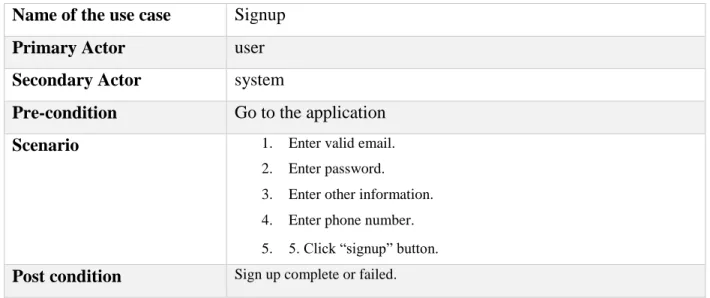
Table 3.2.2.1: Use case description of signup.
Name of the use case Signup Primary Actor user Secondary Actor system
Pre-condition Go to the application Scenario 1. Enter valid email.
2. Enter password.
3. Enter other information.
4. Enter phone number.
5. 5. Click “signup” button.
Post condition Sign up complete or failed.
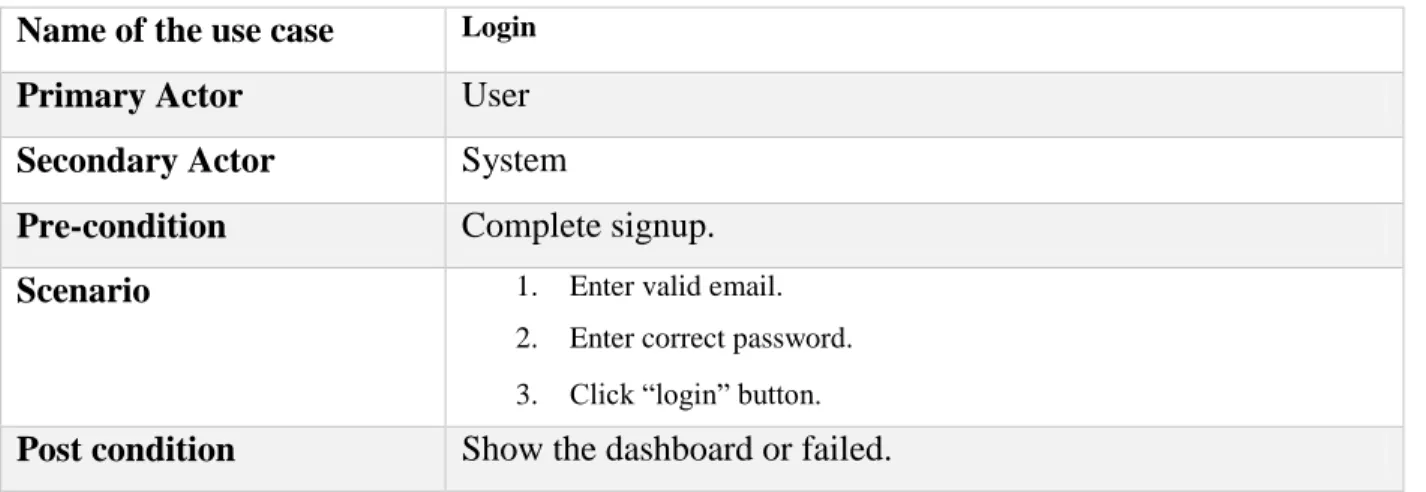
Table 3.2.2.2: Use case description of login.
Name of the use case Login Primary Actor User Secondary Actor System
Pre-condition Complete signup.
Scenario 1. Enter valid email.
2. Enter correct password.
3. Click “login” button.
Post condition Show the dashboard or failed.
3.3 Logical Data Model
A logical data model is a data model of a specific problem domain expressed independently of a particular database management product but in terms of data structures such as relational tables and columns, object-oriented classes.[1]
Figure3.3.1: Logical Data Model
9
3.4 Design Requirements
Many materials are used to making in our project. Here some of materials given below –
HTML:
Hypertext Markup Language (HTML) is the standard markup language for creating web pages and web applications. With Cascading Style Sheets (CSS) and JavaScript [2].
We used html to design font-end.
CSS:
CSS called cascading style sheet. We used css 3 to design our project.
Bootstrap:
We made this website responsive using bootstrap.
Java Script:
We used java script to make our site more attractive.
Pixie:
It is used to get color codes.
Photoshop:
It is used to make logo, banner and get exact measurement to design this project.
CHAPTER 4
Design Specification 4.1 Front-End Design
This is the most significant part of any web application. Because this part is directly interacts with users. That’s why we give more importance to beautifully design our system. We tried to make this project as much user friendly as we can.
4.1.1 Home Page
• Anyone can search by using keywords such as skills and designation.
• For advance search user can use categories option.
Figure 4.1.1: Homepage
11
4.1.2 Login Page
Here user can login by using his/her username or email and password. User must be use a valid email.
Figure 4.1.2: login Page
4.1.3 Registration Page
Here user can registration by providing required information. User must be full fill all the requirement in this page.
Figure 4.1.3: Registration page
13
4.1.4: About Page
This page is show all the information of registered users.
Figure 4.1.4: About page
4.1.5 Resume Page
• This page is show educational qualification of job seekers.
• Academic and professional posting also shown in this page.
Figure 4.1.5: Resume page
15
4.2 Back End Design
It is the most important part in a web application. No web application will work without a good back end design. We designed the back end in this project by using object oriented programming and php.
Admin can block the user whenever he/she want. User can modify, delete, add his information at any time
4.2.1 Database design
Here users can update his/her information. Admin can maintain this web application.
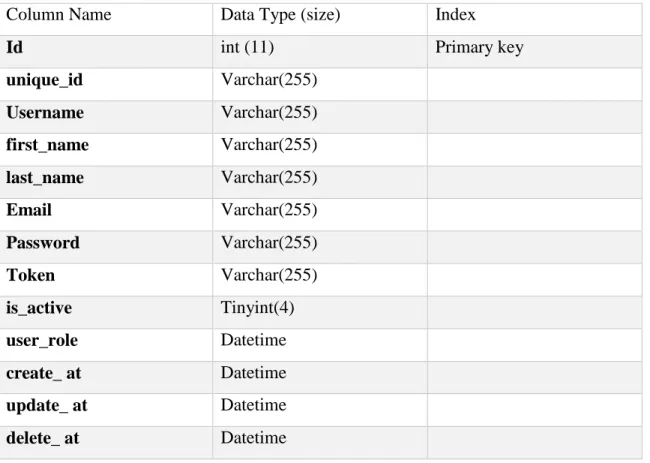
Table 4.2.1.1: User table
Column Name Data Type (size) Index
Id int (11) Primary key
unique_id Varchar(255)
Username Varchar(255)
first_name Varchar(255)
last_name Varchar(255)
Email Varchar(255)
Password Varchar(255)
Token Varchar(255)
is_active Tinyint(4)
user_role Datetime
create_ at Datetime
update_ at Datetime
delete_ at Datetime
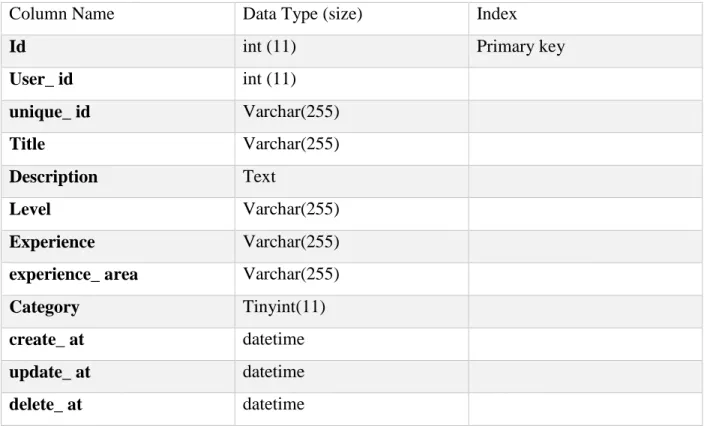
Table 4.2.1.2: Skill table
Column Name Data Type (size) Index
Id int (11) Primary key
User_ id int (11)
unique_ id Varchar(255)
Title Varchar(255)
Description Text
Level Varchar(255)
Experience Varchar(255)
experience_ area Varchar(255)
Category Tinyint(11)
create_ at datetime
update_ at datetime
delete_ at datetime
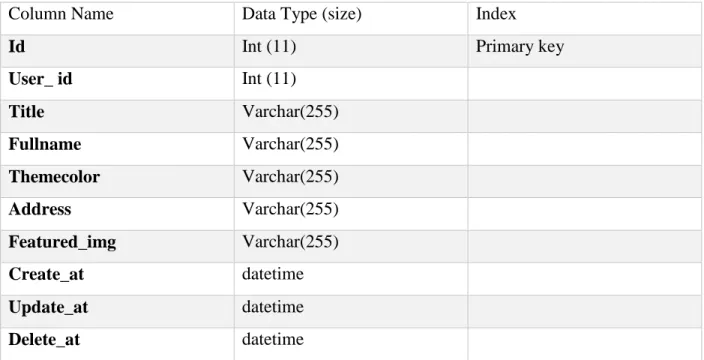
Table 4.2.1.3: Setting table
Column Name Data Type (size) Index
Id Int (11) Primary key
User_ id Int (11)
Title Varchar(255)
Fullname Varchar(255)
Themecolor Varchar(255)
Address Varchar(255)
Featured_img Varchar(255)
Create_at datetime
Update_at datetime
Delete_at datetime
17
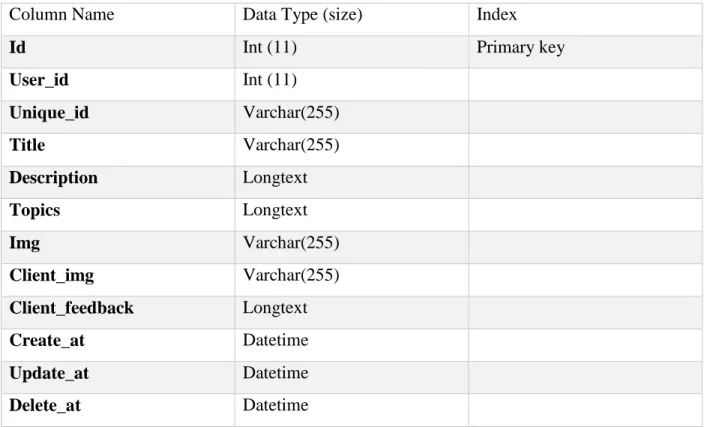
Table 4.2.1.4: Service table
Column Name Data Type (size) Index
Id Int (11) Primary key
User_id Int (11)
Unique_id Varchar(255)
Title Varchar(255)
Description Longtext
Topics Longtext
Img Varchar(255)
Client_img Varchar(255)
Client_feedback Longtext
Create_at Datetime
Update_at Datetime
Delete_at Datetime
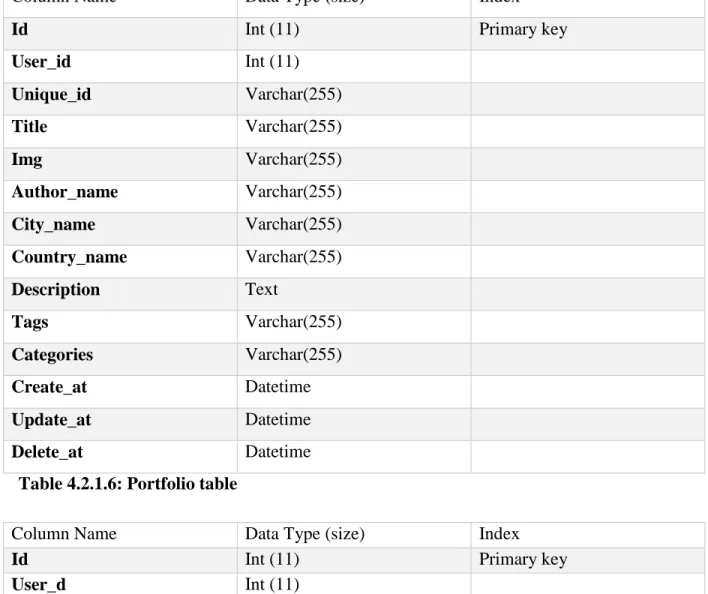
Table 4.2.1.5: Post table
Column Name Data Type (size) Index
Id Int (11) Primary key
User_id Int (11)
Unique_id Varchar(255)
Title Varchar(255)
Img Varchar(255)
Author_name Varchar(255)
City_name Varchar(255)
Country_name Varchar(255)
Description Text
Tags Varchar(255)
Categories Varchar(255)
Create_at Datetime
Update_at Datetime
Delete_at Datetime
Table 4.2.1.6: Portfolio table
Column Name Data Type (size) Index
Id Int (11) Primary key
User_d Int (11)
Unique_id Varchar(255)
Title Varchar(255)
Description Text
Img Varchar(255)
Category Varchar(255)
Create_at Datetime
Update_at Datetime
Delete_at Datetime
19
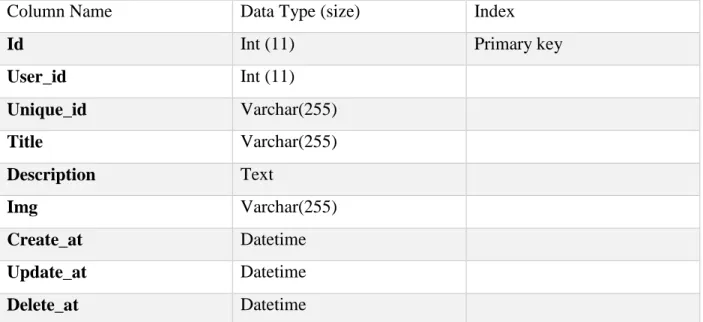
Table 4.2.1.7 : Hobies table
Column Name Data Type (size) Index
Id Int (11) Primary key
User_id Int (11)
Unique_id Varchar(255)
Title Varchar(255)
Description Text
Img Varchar(255)
Create_at Datetime
Update_at Datetime
Delete_at Datetime
Table 4.2.1.8: experience table
Column Name Data Type (size) Index
Id Int (11) Primary key
User_id Int (11)
Unique_id Varchar(255)
Designation Varchar(255)
Company name Varchar(255)
Experience_desc Varchar(255)
Start_date Year(4)
End_date Year(4)
Company_location Varchar(255)
Create_at Datetime
Update_at Datetime
Delete_at Datetime
Table 4.2.1.9: Education table
Column Name Data Type (size) Index
Id Int (11) Primary key
User_id Int (11)
Unique_id Varchar(255)
Title Varchar(255)
Degree Varchar(255)
Institute Varchar(255)
Result Varchar(255)
Enrolled_year Year(4)
Passing_year Year(4)
Education_board Varchar(255)
Course_duration Varchar(255)
Create_at Datetime
Update_at Datetime
Delete_at Datetime
Location Varchar(255)
21
Table 4.2.1.10: contact table
Column Name Data Type (size) Index
Id Int (11) Primary key
User_id Int (11)
Unique_id Varchar(255)
Name Varchar(255)
Email Varchar(255)
Message Text
Status Int (11)
Create_at Datetime
Update_at Datetime
Delete_at Datetime
Table 4.2.1.11: About table
Column Name Data Type (size) Index
Id Int (11) Primary key
Unique_id Varchar(255)
User_id Int (11)
Phone Varchar(255)
Work_area Varchar(255)
Short_desc Varchar(255)
Bio Longtext
Create_at Datetime
Update_at Datetime
Delete_at Datetime
4.3 Interaction Design and UX
Interaction design, often abbreviated as IxD, is "the practice of designing interactive digital products, environments, systems, and services. “Beyond the digital aspect, interaction design is also useful when creating physical (non-digital) products, exploring how a user might interact with it. Common topics of interaction design include design, human–computer interaction, and software development.[3] we’ve tried to keep our app’s interface as simple as we can. So user can easily interact with this application.
4.4 Implementation Requirements
Our web application run with the help of apache web server and MySQL server database system and PHP. In recent times this is the most used and popular web server environment in the world.
Our web application have some advance functionality, so we have needed some configuration requirements.
• Needed to install apache web server.
• Needed to install MySQL server.
• Apache with configured PHP must be needed.
• Google API.
23
CHAPTER 5
Implementation and Testing
5.1 Implementation of Database
Database is called an organized collection of data. It’s an online storage where any kind of data can be store. It’s very important for a website to have a database. Because storing data in hardware is not so much secure. So it’s been always major part for a project to implement a database. Web developer uses this data in various sector of project. Now a day’s people are generally want to store all their information on digital platform so that they can get access to it anytime and from anywhere. But it’s a very sensitive thing that user’s information is very valuable for user. As usual user will not want that somehow his/her information being misused and leaked.
So it’s very urgent and important task for any developer to secure the database. The more secure database is the more attractive and useful for user. And that’s the reason we’ve tried our best to secure our database. Only an authorized user can modified his own data. We’ve use their mail verification technique for verified user.
5.2 Implementation of Front-End Design
Front-end web development is the practice of producing HTML, CSS and usually JavaScript (while Web Assembly is a recent alternative to it) for a website or Web Application so that a user can see and interact with them directly. The challenge associated with front-end development is that the tools and techniques used to create the front end of a website change constantly and so the developer needs to constantly be aware of how the field is developing.[4]
It’s very important to look a web application beautiful and attractive so we have tried a lot to look our project attractive and user friendly. We have done a lots of research on user friendly template.
So finally we think of a template which is very simple and easy to use.
To implement this template we used HTML5, CSS3, and java script, bootstrap.
5.3 Implementation of Interactions
User interaction is more important thing than making a web application. Because it’s the user for whom we created the web application. So it’s the main challenge for us to create a user friendly web application. So that we have tried our best to make our project to easy, simple and user friendly. We hope our application will be easy to use for user and effective. As we worked with a selective area, we think user will accept our application with happy face and will be benefitted. We will see how the user response to our project and then in the basis of response we will do lots of research on it and make sure users satisfaction.
5.4 Testing implementation
There are many importance effort need to do a web application better. Among them testing is one of the importance part for web development. Before releasing a web application to user it’s the final step. The drawbacks and error of a web application comes in front of developer due to testing process. After the testing developer can think of next step. So testing is very important in the field of web engineering.
In our web project we have done a lots of testing, some of them discuss in below here- Error testing:
We had tested lots of input to find whether there was error had or not.
Whenever we found an error, we solved it and made sure that it never could happen again.
We had done this process again and again till we got satisfied.
Data validation:
It’s the security testing part. Data validation is very important in web application. Because security is the main aspect of any application. We’ve test data validation by giving some valid and invalid input data and check the expected result.
Unlimited data store:
Unlimited data can reduce systems speed. It cause unwanted loading. Which makes the application difficult and uncomfortable to use. So we recover the problem and tested the application. We have given many unlimited input and checked the expected outcome.
25
5.5 Test Results and Reports
Lots of testing are done by us to make the project error free. We have found a thousands of error and tried with our heart and soul to remove all the problems. Finally we got the expected outcome. We do our best to make this project more efficient to the user. We hope that user will not find any problems during using this web application. Our application is easy to use. We hope it will be very helpful to user and we will get lots of response from the user.
CHAPTER 6 Conclusion and Future Scope
6.1 Discussion and Conclusion
We want to build a web application for a selected area as CV making. It is very essential to have a good CV. We’ve tried our best to make a platform where job provider can directly communicate with job seeker. And for today’s situation it’s much needed. We made this web app for every sector of people but especially for IT people. We design our database in that way so that it could contain lots of data. We think people will be benefited from this application.
6.2 Scope for Further Development
We’ve think about the further development of our project. We will improve our search system so that people can feel easier to use the app. We will develop our log in system. We will make it more restricted and protected.
REFERENCES
[1] Logical data model< https://en.wikipedia.org/wiki/Logical_data_model >last accessed at 4-06-2018 at 10.07 pm.
[2] Html https://en.wikipedia.org/wiki/HTML last accessed on 06-04-2018 at 10.1 pm.
[3] Learn about interaction design and UX https://en.wikipedia.org/wiki/Interaction_design last accessed on 0604- 2018 at 10.09 pm.
[4]Front-End design https://en.wikipedia.org/wiki/Front-end_web_development last accessed on 06-04-2018 at 10.18 pm.
27