INTERNSHIP ON ROUTING AND SWITCHING
BY
SOURAV SARKAR ID: 183-15-12007
This Report Presented in Partial Fulfillment of the Requirements for the Degree of Bachelor of Science in Computer Science and Engineering.
Supervised By
GAZI ZAHIRUL ISLAM Assistant Professor
Department of Computer Science and Engineering Daffodil International University
DAFFODIL INTERNATIONAL UNIVERSITY
DHAKA, BANGLADESH
APPROVAL
This Intern titled “Internship on Routing and Switching” submitted by Sourav Sarkar ID No: 183-15-12007 to the Department of Computer Science and Engineering, Daffodil International University, has been accepted as satisfactory for the partial fulfillment of the requirements for the degree of B.Sc. in Computer Science and Engineering (BSc) and approved as to its style and contents. The presentation has been held on date.
BOARD OF EXAMINERS
________________________
Dr. Touhid Bhuiyan Professor and Head
Department of Computer Science and Engineering Faculty of Science & Information Technology Daffodil International University
Chairman
________________________
Zahid Hasan (ZH) Associate Professor
Department of Computer Science and Engineering Faculty of Science & Information Technology Daffodil International University
Internal Examiner
________________________
Mohammad Monirul Islam (MMI) Senior Lecturer
Department of Computer Science and Engineering Faculty of Science & Information Technology Daffodil International University
Internal Examiner
______________________
Dr. Dewan Md. Farid Professor
Department of Computer Science and Engineering United International University
External Examiner
DECLARATION
It is hereby declared that, the work presented in this internship report is done by me under the supervision of Mr. Gazi Zahirul Islam, Assistant Professor, Department of Computer Science and Engineering, Daffodil International University, in partial fulfillment of the requirements for the degree of Bachelor of Science in Computer Science and Engineering. I am declaring this report is my original work. I ensure that neither this report nor any part has been submitted elsewhere for the award of any degree or diploma.
Supervised by:
Mr. Gazi Zahirul Islam Assistant Professor Department of CSE
Daffodil International University
Submitted by:
Sourav Sarkar ID: 183-15-12007 Department of CSE
Daffodil International University
ACKNOWLEDGEMENT
First of all, I would like to express my heart presented gratitude to my honorable supervisor Mr. Gazi Zahirul Islam, Assistant Professor, Department of Computer Science and Engineering, Daffodil International University, Dhaka for his whole-hearted supervision. His understanding, encouragement, guidance and instructions throughout the progress of the internship and report writing have provided a good basis for this work. His inputs during the development of the ideas in this report have contributed substantially to the completion of this work.
I would also like to extend my thanks to all others who have encouraged and have provided support directly or indirectly, throughout my internship.
I am grateful to CSL Training for giving me an opportunity to do internship under its Network Management. A lot of supportive person helped me during the time of writing the report by providing data, and information, procedure as well as the management process when required, and made me clear different concept clearly.
I also would like to express our heartiest gratitude to Dr. Touhid Bhuiyan, Head the Department of CSE for his kind help to finish my Internship and also to other faculty member and staff of CSE department of Daffodil International University.
I would like to express special thanks to my parents for their encouragement during all the hard times in my life and my career.
Finally, and with special recognition, I want to convey my deepest regard to the Almighty Allah, the beneficial, the magnificent.
ABSTRACT
CSL Training is one of the networking training centers in Dhaka. It is a fastest-growing IT company with a vision to stay on the cutting edge of technology and IT training and systems and networking solutions, training center and Certification.
CSL Training Institute provides the best networking training in Dhaka. Notable among them are CCNA, CCNP, CCNA Security, MCSA, Linux, MS Exchange, Juniper, VMware, Zimbra, AWS, Azure, Asterisk and many more. CSL Training is one of the largest ICT (Cisco, Linux, Microsoft, MikroTik, Security, Oracle, Juniper, VMware, Zimbra, Azure, Asterisk, Huawei) Training center in Bangladesh.
Currently, they have two Branches (Lalmatia, Kuril). CSL Training is a huge library of top- quality online training in IT training. Includes testing and training with certification in Cisco Course, Linux Course, Juniper Course, Microsoft Course and MikroTik Course. CSL Training provides all types of IT training, testing, dumps, vendors and certifications which is a great advantage of CSL training.
TABLE OF CONTENTS
CONTENTS PAGE
Approval and Board of examiners i
Declaration ii
Acknowledgement iii
Abstract iv
Table of Content v-vi
List of Figure vii
List of Table viii
CHAPTER
CHAPTER 01: INTRODUCTION
1-21.1 Introduction 1
1.2 Motivation 1
1.3 Internship Objectives 2
1.4 Introduction to the Company 2
1.5 Report Layout 2
CHAPTER 02: ORGANIZATION
3-42.1 Introduction 3
2.2 Product and Market Situation 3
2.3 Target Group 3
2.4 SWOT Analysis 4
CHAPTER 3: INTRODUCTION TO CCNA
53.1 Introduction to CCNA 5
CHAPTER 04: OSI AND TCP/IP REFERENCE MODEL
6-94.1 Introduction to OSI reference model 6
4.2 Introduction to TCP/IP reference model 9
CHAPTER 05: ABOUT IP ADDRESS
10-155.1 About IP address 10
5.2 Classes of IP 10
5.3 Private and Public IP 11
5.5 Variable Length Subnet Mask (VLSM) 13
5.6 Working with VLSM Network 14
CHAPTER 06: NETWORKING TOOLS
16-196.1 Router 16
6.2 Switch 17
6.3 Fiber Optic Cable 18
6.4 Twisted Pair Cable 19
CHAPTER 07: ROUTER CONFIGURATION
20-277.1 Platform 20
7.2 Configuring Router Interfaces 21
7.3 Static Routing 22
7.4 Dynamic Routing 23
7.5 Routing Information Protocol 24
7.6 RIP Configuration 24
7.7 EIGRP Protocol 25
7.8 EIGRP Configuration 25
7.9 OSPF Protocol 27
CHAPTER 08: SWITCHING AND VLANS
28-308.1 Configuring Switch with VLAN’s 28
8.2 VLAN Trunk Protocol 29
8.3 VIP Configuration 29
CHAPTER 09: COMPETENCIES AND SMART PLAN
319.1 Competencies Earned 31
9.2 Smart Plan 31
9.3 Reflections 31
CHAPTER 10: CONCLUTION AND FUTURE CAREER
3210.1 Discussion and Conclusion 32
10.2 Scope for Future Career 32
REFERENCES 33
APPENDICES
34LIST OF FIGURES
FIGURES PAGE NO
Figure 3.1: Types of CCNA 5
Figure 4.1: Layers of OSI reference Model 6
Figure 4.2: TCP/IP Reference Model 9
Figure 5.6: VLSM Network 14
Figure 6.1: Router 16
Figure 6.2: Switch 17
Figure 6.3: Optical Fiber Cable 18
Figure 6.4: Twisted Pair Cable 19
Figure 7.1: Cisco Packet Tracer user interface 20
Figure 7.2: Interfaces of router 21
Figure 7.3: Static Routing 22
Figure 7.4: Dynamic Routing 23
Figure 8:1: VLAN 28
Figure 8.2: VIP 29
LIST OF TABLES
TABLE PAGE NO
Table 1: There are five classes of IPv4 10
Table 2: Private IP address 11
Table 3: Class A subnet 12
Table 4: Class B subnet 12
Table 5: Class C subnet 13
Table 6: VLSM Example 13
Table 7: VLSM Calculation 14
CHAPTER 01 INTRODUCTION
1.1 Introduction
Telecommunication is the most important thing in this age of modern world. Computers and computer networking have made our lives easier. As a part of my BSc in Computer Science I completed my Internship on Routing and Switching. During the training I learned about the topology, how to implement it, the protocol standards, different types of network design, configuring routers and switches with different routing protocols and so on. In this report I have covered many issues that are important for networking. Currently CCNA is familiar with communication engineering for routing and switching communications. A safe and reliable communication system must be built for the development of a country.So, we have to take this matter seriously and its importance for our future life is immense. This is why I did my Internship on Routing and Switching.
1.2 Motivation
As students of computer science engineering, we have accumulated a lot of theoretical knowledge but we are not proficient in practical matters. But in real life all companies and organizations value some skills in the personal field. I don't think we have enough practical knowledge in real life in the private sector. I am also interested in the networking sector and in the future, I would like to build my career as a network engineer. Currently, the popularity of routing and switching is increasing day by day all over the world. These professional certifications used to be an important part of the computing industry and are becoming more important now. The most popular cited reason for this certification is reliability. Cisco typically offers four levels of routing and switching certification, each with an increasing level of efficiency. So as a CCNA routing and network administrator I am motivated to choose a temporary position in organizing the PC in switching, which is very good in my mind, and to solve problems, talk to people, understand their needs and know how to maintain the problem and Provide them with improved administration.
1.3 Internship Objectives
Internships are important for both interns and organizations that help them gain knowledge. It is very difficult to get a good job without proper and adequate skills in this competitive job market. Internships are for our future lives and jobs incredibly important to succeed. The main purpose of my internship program is to prepare myself as a skilled person in the future.
Therefore, the following benefits can be identified for the intern part as follows -
• An Internship allows an intern to top the job market with basic job experience.
• It can help a student transform into a future employee through an internship.
• Internships give students the opportunity to verify the choice of a desired career path in the future.
• Internships help students build confidence to become successful employees in the future.
• Most notably, internships serve as a field for students to test their theoretical knowledge on how best to apply in the practical world.
1.4 Introduction to the Company
It is a fastest-growing IT company and has become a key player in IT training systems and networking solutions, training and certification. This is the only best networking Training Center in Dhaka. CSL Training is a huge repository of top-quality training in IT training which includes certification through many tests and trainings including Cisco Course, Linux Course, Juniper Course, Microsoft Course and MikroTik course certification. Currently, CSL have 02 Branches (Lalmatia, Kuril).
1.5 Report Layout
In the Chapter (1): Focuses on the introduction, motivation, objective of my internship and about company.
In the Chapter (2): I have described about the company.
In the Chapter (3-8): Described what I did during my daily internship period
In the Chapter (9-10): I have discussed and concluded and described future career opportunities
CHAPTER 02 ORGANIZATION
2.1 Introduction
CSL Training is one of the networking training centers in Dhaka. It is a fastest-growing IT company and has become a key player in IT training systems and networking solutions, training and certification. This is the only best networking Training Center in Dhaka. CSL Training is one of the largest ICT (Cisco, Linux, Microsoft, MikroTik, Security, Oracle, Juniper, VMware, Azure, Asterisk, Huawei) Training center in Bangladesh. Currently, CSL have 02 Branches (Lalmatia, Kuril).
2.2 Product and Market Situation
➢ Professional Training Services
• Cisco Certified Network Associate (CCNA)
• Cisco Certified Network Professional (CCNP)
• Microsoft Certified Systems Administrator (MCSA)
• Lovable Intellect Not Using XP (LINUX)
• CCNA Security
• Microsoft
• VMware
• Oracle
• Juniper
2.3 Target Group
The institute targets students who are unskilled and want to improve their skills. Moreover, the main objective of the institute is to work for engineering students and professionals.
Students are included in the future plans of the current CSL training develop as a Network Professional, Network Support Engineer, Network Admin and System Engineer that can be used later.
2.4 SWOT Analysis Strength:
➢ Has good communication skills
➢ Good reputation in the market
➢ Good professional trainer Weakness:
➢ scarcity of adequate capital
➢ scarcity of experience
➢ scarcity of marketing Opportunities:
➢ Training system for all types of people
➢ Become an educator Threats:
➢ The pecuniary problem is to enhancement the area of their training and the area of the organization which will reduce the economic problem to a great extent.
CHAPTER 03
INTRODUCTION TO CCNA
3.1 Introduction to CCNA
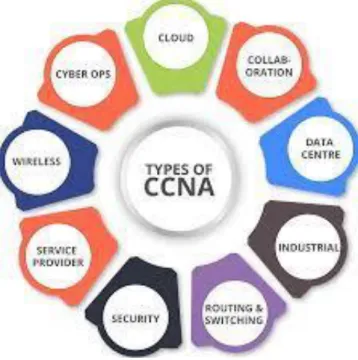
Cisco Certified Network Associate (CCNA) refers to an information technology certified by Cisco. Cisco provides a collaborative-level Cisco carrier certification called CCNA Certification. The Cisco test has been changed several times. Cisco announced in 2013 an update to its certification program, including the role of the industry’s growing work. Cisco Certified Network Associates are divided into different types. Cisco offers a variety of learning methods. A few days ago Cisco published a book by Cisco Press. CCNA certification demonstrates the technician's skills in installing, configuring, troubleshooting, and managing medium-sized routed and switched networks. We don't need a degree if we want to get CCNA certification. Anyone with a good idea about networking and CISCO device configuration can be certified by CISCO.
Fig 3.1: Types of CCNA
CHAPTER 04
INTRODUCTION TO OSI AND TCP/IP REFERENCE MODEL
4.1 Introduction to OSI reference model
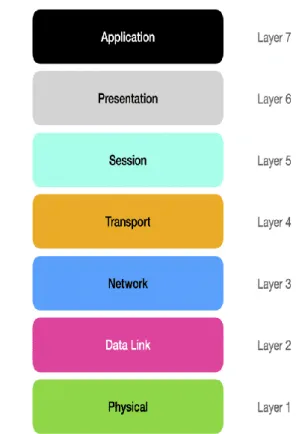
OSI is a conceptual model for open system interconnection that homogenize the communication functions of a telecommunications or computing system. The OSI model serves as a universal language for computer networking. Modern telecommunications systems do not properly follow the OSI model, but it is still considered a very useful model for solving network problems. The OSI reference model has 7 different levels in networking. Each level conducts certain tasks and communicates with each other below and above itself. The physical layer, the data link layer, and the network layer handle the physical transfer of data from one device to other. The session layer, the presentation layer and the application layer act as the user interface.
Fig 4.1: Layers of OSI reference Model
Application Layer: The highest level of the OSI model is the application layer which interacts with an application program. An application layer acts as a window for users. Application level helps users interact with other software applications. An application layer is an isolated layer that specifies the distribution communication protocols and interface methods used by hosts in a communication network. The application layer refers to the abstraction computer networking that is used in both standard models. The two models used are Internet Protocol Suite (TCP / IP) and OSI model. Application-level examples are Hypertext Transfer Protocol (HTTP), File Transfer Protocol (FTP), Post Office Protocol (POP), Simple Mail Transfer Protocol (SMTP), and Domain Name System (DNS) etc.
Presentation Layer: The job of the presentation layer is to take data from the application layer and convert the following layers to an intelligible format. The presentation level allows us to determine the form of data interchange among the two communicators. It further aid us to manage data encryption and data compression. This layer works by formatting and encrypting data that should be sent across all networks. This layer is also included as a syntax layer.
Session Layer: The session layer acts as a connector between the source and the destination device and maintains that connection until disconnected. This session requests a logical connection to the layer which should be established in the needs of the end user. Session Layer Dialog provides services like rule, which acts as duplex or half-duplex. This applies usually to application environments that use outlying way calls.
Transport Layer: The transport layer ensures that the data from the session layer is reliably delivered to another Hosted using diverse networks and further maintains the quality of subsequent service functions. The transport layer favour us to control authenticity through error control, flow control and segmentation or segmentation. The transport layer recognizes the data transmission and sends the next data if no mistake is made. The transport layer is divided into TCP and UDP segments. TCP usually confirms the sending of data via communication to the recipient when passing the message but UDP sends the data without any communication. This means that the TCP protocol always ensures the sending of data, while the UTP protocol does not ensure the sending of money, so it often reaches the data destination.
Network Layer: The primary function of the network level is to transfer data from one place to another and through other networks. The network layer selects the best path and its job is to deliver packets of addresses. This means that the network layer selects the appropriate network route and forwards it to the transport level of the packaged data stack. Delivering messages at the network level does not guarantee reliable network level protocols. The network layer works with network routing, and can also perform fragmentation and reassembly and its signal data in the event of a delivery error.
Data Link Layer: The physical layer transmits data from one device to another in a flawless manner and transmits data in frame form. The data link level corrects errors that can occur at the physical level. Layer establishes a link between two connected network devices and allows the protocol to be defined for termination. This is the level of IP address comprehension, which helps determine the logical address so that a point can be identified as the end point. The three main steps of the data link level are to deal with errors within the transmission, to control the data flow and to provide a specific interface to the network level.
Physical Layer: The function of the physical layer is to define the electric and physical possession of the data link. This physical layer establishes a bearing between the device and a physical dispatch through it. This layer is used to carry data from one place to another through various connectors. Hardware components commonly used in OSI physical layers include network interface cards (NICs), connectors and interfaces and cables that help transmit data from source to destination. It has nothing to do with physical level protocols or other high-level items this layer transfers data from one device to another in a computer bit with a network.
Examples of this level are Ethernet, network adapters, repeaters, networking hubs, etc.
4.2 Introduction to TCP/IP reference model
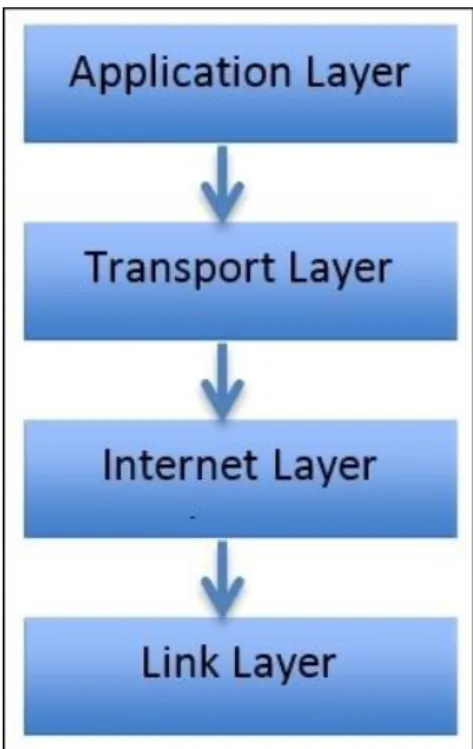
TCP/IP stands for Transmission Control Protocol and Internet Protocol. This network model is also used in present Internet architectures. A protocol is a set of rules that governs each feasible communication through a network. Protocols are sources and destinations that describe the movement of data across the Internet. The current telecommunication method follows the TCP/IP model. Open Systems Interconnection reference model has four layers of TCP/IP reference instead of 7 layers. A classified protocol consisting of TCP/IP interactive modules, and each has specific functionality. TCP/IP does not offer any distinct distinction points for distinguishing between services, interfaces and protocols.
The TCP/IP model is a network model based on which computer networks are currently used around the world. TCP/IP refers to the Transmission Control Protocol and the Internet Protocol.
Network models used in current Internet architectures. This model is a set of rules that governs and controls all possible communications through a network. These protocols can understand the intercourse of data between source and destination.
Fig 4.2: TCP/IP Reference Model
CHAPTER 05
ABOUT PHYSICAL AND LOGICAL ADDRESS
5.1 About IP Address
An Internet Protocol address (IP) refers to the identification number of all routers connected to a network. This address carries a identical address for every router linked to the network. No router except an IP address can communicate with another router through an IP-based network as an intern. IP address look like 172.168.10.2 in IPv4 and 2008:db7:0:1254:0:587:8:4 in IPv6.
It can be noted that there are two versions of the Internet Protocol address (IP), IPv4 and IPv6.
IPv4 (Internet Protocol version 4) is an address of a 32-bit number. IPv6 (Internet Protocol version 6) was created in 1995 for the rapid growth of the Internet and is a 128-bit number.
Host and network serve two functions in an IP. IP address space is ruled by the Global Internet Assigned Numbers Authority (IANA).
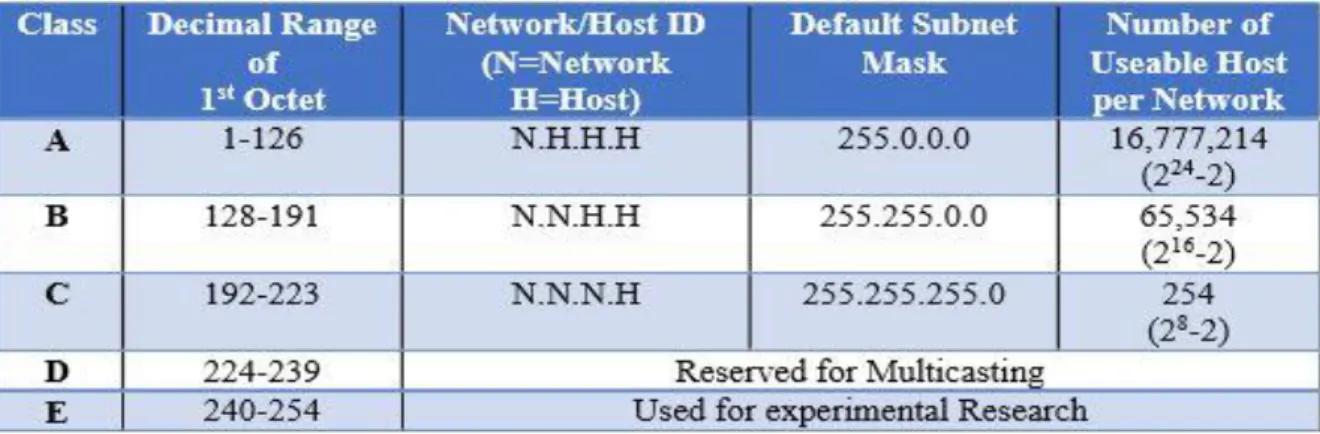
5.2 Classes of IP
Table 1: There are five classes of ipv4
Note: Here 127.0.0.0 this IP is not shown in the table. Because 127.0.0.0 this IP is used for loopback purposes.
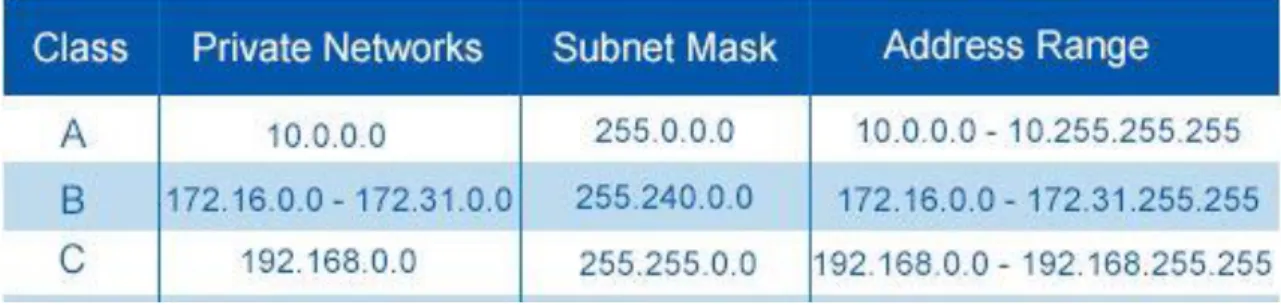
5.3 Private and Public IP Private IP
Private IP is an IP address that is preserved for internal use in addition to public IP. A private IP refers to a local IP address. The Internet Assigned Numbers Authority (IANA) stores the following IP as personal IP addresses.
Table 2: Private ip address
Public IP
A public IP address is an IPv4 address that can be accessed from the Internet. If your tenant has access to a resource directly from the Internet, it must have a public IP address. Depending on the type of asset, there may be other requirements. If your tenant has access to a resource directly from the Internet, it must have a public IP address. A public IP address is required to enable communication with the Internet.
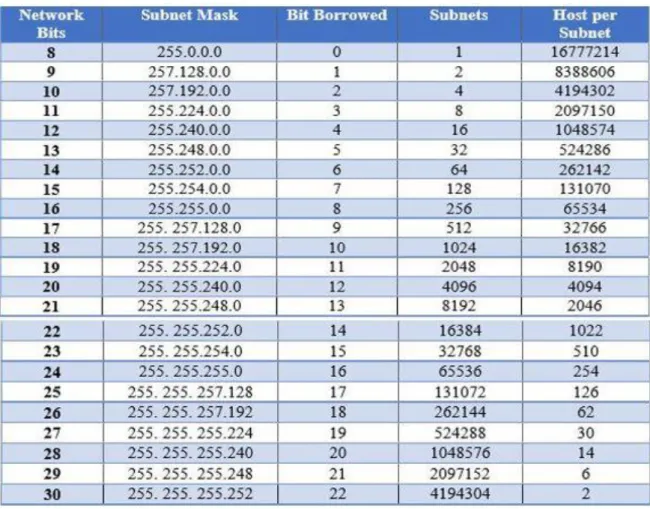
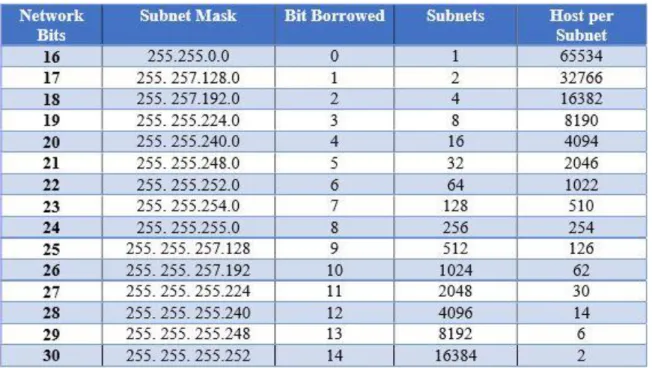
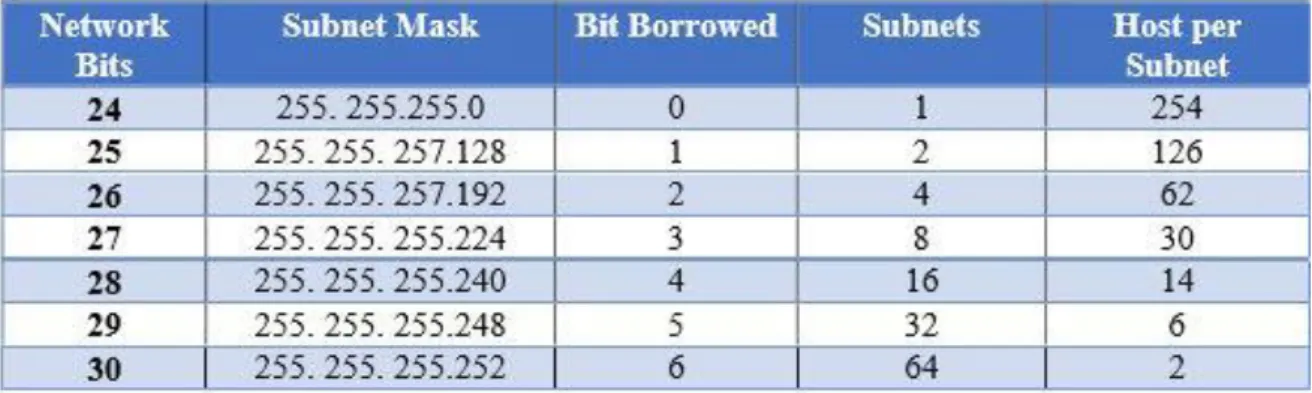
5.4 IP Subnetting
Subnetting is when a large network (class A, B, or C) is divided into lesser networks. Sub- Netting allows the creation of umpteen logical networks that refer to a single class A, B, or C network. If we do not use subnet then we will be able to use only one network instead of one network from different classes like A, B, or C, which is not possible by any means. Any device that connects to the work that the network / subnet does has its own IP address. To create a subnet from the host ID part of the address, you have to extend the natural mask with a few bits. Subnetting is done by selecting a suitable mask to ordain the number of hosts in the network, called a subnet mask. The network address of a subnet may be a valid IP address from the subnet network that devices can no longer use.
Table 3: Class A subnet
Table 4: Class B subnet
Table 5: Class C subnet
5.5 Variable Length Subnet Mask (VLSM)
The amount of variable-length subnet masking (VLSM) "sub-neted subnet" means that VLSM allows network engineers to share an IP address of different sized subnets, allowing different host IPs to be distributed correctly without wasting IP.
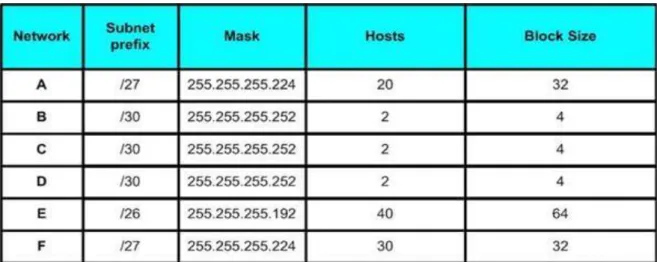
Table 6: VLSM example
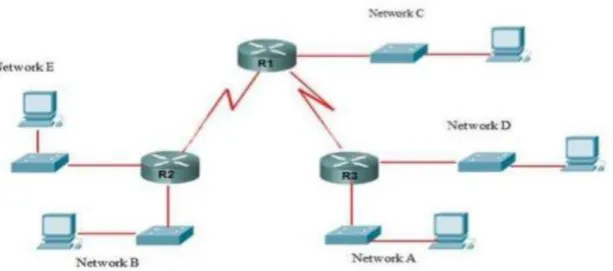
5.6 Working with VLSM Network
Fig 5.6: VLSM Network
Suppose ISP allocated a class B network. Which is 172.168.1.0/24 HQ = 40 host R1 = 25 hosts R2 = 8 hosts LAN links = 5
Table 7: VLSM calculation
HQ = 40 host R1 = 25 hosts R2 = 8 hosts LAN links = 5
IP 172.168.1.0
Mask 11111111. 11111111. 11111111.00000000 Host 64‐ 2= 62
Mask 1111 1111. 1111 1111. 1111 1111.11000000 Network Mask = 128+64=192 size 256‐ 192=64 Waste/Future use = 62‐ 40=22
HQ = 40 host R1 = 25 hosts R2 = 8 hosts LAN links = 5
IP 172.168.1.64
Mask 11111111. 11111111. 11111111.11000000 Host 32‐ 2= 30
Mask 11111111. 11111111. 11111111.11100000 Network Mask = 128+64+32=224 size 256‐ 224=32 Waste/Future use = 30‐ 25=5
HQ = 40 host R1 = 25 hosts R2 = 8 hosts LAN links = 5
IP 172.168.1.96
Mask 11111111. 11111111. 11111111.11100000 Host 16‐ 2= 14
Mask 11111111. 11111111. 11111111.11110000 Network Mask = 128+64+32+16=240 size 256‐ 240=16 Waste/Future use = 14‐ 8=6
HQ = 40 host R1 = 25 hosts R2 = 8 hosts LAN links = 5
IP 172.168.1.112
Mask 11111111. 11111111. 11111111.11110000 Host 8‐ 2= 6
Mask 11111111. 11111111. 11111111.11111000
Network Mask = 128+64+32+16+8=248 size 256‐ 248=8 Waste/Future use = 6‐ 5=1
CHAPTER 06
NETWORKING TOOLS
6.1 Router
A router is a device that can connect two or more packet-switched networks or sub networks.
It can serve two primary activities. Manages traffic between these networks, forwards data packets to the intended IP addresses, and connects umpteen devices to the same Internet.
Routers use packet switching to send messages from one place to another. Messages are shared in packets before going to the network. In fact, each packet of a message can work with a different route to its destination.
Fig 6.1: Router
Routers operate on the physical layers of the Internet, data links, and TCP / IP structures. A router is like an octopus whose tents represent all your wire types. Routers are aware of multiple paths and can carry data packets across the network to their destination. The functionality of the router is in the network layer. This layer does packet forwarding, routing through different types of routers and the router is the networking device that works in layer 3.
In addition to defining and maintaining network connections, TCP first divides the various data into smaller pieces called packets and then prepares the data. Using a web of IP routers to send packets from one computer to another is known as IP routing. The router then builds and connects to our home Wi-Fi network using the built-in antenna. That is, Internet access exists on all devices, including any type of home network.
6.2 Switch
A switch is a device in a computer network that connects multiple computer devices to form a network. Multiple data wires are connected to a switch to sustain communication between various network devices. Switches contain one can only send other network packets to one or more devices. All networked devices connected to a switch are identified by its network address, the switch enhances network security and efficiency. An Ethernet switch to create a separate domain for each switch port and the data link level (level 2) of the Open Systems Interconnection model is required. Each device is linked to a switch port and can transference data to another port and transmissions will not be interrupted.
Fig 6.2: Switch
There are many types of switches, some of which are listed below-
• Smart Switch
Smart switches provide some management and segmentation, service quality and protection, so they can be an affordable alternative to modular switches. Still, these are not as measurable as operated switches.
• Managed switch
Among the fixed-configuration switches, the switches are designed to provide the most comprehensive set of features for optimal application experience, security arrangements, precise control and operation of the network, and scalability. Managed switches serve as the most expensive alternative to fixed-configuration switches.
• Unmanaged switch
Unmanaged switches are usually used for basic connections. These are designed to plug and play, no configuration required.
6.3 Fiber Optic Cable
A fiber optic cable is a network of wires that contain strands of glass fiber in a sheath. They are typically designed for long distances, lofty-performance data networking and telecommunications. Better than wired cable, because fiber optic cables provide high bandwidth and emit data over long distances without any hassle. The light repeatedly falls on the wire walls under a fiber optic cable. Each light particle (photon) constantly bounces through the bottom of the pipe with an internal mirror-like reflection. The ray of light travels down the core of the wire. Fiber optics has been used to transmit cable signals since its invention. Usually used for signal transmission in HD televisions because they have higher bandwidth and can work faster. NTT Japan has demonstrated with a single fiber cable capable of transmitting 1 petabit (1015 bits / second) per second over a distance of up to 50 kilometers.
Fig 6.3: Optical Fiber Cable
Advantages of Optical Fiber Cable
• Fiber optical cables have much more bandwidth than metal cables.
• Can transmit data over long distances
• Fiber optical cable protects data.
• The total cost of ownership is low
• Better Reliability
• Faster Speeds
6.4 Twisted Pair Cable
Twisted pair cable is one of the media that usually gives direction to transmission media. A twisted pair cable consists of two different types of insulated copper wire, which are twisted together and run in parallel. Usually, copper wire is up to 1 mm in diameter. One of its two wires is used to transmit data and the other cable is used for ground reference. There are usually two types of twisted pair cables, one is unshielded twisted pair (UTP) and the other is shielded twisted pair (STP). Shielded twisted pair cable consists of a metal foil where the coils bind each pair of insulated conductors.
Fig 6.4: Twisted Pair Cable
Advantages of Twisted Pair Cable
• Spread significant distances before repeaters are needed
• Manages current fast networking transmission rates
• It supports analog and digital transmission together
• Flexible and light weight
• Easy to operate and install
• Cheap and available
CHAPTER 07
ROUTER CONFIGURATION
7.1 Platform
We need to configure the router to complete the network. The IP address plays the most important role when configuring the router. Most routers do not set up the things you need. Set up a service SSID for your wireless network. The PE router configuration is the most comprehensive of the VPLS routers. These configurations tend to be long, so comments are used everywhere. The PE router configuration is the most comprehensive of the VPLS routers.
Since these configurations are rather long, comments are used everywhere. On Android, the settings vary from phone to phone, but once you find the Wi-Fi settings: make sure the router is connected to the Wi-Fi network.
Fig 7.1: Cisco Packet Tracer user interface
7.2 Router Interfaces Configuration
Interface configuration command refers to following a specific global configuration command.
Interface configuration mode access is required to use the interface interface-id command.
Router interface description is what is configured on each interface of a router. With the help of router commands, administrators can enter relevant information about the interface they like.
This is very useful for the main administrator configuring the interface. Or it may be important for another administrator to try to troubleshoot or reconfigure the interface later. The suggested uses for the router interface description command are: interface detection. Notice who to call if the interface is down. Record circuit information for that connection. To go into configuration interface mode we need to type #interface Ethernet number (example: interface fa0/1).
There are three ways to control routing decisions on a router- 1. Static Router
2. Dynamic Router 3. Default Router
Fig 7.2: Interfaces of router
The step is to configure IPv4 on the router-
• Add details. Although optional, it is a necessary element for registering a network.
• Configure IPv4 addresses.
• Configure the clock rate in the serial interface
• Activate the interface.
7.3 Static Routing
Static routing tables work by manually creating, maintaining, and updating network administrators. A full static route must be configured on each network on each router for full connection. Otherwise it will not be possible to route the static router. Routes of a static router are usually configured by the router for routing from a specific network to a stub network.
Static routing generates very little load on all other CPUs of the router and does not generate any traffic when routing on all other routers. This routing can have complete control over the routing behavior of the network and then leave it to the network administrator. Static routing can work very easily by configuring all types of small networks. This static routing involves configuring strategic routes on each router in the network. The static route, which defines the obvious path between two routers, cannot be changed automatically. Many routers can take a long time to configure. For example, some commands are needed to route IP traffic to the network using the following commands or steps 10.10.10.0/24 via Next-Hop router with IPv4 address of 172.168.10.1.
Fig 7.3: Static Routing
7.4 Dynamic Routing
Dynamic routing is a strategy to learn about routing information and select thechief route in its routing table. A Dynamic Routing Protocol A router in Networking selects the best route in that routing table, and the routers can determine another route if the initial route is lost at any time.
Fig 7.4: Dynamic Routing
• Router exchange routing information.
• The router learns changes dynamically.
• Can perform from small to large (any network).
• The router devour superfluous resources (CPU, RAM) to make the router work dynamically
Dynamic Routing protocols are:
• RIPv1
• RIPv2
• EIGRP
• OSPFv2
• BGPv1
• IS-IS
7.5 Routing Information Protocol (RIP)
Routing Information Protocol (RIP) refers to a part of the IP Routing Protocol, an internal gateway protocol (IGP) that exchanges this routing information between an autonomous system (AS) and the routing is designed accordingly. RIP is a general vector routing protocol that has many existing implementations. Routers that are around a vector routing protocol exchange information by building relationships with the neighbors around them.
There are usually two types of rip- 1. RIP version 1
2. RIP version 2
IPv6 for next generation (RIP ng).
7.6 RIP Configuration
Tue Nov 2 16:45:54 2021 Router1 Router>enable Tue Nov 2 16:45:56 2021 Router1 Router#conf t
Tue Nov 2 16:45:58 2021 Router1 Router (config) #int s0/0
Tue Nov 2 16:45:58 2021 Router1 Router (config-if) #no shutdown
Tue Nov 2 16:46:08 2021 Router1 Router (config-if) #ip address 172.168.10.3 255.255.255.252
Tue Nov 2 16:46:12 2021 Router1 Router (config-if) #int s0/1 Tue Nov 2 16:46:16 2021 Router1 Router (config-if) #no shutdown
Tue Nov 2 16:46:20 2021 Router1 Router (config-if) #ip address 172.168.10.23 255.255.255.252
Tue Nov 2 16:46:22 2021 Router1 Router (config-if) #int f0/0 Tue Nov 2 16:46:24 2021 Router1 Router (config-if) #no shutdown Tue Nov 2 16:54:31 2021 Router1 Router (config-if) #exit
Tue Nov 2 16:54:45 2021 Router1 Router (config) #router rip Tue Nov 2 16:54:58 2021 Router1 Router (config-router) #version 2 Tue Nov 2 16:55:05 2021 Router1 Router (config-router) #version 2
Tue Nov 2 16:55:20 2021 Router1 Router (config-router) #network 172.168.10.0 Tue Nov 2 16:55:48 2021 Router1 Router (config-router) # network 172.168.23.0
7.7 Enhanced Interior Gateway Routing Protocol (EIGRP)
The new version of the obsolete Interior Gateway Routing Protocol (IGRP) is the Enhanced Interior Gateway Routing Protocol (EIGRP). The original protocol was created to overcome the problems of Routing Information Protocol (RIP). A router it stores all of the neighborhood's routing information when running EIGRP and searches for alternative routes when needed. If the router cannot find a suitable route, EIGRP helps its neighbors to find an alternative route.
Characteristics of EIGRP (Enhanced interior gateway routing protocol)
• Uses default composite metric bandwidth and lateness
• Possible routing protocols for the core of a network
• Sends partial route updates whenever changes are made.
• Hybrid Routing Protocol
• Classless protocol
7.8 EIGRP Configuration
Thu Nov 04 15:44:22 2021 Router0 Router>enable Thu Nov 04 15:44:28 2021 Router0 Router#conf t
Thu Nov 04 15:44:42 2021 Router0 Router (config) #int s0/0/0 Thu Nov 04 15:44:55 2021 Router0 Router (config-if) #no shutdown
Thu Nov 04 15:45:09 2021 Router0 Router (config-if) #ip address 172.168.8.1 255.255.255.252
Thu Nov 04 15:45:16 2021 Router0 Router (config-if) #int f0/0 Thu Nov 04 15:46:43 2021 Router0 Router (config-if) #no shutdown
Thu Nov 04 15:48:50 2021 Router0 Router (config-if) #ip address 172.168.8.1 255.255.255.0
Thu Nov 04 16:05:12 2021 Router0 Router (config) #hostname A1 Thu Nov 04 16:05:43 2021 Router0 A1 (config) #ip dhcp pool Narail
Thu Nov 04 16:06:26 2021 Router0 A1 (dhcp-config) #network 172.168.8.0 255.255.255.0
Thu Nov 04 16:06:59 2021 Router0 A1 (dhcp-config) #default-router 172.168.8.1 Thu Nov 17 16:07:38 2021 Router0 A1 (dhcp-config) #exit
Thu Nov 04 16:07:54 2021 Router0 A1>end Thu Nov 04 16:08:19 2021 Router0 A1#conf t
Thu Nov 04 16:08:43 2021 Router0 A1 (config) #ip dhcp excluded-address 172.168.8.4
Thu Nov 04 16:09:03 2021 Router0 A1 (config) #ip dhcp excluded-address 172.168.8.4 172.168.8.7
Thu Nov 04 16:09:56 2021 Router0 A1 (config) #do show ip route Thu Nov 04 16:10:13 2021 Router0 A1 (config) #router eigrp?
Thu Nov 04 16:10:52 2021 Router0 A1 (config) #router eigrp 10
Thu Nov 04 16:11:12 2021 Router0 A1 (config-router) #eigrp router-id 1.1.1.1 Thu Nov 04 16:11:37 2021 Router0 A1 (config-router) #network 172.168.8.0 0.0.0.3 Thu Nov 04 16:12:07 2021 Router0 A1 (config-router) #network 172.168.8.0 0.0.0.255 Thu Nov 04 16:12:52 2021 Router0 A1 (config) #do show ip route
Thu Nov 04 16:13:33 2021 Router0 A1 (config) # do show ip protocols Thu Nov 04 16:14:03 2021 Router0 A1 (config) # router eigrp 10
Thu Nov 04 16:14:43 2021 Router0 A1 (config) # no auto-summary Thu Nov 04 16:15:10 2021 Router0 A1 (config) # exit
Thu Nov 04 16:15:07 2021 Router0 A1 (config) # do show ip protocols Thu Nov 04 16:15:37 2021 Router0 A1 (config) # do show ip route Thu Nov 04 16:16:19 2021 Router0 A1>enable
Thu Nov 04 16:16:41 2021 Router0 A1#show ip route
Thu Nov 04 16:17:11 2021 Router0 A1# show ip eigrp neighbors Thu Nov 04 16:18:16 2021 Router0 A1# show ip eigrp neighbors Thu Nov 04 16:18:51 2021 Router0 A1# show ip eigrp neighbors Thu Nov 04 16:19:21 2021 Router0 A1# show ip eigrp topology Thu Nov 04 16:20:27 2021 Router0 A1>enable
Thu Nov 04 16:21:02 2021 Router0 A1#confi t
Thu Nov 04 16:21:56 2021 Router0 A1 (config) #router eigrp 10
Thu Nov 04 16:26:15 2021 Router0 A1 (config-router) #metric weights 0 1 1 1 0 0 Thu Nov 04 16:26:25 2021 Router0 A1 (config-router) # do show ip route
Thu Nov 04 16:28:09 2021 Router0 A1 (config-router) # metric weights 0 1 1 0 00 Thu Nov 04 16:30:39 2021 Router0 A1 (config-router) #metric weights 0 1 0 1 0 00 Thu Nov 04 16:32:41 2021 Router0 A1 (config-router) #do show ip route
7.9 Open Shortest Path First (OSPF)
This protocol works using the Link State Routing (LSR) algorithm and belongs to the Interior Gateway Protocol (IGP). OSPF version 2 works on IPv4 and OSPF version 3 on IPv6. OSPF is referred to as Classless Inter Domain Routing (CIDR). This protocol is routed based on an algorithm and calculates the shortest path to reach the destination. OSPF provides multiple path routing at the same cost. Add duplicate route to TCP stack using different next hopes to reach destination. To configure any OSPF router, it is important to set up an area assignment to enable the interface. OSPF is capable of calculating the routes of large and complex local area networks (LANs).
CHAPTER 8
SWITCHING AND VLANS
8.1 Configuring Switch with VLAN’s
A VLAN is a virtual local area network, not a "VPN" (Virtual Private Network). VLAN is a logical division of a LAN device into a network division for the acquisition of virtual work group emerging data exchange technology. The VLAN is integrated as a virtual LAN. It can be considered as a broadcast domain. A. Sending a packet to a specific node is usually when sending a packet across a network. Packets cross all the nodes connected to the network, but this reduces the security of a large network and causes more problems because large network has a large number of nodes. But the data transmission system may fail. So VLAN is important for a network. A network can be divided into separate sections by creating a VLAN. In this case, the data packets can be sent to the destination without any problems.
The VLAN is basically connected to the IP sub-network. We must route traffic to communicate between VLANs.The Cisco Nexus Switch supports VLAN numbers 1 to 4094 according to IEEE 802.1Q standards.
Fig 8.1: VLAN
8.2 VLAN Trunk Protocol (VTP)
Fig 8.2: VTP
8.3 VTP Configuration
Wed Nov 03 12:48:51 2021 Switch1 Switch>EN Wed Nov 03 12:48:07 2021 Switch1 Switch#conf t
Wed Nov 03 12:48:18 2021 Switch1 Switch (config) #vtp mode client Wed Nov 03 12:48:36 2021 Switch3 Switch>enable
Wed Nov 03 12:51:02 2021 Switch3 Switch#conf t
Wed Nov 03 12:53:42 2021 Switch3 Switch (config) #vtp mode client Wed Nov 03 12:53:57 2021 Switch4 Switch>enable
Wed Nov 03 12:54:21 2021 Switch4 Switch#conf t
Wed Nov 03 12:54:55 2021 Switch4 Switch (config) #vtp mode client Wed Nov 03 12:55:11 2021 Switch5 Switch#conf t
Wed Nov 03 12:55:39 2021 Switch5 Switch#conf t
Wed Nov 03 12:56:16 2021 Switch5 Switch (config) #int range f0/1-f0/6
Wed Nov 03 12:56:47 2021 Switch5 Switch (config-if-range) #switch port mode trunk Wed Nov 03 12:53:32 2021 Switch5 Switch (config-if-range) #exit
Wed Nov 03 12:54:37 2021 Switch5 Switch (config) #vtp domain Khulna
Wed Nov 03 12:56:48 2021 Switch5 Switch (config-vlan) #name HR Wed Nov 03 12:57:57 2021 Switch5 Switch (config-vlan) #vlan 4 Wed Nov 03 12:59:01 2021 Switch5 Switch (config-vlan) #name IT Wed Nov 03 12:60:29 2021 Switch5 Switch (config-vlan) #vlan 5
Wed Nov 03 01:02:32 2021 Switch5 Switch (config-vlan) #name SALES Wed Nov 03 01:08:00 2021 Switch5 Switch (config-vlan) #vlan 6
Wed Nov 03 12:12:50 2021 Switch5 Switch (config-vlan) #name MANAGEMENT
CHAPTER 9
COMPETENCIES AND SMART PLAN
9.1 Competencies Earned
Currently every job has a marketplace or any place if skilled people are needed. Therefore, in order to move forward, we must ensure practical skills. Acquired skills or learning outcomes are a declaration of what a student needs to know, understand or be able to do because of a teaching method. Computer networking is a big part of our future acquired space. The main part of configuring the router is to introduce and decommission both the system and the server machine in the datacenter. Facing a variety of internship issues will help me maintain a big head in the cold head for the future. So, for this reason it can be called my big achievement from internship. The university had an idea about the theoretical subject and now through the internship I got the practical idea of configuring router and switch, configuring VLAN, configuring OSPF, configuring EIGRP and configuring RIP.in addition, not to be distracted by the results of learning from it, the internship in the supervisor will play an important role in the future regarding authentic techniques and methodological technical skills.
9.2 Smart Plan
For good credit and how an organization sets top label management to make their plans more identical and innovative than unique organizations. This internship smart plan will play a very helpful role in building my future career and successful life
9.3 Reflections
CSL Training is providing its services to the customers with utmost care. They are very concerned from the date of their launch to provide services in their new way. And they are very diligent to take all their customers and give them the best service. They build their network by providing corporate network solutions and other companies in the technical and most efficient art of networking.
CHAPTER 10
CONCLUSION AND FUTURE CAREER
10.1 Discussion and Conclusion
I have successfully completed the internship that I have been doing for a few months. I think this internship is immensely momentous for gaining practical efficient. This internship indoctrinates me how to outlive by working 7 to 8 hours in an office. Moreover, how to properly fulfill your responsibilities and find a way to solve the problem. Working hard for 7-8 hours every day and 4 or 5 days a week, so I practiced this practice through this internship. Working hard for 7-8 hours every day and 4 or 5 days a week, so I practiced this habit through this internship. I have highlighted the major themes of the time sustained by self-motivation and inspired by internships. Time knowledge is immensely momentous in each corporate and business life which I have observed by the duration of this training. This internship period teaches me many more important things related to my course and the need to build a future career. I gained knowledge through internship and from that knowledge I continue to work hard from my position and plan for any further work. I learned from the internship how to get mind by my boss’s work and How to get job uplift by me and identity. This internship encourages me to work sincerely and hard. In conclusion I would just like to say that the importance of internship is immense in gaining real life practice and skills knowledge in every educational institution or workplace.
10.2 Scope for Further Career
Computer networking is a sector that is currently in demand worldwide. There are different zones in the IT sector. This IT has huge workspace for all organizations, such as CCNA routing and switching, Linux etc. According to the United States Bureau of Labor Statistics, the work outlook of a certified IT networking professional like CCNA is predicted to grow by 8% by 2024. This is due to the increasing use of both networking technology and cloud-based. So, good news for the future of network engineers. Building yourself as a skilled worker is in demand everywhere, so first you have to make yourself skilled, and then it will take my life to a higher level.
REFERENCE
[1] Get information about CSL Training., available at <<https://www.csltraining.com>>, last accessed on 04 November 2021 at 09.00 PM.
[2] Learn about internships, available here <<https://www.teenvogue.com/story/how-to-network-for- internships>>, last accessed on 04 November 2021 at 09.00 PM.
[3] Andrew S. Tanebaum, “Computer Networking”, New Jersey, 2003 by Prentice Hall, Forth Editions, Sample Book page last accessed on 02 October 2021 at 07.00 PM.
[4] Learn about the OSI model concept, available here <<https://www.wikipedia.org>>, last accessed on 04 November 2021 at 10.00 PM.
[5] Learn about the OSI model concept, available here <<https://www.javatpoint.com/osi-model>>, last accessed on 05 November 2021 at 08.00 PM.
[6] Learn about Cisco Router and Switch, available at <<https://www.cisco.com>>, last accessed on 03 November 2021 at 07.00 PM.
[7] Learn about IP addressing, available at <<https://en.wikipedia.org>>, last accessed on 02 November 2021 at 09.00 PM.
[8] Learn about Cisco Router and Switch configuration, available at <<http://www.cisco.com>>, last accessed on 01 November 2021 at 05.00 PM.
[9] Learn about CCNA available at <<https://www.cisco.com/c/en/us/training-events/training- certifications/certifications/associate/ccna.html>>, last accessed on 03 November 2021 at 04.00 PM.
[10] Get Concept about Switching Available <<https://ecomputernotes.com/computernet- workingnotes/computer-network/what-is-switching>>, last accessed on 20 November 2021 at 07.00 PM.
[11] Get Concept about Router Board available at, <<https://en.wikipedia.org/wiki/MikroTik>>, last accessed on 22 November 2021 at 03.00 PM.
[12] Get concept about Routing and switching, available at <<https://www.researchgate.net/project/Routing- Switching-And-Security-in-Next-Generation-IP-Network>>, last accessed on 07 November 2021 at 02.00 PM.
[13] CCNA Routing and Switching, CCNA 200-120, page number (3,76,121,134,138,149,162,182,190,197,235).
APPENDICES
Appendix A: Internship Reflection
The duration of my internship was 3 months. During this time, I have gained much more practical knowledge of the unknown. I think it will help me build a career in the IT sector in the future. I practiced practically to improve my skills. When I finished the internship period, I realized the difference between theoretical and practical knowledge. Internships encourage me to plan for a career in life and in a global society. The internship teaches me how to handle practically everything in a boss and expert manner and gains various representations from this training. Internships are a way to meet professional level specialists and it enhances the experience by working with them. Moreover, it is known how they deal with critical work.
During this internship period I found many unanswered questions. I am glad that I was able to gain knowledge through internship.
Appendix A: Company Details
Name : CSL Training
Address : 2/1 (2nd floor), Beside Sunrise Plaza, Block-A, : Block-A, Lalmatia, Dhaka 1207
Phone : +8801613-275275
E-mail : [email protected]
Website : https://www.csltrainig