Title: Personal Health Assistant
Submitted by Masum Al Reza ID: 153-35-1370
Department of Software Engineering Daffodil International University
Supervised by
Tasnim Rahman Lecturer
Department of Software Engineering Daffodil International University
This Project report has been submitted in fulfillment of the requirements
for the Degree of Bachelor of Science in Software Engineering.
ACKNOWLEDGMENT
The Most Gracious WHO blessed me to understand and carry out this work within my expected time-frame. I would like to present my greatest and sincerest thanks to her for giving me knowledge and strength during the entire course of SWE332:
We would like to honor my utmost gratitude to my teacher ‘Tasnim Rahman’ for her generous support, outstanding guidance, motivation, wonderful suggestions, discussion time allocated for me and strong faith upon me that he provided me throughout the work. His continuous inspirations for working, constructive criticism, and sincere willingness to solve problems have made this work to be completed within the expected time. We also heartily thank Dr. Thouhid Bhuyan, Head, Department of Software Engineering, for his valuable outlines during this project work. We would like to special thanks to Daffodil International University for providing me the financial support and other facilities to complete this project work.
We would like to extend my sincere regards to all the teaching and non- teaching staffs of the Department of Software Engineering for their co-operation and timely support. Lastly, am indebted to my dearest parents’ brothers and sisters, especially my lovely father and mother who encouraged me to achieve this goal.
ABSTRACT
Mobility in medical service is a term where people can get some medical services remotely. In terms I make this about those people who is not concern about their daily needs of calorie they can calculate their calorie with proper time and also view the history of calorie statement user also can check his status and most importantly user can remind which time they needs to take water and also which time they need to take medicine it will remember them by input some value.
TABLE OF CONTENT
APPROVAL... ii
DECLARATION ... iii
ACKNOWLEDGMENT ... iv
ABSTRACT ... v
TABLE OF CONTENT... vi
CHAPTER 1: INTRODUCTION... 1
1.1. Project Overview ... 1
1.2. The Purpose of the Project... 1
1.2.1. Background ... 1
1.2.2. Benefits ... 1
1.2.3. Goals ... 2
1.3. Stakeholder ... 2
1.4. Proposed System Model (Block Diagram) ... 3
1.5. Project Schedule... 4
1.5.1 Gantt Chart ... 4
CHAPTER 2: SOFTWARE REQUIREMENT SPECIFICATION... 5
2.1. Requirement Specification ... 5
2.2. Performance Requirements ... 5
2.2.1. Speed and Latency Requirements ... 5
2.2.2. Precisions or Accuracy Requirements ... 6
2.3. Dependability Requirements ... 6
2.3.1. Reliability Requirements ... 6
2.3.2. Availability Requirements ... 6
2.4. Maintainability and supportability Requirements ... 6
2.4.1. Maintenance Requirements ... 6
2.5. Security Requirements ... 7
2.5.1. Access Requirements ... 7
2.6. Usability and Human-Interaction Requirements ... 7
2.7. Legal Requirements ... 7
2.7.1. Standards Requirements ... 7
Chapter 3: System Analysis ... 8
3.1. Use Case Diagram ... 8
3.2. Use Case Description ... 9
3.3. Activity Diagram... 14
3.3.2. Activity Diagram for User ... 14
3.4.1. User Sequence Diagram ... 16
CHAPTER 4: SYSTEM DESIGN SPECIFICATION ... 19
4.1. Class Diagram (Personal Health Assistant): ... 19
4.2. Entity Relationship Diagram ... 20
4.3.Development of Tools and Technology ... 21
4.3.1. User Interface Technology ... 21
4.3.2. Implementation Tools & Platforms ... 21
CHAPTER 5: SYSTEM TESTING ... 22
5.1. Testing Features ... 22
5.1.1. Features to be tested ... 23
5.1.2. Features not to be tested... 23
5.2. Testing Strategies ... 23
5.2.1. Test Approach ... 23
5.2.2. Pass/Fail Criteria ... 23
5.2.3. Suspension and Resumption ... 24
5.2.4. Testing Schedule ... 24
5.3. Test Cases ... 25
5.3.1. Test Case 1... 25
5.3.2. Test Case: 02 ... 25
CHAPTER 6: USER MANUAL ... 26
6.1. User Manual (User) ... 26
6.1.1. User login /Registration... 27
6.1.2. User Dashboard ... 28
6.1.3. User Diet panel. ... 29
6.1.2. Diet panel/add catagory... 30
6.1.2.Medicine reminder... 31
7.1. GitHub Link: ... 33
7.2. Limitations ... 33
7.4. Obstacles & Achievements ... 33
7.5. Future Scope ... 33
CONCLUSION ... 34
REFERENCES ... 35
LIST OF FIGURES
Figure 1.1: Block diagram (Personal Health Assistant) ... 03
Figure 3.1: Use Case diagram (Personal Health Assistant) ... 08
Figure 3.2: Activity diagram for user (Personal Health Assistant) ... 16
Figure 3.3: Activity diagram for Admin (Personal Health Assistant) ... 17
Figure 3.4: Sequence diagram for user (Personal Health Assistant) ... 18
Figure 1.1: Sequence diagram for Admin (Personal Health Assistant) ... 19
Figure 4.1: Class diagram (Personal Health Assistant)... 20
Figure 4.2: Entity Relationship diagram (Personal Health Assistant) ... 21
.
LIST OF TABLE
Table 1.1: Gantt chart ... 04
Table 2.1: Functional Requirements... 05
Table 3.1: User & Admin Login ... 09
Table 3.2: User Registration ... 09
Table 3.3:User Profile ... 10
Table 3.4: Create Diet panel list ... 11
Table 3.5: Medicine reminder for the system ... 12
Table 3.6: Water alarm for the system ... 12
Table 3.7: Comment system ... 13
Table 5.1: Testing Schedule ... 24
Table 5.2: Test case 1 ... 25
Table 5.3: Test case 2 ... 26
CHAPTER 1: INTRODUCTION 1.1. Project Overview
This is an android-based system. The project mainly focus on those people who is not concern about their health like how much water they need, how much food they need and also remind of taking medicine.
By using this system any user can easily check their health status and also taking much Care of themselves.
1.2. The Purpose of the Project
1.2.1. BackgroundWe are on the edge of technology and in technology, we mainly deal with data or information (processed data). This data remains efficient if we can use them as much efficient as we can. As part of this, I think about the people like old people who is not So much concern about their health this app will help them so much.
For this purpose, I made this app for those people it will save as a reminder app which Help people how much taking care of them.
this purpose, I will give much more consultancy their personal health related issue.
1.2.2. Benefits
The user will get much more benefit from this app user can easily save their health Information. And remind them in proper time like taking medicine, calorie counter,
The user will be-
▪
User▪ System Admin
1.2.3. Goals
Providing some much needed services remotely with the help of available technology.
• My application will provide some important health related services to the users.
• It is so much user friendly and all the services are kept in one single activity.
• All the features are clearly visible, user won’t have any problem using our application.
• Saving user’s valuable times and money.
• Saves its user from being harass.
• User can get water alarm
• Calculate diet plan
• Can check how much time he/she walk
• Getting important health tips
1.3. Stakeholder
There are two types of stakeholder.
1.User 2.Admin
1.4. Proposed System Model (Block diagram)
Figure1.1. Block Diagram (Personal heal)
1.5. Project Schedule
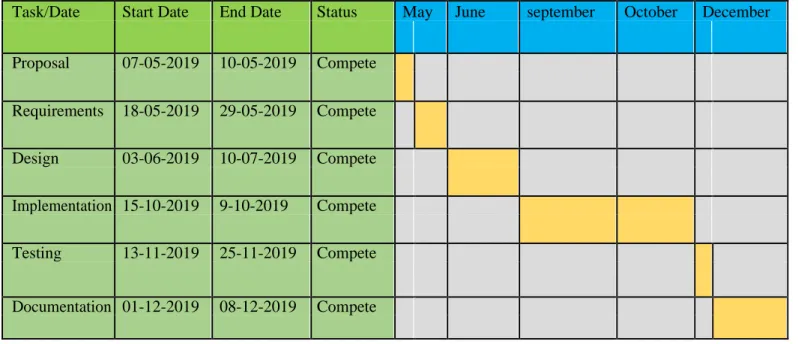
1.5.1 Gantt Chart
Table 1.1. Gantt Chart (Personal health Assistant)
Task/Date Start Date End Date Status May June september October December
Proposal 07-05-2019 10-05-2019 Compete
Requirements 18-05-2019 29-05-2019 Compete
Design 03-06-2019 10-07-2019 Compete
Implementation 15-10-2019 9-10-2019 Compete
Testing 13-11-2019 25-11-2019 Compete
Documentation 01-12-2019 08-12-2019 Compete
CHAPTER 2: SOFTWARE REQUIREMENT SPECIFICATION
2.1. Requirement Specification
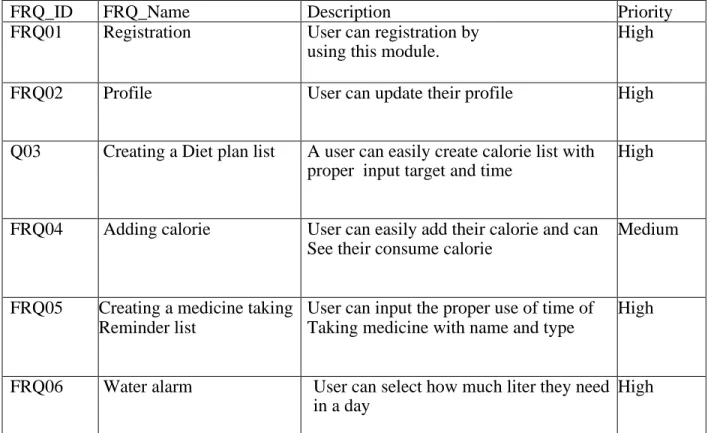
Table 2.1: Functional Requirements (Personal Health Assistant)
FRQ_ID FRQ_Name Description Priority
FRQ01 Registration User can registration by using this module.
High
FRQ02 Profile User can update their profile High
Q03 Creating a Diet plan list A user can easily create calorie list with proper input target and time
High
FRQ04 Adding calorie User can easily add their calorie and can See their consume calorie
Medium
FRQ05 Creating a medicine taking Reminder list
User can input the proper use of time of Taking medicine with name and type
High
FRQ06 Water alarm User can select how much liter they need in a day
High
2.2. Performance Requirements
2.2.1. Speed and Latency Requirements
• Data would be inserted in Firebase realtime database.
• User interface design depends on the user machine and its approximate time would be ten seconds.
• If there is any validation error, the error would show within one millisecond.
2.2.2. Accuracy Requirements
• After every successful login user would show accurate data from the database.
• All the forms should store accurate and valid data to the database.
• The only authentic user would view authentic data.
2.3. Dependability Requirements
2.3.1. Reliability Requirements• The User and Admin should register with the valid data and database will be updated with given data.
• Admin/User should log in to the system after input the valid email and password
• Admin should check the activity of the user.
2.3.2. Availability Requirements
• The application should run perfectly with any other device.
• The system should response though user and User activity and perform immediately.
2.4. Maintainability and supportability Requirements
2.4.1. Maintenance Requirements
• Modify system applications when its need to change on different environment.
• Recover user data, if the data deleted from the user profile.
• Help center if any problems occur for transactions.
2.5. Security Requirements
2.5.1. Access Requirements
• Only registered user can login to the system.
2.6. Usability and Human-Interaction Requirements
2.6.1. Ease of Use Requirements
1. The system UI is user-friendly.
2. The new user should learn the system.
3. System maintenance should not complex.
2.6.2. Understandability and Politeness Requirements 1. Any user should understand the system.
2.6.3. Accessibility Requirements
1. The system should accessible from any other devices.
2. User should access their account within a request.
2.7. Legal Requirements
2.7.1. Standards Requirements
1. The admin should have good knowledge of different types of programming language.
Chapter 3: System Analysis 3.1. Use Case Diagram
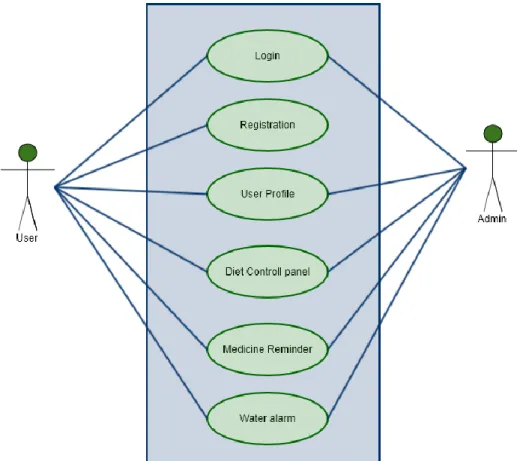
Figure 3.1: Use Case Diagram (Personal Health Assistant)
3.2. Use Case Description
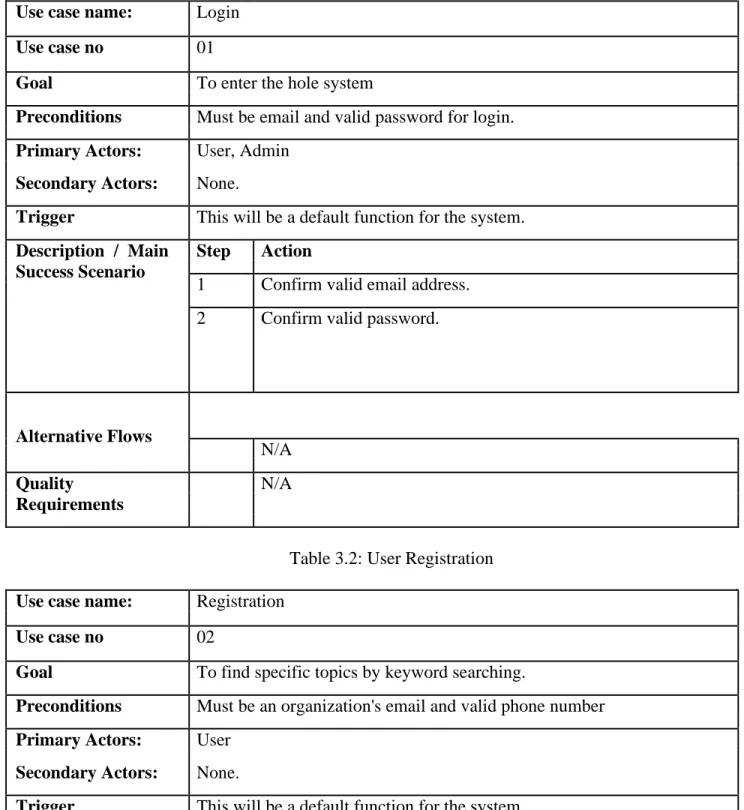
Table 3.1: User & Admin Login
Use case name: Login
Use case no 01
Goal To enter the hole system
Preconditions Must be email and valid password for login.
Primary Actors: User, Admin Secondary Actors: None.
Trigger This will be a default function for the system.
Description / Main Step Action Success Scenario
1 Confirm valid email address.
2 Confirm valid password.
Alternative Flows
N/A
Quality N/A
Requirements
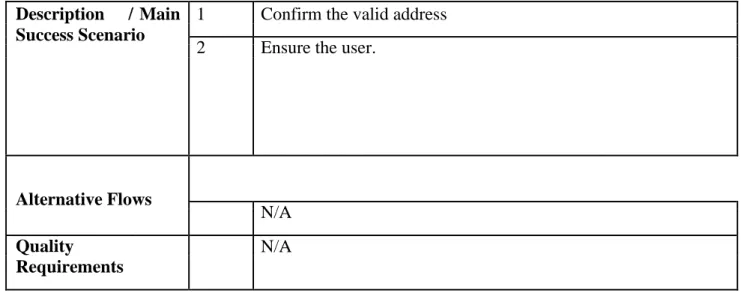
Table 3.2: User Registration Use case name: Registration
Use case no 02
Goal To find specific topics by keyword searching.
Preconditions Must be an organization's email and valid phone number Primary Actors: User
Secondary Actors: None.
Trigger This will be a default function for the system.
Step Action
Description / Main 1 Confirm the valid address Success Scenario
2 Ensure the user.
Alternative Flows
N/A
Quality N/A
Requirements
Table 3.3: User profile Use case name: User Profile
Use case no 03
Goal To Update user profile
Preconditions Must need to log in the system.
Primary Actors: User Secondary Actors: None.
Trigger This will be a default function for the system.
Description / Main Step Action Success Scenario
1 A user enters the system
2 A user Update profile with proper validation
Alternative Flows
N/A
Quality N/A
Requirements
Table 3.4: Create and consume calories for diet control panel Use Case Create Diet Control Panel
Use case no 04
Goal The goal is to create and and consume for a diet panel Preconditions Logged in.
Primary Actors: User
Secondary Actors: None.
Trigger After Clicking there will be diet panel list Description / Main Step Action
Success Scenario
1 The user enters the system
2 User login into the system with username and password.
3 After logged in user see a dashboard
When the button clicked user will see diet control panel
4
After creating list user can see details of the calorie
5
In details page user can calculate their consume calorie and history
Alternative Flows N/A
Quality N/A
Requirements
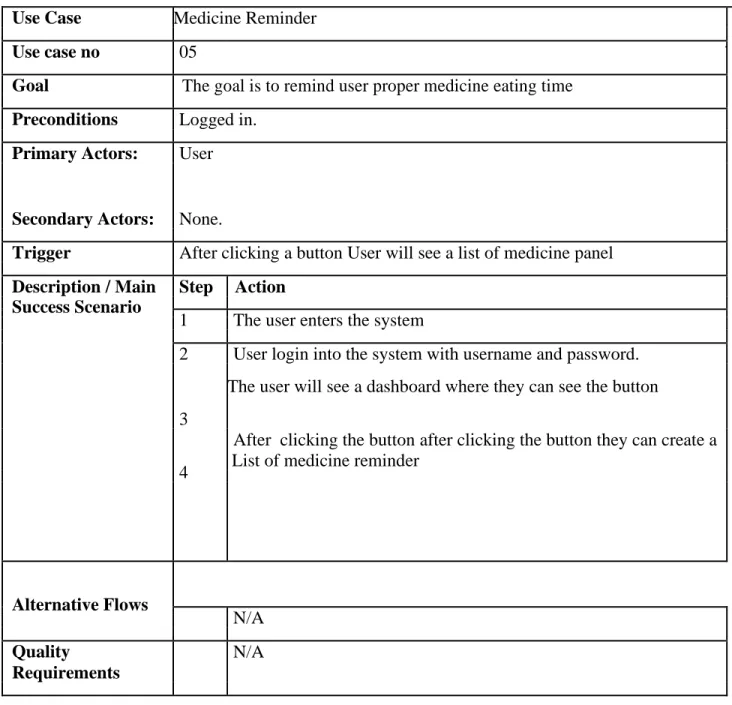
Table 3.5:Medicine Reminder for the system Use Case Medicine Reminder
Use case no 05
Goal The goal is to remind user proper medicine eating time Preconditions Logged in.
Primary Actors: User
Secondary Actors: None.
Trigger After clicking a button User will see a list of medicine panel Description / Main Step Action
Success Scenario
1 The user enters the system
2 User login into the system with username and password.
The user will see a dashboard where they can see the button 3
4
After clicking the button after clicking the button they can create a List of medicine reminder
Alternative Flows
N/A
Quality N/A
Requirements
Table 3.6: Water Alarm for the system Use Case Water alarm
Use case no 06 Goal
The goal is to provide proper taking of water in a day and calculate and also remind the user
Primary Actors: User
Secondary Actors: None.
Trigger After clicking a button user can see the panel of water reminder section Description / Main Step Action
Success Scenario
1 User enters the system
2 User & Admin login into the system with username and password.
3
User will see a dashboard where they will see a button called water alarm
4
User will see a dashboard of water alarm where they can add how much water they need in a single day and
Alternative Flows
N/A
Quality N/A
Requirements
3.3. Activity Diagram
3.3.1. Activity Diagram for User:
3.4.1. User Sequence Diagram
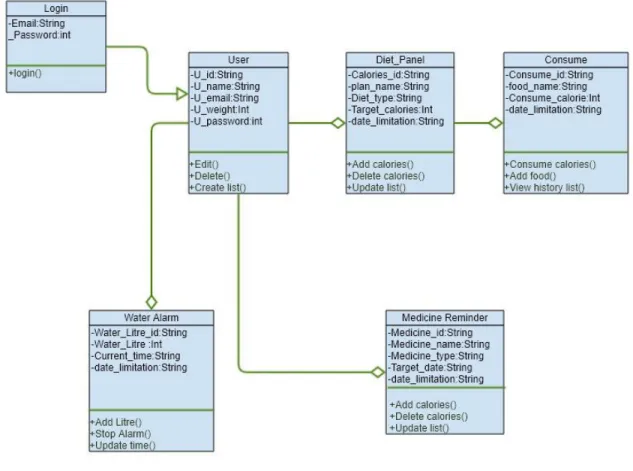
CHAPTER 4: SYSTEM DESIGN SPECIFICATION 4.1. Class Diagram (Personal Health Assistant)
Figure 4.1: Class Diagram (Personal Health assistant)
4.2. Entity Relationship Diagram
Figure 4.2: Entity Relationship Diagram (
Personal Health Assistant)4.3. Development of Tools and Technology
4.3.1. User Interface Technology
• Java
• Xml
4.3.2. Implementation Tools & Platforms
• Object-Oriented Java
• Firebase
• Android Studio
• Android Framework
• Java SDK
CHAPTER 5: SYSTEM TESTING
5.1.
Testing Features
5.1.1. Features to be tested
• Registration
• Login
• Storing data into Realtime Database.
5.1.2.
Features not to be tested
• Create List
• IDE System
• Alarm Check
5.2.
Testing Strategies
5.2.1. Test Approach
•
The whole system will be tested manually•
System testing based on User acceptancy.5.2.2. Pass/Fail Criteria
•
Component Pass/Fail criteria – The test will pass if the case meets the object design requirement or fail if not.• System Pass/Fail criteria – The test will pass if the case meets the functional and non -functional requirements or fail if not.
5.2.3. Suspension and Resumption
•
Regression Testing – The system should work properly after each change on the system.• Build Acceptance Test – The system will pass the test if every build is successful if not then try the build again.
• System Design Changes – The system should work properly after each change in the design.
5.2.4. Testing Schedule
Table 5.1: Testing Schedule (Personal Health Assistant)
Test Phase Time Owner
Test Plan Creation 1 week Masum Al Reza
Test Specification Creation 1 week Masum Al Reza
Test Specification Team Review 2 weeks Masum Al Reza
Component Testing 2 weeks Masum Al Reza
Integration Testing 2 weeks Masum Al Reza
System Testing 3 weeks Masum Al Reza
5.3. Test Cases
5.3.1. Test Case 1
Table 5.2: Test Case 1 (Personal Health Assistant)
Test Case #: 01 Test Case Name: Sign Up
System: Personal Health Assistant Subsystem: N/A
Designed By: Masum Al Reza(153-35-1309) Design Date: 10-11-2019 Executed By: Masum Al Reza Execution date:25-11-2019
Pre-Condition: User Must be Sing up on the system
Step Action Expected System Pass/Fail Comment
Response
1. When a user fills up Other fields are required Pass Other fields are
only Name field required
and clicks the register
2. When a user clicks Fill up the required field Pass Fill up the
only register button required field
without a fill-up any field
3. When a user enters The system should display Pass The email field is email like abc.com the email field is not a not a valid e-mail
valid e-mail address. address.
4. When a user enters The system will display Pass The valid email email like the email field is invalid. needs to register.
5. When a user enter The system should display Pass The field phone phone number as a the field phone number number must be a
character must be a number. number.
7. When a user enters When click register button Pass The password and
8. If a user enters a The password Pass The confirmation password like ‘Abc' confirmation is required. password is
and confirms the required.
password field empty.
9. If a user enters the The system should take it Pass It as a valid password like as a valid password. password.
‘AbC@A11’
5.3.2. Test Case: 02
Table 5.3: Test Case 2 (Personal Health Assistant)
Test Case #: 02
Test Case Name: Storing Data into realtime database
System: Personal Health Assistant Subsystem: N/A Designed By: Masum Al Reza(153-35-
1370) Design Date: 10-11-2019
Executed By: Masum Al Reza Execution date:25-11-2019
Pre-Condition: Must be added value
Step Action Expected System Pass/Fail Comment
Response
1. When a user input the value The value should be Pass Other fields Added into realtime
database in Firebase are required
2. The value added in the list view after Fill up the required Pass Fill up the
Saving Field required
Show listview field
CHAPTER 6: USER MANUAL
6.1. User Manual (User login/Registration)
To Enter my application first you need to register first. As this is lightweight app I make register and login in single fragments so I make this authentication with my firebase console there is two edit text and button and status which confirm the user it is registered onot.also notified the passwod wrong or right.
6.2. User Manual (Dashboard)
Once a user is logged in he or she will have access to the main dashboard where user can easily see the main feature there is four option user can choose and also there is drawer navigation activity in the action bar which makes the app much more smarter user can also choose option and go to the other fragment.
6.1. User Manual (User Profile)
If a user wants to choose a profile option he/she will see user input where he/she can input necessary option the body needs after input he/she able to save and it will save in background.
6.1. User Manual (User Diet Panel)
I have implanted for a suggestion of a diet plan many user concern about their diet some don’t know how to eat properly and how to maintain good health so adding calorie in daily need much more helpful for a user first whenever user open diet plan they open the diet list they can add their target calorie also with the date which will remember them when he/she needs to add calorie or not after adding he/she can see the details
6.1. User Manual (Diet Panel/add calorie)
Whenever user open the specific diet plan details he/she able to see the consume calorie after adding the calorie can view the list of food
6.1. User Manual (Medicine Reminder)
In this portion user can add their desire medicine with specific time what will be listed and remind he/she what time they need to take medicine.
6.1. User Manual (Water Alarm)
Sometimes user forget which time they need to take water and how much so they easily input and set reminder which time they need to take water or not
CHAPTER 7: PROJECT SUMMARY
7.1. GitHub Link:
https://github.com/Masum-Al-Reza/Personal_health_assitant
7.2. Limitations
1. User can’t see their blood pressure 2. User can’t see heart beat
7.4. Obstacles & Achievements
Day by day technologies are updated so the Laravel Framework is updating every day.
It is quite tough to work with new technology but not so hard. New packages and new library functions are added regularly. So, I feature there are some technology can be eliminating and the project can be implemented with new technology. There are too many errors while I am developing the system.
7.5. Future Scope
I have developed the best health app in this region with so many services. I have many ideas that will take time to complete because research is needed. I want it to be fully automated. I want to do research on it because this project aims to serve the people. I want to add the following features in our application.
1.I want to make a native react.js version of our app which will run in all platforms.
2.I want to add machine learning and AI into my app so that users will enjoy many services automatically.
33 ©Daffodil International University
CONCLUSION
I have successful 70% of my project. My application work is finally being completed. In test case I test my apps with different version of phones. I found positive value every phone its work smoothly.
The design of our application is very smooth and attractive. User interfaces are also so smooth and navigation is so fast. Its full complex free. Users will have zero trouble using this app.
REFERENCES
[1].Activity Diagram, Use case Diagram, Class Diagram [Access on 20 June 2019 12.21am] Link: https://diagrams.visual-paradigm.com/#