978-1-4577-1884-7/11/$26.00 ©2011 IEEE
A Study on the Leveraging Categorization of
Multimedia Presentation
Rustam Asnawi1), Wan Fatimah Wan Ahmad2), and Dayang Rohaya Awang Rambli3) Computer and Information Sciences, Universiti Teknologi PETRONAS
Bandar Sri Iskandar, Tronoh, Perak, Malaysia
[email protected]), [email protected]), [email protected])
Abstract– In general, multimedia presentation can be categorized into two major categories namely stored multimedia presentation and live multimedia presentation. Unfortunately, the information of such categorization of multimedia presentation (particularly for live multimedia presentation) is poor even in common resources such as web, and literatures. Both multimedia presentations do really exist, and they hold important roles in many user domains. Leveraging the categorization of multimedia presentation is urgently required since at present there are many researches being conducted in both multimedia presentations. This work aims to give a global view about multimedia presentation as well as sharpening the categorization of multimedia presentation. In this paper, we are recommending to propose a model for Presentation System using SMIL-driven approach. Then from the proposed model of Presentation System can be derived a general framework for the live multimedia presentation applications.
Keyword: multimedia presentation, presentation system, live multimedia presentation, modelling
I. INTRODUCTION
Multimedia has been used in many different user domain areas. Each domain area has specific characteristic depending on the needs, behavior and purposes of its users. Consequently, the presentations of those multimedia elements in many different domain areas are performed in various manners. In some areas, the utilization of multimedia does in fact provide significant contributions and benefits. In educational area for example, about two decades ago it is a very challenging task for a teacher or lecturer to present video and image materials concurrently with text material and audio narration in front of a class. At that time, presentations were static or linear using transparent slide with overhead projector, which was the popular tool. Nowadays, such presentations become an easy and pleasant work since the materials can be presented in various multimedia data types. Even for entertainment, since computer has become an ordinary property that is affordable by almost all families, home entertainment with computer-based multimedia application is slowly becoming the choice. In the medical field, a dentist uses multimedia technology such as a high-resolution of intra-oral camera to perform video previewing, video recording and image capturing. The results are used to support decision when diagnosing mouth diseases, for instance. In general, more benefits can be obtained by utilizing multimedia in other different domain areas.
Therefore the characteristic of utilization of the multimedia data in particular domain area is also specific and unique. It means that, principally the presentation of the multimedia data must be conformed to the needs and requirement of its user in pertinent domain area. The multimedia presentation should be performed in various styles according to its domain area.
Current researches in multimedia presentation area (as a part of multimedia system) are becoming more interesting since it involves some other disciplines such as art, science, modeling, mathematic, human computer interaction, and education. Basically, the two major categorization of multimedia presentation namely stored multimedia presentation and live multimedia presentation (initially mentioned by [1] as live and orchestrated presentation) arise from the way each multimedia element is presented. Although these two major categories are well known, unfortunately the information of both types of multimedia presentation as well as the detailed categorization is very poorly documented in common resources (websites and literatures). Leveraging the categorization of multimedia presentation is urgently required since many researches in both categories of multimedia presentations have been conducting now.
This paper discusses the leveraging in both categorization of multimedia presentation with the objective of giving a global view about multimedia presentation as well as sharpening the categorization of multimedia presentation. It is also hoped that the contributions from this work will be of benefit to other researchers in the multimedia system area, particularly while doing further analysis and researches in multimedia presentation.
II. MULTIMEDIA PRESENTATION REVIEW
Before discussing the two categories of multimedia presentation in greater detail, we will describe multimedia presentation itself, briefly.
constraints through the entire process for synchronization is the most important characteristic in multimedia presentation.
According to Taekyong L. et al. [2], multimedia presentation is “a synchronized and, possibly, interactive delivery of multimedia data to users”. Sapino [3] defines multimedia presentation as a collection of multimedia data provided with synchronization primitives, and possibly interactive feature with user. Address to Hakkoymaz [4] multimedia presentation also considers the real time presentation of various data stream.
From this, a multimedia presentation can be described as a series of efforts and processes to present any multimedia data (a part or whole data) from its resources until presentation to the end user with some constraints, and synchronizations.
As mentioned in the previous section, there are two big categories in multimedia presentation, each having its own set of behaviors, characteristics, and history. The next subsections will discuss both categories.
A. Stored (Orchestrated) Multimedia Presentation
As suggested by its name, stored means that all presentation steps and processes including multimedia data retrieval, querying, authoring, managing and synchronizing with constraints are stored as a static document. The multimedia document is stored in a certain location (called as multimedia server) that can be accessed from anywhere at any time by anyone through the web or network. This category is also popularly mentioned as stored-orchestrated multimedia presentation.
Indeed, mostly researches of the multimedia presentation are related to this category. The main characteristics of this category are web based, network-oriented, and distributed environment. The most popular example of stored-orchestrated multimedia presentation is SMIL (Synchronized Multimedia Integration Language). The World Wide Web Consortium (W3C) released SMIL 1.0 in 1998 and it became a popular markup language in web-based multimedia presentation [5-15]. As a family of XML, SMIL has some abilities to integrate and synchronize various types of media data to be presented in the client browser by considering the temporal and spatial constraint [9-11, 14, 16-19].
Most of the existing researches in multimedia presentation can be categorized into the following topics:
• Multimedia presentation document, in orchestrated multimedia presentation the multimedia document contains the declarative syntax for that presentation and also all constraints for synchronization. It is the key for the success of such presentation [10, 13, 18, 20]. Many research works have been conducted to improve the model of temporal and spatial constraint through language such as in SMIL [9, 14, 16, 21].
• Adaptive and intelligent on the synchronization, since it is web based and network oriented the play out management of each multimedia data on such multimedia presentation holds an important role. Agile, automatic and adaptive multimedia presentation
through internet or networks has been studied and developed [19, 21-22].
• Multimedia database retrieval and query, today multimedia data and information available in the web are innumerable, infinite and in great quantity. Multimedia database management is a compulsory feature and is being continuously improved particularly in the performance quality of database query and retrieval [23-24].
• Distributed multimedia presentation with QoS consideration. In web based oriented, the delivery of such multimedia data from distributed resources to the user are very much influenced by many factors such as the quality of the network infrastructure, data compression, data encryption for multimedia security, and multimedia data transformation. Importantly, the QoS of that multimedia presentation by influenced with those factors [11, 17, 25].
The important thing that must be highlighted here is that all of the above researches use formal definition to analyze or to model such multimedia presentation. Moreover almost all models use graph theory to represent the multimedia presentation in conceptual level.
However, in the real world multimedia presentation is required to be conducted in real time presentation. In this case, performing construction, authoring and organizing presentation is done on the fly during presentation time. This gives rise to the second category of multimedia presentation that is live multimedia presentation, or abbreviated as LMP.
B. Live Multimedia Presentation
What is Live Multimedia Presentation, exactly? Multimedia users in domains such as educational, security, medical, and entertain area need to present multimedia data types live without prior construction of a few lines of “program”. In the LMP there are no additional efforts to build a stored and documented-codes with much declarative syntax before the process of that presentation is begun. By this way, the presenter is not work loaded with the development of such multimedia documents.
Simple examples of the LMP are the conventional slideware application and common media player applications. Today, the most popular slideware application is Microsoft PowerPoint. The slideware is mentioned as a simple example of LMP (or perhaps can be called as semi-LMP) since PowerPoint does not require considerations of the temporal and spatial constraints for performing synchronization of each multimedia data in live presentation. Temporal and spatial constraints in PowerPoint are pre-defined construction, which is done during authoring processes prior to the real presentation. Therefore, PowerPoint actually is a static, single frame, and linear presentation oriented. During presentation time, the presenter cannot change and edit the value of such temporal and spatial constraint parameters. There is no offering of user interactivity to control both constraints.
and commonly in the overall performance of the presentation. That way makes the slideware application has a static synchronization behaviour. All multimedia data types (any video, audio, image and animation) included or embedded in the slides are viewed as an object of slide. It means, for an example, if a slide contains text, one video and one audio file, than those multimedia data will be treated in a single frame (slide). Both video and audio data will be played back in one slide without a complete playback controller.
Furthermore, many studies have been conducted on the characteristics and impacts of slideware application, particularly in educational area. The findings of those studies indicated some evidence of drawbacks in slideware applications such as PowerPoint and Impress. The static, linear, single frame-by-frame, and presenter-centered presentation are the characteristics of the popular slideware applications that are viewed by some researchers as the dominant drawbacks of such applications [26-31]. Subsequently, many researches and studies have been conducted to overcome those drawbacks by improving and enhancing the slideware application, which finally lead to the development of presentation system.
The presentation system is not similar with multimedia presentation. Presentation system does not only consider how some slides are made and presented to the audience, but it also involves how to deliver the detail content of the information to the audience. To attain the goals, for instance in the educational area, some additional features to support the teaching learning processes are provided within the presentation system application such as screen recording, video and audio capturing, and inkless-whiteboard.
The presentation system also exploits the various types of additional hardware devices in the environment in which such presentation takes place. Some common additional hardware devices are the output monitor (LCD projector), microphone, active speaker and camera (webcam or digital camcorder). Recent model of the presentation system already supports distant presentation, both live and stored presentation. Of course, in order to perform this feature, a network infrastructure through either local area network or the internet network is required. By applying the presentation system in a class room environment the level of understanding of the audience can be improved, expectedly. Generally, there is an expectation that by applying the presentation system, the overall performance of the teaching learning process can be enhanced.
Presentation system is becoming an increasingly important area of research topics in multimedia system. The research topics in presentation system are centered on overcoming those weaknesses of slideware application by developing such presentation system that support flexible, dynamic, audience-centered, and non linear presentation for a professional class room presentation. However most, of the current proposed models of presentation system are slide-based oriented without considering the detail concepts of either the temporal or spatial constraints to perform the synchronization. This configuration is reasonable since originally presentation system is designed to support the teaching learning processes in class room environment. Consequently, most of the proposed presentation
system models are only suitable to be applied in educational area.
Meanwhile, to present various multimedia data type in domain areas other than education, media player applications
or a particular multimedia application that is specifically designed for such domain area is usually used. Since each domain area has specific characteristic and user’s behavior, obviously such multimedia application would not be compatible to be applied in different domain areas. Both media player and particular multimedia application are examples of simple live multimedia presentation (since there is no any formal constraint definition for synchronization).
III. CATEGORIZATION IN LIVE MULTIMEDIA PRESENTATION As mentioned earlier, the differences between multimedia presentation and media player or presentation system will be highlighted in this section.
A. Presentation System
Basically, the Presentation System is introduced in an effort to develop a more powerful presentation tool that has solved the weaknesses and problems associated with e-slide application. As we know, current most popular electronic slide (e-slide) applications are PowerPoint in Windows platform and Impress in Linux platform. Historically, in 1984, a software house produced a package software application that was specially designed for presentation, named “Presenter”. Later, Microsoft acquired the Presenter and changed the product’s name into “PowerPoint” [29].
As mentioned by [29-30], PowerPoint is a slideware or a tool to support presentation. PowerPoint was designed for particular, slide-by-slide, linear presentation and is still difficult to be used for nonlinear slide-based presentation although it supports dual display. An advanced controller is needed to enhance the performance of PowerPoint presentation to be user-centered presentation.
Starting from these, some researchers have been interested to research and develop Presentation System since a few years ago. Schnepf et al. [11] introduced a Flexible Interactive Presentation Synchronization (Flip). Flip works by event-based model that support inclusion of various media displayer and user interaction. Then, Bailey et al. [12] proposed a multimedia synchronization toolkit, identified by the named Nsync. Chiu,
et al.[13] developed ModSlideShow, a presentation system that is based on a discrete modular model to manage the slides to show onto multi displays. The slides also can be manipulated and annotated in simply and flexible way.
Liu et al.[4] develop EPIC, a Presentation System that uses multiple display. It is a tool to support presentation by considering the quality of views of the audience members through a model. EPIC supports PowerPoint© and other multimedia data types such as video, audio, and image file formats. It views and treats all types of multimedia elements as a (hyper) slide. Turban et al.[4, 5] proposed and developed an
flexible presentation tool for diverse multi monitor was proposed by Kurihara et al.[14]. This Presentation System will separate the contents from the views. For instance, if there are three monitors, the first for displaying previous slide, the second is current slide and the last monitor to show the next slide. Lastly, Lanir et al. [2] introduced MultiPresenter, a presentation system that uses slide-oriented approach. It considers presenting slides in a large and multi display environment. Various presentation styles and the way to deliver each component of slides are stressed and highlighted by MultiPresenter. It views that a slide which consists of other multimedia elements can be shown as another slide independently.
From the foregoing review of previous works, it can be concluded that a presentation system is an enhancement of e-slide presentation. In principal, Presentation System is e- slide-based oriented and there is no consideration about constraint and synchronization, whereas multimedia presentation emphasizes on synchronized presentation of each multimedia data type. And also most of the recent slide-based presentation systems use a separate view mechanism between presenter and audience. The Presentation System assumes that the presenter as the author has full authority to control, and maintain the flow of information during the presentation, while the audience is interested mainly in what and how the entire presentation content can be received completely and easily. From this, originally the emerging of those Presentation System models is intended to bridge the gap between presenter and audiences needs.
B. Media Player Review
The term media in this context refers to the multimedia data types (video, audio, image, text and animation) including real time capturing and previewing devices such as web camera or microphone. The term player means playing back such media type involved with the controlling function such as VCR-like (play, pause, stop). Today, many types of computer based media players are available as a shareware or freeware applications. Each player offers many features, benefits and has specialties but it is difficult to find a media player that supports all of multimedia data types (including text or e-slide file format). The popular player such as Windows Media Player© does not support all types of multimedia data, in particular animation and text (e-slide). Users who want to play more diverse multimedia data types must use another player.
Additionally, the design of the media library user interface is in single file list. Any video, audio, image, and animation files that have been chosen by the user will be located in a single file list. From the user’s point of view, this is not flexible because it makes switching between different media file types difficult. Furthermore, when presenting various media types, user often needs to select between media file types quickly and he/she needs to make the right choice. Therefore, it is better to group each media file type into separate file lists.
The idea in order to group each media file type into separate file list emerges a consequence that it needs a wider area for designing the control panel user interface. Moreover, common media player applications have many menus for
choosing, managing, and controlling the playing back of the media that displayed in same area with its file-list. Additionally, it becomes more complex since almost all media players have been designed for single display. It means that the design of the video/image output area and the control panel user interface of the player are displayed at the same area in single monitor. Consequently this current design of those media player applications make users somewhat confuse and inconvenient. An alternative solution has been issued by separating the control panel user interface area and the player’s output area into different hardware monitor.
From the discussion above, it can be concluded that both presentation system and media player require a separate view between control panel and output area in order to improve their performance. One solution to overcome such problem is by exploiting the multi-display feature. Multi-display or other popular terms: dual-monitor, dual-display or extended desktop feature is a standard feature of VGA card in modern laptop.
IV. LESSON LEARNED
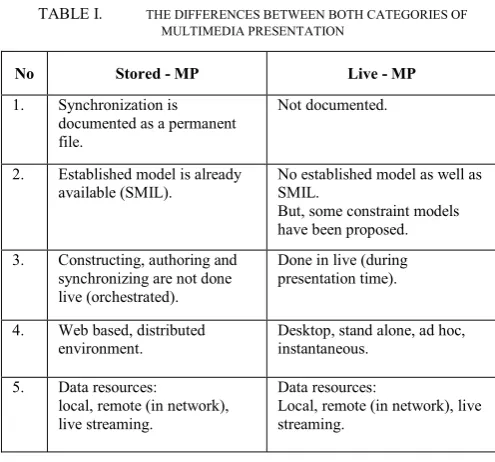
The findings from this study have clearly shown that both categories are different in many ways. Table 1 summarizes the differences between both categories in order to highlight their respective role in the multimedia system.
TABLE I. THE DIFFERENCES BETWEEN BOTH CATEGORIES OF MULTIMEDIA PRESENTATION
No Stored - MP Live - MP
1. Synchronization is documented as a permanent file.
Not documented.
2. Established model is already available (SMIL).
No established model as well as SMIL.
But, some constraint models have been proposed.
3. Constructing, authoring and synchronizing are not done live (orchestrated).
Done in live (during presentation time).
4. Web based, distributed environment.
Desktop, stand alone, ad hoc, instantaneous.
5. Data resources: local, remote (in network), live streaming.
Data resources:
Local, remote (in network), live streaming.
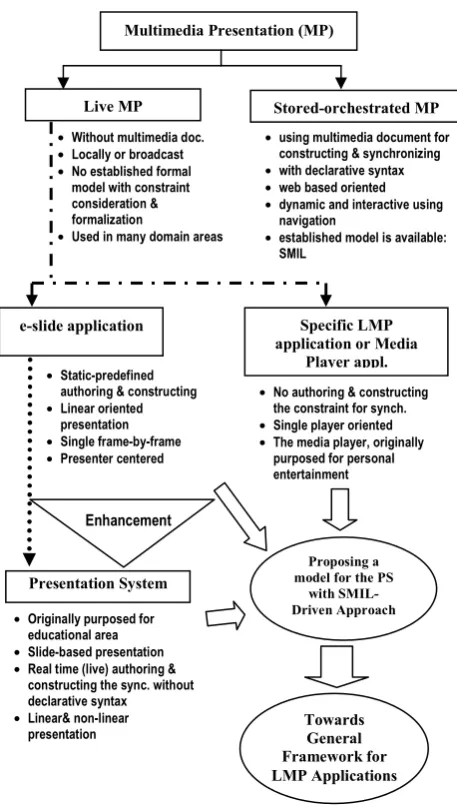
An overview of the categorization of multimedia presentation is presented in Figure 1. The solid line represents the categorization of the multimedia presentation, the dotted-dash line points instance examples of live multimedia presentation application in real word, and the dotted line points to enhancements of such applications.
Multimedia Presentation (MP)
Stored-orchestrated MP Live MP
• using multimedia document for constructing & synchronizing • with declarative syntax • web based oriented • dynamic and interactive using
navigation
• established model is available: SMIL
• Without multimedia doc. • Locally or broadcast • No established formal
model with constraint consideration & formalization
• Used in many domain areas
e-slide application Specific LMP
application or Media Player appl.
Presentation System
Proposing a model for the PS
with SMIL-Driven Approach
• Static-predefined authoring & constructing • Linear oriented
presentation • Single frame-by-frame • Presenter centered
Enhancement
• No authoring & constructing the constraint for synch. • Single player oriented • The media player, originally
purposed for personal entertainment
• Originally purposed for educational area • Slide-based presentation • Real time (live) authoring &
constructing the sync. without declarative syntax • Linear& non-linear
presentation Towards General Framework for LMP Applications
First, the utilization of live multimedia presentation in many user domain areas is increasing rapidly. At present standard concept and guideline for developing live multimedia presentation applications are unavailable. In the anticipation of more rapid developments of numerous types of live multimedia presentation, it is important to develop a standard framework or guideline for developing such applications soon.
Second, since a standard model in stored multimedia application (with SMIL) is already established, we recommend developing a standard model for the Presentation System using SMIL-driven approach. Then from the Presentation System model can be derived a general framework or guideline for the live multimedia presentation (see Figure 1). The rationale of this recommendation comes from our previous work [32-34] where all findings from those studies converge to the development of a model of live multimedia presentation with SMIL-driven approach.
Figure 1. Overview of the categorization of multimedia presentation
Commonly to develop live multimedia presentation application that suitable for particular domain areas are based
on the presenter/user and developer perspective. However, different developer will produce different product although they do same task in same domain area, since each developers have their own perspective. Definitely the rapid growth of the live multimedia presentation applications requires a standard guideline or framework that will help developers to do in the same vision and perspective during development processes. A particularly concern may be on the standard model of temporal constraint or spatial coordination for synchronization during presentation.
We expect that the established framework of live multimedia presentation including modeling on live construction of constraint (temporal-spatial constraint) and synchronization will make significant contributions in the development process, and will improve other presentation systems or media player applications. At least both the effectiveness and productivity during development of such software application can be increased.
V. CONCLUSION
Basically there are two major categories of multimedia presentation namely stored and live multimedia presentation. The first category already has a standard model i.e. SMIL, however the second one still does not have any standard model or framework.
Due to the rapid growth of live multimedia presentation applications such as the development of Presentation System and other specific live multimedia presentation applications, we recommend that a model/framework for live multimedia presentation to be developed urgently. Firstly, developing a model of Presentation System using SMIL-driven approach, then based on such proposed model of Presentation System can be derived a general framework for the live multimedia presentation applications.
ACKNOWLEDGMENT
This work has been conducted at Universiti Teknologi PETRONAS and is funded as part of graduate assistantship program at Universiti Teknologi PETRONAS. This is part of the author’s work on developing a framework (modeling) of live multimedia presentation.
REFERENCES
[1] Maria Jose Perez-Luque and T. D. C. Little, "A Temporal Reference Framework for Multimedia Synchronization," IEEE Journal on Selected Areas in Communications, vol. 14, 1996.
[2] T. Lee, et al., "Querying Multimedia Presentations Based on Conctent," Knowledge and Data Engineering, IEEE Transaction, vol. 11, June 1999 1999.
[3] M. L. Sapino, Multimedia Presentations Databases (Extended Abstract): SOFSEM 2002, LNCS Springer Berlin 2540, 2002.
[4] V. Hakkoymaz, "Multimedia Presentation Organization and Playout Management Using Intelligent Agents," Multimedia Tools and Applications, Springer, vol. 47, 2009.
[6] W3C. (2010, November 2010). Synchronized Multimedia Integration
Language (SMIL 2.0) - [Second Edition]. Available:
http://www.w3.org/TR/2005/REC-SMIL2-20050107/
[7] Simon S.Y. Shim, et al., "Multimedia Presentation Components in E-commerce," presented at the Second International Workshop on Advanced Issues of E-Commerce and Web-Based Information Systems 2000.
[8] L. Rutledge, "SMIL 2.0 : XML for Web Multimedia," Internet Computing, IEEE vol. 5, pp. 78 - 84, 2001.
[9] Lloyd Rutledge, et al., "Anticipating SMIL 2.0: the developing cooperative infrastructure for multimedia on the Web," Computer Networks, Elsevier Science, vol. 31, pp. 1421–1430, 1999.
[10] M. Jourdan, "A formal semantics of SMIL: a web standard to describe multimedia documents," Computer Standards & Interfaces, Elsevier, vol. 23, pp. 439–455, 2001.
[11] Ing-Chau Chang and S.-W. Hsieh, "ATF: an Adaptive Three-layer Framework for inter-stream synchronization of SMIL multimedia presentations," The Journal of Systems and Software, Elsevier, vol. 75, pp. 283–303, 2005.
[12] P. Hoschka, "An Introduction to the Synchronized Multimedia Integration Language," Multimedia, IEEE Journal, vol. 5, pp. 84 - 88 1998.
[13] Dick C.A. Bulterman , et al., "GRiNS: A GRaphical INterface for creating and playing SMIL documents," Computer Networks and ISDN Systems, Elsevier Science, pp. 519-529, 1998.
[14] Chun-Chuan Yang, et al., "Synchronization modeling and its application for SMIL2.0 presentations," The Journal of Systems and Software, Elsevier, vol. 80, pp. 1142–1155, 2007.
[15] D. C. A. Bulterman, "SMIL 2.0 - Part 1: Overview, Concepts, and Structure," Multimedia, IEEE Journal, vol. 8, pp. 82 - 88 2001. [16] Timothy K. Shih and A. Y. Chang, "Toward a Generic Spatial/Temporal
Computation Model for Multimedia Presentations," in IEEE International Conference on Multimedia Computing and Systems, Canada, June 1997.
[17] Thomas D.C. Little and A. Ghafoor, "Spatio-Temporal Composition of Distributed Multimedia Objects for Value-Added Networks," IEEE Computer, pp. 42-50, 1991.
[18] P.N.M. Sampaio, et al., "About the Semantic Verification of SMIL Documents," in IEEE International Conference on Multimedia and Expo, 2000, pp. 1675 -1678.
[19] A. Y. Chang, "Design of Consistent SMIL Documents for Distributed Multimedia Presentation Using Temporal Algebra," in International Conference on Parallel and Distributed Systems11th 2005, pp. 189 - 195.
[20] Paola Bertolotti and O. Gaggi, "A Study on Multimedia Documents Behavior: a Notion of Equivalence," Multimedia Tools and Applications, Springer, vol. vol. 33, 2007.
[21] I. M. Bilasco, et al., "STAMP: A Model for Generating Adaptable Multimedia Presentations " Multimedia Tools and Applications, Springer, vol. 25, 2005.
[22] A. Y. Chang, "An Intelligent Semantic Model for the Design of Consistent Online SMIL Presentations," in The 19th International Conference on Advanced Information Networking and Applications (AINA’05), 2005.
[23] A. Celentano, et al., "Retrieval in multimedia presentations " Multimedia Systems, Springer-Verlag, 2004.
[24] S. Adah, et al., "An algebra for creating and querying multimedia presentations," Multimedia Systems, Sringer-Verlag, vol. 8, pp. 212-230, 2000.
[25] B. Prabhakaran, "Adaptive Multimedia Presentation Strategies," Multimedia Tools and Applications, Springer, vol. 12, 2000.
[26] J. Lanir, et al., "MultiPresenter: A Presentation System for (Very) Large Display Spaces," in Proceeding of the 16th ACM International Conference on Multimedia, Vancouver, British Columbia, Canada, 2008.
[27] G. Turban and M. Muhlhauser, "A Framework for the Development of Educational Presentation Systems and its Application," in Proceedings of the international workshop on Educational multimedia and
multimedia education., Augsburg, Bavaria, Germany, 2007, pp. 115-118.
[28] G. Turban, "Categorization of Educational Presentation Systems," in Proceedings of the international workshop on Educational multimedia and multimedia education, Augsburg, Bavaria, Germany, 2007, pp. 5-10.
[29] E. R. Tufte, The Cognitive Style of PowerPoint: Graphics Press, Chesire, CT, , 2003.
[30] J. E. Kjeldsen, "The Rhetoric of PowerPoint," Seminar.net International Journal of Media, Technology & Lifelong Learning vol. 2, 2006. [31] Q. Liu, et al., "Framework for Effective Use of Multiple Display," in
Proceedings of SPIE International Symposium ITCom on Multimedia Systems and Applications VIII, , Boston, Massachusetts, USA, 2005. [32] R. Asnawi, et al., "Design Architecture for IM-Player as a Tool for
supporting Visual Education Presentation," in Lecture Notes in Computer Science-IVIC Kuala Lumpur, Malaysia, 2009, p. 11.
[33] R. Asnawi, et al., "Development of Multipurpose Integrated Multimedia Presentation System Based on the CCM Algorithm," in Proceedings of International Conference on Computer and Automation Engineering, Singapore, 2010, pp. 716-720.