PC THERMOMETER
SITI NAZIA BINTI ABD RAHIM
This Report is submitted in Partial Fulfillment of the requirements for the award of Bachelor of Electronic Engineering (Industrial Electronics) With Honours.
Faculty of Electronic and Computer Engineering Universiti Teknikal Malaysia Melaka
UNIVERSTI TEKNIKAL MALAYSIA MELAKA
FAKULTI KEJURUTERAAN ELEKTRONIK DAN KEJURUTERAAN KOMPUTER
BORANG PENGESAHAN STATUS LAPORAN PROJEK SARJANA MUDA II
Tajuk Projek : PC THERMOMETER
Sesi
Pengajian : 2008/2009
Saya SITI NAZIA BINTI ABD RAHIM
(HURUF BESAR)
mengaku membenarkan Laporan Projek Sarjana Muda ini disimpan di Perpustakaan dengan syarat-syarat kegunaan seperti berikut:
1. Laporan adalah hakmilik Universiti Teknikal Malaysia Melaka.
2. Perpustakaan dibenarkan membuat salinan untuk tujuan pengajian sahaja.
3. Perpustakaan dibenarkan membuat salinan laporan ini sebagai bahan pertukaran antara institusi pengajian tinggi.
4. Sila tandakan ( √ ) :
SULIT* (Mengandungi maklumat yang berdarjah keselamatan atau kepentingan Malaysia seperti yang termaktub di dalam AKTA RAHSIA RASMI 1972)
TERHAD* (Mengandungi maklumat terhad yang telah ditentukan oleh organisasi/badan di mana penyelidikan dijalankan)
TIDAK TERHAD
Disahkan oleh:
__________________________ ___________________________________ (TANDATANGAN PENULIS) (COP DAN TANDATANGAN PENYELIA)
Alamat Tetap KM 13, JLN DATUK KUMBAR,
05300 ALOR STAR, KEDAH
iii
“I hereby declare that this report is the result of my own work except for quotes as cited in the references.”
Signature :……….
Author : SITI NAZIA BINTI ABD RAHIM
iv
“I hereby declare that I have read this report and in my opinion this report is sufficient in terms of the scope and quality for the award of Bachelor of Electronic Engineering
(Industrial Electronics) With Honours.”
Signature :……….
Supervisor’s Name :EN AMAT AMIR BIN BASARI
v
vi
ACKNOWLEDGEMENT
Alhamdulillah…I’m grateful to Allah S.W.T, our Lord and Cherisher and Selawat to our prophet, Nabi Muhammad S.A.W and his family. I have completed my thesis which is partial fulfillment of requirements for the degree of Bachelor in Electronic Engineering (Industrial Electronic).
On this opportunity, I would like to express my gratitude to the Faculty of Electronic and Computer, University Teknikal Malaysia Melaka generally and sincere gratitude to my supervisor, Pn Hanim Binti Abdul Razak, for his assistance and guidance towards the progress of this project thesis. Throughout this semester, Pn Hanim Binti Abdul Razak has been patiently monitoring my progress and guided me in the right direction and offering his encouragement to me. Obviously the progress I had now will be uncertain without his assistance.
I am very grateful to my family especially my mom and dad and not forget also to my siblings for their unfailing encouragement and financial support that they have given to me for over the years.
vii
ABSTRACT
viii
ABSTRAK
ix
TABLE OF CONTENTS
CHAPTER TITLE PAGE
PROJECT TITLE i
STATUS REPORT DECLARATION FORM ii
DECLARATION iii
DECLARATION SUPERVISOR iv
DEDICATION v
ACKNOWLEDGEMENT vi
ABSTRACT vii
ABSTRAK viii
CONTENTS ix
FIGURE LIST xii
TABLE LIST xiv
APPENDIX LIST xv
1 INTRODUCTION
1.1 Project Introduction 1
1.2 Objective 2
1.3 Scope of Project 3
1.4 Problem Statement 2
x
2 LITERATURE RIVIEW
2.1 Literature Review 4 2.2 The Comparison between This Project 4
and Previous Project
2.3 The PC Thermometer V2 5
2.4 Simple PC Thermometer 6
2.5 PC Thermometer 6
3 PROJECT METHODOLOGY
3.1 Project Methodology 8
3.2 Software Development 10
3.2.1 Visual Basic 10
3.2.2 Program Implementation Process 11 3.2.3 The Development Environment 14 3.2.4 The Project Explorer Window 14
3.2.5 The Default Layout 15
3.3 Writing/Modify “Visual Basic” Program 16 3.3.1 Original Program Display 16 3.3.2 Display Program that was Modified 24
3.4 Hardware Development 32
3.5 PC Thermometer Circuit 33
3.5.1 PC (Personal Computer) 33
3.5.2 Interfacing Part 34
3.5.3 Power Supply Part 35
3.5.4 Part of Sensor/Detector 36
3.6 Operation the Entire Circuit 39
xi
4 RESULT AND ANALYSIS
4.1 Introduction 44
4.2 Run the Program and Interface by Hardware 44
4.2.1 Result of Temperature in Deactivate 44 State
4.2.2 Result of Temperature in Normal 45 Circumstances
4.2.3 Result of Temperature at the Over Limit
Of Setting Temperature 46
4.2.4 Result of Temperature is Close the
Limit Setting Temperature 48 4.3 Last Finishing and Project Position 49
4.4 Wave form Transmission Data 52
4.5 Discussion 55
4.6 Advantages of PC Thermometer Project 57
5 CONCLUSION AND RECOMMENDATIONS
5.1 Conclusion 58
5.2 Recommendations 59
REFERENCES 60
xii
FIGURE LIST
NO TITLE PAGE
2.3.1 The system Tray of GUI displayed 6
2.5.1 PC Thermometer 6
3.3.1 Project Methodology 8
3.1.2 The Method/Procedure Project 9
3.2.2.1 Flow chart of Implementation VB Programming 12 3.2.2.2 Flow chart for VB display that have been Modified 13
3.2.3.1 Development Environment 14
3.2.4.1 The Project Explorer Window 15
3.3.1 Original Program Display 16
3.3.2.1 The GUI Visual Basic Display 24
3.3.2.3 The Display of Summary Information 31
3.4.1 Block of function circuit and the Components that
Involved 32
3.5.2.1 Interfacing Circuit for “PC Thermometer” Circuit 34 3.5.3.1 Power Supply Part of “PC Thermometer” Circuit 35
3.5.4.1 Part of Sensor/Detector 36
3.5.4.2 IC DS1621 36
3.6.1 Connection Configuration of IC DS1621 address’s Pin 40
3.7.1 Indoor Sensor Part Schematic 41
3.7.2 Outdoor Sensor Part Schematic 41
xiii
3.7.4 Indoor Sensor PCB Circuit’s Form that Produce by
Eagle’s Software 42
3.7.5 Outdoor Sensor PCB Circuit’s Form that Produce by
Eagle’s Software 43
3.7.6 PCB Circuit’s Form that Produce by Eagle’s Software 43 4.2.1.1 The Display during the Indication Part is OFF 45 4.2.2.1 The Display when Normal Temperature and Indication Part
Is ON 46
4.2.3.1 The display when temperature over the setting limit and
Indication is ON 47
4.2.4.1 The Display when Temperature Close the Value Set and
Indication Part is ON 48
4.3.1 PCB’s circuit that is Install with Slot in Panel 49 4.3.2 PC Thermometer circuit’s position in Housing Computer 50
4.3.3 PC Thermometer circuit’s Position 50
4.3.4 PC Thermometer circuit’s Position 51
4.3.5 Series Port Connection 51
xiv
TABLE LIST
NO TITLE PAGE
3.3.2.3 Colour Indication of Situation Temperature Based on Difference between Current Temperatures with Setting
Temperature 26
3.5.4.3 Table of Pin Configuration IC DS1621 38
xv
APPENDIX LIST
NO TITLE PAGE
A Visual Basic Coding 62
B Positive Voltage Regulator 66
C Digital Thermometer and Thermostat 67
CHAPTER 1
INTRODUCTION
1.1 Project Introduction
Temperature was a quantity that behaves as an analogue likewise another basic quantity in surface of earth. Because of that, a sensitive electronic circuit needs to be used to measure and display on computer by digital. Temperature measurement can be done by using usual gauge such as thermometer and make notes at notebook. However, if the detail temperature it will be difficult to do the measurement manually.
In this project, a portable PC Thermometer will be designed to display temperature readings (°C or °F) of inside and outside computer CPU. This device is easy to use and temperature readings will be displayed on the computer screen using Visual Basic software.
1.2 Objective
2
been created. Therefore, this project can be assumed as a contribution to the science and technology if it can be done successfully.
The objectives of this project are:
To write and produce one program using Visual Basic to accept signal from the thermometer and display on computer screen.
To interface Visual Basic 6 programming (software) with digital temperature circuit (hardware) by using DB9 cable.
To develop an affordable temperature measurement device for PC user.
To learn the art of Visual Basic 6 programming.
1.1 Scope of Project
This project will discover certain area of development which stated in the scopes below:
To develop a PC Thermometer circuit via DB9 cable.
To develop a GUI display using Visual Basic Programming.
To develop a notepad and use to store the temperature data
1.2 Problem Statement
3
1.5 Report Structure
This report contains of five chapters that explain detail about this project. The first chapter is introduction of the project. This chapter contain of project introduction, project objectives, project scope and problem statement.
The second chapter will discuss about literature review about PC Thermometer. The discussion will similar project which is PC Thermometer but use the different method. The project will be explained briefly in this chapter. So, it is very important to understand the concepts involve and how this system works.
The third chapter is about project methodology. This chapter will figure out a few tests that have been conducted. This is to make sure the components and other devices involves are in good condition function. The testing procedures, devices and method used to generate the expected results will include in this chapter.
The fourth chapter will discuss about the components used in this project. This chapter gives information about hardware and software involves in making this project works. This chapter also gives information about a circuit and the main components used. The components are DS1621 digital temperature sensor, LM2936z-5.0 Ultra low dropout voltage regulator and many more. It shows results, possible problems and solution for the problem occurred.
CHAPTER 2
LITERATURE REVIEW
2.1 Literature Review
This chapter explains the previous research that that has been done. The main purpose of this literature research is to make the comparison of PC Thermometer that available in the market form aspect, temperature that are capped, error rate that resultant from each thermometer and resilience feature.
2.2 The Comparison Between This Project and Previous Project
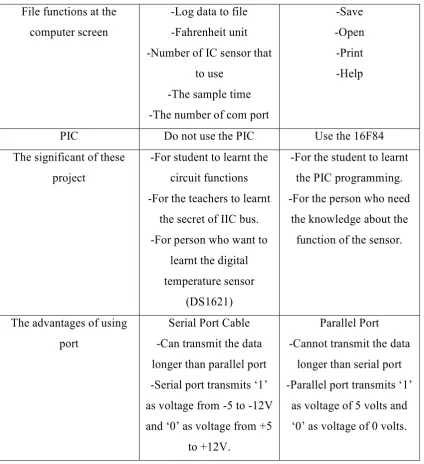
Performance PC Thermometer Previous
Display temperature Can display one or two temperature readings
which is indoor and outside
Can display only one temperature reading
Port to connect to the computer
Using serial port Using parallel port
Connector Using the DB9 which has 9 pins
5
File functions at the computer screen
-Log data to file -Fahrenheit unit
-Number of IC sensor that to use
-The sample time -The number of com port
-Save -Open -Print -Help
PIC Do not use the PIC Use the 16F84
The significant of these project
-For student to learnt the circuit functions -For the teachers to learnt
the secret of IIC bus. -For person who want to
learnt the digital temperature sensor
(DS1621)
-For the student to learnt the PIC programming. -For the person who need
the knowledge about the function of the sensor.
The advantages of using port
Serial Port Cable -Can transmit the data longer than parallel port -Serial port transmits ‘1’ as voltage from -5 to -12V and ‘0’ as voltage from +5
to +12V.
Parallel Port -Cannot transmit the data
longer than serial port -Parallel port transmits ‘1’
as voltage of 5 volts and ‘0’ as voltage of 0 volts.
Table 2.2.1: Comparing Project Using Serial Port and Parallel Port
2.1 The PC Thermometer V2
6
Figure 2.3.1 The system tray of GUI displayed
2.2 Simple PC Thermometer
This project was developed to measure and detect the temperature PC by using Serial port at PC. This project was involved two part that are the hardware and software. For the hardware part, the circuit was build using the component of diode, capacitor, NTC, resistor and serial port at computer. For the software part, this project was used the Microsoft Excel from Visual Basic 6.0 to set the graph.
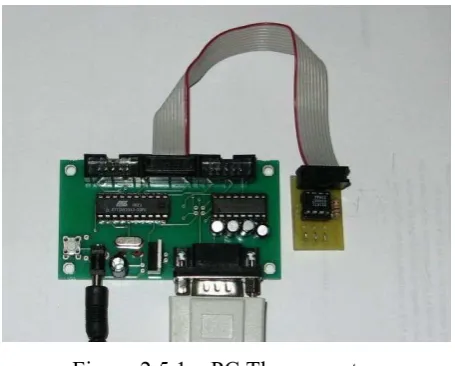
2.5 PC Thermometer
[image:21.595.206.434.544.727.2]7
This project was developed to show the temperature on the PC’s screen. This project only plug in any serial port at computer’s CPU. This project consists of the AVR 2313 Project board and the DS1621 Thermometer board and software for the PC. The AVR Project Board works as the interface between the DS1621 temperature board and the PC. The DS1621 Temperature board is connected to port of the ATTiny2313 microcontroller. The DS1621 measures the temperature and the microcontroller contains the firmware for passing through the measured temperature to the serial port. The AVR Projects Board has an on board voltage convertor, the MAX232, to convert the TTL signals of the microcontroller to the RS232 signals of the serial port. The AVR projects board has a 9-pin DB connector to hook the board to the serial port of computer’s CPU.
CHAPTER 3
PROJECT METHODOLOGY
3.1 Project Methodology
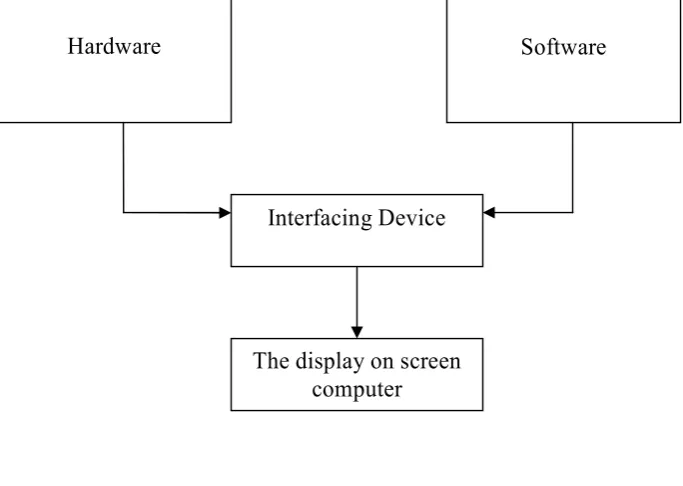
To achieve the goal that has been set in the objectives of this project, certain methods shall be used. Before starting on this project, research or literature review shall be done from books, internet websites, journals and course notes. This is to know the equipments, materials and components needed in building the project.
Figure 3.1.1 Project Methodology
Hardware Software
Interfacing Device
9
3.1.2 The Method / Procedure Project
Figure 3.1.2 The Method Used Do the simulation using
the PCB software
Construct the circuit
Identify the problems
Construct the Visual Basic program
Interfacing device
Result
End
Do research and get the information about the
project
Design the circuit Understand the whole project
Start
NO YES
YES
NO
YES