• Tidak ada hasil yang ditemukan

Pro Web Project Management ebook free download

N/A
N/A
Protected

Academic year: 2019

Membagikan "Pro Web Project Management ebook free download "

Copied!
242
0
0

Teks penuh

(1)

•฀Preparing฀a฀realistic฀budget฀and฀schedule •฀Getting฀clients฀to฀deliver฀project฀assets

•฀Handling฀and฀negotiating฀out-of-scope฀client฀requests •฀Writing฀effective฀e-mails

•฀Maintaining฀project฀momentum •฀Planning฀for฀launch฀day •฀Implementing฀support

From฀defining฀a฀project฀and฀its฀scope฀of฀work,฀through฀product฀development,฀

and฀Chris฀Steins฀offer฀practical฀guidelines฀and฀real-world฀advice฀that฀enable฀ you฀to฀take฀control฀of฀a฀project฀from฀day฀one.฀They฀also฀provide฀example฀

helps฀you฀solve฀problems฀quickly฀and฀effi-ciently.฀Packed฀with฀proven฀techniques฀and฀helpful฀templates,฀it฀will฀turn฀you฀ into฀an฀incredibly฀effective฀project฀manager,฀one฀able฀to฀take฀both฀simple฀and฀ complex฀projects฀from฀proposal฀to฀successful฀launch฀every฀time.

(2)

For your convenience Apress has placed some of the front

matter material after the index. Please use the Bookmarks

and Contents at a Glance links to access them.

(3)

Pro Web Project

Management

Justin Emond

(4)

iii

Contents

Contents ... iii

About the Authors ... iv

Acknowledgments ... v

Introduction ... vi

Chapter 1: The Project Life Cycle ... 1

Chapter 2: The Project Definition and Scope of Work ... 5

Chapter 3: Meetings, Meetings, Meetings ... 21

Chapter 4: Discovery and Requirements ... 43

Chapter 5: Project Schedule and Budgeting ... 59

Chapter 6: Running the Project ... 79

Chapter 7: Technical Documentation ... 89

Chapter 8: Development, Communication, Documentation ... 117

Chapter 9: Quality Assurance and Testing ... 135

Chapter 10: Deployment ... 151

Chapter 11: Support and Operations ... 163

Appendix ... 179

(5)

vi

Introduction

Is This Guide for You?

This guide was written for those who will manage or fund technology projects with budgets between $25,000 and $500,000. Our goal is to provide a quick-start guide for professional, smart, competent people who are new to web project management, or who need some guidance on how to manage a web project.

This guide offers a practical, step-by-step

project management process. While it is adapted from best practices in the technology industry, this guide recognizes the differences in the size, scope, and cost of projects. Project management techniques that may work perfectly for a 3-year, $10 million project may be overly burdensome for a smaller but still important 6-month, $500,000 project.

This guide generally focuses on web

application projects. A web application is a software application that is accessed using a web browser over a public network, such as the Internet, or a private network.

If you are a project manager, this guide provides specific

(6)

| Introduction

vii

How Is This Guide Different?

Many books and guides espouse well-documented techniques for managing larger technology projects with budgets exceeding $1 million. Likewise, there are several excellent how-to guides for managing small web site development projects with budgets of less than $25,000.

Most projects, though, fall somewhere in between. The techniques, documents, and tools recommended for the highly ambitious projects—while impressive—are often impractical, and require far more overhead documentation than a midsize project of more than $25,000 and less than $500,000 is likely to need. In theory, many of the techniques applicable to small web site development projects also apply to midsize projects. However, techniques for small projects tend not to scale well when there are more than two project team members, and these techniques frequently do not recognize the complexity involved in a more challenging midsize project.

This guide is about how to manage a technology project with a budget generally between $25,000 and $500,000. It includes

• Examples from the authors’ personal experiences;

• Examples of documents from real projects; and

• Immediately useful techniques that will translate to your own projects.

This guide is not an overview of popular project management methodologies and frameworks such as Agile and Waterfall, although we do touch on these topics.

Ultimately, we want this guide to serve as a reference that will help you to solve problems quickly and efficiently—problems that will inevitably arise in your own projects.

About the Document Examples

All of the example documents in this book are real, created by the Urban Insight team while working on projects for our clients.

(7)

| Introduction

viii Communication and Journalism at the University of Southern

California in 2009 decided to use the Drupal web content management system as the infrastructure for school-wide web publishing, student e-portfolio, and interactive media projects to provide real-life, hands-on journalism and communications experience to students.

(8)

C H A P T E R

1

The Project Life

Cycle

In this book, we make reference to various phases in the life of a project. These are the project phases and elements that are common to many, if not most, web development projects. The tips and techniques we offer are rele-vant to many phases in the project life cycle. For example, the section on how to run a meeting effectively will serve you well through your project, and perhaps even beyond your web project experience.

Following is a brief description of each phase, and where we discuss it in this book.

(9)

Chapter 1 | The Project Life Cycle 2

Visual design: This is often the most variable part of a project. In a web site development project, the design phase is often the area of the project where nontechnical team members have the most input, and where many smaller projects run over budget. Your best ap-proach to keeping the visual design phase on track and on-budget is to produce an excellent requirements document and wireframes in phase 1. We discuss the design process in Chapters 5 and 6.

Development: This is often the largest phase of the project, and where you have the greatest opportunity to be efficient, focused, and really allow your development team to stretch their wings. Conversely, this is also where you have the greatest opportunity to avoid the most dangerous mistakes from which most web projects suffer. Depending on the type and size of project, the development phase may start immediately after the planning phase, and conclude up to the testing phase. We offer lots of actionable tips and tech-niques on how to make this phase rewarding in Chapters 6, 7, and 8.

Content: The content phase of the project often overlaps with de-velopment and testing. This is the phase where you engage your us-ers or client to begin populating the system you’re building with content or data. As part of this phase you also provide training to your client. Training is critical to the success of your project, but sadly is one of the most often overlooked areas of web projects. We discuss the content phase in Chapters 8, 9, and 10.

Testing: When Chris first started running web projects, he felt guilty about having a section of the project and budget called “Test-ing” or “Quality Assurance.” After all, when delivering a quality ser-vice or product, should it not be perfect? It’s taken him many years to recognize that any project that does not plan for testing and quality assurance will not only fail, but fail spectacularly. Depending on the size of the project, quality assurance and testing can

represent 5%–20% of the project budget. Check out Chapter 9 for an easy-to-follow guide for testing.

(10)

Pro Web Project Management 3

Additional project management responsibilities fall outside of the project process we outline here. In subsequent chapters, we also cover the following:

Defining the project: Before a proposal is signed it must first be created. The task of turning initial, nebulous discussions with a client about a problem they face into a sensible (for both you and the client) proposal requires a thoughtful approach. We cover the process of defining a project in Chapter 2.

Meetings, meetings, meetings: If there is one common theme that binds together the activities of a project manager, it is the meeting. Meetings can keep your project running smoothly as easily as they can devastate budgets and sap morale. We talk about how to run focused and efficient meetings that keep everyone happy in Chapter 3.

(11)

C H A P T E R

2

The Project

Definition

and Scope of Work

Before you have a project, you have a proposal. The project definition is vi-tal because the proposal sets the tone for the entire life of the project. From our years of experience in advising clients on projects, we’ve devel-oped the following simple approach to easily navigate the pre-project phase:

 What is the problem?

 Can we help solve the problem?

 Outlining the solution: the scope of work

Since the proposal is the first work product of yours that the client will see, it’s vital to set a great first impression. With this in mind, we also cover how to prepare client documents.

Finally, we cover how to address a common client concern during the project definition phase: What is customization and what is configuration?

What Is the Problem?

(12)

Chapter 2 | The Project Definition and Scope of Work 6

“You won’t make it. You don’t have what it takes to make it on your own. You need to be able to sell wool blankets at a Dodger game on a hot sum-mer day.”

That remark hit Chris hard, especially coming from someone with whom he had worked for many years. But he also saw the fundamental difference in the way each of them would run a business.

He thought, “I won’t sell blankets; I’ll sell beer.”

Chris often recalls this conversation when meeting with a new client. He asks himself, am I trying to sell this client something that they don’t need— the wool blanket on a hot day? So when our team first speaks with a pros-pective client about a project, we present ourselves as advisors. We don’t start by trying to sell a product or service. Instead, we learn about the client, their business, their technology, and their specific technology prob-lem.

Be a Trusted Advisor

First, be an advisor. This approach will pay off down the road. If you appear to be a cheerleader for a particular technology or approach, your client will never be able to heed your advice without wondering if you are trying to promote your favorite technology. If you begin the project with an objective evaluation of the various approaches or technologies, you present yourself as your client’s advisor or advocate. This is a much stronger position than being a promoter of a specific technology.

Tip When you hear your client’s idea, rather than initially proposing a particular technology or so-lution, position yourself as an advisor and try to understand the client’s problem.

Listen to what the client is telling you about his or her problem, and try to get to the root of that problem. Here is an example of how a conversation might start:

Client: “We need a better system to print letters thanking donors for their contributions.”

(13)

Pro Web Project Management 7

Client: “It’s too manual. We have to retype every-thing.”

Consultant: “What do you use to track your do-nors?”

Client: “We keep some of it in a spreadsheet, and some of it in files.”

If we had tried to solve this (admittedly simple) problem by recommending a system for printing letters, we would have committed ourselves to a specific technology without understanding the problem. The problem here is not about printing letters. That is a byproduct of the real problem: the lack of a customer relationship management system or database.

Here is another example of trying to use a one-solution-fits-all approach to problem solving. We know a highly technical and skilled colleague who is an expert with a programming language called Perl. When asked to complete a task or project, he will always use Perl. It does not matter if there is a bet-ter language or way to do the project; he knows Perl, and that is what he will use to solve the problem.

If we have a programming project for which Perl is a good choice, then he is an excellent fit. If we have a project where the requirements do not match what Perl offers, he is the wrong choice. He thinks anything could be done using Perl. But if Perl is not a good solution, you would not want him work-ing on your project.

When you consider building a complex system or application, it is often un-wise to select the system architecture and software based solely on the qua-lifications of a single person. Often, it is much better to evaluate several op-tions and select the best fit.

Once we understand the client’s problem, we usually offer three likely tech-nology solutions, and present the pros and cons of each.

Be Honest. Really.

(14)

Chapter 2 | The Project Definition and Scope of Work 8

If there is a less expensive way to do the project, identify it. Client: “We’re thinking about asking you to imple-ment enterprise solution X to host and deliver streaming media from our web site.”

Consultant: “Hmm. That is a very good system, but it might be more than you need. Have you also consi-dered option Y?”

Client: “No, I’m not familiar with option Y.”

Consultant: “Let’s compare solutions X and Y, and see if Y might work you. It’s about 10% of the cost of enterprise solution X.”

Client: “Great. Now we have plenty of budget to have you perform the evaluation.”

Beyond the obvious ethical argument, honesty helps build a precious re-source that is easily lost and painfully gained: credibility. Credibility built at the start of the project—or even before it has begun—will help you manage the inevitable challenges you will face later in the project. Even when it hurts, it pays to be honest.

Can We Help Solve the Problem?

From time to time, when discussing a potential project with a prospective client, we realize that the solutions we could bring to the table are not the ideal options for the project. What do we do?

We discuss the most likely project options with the client, and then we tell the client that we are unlikely to be a good fit because we are not experts in the solutions that will best serve the project.

We are prepared to lose the business on that project. But, two surprising things often happen:

 The client hires us anyway. Many clients appreciate the value of having an honest advisor on the project, so they will hire us to help specify the project, hire a consultant, or provide project

management oversight.

(15)

Pro Web Project Management 9

good fit for a particular project, the potential client is likely to remember your candor and engage you on a different project.

Like honesty, knowing when you are not a good fit for a project will help you build credibility. There is no short supply of vendors and partners ready to sell something to your client, but there is a shortage of honest people you can trust.

Outlining the Solution: The Scope of

Work

If the client feels that we are a good fit the project, we’re asked to prepare a scope of work.

Fundamentally, a scope of work is the statement about what you will do. Often, the scope of work includes a budget or expected level of effort. The scope of work sets the bounds on what will be included in the project, and importantly what will not be included in the project.

Scopes of work take many shapes, but the best of them have common ele-ments. Your scope of work should almost always include the following:

Project Name

This is often an overlooked opportunity. Create an appealing and useful name that adds weight to the project. For example, “Admissions Database” is fine, but boring. Try changing the name slightly to “Admissions Database for Applicant Management,” or “ADAM.” Now the project has a catchy name, one that makes it seem more human, approachable, and manageable.

Contacts

Include the name and contacts of the project sponsor for whom you are pre-paring the scope of work as well as your own name and contact information.

Date and Version

(16)

Chapter 2 | The Project Definition and Scope of Work 10

Background

Add a few sentences about the high-level business need for the project, as well as how it originated and other background information. While this in-formation may be obvious to you and the project sponsor, you should be aware that a scope of work is often distributed well beyond the immediate project audience; for example, we know of a scope of work for a small web application development project that ultimately reached the CEO of a For-tune 500 company. This background clarifies the usefulness of the project to someone who is not familiar with the project.

Scope of Work

This is the essence of the project. Identify the different components or phases of the project separately. For example:

 Discovery and planning

 System architecture design

 Visual design

When we first started writing scopes, we would include one or more para-graphs about each project component. After observing how people tend to read scopes of work, however, we changed the way we prepare them. Typi-cally, we try to include a brief set of bullet points that clearly define the work that will be performed and the products that will result from each step.

For example:

Discovery and planning

 Conduct a series of three kickoff meetings to identify requirements.

 Prepare a requirements document.

 Create the application home page wireframe.

 Create five wireframes of key functional pages.

 Update the project budget, if necessary.

(17)

Pro Web Project Management 11

This approach also makes it much easier to estimate an initial project budg-et. For example, it is very difficult to identify accurately how much time is required for discovery and planning, which encompasses many steps. If you break this down into discrete tasks, it is much easier to determine the time required for each component and to total these individual costs to arrive at a budget.

For example, instead of including a huge item like “development” that in-cludes everything from design through launch, break up the scope and budget into smaller pieces that describe specific tasks included in develop-ment, such as

 Interface Theming

 Installation and Configuration

 Application Development

 Quality Assurance

 Testing and Beta Testing

 Launch

Timeline

Timelines will vary widely depending on the size of the project and the number of constituents. However, we find it helpful to prepare a genera-lized schedule as a starting point for discussion with the client. This schedule can typically be a simple Excel chart with five or six key milestones that cor-respond to key tasks in your scope of work. We usually include the follow-ing statement with the schedule:

“The project manager will update the project schedule upon completion of the discovery and planning phase of the project when the full project details are known.”

This helps you define a general schedule while allowing you to defer building a detailed schedule until you have more information about the project.

Investment Budget

(18)

Chapter 2 | The Project Definition and Scope of Work 12

Tip Our rule of thumb is that if the project is around $7K, you usually present the time required for each task in hours. If the project is over $7K, you present the time required for each task in days. Trying to estimate the number of hours required for a project over $7K implies a level of pre-cision in estimating that seldom exists in reality.

In many cases, your budget will be higher than what your sponsor expects. (Development is hard work!) If so, it helps to separate the optional tasks from the required tasks. You can do this easily by creating two budget sec-tions: core project budget and optional project budget. This way, the project sponsor or client can immediately identify which aspects of the project can be moved into a later phase without disrupting the entire project.

This also helps to avoid having to answer questions like, “Can we move the discovery and planning task to phase 2?” Obviously the discovery phase must come before—not after—the start of the project because by defini-tion, it’s discovery.

Approval

Even in informal or internal scopes of work, include an approval section with signature blocks for the project manager or representative of the com-pany, as well as the project sponsor or client. There is a psychological dif-ference between verbally agreeing to proceed on a project and actually hav-ing to put your signature and name on a scope of work.

The scope of work should never be a replacement for a formal contract for services between an organization and a consultant. A contract protects both the consultant and the organization paying for the project in the unfortunate case where the project does not work out as intended and needs to be terminated, or in cases where the sponsoring organization needs to termi-nate the project due to budget or other considerations.

Don’t Go Chasing Methodologies

(19)

Pro Web Project Management 13

are used. We don’t have a methodology to sell you. We have a project to complete on schedule, on budget, and according to your expectations. If anything, we advocate a pragmatic approach to the use of methodologies.

If you work in a larger organization that has a well-defined project manage-ment process, you may have little choice about which methodology your organization will use. However, for many project managers in web applica-tion projects, little thought is given to which, if any, methodology will be used. There are loads of software development methodologies floating around these days. Two of them seem to be exceptionally popular at present.

In the Agile software development methodology, teams work in short spurts building just a few features at a time, test and refine often, and gather feedback from the client frequently. Proponents of the Agile method argue that this helps to ensure client satisfaction as they are involved with the project from the start, and development can’t drift away from what the client wanted.

The polar opposite of Agile development is the Waterfall approach, wherein you move from one defined step of the project to the next in a deliberate and orderly way.

Because the Agile approach includes so much more feedback from the client than the Waterfall approach, Agile development is often considered client-driven.

Several popular businesses are outspoken about this approach, and so the Agile methodology is often perceived as hot and young, while the Waterfall methodology is seen as stuffy and old. Think Facebook (hot, young, and ex-citing) vs. IBM (staid, fatherly, and predictable).

Hype and popularity are not valuable measures of the merits of a technology.

(20)

Chapter 2 | The Project Definition and Scope of Work 14

Still, you will find that the approach we advocate in this guide is oriented more toward Waterfall.

Here are some pros and cons of each style based on our experiences:

Agile Methodology

Pros

Fast ramp-up. If you have a tight timeline and a team ready to go, an Agile process can get you started developing an interim product within a few days of the project start.

Immediate results. Agile focuses on providing immediately useful components during each sprint. If your project will benefit from being able to interact with and test drive the system quickly, Agile can work well for you.

Cons

Client expertise. In a client-driven consulting process, Agile assumes that the client possesses expertise in areas that would be useful throughout development. If this is not the case, and the client is not technologically sophisticated, inconsistent or undirected feedback can hurt the project. Getting feedback from someone never involved in a web project before—let alone a consulting engagement—could prove to be a disaster.

Project delays are highly disruptive. In our experience, many small and midsize projects are spread over long periods, and team members focus intermittently on the project in short bursts of time. In this case, if Agile is used, you can burn through your project budget quickly without achieving your project goals.

Waterfall Methodology

Pros

(21)

Pro Web Project Management 15

Manages expectations. Using a well-defined Waterfall process can help manage the expectations of the client. You make it clear when feedback will be collected and include time to act on that feedback, make refinements, and respond to your client’s concerns.

Cons

Changing requirements. Since there is a defined lag in time between approval of project requirements and the client’s first review, it’s possible that new requirements have been identified or priorities have changed. In Waterfall, these are hard to address.

Planning time. If you use Waterfall, you will spend significantly more time in project planning at the beginning of a project. This contrasts with Agile, in which the client and developer uncover requirements as the team proceeds with the project.

Less real-time feedback. Typically, there are longer intervals between client feedback on a project managed using Waterfall than on a project managed using Agile. Some project managers mitigate this concern by demonstrating to the client incremental features or having guided “walk-throughs” of selected features of the

application.

The Document Formats Rule

There are really three document formats:

 Formal, for documents like a scope of work or a requirements document;

 Informal, for a recommendations document or technology research summary; and

 E-mail, for everything else.

A formal document should have your logo, a nicely formatted footer at the bottom of the page, and a cover page with the client’s name, project name, client contact, document date, and a document reference code.

(22)

Chapter 2 | The Project Definition and Scope of Work 16

The informal format is great for documents that are too long for e-mail but do not need the logo, branding, and client information. Still, these should have a simple footer with a page number and the document title.

Preparing Client-Ready Documents

Whether it is a requirements document, a scope of work, a list of recom-mendations, or a feature request list, documents sent to the client must be treated with care. Like it or not, the content of your e-mails and documents largely shapes the client’s opinion of you. That is why a spelling mistake in an e-mail is so embarrassing—or should be. (See the “Tips for Writing E-mails” section in Chapter 8 for more information.)

Still, it can be painless to prepare client-ready documents. Follow these guidelines:

Send PDFs

Do not send documents in an editable format unless you specifically want the client to edit a document, which should happen infrequently. As a PDF, it looks more finished and works on any operating system or device.

Hand-Edit Your Document

The best way to edit a document is by hand. When you feel the document is complete on the computer, print out a copy, push your mouse and key-board away, grab a pen, and edit the entire document, start to finish. When you find errors, mark them on paper—avoid jumping to the computer to fix them.

You will catch more errors and the prose will read much better after a hand edit. Just try it.

Double-Check the Attachment

(23)

Pro Web Project Management 17

numbers in the footer. Then there are the Friday afternoon errors, like at-taching the wrong file.

Configuration vs. Customization

These two words sound similar enough. However, they can imply a huge difference in your project’s budget, level of effort, and timeline.

We find that when a current or potential client with a limited budget begins to outline ambitious plans for a project, explaining the difference between these two options can be useful.

In the simplest form, from a technical perspective, customization requires changing source code, while configuration does not.

Let’s dig into the differences a little more deeply.

Configuring Software

You modify the software using the software’s standard interface. For exam-ple, if you were using a web content management system, configuring the software would be completed using the web interface. Most good web-based software today is highly configurable, enabling you to shape the beha-vior of the software.

Customizing Software

You modify the code that powers the software. Customization can increase the cost and complexity of a project dramatically:

 You need a developer or engineer who understands the software and programming language well enough to perform the

modifications.

 You have to test the modifications you have made to the software to evaluate how they will work with other parts of the software. If your customizations are extensive or if the software is very complex, testing can be at least as challenging as the

customizations themselves.

(24)

Chapter 2 | The Project Definition and Scope of Work 18

you to have good documentation, a system to manage your code, and a developer who has expertise with the software.

Some types of software plan for customization and provide architecture to support it. For example, the open source web content management system, Drupal, provides a modular

architecture in which you can write your own custom modules that interact with the software. When it comes time to upgrade, you know that all your code customizations are retained in a specific custom module.

 Customization projects tend to create consultant lock-in, as those who make custom refinements are the experts on how to maintain them.

 Finally, if you customize your software, future development and maintenance will cost more. For example, when we come into a project where there has been a lot of customization (particularly if this customization took place over a span of a year or more and with several developers), we expect that there will be a variety of problems with the testing, code, or documentation.

Despite the challenges, however, there are compelling reasons to customize software:

 Customizing software is typically far less expensive than writing new software. If an open source software product provides you with 75% of the functionality you need, customizing the software is likely to be significantly less expensive than writing new software from scratch.

 Why? Let’s say you decide to rewrite an open source solution that provides 75% of what you need. You only have to do the work to recreate that 75%, right? Wrong. You will also need to fix all of the bugs and architectural issues that will naturally be introduced in the process of rewriting that code. Like it or not, more time is spent fixing bugs than writing software.

 From a marketing perspective, if you are supporting your products anyway, “customization” can make a nontechnical client feel good. People tend to like the idea of customizing—think about

(25)

Pro Web Project Management 19

Cost Implications

When a client or potential client understands the difference between cus-tomization and configuration, she appreciates the features that may be re-quired in the two types of software. She is much more understanding of the budget involved when the project requires customization.

Tip Our rule of thumb is to budget four times as much for customizing software than for configur-ing it.

Tactically, these cost implications can be used to help clients be sure that the incremental value they receive from a customization matches the cost. Some clients will ask for expensive customizations, but fail to notice that, of their requested customizations, two out of three were nice-to-haves, whe-reas one was worth many, many times its cost.

Wrapping Up

By this stage in your negotiations you should have a good general sense of what problem the client faces and whether you are a good fit to help ad-dress it. You should have all the tools necessary to write a great proposal. The next stage in the process—discovery and requirements—is to detail all of the specific features and functions of the project. We cover this in Chap-ter 4.

However, before we dive into discovery and requirements, we will spend the next chapter looking at a vital project management activity that occurs at all stages of the project process: meetings.

If project management is three things, it’s about managing your team, your client, and your boss. It’s in meetings where a lot of that “people manage-ment” happens. Bad meetings can be boring, unproductive, and inefficient. They can also put projects at risk if the client loses confidence in your ability to lead the project. Running a great meeting is vital to project management.

(26)

C H A P T E R

3

Meetings,

Meetings,

Meetings

Meetings matter. Your participation in meetings is often the most visible as-pect of your role as a project manager. Your ability to manage meetings and use them to your advantage will make a tremendous difference in the suc-cess of the project.

We’ll start with a cautionary tale about how not to conduct a meeting, and use the takeaway points from that story to discuss issues related to running a successful meeting. Beyond general advice, we’ll cover a few specific types of meetings that you are likely to encounter as a project manager, such as a project kickoff meeting.

We include tips on how to run a great meeting and how to write an agenda. To wrap up, we talk about how—wait for it—to wrap up a meeting.

Don’t Do This: A Disastrous Kickoff

Meet-ing

(27)

Chapter 3 | Meegings, Meetings, Meetings 22

Greg is excited about this first opportunity to flex his project management muscles for his new employer; he was hired specifically for this project just a few months ago.

Before the kickoff meeting with the client, he met with the technical staff at his consulting firm, who gave him a crash course in the pricey database management software that his firm sells and configures. Greg is ready to go—ready to manage the client and run the project.

On the day of the kickoff meeting, Greg and his two “technical liaisons”— who will make sure he can field any technical questions that might get thrown his way—have trouble finding parking and arrive 15 minutes late. Fortunately, the meeting has been scheduled for 4 hours, so Greg shrugs off the lost time as trivial.

Greg makes a good showing introducing himself and his developers to the eight people from the client’s agency who are attending the meeting. He is surprised that there are so many people; he anticipated only two or three. Although Greg did not bring an agenda, he has several company brochures, which he passes out and advises people to share. Fortunately, he has plenty of business cards, so he gives everyone one of those, leaving a few extra in the middle of the table for good measure.

There is some initial confusion about who is running the meeting. Greg is confident and announces that he is happy to lead the meeting. Since his background is in change management, he begins the meeting with an im-promptu discussion about how technology can be an important tool for change.

After about an hour, Greg decides it is time to have the client begin describ-ing what they want this new database system to do. Greg loves to talk, and at various points shows off his new database experience by explaining how databases work and why some of the client’s ideas may not be so great.

Just when Greg thinks the conversation is really getting going, one of the client’s representatives, Bill—whom Greg has decided he does not particu-larly like because he asks a lot of pointed follow-up questions—asks Greg to define the process that will be used to develop the database system.

(28)

Pro Web Project Management 23

notes in his leather-bound notepad so that he is more prepared to discuss the process next time.

After 3 hours, Greg notices that some of the clients are slipping out of the room and others are checking e-mail on their smartphones. Ah well, Greg thinks, they cannot be expected to understand all the technical details, or why would his firm have been hired in the first place? Greg decides that the group needs a break and interrupts one of the client representatives to an-nounce that they will take a 10-minute recess before wrapping up the last portion of the meeting.

After the break, only two of the client’s representatives have returned, and Greg decides to use the time to plan out the next meeting. He feels as if this meeting has gone very well and would like to plan another 4-hour meeting for the following week so they can continue making good progress. The client’s representatives seem hesitant to commit to another meeting, but Greg reminds them that change is never easy, and there is still a lot to get done. Greg says that he will discuss with the developers what they want to cover in the next meeting, and he will probably set up a demo of the data-base software they use.

About 30 minutes past the scheduled end of the meeting, Greg tells the client that they are done for the day, gathers up his developers, and heads out to the car. He cannot wait to talk with the developers on the ride back to the office about what a great meeting it was.

When Greg gets back to the office, he rushes into his boss’ office to give her the exciting news about how well the project is going. Greg is quite shocked to learn that the client has already called his boss and put the project on hold pending a discussion about how the project is being ma-naged.

Although the names have been changed, this is a true account. Greg is a real person, and this meeting really did happen. Greg is a fine fellow, and some-one you might enjoy having a beer with after work. However, Greg is totally unqualified at this stage of his career to be a project manager on a project of this size, complexity, and magnitude.

What did Greg do wrong?

 He arrived late.

 He failed to run the meeting.

 He let the meeting run too long.

 He didn’t provide focus during the meeting.

(29)

Chapter 3 | Meegings, Meetings, Meetings 24

This chapter introduces the fundamentals of running a successful meeting— including critical kickoff meetings and everything Greg did wrong—so that you can be successful and impress your colleagues and clients.

Project Kickoff

The kickoff meeting sets the tone and expectations for the balance of the project. Whether the participants are internal stakeholders or clients, this meeting will demonstrate the level at which the other team members are expected to perform.

For this reason, preparing well for your kickoff meeting is essential. Our three rules for running a kickoff meeting are as follows:

Prepare! This means knowing who is coming to the meeting and what roles the participants have in the meeting. Be sure you have a solid agenda, and have the client approve it.

Start on time; end on time. With a new client, this is very hard as the relationship is very new. You don’t want to leave an unhelpful first impression and you do want to be respectful of your client. However, it is even more important to end the meeting on time. We find it is more effective to table unresolved issues and stay on track than to let unresolved issues derail the meeting timeline and agenda.

Run the meeting. This is very hard for new project managers. Running a meeting does not mean that you have to rule with an iron fist, but it does mean that you have to gently keep everyone focused and moving forward on the agenda.

Now let’s look at some of the logistics and planning that go into preparing for a kickoff meeting.

What Should Be Covered?

(30)

Pro Web Project Management 25

One Hour or Five Days?

The length of your kickoff meeting should correspond to the size of the project. If you have a large, complex development project, you may need 2 to 5 days. If you have a small web site project, you may only need 2 hours. You should let the agenda drive the length. However, keep in mind that people have difficulty concentrating for extended periods of time. Most people can only sit still for about 90 minutes. Therefore, when we create our agendas, we make sure that we have a break every 90 to 120 minutes.

For example, if we were organizing a daylong kickoff meeting, we would ar-range meeting times along the following lines:

09:30 a.m. – 10:45 a.m. Session 1

10:45 a.m. – 11:00 a.m. Break

11:00 a.m. – 12:15 p.m. Session 2

12:15 p.m. – 01:30 p.m. Lunch

01:30 p.m. – 02:45 p.m. Session 3

02:45 p.m. – 03:00 p.m. Break

03:00 p.m. – 04:15 p.m. Session 4

04:15 p.m. – 04:30 p.m. Wrap-Up

If you start a meeting at 9:00 a.m., client representatives will almost always arrive late.

Tip Most people appreciate starting the meeting a little later so they have time to get into the of-fice and check e-mail.

(31)

Chapter 3 | Meegings, Meetings, Meetings 26

How Big?

The ideal size for a productive kickoff meeting is two to six people. If more people participate, your level of productivity will drop. If there are more than ten people, it is likely that the meeting is more about introducing your team and capturing very high-level stakeholder feedback. This is OK, but make sure you know your audience. With ten or more people, you will want to keep the agenda very simple and focus on high-level feedback. Save the details for a small, more focused meeting.

Traveling for a Big Project?

If you will be traveling a long distance—for example, to another state—for your kickoff meeting, then hold one or more—pre-kickoff meeting planning calls or meetings. The goal of these initial meetings is to reduce the pres-sure during the formal kickoff meeting by ensuring that you identify the client’s concerns, understand the key issues, and prepare an appropriate agenda.

For a major project with a client in Chicago (we are based in Los Angeles), we had a 2-day kickoff meeting scheduled. However, 2 weeks prior to the meeting, we held a series of three 1-hour calls with the client’s project man-ager to go over the proposed agenda and identify several key goals. During this meeting, we discovered that the client was using two software systems with which we were unfamiliar. This allowed us to research the technical details about these systems beforehand, and as a result we were prepared during the meeting. These calls also helped the client’s project manager feel more comfortable working with us and made sure that she would not be surprised during the meeting.

While this would have been inconvenient even if we weren’t traveling such a distance, at least we could have rescheduled the meeting more easily rather than have wasted a long trip to do so.

(32)

Pro Web Project Management 27

Preparing for a Meeting

If you do appropriate planning, your meeting will be much more likely to be successful. In this section, we give you a checklist of things you would typi-cally do when planning a meeting.

Tip Seventy-five percent of the effort involved in the meeting should be completed prior to the meeting so that very little is left to chance.

 Send a meeting agenda and any materials at least 1 day prior to the meeting (see the next section, “Don’t Waste Time: Write an Agenda”).

 Clearly identify your goals (ideally at least one, and no more than three) for the meeting.

 On the evening before or the morning of the meeting, send a brief reminder, including the agenda and time, date, and location.

 Know who will be attending the meeting, include them on the agen-da, and know at least a little (title, responsibilities) about each per-son. Ideally, try to guess what will be important to the other people in the meeting.

 If you are presenting one or more agenda items, know what point you will make with each item, and the result you want after present-ing it.

 Arrive 5 or 10 minutes early to the meeting location to set up, in-cluding placing the agendas, powering up your laptop, and otherwise preparing.

 Bring copies of the agendas and all handouts. If five people are slated to attend the meeting, bring six copies of everything. That way, you won’t be caught short if an extra person shows up.

 If you are demoing anything on your computer, have it loaded in ad-vance. For example, if you are showing web sites, the various web pages should be loaded in different tabs, or your PowerPoint should already be running before the meeting starts.

(33)

Chapter 3 | Meegings, Meetings, Meetings 28

 Beyond Internet connectivity, confirm in advance that the facility has everything you will need for your meeting. Don’t assume anything.

Don’t Waste Time: Write an Agenda

Meetings for small projects need to be efficient because your most scarce commodity is time to work on the project. In a larger project, however, you are likely to have more meetings involving more people simply because you have more stakeholders, a larger scope, and larger technical decisions to make. But meetings for larger projects—while more frequent and perhaps longer—need to be just as efficient, focused, and thoroughly planned as smaller project meetings. With a larger meeting, your stakes are higher.

Too many meetings without clear resolution are a wasted effort because discussions end up being circular or branching off into unintended areas. In either case, the discussion never addresses the meeting goals, and the par-ticipants’ time is wasted.

Why bother running a good meeting? Because the old adage is true: time is money.

Tip When you are considering calling for a meeting, remember that in software, time is bugs: time spent in meetings is time not spent fixing bugs.

Try this little exercise to see just how expensive meetings are.

 At the next meeting you attend, make a mental note of how many people are involved.

 If you work at a consulting firm, calculate the hourly rate of each person and total the cost.

 If you work at a traditional software development firm, assign two bugs per programmer, and one testing document and three e-mails per project manager or architect at the meeting.

How much did your meeting cost? Was it worth what was achieved? A 2-hour meeting with three .NET developers, a database developer, a project manager, and a database architect just cost the firm eight bug fixes, two testing documents, and six e-mails to clients.

(34)

Pro Web Project Management 29

Meetings are expensive, and most people hate them. Most people hate meetings because most meetings are not productive and are run poorly. But meetings do not need to be hated. It is not hard to run a great meeting. However, it does require planning, an agenda, and clear goals.

Why Do I Need an Agenda?

The whole point of a meeting is simple: to make a decision that involves more than one person. This decision might be a set of features, a schedule, an upgrade plan, or a technical outline to solve a problem. Whatever you might need from the meeting, it is still a decision.

Where does the agenda come in?

In order for a meeting to come to a decision, you need to have a clear goal. Why?

 A goal makes it clear to all involved what needs to be determined by the end of the meeting.

 A goal enables all participants to evaluate the success of the meet-ing.

 Most importantly, the goal leads to a decision. So what does the agenda do?

The agenda makes the goal clear (by stating it succinctly in the agenda) and it sets a framework for writing the discussion topics so that they help attain the ultimate goal of the meeting: the decision.

The Agenda Clothing Rule

There is no set format for an agenda and no hard-and-fast template that you can apply to every kind of meeting. An agenda can be a simple three-item list sent to the team in an e-mail, or a full and formal two-page agenda as a PDF attachment in an e-mail sent to a client.

(35)

Chapter 3 | Meegings, Meetings, Meetings 30

If you are meeting with clients who are wearing pressed pants and ties, you need a nicely formatted, formal agenda. If you are meeting with a develop-ment team wearing flip-flops and wrinkled T-shirts with trite, trendy state-ments, a simple e-mailed agenda will probably do just fine.

The short agenda—for the informal meeting—is usually written as part of a meeting reminder e-mail and contains a one-line goal for the meeting and a short list of two to five discussion items. It is short, sweet, targeted, and informal.

The long agenda—for the more formal meeting—is usually a full-page PDF that contains a few parts:

 Document title;

 Meeting location;

 Meeting date and time;

 Meeting goal(s);

 Topics/discussion items; and

 List of participants with titles and affiliations.

If the more formal meeting is meant to be more than an hour, you probably want to include times for each discussion topic. This helps you end circular discussions for items that are not making progress toward a decision in or-der to “respect everyone’s time and move on to the next item.”

If you had listed 30 minutes for the current topic and time is clearly up, it becomes easier to say, “I want to respect everyone’s time, so I think we re-ally need to move to the next topic,” without offending anyone.

A long agenda should probably end with a “next steps” topic to allow the person running the meeting to wrap up and outline what happens now.

Topics, Topics, Topics

The core of any agenda is the discussion topics you outline. These should be easy to write if you have identified a goal for the meeting.

Here are a few points to keep in mind:

(36)

Pro Web Project Management 31

 Be as specific as possible in each topic (the more vague the topic, the more vague and unhelpful the discussion will be); and

 Ensure that each topic helps achieve whatever goal you have out-lined for the meeting.

One trick to determining what topics are achievable in the meeting is to take a moment and think about all of the immediate decisions you need to make for the project to continue. Think through the major work tasks you plan to assign to various members of your team, the next major project phase (and what you need to get there), and what work product you might be expected to create soon.

Once the topics are in place, it should be clear who needs to attend to the meeting. If possible, try to pick the minimum number of people who might need to attend, as duplicate decision coverage from key stakeholders tends to be inefficient.

Let the necessity of the project guide you to good meeting topics.

Putting so much thought into an agenda might seem like overkill. But re-member, a meeting is a lot like what you eat: what you get out of a meeting can only be as good as what you put in.

Agenda Throwdown

(37)

Chapter 3 | Meegings, Meetings, Meetings 32

The good:

(38)

Pro Web Project Management 33

The bad:

Figure 3-2. An unprofessional and unclear agenda

Why is the “good” agenda better?

 The bad agenda does not list a start and end time, so the expecta-tion of meeting length is not managed. It will be harder to force the group to conclude the meeting and arrive at decisions in light of time pressure.

 The bad agenda does not clearly state the goal of the meeting. If you have not identified the meeting goal before the meeting starts, you will not have a strong premise to help you guide the discussion to resolving what you need resolved to move forward.

 The bad agenda is unprofessional, lacking an attendee list, a project or client identifier, and a location.

 Several agenda items on the bad agenda are not actionable, like “Users” and “3 reports.” What is the goal of these items in the meeting? It cannot be to just talk about reports and users. You like-ly need to verify report formats and identify a user list or confirm user roles—but this is not clear.

 The bad agenda items lack specificity, which would help steer the discussion to the resolution you need to move forward.

 The bad agenda items lack parallel structure. Whenever possible, agenda items should be formatted the same way by, for example, starting each item with action verbs like identify, review, and verify.

(39)

Chapter 3 | Meegings, Meetings, Meetings 34

meeting with a brief summary of where things will move following the meeting.

Tip A great agenda is specific, has clear goals, and includes actionable items.

You will notice a common theme among all of the criticisms here: maintain-ing momentum. Momentum in all phases of the project is crucial to keepmaintain-ing your efforts efficient and completing a project on schedule—two vital pre-requisites to project success.

Running a Meeting

“If you don’t know where you are going, any road will get you there,” author Lewis Carroll famously wrote in Alice’s Adventures in Wonderland. The same is true of running a project.

Most people who do not have experience running meetings tend to make a similar set of mistakes, which leads to unproductive meetings:

 They lose control of the meeting;

 They let the meeting run on too long; and

 They do not focus the discussion around the agenda.

The participants in your meeting want someone to assert control and run the meeting well. The participants want to be helpful and want to feel va-lued. If you run the meeting well and provide participants with a clear framework on how participants can contribute, the meeting will be success-ful, and the participants will thank you (sometimes, quite effusively) for run-ning the meeting.

Take Charge

The key to running a successful meeting is to take charge. Taking charge of the meeting should happen early, even before the meeting begins.

And remember from the previous section, “Don’t Waste Time: Write an Agenda,” two important tips:

 You should know what outcome you want from the meeting.

(40)

Pro Web Project Management 35

Tip Typically, participants will filter into the room, video, or conference call. To assert your control over the meeting, it is important that you make eye contact and welcome each participant.

Sometimes, meeting leaders will allow meetings to start late if key people have not yet arrived. Unless there is a specific reason to do so, avoid this approach. If you regularly start your meetings late, people will arrive increa-singly late to your meetings. However, if all participants know that your meetings start on time, participants will arrive on time because they know that they will be embarrassed by walking in late or entering a telephone conference late.

Starting the Meeting

Today’s meetings take place in a variety of formats: videoconference, webi-nar, telephone conference, in-person meetings, or a combination of formats. Regardless of the format, you can demonstrate your leadership by opening the meeting with a phrase like, “Let’s get started. First of all, thank you all for taking time out of your busy schedules to participate in today’s meet-ing.” This simple statement establishes your control of the meeting but also recognizes the value of the participants’ time.

As we have noted, most people do not like meetings. You can quickly win these skeptics over by recognizing that this meeting will only take as long as absolutely necessary. It is easy to do this with a statement like, “We have a full agenda, but I want to ensure that we respect your time today, so I will keep us moving along on the agenda to ensure that we conclude our meet-ing on time, or even a little early today.”

Introduce the Agenda

(41)

Chapter 3 | Meegings, Meetings, Meetings 36

Ninety-nine percent of the time, if you distributed the agenda several days prior to the meeting, no one will try to take over your meeting or change the agenda because they will know that this agenda has been planned for some time. In the unusual case where someone attempts to insert into the agenda an entirely irrelevant subject, you can suggest that the new item will be added to the agenda as a discussion point and then make a point of writ-ing it down on your own agenda to make that person feel as if her recom-mendation has been heard. If it turns out that you do not have time to cov-er this new item during the meeting, recognize the item at the conclusion of the meeting by suggesting that you will add it as an agenda item to the next meeting.

If you have more than five items on your agenda, you should break the items into a series of shorter meetings, even if the meetings have to be con-ducted one after the other. The problem with having too many items on an agenda is that people tend to get bogged down on the early items, leaving you with little time to discuss the later items.

Guiding the Meeting

Once the meeting starts, you have three responsibilities:

 Ensure a smooth and consistent flow to the meeting. This can in-clude introducing the background for an item on the agenda, and then asking the responsible person (if it is not you) to discuss the topic. At some point when the discussion around that item is com-plete, you can introduce the next item on the agenda.

 Track the action items. Each time there is a specific action (no mat-ter how small) that is assigned, volunteered, or implied, write it down as a brief sentence, with the name of the person who will need to get it done.

 End the meeting on time.

(42)

Pro Web Project Management 37

The primary challenge to accomplishing your responsibilities in running the meeting, of course, is that participants get sidetracked and begin discussing an issue that is not related to the agenda. This is undoubtedly the hardest part of running a meeting and requires some finesse.

Here are several quick techniques to help get the meeting back on track:

 When a meeting participant is talking endlessly about a topic, you can politely interrupt when they take a breath, acknowledge that what they are discussing is important, and then state you will add it to the agenda for continued discussion at a later point. Then ask if there are any other comments about the active agenda item. This is admittedly hard to do, especially when the person you are inter-rupting is important. Sometimes, in the interest of politics, there simply is nothing to be done. In this case, you can try asking the par-ticipant a question that attempts to bring the topic back to the meeting at hand.

 When a meeting gets off track, you can quickly restore order by stating, “This is an important issue, but we won’t be able to respect your time and resolve this issue during our meeting today. Let’s put this item on the agenda for a future meeting or follow-up call, and get back to today’s agenda.” This technique shows that you are pushing the meeting back on track to respect the participants but, at the same time, identifying a time when the issue can be addressed. Participants in the meeting will love you for doing this.

 When you find that you have reached an impasse on an agenda item, and further discussion will not be productive, you can con-clude discussion with a phrase like, “It appears that we won’t be able to resolve this issue during our meeting today. I’ve recorded where we are on this issue so we can come back to it at some fu-ture time. Let’s proceed with the next item on the agenda.”

Winding Down the Meeting

(43)

Chapter 3 | Meegings, Meetings, Meetings 38

With only 7 minutes left, you need to wrap up the meeting. Typically, the last item on your agenda should be something like, “Review Action Items.” You can signal the wrap-up of the meeting with a simple phrase like, “I want to respect your time and end our meeting on schedule, so we need to wrap up. Let me just summarize our action items.”

At this point, you should summarize each of the action items you recorded during the meeting, and look at the person to whom each task is assigned. When you are done with your list, ask if there are any other action items you missed.

Finally, with a few minutes remaining, thank the participants for their time, and adjourn the meeting; “I want to thank each of you again for taking time out of what I know must be a very busy day to participate in our meeting. I will be following up via e-mail with the action items we identified during our meeting.”

Meeting Wrap-Up

The key to a successful meeting is direction, momentum, and decisions. Re-ally, these are all the same thing: ensure that the meeting moves the project from point A to B, no matter how small or large that might be. The key is

progresstoward completing your project. The goal of the meeting wrap-up is then the same: take the progress you made during the meeting and move forward.

The simplest way to move forward from a meeting is to identify the next steps, decisions, and deliverables needed from the project team in the form of action items. A deliverable is a document you provide to the client. An ac-tion item is simple: it’s something you need someone to do. This is a specif-ic, individual, attainable task that needs to be completed for the project to move forward.

This task could be work product (for example, identifying primary navigation items) or a decision (for example, deciding whether to use a fixed or fluid-width design).

An e-mail is a great format for a meeting wrap-up. Here are some tips:

Brevity is important. Keep the e-mail and individual action items as short as possible.

 Thank everyone for taking the time to participate in the meeting.

(44)

Pro Web Project Management 39

Label each item with initials to clearly name the person who is responsible for completing that item. (Items assigned to a group or to no one will never be completed because no one is responsible for them.)

 Clearly identify the next steps from the meeting (commonly an updated document following feedback, some other kind of delivera-ble, or the decision to proceed with the next phase of the project).

Your Monday morning checklist (see Chapter 6) is a great time to review any meeting follow-up e-mails you sent out in the previous week and “ping” people on tasks assigned to them to prod some work product out of your client. You can forward the meeting follow-up e-mail from your Sent folder with a short note that says something like this:

Hi {client first name},

I just wanted to check in on the {action items}.

If there is anything I can do to help, please don’t hesi-tate to let me know.

Thanks, {call sign}

A quick e-mail like this is a polite way to guilt the client into action on the task they promised to complete. A little guilt can go a long way. Some people may regard the forwarding of an unanswered e-mail to be aggressive. However, if you wait a reasonable amount of a time for a reply (3 business days) and do not receive one, then the recipient may feel too guilty about not replying to feel overly managed.

Tip If you use a project management tool (see the Appendix for a list of tools), action items are perfectly suited to become tasks that you can assign to project and client team members.

What About Minutes?

(45)

Chapter 3 | Meegings, Meetings, Meetings 40

Meetings are not about remembering discussion (that is what minutes are great for), they are about deciding action. This is why action items are useful because they are specific, individual, attainable tasks that move the project toward completion.

Wrap-Up E-mail Example

Here is a sample e-mail that summarizes a meeting where the client re-viewed the first draft of wireframes we prepared.

Hi Team,

Thanks for taking the time today to chat about the draft wireframes for the new {project name} web site. I collected great feedback during our call.

Here are the action items I collected during our meeting:

1. Confirm primary navigation items (Wendy)

2. Provide three example images from existing site (Wendy)

3. Research options for using Flash in the navigation (Justin)

4. Determine fixed vs. fluid width (Gabe)

5. Prepare a set of refined wireframes (Justin)

6. Approve updated wireframes (Wendy)

I’ll take all of the comments I collected today and prepare a new set of wireframes. I expect to have to the updated wireframes to you by the end of next week.

If there is anything else you need or if you have any questions, kindly let me know.

(46)

Pro Web Project Management 41

Wrapping Up

Hopefully by this point you have a good sense of how disastrous to the health of the project Greg’s approach to meetings is. It is no surprise his project was put on hold by the client. He didn’t plan ahead, didn’t take con-trol of the meeting, and didn’t build confidence with his client.

Preparing agendas and paying attention to the clock sound pretty dry, but a well-executed, well-planned meeting can keep the project running smoothly and everyone involved happy.

(47)

C H A P T E R

4

Discovery and

Requirements

By now you should have a signed scope of work with the client and be ready to actually start the project. Where to begin? That’s easy: discovery. Discovery is a vital first step in your project. In discovery, you turn the va-gue feature outlines in the proposal into detailed, actionable lists of features that will be built.

Discovery is vital for a variety of reasons, so we start with a clear explana-tion of why we think it’s so important. We then look at the two main kinds of documents that get created in this phase: sitemaps and requirements documents. We show you how to gather requirements, how to format the document, and some guiding principles on what makes a good requirement.

To wrap up, we also cover the importance of getting the client to approve the requirements for the project and dealing with out-of-scope requests (a challenge on almost any project).

Why Discovery?

Discovery is the process by which you identify exactly what you and your team are going to build.

(48)

Chapter 4 | Discovery and Requirements 44

it is not necessary to have this precise list to create a proposed project budget.

Consider the difference between the scope of work and discovery as “what” vs. “how.” The scope of work might include, “Develop a web inter-face for importing contact records in an external file.” That’s the “what.” The discovery process gets into details—the “how.” How the file will be formatted, with what frequency will the file be imported, and what should happen when errors are encountered.

For the project to be successful, it must be crystal clear to the project man-ager—and thus the project team—and the client exactly what the system will do. For example, in a scope of work, the sentence, “The web site will contain a blog,” can mean one thing to a client and an entirely different thing to a project manager. The client might envision a blog that allows users to create podcast posts that integrate with iTunes automatically and include a one-click method to embed uploaded video, while the project manager might simply picture a blog limited to user posts with a title, body, and date of publication, and nothing else. The whole point of discovery is to ask ques-tions like, “What do you need the blog to do?”

Identifying the requirements for a project will help reveal any disconnect be-tween the client’s expectations and yours. It is in this phase when those

disparities will appear and when they can be addressed at the low-est cost. (For handling out-of-scope requirements, see “Dealing with Out-of-Scope Requirements” later in this chapter.)

Discovery is a clear critical path item. You absolutely should not pro-ceed with design or development until you have a discovery document fina-lized and approved by the client.

Depending on the project type, there are two kinds of documents you can create to complete project discovery. For a web site redesign project, a sitemap is sufficient. A web site redesign tends to focus less on custom application development and the features that come with it and more on capturing the configuration of the new version of a public web site. A public web site has a set number of ways that it tends to behave, while an applica-tion is an entirely customized experience.

Gambar

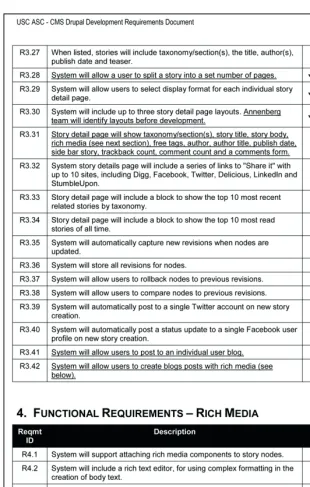
Figure 4-1. An excerpt from a requirements document for NeonTommy.com
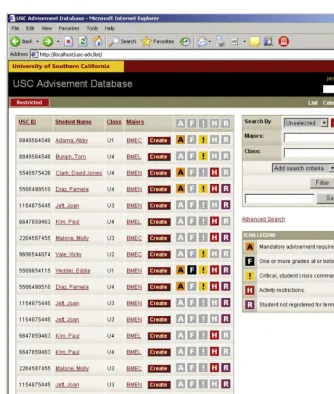
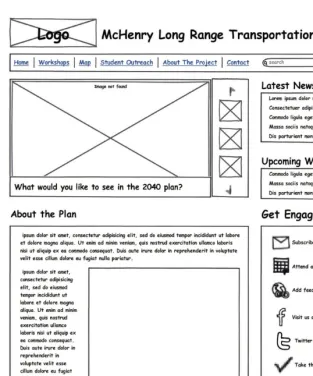
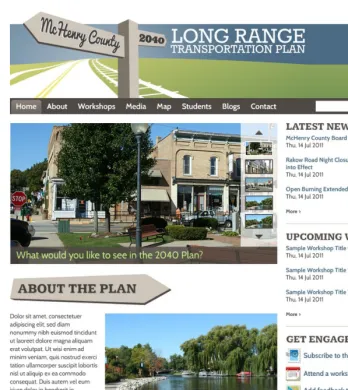
Figure 7-1. An  HTML mock-up for the home page of a custom web application. The mock-up is just HTML; there is no functionality in the links and UI elements
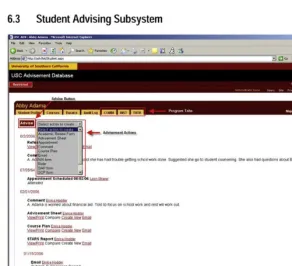
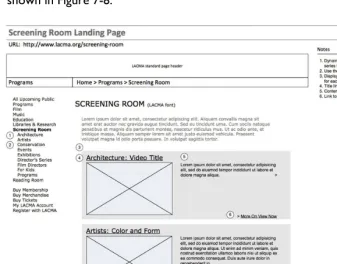
Figure 7-2.  A page from a technical specification detailing how a key user interface
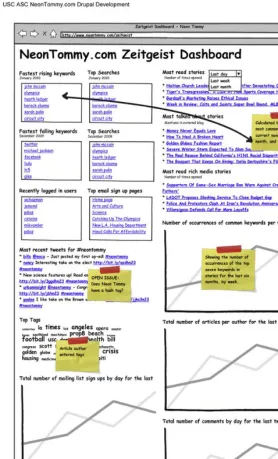
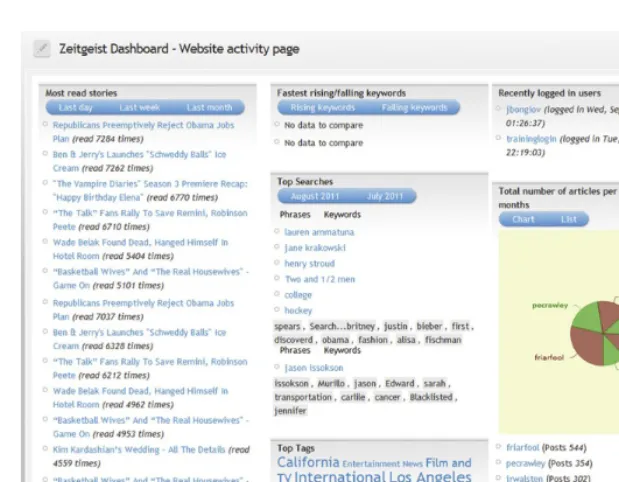
Figure 7-3. A wireframe for the editor’s site activity dashboard in NeonTommy.com
+7

Referensi

Dokumen terkait