Praise for
Essential Mobile
Interaction Design
“In Essential Mobile Interaction Design, Banga and Weinhold do a great job of explaining what it takes to make a good-looking and easy-to-use app. The accessible language and visual examples of quality work combine to make this book a great resource for those looking to get into app design, or to take their craft to the next level.”
— Jon Becker
boom. reactive.
“Essential Mobile Interaction Design is not merely a book full of pictures and design concepts or one of straight technical drivel. Instead, it is a guidebook for creating human-based interfaces that feature simplicity, functionality, and value. Whether you have questions about how mobile design is different from traditional desktop design, how to work with a developer, or even what tools to use for the creation process, Essential Mobile Interaction Design demonstrates the answer for that.”
— Phil Dutson
Lead UX and Mobile Developer, ICON Health & Fitness
“Filled with nuggets of useful information, this book is a solid resource for the many aspects of designing a mobile app. I’ve found many recommendations in this book that we can use in our apps.”
— Lucius Kwok
CEO, Felt Tip, Inc.
“A well-rounded, easy-to-read book that provides a good grounding in mobile design and how to keep all those small details in mind so that your apps will really shine.”
— Dave Verwer
Essential Mobile
Interaction Design
Perfecting Interface Design in Mobile Apps
Cameron Banga
Josh Weinhold
Upper Saddle River, NJ • Boston • Indianapolis • San Francisco
New York • Toronto • Montreal • London • Munich • Paris • Madrid
The authors and publisher have taken care in the preparation of this book, but make no expressed or implied warranty of any kind and assume no responsibility for errors or omissions. No liability is assumed for incidental or consequential damages in connection with or arising out of the use of the information or programs contained herein.
App Store, Apple, the Apple logo, Apple TV, Aqua, Cocoa, Cocoa Touch, Cover Flow, Dashcode, Finder, iMac, Interface Builder, iOS, iPad, iPhone, iPod, iPod touch, iTunes, the iTunes logo, Leopard, Mac, the Mac logo, Macintosh, Maps, Mavericks, Multi-Touch, Objective-C, Safari, Snow Leopard, Spotlight, and Xcode are trademarks of Apple, Inc., registered in the U.S. and other countries. Android, Google Chrome, Google Maps, and Google Play are trademarks of Google, Inc. Chatheads, Facebook, Facebook Chat, Facebook Home, and the Facebook logo are trademarks of Facebook, Inc. Bitbucket and the Bitbucket logo are trademarks of Atlassian Software Services. The TestFlight logo is a trademark of Burstly, Inc. SkyDrive, Skype, Windows 8, and Windows Phone 7 are trademarks of Microsoft, Inc. The Twitter logo and the Vine logo are trademarks of Twitter, Inc. The Tumblr logo and the Yahoo! logo are trademarks of Yahoo!, Inc. Chicago Fire and the Chicago Fire logo are trademarks of Andell Holdings, LLC and Major League Soccer. The CNN logo is a trademark of Turner Broadcast System, Inc. The Cincinnati, Inc. logo and CL-900 are trademarks of Cincinnati, Inc. For information about buying this title in bulk quantities, or for special sales opportunities (which may include electronic versions; custom cover designs; and content particular to your business, training goals, marketing focus, or branding interests), please contact our corporate sales department at [email protected] or (800) 382-3419.
For government sales inquiries, please contact [email protected]. For questions about sales outside the U.S., please contact [email protected]. Visit us on the Web: informit.com/aw
Cataloging-in-Publication Data is on file with the Library of Congress
Copyright © 2014 Pearson Education, Inc.
All rights reserved. Printed in the United States of America. This publication is protected by copyright, and permission must be obtained from the publisher prior to any prohibited reproduction, storage in a retrieval system, or transmission in any form or by any means, electronic, mechanical, photocopying, recording, or likewise. To obtain permission to use material from this work, please submit a written request to Pearson Education, Inc., Permissions Department, One Lake Street, Upper Saddle River, New Jersey 07458, or you may fax your request to (201) 236-3290. ISBN-13: 978-0-321-96157-0
ISBN-10: 0-321-96157-9
I dedicate this book to Gavin. Although we’ve only just met, I couldn’t be
more excited to be your uncle. Hopefully, you’ll be interested in interface
design one day so that you can read through this and remind me how silly
and archaic our phones and computers once were.
—Cameron
I dedicate this book to Mallory. Thank you for always encouraging me to
take on new challenges and pushing me to always aim higher.
Preface
xvii
Acknowledgments
xix
About the Authors
xxi
1
A Look at Mobile and Its Main Players
1
The Field of Interface Design 2
The Dawn of the App 3
Defining an App in Today’s Context 5
Build It and They Will Come 7
What Is a Mobile Device? 8
A Portable, Pocket Computer 9
Tablets, Too 10
Other Devices That Are Part of the Revolution 11
The Industry’s Key Players 12
Apple 12
Google and Android 13
The Other Players 14
Distinctions between Platforms 16
Conclusion 19
2
Design for Humans, by Humans
21
What Is Interaction Design? 22
Goals When Designing an Interface 25
Designing for Humans 25
Designed by Humans 28
Where to Begin 30
Anticipating Your User Base 32
Mobile’s Role in User Workflow 35
Conclusion 37
3
Dynamic Differences in Mobile Design
39
Understanding the Role of Mobile 40Mobile-Only Interactions 41
Interactions Only Possible with a Smartphone 42
Interactions Only Possible with a Tablet 44
Interactions That Aren’t Possible on Mobile 46
Keyboards and Data Entry 46
Click, Tap, Point 47
Expandability 48
Universal Appeal 48
Interaction Experiences for Phones and Tablets 48
Interaction Experiences for Multiple Platforms 53
Complementing Traditional Workflows 55
Conclusion 57
4
First Sketches of an App
59
What Tools Do You Need? 60
Becoming a Designer 65
Planning for a Specific Platform 66
Starting with a Workflow 68
Meeting Design Expectations 70
Wrapping Up Design Documentation 73
Creating Pixel-Perfect Digital Mockups 73
Reiterating Before It’s Too Late 75
Preparing for the Next Stage 77
Conclusion 79
5
Finding the Right Design Flow
81
The Big Three App Types 82
Native Apps 82
Web Apps 83
CONTENTS xi
Common App Navigation Methods 85
Single View 85
Stacked Navigation Bar 87
Tab Controller 88
Scroll Views 89
Search-Driven Navigation 90
Modal Controller 91
Gesture-Based Navigation 92
Picking an Interaction Type 93
Minimizing Interface Friction 96
Preparing for Connectivity Failure 98
Conclusion 102
6
Designing for Visual Appeal
103
How Appearance Changes Interactions 104
Skeuomorphic Design 104
Flat Design 106
Creating an App Icon 107
Finding a Unique Look 111
Matching Art to Interaction Design 115
Crossing Platforms 117
App Branding Guides 118
Building Art That Scales 119
Adding the Final Touches 123
Conclusion 126
7
Working with Programmers
127
Understanding Your Programmer 128
Learning Programming Languages 128
From Sketch to Programmable Design 130
Communicating During Development 136
Clear Communication 136
Tracking Issues 137
Learning More 139
Comprehending the Source Code 141
A Designer’s Introduction to Programming 141
Writing Source Code 143
Knowing What to Change 144
Conclusion 148
8
Making Apps Usable by All
149
Knowing Your Audience 150
How Sandboxing Changed Mobile 152
Interactions for the Mass Market 157
Trait 1: Not a Computer Geek 157
Trait 2: Only Uses a Handful of Apps 158
Trait 3: Uses Apps in Short Bursts 159
Trait 4: Follows the 80/20 Rule 159
Trait 5: Likes What Everyone Else Likes 160
Building Multilingual Interaction Designs 160
Designing for Users with Disabilities 163
Conclusion 166
9
Designing for Simplicity
167
The Sophistication of Simplicity 168
Striving for Simple Interaction Design 168
The Difficulties of Simplicity 170
Simple Design Goals 171
Clarity 171
Continuity and Flow 172
Retention and Growth 173
Interfaces That Do It Well 175
iOS’s Slide-to-Unlock 175
CONTENTS xiii
Creating Simple Interactions 178
Learning to Say No 178
Making Tasks Obvious 178
Offering Subtle Hints 179
Putting Elements in the Right Location 180
Addition by Subtraction 182
Simplicity through Familiarity 183
Using Well-Known Visuals 184
Following Industry Leaders 185
Going Against the Grain 186
Testing Simplicity 186
Speed of the App 186
How the App Is Being Used 187
Social Reach 188
Dogfooding 189
Conclusion 191
10
Gaining Valuable Feedback
193
Showing Off Your Work 194
Protecting Your Secrets 194
Choosing the Right Testers 195
When to Share Your Work with Testers 196
Devising a Beta-Test Strategy 198
Tracking an App’s Issues 199
Prepping Every Build 200
Handing the Beta Off 203
Analyzing Valuable Test Data 204
Knowing Where Testers Spent Their Time 205
Finding Software Bugs and Crashes 206
Managing Issue Resolve 207
From Beta to Positive Changes 208
Determining When Enough Is Enough 208
Releasing the App 210
11
Refreshing a Design
213
Improving as a Designer 214
Maintaining a Work Journal 215
Evaluating Your Own Work 216
Judging Who Is Worth Listening To 218
Review Web Sites 219
App Store Reviews 221
Personal Messages 222
Avoiding Negativity 223
Turning Requests into Changes 224
Preparing Users for Design Changes 226
The Resubmission Process 228
Conclusion 230
A
Standout Apps
231
1Password 232
Amazon Mobile 232
CNN News 233
Coach’s Eye 234
Evernote 234
Facebook 235
Flipboard 236
Google Chrome 237
Google Maps 237
Instagram 237
Instapaper 239
MLB.com At Bat 240
Twitter 240
TuneIn Radio 241
Wolfram|Alpha 242
B
Apps for Designers
243
Adobe Photoshop 244
CONTENTS xv
Bugshot 245
Dribbble 246
Icon Slate 247
MindNode Pro 247
Pngyu 248
Skitch 249
Spark Inspector 249
xScope 249
C
Artwork Requirements for Android and iOS
251
Android 252
Icon Sizes 252
General Art File Format 252
General Art File Management 253
Naming Conventions 254
Other Tips 254
iOS 255
Icon Sizes 255
General Art File Format 256
General Art File Management 257
Naming Conventions 258
Other Tips 258
PREFACE
This text offers an introduction to and general overview of interaction design for all mobile computing platforms, with a particular emphasis on Google’s Android and Apple’s iOS platforms.
Mobile apps should feel natural and intuitive. Users should quickly and easily understand them. This means that effective interaction and interface design is crucial to the success of any mobile app. Few mobile app developers (or even designers), however, have had adequate training in these areas.
Touchscreen-focused, mass-market mobile applications are a type of technology that’s only been possible to create since 2008, and the industry has seen monumental shifts and growth in the six years between the introduction of the “app economy” and the publication of this work. This book aims to help put you in a place to succeed as a designer in today’s app market by teaching proven principles and techniques that you can use in your next app, no matter what mobile platform, targeted device, form factor, or user base you’re targeting.
In short, the tutorial style used here aims to help you master the mindset, processes, and vocab-ulary of mobile interaction design so that you can start making better choices right away. This book guides you through the entire process of app design, demystifying many of the tasks and issues that arise during the many stages of developing, releasing, and improving a mobile app. Cameron Banga has been working in mobile application development since 2009, and in the nearly five years since releasing his first app he’s contributed as a designer or as an adviser to more than 100 applications for iPhone, iPad, Android, and OS X. In that time, he’s seen firsthand the growth and change experienced in the mobile industry and has worked to meet client and customer expectations throughout the many evolutions of mobile platforms.
This book aims to serve as a central resource for programmers or designers looking to best determine how to establish themselves in today’s modern mobile landscape by offering advice formulated and acquired through Cameron’s experiences over the past several years as a pio-neer of the mobile app economy.
No programming knowledge and only basic design knowledge is required to understand this book, as it’s been carefully crafted to be universally readable and helpful. In situations in which it does dive into extremely specific terminology or a topic for which prior information would be required, breakout boxes offer context and suggestions as to where the reader can look for further information that’s beyond the scope of this book.
Only basic design tools were used to create the example work included in this book, and the software or hardware that was used is detailed where relevant. Much of this book focuses on general theories and somewhat universal design practices that can be slightly modified and fine-tuned to the reader’s specific circumstances. Additional resources that are required or may be helpful have been posted online at http://cameronbanga.com/EMIDbook.
ACKNOWLEDGMENTS
This book would not exist without the dedicated work of Laura Lewin (our gracious and ever-helpful executive editor) and Olivia Basegio (our wonderful editorial assistant, always willing to lend a hand and keep us on track). We’d like to give a huge thank you to the entire Addison-Wesley editorial team, especially Michael Thurston and Melinda Rankin.
Special thanks go out as well to our technical reviewers: Jonathon Becker, Victor Lara, and Francisco Velazquez. The book is significantly better due to their recommendations, nitpicking, and fact-checking.
Cameron
I am extremely thankful for all of the people who worked with me and tolerated me through-out the lengthy process of book development, particularly my mother, father, brother, and sister-in-law. I can’t explain the gratitude I have for my family and their ability to put up with the absences, stress, and limited schedule that comes with writing a book. Thanks to the entire 9magnets team: Dillon Carter, Nathan Feldsien, Michael Phelps, and Francisco Velazquez; they were amazing coworkers and even better friends throughout the entire process. I would also like to give special thanks to all the amazing people that I’ve had the pleasure to meet in the independent app development community that serve as my biggest source of inspiration every day. Cabel Sasser, I hope that this makes you proud.
Josh
ABOUT THE AUTHORS
Cameron Banga is the lead designer at a company he cofounded, 9magnets, LLC. He has worked on more than 100 mobile apps for clients ranging from professional sports teams, to educators, to large corporations. His first application, Battery Go!, quickly became an iPhone best-seller, and his apps have been recommended by the New York Times, Fox Business News,
Macworld, PC Magazine, and many other media outlets. Cameron holds a B.A. in economics from Valparaiso University.
When not writing, Cameron is an avid photographer, novice runner, and coffee connoisseur in training. Cameron can be most easily reached via Twitter, at @CameronBanga.
Josh Weinhold is the assistant editor of the Chicago Daily Law Bulletin newspaper and Chicago Lawyer magazine. He spent five years as a political reporter and has written hundreds of news articles and feature stories published in the Daily Law Bulletin, the Elkhart Truth, the Dubuque Telegraph Herald, and on msnbc.com. He shared a National Press Club Online Journalism Award with other members of an msnbc.com and Elkhart Truth reporting team, and won The Chicago Bar Association’s Herman Kogan Award for legal beat reporting.
C H A P T E R 1
A L O O K A T M O B I L E A N D
ITS MAIN PLAYERS
Apple may have popularized the use of smartphones
and tablets, but a number of other companies
followed its path and moved quickly to get in on
this latest digital revolution. Now the marketplace
is filled with hardware manufacturers and
platforms. In this chapter, you’ll find an overview of
introductory topics that will be crucial to understand
as you begin designing for iPhone, Android, and
other mobile platforms.
You’ll also find a brief history of mobile app
design and information about how this industry
grew. As a designer, you’ll need to understand the
The Field of Interface Design
There once was a very dark time in the world of mobile computing: a time when we navigated phones using small arrow keys or a rough scroll ball, a time when a calculator and an alarm clock were considered advanced features on a device that primarily made calls and sent text messages, a time when the most advanced game a phone could run involved a rectangular “snake” chasing after pixelized “fruit.”
But in the late 2000s, a combination of two companies, touch-screen technology, and one ad campaign changed all of that.
Just a few years after Apple touted in print and television advertising that “there’s an app for that,” asserting that there was a way to accomplish anything you wanted to on the iPhone, it seems that there has become an application for any task our hearts desire to perform. Yet, there can’t be an app for everything already; otherwise, you wouldn’t be looking to jump into the world of mobile development.
THE DAWN OF THE APP 3
Let’s get started. You’ll be jumping into the fine details of mobile interaction design soon enough, but first you need a short history lesson in mobile computing to lay the groundwork for the world you’ll soon be exploring.
The Dawn of the App
With the sudden explosion of the affordable smartphone market came the rapid ubiquity of apps: smaller, more focused, and often inexpensive programs that add value to the most advanced piece of technology individuals have ever owned.
What makes up these apps? Naturally, they have an underlying logic and are comprised of code, art, and images; but what actually makesup one?
Apps aren’t a new thing or a recent advance in computing. An app—short for application—is just a piece of computer software designed to help a user solve a problem. Compiled from lines of code into a binary code (see Figure 1.1), typically written inside of an integrated development environment (IDE) such as Xcode or Eclipse, an app is seen as the most practical way for users to manipulate their computers or mobile phones into helping with an everyday task.
Today, you’ll find apps most commonly on mobile phones, but they’ve existed on comput-ers for decades. Generations of word processors, spreadsheet programs, first-pcomput-erson shooter games, and photo-editing platforms all qualify as “apps”; such apps just had to be installed via a floppy disk or CD-ROM. The abbreviated, seemingly new term grew popular in 2008 because of Apple’s well-known “There’s an app for that” marketing campaign and the launch of the App Store.
Most smartphones that came before the iPhone or Android phones shipped to consumers with a miniscule number of applications installed, typically curated by the hardware manufacturer or phone carrier. Because there wasn’t much choice, these applications often had a high cost and limited feature set. There was no reasonable market for such apps because most develop-ers were unable to get their software on the platform and carridevelop-ers had little incentive to create apps that truly met consumer needs.
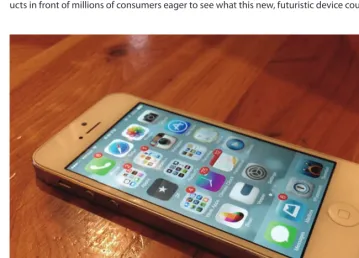
That environment changed radically, however, with both the advent of the touchscreen phone and access to a consumer-facing app store. Full-glass touchscreen phones, like the iPhone shown in Figure 1.2, were revolutionary in many respects. Gone were the days of phone inter-faces limited by a number keypad or an extremely small keyboard that was difficult to type on. The glass screen became a blank canvas on which anything could be created, and it allowed developers to work with a fluid interface capable of handling nearly any type of application. Although the technology within a phone gave developers unprecedented design power, an app store gave them unprecedented direct access to consumers. Almost instantly, developers with basic programming knowledge and a computer capable of compiling code could get their prod-ucts in front of millions of consumers eager to see what this new, futuristic device could do.
THE DAWN OF THE APP 5
Defining an App in Today’s Context
In the practical sense, apps have been around almost as long as computers, but does the tradi-tional definition remain the same as the modern one? When consumers ask you if you can make an app that fits their needs, exactly what are they asking for?
Today, an app is typically defined as a fully contained software application designed to run natively on a mobile phone, tablet, or even a traditional computer. Apps usually are down-loaded from a store created and curated by the platform owner, such as Apple, Google, Micro-soft, or BlackBerry. Often, an app is either inexpensive or free and serves a small, single purpose. Modern operating systems are now built around making it easy for the user to get in and out of apps, typically with some sort of basic launcher platform such as iOS’s Springboard, shown in Figure 1.3.
From a technical standpoint, apps are typically compiled using code native to the platform, such as Objective-C or Java, and an IDE in coordination with software development kits (often
referred to as SDKs) provided by the operating system creator. Application languages and pro-gramming, however, are topics outside the scope of this book.
Technically, HTML-based Web applications could also be considered mobile apps; they’ll be discussed a bit throughout this book, but as a general rule of thumb, when apps are discussed the conversation involves writing in the native language of the platform rather than writing an app designed for one-size-fits-all access across a menagerie of devices.
Although it is possible to build a program with Web technologies such as HTML or JavaScript, most users don’t think of those as “apps” unless they’re downloaded from a traditional mobile store. Mostly this matters from a delivery standpoint, which we’ll discuss later in this chapter. There are many reasons a programming development team might want to build an app natively instead of on the Internet with Web technologies. First and foremost, the application will be reminiscent of the device’s native language architecture and is thus likely to be much more responsive than applications written in Web languages such as HTML and JavaScript. Although there are some exceptions to the rule—some great applications have been cre-ated using such technologies—in general it is much easier for a developer to make a smooth, responsive, animated application when using a native language.
Another benefit of working in the native language of the system you’re programming for is that you’ll likely have much shorter communication with the hardware features of the device. If you’re looking to integrate features into an app—to take advantage of the device’s GPS, gyro-scope, accelerometer, camera, microphone, or other advanced hardware—you’re probably best off building a native app using the platform’s SDK.
tip
Current mobile operating systems, such as Android and iOS, provide easy access to advanced hardware features such as GPS or gyroscopes by using a simple API. Take advantage of these features to provide exceptional interactions in your application.
As mentioned earlier, the interaction design techniques discussed in this book are designed to be platform agnostic and should be applicable whether you’re working on iOS, Android, BlackBerry, or the Web. If you haven’t done much mobile development, it’s probably a bit difficult to understand the technical differences between a native iPhone or Android app and a mobile Web app, and that’s no problem.
THE DAWN OF THE APP 7
worked frequently on a mobile platform, and so your target platform has likely been picked already by your programmer or technical team. As we mentioned earlier, we won’t dive too far into the technical aspects of each platform, but we will discuss important design constraints or limitations for each major platform.
Build It and They Will Come
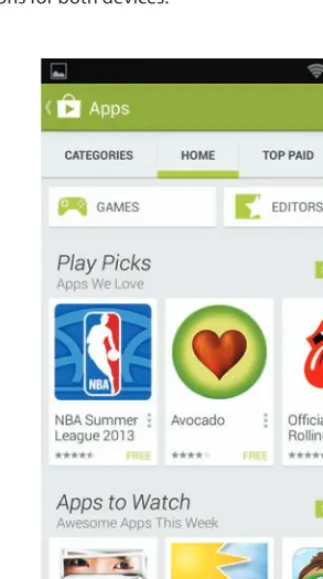
Ironically, the biggest players in this mobile revolution may not have even foreseen the potential of apps when they first announced their platforms. When launching the iPhone, Apple initially indicated there was no need for a marketplace for native software on the iPhone. Google likewise did not make a software store available for its Android mobile operating system at first launch. It wasn’t until 2008 that the typically unflappable Apple changed that plan. With the release of the iPhone App Store in July of that year, developers were finally given the opportunity to build native software for the platform. Google followed suit with the release of the Google Play Store (originally called the Android Market) just three months later (see Figure 1.4).
Apple’s App Store and the Google Play Store were the first mobile app markets that prompted any significant customer response or gained traction with mainstream users. Today, however,
there are a variety of app stores available for nearly every mobile platform; popular ones include the Amazon App Store, BlackBerry World, the Windows Store, the Nokia Symbian Store, and Samsung Apps. Every major platform will be discussed throughout this book, but the premise remains the same for each; app stores are a place that users go to quickly download new software for their phones or tablets.
When Apple says “there’s an app for that” now, it isn’t kidding—and the same holds true for its competitors. The number of programs available on their stores continues to grow. To date, Apple has more than 900,000 apps in its store. Android has around 700,000. The Windows Store, though still young, claims to have 100,000 applications.
The astronomical growth of these mobile applications has greatly outpaced what any observer might have expected for such a marketplace. In a relatively short amount of time, applications for phones and tablets have redefined how we view computing. In the past, applications were viewed as larger, fully functioning operations: Web browsers, mail clients, and word processors that could be used for a multitude of tasks during an average computing day. Now applications are being built to target smaller, more specialized tasks.
On an iPhone or an Android phone today, for example, it’s not uncommon to have three applications that handle e-mail, as they all serve different purposes for sorting through a user’s daily messages. It’s also not uncommon to have a handful of Web browsers—perhaps one for syncing bookmarks and another for sharing links socially. Additionally, many Web companies or services such as Facebook or Twitter now have their own applications; in the past, a user would simply open a Web browser to access such services.
Apps are easy to build. They’re easy to get. And they’re easy to use, thanks in large part to native application frameworks with features such as pinch-to-zoom, maps integration, and calendar support. All told, that makes apps the optimal experience on mobile devices.
What Is a Mobile Device?
Apps and the smartphones that use them have been mentioned frequently already, but what truly defines a “mobile” device? One attribute commonly used to categorize nearly all mobile devices is the operating system that they’re running. Most mobile devices today are based on what tech companies such as Apple and Google call a “post-PC” operating system: something that functions differently from the point-and-click only, window-based interfaces of desktops and laptops. (The term “post-PC” still doesn’t have a technical definition, though. It’s essentially a buzzword coined by Apple at the release of the iPad.)
WHAT IS A MOBILE DEVICE? 9
These mobile operating systems are everywhere, so much so that it’s difficult to get away from them. Phones, tablets, and even many laptops are now considered mobile devices running post-PC operating systems. Analysts estimate that in the beginning of 2014, mobile phones overtook personal computers as the type of device most commonly used for Web access. It’s also estimated that two billion smartphone units have been sold worldwide, with iPhone and Android dominating almost 70 percent of the market.
So many devices in consumers’ hands also means that there’s a large quantity of potential users willing to pay to download apps. Apple alone has more than 575 million accounts registered with credit cards on the App Store, and the revenue generated by their app purchases, a few dollars at a time, really adds up. By summer 2013, app developers had already made more than $10 billion in revenue from sales inside Apple’s App Store.
Smartphones aren’t only making an impact in the United States, as areas including China, India, and many parts of Europe have been quick to adapt to these devices. In many countries with developing economics, potential users frequently pass over personal computers and instead choose a more affordable, versatile technology: mobile phones.
note
Mobile platforms today make it very easy to localize applications for numerous world languages. With a small amount of work, applications can become more desirable to people in different countries around the globe.
A Portable, Pocket Computer
Although mobile devices today are largely defined as phones and tablets, their origins can be traced back to more humble, single-function products. MP3 players, including the original iPod and the Microsoft Zune, are often cited as the first mobile devices that mainstream users embraced in great numbers.
In fact, mobile computing devices themselves have been around since the early to mid 1990s. But the technology really hit its stride in the early to mid 2000s as cell phones became more accessible, lightweight, smaller, faster, and cheaper. Multipurpose devices such as the iPod or Zune made it easy for users to carry entire music collections, games, texts, and contact informa-tion in their pockets. Over time, these devices converged with cell phones to form an all-in-one device that was friendlier to users’ pockets and wallets.
This change was driven primarily by a refined definition of what it means to own a smartphone. Prior to the iPhone and Android phones, smartphone technology was seen as something best used for calls, text messages, and e-mail. The new wave of smartphones was revolutionary, because it took a device nearly as powerful as a home computer and shrunk it down to a size that could fit in a pocket or a purse. For the first time, a phone was effectively capable of browsing the Web or running programs on par with the type computers had featured for decades.
With the creation of mobile app stores, it also became simple for nearly anyone to create software for these devices. To spawn a mobile application in the past, a developer would be forced to go through restrictive mobile carriers or hardware manufacturers—a difficult task for even seasoned software veterans. Only a few privileged developers then were able to make programs and sell them to consumers worldwide; now it only takes a few months, a computer, and a connection to the Internet for any of the tens of thousands of developers to release their creations to users worldwide. This new “app economy” is a flat playing field in which anyone can make an impact with little experience or few resources.
The combination of extremely capable smartphones, an abundance of great mobile software, and previously unimaginable Internet speeds from mobile carriers created a perfect storm for the industry in 2008 and 2009; as a result, a modern economy now exists in which smartphone adoption rates are approaching 80 percent in major markets such as the United States, Canada, Japan, England, and France.
Tablets, Too
Since 2010, the world of mobile computing has grown to include tablets, especially with the proliferation and success of Android and iOS operating systems. Devices such as the iPad and Google’s Nexus 7 are now seeing even faster adoption rates than smartphones ever did. Tablets aren’t a new, unprecedented computing experience either. Microsoft was an early proponent of tablets that featured a pen stylus and touch interface, but the company mar-keted them with little to no success throughout the 1990s and early 2000s. Over the past 20 to 30 years, tablets have been seen as the computing device of the future, making frequent appearances in science fiction movies and TV shows, and for good reason; a carryable com-puter that can be written on or interacted with by touch just seems to make sense.
tip
WHAT IS A MOBILE DEVICE? 11
both Apple and Android tablets when first learning about design in an attempt to diversify your knowledge of mobile interaction types. Instead, focus on one mobile operating system and become an expert at its phone and tablet interface designs.
Most early tablet devices failed or were targeted for extremely niche markets, but they finally found success in 2010 when Apple released the iPad (although even that device was met ini-tially with a mixed response).
In the years since its release, the iPad has been nothing short of a dramatic, industry-disrupting device. It has seen incredibly strong growth and adoption rates: even better than those of the iPhone, considered one of the most profitable products ever.
With the success of the iPad, competitors have followed suit. Google has now moved its Android operating system to the tablet format, allowing apps to take advantage of the larger-screen devices. Google now partners directly with hardware manufacturers such as Asus to create its own hardware as well, and their Nexus 7 is viewed as the most successful Android tablet to hit the market. Due to the operating system’s open-source nature, a variety of hard-ware manufacturers have built unbelievable tablets with a multitude of screen sizes to choose from—ranging from 7 to 13 inches—on hundreds of devices released worldwide.
Microsoft also jumped into the tablet market with its own touch-centric tablet. The Surface, released in 2012, is a popular piece of hardware that integrates closely with the company’s Touch and Type Covers. Users can quickly attach or detach the tablet’s keyboard, which makes typing in apps such as Microsoft Word or Excel simple and easy. The Surface has developed a dedicated user base, but it still has room for improvement. It hasn’t picked up a large market share, although many designers and programmers are keeping an eye on this device as one that could have future potential.
Other Devices That Are Part of the Revolution
So far, this discussion has focused only on smartphones and tablets, all of which have touch-screens, but mobile devices don’t necessarily need to have a panel that responds to swipes and pinches from fingers. Hardware that uses more conventional navigation tools has had some success as well.
The Industry’s Key Players
Now that you have a background in apps, mobile devices, and the operating systems involved, it’s time to dive further into the key players in the industry. Mobile’s growth has been charac-terized by big, bold moves by the companies detailed ahead, and some historical context can be helpful in understanding what drives the systems that you’re creating software for. From Apple’s revitalization to Microsoft’s reimagining of Windows, the critical events explained here present some perspective on what’s led to today’s current mobile app landscape.
Apple
THE INDUSTRY’S KEY PLAYERS 13
allowed the average person to simultaneously carry their music, videos, podcasts, contacts, and calendar: essentially, their entire digital personas. Apple hit a gold mine when it discovered that people wanted the capability and functionality of a computer in a smaller, pocket-sized device. At Apple, the impending mobile revolution was being designed and refined over a period of several years. Steve Jobs, designer Jony Ive, engineer Scott Forstall, and other Apple executives led a secret project to merge Apple’s expertise in desktop computing with its new hit mobile music and video player.
It wasn’t until 2007, though, that Apple was finally able to crack the code and deliver a min-iature computer. The device was so incredible at the time that many critics and competitors didn’t believe that the product shown off during the initial press conference was even real. Many thought that Apple was using gimmicks or tricks to make the device as fast, smooth, and responsive as it appeared in initial video previews. At the time, storing all that media on one device with a remarkably long battery life was seen as something just shy of magic.
The release of the iPhone sparked the mobile-computing revolution. For many, it was as simple and fun, if not more so, to use than a laptop or desktop computer for browsing the Web, watch-ing videos, readwatch-ing PDFs, or playwatch-ing games.
Not only did the iPhone change the way users saw computers (to the point of ignoring them altogether), it also significantly advanced touch computing. Although touchscreen computers had been available for many years, the technology never saw mainstream adoption, primarily due to inaccurate screens hindered by poor build quality. But after the iPhone, other vendors took notice; operating systems such as Android, BlackBerry, Windows, and the now-defunct WebOS integrated first-class touchscreen functionality.
Apple followed up the iPhone in 2010 with its iPad, which pushed growth in a market that had never seen widespread commercial success. As noted, the iPad has experienced phenomenal growth, and tablet computers are poised to soon eclipse the yearly sales, market share, and Web-browsing rates of desktop computers and traditional operating systems.
Google and Android
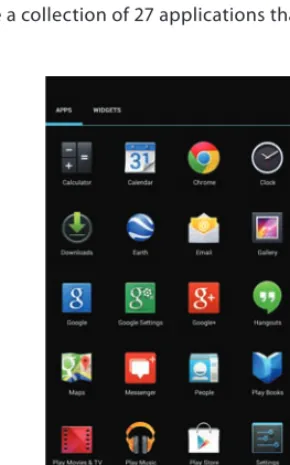
Because Android is open source and available to any manufacturer that’s able to compile the source code and willing to work within the platform’s license agreement, it’s now available on more than 4,000 distinct hardware devices worldwide (see Figure 1.6). A new iPhone only hits the market once a year, but Android device makers can literally release dozens of new imple-mentations with a variety of different specifications every month.
These contrasting strategies lead to many of the differences in operating systems that will be discussed throughout this book. Although the specifications of iOS devices are strictly dictated by Apple, Android devices can be found with nearly any screen size, processor, RAM, and hard-ware configuration imaginable.
Consumers love this functionality, as they can buy a device to match any need they might have, but it makes interfaces a bit tougher to build. Yet, the success of Android and the large market size it has built means that there are millions upon millions of customers waiting to use applications.
The Other Players
Aside from Apple and Google, there are a few other players of note. Although you may never design anything for these platforms, it’s important to know what they mean for the mobile industry.
THE INDUSTRY’S KEY PLAYERS 15
BlackBerry
The first major competitor is BlackBerry, a company credited with being the driving force behind the original smartphone craze. Before Apple took over with the iPhone in 2007, Black-Berry stood alone atop the mobile summit, primarily due to demand from the business world. Once renowned for phones with full QWERTY keyboards, BlackBerry had significant difficulty adapting once touchscreens emerged and became popular. The BlackBerry 10 operating sys-tem is the company’s latest offering in the mobile space. This new design focuses on dynamic interactive messaging, making it easy for users to quickly move back and forth between e-mail, text messages, social networks, and more.
The most difficult hurdle for BlackBerry to overcome has been a lack of applications. Because its post-PC operating system didn’t arrive on the scene until January 2013, most developers had already established themselves on either Android or iOS. Although the interface is clean and intuitive—and available with both touchscreen and physical keyboard options—BlackBerry 10 has seen relatively slow market growth to date.
Microsoft
Another strong mobile competitor has been Microsoft and its Windows 8 and Windows Phone 8 platforms. A rash departure from its typical style, Microsoft overhauled a long-standing operating system strategy, converging mobile and traditional desktop computing into a single platform that uses the same interface styles and design language. This vast change was some-what uncharacteristic for the computer behemoth out of Redmond, Washington. For nearly two decades, Windows was renowned for its consistency. Today, Windows phones, tablets, and desktops feature a new flat design, which Microsoft previously labeled “Metro” but is now calling the Microsoft design language. This new format is characterized by bold colors, large text, and square, sharp-edged buttons. The initial version of Windows 8 received some criticism because it did away almost entirely with its famous “Start” menu and desktop format. In later updates, Microsoft backtracked on its uncompromising devotion to its new idea because some long-term users had found the new interface hard to work with.
To date, Windows 8 has faced relatively mixed reviews as well as mixed success in the market. The new Windows desktops and tablets were greeted with adoption rates similar to those of their predecessors, but Windows Phone has had a difficult time gaining wider public adoption. For application developers, it would be advantageous for Windows to see greater worldwide popularity because the unified design structure and language among platforms makes app creation easier; however, customers just aren’t jumping on the bandwagon.
tip
use on your phone every day. If you can’t think of a type of project you want to work on, build something that solves a personal need or something you would use every day. Designing a project for yourself will help provide extra motivation when picking up and learning a development platform.
Mobile Web Sites
Finally, don’t forget about mobile Web sites. As discussed earlier, they don’t offer the same experience as native apps, but they’ve still had success and are turned to frequently by users. A variety of new operating system choices that focus on using the mobile Web as the primary application-delivery framework have surfaced recently. Popular Linux distributors such as Ubuntu are proposing a completely open-source take on mobile software and operating sys-tems. Browser stalwart Mozilla is also promising to take Firefox and use it as the foundation for a mobile platform.
Later, we’ll take a look at the variety of benefits and potential pitfalls that the mobile Web faces regarding interaction design. The goal of working with HTML, CSS, JavaScript, and other Web technologies is quite simple: Developers should be able to write once, and designers should be able to design once, creating a Web application that runs on any hardware and any operating system. In theory, that sounds amazing, but in practice it hasn’t worked out so well. Browsers simply aren’t completely consistent between operating systems or render-ing engines. Although much work has been done to help mobile Web sites work well in any browser, these applications take a lot of tinkering and fine-tuning in order to function properly. Most of the best mobile applications currently being built use native frameworks such as Objective-C or Java. Although Web apps do look promising, it appears that they’re still a few years away from offering the same responsive, animated interactions that users demand from their mobile phones.
This is changing rapidly—even daily—and there could be a time in the near future in which mobile Web sites overtake native applications as the platform Web developers and designers target first. It’s best to remain open-minded and consider developing a mobile Web applica-tion whenever it can provide the same experience as a mobile app. This results in a product that allows you to have an audience much larger than any single mobile platform’s customer base while also helping to keep a development team small and design resources focused.
Distinctions between Platforms
DISTINCTIONS BETWEEN PLATFORMS 17
languages are the most efficient or simplest to learn, but you should be cognizant of the tech-nical hurdles surrounding a project.
Designers typically see themselves as artists, thus becoming too focused on the creative proj-ect and not enough on the technical cogs that spin in the background. This is one of the big-gest mistakes designers make, especially early in their careers. Mobile interface design is much more than pretty pictures and perfect typography.
The essence of mobile interaction design is defined by the way an application feels in your hands, the way it responds when you are most dependent upon the information contained within it. Users expect an application to feel alive on the phone. They expect consistency, reliability, and sophistication. They don’t just expect these traits inside your app; they also demand them from how your application functions within the entire ecosystem of their chosen operating system. Therefore, it’s important to understand the technical choice you’re making with a platform so that you can design to the delight of your user base.
If you target Apple’s iOS operating system, it’s likely that you’re building an application rich in animation with an aesthetic much like that of a piece of fine woodwork. The best applications in Apple’s ecosystem feel handcrafted, like something passed down from generation to genera-tion. It’s this “Garden of Eden” feel that draws users to the Apple infrastructure.
If you’re targeting Apple’s platform, your primary goal should be to focus, focus, and focus some more on your interface. To Apple users, details matter, so be sure that you take seemingly insignificant font-size decisions or color choices into consideration.
Google, meanwhile, has long lived by the mantra of “open and free.” Android is an open-source operating system, and the majority of applications available for the platform are either free or open source as well. This strategy has been effective as Android has built a reputation of being a perfect haven for individuals who want to tinker around or start their own hobby project. As such, applications on this platform are notorious for being quick to market and a little rough around the edges. This can be an advantage for good designers, though, because it can make it much easier to stand out from the rest of the often ragged crowd.
The reluctance of Android users to pay for apps can cause some issues with monetization strat-egies, however. Because most applications for Android are free, it’s very common to see adver-tising contained within the application itself. Banner ads, splash screens, or entirely branded applications have become a very real by-product of the mobile app world, and as a designer you will have to live with that reality.
screens to large screens, and with a bit of extra work you can create an outstanding tablet experience, which is rare for Android users.
In the post-PC market, Microsoft has entrenched itself as the leading platform for enterprise deploy-ments. For users who must have their long-standing powerhouse applications, such as Word, Excel, or PowerPoint, Microsoft has emphasized that they are the only significant player around.
Microsoft also offers a unique opportunity for designers as it now uses the same operating sys-tem on desktop computers and tablets. Although Apple has OS X on its desktops and Google pushes the Chrome operating system for traditional computers, Microsoft has championed the “no compromises” system in which users conceivably can have their cake and eat it too. This cross-platform strategy leads to some interesting design decisions, many of which are in direct contradiction to established interface-design principles such as Fitts’s Law (discussed in the following Note). It’s still too early to decide how this strategy will play out, but Apple and Google seem somewhat open to copying this idea. In OS X Lion and Mountain Lion, Apple brought many of its successful iOS features to the desktop, and Google recently began working to unify the design language between Android and Chrome.
note
Fitts’s Law is a common model for user-interface design and a common principle that designers work with when building software for desktop applications. The idea is fairly long and complex, but it can be most simply stated like this: Because your computer mouse stops moving either vertically or horizontally once you hit the top or bottom of a computer screen, buttons or interface objects placed on the edges of the screen essentially have infinite width or height. Look at your computer and you’ll see this with menus or important navigation buttons appearing near the corners of the screen.
This principle doesn’t apply to mobile devices for which fingers are used to manipulate objects, as your finger doesn’t need to scroll from one target point to another; you just pick it up and move it where it needs to go.
CONCLUSION 19
Conclusion
When kicking off a first or second mobile design project, it may be a bit confusing to determine an initial direction. Between various operating system providers, device sizes, and target audi-ences, there’s a lot that can make it difficult to get comfortable and to feel like you’re in control of the design.
But by sitting back, relaxing, and tackling these problems one at a time, it will be easy to focus your work and begin building an interface with exceptional interaction design. First, decide whether to use iOS, Android, or another operating system; then choose whether to work for a phone or tablet; then prepare to begin your project.
Interaction design, and design in general, is about making choices. A target operating system and device type are just two choices in the long process of building a product. As you continue to explore the mobile design process, you’ll learn how to focus choices into small and simple decisions. Before long, you’ll be isolating problems and making informed decisions like an expert mobile designer.
IN-DEPTH
What’s the best way to get familiar with the interface design of a new operating system? Study the prepackaged applications of an operating system, programs that companies like Microsoft, Apple, or Google ship to users. These are constructed by the same people who created the design language and human-interface guidelines for the platform; thus they’re prime examples of what the developer sees as model software for the platform.
■ Examine them carefully until you understand why each and every decision was made regarding the user interface.
■ Look at the human-interface guidelines for the system. These documents go deep into the design decisions of the system and are like the designer’s bible for building a platform.
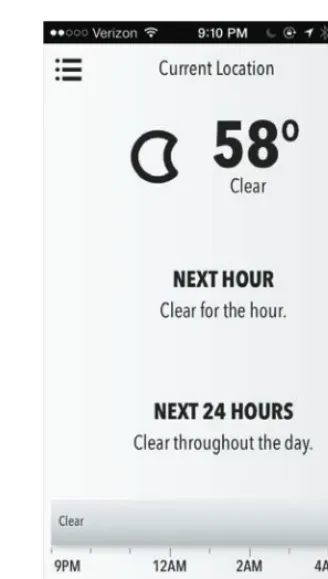
■ Spend a few hours using the built-in applications; set up the native mail app to check e-mail and look at forecasts on the weather app. Soon, you’ll be able to understand why the interface works the way it does.
C H A P T E R 2
DESIGN FOR HUMANS,
BY HUMANS
Now that the history lesson is complete, it’s time to
dive headfirst into the pool of mobile interaction
design. Over the coming chapters, we’ll cover the
various interaction foundations that we should
master and the potential roadblocks that stand in
the way of building mobile interfaces. The first step
of that quest involves determining what exactly
mobile interaction design is. Next, it’s critical
to learn how to avoid the first big mental pitfall
that traps many designers working on interfaces:
learning that they are designing for humans—
impressionable, sometimes confused, unforgiving
What Is Interaction Design?
Mobile interaction design can be a somewhat confusing term—and one relatively advanced for those just beginning careers in interface design. Often used interchangeably, interaction design and interface design are completely different concepts, and it’s important not to mis-take one for the other. In fact, the two ideas can appear to be so similar that a casual reading of this text could make it seem as if we are confusing the two as well. They have separate definitions, however, and although they do work together to achieve the same goal, they are actually quite different.
Interface design involves the technical pieces and intricate design language created and man-dated by a platform developer for use in a specific operating system. On a popular mobile sys-tem such as Android, this includes standards such as using Roboto as a syssys-tem font or applying the Holo Light or Dark visual theme styles that specify suggested color, font size, line height, or other properties of phone interfaces. Apple has its own carefully defined set of interface design standards, as pictured in Figure 2.1.
WHAT IS INTERACTION DESIGN? 23
Interface design revolves around a standard look for specific elements—for example, the way an icon appears or the type of text used in error messages—throughout an interface. Modern operating systems typically have long human interface guidelines documents that detail how to establish the correct look and feel for each and every visual asset in an application. As an interface designer, it’s your responsibility to understand these documents and to be capable of building an interface that meets their requirements.
Interaction design, meanwhile, is a more abstract term. If interface design is like chemistry class, then interaction design is a philosophy seminar. Interaction design has much more to do with the design concepts and interface tools used to present information to a user.
With interaction design, you’re going for something much more powerful than slick fonts or an appealing logo; you’re looking to understand and influence users’ behaviors once they load an application. Though you will use interface tools such as buttons, switches, typography, lighting, audio sound effects, icons, or color to help do this, interaction design is also more focused on the user’s reaction or on habits that develop in response to each of these elements. Your goal is to learn how the average user will respond to your interface—ultimately, you hope, in a predict-able manner—and then refine and evolve the interface so the user experiences exactly what you intend.
warning
NO PERFECT USERS Unfortunately, when building the interactions contained in an app there is no exact “ideal user” you can target everything toward. In economics, problems that need solving reference “homo economicus”: a hypothetical person who makes rational and well-thought-out economic decisions. For mobile designers, though, that person doesn’t exist.
Interaction design is a fluid, ever-evolving field. Although interface design changes are some-what like the world of fashion, dominated by color schemes, background types, and gestures that go in and out of style, interaction design remains a slower-moving industry, one primarily driven by the way users interact with the human-interface tools the operating system offers to applications.
The field will also continue to evolve in the future. Who knows what will drive the devices and interfaces of the coming years? In just the past few years, major advancements have been made through new technologies such as the Siri voice-command personal assistant and the Google Glass visual platform. If the advanced worlds imagined by science fiction writers continue to manifest in our realm, perhaps previously unthinkable elements such as brainwave control or holographic interfaces could play a role in the interface design of the future.
tip
Interaction design isn’t strictly limited to mobile applications; everything we use involves interaction design. Practice your design critical-thinking skills by finding ways to improve the interaction design in common, everyday items. How would you improve the design of your car, refrigerator, or vacuum cleaner? Look for the
GOALS WHEN DESIGNING AN INTERFACE 25
beauty and simplicity in items that function well (or the clutter and difficulty posed by poor interaction design), then use these as inspiration to help improve your apps.
Goals When Designing an Interface
Now that you know what you’re trying to achieve with interaction design—efficient and easy-to-use interfaces—what should your goals be when you embark on this journey? Is an ideal interface one that’s simple or full of features? Should you try your best to blend in with every other application and operating system, or should you try to be unique?
Building a product involves making lots of decisions, so your primary goal as an interaction designer is to be in a position to best understand what the right choice is. The end goal is always to create the “ultimate” interface. Unfortunately, that notion is subjective, and in reality it will never happen. Yet, it doesn’t hurt to try.
tip
In a perfect world, you’d be able to design for “homo interacticus”: a hypothetical person who makes rational, well-thought-out decisions when they interact with a mobile app. But because he or she doesn’t exist, it’s often helpful when designing to refer back to the applications built by the platform creator (Mail or Safari on iOS and Gmail or Chrome on Android) to see examples of near-perfect applications.
Because you can’t build an ultimate interface, your goal should be to refine your interface as you learn about your customer base and work to retain users and increase their opinion of your application (something measured quantitatively in app stores through ratings and reviews). If you take a systematic approach, you can hopefully solve the seemingly unsolvable equation that reveals which parts of an application increase or decrease user satisfaction.
Designing for Humans
It sounds silly, yet it’s so simple. You’re designing applications to be used by humans; if not them, who else would use your work? Grasping that concept, however, is the most difficult obstacle designers face when attempting to build the perfect app interface.
it’s important to remember that they are like you, also keep in mind that they aren’t entirely like you. When using interface pieces to plan out an interaction design, you must be careful that the design doesn’t make sense only inside your own head.
Although that might seem simplistic, redundant, and perhaps even patronizing, it’s still the most important primary lesson of designing user interfaces. The vast majority of users, although human, aren’t interface designers and may not even be extremely tech-savvy. By reading this book, you are acknowledging that you know more about computer interfaces and interaction design than 99 percent of your potential user base. Users are normal people that come in all different shapes and sizes. They may speak different languages, be older or younger, be better or worse readers, know more or less about computers, and even have various disabili-ties (such as color blindness) that hinder their ability to use your application. Your users will be simultaneously a lot and hardly anything like you.
Comprehending that you are building for all types of people quickly reveals how difficult interaction design can be. For many, it’s this diversity and challenge that makes the job of an interface designer exciting. Understanding your audience helps you see software problems dif-ferently and in a way that will help you create an effective design.
As you’ll learn through experience, humans are by no means the perfect users. Interface designs need to be forgiving, preventing the user from messing everything up in an instant. Designing for humans is in stark contrast to designing for computers, which automatically run all programming instructions defined in the code. In the apps developed for mobile platforms, human users often won’t listen to what they’re told even when you think you’ve laid out every-thing in a clear and deliberate way. Meeting that challenge is both the most rewarding and the most frustrating aspect of building an interface and interaction design for humans.
So what’s the best design for human users? It’s one built with forgiveness in mind. Ideally, strive to create something that gives the user a sense of freedom and the ability to explore without fear or apprehension. The biggest way to comfort users through interaction design is to guard against data loss, clearly explain the results of major actions, and allow users to start over when they feel they’ve made a mistake. When building apps, you want to create experiences that give the user a sense of security to explore your work.
Apple’s App Store (see Figure 2.3) is a great example of a design built toward encouraging user exploration while also confirming content. To pay for an app, a user must tap on an app’s price, tap a subsequent “buy” button, and then finally enter a password before a purchase is con-firmed. This gives users the comfort of browsing without fear of making a mistake and acciden-tally purchasing something.
GOALS WHEN DESIGNING AN INTERFACE 27
easy to delete important work documents, treasured family photos, or entire folders of impor-tant system information.
In post-PC operating systems, however, there’s been a reimagining of how documents are handled, and it’s a shining example of great interaction design. Developers working in iOS, for example, don’t get full access to the photos a user takes with the iPhone camera. Instead, the applications seeking to alter or enhance photos—by cropping, removing red-eye, or adding a filter—must first create a duplicate of the original photo.
This is a drastic change from the era of traditional computing, in which applications had direct access to original files and any changes made could potentially overwrite or damage precious user photos. Knowing this—and knowing that it made users fearful of working with photos— Apple retooled the way files lived in an operating system, and with this change they paved the way for the significant growth of applications that allow users to get creative with their photographs.
Designing for humans brings other challenges too; some of them are fun, like working around the impatience and aversion users have for sitting and learning how to use an app via a tutorial or help menu. The way new users are trained on software has changed significantly in recent years, something interaction designers have needed to adapt to. Fifteen years ago, it was not uncommon for an application to ship with a guide of 100 pages or more, but today modern software—especially mobile software—often comes with no help manual.
That evolution is a direct consequence of users’ increased knowledge of and familiarity with computers: as individuals become more experienced with technology, there is less need for generalized instruction. But this change also resulted from better interaction design. As the computer software industry matures, the entities and people developing applications increase their knowledge of how to build software. On the mobile operating systems of today, naviga-tion menus have been simplified, making a more straightforward and clear process for users to work through.
Designed by Humans
Though users are imperfect and will likely make mistakes when using your applications, it’s important to note that designers are also human and far from perfect. In building interaction design for any application, you’re likely to make many mistakes—and any design is capable of being improved in order to offer a better user experience.
There are many ways, though, to learn from your mistakes. Users are very good at pointing out spots where designers mess up, so why not take advantage of that fact? Let users get their hands on your application, test it out, and offer feedback. Be sure to listen to their comments and criticisms, as taking in negative feedback and growing from it is among the most difficult things a person has to adapt to when making work public. It’s just like waiting for a grade on a test in high school; you inherently don’t want to see or hear what you’re doing wrong. As a result, it takes an intentional effort on your part to open up an interface design for comment from the general public and then use that feedback to improve your work.
tip
Design is not a profession for the shy. In order to be a great designer, you’ll have to show off your work frequently and deal with constant criticism about your prod-ucts. Be warned: Once work has gone public, everyone (and we mean everyone) will have an opinion on your work.
GOALS WHEN DESIGNING AN INTERFACE 29
are encouraged to post their upcoming work on a public forum so that others can comment and suggest improvements. Consider joining one of these sites to gain constructive and well-intended criticism on designs for upcoming projects.
Likewise, it’s often valuable to build a small pool of trusted friends and colleagues who are willing to review your work and offer thoughts on what you’re doing correctly and what needs improvement. Most successful software development teams implement formal processes such as peer design reviews or code reviews to help make sure their work is being checked internally for improvement.
When working by yourself or on a small team in which you are the only designer, however, it can be difficult to find close friends who are talented and knowledgeable enough to provide this type of insight into your project. If you find yourself in this situation, tech conferences are a great place to meet like-minded individuals who you can build friendships with based on a shared passion for mobile application development. Because you’re building digital software, it’s easy to instantly share Photoshop designs, wireframe workflows, or early software beta builds with anyone around the globe. Plan to attend a few conferences and make a concerted effort to meet other designers and software developers while you’re there.
Finally, there’s often nothing more helpful than a beta-testing group that allows you to experi-ment with interaction design types and play with test builds of upcoming applications. When finding users to test prerelease software, it’s important to select a diverse group of potential users. Look for friends and family who are known for vocally sharing their opinions, and be will-ing to listen when they offer their thoughts. It can often be a valuable experience to sit next to them and watch as they use your software for the first time. While observing, you can see what parts of the design they had problems with and where it could be clarified, simplified, or better explained.
tip
When choosing one of your first beta groups, try to recruit a group about two or three times larger than you imagine is necessary. Unfortunately, people get busy or will offer less feedback than you desire, so grow your group in order to get adequate amounts of feedback.