Real-World
Maintainable Software
Ten Coding Guidelines in Practice
Real-World Maintainable Software by Abraham Marín-Pérez
Copyright © 2016 O’Reilly Media. All rights reserved. Printed in the United States of America.
Published by O’Reilly Media, Inc., 1005 Gravenstein Highway North, Sebastopol, CA 95472.
O’Reilly books may be purchased for educational, business, or sales promotional use. Online editions are also available for most titles (http://safaribooksonline.com). For more information, contact our corporate/institutional sales department: 800-998-9938 or
Editors: Nan Barber and Brian Foster
Production Editor: Colleen Cole
Copyeditor: Gillian McGarvey
Interior Designer: David Futato
Cover Designer: Karen Montgomery
Illustrator: Rebecca Demarest
Revision History for the First Edition 2016-09-15: First Release
See http://oreilly.com/catalog/errata.csp?isbn=9781491958582 for release details.
The O’Reilly logo is a registered trademark of O’Reilly Media, Inc. Real-World Maintainable Software, the cover image, and related trade dress are trademarks of O’Reilly Media, Inc.
While the publisher and the author have used good faith efforts to ensure that the information and instructions contained in this work are accurate, the publisher and the author disclaim all responsibility for errors or omissions, including without limitation responsibility for damages resulting from the use of or reliance on this work. Use of the information and instructions contained in this work is at your own risk. If any code samples or other technology this work contains or describes is subject to open source licenses or the
intellectual property rights of others, it is your responsibility to ensure that your use thereof complies with such licenses and/or rights.
Preface
Being the relatively young profession that it is, software development is still trying to figure out the best way to deliver. One of the most promising ideas of recent years comes from the software craftsmanship movement, which recommends small teams with attention to detail, risk aversion, and an appetite for continuous improvement. In teams like this, it is easy to be kept up-to-date with almost every aspect of the project, which means hidden traps and mistakes rarely go unnoticed for long. These teams consistently produce high-quality software that is easy to maintain.
Unfortunately, for better or worse, some organizations still need to manage large projects over long periods of time. In such environments, the principles of craftsmanship still apply, though one cannot hope to be kept up-to-date on every single aspect of the daily life of the project. Knowledge silos will appear, communication channels will decrease, and as a result it will be nearly impossible to assess whether staff are following a good set of best practices.
Many organizations have tried to fix this, especially from the point of view of project management. This is how, first, complex project management
processes with certifications like PRINCE2 and, later, lighter processes with certifications like SCM came to be born. And, although both types of
approaches achieved some level of success, they were both missing the technical side of things.
Acknowledgments
I have always liked writing, ever since I was little. When I was in high school, I entered a regional narrative contest where I reached a modest yet satisfying third position. Then the Internet became popular and I started to write blogs and, more recently, technology news articles. This is why I was so excited when O’Reilly gave me the opportunity to write this report. A project like this is never the product of a single person’s efforts, and I’d like to thank those that have helped me along the way. First of all, I’d like to say thank you to Brian Foster, whose initial steering helped identify the best way for this report to serve its readers.
I’d also like to thank Nan Barber and Keith Conant for their reviews. Nan helped me make sure the report has a consistent style and structure, which has turned it into a more pleasant reading experience, while Keith’s technical review improved the quality of the contents.
Chapter 1. “How Did We Get into
This Mess?”
Cape Canaveral, Florida. November 8, 1968. At precisely 9:46 a.m., the Delta E rocket ignites, propelling the Pioneer 9 spacecraft into the
atmosphere. This is the fourth in a series of space missions directed at studying “space weather.”
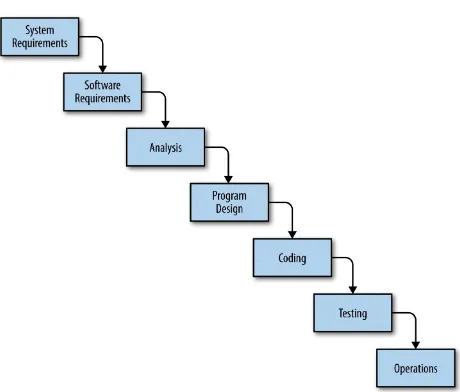
The program was highly successful: while designed to last for six months, it provided data for 35 years. The main contractor of the Pioneer 6-9 program was TRW, a company in charge not just of the construction of the spacecraft but also of the design and implementation of the software that governed it. This was during the relatively early days of the software development industry, and there weren’t too many references on running software development projects. Perhaps for this reason, Winston W. Royce, one of TRW’s most prominent software development project managers, published in 1970 a paper titled “Managing the Development of Large Software Systems,” in which he described his views on making software projects succeed.
Royce’s paper was famously attributed as being the first written reference to the Waterfall Development Model, describing it as a “grandiose approach to software development.”
This model took the world by storm. Companies all over the planet started to follow this methodology. Certifications were created for project managers who would be accredited as following the Waterfall Model to the letter.
Figure 1-1. The Waterfall Development Model as described in Winston W. Royce’s paper
However, in what may be a prophecy of the hunger for quick wins that would come to plague the software development industry, the early adopters of the Waterfall Model failed to properly read Royce’s paper. Even though he
described the Waterfall Model as the ideal way to build software, he also said that “the implementation described above is risky and invites failure.” He then went on for several pages explaining the risks and downsides of his model, concluding that the only way to make it work is to run the same project at least twice so that subsequent implementations can learn from the mistakes of the previous ones.
first CHAOS report, a survey covering more than 8,000 applications, in which the overall success of software development projects throughout the industry was assessed. The results were abysmal: 31% of projects were cancelled before completion, 53% were finished with reduced functionality and/or over budget, and only 16% finished successfully according to the initial parameters.
Maybe because of these results, project managers began to worry about hitting deadlines above anything else, and potentially at the expense of long-term instability. This had the effect of increasing the costs of maintaining the code after delivery, with some sources like the IEEE estimating that
maintenance causes around 60% of the total cost of the project.1
Step by step, failure after failure, the software development industry realized that something needed to be done differently. In 2001, the Agile Manifesto was signed, encouraging a new way of thinking about software development. Companies that began to deviate from the norm experienced the benefits. In the latest CHAOS report, results were segregated for Agile and Waterfall projects: while 29% of Waterfall-led projects are still cancelled (signifying virtually no improvement after 11 years), the failure rate of Agile-led projects is down to 9%.
It’s taken time, but companies finally realize that, for a project to succeed, focus needs to be placed on the long term. Maintainability is the main issue, and for this to come at a reasonable cost it needs to be looked after from day one. It is for this reason that companies like SIG began to think about patterns and guidelines that can be applied to the everyday work of a software
developer and that will assist in ensuring and assessing software
maintainability. After years of experience, SIG has found a set of 10 easy-to-follow guidelines that will help keep code manageable for years to come, putting teams one step closer to success. This report will explore those
guidelines, explain their applicability, and present them together with a set of real use cases that benefited from it.
You can start building maintainable code today by using these 10 guidelines.
Chapter 2. The Ten Guidelines
After many years of failures, the software development industry is gradually coming to understand what makes projects succeed. Best practices have started to appear, sometimes mixed with misinformation and plain technical folklore, but through trial and error, teams around the world have started to separate the chaff from the grain.
SIG is one organization that has gone through this. And not only that, it has studied the way software development projects evolve so as to identify the difference between success and failure. After analyzing business cases for years, SIG has come up with Ten Guidelines that, if followed correctly, can make the difference between success or failure.
The Ten Guidelines are easy to understand but not necessarily easy to apply. Teams may face resistance on several fronts: sometimes from management, who may not understand the value of an investment like this, and sometimes from developers, who may take badly the fact that they are being told how to work best.
However, even if everybody is on board, the Ten Guidelines require that a level of technical expertise be applied. A lot of refactoring is needed to keep applying the guidelines overtime, and refactoring is an art that is very
difficult to master. There are a number of resources that can be used to increased a developer’s refactoring skills, among them the fantastic How to Work Effectively with Legacy Code by Michael Feathers (Prentice Hall). In this chapter, we will briefly cover the Ten Guidelines and explain their usefulness; for more thorough coverage, the reader is advised to read Building Maintainable Software.
The first thing we need to note about the guidelines is that they are roughly divided into three categories. This isn’t a strict division (in fact the
Unit guidelines
Write short units of code Write simple units of code Write code once
Keep unit interfaces small Architectural guidelines
Separate concerns in modules
Couple architecture components loosely Keep architecture components balanced Keep your codebase small
Unit Guidelines
The first four guidelines are unit guidelines. In this context, a unit is the
Write Short Units of Code
The first guideline indicates that our methods should be short, usually no more than 15 lines of code. This not only improves readability (fewer lines of code are easier to understand), but it also lowers the probability of hidden side effects. On top of this, a short method will have fewer variations, which means it will be easier to test.
The easiest way to apply this guideline is to move parts of the code in a method into other methods. Many IDEs will have an “extract method” function that makes this easier. Sometimes, however, the right answer is to move the code not to a different method but to a new class — we’ll see more of that when we get to the architectural guidelines.
COUNTING LINES OF CODE
Different teams may use different criteria when deciding what constitutes a line of code. In this report, we use the following:
The signature and closing curly bracket of the method don’t count. This is because these are lines that can’t be removed and therefore have no bearing toward measuring the complexity of the method.
Blank lines within the method do count. This is because, although blank lines don’t have any instructions, programmers tend to add them to separate groups of lines that perform closely related tasks, which means they help indicate the complexity of the method. If an instruction is so long that it needs to be split into two or more lines, we count each of those lines independently. This is because we consider such instructions to represent extra complexity, and therefore it makes sense for them to contribute further to the total line count.
Choosing different criteria will obviously change the resulting number of lines, but the only effect will be that the triggering conditions for the guidelines will be met slightly sooner or later. In the end, a large method is a large method, regardless of how the lines are counted.
Let’s take a look at an example. The following method contains 21 lines of code, more than the recommended limit of 15. It may not be clear what this particular method does, but that’s not relevant at this point (it is part of a tool to analyze build data from a Jenkins server1).
jenkinsClient = new JenkinsClient(source);
grid.setPadding(new Insets(25, 25, 25, 25)); grid.add(buildSelector, 0, 0);
Scene scene = new Scene(grid, 250, 400); m_primaryStage.setScene(scene);
Button btn = new Button();
btn.setText("Show me hotspots!");
btn.setOnAction(event -> {
List<String> selectedBuilds = buildSelector.getBuilds();
AddDrawingToScene(selectedBuilds);
});
grid.add(btn, 0, 1); }
We can make this method shorter by moving the creation and setup of the Grid and the Button objects into new methods, like this:
private GridPane createGridPane() { GridPane grid = new GridPane(); grid.setAlignment(Pos.CENTER); grid.setHgap(10);
grid.setVgap(10);
grid.setPadding(new Insets(25, 25, 25, 25));
return grid; }
private Button createButton(BuildSelector buildSelector) { Button btn = new Button();
btn.setText("Show me hotspots!");
btn.setOnAction(event -> {
List<String> selectedBuilds = buildSelector.getBuilds();
AddDrawingToScene(selectedBuilds);
});
protected void selectBuilds(String source) { jenkinsClient = new JenkinsClient(source); List<String> allBuilds =
jenkinsClient.getBuildConfigurations();
BuildSelector buildSelector = new BuildSelector(allBuilds);
GridPane grid = createGridPane(); grid.add(buildSelector, 0, 0);
Scene scene = new Scene(grid, 250, 400); m_primaryStage.setScene(scene);
Button btn = createButton(buildSelector); grid.add(btn, 0, 1);
}
Write Simple Units of Code
The more paths of execution a method has, the more difficult it will be to reason about all of them. And when code is difficult to reason about, misunderstandings occur, and misunderstandings lead to bugs.
It’s important to clarify, though, what a path of execution means. Paths of execution are branching points, instructions that can make the execution of the code go in one way or another. For instance, an if statement creates a branch of execution because, depending on the evaluation of a condition, different code will be executed. But not only that — if the condition in the if statement is a boolean operation involving several operators, the application of each operator will imply a new branch.
This guideline suggests that we limit branch points to a maximum of four. This will not only make the methods easier to understand but will also make them easier to test. In order to cover all different scenarios of a method, we need a number of automated tests that is at least the number of branch points plus one. Let’s take a look at the following code:
public int getDiscount(String promoCode) {
if(promoCode == null) {
throw new IllegalArgumentException("promoCode");
}
promoCode = promoCode.trim();
if(promoCode.length() < 5 || promoCode.length() > 8) {
throw new IllegalArgumentException("promoCode");
}
if(expiredPromoCodes.containsKey(promoCode)) {
throw new ExpiredPromoException(promoCode);
}
if(!availablePromoCodes.containsKey(promoCode)) {
return 0;
}
As can probably be guessed, this method will provide the appropriate
discount to apply depending on a promotional code, throwing exceptions in particular situations. This code has five branching points, which means there are six different scenarios to be considered while testing: promotional code being null, too short, or too long; promotion having expired; promotional code not matching any existing promotion (expired or not); and promotional code applied successfully.
We can reduce the number of branching points per unit by moving the validation logic to its own method, like the following:
public boolean isPromoCodeValid(String promoCode) {
if(promoCode == null) {
public int getDiscount(String promoCode) {
if(!isPromoCodeValid(promoCode)) {
throw new IllegalArgumentException("promoCode");
}
promoCode = promoCode.trim();
if(expiredPromoCodes.containsKey(promoCode)) {
throw new ExpiredPromoException(promoCode);
}
if(!availablePromoCodes.containsKey(promoCode)) {
return 0;
}
return availablePromoCodes.get(promoCode); }
may look as if we have more work to do now since we have a total of eight scenarios to cover, whereas before we only had six. However, analyzing effort this way can be deceiving. We don’t quite have eight scenarios to cover; we have two sets of four scenarios each. This distinction is important because in software development, effort doesn’t grow linearly with
Write Code Once
Internet folklore has many ways to refer to this guideline, including “Stay DRY,” with DRY being short for Don’t Repeat Yourself, and “Don’t get WET,” with WET being short for Write Everything Twice. The truth is, there are so many ways to refer to this because this is one of the most powerful single sources of bugs.
It usually goes like this: A programmer, maybe due to time restrictions,
decides to copy and paste a portion of code to make use of it somewhere else. Some time after that, a requirement arrives to modify that piece of code. The programmer that picks up this task, which might be the original one or a new one, doesn’t remember or realize that the code that needs to be modified exists in two different places, so that programmer only applies changes to one of the copies of the code. And just like that, we have created a bug: two parts of the system that are meant to do the same thing no longer do.
But even if we manage duplication well and prevent bugs, duplicate code can still hurt a team. Whenever a task is performed, if programmers know that there is duplication in the codebase, they’ll have to search for all the
occurrences of the code that need to be modified and act on all of them appropriately; this is much more costly that having to change just one existing copy of the code.
Keep Unit Interfaces Small
In the same way that unit means, in this context, a method in a class,
interface here refers to the way we interact with a method; that is, the method signature. Methods with long signatures usually indicate the existence of data clumps: variables that always travel together and that in fact aren’t
particularly useful if used independently. Typical examples of data clumps are colors (expressed as their red, green, and blue components) and
coordinates (expressed as their x,y components).
The way to make sure we keep interfaces small and detect these data clumps is by keeping method signatures to a maximum of four parameters. The way to apply this guideline is by bundling together two or more arguments into a new class, and then to use references to this new class. The interesting side effect is that now that we have a new class, we can start adding logic to it. Let’s consider a hotel room reservation system and, more precisely, a method to get quotes for specific rooms. Since we’re only dealing with method
signatures in this guideline, we won’t include the body of the method:
public Quote getQuote(String hotelName, RoomType roomType,
boolean breakfastIncluded,
LocalDate checkInDate,
LocalDate checkOutDate)
This signature has five parameters, one more than the guideline allows. We can fix this by bundling check-in and check-out dates into a TimePeriod class.
public Quote getQuote(String hotelName, RoomType roomType,
boolean breakfastIncluded,
TimePeriod timePeriod) {
// ... //
}
public class TimePeriod {
public TimePeriod(LocalDate checkInDate,
LocalDate checkOutDate) {
}
The interesting thing about the TimePeriod class is that we can easily add validation to it: ensure that check-out date is at least one day after check-in date, ensure that check-in date isn’t in the past, etc. And if we do that, we’ll have validation for free whenever we need to use the pair of check-in and check-out dates. Thus, keeping unit interfaces small not only makes for
Architectural Guidelines
If the first four guidelines referred to characteristics that we need to measure at the unit (or method) level, the next four focus at a higher level — namely modules, components, and codebases.
In this context, a module is a collection of units; in other words, a class. Similarly, we can understand a component as an aggregation of modules (or classes) that can be grouped to offer a higher order of functionality. For many teams, a component will be something that can be developed, deployed,
and/or installed independently, and will typically refer to them as a JAR file in Java, a DLL in .NET languages or, more generally, a library. However, some other teams with larger codebases will choose a bigger unit of
measurement when defining what a component is, and will typically refer to them as frameworks or systems. The definition of the concept of a component will have an impact on the applicability of some of the guidelines, so teams should choose a definition carefully and potentially review it over time. Finally, a codebase is a version-controlled collection of software; this typically means a repository in GIT-based systems, or an independent subfolder in Subversion or CVS-based systems.
As you will see, the architectural guidelines will apply to progressively
Separate Concerns in Modules
Modules, or classes, are meant to be representations of domain concepts; if you can’t explain what a class does in a couple of simple sentences, then that class either represents more than one concept or represents a concept that is too general or abstract.
A class that holds too much responsibility will be troublesome in several ways. First, it is likely to become a change hotspot. Since it has so many responsibilities, it will affect a large proportion of the business logic, and therefore the probability that it needs to be modified upon any new request will be high. Change hotspots create long (and difficult to browse) change logs and increase the probability of clashes between programmers, potentially disrupting the natural team flow.
Second, big classes have the risk of becoming a dumping ground for difficult design decisions. When new functionality needs to be added to a system and programmers are unsure about where that new functionality should go, it is not uncommon for people to choose an existing big class whose purpose is not entirely clear anyway.
Finally, big classes that concentrate a lot of logic in one place will be highly utilized by other classes in one way or another. This means we are creating a class with a high degree of change (and therefore a higher risk of accidents) and high exposure (and therefore a higher impact on accidents), and creating areas of code with high risk and impact is never a good idea.
Deciding how well a team is applying “Separate Concerns in Modules” is a little subjective. The general suggestion is to try and apply the Single
Couple Architecture Components Loosely
This guideline is similar to the previous one, but it is applied at an even higher level. With “Separate Concerns in Modules,” we tried to limit the responsibilities of a class so as to limit the dependencies upon it. With
“Couple Architecture Components Loosely,” we try to do the same but with regards to components.
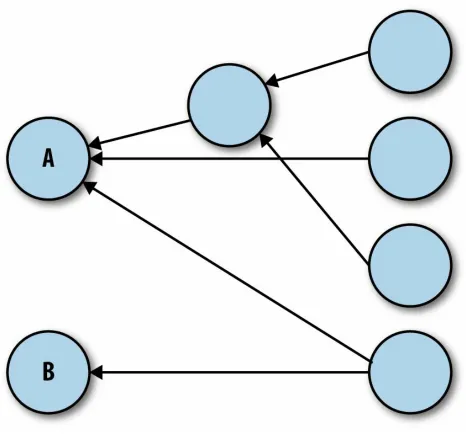
Like it happened with the previous guideline, it’s a bit difficult to establish general parameters that highlight when architecture components are loosely coupled and when they aren’t; the final decision may be different from team to team. However, there are some general principles that can be applied. First, we can draw a diagram of all the different components in our system and connect them to represent their dependencies. With this kind of diagram, we can look for components that accumulate too many incoming
dependencies. For instance, in the following diagram we can see how component A is tightly coupled with the rest of the architecture, while component B isn’t. Modifying component A can have repercussions in almost every other component of the system. This turns modifying
Figure 2-1. A component dependency diagram showing a tightly coupled component (A) and a loosely coupled one (B)
time; if there are many callers, this may be impractical.
Unfortunately, depending on the language there may not be an easy way to analyze the proportion of a component that is being exposed. In C#, the developer can use different access modifiers for classes that are to be
Keep Architecture Components Balanced
As systems grow, it may become too easy to get lost in the many facets of it, and when this happens it may become easy to miss systemic issues. This is why software needs to make sense also from a high-level point of view. Although this sounds like a rather subjective measurement, there are
objective metrics that we can apply to assess how balanced our architecture is. First of all, we can intuitively conclude that an architecture with too few components can’t really describe the multiple features of a system, whereas one with too many of them will be difficult to grasp. For this reason, SIG recommends architectures designed around having nine components, with an operating margin of plus/minus three. This means that, if we have fewer than six components, we should probably look into splitting some of them,
whereas if we have more than 12, we should try to consolidate them. When components are consolidated, teams may need to revisit their definition of “component” so it maps to a bigger unit of measurement.
On the other hand, the relative size of the components is also important. There probably isn’t much we can infer from an architecture containing one really big component and eight tiny ones: the latter will probably be minor utility libraries, whereas the former will hold further substructures and divisions that are kept hidden. Components in an architecture should be as close in size as possible.
Keep Your Codebase Small
The vast majority of programmers will maintain that smaller codebases are easier to manage. This may sound like software development folklore, but after analyzing over 1,500 systems, SIG provided statistical evidence of it. On top of this, structuring the overall systems in several, smaller codebases as opposed to a single big one will simplify some higher-order administrative tasks: for instance, if a team needs to be split as part of an organizational restructuring, the responsibilities of the new teams can be easily decided by assigning the different codebases to each of them.
It may seem that, after applying the component guidelines above, the size of the codebase has already been taken care of. This is not necessarily true, since one could be splitting components without splitting the associated codebase. For instance, the build tool Maven, popular among Java
programmers, allows the management and creation of multiple JAR files within a single project, and therefore a single codebase. In fact, given that splitting components is often easier than splitting codebases, it is advisable to try and apply this guideline by preventing unnecessary growth.
There are many things that can be done to prevent a codebase growing too big. Applying the guideline “Write Code Once” is one of them. “Couple Architecture Components Loosely” can help too, since essential components with a high number of incoming dependencies, like logging or serialization, tend to have a publicly available counterpart that could be used instead. Removing unused code is another obvious way to reduce the size of the codebase.
However, one of the most effective ways to achieve this (but frequently also the most difficult to apply) is to avoid future-proofing. Future-proofing is the practice of adding functionality to the codebase that hasn’t been required but that people believe might be required at some point in the future. One
common example of this is unsolicited performance optimization utilities, like caching or connection pooling, added in case workload volumes grow to unmanageable levels. While performance is a valid concern in some
actual data.
Enabling Guidelines
Up to now, we’ve talked about guidelines that express how the code should be structured, both at the low and high level. Also, we’ve talked about how the code needs to be modified whenever any of the previous guidelines isn’t met. But so far we haven’t talked about the inherent risk of the very
application of the guidelines.
To be able to abide by the guidelines, we need to be constantly making changes to our code. However, with every change there is the risk of
accidents, which means every corrective measure is an opportunity for a bug to appear. In order to apply the guidelines safely, the code needs to be easy to understand and difficult to break. The last two guidelines address these
Automate Tests
Automated tests require a considerable amount of investment, but the returns are almost invaluable. Automated tests can be rerun again and again almost at no cost, which means we can frequently reassess the status of the system. Thanks to this, we can safely perform as many modifications as we deem necessary, knowing that accidents that break it won’t go unnoticed for long. There is plenty of literature on the topic of how to write automated tests, so we won’t cover that here.
What we will cover is how to make sure that our set of automated tests is a faithful representation of the requirements of the system. On one side, we can use a technique called Test-Driven Development (TDD), in which tests are written before the implementation they are testing. Moreover, when writing implementation, the programmer has to write only as little as necessary to satisfy the tests at hand. This will ensure that, if a functionality needs to be implemented, a test that verifies that functionality will be written first.
Even if we don’t use TDD, or if we inherit a legacy codebase, there are ways to assess the quality of the automated tests suite. We can use code coverage analysis tools, which tag the lines of code that are being executed while
running each test; this way, the tool can highlight code that isn’t exercised by any test and which may constitute a gap in the testing suite. Unfortunately, code coverage analysis is not enough: one thing is saying that a particular section of code is executed while running a test, and another one is saying that the test performs the right checks after running. To go one step further, we can use tools like Jester for Java or Nester for .NET. Jester will make random modifications to the source code and then run the tests, expecting at least one of them to fail; if none of the tests fail after modifying the code, it will highlight this as a potential test gap.
Note, however, that automated tests don’t entirely remove the need for
Write Clean Code
Edsger Dijkstra, one of the fathers of modern programming, once said that “in programming, elegance is not a dispensable luxury but a quality that decides between success and failure”. Obscure code is difficult to grasp, and therefore difficult to maintain. On the other hand, code that can be picked up by any random programmer with no problem represents the ultimate measure of maintainability.
The problem of clean code is that it’s a rather ambiguous topic. It’s not simply a matter of code style, indentations, or variable name lengths, it’s a matter of understandability. Code should clearly show its intent and avoid any pitfalls or misgivings, so that anybody who reads it will understand it quickly and be able to modify it without making inadvertent mistakes.
However, what exactly constitutes the right set of rules to decide if the code at hand is clean or not is something that has to be agreed on by the team. To help with this, SIG provides a basic yet functional set of rules to write clean code as part of this guideline; these rules are a great starting point for any team. If further information is needed, readers can refer to the book Clean Code by Robert C. Martin (Prentice Hall). Another technique that can help teams to write clean code is doing unguided but supervised peer
reviews: after writing code, a programmer can share it with a peer, who will read the code and try to understand it without help; any questions that the peer needs to ask in order to understand the code represents an area where the code isn’t self-evident, and therefore an area that needs to be modified.
For further reference, see Build Hotspots on GitHub.
Apply All the Guidelines
Applying “Write Shorts Units of Code” and “Write Code
Once”
Let’s assume that we are building a new system. The purpose of the system is not important right now, except to mention that this system will need a way to manage users. The first thing we create is a User class that simply holds the first, last, and middle name of the user.
public class User {
private final String firstName;
private final String middleName;
private final String lastName;
public User(String firstName, String middleName,
String lastName) {
The first validation requirement then arrives: while a middle name is
optional, the first and last names are mandatory, non-blank values. We add some validation to the constructor.
public class User {
private final String firstName;
private final String middleName;
private final String lastName;
public User(String firstName, String middleName,
this.lastName = lastName;
} }
It seems clear that the validation of both first and last name is essentially the same, which means we should apply the guideline “Write Code Once” and refactor that code into its own method (showing only the constructor and the resulting new method).
public User(String firstName, String middleName, String lastName) {
ensureNotEmpty(firstName, "firstName");
ensureNotEmpty(lastName, "lastName");
this.firstName = firstName;
this.middleName = middleName;
this.lastName = lastName; }
private void ensureNotEmpty(String field, String fieldName) {
if (field == null || field.trim().length() == 0) {
throw new IllegalArgumentException(fieldName);
} }
Adding Contact Details
That looks like reasonable code. At this point, the next requirement arrives: we also need the user’s email address, home number, and mobile number in case we need to contact her. The resulting modified class follows.
public class User {
private final String firstName;
private final String middleName;
private final String lastName;
private final String homeNumber;
private final String mobileNumber;
private final String emailAddress;
public User(String firstName, String middleName,
String lastName, String homeNumber, String mobileNumber,
String emailAddress) {
ensureNotEmpty(lastName, "lastName");
this.firstName = firstName;
private void ensureNotEmpty(String field, String fieldName) {
if (field == null || field.trim().length() == 0) {
throw new IllegalArgumentException(fieldName);
}
} }
Validation is also required for these fields, although the validation rules differ. In this case, email address is mandatory, and we need at least one of home or mobile number; for simplicity, we’ll assume at this point that we don’t need to check the format of the strings representing the phone numbers and email address, although in a real-life scenario we would. Here is the resulting constructor:
public User(String firstName, String middleName,
String lastName, String homeNumber, String mobileNumber,
String emailAddress) {
ensureNotEmpty(lastName, "lastName");
ensureNotEmpty(firstName, "firstName");
ensureNotEmpty(emailAddress, "emailAddress");
if ((homeNumber == null || homeNumber.trim().length() == 0)
&& (mobileNumber == null
|| mobileNumber.trim().length() == 0)) {
String message = "homeNumber or mobileNumber is needed";
throw new IllegalArgumentException(message);
}
this.firstName = firstName;
this.middleName = middleName;
this.lastName = lastName;
this.homeNumber = homeNumber;
this.mobileNumber = mobileNumber;
this.emailAddress = emailAddress; }
“Write Code Once,” which would leave the class with the following constructor and methods:
public User(String firstName, String middleName,
String lastName, String homeNumber, String mobileNumber,
String emailAddress) {
ensureNotEmpty(lastName, "lastName");
ensureNotEmpty(firstName, "firstName");
ensureNotEmpty(emailAddress, "emailAddress");
if (isBlank(homeNumber) && isBlank(mobileNumber)) {
String message = "homeNumber or mobileNumber is needed";
throw new IllegalArgumentException(message);
}
this.firstName = firstName;
this.middleName = middleName;
this.lastName = lastName;
this.homeNumber = homeNumber;
this.mobileNumber = mobileNumber;
this.emailAddress = emailAddress; }
private void ensureNotEmpty(String field, String fieldName) {
if (isBlank(field)) {
throw new IllegalArgumentException(fieldName);
} }
private boolean isBlank(String field) {
return field == null || field.trim().length() == 0; }
The constructor is now 15 lines long, just on the verge of the limit established by “Write Short Units of Code” but not quite enough to force a rewrite, and there isn’t any other repetition worth refactoring, which means the code is good considering the guidelines we are applying.
Adding Address
We are ready to implement our next requirement: users also need a full address, which is made up of two lines of address, a city, a postcode, and a country. The second line of address is optional, but all other fields are
the format of the values, just that these are there. The resulting constructor follows.
public User(String firstName, String middleName, String lastName,
String homeNumber, String mobileNumber,
String emailAddress, String addressLine1,
String addressLine2, String city, String postcode,
String country) {
ensureNotEmpty(lastName, "lastName");
ensureNotEmpty(firstName, "firstName");
ensureNotEmpty(emailAddress, "emailAddress");
ensureNotEmpty(addressLine1, "addressLine1");
ensureNotEmpty(city, "city");
ensureNotEmpty(postcode, "postcode");
ensureNotEmpty(country, "country");
if (isBlank(homeNumber) && isBlank(mobileNumber)) {
String message = "homeNumber or mobileNumber is needed";
throw new IllegalArgumentException(message);
}
this.firstName = firstName;
this.middleName = middleName;
this.lastName = lastName;
this.homeNumber = homeNumber;
this.mobileNumber = mobileNumber;
this.emailAddress = emailAddress;
this.addressLine1 = addressLine1;
this.addressLine2 = addressLine2;
this.city = city;
this.postcode = postcode;
this.country = country; }
Now this constructor is 24 lines long, which is more than what the guideline “Write Short Units of Code” allows. We can make it shorter by moving all the validation logic into a new private method, resulting in the following code.
public User(String firstName, String middleName,
String lastName, String homeNumber,
String mobileNumber, String emailAddress,
String addressLine1, String addressLine2,
String city, String postcode, String country) {
validateInputs(firstName, lastName, homeNumber,
postcode, country);
this.firstName = firstName;
this.middleName = middleName;
this.lastName = lastName;
this.homeNumber = homeNumber;
this.mobileNumber = mobileNumber;
this.emailAddress = emailAddress;
this.addressLine1 = addressLine1;
this.addressLine2 = addressLine2;
this.city = city;
this.postcode = postcode;
this.country = country; }
private void validateInputs(String firstName, String lastName,
String homeNumber,
String mobileNumber,
String emailAddress,
String addressLine1, String city,
String postcode, String country) {
ensureNotEmpty(lastName, "lastName");
ensureNotEmpty(firstName, "firstName");
ensureNotEmpty(emailAddress, "emailAddress");
ensureNotEmpty(addressLine1, "addressLine1");
ensureNotEmpty(city, "city");
ensureNotEmpty(postcode, "postcode");
ensureNotEmpty(country, "country");
if (isBlank(homeNumber) && isBlank(mobileNumber)) {
String message = "homeNumber or mobileNumber is needed";
throw new IllegalArgumentException(message);
} }
Now both the constructor and the private validation method are shorter than 15 lines, so according to the guidelines we are applying we are good to go. However, by this point we can already feel that this code is not quite right. Let’s take a look at the entire resulting class.
public class User {
private final String firstName;
private final String middleName;
private final String lastName;
private final String homeNumber;
private final String mobileNumber;
private final String emailAddress;
private final String addressLine2;
private final String city;
private final String postcode;
private final String country;
public User(String firstName, String middleName,
String lastName, String homeNumber,
String mobileNumber, String emailAddress,
String addressLine1, String addressLine2,
String city, String postcode, String country) {
validateInputs(firstName, lastName, homeNumber, mobileNumber,
private void validateInputs(String firstName, String lastName,
String homeNumber,
String mobileNumber,
String emailAddress,
String addressLine1, String city,
String postcode, String country) {
ensureNotEmpty(lastName, "lastName");
ensureNotEmpty(firstName, "firstName");
ensureNotEmpty(emailAddress, "emailAddress");
ensureNotEmpty(addressLine1, "addressLine1");
ensureNotEmpty(city, "city");
ensureNotEmpty(postcode, "postcode");
ensureNotEmpty(country, "country");
if (isBlank(homeNumber) && isBlank(mobileNumber)) {
String message = "homeNumber or mobileNumber is needed";
throw new IllegalArgumentException(message);
}
}
if (isBlank(field)) {
throw new IllegalArgumentException(fieldName);
}
}
private boolean isBlank(String field) {
return field == null || field.trim().length() == 0;
} }
By this point, we have a class with no public methods (other than the
constructor) and three private methods; this gives away the feeling that this class has enough complexity within it that it needs to be sorted out in
different methods, although the functionality of these methods is not useful outside. On the other hand, the signatures of some of those methods (the constructor and the validation method) are so large that they span several lines. We can feel something is missing, and that something is the application of the guideline “Keep Unit Interfaces Small.” Let’s see what this class
Applying the Guideline “Keep Unit Interfaces Small”
“Keep Unit Interfaces Small” instructs us to keep method signatures to a maximum of four parameters. Looking back at our example, we didn’t violate this guideline until we added the contact details, so we’ll pick it up from there.
Adding Contact Details
At this point, the constructor had six parameters and, counting validation logic, it was 15 lines long. We’ll copy it next for quick reference.
public User(String firstName, String middleName, String lastName,
String homeNumber, String mobileNumber,
String emailAddress) {
ensureNotEmpty(lastName, "lastName");
ensureNotEmpty(firstName, "firstName");
ensureNotEmpty(emailAddress, "emailAddress");
if (isBlank(homeNumber) && isBlank(mobileNumber)) {
String message = "homeNumber or mobileNumber is needed";
throw new IllegalArgumentException(message);
}
this.firstName = firstName;
this.middleName = middleName;
this.lastName = lastName;
this.homeNumber = homeNumber;
this.mobileNumber = mobileNumber;
this.emailAddress = emailAddress; }
We can bundle up all the contact details into a class of its own,
ContactDetails. After this, the constructor of User will only have four parameters. Now, it makes sense that the validation of homeNumber,
mobileNumber, and emailAddress is moved to the constructor of ContactDetails, which would result in the following code.
public class User {
private final String firstName;
private final String middleName;
private final ContactDetails contactDetails;
public User(String firstName, String middleName,
String lastName, ContactDetails contactDetails) {
ensureNotEmpty(lastName, "lastName");
ensureNotEmpty(firstName, "firstName");
if(contactDetails == null) {
throw new IllegalArgumentException("contactDetails");
}
private void ensureNotEmpty(String field, String fieldName) {
if (isBlank(field)) {
throw new IllegalArgumentException(fieldName);
}
}
private boolean isBlank(String field) {
return field == null || field.trim().length() == 0;
} }
public class ContactDetails {
private final String homeNumber;
private final String mobileNumber;
private final String emailAddress;
public ContactDetails(String homeNumber, String mobileNumber,
String emailAddress) {
ensureNotEmpty(emailAddress, "emailAddress");
if (isBlank(homeNumber) && isBlank(mobileNumber)) {
String message = "homeNumber or mobileNumber is
private void ensureNotEmpty(String field, String fieldName) {
throw new IllegalArgumentException(fieldName);
}
}
private boolean isBlank(String field) {
return field == null || field.trim().length() == 0;
} }
This refactoring complies with “Keep Unit Interfaces Small” but not “Write Code Once” because we had to duplicate the validation helper methods in both classes. To avoid this duplication, we can move these methods into a third class, which we can call Validator; given that Validator doesn’t need to handle any internal status, the new methods can be created as static. The three classes will now look pretty tidy.
public class Validator {
public static void ensureNotEmpty(String field,
String fieldName) {
if (isBlank(field)) {
throw new IllegalArgumentException(fieldName);
}
}
public static boolean isBlank(String field) {
return field == null || field.trim().length() == 0;
} }
public class User {
private final String firstName;
private final String middleName;
private final String lastName;
private final ContactDetails contactDetails;
public User(String firstName, String middleName,
String lastName, ContactDetails contactDetails) {
Validator.ensureNotEmpty(lastName, "lastName");
Validator.ensureNotEmpty(firstName, "firstName");
if(contactDetails == null) {
throw new IllegalArgumentException("contactDetails");
}
this.firstName = firstName;
this.lastName = lastName;
this.contactDetails = contactDetails;
} }
public class ContactDetails {
private final String homeNumber;
private final String mobileNumber;
private final String emailAddress;
public ContactDetails(String homeNumber, String mobileNumber,
String emailAddress) {
Validator.ensureNotEmpty(emailAddress, "emailAddress");
if (Validator.isBlank(homeNumber)
By this point, we can already see the effects of applying “Keep Unit
Interfaces Small,” but let’s continue the example until the end. Let’s add the address to the User class, leaving the following constructor:
public User(String firstName, String middleName, String lastName,
ContactDetails contactDetails, String addressLine1,
String addressLine2, String city, String postcode,
String country) {
Validator.ensureNotEmpty(lastName, "lastName");
Validator.ensureNotEmpty(firstName, "firstName");
Validator.ensureNotEmpty(addressLine1, "addressLine1");
Validator.ensureNotEmpty(city, "city");
Validator.ensureNotEmpty(postcode, "postcode");
Validator.ensureNotEmpty(country, "country");
if(contactDetails == null) {
throw new IllegalArgumentException("contactDetails");
this.firstName = firstName;
this.middleName = middleName;
this.lastName = lastName;
this.contactDetails = contactDetails;
this.addressLine1 = addressLine1;
this.addressLine2 = addressLine2;
this.city = city;
this.postcode = postcode;
this.country = country; }
This constructor violates two guidelines, “Write Short Units of Code” and “Keep Unit Interfaces Small.” We could bundle up all the new address fields into a new class, Address, and move the validation of relevant fields to that class. However, that would leave the constructor with five parameters, which would still violate “Keep Unit Interfaces Small.” To fix this, we will also bundle the name-related attributes into a new class, FullName.
This would be the new FullName class, reusing the existing Validator:
public class FullName {
private final String firstName;
private final String middleName;
private final String lastName;
public FullName(String firstName, String middleName,
String lastName) {
Validator.ensureNotEmpty(lastName, "lastName");
Validator.ensureNotEmpty(firstName, "firstName");
this.firstName = firstName;
this.middleName = middleName;
this.lastName = lastName;
} }
This would be the new Address class:
public class Address {
private final String addressLine1;
private final String addressLine2;
private final String city;
private final String postcode;
public Address(String addressLine1, String addressLine2,
String city, String postcode, String country) {
Validator.ensureNotEmpty(addressLine1, "addressLine1");
Validator.ensureNotEmpty(city, "city");
Validator.ensureNotEmpty(postcode, "postcode");
Validator.ensureNotEmpty(country, "country");
this.addressLine1 = addressLine1;
And, finally, this would be the end state of the User class:
public class User {
private final FullName fullName;
private final ContactDetails contactDetails;
private final Address address;
public User(FullName fullName, ContactDetails contactDetails,
Address address) {
if (fullName == null) {
throw new IllegalArgumentException("fullName");
}
if (contactDetails == null) {
throw new IllegalArgumentException("contactDetails");
}
The User class can be further improved by applying “Write Code Once” and removing duplication, which would leave it as follows:
public class User {
private final ContactDetails contactDetails;
private final Address address;
public User(FullName fullName, ContactDetails contactDetails,
Address address) {
ensureNotNull(fullName, "fullName");
ensureNotNull(contactDetails, "contactDetails");
ensureNotNull(address, "address");
this.fullName = fullName;
this.contactDetails = contactDetails;
this.address = address;
}
private void ensureNotNull(Object fieldValue,
String fieldName) {
If we now compare the end result with the one we obtained without applying the guideline “Keep Unit Interfaces Small,” we can see a big difference. In the former case, at the end of the coding exercise we only had one class, User, which was clearly bigger than desirable and had too many variables and moving parts; it’s easy to see that, if the first version of User were to be modified, mistakes could be inadvertently made. However, just by applying “Keep Unit Interfaces Small,” the end result was dramatically different: instead of one class, we had five, all of them small and obvious in their own way. If a programmer was to make a mistake in one of these five classes, it would stand out much more clearly and therefore the probability of
somebody catching it would be higher.
This example illustrates just how important it is that the Ten Guidelines are not cherry-picked. They were designed to complement each other, and their benefits can only be achieved if applied together; as we just saw, leaving out even only one of them could have a dramatic effect on the quality of the end product.
Getting Value from the Ten Guidelines
There is a common joke in software development that says “the first 90% of a software development project costs as much as the other 90%.” What this joke shows is that while the vast majority of requirements in a project tend to be relatively straightforward, there is always a small fraction of requirements that represent unusual edge cases and abnormalities that are incredibly hard to code, up to the point that this small fraction requires as much energy and dedication as the rest of the project, frequently running the project over budget.
The same can happen when applying the Ten Guidelines to our software. If we attempt to apply all the guidelines strictly to the letter, we’ll find
ourselves spending a lot of time and effort on a few outliers. However, while we rarely have the option to drop requirements that are too difficult to
implement, we do have the option to give ourselves some room for flexibility when applying the guidelines. We must remember that the Ten Guidelines are here to help us make projects more maintainable in the future, and therefore to help us reduce the cost of writing software. If we let the
guidelines govern all of our decision-making, we’ll find ourselves rewriting the code so much that we’ll drive the cost up instead of down.
There needs to be, therefore, a threshold of tolerance when applying the
guidelines to make sure we get value out of them. What’s more, the particular threshold may be different for different teams, or even for the same team over time. For instance, a team of junior programmers may have a hard time
refactoring code to make it fully compliant, which means a higher tolerance may be needed to keep a good balance of short- and long-term benefits; however, an experienced team with a higher knowledge of design patterns and other refactoring techniques can manipulate the code much more
effectively, which means we can aim at a higher level of quality. Similarly, a team that inherits some legacy codebase may need to start with a high
progressively reduced.
SIG, the creators of the Ten Guidelines, have embedded this wisdom into the SIG/TÜViT Evaluation Criteria (or EC for short), its quality-scoring system for code. EC is based on the Ten Guidelines but includes a number of
tolerance thresholds that are benchmarked and calibrated every year against a set of software systems across industries. This allows teams to monitor the quality of their codebase in an effective manner, correcting those violations that could cause a greater impact to the code but leaving the harmless ones. Flexibility is a double-edged sword, though. Every project experiences
Not Too Much, Not Too Little: Just Right
The previous section showed how being too strict about the Ten Guidelines could grind the team to a halt, whereas being too lax could be the equivalent of cutting corners. However, reaching the right balance can only be done by taking into account many other variables beyond the guidelines. In other words, while the guidelines need to be applied in their entirety to be effective, they also need to be applied within a context.
SIG, with its EC scoring system, provides a way to measure how much a codebase is adhering to the guidelines. But the score is only the starting point. Whenever changes in a codebase make the score fall below the agreed-upon threshold, it is not enough to send the code back to the programmers and expect them to rewrite it until the score is back up. A conversation needs to happen so as to find the reason for which the score went down; maybe a key member of the team has been out sick, maybe work has turned onto a
Chapter 4. Ten Real-World Use
Cases
Perhaps the most important takeaway of this report is the fact that the Ten Guidelines aren’t just a theoretical exercise. In fact, the guidelines were created after examining what made software projects successful and
maintainable, and once created, SIG applied them successfully to real-life projects.
Interamerican Greece
Interamerican Greece, or IAG, is the top insurance company in Greece. In 2010, it had 1,400 employees and worked with 1,800 intermediaries to provide insurance to more than one million Greeks. But by that time, the market was beginning to change. On one side, customers wanted to buy insurance directly from the insurer via the Internet; on the other side,
intermediaries wanted to have more e-commerce options. IAG responded to the challenge to become the first company in Greece to sell insurance over the Internet.
However, the increased reliance on IT to drive business exposed a significant risk: much of IAG’s IT infrastructure had suffered from years of
underinvestment — some of the systems were 40 years old. Failures couldn’t be completely ruled out, and these would be directly visible to the client, which would damage their reputation. IAG needed a new strategy.
The in-house programmers had already migrated some older systems to a newer Java platform, and the main question at IAG was whether this was the right approach for the other systems. SIG analyzed the migrated systems according to the Ten Guidelines using their EC score system, giving a score of three out of five. This wasn’t as high as desirable, but it was enough to prove that the strategy was sound. Therefore, IAG set out to migrate further systems using their in-house teams but with the assistance of SIG to aim at a score of four out of five. Thanks to monthly reviews and constant
Alphabet International
Alphabet International, part of the BMW Group, provides leasing and business mobility solutions in Europe. After acquiring ING Car Lease in 2011, their market share boosted dramatically: by 2012, the combined company had more than 490,000 cars under contract in 19 countries.
One of the main challenges in the acquisition of ING Car Lease, and in any other merger or acquisition, is consolidating the IT systems of both
companies. Both Alphabet International and ING Car Lease had their own applications to manage lease contracts, some of them in-house and some of them provided by partners. SIG was brought in to analyze those applications, highlighting the ones that were too tied to operations in a particular region (and therefore not suitable for a global operation), those that didn’t align with long-term objectives, and those that would become part of Alphabet
Port of Rotterdam Authority
The Port of Rotterdam is the largest port in Europe and, until 2004, was also the busiest in the world. It is managed by the Port of Rotterdam Authority, a public company owned by the Municipality of Rotterdam and the Dutch State. Managing port activities is incredibly complex, and until recently this was done by a collection of multiple, independent systems connected with varying degrees of luck.
In order to remain competitive, the Port of Rotterdam Authority realized that they needed a new, fully integrated solution, one that could be managed more effectively and efficiently. They named their new system HaMIS, the
Harbour Master Management and Information System. Although they wanted to create this solution in-house, they realized that managing complex IT
Care Schadeservice
Care Schadeservice is the largest car repair organization in the Benelux region. Repairing cars is a labor-intensive activity, which means repair costs can easily skyrocket for even the simplest breakdown. For this reason, Care Schadeservice aimed at finding as many efficiencies as possible, creating a streamlined workflow that minimized waste. Care Schadeservice initially used off-the-shelf IT products to manage their workflow, but being the biggest company in the care repair sector, they were the first to notice the limitations of standardised products. So in 2004 they set out to create their own in-house solution, CareFlow, with a second generation of the platform coming out six years later.
SIG was involved in the creation of both generations, although in different ways. During the creation of CareFlow v1, Care Schadeservice was part of a holding company listed in the stock market, which required them to include an objective assessment of any software developed in-house; SIG, with their EC scoring system based on the Ten Guidelines, provided such assessment. When CareFlow v2 was needed, Care Schadeservice decided that they
Vhi Ireland
Vhi Ireland is a leading private health insurance company. Like many other companies, Vhi Ireland had a combination of systems that had evolved over decades. On top of this, in many occasions the systems had to be modified by external developers and sub-contractors, which contributed to a lack of
cohesiveness in the codebase.
Rabobank International
Rabobank International needed a new application for foreign currency transactions by bank employees and large clients. They analyzed existing packages but didn’t find any suitable ones, so they turned to a custom-built application. Nexaweb was contracted to create and maintain the new foreign currency application: RITA.
Unfortunately, RITA didn’t meet expectations. There were constant
complaints from the trading floor regarding the stability of the application, and stakeholders were unhappy about the slow turnaround of new features. Rabobank International and Nexaweb had agreements specific to the
architecture and code quality, but these were too abstract to be discussed effectively. A more specific way to measure quality was needed.
With the help of SIG, the underlying problems of RITA were slowly unearthed. Fixing the architectural problems provided stability to the