Vol 41 - (2/2016)
“People often represent the weakest link in the security chain and are chronically responsible for the failure of security systems. ”
Bruce Schneier, Secrets and Lies
The Rise of Macro Malware in Malaysia
ii
Level 5, Sapura@Mines No. 7 Jalan Tasik The Mines Resort City 43300 Seri Kembangan Selangor Darul Ehsan Malaysia.
T: +603 8992 6888 F: +603 8992 6841 E: [email protected] Customer Service Hotline:
1 300 88 2999 www.cybersecurity.my
Cyber999 Help Centre | My CyberSecurity Clinic |
Professional Development (Training & Certification) |
Product Evaluation & Certification (MyCC) |
Information Security Management System Audit and Certification (CSM27001) | Malaysia Trustmark | Security Assurance | Digital Forensic & Data Recovery | Malaysia Computer Emergency Response Team (MyCERT) | Security Management & Best Practices | Cyber Security Research |
CyberSAFE (Cyber Security Awareness for Everyone)
CyberSecurity Malaysia,
an agency under Malaysia’s
Ministry of Science, Technology and Innovation was
set up to be the national cyber security specialist
centre. Its role is to achieve a safe and secure
cyberspace environment by reducing the vulnerability
of ICT systems and networks while nurturing a culture
of cyber security. Feel secure in cyberspace with
WELCOME MESSAGE FROM THE CEO OF CYBERSECURITY MALAYSIA
Dear Readers,
We have come to the end of 2016. Throughout the year, we’ve brought to you various information on the latest technologies involving cyber security, threats, trends and issues that have been lurking and knocking at our doorsteps.
Based on the statistics gathered by MyCERT (Malaysia Computer Emergency Respond Team), for the past eleven months (January - November 2016), there are 3,612 fraudcases that have been reported to Cyber999 Help Centre. Not only has fraud cases have been noted, other incidents are also arising.
With the dynamic and immense growth of ICT, been just cyber-savy is not enough. When one decides to take things for granted of the lack of cyber security measures, one will ind themselves caught in a situation at any given moment, a victim of cybercrime.
Thus, we need to take the necessary steps and act vigilantly in whichever path of internet suring through our technological devices we decide to use, either in our personal life orduring our professional one. Cyber security is a necessity.
In this 41st edition, we have complied approximately 45 interesting articles for your reading pleasure. There are few articles featured which had caught my attention, among others are; Fraud Purchase, The Rise of Macro Malware in Malaysia, Malvertising, and of cause,T.I.M.E.W.I.S.E - Time Management, Why Time Management? These articles highlighted the importance of managing and spending time with our gadgets. Hence, please be reminded that our life does not revolve only with technological devices, the verbal communication amongst family and friends is even more important.
Last but not least, I would like to take this opportunity to thank everyone who has contributed articles. Your continuous support to CyberSecurity Malaysia’s e-Security Bulletin is highly appreciated. Till we meet again in upcoming edition in 2017; and before I sign off, as always, act wisely while suring online - be smart and be safe!
Dato' Dr. Haji Amirudin Abdul Wahab
PUBLISHED AND DESIGNED BY
READERS’ ENQUIRY
CyberSecurity Malaysia,
Outreach and Corporate Communications, Level 5, Sapura@Mines, No.7 Jalan Tasik, The Mines Resort City, 43300 Seri Kembangan
EDITORIAL BOARD
Chief Editor
Dr. Zahri bin Yunos
Editor
Lt. Col Mustaffa bin Ahmad ( Retired )
Internal Reviewers
1. Mohd Shamil bin Mohd Yusoff 2. Ramona Susanty binti Ab Hamid 3. Nur Arafah binti Atan
4. Jazannul Azriq bin Aripin
Designer & Illustrator
1. A Quick Look at Linux ... 1
2. Guideline for Securing Your Password ... 4
3. The Rise of Macro Malware in Malaysia ... 6
4. MouseJack Attacks Billions of Devices ... 10
5. Fraud Purchase: Statistics & Trends ... 14
6. CCTV Colorspace Analysis (Daylight Condition) For Cloth Colour Image Verification ... 15
7. Development of A 2D and 3D Forensic Face Recognition (2D3DFFR) Database for Forensic Analysis of CCTV Evidence ... 19
8. Forensics Readiness For Surveillance CCTV Security In Public Safety ... 22
9. Overview of Big Data ... 25
10. Acquisition of Oversized Hard Drive Storage ... 28
11. Comparative Study on the Quality of Automatic Speaker Recognition from Various Online Evidence Data ... 31
12. A Data Recovery Service during a National Disaster: CyberSecurity Malaysia’s Perspective ... 36
13. Mobile Phone Forensics: Getting Phone Content With and Without The Actual Phone... 38
14. Process Improvement Through ISO – The next level for the Digital Forensics Laboratory ... 42
15. Your Smartphone Knows Exactly Where You Go ... 45
16. Current Trend in Exploit Kit Incidents ... 48
17. Understanding Image File Formats ... 51
18. Career In Cyber Security ... 54
19. Malvertising ... 58
20. Common Loopholes in Mobile Applications ... 61
21. How to Maintain the Computer Lab ... 65
22. Colocation – Alternate Hosting for Your Infrastructure ... 67
23. Cloud Security – What You Need to Know ... 70
24. T.I.M.E.W.I.S.E - Time Management: Beat Work Overload. Be More Effective. Achieve More ... 73
25. How Secure is MyKad? ... 75
26. Introduction to iOS Forensics ... 78
27. Cyber Security in the ICT Supply Chain ... 83
28. 5 Common Mobile Device Security Issues ... 87
29. Its Position in Malaysian Law and the Applicability of the Personal Data Protection Act 2010 ... 89
30. Webshells in a nutshell ... 92
31. 2017 Cyber Security Highlights: A Summary ... 94
32. GST in Malaysia ... 97
33. How to Organize Your Documents Securely and Efficiently ... 101
34. Electronic Document Management System (EDMS) ... 104
35. Face Recognition in The Wild – Forensic Facial Identification in Video Evidence Based on The Boston Marathon Bombing Case ... 106
36. Combining CSRF vulnerability with Stored XSS ... 111
37. Cryptocurrencies 101 ... 115
38. The Driving Forces of Cyber Security Entrepreneurship ... 118
39. International Cooperation Strengthens Cybersecurity's Role ... 121
40. Privacy From an Islamic Perspective ... 124
41. Psychometrics principles in developing a valid, reliable and fair examination based on ISO/IEC 17024 standard requirements ... 127
42. Pokemon Go ... 130
43. When the playground is not safe anymore ... 133
44. 10 IoT Security Tips for Consumers ... 135
45. Building Evacuation: Things You Should Know ... 136
46. 10 Tip Menjadi Pakar Keselamatan Teknologi Maklumat ... 138
47. Netika di Alam Siber ... 140
48. Bagaimana Mengendalikan Spam SMS ... 142
49. Makmal Forensik Digital Bertaraf Dunia... 144
50. Santai Siber ... 148
51. Kaedah Keselamatan Asas untuk Telefon Pintar Hak Milik Syarikat ... 149
1
A Quick Look at Linux
By | Nurul Syahirah binti Aspawi & Zarina binti Musa
Introduction
Each and every success has a beginning. Regarding Linux, we will look back at the first step that has made Linux into what it is today. It is important to first understand what Linux is, as learning the basics ensures better understanding of a topic. Linux is an operating system like ones we already know, for instance Mac and Windows. But what makes it different and unique from these two systems is that Linux is an open-source operating system. What is open source? What does an operating system do? These questions will be answered, thus enhancing our knowledge not only of Linux but other operating systems as well.
OS, which is the abbreviation for Operating System, is a common concept with which people are familiar, but do they know what an OS is capable of and its importance? Simply put, an OS is a medium for people, or users like us, to communicate with hardware like the computer. A computer would be like an empty capsule without an OS to manage the applications within. The OS also enhances computer functionality, and recently OS can also be implemented in smartphones but this topic will not be addressed at this time. Focus is more on how the OS plays a big part in supporting the basic functions of a computer.
From the term ‘open source,’ the definition is crystal clear. The source of the operating system and the applications can be modified depending on user preferences. This is how Linux is unique as an open-source OS, whereby lots of changes can be made while still complying with user needs. Sometimes clarity and transparency may reveal weaknesses, but this is not the case with Linux. This approach helps Linux become more advanced day by day, hence developing a sense of trust in the community.
Linux and Windows
Why use ‘and’ but not ‘versus’? It is well known that the OSs mentioned above have specific uses and characters, making them unique. This section presents their components in terms of their technological developments from their inception till now. There is no intentional reason
to create a fan war regarding the respective OSs; rather, the purpose is purely knowledge sharing.
Windows has always been great as a single-user system. Windows was created for use by one user per desktop, and thus, two people cannot run their programs simultaneously. Some say it is possible to use Terminal Services so other computers can be used remotely, but there is still the single-user standard restriction. What about Linux? Multiple users can operate and log in concurrently. Various individuals may edit or modify files without interruption. This process is allowed because the OS in the central machine is responsible for managing each user’s details.
As mentioned previously, Linux is an open-source OS. In this case, a user may access the system up to the kernel level. In contrast to Linux that is under the GNU Public License, Windows was developed by Microsoft so it is impossible for users to gain access to the OS or source code. You may dream about having access only if you are some elite or a developer in the Microsoft family. It is claimed that developers with malicious intentions could take advantage of the clarity of Linux. But looking on the bright side, some deficiency that one individual may overlook can be identified by others in seconds, thus patching the weakness in the blink of an eye. Windows, on the other hand, employs the Helpdesk approach, where a user states their concern or problem, after which the responsible party runs a patch and the user updates their OS so the patch can be implemented.
2
Types of Linux Distribution
Linux is different from other OSs in several ways, one being how Linux is distributed. Linux is not produced by one particular organization but its system is produced by various parties for different system parts. Linux distribution works by gathering all codes from various open sources and combining them into one operating system to make it easier for the user to boot and install. Each distribution is unique in its own way and is applicable to a respective area depending on functionality. Subsequently, we will describe multiple types of Linux distribution that have been developed so far.
Ubuntu is a Linux distribution that is well known and used by a lot of people. This distribution contributes greatly to the Linux OS as one of the most popular distributions. It has its own desktop shell called Unity that totally redefines the user-friendly concept.
The next distribution is Linux Mint, which is perfectly suitable for users who are still unfamiliar with the Linux OS. Users can choose among a few editions, for example Cinnamon, MATE, KDE and Xfce. Linux Mint offers many applications that really help users who are new to this kind of platform. It is customizable and compatible even to older computer versions.
Debian is one of the oldest Linux distributions. This distribution is unique in terms of its stability. Actually only a few versions or editions of Debian have been released, but once produced, we can be sure the distribution is stable because to achieve a certain level of stability, Debian has undergone and passed various tests. Debian contains several packages, and due to their stability, the security of the system can be trusted.
LXLE is a distribution that might be useful for people having difficulties tossing out their old computer. LXLE is based on the Ubuntu OS that was originally created for use on old computers. It is more aimed at the ability to be installed on any computer despite age and version. TLXLE also provides a different desktop layout that can be changed to a layout that is the same as other OSs. It comes in both 32-bit and 64-bits versions.
Advantages & Disadvantages
Sometimes achievement and success are what give the developer passion to maintain good
performance while weaknesses drive self-improvement. Both are important in ensuring the system has space to enhance to another level. It is said that hearing the good news first can be reassuring, so before anything else we will cover the good things brought by Linux and how it is a great help to users’ work.
Compared to other operating systems, Linux is less vulnerable to any attack. Most malware or attacks are designed towards larger companies like Windows. Compared to Windows, cases of attacks on Linux by any malware are fewer and will stay like that as long as users install software from the official repository. Regarding patches, due to the open-source approach of Linux, patching processes are considerably fast and effective, as people who are good at coding can solve a problem in no time. There are no secrets as the source codes are open-source. Moreover, there are no boundaries for people to discover their talent and enhance their skills in coding development.
A renowned advantage for Linux is that it gives life to old computers, on which users can install Linux. Besides, Linux is also compatible with newer computer versions. It is thus not surprising that old computers can be reborn and able to still function. The wide variety of distributions is one more of the reasons Linux is ahead of other Operating Systems. Users can choose any distribution that suits their personality or even select the functionality they wish. Linux offers various distribution characters that users can choose from, depending on the kind of objective users want to achieve.
Nothing is perfect and neither are operating systems. Linux is the same as any other operating system in having some disadvantages. One downfall is that most Windows programs cannot run on the Linux platform. Nonetheless, several programs are available from Linux as alternatives to Windows programs, but they will never work as well as in Windows. For example, OpenOffice is used to replace Microsoft Office in Linux, but the functionality is not as good as Microsoft.
3
Conclusion
Linux has emerged in current technology development and become as important as other operating systems. Despite all the pros and cons of using Linux, there is no doubt that Linux can be very helpful for educational activity purposes, thus assisting to enhance the education of new, developing companies. Instead of using an operating system that requires huge monetary investment, users can utilize Linux as an operating system because it is open-source and free. Linux is an alternative choice for users to enhance their knowledge of technology.
As mentioned earlier in the article, we should never stop learning, as life is a journey of learning new things as well as technology. As time goes by, technology will become more advanced, and Linux is an example of a promising technology that will change and maybe become something more in the future rather than just a mere alternative operating system. Most educators nowadays use Linux as a learning platform, for it has multiple usages consistent with multiple learning platforms that need to be covered. If not now, when? Linux is often used as an alternative, and now it is time it becomes more. Linux shows huge room for improvement, which is a good thing, and it is your choice.
References
1.
http://www.ubuntu.com/about/about-ubuntu/
2.
https://www.linux.com/learn/new-user- guides/376-linux-is-everywhere-an-overview-of-the-linux-operating-system
3.
http://www.linuxfoundation.org/what-is-linux
4. http://computer.howstuffworks.com/
question246.htm
5. http://www.brighthub.com/computing/
linux/articles/51109.aspx
6.
http://www.linux.org/threads/the-linux-kernel-types-of-kernels.5409/
7.
http://www.linux.com/learn/new-user- guides/376-linux-is-everywhere-an-overview-of-the-linux-operating-system
8.
http://beebom.com/2015/03/best-linux-distributions
9.
http://www.storagecraft.com/blog/linux-vs-windows-the-key-differences/
10. http://readwrite.com/2014/02/20/linux-jobs-report
11. http://www.wikiforu.com/2014/11/ advantages-of-linux-hosting.html
12. h t t p s : / / w h y c h o o s e l i n u x . w o r d p r e s s . com/2014/03/05/advantages-of-ubuntu-over-windows/
13. http://www.storagecraft.com/blog/ linux-advantages-disadvantages-open-source-technology/
14. h t t p : / / b a t e s b l o g y e a h . b l o g s p o t . my/2010/12/advantages-and-disadvantages-of-linux.html
15. h t t p s : / / o p e n s o u r c e w i n . w o r d p r e s s . com/2010/11/21/top-20-advantage-of-using-linux/
4
Guideline for Securing Your Password
By | Nur Fazila SelamatTIP 1: CHANGE YOUR PASSWORD
Change your password once you get a notification of password expiry from the IT Department. Do not ignore the notification to avoid inaccessibility to any internal system.
Remember:
• Do change the password periodically as stated in your company’s policy. For example, change the password at least every 6 months.
• Do change your password regularly to prevent unauthorized users misusing your account.
TIP 2: STRONG AND REMEMBER
Ensure your password is strong and do not write it on sticky notes, calendars, online or anywhere that is accessible to others.
Remember:
• Use a password with mixed-case letters. Do not only capitalize the first letter, but add other uppercase letters.
5
• Use a password that can be typed quickly, without having to look at the keyboard. This makes it harder for someone to steal your password by looking at your keyboard (also known as “shoulder surfing”).
• Do not write a password on sticky notes, desk blotters, calendars, online or anywhere it can be accessed by others. It is probably against your company’s policies to write down your password. • Do not type your password while anyone is watching.
TIP 3: DO NOT REVEAL THE PASSWORD
Keep your password secure and do not share it with others.
Remember:
• Do not reveal your password to anyone.
• Do not let anyone else know or use your password.
• Do not use your first, middle or last name in any form. Do not use your initials or any nicknames you may have.
• Do not use a network login ID in any form (reversed, capitalized and doubled) as a password.
Reference
1. Make Beliefs Comix. (2006). Bill Zimmerman. Retrieved June 9, 2016, from http://www.
6
The Rise of Macro Malware in Malaysia
By | Md Sahrom bin Abu & Nur Mohammad Kamil Bin Mohammad AltaIntroduction
Recently, Cyber999 has received several reports regarding macro viruses targeting Internet users in Malaysia and staff of Cybersecurity itself. An e-mail comes with various contents including job and internship applications. According to recent data from the Microsoft Office 365 Advanced Threat Protection service, 98% of Office-targeted threats use macros.
The enduring appeal for macro-based malware appears to be victims’ likelihood of enabling macros. Previous versions of Microsoft Office include a warning when opening documents that contain macros, but malware authors have become more resilient in their social engineering tactics, luring users to enable macros in good faith and ending up infected.
What is a Macro Virus?
A macro virus is a type of computer virus that is written in a macro language: a programming language that is embedded inside a software application (e.g., word processors and spreadsheet applications). Many applications, such as Microsoft Word and Excel allow embedding a macro in a document and having the macro execute each time the document is opened. A macro virus is often spread via e-mail. This is one reason it can be dangerous to open unexpected attachments in e-mails. However, many antivirus programs can detect macro viruses. A well-known example of a macro virus is the Melissa virus, which spread in March 1999.
Technical Analysis
Attack Overview
Based on several case studies, most macro malware documents arrive from spear phishing e-mails targeting non-IT users or management staff from specific organizations. The e-mail text contents are carefully crafted for the recipients. The objective of macro malware documents is to download another Trojan or ransomware.
The example in Figure 1 shows the content of an e-mail message used to target Cybersecurity Malaysia including text related to student internship matters.
Figure 1: Spear phishing e-mail targeting Cybersecurity Malaysia
Since Microsoft Office 2010, any Word, Excel and PowerPoint document opens in Protected View, which is a sandboxed environment that lets a user read the document contents. Office will display a notification message before the macro code can be executed. Due to lack of awareness, most people will simply ignore the warning message from the Microsoft Office application. Figure 2 below shows a warning message when we try to open the My_Resume_27958.doc file.
Figure 2: Notiication message to enable/disable macros
Several methods are used to embed malicious macro codes, some of which are as follows:
1. Using standard and normal macro codes.
2. Using obfuscation on the entire macro code. 3. Using a special technique to evade antivirus
7
Using standard and normal macro
codes
These macro codes are commonly used since the 90s and still work with modern Microsoft
Office. The attacker usually takes advantage of non-IT staff or users to trick them into enabling the macro execution when prompted. As shown in Figure 1, the macro can simply be accessed and read with a plain, standard macro code.
Figure 3: Malicious macro code with normal coding style
Using obfuscation on the entire macro
code
Basically, most antivirus scanners can easily detect the presence of any macro in a document, which may trigger an alert. Since the 90s malware authors have been obscuring their macros by scrambling the codes, adding fake
functions, long looping variables or functions, or simply adding junk or comment codes.
Figure 2 shows that the code has been obfuscated and most of the functions are generated randomly. This will hinder code analysis and obtaining the actual code.
8
Some macro modules are also protected with a password in order to make the analysis more difficult. However, with today’s technology, such codes can be defeated with special tools and their password-protected macro modules can be bypassed. Figure 3 is an example of a password-protected macro module.
Figure 5: Password-protected macro
Using special techniques to evade
antivirus detection
In some cases malware authors use inappropriate macro code methods just to evade antivirus detection. For example, instead of using a standard variable to store some data, they use a form object to store and pass data. Figure 4 gives an example of using a form object to store data.
Figure 6: Macro code storing data using a form object instead of a variable
Prevention
MyCERT recommends the following steps to combat macro malware attacks:
1. Do not save and open Microsoft Office files from unknown or unexpected sources.
2. Users are encouraged to always disable macros in Microsoft Word.
3. Install an updated version of an antivirus software and keep it updated daily.
4. Do not click on any attachments received via e-mail or instant messages. If you need to open an attachment, save and scan it with an updated version of an antivirus to confirm the attachment is clean before opening it.
5. If your computer is infected with malware, run an updated version of an antivirus software to scan, detect and remove the malware from the infected computer.
6. Users can also use free removal tools, which are available at:
TrendMicro: http://housecall.trendmicro. com/
McAfee: http://home.mcafee.com/ downloads/free-virus-scan
Conclusion
Finally, as a precautionary measure, it is very important for end users to always be aware and not enable macros for documents received from untrusted sources. Also be careful even with attachment macros from trusted sources in case they have been hacked.
9
References
1. http://searchsecurity.techtarget.com/
deinition/macro-virus
2. https://www.virusbtn.com/virusbulletin/
archive/2014/07/vb201407-VBA
3. https://www.decalage.info/en/taxonomy/
term/10
4. h t t p s : / / w w w . f - s e c u r e . c o m / documents/996508/1030745/nanhaishu_ whitepaper.pdf
5. https://www.mycert.org.my/en/services/
10
MouseJack Attacks Billions of Devices
By | Marinah Syazwani MokhtarHackers can now access your computer with just 15 Python code lines. With a bit of ingenuity and intelligence, they can remotely hack a computer from over 100 feet away. But with some research, Marc Newlin has identified the MouseJack vulnerabilities.
What is MouseJack?
MouseJack is a type of security vulnerability that affects non-Bluetooth wireless mice and keyboards. Such security vulnerability enables an attacker to type arbitrary commands into a victim’s computer from up to 100 meters away using cheaper USB dongle. Once paired, the MouseJack operator can insert keystrokes or malicious codes with the full privileges of the PC owner and can infiltrate networks to access sensitive data. Attacks can also happen at the keyboard level. Wireless dongles used by PCs, and Mac and Linux machines can be victims too. Logitech, Dell, HP, Lenovo, Microsoft and
Gigabyte are examples of affected vendors, and most non-Bluetooth wireless dongles are also vulnerable.
Overview
Wireless mice and keyboards communicate using proprietary protocols operating in the 2.4GHz ISM band. Compared to Bluetooth, there is no industry standard to follow and the vendors themselves should think of how to implement their own security scheme.
Wireless mice and keyboards work by transmitting radio frequency (RF) packets to a USB dongle plugged into a user’s computer. When a user presses a key on their keyboard or moves their mouse, information describing the actions are sent wirelessly to the USB dongle. The dongle listens for RF packets sent by the mouse or keyboard and notifies the computer whenever the user moves their mouse or types on their keyboard.
Figure 1: Unencrypted Mouse Packet
Most vendors encrypt data transmitted by wireless keyboards to prevent eavesdropping. The dongle knows the encryption key being used by the keyboard, so it is able to decrypt
11
However, none of the mice tested encrypt their wireless communication. This means there is no authentication mechanism and the dongle is unable to distinguish between packets
transmitted by a mouse and those transmitted by an attacker. As a result, an attacker can act as a mouse and transmit their own movement or click packet to a dongle.
Figure 2: Encrypted Keyboard Packet
Figure 3: Spoofed Unencrypted Keyboard Packet
Problems with the way dongles process received packets enable attackers to transmit specially crafted packets that generate key presses instead of mouse movements or clicks.
Attack Steps
A MouseJack attack does not require specialized or high-specification and expensive equipment. It can be done with a bit of ingenuity and cheaper USB dongles.
12
Figure 4: Attacker Identifying a Victim’s Mouse or Keyboard
The attacker can also force-pair a fake keyboard with the victim’s dongle.
Figure 5: Attacker Force-Pairing a Fake Keyboard with the Victim’s Dongle
Finally, the attacker transmits key press packets to type a series of commands into the victim’s computer. This can include downloading a rootkit or virus, transferring files off the victim’s computer, or anything else the attacker could do if they were physically typing on the computer’s keyboard.
13
MouseJack Vulnerabilities
MouseJack vulnerabilities can be categorized into three types as follows.
1. Keystroke injection, spoofing a
keyboard
Most tested keyboards require encrypting data before transmitting it wirelessly to the dongle. But the problem occurs when not all dongles require encryption to be used. It is possible for an attacker to act as a keyboard and transmit unencrypted keyboard packets to the dongle. The encryption normally used by the keyboard is thus bypassed, allowing the attacker to inject arbitrary commands on the victim’s computer.
2. Keystroke injection, spoofing a
mouse
When radio frequency (RF) packets are received during processing, some dongles do not verify whether the type of packet received matches the type of device that transmitted the packet. In normal circumstances, a mouse will only transmit movements or clicks to the dongle, and a keyboard will only transmit key presses. An attacker may therefore act as a mouse, because the dongle does not verify if the packet type and transmitting device type match but it transmits a key press packet. The dongle does not expect packets coming from a mouse to be encrypted, so it accepts the key press packets, allowing the attacker to inject arbitrary commands on the victim’s computer.
3. Forced pairing
Before a wireless keyboard or mouse leaves the factory it is paired with a dongle. This means that it knows the wireless address of the dongle, and in the case of a keyboard, it knows the secret encryption key. Some keyboards or mice are designed to be able to pair new devices with a dongle, or pair an existing keyboard or mouse with a new dongle. For example, if a dongle is lost, the user only needs to purchase a new one instead of an entirely new set.
To prevent unauthorized devices from pairing with a dongle, the dongle will only accept new devices when the user has set a special “pairing mode,” which lasts 30-60 seconds. It is possible to bypass this pairing mode on some dongles and pair a new device without any user interaction. For example, in case the victim only has a mouse but is using a dongle that is vulnerable to keystroke injection by spoofing a keyboard, an attacker can pair a fake keyboard
with the dongle and use it to inject arbitrary commands on the victim’s computer.
References
1. http://www.darkreading.com/endpoint/
mousejack-attack-bites-non-bluetooth-wireless-mice/d/d-id/1324404
14
Fraud Purchase: Statistics & Trends
By | FaiszatulnasroFRAUD PURCHASE
STATISTICS & TRENDS
26%
Mobile phone
21%
21% 11%
Household items
Computer & appliances
Apparel
8%
13%
Entertainment items
Others
2
3 14
13
26
0-18 years
19-25 years
26-40 years
41-55 years
Unknown
loading... E-commerce sites
Forum Websites
Social networking sites
56% 14%
28% 2%
BUYER
Fraud
Requesting the item to be sent abroad
Fraudster pays a higher price than that had specified in the advertisement
Fake payment notification as if the money has been deposited into the account
Seller is ordered to pay taxes or money transfer charges
SELLER
Fraud
Item is sold at a very low price
Failure to disclose information about the shipment details Communication with the buyer is blocked
Buyer never received the item
Meet in person
Do a background check on the website’s reputation/ seller/ buyer’s name/ bank account
Be aware of “phishing” when making money transfers online Keep personal information safe
Protect yourself as a
BUYER
Be wary of too good to be true offers
Never click on links from spam emails to make payment
Protect yourself as a
SELLER
Verify the confirmation of payment Never accept a cheque
15
CCTV Colorspace Analysis (Daylight
Condition) For Cloth Colour Image
Verification
By | Mohammad Zaharudin bin Ahmad Darus, Fakhrul Afiq bin Abd Aziz & Muhamad Zuhairi bin Abdullah
Introduction
Nowadays, surveillance CCTV is becoming a common application that can be crucial depending on the usage and purpose of the installation. Most uses are intentional for monitoring any suspicious activities and as a warning tool for crime prevention. Surveillance and security CCTV systems are widely used to record any events that may contain scenes of interest. For instance, there is a scenario when a criminal event occurred that was entirely captured and recorded by a CCTV installed nearby. There may be no other evidence except the CCTV recording that now becomes primary evidence.
A forensics investigator will definitely require the recorded CCTV events to assist with the investigation. The first step is to preserve the evidence by extracting all the relevant CCTV content and setting the objective for the investigation case. Let’s say that in this case the objective is to identify the subject of interest from the extracted CCTV recording. The most popular method of conducting the examination is to employ pattern recognition approaches. These include biometrics facial recognition and behavioural analysis, and if too many occlusions appear, soft biometrics and cloth colour similarity are alternative options. However, forensics examinations can be very challenging if the evidence found is insufficient for analysis using these approaches. This can be due to several factors, such as heavy noise, illumination, high compression and low video resolution.
The scope of this article is to perform a colour space analysis comparison between coloured cloth images derived from CCTV frames and DSLR cameras. A CCTV configuration with high compression and low resolution setting will yield a different colour space from the actual colour. Figure 1 shows our previous case analysis conducted at Cybersecurity Malaysia (CSM).
Figure 1: Different colour spaces between cloth colour derived from CCTV and DSLR cameras
The objective is to prove scientifically the correlation between CCTV and digital single-lens relex camera (DSLR) colour spaces. This is very important for the establishment of findings to become evidence in the court of law.
Methodology
We conducted an experiment to identify the colour space correlation between CCTV frames and DSLR photos of a similar target object in daylight condition. To proceed with the experiment, we required some equipment to be setup as shown in Figure 2.
16
Figure 3 shows the research methodology used to conduct the experiment.
Figure 3: Research methodology
(…resolution photos…; …from 2 types of…; a. Frame extraction; b. Frame selection…)
A. Phase 1: Acquisition
We used 10 clothes as evidence samples (Figure 4). The high-resolution image was taken with a DSLR camera in a mini photo studio to serve as reference data using the following setup parameters:
1. Lighting condition at 100 foot-candle
2. Camera ISO setting at 400
3. Picture format: raw with 8 Mp (3264x2488 px)
Figure 4: Clothing samples
For data testing, we decided to conduct the data collection using 2 types of CCTV camera, where each camera recorded with CIF and 5 Mp resolutions. Figures 5 and 6 show the 2 different setup conditions during data collection, which are under artificial lighting and natural lighting with the following setup parameters:
Artificial lighting condition:
1. Lighting between 20 and 40 foot-candle
2. Lo-res camera resolution less than 0.3 Mp (CIF resolution)
3. Hi-res camera resolution of 5 Mp
4. Recording distance between 1 and 10 m
Natural lighting condition:
1. Lighting between 250 and 1999 foot-candle 2. Lo-res camera resolution less than 0.3 Mp
(CIF resolution)
3. Hi-res camera resolution of 5 Mp
4. Recording distance between 1 and 10 m
Figure 5: Artiicial lighting setup for collected data testing
Figure 6: Natural lighting setup for collected data testing
B. Phase 2: Pre-processing
17
C. Phase 3: Feature Extraction
Figure 7: Data normalization
D. Phase 4: Distance Measurement
Distance measurement was conducted using the Delta-E approach. Delta-E is defined as the difference between 2 colours in a L*a*b colour space. It is important to take into account the type of colour formula when comparing the values, as the comparison is based on mathematical formulas. Table 1 shows the Delta-E distance values and their meanings.
Table 1: Delta-E values
Table 2 displays the distance results obtained from data collected in artificial lighting condition while Table 3 shows the distance results obtained in natural lighting condition. A total of 8 colour spaces were calculated for the Delta-E distance out of 10 cloth samples. The results in the following tables will be discussed further in the Results section.
Table 2: Delta-E distances for artiicial lighting condition
Table 3: Delta-E distances for natural lighting condition
Results
Graph 1: Colour distance mapping for 2 different conditions using 2 types of CCTV camera
Graph 1 represents the experiment results, which indicate that 7 colours have a very obvious difference and only 1 colour has an obvious difference (Table 1), which is colour map C4-595857 in artificial lighting condition using a hi-res camera. The maximum distance value for the hi-res camera running in both conditions is 26 and the minimum distance value is 6. The maximum distance value for the lo-res camera running in both conditions is 46 and the minimum distance value is 18. The huge distance gap for the lo-res camera under natural lighting is caused by extremely high natural lighting exposure where the foot-candle value is over 1999. We also considered that strong sunlight is a factor we could not control. The image results are shown in Figure 8.
18
Figure 8: Data collection in varying conditions using lo-res and hi-res cameras
Conclusions And Way Forward
This research was motivated by a case analysis of CCTV video evidence conducted previously by Team Charlie from DFD, CSM. Sequential frames extracted from Closed-Circuit Television (CCTV) system recordings, which consist of colour information, can be an important aspect of colour verification analysis. Hence, this may be an alternative approach for forensics practitioners or investigators when the specifications of the camera used are insufficient for the biometric approach or the recognition target type is an object. However, the challenges of this approach listed during the experiment conducted are as follows.
1. The natural light source may vary and is not consistent.
2. Large recording distances will result in different colour space values.
3. Colour normalization and segmentation algorithms can be further enhanced to identify similar colour regions.
For a way forward, we are planning to collect more colour samples as reference as well as testing data and to establish a colour space similarity database to further prove the strong correlation between CCTV and DSLR camera evidence. This research effort can also benefit towards the development of CCTV guidelines for colour CCTV camera calibration and installation. Furthermore, the research outcome can reduce investigation and forensics analysis duration.
References
1. Hae-Min Moon. A New Human Identiication Method for Intelligent Video Surveillance System, 2008. IEEE.
2. You-Shen Lo. Color Image Segmentation
Using Local Histogram and Self-Organization of Kohonen Feature Map, 1999. IEEE.
3. Yoo-Joo Choi. Retrieval of Identical
Clothing Images Based on Local Histograms, 2008. International Conference on Convergence and Hybrid Information Technology.
4. Phillip Urban. Constructing Euclidean
Color Spaces based on Color Difference Formulas, 2007. 15th Color Imaging Conference Final Program and Proceedings.
5. R. A. Smith. Colour Analysis and
Veriication of CCTV Images Under Differenct Lighting Conditions, 2008. SPIE.
6. Shamik Sural. Segmentation and
19
Development of A 2D and 3D Forensic
Face Recognition (2D3DFFR) Database for
Forensic Analysis of CCTV Evidence
By | Wafa binti Mohd Kharudin, Fakhrul Afiq bin Abd Aziz & Nazri bin Ahmad Zamani
Introduction
The Digital Forensics Department (DFD) of CyberSecurity Malaysia (CSM) has developed a facial database called 2D3DFFR (2D and 3D Forensic Face Recognition). This database was designed and acquired to simulate forensic face identification analysis of video surveillance evidence. The database comprises more than 230 CyberSecurity staff individuals who provided full support and cooperation by coming to DFD and underwent a facial enrolment process to have their 2D face images and 3D scans acquired. The aim of 2D3DFFR is to solve the problem of facial poses, which is a prevalent problem in the analysis of video surveillance evidence.
The objective of this article is to explain the way image acquisition was done and how the data can be used later for face recognition analysis. This article also provides a brief explanation on the application of a 3D morphable model to produce predictive 3D models of non-frontal faces found in video evidence to be used in face recognition.
Face Recognition for Forensic
Analysis
While fingerprint and DNA forensic identification are two of the most reliable and available identification methods in biometric forensic science, continued progress in automated face recognition technology is necessary to improve the set of tools available to determine a person’s identity, particularly from surveillance imagery. Face recognition is defined as the ability to establish a subject’s identity based on facial characteristics. In digital forensics, facial analysis is performed on digital evidence, such as digital photos, digital videos and surveillance videos. All these media are extracted from captured evidence, for example with CCTV, laptops, mobile phones and tablets. A common issue regarding face recognition in forensic analysis is that faces being investigated in such media are often partial, which causes low accuracy in face
matching analysis. It is important to address this issue as face recognition for forensic analysis is used to evaluate the strength of evidence in the court of law.
Recent research on face recognition has been focusing on reducing the impact of nuisance factors, such as pose, illumination and expression variations on face recognition. An essential part of the constant enhancements in the field of automated face recognition is the collection of a facial database for benchmarking purposes. Over the years, several facial recognition algorithms have been developed, resulting in the creation of databases with the purpose of assessing the performance of these facial algorithms. Today, a number of databases are used for facial recognition, and the databases have different sizes, and various poses, expressions, lighting conditions, occlusions and number of imaged subjects. Examples of popular databases used for research purposes include the AT&T database, Facial Recognition Technology (FERET), Surveillance Camera Face Database (SCFace) and CASIA.
Despite many facial databases having been developed over the years, none are specifically aimed for forensic analysis. Aware of this situation, DFD came up with the idea of 2D3DFFR, which is a facial database specifically designed for forensic analysis.
2D3DFFR Data Collection
The image acquisition to produce the 2D3DFFR database was conducted in three different scenarios. The first and second scenarios consisted of the enrolment process: 1) Enrolment of 2D facial images using a digital camera in a controlled environment, 2) Enrolment of faces using a 3D sensor in a controlled environment, and the third scenario was for data and testing: 3) CCTV recording in specific indoor areas.
20
that could later be used to produce good analysis results. The enrolment process to collect 2D facial images and 3D scans of participants was conducted in the Cyber Forensics X-lab. At the same time, a few CCTV cameras were installed in CSM corridor areas to collect data for testing.
The Enrolment Process
1. 2D face images
a. Subjects were to position themselves in front of the digital camera Lumix GF7.
b. Subjects needed to move only their head and not their body.
c. Subjects’ motion was then recorded in the form of a video instead of a set of images.
Figure 1: 2D enrolment process (male subject)
Figure 2: 2D enrolment process (female subject)
The fixed variables in this process are:
a. The video recorded was in *.MPEG-4 format.
b. The duration of enrolment per subject was 20 – 30 seconds.
c. The distance range between the digital camera and the subject was 1 meter.
d. The video resolution was 1920x1080.
2. 3D face scan
a. Subjects were to position themselves on a rotary chair in front of the Sense 3D scanner.
b. As scanning started, subjects were required to rotate their body by rotating the chair 90 degrees to the left and right. The head should follow the body direction.
c. The movement was done slowly so the scanner could detect it.
d. The 3D scan software recorded all 3D information (video frames and 3D fusion data) of the face while the participant was moving.
Figure 3: 3D enrolment process.
The fixed variables in this process are:
a. The 3D image scan was in *.VRML and *.PLY format.
b. The duration of enrolment per subject was 30 – 70 seconds.
c. The distance range between the digital camera and the subject was 1 meter.
d. The 3D software used for this process was Skanect 3D Scanning Software.
Both enrolment processes had to be done in a controlled environment. For example, the dark-coloured background was to enhance the contrast of the subject’s face and the background. Lighting was also administered using a combination of diffused white and warm light to ensure white balance control.
21
Figure 4: Sample of 2D face images
Figure 5: Sample of 3D face scan
Once data collection was completed, the face images were extracted and uploaded into our 2D3DFFR system.
The 2D3DFFR system essentially serves as a forensic analysis tool to determine the identity of a subject from a piece of video/image-based evidence. The identification system compares the extracted face image with an enrolled 3D-model database of faces stored in an idM (identity management) system. The matching score is then compared to a population of samples in order to compute the strength of the evidence. The evidence strength is presented in the court of law to confirm the presence of the suspect at the time and location the crime took place.
3D Moprhable Model (3DMM)
3DMM has been applied in face recognition to solve the problem of the Labelled Face in the Wild database. Basically, 3DMM is used to estimate the 3D shape and texture of a face, which is rendered in a frontal pose with standard size and illumination. For any 2D face image, 3DMM can furnish complementary information in terms of its 3D face shape and texture. The specific application of this method in our
2D3DFFR system is to build a 3D image of a partial face found in photos and video evidence.
The 2D & 3D face engine development of the 2D3DFFR system is based on the 3D morphable model developed at Surrey University, Guildford, United Kingdom. The system consists of a few binaries developed in the Ubuntu Linux operating system. Each has different functions that are combined to work properly.
Conclusion
With our initiative, we believe that our research on 2D3DFFR is a kick-start in the new area of forensic analysis databases. The 3D face engine does face image annotation marking to match the image of a person from a CCTV recording with the 2D3DFFR database. We also believe this will be be able to address the current issue of poor forensic analysis resulting from CCTV video evidence. As future work, we will develop a studio for the data enrolment process. This studio will improve the accuracy of measuring the distance between the subject and the camera and improve the quality of data enrolment. This will eventually yield high-quality forensic analysis results that will be useful for court purposes.
References
1. Blanz, V. & Vetter, T. 2003. Face recognition based on itting a 3D morphable model. IEEE Transactions on Pattern Analysis and Machine Intelligence 25(9): 1063-1074.
2. Jain, A. K., Klare, B. & Park, U. 2011. Face recognition: Some challenges in forensics. IEEE International Conference on Automatic Face & Gesture Recognition and Workshops 726-733.
3. Roychowdhury, S. & Emmons, M. 2015.
A survey of the trends in facial and expression recognition databases and methods.arXiv preprint arXiv:1511.02407.
4. Naseem, I., Togneri, R. & Bennamoun, M. 2010. Linear regression for face recognition. IEEE Transactions on Pattern Analysis and Machine Intelligence 32(11): 2106-2112.
22
Forensics Readiness For Surveillance CCTV
Security In Public Safety
By | Yasmin binti Jeffry, Mohammad Zaharudin Bin Ahmad Darus, Tajul Josalmin Bin Tajul Ariffin & Nur Afifah Binti Mohd Saupi
In general, surveillance CCTV security application is not just for the purpose of monitoring suspicious human act and behavior, but it has been widely used for many purposes such like to observe parts of a process control in industrial plants, traffic control monitoring and for covert operation as well. The technology nowadays behind CCTV system is getting more advanced and improve the quality and performance, which includes extra features such as motion detection and notification decentralised camera.
However, a sophisticated CCTV application system and technology will not 100% fulfill the expectation by the end user. Given a scenario example, a CCTV system is proposed to be installed in a parking area to monitor the movement of cars. In addition, the system must have capability to detect car number registration for the purpose of Automated License Plate Recognition (ALPR). The end user had communicate with the CCTV vendor to proceed with the installation and once the project was completed, it was found that the performance and functionalities of the system do not reach its optimum capacity. Furthermore, the performance was decrease as time goes by.
The given example shows that several issues might occur before, during and after the installation of the CCTV. Some of the issues are as following:
1. Insufficient requirement specification to decide an effective CCTV to function at optimum and maximum level from end user.
2. Poor installation of the CCTV cameras by the CCTV vendor.
3. Poor configuration and setup by the CCTV vendor due to inexperience factor.
4. Improper planned maintenance for the CCTV system such as preventive and corrective maintenance
Based to the CyberSecurity Malaysia CyberCSI statistics, more than 80% video forensics cases related to facial/object identification were unable to be solved due to video resolution factor and
CCTV specification issues. There is an emerging trend where CCTV is becoming more and more of a forensics evidence to an incident than just a mere monitoring device for businesses. However, due to a few drawbacks on the current practice of installing and maintaining CCTV on premises, investigation team is facing a hard time in constructing a strong case using CCTV evidences. This article aim to discuss these drawbacks and possible ways to overcome it by referring to current practice by other countries.
Improper Installation Of Cctv
Systems
Improper installation is one of the issues that hinder the effectiveness of a CCTV system. This includes improper distance or height (between the camera and targeted object at the interested scene area), improper perspective angle, cable management, and inadequate lighting. In addition, physical installations of CCTV need to satisfy three criteria, according to Australia and New Zealand Police Recommendations for CCTV Systems to provide on-going reliability for police purposes. The first criterion is the CCTV recording equipment needs to be housed in a secure manner/location to avoid vandalizing or tampering with recorded material. The second criterion is the cameras need to be protected against poor weather or vandal damage. Wires and tapes must be hide and not easily accessible to prevent vandal damage. Thirdly, to position the system to avoid dust, water, grease or the ingress of other airborne contaminants. Exposed holes must be sealed to avoid water damage.
23
Some example of improper installation of CCTV on premises
Insufficient Requirement
Specification
Australia and New Zealand Police Recommendations for CCTV Systems dictate that camera placement is critical to the success of a CCTV installation. Best practice recommended is to overlap camera views with sufficient cameras and placement that maximize the continuous recording of a target person moving throughout the site. Another recommended practice is to avoid back-lit areas and bright or lashing lights in the camera’s field of view. Cameras directed towards bright lights will cause target persons to become silhouetted. Other than that, one or more eye-level cameras need to be incorporated in the system design and advertising banners, rotating signs or other objects that obstruct camera views need to be removed or reposition. Furthermore, assessment on camera placement must be made over the entire operating timeframe to ensure the camera view is not compromised by changing conditions such as the position of the sun, car headlights, street lights or motion sensor lights and location of CCTV to be installed in a premise should take into account areas that have a lot of movement, valuable goods being stored and areas that can be considered as hotspots for crime to happen.
Poor Configuration And Setup
During the installation phase, factors such as DVR configuration and camera specification are also vital and needs to be considered. DVR configuration may include factors such as recording time, recording quality and the storage media itself. Home Office Scientific Development Branch stated that, a retention time of 31 days has traditionally been used for most CCTV applications and is still recommended by police and this may be the case for large scheme of monitoring as it may capture details of a serious crime or major incident. However, a smaller premise that may capture less serious events
can adapt with the minimum retention time of 14 days as this provides sufficient time for the authorities to retrieve the video recording, but respects the advice of the Information Commissioner that data should not be retained for longer than necessary. The CCTV manager should make a decision on a suitable retention time for his/her application.
Adjusting the recorder settings to increase the retention time will result in a reduction in the stored image quality (i.e. “Best Storage” settings give you the lowest quality recorded video). It is extremely important to be aware of this trade-off between retention time and recorded image quality when setting up the system plus metadata related to the recording such as time and date of event, camera location and channel number. There should be a mechanism for ensuring that the time and date information remains accurate by technical or procedural. During the installation process, sometimes the initial requirement needs to be changed due to it does not met the expectations. This is considered a norm where it must be determine that the initial requirement is not static. It must be dynamic in order to succeed the whole process of implementing the CCTV system.
Conclusion
24
The camera is able to detect movement of a person towards the white car. (Refer to the red arrow)
The camera is able to detect the movement of object of interest in this scene, which is the white car moving backwards and right.
The camera is able to detect and predict the movement of the car.
And it was proven to be right when the object of interest move towards the direction predicted.
25
Introduction - What is Big Data?
Big data is a term used to describe large and complex data sets that render traditional processing applications inadequate for dealing with such data. With the advancing digital and mobile communication world as well as existing cloud computing technology, big data allows people to become more connected, networked and traceable. This leads to the availability of such large-scale data sets resulting in traditional processing applications’ inability to process the data.
Fremont Rider, a librarian who predicted that Yale Library will have 200 million volumes occupying 6000 shelves by 2040, and will require over 6,000 people to manage the catalogue, envisioned Big Data in 1944. This paper was published in The Scholar and The Future of Research Library.
Roles of Big Data
Big Data helps build better models for large data sets, which leads to higher precision in predicting future data. For example, Big Data can map the personalized preferences of customers based on their shopping trend. One of the most popular applications of Big Data is personalized marketing, with some examples being recommendation engines, sentiment analysis and mobile advertising.
Recommendation engines work such that when a user searches for certain products online, the browser will automatically display other related products based on the user’s interest. As for sentiment analysis, online shopping websites like Amazon.com keep on tab the trends for particular products based on reviews by their consumers. These websites can also analyse the general opinion of a certain product through the star ratings given by consumers.
As almost everyone owns mobile devices now, mobile advertising is a huge market for the business industry to gain more customers. Such advertising is enabled by consumer information from both online and ofline databases that include costumers’ recent purchases as well as geo-location data.
Big Data is also applied in the biomedical industry, where genomics data is among the fastest growing Big Data types. Biomedical Big Data is used for many applications in research and personalized medicine. For instance, before personalized medicine was possible, most patients without a specific cancer type and stage would receive the same cancer treatment, and that treatment might work better for some than others. With personalized medicine, doctors are able to recommend the best cancer treatment to patients based on the cancer type and stage.
Big Data Characteristics
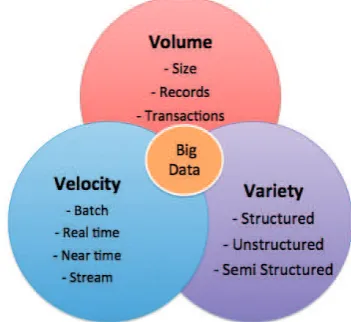
Since the definition of Big Data is vast, many attempts are made to define how big the data must be to be considered Big Data. In 2001, Doug Laney identified 3 Vs that define data growth challenges and opportunities, which are Volume, Variety and Velocity. These Vs are defined as Big Data characteristics and are shown in Figure 1.
Figure 1: The 3Vs of Big Data
Volume refers to the amount of data and size of data sets generated every second. Currently, the amount of data generated each day is almost equal to the total amount of data generated between the beginning of time and 2008. It is estimated that 2.5 quintillion bytes of data are created every day, which is equal to 2.3 trillion gigabytes. Thus, the data is too large to store and analyse using traditional processing applications. With the enormous size of data sets being generated every day, storage solutions like Hadoop and algorithms are created to store data at lower cost compared to past years.
Overview of Big Data
26
Velocity can refer to the speed of data generation as well as data in motion. Velocity is the speed at which data is created, stored, analysed and visualized. Before this, batch processing was a common practice. But in this Big Data era, batch processing is no longer practical because data is created in real time or almost real time. IBM predicted that by 2018, the rate of global Internet traffic would reach 50,000GB per second. With this kind of speed, traditional data management systems will no longer be capable of handling data.
Variety refers to types of data, whether structured or unstructured. Before Big Data, people used to store data on limited sources, such as spreadsheets and databases. Nowadays, sources have evolved and come in different formats, for example PDF, email, photos, video, audio, encrypted packets, sensors and others. The greater the variety of data, the more complex it becomes to combine, analyse and store data. For example, a single email can contain a variety of data. The email header is structured to describe the sender, receiver, subject and time. The email body may contain unstructured text depending on the content. Email may also contain attachments, which are another type of data.
With the evolution of Big Data, another V has been introduced. Veracity is explained as the biases and abnormality of data. With the amount of data available today comes a lot of data uncertainties, truthfulness and trustworthiness. Veracity can be defined as quality. Data is considered to be of quality based on its accuracy, source reliability and its context within analysis. For example, when users review certain products on social media, the data is uncertain since it entails human judgment. However, the review may contain valuable information for the seller. Therefore, this type of data needs to be addressed using specific tools and analytics developed for mining uncertain data. Figure 2 shows a summary of the 4 Vs of Big Data.
Figure 2: 4 Vs of Big Data
Big Data Security and Privacy
In this Big Data era, people connect to each other in various ways. With personal digital footprints, records of electronic interactions connect people in one way or another. These records keep increasing with current technologies. People might think that all stored data are secure and their privacy is in control, but there are data that cannot be secured.
Data privacy can be exposed through various data analyses available on the Internet, which is also called Open-Source Information (OSI). OSI is a type of data that can be obtained lawfully and ethically and that describes people, locations, groups, events or trends that exist in the public domain. When this information is evaluated and analysed, it can provide insight into the target. A few examples of OSI are all types of media like video uploads on YouTube and images on Twitter. Open discussions through forums, bulletin boards, chat rooms and general conversations are also included as OSI. This obviously shows that not all data shared on the Internet are private and secured.
Cloud Security Alliance (CSA) has identified the top ten challenges in Big Data security, which is grouped in 4 components: infrastructure security, data privacy, data management and integrity, and reactive security. Details of the challenges of each component are as follows:
i. Infrastructure Security
• Secure Computations in Distributed Programming Frameworks
• Security Best Practices for Non-Relational Data Stores
ii. Data Privacy
• Privacy-Preserving Data Mining and Analytics
• Cryptographically Enforced Data-Centric Security
• Granular Access Control
iii. Data Management
• Secure Data Storage and Transaction Logs
• Granular Audit • Data Provenance
iv. Integrity and Reactive Security
27
Conclusion
We have entered the era of Big Data, which comes with a lot of opportunities as well as challenges. Through various well-developed and developing analytics techniques and methods, there is huge potential for making faster advances in many scientific disciplines and improving the profitability and success of several enterprises in a business sense. However, Big Data also presents challenges such as with logistics, in the sense that more data demands more storage. Other than that, one of the biggest concerns with Big Data regards privacy and security. To mitigate the security risk in Big Data, users need to focus more on application security rather than device security. This is important because nowadays the application usually contains more user data compared to the device. Abundant data are saved in the cloud instead of hardware. Undeniably, Big Data expands the boundaries of existing information security responsibilities, and at the same time it introduces significant new risks and challenges.
References
1. Data Intensity. Characteristic of Big
Data – Part One. Retrieved from http://www. dataintensity.com/characteristics-of-big-data-part-one/ on 25 September 2016.
2. Darrin, Characteristic of Big Data. Retrieved from https://educationalresearchtechniques. wordpress.com/2016/05/02/characteristics-of-big-data/ on 26 September 2016.
3. Normandeau. K, Beyond Volume,
Variety and Velocity is the Issue of Big Data Veracity. Retrieved from http://insidebigdata. com/2013/09/12/beyond-volume-variety-velocity-issue-big-data-veracity/ on 26 September 2016.
4. Gandomi. A. & Haider. M. 2015. Beyond the hype: Big data concepts, methods and analytics. Ted Rogers School of Management. International Journal of Information Management 35: 137-144.
5. IBM Big Data & Analytics. The Four
V’s of Big Data. Retrieved from http://www. ibmbigdatahub.com/infographic/four-vs-big-data on 26 September 2016.
28
Acquisition of Oversized Hard Drive Storage
By | Jazreena binti Abdul Jabar, Abdul Wafi bin Abdul Rahman & Mohd Izuan Effenddy bin YusofIntroduction
Acquisition is a process of making a duplicate of a storage device in a forensic manner. Acquisition can be done from a tiny storage device like a micro memory card to a larger storage device like a 1TB hard drive. For a machine that uses logical volume storage like a database server, the storage capacity may get even larger. This article describes how to acquire a RAID (Redundant Array of Independent Disks) logical volume from a machine with more than 2 TB of storage.
RAID is a data storage virtualization technology that combines multiple physical hard drive components into a single logical unit for the purpose of data redundancy and performance improvement. Data is distributed across the drives in one of several ways, or RAID levels, depending on the required redundancy and performance level. The different schemas, or data distribution layouts, are denoted by the term RAID followed by a number, e.g. RAID 0 or RAID 1.
How does RAID work?
RAID arrays appear to the operating system as a single logical hard drive. RAID employs techniques of “disk mirroring” or “disk
striping” that involve partitioning each drive’s
storage.
Standard RAID levels
RAID 0: This configuration involves data
striping but no data redundancy. It offers the best performance but no fault tolerance.
RAID 1: Also known as “disk mirroring,” this
configuration consists of at least two drives that duplicate the data storage. This RAID level performs no striping.
Case Background
This article is written based on a case received by the Digital Forensics Department, CyberSecurity Malaysia. The case involves a server machine with RAID configuration. The server has 3 partitions of storage volume with capacities of 1 TB, 100 GB and 4 TB respectively. DFLive 2.0, a Linux Live CD was used to acquire the server. The first two volumes were acquired successfully. However, the challenge began with the last volume.
In order for an operating system to fully support storage devices with capacity exceeding 2 TB, the device must use a GUID Partition Table (GPT) partitioning scheme. This scheme supports addressing oversized storage devices (over 2 TB). If the user intends to start the computer from one of these large disks, the system’s base firmware interface must use the Unified Extensible Firmware Interface (UEFI) and not BIOS.