Virtual Learning Space for Kindergarten
By
Nurul Liza bt Yusoff
Dissertation submitted in partial fulfillment of the requirements for the
Bachelor of Technology (Hons) (Business Information System)
Universiti Teknologi PETRONAS
Bandar Sen Iskandar 31750 Tronoh PerakDarul Ridzuan
JANUARY 2008
Approved by,
CERTIFICATION OF APPROVAL
Virtual Learning Space for Kindergarten
by
Nurul Lizabt Yusoff
A project dissertation submitted to the Business Information System Programme
Universiti Teknologi PETRONAS in partial fulfilment of the requirement for the
BACHELOR OF TECHNOLOGY (Hons) (BUSINESS INFORMATION SYSTEM)
(DrP.D.DDom4nit)
UNIVERSITI TEKNOLOGI PETRONAS TRONOH, PERAK
January 2008
CERTIFICATION OF ORIGINALITY
This is to certify that I am responsible for the work submitted in this project/assignment, thatthe original work is my own except as specified in the references and
acknowledgements, andthat the original work contained herein have notbeen undertaken or done by unspecified sources or persons.
(NURUL LIZA BINTI YUSOFF)
ABSTRACT
This report covers the final draft of the study in which the title Virtual Learning Space for Kindergarten has been researched. The Virtual Learning Space for Kindergarten is developed using Macromedia Dreamweaver, Macromedia Flash MX 2004, Barbarosa Gif Animator and Adobe Photoshop 7.0. This project is carried out using Waterfall System Development Life Cycle Model. The Virtual Learning Space for Kindergarten will assist the kindergarten kids since "Children are active thinkers who are constantly trying to construct new strategies and advanced understandings" (Piaget). As the word kids might propose several definitions and explanation to different individual, this research stress on kindergarten kids whose ages are between 4 to 6 years old. Several meaningful findings are made during the research, which suggestively enable the author to tackle the matter in a broader view. By using the integration of multimedia which is the combination of sounds, animations and text, Virtual Learning Space for
Kindergarten helps kindergarten kids in Malaysia, to enhance their learning. The emphasis will shift from chalk-and-board method to interactive digital content delivered via the Internet. With sufficient access and support, teachers will be better able to help their students to understand concepts and engage in learning and to provide them with access to information and resources and better meet the students' individual needs.
Technology opportunities presented leads to the enhancement of learning and improve students' achievement. It can enrich the exchange between kids and their families at home as schools are looking for greater parental participation in their children's educational. Virtual Learning Space for Kindergarten gives even the busiest parents an affordable and easy means to participate in their child's lessons and even work cooperatively with teachers where they can explore the world together. In the best of all worlds, parents and educators would be 'attached at the hip', working side by side, sharing information and planning opportunities to enrich kids' learning experiences at
home and in the classroom.
ACKNOWLEDGEMENT
This project is especially dedicated to all web builders who are interested in taking up opportunity to build children website, I was geared to start on the research after reviewing hundreds of websites loaded on web and reading several materials on
children's issues which are related to the World Wide Web.
It is a pleasant thing that I have now the opportunity to express my deepest gratitude to
the person who has been closely supervising me throughout the semester and keenly guided me to take up effective efforts to ensure that I am able to complete this project within its time frame. I would like to thank my most supportive supervisor, Dr P.D.D Dominic for his constructive comments, suggestions, improvements and correctionsregarding this project. I would like to express my sincere appreciation to him for
providing me with the unique opportunity to work with him, for his expert guidance and
mentorship, and for his encouragement and support at all levels.I am very fortunate to have many good friends around me. Their readiness to guide me
really helped me in various aspects especially in understanding much more details about
the function of Macromedia Flash MX 2004. Thanks to Kaksya for her encouragement
and sharing of ideas and also a big thank to Paress for being such a nice friend all the
time, for all the inspiring and invaluable support.
I would also like to say thank you to all participants who were willingly spent their time answering questionnaires that have been distributed to them. And I also would like to
say a big thank to all children and teenagers who had chatted with me through iRC and provided me with priceless information I need for my research. Last but not the least, I
would like to thank all lecturers, UTP staffs and to all people out there who had help me directly or indirectly throughout this semester.
in
TABLE OF CONTENTS
CERTIFICATION OF ORIGINALITY .
ABSTRACT .
ACKNOWLEDGEMENT
TABLE OF CONTENTS
LIST OF FIGURES .
LIST OF TABLES .
ABBREVIATION AND NOMENCLATURES
CHAPTER 1 INTRODUCTION .
1.1 Background of Study .
1.2 Problem Statement
1.3 Objectives and Scope of Study
ui
IV
VI
VII
v i n
CHAPTER 2: LITERATURE REVIEW . . . 8
2.1 Overview . . . . 8
2.2 Introduction to Web Based E-Learning
System: An Evolution of Education . 9 2.3 Advantages and obstacles of E-Learning 10
2.4 How Children Learn 12
2.5 Effects of computers on Kindergarten Kids 12
IV
CHAPTER 3: METHODOLOGY .
3.1 Hardware Preparation.
3.2 Software Preparation .
3.3 System Development .
3.4 The Design Prototype.
3.5 Tools Required
CHAPTER 4: RESULTS AND DISCUSSIC
4.1 Data Gathering & Analysis
4.2 Results and Discussion.
14 14 14 14 20 29
30
30 33
CHAPTERS: CONCLUSION AND RECOMMENDATION 34
5.1 Conclusion . . . . 34
5.2 Recommendation . . . 35
REFERENCE 36
APPENDICES 39
APPENDIX 1: Sample of Questionnaire
v
LIST OF FIGURES
Figure 3.1
Use Case Diagram of Virtual Learning Space 16
for Kindergarten
Figure 3.2 Context Diagram of Virtual Learning Space 17
for Kindergarten
Figure 3.3 Data flow diagram of Virtual Learning Space 19
for Kindergarten
Figure 3.4 Screenshot ofMenu page design 21
Fieure 3.5 Screenshot of Learn ABC page design 22
Figure 3.6 Screenshot ofCount 123 page design 23 Figure 3.7 Screenshot of Recognize Colour page design 24 Figure 3.8 Screenshot of Hacalah Anakku page design 25 Figure 3.9 Screenshot oi' Mori Semhahyang page design
26
Figure 3.10 Development Process of Virtual Learning Space 27for Kindergarten
Figure 3.11 Gantt Chart for Final Year Project II
28
Figure 4.1 The survey result of impact ofcolor on children 31mood in learning
Figure 4.2 The survey result of teachers' acceptance towards 32
the use of Internet for their students to learn
VI
LIST OF TABLES
Table 2.1 Advantages of E-Learning 10
Table 2.2 Obstacles of E-Learning 11
v n
ABBREVIATIONS AND NOMENCLATURES
WWW IT CAI PHP HTML XML SDLC PC RAM
World Wide Web
Information Technology Computer-aided instruction PHP: Hypertext Preprocessor Hypertext Markup Language Extensible Markup Language System Development Life Cycle Personal Computer
Random Access Memory
v i u
CHAPTER 1 INTRODUCTION
1. BACKGROUND
Integration of multimedia becomes a very powerful teaching and learning tool. It has been placed at the center of current development in learning technology. Many types of multimedia integration can be discovered through the e-learning in global internet and almost of these stuffs are free and downloadable. Multimedia is a term that generally describes a computer based program that integrates several forms of media that may include video, sound, animation, graphic and text to create a multi sensory experience.
The term interactive implies that the media responds to some input from the user. There has been an explosion in the production of multimedia application for children in recent years. There are games utilities and educational programs. Besides modules and knowledge about the subject, quizzes and activities provided can give a good result in developing minds of kindergarten kids.
1.1 Background of Study
As for this Final Year Project, the Virtual Learning Space for Kindergarten can be defined as an online system designed for both kindergarten's teachers and kids that serve as an e-center in order to create the teaching and learning process interactive. This e-!earning offers a 'classroom-friendly' website as well as to offer school boards new ways to help the kids experience an interactive learning process. Main purpose of the project is to develop an e-learning website for kindergarten kids in learning basic subjects in a very effective way. The prototype consists of basic modules which applied
in Malaysia's kindergartens. Activities provided in way to enhance kids' mind and to
generate their creativity.
1.2 Problem Statement
1.2.1 Problem Identification
In depth study on 'Children on the internet' which was conducted in 1997 concluded
that more than 98 million children were using the internet during that time. In the U.S alone, when the Clinton administration has enforced its' people to connect every
classroom and library to the internet by year 2002, the percentage ofU.S public schools
with internet access has increased to 78 percent (Kim Wimpsett,1998). An estimated 42million kids will be surfing the web by 2002 but yet so little has been done in reinforcing people to produce children's websites with outstanding qualities. This exciting phenomenon however paved the way ofdiscussing the issue ofchildren and the web openly but most of them were only too concerned with legal issues like the manipulating of children's personal info by advertising computer, the need of getting parental consent for logging on to the web by children under 12, the need of filtering software to filter out filthy information on the web and some other related issues. Thus it is pertinent to carry out research that will be able to present the attributes of websites that are likeable by children, what are the things children looking for on the web, what are considered as good websites and wrap the whole ideas and findings into a standard guidelines that will lead the web developers to develop 'good n sound' children's
websites.
What is the different between game and educational programs? Certainly many games
teach valuable cognitive n social skills. Chess can teach problem solving. 'Old maid' can teach memory skills and playing with blocks can develop imagination and spatial
skills. Formal educational can be more productive when it has a certain amount ofentertainment built in.
As the multimedia delivery is engaging, lessons need not to be boring and it supposed to be more fun to learn. The existing e-learning for kids is basically simple with certifiable
approaches to implement an ideal instructional strategies and learning theories. Some
however are irrelevant for children as this may be due to the fact that most learning
concept are developed with adults or young adults in mind. E-learning for kindergarten
kids is different from adult as adult require less guidance in controlling one's own
learning. As for kids, it requires more use of graphical mode of representation and multi
usage as compared to adults.
In world of computer nowadays, people are ready and prefer seeing computer as one of
the medium of communication. Learning technology and educational applications have been discovered via WWW. Nevertheless, do all these utilities offer a great deal to ensure an effective learning environment? Existing program designed for kindergarten kids are sometimes questionable. Most of them are not attractive and inefficient. Colorsare inappropriate and pictures are too small. Therefore, the purpose of this research is to
come out with a simple, entertain and yet informative online based learning applicationsfor kindergarten kids.
Problem learning in traditional way
Dull environment
The present methods and way ofteaching in school especially in kindergarten is tedious
and uninteresting where this situation can make kids bored.Less effectiveness in learning
Old methods being used are ineffective and inefficient to attract kids for long term.
Lack ofnew material
Most of the kindergartens in Malaysia are still using old fashioned tools in teaching.
Teachers prefer to use flashcards, manila card and papers. Depends on subjects being
taught, we need to identify what tools is better for pushing kids to maximize their level
of knowledge.
1.2.2 Significance of the Project
This e-learning project is dedicated to kindergarten kids in Malaysia (aged 4 to 6 years old), allowing them to gain essential basic knowledge using the aid ofentertainment and multimedia techniques. The Virtual Learning Space for Kindergarten's goal is to open a dynamic window to the world for kindergarten's kids. Access to the Internet gives teachers and students everywhere an equal opportunity to use the most stimulating and interactive teaching tool in history. It takes advantage ofa new breed ofaccess devices called Internet appliances, which provide a simple pushbutton-type ofuser interface that
accesses information. The main target is promoting the idea of educational websites aswell as providing the kids with a safe area where they can learn and expand their knowledge. This project will bring a positive impact ofthe Internet towards the parents who will then be encouraged to allow their children to browse the Net and learn through
educational activities. Children are usually taught to trace numbers and alphabets inkindergarten and thus the same technique will be applied in the website which will allow them to learn while using the Internet. And the most important thing, it will introduce computers to children in a very productive way, therefore, putting forth a positive attitude to the use ofthe Internet. The aim is to provide educational activities along with fun. This is to ensure that the children's interest is kept.
The Virtual Learning Space for Kindergarten will be an absolutely perfect technology
'launch package' for any kindergarten kids in Malaysia and will be one of the most exhilarating experiences for them. This proposed system will also avoid the constraints
on teachers' time. It creates a shared learning environment that allows kids to explore, learn and interact in unlimited ways. As well as this e-learning opens the world to kids
in kindergarten, this project can enrich the exchange between kids and their families at
home. Schools are looking for greater parental participation in their children's
educational. Virtual Learning Space for Kindergarten Kids gives even the busiestparents an affordable and easy means to participate in their child's lessons and even work cooperatively with teachers where they can explore the world together. In the best of ail worlds, parents and educators would be 'attached at the hip', working side by side, sharing information and planning opportunities to enrich kids' learning experiences
at home and in the classroom.
1.3 Objectives and Scope of Study
1.3.1 Objectives
This project serves the objectives of:
• To construct the learning modules in the most interactive and appealing
environment for kids
Modules will be presented in short time effective n attractive. Graphics and sound can
give better understanding about the modules.• To increase way of presenting the interactive learning content
The purpose is to create an interesting mode in learning environment to avoid bored
situation while learning subject. It can create fun mood in learning environment.
• To gain more understanding experience in developing online learning prototype
• To prove an effectiveness of interactive multimedia element in educational
Research has to be done in order to see whether it really convinces and promotes
advantages for the kids in get cope with syllabus content and to advance the acceptance
ofelectronic publication as a legitimate and valuable form for academic course.
• To adapt technology and multimedia in teaching subjects
The most vital in developing multimedia learning tools is to improve the preparation of new teacher, increase quantity, quality and coherence of technology focused and activities aimed at development of teachers and improve the available instructional
support.
• To expose kindergarten kids with IT environment especially at early age
Starting from kids, technology could be adapted in learning environment as a tool of learning presentation.
1.3.1 Scope of Study
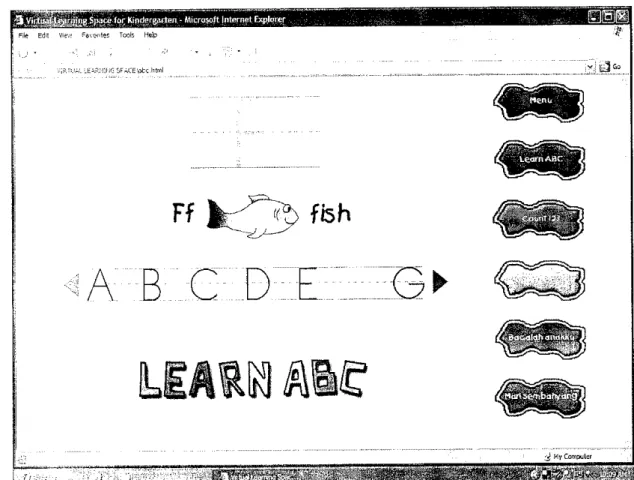
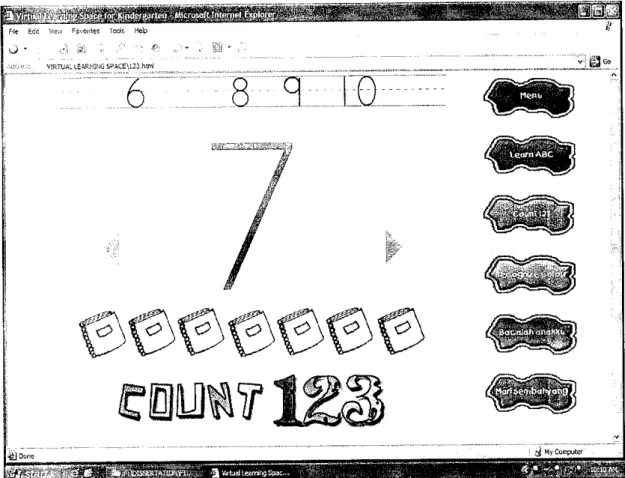
The modules consist in the Virtual Learning Space for Kindergarten are Learn English, Bacalah Anakku and Mari Sembahyang. There are three subsections under Learn English section which are Learn ABC, Count 123 and Recognize Color. There will be lesson, and activities designed for kids in an interesting approach. In developing this e-learning, the study covers on several areas of software engineering, knowledge on program and computer interface as well as researches for literature review. New areas of graphical and animation tools are explored in the sense that it has to interact with kids. They will learn online through fun activities using the latest in graphical and animation technologies in a designated way that will stimulate kid's brain, helping lay the groundwork for a successful kindergarten experience.
1.3.2 Feasibility of the Project within the Scope and Time Frame
A feasibility study outlines all the data needed to ensure that a project is an economic success over a longer period of time. It measures the practicality and the development of a system will be to an organization. Feasibility study includes operational feasibility, technical feasibility and economic feasibility.
Operational feasibility provides the core understanding on how the system will operate as planned. It measures on how well the solution of problems or a specific solution will work in the organization and how people feel about the system as the success of a system is determined by its end users. It is not only important to evaluate whether a system can work but also to evaluate whether a system will work. There are two aspects of operational feasibility to be considered:
• Is the problem worth solving or will the solution to the problem work?
• How do the end-users and management feel about the problem (solution)?
It can be said that intangible benefits can be derived from this project as it may enhance knowledge of kids in terms of level of information they receive and better improved their knowledge power. Therefore, this project is economically feasible to be developed.
Technical feasibility engages with technical structure of the system. One of the essential parts in technical feasibility relates to software and hardware. In terms of technical feasibility, developer has sufficient experience and familiarity with the application used in this project, that is the Macromedia Dreamweaver as it has been extensively used to develop other systems as well. Other software used to develop this project includes Macromedia Flash MX, Barbarosa Gif Animator and Adobe Photoshop 7.0.
The bottom line in many projects is economic feasibility. This is often called a cost- benefit analysis. During the early phases of the project, economic feasibility analysis amounts to little more than judging whether the possible benefits of solving the problem are worthwhile. The project's moderate size has also made this project feasible within the scope and time frame.
CHAPTER 2
LITERATURE REVIEW
2.1 OVERVIEW
This section's main objective is to review the analytical, critical and objective of written
materials on the chosen topics.
Interactive teaching methods have long been considered a superior approach for teaching subject material and skills in the area of business and management (Michaelson, 1993). These methods may include in-class processes such as debates case
study and role plays. As computer has become more widely used, computer supported presentation methods and computer-aided instruction (CAI) have also been employed
both to enhance in-class instruction and to supplement class instruction with autonomous learning (Bigelow, 1993).
E-learning for children is relatively new for the online community. This may be
contributed by the fact that it is assumed that children are the least as the users of the
Internet community. However, as the result of the massive Internet explosion amongst the recent community, children shall have to be better equipped in order to partake in the future of the Internet. In this context according to Cisco (2001;, "E-learning is Internet-enabled learning"- It refers to learning any type of information via onlinefacilities.
2.2 Introduction to the Web Based E-Learning System: An Evolution of Education
E-learning can be recognized as an alternative to the classic school learning or even solution to additional learning as the replacement to the traditional classrooms. School learning usually involves time cost and effort as children particularly have to make effort to take bus or walk to school premise and sit for at last half and hour per course.
As indicated by Adam (1997> "Reasons forfailure in schoolwork by this age are many:
inability to adjust to school (and, sometimes, the teacher), faulty teaching methods (including lack of good special help for slow learners), lack of encouragement from
home, etc".
Internet brings communities closer than ever before, making education available to many. Chalk-and-board instructional mode has long ruled the classrooms and lecture halls for the last two centuries. Even today, there are many schools and colleges, using this instructional mode. Some may have incorporated PowerPoint presentations together with the chalk-and-board method. We cannot deny that this is one of the effective modes of presentation and that it is here to stay for many more decades. However, the emphasis will shift from chalk-and-board method to interactive digital content delivered via the Internet. E-learning has some undeniable benefits over traditional learning methods. This is indicated by the demand for multimedia-based content as well as the growth of educational software. The e-learning content is available on-demand. Another benefit of e-learning is that the content can be easily customized, updated and
maintained at the server side. The content will be consistent and this gives the learners
equal education opportunity. Some theories and concepts can be easily explained using
multimedia tools and simulation software. With the World Wide Web already enjoying over 150 million users, it is no surprise that e-learning is set to become the biggest sector in the technology training market within the next 3 years. Indeed, with the technical advances and innovation associated with the web this rate will most probably accelerate. E-learning will continue to reshape education over the next two decades.
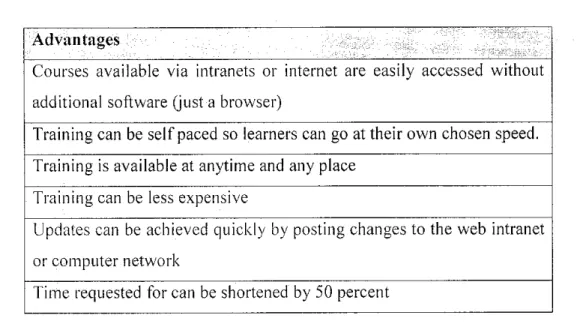
2.3 Advantages and obstacles of e-learning
Advantages and obstacles can be viewed as suggested by Hall (2000)
Advantages
Courses available via intranets or internet are easily accessed without additional software (just a browser)
Training can be self paced so learners can go at their own chosen speed.
Training is available at anytime and any place Training can be less expensive
Updates can be achieved quickly by posting changes to the web intranet or computer network
Time requested for can be shortened by 50 percent
Table 2.1 Advantages of e-learning
The mentioned advantages are designed in order for society to understand and see benefits of e-learning. The problems in traditional classroom as indicated by Adams earlier can be solved by adding e-learning to child educational.
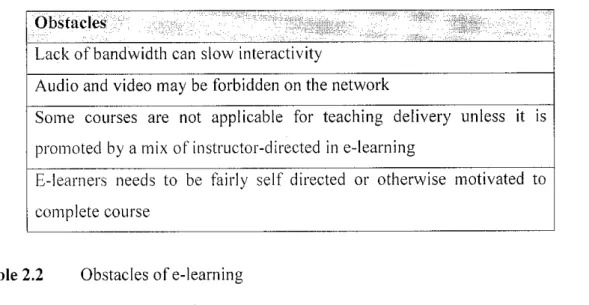
Internet is an amorphous medium that works as a push button that lead people to any possible direction. It is governed by the evolutionary rules that keeps on evolving at an infinite rate and cannot be stated with any certainty. Since the last few decades, it has played major rule in communication patterns and processes and still claiming its stake in running the lives of individual for various purposes like online business, entertaining, educational and personal gratification. Apart from advantages of e-learning, there are also obstacles in order to develop its quality. Most of obstacles however are basically based on the technicalities of the network or internet facility. It is presumed that most obstacles can be resolved once the technicalities are provided with appropriate solution (Hall).
10
Obstacles
Lack of bandwidth can slow interactivity
Audio and video may be forbidden on the network
Some courses are not applicable for teaching delivery unless it is promoted by a mix of instructor-directed in e-learning
E-learners needs to be fairly self directed or otherwise motivated to complete course
Table 2.2 Obstacles of e-learning
Obstacle number 3 recognizes the involvement of a tutor in order to promote the learning. This applies to certain types of courses that require tutor based support.
According to HalI,B.(2000),"77ze first step will be to make sure you have in place proper front-end analysis, including clear identification of who will be trained, what needs to be learned, and a performance analysis ofwhat the job requires improvement.
A good instructional design can make up for poor quality of media but it does work the other way around". Hall indicates the basics in order to develop a great instructional design. It is important that a good design contains the proper identifications of the target audience, the contents of the learning and improvements for learning subjects.
Some studies have shown that there are mainly three attributes that contribute to the good children's website selection which are interactivity, design and content (Yasmin, 1999). 3 different criteria must be possessed by any website in order to be called good children website. In her research, Yasmin proposed that the most desirable attributes of an ideal children's website must ensure that it allows for incidental learning, specific information gathering and entertainment.
11
2.4 How Children Learn
Based on Jean Piaget (1896-1980), [19] he found out that children learn through adaptation, example like in 'adapt to the environment'. In adaptation, two processes are involved, assimilation that involves reacting on the bases of the previous learning and understanding and accommodation that involves a change in understanding. As the example given by Piaget, a child who has learned the rules ofaddition can assimilate a problem such as 1+ 1; that is he or she can respond appropriately in terms of previous learning. Changes in the learning process like when he or she has 2 apples left and mom bought 3 new apples, therefore is understood that the number of apples has increased.
Therefore, this shows the accommodation.
Besides, children also learn through 'play and imitation'. According to Piaget (Theories
of Human Learning, 1999) [13] [19], when children play, they continually assimilate objects to predetermine activities and ignore attributes that do not really fit the activity.
While play only contains the assimilation, imitation is primarily accommodation. When children engage in imitation, they constantly modify their behaviour according to the
person or things they see.
2.5 Effects of computers on Kindergarten Kids
Traditional preschool curriculum involves a variety of activities that try to promote a
"balance of social, emotional, physical and intellectual stimulation for the young child". (Campbell, Fein 46). Supporters of the computer see this new technology as
very beneficial to the preschooler as thinking skills are developed and an extensive amount ol: problem solving and planning can be tested. The computer stimulates the
child to perform tasks otherwise not developed until the later stages.
Computers are extremely effective in association with kindergarten kids. Computers and technology tend to have more positive effects on young children than negative
effects. The children become more educated and advance in their learning development.
12
One thing that computers offer for everyone, especially children, the instant
gratification they can receive when they push a button and they are rewarded. Attention spans of preschoolers is very short so when they hit a button and they can predict the
outcome, the child feels comfortable and in control. [6]
13
CHAPTER 3 METHODOLOGY
3. PROCEDURE IDENTIFICATION
3.1 Hardware Preparation
A PC with Windows platform is needed to make this project possible.
3.2 Software Preparation
The web based application tools software is used due to developer's familiarity with the
software. These include PHP, HTML and XML. Besides, its feasibility to interact with the
server and availability or resources to refer to is additional factors affecting the selection of the software. Graphical packages and animation tools software may be used in order to construct an inviting environment for kids to learn and interact. These tools include
Macromedia Flash MX , Barbarosa Gif Animator and Adobe Photoshop 7.0.
3.3 System Development
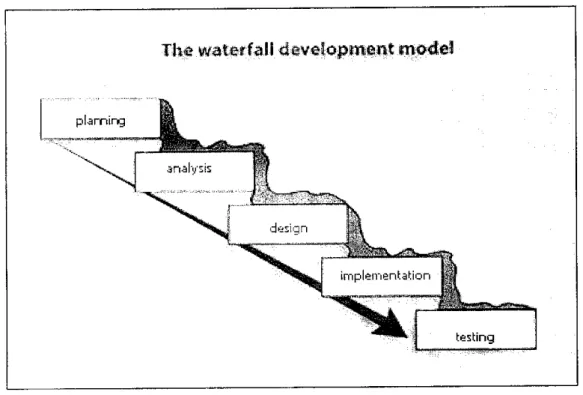
The e-learning development consists of five phases in accordance to that of the waterfall
system development life cycle (SDLC) model. Using this model, the project will follow a sequence ofstages in which the output of each stage becomes the input for the next. These stages can be characterized and divided up in different ways, including the following:
• Project planning
During this stage, a thorough study of web based application tools software and how it
functions are among the activities involved. The purpose of this phase is to document the
objectives, scope and requirements of the system so that a high-level view ofthe website
can be gained after a proper planning and study.
• Systems analysis
This stage involves lots of research, analysis, self study and information gathering from
various sources to master the requirements needed to build the online the Virtual LearningSpace for Kindergarten. A lot of researches and surveys are done to get feedback of kindergarten's learning modules and their teaching process. Reading from journals, internet, books and other methods of information gathering prepared in this stage to gain
insights on the matter the project is trying to resolve.40 copies of questionnaires have been distributed to kindergarten teachers in order to analyze their point ofview regarding this e-learning project. (APPENDIX 1)
15
Virtual Learning Space for Kindergarten
y y'
y
/•• \
y'' ,*-"--•\
\
_--) /
*
A
\ \.
<indtt rtjiir "•??i K tii-
Fi»ure 3.1 Use Case Diagram of Virtual Learning Space for Kindergarten
Kindergarten
kids
/
Parents r""'\
Entities interfacing with the sjstem
^Ministry of•c
'Education
Virtual Learniig Space for /^Kindergarten Kids
Teacher
Board of School
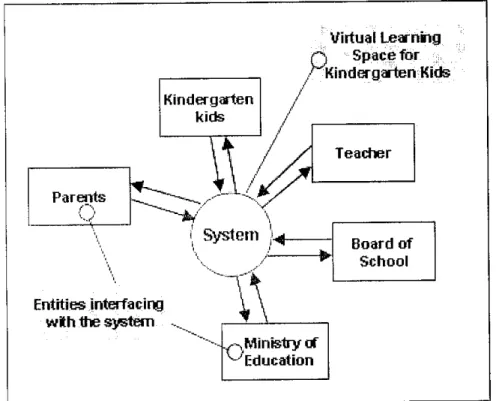
Figure 3.2 Context Diagram of Virtual Learning Spacefor Kindergarten
17
The system is encapsulated fully within the circle. This technique does not show any of
the inner workings of the system. Instead it focuses on the systems context. The focus is on the external entities that the system needs to interface with successfully. These are represented by named boxes and connected using directional arrows.The context diagram clearly organized into 2 areas which are:
• The system
• Things that interact with the system
In the case of this final year project, the system will be the e-learning itself, while entities include Teachers, Parents, Kindergarten Kids, Board of School and Ministry of
Education.
••&&£•
•-/earning system
5a
Internet access
Process
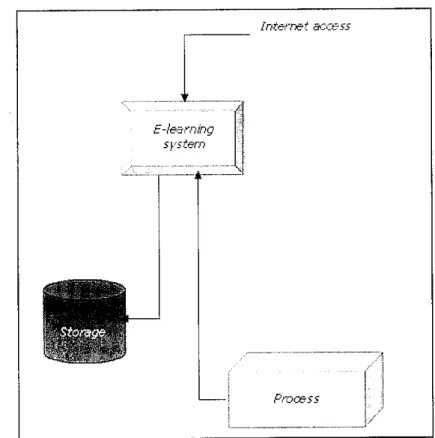
Figure 3.3 Data flow diagram of Virtual Learning Spacefor Kindergarten
19
• Systems design
This stage consist of tasks necessary to describe how the proposed system will be developed including interface design and information ofkindergarten's learning modules.
• Implementation
During this stage, all codes to integrate the online server functions with the interface of web
based platform will be implemented. The website will be linked to the system.3.4 The Design Prototype
The design prototype of Virtual Learning Space for Kindergarten consists of few main
pages including all main three modules. The pages will be presented in a colorful kids'
environment. The mentioned design prototype above is shown in figures below.
20
Figure 3.4 Screenshot of Menu page design
Brig.Spatefor. Kiiitigrgarten - Microsoft Internet Expjoirer
Filt Edit View t=»n?ntM Tooli Help
• ISVi.'A'. .ti.3;!:i.GSF^C£wtc html
Ff
fo ffeh
B'C.DiE
;J My Conpulei
Figure 3.5 Screenshot of the Learn ABC page design under Learn English section
22
Figure 3.6 Screenshot of Count 123 page design under Learn English section
23
Figure 3.7 Screenshot of Recognize Colour page design under Learn English
section
24
h ^MM&M^z^'ltL^ f v* :" t:. " I
1"^TlvA..EW!):I.Gil:,ACt*fiCS.htii'J
o-hiG sa-ya A-u-na
%/
Figure 3.8 Screenshot of Bacalah Anakku page design
25
•-•!:'"|JA. .£^P"i|irG fj^iCE^m^ehrSnfl.htniE
Wari Belajar
5e/T)bahyan
^
: -l , J
JT, . •*» -'"•irSglflfi *•*•* I
UGo
'f H/Computer
v.'j*-* .:?wfES3rH Figure 3.9 Screenshot of Mari Sembahyang page design
26
• Integration and testing
This is where everything will be ready to bring to testing environment. Any error, bugs and interoperability will then be checked.
The mentioned development process above is summarized in Figure 3.10 below.
Th* waterfall development model
testing
Figure 3.10 Development Process of Virtual Learning Space for Kindergarten
27
Detail Week 10 11 12 13 14 Scope proiccl
Conduct Survey Made Hypothesis Submrt Piogress Repor' *.
Des'O'i Prototype.
Submit Progress. Rppon 2 Develop an Application PreEDX
Out Pie&ental'on Dissertation
Figure 3.11 Gantt Chart for Final Year Project II
28
3.5 Tools Required
As a vital requirement for the completion of this project, several tools are required
including:
Hardware:
• A personal PC of Windows platform with at least Pentium II Processor 500MHZ speeds for quick data processing and retrieval.
• Minimum of 128 MB RAM
• Minimum of 2.0 GB hardiskto store all the data and web based material
• flatbed scanner
Software:
• Macromedia Dreamweaver
• Macromedia Flash MX 2004
• Barbarosa Gif Animator
• Adobe Photoshop 7.0
29
CHAPTER 4
RESULTS AND DISCUSSION
4. ANALYSIS
4.1 Data Gathering & Analysis
40 copies of questionnaires have been distributed to 40 kindergarten teachers in district of Penang and relevant answers will be discussed. The purpose of this questionnaire is to search out for opinion regarding this final year project.
In each kindergarten, respondents were asked to provide information and make as close an estimate as possible in the questionnaire. The picture obtained from the survey will be the fundamental of the development of the Virtual Learning Space for Kindergarten.
The feedback provided through this survey helps to determine the content offered in the website. The responses have been analyzed and a summary of the results is shown
below.
The most significant findings which the questionnaire has brought for the signs of a good e-learning for kindergarten kids are:
• Children learn numbers and the alphabet in the context of their everyday experiences. The content of the web-based e-learning system must have a combination of animals, shapes, fruits etc.
• E-learning for kindergarten kids needs supervision by teachers or parents
Opportunities for children with diverse backgrounds and developmental levels to participate in whole-group activities
Impact of colour on children mood in learning
• Agree
• Disagree
Figure 4.1 The survey result of impact of color on children mood in learning The finding shows that 35 out of 40 respondents agree that colour does impact children
mood in learning.
Teachers1 acceptance towards the use of internet in learning
• Agree
• Disagree
Figure 4.2 The survey result ofteachers' acceptance towards the use ofInternet for
their students to learn
From the survey, the result shows that 38 out of 40 respondents agree that it is good for
their students to learn through internet.
32
4.2 Results and Discussion
The expected result of this project is to make the kids become interested to learn at their
early age. Although the chalk-and-board mode of instruction will not be eliminated, emphasis will be on multimedia-based instructional mode where the content is delivered digitally using text, graphics, animation and sound with elements of interactivity.
Activities and games designed for kids in a very exciting method will attract them to be more engrossed in learning activities. The website allows kindergarten kids to learn mainly through play and interactive activities. The Internet exposes kids to a vast range of experiences and promotes interactive learning. It helps the kids to become computer literate at an early age and provides a safe environment in which the kids can work and achieve at their own level. It also helps the kids to provide repeated readings of stories
so they can gain mastery of the narrative, ideas and language. It provides opportunities
for children to talk about what is read and to focus on the sounds and parts of language as well as the meaning.
33
CHAPTER 5
CONCLUSION AND RECOMMENDATION
5.1 Conclusion
It can be concluded that this project will serve as an online system as a teaching and learning tool for kindergarten's teacher to teach the early age kids. This e-center will help the teacher in making the learning process interactive and attract kids to learn.
Thus, it makes this Virtual Learning Space for Kindergarten more interesting and experiential. The achievement of this project should be very beneficial towards the development of online based learning for kindergarten kids. This project would perhaps be the guidance for other research project in the aspect of introducing online learning to
early childhood education. It is also important to state that this project is practicable and
capable of delivering information that is related towards the process of exposing earlyage kids towards the use of internet.
Kindergarten is a time for children to expand their love of learning, their general knowledge, their ability to get along with others and their interest in reaching out to the world. While kindergarten marks an important transition from preschool to the primary grades, it is important that children still get to be children and getting kindergarten kids ready for primary school does not mean substituting academics for play time, forcing children to master first grade "skills" or relying on standardized tests to assess children's success. Kindergarten "curriculum" actually includes such events as snack time, recess and individual or group activities in addition to those activities we think of as traditionally educational. Kindergarten kids will continue to develop control of their own behavior through the guidance and support of warm, caring adults. At this stage,
children are already eager to learn and possess an innate curiosity. Teachers with a strong background in early childhood education and child development can best provide for children what they need to grow physically, emotionally, and intellectually. But all developmentafly appropriate kindergarten classrooms will have one thing in common:
the focus will be on the development of the child as a whole.
5.2 Recommendation
The result depends soundly on research papers and web as prime resources for data
gathering and analysis. As to validate the hypotheses, interviews have to be done with
parents of kindergarten kids. In the future, the result could be enhanced by distributing
the questionnaire to the real users, the children itself. Target group should be larger enough so that the results obtained from questionnaire are reliable.REFERENCE
[1] Christ Taylor (1999),"Raising Kids Online: What can parents do?", Time Magherot, Secton Family, Volume 153, Issue 18, Page 38, Item Number:
J 795046
On Web: http://www.time.com/cvberguide
[2] Jaffe, L.D. (1994).INTRODUCING THE INTERNET: A TRAINER'S WORKSHOP. Berkeley: Library Solutions Press.
[3] Michele Orecklin (1999)"Raising Kids Online: What can parents do?", Time South Pacific Magazine, Issue 19, Page 38
[4] ERIC/EECE [Online]
Available: http://erics.ed,uiuc.edu/ericeece.html
[5] Children on the web [Online]
Available: http://cyberatlas.internet.com
[6] Frank, Mary. Young Children in a Computerized Environment Volume 14, No
L The Haworth Press, 1981
[7] M.D. Robyler, Jack. 'Integrating Educational Technology Into Teaching'.
[8] Hot educational web for kids [Online]
Available: http://www/10hot.comidirectorv/education/kids.html
[9] Forcier, Richard C, 1996. The Computer as a Productivity Tool in Education.
Englewood Cliffs, NJ: Merrill.
[10] Frank, Mary. Young Children in a Computerized Environment Volume 14, No
I, The Haworth Press, 1981.
[11] Judd. C.H. (1908). The relation of special training to general intelligence.
Educational Review, 36, 28-42
[12] K.T. Camarena, An article on "Multimedia Elements and Delivery Methods".
[13] Skinner, B.F. (1954).THE SCIENCE OF LEARNING AND THE ART OF
TEACHING. Harvard Educational Review 24(2), 86-96.
[14] Murch, G.M. (1983).The effective use of color: Physiological Principles Techniques, 7(4), 13-16.
[15] Christine Seniuk, Effects of Computers on Preschool Aged Children,
[Online]
Available: [email protected]
[16] Niki Fardouly (1998), "Instructional Design of Learning Materials"
[Online]
Available: http://www.fbe.edu.au/learning/instructionaldesign/materials.htm
[17] All about Kindergarten & early childhood education [Online]
Available: http://kindergarten2u.com/
37
[18] Opening Doors to Education Worldwide [Online]
Available: http://www.e-learningforkids.org/
[19] Lefrancois, G.R. (1999). Theories of Human Learning, Wadsworth Thomson
Learning
[20] William B. Sanders. Macromedia Flash MX : The Complete Course, Seyboid
Seminar Publications
[21] H. Jamaluddin, T. Zaidatun. Multimedia Menerusi Macromedia Flash MX 2004,
VENTON.
38
APPENDICES
Appendix 1: Questionnaire Sample
This questionnaire contains one section that is to be answered by kindergarten teachers.
Please circle and state your answers representing the most appropriate responses for you in
respect of the following items.
1. Do you agree that color does impact children mood in learning?
A. Yes B. No
2. From your opinion, what colors will increase the students' motivation in learning process
3. Do you agree that colorful learning environment will increase children learning motivation?
A. Yes B. No
Why?
4, Other than conventional teaching methods, do you think it is good for your students to learn
through internet?
A. Yes B. No
Why?
5. Do you think e-learning for kindergarten kids' needs supervision by teachers or parents?
A. Yes B. No
Why?
6. From your opinion, what subjects are suitable for your students to learn through internet?
Why?
7. Does your kindergarten have any computer/computer facilities? If yes go to question 8, if no go
to question 9.
A. Yes B. No
8. Do you plan to have internet access/to have one?
A. Yes B. No
9. Do you plan to buy a computer in the near future?
A. Yes B. No
10. Do you feel comfortable with online teaching?
11, If you were to conduct an online learning, do you prefer it to be a formal one or not? Please
specify your answer.
A. Yes B. No
Why;
12. Please state any additional/special elements that you would like to see in an online teaching
curriculum