Accepted and approved as partial fulfillment of the requirements for the degree of Bachelor of Science in Computer Science. There is no easy way to separate the function of the listener object from the entire class that contains the components. See the result of the XUL file as you edit it without manually recompiling the file.
Use all command-line program features except those already provided by the IDE. HTML is a markup language derived from SGML and has become one of the most widely used languages on the web. XUL can also clearly separate user interface design and program logic [17–18].
It is up to the implementation of the XUL or the programmers whether they will use the model [19 - 20]. One of the first successful XULs developed is Mozilla's XUL, a XUL developed by Mozilla for use by cross-platform applications such as Firefox.
THEORETICAL FRAMEWORK
STANDARD GENERALIZED MARKUP LANGUAGE (SGML)
HYPERTEXT MARKUP LANGUAGE (HTML)
EXTENSIBLE MARKUP LANGUAGE (XML)
There is also a valid XML document, which is a well-formed XML document that passes a different set of restrictions. The empty element tag is like the start tag except that it ends with a "/>" and not a ">". Alternatively, a start tag and an end tag without any content are also considered an empty element.
The top of each XML element is marked by a tag called the root; all other tags must be below the root.
OBJECT ORIENTED PROGRAMMING
JAVA PROGRAMMING LANGUAGE
MODEL-VIEW-CONTROLLER ARCHITECTURE
- A Model can have multiple views, which means that different kinds of interfaces can be used to show a certain model, and the user can choose which of those
- Since the 3 components are separated, each component can be developed almost independent of each other
- Changes in one component normally do not affect other components
- Bugs can be easily spotted since it can be isolated in any of the 3 components
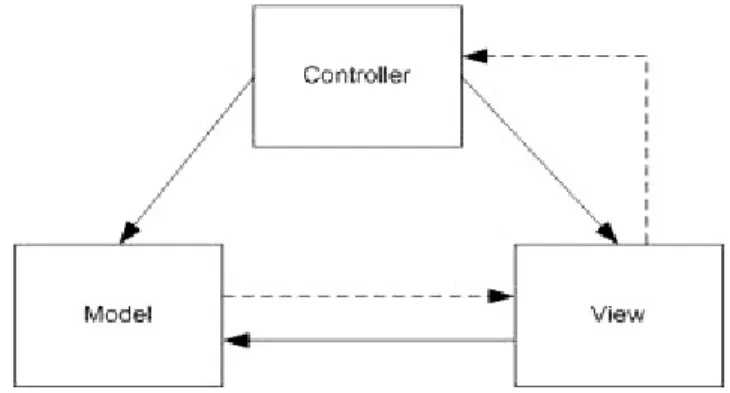
Controller – contains the methods used for the communication between the user and the application. These are usually the events that are generated when a user performs an action in the view to manipulate the model. As seen in Figure 1, the solid lines indicate direct association, which means that one component can use every resource the other component has, while the dashed lines indicate indirect association, which means that one component notifies the other component in case of changes.
A model can have multiple views, which means that different types of interfaces can be used to display a particular model, and the user can choose which of them can be used to display a particular model, and the user can choose which of those interfaces he wants to display. /she wants. Because the 3 components are separated, each component can be developed almost independently of each other. Bugs can be easily spotted because they can be isolated in any of the three components.
JAVA SWING
JAVA BEANS
SIMPLE API FOR XML
XML UI LANGUAGE (XUL)
The user defines a number of callback methods that are called when events occur during parsing. The color of the button is red and has the text “Click to Greet!” We also know that a certain function called “dogreet” is called when a user clicks the button.
DEFINITION OF TERMS
DESIGN AND IMPLEMENTATION
- The following components in the Swing UI toolkit (as of version 5) should be expressed in the XUL
- The XUL should be as simple as possible, and would provide no features that can promote logic code inside the XUL, such as scripting inside the XUL code
- The XUL should be able to express most of the graphical routines of Java’s Graphics2D
- The XUL file should be able to support writing Frames, Applets, Style sheets, and extending other Swing components
- The GUI file contains two methods that are called in the constructor,
- Swing components that represent a visible object (like buttons) are mapped by using their class names as names for tags and bean properties as its attributes. The attribute
- Swing Layout managers are important to describe the orientation of the components
- Styles are separate files that are used to define the properties of the components and are used like a CSS file. To use a Style, reference their url in the top level container
The following components in the Swing UI Toolkit (as of version 1.5) must be expressed in XUL. The "GUI" file, which also contains the main method, anything included in the "Event" file is ignored in this mode. A tag inside a tag means that it is added to the parent tag's container.
The children of the component with the "model.loop" attribute will be looped per element in the model. The complete lists of the special ways of expressing such values are included in the appendix. Attribute content has special parameters: .. a) {var varname} – The attribute uses the value of the given variable. "varname" .. can only point to variables created using the 'id' attribute.
The value of the attribute will be the name of the method in the event file. The method will be called in the same way that the "actionPerformed" method inside an ActionListener will be called by a swing component.
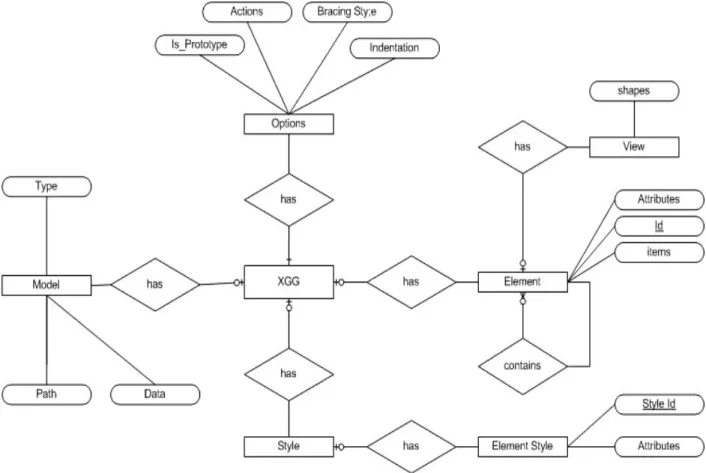
RESULTS
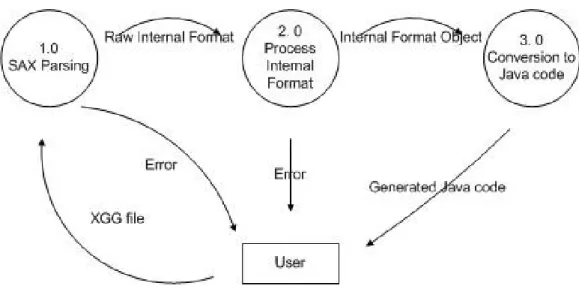
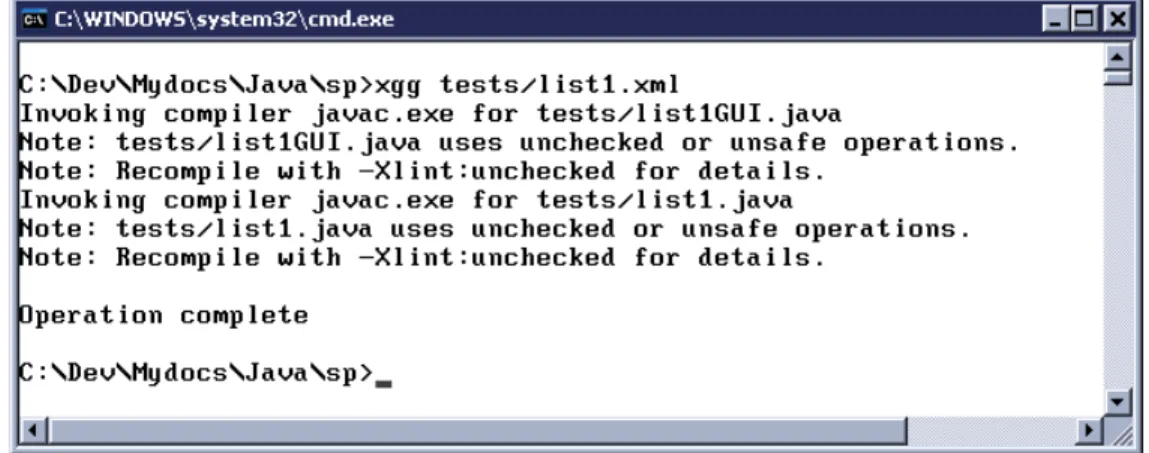
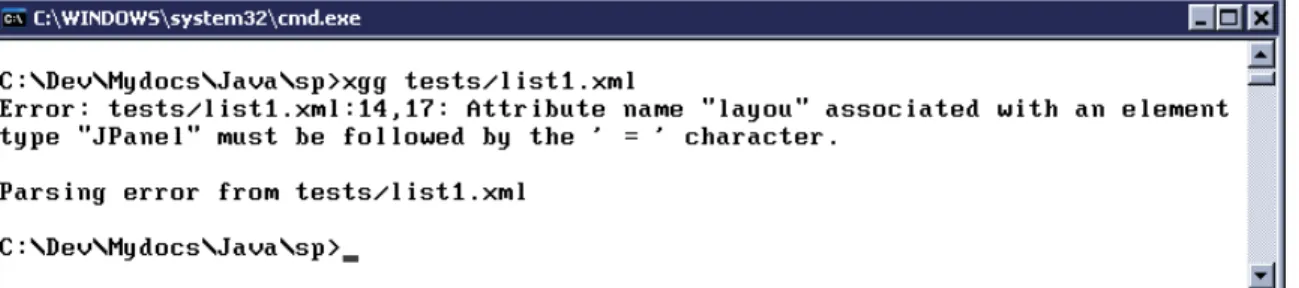
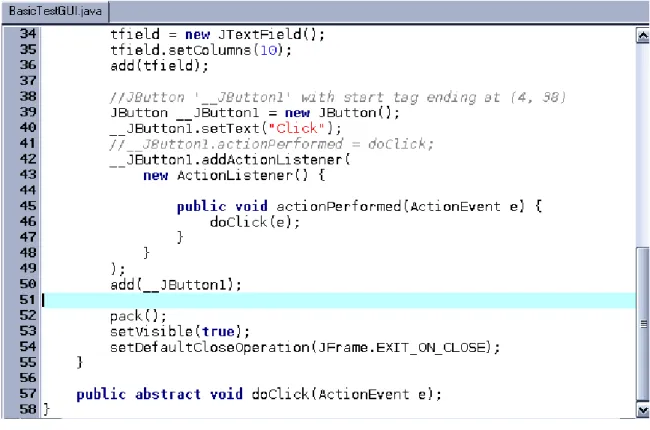
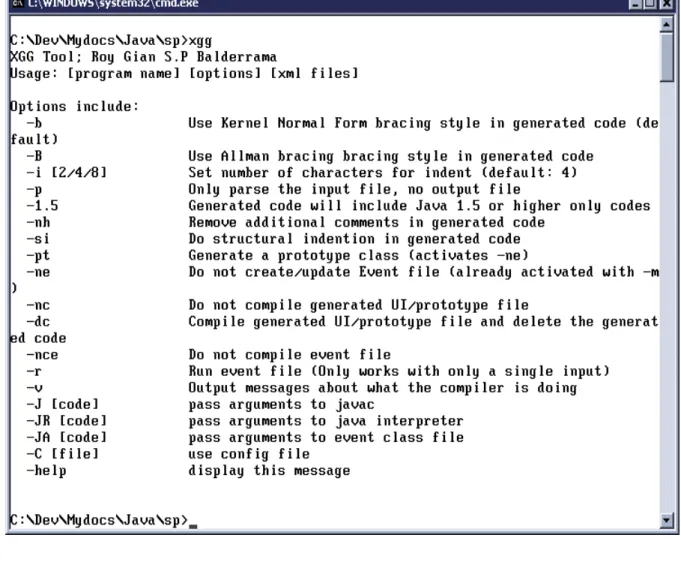
After the internal format is completed, the Java code extraction method is called and saved to the output file. When you run the command line compiler with a file as an argument, the compilation process will begin. The XGG compiler warns the user that it is running the Java compiler "javac" and also outputs its messages.
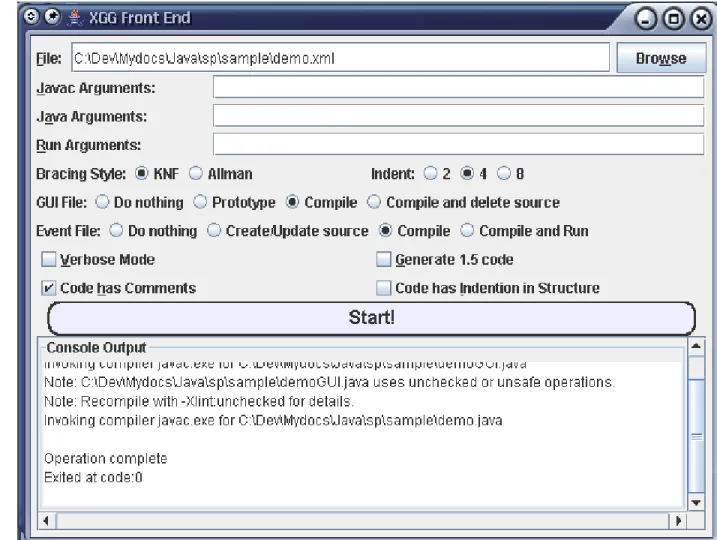
The user can browse or drag a file onto the screen, select the compiler options and then start compilation. The front end captures all output from the compiler and compiler program when the run option is chosen for a text area. The compiler options are saved when the user leaves the frontend and are loaded when the frontend is restarted.
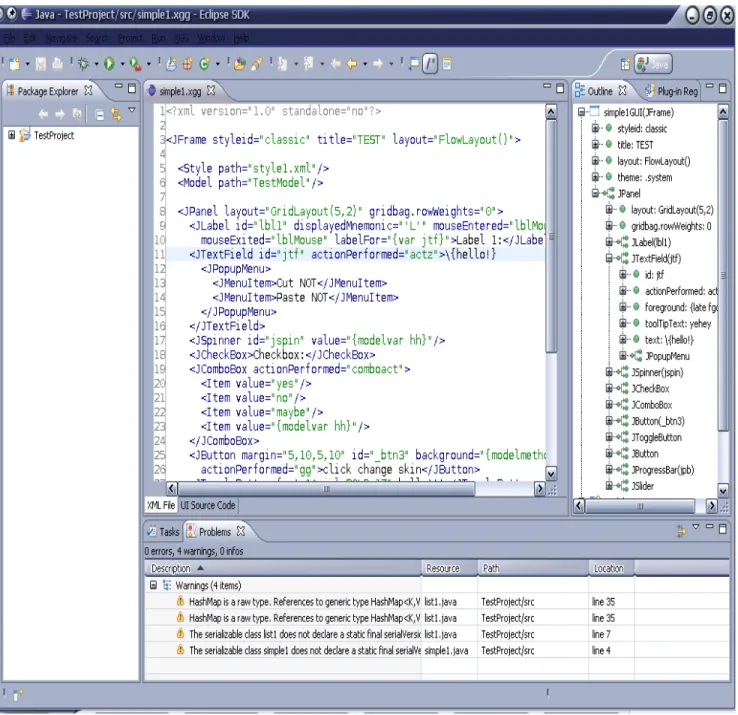
It provides syntax highlighting for XML, extra tab to switch between the XGG file and the GUI file, tree view of the XGG file and automation of the compilation, errors are also shown in the problem view of Eclipse. This simple example shows how much effort is reduced by using the XGG compiler.
DISCUSSION
It also runs faster because UI screens created with XGG do not spend time parsing and using slow Java routines (reflection) every time it is started. XGG does not require the applications compiled by the program to include a runtime package, unlike other XULs. One disadvantage that XGG had over other XUL is that it is severely limited by the Swing API.
If you're not careful with builders, it's easy for your code to get messy. XGG also does not encode the coordinates of the components and is usually better when creating windows that resize frequently. It does not offer advanced XML features unlike most XULs, such as namespaces and CDATA scripting.
This simplicity makes it a good choice if the user wants to start learning the basics and getting a feel for XUL as it is now being used in several major technologies such as Adobe Flex and Microsoft's WPF. As a learning tool, XGG can be quite effective, although it is not recommended for users without knowledge of Swing especially with Java.
CONCLUSION
Users with basic knowledge of Swing can check the sample XGG files and check the commented GUI file to learn more. Over time, users can easily visualize the layouts that would be used in each UI, meaning they could also be very efficient with hand coding.
RECOMMENDATIONS
BIBLIOGRAPHY
XML and the New Design Regime: Conflicts Between Designers, Application Developers, Authors, and Readers in Changing Technological Conditions and Perceptions of Social and Professional Needs”, ACM Journal of Computer Documentation May 2002/vol. Route Materialization Revisited: An Efficient XML Data Storage Model”, ACM International Conference Proceedings; vol. Introducing Application Design and Software Engineering Principles in Introductory CS Courses: The Java Model-View-Controller Application Framework”, College Computer Science Consortium, 2004.
APPENDIX
Appendix A
List of Supported Component Tags and Attributes
Attribu
OUTLINE_DRAG_MODE selectedFra
Attribu te
Java Type Comme nts
TRAILING scrollOffset int
AS_NEEDED
NEEDED
SCROLL_TAB_LAYOUT
AUTO_RESIZE_NEXT_COLUMN,
AUTO_RESIZE_SUBSEQUENT_COLUMNS, AUTO_RESIZE_LAST_COLUMN,
SELECTION selectionModel javax.swing.ListSelectionM
VERTICAL rollover boolean
Appendix B
Attribute Value Syntax
Primitive types (int, double, short, char) – Express them as you declare them in Java
String (java.lang.String) – Express them as you declare them in Java
You can also add “.brighter” and “.darker” to the constants to get more variations (e.g. “red.brighter”, “blue.darker”). LayoutManager (java.awt.LayoutManager) – Express them by entering the constructor of any LayoutManager object without the new keyword. Only the objects present in Java 1.5 of a LayoutManager object without the new keyword, only the objects present in Java 1.5 are valid. Border (java.swing.border.Border) – Express them by entering the constructor of a Border object without the new keyword, only the ones present in Java 1.5 are valid.
Icon (javax.swing.Icon) – Express them by inputting the url or the path of the image file
Image (java.awt.Image) – Treat them like the Icon type
Insets (java.awt.Insets) – Express them by inputting four comma-separated integers (ie
Paint (java.awt.Paint) – Either treat it as color or express them using GradientPaint constructors without the new keyword. Stroke (java.awt.Stroke) – Express them by entering the constructor of the BasicStroke object without the new keyword, only those found in Java 1.5 are valid.
ACKNOWLEDGEMENTS