The special problem entitled “LeafSnap PH: A Mobile Application for Identification Leaf Samples of Philippine Plants” prepared and submitted by Marbert John C. Marasigan in partial fulfillment of the requirements for the degree of Bachelor of Science in Computer Science has been examined and is being recommended for acceptance. Accepted and approved in partial fulfillment of the requirements for the degree of Bachelor of Science in Computer Science.
Mathematical and Computer Sciences Unit Department of Physical Sciences Department of Physical Sciences and Mathematics. LeafSnap PH is a mobile application that will help users identify plant species through their leaves. The leaf feature to be extracted is its shape using contour points and this will be used in leaf identification using support vector machine.
Background of the Study
The main feature of LeafSnap is plant identification by taking a picture of a leaf with a smartphone's camera. The application can also handle textual searches of the common or scientific name of a leaf in its database. The app also has a game where you match a certain leaf to its common or scientific name.
Currently, the developers of Leafsnap are working on an Android version of the app, but there is still no news about its release[7, 11]. Although, there are theses on an Android application similar to Leafsnap, but none of them have been released in the Google Play Store[12, 13]. There are two datasets from Leafsnap: one covers the trees of the Northeastern United States[11], found in the original Leafsnap application[8, 9], the other covers the trees found in the United Kingdom[11 ], which was found in the Leafsnap UK application[10].
The Philippine Plant Information System (PPIS) contains information on plant collections and specimens from the various herbaria in the Philippines collected, aggregated and shared publicly. The mobile application is part of a project together with the Philippine Plant Information System.
Statement of the Problem
Objectives of the Study
If the device has no internet connection or the user chooses not to proceed with identification, the image is still stored in the file storage and can be identified at a later time.
Significance of the Project
Scope and Limitations
Assumptions
Review of Related Literature 6
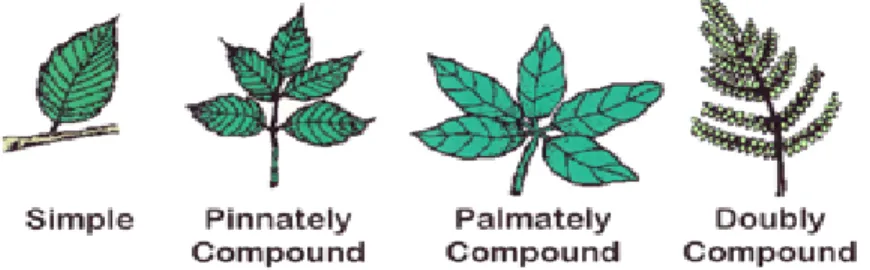
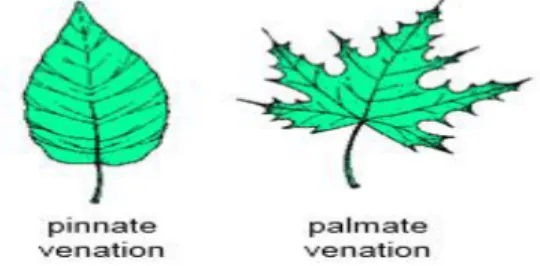
Classification is done by projecting the test data into a multi- or infinite-dimensional space and checking which side of the space it is on. According to the arrangement of the leaves on the stems, the leaves can be classified into four types as shown in. Leaves can also be classified by their shape and is a primary tool in plant identification.
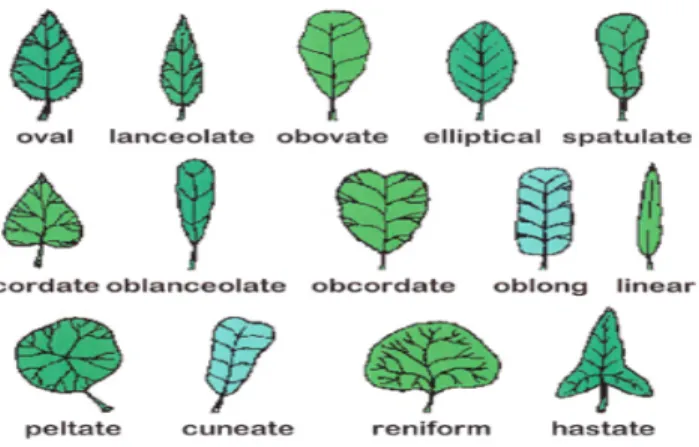
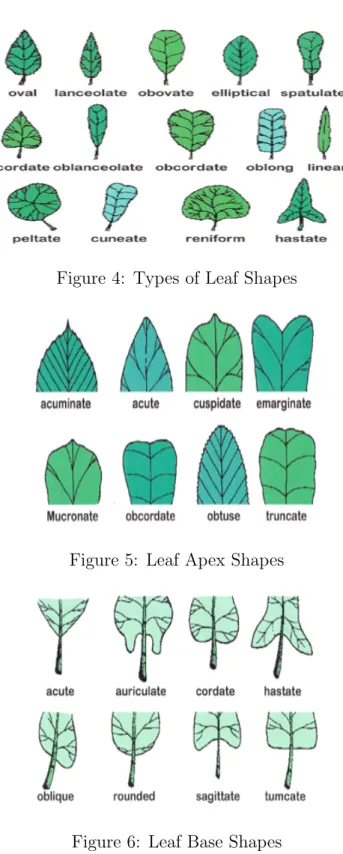
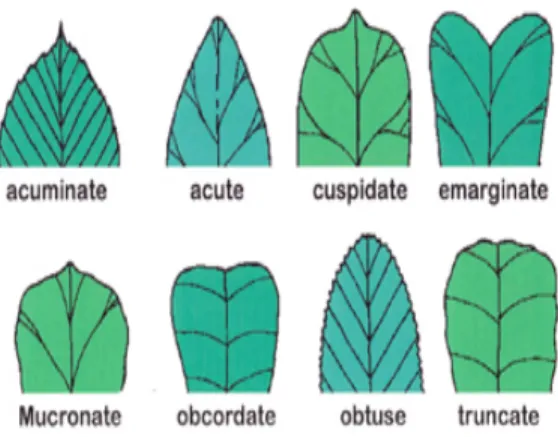
Common shapes are oval, lanceolate, elliptical, spatulate, cordate, oblanceolate, obcordate, oblong, linear, peltate, conical, reniform and hastic, as shown in Figure 4[27]. The leaf apex shapes can be acuminate, acute, pointed, emarginate, mucronate, obcordate, obtuse or truncated, as shown in Figure 5[27]. The shapes of the leaf base can be topical, auricular, cordate, haste, oblique, circular, arcuate or tumcate, as shown in Figure 6 [27].
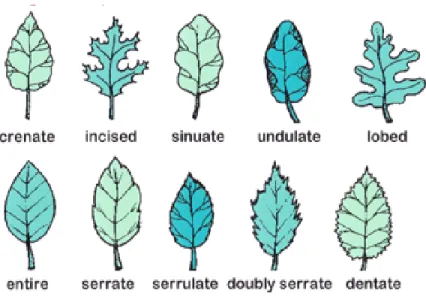
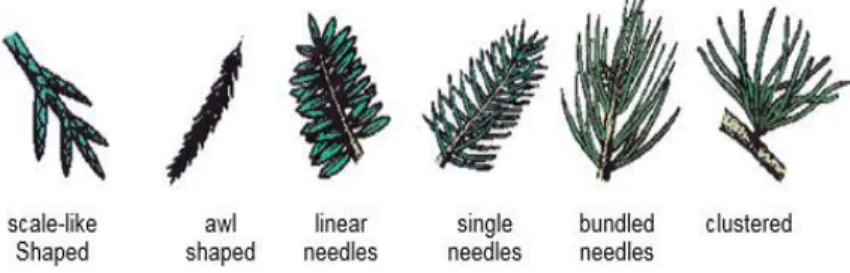
The shapes of the leaf edges can be serrated, incised, corrugated, corrugated, lobed, entire, serrate, serrate, doubly serrate, or serrated, as shown in Figure 7[27]. Conifer types can be classified into four types based on their veins, namely scale-shaped, awl-shaped, linear-shaped and needle-shaped, as shown in Figure 8[27].
Image Classification
Computer Vision
Expectation-Maximization Algorithm
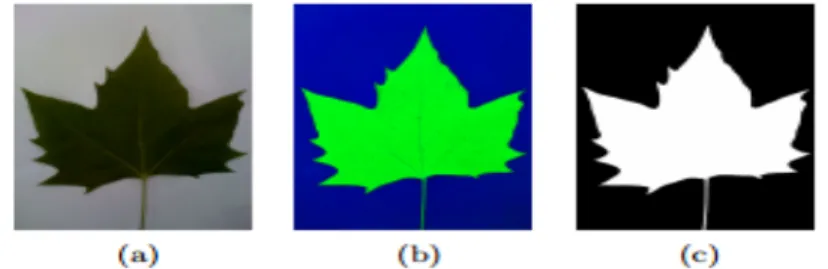
Independence: A change in the description of one training class should not change the value of another. Basically what the EM algorithm does here is separate the leaf from the background.
Histograms of Curvature over Scale
Machine Learning
Support Vector Machine
Mobile Application
Android Software Development Kit
The Android Software Development Kit (SDK) includes the required libraries, debugger, emulator, relevant documentation for Android programming interfaces (APIs), sample source codes, and Android OS tutorials for developing applications for the Android platform. Android applications are written in Java, so the Java Development Kit (JDK)[43] would also be required. Appcelerator Titanium includes a software development kit (SDK), Studio, an Eclipse-based IDE, Alloy, an MVC framework, and cloud services.[44]
Design and Implementation 21
Entity-Relationship Diagram
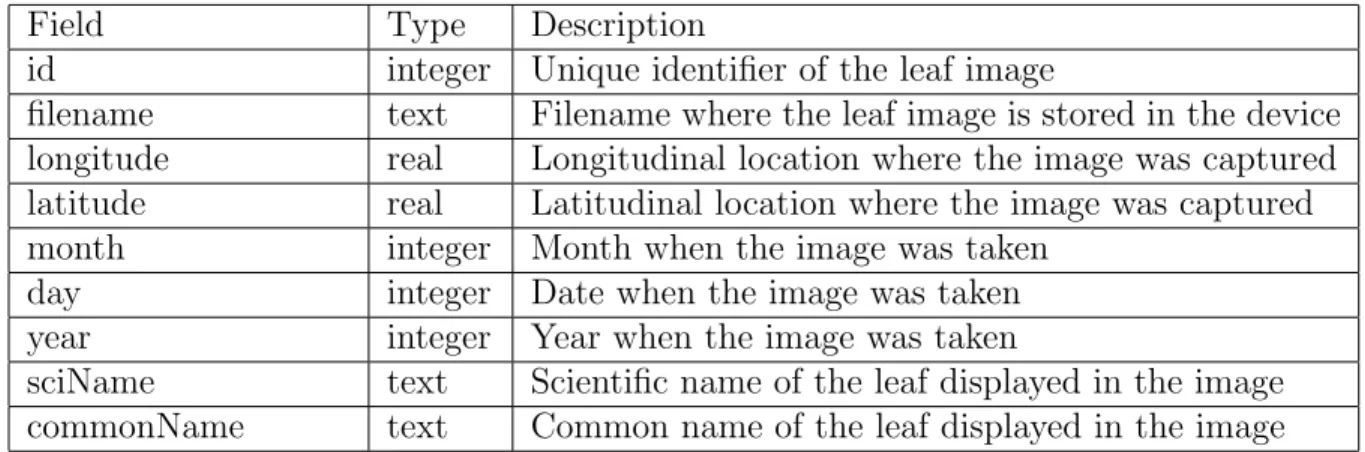
Data Dictionary
Activity Flow Diagram
If the user chooses to send it now, the device will send the image along with the device ID (a unique identifier for Android devices) to the server. If not, the server will create a unique directory for that device ID and then continue with the login process. The server starts the identification process by storing the image in the unique directory for the device ID.
It will then extract the features of the image and then using those features, it will then identify the labels of the five closest matches. The server will continue to retrieve the scientific names and common names mapped to those tags. And then the server will encode the scientific name-common name pairs into Javascript Object Notation (JSON) format and send that JSON string back to the mobile device.
And the process ends after the device has updated the scientific and common name of the captured leaf image.
System Architecture
LIBSVM
OpenCV
Technical Architecture
Minimum System Requirements
Results 27
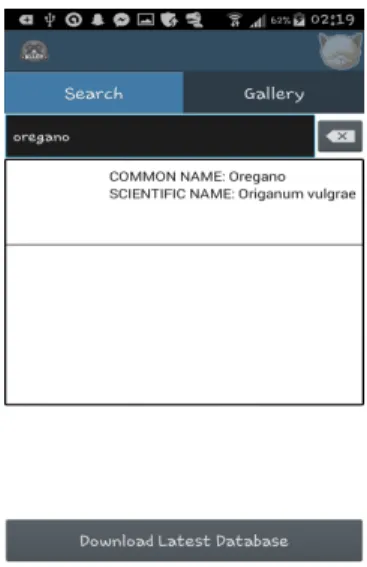
Search
When the transfer is complete, a warning dialog will inform the user that the database has been updated as shown in Figure 22.
Gallery
Discussions 34
The Expectation-Maximization (EM) algorithm is used to separate the leaf from the background and then determine the shape of the leaf using Canny Edge Detection. Another issue addressed is that the background is sometimes too dark, so using the EM algorithm treats the entire sheet as part of the background. For the feature extraction and labeling of the sheet on the server side, Visual C++, with the OpenCV extension for image processing, was used in writing the application.
Displaying all leaf images at once resulted in a lack of memory, causing some of the images to not be displayed. A solution, therefore, is to create only one image view and view the leaf image only by tapping on a leaf sample. The test set used 40 images that were not part of the 240-image training set.
This addresses the rapid growth of the mobile platform, the rapid increase in the number of mobile users and the lack of a mobile application for this purpose. The ease and speed of the program allows those who have little to no botanical background to identify leaves. The accuracy of the model is 65% if we look at the closest result, but if we take into account the five closest results, the accuracy would be 90%.
Leafsnap US has a database of 184 species compared to the model used, which has 8, and therefore a comparison of the accuracy of the two datasets would lead to inconclusive results. LeafSnap PH can be further improved by increasing the accuracy of the training model to 90%. The data can also be improved by taking into account the size of the leaf.
An iOS version of it can be developed to expand the range of users of the application. A map function, where location data of plants is sent to a server and can be viewed by all users, can also be implemented to utilize the longitude and latitude components of the database. As stated in the conclusion, the accuracy of the model compared to Leafsnap is slightly lower, but the model has significantly fewer classes than that of Leafsnap.
Therefore, it is highly recommended to increase the size of the database by adding more classes to make the results more convincing. Huang, et al., “Computer-aided plant species identification (CAPSI) based on leaf shape matching technique,” Transactions of the Institute of Measurement and Control, 2006.