©Daffodil International University i
“Local Tourist”
By
Maksudur Rahman Maruf Id: 152-35-1167
A project submitted in partial fulfillment of the requirement for the degree of Bachelor of Science in Software Engineering
Department of Software Engineering
DAFFODIL INTERNATIONAL UNIVERSITY
Semester: Spring –Year: 2019
©Daffodil International University ii
©Daffodil International University iii
Acknowledgement
After all, I was successful as I successfully replaced the final semester. And so I'm pleased with my Almighty. From the beginning of my university career, I learned a lot about the knowledge about software engineering and core computer science about my course teachers. Moreover, they teach our ethics, ethics, and modesty.
As well, I am very grateful to my parents that I was always supported by them. They always inspire me to my opinion priorities and as well.
My supervisor to allow me to work with this project. Mr. Iftekharul Alam Efat too much
appreciated. He always supports me to make this project successful. Especially I am very
grateful to my brother, who always admires my professionalism.
©Daffodil International University iv
Executive Summary
January was the when we started the development phase. We all know that, people have to put hard work, dedication, and full concentration to complete a project successfully.
Here comes to requirements analysis to help the developments phase. Requirements analysis helps every step of development phase.
Database it’s the important part of any system. That’s why, in the initial step of development phase I have focused on database design, make the table and their attribute.
Complete a project in not easy at all. Also it’s not the end, you have to ensure that you project works properly and for that you have to test your project. And here comes the testing part.
Testing ensure that your system quality.
©Daffodil International University v
Table of Contents
APPROVAL ... Error! Bookmark not defined. Acknowledgement ... iiiExecutive Summary ... iv
Chapter 1 ... 1
Introduction ... 1
1.1 Project Overview ... 2
1.2 Project Purpose ... 3
1.2.1 Background ... 3
1.2.2 Benefits & Beneficiaries ... 3
1.2.3 Goals ... 3
1.3 Stakeholders ... 4
1.4 Proposed System Model... 5
1.5 Project Schedule ... 5
1.5.1 Gantt Chart ... 6
Chapter 2 ... 7
Software Requirement Specification ... 7
2.1 Functional Requirements ... 8
2.1.1: Traveler Registration ... 8
2.1.2: Traveler Login ... 8
2.1.3. Find a Tour ... 8
2.1.4: Traveler Can View full tour Plan ... 8
2.1.5: Traveler can send a booking request for a tour ... 8
2.1.6: Traveler can view upcoming tour and guide event. ... 9
2.1.7: Traveler can view the pending request ... 9
2.1.8: Traveler can rate the guide ... 9
2.1.10: Traveler can find a Guide ... 9
2.1.12: Traveler can send a hiring request ... 9
2.1.13: Guide Registration ... 10
2.2 Data Requirements ... 10
2.3 Performance Requirements ... 10
2.4 Dependability Requirements ... 10
2.4.1 Reliability Requirements ... 11
2.4.2 Availability Requirements ... 11
2.5 Maintainability and Supportability Requirements ... 11
©Daffodil International University vi
Chapter 3 ... 12
Requirement Analysis ... 12
3.1 Use Case Diagram ... 12
3.1.1 Registration ... 13
3.1.2 Login ... 14
3.1.3 Find a Tour ... 14
3.1.4 Find a Guide ... 14
3.1.5 View Request Tour ... 16
3.1.6 Give Rating ... 16
3.1.7 View Guide Details ... 16
3.1.8 View Tour History ... 17
3.1.12 Booking Guide ... 18
3.2 Activity Diagram ... 18
3.2. Traveler Registration... 19
3.2.2 Login ... 20
3.2.3 Find Tour ... 21
3.2.4 View Tour Details ... 21
3.2.5 Booking Tour ... 22
3.2.6 View Upcoming tour ... 22
3.2.7 View previous tour history ... 23
3.2.8 Request for guide ... 23
3.2.9 Request for hiring a guide ... 24
3.2.19 See upcoming tour ... 24
3.2.10 View tour history ... 25
3.2.11 booking tour ... 26
3.2.19 View tour Details ... 27
3.3 Sequence Diagrams ... 28
3.3.1 User Registration... 28
3.3.2 User Login ... 29
3.3.3 Find Tour ... 30
3.3.4 Vie Tour Details ... 30
3.3.5 Book Tour ... 31
3.3.6 View Upcoming Tour ... 31
3.3.7 View Request Tour ... 32
3.3.8 View Tour History ... 32
3.3.10 Find Guide ... 33
©Daffodil International University vii
3.3.11 View Guide Details ... 33
3.3.12 Booking Guide ... 34
3.3.17 View Tour Rating... 34
Chapter 4 ... 35
System Design Specification ... 35
4.1 Development tools and technology ... 36
4.1.1 User Interface Technology ... 36
4.1.1.3 Programming Language ... 36
4.1.2 Implemented tools and platform ... 36
4.2 Class Diagram ... 36
4.3 Database Design Diagram ... 37
Chapter 5 ... 38
System Test ... 38
5.1 Testing Features ... 39
5.1.1 Features to be tested ... 39
5.2 Black Box Testing ... 39
5.2.1 White Box Testing ... 39
5.2.2 Pass / Fail Criteria ... 39
5.3 Test Cases ... 40
5.3.1 Login ... 40
5.3.2 Registration ... 41
5.3.3 Hiring guide ... 42
5.3.4 View Upcoming Tour ... 43
5.3.5 Find Tour ... 44
5.3.6 Find Guide ... 45
Chapter 6 ... 46
User Manual ... 46
6.1 Flash Screen ... 47
6.2 Registration Page ... 48
6.3 Login Page ... 49
6.4 Tour List... 50
6.5 Tour Details ... 51
6.5 Guide Search ... 52
6.7 Guide Details ... 53
6.8 Tour Overview ... 54
Chapter 7 ... 55
©Daffodil International University viii
Conclusion ... 55
7.1 GitHub Link ... 56
7.2 Project Summary ... 56
7.3 Limitations ... 56
7.4 Obstacles and Achievements ... 56
7.5 Future Scope ... 56
7.6 References ... 57
©Daffodil International University ix
©Daffodil International University 1
Chapter 1
Introduction
©Daffodil International University 2
1.1 Project Overview
Traveling teach us more than any book. Travelling make your life better and happier in several ways. We will meet the different people during traveling. If we want to be more open and more accepting, then we should travel. If we want more independent and confident go to travel.
When we want to travel any place, we haven’t much opportunity to go an unknown place, because we don’t know about the place, security, costing etc. actually we are traveling like generally!
People go only main focused place say like Cox Bazar. and they never reach any placed deeply.
Because of the lack of communication, security reason, etc.
For the reason, we are going to design and develop an application called “Local Tourist”, because of helping the traveler to travel any placed in Bangladesh.
In our Application, there is a traveler part. Suppose a traveler want to travel any place so they can search into the system for knowing upcoming tour details of any specific placed. And they can see all details about the tour like tour date, cost, etc. If they want to enroll in the tour, Traveler have to ensure that they are an authentic user by login into the system. Then they can send enroll request.
In this system, only guide can create a tour.
Traveler enrollment request comes to the Guide. In this system, guide play a vital role that’s why when admin accepts the guide profile they make sure that the guide information is solid and accurate.
When an enrollment request come to guide then the guide check that request and after seeing the traveler given information, the guide can cancel or accept the enrollment request, a traveler also can book a local guide, to guide him.
Suppose, any traveler needs to visit a district so they can search for a guide of their desire place and sending booking request to guide.
We decided to make a system to help the traveler to travel. When any people travel any place with
a local guide of that area then there is no security issue and they know properly about the traveling
place.
©Daffodil International University 3
1.2 Project Purpose
Our purpose about “Local Tour” to make a tradition for a traveler to visit anywhere in a place properly. And build a communication system between traveler and local guide. As if, a traveler can find a tour easily and also can book a guide. The people called guide is make money using this system.
1.2.1 Background
We recognize that, people travel only a focused place but a focused placed have some other tourism sport and a traveler missing those tourism sport. People know a place but not everything on that place because the lack of availability of information. And they also don’t know that there have a tourist placed. So that’s why we have thought that here we can help the people.
1.2.2 Benefits & Beneficiaries
Our application is going to be beneficial in various ways. Some of them are below
It helps a traveler to find and see upcoming tour on a specific area
It’s more easy for a traveler to enroll the tour
Also a traveler easily can find a “Guide”
Traveler can send guide booking request more easily
After complete the tour, the traveler can give rating on a guide
Traveler can update their own profile
This app helps the guide for create and arrange a tour
Guide can accept or reject traveler enrollment request
Guide also can delete or cancel the tour that is created by him
After complete the tour, guide also can giving rating on a traveler
Guide can update their own profile also
The guide information is trustable because an admin is completed the guide registration process
1.2.3 Goals
The final goal of this project is to build an application based on web. Our aim is to help the traveler
to travel any place properly and make their traveling path easy and more secure. We want build a
platform where a traveler can find his maximum needs. And the guide side we will try to make
this application useful for them as they can get their return values.
©Daffodil International University 4
1.3 Stakeholders
There are three stakeholders in our “Local Tour” System. And they are:
Traveler
Guide
Admin
Traveler: Traveler is the primary stakeholders in this system. The main user in this system is a traveler. Traveler searches a tour on a specific placed and sees the tour details if they like the tour
they can send an enrollment request. Also, a traveler can book a guide to giving him company on any tour. After the tour, they can give a rating on that guide.
Guide: The Guide is another primary stakeholder in this system. A guide can create a tour based on any specific area. And on that tour, if any enrollment request comes from any traveler then the guide can accept or reject that request. For any reason, the guide can delete or cancel the tour.
After the tour, guide also can give a rating on a traveler.
Admin : There is a small roll in admin part of this system. When a guide registration request come
to admin they check the guide information if the guide provide solid information then admin accept
there registration.
©Daffodil International University 5
1.4 Proposed System Model
Before going to develop a system it is very important to have a system model. We have already Prepared a system model. This model will clarify our proposed system in brief.
Figure 1.1: Proposed system model
Our project named “Local Tourist” is going to be developed based on web and mobile, this application reserve different types of modules as well as user privileges. And each module architecture is different from another one. Before describing project overview, I need to expose about our system module architecture
Such as:
1.5 Project Schedule
We need to prepare a scheduling plan to complete the project on time. It also refers to make
Communication with what task need to get done within timeframe.
©Daffodil International University 6
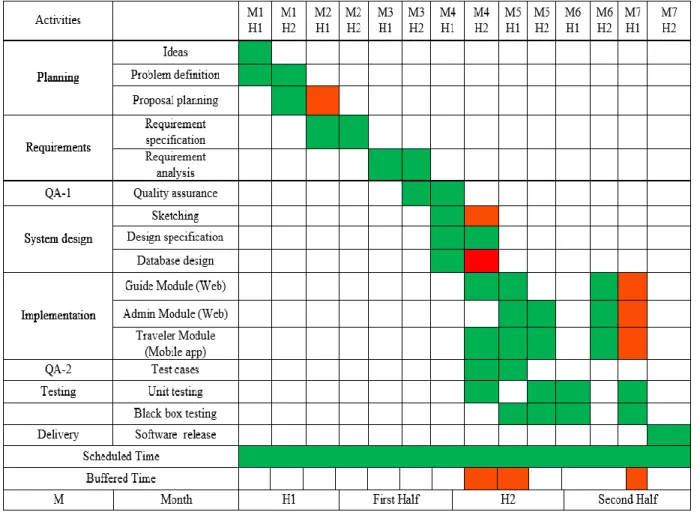
1.5.1 Gantt Chart
Gantt chart is mainly a production control tools. It remained us to complete our assigned tasks Within a certain period of time. For developing software, it is mostly used. Now I will show a Gantt chart for our project.
Figure 1.2: Gantt chart
©Daffodil International University 7
Chapter 2
Software Requirement Specification
©Daffodil International University 8
2.1 Functional Requirements
Functional requirements refer to the function which is must be belong to the system. Functional requirements are mandatory to perform the software system. There is no system without functional requirements. Now, we are going to discuss functional requirements for our project.
2.1.1 : Traveler Registration
FR-01 Traveler Registration
Description Traveler must registration the system using unique email, password, name and other additional information. In future, Traveler can't change her register email address. Without registration, He /she can’t book any guide or tour.
Stakeholders Traveler Priority High
2 .1.2: Traveler Login
FR-02 Traveler Login
Description After successfully login, Traveler login the system using email and password. And sent a booking request for guide or tour.
Stakeholders Traveler Priority High
2.1. 3. Find a Tour
FR-03 Find a Tour
Description Traveler can search a tour by area basis. From drop down menu, traveler can choose a district and then he will see the tour list.
Traveler can search a tour by place / area name.
Stakeholders Traveler Priority High
2.1. 4: Traveler Can View full tour Plan
FR-04 Traveler Can View full tour Plan
Description Traveler can view full description and plane about the Tour, which was provide by the Guide.
Travelers also see the guide profile, rating, traveler comment, previous guide and tour experience.
Stakeholders Traveler Priority High
2.1. 5: Traveler can send a booking request for a tour
FR-05 Traveler can send a booking request for a tour
Description When Traveler wants to attend a tour, he / she must send a booking request to guide (who arranged the tour).
Traveler must provide additional information about how many people will go with him, there age. Traveler can ask any tour related question.
Stakeholders Traveler Priority High
©Daffodil International University 9
2.1. 6: Traveler can view upcoming tour and guide event.
FR-06 Traveler can view upcoming tour and guide even.
Description When traveler booking a tour or hire a guide and guide approved it, then traveler can see the upcoming tour or hiring event. He can see that info, until the date passed.
Stakeholders Traveler Priority High
2.1. 7: Traveler can view the pending request
FR-07 Traveler can view the pending request
Description When traveler send a tour booking request or send a guide hiring request, Guide is not giving any decision (Like request or Reject).
Then this request in pending request. Traveler can see the pending request.
Stakeholders Traveler Priority Medium
2.1. 8: Traveler can rate the guide
FR-09 Traveler can rating to the guide
Description Traveler can rating the guide if they hired the guide or attended the tour. Rating range must be 1 to 5.
Traveler can ratings the guide only one time for every tour or every hire.
Stakeholders Traveler Priority Low
2.1. 10: Traveler can find a Guide
FR-10 Traveler can find a Guide
Description Traveler can search a guide by area basis. From drop down menu, traveler can choose a district and then he will see the guide list.
Traveler can search a guide by place / area name.
Stakeholders Traveler Priority High
FR-11 Traveler can see guide profile
Description Traveler can see the guide profile, rating, traveler comment, previous guide, tour experience and other information.
But they can’t see guide phone number or email address.
Stakeholders Traveler Priority High
2.1. 12: Traveler can send a hiring request
©Daffodil International University 10 FR-12 Traveler can send a hiring request.
Description Traveler must provide additional information about how people will going with them, their age, for how many days he want to hire, start date, end date, budget amount.
Traveler can ask any question and also can give offer.
Before send request, Traveler must be login the system.
Stakeholders Traveler Priority High
2.1. 13: Guide Registration
FR-14 Guide Registration
Description Guide must registration the system using unique email, password, name, address and location. In future, Guide can't change her register email address. Without registration, they can’t enter the guide panel and can't use guide facilities.
Stakeholders Guide Priority High
2.2 Data Requirements
To direct data gathering efforts and ensure that meetings with others, on whom you depend for model information, are productive, it may be useful to prepare a specific list of questions that identify the data needed.
• Route data locations
• Capacity and resources of the data requirements
• Data availability schedules
• Quantity of data
• Data source sequence
2.3 Performance Requirements
It is very important to maintain performance of any software system. To ensure performance, we need to maintain some steps. Now, I will explain some perspective by which we are going to enhance the performance of the project.
2.4 Dependability Requirements
The term dependability is measured based on four dimensions. Such as:
• Availability
• Reliability
• Safety
• Security
If we want to say that our application system is dependable then it must fulfill the four dimensions. But there are other tasks. Like there is no way to make mistakes or our system should have the ability to detect and then remove errors.
©Daffodil International University 11
2.4.1 Reliability Requirements
Now, I will mention requirements which is related to reliability and availability.
RAR-1 The system must be available on 24 X 7
Description Our system must be available all day long, every day in a week
The system must be updated regularly
System must be malware free
Stakeholders Guide, Traveler Priority Medium
2.4.2 Availability Requirements
To ensure robustness and fault-tolerance facilities to the end users, it is urgent to ensure 0% crush.
Moreover, it must show accurate results.
RFT-1 The system handles all user access without system errors
Description Hundreds of user may hit our application system at a time. All their requests must be handled without any fault.
Stakeholders N/A Priority High
2.5 Maintainability and Supportability Requirements
Supportability requirements may have related to some extends. Like:
• Testability
• Extensibility
• Adaptability
• Maintainability
• Serviceability
• Install ability
©Daffodil International University 12
Chapter 3
Requirement Analysis
3.1 Use Case Diagram
We have use case diagram. And there are three actors, Traveler, Guide and Admin. And those
©Daffodil International University 13
Are already indicated to this use case diagram. This diagram will clarify our system in brief.
Figure 3.1: Use Case diagram for “Local Tourist”
Use case diagram show about the traveler attributes and limitation, it show the traveler work process and how can a traveler use this application, they can do many thing about “Local Tourist”
Application. And this use case diagram show their opportunity
3.1.1 Registration
©Daffodil International University 14
3.1.2 Login
3.1.3 Find a Tour
3.1.4 Find a Guide
Use Case Title Registration
Goal Traveler must be registration the system.
Preconditions
Registration data have to be genuine Success End Condition Registration done by a traveler or guide
Failure End Condition Registration can’t done by a traveler or guide Primary Actors:
Secondary Actors:
Traveler System
Trigger After click registration button, field will open Description
Main Success Scenario
Step Action
1 Registration data have to be solid 2 Traveler and guide both have to be registered 3 Illegal data can’t accept for registration
Alternative Flows Step Branching Action
1a Traveler a can’t registered 2a Illegal data can accept for registration
Quality Requirements Step Requirements
N/A
©Daffodil International University 15
Use Case Title Login
Goal Traveler must be Login the system.
Preconditions
Without registration traveler and guide can’t be login Success End Condition Login done by a traveler and guide
Failure End Condition Login can’t done by a traveler or guide Primary Actors:
Secondary Actors:
Traveler
Trigger After click Login button, system will open Description
Main Success Scenario
Step Action
1 After registration second step will login 2 After registration traveler and guide both
will login
3 Without registration traveler and guide can’t login the system
Alternative Flows Step Branching Action
1a Traveler can’t Login
Use Case Title Find a Tour
Goal Traveler view tour details
Preconditions
Traveler must login the system
Success End Condition After successfully login traveler view the tour details.
Failure End Condition Traveler can’t view the tour details.
Primary Actors:
Secondary Actors:
Traveler
Trigger After click tour details button, it shows tour details.
Description Main Success
Scenario
Step Action
1 Traveler login the system
2 Traveler can find a tour
3 Traveler can view tour details
Alternative Flows Step Branching Action
1a Traveler can’t find tour
2a Guide create tour
Quality Requirements Step Requirements
N/A
Use Case Title Find a Guide
Goal Traveler will find a guide
Preconditions
Traveler must entire the system Success End Condition Guide will find by a traveler.
Failure End Condition Traveler can’t find a guide.
Primary Actors:
Secondary Actors:
Traveler Guide
Trigger After click find guide button, it shows guide list Description
Main Success Scenario
Step Action
1 Traveler find guide
2 Traveler can view guide details 3 Traveler can view guide profile
Alternative Flows Step Branching Action
1a Traveler can’t find guide
©Daffodil International University 16
3.1.5 View Request Tour
3.1.6 Give Rating
3.1.7 View Guide Details
2a After registration traveler and guide both can’t will login
Quality Requirements Step Requirements
N/A
2a Traveler book guide
Quality Requirements Step Requirements
N/A
Use Case Title View Request Tour
Goal Traveler can see their requested tour Preconditions
Traveler must login the system
Success End Condition After request tour, traveler can see their requested tour.
Failure End Condition Traveler can’t see their requested tour.
Primary Actors:
Secondary Actors:
Traveler
Trigger After press button traveler can see their requested tour.
Description Main Success
Scenario
Step Action
1 Traveler can login the system
2 Traveler can request tour
3 Traveler can see their requested tour
Alternative Flows Step Branching Action
1a Traveler can’t view their requested tour 2a Traveler can view their requested tour
Quality Requirements Step Requirements
N/A
©Daffodil International University 17
3.1.8 View Tour History
Use Case Title Give Rating
Goal Traveler can give rating for guide tour.
Preconditions
Traveler must login the system.
Success End Condition After tour traveler can rate the guide Failure End Condition Traveler can’t rate the guide.
Primary Actors:
Secondary Actors:
Traveler Guide
Trigger After finish tour, traveler can give rating Description
Main Success Scenario
Step Action
1 Traveler login the system
2 Traveler book a tour
3 Traveler give rating.
Alternative Flows Step Branching Action
1a Traveler can’t rating.
Use Case Title View Guide Details
Goal Traveler view guide details
Preconditions
Traveler must login the system
Success End Condition After successfully login traveler view the guide details.
Failure End Condition Traveler can’t view guide details.
Primary Actors:
Secondary Actors:
Traveler Guide
Trigger After click guide details button, it shows guide details.
Description Main Success
Scenario
Step Action
1 Traveler login the system
2 Traveler can find a guide
3 Traveler can view guide details
Alternative Flows Step Branching Action
1a Traveler can’t find guide
2a Traveler book guide
Quality Requirements Step Requirements
N/A
Use Case Title View Tour History
Goal Traveler can see guide tour history
Preconditions
Traveler must login the system
Success End Condition Before booking guide, traveler can see the guide tour history.
Failure End Condition Traveler can’t see the guide tour history.
Primary Actors:
Secondary Actors:
Traveler Guide
Trigger After press tour history button, traveler can see the tour history Description
Main Success Scenario
Step Action
1 Traveler can login the system
2 Traveler can book a tour
3 Traveler can see guide tour history.
Step Branching Action
©Daffodil International University 18
3.1.12 Booking Guide
3.2 Activity Diagram
We have prepared some activity diagram according to our use case. These activity diagrams Are properly referring the flow of the individual conditions of our project.
3.2.1 Registration Traveler
2a Traveler can view guide previous rating.
Quality Requirements Step Requirements
N/A
Alternative Flows 1a Traveler can’t view traveler tour history.
2a Traveler can view guide tour history.
Quality Requirements Step Requirements
N/A
©Daffodil International University 19
3.2. Traveler Registration
Use Case Title Booking Guide
Goal Traveler book a guide
Preconditions
Traveler must login the system Success End Condition After login traveler can book a guide.
Failure End Condition Traveler can’t book a guide.
Primary Actors:
Secondary Actors:
Traveler Guide
Trigger After click guide profile, it shows guide details.
Description Main Success
Scenario
Step Action
1 Traveler can find a guide
2 Traveler can view guide details
3 Traveler can book the guide
Alternative Flows Step Branching Action
1a Traveler can’t book a guide 2a Guide booked by a traveler
Quality Requirements Step Requirements
N/A
©Daffodil International University 20
3.2.2 Login
©Daffodil International University 21
3.2.3 Find Tour
3.2.4 View Tour Details
©Daffodil International University 22
3.2.5 Booking Tour
3.2.6 View Upcoming tour
©Daffodil International University 23
3.2.7 View previous tour history
3.2.8
Request for guide
©Daffodil International University 24
3.2.9
Request for hiring a guide
3.2.19 See upcoming
©Daffodil International University 25
tour
3.2.10 View tour history
©Daffodil International University 26
3.2.11 booking tour
©Daffodil International University 27
3.2.19 View tour Details
©Daffodil International University 28
3.3 Sequence Diagrams
Mainly sequence diagrams understand us how the data will be followed in any application.
Now we are going to show some sequence diagrams.
3.3.1 User Registration
Use must be registration for access to the system.
©Daffodil International University 29
3.3.2 User Login
Use must be login to the system for guide booking or searching tour.
©Daffodil International University 30
3.3.3 Find Tour
After successfully login, user can search tour and find a tour.
3.3.4 Vie Tour Details
After find tour, traveler can be see the tour details.
©Daffodil International University 31
3.3.5 Book Tour
After find tour, and view tour details, traveler can be book the tour.
3.3.6 View Upcoming Tour
After login in the system, traveler can view upcoming tour and the tour create by admin.
©Daffodil International University 32
3.3.7 View Request Tour
Traveler can view their requested tour,
3.3.8 View Tour History
Traveler can view their tour history, which they have already done.
©Daffodil International University 33
3.3.10 Find Guide
After successfully registration and login, traveler can find a guide.
3.3.11 View Guide Details
After hiring a guide, traveler can view guide details.
©Daffodil International University 34
3.3.12 Booking Guide
After view guide details, traveler can booking the guide.
3.3.17 View Tour Rating.
Before hiring a guide, traveler can see guide previous tour rating.
©Daffodil International University 35
Chapter 4
System Design Specification
©Daffodil International University 36
4.1 Development tools and technology
Many of Development tools use for our “Local Tourist” application, for Mobile application we use java, php, MySQL,SQLite
4.1.1 User Interface Technology
Mobile and Web application interface create by Android XML and HTML, CSS also, we are design the application in two part, mobile and web.
4.1.1.3 Programming Language
Programming language is an essential part of building any application, we Java and PHP for deployment, Java for mobile application and PHP for web application.
4.1.2 Implemented tools and platform
Beside the choosing programming language there is also need to select some tools for developing software. And also we use for our application, for mobile application we use Android Studio, and for web application we use notepad++
4.2 Class Diagram
©Daffodil International University 37
4.3 Database Design Diagram
Figure 4.2: Database Diagram
©Daffodil International University 38
Chapter 5
System Test
©Daffodil International University 39
5.1 Testing Features
We are testing our application during making, without testing an application or anything can’t be proper. We are tested our system and during deployment time we do also. Black box, white box, user testing we do.
5.1.1 Features to be tested
5.2 Black Box Testing
We test our application by random person who doesn’t know about our application and they also don’t know the code also. They just open the app and use randomly.
5.2.1 White Box Testing
We test our application by engineer and me also, deployment time I see the each and every line code and run the application and its work properly, so I can see the code and I know the system which I making.
5.2.2 Pass / Fail Criteria
Pass or fail criteria will be set by the test engineers. They will prepare the pass / fail criteria on
Features Priority Description
Login High
User must be authenticated
by login
Logout Medium
Session must be destroyed
after logout
Registration High registration the system
mandatory
Create tour High Guide can create a tour
Update profile Medium Guide can update their profile
Hiring guide High Traveler can hire a guide
Enroll Request High Both are enroll the system
Find Tour High Traveler will find the tour
Find Guide High Traveler will find the guide
Approve Guide profile High Admin will approve guide
request
©Daffodil International University 40
The basis of which input data are worked and which are not works. Those data that are
Worked well will considered as pass criteria. And rest of input data will be considered as fail Criteria.
5.3 Test Cases
A test case is a document, which has a set of test data, preconditions, expected results and post conditions, developed for a particular test scenario in order to verify compliance against a specific requirement. Test Case acts as the starting point for the test execution, and after applying a set of input values, the application has a definitive outcome and leaves the system at some end point or also known as execution post condition.
5.3.1 Login
Test Case #1 Test Case Name: Login
System: Local Tourist Sub-System:
Designed by: Maksudur Rhman Maruf Designed date:
Executed By: Ashraful islam Executed date:
Short Description: The registered traveler login to the System. And before login, System will check the authentication and authorization.
Pre-Condition:
Traveler, admin, guide login the system using registered email and password, and redirect to dashboard. But if wrong can’t enter the system.
Assume that, email ‘ [email protected] ‘ and password is ‘123456’.
Step Action Response Pass /
Fail
Comment
1 Unregistered email and
password.
(email: [email protected] Password: 1234)
User not found. Fail Wrong data entry
2 Using wrong password.
(email: [email protected] Password: 1234)
Wrong password. Fail Wrong password
3 Using registered email and
password
(email: [email protected] Password: 123456)
Successfully login
the system and
redirect to
dashboard.
Pass Valid data entry
Post-Condition: Traveler, admin, guide will successfully login to the system.
©Daffodil International University 41
5.3.2 Registration
Test Case #2 Test Case Name: Registration
System: Tour by local Sub-System:
Designed by: : Maksudur Rhman Maruf Designed date:
Executed By: Ashraful islam Executed date:
Short Description: Traveler, Guide must fill up unregister email, password and another mandatory field for registration.
Pre-Condition:
Every required fields must be filled up by the user (guide, traveler).
Step Action Response Pass / Fail Comment
1 All require fields are not filled up.
Warning, Must fill up all fields.
Fail Not fill all field 2 All require fields are filled
up.
Registration successfully complete.
Pass Valid data entry
3 Use registered email for registration.
Email already registered. Fail Duplicate data
Post-Condition: Every information is saved to the database of the system.
©Daffodil International University 42
5.3.3 Hiring guide
Test Case # 3 Test Case Name: Hiring guide
System: Tour by local Sub-System:
Designed by: : Maksudur Rhman Maruf Designed date:
Executed By: Sheimul Mahmud Executed date:
Short Description: When traveler wants to hire a guide, he/she sent hiring request to the guide with fill up mandatory fields.
Pre-Condition:
Traveler must be login the system.
Traveler must provide budget, max people, and other mandatory fields.
Step Action Response Pass / Fail Comment
1 Provide all hiring information. Your request successfully sent to the guide.
pass Valid data entry
2 All hiring require fields are not filled up.
Please fill up all fields.
Fail Invalid data entry
Post-Condition: Request save the database and guide can see the request.
©Daffodil International University 43
5.3.4 View Upcoming Tour
Test Case # 4 Test Case Name: View Upcoming Tour
System: Tour by local Sub-System:
Designed by: : Maksudur Rhman Maruf Designed date:
Executed By: Khan Ahmed Hossain Executed date:
Short Description: Traveler and guide may need to see their upcoming tour. When the tour start date is less than 7 days, guide and traveler see the upcoming tour.
Pre-Condition:
User must be login the system.
Tour start date is less than 7 days.
Step Action Response Pass / Fail Comment
1 Check upcoming tour list
when your tour start date is greater than 7 days.
List is empty. Fail Invalid data entry
2 Check upcoming tour list
when your tour start date is less than 7 days.
Display upcoming tour list.
Pass Invalid data entry
3 Tour start day is already over. List is empty. Fail Invalid data entry
Post-Condition: List will be shown until tour start.
©Daffodil International University 44
5.3.5 Find Tour
Test Case # Test Case Name: Find Tour
System: Tour by local Sub-System:
Designed by: : Maksudur Rhman Maruf Designed date:
Executed By: Executed date:
Short Description: Traveler can search a tour using district name and see the tour list of current search district.
Pre-Condition:
Traveler must provide a district name.
System must provide a tour list and those tour is arrange in searching district.
Traveler must be login the system.
Step Action Response Pass / Fail Comment
1 Select a district name. Display the search list pass valid data entry
2 Traveler not select a
district.
Please select a district. pass valid data entry
3 No tour found in current
district.
Display an empty list.
And show no tour found
fail Invalid data entry
Post-Condition: Traveler can see the tour details and enroll the system. And request sent to the guide.
©Daffodil International University 45
5.3.6 Find Guide
Test Case #6 Test Case Name: Find Guide
System: Tour by local Sub-System:
Designed by: : Maksudur Rhman Maruf Designed date:
Executed By: Mamun hossain Executed date:
Short Description: Traveler can search a guide using district name and see the Guide list of current search district.
Pre-Condition:
Traveler must provide a district name.
System must provide a guide list who are living search district.
Step Action Response Pass / Fail Comment
1 Select a district name. Display the guide list Pass valid data entry
2 Travelers not select a
district.
Please select a district. fail Invalid data entry
3 No guide found in
current district.
Display an empty list.
And show no guide found.
fail Invalid data entry
Post-Condition: Traveler can see the guide profile and request for hiring guide. And request sent to the guide.
©Daffodil International University 46
Chapter 6
User Manual
©Daffodil International University 47
6.1 Flash Screen
©Daffodil International University 48
6.2 Registration Page
6.2 Registration Page
©Daffodil International University 49
6.3 Login Page
Figure 6.3 Login Page
©Daffodil International University 50
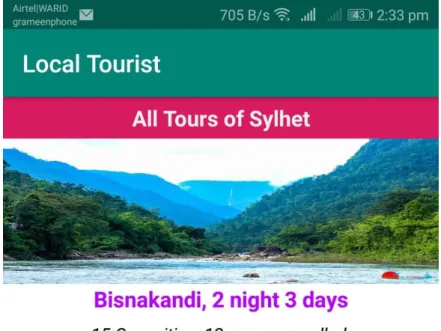
6.4 Tour List
Figure 6.5 Tour List
©Daffodil International University 51
6.5 Tour Details
Figure 6.5 Tour Details
©Daffodil International University 52
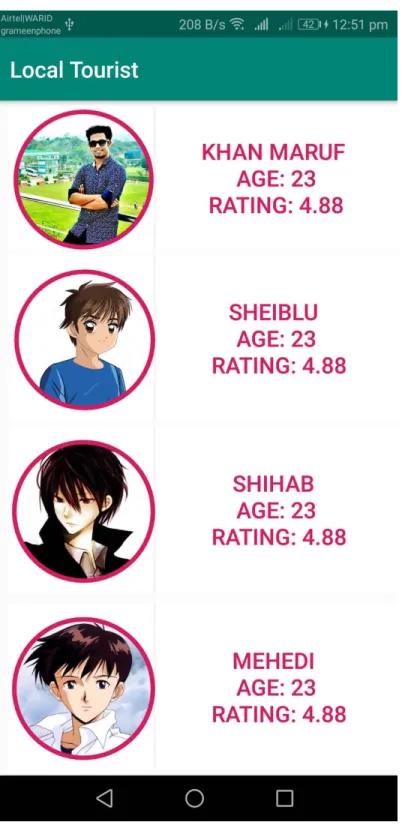
6.5 Guide Search
Figure 6.5 Guide Search
©Daffodil International University 53
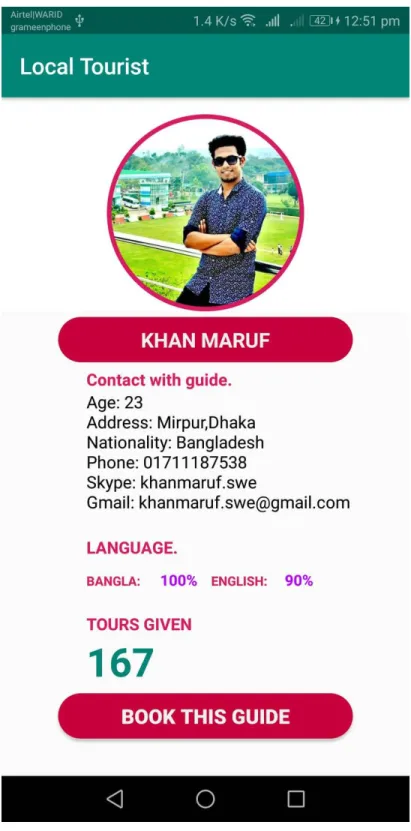
6.7 Guide Details
Figure 6.7 Guide Details
©Daffodil International University 54
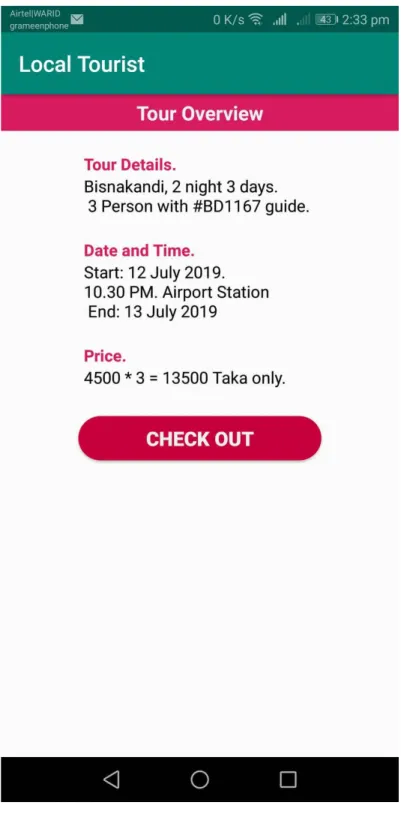
6.8 Tour Overview
Figure 6.8 Tour Overview
©Daffodil International University 55
Chapter 7
Conclusion
©Daffodil International University 56
7.1 GitHub Link
https://github.com/maruf/local_tourist
7.2 Project Summary
The time when we started the development part it’s in January. Like other projects, it is
important to work hard, endurance, dedication, and concentration to complete the project. There are many reasons for the capitalization of the project development, such as the requirements of the stakeholder to be properly filled.
7.3 Limitations
For developing this project, I have faced some limitations. Now I will describe those in brief.
Payment Method: We do not have any payment method directly in this application. So users can not make any payment transactions through our system. The user pays for him to use our system.
No Mobile Version: In this system Guide and Admin has no mobile version.
7.4 Obstacles and Achievements
By doing this project we learn how to collect and analyze requirements. Brainstorming is a must for any project you're doing to make sure it's done. System analysis and database design that we learn about this project correctly. Our supervisor helps us at every step of this project Also there are some obstacles and achievement in our project and that is below:
Requirements getting from stakeholders: There are three types of stakeholders in this system and everyone have different functionality. It would be better, if we could gather requirements from them directly.
Scope Change: When we check the requirements then some features has been added and a few of feature get cutting. When it was needed we did brainstorming for that.
7.5 Future Scope
I learned a lot while finishing this project. To build and improve this project. I have met some young entrepreneurs and enthusiasts. I thank all of them very much.
Besides, I am grateful to them because I have been able to complete my project by adopting their important opinions and discussions. It will help me in the future to work with similar projects
©Daffodil International University 57
7.6 References
www.google.com
www.youtube.com
www.github.com
www.wikipedia.com
www.stackoverflow.com
www.androidhive.com
www.guru99.com