NETWORKING BASED ORGANIZATIONAL SECURITY SYSTEM
BY
Md. Foysal Akhram Akash Student ID: 151-15-5233 Md. Yasir Arafat Shaoun
Student ID: 151-15-5333
This Report Presented in Partial Fulfillment of the Requirements for the Degree of Bachelor of Science in Computer Science and Engineering
Supervised By Ms. Refath Ara Hossain
Lecturer Department of CSE
Daffodil International University
DAFFODIL INTERNATIONAL UNIVERSITY DHAKA, BANGLADESH
DECEMBER 2018
APPROVAL
This Project titled “Networking Based Organizational Security System”, submitted by Md.
Foysal Akhram Akash, ID No: 151-15-5233 and Md Yasir Arafat Shaoun ,ID:151-15-5333 to the Department of Computer Science and Engineering, Daffodil International University has been accepted as satisfactory for the partial fulfillment of the requirements for the degree of B.Sc. in Computer Science and Engineering and approved as to its style and contents. The presentation has been held on 11-12-2018.
BOARD OF EXAMINERS
Dr. Syed Akhter Hossain Chairman
Professor and Head
Department of Computer Science and Engineering Faculty of Science & Information Technology Daffodil International University
Narayan Ranjan Chakraborty Internal Examiner
Assistant Professor
Department of Computer Science and Engineering Faculty of Science & Information Technology Daffodil International University
Md. Tarek Habib Internal Examiner
Assistant Professor
Department of Computer Science and Engineering Faculty of Science & Information Technology Daffodil International University
Dr. Mohammad Shorif Uddin External Examiner
Professor
Department of Computer Science and Engineering Jahangirnagar University
DECLARATION
We hereby declare that, this project has been done by us under the supervision of Ms.
Refath Ara Hossain, Lecturer Department of CSE, Daffodil International University. We also declare that neither this project nor any part of this project has been submitted elsewhere for award of any degree or diploma.
Supervised by:
Refath Ara Hossain Lecturer
Department of CSE
Daffodil International University Submitted by:
Md Foysal Akhram Akash ID: -151-15-5233
Department of CSE
Daffodil International University
Md Yasir Arafat Shaoun ID: -151-15-5333
Department of CSE
Daffodil International University
ACKNOWLEDGEMENT
First we express our heartiest thanks and gratefulness to almighty God for His divine Blessing makes us possible to complete the final year project successfully.
We really grateful and wish our profound our indebtedness to Refath Ara Hossain, Lecturer, Department of CSE, Daffodil International University, Dhaka. Deep Knowledge & keen interest of our supervisor in the field of “Computer Networking”
to carry out this project. Her endless patience, scholarly guidance, continual encouragement, constant and energetic supervision, constructive criticism , valuable advice ,reading many inferior draft and correcting them at all stage have made it possible to complete this project.
We would like to express our heartiest gratitude to the Almighty Allah and Head, Department of CSE, for his kind help to finish our project and also to other faculty Members and the staff of CSE department of Daffodil International University.
We would like to thank our entire course mate in Daffodil International University, who took part in this discuss while completing the course work.
Finally, we must acknowledge with due respect the constant support and patients of our parents.
ABSTRACT
Security is always very critical and important in all sectors, especially in the financial organization or company. In this modern or internet based era it is more important to keep your data secure. “Networking Based Organizational Security System” is networking security model. The purpose of this model is to improve the security system with low cost. It will fulfill all security requirements and it can store data for the longer period. It enables to secure, reliable, and fast management system.
Basically this model is designed for business purpose. In this model admin, users and other employee must be logged in for managing this system. This project will help to understand different security requirements of business sector. It will also enable readers to apprehend and learn the security technologies which provide security to business sector.
TABLE OF CONTENTS
Content Page
Approval
i
Board of examiners
i
Declaration
ii
Acknowledgements
iii
Abstract
iv
List Of Figures
viii
CHAPTER
CHAPTER:1 INTRODUCTION 1-4
1.1 Introduction 1
1.2 Motivation 1
1.3 Objective 1
1.4 Expected Outcome 3
1.5 Report Layout 4
CHAPTER:2 BACKGROUND
5-332.1 Introduction 5
2.2 Threat and prevention 5
2.3 IPsec and virtual private network (VPN) 7 2.3.1 Components of Virtual Private Network
(VPN)
8 2.3.2 Reason of implementing VPNs by IT
Managers
10
2.3.3 Configuration of IPsec VPN 10
2.4 Virtual Local Area Network (VLAN) 14
2.4.1 Types Virtual Local Area Network (VLAN) 16 2.4.2 Virtual Local Area Network (VLAN)
Classification
17
2.4.3 Required of Virtual Local Area Network (VLAN)
17 2.4.4 Configuration of Virtual Local Area Network
(VLAN)
17
2.5
Firewall 192.5.1 Types of firewall 20
2.5.2 Firewall Protect 20
2.5.3 Firewall Configuration 20
2.5.4 Firewall Logic 22
2.6
Intrusion Prevention System (IPS) 222.7
Intrusion Detection System (IDS) 242.8
Server management and configurations 25 2.8.1 FTP server 252.8.2 Samba server 27
2.8.3 Mail server 29
CHAPTER:3 REQUIREMENT SPECIFICATION
34-35 3.1 Elements 34 3.2 Internal and External requirements 34 3.2.1 Frequency of Internal attacks 34 3.2.2 What can organization do? 353.2.3
Do not leave the back door open 35Chapter:4 DESIGN SPECIFICATION
36-384.1
Introduction 364.2
Network security and protection 364.3
Weakness of Router 374.4
Router and Firewall security policy 374.5
Conclusion 38CHAPTER:5 IMPLEMENTATION AND TESTING
39-425.1 Introduction 39
5.2 Simulation 39
5.3 Penetration test 41
5.3.1 Basic of External penetration testing 41 5.3.2 Basic of internal penetration testing 42
5.4 Result of Simulation 42
CHAPTER:6 CONCLUSION AND FUTURE SCOPE
43-456.1
Discussion and Conclusion 436.2
Scope for Future Developments 43REFERENCE
44APPENDICES
45
LIST OF FIGURES
Figure Name Page
Figure 2.1 IPsec VPN connection 07
Figure 2.2 VLAN Connection 16
Figure 2.3 Assigning of port in VLAN 18
Figure 2.4 Basic structure of firewall 19
Figure 2.5 Intrusion prevention system 24
Figure 2.6 Intrusion Detection system 24
Figure 2.7 FTP server 25
Figure 5.1 VLAN 39
Figure 5.2 IPsec VPN 40
Figure 5.3 Demo of Project 41
CHAPTER 1 INTRODUCTION 1.1 Introduction
“Networking Based Organizational Security System” is security model. The authority of any organization or company can easily secure their organization by using this model. In this model there several part, like authority and user. Users can access easily without any doubt and fear. When people want to set any company at first they think how to secure companies documents or data. Because they know it very well any company related data is very important just like an assets.
So we just want to make whole security system in a digital way. In this system is done with dynamically. As it goes on digitally, so it’s save more time if compare it with the previous system. By this model authority can easily design their model and keep their data secure, which is our main goal.
1.2 Motivation of work
Recently we experience that there are lots of vulnerabilities in most of our organization around our country. For example, our banking security system was hacked and stolen millions of our currency. This kind of security issues are raised in every day. So it is high time to concern the security management.
1.3 Objectives
Now days every sector is Internet based. So it is very important to ensure the network security. So it is also very important to understand the security requirements and common security problem in the organization sector, especially in those sectors which are Internet based. So need to learn relevant technologies.
When you thinking about your network security, it must be emphasized that how you secure
computer and the entire organization is network based. Network security does not only concern about the security of your computer. It also concerns the security of data communication. It is very important that, when you transmitting data from one channel to another channel, communication channel should not be vulnerable to attack. If your networking security system is not enough secure, in this case a possible hacker could target your communication channel to collect your organization data or other important documents.
[1]
When we are developing our network security system, following needs to be considered.
Confidentiality: In your network all information are not public or all information are not private. Some information is public and some are private. In this case you need to remain your private information private that means without authorized people it cannot access every people. On the other side public information can access each and every people. By this system you can main your organization confidentiality. To achieve confidentiality use encryption.
Integrity: Integrity ensures that the data store on the device is adequate and no one has altered data. It is probably more critical than confidentiality. It follows some method like checksum and file hashing. Garble data is the main reason of defeat to keep up the integrity.
Availability: If the data is unavailable to its permitted user, then the result perhaps important to organization and user who depends on that network as an instrument. System and data both are available to user or system without any disruption.
Authentication: Authentication is the process of either allowing or denying a user access to the network. Generally it ensures the user of the network is who they say they are.
Non-repudiation: It is the process which is refers to the authority to confirm a party to a contact or a communication that cannot refuse the pure of their signature on a document or the sending of the message that they oriented. It is very important to know how non repudiation works for assure the security between our message, to
verify authenticity and how to keep message safe. With this we can prove easily if a message is real or not a hacker can change the digital signature or the certificate to break the non-repudiation.
1.4 Expected outcome
“Networking Based Organizational Security System” is a networking based model and its implementation where we describe how to secure the organization security model.
In this model we define how to emphasize the security of whole network. Here we state the limitation of a user what he can’t do and the ability what he can do. It also makes secure the data transmission between the users and the data center.
1.5 Layout of the Report
The views of the Group were crystallized after several rounds of deliberations of members .The report is presented in six chapters.
Chapter–1: The introductory chapter gives the background leading of the project,
Chapter-2: This chapter is about the overview of the project. In this chapter we discuss about VLAN, VPN, Firewall, IDS, IPS and Web Server as HTTPS, FTP, and IP Sec with
configuration.
Chapter-3: This chapter is about Requirement Specification Network project (Requirement for the network system)
Chapter -4: The chapter Design model of the Project.
Chapter-5: Demo (Simulation and result) of the project
Chapter-6: We turn into the conclusion and future Scope of the Networking security system of Organizations.
CHAPTER 2 BACKGROUND 2.1 Introduction
In this report it is our second chapter and this is the most important chapter. In this section we are discussing our model's design. We will discuss what we will use to make our models.
We use VPN, VLAN, FIREWALL, OSPF, IPS, IDS and many other topics to complete the design. Server configuration is one of the most important parts in our model. We use three servers which are FTP server, mail server, samba server and also we discuss in this chapter.
In this chapter we also discuss how to save your company from virus or other malicious things. It is the most important because to make a successful model at first you need to aware about malicious things and take proper step how to prevent it and all discuss in this sector.
2.2 Threat and prevention
Threats: There is also lots of danger and threats in using Internet. Some of them are given below.
Virus: Virus is a malicious code or program that causes damage to the system.
Generally virus cannot enter computer or system automatically. It can enter to the computer or system through some other medium like pen drive, email attachments, download file etc. virus cannot spread out itself. It needs a medium to spread through the system. So virus needs a host to attach and spread. Most of the case virus are man- made and its aims to destroy a system or computer. it can destroy your system in various way such as:
It can erase your all personal data or file or text and also can modify your personal data as well.
It can completely erase your hard disk.
Worms: Worms are also like a virus but it work little bit differently than virus.
Generally virus modify program but worms does not modify and worms replicate it again and again. It consumes lots of computer resource.
Trojans horses: Trojans horses are a software program that seems to be gentle but then does something other than unexpected. It also like a virus and generally it does not modify the program.
Phishing: Phishing is the function of effort to achieve fact like username, password, and other details as loyal existence in an electronic communication.
Pharming: Internet scamming practice which malicious code is installed on a personal computer or server misdirecting users to fraudulent web site without their knowledge or consent is called pharming. It is also called phishing without a lure.
Key logger: In a simple word key logger is a one kind of function in computer. At the primary stage it does not look dangerous or harmful, but it is a harmful tool who can record all keystroke on computer to steal password, serial number and many other personal things.
Hacking:Hacking is a technical attempt to manipulate the natural attitude of network connection and connected method. A person who involved with hacking or this kind of work is called hacker. [5]
There are three type of hacker which is show below.
White hat or ethical hat.
Black hat.
Grey hat
Hacker Targets:
Financial Data.
Intellectual Property.
Personal Data.
System Access.
Prevention:
There is also some prevention to keep safe your security system, which are also given below. Anti-virus protection.
Sign off and log out.
Don’t get fished.
Monitor you accounts.
2.3 IPsec and virtual private network (VPN)
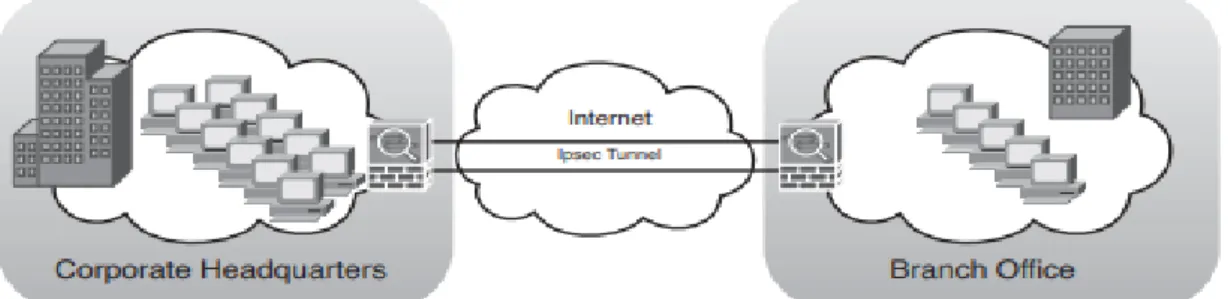
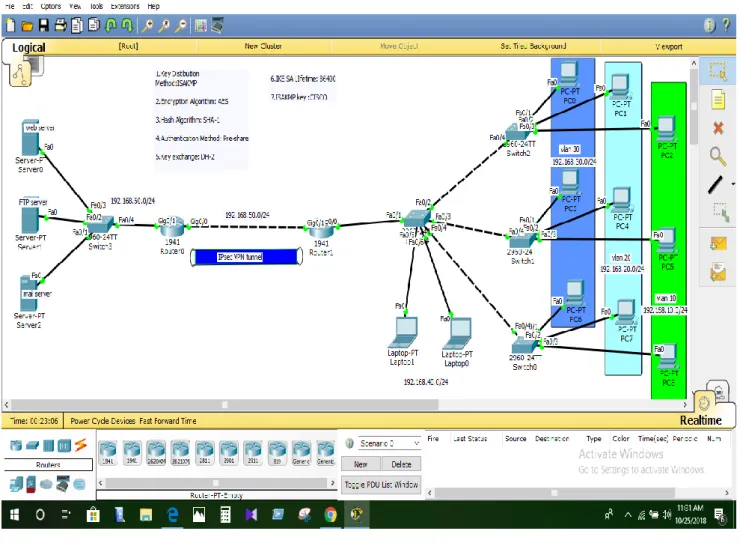
Now days every company or offices are Internet based. Without Internet connection it is impossible to survive. Many companies have several branches in several cities even in several countries. So it is almost impossible to maintain every office at a time without Internet connection. But other thing should be kept in your mind, that only Internet connection cannot maintain all companies or office. In this case you need a proper network connection. Virtual private network (VPN) can give you this private network. Figure 2.1 shows the IPsec VPN Demo.
Fig 2.1: IPsec VPN
Generally it is fine than other network and it also very secure. In this network no traffic can leak out of any company location and intruders have to physically wiretap the lines to break in, which is not easy to do. There are some problems of private network as well. Cost is the one of main problem in private network. In this network is that leasing a single T1 line costs thousands of dollar a month and T3 lines are more expensive that the T1 lines. Cost is the big factor in this network. So this is the main reason why many company and organization like to transfer data to the public networks and later Internet appeared. But they don’t want to give up their security of private network. The demand soon led to invention of VPNs (Virtual Private Networks). VPN are overlay networks on top of public networks but most of the properties of private networks. They are merely an illusion, like as virtual circuits and virtual memory which is not real memory that’s why it is called “virtual”. Virtual Private Network (VPN) is a mechanism of employing encryption authentication and integrity protection so that we can use a public N/W as if it is a private N/W. VPNs can be implemented on the top of the ATM and it also increasing popularity approach is to make VPNs directly over the internet. [7]
2.3.1 Components of Virtual Private Network (VPN)
Virtual Tunnel Interface.
VPN peer.
VPN Domain.
VPN Community.
VPN Security Gateway.
Site To Site VPN.
Remote Access VPN.
Remote Access Community.
Domain Based VPN.
Router Based VPN.
Virtual Tunnel Interface: Virtual Tunnel Interface or VTI is a feature that allow for a more flexible VPN. A VTI is a member of an existing routed based VPN tunnel.
VPN PEER: A gateway which is connects to other gateway using a Virtual Tunnel Interface.
VPN Peer is not a device; it is an IP which we used to communicate with other peer IP.
VPN Domain: A group of computers and networks that connected to a VPN tunnel by one VPN gateway that handles encryption and protects the VPN Domain members.
VPN Community: A named collection of VPN domains, each protected by VPN gateway.
VPN Security Gateway: The gateway that manages encryption and decryption of traffic between the members of a VPN Domain typically located at one (Remote Access VPN) or both (Site To Site) ends of a VPN tunnel.
Site To Site VPN: An encrypted tunnel between two gateways typically on different geographical site. The other name of site to site VPN connection is router to router connection.
Remote Access VPN: An encryption tunnel between a security gateway and remote access client, such an endpoint security VPN and communities
Remote Access VPN is also three types
Client – Based.
Clientless.
On demand client.
Remote Access Community: A group of computers, appliances and device that access with authentication and encryption, the internal protected network from physical remote site.
Domain Based VPN: A method to route encrypted traffic with parameters defines by security gateway.
Router Based VPN: A routing method or participants in a VPN community defined by the Virtual Tunnel Interface (VTI).
2.3.2 Reason of implementing VPNs by IT Managers
The main reason of using VPN is, it offer high amount of security.
Supports connectivity between user and LAN.
Easy to manage.
Flexible.
Upgradeable.
Lower supporting costs.
Lower Training costs.
Lower Central Hardware Infrastructure Costs.
2.3.3 Configuration of IPsec VPN
Now we will show configuration of IPsec and VPN in below.
Part 1: Enable Security Features
Part 2: Configure IPsec Parameters on R0 Part 3: Configure IPsec Parameters on R1 Part 4: Verify the IPsec VPN
Part1:
Router1#show version
R1(config)# license boot module c2900 technology-package securityk9 R1(config)# end
R1# copy running-config startup-config R1# reload
Part 2:
R1(config)# crypto isakmp policy 10 R1(config-isakmp)# encryption aes
R1(config-isakmp)# authentication pre-share R1(config-isakmp)# group 2
R1(config-isakmp)# exit
R1(config)# crypto isakmp key cisco address 192.168.50.1
R1(config)# crypto ipsec transform-set VPN-SET esp-3des esp-sha-hmac R1(config)# crypto map VPN-MAP 10 ipsec-isakmp
R1(config-crypto-map)# description VPN connection to R0
R1(config-crypto-map)# set transform-set VPN-SET R1(config-crypto-map)# match address 100
R1(config-crypto-map)# exit R1(config)# interface g0/1
Part3:
R0(config)# crypto isakmp policy 10 R0(config-isakmp)# encryption aes
R0(config-isakmp)# authentication pre-share R0(config-isakmp)# group 2
R0(config-isakmp)# exit
R0(config)# crypto isakmp key cisco address 192.168.50.2
R0(config)# crypto ipsec transform-set VPN-SET esp-3des esp-sha-hmac R0(config)# crypto map VPN-MAP 10 ipsec-isakmp
R0(config-crypto-map)# description VPN connection to R1 R0(config-crypto-map)# set peer 192.168.50.2
R0(config-crypto-map)# set transform-set VPN-SET R0(config-crypto-map)# match address 100
R0(config-crypto-map)# exit R0(config)# interface g0/0
R0(config-if)# crypto map VPN-MAP
Part 4:
R1# show crypto ipsec sa
Then ping from any permitted source to any permitted destination R1# show crypto ipsec sa
2.4 Virtual Local Area Network (VLAN)
Virtual LANs: Having seen why many companies might want multiple LANs with restricted scope, let us get back to the problem of decoupling the logical topology from the physical topology. Suppose that a user gets shifted within the company from one department to another department without changing the department or without changing the office. With hub wiring, moving the user to the correct LAN means having the network administrators walk down to the wiring closet and pull the connectors for the user machine from one hub and put it into new hub. In many organization or companies need to change all the time, meaning that system administrator needs to spend lot of time behind this. Also, in some times, the changes cannot be made at all time, because the twisted pair from the user machine is too far from the correct hub.
Network vendors began working on a way to rewire buildings entirely in software in response to user request for more flexibility. This concept is called VLAN (Virtual LAN). Now it is deployed in many organizations. Now need to take a look at it. Basically VLANs are based on specially designed VLAN aware switches, although they may also have some hubs on the periphery. At first to set up a network which is VLAN based network the network administrators need to decide how many VLAN there will be and also need to decide which VLAN will be in which computer and what the VLANs will be called. VLANs are named by colors often, since it is then possibility to print color diagrams showing the physical layout of the machines. The member with the red LAN is red, members of green LAN is green.
Physical and logical both layouts are visible in a single view n this way. Configuration tables have to be set up in the bridges or switches to make VLAN function correctly. In VLAN this tables are very important because this tables tell which VALNs are accessible via which ports. Actually in this vase ports mean lines.
So far we have assumed that bridge and switches somehow know what color an incoming frame is. But how do they know this?? [4]
The methods are use as followings
Each port assigns a VLAN color.
Each MAC address is assigned a VLAN color.
Each layer 3 protocol or IP address is assigned a VLAN color.
Each port is labeled with VLAN color in the first method. If all machines on port belong to the same VLAN in this time only this method work.
In the second method, the bridge or switch has a table listing the 48 bit MAC address of each machine connected to it along with the VLAN machine is on. It is possible to mix VLANs on a physical LAN under this condition. The bridge or switch to do is extract the MAC address, when frame is arrives.
The bridge or switch is to examine the payload field of the frame, in this third method. For example to classify all IP machines as belonging to one VLAN and all apples talk machine as belonging to another.
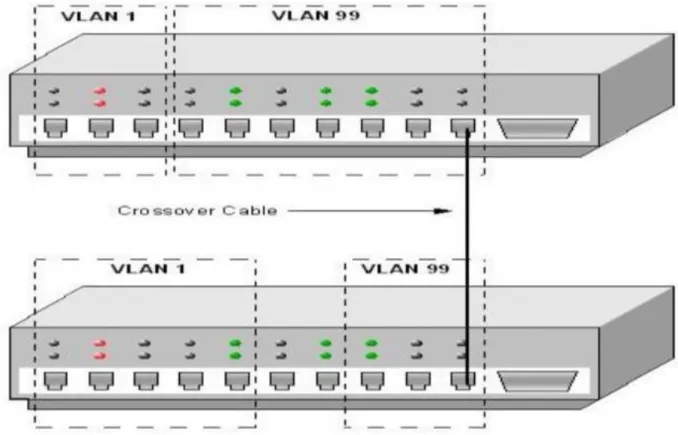
There is also a problem with this approach is that it is violates the fundamental rules of computer networking. It is none of the data link layer business what is in payload field. It should not be examining the payload and certainly not making the decision based on the content. Figure 2.2 shows typical VLAN connection.
Fig 2.2: VLAN Connection
2.4.1 Types of Virtual Local Area Network (VLAN)
Types of VLANs: There is different type of VLAN; also there is some common type of VLAN. Those are given below.
Default VLAN.
Management VLAN.
Data VLAN.
Native VLAN.
Voice VLAN.
Private VLAN.
2.4.2 Virtual Local Area Network (VLAN) Classification
VLAN can be classified into following types.
Layer 1 VLAN.
Layer 2 VLAN.
Layer 3 VLAN.
High Layer VLAN.
2.4.3 Required of Virtual Local Area Network (VLAN)
VLAN is required due to the following reasons.
Broadcast problem is a common problem in computer network. VLAN solve the broadcast problem easily. Each VLAN has a separate broadcast domain. We use VLAN to solve the broadcast problem instead of router.
It also reduces the size of broadcast domain. The number of broadcast domain increase by VLAN while reducing the size.
It allows us to add additional security layer.
It makes device management system easier.
2.4.4 Configuration of Virtual Local Area Network (VLAN)
1. Create VLAN ID and VLAN NAME (config)#vlan <vlan id>
(config-vlan)#name <vlan name>
2. Assign ports to VLAN (config)#interface fa
(config-if)#switchport access vlan <vlan id> Assigning port range to VLAN (config)#interface range fa#/start_of_range - end_of_range
(config)#interface range fa#/start_of_range - end_of_range (config-if)#switchport access vlan <vlan id>
3. Configure VLAN trunk port (config)#interface <interface id>
(config-if)#switchport mode trunk
(config)#switchport trunk native vlan <vlan id>
(config-if)#switchport trunk allowed vlan add <vlan list>
4. Verify VLAN settings
show interfaces {interface id | vlan <vlan id> | switchport}
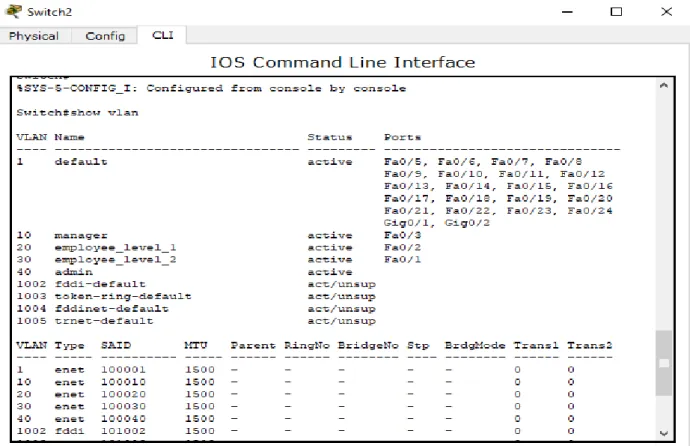
Fig 2.3 shows the assignment of port in VLAN.
Fig 2.3: Assignment of Port in VLAN.
2.5 Firewall
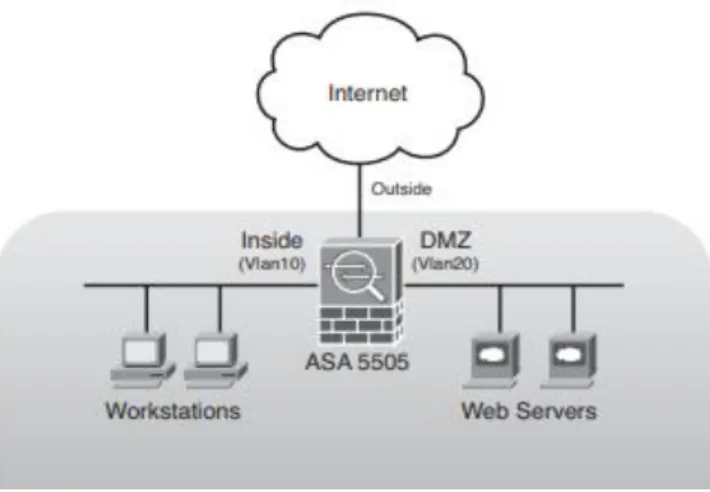
The ability to connect any computer, anywhere, to any other computer anywhere is mixed blessing. For individual at home wondering around the internet is lots of fun. For corporate security managers, it is a nightmare. Most companies have large amount of confidential information on line trade secret product development plans, marketing strategy, financial analysis, etc. Disclosure of this information to a competitor could have dire consequences. In addition to the danger of information leaking out, there is also a danger of information leaking in.in particular virus, worms, or other digital pests cam breach security, can destroy valuable data, and waste large amounts of administrators time trying to clean up the mess they leave. Firewalls are just a modern adaptation of that old medieval security standby digging a deep moat around your castle. This design forced everyone entering or leaving the castle to pass over a single drawbridge, where they could be inspected by I/O police. With the computer networks same tricks is possible. Suppose a company may have many LAN connected in arbitrary ways, but all traffic to or from the company is forced through an electronic drawbridge. [3] In below fig: 2.4 shows typical firewall connection
Fig 2.4: Structure of a firewall.
2.5.1 Types of firewall
Packet Filtering Firewall. Stateful inspection firewall. Application-levels gateways.
Next-gen Firewall. Circuit level gateways.
2.5.2 Firewall Protect
Application Layer. Network Layer.
Step 1: Retrieve the Iptables firewall:
Iptables is pre-installed on almost every Linux distribution. You can use this command to retrieve the package:
#sudo apt-get install iptables
Step 2: Discover what Iptables is already configured to do by default:
#Run the iptable L command
Step 3: Decide to modify the existing rules or instead start afresh:
To start afresh, run this command
#iptables-F
Step 4: Decide which firewall ports to close:
First block all lines of attack by running the following commands:
Block XMAS Packets: iptables -A INPUT -p tcp –tcp-flags ALL ALL -j DROP Block null packets: iptables -A INPUT -p tcp –tcp-flags ALL NONE -j DROP
Block syn-flood packets: iptables -A INPUT -p tcp ! –syn -m state –state NEW -j DROP Step 5: Decide which firewall ports to leave open:
Here are some ports you could decide to leave open:
For outgoing connections:
80/tcp for HTTP
53/udp for DNS
21/tcp for FTP (File Transfer Protocol)
465/tcp for SMTP (send emails)
25/tcp for Insecure SMTP
22/tcp for SSH (secure connection from computer to computer) For Incoming connections:
993/tcp&udp for IMAP (receive emails)
22/tcp for SSH (secure connection from computer to computer) etc.
Step 6: Save firewall configuration
Type the following command to save the settings we’ve configured and restart our firewall:
#iptables -L -n
#iptables-save | sudo tee /etc/sysconfig/iptables
#service iptables restart
Tools to assist with the iptables configuration:
Step 1: Type this command into the terminal to install UFW:
# apt-get install ufw
Step 2: Next, enable the firewall:
# ufw enable
Step 3: enable the default settings.
# ufw default deny incoming
# ufw default allow outgoing
This will deny all incoming connections. To specify which ones to allow – do the following:
Step 4: To allow specific connections. For example, SSH-
# ufw allow ssh
Step 5: ensure the firewall is saved:
# ufw status verbose
Rules may be deleted with the following command:
# ufw delete allow ssh
2.5.4 Firewall Logic
Firewall has three type of filtering mechanism.
Packet filtering: Packet filtering is a firewall method used to control arranges access by checking active and approaching parcels and enabling them to pass or end dependent on the source and goal Internet Protocol (IP) locations, conventions and ports.
Proxy: Most of the proxy firewalls works at the application layer of OSI model. To accelerate the transaction firewall can cache information.
Inspection: It is the most common firewall deployed today specially on the Internet. It keeps track of the state of the connection. Add additional security to packet filtering application firewalls by monitoring the TCP traffic by 3 way handshake which allows it to know if the packet is the start (SYN) continuation (SYN-ACK).
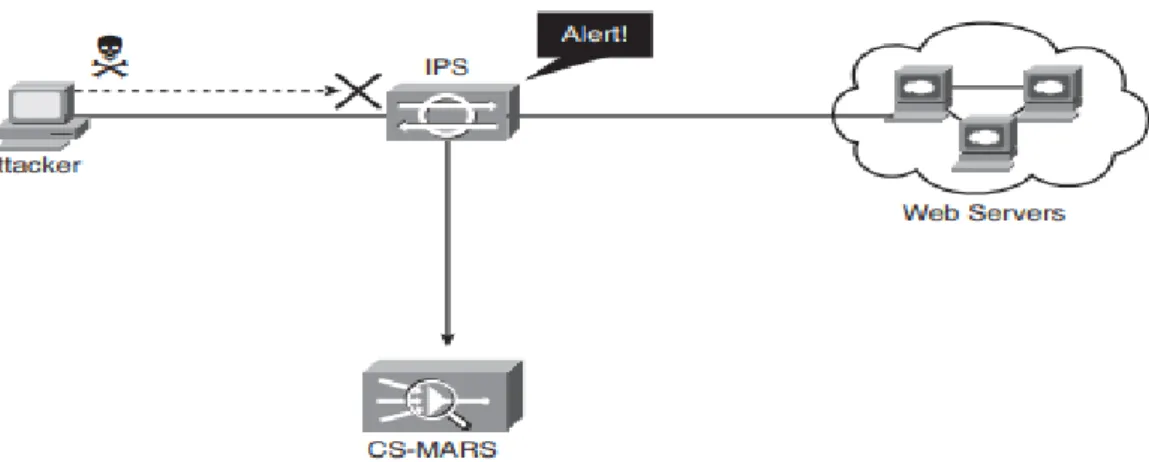
2.6 IPS
Intrusion Prevention System (IPS): Intrusion prevention system is network security tools that help to monitor network. It can migrate a wide range of network attacks without compromising. It can also monitor malicious activity. IPS software uses security device event exchange (SDEE) protocol. There are some remote applications like Adaptive Security Device Manager (ASDM), IPS Device Manager (IDM), Intrusion Prevention System Manager Console (IPSMC) can retrieve events from the sensor through this protocol. There are two different type of IPS exists. [2]
Network-based (NIPS).
Host-based (HIPS).
There are some important components of intrusion prevention system (IPS) which are given below.
Main app.
Sensor App.
Authentication App.
CIPS Webserver.
Event Store.
Main App: Generally main app is responsible for many task and control the CIPS software for update and installation. The network communication parameter also control by main app.
Sensor App: For the analysis of traffic networks, examine it for any malicious content sensor app is responsible. The packets flow through it from the gigabit Ethernet network interface on the AIP-SSM, which is directly connected to the Cisco ASA backplane. The packets are discarded after processing by the app, if the cisco ASA AIP-SSM configuration is set for promiscuous mode. Sensor mode has two modules.
Authentication App: Authentication app is the process that is help to control the user authentications on the AIP-SSM. It is also helps to control user authentications any other device running Cisco IPS 5.x and later software.
CIPS Webserver: The CIPS webserver within AIP-SSM provides configuration support for the IDM and also provide support for SDEE transaction. The CIPS webserver also supports HTTP 1.0 and 1.1 running security socket layer (SSL) transport layer security (TLS).
Event Store: With a time stamp and unique ascending identifier all IPS event are stored in the event store. Internal application of CIPS write log, status and error event into event store.
CIPS events are store in this event app in a circular fashion. Fig: 2.5 shows intrusion prevention system mechanism.
Fig 2.5: Intrusion Prevention System.
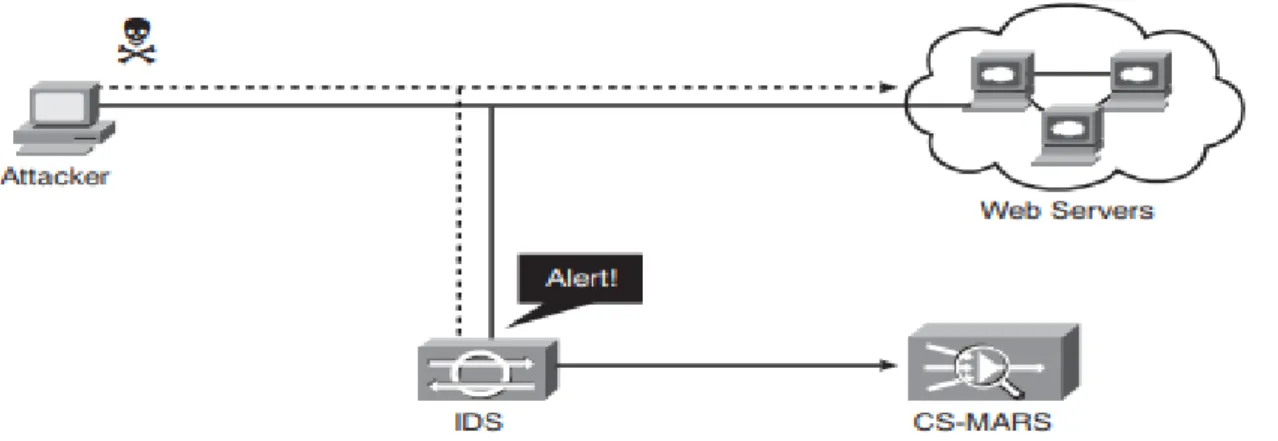
2.7 IDS
Intrusion Detection System (IDS): Intrusion detection system (IDS) is device that detects attacks from an attacker to gain unauthorized access to a network or host to steal information. It also detect virus outbreak, worms. The intrusion detection system (IDS) sends an alert to the monitoring system. [2] Fig 2.6 shows the Intrusion detection system mechanism.
Fig 2.6: Intrusion Detection System.
2.8 Server Management and Configurations
We have configured three servers in our projects. Their Description and configurations are given below. As our entire server platform are in black screen or minimal mode. So we should avoid graphical mode here and use minimal mode. In our configuration we will frequently uncomment many of lines. Removing # we will uncomment the line.[6]
2.8.1 FTP server
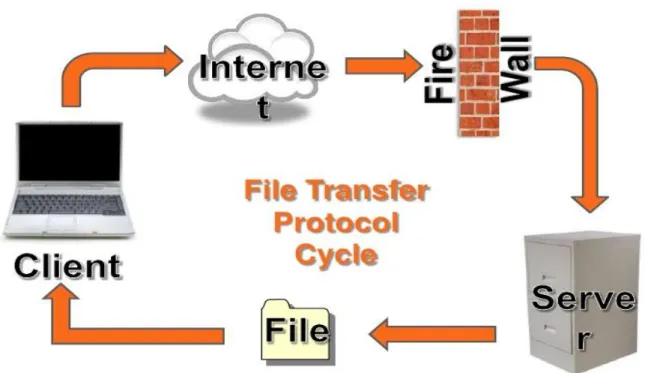
FTP is an internet protocol which is used to send files between client and server. It stands for file transfer protocol. If you want to develop any website ftp is the critical part of the process.
Fig 2.7 shows the FTP server mechanism.
Fig2.7: FTP server.
Configuration of FTP server
#vim vsftpd.conf [In minimal mode vim package didn’t installed before.we need to install it first]
#yum install vim –y
#cd /etc/vsftpd
#ls
#vim vsftpd.conf
#line 12: anonymous_enable=NO
#line85:(uncomment)
line85: ftpd_banner= (any name)
#line96: (uncomment) chroot_local_user =YES ascii_download_enable=YES Then go for last line
#use_localtime=YES
#service vsftpd restart
User Create:
#useradd –s /sbin/nologin helpdesk
#Passwd helpdesk
#cat /etc/passwd | grep helpdesk
#usermod-d/var/ftp/ helpdesk
#cat /etc/passwd | grep helpdesk
#service vsftpd restart
For checking ftp setup we need to install one more package.
#yum install ftp –y
#ftp 192.168.50.49
Then go For browser and log in using the ip address.
#cd /var/ftp
#mkdir movie
Then this movie folder will be shown in browser.
2.8.2 Samba server
Samba server is a server that is runs on Linux/Unix based platform. Samba server is an open source. It is a popular freeware program. Basically it is run on Linux or UNIX but as a native it can speak to window client.
Configuration of Samba Server
Samba package install:
#yum install samba samba-client –y
#rpm -qa | grep samba
#service smb start
#service nmb start
#chkconfig smb on
Need to be create at least two user
#useradd –s /sbin/nologin harry
#useradd –s /sbin/nologin sarah
#smbpasswd –a harry
#smbpasswd –a sarah
#rpm -ql samba | more
#cd /etc/samba
#ls
#cp smb.conf smb.conf.org
#ls
#mkdir /sharedir
#ls /
#ls -ldz /sharedir
#vim smb.conf
#Line 39: (after following) chcon –t samba_share_t /sahredir
#chcon –t samba_share_t /sharedir
#ls ldz /sharedir
In My computer workgroup=WORKGROUP
#Line80:(remove ;) hostallow=127.192.168.50
At last line Path= /sharedir
Valid user =harry,sarah
Read only =yes Browseable= yes Write list =harry
#service smb restart
#service nmb restart
#service iptables stop
In my computer map network drive
\\192.168.50.49\UserShare
#ls ld /sharedir
#chmod -R 750 /sharedir
#chmod -R harry;sarah /sharedir
#Ls -ld /sharedir
2.8.3 Mail server
In a computer system mail server is used to send and receive email. It is also called email server. There are many cases where web server and mail server used to combine a single machine.
Configuration of Mail server:
#yum install postfix* -y
#service postfix start
#rpm –qa | grep postfix
#chkconfig postfix on
#rpm –qa postix | more
#vim /etc/postfix/main.cf
Myhostname=mail.example.com
#line 83: (uncomment) Mydomain=example.com
#line 99:(uncomment)
#line 113:(uncomment)
#line 119: (uncomment) at line 164 put # on the line .
#line 165: (uncomment)
#line 264: (uncomment)
#cd Nagios-4.2.0
#ls
#./configure --with-command-group=nagcmd
#make all
#make install
If show any error
#yum install unzip –y
#make all
#make install
#make install-init
#make install-cmmandmade
#make install-webconf
#cd
#cat /etc/group | grep nagcmd
Make a directory and install package into it
#makedir /root/Nagios
#cd /root/Nagios
#yum install wget –y
#ls
Then this two line put on the browser. Those tar file present in the link should be untar.
#tar –xvf Nagios-4.2.0.tar.gz
#tar -xvf Nagios-plugins -2.1.2.tar.gz
Alias /squaremail /user/share/squaremail
<Directory /user/share/squaremail>
Options indexes FollowSymlinks RewriteEingine ON
AllowOverRide All
DirectoryIndex index.php Order allow,deny
Allow from all
</Directory>
#cd /user/share/squaremail/config/
#ls
#vim /etc/httpd/conf/httpd.conf
#service httpd restart
#wget http://dl.fedoraproject.org/pub/epel/6/x86_64/epel-release -6-8.noarch.rpm
#yum install wget –y
#ls
Fow download #rpm -ivh epel
#yum install squarelmail -y
If tehere any irror and metalink present in the error than
#vim /etc/yum.repos.d/epel.repo Mirrorlist=http
#yum install squirremail -y
#yum remove dovecot -y For receiving mail
#yum install dovecot -y
#service dovecot start
#chkconfig dovecot on
#vim /etc/dovecot/dovecot.conf
#line 20: (uncomment)
Vim /etc/dovecot/conf.d/10-mail.conf
#line 24: (uncomment)
#vim /etc/dovecot/conf.d/10-auth.conf
#line 9: (uncomment)
#line 97: auth_machanism= plain login
#vim /etc/dovecot/conf.d/10-master.conf
#line 83: (uncomment)
#line 83: (uncomment) User =postfix
Group= postfix
#service dovecot restart
#telnet localhost 110 User akash
Pass akash1234 Retr 1
Then it will be showing your mail.
CHAPTER 3
REQUIREMENT SPECIFICATIONS 3.1 Elements
Packet tracer.
VMware or virtual box software.
PC
Switch.
Router.
Host name.
IP address.
Subnet mask.
Default gateway.
Domain name.
Domain name server.
NTP server.
Time zone.
OS
3.2 Internal and External requirements 3.2.1 Frequency of Internal attacks
As we know it very well that cisco system is one of the leading network security device manufactures, and they writes that 80 percent of attack happens from inside the network.
There are lots of security model designed by Microsoft for their server to prevent the internal attacks. Microsoft knows it very well that first account an internal attacker is likely to look for on the network is “Administrator.” That’s why they allow the default administrator account called “administrator” to be renamed.
3.2.2 What can organization do?
There are lots of step that an organization need to take. The first step management should take is to ensure that its IP staff is informed and aware of the threats and issues surrounding internal penetration testing. In this case it staff can leverage existing security measures such as virtual Private network (VPN), Media Access Control addresses filtering on switches, and ensures all Directories have the appropriate permissions. Organization can motivated their IT staff to earn basic network certification such as Microsoft Certified System Engineer and Cisco Certified Network Administrator. Another important thing needs to maintain that all the information of organization need to be confidential and always recruit experience person.
3.2.3 Do not leave the back door open
As regulators increasingly expect thorough information security risk assessments from organization, it is critical to include proper internal penetration testing. Cutting costs by performing only external vulnerability testing is like buying a steel door with deadbolts for the front of your house while leaving the back door open for anyone in the neighborhood to come and go as they darn well please.
CHAPTER 4
DESIGN SPECIFICATION 4.1 Introduction
Generally computer network or network security is a complex subject than other field of computer. It is really important that who tackled this network site. Most of the time it is maintain by well-trained persons. To provide proper security on the organization is now forefront of computer networks. In this modern era computer and also Internet risen rapidly.
So the threats of information are also raised very quickly. There are many threats which are damage the whole organization. The internets are growing very quickly in every sector from personal to government and also in all business sectors from private to government. There are also huge security risks to the individual as well as organization information resources of using network based applications. No doubt about it information is an asset and it is very important to protect it. If we do not take proper step to protect it we will lose our asset.
Network security is a main way to keep secure your digital information. With this mind it is compulsory that all networks need to keep secure or protected from all kind of threats.
Generally these kinds of threats are come from miss configured hardware or software weak Internet technology, user carelessness. In router there is many service are enabled by default.
We don’t have clear idea about these kind of service and many service are unnecessary and most of the time attacker used these unnecessary service or function to gathering important information. To prevent this attack at first need to disable all the unnecessary service. In this report we review attack on router and also show how to prevent this attack, also describe basic function of router, switches, and firewalls critical parts of network operation.
4.2 Network security and protection
Security has only one aim to keep safe information or data. Internet, computer, LAN’s the network of today is more open than previous year. Internet application is continue to grow day by day and it also very quickly. So it is very important to finding a balance between being isolate and open. With the increase number of tools or mechanism, internet are now create untold number of security risk. Firewall is a new device which can be software or hardware it introduce an access control policy between two more networks. System security is the most well-known and crucial part since it is in charge of anchoring all sorts of data
which are gone through organized PC. Implementation of a Network Security Model for Cooperative Network must follow three fundamental precepts. First, in a secure network all the legal information is stored in correct place and it maintain the integrity of information. To maintain confidentiality will be next step and last step will be availability.
In the real world or proper security system includes three common things, which are prevention, detection and response. These three are equally important. If you have perfect prevention policy in this case you don’t need other two mechanisms. But no prevention is hundred percent perfect. So you need other two. Detection and response are more costly than prevention. But it is more powerful than prevention. [8]
4.3 Weakness of Router
When we are talking about network security system, there is one common term which is called vulnerability which means weakness. Weakness is a common factor in network device.
Basically there are three common weaknesses in router.
Technical weakness.
Configuration weakness.
Security policy weakness.
4.4 Router and Firewall security policy
In a modern network router are perform many jobs. Traffic is sent between at least two nearby systems inside an association or venture courses. Interior router inducts some restriction to forward traffic between internal networks.
The trust levelbetween the systems associated by a spine switch is generally low. To forward activity as quickly as time permits without forcing any confinement on it spine switch are composed and arranged. The backbone router has a primary security goal is to secure that the management and operations of the router are conducted only by the authority parties. [8]
4.5 Conclusion
Generally any company or organizations are interested to take that security model which is offer more security and less risk. Now let's talk about how we can protect a model. The best way to know what kind of safety a model can offer is to use the safety elements in this model.
We are here to tell the safety element, what is the protection policy of the router, and what is the safety net of this security element? And whether there is any weakness in this material's security policy. We are discussing these topics at this chapter. As we talk about the routers weaknesses and how to overcome this problem. We are talking about the safety measures of the routers and how to strengthen security. Finally, I want to say that all security models have some misunderstanding. We are not saying there is no mistake in our model. Of course, there is some misunderstanding in our model. We are thinking about how to overcome this misunderstanding of our model and how to make it more effective
CHAPTER 5
IMPLEMENTATION AND TESTING 5.1 Introduction
This part portrays the Demo test application, how to set it up, and how to run the Suppliers Module. The directions in this section are for setting up and running the example application on IP sec VPN, VLAN, HTTPS of keeping an organization secure.
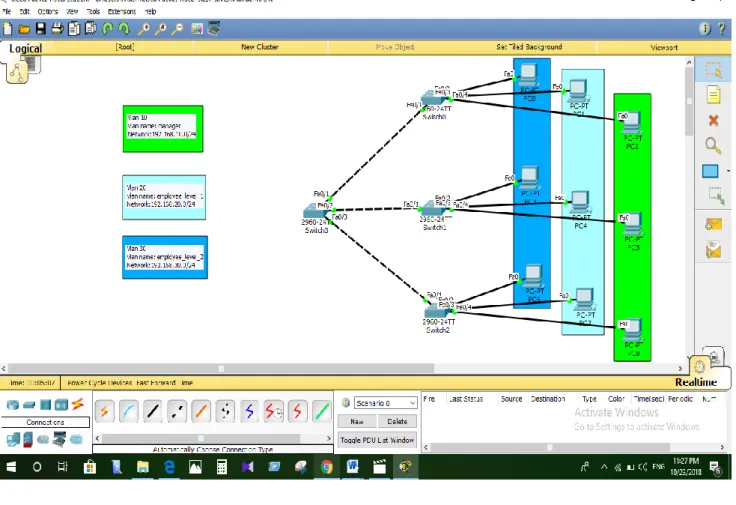
5.2 Simulation
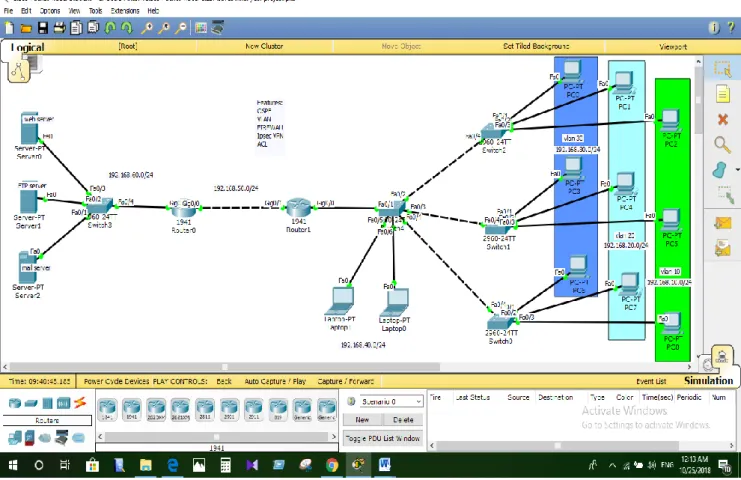
Figure 5.1: VLAN
Fig 5.2: IPsec VPN
Figure 5.3: Demo of project
5.3 Penetration test
A penetration test which is also known as pen test is a practice of comprehensive security program. Sometimes it also exposes a missing security device like firewall, intrusion detection system, intrusion prevention system. Penetration test is one of the most important in organization security system because it can identify the security weakness of an organization very successfully. It also helps to make strategic decision.
5.3.1 Basic of External penetration testing
External penetration test is the method of penetration test. In this method tests are target those assets of a company which are outside or visible to the internet. Company website, mail server, domain is the main target of the external pretention test.
5.3.2 Basic of internal penetration testing
This is another method of penetration test. In this method there are include many element.
The larger the institution the large number of target need for proper testing. There is lots of device that need to test for weakness like server, internal router interface, and internal firewall interfaces. This kind of testing is very important and also useful because it helps you to estimate how much damage a disgruntled employee could cause.
5.4 Result of Simulation
As a recreation result we see that this framework can secure unapproved get to.
Here we interface and control diverse system in utilizing VLAN and VPN.
This framework can give the security to client.
This framework helps to comprehend distinctive security necessities of any organization.
This frameworks simple to oversee
Upgradeable
The frameworks are adaptable
CHAPTER 6
CONCLUSION AND FUTURE SCOPE 6.1 Discussion and Conclusion
Security is always difficult topic, when you working with security you cannot complete it properly, because our modern technology is developed day by day. So security risk also rose rapidly. The Definition of security is vary person to person and it also vary according to the situation.in this project we are trying to develop a security model of an organization. The main goal of this project was to make an organization totally secure and protect it from any kind of outside and inside attacks. Our project is easy to handle and also well protected.
It is really important to realize or understand what can be improved. It is important to let them know why what’s been done has been and the kind of risk that are remember is not acceptable, and what has been done to reduce the organizations exposure to them. At the end we want to say that security is a very important but you cannot maintain it alone. By everyone cooperation, an intelligent policy and consistent practice you can achieve high range of security.
6.2 Scope for Future Developments
In our project we have connected in many branches. In future it will connect with two or more large company in the world. It will help to reduce the traffic, increase security and also helps to manage it department easily. There also is a large reduction cost to a company with the ability of employee of network together. Share data without having to travel the cities with other departments. We also try to make this project globally, so any of organization or company can access these facilities. If we connect with large companies in future VLAN will grow even more in the future as companies uncover more advantages.
References
[1]
Learn about networking basics. Available at<<https://www.internetsociety.org/tutorials/w4c/?gclid=CjwKCAjwpeXeBRA6EiwAyoJPKo br117iJfL9kkmjSlNhcf2E6ALkMRIfOWsiPJndXKXY0cFIcC28uBoCGzwQAvD_BwE >>
Last accessed on 12-31-2018 at 12.00 pm.
[2] Learn about IPS and IDS .Available at
<< Jazib Frahim, CISCO ASA all in one firewall, IPS ,anti-x ,and VPN adaptive security appliance ,CISCO press, second edition, page 8-11>> Last accessed on 10-27-2018 at 11am.
[3] Learn about Firewall. Available at
<<http://www.pearsonitcertification.com/articles/article.aspx?p=31562&seqNum=2>> Last accessed on 10-29-2018 t 11.30 am.
[4]Learn about VLAN. Available at
<< https://www.computernetworkingnotes.com/ccna-study-guide/vlan-basic-concepts- explained-with-examples.html>> Last accessed on 10-15-2018 at 12 pm.
[5] Learn about common threats of computers. Available at
<<https://www.getcybersafe.gc.ca/cnt/rsks/cmmn-thrts-en.aspx>> Last accessed on 10-20- 2018 at 10 pm.
[6]Learn about CentOS<<https://linuxconfig.org/centos>> Last accessed on 10-25-2018 at 9 pm
[7] Learn about the IPsec VPN security feature. Available at
<<https://courses.cs.ut.ee/MTAT.08.004/2016_spring/uploads/Main/37_1.pdf>> Last accessed on 10-25-2018 at 10 pm
[8] Learn about network security policy. Available at
<<https://en.wikipedia.org/wiki/Network_security_policy>> Last accessed on 10-25-2018 at 1.00 am.
APPENDICES
Appendices A
Project Reflection: From Summer-2017 semester we started my journey for make a security model of an organization or a company, where an organization can develop the security system by following this model. We followed the model for improvement to implement and monitor our interventions, and were able to reach our aim.
Appendices B
Abbreviations and Acronyms VPN: Virtual Private Network.
LAN: Local Area Network
VLAN: Virtual Local Area Network WAN: Wide Area Network
IPS: Intrusion Prevention System IDS: Intrusion Detection System FTP: File Transfer Protocol
HTTPS: Hyper Text Transfer Protocol Secure DNS: Domain Name System
DHCP: Dynamic Host Configuration Protocol ISP: Internet Service Provider.