STUDENT’S PERFORMANCE ANALYZER
Submitted By:
Momit Rahman 141-35-631
&
Muhammad Rasel 141-35-624
ThisProjectreport has been submitted in fulfillment of the requirements for the Degree of Bachelor of Science in Software Engineering.
Department of Software Engineering
Daffodil International University
Spring-2018
Copyright 2018 ©Daffodil International University
APPROVAL
This Project titled “Student Performance Analyzer’’, submitted by Momit Rahman (141-35-631) and Muhammad Rasel (141-35-624) to the Department of Software Engineering, Daffodil International University has been accepted as satisfactory for the partial fulfillment of the requirements for the degree of B.Sc. in Software Engineering and approved as to its style and contents.
BOARD OF EXAMINERS
DECLARATION
We hereby declare that, this project has been done by us under the supervision ofMd.
Khaled Sohel, Assistant Professor, Department of Software Engineering, Daffodil International University. We also declare that neither this project nor any part of this project has been submitted elsewhere for award of any degree or diploma.
ACKNOWLEDGEMENTS
We feel grateful to Md. Khaled Sohel, Assistant Professor, Department of Software Engineering, Daffodil International University, Dhaka. For his fantastic idea and excellent guidance that has made this project successful. He is very helpful, patience and very good instructor. Without his valuable advice would not be possible to complete this project. We are very thankful as get him as our supervisor.
We are very thankful to teacher and office stuffs of Mohammadpur Model School and College, Dhaka - 1207for helping us complete this project by giving so much information and lots of time.
I would like to express my heartiest gratitude to Prof. Dr. Touhid Bhuiyan,Head of the department of Software Engineering, for his kind help to finish our project and also to other faculty member and the staff of Software Engineering department of Daffodil International University.
ABSTRACT
“Student’s Performance Analyzer” is a Management Information System where student’s curricular and extra curricular records of educational life will be saved for the future use. Educational institution will get benefit mostly to make any kind decisions for their institution by analyzing the data of their students. Individual student will be beneficial by using his/her performance records to know about his/her strength and weakness in education. By integrating all students and educational institutions in one place, it will make many works and decision easier for the whole education system. After researching and implementing all the functions, the system is built and tested in real life and works successfully.
TABLE OF CONTENTS
APPROVAL... I DECLARATION...II ACKNOWLEDGEMENTS...III ABSTRACT...IV TABLE OF CONTENTS... V LIST OF TABLES...VII LIST OF FIGURES...VIII
Chapter 1: Project Initiation ...1
1.1 Introduction...1
1.2 Background of the Project...1
1.3 Problem with the Current Systems... 1
1.4 Purpose and Scope... 2
1.5 Beneficiaries and Benefits...2
1.6 Conclusion... 2
Chapter 2: System Analysis...3
2.1 Introduction...3
2.2 Requirement Analysis...3
2.2.1 Requirement Gathering... 3
2.2.2 Requirement Specification...3
2.2.3 Functional Requirement List... 4
2.2.4 Non-Functional Requirement List...6
2.2.5 Usecase Diagram of Proposed System...7
2.3 Software Development Plan...9
2.3.1 Project Features...9
2.3.2 Risk Management...9
2.4 Software Test Plan...12
2.4.1 Objective... 12
2.4.2 Scope... 12
2.4.3 Test strategy... 12
2.5 Conclusion...13
Chapter 3: System Design... 14
3.1 Introduction... 14
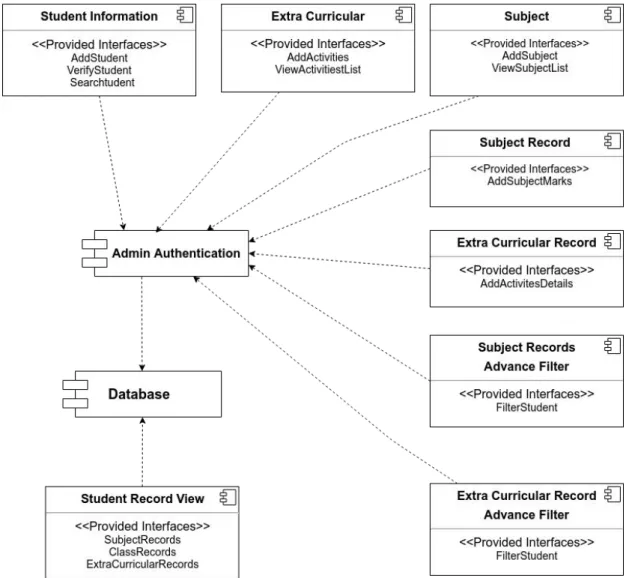
3.2 Component Diagram...14
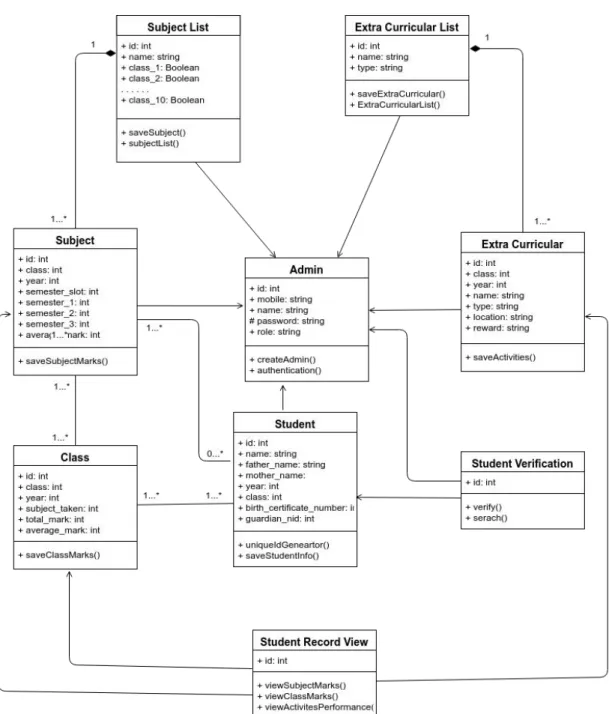
3.3 Class Diagram... 15
3.4 Crow’s Foot Entity Relationship Diagram...16
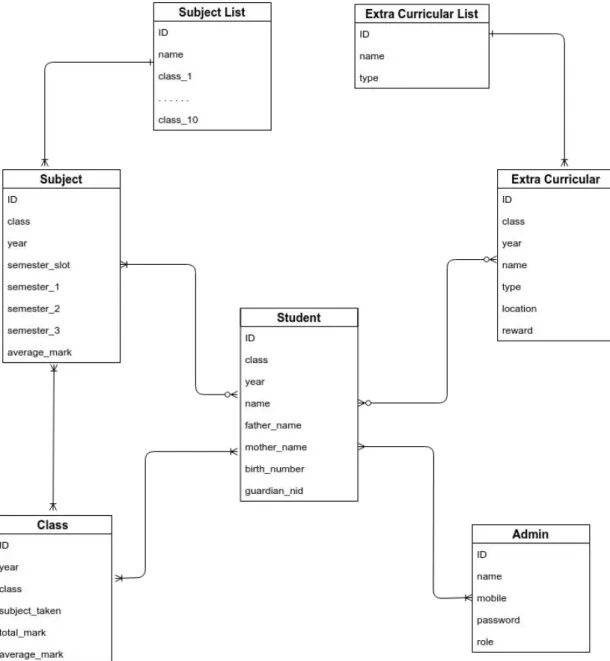
3.5 Database Design...17
3.6 Sequence Diagram... 18
3.7 Conclusion...19
Chapter 4: Development...20
4.1 Introduction... 20
4.2 Technology and Tools...20
4.3 Reason Behind Choosing... 20
4.3.1 In General...20
4.3.2 On Perspective of This Project...21
4.4 Conclusion...21
Chapter 5: Testing...22
5.1 Introduction... 22
5.2 Test Case... 22
5.3 Black Box Testing...22
5.4 Module Testing...26
5.5 All other testing... 28
5.6 Conclusion...28
Chapter 6: User Manual...29
6.1 Training...29
6.2 How It Works...29
Chapter 7: Conclusion... 30
7.1 Introduction... 30
7.2 Strength of The System... 30
7.2 Weakness of The System...30
7.3 Future Scope...30
Appendix A...31
Appendix B...33
LIST OF TABLES
Table 2.1: Functional Requirement List...4
Table 2.2: Non-Functional Requirement List... 6
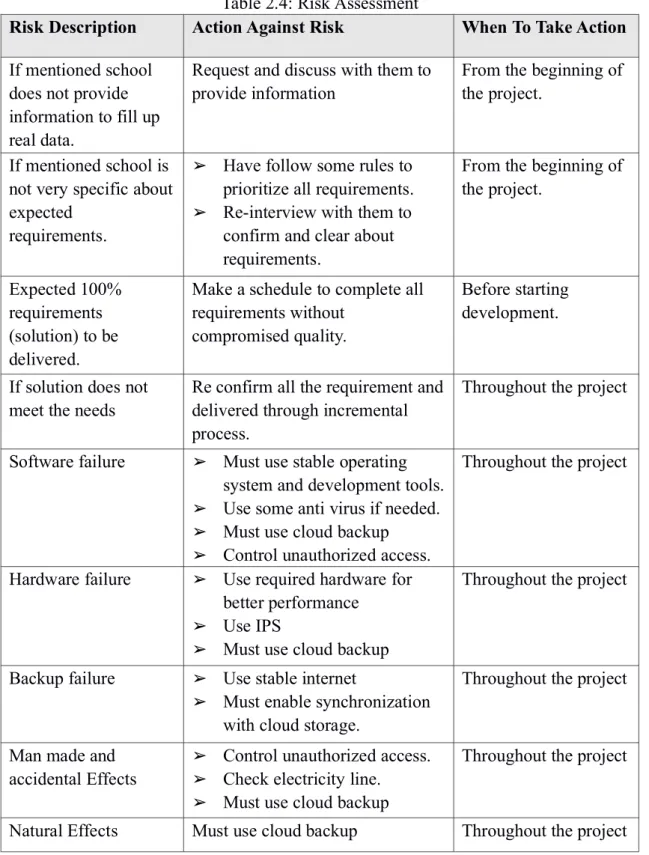
Table 2.3: Risk Identification...10
Table 2.4: Risk Assessment...11
Table 5.1: Black Box Testing For Admin...22
Table 5.2: Black Box Testing For Student... 25
Table 5.3: Module Testing For Admin... 26
Table 5.4: Module Testing For Student...28
LIST OF FIGURES
Figure 2.1: Admin Usecase... 7
Figure 2.2 : Student (Public User) Usecase... 8
Figure 3.1: Component Diagram...14
Figure 3.2: Class Diagram...15
Figure 3.3: Crow’s Foot Entity Relationship Diagram...16
Figure 3.4: Database Design...17
Figure 3.5: Sequence Diagram for Admin...18
Figure 3.6: Sequence Diagram for Student...19
Chapter 1
Project Initiation
1.1 Introduction
Basic knowledge is mandatory about a system area before develop it. It is very important to understand well about a system before actual development and it will be very helpful for development. Project initiation will give overall knowledge and visualized purpose of this system.
1.2 Background of the Project
Student life is a longer portion of life. As student they have to complete each class step by step and have to participate in many extracurricular activities.
Performance of students can vary various times but we specifically measure them in some particular stages (SSC, University Exam and so on). A student’s result can be suddenly go up or down but in that moment it will not be fair to justify a student.
Another fact is that students can have many other qualities in many area like game, debate etc but unfortunately we ignore them.
Most of time educational institutions do not have enough resources to make good decision for them and students.
Now If a system can track result of each subject and extra curricular performance of student then it will be best way to measure a student’s qualification also a student can make a decision or improve himself in some of areas. And any educational institution will be able to use this data for their need.
1.3 Problem with the Current Systems
There are many systems like a individual school management system and government central system for major examination like SSC, HSC and so on. They are not integrated in one place and it is not possible to track down whole educational life of student. So this system will solve all this problem by storing all the performances of a student and make possible to analyze them.
1.4 Purpose and Scope
The goal of making this system for a any institution specially educational institution to know and justify students as their need and make any essential decision for their institution.
For Students it will be the best way to know about strength and weakness about their performance in individual subjects and outcome of their interested area.
1.5 Beneficiaries and Benefits
1. A educational institution
➢ Can check a student’s condition, like - admission, department selection, is approved for next class and so on.
➢ Can filter students to make category like - top or low marks students from all or each subject, for specific class or year top or low marks students,
➢ Can compare among their institution results vs board exam.
2. Any other institution
➢ Can check qualified candidates for their purpose.
➢ Can give right opportunity to right person.
3. A student
➢ Can check in which subjects he/she is good at.
➢ Where he/she needs to improve
➢ Which department to choose.
➢ Can find out interested area from his/her extracurricular activities.
1.6 Conclusion
A system is planned to develop which will give honest measurement for each student and will provide right justification for a student. Education institution will face less pressure and will get a trustful system to make a right decision for students also for their institutions. Overall it will be beneficial for whole national education system and other institutions as well.
Chapter 2
System Analysis
2.1 Introduction
After analyzing the requirements of the problematic area based on them a system design and specified required software development process and test plan will be choose.
2.2 Requirement Analysis
User exceptions for new or modified product need analysis for determine their actual requirement, this process is known as Requirement Analysis. Requirements must be quantifiable, relevant and detailed. Functional and Non-functional requirements are available.
By requirements gathering and specifying them requirements analysis done.
2.2.1 Requirement Gathering
Requirement gathering techniques are like brainstorming, questionnaires, interviews, user observation and document research are used for problem area to identify requirement.
By meeting with our supervisor first we list the requirements from our perspective. To collect real life requirements we visit mentioned school to see their school management system and interviews some teacher and student.
2.2.2 Requirement Specification
List of raw requirements from requirement analysis are -
1. All educational institution like school, college should be centralized in one place.
2. All records of each student should be stored.
3. Records can be curricular and extracurricular performance.
4. Student list of a institution who are already admitted.
5. For new student of this system must have an unique ID.
6. Every student will know about their history of performance.
7. If possible entry records for old students.
8. Administration can access to view and filter students performance as their need.
9. To insert or update a student’s records must be maintained by access privileged.
10.There will be two area Admin and Student (public) section.
11.Only valid admin can enter admin section to insert, update and analyze or filter their
student’s performance as their need.
12.Student section is public, any student or other person can easily see their or others records.
13.Their will have some super admins they will give special permission to a person or institution.
14.Any new subject or extracurricular will be added when needed.
15.It is possible to verify a student by some documents like Birth Certificate , Voter ID of their parents when they enter in this system.
16.System can track which record get insert, update, delete by whom and when.
17.Better usability and readability.
18.Better security for the system safe from hacking or unauthorized access.
2.2.3 Functional Requirement List
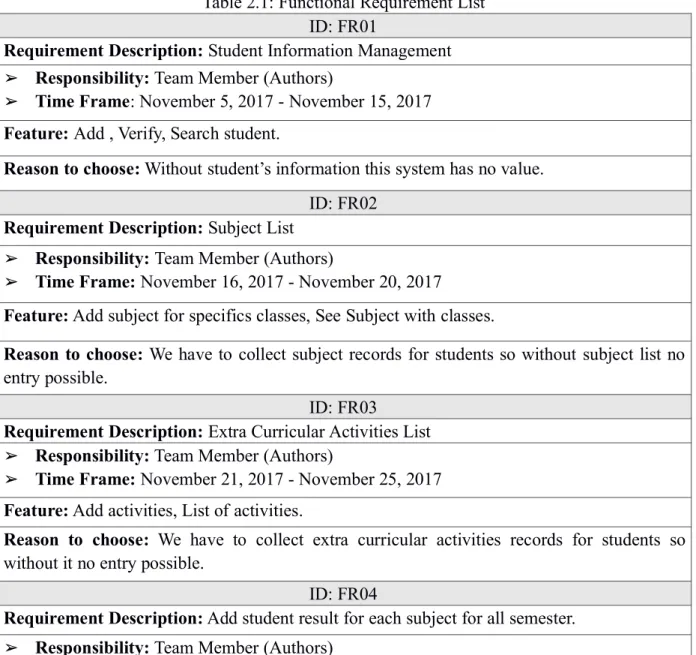
Table 2.1: Functional Requirement List ID: FR01
Requirement Description:Student Information Management
➢ Responsibility:Team Member (Authors)
➢ Time Frame: November 5, 2017 - November 15, 2017 Feature:Add , Verify, Search student.
Reason to choose:Without student’s information this system has no value.
ID: FR02 Requirement Description:Subject List
➢ Responsibility:Team Member (Authors)
➢ Time Frame:November 16, 2017 - November 20, 2017
Feature:Add subject for specifics classes, See Subject with classes.
Reason to choose: We have to collect subject records for students so without subject list no entry possible.
ID: FR03
Requirement Description:Extra Curricular Activities List
➢ Responsibility:Team Member (Authors)
➢ Time Frame:November 21, 2017 - November 25, 2017 Feature:Add activities, List of activities.
Reason to choose: We have to collect extra curricular activities records for students so without it no entry possible.
ID: FR04
Requirement Description:Add student result for each subject for all semester.
➢ Responsibility:Team Member (Authors)
➢ Time Frame:November 25, 2017 - December 10, 2017
Feature:Add year, class, semester slot then choose subject list then enter marks.
Reason to choose: System’s main purpose is to store student’s subjects records for future use without it no analysis possible.
ID: FR05
Requirement Description: Add extra curricular activities performance
➢ Responsibility: Team Member (Authors)
➢ Time Frame:December 11, 2017 - December 20, 2017 Feature:Add year, class , award of participation area of activity.
Reason to choose: Here, not only have student’s subjects records of different classes but also have extra curricular activities performance records to know about interested area of students.
ID: FR06
Requirement Description:A advanced filter for administration (For curricular)
➢ Responsibility:Team Member (Authors)
➢ Time Frame:December 21, 2017 - January 10, 2018
Feature:Can filter student list by subjects marks through class, year, marks specific or range.
Reason to choose: This is most important part of this system because with this filter it is possible to analysis the marks of students.
ID: FR07
Requirement Description:A advanced filter for administration (For extra curricular)
➢ Responsibility:Team Member (Authors)
➢ Time Frame:January 11, 2018 - January 20 , 2018
Feature: Can filter student list by extra curricular performance area through class, year, award.
Reason to choose: With this filter it is possible to analysis the activities of students in extra curricular activities.
ID: FR08 Requirement Description:Access control for admin
➢ Responsibility:Team Member (Authors)
➢ Time Frame:January 21, 2018 - January 25 , 2018
Feature:Admin access control rules maintenance, Add and delete admin
Reason to choose:This system information is very sensitive so without perfect access control system information will be invalid.
ID: FR09
Requirement Description:Individual Student Records View (Subject)
➢ Responsibility:Team Member (Authors)
➢ Time Frame:January 26 , 2018 - February 2, 2018
Feature:By enter someone ID anyone can view all records of a subject.
Reason to choose: By knowing about performance on specific subject of a student any rightful decision can be made.
ID: FR10
Requirement Description:Individual Student Records View (Class)
➢ Responsibility:Team Member (Authors)
➢ Time Frame:February 3, 2018 - February 10, 2018
Feature:By enter someone ID anyone can view all records of a class.
Reason to choose: By knowing about performance on specific class of a student any rightful decision can be made.
ID: FR11
Requirement Description:Individual Student Records View (Extra Curricular)
➢ Responsibility:Team Member (Authors)
➢ Time Frame:February 11, 2018 - February 17, 2018
Feature:By enter someone ID anyone can view all participation records of activities.
Reason to choose: By knowing about performance on extra curricular of a student any rightful decision can be made.
2.2.4 Non-Functional Requirement List
Table 2.2: Non-Functional Requirement List ID: NFR1
Requirement Description:Font size and face acceptable for all devices and user.
➢ Responsibility:Team Member (Authors)
➢ Time Frame:Throughout the development phase Feature:Includes in all feature.
Reason to choose:For better usability and readability.
ID: NFR2
Requirement Description: Background color and font color acceptable for all devices and user.
➢ Responsibility:Team Member (Authors)
➢ Time Frame:Throughout the development phase Feature:Includes in all feature.
Reason to choose:For better usability and readability.
ID: NFR3
Requirement Description:Security is also a major requirement of this system.
➢ Responsibility:Team Member (Authors)
➢ Time Frame:Throughout the development phase Feature:Includes in all feature
Reason to choose:It will ensure the security. Also save the system from hacking.
2.2.5 Usecase Diagram of Proposed System
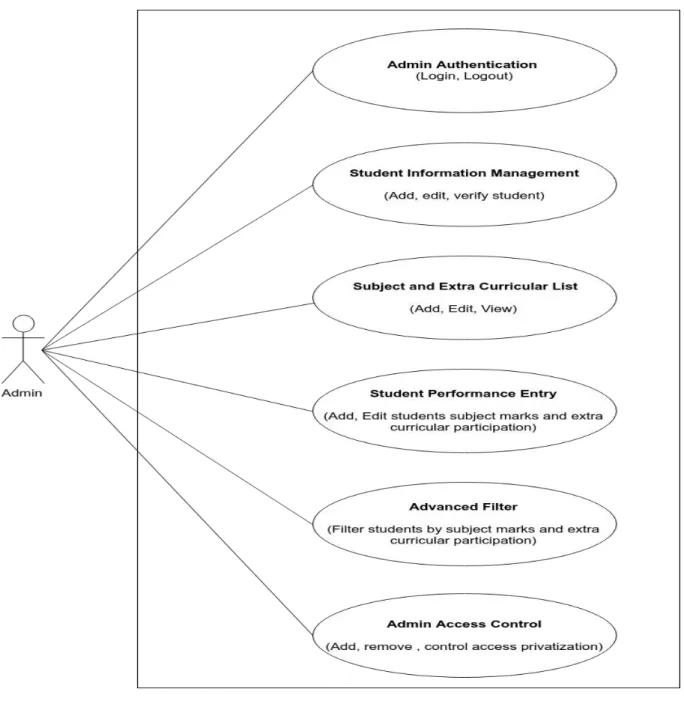
Figure 2.1: Admin Usecase
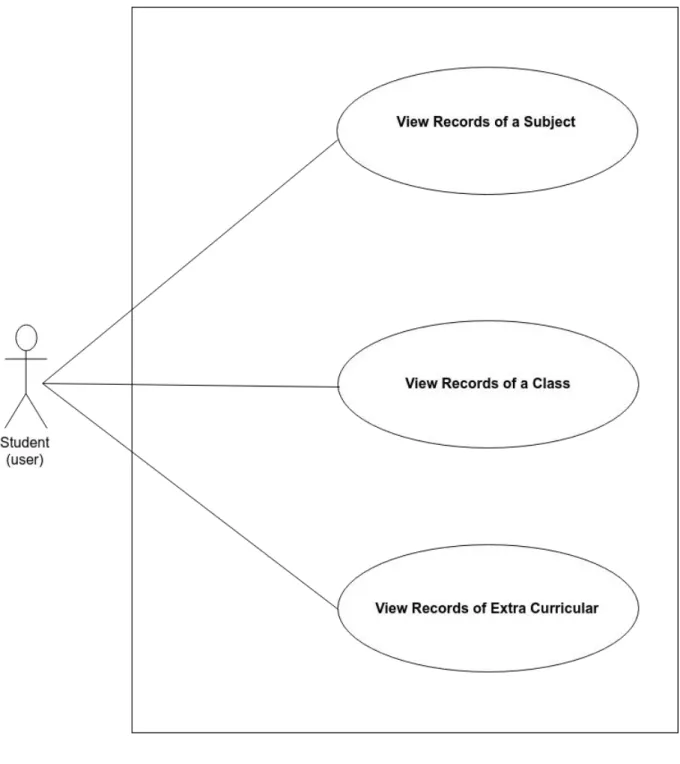
Figure 2.2 : Student (Public User) Usecase
For details Use Case Documentation checkAppendix Asection.
2.3 Software Development Plan
2.3.1 Project Features
These are the project features we will develop in our system -
➢ For Admin
1. Student Information Management for add, edit and verify student.
2. Add, edit subject list.
3. Add, edit extra curricular list.
4. Add, edit marks for subject for specific year and class.
5. Add, edit extra curricular performance entry.
6. Advanced Filter (subject) for filter student by any condition using year, class, subject, marks etc.
7. Advanced Filter (extra curricular) for filter student by any condition using year, class, performance name.
➢ For Student (Public)
1. View student records of any subjects.
2. View student records of any class.
3. View student record of any extra curricular activities.
➢ For Full System
1. Background color and font color acceptable for all devices and user.
2. Font size and font face acceptable for all devices and user.
3. Security is also a major requirement of this system.
2.3.2 Risk Management
2.3.2.1 Risk identification
Risk identification is involved with team members (Authors), stack holders of this project, environment factors, project management plan and scope. Very careful attention will be given to project plan and deliverable date, assumption, constraint and other key factors.
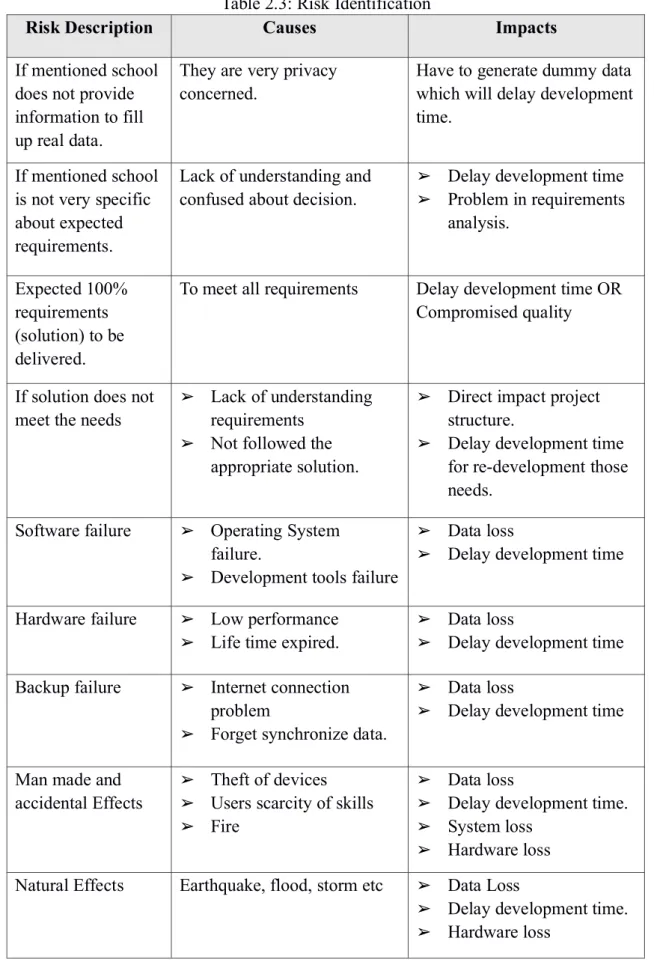
Table 2.3: Risk Identification
Risk Description Causes Impacts
If mentioned school does not provide information to fill up real data.
They are very privacy
concerned. Have to generate dummy data
which will delay development time.
If mentioned school is not very specific about expected requirements.
Lack of understanding and
confused about decision. ➢ Delay development time
➢ Problem in requirements analysis.
Expected 100%
requirements (solution) to be delivered.
To meet all requirements Delay development time OR Compromised quality
If solution does not
meet the needs ➢ Lack of understanding requirements
➢ Not followed the appropriate solution.
➢ Direct impact project structure.
➢ Delay development time for re-development those needs.
Software failure ➢ Operating System failure.
➢ Development tools failure
➢ Data loss
➢ Delay development time
Hardware failure ➢ Low performance
➢ Life time expired. ➢ Data loss
➢ Delay development time Backup failure ➢ Internet connection
problem
➢ Forget synchronize data.
➢ Data loss
➢ Delay development time
Man made and
accidental Effects ➢ Theft of devices
➢ Users scarcity of skills
➢ Fire
➢ Data loss
➢ Delay development time.
➢ System loss
➢ Hardware loss Natural Effects Earthquake, flood, storm etc ➢ Data Loss
➢ Delay development time.
➢ Hardware loss
2.3.2.2 Risk assessment and action plan
Risk assessment and action plan will help to measure the risk level and what action need to apply against that risk. Risk assessment normally perform by project manager here team member (Authors) will manage.
Table 2.4: Risk Assessment
Risk Description Action Against Risk When To Take Action If mentioned school
does not provide information to fill up real data.
Request and discuss with them to
provide information From the beginning of the project.
If mentioned school is not very specific about expected
requirements.
➢ Have follow some rules to prioritize all requirements.
➢ Re-interview with them to confirm and clear about requirements.
From the beginning of the project.
Expected 100%
requirements (solution) to be delivered.
Make a schedule to complete all requirements without
compromised quality.
Before starting development.
If solution does not
meet the needs Re confirm all the requirement and delivered through incremental process.
Throughout the project
Software failure ➢ Must use stable operating system and development tools.
➢ Use some anti virus if needed.
➢ Must use cloud backup
➢ Control unauthorized access.
Throughout the project
Hardware failure ➢ Use required hardware for better performance
➢ Use IPS
➢ Must use cloud backup
Throughout the project
Backup failure ➢ Use stable internet
➢ Must enable synchronization with cloud storage.
Throughout the project
Man made and
accidental Effects ➢ Control unauthorized access.
➢ Check electricity line.
➢ Must use cloud backup
Throughout the project
Natural Effects Must use cloud backup Throughout the project
2.4 Software Test Plan
Test plan is a document describing the objective and scope to be tested to run for a software project. The test plan contains identifying test items, the feature to be tested and who will tested by maintaining work flow.
2.4.1 Objective
To understand a system whether a system works properly or not a perfect test plan is necessary. By comparing with system output with expected output whether system is productive or non productive can be confirmed.
2.4.2 Scope
To test a system various types of tests are available. Here we will use unit and module testing through black box testing for module and source.
2.4.2.1 Function to be tested
➢ Authentication module
➢ Student information management
➢ Subject list
➢ Extra curricular list
➢ Entry subject marks
➢ Entry extra curricular activities.
➢ Advanced filter for subjects.
➢ Advanced filter for extra curricular activities
➢ Admin Access Control
2.4.2.2 Functions not to be tested
No specific field found.
2.4.3 Test strategy
The different levels of testing will apply - 2.4.3.1 Black Box Testing
➢ It will reduce the level of bugs in the system production.
➢ It will make system more stable.
➢ It will help write code better.
2.4.3.2 Module Testing
Module testing is used along with unit testing.
➢ It will help to detect errors of system by using unit.
➢ Early error detection will reduce development cost and time.
➢ It is used from the beginning of development so system will less error prone.
2.4.3.3 Acceptance testing
➢ It will be trustworthy and satisfactory to system user.
➢ It will disclose more defects on the system by formal or informal way.
2.4.3.4 Performance Testing
➢ It will help to measure system performance.
➢ It will help to verify scalability, reliability and resource usage.
2.4.3.5 Security Testing
➢ It will ensure access control
➢ It will prevent from unauthorized access.
➢ It will be trustworthy and satisfactory to system user.
2.5 Conclusion
By completing system analysis and other parts of project development like system design , development and testing get very easier.
Chapter 3
3. System Design
3.1 Introduction
To achieve a better system and to make development work easier, time consume and less error prone System Design is must needed. System Design is way to design structure of a system like architecture, component and database design etc.
3.2 Component Diagram
The relationship between different components in this system.
Figure 3.1: Component Diagram
3.3 Class Diagram
The purpose of the Class diagram describes the attributes and operations of a class and also the constraints imposed of this system.
Figure 3.2: Class Diagram
3.4 Crow’s Foot Entity Relationship Diagram
The purpose of ERD to design relational database for this system.
Figure 3.3: Crow’s Foot Entity Relationship Diagram
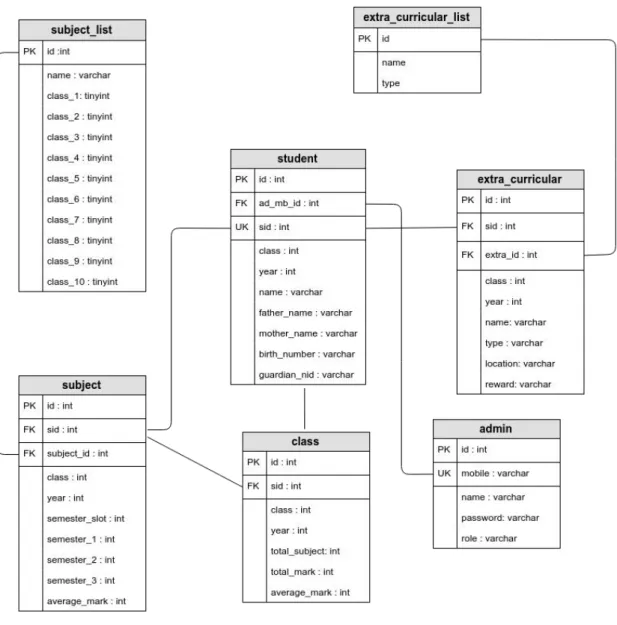
3.5 Database Design
The complete database schema design for proposed system.
Figure 3.4: Database Design
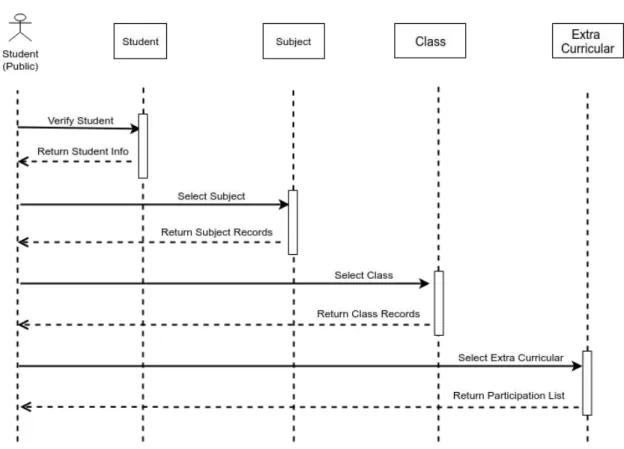
3.6 Sequence Diagram
Sequence Diagram illustrate how the different parts of a system interact with each other to carry out a function, and the order in which the interactions occur when a particular use case is executed.
Figure 3.6: Sequence Diagram for Student
3.7 Conclusion
This chapter will cover the comprehensive design of the system. Design phase converts the users requirements into more technical terms which are prepared to development for selected technology and tools.
Chapter 4
4. Development
4.1 Introduction
To develop this system we (authors) have to choose technology and tools. This system will be a web application.
4.2 Technology and Tools
➢ Presentation Layer- HTML5, CSS3, Bootstrap, JavaScript, jQuery
➢ Application Layer- PHP, LARAVEL
➢ Data Layer- MariaDB (MySQL)
➢ Tools -VSCode, Adminer
➢ Version Control- Git (Github)
4.3 Reason Behind Choosing
4.3.1 In General
➢ HTML5- Its a markup language used to build structure of web page.
➢ Bootstrap with CSS3 - Bootstrap is library to build on CSS3 a styling language used for beautiful style web page.
➢ JavaScript with jQuery- jQuery is a library build on JavaScript language which generally used to make presentation layer interactive.
➢ Laravel with PHP- Laravel is MVC framework build on PHP language used for server side scripting by connecting presentation and data layer..
➢ MariaDB with SQL - MariaDB is forked of MySQL which is free and open source database build on SQL to manage relational database used manipulate data and make connection to application layer.
➢ VSCode- VSCode is modern text editor powerful like IDE used for coding.
➢ Adminer- Adminer is GUI tools to browse database.
➢ Github with Git- Github is cloud hosting based on Git version control system.
4.3.2 On Perspective of This Project
➢ Presentation Layer - This system will be web based system so build structure and make nice interface HTML5, CSS3, Bootstrap, JavaScript, jQuery is best option.
➢ Application Layer - To implement bushiness logic for this system and make connection between presentation and data layer by following MVC pattern PHP, Laravel is best choice.
➢ Data Layer - To make relational database for this system and manage query MariaDB used.
➢ Tools and Backup: For coding purpose VSCode editor will use and for backup with version controlling Github service will be used.
4.4 Conclusion
We will build this system as a web based application. After comparing among other technology and tools Laravel is the best choice.
Chapter 5
5. Testing
5.1 Introduction
Without testing it is not possible to trust the system functionality if it works properly or not. We will test the system that has been already built by following testing rules. Every parts of the system will be tested.
5.2 Test Case
For testing this system for any kind testing type this test case standard will follow
No Test Scenario Test Steps Test Data Expected
Results Actual
Results Pass /Fail
5.3 Black Box Testing
In Unit testing, here all the system units will be tested according to the test case and if it does not match the expected result, further action will be taken to fix the problem.
➢ For Admin Section
Table 5.1: Black Box Testing For Admin
No. Test
Scenario Test Steps Test Data Expected
Results Actual
Results Pass /Fail 01 Login
(valid data) 1. Goto /admin URL 2. Enter Mobile Number and Password
3. Click Submit
0171--564686
&
12345678
Logged In As
expected Pass
02 Login (Invalid data)
1. Go to /admin URL 2. Enter Mobile Number and Password 3. Click Submit
0171--564666
&
586756
NotLogged In As
expected Pass
03 Admin related URL check without login
Try to browse any
admin related URL Can not
browse any URL and redirect to login page.
As
expected Pass
04 Add new
student Click on ‘New Student’ button and fill up form
Antu Hossain
&
Rakib Hossain
&
Zerin Hossain
&
1&
2018&
20805036
Saved in DB and show in a page.
As
expected Pass
05 Verify
Student Click on ‘Verify Student’ button and give a student id
2000111 Show
Student Info
Asexpected Pass
06 Add new
subject Click on ‘Add Subject’ button and give subject name with required classes.
Bangla - I
&
Select class : 1-10
Saved in DB and give a confirmati on
message
Asexpected Pass
07 View
Subject List Click on ‘Subject
List’ button See all
subjects list with classes
Asexpected Pass
08 Add new Extra Curricular Activities
Click on ‘Add
Activities’ button and give activities name with type.
Cricket
&
Outdoor
Saved into DB and give a confirmati on
message
Asexpected Pass
09 View Extra Curricular Activities List
Click on ‘Activities
List’ button See all
activities list with type
Asexpected Pass
10 View filtered student by marks
Click ‘Advanced Filter Marks’ button and choose/fill all the forms
Sell list of students forrequired condition
Asexpected Pass
11 View filtered student by activities
Click ‘Advanced Filter Activities’
button and choose/fill all the forms
Sell list of students for required condition
As
expected Pass
12 Show Admin Menu
Admin menu will be visible only when admin have access permission as super admin.
0171--564686
&
12345678
Admin menu visible
Asexpected Pass
13 Create new admin when login as super admin
Click ‘New Admin’
button and fill up form
Faysal Mojumder
&
01676--7017
&
Admin
&
12345678
Create an account and give confirmati onmessage
As
expected Pass
14 View all admin list when login as super admin
Click ‘Admin List’
button Sell list of
admin As
expected Pass
15 Add marks
for a student Click ‘Add marks’
button 200111
&
3
&
2018
&
3&
Bangla, English
Saved in DB and give a confirmati on
message
Asexpected Pass
16 Add activities participation for a student
Click ‘Add Extra
Curricular’ button 200111
&
3&
2018&
Cricket, Debate
Saved in DB and give a confirmati onmessage
Asexpected Pass
➢ For Student (Public) Section
Table 5.2: Black Box Testing For Student
No Test
Scenario Test Steps Test Data Expected
Results Actual
Results Pass /Fail 17 Check a
student ID Go to /student URL 2000111 Show student basic info
Asexpected Pass
18 Check all result of a selected class
1. Click ‘Class’
Button
2. Select a class
2 Show all
results details of that class
Asexpected Pass
19 Check all result of a selected subject
1. Click ‘Subject’
Button
2. Select a subject
Bangla - I Show all results details of that subject
As
expected Pass
20 Check all participation details of a student.
Click ‘Extra Curricular’
Button
Show list of all participati on details
Asexpected Pass
21 Check individual participation details
Click on any
activities name Show
details of that activities
Asexpected Pass
5.4 Module Testing
Modules are the combination of units. Here all the modules that are tested to prove that they are working as expected.
➢ For Admin Section
Table 5.3: Module Testing For Admin
No Test
Scenario Test Steps Test Data Expected
Results Actual
Results Pass /Fail
01 Login 1. Goto /admin
URL
2. Enter Mobile Number and Password 3. Click Submit
0171--564686
&
12345678
Logged In As
expected Pass
02 Student
Information Click on ‘New Student’ button to create new
student by fill up form and from auto generated id for student verification possible.
Antu Hossain
&
Rakib Hossain
&
Zerin Hossain
&
1
&
2018&
20805036
Saved in DB and show on a page
As
expected Pass
03 Subject Click on ‘Add Subject’ button and give subject name with required classes and view the subject list
Bangla - I
&
Select class : 1-10
Saved in DB and give a confirmation message and show subject list
Asexpected Pass
04 Extra Curricular Activities
Click on ‘Add Activities’ button and give
activities name with type and view all the list
Cricket
&
Outdoor
Saved in DB and give a confirmation message and
showactivities list
Asexpected Pass
05 Subject
Marks Entry Click ‘Add
marks’ button 200111
&
3
&
2018
&
3&
Bangla, English
Saved in DB and give a confirmation message
Asexpected Pass
06 Extra Curricular Activities Participation Entry
Click ‘Add Extra
Curricular’ button 200111
&
3
&
2018
&
Cricket, Debate
Saved in DB and give a confirmation message
Asexpected Pass
07 Admin Click ‘New
Admin’ button by fill up form a admin will create and this menu will only show when logged in as Super Admin
Faysal Mojumder
&
01676--7017
&
Admin
&
12345678
Saved in DB and give confirmation message and can view admin list
Asexpected Pass
➢ For Student (Public) Section
Table 5.4: Module Testing For Student
No Test Scenario Test Steps Test Data Expected
Results Actual
Results Pass / Fail 08 Student
Records View
1. Go to /student URL
2. Enter ID
3. Click on required Option
2000111 Show
student basic info to confirm enter And give records against click action.
Asexpected Pass
5.5 All other testing
➢ Acceptance testing - By unit and module testing its working as its expected which are already fulfill the acceptance testing so no need separately do it.
➢ Performance Testing - We input lots of data and tested in so many ways to read and write data but system was stable and reliable.
➢ Security Testing - By unit and module testing its working as its expected which are already fulfill the security testing so no need separately do it
5.6 Conclusion
Testing is mandatory to ensure that the systems can conform user requirements.
All the necessary testing is accomplished to ensure this.
Chapter 6
6. User Manual
6.1 Training
This system is a very sensitive because of the information it collects and for it’s functionality so hand on experience will best option for it. 1 day training mandatory for all admin level user.
6.2 How It Works
“How It Works” section available on web application. This will help admin if they need support after training and for student (public) user it will give simple instruction to use it.
Chapter 7
7. Conclusion
7.1 Introduction
The main goal is to make a central database and give a application to access them to educational institution and students. They can use this data to make educational system better, make their works easier and honest measurement for all students.
7.2 Strength of The System
Most of the major objectives of this system already built up by following requirement collection, system analysis and design and by testing it. After that this system becomes ready for production. System is built on top technology so it is stable, reliable and future maintainable. This system will help our education system, educational institution, students and other institutions.
We have tried to build most functional and non functional requirement to make it feature rich, user friendly, secured and performance focused.
7.2 Weakness of The System
We have tried our best to build this system better and fulfill all the requirements but some of them were not possible built for time shortage and government permission.
Major weakness or missing features of this system are -
➢ Log of every action on this system.
➢ Integrating all the educational institutions in one place
➢ For verification of birth certificate link to the government server.
7.3 Future Scope
The system has been developed for research purpose to see how much impact it has. A product has been built without compromising it’s main goal . If we can get support from larger team and government supports this project then lots of advanced and rich feature can be implemented. If the all goals of this project can be implemented with more new goals it will become one of the most popular and grateful project in our country.
Appendix A
USE CASE DOCUMENTATION
Use Case Name: Student Information Management
Actors: Admin
Preconditions: Admin logged in into system
Post Conditions: Admin has access permission to perform action.
Primary Scenario: ➢ Fill up form to add new student to database.
➢ Enter student ID to verify existing student.
➢ Search student by name if anyone forget their id.
Use Case Name: Admin Login
Actors: Admin
Preconditions: Entered into login page Post Conditions: ➢ Enter into Dashboard
➢ New Session Created Primary Scenario: ➢ Enter mobile and password
➢ System verify mobile and password
➢ If verified system allowed to enter dashboard otherwise give error message.
Use Case Name: Subject And Extra Curricular List
Actors: Admin
Preconditions: Admin logged in into system
Post Conditions: Admin has access permission to perform action.
Primary Scenario: ➢ Add new subject or extra curricular activities to database.
➢ Edit subject or extra curricular activities.
➢ View list of all subject or extra curricular activities.
Use Case Name: Student Performance Entry
Actors: Admin
Preconditions: Admin logged in into system
Post Conditions: ➢ Admin has access permission to perform action.
➢ Must choose an student ID before entry records.
Primary Scenario: ➢ Add marks of class for selected subjects.
➢ Add participation details for extra curricular activities.
Use Case Name: Advanced Filter
Actors: Admin
Preconditions: Admin logged in into system
Post Conditions: ➢ Admin has access permission to perform action.
➢ Must select class or subject for fill up filter form.
Primary Scenario: ➢ Choose filter by year.
➢ Choose filter by marks.
➢ Choose filter by class.
Use Case Name: Admin Access Control
Actors: Admin
Preconditions: Admin logged in into system
Post Conditions: ➢ Admin has access permission to perform action.
➢ Only super admin can add and delete other admin.
Primary Scenario: ➢ Only super admin create other admin.
➢ Can control their access permission in system area.
Use Case Name: View Record of a Subject
Actors: Student (public user)
Preconditions: Must entered student ID
Post Conditions: ➢ System confirmed matched student ID
➢ Choose a subject from list.
Primary Scenario: Show marks details for selected subject from all classes.
Use Case Name: View Record of a Class
Actors: Student (public user)
Preconditions: Must entered student ID
Post Conditions: ➢ System confirmed matched student ID
➢ Choose a class from list.
Primary Scenario: Show marks details for selected class for all subjects.
Use Case Name: View Record of a Extra Curricular
Actors: Student (public user)
Preconditions: Must entered student ID
Post Conditions: System confirmed matched student ID.
Primary Scenario: ➢ Show all participation list of activities with award details.
➢ Show all history for a specific activities.
Appendix B
SCREENSHOT OF THE LIVE SYSTEM
➢ FOR ADMIN
1. Login
2. New Student
3. Verify Student
4. Student Info Check
5. Add subject
6. Subject List
7. Add Extra Curricular Activities
8. Extra Curricular Activities List
9. Add subjects marks of a class
10.Add Extra Curricular Activities Participation
11.Advanced Filter for Marks (Subject/Class)
12.Advanced Filter for Extra Curricular Activities
13. Add Admin
14.Admin List
➢ FOR STUDENT (PUBLIC) 1. Enter Student ID
2. Timeline Graph
3. Details of a subject
4. Details of a class
5. Details list of all activities participation
6. Details list of a activities participation