Materi
●
HTML
●
Object HTML
●
CSS
●
CSS Layouting
●Javascript
●
jQuery
●
PHP Dasar
●
Konsep Database & MySQL
●PHP & MySQL
HTML
●
HTML
–
Hypertext Markup Language
●
Tag
–
Penanda untuk membuat efek pada halaman web
–Ada yang berpasangan, ada yang tidak
–
Syntax:
● Awal: “<” + nama_tag + “>” ● Akhir: “</” + nama_tag + “>”
●
Attribute
–
Properties pada tag HTML
● <FORM method=”post”>
●
Penamaan file
Struktur HTML
Tag minimal:
–
HTML, HEAD, BODY
<html>
<head>
</head>
Heading | Hn
●
Untuk membuat judul
●
Nilai n: 1 – 6
●
Attribute:
–
Align:
●
center, left, right
<H1>Heading dengan nilai N = 1</H1>
Paragraph | P
●
Untuk membuat paragraph
●
Attribute:
–
Align:
●
center, left, right
<P>default paragraf</P>
List
●
Ordered List | OL
●
Unordered List | UL
Ordered List | OL
●
Untuk membuat Numbering
●
Attribute:
–
Type:
●
1, A, a, I, i
<h1>List Terurut</h1>
<ol type="i">
Unordered List | UL
●
Untuk membuat Bullets
●
Attribute:
–
Type:
●
disc – bulatan hitam
●square – kotak
●
circle – bulatan kosong
<h1>List Tidak Terurut</h1>
<ul type="square">
Characters Formatting
●
SUP – Superscript
●
SUB – Subscript
●
BIG – Membesarkan
●
SMALL – Mengecilkan
<h1>Characters Formatting</h1> Tulisan normal<br>
Cetak <b>tebal</b><br>
Cetak <b><i><u>tebal italic underline</u></i></b><br> Discount: <s>Rp. 5000,-</s> Rp. 1000,-<br>
<pre>
Tulisan fixed font </pre>
X<sup>2</sup> = 4. X = ?<br> H<sub>2</sub>O – Air<br>
Gambar | IMG
●
Menampilkan gambar pada layer depan
●
Attribute
–
Src: url
–
Align: center, left, right, justify, top, bottom, middle, baseline
–Border: pixel, persentase
–
Width: pixel, persentase
–Height: pixel, persentase
<img src="gambar1.jpg" border="1"><br>
Anchor | A
●
Membuat link untuk:
– Menuju webpage itu sendiri atau webpage lain – Melakukan download
– Mempermudah pengiriman e-mail
●
Attribute:
– href – URL
– target – Target window yang dituju (_self, _blank, _top, _parent) – name – Nama label
– title – tooltips
<h1>Anchor</h1>
<a href="page2.html" title="goto page 2...">Go To Page 2</a><br>
Table | TABLE
●
Membuat tabel berisi data
–
Misconception: Table digunakan untuk membuat layout
website.
●
Additional Tag
–
CAPTION – Judul Tabel
–
TR – Table Row (Baris Tabel)
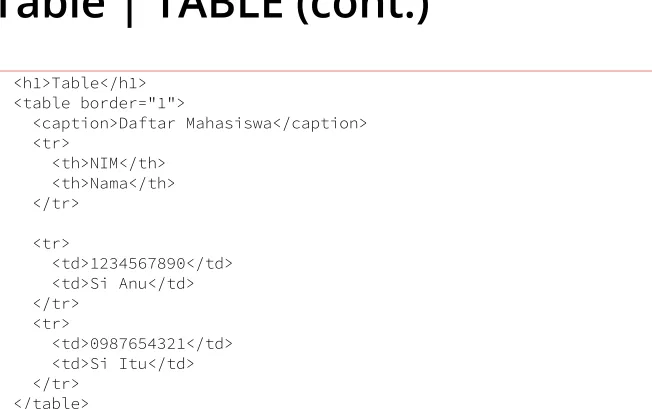
Table | TABLE (cont.)
<h1>Table</h1>
<table border="1">
<caption>Daftar Mahasiswa</caption>
<tr>
<th>NIM</th>
<th>Nama</th>
</tr>
<tr>
<td>1234567890</td>
<td>Si Anu</td>
</tr>
<tr>
<td>0987654321</td>
<td>Si Itu</td>
Form | FORM
●
Area yang menampung objek HTML lain untuk dapat
diproses secara dinamis
●
Attribute:
–
Name – nama objek
–
Action – berisi URL file yang melakukan proses data secara dinamis
–
Method – metode pengiriman data ( berisi GET atau POST)
Input | INPUT
●
Digunakan untuk mendapatkan entry dari user
●
Attribute:
–
Name – nama objek
–Type – tipe input
●
Text – input berupa alpanumeric 1 baris
●Password – input berupa password
●Hidden – objek tidak terlihat
●
Radio – objek radio button
●Checkbox – objek checkbox
●TOMBOL:
– Submit – memproses data pada form menuju fille yang ditunjuk attribute action
– Button – tombol tanpa action (gabung dengan javascript)
– Reset – melakukan reset data pada form yang ada
Input | INPUT (cont.)
<form name="frm_html" method="post" action="proses.php">
NIM: <input type="text" name="txt_nim" value="1234567890"><br> <input type="hidden" name="txt_type" value="mahasiswa"> Nama: <input type="text" name="txt_nama"><br>
Password: <input type="password" name="txt_password"><br> Jenis Kelamin:
<input type="radio" name="opt_jenkel" value="P" checked>Pria <input type="radio" name="opt_jenkel" value="W">Wanita<br> Hobby:<br>
<input type="checkbox" name="chk_hobby" value="Basket">Bola Basket<br> <input type="checkbox" name="chk_hobby" value="Volly">Bola Volly<br> <input type="checkbox" name="chk_hobby" value="Buku">Baca Buku<br> <input type="checkbox" name="chk_hobby" value="Internet">Internet<br>
Select | SELECT
●
Digunakan untuk membuat dropdown option
●
Attribute:
–
Name – nama objek
–
Multiple – membuat pilihan dapat dipilih lebih dari satu
●
Additional Tags
–
OPTION – menambahkan item pilihan
–
Attribute:
Select | SELECT (cont.)
<form name="frm_html" method="post" action="proses.php"> Agama:
<select name="cmb_agama">
<option value="I">Islam</option>
<option value="P">Protestan</option> <option value="K">Katolik</option> <option value="B">Budha</option> <option value="H">Hindu</option> </select><br>
Hobby:
<select name="cmb_hobby" multiple> <option value="B">Basket</option> <option value="V">Volly</option>
Textarea | TEXTAREA
●
Digunakan untuk membuat textbox lebih dari 1 baris
●
Attribute:
–
Name – nama objek
–
Cols – kolom (satuan karakter)
–
Rows – baris (satuan karakter)
<form name="frm_html" method="post" action="proses.php"> Komentar:
<textarea name="txt_komen" cols="50" rows="7">berikan komentar anda...</textarea> <br>
CSS
●
Kumpulan format yang digunakan untuk mengatur desain
website sehingga dapat lebih flexibel.
●
Elemen Dasar
–
Selector
●
Tag / elemen pada html
–
Declaration
●
Perintah CSS yang digunakan untuk menjelaskan desain selector; terdiri dari:
– Property – Value
●
Format Penulisan
Penulisan CSS
●
Inline CSS
<p style='color: red'>warna merah</p>
●
Internal / Embedded CSS
<style>
p { color: red; }
</style>
Jenis CSS
●
Font CSS
●
Text CSS
●
Background CSS
●
Border CSS
●
Padding CSS
Font CSS
Property Value
font font-family
font-size-adjust
font-family font family name
generic family font name
font-size-adjust none
number
font-stretch ultra-condensed
extra-condensed
Property Value
font-size xx-small, x-small, small,
medium
large, x-large, xx-large, larger, smaller,
length, percentage
font-style normal, italic, oblique
font-variant normal,
small-caps
font-weight normal, bold, bolder,
lighter,
100, 200, 300, 400, 500,
Font CSS (cont.)
<html> <head>
<title>Font CSS</title> <style>
h1{
</style> </head>
<body>
<h1>Judul Berita</h1> <p>
isi berita disini (paste 30x) </p>
<h1>Judul Artikel</h1> <p>
isi artikel disini (paste 30x) </p>
Text CSS
Property
Value
color
color contants, hexadecimals, rgb(), rgba()
direction
ltr,rtl
letter-spacing
normal, length
text-align
left, right, center, justify
text-decoration
none,
underline, overline, line-through, blink
text-indent
length, percentage
text-shadow
none, x-offset y-offset blur-radius color
text-transform
none, capitalize, uppercase, lowercase
white-space
normal, pre, nowrap
Text CSS (cont.)
<html> <head>
<title>Text CSS</title> <style>
h1{
</style> </head>
<body>
<h1>Judul Berita</h1> <p>
isi berita disini (paste 30x) </p>
Background CSS
Property
Value
background
background-attachment,
background-color,
background-image,
backgound-position,
background-repeat
background-attachment
scroll, fixed
background-color
color constant,
rgb(), rgba(), hexadecimal,
transparent
background-image
url(), none
background-position
left, center, right, top, bottom,
percentage, fixed position
Background CSS (cont.)
<html> <head>
<title>Background CSS</title> <style>
body{
background-color: yellow;
background-image: url('images/bg.png'); background-attachment: fixed;
} h1{
background-color: green; }
p{
background: url('images/bg.png') bottom right no-repeat; }
</style> </head>
<body>
<h1>Judul Berita</h1> <p>
isi berita disini<br> (paste 30x) </p>
Border CSS
Property
Value
border[-position]
border-color, border-style, border-width
border[-position]-color
color constant, rgb(), hexadecimal
border[-position]-style
none, hidden, dotted, dashed, solid, double, groove,
ridge, inset, outset
border[-position]-width
thin, medium, thick, length
●
[-position]:
Border CSS (cont.)
<html> <head>
<title>Border CSS</title> <style>
h1{
</style> </head>
<body>
<h1>Judul Berita</h1> <p>
isi berita disini<br> (paste 30x)
<blockquote>Kutipan disini...</blockquote> </p>
Padding CSS
Property
Value
padding[-position]
length, percentage
●
[-position]:
Padding CSS (cont.)
<html> <head>
<title>Padding CSS</title> <style>
h1{
</style> </head> <body>
<h1>Judul Berita</h1> <p>
isi berita disini (paste 30x) </p>
Margin CSS
Property
Value
margin[-position]
length, percentage
●
[-position]:
Margin CSS (cont.)
<html> <head>
<title>Border CSS</title> <style>
h1{
</style> </head> <body>
<h1>Judul Berita</h1> <p>
isi berita disini (paste 30x) </p>
Custom Selectors | Class
●
Menerapkan desain custom yang dibuat
sendiri
●
Penulisan
–
Nama desain yang tidak terpaku pada tag HTML
–
Menggunakan titik sebelum nama desain
●
Contoh:
Custom Selectors | Class (cont.)
<html> <head>
<title>Class</title> <style>
.my_class{
</style> </head>
<body>
<h1 class='my_class'>Judul</h1> <p>paragraf standar</p>
<p class='my_class'>efek class my_class</p>
Custom Selectors | ID
●
Menerapkan desain custom yang dibuat sendiri
●
Unique
●
Penulisan
–
Nama desain yang tidak terpaku pada tag HTML
–
Menggunakan pagar sebelum nama desain
●
Contoh:
Custom Selectors | ID (cont.)
<html>
<head>
<title>ID</title>
<style>
#kotak{
</style>
</head>
<body>
<h1 id='kotak'>Judul</h1>
<p>paragraf standar</p>
<p id='kotak'>efek class kotak</p>
<p id='kotak1'>efek class kotak1</p>
</body>
Table Less Layout
●
Membuat layout website tanpa menggunakan
tag table maupun tag frame
●
Menggunakan CSS dengan tag DIV, attribute ID
Layout 1 Kolom
<html>
<head>
<link rel="stylesheet"
type="text/css"
href="real1.css">
</head>
<body>
<center>
<div id="root">
</center>
</body>
Layout 1 Kolom (cont.)
body {
font: 11pt Tahoma, Verdana;
background: #5d5d5d;
}
#root {
width: 960px;
text-align: left;
}
#header {
background: #806d59;
color: #edebda;
text-shadow: 1px 1px 1px
#5d5d5d;
padding: 20px 10px;
font-family: "Times New Roman";
}
#header h1 {
padding: 0;
margin: 0;
}
#navigation {
background: #a89888;
padding: 20px 10px;
}
#content {
background: #fff;
padding: 20px 10px;
}
#content h3 {
font-weight: lighter;
padding: 0;
margin: 0;
}
#footer {
Layout 2 Kolom
●
Demokan pembuatan layout 2 kolom
–
https://student.budiluhur.ac.id
Pendahuluan
●
Digunakan untuk membuat halaman web
dinamis
●
Simple dan ringan
●
Berjalan di Client Side Script
●
Disematkan pada halaman HTML
Cara Penulisan
●
Menggunakan tag <script>
●Sebelum tag akhir BODY
<html>
<head></head> <body>
<script type="text/javascript"> // statement javascript
</script>
<script type="text/javascript" src="namafile.js"></script> </body>
Komentar
●
// statement javascript;
●
/*
statement javascript;
*/
<script>
// komentar satu baris /*
Variable
●
Untuk menampung data sementara
●
Bersifat volatile
●
Cara penulisan:
–
Case sensitive
–
Dimulai menggunakan huruf atau underscore
–
Tidak boleh ada spasi
Operator
●
Aritmatika
–
Untuk perhitungan matematika
●
Pembanding
–
Untuk mengembalikan nilai dalam bentuk true atau false
●
Penambahan/Pengurangan terstruktur
–
Untuk penambahan/pengurangan secara teratur
●
Logika
Operator (cont.)
●
Aritmatika
●
Pembanding
Operator
Operasi
Contoh
== Sama a == 2
!= Tidak sama a != 2
< Lebih kecil a < 2
> Lebih besar a > 2
<= Lebih kecil atau sama dengan a <= 2
Operator
Operasi
Contoh
+ Penjumlahan a + b
- Pengurangan a – b
* Perkalian a * b
/ Pembagian a / b
Operator (cont.)
●
Penambahan / Pengurangan Terstruktur
Operator
Operasi
++a Pre Increment
a++ Post Increment
--a Pre Decrement
a-- Post Decrement
Operator
Operasi
Contoh
&& Benar, jika keduanya bernilai benar a && b
|| Benar, jika salah satu bernilai benar a || b
! Benar jika pernyataan salah !a
●
Logika
Statement Kendali
●
Pengandaian
–
If
–
Switch
●
Perulangan
–
Do
–
While
If
if (expresi) { statement_if; } elseif (expresi) {
statement_elseif;
alert("a lebih besar dari b"); }
</script>
<script> a=2; b=10; if(a > b){
alert("a lebih besar dari b");
<script> a=1;
if(a==1){
alert("satu"); }else if(a==2){
alert("dua"); }else if(a==3){
alert("tiga"); }else{
Do
document.write(i + "<br>"); i++;
} while(i<10);
<script> i=1;
do{
document.write(i + "<br>"); i++;
While
while (expresi) {
statement_while;
…
}
<script> i=1;
while(i<=10){
document.write(i + "<br>"); i++;
document.write(i + "<br>"); i++;
}
For
for (nilai_awal, nilai_akhir, perhitungan_aritmatik) {
statement_for;
…
}
<script>
for(i=1; i<=10; i++){
document.write (i + "<br>"); }
Function
function nm_fungsi (parameter1, parameter2, …){
statement_fungsi;
…
return nilai_return;
}
<script>
function hitung(a, b){ c = a + b;
alert("Jumlah " + a + " ditambah " + b + " =" + c); }
Function (cont.)
<html>
<head></head>
<script>
function hitung(a, b){ c = a + b;
alert("Jumlah " + a + " ditambah " + b + " =" + c); }
</script>
<body onLoad='hitung(5, 4);'>
Contoh Fungsi pada Javascript<br><br>
<input type='button' value='Tambah' onClick='hitung(5, 4);'> </body>
Pendahuluan
●
Library dalam memudahkan pemanfaatan
Javascript
●
Ringan
–
Ukuran file sekitar 32kB
●
CSS3 Compatible
Install jQuery
●
Download
–
http://jquery.com/download/
●
Bower
–
bower install jquery
●
CDN
Syntax
$(selector).action();
–
$ jQuery
→
–
selector CSS Selector
→
–
action() jQuery Function
→
$(this).hide(); $("p").hide();
Document Ready
$(document).ready(function(){
// jQuery methods go here...
});
$(function(){
// jQuery methods go here...
Selector
●
Memanipulasi element HTML
●
Menemukan element HTML berdasarkan id,
Selector | element
<!DOCTYPE html> <html>
<head>
<script src="https://ajax.googleapis.com/ajax/libs/jquery/1.11.3/jquery.min.js"></script> <script>
$(document).ready(function(){ $("button").click(function(){ $("p").hide();
<h2>This is a heading</h2> <p>This is a paragraph.</p>
<p>This is another paragraph.</p> <button>Click me</button>
Selector | #id
<!DOCTYPE html> <html>
<head>
<script src="https://ajax.googleapis.com/ajax/libs/jquery/1.11.3/jquery.min.js"></script> <script>
$(document).ready(function(){ $("button").click(function(){ $("#test").hide();
<h2>This is a heading</h2> <p>This is a paragraph.</p>
Selector | .class
<!DOCTYPE html> <html>
<head>
<script src="https://ajax.googleapis.com/ajax/libs/jquery/1.11.3/jquery.min.js"></script> <script>
$(document).ready(function(){ $("button").click(function(){ $(".test").hide();
<h2 class="test">This is a heading</h2> <p class="test">This is a paragraph.</p> <p>This is another paragraph.</p>
<button>Click me</button> </body>
Selector (cont.)
●
$(“*”)
●
$(this)
●
$(“p.intro”)
●
$(“p:first”)
●
$(“ul li:first-child”)
●
$(“[href]”)
●
$(“a[target='_blank']”)
●
$(“:button”)
Events
●
Merespon kegiatan user pada halaman web
–
Contoh:
●
Saat user menggerakan mouse
●
Saat user melakukan klik pada elemen HTML
Mouse Events
Keyboard Events
Form Events
Document Events
click
keypress
submit
load
dblclick
keydown
change
resize
mouseenter
keyup
focus
scroll
Events | Syntax
●
Hampir semua DOM events adalah jQuery method
<!DOCTYPE html> <html>
<head>
<script src="https://ajax.googleapis.com/ajax/libs/jquery/1.11.3/jquery.min.js"></script> <script>
$(document).ready(function(){ $("p").click(function(){ $(this).hide();
<p>If you click on me, I will disappear.</p> <p>Click me away!</p>
Events | on() method
●
Menggabungkan beberapa events pada element
$("p").on("click", function(){ $(this).hide();
});
$("p").on({
mouseenter: function(){
$(this).css("background-color", "lightgray"); },
mouseleave: function(){
$(this).css("background-color", "lightblue"); },
click: function(){
$(this).css("background-color", "yellow"); }
Events | on() method (cont.)
<!DOCTYPE html> <html>
<head>
<script src="https://ajax.googleapis.com/ajax/libs/jquery/1.11.3/jquery.min.js"></script> <script>
$(document).ready(function(){
$("p").on("click", function(){ $(this).hide();
<p>If you click on me, I will disappear.</p> <p>Click me away!</p>
Events | on() method (cont.)
<!DOCTYPE html> <html>
<head>
<script src="https://ajax.googleapis.com/ajax/libs/jquery/1.11.3/jquery.min.js"></script> <script>
<p>Click or move the mouse pointer over this paragraph.</p> </body>
Effects | Hide & Show
$(selector).hide(speed,callback);
Effects | Hide & Show (cont.)
<!DOCTYPE html> <html>
<head>
<script src="https://ajax.googleapis.com/ajax/libs/jquery/1.11.3/jquery.min.js"></script> <script>
$(document).ready(function(){ $("#hide").click(function(){ $("p").hide();
});
$("#show").click(function(){ $("p").show();
<p>If you click on the "Hide" button, I will disappear.</p> <button id="hide">Hide</button>
<button id="show">Show</button> </body>
Effects | Toggle
Effects | Toggle (cont.)
<!DOCTYPE html> <html>
<head>
<script src="https://ajax.googleapis.com/ajax/libs/jquery/1.11.3/jquery.min.js"></script> <script>
$(document).ready(function(){ $("button").click(function(){ $("p").toggle();
<p>This is a paragraph with little content.</p> <p>This is another small paragraph.</p>
HTML | text(), html(), val()
●
text() isi text yang ada pada element HTML
→
●
html() isi yang terdapat pada element HTML
→
(termasuk tag HTML)
HTML | text(), html(), val() (cont.)
<!DOCTYPE html> <html>
<head>
<script src="https://ajax.googleapis.com/ajax/libs/jquery/1.11.3/jquery.min.js"></script> <script>
$(document).ready(function(){ $("#btn1").click(function(){
alert("Text: " + $("#test").text()); });
$("#btn2").click(function(){
alert("HTML: " + $("#test").html());
<p id="test">This is some <b>bold</b> text in a paragraph.</p> <button id="btn1">Show Text</button>
HTML | text(), html(), val() (cont.)
<!DOCTYPE html> <html>
<head>
<script src="https://ajax.googleapis.com/ajax/libs/jquery/1.11.3/jquery.min.js"></script> <script>
$(document).ready(function(){ $("#btn1").click(function(){
$("#test1").text(function(i, origText){
return "Old text: " + origText + " New text: Hello world! (index: " + i + ")"; });
});
$("#btn2").click(function(){
$("#test2").html(function(i, origText){
return "Old html: " + origText + " New html: Hello <b>world!</b> (index: " + i + ")";
<p id="test1">This is a <b>bold</b> paragraph.</p>
HTML | Add
●
append() menambahkan content di akhir
→
●
prepend() menambahkan content di awal
→
●
after() menambahkan content setelah
→
element
●
before() menambahkan content sebelum
→
HTML | Add
●
append() menambahkan content di akhir
→
●
prepend() menambahkan content di awal
→
●
after() menambahkan content setelah
→
element
●
before() menambahkan content sebelum
→
HTML | Add (cont.)
<!DOCTYPE html> <html>
<head>
<script src="https://ajax.googleapis.com/ajax/libs/jquery/1.11.3/jquery.min.js"></script> <script>
$(document).ready(function(){ $("#btn1").click(function(){
$("p").append("<b>Append text</b>. "); });
$("#btn2").click(function(){
$("p").prepend("<b>Prepended text</b>. "); });
});
</script> </head> <body>
<p>This is a paragraph.</p>
<button id="btn1">Append text</button> <button id="btn2">Prepend text</button> </body>
HTML | Add (cont.)
<!DOCTYPE html> <html>
<head>
<script src="https://ajax.googleapis.com/ajax/libs/jquery/1.11.3/jquery.min.js"></script> <script>
$(document).ready(function(){ $("#btn1").click(function(){
$("p").before("<b>Before</b>"); });
$("#btn2").click(function(){
$("p").after("<i>After</i>"); });
});
</script> </head> <body>
<p>This is paragraph</p>
HTML | Remove
●
remove() menghapus element dan sub child
→
●
empty() menghapus child element dari
→
HTML | Remove (cont.)
<!DOCTYPE html> <html>
<head>
<script src="https://ajax.googleapis.com/ajax/libs/jquery/1.11.3/jquery.min.js"></script> <script>
$(document).ready(function(){ $("#empty").click(function(){ $("#div1").empty();
});
$("#remove").click(function(){ $("#div1").remove();
<div id="div1" style="height:100px;width:300px;border:1px solid black;"> This is some text in the div.
<p>This is a paragraph in the div.</p>
<p>This is another paragraph in the div.</p> </div>
Sekilas PHP
●
PHP
–
PHP: PHP Hypertext Preprocessor
–
Rasmus Lerdorf
–
Open Source
–
Server Side Script
–
www.php.net
●
Zend
Kelebihan PHP
●
File Upload
●
HTTP Cookie
●
Akses Database
●
HTTP Authentification
●
Regular Expression
●
Akses File
●
Error Handling
●
Membuat file PDF
Konsep Server Side Script
Tools
●
Web Server
–
Apache (http://www.apache.org)
–IIS – Internet Information System
–nginx
●
Web Browser
–
IE – Internet Explorer
–Mozilla Firefox
–
Konqueror
–Safari
●
Editor
Instalasi PHP
●
Easy way
–
Install XAMPP
–
Tidak cocok untuk production server
–
Banyak security hole
●
Bloody way
–
Install PHP, Apache, MySQL secara manual
Documentroot
●
Folder dimana user hanya dapat mengakses
file dan direktory didalamnya saja
●
Web server hanya akan memberikan respon
untuk file yang hanya ada di documentroot
●
Dimana Documentroot?
–
httpd.conf
●
Pada xampp terdapat di folder:
Tag PHP
<?php
statement_php;
phpinfo()
<?php
phpinfo(); ?>
Komentar
●
Single line
#
//
●
Multi line
/* … */
<?php
# echo "Hello"; // echo "Hello"; /*
Variable
●
Untuk menyimpan data
●Penulisan:
– Diawali tanda $
– Panjang tidak terbatas
– Setelah $, diawali oleh huruf atau garis bawah – Case sensitive
– Tidak boleh ada spasi
<?php
$nama="Rizky Tahara Shita"; $angka="28";
echo $nama . " $angka"; ?>
Tipe Data
●
Integer
●
Float
●
String
●
Array
●
Object
<?php
$gaji=1000000; $pajak=0.1;
$thp=$gaji-($gaji*$pajak);
Tipe Data (cont.)
●
Integer (bilangan bulat)
●
Float
●
String
<?php
$a = 1234; # decimal number $a = -123; # a negative number
$a = 0123; # octal number (equivalent to 83 decimal)
$a = 0x1A; # hexadecimal number (equivalent to 26 decimal) ?>
Escaped Characters
Sequences
Arti
\n Newline (CHR 13)
\r Carriage Return (CHR 10)
\t Tab character
\\ Backslash
\$ Tanda dollar
\”
Kutip
\'
Petik
<?php
Array
●
Penulisan array
<?php
$a[0] = "isi index ke 0"; $b['satu'] = 1;
$a[] = "index berapakah saya?";
echo $a[0] . '<br>';
echo $b['satu'] . '<br>'; echo $a[1];
Array (cont.)
●
Jenis array
–
Array skalar
$a[0] = “isi index ke 0”; // index merupakan array skalar
–
Array asosiatif
Array (cont.)
●
Dimensi array
–
Array 2 dimensi
●
Implementasi dapat dilihat pada Spreadsheet
$a[0][0] = “ini array 2 dimensi”;
–
Array 3 dimensi
●
Implementasi dapat dilihat pada game 3D, rubrik, dll
Array (cont.)
●
Menggunakan fungsi array()
–
Tanpa fungsi array()
<?php
$mhs['nim'] = '123123123'; $mhs['nama'] = 'Rizky Tahara'; $mhs['alamat'] = 'Deket';
?>
<?php
$mhs = array(
'nim' => '123123123', 'nama' => 'Rizky Tahara', 'alamat' => 'Deket'
Array (cont.)
Object
<?php class foo {
function do_foo() {
echo "Doing foo."; }
}
$bar = new foo; $bar->do_foo();
?>
●
Class sebagai prototype
Penutup
●
Terima kasih
●