Storage Security Design -
A Method to Help Embrace Cloud Computing
Author: Ahmed Abdel-Aziz – GSE, CISSP
Abstract
With many organizations rushing to embrace cloud computing, security professionals
seek tools that enable them to guide organizations on their cloud journey. The paper starts
with an introduction to cloud computing: the tenets, service models, and deployment models.
It suggests a process that can help answer “Is cloud for me?” and explains the tight
relationship between cloud computing, virtualization, and shared storage. To address the
pressing need of data-centric security, the research introduces storage security along with its
foundational element of data classification as an important converged discipline. To
overcome the data classification challenge, the research proposes an automated approach for
data classification. This paves the road to adopt technology-neutral and technology-specific
best practices for storage security design. The paper culminates with a real-world solution
that helps apply the suggested best practices, and which enables mobility and the strategy of
Table of Contents
1. INTRODUCTION ...3
2. THE CLOUD, VIRTUALIZATION, AND STORAGE RELATIONSHIP ...3
2.1.CLOUD INTRODUCTION...3
2.1.1. The Cloud Tenets, Service Models and Deployment Models...3
2.1.3. Is Cloud for Me – The Trust Element ...6
2.2.VIRTUALIZATION AS CLOUD ENABLER ...7
2.3.SHARED STORAGE –AKEY VIRTUALIZATION COMPONENT ...8
2.3.1. Storage is where Data Lives ...9
2.3.2. Storage Security ...9
2.3.3. Drivers for Data-Centric Security ... 10
3. PROPOSED DATA CLASSIFICATION APPROACH ... 11
3.1FOCUSING ON THE DATA ... 12
3.2ESTABLISHING A RISK-BASED DLPPROGRAM ... 13
3.3AUTOMATING DATA CLASSIFICATION AND POLICY DEFINITION ... 14
3.4AUTOMATING THE CONTROL OF DATA-IN-FLIGHT ... 16
3.5AUTOMATING THE CONTROL OF DATA-AT-REST ... 18
3.6.STORAGE SECURITY STARTS WITH DATA CLASSIFICATION ... 22
4. BEST PRACTICES FOR STORAGE SECURITY DESIGN ... 22
4.1.TECHNOLOGY-NEUTRAL BEST PRACTICES ... 23
4.2.NETWORK ATTACHED STORAGE (NAS)BEST PRACTICES... 25
4.3.CLOUD-OPTIMIZED STORAGE BEST PRACTICES ... 28
5. CONCLUSION ... 32
6. REFERENCES... 32
Disclaimer: The author is an employee of EMC at the time of writing this paper. The opinions and commentary in this paper are those of the author. Content in this paper does not necessarily reflect the views and opinions, nor does it constitute any official
1. Introduction
Computing today is evolving from traditional computing models to a cloud
computing model. At one time information was stored in a central physically located place
(the data center) where access presumed physical control over equipment. Now computing is
increasingly reliant on technologies such as shared storage, virtualization, and mobile
devices; information and applications are no longer confined in the walls of the traditional
data center. The implication is that security is also evolving from securing networks, to
securing systems, to securing the information itself. The objective of this paper is to
introduce a new tool to the modern security architect/professional, which helps embrace
cloud computing. That new tool is called Storage Security Design.
2. The Cloud, Virtualization, and Storage Relationship
2.1. Cloud introduction
Cloud computing is a model for enabling pervasive, easy-access, on-demand network
access to a shared pool of configurable computing resources (compute, network, storage,
applications). Cloud computing is a disruptive technology that has the potential to enhance
collaboration, agility, and quality of service. It also provides opportunities for cost reduction
through optimized and efficient computing. The cloud model envisions a world where
components can be rapidly orchestrated, provisioned, implemented, decommissioned, and
scaled up or down to provide an on-demand utility-like model of allocation and consumption
(CSA, 2011). Picture the way we consume electricity today by simply plugging into a power
outlet and consuming, with no interest of knowing how that electricity was generated or
transmitted to the power outlet. Replace electricity with IT-service and that is much of what
cloud computing is about.
2.1.1. The Cloud Tenets, Service Models and Deployment Models
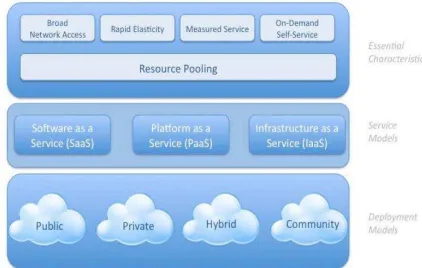
Cloud computing is composed of five essential characteristics, three service models,
Figure 1 – image source: (CSA, 2011)
The five essential characteristics or tenets are rather self-explanatory. A brief explanation in
quotes follows for the service and deployment models based on the NIST definition for cloud
computing (Mell, Grance, 2011).
“
Service Models
Software as a Service (SaaS): The capability provided to the consumer is to use the
provider’s applications running on a cloud infrastructure - collection of hardware and
software that enables the five tenets of cloud computing. The applications are accessible from
various client devices through either a client interface, such as a web browser, or a program
interface. The consumer does not manage or control the underlying cloud infrastructure
including network, servers, operating systems, storage, or even individual application
capabilities, with the possible exception of limited user-specific application configuration
settings.
Platform as a Service (PaaS): The capability provided to the consumer is to deploy on the
languages, libraries, services, and tools supported by the provider. The consumer does not
manage or control the underlying cloud infrastructure including network, servers, operating
systems, or storage, but has control over the deployed applications and possibly configuration
settings for the application-hosting environment.
Infrastructure as a Service (IaaS): The capability provided to the consumer is to provision
processing, storage, networks, and other fundamental computing resources where the
consumer is able to deploy and run arbitrary software, which can include operating systems
and applications. The consumer does not manage or control the underlying cloud
infrastructure but has control over operating systems, storage, and deployed applications; and
possibly limited control of networking components such as host firewalls.
Deployment Models
Private Cloud: The cloud infrastructure is provisioned for exclusive use by a single
organization comprising multiple business units. It may be owned, managed, and operated by
the organization, a third party, or some combination of them, and may exist on or off
premises.
Public Cloud: The cloud infrastructure is provisioned for open use by the general public. It may be owned and operated by a business, academic, or government organization. It exists
on the premises of the cloud provider.
Community Cloud: The cloud infrastructure is provisioned for exclusive use by a specific community of consumers from organization that have shared concerns, such as a community
cloud for O&G companies. It may be owned, and operated by one or more of the
organizations in the community, a third party, or some combination of them. It may exist on
or off premises.
Hybrid Cloud: The cloud infrastructure is a composition of two or more distinct cloud infrastructures (private, public, or community) that remain unique entities, but are bound
together by standardized or proprietary technology that enables data and application
portability – cloud bursting for load balancing between clouds.
2.1.3. Is Cloud for Me – The Trust Element
Is cloud for me? A common answer is: it depends. If it depends, then what factors does it depend on exactly? One may summarize these factors as follows:
1) Economics
2) Functionality
3) Trust
Often the economics of a cloud offering will be attractive due to economies of scale.
In fact, the earlier definition for cloud computing stated that cloud provides the opportunities
for cost reduction through optimized and efficient computing. With the continuously
increasing number and variety of cloud offerings available, the functionality required for a
needed IT service will very often exist as a cloud offering. This leads to the conclusion that
the element of trust is the more important factor of the three, when attempting to answer the
question “Is cloud for me?”
In the security engineering subspecialty of computer science, a trusted system is a
system that is relied upon to enforce a specified security policy (Taipale, 2005). Therefore, a
cloud customer can trust a cloud service if the service is offered from a trusted system that
enforces the customer’s security policy. In other words, when moving information or
applications to the cloud, the security policy related to that specific information or
application needs to be enforced by the cloud infrastructure in order to be trusted. To help
reach a decision on whether the cloud service is trusted enough to use, the following process
can be used (CSA, 2011):
1) Identify the asset (data or application) considered for cloud deployment
2) Review the security policy with regards to that asset – assess the confidentiality,
integrity, and availability requirements of that asset
3) Map the asset to the appropriate cloud deployment model (public, private,
community, hybrid)
4) Map the asset to the appropriate cloud service model (IaaS, PaaS, Saas). Keep in
mind the cloud customer security responsibilities are maximum in IaaS, and
minimal in SaaS. However, the customer’s security accountability is rather the
5) Based on the above decisions, map out the potential data flows in and out of the
cloud and potential risk exposures
At this stage, one understands the importance of the asset being considered for
moving to the cloud, its security requirements dictated in the security policy, and whether the
chosen cloud deployment and service models are capable of achieving those security
requirements (i.e.: the cloud service is trusted for that asset). The process is repeated for each
asset being considered for moving to the cloud, and a cloud trust evaluation is completed for
that asset. As long as the three factors (economics, functionality, and trust) are successfully
met, the organization can enjoy the benefits of cloud computing, by moving gradually to the
right cloud deployment and service model.
2.2. Virtualization as Cloud Enabler
Virtualization is a technique of abstracting physical resources into a logical view,
which simplifies the infrastructure and helps adjust to the increasing pace of business and
technological changes. Virtualization increases the utilization and capability of IT resources,
such as servers, networks, or storage devices, beyond their physical limits. It also simplifies
resource management by pooling and sharing resources for maximum utilization and makes
them appear as logical resources with enhanced capabilities (EMC, 2009).
With that description of virtualization, it is no wonder that cloud services are often
enabled by virtualization technologies (CSA, 2011). Cloud services are characterized by five
essential characteristics: resource pooling, broad network access, measured service,
on-demand self-service, and rapid elasticity, which significantly benefit from virtualization
capabilities. Virtualization can come in many forms and these are some examples:
• Virtual Networks: each application sees its own logical network, independent of physical network
• Virtual Storage: each application sees its own logical storage, independent of physical storage
• Virtual Servers: each application sees its own logical server, independent of physical servers
The last virtualization form –virtual servers- is well known, and could be considered
virtual servers, distributed resource scheduling, improved disaster-recovery for virtual
environments and other virtual server capabilities benefit immensely from shared storage.
2.3. Shared Storage – A Key Virtualization Component
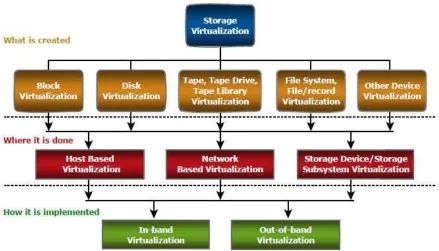
The SNIA (Storage Networking Industry Association) storage virtualization
taxonomy provides a systematic classification of storage virtualization, with three levels
defining what, where, and how storage can be virtualized. The first level of the storage
virtualization taxonomy addresses “what” is created. It specifies the types of virtualization:
block virtualization, file virtualization, disk virtualization, tape virtualization, or any other
device virtualization. The second level describes “where” the virtualization can take place.
This requires a multilevel approach that characterizes virtualization at all three level of the
storage environment: server, storage network, and storage. Finally the third level describes
how a specific storage virtualization is implemented (EMC, 2011). The following figure
illustrates the taxonomy.
Figure 2 – image source: (CSA, 2011)
In addition to storage being a key virtualization component in terms of virtual storage,
2.3.1. Storage is where Data Lives
For information infrastructures in general and for a virtual servers’ environment in
particular, shared storage is where data lives. As Hibbard states (Hibbard, 2009), “few other
elements of the ICT infrastructure have a more important relationship with data than that of
storage systems – they are the repository”. There are two main ways shared storage is utilized
in a virtual servers’ environment (EMC, 2011):
1) Storage is used by the virtualization server – hypervisor: the storage hosts files
relating to the virtual machines (guest OSes), as well as hosting ancillary files for
the operation of the virtualization server. The ancillary files can include original
ISO images for the virtual machines, or file sets representing original images of
for the virtual machines themselves.
2) Storage is used by the virtual machines – the guest OSes: the virtual machines
typically have a very simplistic view of storage. Each virtual machine has a
virtual SCSI adapter and one or more virtual SCSI disks connected to it. The
virtual disks are provided by the virtualization server and are stored as one or
more files on the shared storage. In addition, virtual machines may also connect
directly through IP to network-attached storage (NAS), or object storage.
Given the importance of storage in virtual and cloud environments, a security
professional/architect would serve themselves well by learning more about storage security.
2.3.2. Storage Security
Cloud computing appears to be a big wave that is coming to sweep the IT industry.
The implication is increased importance of virtualization, and shared storage. Understanding
storage security is potentially one way of allowing oneself to ride that wave, rather than
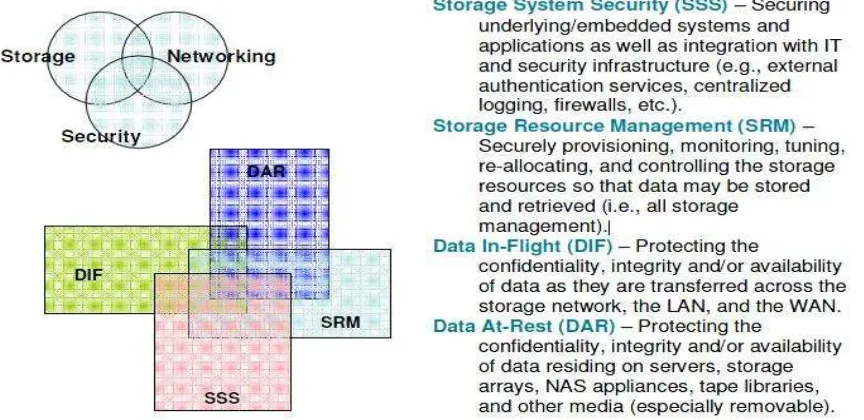
ignoring the wave and struggling to keep afloat. Storage security represents the convergence
of the technologies and methodologies of three main disciplines: storage, networking, and
security for the sake of protecting and securing digital assets. Storage security requires a
cross-section of knowledge in storage, networking, and security. That said, it is also
2008). Storage security is illustrated by the below model.
Figure 3 – image source: (Hibbard et al, 2008)
Over the last few years, there has been a significant shift in attention and investment
from securing the network to securing systems within the network, to securing the data itself
(CAG, 2011). In other words, information security is becoming more data-centric. This shift
of security to data is no surprise due to: 1) the current threat environment and APTs, and 2)
the increased mobility of applications and data in a virtual and cloudy world
2.3.3. Drivers for Data-Centric Security
In its technical proposal: “Introduction to Storage Security”, the Storage Networking
Industry Association (SNIA) highlights the key business drivers for data-centric security
(Hibbard, 2009). These set of drivers summarize why organizations should care about
data-centric security. Due to perception of security in most organizations as a necessary evil (not a
business-enabler), the proposal argues that drivers tend to be defensive and reactive in nature,
rather than proactive. What follows is a summary of these drivers.
• Theft Prevention: industrial espionage, and organized crime on the rise.
• Prevention of Data Tampering: unauthorized data modification can lead to substantial financial losses and even criminal prosecution under some laws.
• Prevention of Accidental Corruption/Destruction: increasing complexity within ICT, and expanding workloads combine to increase likelihood of human error.
• Accountability: corporate officers held to higher standards of accountability.
• Authenticity: as more and more data records are created, modified, processed, archived, and ultimately destroyed there is a need for demonstrating authenticity
at different stages of the data life-cycle.
• Verifiable Transactions: evidence in legal proceedings requires adequate traceability and non-repudiation of transactions dealing with sensitive data
• Business Continuity: the availability of data and systems is of paramount
importance for many organizations during disasters and limited disruption events.
• Regulatory and Legal Compliance: compliance is often the top driver for security; new requirements for electronic records retention mandated during the last decade
The current applications and data mobility trend prevails by a cloud computing
model, and does indeed stimulate many of the drivers listed above. Add to that the
proliferation of advanced-persistent threats and these drivers are stimulated even more. The
consequence is that there is a clear need to adopt a data-centric approach to security, which
makes data classification a good topic to focus on.
3. Proposed Data Classification Approach
Organizations often do not carefully identify and separate sensitive data from publicly
available data in their information systems. Because there is no such separation between the
two different types of data, internal users will have access to all or most of the sensitive data.
This makes it easy for attackers who have penetrated the network to locate and exfiltrate the
sensitive data. What compounds the problem further is that an organization may not be
monitoring data outflows to quickly detect such exfiltration. While some information is
leaked as a result of theft or espionage, the vast majority of leakages occur from poorly
understood data practices, lack of effective policy, and user error (CAG, 2011). The loss of
control over sensitive data is a serious vulnerability, and introduces a high risk to
included portions in this section that I have written in an earlier paper titled “Automating
Crosswalk between SP 800, the 20 Critical Controls, and the Australian Government Defense
Signals Directorate’s 35 Mitigating Strategies” (Abdel-Aziz, Sorenson, 2012).
3.1 Focusing on the Data
Data classification is a simple idea. It is an arrangement whereby the organization
assigns a level of sensitivity to each piece of data that it owns and maintains. The proper
categorizing of data based on its sensitivity helps to avoid both under and over protection.
Using a few data security classifications helps to keep the classification process manageable.
A good data classification arrangement should include a time-element; this allows a piece of
data to change sensitivity levels as time goes by (Hibbard, 2009). A simple example of a
data classification scheme could be:
• Public – data useful to organization affiliates and the general public
• Sensitive (Private) – sensitive data that is useful to corporate employees
• Sensitive (Secret) – highly sensitive data available to approved-only individuals with a need to know
Before attempting to secure the sensitive data –whether private or secret-, there must be
clarity on the types of sensitive data. Two main types of sensitive data exist: Regulatory
Data, and Corporate Data.
Regulatory Data is found in many organizations. It takes the same form regardless of
which organization it is stored. On the flip side, Corporate Data is usually unique data that
•
Credit card data
•
Privacy data (PII)
•
Health care information
Sensitive
Regulatory Data
•
Intellectual property
•
Financial information
•
Trade secrets
differs from one organization to another. The unique property of Corporate Data makes it
more challenging to identify, control, and secure.
Controlling sensitive data can take place when the data is at rest (e.g., data storage),
and when the data is in flight (e.g., network actions). To facilitate controlling sensitive data,
organizations can establish a proper Data Loss Prevention (DLP) program.
Figure 4
3.2 Establishing a Risk-based DLP Program
There are many publications in the market about how complex and expensive (DLP)
projects can get if not properly handled. It can be argued, a primary reason for such
perception, is a lack of importance to people and process in DLP projects. Rather than
considering DLP as a point product, one can benefit from considering DLP a technology that
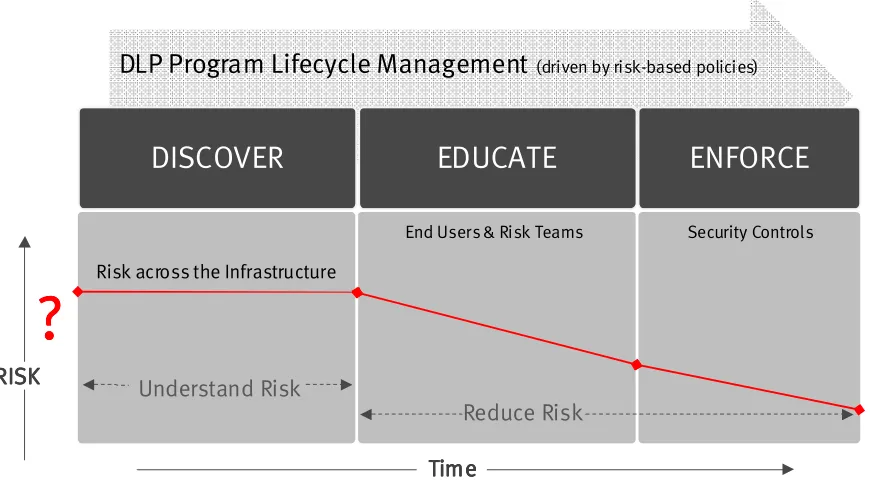
helps build processes to prevent people from leaking sensitive data. To establish a proper DLP program, the following three-phased model is suggested:
Control
Data-at-Rest
Figure 5 – image source: (Devata, 2012)
Whether sensitive data is being controlled at rest, or in flight, this three-phased model
will be used. The first step is to better understand risk by identifying sensitive data through a
discovery process. The risk discovery phase can occur while data is in flight, or at rest. The
next step is where risk starts to be mitigated through education of both end users and risk
teams. Finally, risk mitigation reaches its peak by enforcing effective security controls that
don’t get in the way of business productivity.
3.3 Automating Data Classification and Policy Definition
For technology to identify sensitive data through a discovery process, it needs to
understand what sensitive data is. It would be optimum to just tell technology that sensitive
data is any intellectual property (IP); unfortunately, it is not that simple. Data classification
(defining data sensitivity) is a complex task, because only the business owners know this
information. The sensitivity of data is dynamic; it is a function of the business unit and time.
It is a challenge for security teams to determine what data is sensitive and how data should be
handled according to policy. The logical approach is to involve the line of business in the
process of data classification and policy definition, but involving line of business is not
! "
#$ % & '& $ ( ! )****
$ $
$
$ + !
define what data is sensitive (or what criteria makes data sensitive), and how the sensitive
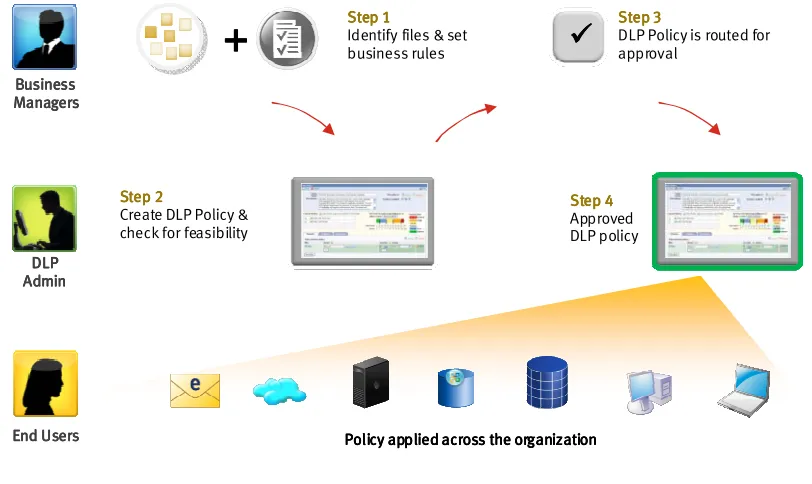
data should be handled. To automate this challenge, a portal with a workflow engine can be
used to complete the operation. This type of automation can be achieved by Governance,
Risk, and Compliance (GRC) tools, if these tools are integrated with the DLP technology
being used. One example of such a solution is the RSA DLP Policy Workflow Manager
illustrated below (RSA, 2011):
Figure 6
It is important to point out that this stage is not about using a tool to go around and
locate sensitive data all across the organization. This stage is merely defining what is it that
we should look for, and when we find what we are looking for, how should it be handled.
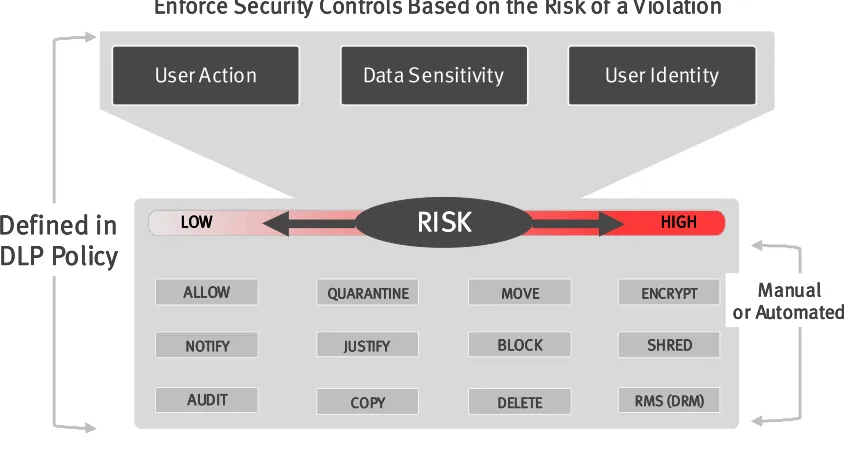
This stage is about defining criteria and rules, and not about scanning. The output of this
-Figure 7
Data sensitivity is one of three key elements constituting the risk level for a DLP
policy. For sake of simplicity, an organization can initially start with only two classification
levels: sensitive, and public. In the future, the classification levels can possibly be extended
to three levels: Secret, private, and public. A properly integrated DLP and GRC solution
represents an abstraction layer for the line of business to define technical DLP policies.
These policies will then be used to control data in motion, at rest, or in use. This DLP and
GRC integrated solution is technology that is helping to fill the undesired gap of people and
process in DLP projects. Using such an automation approach for data classification and DLP
policy definition can reduce the duration of these activities from weeks to days.
3.4 Automating the Control of Data-in-Flight
People and process elements of DLP projects are often ignored. To address these two
elements when automating the control of data in flight, an organization needs to follow this
process:
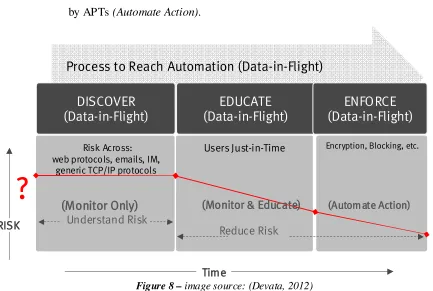
1) Initially understand the risk of data-in-flight across the various protocols
(Monitor only);
2) Just-in-time education can be introduced to users to mitigate risk (Monitor and
3) In the enforcement phase, an action such as automating encryption of sensitive
data can be implemented. Also in the final phase, unauthorized encrypted data
can be blocked to mitigate the exfiltration of sensitive data that was encrypted
by APTs (Automate Action).
Figure 8 – image source: (Devata, 2012)
The following scenario is an example of just-in-time education when controlling
data-in-flight. An employee just sent out an email containing intellectual property. When the
network traffic is scanned by the DLP system, an alert is sent to the employee saying the
email they just sent possibly violates the organization’s intellectual property policy. The alert
would also include the policy itself and why this email represents a violation. The employee
is then given the option (in figure below) of sending the email because they are sure this is
not a policy violation, or not sending the email at all. The action is logged, and the employee
is educated just-in-time. If the employee faces a similar experience in the future, the
employee will likely make a better decision, and therefore, reduce the organization’s risk
3.5 Automating the Control of Data-at-Rest
At this stage, as well as the earlier stage of controlling data in flight, sensitive data has
been identified using techniques highlighted in section 3.3. Where the sensitive data is, who
has access to it, and how it is being used is still not clear at this point in time. The risk
exposure is therefore unknown. When these questions are answered, the risk exposure
becomes known. The focus of this section is to fix that by addressing how to answer these
important questions in an automated manner. Moving on with the same theme (giving more
attention to the people and process elements of DLP projects), an organization can follow
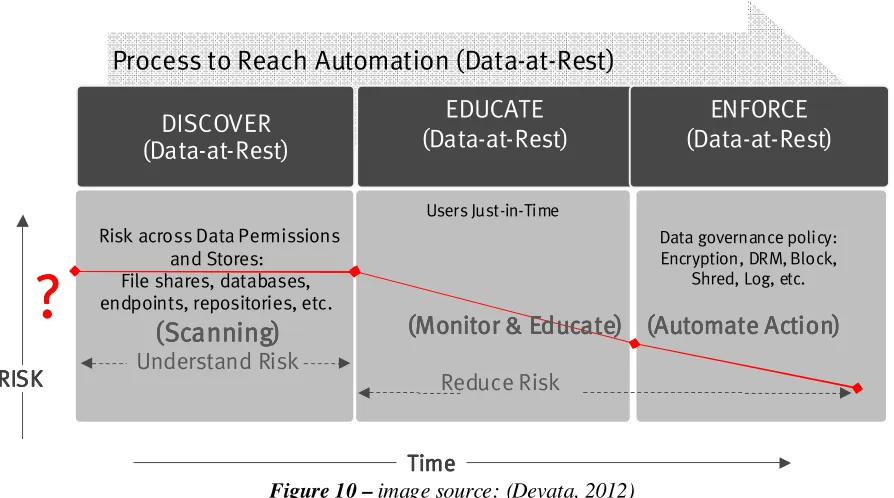
this process for automating the control of data-at-rest:
1) Understand the risk of data-at-rest in all data stores. This requires scanning all data
stores to identify where sensitive data is located. The tools available for this vary
from open source tools such as OpenDLP, to commercial DLP tools. Once the
location of sensitive data is identified, the next step is to know who has access to
sensitive data, and whether they have a need-to-know. This other scanning operation
is often performed using a different set of tools, some of which are free and gather
ACLs of files and folders on network shares such as ShareEnum. Other tools may be
built-in and monitor file activities, such as the Windows audit logging capability for
files (Scanning);
2) Just-in-time education can be introduced to users to mitigate risk associated with
sensitive data. As line-of-business becomes more educated, proper data governance
policies can be defined (Monitor and Educate); and
3) In the enforcement phase, data governance policies can be implemented to further
reduce risk. An action such as automating encryption of sensitive data at rest can be
implemented. Also in this final phase, integration of DLP with other technologies,
such as Digital Rights Management (DRM) tools can be leveraged. An integration
example would be the automatic application of DRM controls on sensitive data when
Figure 10 – image source: (Devata, 2012)
Sensitive data is likely scattered all across the organization. At this stage, the line of
business has defined what sensitive data is and that is incorporated into DLP policies. The
security/risk team now knows what it is they are looking for. The scanning operations that
take place in the discovery phase of the above process will answer two important questions:
1) Where is the sensitive data? And 2) Who has access to it? The answers to these two
questions will help an organization understand the risks associated with sensitive data at rest.
It is definitely a challenge to locate sensitive data out of terabytes of data spread across
multiple sites. In fact, it resembles trying to locate gems in extremely long sandy shores.
Luckily, technology is available to overcome this problem, even in massive environments.
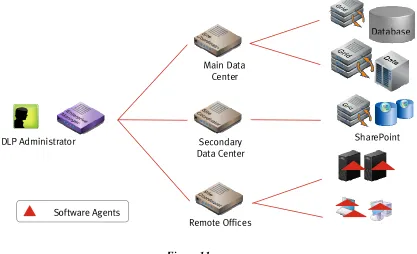
Scanning technology of commercial DLP vendors can transform existing servers into a
powerful cluster to scan terabytes of data in parallel with no additional hardware. Using
temporary software agents, sensitive data is identified in multiple repositories such as file
servers, endpoints, databases, and collaborative environments such as Microsoft SharePoint.
Monitoring incremental changes to data repositories is possible to facilitate scanning on a
regular basis. By bringing the scanning software to the data, and not vice versa, it is possible
to scan massive amounts of data without saturating the network. The figure below illustrates
the architecture used to perform sensitive data discovery in a multi-site environment, with
multiple data repositories:
Figure 11
After using technology in the discovery phase to answer where sensitive data is, one
has a better understanding of risk. However, understanding the risk is only the first half of the
story. The second half is risk remediation and it is not trivial.
The second half of the story (risk remediation for sensitive data at rest) is around
defining the appropriate data governance policy and applying it so that files with sensitive
data content are properly protected. However, the acts of file encryption, file relocation, or
file-permission modification without involving the end users of the file can negatively impact
any organization. The right way to address this issue is to involve the line of business in the
remediation process. The benefit of this is that proper data governance policies can be
defined for sensitive data and the business is not negatively impacted. The drawback is the
duration of the risk remediation process can significantly increase with emails, phone calls,
and spreadsheets going back and forth between the security/risk team and the line of business
to properly protect a large number of files located all around the organization.
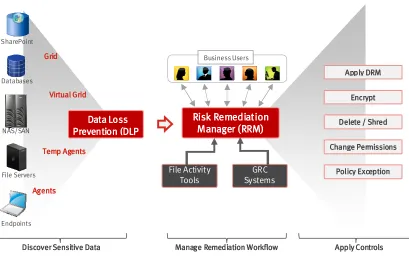
The drawback described earlier is a workflow challenge, and can be overcome using a
proper risk management workflow module that automates risk remediation. This type of
&
; $
"
automation can be achieved by GRC tools; especially if these tools are integrated with the
scanning tools used to discover sensitive data, permissions, and file activity. The workflow
module allows the security/risk team to send the business owners remediation options and
questionnaires about the business context in an automated manner. This permits the business
users to take suitable decisions about the sensitive files they own. An example is the RSA
DLP Risk Remediation Manager (RRM) solution as follows (RSA, 2011):
Figure 12
Using such an automation approach for risk remediation of data-at-rest, can take down
the duration time of these activities from months to weeks. The benefit of the automation
approach is twofold:
1. The automation will allow just-in-time education to the line-of-business, which
will facilitate the definition of the data governance policy, and improve future actions; and
2. The automation will significantly reduce the remediation time for data
3.6. Storage Security Starts with Data Classification
The SNIA Best Current Practices (BCPs) states that any worthwhile attempt to secure
storage necessitates a clear understanding of the assets involved (data and technology), as
well as a fundamental classification (Hibbard, 2008). The SNIA technical proposal however
does not suggest how to understand data and how to perform a fundamental classification of
data. That is why this paper on Storage Security Design has attempted to propose a data
classification approach to help understand and classify data by involving the business – the
asset owners. In addition, quoting the Cloud Security Alliance Guidance (CSA, 2011) “As a
rule, good data management practices are essential before moving data into the cloud, to
understand whether all or just some of the data needs to be encrypted, protected by an
alternative method, or not protected at all.” Therefore, whether an organization is attempting
to adopt storage security in a traditional environment, or in a cloud environment,
understanding data and classifying it first is an imperative.
4.
Best Practices for Storage Security Design
While the previous section “Data Classification Approach” focused more on the
process and people elements of security, this section will focus more on the technology
element. There are multiple shared storage categories, and each category serves a different
need. The four main storage categories are summarized below:
SAN storage is built for handling structured data (databases), transaction-intensive
environments requiring minimal latency and provides block access to servers. On the other
hand, Network Attached Storage (NAS) is built for handling unstructured data and files with
end-users sharing files and collaborating. Content Addressable Storage (CAS) is a form of
object storage and represents a secure platform for archiving infrequently accessed
fixed-content information, which must be retained for compliance purposes. Cloud Optimized
Storage (COS) is another form of object storage that adds globally distributed policies on top
of the object metadata concept introduced by CAS. It is policy, location, metering, built-in
multi-tenancy, and massive scalability that sets COS apart from other types of storage such
as SAN, NAS, or CAS (EMC, 2011).
With VMWare vSphere long supported on NFS, and Microsoft Hyper-V now
supported on SMB 2.2, some organizations may find it operationally easier to adopt NAS for
their virtual infrastructure (Stewart, 2011). That is to say the virtualization server would
connect to shared storage through NAS protocols (NFS, SMB 2.2), while the virtual
machines have the needed access method to data – block, file, object, or all. To help with
cloud computing initiatives, the scope of this paper has been confined to technology-neutral
best practices, in addition to NAS & COS technology-specific best practices. The SNIA best
current practices (BCPs) (Hibbard, 2008) and other sources can be referenced for other
technology-specific best practices – SAN, CAS. The best practices provide broad guidance
to security architects/professionals seeking to architect secure information storage solutions,
especially in a virtual and cloud environment.
4.1. Technology-Neutral Best Practices
The technology-neutral best practices consist of three main groups (Hibbard, 2008):
1. General Storage Security
• Identify and assess all storage interfaces – After understanding and classifying data, identify and document the physical and logical interfaces.
Determine interfaces supporting business-critical data and applications to
prioritize protection activities.
security breach occur (EMC, 2011). Normally the more sensitive the data
the more risk there is. Minimize damage from successful attacks by using
risk domains and logically segregating storage traffic from normal server
traffic, and management traffic from all other traffic. Manage the
movement of virtual servers between different risk domains
• Monitor and control physical access – Monitor and control physical access to the storage ecosystem – data center facilities, active and passive network
infrastructure, and storage resources.
• Avoid failures due to common mistakes – Establish and follow strong configuration management and change management processes to avoid
common mistakes during operational activities. For example, storage
management software can perform periodic discovery of the storage
environment configuration, compare discovered configuration with stored
template configuration; alert on deviations; relate the business impact and
compliance impact when that data is fed to an integrated GRC solution.
• Address data security compliance – Address compliance by ensuring accountability, traceability, risk management, data retention, data
sanitization, audit logging, privacy, and legal measures are properly set.
• Implement appropriate service continuity – Ensure storage ecosystem is factored into the organization’s Disaster Recovery (DR) and Business
Continuity (BC) plans, as well as the testing of those plans.
• Align storage and security policy – Align the storage-specific policies that cover data classification, retention, destruction, and protection with the
organization’s security policy. Avoid creating separate documents.
2. 2. 2.
2. Storage Systems Security
• Understand the exposures – The long term security of the storage
ecosystem will depend on performing regular vulnerability assessments, and
patch management for the storage ecosystem.
Logging management events is most important, and then come data access
events for sensitive data, then control events such as system status, etc.
• Secure backups and replication – Backups and replication approaches need to provide adequate protection against unauthorized access using measures
such as controlled access, encryption in-flight or encryption at-rest
• Use trusted and reliable infrastructure – Securing storage requires using trusted internal services (DNS, NTP, etc.), instead of the external services.
Take full advantage of redundant IT infrastructure (DNS, directory services,
etc.)
3. 3. 3.
3. Storage Management Security
• Secure the management interfaces – Protecting management interfaces is of paramount importance. Segregate management traffic from any other
traffic, use secure channels and strong authentication. Control vendor access
• Harden management applications – Guard against malware, limit SNMP and command-line-interface (CLI) access to storage systems. Ensure
web-based access is free from common web vulnerabilities.
• Tightly control access and privileges – Employ the concepts of least privilege, and separation of duties for storage management (security and
storage admins). Manage access permissions by role rather than by user,
and use centralized authentication for improved monitoring and control.
• Restrict remote support – Restrict remote vendor support by limiting access to dial-in modems. Control and log support actions performed during
remote network support.
• Include configuration management – Establish a secure baseline
configuration and regularly audit to limit vulnerabilities introduced as a
result of intentional or un-intentional changes
4.2. Network Attached Storage (NAS) Best Practices
The technology-specific NAS best practices consist of two main groups based on the
type of environment – Unix/Linux or Windows (Hibbard, 2008), in addition to
1. Network File System (NFS) – UNIX/Linux Environments
• Control NFS network access and protocols – Enable NFS only if needed to eliminate as possible attack vector. Use NFSv4 instead of v3 when possible
and encrypt data access (ex: IPSec) if necessary. Filter client access by IP
and well-known source ports. Enable multi-protocol access (NFS, CIFS)
only when required.
• Apply access controls to NFS exported file-systems – Employ user-level authentication when possible (ex: NFSv4 with KerberosV5). Configure
exported file-systems with minimum required privileges for only authorized
users with NFS ACLs. Avoid granting “root” access to files on network
file-systems. Kerberized NFS has an additional data integrity benefit where
cryptography adds to the existing checksum-based integrity controls built-in
to shared storage systems and data transfer protocols.
• Restrict NFS client behaviors – Prevent clients from running suid and guid programs on exported file-systems.
• Secure data on NFS server – Use quotas or separate partition for exported file-systems to prevent system degradation by attacker intentionally filling
exported file-system. Prevent NFS exports of administrative file-systems
(ex:/etc). Encrypt data at-rest when necessary, protect against malware.
Continually monitor content placed in NFS shares and access controls.
2. SMB/CIFS – Windows Environments
• Controls SMB/CIFS network access and protocols – Enable SMB/CIFS only if needed to eliminate as possible attack vector. Encrypt data access
(ex: IPSec) if necessary. Implement CIFS with good authentication
(NTLMv2, Kerberos).
• Apply access controls to SMB/CIFS exported file-systems – Disable
unauthenticated access to CIFS shares (ex: Anonymous, Guest, Everyone).
Implemented authentication and access control via a centralized mechanism
such as Active Directory.
where cryptography adds to the existing checksum-based integrity controls
built-in to shared storage systems and data transfer protocols.
• Secure Data on SMB/CIFS Server – Enable CIFS auditing whenever possible. Encrypt data at-rest when necessary, protect against malware.
Continually monitor content placed in CIFS shared and access controls.
3. Implement Virtualization-specific Measures
In addition to applying the recommendations above when adopting NAS for
virtual environments, there are specific measures worth noting specifically.
VMware-specific terminology is used, but same concepts should apply for
Hyper-V and other hypervisors. Files constituting the virtual machines
(datastore), as well as ancillary files for the operation of the virtualization
server (repository) should only be accessible by virtualization servers. Virtual
machines in DMZs should be hosted in datastores and repositories separate
from non-DMZ virtual machines (different risk domains). Segregate
virtualization server traffic from virtual machines traffic (VLANs). Use
physical switches that can protect against layer-2 attacks such as ARP &
MAC-address spoofing (EMC, 2011). For additional protection against virtual
machine images theft or modification, the VM images may be encrypted in
high security or regulated environments (CSA, 2011). Not forgetting the
availability component of security, adopting a highly-available network and
NAS design is crucial. A joint NetApp-EMC article that helps NFS customers
using VMware suggests such a design (Sakac, Stewart, 2009), which is
Figure 14 – image source: (Sakac, et al, 2009)
4.3. Cloud-Optimized Storage Best Practices
As mentioned by Staimer (Staimer, 2011), “cloud-optimized storage is changing the
storage game, and has the following key characteristics: massively scalable, geographically-independent, commodity components, secure multi-tenancy, exceptional self-healing, data
permanence, on-demand allocation, billed per usage, application agnostic, and primary
Figure 15 – image source: (Staimer, 2011)
The best practices laid out for cloud-optimized storage are in line with the top
security concerns identified by the cloud security alliance (CSA) in their research titled “Top
Threats to Cloud Computing V1.0” (CSA, 2010).
Security Concern #1: Abuse and Nefarious Use of Cloud Computing
• Ensure strict initial registration and validation processes for public & hybrid deployments
• Comprehensive introspection of network traffic due to storage access (ex:
scanning REST/SOAP traffic for malware or bot-related activity)
Security Concern #2: Insecure Interfaces and APIs
• Implement and use TLS for encrypted communication.
• Implement and use authentication for both server (certificate authentication)
and client (HTTP authentication or certificate authentication if possible)
• Implement and use access control lists. Access to a particular object is granted
based on traversing the object’s permission-granting or permission-denying
access control entries
• Implement and use security logging for the three planes: Data (object activity),
Control (cloud-optimized storage security events), Management (storage
management events)
• All elements listed for security concern #2
• Encrypt data before transmission to storage (ex: encrypt data at the application)
• Specify human resource requirements as part of legal contracts for hybrid and
public deployments
Security Concern #4: Shared Technology Issues
• Research multi-tenancy capability for used cloud-optimized storage
• Conduct vulnerability scanning and configuration audits
• Enforce service-level agreements for patching and vulnerability remediation for
hybrid and public deployments
Security Concern #5: Data Loss or Leakage
• All elements listed for security concern #3
• Contractually demand providers sanitize persistent media before releasing it for
reuse
• Contractually specify provider backup and retention strategies
Security Concern #6: Account or Service Hijacking
• All elements listed for security concern #2
• Leverage strong two-factor authentication techniques where possible
Security Concern #7: Unknown Risk Profile
• All elements listed for security concern #3
• Due diligence on the provider’s infrastructure and approach for hybrid and
public deployments
• If possible for hybrid and public deployments, contractually demand
notification following provider’s security incidents and remediation activities
As evident from the listed best practices of cloud-optimized storage, encryption is a
necessary control to protect the highly mobile data from increased risk exposure. Encryption
is becoming more and more commoditized, with more and more products shipping
encryption as native functionality. One argues key management is the hard part, and can
lower the total cost of ownership and simplify the deployment of encryption. Encryption can
take place at many locations, with application-based encryption offering the greatest level of
hybrid and public deployments. Of course this comes with the trade-off of being the most
complex encryption compared to database-based or media-based encryption. The SNIA
storage best current practices (Hibbard, 2008) give useful recommendations concerning
encryption and key management.
To illustrate many of the above security best practices in action, the following
solution has been chosen. A vendor named Oxygen appeared in 2010 with a solution that
helps to apply many of the previous best practices, including the encryption and key
management parts. The idea as illustrated in below architecture is to create a storage grid
connecting cloud-optimized storage on the right and devices on the left. The Storage Cloud
Broker below represents the application that connects to the cloud-optimized storage, and
accesses the data as needed. Following a basic classification of organization data, the Storage
Cloud Broker controls location of storage, based on data specific policies. Regulated data can
stay in a private cloud; sensitive data stored in hybrid cloud, while other data goes to public
cloud for example. Key management can either be onsite or in the Oxygen Cloud (Mak,
2012). This allows maintaining data control regardless of device/storage type and location.
Figure 16 – image source: (Mak, 2011)
A nice article named “Deploying the Collaboration Cloud” explains the different
deployment models (Crump, 2011) for what may be the possible evolution of network
attached storage (NAS). Those deployment models are Public Cloud, Hybrid Cloud, Private
5.
Conclusion
Almost three-quarters of IT budgets are spent to keep the lights on and maintain
existing applications and infrastructure (Forrester, 2010). Allocating majority of IT budgets
to introduce new IT services, rather than maintaining existing services is therefore appealing
to most organizations. That is one of many value propositions offered by the cloud
computing wave, which many organizations are attempting to ride. The tight relationship
between cloud computing, virtualization, and shared storage naturally means that
virtualization and shared storage will increase in importance. The new utility model for IT
services breaks the conventional technology, people, and process barriers that applications
and information haven been confined to. The implication is that useful security needs to be
data-centric. Similar to the way IT infrastructure elements are converging in cloud models,
the disciplines of networking, storage, and security are also converging to serve the
data-centric need of security. That new discipline has been coined Storage Security. This paper
argues that proper storage security starts with the challenging task of data classification.
Therefore, the paper introduced a data classification approach that leverages automation to
help overcome the data classification challenge. With the data classification foundation laid
out, it becomes possible to suggest two types of practical and effective best practices:
technology-neutral and technology-specific. The Network Attached Storage (NAS) and Cloud-Optimized Storage (COS) best practices were given priority over other types of
technologies due to the increasing role of these technologies in virtual and cloud
environments.
Cloud computing is transforming Information Technology (IT) because it increases
IT efficiency, increases business agility, and makes people more productive. As security
professional are taking on the responsibility of helping organizations embrace cloud
computing, we too must also transform ourselves by excelling in tools that help us succeed in
such a responsibility. Storage security design is one such tool!
6. References
1
Cloud Security Alliance (2011). Security Guidance for Critical Areas of Focus in Cloud Computing V3.0. Retrieved From:
2 Mell, P., Grance, T. (2011). The NIST Definition of Cloud Computing, NIST Special
Publication 800-145, National Institute of Standards and Technology, US Department of
Commerce
3
Taipale, K.A. (2005). The Trusted Systems Problem: Security Envelopes, Statistical Threat Analysis, and the Presumption of Innocence. Homeland Security – Trends and Controversies,
IEEE Intelligent Systems, Vol 20 No. 5
4
Kaplan, R. (2000). A Matter of Trust, Information Security Management Handbook, 5th Edition. Tipton & Krause, editors.
5 Hibbard, E. (2011). SNIA Storage Security Best Practices. Storage Networking Industry
Association (SNIA)
6
EMC Education Services. (2009). Information Storage and Management Training. EMC
7
EMC Education Services. (2011). Information Storage Security Design and Management
Training. EMC
8 Bunn, F., Simpson, N., Peglar, R., Nagle, G. SNIA Technical Tutorial. (2003). Storage
Virtualization. Storage Networking Industry Association (SNIA). Retrieved From:
http://www.snia.org/sites/default/files/sniavirt.pdf
9
Hibbard, E. Security Technical Workgroup (TWG). (2009). Introduction to Storage
Security V2.0. Storage Networking Industry Association (SNIA). Retrieved From:
http://www.snia.org/sites/default/files/Storage-Security-Intro-2.0.090909.pdf
10
Hibbard, E., Austin, R. Security Technical Workgroup (TWG). (2008). Storage Security
Professional’s Guide to Skills and Knowledge. Storage Networking Industry Association
(SNIA).
11
Consensus Audit Guidelines (CAG) Version 3.1 (2011). Twenty Critical Security Controls
for Effective Cyber Defense: Consensus Audit Guidelines (CAG). Retrieved from
http://www.sans.org/critical-security-controls/cag3_1.pdf
12
RSA Data Loss Prevention (DLP) Suite (2011).Retrieved from
http://www.rsa.com/node.aspx?id=3426
13 RSA Data Loss Prevention (DLP) Policy Workflow Manager (PWM) (2011).Retrieved
from http://www.rsa.com/products/DLP/ds/11436_DLPPWM_DS_0611.pdf
14
RSA Data Loss Prevention (DLP) Risk Remediation Manager (RRM) (2011).Retrieved
15 Adel-Aziz, A. Sorenson, R. (2012). Automating Crosswalk between SP 800, the 20
Critical Controls, and the Australian Government Defense Signals Directorate’s 35
Mitigating Strategies. Retrieved from
http://www.sans.edu/student-files/projects/jwp-abdel-aziz-sorensen-rev.doc
16
Hibbard, E. (2008). Storage Security Best Current Practices (BCPs) Version 2.1 – SNIA
Technical Proposal. Storage Networking Industry Association (SNIA)
17
ISO/IEC. (2009). ISO/IEC 15408-1:2009 Information Technology – Security Techniques –
Evaluation Criteria for IT Security – Part1: Introduction and General Model. International Organization for Standardization (ISO)
18
Stewart, V. (2011, September). Microsoft Announces SMB 2.2 and NAS Support for
Hyper-V 3.0 in Windows 8. The Virtual Storage Guy [Web Log]. Retrieved from
http://virtualstorageguy.com/2011/09/20/microsoft-announces-smb-2-2-and-nas-support-for
hyper-v-3-0-in-windows-8/
19 Sakac, C., Stewart, V. (2009). A Multivendor Post to Help our Mutual NFS Customers
Using VMware. Virtual Geek [Web Log]. Retrieved from
http://virtualgeek.typepad.com/virtual_geek/2009/06/a-multivendor-post-to-help-our-mutual-nfs-customers-using-vmware.html
20
Staimer, M. (2011). Cloud Storage’s “Organic” or Living Evolution. The Storage
Networking Industry Association (SNIA) Cloud Burst Summit. Retrieved From:
http://www.snia.org/sites/default/files2/cloudburst2011/presentations/MarcStaimer_Cloud_S
torage_Organic_revO2.pdf
21 Cloud Security Alliance (2010). Top Threats to Cloud Computing V1.0. Retrieved From:
https://cloudsecurityalliance.org/topthreats/csathreats.v1.0.pdf
22
Hibbard, E. (2010). Cloud Storage Security with a Focus on CDMI. Storage Networking
Industry Association (SNIA). Retrieved From:
http://www.snia.org/sites/default/education/tutorials/2010/fall/cloud/EricHibbard-Cloud-Storage-Security-CDMI_final.pdf
23 Intel (2011). Intel Cloud Builders Guide to Cloud Design and Deployment on Intel
Platforms – Anywhere, any device secure access to enterprise storage with EMC Atmos and
Oxygen Cloud. Retrieved From:
http://www.intel.com/content/dam/doc/reference-architecture/cloud-computing-secure-cloud-storage-with-emc-and-oxygen-cloud-architecture.pdf
24 Mak, J. (2011). Hybrid Storage & Cloud Brokering – Videos From Cloud Expo NY.
Oxygen Cloud [Web Log]. Retrieved from
http://blog.oxygencloud.com/2011/06/15/hybrid-storage-cloud-brokering-cloud-expo-ny/
25
Mak, J. (2012). 3 Reasons Why Oxygen is a Secure Alternative to Dropbox for
Business. Oxygen Cloud [Web Log]. Retrieved from
http://blog.oxygencloud.com/2011/06/22/oxygen-secure-alternative-to-dropbox-for-businesses/
26 Crump, G. (2011). Deploying the Collaboration Cloud. Storage Switzerland Articles.
Retrieved from
http://www.storage-switzerland.com/Articles/Entries/2011/8/17_Deploying_The_Collaborated_Cloud.ht
ml
27 Forrester (2010). 2010 IT Budget Allocations: Planning for 2011. Forrester Research for
CIO Professionals. Retrieved From:
http://www.forrester.com/2010+IT+Budget+Allocations+Planning+For+2011/fulltext/-/E-RES57975
28
Devata, A. (2012). Enterprise Data Loss Prevention Solutions. A Radicati Group Web
Conference. Retrieved From: