117
4.3.1
Perancangan Basis Data
4.3.1.1 Perancangan Kode
Adapun perancangan untuk pengkodean yang digunakan oleh penulis adalah
sebagai berikut :
A.
Kode Pengiriman
BKM/ 6 / 2011
/ 007
Nomor Urut Pengiriman
Empat Digit Tahun
Satu Digit Bulan
Tanggal Pengiriman Barang
B.
Kode Provinsi
DP / 007
Nomor Urut
Kode Provinsi
C.
Kode Kota
DK/ 006
Nomor Urut
Kode Kota
D.
Kode Member
DM/ 005
Nomor Urut
Kode Member
118
E.
Kode Biaya Operasional
BOK/ 6/ 2011/ 002
Nomor Urut
Empat Digit tahun
Satu Digit bulan
Nama Biaya Operasional
F.
Kode Pelunasan
RPM/ 6/ 2011/ 003
Nomor Urut
Empat Digit tahun
Satu Digit bulan
Nama Pelunasan
G.
Kode Karyawan
DKR/ 003
Nomor Urut
Data Karyawan
H.
Kode Penggajian
RG/ 6 / 2011/ 003
Nomor Urut
Empat Digit Tahun
Satu Digit Bulan
Kode Gaji
119
A.
Kode Akun:
111
Nomor Urut Jenis Akun
SubKelompok Akun
Kelompok Akun
Tabel 4.3Kode Akun
Kode Akun
Nama Akun
111
Kas
331
Kantor Pusat
411
Pendapatan
113
Piutang Usaha
412
Modal
514
Beban Kerugian
501
Beban Operasional
515
Biaya Transit
511
Beban Air, Listrik, Telepon
512
Beban Dividen
511
Gaji
4.3.1.2 Normalisasi Yang Diusulkan
120
Tabel 4.4 Tabel Pemasukan Kas 1 (dalam bentuk Unnormal)
Tabel 4.5Tabel Bukti Pemasukan Kas (dalam bentuk 1-NF)
Tabel 4.6Tabel Bukti Pemasukan Kas (dalam bentuk 2-NF)
121
Tabel 4.7Tabel Bukti Pemasukan Kas (dalam bentuk 3-NF)
Gambar 4.17 Dokumen Invoice/Resi
Tabel 4.8 Tabel Invoice/Resi 1 (dalam bentuk Unnormal)
122
Tabel 4.9Tabel Invoice/Resi (dalam bentuk 1-NF)
Tabel 4.10Tabel Invoice/Resi (dalam bentuk 2-NF)
Tabel 4.11Tabel Invoice/Resi (dalam bentuk 3-NF)
123
Tabel 4.12Relasi Tabel
124
4.3.1.3 Diagram Relasi Entitas (Entity Relationship Diagram) Yang Diusulkan
Gambar 4.18Diagram Relasi Entitas (Entity Relationship Diagram)
Yang Diusulkan
4.3.1.4 Perancangan Struktur Tabel
Merancang struktur tabel adalah salah satu hal yang paling utama sebelum
125
bagian dari jalannya suatu program yang akan dirancang. Hasil perancangan yang
dihasilkan oleh penulis untuk PT Tiki Jalur Nugraha Ekakurir Cabang
Bandungdapat dilihat pada gambar dibawah ini:
Gambar 4.19Struktur Tabel Data Beban Operasional
126
Gambar 4.21Struktur Tabel Data Kota
Gambar 4.22Struktur Tabel Data Member
127
Gambar 4.24Struktur Tabel Gaji
Gambar 4.25Struktur Tabel Tampil
128
Gambar 4.27Struktur Tabel Pelunasan Member
129
Gambar 4.29Struktur Tabel Jurnal
130
4.4
Perancangan Struktur Menu
131
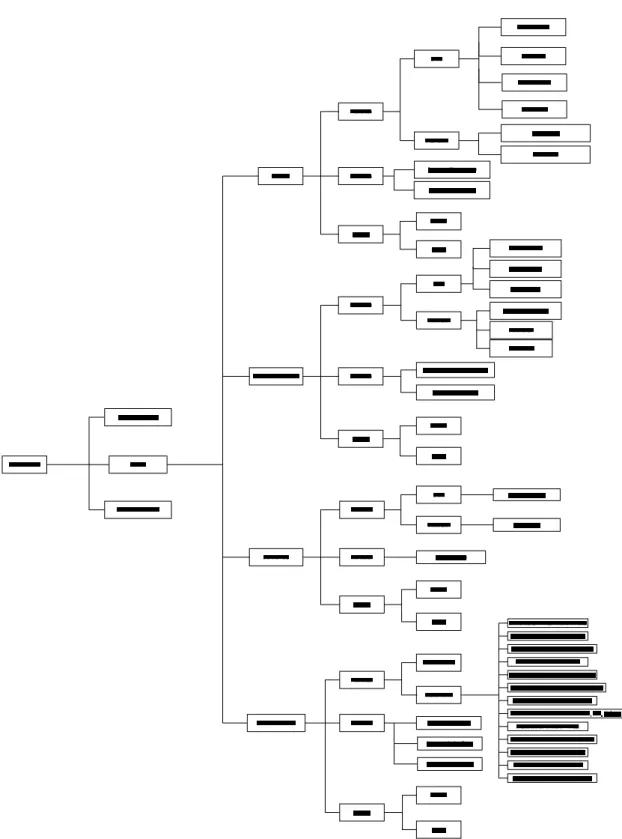
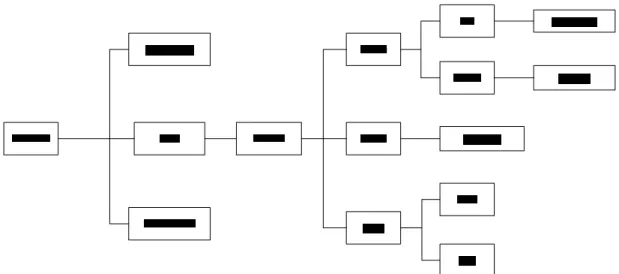
4.4.1 Struktur Menu Pada Bagian Kasir
Gambar 4.32Struktur Menu Program pada bagian Kasir
Pada menu utama Kasirterdapat masukan, keluaran, dan keluar.
A.
Pada Menu Masukan terdiri dari empat masukan yaitu sebagai berikut:
1.
Menu Masukan Data:
a. DataProvinsi
b.
Data Kota
c.
Data Member
d.
Data Kurir
2.
Menu Masukan Transaksi:
a.
Pengiriman
b.
Kerusakan
B.
Pada Menu Keluaran terdiri 2 laporan yaitu sebagai berikut:
1.
Laporan Pengiriman
2.
Laporan Kerusakan
132
4.4.2 Struktur Menu Pada Bagian Adm Personal
Gambar 4.33Struktur Menu Program pada bagian Adm Personal
Pada menu utama Adm Personalterdapat masukan, keluaran, dan keluar.
A.
Pada Menu Masukan terdiri dari dua masukan yaitu sebagai berikut:
1.
Menu Masukan Data:
a.
Data Member
b.
Data Supplier
c.
Data Barang
2.
Menu Masukan Transaksi :
a. Biaya operasional
b.
Pelunasan
B.
Pada menu keluaran terdiri dari 2 laporan yaitu sebagai berikut :
1.
Laporan Biaya Operasional
2.
Laporan Pelunasan
133
4.4.3 Struktur Menu Pada Bagian Finance
Gambar 4.34Struktur Menu Program pada bagian Finance
Pada menu utama Finance terdapat masukan, keluaran, dan keluar.
A.
Pada Menu Masukan terdiri dari dua masukan yaitu sebagai berikut:
1.
Menu Data:
a. Data Karyawan
2.
Menu Transaksi :
a. Penggajian
B.
Pada menu keluaran terdiri dari 1 laporan yaitu sebagai berikut :
1.
Laporan gaji
134
4.4.4 Struktur Menu Pada Bagian Accounting
Gambar 4.35Struktur Menu Program pada bagian Accounting
Pada menu utama Accountingterdapat masukan, keluaran, dan keluar.
A.
Pada Menu Masukan terdiri dari dua masukan yaitu sebagai berikut:
1.
Jurnal Umum
2.
Buku Besar
B.
Pada menu keluaran terdiri dari 3 laporan yaitu sebagai berikut :
1.
Laporan arus kas
2.
Laba rugi
3.
Laporan kerusakan
135
4.5Perancangan Antarmuka dan Laporan
4.5.1 Perancangan Antarmuka
Gambar 4.36Tampilan Perancangan Antarmuka Pada Menu Utama
136
Gambar 4.38Tampilan Perancangan Antarmuka Pada Profil Programmer
137
Gambar 4.40Tampilan Perancangan Antarmuka Pada Tampilan menu
Kasir
Gambar 4.41Tampilan Perancangan Antarmuka Pada Tampilan Data
Provinsi
138
Gambar 4.42Tampilan Perancangan Antarmuka Pada Tampilan Data Kota
Gambar 4.43Tampilan Perancangan Antarmuka Pada Tampilan Transaksi
Pengiriman
139
Gambar 4.44Tampilan Perancangan Antarmuka Pada Tampilan Menu Adm
Personal
Gambar 4.45Tampilan Perancangan Antarmuka Pada Tampilan Data
Member
140
Gambar 4.46Tampilan Perancangan Antarmuka Pada Tampilan Beban
Operasional
141
Gambar 4.48Tampilan Perancangan Antarmuka Pada Tampilan Menu
Finance
Gambar 4.49Tampilan Perancangan Antarmuka Pada Tampilan Data
Karyawan
142
Gambar 4.50Tampilan Perancangan Antarmuka Pada Tampilan Penggajian
4.5.2 Perancangan Laporan
PT. TIKI JALUR
NUGRAHA EKA KURIR
CABANG BANDUNG
Jurnal Umum
Periode ________
In Rp
Tanggal
Nomor
Bukti
Keterangan
Ref
Debit
Kredit
Gambar 4.51Tampilan Perancangan Antarmuka Pada Tampilan Cetak
Jurnal Umum
143
PT. TIKI JALUR
NUGRAHA EKA KURIR
CABANG BANDUNG
Buku Besar
Periode ________
In Rp
Nama Akun:
Nomor Akun:
Tanggal
Keterangan
Ref
Debit
Kredit
D/K
Gambar 4.52Tampilan Perancangan Antarmuka Pada Tampilan Cetak
Buku Besar
144
4.6 Tampilan dan Kode Program
4.6.1
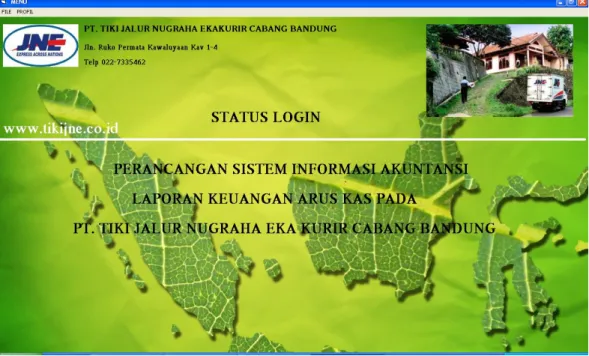
Tampilan Menu Pada Menu Utama
Untuk merancang program sistem informasi akuntansi pendapatan ini penulis
melengkapi dengan pengendalian keamanan, setiap masuk ke dalam
bagian-bagian yang terdapat pada program maka user harus mengetahui kata kunci pada
setiap bagian.
Gambar 4.53Tampilan Menu Utama
4.6.1.1 Tampilan Program PadaKasir
Selain memberikan pengamanan terhadap data sendiri fungsi dari masuk itu
sendiri untuk digunakan sebagai cara untuk memasuki program aplikasi ini, dan
apabila kata kunci yang dimasukan sesuai dan benar, maka akan muncul tampilan
145
Gambar 4.54Tampilan Masuk Kasir
Kasir adalah salah satu dari bagian-bagian yang terdapat dalam program
sistem informasi akuntansi laporan keuangan arus kas yang terdapat pada
perusahaan, berikut tampilan dari menu Kasir:
146
Tabel 4.13Listing Program Untuk masuk menu utama kasir
Listing Program
Keterangan
Private Sub LKIRIM_Click() Form14.Text2 = "KIRIM" Form14.Show 1
End Sub
Private Sub LO_Click() Form1.Show
Unload Me End Sub
Private Sub LOGIN_Click() Form1.Show
Unload Me End Sub
Private Sub LOGOUT_Click() End
End Sub
Private Sub LPP_Click() Form14.Text2 = "LUNAS" Form14.Show 1
End Sub
Private Sub PERUSAHAAN_Click() Form18.Show
End Sub
Private Sub PP_Click() Form10.Show 1
End Sub
Private Sub PROGRAMER_Click() Form19.Show
End Sub
Tampilan Menu Utama bagian kasir
147
4.6.1.2 Perancangan Masukan
Gambar 4.56Tampilan Untuk Data Provinsi
Tabel 4.14Listing Program Untuk Data Provinsi
Listing Program Keterangan Private Sub kode_otomatis()
With Adodc1.Recordset If .EOF = True Then Text1 = "DP001" Else
.MoveLast
urut = Right(.Fields(0), 3) + Int(1)
If urut <= 9 Then Text1.Text = "DP" & "00" & urut
If urut >= 10 And urut <= 99 Then Text1.Text = "DP" & "0" & urut
If urut >= 100 And urut <= 999 Then Text1.Text = "DP" & urut
End If End With End Sub
Private Sub Timer1_Timer()
Label3.ForeColor = QBColor(Rnd * 15) Label3.Caption = (Label3.Caption) Label3.Caption = Right(Label3.Caption, Len(Label3.Caption) - 1) + Left(Label3.Caption, 1) End Sub 'ACEH 'SUMATRA UTARA 'SUMATRA BARAT 'SUMATRA SELATAN 'PADANG 'LAMPUNG 'BENGKULU 'BANGKA BELITUNG 'BANTEN
Tampilan untuk data provinsi
148
Gambar 4.57Tampilan Untuk Data Kota
Tabel 4.15Listing Program Untuk Data Kota
Listing Program Keterangan Private Sub Command2_Click()
If Command2.Caption = "EDIT" Then Command2.Caption = "BATAL" Text1 = Adodc1.Recordset.Fields(0) Text2 = Adodc1.Recordset.Fields(1) Text3 = Adodc1.Recordset.Fields(2) Text5 = Adodc1.Recordset.Fields(3) Text6 = Adodc1.Recordset.Fields(4) Else Command2.Caption = "EDIT" kode_otomatis Text2 = "" Text3 = "" Text4 = "" Text5 = "" Text6 = "0" End If End Sub
Private Sub Command3_Click() Adodc1.Recordset.Delete End Sub
Private Sub Command4_Click() Unload Me
End Sub
Tampilan untuk data kota
149
Gambar 4.58 Tampilan Untuk Data Kota Domestik
Tabel 4.16Listing Program Untuk Data Kota Domestik
Listing Program Keterangan Private Sub Command1_Click()
If Command2.Caption = "EDIT" Then With Adodc1.Recordset .AddNew .Fields(0) = Text1 .Fields(1) = Text2 .Fields(2) = Text3 .Fields(3) = Text5 .Fields(4) = Text6 .Fields(5) = Text7 .Update End With Else Command2.Caption = "EDIT" With Adodc1.Recordset '.AddNew .Fields(0) = Text1 .Fields(1) = Text2 .Fields(2) = Text3 .Fields(3) = Text5 .Fields(4) = Text6 .Fields(5) = Text7 .Update End With End If Text2 = "" Text3 = "" Text4 = "" Text5 = "" Text6 = "0" Text7 = "" ' kode_otomatis End Sub Tampilan untuk data kota domestik
150
Gambar 4.59 Tampilan Untuk Data Kota Motor
Tabel 4.17Listing Program Untuk Data Kota Motor
Listing Program Keterangan Private Sub Command1_Click()
If Command2.Caption = "EDIT" Then With Adodc1.Recordset .AddNew .Fields(0) = Text1 .Fields(1) = Text2 .Fields(2) = Text3 .Fields(3) = Text5 .Fields(4) = Text6 .Fields(5) = Text7 '.Fields(6) = Text8 .Update End With Else Command2.Caption = "EDIT" With Adodc1.Recordset '.AddNew .Fields(0) = Text1 .Fields(1) = Text2 .Fields(2) = Text3 .Fields(3) = Text5 .Fields(4) = Text6 .Fields(5) = Text7 '.Fields(6) = Text8 .Update End With End If Text2 = "" Text3 = "" Text4 = "" Text5 = "" Text6 = "0" Text7 = "0" kode_otomatis End Sub Tampilan untuk data kota motor
151
Gambar 4.60Tampilan Untuk Data Member
Tabel 4.18Listing Program Untuk Data Member
Listing Program Keterangan Private Sub Command5_Click()
With Adodc4
.Enabled = False .RecordSource = ""
.RecordSource = "select * from A_DATA_KOTA where Kode_Provinsi='" & Text10 & "'"
.Enabled = True .Refresh End With
If Me.DataGrid4.Visible = True Then Me.DataGrid4.Visible = False Else
Me.DataGrid4.Visible = True End If
End Sub
Private Sub Command6_Click() If Me.DataGrid3.Visible = True Then Me.DataGrid3.Visible = False Else Me.DataGrid3.Visible = True End If End Sub Tampilan untuk data member
152
Gambar 4.61 Tampilan Untuk Data Kurir
Tabel 4.19Listing Program Untuk Data Kurir
Listing Program Keterangan Private Sub Command1_Click()
If Command2.Caption = "EDIT" Then With Adodc1.Recordset .AddNew .Fields(0) = Text1 .Fields(1) = Text2 .Fields(2) = Text3 .Fields(3) = Text4 .Fields(4) = Text5 '.Fields(5) = Text6 .Update End With Else Command2.Caption = "EDIT" With Adodc1.Recordset '.AddNew .Fields(0) = Text1 .Fields(1) = Text2 .Fields(2) = Text3 .Fields(3) = Text4 .Fields(4) = Text5 '.Fields(5) = Text6 .Update End With End If Text2 = "" Text3 = "" Text4 = "" Text5 = "" 'Text6 = "" kode_otomatis End Sub Tampilan untuk data kurir
153
Gambar 4.62Tampilan Untuk Transaksi Pengiriman
154
Tabel 4.20Listing Program Transaksi Pengiriman
Listing Program Keterangan Private Sub Command6_Click()
CR1.ReportFileName = App.Path & "\Report\KWITANSI.rpt" CR1.SelectionFormula = "({A_TRANSAKSI_PENGIRIMAN.No_Pengiriman})='" & Adodc1.Recordset.Fields(0) & "'" CR1.RetrieveDataFiles CR1.WindowState = crptMaximized CR1.Action = True End Sub
Private Sub Command7_Click() With Adodc4
.Enabled = False .RecordSource = ""
.RecordSource = "select * from A_DATA_KOTA where Kode_Provinsi='" & Text22 & "'"
.Enabled = True .Refresh End With
If Me.DataGrid5.Visible = True Then Me.DataGrid5.Visible = False Else
Me.DataGrid5.Visible = True End If
End Sub
Private Sub Command8_Click() If Me.DataGrid6.Visible = True Then Me.DataGrid6.Visible = False Else
Me.DataGrid6.Visible = True End If
End Sub
Private Sub DataGrid2_Click() Text2 = Adodc2.Recordset.Fields(0) Text3 = Adodc2.Recordset.Fields(1) Text4 = Adodc2.Recordset.Fields(2) Text5 = Adodc2.Recordset.Fields(3) Text6 = Adodc2.Recordset.Fields(4) Text7 = Adodc2.Recordset.Fields(5) Text20 = Adodc2.Recordset.Fields(8) Me.DataGrid2.Visible = False End Sub
Private Sub DataGrid3_Click() Text8 = Adodc3.Recordset.Fields(0) Text9 = Adodc3.Recordset.Fields(1) Me.DataGrid3.Visible = False End Sub
Private Sub DataGrid4_Click() Text10 = Adodc4.Recordset.Fields(0) Text11 = Adodc4.Recordset.Fields(1) Text14 = Adodc4.Recordset.Fields(3) Text18 = Adodc4.Recordset.Fields(4) Me.DataGrid4.Visible = False End Sub
Private Sub DataGrid5_Click() Text5 = Adodc4.Recordset.Fields(1) DataGrid5.Visible = False End Sub Tampilan untuk transaksi pengirimn
155
Gambar 4.64 Tampilan Untuk Transaksi Kerusakan
156
Tabel 4.21Listing Program Transaksi Kerusakan
Listing Program Keterangan Private Sub Command1_Click()
With Adodc1.Recordset .AddNew .Fields(0) = Text1 .Fields(1) = DTPicker1 .Fields(2) = Text2 .Fields(3) = Text3 .Fields(4) = Text4 .Fields(5) = Text5 .Fields(6) = Text6 .Fields(7) = Month(DTPicker1) .Fields(8) = Year(DTPicker1) .Fields(9) = "T" .Fields(10) = Text7 .Update End With With Form11.Adodc4.Recordset .AddNew .Fields(0) = Text1 .Fields(1) = DTPicker1
.Fields(2) = "BIAYA PENGGANTIAN" .Fields(3) = Text6 .Fields(4) = Month(DTPicker1) .Fields(5) = Year(DTPicker1) .Update End With Tampilan untuk transaksi kerusakan
4.6.1.3 Perancangan Keluaran
157
Gambar 4.67Tampilan Untuk Cetak Laporan Pengiriman
Tabel 4.22Listing ProgramLaporanTransaksi Pengiriman
Listing Program Keterangan Private Sub Command1_Click()
If Text2 = "KIRIM" Then
If Option1.Value = True Then CR1.ReportFileName = App.Path & "\Report\LAP_KIRIM.rpt"
CR1.SelectionFormula =
"month({A_TRANSAKSI_PENGIRIMAN.Tanggal})=" & Combo1.ListIndex + 1 & " and " &
"year({A_TRANSAKSI_PENGIRIMAN.Tanggal})=" & Text1.Text Else
CR1.ReportFileName = App.Path & "\Report\LAP_KIRIM.rpt"
CR1.SelectionFormula =
"year({A_TRANSAKSI_PENGIRIMAN.Tanggal})=" & Text1.Text End If
End If
If Text2 = "BIAYA" Then
If Option1.Value = True Then CR1.ReportFileName = App.Path & "\Report\LAP_BIAYA.rpt"
CR1.SelectionFormula =
Tampilan untuk laporan transaksi
158
LanjutanListing Program LaporanTransaksi Pengiriman
"month({A_BIAYA_OPERASIONAL.Tanggal})=" & Combo1.ListIndex + 1 & " and " & "year({A_BIAYA_OPERASIONAL.Tanggal})=" & Text1.Text
Else
CR1.ReportFileName = App.Path & "\Report\LAP_BIAYA.rpt"
CR1.SelectionFormula =
"year({A_BIAYA_OPERASIONAL.Tanggal})=" & Text1.Text End If
End If
If Text2 = "LUNAS" Then
If Option1.Value = True Then CR1.ReportFileName = App.Path & "\Report\LAP_LUNAS.rpt"
CR1.SelectionFormula =
"month({A_PELUNASAN_MEMBER.Tanggal})=" & Combo1.ListIndex + 1 & " and " & "year({A_PELUNASAN_MEMBER.Tanggal})=" & Text1.Text
Else
CR1.ReportFileName = App.Path & "\Report\LAP_LUNAS.rpt"
CR1.SelectionFormula =
"year({A_PELUNASAN_MEMBER.Tanggal})=" & Text1.Text End If
End If
If Text2 = "GAJI" Then
If Option1.Value = True Then CR1.ReportFileName = App.Path & "\Report\LAP_GAJI.rpt"
CR1.SelectionFormula =
"month({A_GAJI_MASTER.Tanggal})=" & Combo1.ListIndex + 1 & " and " & "year({A_GAJI_MASTER.Tanggal})=" & Text1.Text Else
CR1.ReportFileName = App.Path & "\Report\LAP_GAJI.rpt"
CR1.SelectionFormula =
"year({A_GAJI_MASTER.Tanggal})=" & Text1.Text End If End If CR1.RetrieveDataFiles CR1.WindowState = crptMaximized CR1.Action = True End Sub
159
Gambar 4.69 Tampilan Untuk Cetak Laporan Kerusakan
Tabel 4.23Listing Program Laporan Kerusakan
Listing Program Keterangan Private Sub Command1_Click()
With Adodc1.Recordset .AddNew .Fields(0) = Text1 .Fields(1) = DTPicker1 .Fields(2) = Text2 .Fields(3) = Text3 .Fields(4) = Text4 .Fields(5) = Text5 .Fields(6) = Text6 .Fields(7) = Month(DTPicker1) .Fields(8) = Year(DTPicker1) .Fields(9) = "T" .Fields(10) = Text7 .Update End With With Form11.Adodc4.Recordset .AddNew .Fields(0) = Text1 .Fields(1) = DTPicker1
.Fields(2) = "BIAYA PENGGANTIAN" .Fields(3) = Text6 .Fields(4) = Month(DTPicker1) .Fields(5) = Year(DTPicker1) .Update End With With Adodc2 .Enabled = False .RecordSource = ""
.RecordSource = "select * from A_TRANSAKSI_PENGIRIMAN where No_Pengiriman='" & Text2 & "'"
.Enabled = True .Refresh End With Tampilan untuk laporan Kerusakan
160
4.6.2
Tampilan Menu Pada Bagian Adm Personal
Adm Personar adalah salah satu dari bagian-bagian yang terdapat dalam
program sistem informasi akuntansi laporan keuangan arus kas yang terdapat pada
perusahaan, berikut tampilan dari menu Adm Personal:
Gambar 4.70Tampilan Untuk masuk bagian Adm Personal
161
Tabel 4.24Listing Program Untuk Menu Utama bagian Adm Personal
Listing Program Keterangan Private Sub PROGRAMER_Click()
Form19.Show End Sub
Private Sub Timer1_Timer()
Label1.ForeColor = QBColor(Rnd * 15) Label1.Caption = (Label1.Caption)
Label1.Caption = Right(Label1.Caption, Len(Label1.Caption) - 2) + Left(Label1.Caption, 2) Label2.ForeColor = QBColor(Rnd * 15) Label2.Caption = (Label2.Caption) Label3.ForeColor = QBColor(Rnd * 15) Label3.Caption = (Label3.Caption) Label4.ForeColor = QBColor(Rnd * 15) Label4.Caption = (Label4.Caption) End Sub Tampilan menu bagian utama Am Personal
4.6.2.1 Perancangan Masukan
162
Tabel 4.25Listing Program Untuk Data Member
Listing Program Keterangan Private Sub Command5_Click()
With Adodc4
.Enabled = False .RecordSource = ""
.RecordSource = "select * from A_DATA_KOTA where Kode_Provinsi='" & Text10 & "'"
.Enabled = True .Refresh End With
If Me.DataGrid4.Visible = True Then Me.DataGrid4.Visible = False Else
Me.DataGrid4.Visible = True End If
End Sub
Private Sub Command6_Click() If Me.DataGrid3.Visible = True Then Me.DataGrid3.Visible = False Else
Me.DataGrid3.Visible = True End If
End Sub
Tampilan untuk data member
163
Tabel 4.26Listing Program Untuk Data Supplier
Listing Program Keterangan Private Sub Command1_Click()
If Command2.Caption = "EDIT" Then With Adodc1.Recordset .AddNew .Fields(0) = Text1 .Fields(1) = Text2 .Fields(2) = Text3 .Fields(3) = Text4 .Fields(4) = Text5 .Fields(5) = Text6 .Update End With Else Command2.Caption = "EDIT" With Adodc1.Recordset '.AddNew .Fields(0) = Text1 .Fields(1) = Text2 .Fields(2) = Text3 .Fields(3) = Text4 .Fields(4) = Text5 .Fields(5) = Text6 .Update End With End If Text2 = "" Text3 = "" Text4 = "" Text5 = "" Text6 = "" kode_otomatis End Sub
Private Sub Command2_Click() If Command2.Caption = "EDIT" Then Command2.Caption = "BATAL" Text1 = Adodc1.Recordset.Fields(0) Text2 = Adodc1.Recordset.Fields(1) Text3 = Adodc1.Recordset.Fields(2) Text4 = Adodc1.Recordset.Fields(3) Text5 = Adodc1.Recordset.Fields(4) Text6 = Adodc1.Recordset.Fields(5) Else Command2.Caption = "EDIT" kode_otomatis Text2 = "" Text3 = "" Text4 = "" Text5 = "" Text6 = "" End If End Sub
Private Sub Command3_Click() Adodc1.Recordset.Delete End Sub
Private Sub Command4_Click() Unload Me
End Sub
Private Sub Command5_Click() End Sub
Private Sub Form_Load() kode_otomatis
End Sub
Tampilan untuk data supplier
164
Gambar 4.74Tampilan Untuk Data Barang
Tabel 4.27Listing Program Untuk Data Barang
Listing Program Keterangan Private Sub Command1_Click()
If Command2.Caption = "EDIT" Then With Adodc1.Recordset .AddNew .Fields(0) = Text1 .Fields(1) = Text2 .Fields(2) = Text3 .Fields(3) = Text5 .Fields(4) = Text6 .Update End With Else Command2.Caption = "EDIT" With Adodc1.Recordset '.AddNew .Fields(0) = Text1 .Fields(1) = Text2 Tampilan untuk data barang
165
Lanjutan Listing Program Untuk Data Barang
.Fields(2) = Text3 .Fields(3) = Text5 .Fields(4) = Text6 .Update End With End If Text2 = "" Text3 = "" Text4 = "" Text5 = "" Text6 = "" kode_otomatis End Sub
Private Sub Command2_Click() If Command2.Caption = "EDIT" Then Command2.Caption = "BATAL" Text1 = Adodc1.Recordset.Fields(0) Text2 = Adodc1.Recordset.Fields(1) Text3 = Adodc1.Recordset.Fields(2) Text5 = Adodc1.Recordset.Fields(3) Text6 = Adodc1.Recordset.Fields(4) Else Command2.Caption = "EDIT" kode_otomatis Text2 = "" Text3 = "" Text4 = "" Text5 = "" Text6 = "" End If End Sub
Private Sub Command3_Click() Adodc1.Recordset.Delete End Sub
Private Sub Command4_Click() Unload Me
End Sub
Private Sub Command5_Click() If Me.DataGrid2.Visible = True Then Me.DataGrid2.Visible = False Else
Me.DataGrid2.Visible = True End If
End Sub
Private Sub DataGrid2_Click() Text3 = Adodc2.Recordset.Fields(0) Text4 = Adodc2.Recordset.Fields(1) Me.DataGrid2.Visible = False
166
Gambar 4.75Tampilan Untuk Transaksi Beban Operasional
Tabel 4.28 Listing Program Untuk Transaksi Beban Operasional
Listing Program Keterangan Private Sub Command1_Click()
With Adodc1.Recordset .AddNew .Fields(0) = Text1 .Fields(1) = DTPicker1 .Fields(2) = Combo1 .Fields(3) = Text2 .Fields(4) = Month(DTPicker1) .Fields(5) = Year(DTPicker1) .Update End With If Combo1.ListIndex = 0 Then With Form11.Adodc1.Recordset If .BOF = True Then urut = 1 Else .MoveLast urut = .Fields(8) End If .AddNew .Fields(0) = DTPicker1 .Fields(1) = Text1
.Fields(2) = "Beban Listrik" .Fields(3) = "512" .Fields(4) = Text2 .Fields(5) = "0" .Fields(6) = "Kas" .Fields(7) = "111" .Fields(8) = urut + 1 .Update Tampilan untuk transaksi beban operasional
167
Gambar 4.76Tampilan Untuk Transaksi Piutang
Tabel 4.29Listing Program Untuk Transaksi Piutang
Listing Program Keterangan Private Sub kode_otomatis()
With Adodc3
.Enabled = False .RecordSource = ""
.RecordSource = "select * from A_PELUNASAN_MEMBER where Bulan='" & Month(DTPicker1) & "' and Tahun='" & Year(DTPicker1) & "'"
.Enabled = True .Refresh End With
With Adodc3.Recordset If .EOF = True Then
Text1 = "RPM/" & Month(DTPicker1) & "/" & Year(DTPicker1) & "/001"
Else
.MoveLast
urut = Right(.Fields(0), 3) + Int(1) If urut <= 9 Then Text1.Text = "RPM/" &
Month(DTPicker1) & "/" & Year(DTPicker1) & "/00" & urut If urut >= 10 And urut <= 99 Then Text1.Text = "RPM/" & Month(DTPicker1) & "/" & Year(DTPicker1) & "/0" & urut
If urut >= 100 And urut <= 999 Then Text1.Text = "RPM/" & Month(DTPicker1) & "/" & Year(DTPicker1) & "/" & urut
End If End With End Sub
Private Sub Command1_Click() With Adodc3.Recordset .AddNew
.Fields(0) = Text1
Tampilan untuk transaksi piutang
168
Gambar 4.77Tampilan Untuk Transaksi Pembelian
Tabel 4.30Listing Program Untuk Transaksi Pembelian
Listing Program Keterangan Private Sub kode_otomatis()
With Adodc1
.Enabled = False .RecordSource = ""
.RecordSource = "select * from A_PEMBELIAN where Bulan='" & Month(DTPicker1) & "' and Tahun='" & Year(DTPicker1) & "'"
.Enabled = True .Refresh End With
With Adodc1.Recordset If .EOF = True Then
Text1 = "TB/" & Month(DTPicker1) & "/" & Year(DTPicker1) & "/001"
Else
.MoveLast
urut = Right(.Fields(0), 3) + Int(1) If urut <= 9 Then Text1.Text = "TB/" &
Month(DTPicker1) & "/" & Year(DTPicker1) & "/00" & urut If urut >= 10 And urut <= 99 Then Text1.Text = "TB/" & Month(DTPicker1) & "/" & Year(DTPicker1) & "/0" & urut
If urut >= 100 And urut <= 999 Then Text1.Text = "TB/" & Month(DTPicker1) & "/" & Year(DTPicker1) & "/" & urut End If End With End Sub Tampilan untuk transaksi pembelian
169
4.6.2.2 Perancangan Keluaran
Gambar 4.78Tampilan Untuk Laporan Beban Operasional
170
Gambar 4.80Tampilan Untuk Laporan Pelunasan
Tabel 4.31Listing Program Untuk Laporan Beban Operasional
dan Laporan Pelunasan
Listing Program Keterangan If Text2 = "BIAYA" Then
If Option1.Value = True Then CR1.ReportFileName = App.Path & "\Report\LAP_BIAYA.rpt"
CR1.SelectionFormula =
"month({A_BIAYA_OPERASIONAL.Tanggal})=" & Combo1.ListIndex + 1 & " and " &
"year({A_BIAYA_OPERASIONAL.Tanggal})=" & Text1.Text Else
CR1.ReportFileName = App.Path & "\Report\LAP_BIAYA.rpt"
CR1.SelectionFormula =
"year({A_BIAYA_OPERASIONAL.Tanggal})=" & Text1.Text End If
End If
If Text2 = "LUNAS" Then
If Option1.Value = True Then CR1.ReportFileName = App.Path & "\Report\LAP_LUNAS.rpt"
CR1.SelectionFormula =
"month({A_PELUNASAN_MEMBER.Tanggal})=" & Combo1.ListIndex + 1 & " and " &
"year({A_PELUNASAN_MEMBER.Tanggal})=" & Text1.Text Else
CR1.ReportFileName = App.Path & "\Report\LAP_LUNAS.rpt"
CR1.SelectionFormula =
"year({A_PELUNASAN_MEMBER.Tanggal})=" & Text1.Text End If End If Tampilan untuk laporan beban operasional dan laporan pelunsan
171
4.6.3
Tampilan Menu Pada BagianFinance
Financeadalah salah satu dari bagian-bagian yang terdapat dalam program
sistem informasi akuntansi laporan keuangan arus kas yang terdapat pada
perusahaan, berikut tampilan dari menu Finance:
Gambar 4.81Tampilan Untuk Masuk BagianFinance
172
Tabel 4.32Listing Program Masuk Menu Utama Bagian Finance
Listing Program Keterangan Private Sub PROGRAMER_Click()
Form19.Show End Sub
Private Sub Timer1_Timer()
Label1.ForeColor = QBColor(Rnd * 15) Label1.Caption = (Label1.Caption)
Label1.Caption = Right(Label1.Caption, Len(Label1.Caption) - 2) + Left(Label1.Caption, 2) Label2.ForeColor = QBColor(Rnd * 15) Label2.Caption = (Label2.Caption) Label3.ForeColor = QBColor(Rnd * 15) Label3.Caption = (Label3.Caption) Label4.ForeColor = QBColor(Rnd * 15) Label4.Caption = (Label4.Caption) End Sub
Tampilan untuk menu utama bagian
finance.
4.6.3.1 Perancangan Masukan
173
Tabel 4.33Listing Program Untuk Data Karyawan
Listing Program Keterangan Private Sub Command1_Click()
If Command2.Caption = "EDIT" Then With Adodc1.Recordset .AddNew .Fields(0) = Text1 .Fields(1) = Text2 .Fields(2) = Combo1 .Fields(3) = Combo2 .Fields(4) = Text3 .Fields(5) = DTPicker1 .Fields(6) = Text4 .Fields(7) = Text5 .Fields(8) = Text6 .Fields(9) = Text7 .Fields(10) = Text8 .Fields(11) = Text9 .Fields(12) = Text10 .Fields(13) = Text11 .Update End With Else Command2.Caption = "EDIT" With Adodc1.Recordset '.AddNew .Fields(0) = Text1 .Fields(1) = Text2 .Fields(2) = Combo1 .Fields(3) = Combo2 .Fields(4) = Text3 .Fields(5) = DTPicker1 .Fields(6) = Text4 .Fields(7) = Text5 .Fields(8) = Text6 .Fields(9) = Text7 .Fields(10) = Text8 .Fields(11) = Text9 .Fields(12) = Text10 .Fields(13) = Text11 .Update End With End If Text2 = "" Combo1 = "" Combo2 = "" Text3 = "" Text4 = "" Text5 = "" Text6 = "" Text7 = "" Text8 = "" Text9 = "" Text10 = "" Text11 = "" kode_otomatis End Sub Tampilan untuk Data Karyawan
174
Gambar 4.84Tampilan Untuk Transaksi Penggajian
175
Tabel 4.34ListingProgram UntukTransaksi Penggajian
Listing Program Keterangan Private Sub Command1_Click()
If Me.DataGrid2.Visible = True Then Me.DataGrid2.Visible = False Else
Me.DataGrid2.Visible = True End If
End Sub
Private Sub Command2_Click() With Adodc3.Recordset .AddNew .Fields(0) = Text1 .Fields(1) = DTPicker1 .Fields(2) = Text10 .Fields(3) = Month(DTPicker1) .Fields(4) = Year(DTPicker1) .Update End With With Adodc1.Recordset .MoveFirst Do While Not .EOF
Adodc4.Recordset.AddNew Adodc4.Recordset.Fields(0) = Text1 Adodc4.Recordset.Fields(1) = .Fields(0) Adodc4.Recordset.Fields(2) = .Fields(2) Adodc4.Recordset.Fields(3) = .Fields(3) Adodc4.Recordset.Fields(4) = .Fields(4) Adodc4.Recordset.Fields(5) = .Fields(5) Adodc4.Recordset.Fields(6) = .Fields(6) Adodc4.Recordset.Fields(7) = .Fields(7) Adodc4.Recordset.Update .MoveNext Loop End With With Adodc1.Recordset .MoveFirst Do While Not .EOF .Delete .MoveNext Loop End With Tampilan untuk transaksi penggajian.
4.6.3.2 Perancangan Keluaran
176
4.35ListingProgram Untuk Cetak Laporan Penggajian
Listing Program Keterangan Private Sub kode_otomatis()
With Form11.Adodc4 .Enabled = False .RecordSource = ""
.RecordSource = "select * from A_BKK where Bulan='" & Month(DTPicker1) & "' and Tahun='" & Year(DTPicker1) & "'" .Enabled = True
.Refresh End With
With Form11.Adodc4.Recordset If .EOF = True Then
Text1 = "BKK/" & Month(DTPicker1) & "/" & Year(DTPicker1) & "/001"
Else
.MoveLast
urut = Right(.Fields(0), 3) + Int(1) If urut <= 9 Then Text1.Text = "BKK/" &
Month(DTPicker1) & "/" & Year(DTPicker1) & "/00" & urut If urut >= 10 And urut <= 99 Then Text1.Text = "BKK/" & Month(DTPicker1) & "/" & Year(DTPicker1) & "/0" & urut If urut >= 100 And urut <= 999 Then Text1.Text = "BKK/" & Month(DTPicker1) & "/" & Year(DTPicker1) & "/" & urut End If End With End Sub Tampilan untuk cetak laporan penggajian.
4.6.4
Tampilan Menu Pada BagianAccounting
Accountingadalah salah satu dari bagian-bagian yang terdapat dalam
program sistem informasi akuntansi laporan keuangan arus kas yang terdapat pada
perusahaan, berikut tampilan dari menu Accounting:
177
Gambar 4.88Tampilan Menu Utama Bagian Accounting
Tabel 4.36Listing Program Masuk Menu Utama Bagian Accounting
Listing Program Keterangan Private Sub PERUSAHAAN_Click()
Form18.Show End Sub
Private Sub PP_Click() Form10.Show 1
End Sub
Private Sub PROGRAMER_Click() Form19.Show
End Sub
Private Sub Timer1_Timer()
Label1.ForeColor = QBColor(Rnd * 15) Label1.Caption = (Label1.Caption)
Label1.Caption = Right(Label1.Caption, Len(Label1.Caption) - 2) + Left(Label1.Caption, 2) Label2.ForeColor = QBColor(Rnd * 15) Label2.Caption = (Label2.Caption) Label3.ForeColor = QBColor(Rnd * 15) Label3.Caption = (Label3.Caption) Label4.ForeColor = QBColor(Rnd * 15) Label4.Caption = (Label4.Caption) End Sub Tampilan untuk menu utama bagian
accounting.
178
4.6.4.1 Perancangan Masukan
Gambar 4.89Tampilan Untuk Jurnal Umum
179
Tabel 4.37Listing Program Untuk Jurnal umum
Listing Program Keterangan Private Sub Command1_Click()
If Option1.Value = True Then
CR1.ReportFileName = App.Path & "\Report\JURNAL.rpt" CR1.SelectionFormula = "month({A_JURNAL.Tanggal})=" & Combo1.ListIndex + 1 & " and " & "year({A_JURNAL.Tanggal})=" & Text1.Text
CR1.RetrieveDataFiles
CR1.WindowState = crptMaximized CR1.Action = True
Else
CR1.ReportFileName = App.Path & "\Report\JURNAL.rpt" CR1.SelectionFormula = "year({A_JURNAL.Tanggal})=" & Text1.Text CR1.RetrieveDataFiles CR1.WindowState = crptMaximized CR1.Action = True End If End Sub
Private Sub Command2_Click() Unload Me
End Sub
Tampilan Untuk jurnal Umum
Gambar 4.91Tampilan Untuk Buku Besar Umum
180
Gambar 4.93Tampilan Untuk Cetak Buku Besar Umum Piutang
Gambar 4.94Tampilan Untuk Cetak Buku Besar Umum Beban Gaji
Gambar 4.95Tampilan Untuk Cetak Buku Besar UmumBeban Listrik
181
Gambar 4.97Tampilan Untuk Cetak Buku Besar Umum Beban Telepon
Gambar 4.98Tampilan Untuk Cetak Buku Besar Umum Peralatan
Gambar 4.100Tampilan Untuk Cetak Buku Besar Umum Perlengkapan
182
Gambar 4.102 Tampilan Untuk Buku Besar Umum Kantor Pusat
Gambar 4.103 Tampilan Untuk Cetak Buku Besar Umum Diskon
Gambar 4.104 Tampilan Untuk Cetak Buku Besar Umum Biaya Transit
183
Tabel 4.38Listing Program Untuk Buku Besar Umum
Listing Program Keterangan Private Sub Combo2_Click()
If Combo2.ListIndex = 0 Then Text2 = "111" If Combo2.ListIndex = 1 Then Text2 = "411" If Combo2.ListIndex = 2 Then Text2 = "112" If Combo2.ListIndex = 3 Then Text2 = "511" If Combo2.ListIndex = 4 Then Text2 = "512" If Combo2.ListIndex = 5 Then Text2 = "513" If Combo2.ListIndex = 6 Then Text2 = "514" If Combo2.ListIndex = 7 Then Text2 = "113" If Combo2.ListIndex = 8 Then Text2 = "114" If Combo2.ListIndex = 9 Then Text2 = "515" If Combo2.ListIndex = 10 Then Text2 = "516" End Sub
Private Sub Command1_Click() Text4 = 0
If Option1.Value = True Then
Tanggal = DateSerial(Text1, Combo1.ListIndex + 1, 1) Else
Tanggal = DateSerial(Text1, 1, 1) End If
If Combo2.ListIndex = 0 Or Combo2.ListIndex = 2 Or Combo2.ListIndex = 7 Or Combo2.ListIndex = 8 Then Adodc1.Enabled = False
Adodc1.CommandType = adCmdText Adodc1.RecordSource = ""
'Adodc1.RecordSource = "SELECT SUM(Kas)AS TOTAL From dbo.A_LK WHERE (TANGGAL < CONVERT(DATETIME, '" &
Format(Tanggal, "mm/dd/yyyy") & "', 102))"
If Combo2.ListIndex = 0 Then Adodc1.RecordSource = "SELECT SUM(Kas)AS TOTAL From dbo.A_LK WHERE (TANGGAL <
CONVERT(DATETIME, '" & Format(Tanggal, "mm/dd/yyyy") & "', 102))"
If Combo2.ListIndex = 2 Then Adodc1.RecordSource = "SELECT SUM(Piutang)AS TOTAL From dbo.A_LK WHERE (TANGGAL <
CONVERT(DATETIME, '" & Format(Tanggal, "mm/dd/yyyy") & "', 102))"
If Combo2.ListIndex = 7 Then Adodc1.RecordSource = "SELECT SUM(Peralatan)AS TOTAL From dbo.A_LK WHERE (TANGGAL <
CONVERT(DATETIME, '" & Format(Tanggal, "mm/dd/yyyy") & "', 102))"
If Combo2.ListIndex = 8 Then Adodc1.RecordSource = "SELECT SUM(Perlengkapan)AS TOTAL From dbo.A_LK WHERE (TANGGAL < CONVERT(DATETIME, '" & Format(Tanggal, "mm/dd/yyyy") & "', 102))"
'If Combo2.ListIndex = 0 Then Adodc1.RecordSource = "SELECT SUM(Kas)AS TOTAL From dbo.A_LK WHERE (TANGGAL < CONVERT(DATETIME, '" & Format(Tanggal, "mm/dd/yyyy") & "', 102))"
Adodc1.Enabled = True Adodc1.Refresh On Error Resume Next
If Adodc1.Recordset.BOF = False Then Text4 = Adodc1.Recordset.Fields(0) Else
Text4 = "0" End If
Tampilan untuk buku besar umum
184
4.6.4.2 Perancangan Keluaran
Gambar 4.102 Tampilan Untuk Laporan Laba Rugi
185
Tabel 4.39Listing Program Untuk Laporan Laba Rugi
Listing Program Keterangan Private Sub Command1_Click()
If Option1.Value = True Then Text3 = Combo1 & " " & Text1
CR1.ReportFileName = App.Path & "\Report\LR.rpt" CR1.SelectionFormula = "month({A_LK.Tanggal})=" & Combo1.ListIndex + 1 & " and " & "year({A_LK.Tanggal})=" & Text1.Text
CR1.ParameterFields(0) = "PERIODE;" & Text3 & "; 1" CR1.RetrieveDataFiles
CR1.WindowState = crptMaximized CR1.Action = True
Else
Text3 = Text1
CR1.ReportFileName = App.Path & "\Report\LR.rpt" CR1.SelectionFormula = "year({A_LK.Tanggal})=" & Text1.Text
CR1.ParameterFields(0) = "Periode;" & Text3 & "; 1" CR1.RetrieveDataFiles CR1.WindowState = crptMaximized CR1.Action = True End If End Sub Tampilan Untuk Laporan Laba Rugi
186
Gambar 4.105 Tampilan Untuk Cetak Laporan Arus Kas
Tabel 4.40Listing Program Untuk Laporan Arus Kas
Listing Program Keterangan Private Sub Command1_Click()
Text4 = 0 Text5 = 0 Text6 = 0 Text7 = 0
If Option1.Value = True Then
Tanggal = DateSerial(Text1, Combo1.ListIndex + 1, 1) Else Tanggal = DateSerial(Text1, 1, 1) End If Adodc1.Enabled = False Adodc1.CommandType = adCmdText Adodc1.RecordSource = ""
Adodc1.RecordSource = "SELECT SUM(Kas)AS TOTAL From dbo.A_LK WHERE (TANGGAL < CONVERT(DATETIME, '" & Format(Tanggal, "mm/dd/yyyy") & "', 102))"
Adodc1.Enabled = True Adodc1.Refresh On Error Resume Next
If Adodc1.Recordset.BOF = False Then Text4 = Adodc1.Recordset.Fields(0) Else
Text4 = "0" End If
Tampilan Untuk Laporan Arus Kas
187
LanjutanListing Program Untuk Laporan Arus Kas
Adodc1.Enabled = False
Adodc1.CommandType = adCmdText Adodc1.RecordSource = ""
Adodc1.RecordSource = "SELECT SUM(Peralatan)AS TOTAL From dbo.A_LK WHERE (TANGGAL < CONVERT(DATETIME, '" &
Format(Tanggal, "mm/dd/yyyy") & "', 102))" Adodc1.Enabled = True
Adodc1.Refresh On Error Resume Next
If Adodc1.Recordset.BOF = False Then Text5 = Adodc1.Recordset.Fields(0) Else Text5 = "0" End If Adodc1.Enabled = False Adodc1.CommandType = adCmdText Adodc1.RecordSource = ""
Adodc1.RecordSource = "SELECT SUM(Perlengkapan)AS TOTAL From dbo.A_LK WHERE (TANGGAL < CONVERT(DATETIME, '" &
Format(Tanggal, "mm/dd/yyyy") & "', 102))" Adodc1.Enabled = True
Adodc1.Refresh On Error Resume Next
If Adodc1.Recordset.BOF = False Then Text6 = Adodc1.Recordset.Fields(0) Else
Text6 = "0" End If
188
Gambar 4.107 Tampilan Untuk Cetak Laporan Kerugian
Tabel 4.41Listing Program Untuk Laporan Kerugian
Listing Program Keterangan Private Sub Command1_Click()
With Adodc1.Recordset .AddNew .Fields(0) = Text1 .Fields(1) = DTPicker1 .Fields(2) = Text2 .Fields(3) = Text3 .Fields(4) = Text4 .Fields(5) = Text5 .Fields(6) = Text6 .Fields(7) = Month(DTPicker1) .Fields(8) = Year(DTPicker1) .Fields(9) = "T" .Fields(10) = Text7 .Update End With With Form11.Adodc4.Recordset .AddNew .Fields(0) = Text1 .Fields(1) = DTPicker1
.Fields(2) = "BIAYA PENGGANTIAN" .Fields(3) = Text6 .Fields(4) = Month(DTPicker1) .Fields(5) = Year(DTPicker1) .Update End With With Adodc2 .Enabled = False .RecordSource = ""
.RecordSource = "select * from A_TRANSAKSI_PENGIRIMAN where No_Pengiriman='" & Text2 & "'"
.Enabled = True .Refresh End With With Adodc2.Recordset .Fields(21) = "Y" .Update End With Tampilan Untuk Laporan Kerugian
189
Gambar 4.108 Tampilan Untuk Cetak Form Penerimaan
190
Tabel 4.42 Listing Program Untuk Laporan Penerimaan
Listing Program Keterangan Private Sub Command1_Click()
With Form7.Adodc6 .Enabled = False .RecordSource = ""
.RecordSource = "select * from A_DATA_KENDARAAN where No_Polisi='" & Text8 & "'"
.Enabled = True .Refresh End With
If Form7.Adodc6.Recordset.RecordCount = 0 Then 'Text16 = Val(Text14) * Val(Text15) Else Form7.Adodc6.Recordset.Fields(6) = 0 Form7.Adodc6.Recordset.Update End If With Adodc1.Recordset .AddNew .Fields(0) = Text1 .Fields(1) = DTPicker1 .Fields(2) = Text2 .Fields(3) = Text7 .Fields(4) = Text3 .Fields(5) = Text4 .Fields(6) = Text5 .Fields(7) = Text6 .Fields(8) = Month(DTPicker1) .Fields(9) = Year(DTPicker1) .Fields(10) = Text9 .Update End With With Adodc2 .Enabled = False .RecordSource = ""
.RecordSource = "select * from A_TRANSAKSI_PENGIRIMAN where No_Pengiriman='" & Text2 & "'"
.Enabled = True .Refresh End With With Adodc2.Recordset .Fields(33) = "Y" .Update End With ' With Form11.Adodc4.Recordset ' .AddNew ' .Fields(0) = Text1 ' .Fields(1) = DTPicker1
' .Fields(2) = "BIAYA PENGGANTIAN" ' .Fields(3) = Text6 ' .Fields(4) = Month(DTPicker1) ' .Fields(5) = Year(DTPicker1) ' .Update ' End With Tampilan Untuk Laporan Penerimaan