FREE
.net™
Enterprise
Server Training DVD
FREE Palm OS Version
of Book
FREE Downloadable
HTML
FREE MP3 Audio Files
Liz Mason, MCSE, MCT, CTT William Lefkovics, MCSE, A+
WIN A PALM V
x
!
D E T A I L S O N B A C K
E X C H A N G E
2 0 0 0 S E RV E R
CONFIGURING
“The ultimate resource for managing
Exchange 2000 in the enterprise. This
book contains valuable insights.”
—Ed Brovick,
With over 1,500,000 copies of our MCSE, MCSD, CompTIA, and Cisco
study guides in print, we have come to know many of you personally. By
listening, we've learned what you like and dislike about typical computer
books. The most requested item has been for a web-based service that
keeps you current on the topic of the book and related technologies. In
response, we have created
[email protected], a service that
includes the following features:
■
A one-year warranty against content obsolescence that occurs as
the result of vendor product upgrades. We will provide regular web
updates for affected chapters.
■
Monthly mailings that respond to customer FAQs and provide
detailed explanations of the most difficult topics, written by content
experts exclusively for
[email protected].
■
Regularly updated links to sites that our editors have determined
offer valuable additional information on key topics.
■
Access to “Ask the Author”™ customer query forms that allow
readers to post questions to be addressed by our authors and
editors.
Once you’ve purchased this book, browse to
www.syngress.com/solutions.
To register, you will need to have the book handy to verify your
purchase.
(collectively “Makers”) of this book (“the Work”) do not guarantee or warrant the results to be obtained from the Work.
There is no guarantee of any kind, expressed or implied, regarding the Work or its contents. The Work is sold AS IS and WITHOUT WARRANTY. You may have other legal rights, which vary from state to state.
In no event will Makers be liable to you for damages, including any loss of profits, lost savings, or other inci-dental or consequential damages arising out from the Work or its contents. Because some states do not allow the exclusion or limitation of liability for consequential or incidental damages, the above limitation may not apply to you.
You should always use reasonable case, including backup and other appropriate precautions, when working with computers, networks, data, and files.
Syngress Media® and Syngress® are registered trademarks of Syngress Media, Inc. “Career Advancement Through Skill Enhancement™,” “Ask the Author™,” “Ask the Author UPDATE™,” “Mission Critical™,” and “Hack
Proofing™” are trademarks of Syngress Publishing, Inc. Brands and product names mentioned in this book are trademarks or service marks of their respective companies.
KEY SERIAL NUMBER
Copyright © 2001 by Syngress Publishing, Inc. All rights reserved. Printed in the United States of America. Except as permitted under the Copyright Act of 1976, no part of this publication may be reproduced or dis-tributed in any form or by any means, or stored in a database or retrieval system, without the prior written per-mission of the publisher, with the exception that the program listings may be entered, stored, and executed in a computer system, but they may not be reproduced for publication.
Printed in the United States of America
1 2 3 4 5 6 7 8 9 0
ISBN: 1-928994-25-3
Copy edit by: Joeth Barlas, Darlene Bordwell, Developmental Editor: Kate Glennon
and Nancy Hannigan Freelance Editorial Manager: Maribeth Corona-Evans Technical edit by: Liz Mason and Bill Wade Acquisitions Editor: Catherine Nolan
Technical review by: Neil Hobson Index by: Robert Saigh
Co-Publisher: Richard Kristof Page Layout and Art by: Shannon Tozier
v We would like to acknowledge the following people for their kindness and sup-port in making this book possible.
Richard Kristof, Duncan Anderson, David Marini, Jennifer Gould, Kevin Murray, Dale Leatherwood, Laura Cervoni, and Rhonda Harmon of Global Knowledge, for their generous access to the IT industry’s best courses, instructors, and training facilities.
Ralph Troupe, Rhonda St. John, and the team at Callisma for their invaluable insight into the challenges of designing, deploying and supporting world-class enterprise networks.
Karen Cross, Lance Tilford, Meaghan Cunningham, Kim Wylie, Harry Kirchner, Bill Richter, Kevin Votel, Brittin Clark, and Sarah MacLachlan of Publishers Group West for sharing their incredible marketing experience and expertise.
Mary Ging, Caroline Hird, Simon Beale, Caroline Wheeler, Victoria Fuller, Jonathan Bunkell, and Klaus Beran of Harcourt International for making cer-tain that our vision remains worldwide in scope.
Anneke Baeten, Annabel Dent, and Laurie Giles of Harcourt Australia for all their help.
David Buckland, Wendi Wong, Daniel Loh, Marie Chieng, Lucy Chong, Leslie Lim, Audrey Gan, and Joseph Chan of Transquest Publishers for the enthu-siasm with which they receive our books.
Kwon Sung June at Acorn Publishing for his support.
Ethan Atkin at Cranbury International for his help in expanding the Syngress program.
Joe Pisco, Helen Moyer, and the great folks at InterCity Press for all their help. Stephen Chetcuti at www.msexchange.org.
vi
Contributor and Technical Editor
I would like to thank Syngress Publishing, especially Kate Glennon, Catherine Nolan, and Andrew Williams for their professionalism, patience, and assis-tance. You are a quality team of publishers.
I would also like to thank Bill Wade for his reviewing skills and Paul Salas for his insight and moral support.
The authors of this book worked very hard and produced some great content. Congratulations on a job well done.
A special thank you goes to the MicroStaffers that helped out during writing and editing days: Mickey Owens, Tan McGill, and Gale Porterfield, Ken Meece (MCSE, MCT) and Alex Cook (MCSE, MCT) for their clustering and Exchange assistance and David Smith (MCSE, MCT) for his time diagramming and editing.
vii At Global Knowledge we strive to support the multiplicity of learning styles required by our students to achieve success as technical professionals. As the world's largest IT training company, Global Knowledge is uniquely positioned to offer these books. The expertise gained each year from pro-viding instructor-led training to hundreds of thousands of students world-wide has been captured in book form to enhance your learning experience. We hope that the quality of these books demonstrates our commitment to your lifelong learning success. Whether you choose to learn through the written word, computer based training, Web delivery, or instructor-led training, Global Knowledge is committed to providing you with the very best in each of these categories. For those of you who know Global Knowledge, or those of you who have just found us for the first time, our goal is to be your lifelong competency partner.
Thank your for the opportunity to serve you. We look forward to serving your needs again in the future.
Warmest regards,
Duncan Anderson
ix Liz Mason(MCSE, MCT, CTT) is founder and CEO of MicroStaff Information Technology (www.microstaffit.com), a consulting and training firm specializing in Microsoft BackOffice services. Liz has not strayed far from the server room in the past 18 years: She worked for NCR Corporation, starting in 1984, where she did development on MailReady, a C/UNIX messaging product. At NCR, she performed a variety of technical functions, from devel-oping and maintaining NCR’s UNIX SVRV.4 operating system, utilities, and applications, to international support for LAN/WAN communications. When Microsoft introduced Windows NT, NCR assigned a team to the BackOffice products, and Liz was given EMS/Exchange. She has worked closely with the Exchange per-formance team at Microsoft for nearly two years on under-standing server scalability and performance issues.
x
William Lefkovics(MCSE, A+) is currently employed as a
Systems Analyst and Messaging Solution Developer at AscentrA, a group of innovative healthcare companies in the Southwestern US. He is the Microsoft specialist on an IT team supporting a diverse multi-platform environment. Williams has previously worked in data retrieval in an AS/400 environment for a large retailer, as well as in Information Systems and inventory control in a manufacturing environment. William holds an Associate Certificate in Network Engineering from the British Columbia Institute of Technology and hosts an Exchange website, which can be found at www.exchange2000admin.com. William is active in many Exchange-related newsgroups and can be reached at [email protected]. William started with computers composing ASCII adventure games in Basic on a Commodore 64 in 1982 in his home town of 100 Mile House, BC, Canada. He is currently a resident of Las Vegas, NV, and grateful to share his life with his wife, Bertina.
Melissa Craft(CCNA, MCSE, Network+, MCNE, Citrix CCA) is Director of e-Business Offering Development for CompuCom. CompuCom provides IT design, project management, and sup-port for distributed computing systems. Melissa is a key contrib-utor to the business development and implementation of
e-business services. As such, she develops enterprise-wide tech-nology solutions and methodologies focused on client organiza-tions. These technology solutions touch every part of a system’s lifecycle—from network design, testing and implementation to operational management and strategic planning.
xi Managing Active Directory for Windows 2000 Server (ISBN:
1-928994-07-5).
Brian Barber (MCSE, MCP+I, MCNE, CNE-5, CNE-4, CAN-3, CNA-GW) is a Senior Technology Consultant with Sierra Systems Consultants Inc. in Ottawa, Canada. He provides technical architecture consulting and analysis to public and private sector clients in the National Capital Region. Brian specializes in
Internet, intranet, and extranet technologies, focusing on Web-enabled service delivery through directory services and mes-saging. His background includes positions as Senior Technical Analyst at MetLife and Senior Technical Coordinator at the LGS Group Inc. (now a part of IBM Global Services). He would like to thank his beautiful wife, Rosemary, and daughter, Miranda, for all of their love and support, Hugh for encouraging him to tackle this project, and Blair Cribb and Scott Fraser at Microsoft Canda for providing everything he needed to set up his lab.
Neil Hobson(MCSE, CLP) is a Senior Messaging Consultant with Silversands, a UK-based Microsoft Solutions Provider Partner, and has been in the messaging field for over six years. Neil is responsible for the design, implementation, and support of cor-porate messaging systems across the UK and Europe and is pri-marily focused on implementing Microsoft Exchange solutions. His clients include Barclays Bank plc, Hays plc, and the Royal Borough of Kensington & Chelsea. Neil currently resides in Weymouth, England, with his family Sally, Corinna, and Amber.
xii
enterprise scale systems and training individuals and companies to do the same. He has a broad range of consulting and teaching experience, including training internal Microsoft support and consulting personnel in Europe, South America, Asia, the Middle East, and the United States. He can be reached at
[email protected]. Steve resides in Seattle, WA.
Keith Boesel(MCSE+I, CCNA) is a Technical Professional with TEKsystems in Phoenix, AZ. He specializes in designing and deploying business solutions based on Windows NT/2000, Exchange, and Cisco. Keith has also worked with IKON Office Solutions, MicroAge, and General Electric. He has a BS degree in Computer Engineering from The Ohio State University. He lives in Chandler, AZ with his very patient wife, Dorothy.
xiii
Foreword
xxvii
Chapter 1 What’s New in Exchange 2000
1
Introduction 2
Product Versions and Components 2
Exchange 2000 Server 3
Exchange 2000 Enterprise Server 4
Exchange 2000 Conferencing Server 4
Overview of Features 4
Windows 2000 and Active Directory Integration 5
Windows 2000 Security 5
Active Directory Connector 5
Microsoft Management Console Integration 6
Using the Help Files 8
Server Features 8
Multiple Information Stores 8
Transaction Logs 9
Installable File System 10
The Web Store 10
Storage Groups and Multiple Message Stores 11
Multiple Public Folder Trees 14
On-Demand Content Conversion 14
Policy Settings for Information Stores 15 Clustering 15
Routing and Networking Features 15
SMTP Routing of Messages between Servers 16 Integration with Internet Information Services 16 Improved System Monitoring of Exchange 16 Message Restrictions to Reduce Spamming 17
Client Features 17
Increased Protocol Support 18
Outlook 2000 and Outlook for Macintosh 8.2.2 18 Accessing the Exchange Store from Microsoft Office and
Accessing the Exchange Store from Browsers 19 Searching the Exchange Store Faster 20
Development Changes and Features 20
Application Development 21
OLE DB 2.5 Support 21
Utilization of Web Store Content in Web Sites 21 Event Modeling and Workflow Improvements 21 Advanced Concepts and Implementations 21
Instant Messaging 22
Chat Services 22
Data and Video Conferencing 22
Conferencing and Real-Time
Communication Clients 23
Application Service Provider and
Internet Service Provider Solutions 23
Exchange 2000 Resource Requirements 23
Exchange 2000 Resource
Minimum Requirements 24
Exchange 2000 Resource
Recommended Requirements 24
Exchange 2000 Licensing 25
Summary 25
FAQs 26
Chapter 2 Active Directory Integration
with Exchange 2000
29
Introduction 30 Why Use Exchange 2000 on Active Directory 30 The Role of Active Directory in Exchange 2000 32 Exchange Server’s Need for a Directory Service 32 Understanding Active Directory Architecture 32
Hierarchical Structure 33
Domain Trees 34
Organizational Unit Tree Structure 36
Global Catalog 37
Storage 39
Internet Standard Protocols 42
Domain Name System 42
Lightweight Directory Access Protocol (LDAP) 45
Kerberos Version 5 46
Replication 46 Policies 49 Working with the Architectural Details 49 How Exchange Connects to Active Directory 52
Planning for Active Directory 55
Sizing Domain Controllers 55
Exchange Server’s Impact on Design 56 Forest 59 Domains/DNS 62
Organizational Units 65
Sites 66 Implementing Active Directory and Exchange 2000 69
DCPromo 69
Active Directory Connector 72
ForestPrep 74 DomainPrep 78
Setting Up Your Active Directory 80
Troubleshooting Exchange 2000 during Implementation 82
Problems with the DNS 82
Active Directory Connector 84
ForestPrep and Site Configuration 85
Removing an Exchange Server from the Active Directory 86
More Information 87
Summary 87
FAQs 89
Chapter 3 Security Applications that
Enhance Exchange 2000
91
Introduction 92
Understanding Your Security Needs 93
What Needs to Be Protected? 93
Who Is the Enemy? 93
What Are We Protecting Against? 95
Impersonation and Forgery 95
Unauthorized Access to the Corporate Infrastructure 97
Viruses 97
How Do We Protect Ourselves? 98
Windows 2000 and Exchange 2000 Security Architecture 101
Active Directory 101
Public Key Infrastructure 102
Public Key Infrastructure and Active Directory 102
Digital Certificates 103
Certification Authority 103
Digital Envelopes 103
Secure Networking 104
Client Access 105
Windows 2000 and Exchange 2000 Internal Security 106 Protocols 106
Kerberos 109
Secure Sockets Layer 111
Certificates 112
Delegation in Exchange 116
Integrating Roles 116
IP Security Policies 125
Firewalls 125
Firewall Strategies and Exchange 2000 127
Firewall Placement 127
Firewall Administration 131
Configuring Client Security 131
Securing Outlook 131
Encrypting File System 131
Securing Web Browsers 133
User Authentication 133
Encryption 136 Implementing a Smart-Card Environment 138 Authentication 139
Interactive Logon 139
Logon Request 139
Offline Logon 140
Smart Cards and Exchange 2000 Security 140 Summary 141
FAQs 142
Chapter 4 Basic Administration
145
Introduction 146
Exchange Administration Tools 149
Active Directory Users and Computers 150
Exchange System Manager 152
Administering Users, Contacts, and Groups 153
Administering User Accounts 155
Administering Contacts 168
Creating Mail-Enabled Contacts 168
Administering Groups in Exchange 2000 171 Considering Administrative and Routing Groups 171 Managing Security and Distribution Groups 173 Mail-Enabling an Existing Security Group 177
Administering Exchange Server 179
Configuring Exchange Global Settings 180
Administering Address Lists 181
Managing Online Address Lists 182
Default Address Lists 182
Creating Custom Address Lists 184
Editing and Removing Address Lists 184 Setting Client Permissions for Online Address Lists 186
Managing Offline Address Lists 187
Creating Offline Address Lists 187
Editing and Removing Offline Address Lists 189
Rebuilding Offline Address Lists 189
Customizing Address Book Templates 190
Managing Policies on Exchange 2000 191
Administering System Policies 192
Configuring Server Policy 192
Configuring Mailbox Store Policy 194
Configuring Public Store Policy 197
Administering Recipient Policies 198
Creating a New Recipient Policy 199
Changing Recipient Policy Priority 200
Forcing Recipient Policy Updates 201
Administering Exchange Server Protocols 201
Configuring SMTP Virtual Servers 203
Configuring IMAP4 and POP3 Virtual Servers 207
Managing Exchange Data Storage 207
Administering Mailbox Stores 207
Administering Public Folders 212
Maintaining Public Folder Store 212
Managing Connectors 213
Configuring Routing Group Connectors 214
Configuring SMTP Connectors 216
X400 Connectors 218
Connectors to Foreign Systems 218
Summary 219
Chapter 5 Client Access to Exchange 2000 for E-Mail
223
Introduction 224Physical Access 224
Local Area Networks 226
Wide Area Networks 227
Dial-Up Connections 228
Virtual Private Networks 230
VPN Authentication and Encryption
Protocol Considerations 231
VPN Security Considerations 234
Using Windows 2000 Routing and
Remote Access Servers 237
Clients 237
MAPI Clients 238
Outlook 2000 240
Outlook 98 252
Outlook Web Access Clients 252
Migrating from Exchange 5.5 OWA 255
Outlook Web Access Authentication 256
Exchange Server Placement 259
Internet Explorer, Version 5 262
Netscape Navigator 263
POP3 and IMAP4 Clients 264
Migrating a POP3 Client to Use
Exchange 2000 Server 264
Outlook Express 264
Netscape Navigator Mail 266
Eudora 267
LDAP Clients 268
LDAP Background 268
Outlook Express LDAP 270
Troubleshooting 271
Stuck in the Middle of the Outbox 272
The Missing Files 272
POP3 Oddities 273
Chapter 6 Deploying Exchange 2000 Server
279
Introduction 280
Green Field Deployment 281
Using ForestPrep 282
Preparing Your Domains 285
Using DomainPrep 285
Deploying Servers Running Exchange 2000 287 Establishing the First Administrative Group 287 Deploying Exchange Using Terminal Services 288 Deploying Support for Multiple Languages 289 Deploying Exchange on a Windows 2000 Cluster 290
Unattended Installation 291
Deploying Exchange System Manager 292
Upgrading from Previous Versions of Exchange 292 Upgrading the Directories to Active Directory 293 When to Consolidate before Deploying 297 Tools Used to Upgrade the Windows NT 4.0 SAM 298 Using the Active Directory Migration Tool 298 Tools Used to Upgrade the Exchange
Server 5.5 Directory 299
Using the Active Directory Connector 299
Site Replication Service 305
Using the Active Directory Account Cleanup Wizard 306
Directory Upgrade Scenarios 307
Using the In-Place Upgrade Method 307
Upgrade Using ADMT then ADC 308
ADC then In-Place Upgrade then ADClean 309 Upgrade Using ADC then ADMT then ADClean 312
Directory Upgrade Considerations 314
When to Require a Native Mode Domain 315 How to Successfully Use Universal Groups 316 Upgrading the Messaging Environment 317
Performing an In-Place Upgrade 318
Performing a Move-Mailbox Upgrade 318
Using the Leapfrog Method 319
Moving to a New Organization 321
Using the Exchange Mailbox Migration Program 321
Upgrading Supporting Servers 321
Upgrading Connector Servers 322
Upgrading Client Access Using Front-end Servers 323
Testing Your Scenario 323
Summary 324
FAQs 327
Chapter 7 Defending Exchange 2000 from Attack
329
Introduction 330 What Are the Potential Threats to Exchange 2000? 330Considering Defense Strategies 332
Setting Policy 332
Educating Users 333
Protecting the Message Store 334
Physical Security 334
Antivirus Protection for Exchange 334
Vendor Solutions 338
Client-Side Protection 341
Protecting the Workstation 341
Protecting the Outlook Client 341
Microsoft Outlook Security Patch 343
Vendor Solutions 345
Firewall and Gateway Strategies 346
Point of Entry Protection 347
Handling Inbound UCE 347
Vendor Solutions 348
Preventing Unwanted SMTP Mail Relay 349 Configuring SMTP Protocol Logging 351 Hosting 352
Managing Exchange 2000 Security 352
Summary 353
FAQs 354
Chapter 8 Real-Time Communication
in Exchange 2000
355
Introduction 356 The Value of Instant Messaging to Your Business 356 Architecture 357
MSN Messenger Service 357
Exchange 2000 Instant Messaging Client 357 Exchange 2000 Instant Messaging Server 358 Before You Install Your Instant Messaging Servers 360
Implementing Instant Messaging 361
User Administration 363
Client Configuration 365
Troubleshooting 365
Using Chat Services 366
Implementing Chat Services 366
Server-Side Installation 367
Client-Side Configuration 370
Troubleshooting Chat 370
Can Conferencing Server Keep Your Travel Budget Down? 372 Background 373
Components 373
Joining and Managing Conferences 376 Installing Exchange Conferencing Server 379 Configuration 380
Server Side Configuration 381
Client-Side Configuration 387
Troubleshooting 391
More Information 394
Summary 394
FAQs 395
Chapter 9 Application Service Providers
397
Introduction 398 Defining Application Service Providers 398
ASP Definitions 398
ASP Messaging Service Models 400
Dedicated Service Model 400
Shared Service Model 400
Hosting Services Using Exchange 2000
and Active Directory 401
Using Exchange 2000 to Host Basic Messaging 401 Using Exchange 2000 to Host Premium Messaging 402 Using Exchange 2000 to Host Basic Web Messaging 402 Using Exchange 2000 to Host
Premium Web Messaging 402
Hosting Other Services Integrated
with Exchange 2000 and Active Directory 403 Exchange 2000 Conferencing Server 403
Exchange 2000 Instant Messaging 403
Custom Applications 403
Third-Party Add-ons 403
Architecture for Shared Hosting 404
Architectural Overview 404
DMZ 404
Back-end Servers 407
Scaling Exchange 2000 and Active Directory 409 Planning and Configuring the Active Directory
and Exchange 2000 Hosting Infrastructure 410
Windows 2000 and Active Directory 411
Forest and Domains 411
Domain Controllers and Global Catalogs 411
User Identification 411
Creating Organizational Units 413
Configuring Security Groups 413
Configuring Exchange 2000 417 Configuring Front-end Exchange 2000 Servers 417
Configuring Recipient Policies 417
Configuring SMTP Connectors 420
Configuring Address Lists 421
Configuring POP3/IMAP4 426
Configuring HTTP 426
Configuring Storage Groups 429
Security Considerations 430
Additional Resources 430
Summary 430
FAQs 431
Chapter 10 Is Your Backup and Restore Really Working? 433
Introduction 434Exchange 2000 Architecture Overview 434
Database Components 434
Transaction Logging 435
Internet Information Server 436
Certificate Authority/Key Management Server 437
Site Replication Service 437
Exchange 2000 Back Up Basics 438
Online Backups 438
Offline Backups 438
Exchange 2000 Restore Basics 438
Restoring Individual Mailboxes 440
Tools and Products to Back Up Your Exchange 2000 Data 441 NTBackup 441
Third-Party Backup Products 442
ExMerge Utility 443
Mailbox Recovery and Deleted Item Recovery 443
Types of Backup Procedures 443
Normal Backups 444
Differential Backups 445
Incremental Backups 445
Copy Backups 445
When to Back Up 446
Preventing Data Loss: What to Back Up and Why 447
Types of Data to Back Up 447
Types of Losses 448
Planning Data Loss Prevention and Recovery 450
Backup Devices 450
Tape Library 450
Local Tape Drives 451
Best Practices for Backups and Restores 451
Test Your Backups Monthly 451
Consider Services Related to Exchange 452 Keep Half Your Database Drive Space Free 452
Keep an Eye on the Backup Logs 452
Keep an Eye on the Event Logs 452
Document Your Exchange Network 454
Have Components in a Central Location 454
Have Backup Hardware Standing By 454
Store Backup Tapes at a Safe Offsite Location 455
Implementing Backup 455
Using NTBackup to Back Up Exchange Databases 455 Using NTBackup for Other Exchange Databases 457
Backing Up Other Services 457
Internet Information Services 457
Certificate Authority 458
Using ExMerge to Back Up Mailboxes 458
Test Your Backups 459
Implementing Restore Scenarios 460
Restoring an Exchange 2000 Server 460
Performing a Full Restore 460
Restoring a Corrupted Database 460
Restoring the KMS and CA Databases 462 Restoring the Site Replication Service 462
Restoring the Active Directory 463
Deleted Mailbox Recovery 464
Deleted Item Recovery 464
From Brick-Level Backup 465
From ExMerge 465
From a Complete Database Restore 465
Restoring an Exchange Connector 467
Troubleshooting 468 Understanding the LegacyExchangeDN Identifier 468
Backup Problems 470
Corrupted Database 470
Errors in the Backup Log 471
Summary 471
FAQs 472
Chapter 11 Clustering Your Exchange 2000 Server
473
Introduction 474 Understanding Cluster Service and NLBS 475 What Is Microsoft Cluster Service? 476Architecture 478
Cluster Service Basics 478
Quorum Drives 479
Networking Details 480
Resource Groups 480
The Failover Process 482
Exchange 2000 Cluster Basics 484
Network Load Balance Basics 485
Advanced Exchange Clustering 489
Active/Active Clusters 490
Datacenter Server 493
Planning Your Exchange Cluster 495
When to Use Clustering 495
When Not to Use Clustering 496
Database Corruption 496
Service Startup Time 496
Load Balancing Information Stores 497
Database Maintenance 497
Extra Work 497
Capacity Planning 497
Exceed Storage Group Limit During Failure 499
The Failback Option 500
Using Cluster Utilities 500
Installing an Exchange Cluster 501
Building a New Windows 2000 Cluster 501 Installing Exchange 2000 on a Cluster 509 How to Upgrade from an Exchange 5.5 Cluster 515 How to Install and Configure Network Load Balancing 518 Troubleshooting 518
Database Corruption 518
Quorum Drive Failure 519
Accidentally Stopping an Exchange Service 519 Summary 520
FAQs 521
Chapter 12 Basic Monitoring and Troubleshooting
Methodology 523
Introduction 524 Basic Troubleshooting Methodology for Exchange 2000 526Wait and Refresh 526
Know Your Services 526
Event Viewer Logs 529
Diagnostic Logging 530
Message Stores and Storage Groups 535 Message Stores and Storage Group Architecture 535
Information Stores 535
Transaction Logs 536
Reserve Logs 537
Storage Groups and Multiple Message Stores 538
Multiple Public Folder Trees 541
Problems with Databases, Storage Groups,
and Public Folder Trees 541
Isinteg 542 Eseutil 545
Message Flow and Routing 548
Message Flow and Routing Architecture 549 Delivering a Message Within the Same Server 549 Delivering a Message Within the Same Routing Group 551 Delivering a Message to a Different Routing Group 553 Problems with Message Flow and Routing 555
Message Tracking Center 555
Queues Viewer 558
Protocol Logging 562
WinRoute 565
Message Flow Guidelines. 566
Summary 570
FAQs 571
Appendix A TCP and UDP Ports
573
Appendix B Physical Networking and
VPN Protocol Details
577
Physical Networking 578
Types of Connections via Remote Access Servers 580 Analog 580 DSL 582 ISDN 583
VPN Protocol Details 586
IPSec 586
PPTP 587
L2TP 588
I think it’s a fairly obvious statement to say that Exchange 2000 is vastly dif-ferent to any previous version. The sheer amount of new features and capabili-ties provided by Exchange 2000 will undoubtedly lead to the quest for the knowledge required to successfully deploy and support the product.
As someone who has been involved in designing, implementing, and sup-porting Microsoft Exchange server systems since the product was first released, I can safely say that having the right information available is of paramount importance. And that’s where Configuring Exchange 2000 Server
comes in. This is not a book for beginners; it’s a book for experienced Windows NT administrators who are either upgrading from an existing
Exchange 5.5 environment, or who are deploying Exchange 2000 as their first messaging system. It’s a book written by authors who are not theorists—each and every author is actively working with Exchange, giving you practical infor-mation gained from experience in the field. Simply, it’s a book for those of us responsible for designing, deploying, and supporting a reliable and scalable Exchange 2000 messaging system.
Exchange has come a long way since version 4.0 first made its appearance in 1996, when the main focus of the product was migrating from Microsoft Mail. In early 1997, Exchange Server 5.0 embraced the Internet protocols, such as Post Office Protocol v3 (POP3) and Hypertext Transfer Protocol (HTTP), the latter forming the basis for the introduction of Outlook Web Access (OWA). Then, in late 1997, Exchange Server 5.5 was released, giving significantly increased performance and scalability.
Some three years on, we now have Exchange 2000, architecturally very dif-ferent from the previous versions. Exchange 2000 Server has been designed to meet the needs of businesses that range from small organizations to global enterprises, and as a result is available in three editions. First, there’s Exchange 2000 Server, providing the messaging and collaboration features that a small to medium organization will require. Second, there’s Exchange 2000 Enterprise Server, offering reliability and scalability features such as
clustering and multiple database support, elements that are required for today’s largest enterprises. And finally, there’s Exchange 2000 Conferencing Server, in essence a separate product that gives the ability to implement data, voice, and video-conferencing solutions.
The feature list for Exchange 2000 is impressive. Let’s briefly discuss some of these features, to give you a glimpse of what is to be covered in the chapters of this book.
Perhaps the first thing you realize about Exchange 2000 is the fact that it relies upon an underlying Windows 2000 operating system, primarily because there is no longer a separate Exchange directory service. Exchange 2000 takes full advantage of the Windows 2000 Active Directory, a highly scalable enter-prise-class directory service. In previous versions of Exchange, the link
between the Exchange directory service and the Windows NT Security Account Manager (SAM) was minimal—a Windows NT account was an attribute of an Exchange mailbox. Now, the roles have been reversed, whereby the Exchange mailbox is an attribute of the Active Directory user account. The Active Directory therefore gives administrators the benefit of unified administration. The strong link between Windows 2000 and Exchange 2000 incorporates the Windows 2000 security model, giving administrators the ability to use
Windows 2000 access control lists for messaging resources. This extends to the ability to implement permissions at the item or document level, allowing for new levels of security.
Exchange is now tightly integrated with Microsoft Internet Information Server (IIS), providing the Internet protocols that were previously bundled into the Store process in earlier versions of Exchange. Therefore, a new require-ment exists in that IIS must now be installed and operational prior to the installation of Exchange 2000, to allow access via protocols such as POP3, Internet Message Access Protocol v4 (IMAP4), and HTTP. Clients play a big part in an Exchange 2000 system; there wouldn’t be much point in operating a messaging system without any end clients. Fortunately, Configuring
Exchange 2000 Serverhas an excellent chapter on client access to Exchange 2000, which is rather handy when you consider that there’s now such a wide choice of client options available.
Take OWA, for instance. As I stated earlier, OWA first appeared with
perspective, you’ll notice right away that the look and feel of the new OWA is more like Outlook than ever before, with features such as drag-and-drop and right-click shortcut menus. It’s interesting to note that data such as e-mail messages and documents can now be accessed through a Web browser via a friendly URL. (Remember the complex public folder URLs from previous ver-sions of Exchange.)
Those of you familiar with previous versions of Exchange will know that the messaging databases in Exchange versions 4.0 and 5.0 were limited to 16 GB. This limit was removed in Exchange 5.5, when the “unlimited” store was introduced. (The theoretical limit was actually 16 TB, unlimited as far as most people were concerned.) But this removal of the previous limits brought with it other problems and challenges for Exchange administrators. Some databases were getting large enough to cause backup and restore issues, and database errors resulted in outages that affected all users. Exchange 2000 addresses these scalability issues with the introduction of multiple database support, giving us several key advantages. For example, one key advantage is that indi-vidual database failures no longer affect all users on the server, as failed databases can be repaired offline.
Over the years that I’ve been involved with messaging, I’ve seen e-mail sys-tems go from the “nice to have” category, to becoming business critical appli-cations. Let’s face it, e-mail messages now contain important business
decisions; if e-mail is unavailable, money is lost. Although the introduction of multiple databases significantly increases system reliability, businesses that require the best end-user availability can now implement Active/Active Clustering in Exchange 2000. All servers in a cluster can now be used to actively perform work, and when a failure occurs in a server cluster, the responsibilities of the failed server transfer to another server within the cluster. I personally believe that more and more businesses will implement clustering than ever before, so now’s a good time to evaluate the importance of clustering within the pages of this book.
However, hardware failure isn’t always the perpetrator of messaging system outages, as anyone who’s experienced viruses such as Melissa will testify. This is why Configuring Exchange 2000 Servercovers the topic of anti-virus within Exchange 2000, a topic that comes around again and again, usually after the latest outbreak! Traditional anti-virus products have been based on MAPI, with the notable exception of Sybari Antigen, which uses an innovative
the client accesses them. When taking into consideration the impact that viruses can cause on a messaging system, it’s good to know that books such as this one cover such important topics.
Perhaps a phrase that you’ve seen and heard numerous times when researching Exchange 2000 is the “Web Store,” arguably one of the biggest developments in Exchange 2000. The Web Store provides for the integration of knowledge sources by providing a single database for managing messaging, collaboration, and rich document storage within one infrastructure. One of the most interesting aspects of the Web Store is the fact that it can be accessed by such a wide variety of client software, including Outlook, Outlook Express, Office 2000, Windows Explorer, Web browsers and even the MSDOS prompt. The Installable File System (IFS) allows for the integration between Exchange and the Windows file system, mapping drive M on the Exchange server to give direct Win32 API access to the Web Store. Those that have used Microsoft Mail will sympathize with me when I mention that I thought we were returning to Microsoft Mail technology when I discovered the drive M mapping! The Web Store also incorporates built-in content indexing, allowing for high-speed full text searches. Importantly, users can continue to use the familiar search facility within Outlook, but the searches are much faster and can include doc-uments attached to e-mail messages.
Message routing in Exchange 2000 has taken a giant step forward with the introduction of Link State routing. Previous versions of Exchange used the Gateway Address Routing Table (GWART), which gave us a consolidated map of the Exchange Organization, but it lacked downstream link intelligence and dynamic updates. The new Link State routing system is designed to allow for the immediate propagation of link status around the Exchange Organization. When there’s a link failure, the new link information is published immediately to the entire Exchange Organization, allowing intelligent routing to take place at once. The Link State propagation protocol is based on Dijkstra’s algorithm from 1959, which has been used for many years in the format of Open Shortest Path First (OSPF) routers.
white-boards, and chat. Perhaps the biggest challenge with these new solutions will be to understand the business requirements for implementing them.
Over the last few years, you’ve probably heard a lot more of the term Application Service Providers (ASPs). ASPs are successfully providing managed Exchange messaging services, among many other software applications, to businesses of all sizes. Although hosted messaging services have been possible with Exchange 5.5, it is anticipated that using Exchange 2000 for these ser-vices will allow ASPs to provide even more functionality. Using Exchange 2000 Server as an ASP platform will allow ASPs to reach more businesses and pro-vide a more reliable service that also encompasses areas such as Instant Messaging and Knowledge Management. There can be no doubt that together, the Active Directory and Exchange 2000 make an excellent platform for hosted messaging systems. This book covers the steps necessary to implement
Exchange 2000 as an ASP platform, from security considerations to config-uring virtual servers and address lists.
You’ve probably read the last few paragraphs and come to realize that with such a vast array of new features and technology, it’s not difficult to see why Configuring Exchange 2000 Serveris a vital tool for the Exchange 2000 profes-sional. I’ve been impressed with the book’s no-nonsense approach, clearly and concisely providing the information required by anyone faced with imple-menting Exchange 2000. I’ve also been impressed by the book’s approach to covering some of the vital areas of Exchange that can be overlooked, such as anti-virus solutions and clustering, as well as some of the new technologies such as Instant Messaging, Conferencing, and the Application Service Provider market. Also, each chapter covers useful troubleshooting points, along with a selection of Frequently Asked Questions (FAQs), and Tip, Note, and Warning sidebars to help guide you through the information. All of these elements help to place Configuring Exchange 2000 Server as a must-have book for those who want to be in the know. As you will see, Exchange 2000 is an incredibly com-plex product, but Configuring Exchange 2000 Server allows you to understand the key principles you’ll need.
Read and enjoy, safe in the knowledge that this book has been written by real-world Exchange administrators, for real-world Exchange administrators.
What’s New in
Exchange 2000
Solutions in this chapter:
■
Introducing Microsoft Exchange
2000 Features
■
Exchange 2000 CD Components
■
Exchange 2000 Resource Requirements
■
Exchange 2000 Licensing
Introduction
To say that Microsoft Exchange 2000 is a major release is an understate-ment. Exchange 2000 has demonstrated the mantra of messaging anytime, anywhere, in any form. When you say Exchange is the messaging backbone for your infrastructure, you should change your vision from the backbone of a person to an image of pure immenseness and complexity, such as how democracy is the backbone of a country. Microsoft Exchange (version 4.0, 5.0, 5.5, and now 2000) is being implemented in organizations that directly affect the lifeblood of our civilization—the economy, civic rights and politics, health care, transportation, the arts, and so on. So, let’s move on from this mantra of Exchange and begin to review the product.
If you are new to Exchange and reading this as your first introduction to messaging, here is quick summary: In brief, Exchange 2000 is a messaging architecture that delivers server, client, and networking components with industry standard application programming interfaces (APIs) and protocols that provide, retain, and deliver various methods of instant, time-delayed, and scheduled communication. The Exchange 2000 server components can store, index, and search personal and publicly shared e-mail messages and attachments, voice mail messages, telefax messages and attachments, and almost any form of electronic information. The Exchange 2000 client com-ponents (Outlook 2000, Outlook Web Access or OWA, and Instant
Messaging or IM), interfaces, and supported protocols allow a wide variety of methods to utilize these data and messaging services. Exchange 2000 networking components allow the transfer of e-mail between different mes-saging systems and the synchronization and replication of address book and directory information within and to similar messaging environments. These components also allow the scheduling, management, and delivery of voice, data, and audio conferencing among thousands of participants. The Exchange 2000 APIs and interfaces enable clients, tools, and third-party applications to utilize Post Office Protocol v3 (POP3), Simple Mail Transfer Protocol (SMTP), Messaging Application Program Interface (MAPI), Hypertext Transfer Protocol (HTTP), and more to access, synchronize, and manipulate this data. Most of these messaging objects and services are controlled and integrated in the Windows 2000 network operating system.
Product Versions and Components
Microsoft Exchange 2000 is not one product, but three. Microsoft has packaged Exchange 2000 into three product sets based on feature func-tionality, which will be explained in detail throughout this book.■ Exchange 2000 Enterprise Server
■ Exchange 2000 Conferencing Server
The end of this chapter reviews resource requirements for each of these products as well current licensing programs.
Exchange 2000 Server
This product is best utilized by small organizations. It has all of the improvements and new features of Exchange 2000, but with just a few exceptions. For one, Exchange 2000 Server has a limitation of a 16GB information store, and it can have only one private and one public database per server. If you believe your e-mail storage requirements will exceed 16GB on one server, then you need to choose the Exchange 2000 Enterprise Server edition. Exchange 2000 Server does not include clus-tering technology, and it does not allow the front-end/back-end configura-tions that allow for more efficient service distribution. These two features are not typically required in a small organization, so the product is sized and priced appropriately for smaller businesses. The Exchange 2000 Server product contains the following components:
■ Exchange 2000 Server
■ Exchange Server 5.5 with Service Pack 3 (SP3)
■ Outlook 2000 Service Release 1
■ Outlook for the Macintosh 8.2.2
■ Office Developer Tools 2000
■ cc:Mail connector
■ MS Mail Connector
■ Notes/Domino Connector
■ GroupWise Connector
■ X.400 connectors
■ Instant Messaging
NOTE
Exchange 2000 Enterprise Server
This is the product that most Exchange administrators reading this book should and will be deploying. It is delivered with all the components men-tioned previously, and it has greater functionality than the Exchange 2000 Server product. The Enterprise product is targeted for medium to large enterprises. These larger organizations require information stores greater than 16GB. The Exchange 2000 Enterprise product allows the creation of multiple information stores on one Exchange Server. Exchange 2000 Enterprise Server allows clustering of Exchange resources for higher avail-ability as well as distributed configurations to allow for front-end/back-end optimizations.
Exchange 2000 Conferencing Server
Exchange 2000 Conferencing Server is a unique product that complements Exchange 2000. It works with Exchange 2000 Server or Exchange 2000 Enterprise Server. It provides audio, video, and data conference resources, as well as conference scheduling and conference management. When pur-chasing the Exchange 2000 Conferencing Server, you get the following components:
■ Outlook 2000 Service Release 1 ■ Outlook for the Macintosh 8.2.2
■ Data conferencing and applications sharing ■ Multicast video teleconferencing
Overview of Features
Exchange 2000 is not just a feature upgrade from Exchange 5.5. The movement from running on Windows NT 4.0 to Windows 2000 has caused a tremendous change in the internal architecture and implementation of Exchange. This section divides the total body of Exchange 2000 into six subsections and reviews the architectural changes, the key improvements, and the upgrades:
■ Windows 2000 and Active Directory Integration ■ Server Features
■ Development Changes and Features ■ Advanced Concepts and Implementations
Windows 2000 and Active Directory Integration
Exchange Server has always incorporated an integrated directory, which stored address information, messaging data, and details about the system configuration. In Exchange 2000 there is no independent directory as such—it is tightly integrated with Windows 2000 Active Directory (AD). Exchange 2000 can query, modify, and even extend Active Directory when necessary. User and group information and Exchange system and routing information are stored and updated in Active Directory. Exchange 2000 can be managed and monitored by Active Directory tools. Concepts such as Forests, Domains, Organizational Units, and Routing Groups are inte-gral to the planning and installation of Exchange. We’ll briefly review the impact of Windows 2000 security, Active Directory Connector, Microsoft Management Console (MMC), and online help, but for more on the integra-tion of Windows 2000 and Exchange 2000, see Chapters 2 and 3.Windows 2000 Security
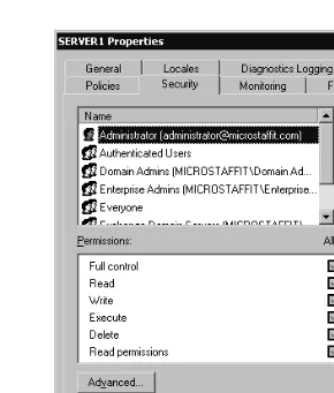
One of the benefits of Windows 2000 integration is that administrators do not have to learn two methods to apply security. In Windows 2000 you modify the Access Control Lists (ACLs) of objects that you wish to secure. You do the same with Exchange 2000. You can set security permissions on users, containers, and most objects within the Exchange organization. You do not have to create your own user group and user accounts. You would use the groupings in Active Directory Users and Computers. The beauty of Windows 2000 and Exchange 2000 integration is that the security groups and distribution groups are both mail-enabled. Figure 1.1 shows the secu-rity ACL for an Exchange object. For more information on Windows 2000 Security and Exchange, see Chapter 3.
Active Directory Connector
the Exchange 5.5 directory and Active Directory. This gives Exchange 2000 and Exchange Server 5.5 insight into each other’s configuration, which allows the two to coexist. For more information on Active Directory and Exchange, see Chapter 2; for more information on deploying Exchange 2000 in an existing or new environment, see Chapter 6.
Microsoft Management Console Integration
The Microsoft Management Console (MMC) is the new interface to adminis-tering your Exchange 2000 server. Administration is detailed in Chapter 4. In legacy Exchange you would run Exchange Administrator on local or remote Exchange servers to manage the Exchange environment, and you would then use Windows NT User Manager to add users. When required, you would switch back to Exchange Administrator to add distribution lists and more.
In Exchange 2000 you have two new tools to perform these functions. Think of them as one for system management and one for user management.
■ Exchange System Manager This tool is similar to Exchange Administrator in functionality. It will be used by your key adminis-trators responsible for managing the Exchange system components (such as administrative groups, routing groups, connectors, tem-plates, policies, server settings, etc.). This is a snap-in to the MMC. See Figure 1.2 for a quick look at what the Exchange System Manager looks like.
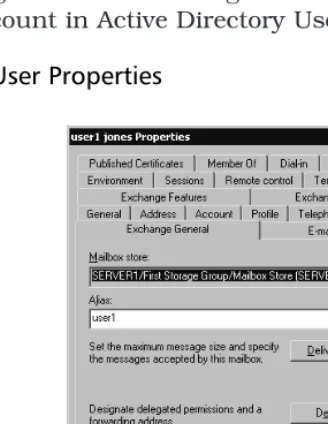
■ Active Directory Users and Computers You will use this tool to add, delete, and modify mailbox-enabled users and mail-enabled users. Exchange 2000 adds extensions to the Windows 2000 ver-sion of Active Directory Users and Computers. Until you install the Exchange Server Administration Tools, as described in Chapter 4, you will not see these additional features such as e-mail address and Exchange mailbox store. Figure 1.3 shows you the Properties of a user account in Active Directory Users and Computers.
Figure 1.2
Exchange 2000 System ManagerUsing the Help Files
Help is normally an overlooked product feature, but no more. The Help functionality delivered with Exchange 2000 really makes it an integrated support tool. When I’ve exalted the improvements and usability of Help in Windows 2000 and Exchange 2000 to administrators and developers they don’t believe me until they use it. Help is reallyuseful. Each Help subsec-tion has a How To and a Concepts secsubsec-tion. The How To secsubsec-tion explains basic administration procedures with overviews, checklists, and references to other material in Help. The Concepts section explains the concept of the topic, discusses why it is important and when appropriate, and includes links to Microsoft subject matter. In some sections, tips on troubleshooting and maintenance are given. The Help feature in Windows 2000 and
Exchange 2000 gives you enough starting information so that you don’t have to browse through myriad Microsoft TechNet articles or Exchange manuals the first time you have a question. Figure 1.4 shows “Using Firewalls with Outlook Web Access,” a typical section in Help.
Server Features
Now, let’s move on to Exchange server components. If you understand how the Exchange database components worked in legacy Exchange, you’ll see that the basic functionality has stayed within the storage components, but each component has been tweaked and improved to increase functionality and interoperability. There is more architectural information on the database components in Chapters 10 and 12.
Multiple Information Stores
Previously in legacy Exchange products, such as Exchange 4.0, Exchange 5.0, and Exchange 5.5, messages were kept in database files called
priv.edb and pub.edb. Priv.edb contains private, personal, and individual
e-mail that normally has a user account associated with the mailbox.
Pub.edbcontains public information that is secured by the administrator,
who defines which user or groups of users can view the data. In Exchange 2000 these two files are now called priv1.edb and pub1.edb (by default). The concept of single instance store (SIS) applies, in that a message is stored once and the database has pointers to those mailboxes that refer-ence that message.
Exchange 2000 includes priv1.edb, but it also has a companion file, priv1.stm. Priv1.edb files contain Rich Text Formatted (RTF) content mes-sages. A priv1.stm file contains non-RTF mesmes-sages. The .stm suffix comes from the word streaming and is utilized for containing Internet
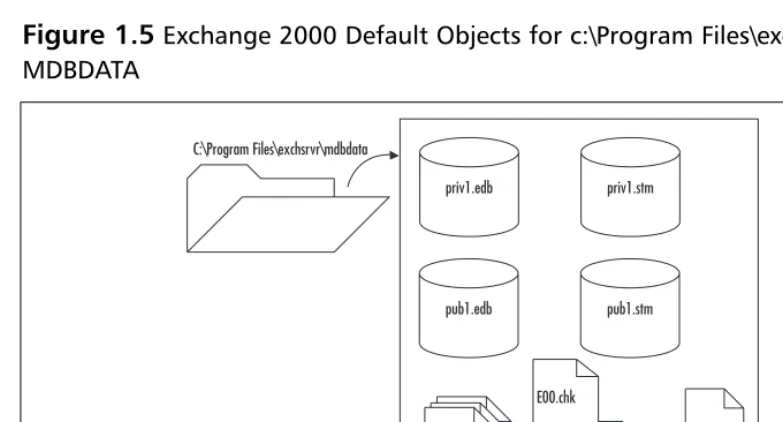
Multipurpose Internet Mail Extension (MIME) data. Typical .stm would be audio, video, and any streaming MIME data. Note that the two files contain different content but that both files store data in the same format, called the Extensible Storage Engine (ESE) database format. As you can see in Figure 1.5, the pub1.edb file also has a companion pub1.stm file.
Transaction Logs
The private and public databases are not complete without the inclusion of transaction logs. The transaction logs function basically the same as in legacy Exchange. You have one active transaction log and then multiple, sequentially numbered transaction logs that contain past Exchange
Figure 1.5
Exchange 2000 Default Objects for c:\Program Files\exchsrvr\ MDBDATAC:\Program Files\exchsrvr\mdbdata
priv1.edb priv1.stm
pub1.edb pub1.stm
E00.log E00001.log
res1.log
database transactions. Refer to Chapter 10 and Chapter 12 for more infor-mation on the importance of transaction logs.
Installable File System
The Installable File System (IFS) exposes Exchange 2000 information stores to the file system. Exchange 2000 automatically creates an M: drive on the local Exchange server that will allow you to share the mailbox or public folder that is the root level of the default public folder tree, the root level of all mailboxes, and a domain folder for each accessible domain. Previously, in Exchange 5.5, clients could access data in the stores via MAPI, Lightweight Directory Access Protocol (LDAP), Network News Transport Protocol (NNTP), HTTP, POP3, and Internet Message Access Protocol v4 (IMAP4) clients. Exchange 2000 clients can now use Explorer, My Computer, or other file access applications/tools to open, read, write, and save data on the Exchange Server information stores. Figure 1.6 gives you an idea of how this looks in Explorer. The purpose of this feature is to allow applications to interoperate with the Exchange data.
The Web Store
Making the Exchange information store accessible from the Internet was a major contribution to making the data available, anytime, anywhere, in any form. The changes to the information stores allow end users to access contents of the stores via browsers, Outlook, Office 2000 applications, wireless devices, conferencing solutions, and more. View the Web Store as an Internet-capable wrapper around the Information Stores, exposing well-known objects to properly authenticated users or applications.
Storage Groups and Multiple Message Stores
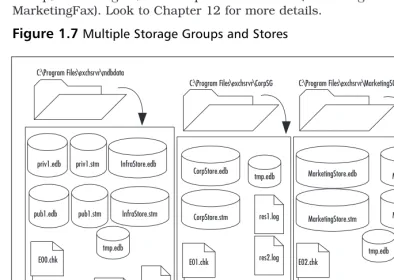
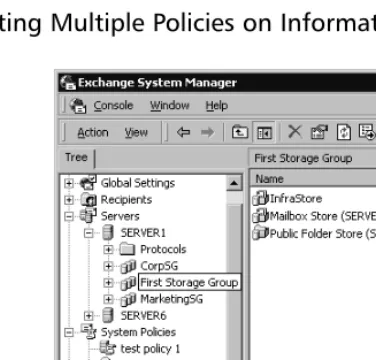
Legacy Exchange had one private and one public information store per Exchange server. Exchange 2000 now allows multiple stores per Exchange server. They are grouped in an object called a Storage Group. You can have up to four Storage Groups per server, with a maximum of five databases per Storage Group, so you could theoretically have 20 databases per server. Also, each Storage Group is maintained by its own instance of the Extensible Storage Engine (ESE), which ensures that all databases within a Storage Group are consistent. Within a Storage Group, there is one set of transaction logs. Operations within a transaction log can apply to any of the databases defined in the Storage Group. See Figure 1.7 for an example of multiple Storage Groups and stores. We have the first Storage Group that was installed with Exchange, called First Storage Group. It contains three different pairs of databases (private data, public data, and Company Infrastructure data). The second Storage Group is the Corporate Storage Group, CorpSG. It contains just one pair of databases. The third Storage Group, MarketingSG, has two pairs of database (Marketing andMarketingFax). Look to Chapter 12 for more details.
Figure 1.7
Multiple Storage Groups and Storesres1.log
Corp Storage Group Marketing Storage Group res1.log
You would utilize Storage Groups and multiple databases for ease of administration, flexibility in configuration, and optimization of your backup and recovery strategies. Also, it is possible to configure a unique set of poli-cies for each storage group. We might put more restrictive polipoli-cies on First Storage Group, and then loosen up requirements on CorpSG and
MarketingSG. You may want to have four information stores with a max-imum file size of 50GB each, rather than one information store at 200GB. This would allow faster restores if just one database became corrupt. (Note that if a drive fails and all the stores are on that drive, then they would all have to be restored.) Another reason for multiple stores is that when you are performing maintenance operations, you would have to take offline only one set of users at a time. As an application service provider (ASP), you may want to create storage groups based on the companies you are hosting as well. Administering these servers and securing the environment will be much easier with a clear delineation between Storage Groups.
Also key to the Storage Group concept is that you affiliate one tion log to one Storage Group, not one per database. A family of transac-tion logs contains the active transactransac-tion log (E00.log), past sequentially numbered transaction logs (E0000001.log, E000000x.log), and the res.logs (res1.log, res2.log) in that same folder path. If you had one Storage Group with five Exchange databases, you would have just one transaction log family. If you had three Storage Groups, each group would have its own family of transaction logs that would be specifically applied to it. As an example, we’ve created three Storage Groups on our Exchange server. We have a Storage Group for the users in Corporate Headquarters, Marketing, and the rest of the company. See Table 1.1 for details about these compo-nents.
Table 1.1
Multiple Storage Groups and Stores with AssociatedTransaction Logs
Storage Group First Storage CorpSG MarketingSG
Name Group
Use First/Default Storage Everyone Everyone
Group. Everyone not reporting to reporting to
in Corporate or Corporate Marketing.
Marketing. Office.
Stores Mailbox Store CorpStore MarketingStore
Public Folder Store MktFAXStore
Infrastructure Store
Storage Group C:\Program Files C:\Program Files C:\Program Files
Folder Path and \exchsrvr\MDBDATA \exchsrvr\CorpSG \exchsrvr\
Files MarketingSG
Private Stores Priv1.edb CorpStore.edb MarketingStore
Priv1.stm CorpStore.stm .edb
InfraStore.edb MarketingStore
InfraStore.stm .stm
MktFAXStore .edb
MktFAXStore .stm
Public Stores Pub1.edb
Pub1.stm
Transaction Log E00.log E01.log E02.log
Path and Names E0000001.log E0100001.log E0200001.log
E0000002.log E0200002.log
Other Files Res1.log Res1.log Res1.log
Res2.log Res2.log Res2.log
Tmp.edb Tmp.edb Tmp.edb
E00.chk E01.chk E02.chk
Within these Storage Groups you can see that we have two private stores within both the default First Storage Group and the MarketingSG. The CorpSG Storage Group has one private information store. There is only one public information store on the Exchange server, and this is the default public store for all the other private information stores. For the Storage Groups with multiple stores, you will notice that we do not have a set of transaction logs per store. There is one set of transaction logs per Storage Group. Any transactions for the MarketingStoreand the
MktFAXStore will be both committed to the E02.log file. Then the transac-tions will be applied to the individual stores as appropriate. Also note that in the First Storage Group we have two private and one public set of stores. All transactions for these stores will be committed to the same log family.
Table 1.1
ContinuedStorage Group First Storage CorpSG MarketingSG
NOTE
Key to understanding Exchange storage benefits is the concept of Single Instance Store (SIS). When a message is received, it is stored once and the database creates internal pointers to reference which users’ mail-boxes contain this message. Movement of the message within a single Exchange store (intact) will still keep one instance of the message. Modification of the message or copying of the message will create a second message entity.
If a message is sent to two users in the sameStorage Group, but on different stores, Single Instance Store is not maintained—there are two copies of the message. If a message is sent to two users in different Storage Groups, Single Instance Store is also not maintained.
Multiple Public Folder Trees
Legacy Exchange allowed only one public information store per server. Public stores contain messaging content that can be exposed to the entire Exchange organization. (User mailboxes are stored in the priv1.edb file, and the users that typically own the mailbox are the only viewers.) Public folders are stored in the pub1.edb file and are created with the intent of sharing all their data to all Exchange users. The Exchange 5.5 design and the default installation of Exchange 2000 install one public information store. This is known as the equivalent of having one public folder tree. Exchange 2000 allows the creation of multiple public folder trees that can be secured and exposed in a finer detail. You may want to have the default public folder tree designated for your organization’s public information, and you may then create a second public folder tree that will be populated with information just for one department—for example, Human Resources or Marketing.
On-Demand Content Conversion
Policy Settings for Information Stores
Now that we have multiple stores and storage groups, Exchange 2000 has a better way to manage them. In Exchange System Manager, you will choose an administrative group. Under that group you have System Policies. Here you can set policies that can be applied to one information store or sets of information stores. Also, you can layer the policies. If you have two private information stores, you may want to archive all the e-mail on store1 and then set two different storage quota limits on store1 and store2. Figure 1.8 shows that we have a storage group with multiple stores within it; you can also see some of the system policies defined.
Clustering
Exchange’s previous implementation of clustering was active/passive. This meant that you could have one Exchange virtual server hosted/configured between two nodes. Exchange 2000’s implementation is active/active. This means, in brief, that you can run Exchange on both nodes of a cluster, and if one server fails, the remaining server will host both Exchange virtual servers. Also, depending on the version of Windows 2000, you can have two nodes in a cluster (Windows 2000 Advanced Server) or four nodes in a cluster (Windows 2000 Data Center).
Routing and Networking Features
Networking protocol functions and processing that were resident in the legacy Exchange server have been moved to the Internet Information
Service (IIS). Directory functions that were in the legacy Exchange directory service, such as maintaining the routing table and replicating directory information, have been moved to Windows 2000 Active Directory. Let’s take a look at how these changes have improved Exchange 2000.
SMTP Routing of Messages between Servers
Start saying goodbye to Remote Procedure Call (RPC) message transfer in Microsoft Exchange environments. In legacy Exchange, RPCs were used to transfer or route messages between servers in an Exchange site. Now SMTP is the default transport protocol to transfer or route messages. A more extensive version of SMTP is installed in Windows 2000 when
Exchange 2000 is installed. SMTP has many advantages over RPCs: better end-to-end performance over poor communication lines, lower utilization of bandwidth, and less overhead, for example.
Integration with Internet Information Services
You will need to have at least version 5.0 of IIS installed on your Exchange 2000 Server if you wish to utilize some of the new features in Exchange 2000. This is the version included in Windows 2000. Exchange 5.5 han-dled many of the protocols required to enable messages. In Exchange 2000, much of this protocol handling has been taken out, and now Exchange 2000 relies on IIS to handle SMTP, HTTP, POP3, IMAP4, and NNTP access. Exchange depends on IIS to perform required message routing functions and to enable Instant Messaging. Exchange createsvir-tual roots (IIS terminology) for mailboxes, public folders, and
administra-tion tools. These virtual roots can be accessed via standard browsers. Finally, IIS integration with Exchange 2000 enables developers to create Web content that is message enabled.
Improved System Monitoring of Exchange
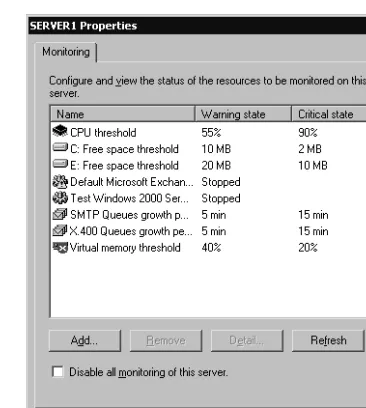
Monitoring of your Exchange server, services, and links has matured in Exchange 2000. There are at least three new ways you can monitor ser-vices and objects in Exchange 2000. In Exchange System Manager you can set monitors on the queues for SMTP and X.400 connectors to alert you when messages on the queues are growing, as in Figure 1.9. You can enable diagnostics logging on all protocols and on many of the objects in Exchange.
Message Restrictions to Reduce Spamming
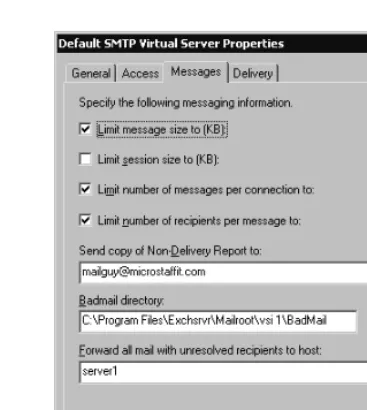
The development team has made it easier for administrators to get a handle on junk e-mail and spamming. The Exchange System Manager in Exchange 2000 will now let you set limits on the number of recipients a user can send to at one time on a per-virtual-server basis. For example, if you decide that you are not going to let users send out e-mails to more than 100 people at a time, they can not send out more than 20 e-mails in a session, and they are limited to messages smaller than 8MB. Figure 1.10 demonstrates this requirement in the Messages tab on the SMTP Protocol for the Default SMTP Virtual Server. For more information on protecting your Exchange server against spamming and other attacks, see Chapter 7.Client Features
The architectural changes in Exchange 2000 and in the Web store allow more Microsoft and non-Microsoft client products to access and utilize the Exchange resources. You need to stop thinking of clients as name brands, such as Microsoft Outlook or Netscape Navigator, and start thinking of them in terms of protocols. Are they MAPI-compliant? Do they support POP3, SMTP, or HTTP? You will see more HTTP clients in the coming years.Look to Chapter 5 for details on the following features.
Increased Protocol Support
The Exchange 2000 Server product allows clients and applications using the following protocols to access its data and perform sends and receives of messages and information:
■ MAPI ■ POP3 ■ SMTP ■ IMAP4 ■ HTTP ■ WebDAV ■ NNTP