Client-Server Web Apps with JavaScript and Java by Casimir Saternos
Copyright © 2014 EzGraphs, LLC. All rights reserved.
Printed in the United States of America.
Published by O’Reilly Media, Inc., 1005 Gravenstein Highway North, Sebastopol, CA 95472.
O’Reilly books may be purchased for educational, business, or sales promotional use. Online editions are also available for most titles (http://my.safaribooksonline.com). For more information, contact our corporate/ institutional sales department: 800-998-9938 or [email protected].
Editors: Simon St. Laurent and Allyson MacDonald
Production Editor: Kristen Brown
Copyeditor: Gillian McGarvey
Proofreader: Amanda Kersey
Indexer: Judith McConville
Cover Designer: Karen Montgomery
Interior Designer: David Futato
Illustrator: Rebecca Demarest
April 2014: First Edition
Revision History for the First Edition:
2014-03-27: First release
See http://oreilly.com/catalog/errata.csp?isbn=9781449369330 for release details.
Nutshell Handbook, the Nutshell Handbook logo, and the O’Reilly logo are registered trademarks of O’Reilly Media, Inc. Client-Server Web Apps with JavaScript and Java, the image of a large Indian civet, and related trade dress are trademarks of O’Reilly Media, Inc.
Many of the designations used by manufacturers and sellers to distinguish their products are claimed as trademarks. Where those designations appear in this book, and O’Reilly Media, Inc. was aware of a trademark claim, the designations have been printed in caps or initial caps.
While every precaution has been taken in the preparation of this book, the publisher and author assume no responsibility for errors or omissions, or for damages resulting from the use of the information contained herein.
ISBN: 978-1-449-36933-0
Table of Contents
Preface. . . xi
1. Change Begets Change. . . 1
Web Users 2
Technology 3
Software Development 4
What Has Not Changed 5
The Nature of the Web 6
Server-Driven Web Development Considered Harmful 7
Why Client-Server Web Applications? 8
Code Organization/Software Architecture 8
Flexibility of Design/Use of Open Source APIs 8
Prototyping 9
Developer Productivity 9
Application Performance 9
Conclusion 11
2. JavaScript and JavaScript Tools. . . 13
Learning JavaScript 14
JavaScript History 15
A Functional Language 16
Scope 17
First-Class Functions 18
Function Declarations and Expressions 20
Function Invocations 22
Function Arguments 22
Objects 23
JavaScript for Java Developers 23
HelloWorld.java 23
HelloWorld.java (with Variables) 27
Development Best Practices 29
Coding Style and Conventions 29
Browsers for Development 29
Integrated Development Environments 30
Unit Testing 31
Documentation 31
Project 31
3. REST and JSON. . . 37
What Is REST? 38
Resources 38
Verbs (HTTP Request Methods) 38
Uniform Resource Identifiers 39
REST Constraints 40
Client–Server 41
Stateless 41
Cacheable 42
Uniform Interface 42
Layered 42
Code on Demand 43
HTTP Response Codes 43
What Is Success? 43
JSON (JavaScript Object Notation) 44
HATEOAS 46
REST and JSON 47
API Measures and Classification 48
Functional Programming and REST 49
Project 50
Other Web API Tools 54
Constraints Redux 54
4. Java Tools. . . 57
Java Language 58
Java Virtual Machine (JVM) 58
Java Tools 60
Build Tools 61
Benefits of Maven 63
Functionality of Maven 64
Version Control 65
Unit Testing 65
Projects 66
Java with JSON 66
JVM Scripting Languages with JSON 69
Conclusion 72
5. Client-Side Frameworks. . . 75
Overview 75
Starting Point One: Responsive Web Design 77
HTML5 Boilerplate 78
Bootstrap 79
Starting Point Two: JavaScript Libraries and Frameworks 79
Browser Compatibility 79
Frameworks 80
Functionality 80
Popularity 81
Obtaining Starter Projects 82
Download Directly from Repositories 82
Download from Starter Sites 82
IDE-Generated Starter Projects 83
The Rise of the Front-End Engineer 83
Client-Side Templating 84
Asset Pipelines 84
Development Workflow 85
Project 85
Conclusion 88
6. Java Web API Servers. . . 89
Simpler Server-Side Solutions 90
Java-Based Servers 91
Java HTTP Server 92
Embedded Jetty Server 93
Restlet 95
Roo 96
Embedded Netty Server 100
Play Server 102
Other Lightweight Server Solutions 105
JVM-Based Servers 105
Jython 106
Web Application Servers 107
Development Usage 107
Conclusion 107
7. Rapid Development Practices. . . 109
Developer Productivity 109
Optimizing Developer and Team Workflow 112
Example: Web Application Fix 114
Example: Testing Integration 115
Example: Greenfield Development 116
Productivity and the Software Development Life Cycle 117
Management and Culture 117
Technical Architecture 118
Software Tools 119
Performance 120
Testing 120
Underlying Platform(s) 122
Conclusion 122
8. API Design. . . 123
A Decision to Design 124
Practical Web APIs Versus RESTful APIs 125
Guidelines 127
Nouns as Resources; Verbs as HTTP Actions 127
Query Parameters as Modifiers 128
Web API Versions 129
HTTP Headers 130
Linking 130
Responses 130
Documentation 130
Formatting Conventions 131
Security 131
Project 131
Running the Project 132
Server Code 132
Curl and jQuery 134
Theory in Practice 135
9. jQuery and Jython. . . 137
Server Side: Jython 138
Python Web Server 138
Jython Web Server 138
Mock APIs 139
Project 181
Client 181
Server 182
Conclusion 182
12. Virtualization. . . 183
Full Virtualization 183
Virtual Machine Implementations 185
VMWare 185
VirtualBox 185
Amazon EC2 186
Management of Virtual Machines 186
Vagrant 186
Packer 186
DevOps Configuration Management 187
Containers 188
LXC 188
Docker 189
Project 190
Docker Help 191
Image and Container Maintenance 191
Java on Docker 192
Docker and Vagrant Networking 194
Conclusion 195
13. Testing and Documentation. . . 197
Types of Testing 198
Formal Versus Informal 198
Extent of Testing 198
Who Tests What for Whom? 199
Testing as an Indicator of Organizational Maturity 199
CMM to Assess Process Uniformity 200
Maven to Promote Uniform Processes 200
BDD to Promote Uniform Processes 202
Testing Frameworks 203
JUnit 204
Jasmine 205
Cucumber 205
Project 206
JUnit 207
Jasmine 207
Maven Site Reports 209
Conclusion 210
14. Conclusion. . . 211
Community 211
History 212
Coda 212
A. JRuby IRB and Java API. . . 213
B. RESTful Web API Summary. . . 221
C. References. . . 227
Index. . . 229
There are only two hard things in Computer Science: cache invalidation and naming things. —Phil Karlton
Preface
While cache invalidation is not a difficulty encountered when writing a book, choosing a suitable title is. The title of this book is intended to represent a broad area of changes in web development that have resulted in a new approach to designing web applications. Of course, many aspects of web development can be considered new. Developers scram‐ ble to keep up with enhancements to desktop browsers, new mobile device clients, evolving programming languages, the availability of faster processors, and an increas‐ ingly discerning audience of users with growing expectations about usability and in‐ teractivity. These changes require developers to continually innovate when coming up with solutions for their specific projects. But many of these solutions have broader implications and are not isolated to any particular project.
Therefore, I chose “client-server” as the term which in many ways captures the changes to web development that have occurred in response to these innovations. Other de‐ scriptions of modern development practices currently in vogue don’t adequately rep‐ resent the problem domain. Web application development is associated with desktop browsers, but excludes the increasingly relevant area of mobile applications.
The terms Single Page Application and Single Page Interface have been used to distin‐ guish modern web applications from earlier static websites. These terms correctly iden‐ tify modern sites as far more dynamic and interactive than their predecessors. However, many modern dynamic applications are made up of multiple pages rather than a single page. The focus in these terms is on the page, the client portion of an application. They make no specific statement about corresponding server-side devel‐ opment. There are JavaScript frameworks that are also associated with highly dynamic pages (such as Angular, Ember, and Backbone), but these are also concerned with the
client tier. I wanted the title of this book to encompass more than front-end innovations and to recognize the corresponding server-side design and web service messaging. The method of communication captured by the popular acronym REST (Representa‐ tional State Transfer) does suggest the web service messaging style. But the definition of REST as specified by its author Roy Fielding is very limiting. On his blog, Fielding lists specific restrictions to REST that are commonly violated in so-called RESTful APIs. And some even question whether a JSON API can be truly RESTful due to the fact that it does not satisfy all of the constraints associated with the style of architecture. There is a continuum by which REST services can be described; so that an API can be described as RESTful only to the degree that it adheres to the constraints. REST does include client-server as one of its constraints, and the verb and URL naming conventions are certainly applicable.
So a JavaScript client consuming messages from a pragmatic “RESTful” API is a signif‐ icant part of the method of development. What about the server component?
Java Enterprise Edition (JEE) includes the JAX-RS API, which uses Java’s flavor of REST (which is not inherently strict) and is demonstrable using the Jersey reference imple‐ mentation. But limiting to JAX-RS web application development ignores frameworks and alternate JVM language solutions that are available and particularly appealing for quick prototypes.
And so crystallizing the intentions of a book in a simple, catchy title is not an easy task. Fortunately, James Ward did a presentation at OSCON 2012 in which he described the development of “Client-Server Web Applications with HTML5 and Java.” He listed the benefits of a method of web application development that is increasingly popular, a method that I have been involved with in recent years on various projects. And the phrase “client-server” is the key to understanding what this method is. It captures the fundamental architectural changes that include aspects of the terms listed above, but represents the distinct partitioning between the client and server and considers each of the roles significant.
A client-server architecture of web applications requires a shift (in some cases seismic) in the way programmers work. This book was written to enable developers to deal with this revolution. Specifically, it is intended to provide a proper perspective in building the latest incarnation of modern web applications.
Who Is This Book For?
recent developments in JavaScript and how the language and its development process compare with those of Java, this book is for you.
A bit of a balancing act is evident as you read this book. On the one hand, the most important thing you can take away is a sense of the “big picture”—the influences and trends causing a shift in the technologies in use. On the other hand, technologies are often best understood by seeing specific examples. If you are interested in an overview of how these technologies actually fit together, you will benefit from this book. My goal in writing this is to help you to make informed decisions. Good decisions result in the right technologies being used on new projects. They allow you to avoid pitfalls caused by mixing incompatible technologies or having the wrong expectations about the implications of a given decision. They help you to step into projects in process and better support existing code. In short, informed decisions will make you a more pro‐ ductive programmer. They help you make effective use of your time in researching areas of specific interest in your work now and in the future.
How This Book Is Organized
Chapter 1 provides a general overview of the client-server web application architecture. It discusses the history of web development and provides a justification for the paradigm shift in development. This leads into the next three chapters that will describe the tools used in the development process.
Chapter 2 describes JavaScript and the tools used in JavaScript development.
Chapter 3 introduces web API design, REST, and the tools used when developing RESTful applications over HTTP.
Chapter 4 pertains to Java and other software that’s used in the remainder of this book.
The next section of the book discusses higher-level constructs (such as client libraries and application servers) and how these provide separation and allow for rapid devel‐ opment.
Chapter 5 describes major client-side JavaScript frameworks.
Chapter 6 addresses Java API servers and services.
Chapter 7 discusses rapid development practices.
Chapter 8 delves into API design in greater depth.
With an understanding of libraries and a process for speedy development of prototypes, the next several chapters apply these to specific projects using various JVM languages and frameworks. The next two chapters use lightweight web servers and microframe‐ works instead of traditional Java web application packaging and servers.
Chapter 9 provides an overview of a project using jQuery and Jython.
Chapter 10 documents the development of a project using JRuby and Angular.
The final chapters detail projects using traditional Java web application servers and libraries.
Chapter 11 looks at the range of packaging and deployment options available in the Java ecosystem.
Chapter 12 explores virtualization and innovations emerging from the management of large server environments.
Chapter 13 draws attention to testing and documentation.
Chapter 14 wraps up with some final thoughts on responding to the tumultuous changes to Internet-related technologies and software development.
Appendix A describes how to explore and manipulate Java classes interactively.
Conventions Used in This Book
The following typographical conventions are used in this book: Italic
Indicates new terms, URLs, filenames, and file extensions. Constant width
Used for program listings, as well as within paragraphs to refer to variables, method names, and other code elements, as well as the contents of files.
Constant width bold
Highlights new code in an example.
Constant width italic
Shows text that should be replaced with user-supplied values.
This element signifies a tip, suggestion, or general note.
Code Examples
Projects and code examples in this book are hosted on https://github.com/java-javascript/client-server-web-apps. You can view them online or download a .zip file for local use. The assets are organized by chapter.
The code examples provided in this book are geared toward illustrating specific func‐ tionality rather than addressing all concerns of a fully functional application. Differ‐ ences include:
• Production systems include greater refinement of selected data types, validation rules, exception handing routines, and logging mechanisms.
• Most production systems will include one or more backend datastores. To limit the scope of discussion, databases are not accessed in most of the examples.
• The modern web application includes a large amount of infrastructure geared to‐ ward mobile device access and browser compatibility. Again, unless these are the specific topic of discussion, responsive design is eschewed for a more minimal design.
• The practice of some degree of unobtrusive JavaScript to separate CSS and Java‐ Script from HTML is a generally accepted best practice. In the examples in this book, they are frequently commingled because all aspects of a given application can be immediately apprised by viewing a single file.
• Unit tests and testing examples are only included when they are directly related to the topic under discussion. Production systems would include far greater test cov‐ erage and extensive testing in general.
That said, this book is intended to help you get your job done. In general, you may use the code in this book in your programs and documentation. You do not need to contact us for permission unless you are reproducing a significant portion of the code. For example, writing a program that uses several sections of code from this book does not require permission. Selling or distributing a CD-ROM of examples from O’Reilly books does require permission. Answering a question by citing this book and quoting example code does not require permission. Incorporating a significant amount of example code from this book into your product’s documentation does require permission.
We appreciate, but do not require, attribution. An attribution usually includes the title, author, publisher, and ISBN. For example: “Client-Server Web Apps with JavaScript and Java” by Casimir Saternos (O’Reilly). Copyright 2014 EzGraphs, LLC., 978-1-449-36933-0.”
If you feel your use of code examples falls outside fair use or the permission given here, feel free to contact us at [email protected].
Long Command Formats
Code displayed inline will be adjusted to be readable in this context. One convention used is that of backslashes to allow newlines in operating system commands. So for instance, the following commands are equivalent and would execute the same way in a bash session. (Bash is a standard operating system shell that you see when accessing a Linux server or Mac OS X at the command line.)
ls -l *someVeryLongName* ...
ls -l \
*someVeryLongName*
The same convention also appears in other settings where OS commands are used, such as Dockerfiles.
Similarly, JSON strings, being valid JavaScript, can be broken up to fit on multiple lines:
o={"name": "really long string here and includes many words"} // The following, as expected, evaluates to true.
JSON.stringify(o)=='{"name":"really long string here and includes many words"}'
// The same string broken into multiple lines is equivalent. // So the following statement also evaluates to true. JSON.stringify(o)=='{"name":' +
'"some really long ' +
'JSON string is here' +
' and includes many, many words"}'
Safari® Books Online
Safari Books Online is an on-demand digital library that delivers expert content in both book and video form from the world’s leading authors in technology and business.
Technology professionals, software developers, web designers, and business and crea‐ tive professionals use Safari Books Online as their primary resource for research, prob‐ lem solving, learning, and certification training.
How to Contact Us
Every example in this book has been tested, but occasionally you may encounter prob‐ lems. Mistakes and oversights can occur and we will gratefully receive details of any that you find, as well as any suggestions you would like to make for future editions. Please address comments and questions concerning this book to the publisher:
O’Reilly Media, Inc.
1005 Gravenstein Highway North Sebastopol, CA 95472
800-998-9938 (in the United States or Canada) 707-829-0515 (international or local)
707-829-0104 (fax)
We have a web page for this book, where we list errata, examples, and any additional information. You can access this page at http://oreil.ly/client-server-web-apps-js. To comment or ask technical questions about this book, send email to bookques [email protected].
For more information about our books, courses, conferences, and news, see our website at http://www.oreilly.com.
Find us on Facebook: http://facebook.com/oreilly Follow us on Twitter: http://twitter.com/oreillymedia Watch us on YouTube: http://www.youtube.com/oreillymedia
Acknowledgments
Thank you to the following people:• Meg, Ally, Simon, and the gang at O’Reilly for the opportunity to write this book. • My brother Neal Saternos and Dr. James Femister for the early suggestions from
days gone by that I might be able to do the “programming thing.”
• Michael Bellomo, Don Deasey, and Scott Miller for their time and expertise as technical reviewers.
• Charles Leo Saternos for taking a break from Lua game development to do some fine image and design work.
• Caleb Lewis Saternos for inspiration in perserverence (early morning run anyone?) and editorial work.
• David Amidon for the first opportunity to work as a software developer and Doug Pelletier for first the opportunity to develop Java web apps.
• All the folks that headed up the projects that inspired this book, including managers Wayne Hefner, Tony Powell, Dave Berry, Jay Colson, and Pat Doran, and chief software architects Eric Fedok and Michael Bellomo.
• Geoffrey Grosenbach from PluralSight, Nat Dunn from Webucator, Caroline Kvit‐ ka (and others from Oracle and Java Magazine) for technical writing opportunities over the past several years that led to the current one.
• My parents Leo and Clara Saternos for bringing me up in a loving household that included a Radio Shack Color Computer when having a PC at home was still a novelty and my sister Lori for reminders of important things that have nothing to do with programming.
My love and thanks to my wonderful wife Christina and children Clara Jean, Charles Leo, Caleb Lewis, and Charlotte Olivia for the consistent love, support, patience, and inspiration while this project was underway.
The entrepreneur always searches for a change, responds to it, and exploits it as an opportunity. —Peter Drucker
CHAPTER 1
Change Begets Change
What kinds of changes encourage developers to adopt a client-server approach? Shifts in user behavior, technology, and software development process are the significant forces that have driven developers to change their patterns of design. Each of these factors, in a unique and significant way, makes established patterns obsolete. Together they have encouraged related innovations and a convergence in practice despite the absence of enforcement or mandated standardization.
Web users have changed. In the early days of the Web, users were satisfied with static pages and primitive user interfaces. The modern web user has come to expect a high-performance, interactive, well-designed, dynamic experience. These higher expecta‐ tions were met with an explosion in new technologies and expansion of web browser capabilities. Today’s web developer needs to use tools and a development approach that are aligned with the modern web scene.
Technology has changed. Browsers and JavaScript engines are faster. Workstations and laptops are far more powerful, to say nothing of the plethora of mobile devices now being used to surf the Web. Web service APIs are the expectation for a modern web application rather than a rare additional feature. Cloud computing is revolutionizing the deployment and operation of web applications.
Software development has changed. The now popular “Agile Manifesto” values:
• Individuals and interactions over processes and tools • Working software over comprehensive documentation • Customer collaboration over contract negotiation • Responding to change over following a plan
It is now possible to quickly spin up web applications that prove—at least on a small scale—the viability of a given technology. There is tremendous value to prototyping. As Fred Brooks, author of The Mythical Man Month (Addison-Wesley Professional), fa‐ mously stated: “Plan to throw one away; you will, anyhow.” A prototype can allow for early customer or end user interaction that helps solidify requirements early in the process. It is no longer an insurmountable task to write a functional web application in a matter of minutes.
Web Users
Modern web application users have well-defined expectations about how they will be able to interact with a web application:
• Web applications will be available across multiple platforms. • They will provide a consistent experience across devices. • They will respond with little or no latency.
The Gartner group claims that in 2014, the personal cloud will replace the PC at the center of users’ digital lives. There are many implications for web app development. Users are more technologically savvy and have high expectations for site responsiveness. They are less passive than in previous years and instead are interactive and engaged. Websites need to be designed in a way that suggests no limitations in the ability of a browser to mimic native application experience.
Users expect an application to be exposed in various ways and available in different situations. Responsive design and support for multiple browsers, platforms, and devices are the new norm. The use of JavaScript libraries and frameworks is essential to support the wide variety of target clients.
Technology
Java web application developers are typically familiar with server-side dynamic content. J2EE and JSP have been refined into JEE and JSF. Projects such as Spring provide ad‐ ditional capabilities geared toward server-side development. This mode of development made a great deal of sense in the early days of the Web, when web pages were relatively static, servers were relatively fast, JavaScript engines were slow, and there were few libraries and techniques to address browser incompatibilities.
By way of contrast, a modern client-server approach involves a server largely responsible for providing access to resources (typically communicated as messages in XML or JSON) in response to client requests. In the old server-driven approach, the browser requested an entire page and it was generated (along with relevant data) for rendering in the browser. In the client-server approach, the server initially serves pages with little data. The pages make asynchronous requests to the server as the user interacts with it and the server simply responds to these events with messages that cause the current page to be updated.
Initial web development efforts consisted of the creation of static HTML sites. Later, these sites were augmented with dynamic content using server-side processing (CGI, Java Servlets). Subsequently, more structured language integration emerged using server-side templating (ASP, PHP, JSP) and MVC frameworks. More recent technologies continue in the same tradition and provide additional abstractions of one sort or another.
Based upon a desire to shield developers from design concerns and the underlying architecture of the Web, component-based frameworks have emerged. Tag libraries were an early innovation, and now a component-based approach has been widely adopted in several popular frameworks:
• Java Server Faces (JSF), an XML-based templating system and component frame‐ work with centralized configurable navigation.
• The Google Web Toolkit is another component framework that leverages the abil‐ ities of Java programmers by letting them focus on Java coding with little need to directly modify HTML, CSS, or JavaScript.
Each of these frameworks has its place and has been used successfully in production systems. But like many solutions that try to hide underlying complexities, their usage is problematic in situations where you need greater control (such as the ability to inte‐ grate large amounts of JavaScript) or you do not conform to the framework assumptions (for instance, availability of server sessions). This is because these solutions attempt to hide the fundamental architecture of the Web, which uses an HTTP request-response protocol following the client-server computing model.
Browser innovations also led to a shift of responsibility from the server to the client. In the late 1990s, Microsoft developed the underlying technologies that led to Ajax (a term coined on February 18, 2005 by Jesse James Garrett). Ajax is an acronym for “asyn‐ chronous JavaScript and XML,” but is more generally applied to various technologies used to communicate with the server within the context of a given web page. This allowed small messages to be sent, which made better use of bandwidth when designing JavaScript-based web applications. Browser performance has increased significantly due to processor improvements and optimizations to JavaScript engines, so it has made sense to offload more work from the server to the browser. User interface responsiveness has evolved to a new level of sophistication.
Mobile device browsers have also provided an additional incentive to further isolate client-side code from the server. In some cases, a well-designed application leveraging responsive design principles can be created. If this is not an option, a single consistent API available for all device clients is very appealing.
Roy Fielding’s doctoral dissertation in 2000 led Java EE 6 to new APIs that deviated from the previous component-based trajectory. JAX-RS (Java API for RESTful Web Services) and Jersey (a “production quality reference implementation”) are designed to create applications reflecting a client-server architecture with RESTful communications.
Software Development
In the past, setting up a new Java project was a rather monumental task. A vast array of configuration options made it tedious and error-prone. Very little was automated, as the assumption was that each project would have unique characteristics that developers would want to account for to meet their specific requirements.
Later influences led to innovations that made setting up a project much simpler. “Con‐ vention over configuration” was an influential mantra of the Ruby on Rails community. Maven and other Java projects also chose sensible defaults and target easy setup for a subset of popular use cases.
The availability of scripting languages on the JVM makes it possible to speed develop‐ ment by bypassing the somewhat rigorous type checking of Java. Languages like Groovy, Python (Jython), and Ruby are loosely typed and constructed in a manner that requires less code to accomplish equivalent functionality. So-called microframeworks like Sina‐ tra or Play provide minimal Domain Specific Languages (DSLs) to quickly write web applications and services. And so today, it is a trivial task to set up a minimal set of web services in a development environment.
• Verify technical foundation of the project
• Create constructs that bridge disparate technologies to be used together • Allow end user interaction to clarify intended usage and user interface design • Allow system designers to clarify the interfaces and data structures to be passed
between systems
• Allow programmers to work on different parts of the application in parallel
Prototypes have numerous benefits:
• They are a specific, tangible asset representing the final system to be designed. As such, they incorporate information that is otherwise stored in design documents, diagrams, and other artifacts (and frequently in more informal locations like email and people’s memories of water-cooler conversations).
• Prototypes are concrete implementations. As such, they present the requirements in a much more tangible form. This can lead to a better understanding of the extent and quality of the requirements gathered, and can suggest areas where there is need of clarification.
• Prototypes can immediately expose potential points of failure that are not apparent before attempting a specific implementation.
• The preceding benefits can lead to better estimates and scheduling due to a more comprehensive understanding of what is intended.
Prototyping can be leveraged extensively in client-server web application development because of the clear and unambiguous separation between the client and server. Pro‐ totypes of the server can be provided to the client developers (and vice versa) while development proceeds in parallel. Or if development is not proceeding in parallel, server-side calls can be quickly stubbed out so that client-side code can be developed.
What Has Not Changed
The fundamental nature of the Web (a client-server architecture transmitted over HTTP) has not changed.
New technology does not change everything. High-level programming languages have not removed the need to understand operating system specifics. Object-relational map‐ ping frameworks have not removed the need to understand relational databases and SQL. In like manner, there have been consistent attempts to ignore the underlying ar‐ chitecture of the Web in an effort to emulate the experience of desktop applications.
Medium Specificity
Medium specificity is a term that appears in aesthetics and modern art criticism but which can be applied to technology as well. It indicates the “appropriateness” of a given artistic subject to be presented by a given medium. The idea has been around for cen‐ turies. Gotthold Ephraim Lessing states in his Lacoon:
[B]odies, with their visible properties, are the legitimate subjects of painting. [A]ctions are [therefore] the legitimate subjects of poetry.
— The Limits of Poetry and Painting
Its application in modern art is usually to challenge traditional limits that appeared in the arts. Technology is a creative activity, but our primary concern is working systems, not abstract beauty. The idea of medium specificity is important in that, if you ignore the underlying nature of a platform, the resulting system will never perform in an optimal manner or will not work at all. This has become painfully obvious in many areas of technology. The goal of this book is to promote web application design strategies that are aligned with the way the Web itself is designed. Such applications operate well be‐ cause they work within the Web’s fundamental constraints rather than ignoring them.
The Nature of the Web
The essence of the Web has not changed. It is still made up of servers that serve HTML documents to clients via the HTTP protocol. See Figure 1-1.
Figure 1-1. HTTP request and response
Figure 1-2. REST request and response
In fact, to more accurately emphasize the challenges in the modern web environment, we need to consider multiple devices and cloud deployments. See Figure 1-3.
Figure 1-3. Multiple devices and cloud deployments
The specific area of “medium specificity” that has been ignored in web development in general (and in component frameworks in particular) is the stateless, client-server na‐ ture of the Web itself.
Server-Driven Web Development Considered Harmful
Just because a given feature is available does not mean that it should be used. In many cases, a server-driven, component-based approach to web development should be re‐ placed with a client-server one. Server-driven approaches obscure the nature of the Web itself, which is a client-server technology built on the HTTP protocol. Ignoring or ob‐ scuring the fundamental underlying architecture of the Web makes development, de‐ bugging, and support of software systems more difficult. The intention, to make the Web somehow simpler or easier to understand, breaks down rather quickly in any non‐ trivial system where there needs to be a clear understanding what functionality is avail‐ able and how the system actually works.
Considered Harmful
In 1968, Edsger W. Dijkstra published a letter entitled “Go To Statement Considered Harmful.” Besides being of interest because it made a considerable impact on reducing the use of the goto statement in structured programming, it introduced the phrase “considered harmful” into hacker culture. Tom Christiansen argued against program‐ ming in csh. Douglas Crawford published a blog post entitled “with Statement Consid‐ ered Harmful”. The phrase has appeared in many other settings as well, and despite the amusingly self-referential “‘Considered Harmful’ Essays Considered Harmful” by Eric A. Meyer, the phrase continues to appear.
Although “Considered Harmful” attention articles are not always of equal merit, the theme arises out of a valid recognition that just because a language feature or technical solution is available, does not mean it is a great general purpose, long-term solution.
Why Client-Server Web Applications?
There are a number of advantages to a client-server approach to web development.
Code Organization/Software Architecture
There are clear advantages to being able to decouple logical sections of code and promote higher cohesion both in the original construction and ongoing support of any system. The clear separation between client and server tiers makes for manageable, modular sections of code. In addition, data and display markup can be more clearly separated. The data can be delivered in JSON rather than inline. This is consistent with the modern JavaScript notion of unobtrusive JavaScript where a page’s behavior, structure, and pre‐ sentation are separated.
Flexibility and code reuse are a logical outcome of good code organization. There is flexibility at many stages in the application life cycle when sections of code can be de‐ veloped in relative isolation (APIs can be exposed, mobile device clients created, new versions of sections of the application tested and released independently). Code reuse is more likely when there are clear components. At minimum, the same RESTful APIs can be used to serve data to a wide variety of browsers and mobile devices.
Component approaches tend to introduce brittle coupling and are less adaptable. There is no way to plug in a different frontend easily.
Flexibility of Design/Use of Open Source APIs
available from a design and behavior perspective. A distinct client running JavaScript can take advantage of the latest libraries that ease browser compatibility, standardize DOM manipulation, and provide complex widgets.
Prototyping
Prototyping works well with client-server web applications due to the clear separation between tiers. As previously mentioned, prototypes can test and verify initial ideals. They help clarify vague notions and facilitate clear communication regarding require‐ ments. They can inspire and generate new ideas as people interact with something more concrete than a long text description or a series of pictures. Bad ideas and inconsistencies can be quickly recognized and eliminated. Used correctly, prototypes can save time, money, and resources and result in a better final product.
Developer Productivity
Besides the ability to prototype either the client portion or the server component (or both), work can be split clearly, and development can progress in parallel. The separation allows sections of code to be built in isolation. This prevents the problem in component approaches where a server build is required every time a page is changed during de‐ velopment. Development tasks require less time and effort, changes are less complex, and troubleshooting is simplified.
This is especially evident when a need arises to replace, upgrade, or relocate server-side code. Such changes can be done independently, without affecting the client. The only limitation is that the original interface, specifically the URL and message data structure, must remain available.
Application Performance
User experience is greatly impacted by the perceived performance of a page in the browser. Faster JavaScript engines allow the client to perform computationally intensive operations so server workload can be effectively offloaded to the client. Ajax requires relatively small amounts of data to be retrieved when needed so full page reloads can occur infrequently and less data is sent in the intervening requests. Users perceive a snappier, more immediate response as they interact with an application.
There are many benefits to stateless design that ease the lives of developers and support staff. Resources dedicated to session management can be freed up. This simplifies load-balancing and configuration that would otherwise be required. Servers can be easily added to accommodate increased load allowing for horizontal scalability. This replaces the unwieldy process of hardware upgrades traditionally used to increase throughput and performance.
The benefits even extend to the simplification of the overall architecture of a system. For instance, problems related to maintaining state are extremely challenging in a cloud-based environment. When using traditional stateful sessions, it is challenging to effi‐ ciently persist data so that it is readily available across multiple requests within a user’s session. If data is stored on a backend server, subsequent requests directed to different servers will not have access to it. Possible solutions include:
• Use an application server that supports clustering and failover. Weblogic uses the concept of managed servers, for instance. These solutions require additional man‐ agement and vary in each application server implementation.
• Use session affinity or sticky sessions. In this scenario, all requests within a user session are sent to the same backend server. This does not provide automatic failover.
• Utilize a separate centralized data store. Typically this involves persisting data in a database. This option may not provide the best performance.
• Store the data on the client side. This avoids the performance problems associated with storing session data in a database as well as the failover issues with sticky sessions. This is because any backend server can handle each client’s request.
The move toward avoiding server-side state management is becoming more prevalent. Even a framework like JSF, which is designed for the traditional server-side management of user sessions, is adding features to allow for stateless functionality.
There are a few inherent challenges with creating client-server applications. It is nec‐ essary to embrace JavaScript as a first-class development language in its own right. This means learning the language in some depth, utilizing available libraries, and adopting mature development techniques. Areas of application architecture that were previously generally accepted require a different design, such as standard practices regarding ses‐ sion management. There is no carefully defined standard for client-server web appli‐ cations. Certain parts of JEE, such as JAX-RS, provide some clarification; others such as JSF do not apply.
Conclusion
New challenges and developments afford new opportunities. A client-server web ap‐ plication design is a natural response that recognizes and accounts for the changes to the Web and web development. And it does so in a way that recognizes what has not changed, and so can allow for development of stable, enduring solutions that are well-positioned for future enhancements.
JavaScript is most despised because it isn’t SOME OTHER LANGUAGE. If you are good in SOME OTHER LANGUAGE and you have to program in an environment that only supports JavaScript, then you are forced to use JavaScript, and that is annoying. Most people in that situation don’t even bother to learn JavaScript first, and then they are surprised when JavaScript turns out to have significant differences from the SOME OTHER LANGUAGE they would rather be using, and that those differences matter. —Douglas Crockford
CHAPTER 2
JavaScript and JavaScript Tools
Thus Douglas Crockford summarizes JavaScript as the language that many use but few learn. His book goes on to identify parts of the language that are legitimately useful and powerful and points out others that are truly problematic and best avoided. If you are a programmer required to extensively use JavaScript, it simply makes sense to take the time and energy to study it thoroughly. Crockford’s approach makes the programmer’s learning task more manageable by effectively ignoring large parts of the language and focusing on a powerful and concise subset.
In addition to learning JavaScript itself (later standardized under the name ECMA‐ Script), you need to invest time learning about the specific programming environment. While other languages run on underlying operating systems, relational databases, or host applications, JavaScript was designed originally to run in a browser. The ECMA‐ Script Language Specification explicitly states this.
ECMAScript was originally designed to be a Web scripting language, providing a mech‐ anism to enliven Web pages in browsers and to perform server computation as part of a Web-based client-server architecture.
— ECMAScript Language Specification
The core JavaScript language needs to be understood in relation to two distinct APIs: the Browser Object Model (BOM) and the Document Object Model (DOM). The BOM
consists of a window and its child objects: navigator, history, screen, location, and document. The document object is the root node of the DOM, a hierarchical tree rep‐ resentation of the contents of the page itself. Some of the complaints about JavaScript are actually due to issues with BOM or DOM implementations. Development of Java‐ Script in a web browser cannot be done effectively without a thorough understanding of these APIs.
The remainder of this chapter will introduce the main topics that need to be understood in a browser JavaScript development. It will not be exhaustive or comprehensive, but will highlight the necessary starting points and categories that you need to understand in order to develop an in-depth understanding of the language.
Learning JavaScript
The Java language has been widely adopted in educational settings. Developer certifi‐ cations have been available for a number of years. There is therefore a well-understood, standardized, general, common body of knowledge associated with Java. Java is often learned first in the classroom, and professionals obtain certification after a fairly defined program of self-study. The same cannot be said of JavaScript, but there are a number of good books on JavaScript:
• JavaScript: The Good Parts (O’Reilly), by Douglas Crockford, has been mentioned already. It has become fashionable in some circles to take issue with Crockford at various points, but that is because he is a recognized authority who has helped shape the thinking of many JavaScript developers. In some cases, he provides arguably overly strict “rules of thumb,” but you will do yourself a great disservice if you don’t understand the subset of the language he considers “the good parts” and the parts he avoids.
• Secrets of the JavaScript Ninja (Manning Publications) is by John Resig and Bear Bibeault. John Resig is the author of jQuery and as such has a broad understanding of practical challenges related to browser compatibility and DOM implementations. • Several books are closer to standard language reference texts, including JavaScript: The Definitive Guide (O’Reilly) and Professional JavaScript for Web Development by Nicholas C. Zakas (Wrox Press). These are more comprehensive (and less opin‐ ionated) than the previous two books. They may not be the type of book you would read end to end, but they are invaluable for delving into specific topics.
Conscious Competence
A crucial step in the learning process is to be aware of what you know relative to what can be known. There is a documented cognitive bias known as the Dunning–Kruger effect. It describes a tendency for unskilled individuals to mistakenly rate their ability as much higher than average. Because of the confusion related to JavaScript and the frequency with which it is dismissed as a “toy language,” the goal of this section (related to the “conscious competence” learning model) is to raise awareness of what there is to learn.
JavaScript History
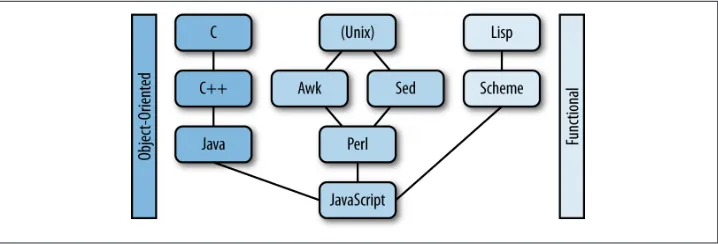
The history of JavaScript is well documented, originating with Brendan Eich writing the initial version in 10 days in 1995. But it is instructive to consider JavaScript in light of earlier computer science history, especially in relation to Lisp, the second-oldest high-level programming language in existence. Lisp was invented by John McCarthy in 1958 (one year after Fortran) as a practical mathematical notation for computer programs. Scheme is one of the two main dialects of Lisp. Strangely enough, Scheme plays a sig‐ nificant part in JavaScript’s history despite being a stark contrast in language design. Figure 2-1 illustrates some of the significant programming languages that influenced the design of JavaScript.
The simple, minimalist design philosophy of Scheme is not at all evident in JavaScript. Its relative verbosity is based in influences from other languages cited in the JavaScript 1.1 Specification:
JavaScript borrows most of its syntax from Java, but also inherits from Awk and Perl, with some indirect influence from Self in its object prototype system.
— JavaScript 1.1 Specification
Figure 2-1. JavaScript syntax influences
This is quite a contrast to Scheme, which does not have several different languages informing its syntax. Perl directly influenced parts of JavaScript, such as regular ex‐ pressions support. Perhaps the Perl motto TMTOWTDI (“there’s more than one way to do it”) influenced JavaScript in a broader way as well. At least it can be said that the converse, “there’s only one way to do it” (popular among the Python community) does not apply. Consider the variations available to create and initialize an array:
var colors1 = [];
colors1[0] = "red";
colors1[1] = "orange";
var colors2 = ["yellow", "green", "blue"];
var colors3 = new Array(2);
colors3[0] = "indigo";
colors3[1] = "violet";
var colors4 = new Array();
colors4[0] = "black";
colors4[1] = "white";
Therefore, it might appear that any connection between JavaScript (with its many in‐ fluences and syntactical variations) and Scheme (a minimalistic dialect of Lisp) seems unlikely. As it turns out, JavaScript’s heritage does include close connections with and direct influences from Scheme:
As I’ve often said, and as others at Netscape can confirm, I was recruited to Netscape with the promise of “doing Scheme in the browser.”
— Brendan Eich
This is also reflected in the ECMAScript Language Specification:
Some of the facilities of ECMAScript are similar to those used in other programming languages; in particular Java, Self, and Scheme.
— ECMAScript Language Specification
The influence has been recognized by others. Douglas Crockford wrote the “The Little JavaScripter” based on the classic by Daniel Paul Friedman called The Little Schemer (MIT Press), which illustrates commonalities between Scheme and JavaScript. The Lisp community itself (as represented by the European Lisp Symposium) describes ECMA‐ Script as a “dialect of Lisp.” There are undeniable similarities between JavaScript and Scheme that are due to the intentions of its creator.
A Functional Language
1. Functional programming has been available for some time on the JVM via scripting language support in several languages, including the Rhino JavaScript implementation. Lambda expressions for the Java pro‐ gramming language are slated for Java 8 and will add closures and related features to the language. Java 8 will also add support for a new JavaScript implementation known as Nashorn. So based on the features being added to the language, JavaScript development in general and functional programming in particular will be areas that Java developers will be expected to understand to a greater degree in coming years.
to leverage JavaScript’s functional capabilities. An understanding of what this means and its implications clarifies the nature and power of the language.
The primary trait of JavaScript that makes it like Scheme, as it relates to both its origin and syntax, is that is in a functional language. Functional language here is used to indicate a language that supports functional programming and first-class functions. This fun‐ damental concept of JavaScript provides an orientation about other aspects of the lan‐ guage. Adoption of functional programming entails a significant paradigm shift for many programmers, especially those grounded in a language like Java that does not (yet) directly support it.1
Scope
Scope, the portion of a program in which a variable is visible and operative is a rather slippery subject as implemented in JavaScript. Like many other languages, a function is used to enclose a set of statements. This allows functions to be reused and limits the visibility of information to a well-understood modular unit. There are three execution contexts defined in the ECMAScript Language Specification: global, eval, and function. JavaScript has function-level scope rather than block-level scope like other C-like lan‐ guages. Blocks such as those used by if statements and other language constructs do not create a new scope.
One danger in JavaScript is that a method or variable might be hoisted or moved to top of scope where it is defined. Since a function declaration is already available at the moment of the scope’s execution, the function appears to be hoisted to the top of the context. A rule of thumb to avoid the issue is to use a single var statement at the top scope to declare all variables that will be needed within that scope:
//this is not like an instance variable in java...
var x = 'set';
var y = function () {
// WHAT YOU DON'T SEE -> var x; is effectively "hoisted" to this line!
if (!x) { // You might expect the variable to be // populated at this point...it is not // though, so this block executes var x = 'hoisted';
}
alert(x); }
//... and this call causes an alert to display "hoisted" y();
The hoisting example includes a few other features that do not exist in Java:
• In JavaScript, null, undefined, and a few other values evaluate to false.
• The if conditional expression is !x. The exclamation point is a NOT logical oper‐ ator. Therefore, if x is undefined (or null), this expression if (!x) evaluates to true. If x had contained a value such as a number or a string at this point, it would have evaluated to false, which is what a developer from another language is likely to expect.
• The var keyword is used to define a local variable. Variables declared without it are global. This definition results in the variable being associated with the scope of the function.
• A function is being created and assigned to a variable named y. This is particularly strange to Java programmers who deal with methods that only exist attached to a class or object instance. This syntax calls attention to the functional nature of JavaScript.
First-Class Functions
Simply having scope-limiting functions available in a language does not make it a “functional” language in any strict sense. A functional language supports first-class functions. According to the Structure and Interpretation of Computer Programs, first-class functions can be named as variables, passed in and returned as results of functions, and included in data structures. The following (contrived) example illustrates these features as well as another characteristic that some researchers cite as a requirement for functional languages: support for anonymous functions:
//
// The following example can be run in a // modern browser at the JavaScript console //
// Assigning a function to a variable
var happy = function(){
return ':)'; }
var sad = function(){
}
// A function that will be used to receive a // function as an argument and return it as well.
var mood = function(aFunction){
return aFunction
}
// Functions added to data structures, arrays: list = [happy, sad]
//...JavaScript objects
response = {fine: happy, underTheWeather: sad}
// A function can be passed in as an argument, // returned as a result of a function call // and assigned to a variable
var iAmFeeling = mood(happy);
console.log(iAmFeeling());
// Try it again
var iAmFeeling = mood(sad);
console.log(iAmFeeling());
// A function can also be included in data structures; // in this case, a JavaScript object.
console.log(response.fine());
// - or if you prefer an array... console.log(list[0]());
// Finally, an immediate, anonymous function. console.log(function(){
return ";)"; }());
So as is apparent from this example, functions are fundamental units in JavaScript and are in fact “first-class.” They can stand alone and are not required to be included in an object or other construct. They can appear anywhere an expression can. The property that distinguishes a function from other types of JavaScript objects is the fact that it can be invoked. Terse, compact code can be written because functions are first class and primary modular units of execution. The fact that scope is related to functions has
implications for JavaScript idioms that are unfamiliar to many new JavaScript developers.
Is JavaScript Really Functional?
Some question whether JavaScript qualifies as a functional language. After all, functional programming is supposed to mimic mathematical functions, which are free of side ef‐ fects. Anyone who worked with JavaScript has dealt with its notorious global context, and most likely encountered side-effect-laden functions when wrangling the DOM. This hardly qualifies as referential transparency. On the contrary, much JavaScript program‐ ming involves an acute awareness of the surrounding environment. Besides, variables are, well, variable. Purely functional languages utilize immutable variables (which pro‐ vide various benefits such as ease in implementing concurrent operations).
In addition, JavaScript does have objects and prototypical inheritance. It could arguably be classified as object oriented or at least multiparadigm.
What is beyond argument is that JavaScript does indeed include functional constructs and supports first-class functions. So you can choose a definition for “functional lan‐ guage” (since there does not appear to be an authoritative definition) and make up your mind whether JavaScript qualifies in a theoretical sense for this designation. The reason for using it in this book is that it aligns JavaScript with languages and techniques that highlight the features and best qualities of the language. For a much more in-depth look at the language from this perspective, see Functional JavaScript by Michael Fogus (O’Reilly) which introduces a wide range of functional techniques implemented in JavaScript, many using the excellent underscore.js library.
Function Declarations and Expressions
A JavaScript function literal consists of four parts:
• The function operator • An optional name
• Open and close parentheses (optionally containing one or more parameter names) • Open and close brackets (optionally containing one or more statements)
A valid minimal JavaScript function declaration statement is as follows:
function(){}
A function can also be given a name, which leads to a style that looks a bit more like traditional C-language family syntax:
If a function does not have a name, it is said to be anonymous. An anonymous func‐ tion can be used in an expression and assigned to a variable. Some authors prefer this syntax to declaring a named function because it makes it clear that a variable contains a function value:
var x = function () {}
It is also possible to assign a named function to a variable:
var x = function y() {}
The practical use of this named function expression is that while the function is available from the outside through the variable x, it is also available from inside the function itself (in a recursive call) as y.
Functions can be attached to objects and then are referred to as methods. A method is implicitly passed the object that called it. It can access and manipulate data that is con‐ tained within the object. The object is referred to using the this keyword as illustrated here:
var obj = {}; // Create a new JavaScript object obj.myVar = 'data associated with an object'
obj.myFunc= function(){return 'I can access ' + this.myVar;} // this: the object console.log(obj.myFunc())
A function can be defined inside of another function, where it also can access variables of the function that encloses it. A closure occurs when a function returns an inner func‐ tion. The returned object includes the function itself as well as its environment when it was created:
function outer() {
var val = "I am in outer space";
function inner() {
return val;
}
return inner; }
var alien = outer();
console.log(alien());
An immediate function is a way to limit code to a local functions scope so as to avoid polluting the global scope:
(function() {console.log('in an immediate function')}());
Function Invocations
There are four ways to call a function:
• As a function • As a method • As a constructor
• Using call() or apply() methods
The chosen method affects what the this keyword references. In the first option (as a function), this references the global context when not in strict mode. In strict mode, undefined or the value assigned in the execution context is returned. The second two (method and constructor) are specific to an object-oriented approach. A method in‐ vocation involves a call to a function that is attached to an object. A call to a constructor causes a new object to be created. Unlike the first three options, the call and apply methods allow you to explicitly set the context when you invoke them on a function.
This and That
A JavaScript convention that can be a bit baffling at first glance is: var that = this
This usage is obvious once you understand the way this works in JavaScript. Because this can vary based on context (scope), some developers alias it to that as a way to retain access to the original value of this.
Function Arguments
As previously mentioned, each function can receive arguments through named param‐ eters in the function signature. There is a special variable named arguments that can hold any and all variables passed to a function whether they are named or not. The following examples demonstrate how to add three numbers using a standard function call and also using a function’s apply and call methods:
function add(){
var sum=0;
for (i=0; i< arguments.length; i++){
sum+=arguments[i];
}
return sum; }
console.log(add.apply(null, [2,3,4]));
console.log(add.call(null,3,4,5));
Objects
In Java, an object is created as an instance of a defined class. In JavaScript, an object is simply a collection of properties. JavaScript objects do inherit (from a prototype object) and so object-oriented design principles are applicable. But the differences from Java’s classical approach are significant. JavaScript allows for the creation of classes, but it is not useful to think about them in the same way as you would in Java (where classes are required and fundamental).
Classical and prototypical inheritance differentiates Java and JavaScript and results in confusion due to their differences. Other features of JavaScript can be highlighted by contrasting it with Java.
JavaScript for Java Developers
Most developers realize that JavaScript syntax superficially resembles that of Java or other C-based language (for loops, conditional statements, and so on). But when full Java applications are viewed, the differences become immediately evident. The following are well-known basic Java programs that illustrate differences in JavaScript code and development practices.
HelloWorld.java
/**
* HelloWorld */
class HelloWorld{
public static void main (String args[]){
System.out.println("Hello World!");
} }
To see the venerable Hello World example program in action at the command line, you need to:
1. Create a source file named HelloWorld.java.
2. Compile the Java code into a class file (using the Java Compiler via the javac command).
3. Execute the resulting class file (using the Java interpreter via the java command).
If you use an integrated development environment like Eclipse or IntelliJ, these steps are represented by corresponding menu options. Simply enough, the program prints out the string literal “Hello World!” when executed. But this simple program serves to highlight a number of significant differences between Java and JavaScript.
The following is the comparable JavaScript program that produces the same output:
console.log('Hello World')
Program execution
First of all, JavaScript is an interpreted language. No compilation is necessary. The ex‐ ecution environment for JavaScript immediately comes into question. If you have node installed, you can run this at the node prompt:
> console.log("Hello World")
Hello World
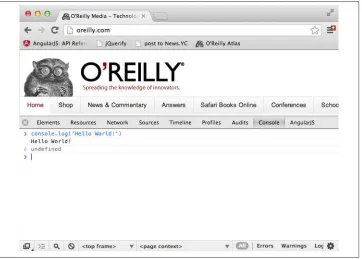
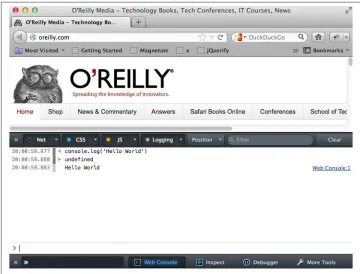
This code can be executed at a browser console. In Chrome, select View → Developer → JavaScript Console (see Figure 2-2).
Figure 2-2. Chrome JavaScript console
Figure 2-3. Firefox JavaScript console
Other modern browsers have comparable menu options that provide the same functionality.
Host Objects
Technically, there is no built-in I/O functionality in JavaScript (although the runtime environment—in this case, the browser—does provide it). This is in accordance with the ECMA standard:
ECMAScript as defined here is not intended to be computationally self-sufficient; in‐ deed, there are no provisions in this specification for input of external data or output of computed results. Instead, it is expected that the computational environment of an ECMAScript program will provide not only the objects and other facilities described in this specification but also certain environment-specific host objects, whose descrip‐ tion and behavior are beyond the scope of this specification except to indicate that they may provide certain properties that can be accessed and certain functions that can be called from an ECMAScript program.
The implications of this not being defined are more than a mere curiosity, not the least of which that console.log is not available in certain versions of Microsoft’s Internet Ex‐ plorer and consequently, unexpected errors can occur. Many of the challenges and problems associated with the JavaScript programming language are actually the fault of the execution environment (which is often a web browser). The DOM is a cross-platform, language-independent means of referencing and manipulating HTML ele‐ ments. It also is not part of the JavaScript language itself.
Back to the the Hello World example itself: you might have noticed that single quotes were used instead of double quotes and that there was no trailing semicolon. JavaScript syntax is forgiving (or ambiguous, if you prefer). There have been a number of inno‐ vations to reduce confusion in this area. A “strict” mode was added to the language itself. Utilities like Douglas Crockford’s JSLint were created to enforce the use of the “good parts” of the JavaScript language. See his book on the subject for more in-depth coverage. Suffice it to say, JavaScript has a number of leniencies that can result in an undisciplined developer or team causing some difficult-to-debug problems. It is well worth the time to learn the language well enough to adopt conventions and practices that avoid these problems.
File system organization
The file and directory structure of a Java project are directly linked to the structure of the code. A source file generally contains a single (public) class with the same name as the file. The file exists in a directory that reflects the package name associated with the class. (There are a few other rules and exceptions related to inner classes, access mod‐ ifiers, and other constructs, but it is clear that file and directory structures will follow similar general structures across Java projects). At times, these restrictions can be an inconvenience (especially in small applications). As a project grows, it provides an clear indication of the general scope and organization of the code base. A glance at the file system makes it immediately evident when a project is becoming disorganized without ever opening a file.