Other resources from O’Reilly
Related titles 802.11 Security
Computer Security Basics Java™ Security
Linux Security Cookbook™ Network Security with
OpenSSL
Secure Coding: Principles & Practices
Securing Windows NT/2000 Servers for the Internet
SSH, The Secure Shell: The Definitive Guide Web Security, Privacy, and
Commerce
Building Secure Servers with Linux
Ajax and Web Services Head Rush Ajax RESTful Web Services
oreilly.com oreilly.comis more than a complete catalog of O’Reilly books. You’ll also find links to news, events, articles, weblogs, sample chapters, and code examples.
oreillynet.comis the essential portal for developers interested in open and emerging technologies, including new platforms, pro-gramming languages, and operating systems.
Conferences O’Reilly brings diverse innovators together to nurture the ideas that spark revolutionary industries. We specialize in document-ing the latest tools and systems, translatdocument-ing the innovator’s knowledge into useful skills for those in the trenches. Visit con-ferences.oreilly.com for our upcoming events.
Securing Ajax Applications
Christopher Wells
Securing Ajax Applications by Christopher Wells
Copyright © 2007 Christopher Wells. All rights reserved. Printed in the United States of America.
Published by O’Reilly Media, Inc., 1005 Gravenstein Highway North, Sebastopol, CA 95472. O’Reilly books may be purchased for educational, business, or sales promotional use. Online editions are also available for most titles (safari.oreilly.com). For more information, contact our
corporate/institutional sales department: (800) 998-9938 or[email protected].
Editor: Tatiana Apandi Production Editor: Mary Brady
Production Services: Tolman Creek Design
Cover Designer: Karen Montogmery Interior Designer: David Futato
Illustrators: Robert Romano and Jessamyn Read
Printing History:
July 2007: First Edition.
Nutshell Handbook, the Nutshell Handbook logo, and the O’Reilly logo are registered trademarks of O’Reilly Media, Inc.Securing Ajax Applications, the image of a spotted hyena, and related trade dress are trademarks of O’Reilly Media, Inc.
Many of the designations used by manufacturers and sellers to distinguish their products are claimed as trademarks. Where those designations appear in this book, and O’Reilly Media, Inc. was aware of a trademark claim, the designations have been printed in caps or initial caps.
While every precaution has been taken in the preparation of this book, the publisher and author assume no responsibility for errors or omissions, or for damages resulting from the use of the information contained herein.
This book uses RepKover™, a durable and flexible lay-flat binding.
To Jennafer, my honey, and Maggie, my bit of honey:
vii
Table of Contents
Preface
. . . .ix
1. The Evolving Web
. . .1
The Rise of the Web 2
2. Web Security
. . .29
Security Basics 29
Risk Analysis 37
Common Web Application Vulnerabilities 40
3. Securing Web Technologies
. . .56
How Web Sites Communicate 56
Browser Security 61
Browser Plug-ins, Extensions, and Add-ons 76
4. Protecting the Server
. . .99
Network Security 100
Host Security 103
Web Server Hardening 121
Application Server Hardening 128
5. A Weak Foundation
. . .130
HTTP Vulnerabilities 131
The Threats 136
JSON 143
XML 146
RSS 148
Atom 149
6. Securing Web Services
. . .155
Web Services Overview 156
Security and Web Services 167
Web Service Security 172
7. Building Secure APIs
. . .174
Building Your Own APIs 174
Preconditions 179
Postconditions 180
Invariants 180
Security Concerns 181
RESTful Web Services 183
8. Mashups
. . .190
Web Applications and Open Internet APIs 191
Wild Web 2.0 192
Mashups and Security 194
Open Versus Secure 198
A Security Blanket 199
Case Studies 201
ix
Preface
1Deciding to add security to a web application is like deciding whether to wear clothes in the morning. Both decisions provide comfort and protection throughout the day, and in both cases the decisions are better made beforehand rather than later. Just look around and ask yourself, “How open do I really want to be with my neigh-bors?” Or, “How open do I really want them to be with me?”
It’s all about sharing. With web sites sharing data via open APIs, web services, and other new technologies we are experiencing the veritable Woodstock of the digital age. Free love now takes the form of free content and services. Make mashups, not web pages! All right, so let’s get down to business.
Believe it, or not, there is security in openness. Look at the United States govern-ment, for example. The openness of the U.S. governmental system is what helps keep it secure. Maybe that can work for us, too! Repeat after me:
We, the programmers, in order to build a more perfect Web; to establish presence and ensure server stability; provide for the common Web; promote general security; for ourselves and our posterity; do ordain and establish this constitution…
Sadly, it is not quite that easy—or is it? Checks and balances make governments work. There are layers of cooperation and defense. Each layer provides defense in depth. Web application security is a serious business. All web applications are or will be vul-nerable to some form of attack. The thing to remember is that most people are good, and security is implemented to thwart those who are not. So, the chances of your appli-cation getting attacked are proportional to the number of bad apples out there.
Audience
Assumptions This Book Makes
This book assumes basic developers’ knowledge of the Internet and web applica-tions. It also assumes a general awareness of security problems that can arise on the Internet. Knowledge of security methodologies and practices is helpful, but not required.
Contents of This Book
Chapter 1,The Evolving WebRecounts how we got to where we are today on the Web. The chapter explains how web technologies have evolved, and why we have such a tangled Web. Chapter 2,Web Security
Describes basic security terms, practices, and methodologies. It also lays out and identifies the major vulnerabilities on the Web today.
Chapter 3,Securing Web Technologies
Describes all the different types of web communications. This chapter discusses basic security measures that minimize risk and examines the security of several Internet technologies.
Chapter 4,Protecting the Server
Walks through setting up a secure web server. It offers practical advice to help protect a server from threats on the Internet.
Chapter 5,A Weak Foundation
Explores the major protocols associated with web applications, where the seams are, what the possible attack vectors might be, and some recommended counter-measures to help make applications more secure.
Chapter 6,Securing Web Services
Looks at how web services work, the moving parts, how web technologies such as Ajax can fit in, and what major areas require security attention.
Chapter 7,Building Secure APIs
Examines web API design and construction and points out some security pitfalls along the way.
Chapter 8,Mashups
Preface | xi
Conventions Used in This Book
The following typographical conventions are used in this book: Plain text
Indicates menu titles, menu options, menu buttons, and keyboard accelerators (such as Alt and Ctrl).
Italic
Indicates new terms, URLs, email addresses, filenames, file extensions, path-names, directories, and Unix utilities.
Constant width
Indicates commands, options, switches, variables, attributes, keys, functions, types, classes, namespaces, methods, modules, properties, parameters, values, objects, events, event handlers, XML tags, HTML tags, macros, the contents of files, or the output from commands.
Constant width bold
Shows commands or other text that should be typed literally by the user. Constant width italic
Shows text that should be replaced with user-supplied values.
This icon signifies a tip, suggestion, or general note.
This icon indicates a warning or caution.
Using Code Examples
This book is here to help you get your job done. In general, you may use the code in this book in your programs and documentation. You do not need to contact us for permission unless you’re reproducing a significant portion of the code. For example, writing a program that uses several chunks of code from this book does not require permission. Selling or distributing a CD-ROM of examples from O’Reilly books does require permission. Answering a question by citing this book and quoting example code does not require permission. Incorporating a significant amount of example code from this book into your product’s documentation does require permission.
We appreciate, but do not require, attribution. An attribution usually includes the title, author, publisher, and ISBN. For example: “Securing Ajax Applications by Christopher Wells. Copyright 2007 Christopher Wells, 978-0-596-52931-4.”
How to Contact Us
Please address comments and questions concerning this book to the publisher: O’Reilly Media, Inc.
1005 Gravenstein Highway North Sebastopol, CA 95472
800-998-9938 (in the United States or Canada) 707-829-0515 (international or local)
707-829-0104 (fax)
We have a web page for this book, where we list errata, examples, and any addi-tional information. You can access this page at:
http://www.oreilly.com/catalog/9780596529314
To comment or ask technical questions about this book, send email to:
For more information about our books, conferences, Resource Centers, and the O’Reilly Network, see our web site at:
http://www.oreilly.com
Safari® Enabled
When you see a Safari® enabled icon on the cover of your favorite tech-nology book, that means the book is available online through the O’Reilly Network Safari Bookshelf.
Safari offers a solution that’s better than e-Books. It’s a virtual library that lets you easily search thousands of top tech books, cut and paste code samples, download chapters, and find quick answers when you need the most accurate, current informa-tion. Try it for free athttp://safari.oreilly.com.
Acknowledgments
I would like to extend my thanks to the great folks at O’Reilly for giving me the opportunity to write this book. I would especially like to thank my editor, Tatiana Apandi, for putting up with me, and to all the technical reviewers who read my book and provided such instructive feedback. Thank you.
Preface | xiii I would additionally like to thank my family—my wife, Jennafer; my daughter, Maggie; my mother and father, Judy and Patrick—and all my kind friends and rela-tives who helped and encouraged me while writing this book.
1
Chapter 1
CHAPTER 1
The Evolving Web
1People are flocking to the Web more than ever before, and this growth is being driven by applications that employ the ideas of sharing and collaboration. Web sites such as Google Maps, MySpace, Yahoo!, Digg, and others are introducing users to new social and interactive features, to seeding communities, and to collecting and reusing all sorts of precious data.
The slate has been wiped clean and the stage set for a new breed of web application. Everything old is new again. Relationships fuel this new Web. And service providers, such as Yahoo!, Google, and Microsoft, are all rushing to expose their wares. It’s like a carnival! Everything is open. Everything is free—at least for now. But whom can you trust?
Though mesmerized by the possibilities, as developers, we must remain vigilant—for the sakes of our users. For us, it is critical to recognize that the fundamentals of web programming have not changed. What has changed is this notion of “opening” resources and data so that others might use that data in new and creative ways. Fur-thermore, with all this sharing going on we can’t let ourselves forget that our applica-tions must still defend themselves.
As technology moves forward, and we find our applications becoming more interac-tive—sharing data between themselves and other sites—it raises a host of new secu-rity concerns. Our applications might consist of services provided by multiple providers (sites) each hosting its own piece of the application.
The surface area of these applications grows too. There are more points to watch and guard against—expanding both with technologies such as AJAX on the client and REST or Web Services on the server.
Luckily, we are not left completely empty-handed. Web security is not new. There are some effective techniques and best practices that we can apply to these new applications.
have been abstracted away. In doing so developers have grown complacent with their environments and in some cases are even more vulnerable to attack.
Before we continue moving forward, we should look at how we got to where we are today.
The Rise of the Web
In 1989, at aConseil Européen pour la Recherche Nucléaire(CERN) research facility in Switzerland, a researcher by the name of Tim Berners-Lee and his team cooked up a program and protocol to facilitate the sharing and communication of their particle physics research. The idea of this new program was to be able to “link” different types of research documents together.
What Berners-Lee and the others created was the start of a new protocol,Hypertext Transfer Protocol (HTTP), and a new markup language, Hypertext Markup Lan-guage (HTML). Together they make up the World Wide Web (WWW).
The abstract of the originalrequest for comment (RFC 1945) reads:
The Hypertext Transfer Protocol (HTTP) is an application-level protocol with the light-ness and speed necessary for distributed, collaborative, hypermedia information sys-tems. It is a generic, stateless, object-oriented protocol which can be used for many tasks, such as name servers and distributed object management systems, through exten-sion of its request methods (commands). A feature of HTTP is the typing of data repre-sentation, allowing systems to be built independently of the data being transferred. HTTP has been in use by the World-Wide Web global information initiative since 1990. This specification reflects common usage of the protocol referred to as “HTTP/1.0”.
The official RFC outlines everything there is to say about HTTP and is located at
http://tools.ietf.org/html/rfc2616. If you have any trouble sleeping at night, reading this might help you out.
Berners-Lee had set out to create a way to collate his research documents—to keep things just one click away. It was really just about information and data organiza-tion; little did he know he was creating the foundation for today’s commerce. Today, we don’t even see HTTP unless we want to deliberately. It has, for the most part, been abstracted away from us. Yet, it is at the very heart of our applications.
Hypertext Transfer Protocol (HTTP)
The Rise of the Web | 3 To Jim, protocol-level communication using HTTP is like breathing. In fact, he would prefer to not use a browser at all, but rather just drop into a terminal window and use good ol’ telnet.
Jim types:
$telnet www.somewebsite.com 80 GET classic.html / HTTP/1.1
and gets back:
Trying xxx.xxx.xxx.xxx...
Connected to www.somewebsite.com (xxx.xxx.xxx.xxx).
Escape character is '^]'.
HTTP/1.1 200 OK
Date: Fri, 08, Sep 2006 06:03:23 GMT Server: Apache/2.2.1 BSafe-SSL/2.3 (Unix) Content-type: text/html
Content-length: 236
<HTML> <HEAD>
<TITLE>Classic Web Page</TITLE> </HEAD>
<BODY>This is a classic web page </BODY>
</HTML>
There are no GUIs or clunky browsers to get in the way and obfuscate the code, just plain text—simple, clear, and true. Jim loves talking to web servers this way. He thinks that web servers are remarkable devices—very chatty. Jim also likes to observe the start and stop of each request and response cycle. Jim sees a different side of the Web than most users will. He can see the actual data interchange and transactions as they happen. Let’s go over what Jim did.
HTTP Transactions
When Jim hooked up with the server using telnet he established a connection to the server and began initiating an HTTP transaction. Next, he evoked the HTTP GET
command ormethod followed by the name of the resource that he wanted—in this case, classic.html. This took the form of a specified Uniform Resource Identifier
(URI), which is a path that the server associates with the location of the desired resource. Figure 1-1 shows an HTTP request.
Then, the HTTP command was sent to the server for processing. The server sees the request and decides whether to process it. In this case it decides the request can be pro-cessed. After processing, the server arrives at a result and sends its STATUS CODE fol-lowed by the message, formatted in blocks of data called HTTP messages, back to Jim.
The response
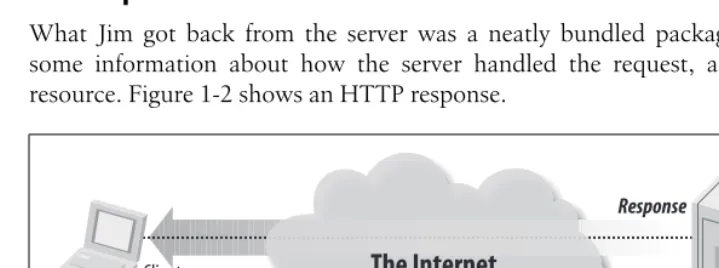
What Jim got back from the server was a neatly bundled package that contained some information about how the server handled the request, and the requested resource. Figure 1-2 shows an HTTP response.
*Click* Now the transaction is over, and I meanover. Jim asked for his resource and got it. Finito. Everything is done.
This is important to remember.HTTP transactions are stateless. No state was per-sisted by this transaction. The server has moved on to service other requests, and if Jim shows up again, he will have to start all over and negotiate all of the same instructions. Nothing is remembered. The transaction is over.
Stateless is a key concept in computer science. The idea is that the application’s running “state” is not preserved for future actions. It’s like asking someone for the time. You ask, you get your answer, and the transaction is over—you don’t get to have a conversation.
Figure 1-1. An HTTP request
Figure 1-2. An HTTP response (simple)
The Internet
Client Server
HTTP request
GET classic.html HTTP/1.1 Host: www.secrsite.com
Request
The Internet
Client Server
HTTP response
HTTP/1.1 200 OKContent-type: text/html Content-length: 1406
…
The Rise of the Web | 5 How can we be like Jim and tickle the server into giving up its information? Well, there is actually a whole set of commands baked in to the HTTP protocol that are rarely seen by anyone. But because we are building our applications on top of these commands, we should see how they actually work. I’d highly recommend (and I’m sure Jim would agree) that you readHTTP:The Definitive Guideby David Gourley and Brian Totty (O’Reilly) for more information. This book is a handy compass for any would-be adventurer wanting to explore the overgrown foot trails of HTTP. Now, let’s take out the machete and start whacking.
HTTP Methods
The commands a web server responds to are calledHTTP methods. The HTTP RFC defines eight standard methods, yet it is ultimately up to the web server vendor as to which of these methods are actually implemented. Table 1-1 lists the eight common HTTP methods.
Safe methods
Some HTTP methods defined by the HTTP specification are intended to be “safe” methods—meaning no action (or state change) will be taken on the server. The two main methodsGET andHEAD fall into this category.
Unfortunately, this “safeness” is more of a guideline than a rule. Some applications have been known to break this contract by posting live data via theGETmethod using things such as theQueryString parameters.
Table 1-1. HTTP methods
Command Description
HEAD I’ll show you my headers if you show me yours! This command is particularly useful for retrieving meta-data written in response headers. The request asks for a response identical to one that it would get from a
GET command, but without the actual response body.
GET This is it baby! By far the most common command issued over HTTP. It is a simple request toGETa server-side resource.
POST This is the command that makes us trust our users. This is where we accept data from users. If malicious code is going to enter our system, it will most likely be through this command.
PUT Upload content to the server. This is another gotcha command that requires data input validation.
DELETE Deletes a specific resource. Yeah, right? Ah, no. This command is rarely implemented.
TRACE Echoes back the received request so that a client can see what intermediate servers are adding or
chang-ing on the request. This command is useful for discoverchang-ing proxy servers and other intermediate servers involved in the request.
OPTIONS Returns the HTTP methods that the server supports. This can be used to check the functionality of a web
server. Does the server implementDELETE, for example?
It is architecturally discouraged to useGET in such situations. Doing so may cause other problems with systems that rely on adherence to the specifications—such as other dynamic web pages, proxy servers, and search engines.
Likewise, unsafe methods (such asPOST,PUT, andDELETE) should be displayed to the user in a special way, normally as buttons rather than links, thus making the user aware of possible obligations.
Idempotent methods
The HTTP methodsGET,HEAD,PUT, andDELETEare defined to beidempotent, mean-ing that multiple identical requests should have the same effect as a smean-ingle request. MethodsOPTIONS andTRACE, being safe, are inherently idempotent.
HTTP Response
After we’ve successfully issued a command to a willing HTTP server, the server gets to respond. Figure 1-3 shows a more detailed HTTP response.
The HTTP response starts with a line that includes an acknowledgment of the HTTP protocol being used, an HTTP response status code, and ends with a reason phrase:
HTTP/1.1 200 OK
Next, the server writes some response headers to help further describe the server environment and message body details:
Date: Fri, 08, Sep 2006 06:03:23 GMT Server: Apache/2.2.1 BSafe-SSL/2.3 (Unix) Figure 1-3. A more detailed HTTP response
The Internet
Client Server
HTTP response
Date: Fri, 08, Sep 2006 06:03:23 GMT Server: Apache/2.2.2 BSafe-SSL/2.3 (Unix) Content-type: text/html
Content-length: 236
<HTML> <HEAD>
<TITLE>Clasic Web Page</TITLE> </HEAD>
<BODY>This is a classic web page </BODY>
</HTML>
The Rise of the Web | 7 Content-type: text/html
Content-length: 236
Finally the server sends the actual body of the HTTP message: <HTML>
<HEAD>
<TITLE>Classic Web Page</TITLE> </HEAD>
<BODY>This is a classic web page </BODY>
</HTML>
That’s it. Now, let’s take a look at what some of the response status codes are and how they get used.
HTTP status codes
Every HTTP request made to a willing HTTP server will respond with an HTTP sta-tus code. This stasta-tus code is a three-digit numeric code that tells the client/browser whether the request was successful or whether some other action is required. Table 1-2 shows the request received, and continuing process.
2xx success codes
The action was successfully received, understood, and accepted. Table 1-3 shows the codes that indicate successful action.
3xx redirection codes
The client must take additional action to complete the request. Table 1-4 lists redi-rection codes.
Table 1-2. 1xx Informational Codes
Status code Description
100 Continue 101 Switching Protocols
Table 1-3. 2xx success codes
Status code Description
200 OK
201 Created 202 Accepted
203 Non-Authoritative Information 204 No Content
4xx client error codes
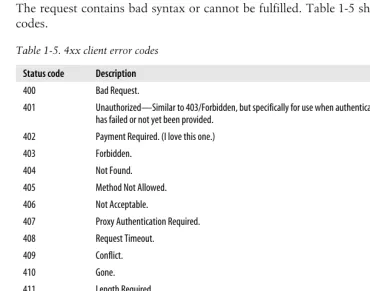
The request contains bad syntax or cannot be fulfilled. Table 1-5 shows client error codes.
Table 1-4. 3xx redirection codes
Status code Description
300 Multiple Choices 301 Moved Permanently 302 Moved Temporarily (HTTP/1.0) 302 Found (HTTP/1.1)
303 See Other (HTTP/1.1) 304 Not Modified
305 Use Proxy (Many HTTP clients, such as Mozilla and Internet Explorer, don’t correctly handle responses with this status code.)
306 No longer used, but reserved 307 Temporary Redirect
Table 1-5. 4xx client error codes
Status code Description
400 Bad Request.
401 Unauthorized—Similar to 403/Forbidden, but specifically for use when authentication is possible but has failed or not yet been provided.
402 Payment Required. (I love this one.) 403 Forbidden.
404 Not Found. 405 Method Not Allowed. 406 Not Acceptable.
407 Proxy Authentication Required. 408 Request Timeout.
409 Conflict.
410 Gone.
411 Length Required. 412 Precondition Failed. 413 Request Entity Too Large. 414 Request-URI Too Long. 415 Unsupported Media Type.
416 Requested Range Not Able to be Satisfied. 417 Expectation Failed.
The Rise of the Web | 9
5xx server error codes
The server failed to fulfill an apparently valid request. Table 1-6 shows server error codes.
HTTP Headers
HTTP headers are like the clothes for HTTP transactions. They are metadata that accent the HTTP request or response. Either the client or the server can arbitrarily decide that a piece of information may be of interest to the receiving party.
The HTTP specification details several different types of headers that can be included in HTTP transactions.
General headers
General headers can appear in either the request or the response, and they are used to help further describe the message and client and server expectations. Table 1-7 lists the general HTTP headers.
Table 1-6. 5xx server error codes
Status code Description
500 Internal Server Error. 501 Not Implemented. 502 Bad Gateway. 503 Service Unavailable. 504 Gateway Timeout. 505 HTTP Version Not Supported.
509 Bandwidth Limit Exceeded. (This status code, although used by many servers, is not an official HTTP status code.)
Table 1-7. General HTTP headers
Header Description
Connection Allows clients and servers to specify connection options Date Timestamp of when this message was created Mime-Version The version of MIME that the sender is expecting
Trailer Lists the set of headers that trail the message as part of chunked-encoding Transfer-Encoding What encoding was performed on the message
Upgrade Gives a new version or protocol that the sender would like to upgrade to Via Shows what intermediaries the message has gone through
Cache-controla
a Optionally used to help with caching local copies of documents.
Used to pass caching directions
Request headers
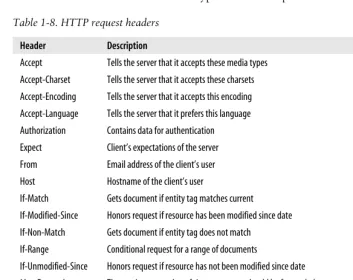
Request headers are headers that make sense in the context of a request. The request header fields allow the client to pass metadata about the request, and about the cli-ent itself, to the server. These fields act as request modifiers, with semantics equiva-lent to the parameters on a programming language method invocation. It is important to recognize that this data is accepted raw from the client without any kind of validation. Table 1-8 shows typical HTTP request headers.
Request header field names can be extended reliably only in combination with a change in the protocol version. However, new or experimental header fieldsmaybe given the semantics of request header fields if all parties in the communication recog-nize them to be request header fields. Unrecogrecog-nized header fields are treated as entity header fields.
Finally, nothing guarantees the validity of this metadata, since it is provided by the client.The client could lie.Therefore, backend applications and services should vali-date this data under authenticated conditions before depending on any values. Table 1-8. HTTP request headers
Header Description
Accept Tells the server that it accepts these media types Accept-Charset Tells the server that it accepts these charsets Accept-Encoding Tells the server that it accepts this encoding Accept-Language Tells the server that it prefers this language Authorization Contains data for authentication Expect Client’s expectations of the server From Email address of the client’s user Host Hostname of the client’s user
If-Match Gets document if entity tag matches current If-Modified-Since Honors request if resource has been modified since date If-Non-Match Gets document if entity tag does not match
If-Range Conditional request for a range of documents
If-Unmodified-Since Honors request if resource has not been modified since date Max-Forwards The maximum number of times a request should be forwarded Proxy-Authorization Same as authorization, but for proxies
Range Requests a range of documents, if supported Referrer The URL that contains the request URI
The Rise of the Web | 11 The server is not guaranteed to respond to any request headers. If it
does, it does so out of the goodness of its administrator’s heart, for none of them are required.
Response headers
Response messages have their own set of response headers. These headers provide the client with information regarding this particular request. These headers can pro-vide information that might help the client make better requests in the future. Table 1-9 shows common HTTP response headers.
Entity headers
Entity headers provide more detailed information about the requested entity. Table 1-10 lists some typical HTTP entity headers.
Content headers
Content headers describe useful metadata about the content in the HTTP message. Most servers will include data about the content type, length of content, encoding, and other useful information. Table 1-11 is a list of HTTP content headers.
Table 1-9. HTTP response headers
Header Description
Age How old the response is
Public A list of request methods the server supports Retry-After A date or time to try back—if unavailable
Server The name and version of the server’s application software Title For HTML documents, the title as given in the HTML
Warning A more detailed warning message than what is in the reason phrase of the HTTP response Accept-Ranges The type of ranges that a server will accept
Vary A list of other headers that the server looks at that may cause the response to vary Proxy-Authenticate A list of challenges for the client from the proxy
Set-Cookie Used to set a token on the client Set-Cookie2 Similar to Set-Cookie
WWW-Authenticate A list of challenges for the client from the server
Table 1-10. HTTP entity headers
Header Description
The HTTP header part of the message terminates with a bare CRLF.
Message or Entity Body
The message or entity body is where the payload of an HTTP message is located. It is the meat of the message. When using HTTP the most common message body will usually be formatted as HTML.
HTML
I can’t believe that it has been only a little more than 10 years since the creation of the Web, and I am about to discuss “classic” web pages. But as Dylan said, “The times they are a changin’.” Figure 1-4 shows what a classic web page looks like. Table 1-11. HTTP content headers
Header Description
Content-Base The base URL for resolving relative URLs Content-Encoding Any encoding that was performed on the body
Content-Language The natural language that is best used to understand the body Content-Length The length or size of the body
Content-Location Where the resource is located Content-MD5 An MD5 checksum of the body
Content-Range The range of bytes that this entity represents from the entire resource Content-Type The type of object that this body is
The Rise of the Web | 13 Actually, a classic web page looks like this:
<HTML> <HEAD>
<TITLE>Classic Web Page</TITLE> </HEAD>
<BODY>
<h1>This is a classic web page</h1> </BODY>
</HTML>
That’s pretty much how things look under the covers. Not a lot of magic, but you can see the stitching in the seams. Now, this text stuff is great for Jim, but some peo-ple want pictures! For those peopeo-ple we need something different—something that would allow them to “browse” the content. Enter the browser!
Mosaic and Netscape
News of Berners-Lee’s invention reached others in the educational community, and by the early 1990s researchers at colleges and universities around the globe began to use the Web to index their research documents.
Legend has it that upon seeing a demonstration of a browser and web server at the University of Illinois’ National Center for Supercomputing Applications (NCSA), a couple of graduate students named Marc Andreessen and Eric Bina, decided to develop a new browser that they would name NCSA Mosaic. Coupled with NCSA’s HTTP server the two became an immediate hit.
The biggest difference about this new browser was that it allowed for images in the markup language. The notion of including images in the markup language really sexed up the otherwise text-heavy reference pages. Previously images were refer-enced as links and would open in their own window after clicked. With Mosaic’s new features you could now achieve something that corporate America could under-stand—branding.
Andreessen then took the idea to the bank and created the Internet’s first commer-cial product, which was a little web browser named Netscape. Yep. Netscape. Netscape quickly gained acceptance, and its usage skyrocketed. God bless America. You have to love a good rags-to-riches story. The story doesn’t stop here, though; that was just beginning.
Andreessen and Bina eventually left the NCSA, and the original NCSA mosaic code base was free to be licensed to other parties. One of these parties was a small com-pany called SpyGlass.
Back then, Microsoft didn’t think that much about the Internet—they were too busy hooking people into Windows—so the earliest versions of IE didn’t amount to much. But, as Internet usage grew, Microsoft responded. When NT 3.5 was released, Microsoft took an all-in approach to the Internet, throwing the entire company behind Internet development and expansion.
The Browser Wars
Episode IIIWar! The Internet is expanding at break-neck speed.
In a stunning move Microsoft releases a new browser capable of unseating the all-mighty Netscape. The two go to battle hurdling new features at one another. Users benefit. Cool things abound on both sides but there can be only one victor.
IE 4.0, by all accounts, was one of the greatest innovations in computer technology. I know that sounds like mighty praise, but when you consider that Microsoft achieved a complete turn-around in market share from having just 6%–7% to more than 80% in a little over a year, you have to agree. Any way you look at it the world benefited by getting a truly revolutionary browser.
The new IE gave users a choice of browsers while providing many new and powerful features. Its release lit a powder keg of innovation on the Web.
Plug-ins, ActiveX, Applets, and JavaScript, Flash
If you don’t know by now, web users really want real-time applications with fancy user interfaces (UI) that have lots of swag (Figure 1-5 shows the actual Swag web site,
http://www.swag.com). Web users tend to want their experience to be a drag-and-drop one. The Web, by itself, does not offer that kind of functionality, so it must be added on to the browser by way of plug-ins and other downloadable enhancements.
Java applets
The Rise of the Web | 15 The technology really was ahead of its time, but size, performance, and security con-cerns kept it from taking off. It’s worth noting that the majority of the issues with Java have disappeared over the last few years, and that applets—once again—might prove to be the next big thing. I, personally, am betting on the Java comeback. Stay tuned.
ActiveX
automation). This version of OLE is commonly used by web designers to embed multimedia files in web pages.
Imitation is the greatest sort of flattery. ActiveX was Microsoft’s me-too answer to applets. It was also the means by which Microsoft extended IE’s functionally.
Flash
Since its introduction in 1996, Flash technology has become a popular method for adding animation and interactivity to web pages; several software products, systems, and devices can create or display Flash. Flash is commonly used to create animation, advertisements, and various web page components; integrate video into web pages; and, more recently, develop rich Internet applications such as portals.
The Flash files, traditionally calledflash movies, usually have a.swffile extension and may be an object of a web page or strictly “played” in the standalone Flash Player. With all these browser enhancements, and all these different choices, web develop-ment and innovation took off like nothing ever seen before.
The Dot-Com Bubble
During the late 1990s things were really popping! Nobody had imagined the success web technology would have. (Figure 1-6 shows the dot-com bubble on the NAS-DAQ composite index.)
Suddenly, everyone wanted a web page—people, companies, pets, everyone. Since it’s so easy to make a web page, many would-be developers took up the charge— building web sites in their spare time. You would hear people say things such as Figure 1-6. NASDAQ composite index showing the dot-com bubble
The Rise of the Web | 17 “You don’t need a big software development house to make your site. My neigh-bor’s kid can set you up for $30.”
As acceptance grew, it became obvious to businesses that this was an opportunity to create another sales channel. Lured by the notion of free publishing and the ability to instantly connect with their users, companies began searching for ways to conduct commerce on the Web.
Web Servers
What started out to be simple servers processing simple HTTP requests was turning into big multithreaded servers capable of servicing thousands of requests. As demand grew so too did the number of web servers.
Web servers began to offer more and more features. As demand grew, people’s desire to conduct transactions using this media also increased. Web servers began to staple on functionality that could help preserve some state.
Netscape Enterprise Server
With its dominance in the browser market, Netscape also took an interest in the server market. It was first on the scene to try and solve the lack of state problem by providing a mechanism for preserving state via client side cookies.
Netscape also was first to implement secure sockets layer (SSL) encryption as a way of providing transport level security for web pages—the infamous lock in the browser.
Here is a list of features from Netscape’s 1998 sales brochure:
Netscape Enterprise Server delivers high performance with features such as HTTP1.1, multithreading, and support for SSL hardware accelerators
Offers high-availability features including support for multiple processes and process monitors, as well as dynamic log rotation
Provides enterprise-wide manageability features including delegated administration, cluster management, and LDAP integration with Netscape Directory Server
Supports development of server-side Java and JavaScript applications that access data-base information using native drivers
Apache
Microsoft’s Internet Information Server (IIS)
As part of the back-office suite of products included in the NT 3.5 rollout, Internet Information Server (IIS) was initially released as an additional set of Internet-based services for Windows NT 3.51. IIS 2.0 followed, adding support for the Windows NT 4.0 operating system, and IIS 3.0 introduced the Active Server Pages dynamic scripting environment. Its popularity was spurred when IIS was bundled with Win-dows NT as a separate “Option Pack” CD-ROM.
e-commerce
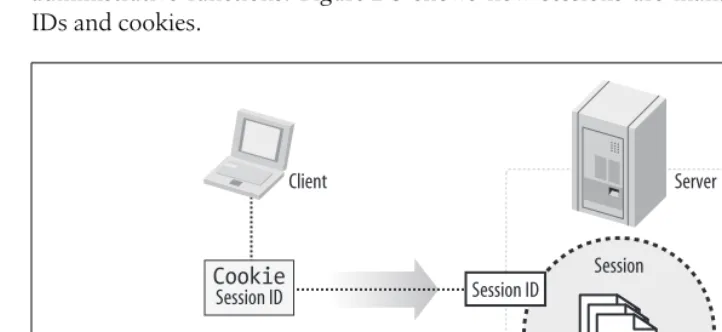
The moment had arrived. e-commerce was a reality. Static web pages are great, but they don’t get you Amazon or eBay. Wait a minute. The HTTP RFC didn’t mention any of this. Nowhere does it read, “a dynamic framework for e-commerce” or “a software-oriented architecture for the distribution of messages within a federated application.” HTTP is stateless. This makes return visits hard to track. With tech-niques such as cookies, web servers attempted to build state and session manage-ment into the web server.
With all the new features offered by these evolving web servers, we began to see a new kind of web site—or the birth of the web application.
The web application
So, with a decade of web pages behind us the Web now is like a college graduate— beaming with excitement and curiosity and looking for a new job. Companies, lured by “free publishing” have flocked to the Web and are demanding more. Commerce! By the year 2000 web applications serving dynamic data were showing up every-where and fueling the great climax of the dot-com era. For web pioneers, led by the likes of Amazon, eBay, Yahoo!, and Microsoft, the electronic world was their oyster. Web server vendors and technology providers, faced with the demands of an ever-growing dynamic Web, were breaking new ground and innovating a whole new type of server. Figure 1-7 shows a typical application server environment.
Application servers
With the demand for dynamic web sites increasing, product vendors responded by creating infrastructures, such as server-side technology for dynamically generated web sites, to support this new and dynamic use of data.
The Rise of the Web | 19 The termapplication serverwas formed initially from the success of server-side Java orJava 2 Enterprise Edition(J2EE). Since then the term has evolved into meaning any server software that provides access to backend services and resources.
Commercials for Internet companies
At the height of the dot-com bubble, these trendy, high-spending companies were hemorrhaging money. Tech companies were living fast and loose with a “Get big or get lost” mentality.
Nothing so soundly illustrated how over the top things were than Super Bowl XXXIV, the so-called “dot-com Super Bowl.” The game took place at the height of the bubble and featured several Internet companies in television commercials. The web site advertisers that purchased commercials during this game—and their fates— are as follows:
Agillion (customer relationship management)
Filed bankruptcy in July 2001
AutoTrader.com (car shopping portal)
Survived
Britannica.com (encyclopedias)
Survived
Computer.com (computer retail)
Ceased operations in October 2000
Dowjones.com (financial information)
Survived
E*Trade (online financial services):
NYSE: ET
Figure 1-7. Application server architecture
Request object
Client
User input
Web server
Response object Application server
Business logic
Epidemic Marketing (incentive marketing)
Closed in June 2000
Hotjobs.com (job search portal)
Acquired by Yahoo!
Kforce.com (temporary job placement)
Survived
LifeMinders.com (email marketing)
Acquired by Cross Media Marketing in July 2001
MicroStrategy (business intelligence vendor)
NASDAQ: MSTR
Monster.com (job search portal)
NASDAQ: MNST
Netpliance (low-cost Internet terminals)
Cancelled product line in November 2000
OnMoney.com (financial portal)
Ameritrade subsidiary, no longer operating
OurBeginning.com (mail-order stationery)
Filed bankruptcy in December 2001
Oxygen Media (television entertainment)
Survived
Pets.com (mail-order pet supplies)
Ceased operations in November 2000
As you can see, many of the companies no longer exist. Most had a short-sighted business plan. In the end, the venture capital that funded many of these companies dried up, and the more transparent companies learned that they could not make it on network effects alone. The honeymoon was over, and Wall Street woke up with a hangover.
Pop!
So, the other shoe dropped. On September 26, 2000, The U.S. Department of Jus-tice decided that Microsoft went too far in its innovations. After a long antitrust trial, the court had finally ruled against the software giant.
The Rise of the Web | 21 Needless to say, the findings did not sit well with Wall Street investors, who were already leery about what might come next. At this point Wall Street delivered a wake-up call and began to pull out. The world had enjoyed unprecedented growth in the tech sector; thousands of companies with questionable business models relied on the ability to suspend economic disbelief. Now, many would disappear.
Fear not, all is not done. This is not the end of the story. Shortly before the ruling in the antitrust case, Microsoft released an upgrade to IE. This new version of the land-mark browser would include some new features that, as it turns out, would fuel the next great wave of Internet development. So, like any great epic tale, there is a setup for a sequel. IE 5.0 implemented the new features to help support its Microsoft Out-look Web Client.
The Hero, Ajax
Oh boy! We’ve finally gotten to the good stuff. So, what exactly is Ajax? A Greek hero second only in strength to Achilles? A chlorine-based chemical used for cleaning your toilet? Or a powerful new way to make ordinary web pages into web applications?
In 2005, a JavaScript-slinging outlaw named Jesse James Garrett, founder of Adap-tive Path in San Francisco, wrote an essay about how he could achieve dynamic drag-and-drop functionality without downloading any add-ons or plug-ins and by using the tools already available in the browsers—*poof*—Ajax was born.
Garrett was the first to coin the termAjax—though he didn’t mean it to stand for anything. Since then, others have forced the acronym to beAsynchronous JavaScript And Xml.
Garrett recognized that the classic request-response cycle was not dynamic enough to support the really glitzy stuff. So, leveraging available features included in the IE5 browser, Garrett blazed a new trail.
Instead of the single request-response model, Ajax offers the capability to create micro—page level—requests that just update particular portions of the page. The browser does not have to do a full refresh.
Figure 1-8 shows an XMLHttpRequest transaction.
What makes Ajax different from previous attempts to provide a richer client-side experience is that Ajax leverages technology already present in the browser without having to download anything. The core technologies that make up Ajax are:
• Standards-based presentation using XHTML and CSS • The Browser’sDocument Object Model (DOM) • Data exchange with XML
• Data transformation with XSLT
Out of the preceding list of technologies the real muse behind Ajax lies in the asyn-chronous communication via XMLHttpRequest. This is just something you wouldn’t have thought about in a classic web page. I mean, you know the drill. You go out to the server and request a page, wait, get the page, wait, post your data, wait, get a response. That’s how this works, right? Well, Ajax changes all that.
XMLHTTP
XMLHttp was originally conceived by Microsoft to support the Outlook Web Access 2000 client as part of Exchange Server. XMLHttp was implemented as an ActiveX control. This ActiveX control has been available since IE55 and was first designed to help make Microsoft’s Outlook Web Client look and act more like Outlook the desktop application. In other words, Microsoft needed a hack to allow drag-and-drop in the browser.
XMLHttpRequest
Microsoft’s basic idea stuck, but because it was yet another Microsoft dependent technology some developers were slow to embrace it. Only after the other major browsers such as Safari, Mozilla, and Firefox had also implemented it did some developers begin to experiment. Today, it stands at the very center of Ajax.
So, here is how it works. Figure 1-9 shows the ordering of an HTTP request and an XMLHttpRequest.
XMLHttpRequest life cycle
1. The client’s browser requests a web page using HTTP.
2. The server responds with the requested page—including the Ajax activating JavaScript.
Figure 1-8. XMLHttpRequest transaction
The Internet
Client
Server
HTTP request
CSS/XHTML Browser/DOM
Javascript XMLHttpRequest
The Rise of the Web | 23 3. The browser executes the JavaScript portion of the page and renders the HTML. Next, the included JavaScript creates an XMLHttpRequest object and issues an additional HTTP request(s) to the server and passes a callback handle.
4. The server responds to the JavaScript initiated request, and the JavaScript “lis-tens” for server responses and remanipulates the browser DOM with the new data.
So, that’s it—clever, but not rocket science. Everything starts with JavaScript, and setting up one of these XMLHttpRequest objects is easy. For most browsers (includ-ing Mozilla and Firefox) us(includ-ing JavaScript, it looks like this:
var xhr = new XMLHttpRequest( );
In Internet Explorer, it looks like this:
var xhr = new ActiveXObject("Microsoft.XMLHTTP");
The object that gets created is an abstract object that works completely without user intervention. Once loaded, the object shares a powerful set of methods that can be used to expedite communications between the client and server. Table 1-12 lists the XMLHttpRequest methods.
Figure 1-9. XMLHttp transaction order
Table 1-12. XMLHttpRequest methods
Method Description
getAllResponseHeaders( ) Cancels the current request
getResponseHeader(headerName) Gets a response header
open(method, URL) open(method, URL, async)
open(method, URL, async, username, password)
Specifies the method, URL, and other attributes of the XMLHttpRequest
send (content) Sends the XMLHttpRequest
setRequestHeader(label, value ) Adds/sets a HTTP request header
1
2
3
Client
Server
Http request
CSS/XHTML Browser/DOM
Javascript XMLHttpRequest
Table 1-13 lists the XMLHttpRequest properties associated to each XMLHttp-Request.
Enough talking about this stuff, let’s see some code. Say we have a hit counter on a web page, and we want it to dynamically update every time someone visits the site. This is what it would look like in action. First we need a function that loads the XMLHttpRequest object into memory so that the rest of our JavaScript can use it. Example 1-1 shows how to set up and load the XMLHttpRequest object.
Table 1-13. XMLHttpRequest properties
Property Description
Onreadystatechange Event handler for an event that fires at every state change
readyState Object Status (int):
• 0 = uninitialized • 1 = loading • 2 = loaded • 3 = interactive • 4 = complete
responseText String version of data returned from server process
responseXML DOM-compatible document object of data returned from server
Status Numeric server response status code, such as (200, 404, etc.)
statusText String message reason phrase accompanying the status code (“OK,” “Not Found,” etc.)
Example 1-1. XMLHttpRequest object setup and loading
var xhr;
function loadXMLDoc(url) { xhr = false;
// Mozilla, Safari, Firefox and the like. if ( window.XMLHttpRequest ) {
try {
xhr = new XMLHttpRequest( ); }
catch (e) { xhr = false; }
}
// Internet Explorer
else if ( window.ActiveXObject ) { try {
xhr = new ActiveXObject("Msxml2.XMLHTTP"); }
The Rise of the Web | 25 Next, after loading the page the browser will load and execute the XMLDoc func-tion and load the XMLHttpRequest object into the variablexhr.
Example 1-2 shows how to set up a function that listens for a response from the server and that can handle the server’s callback.
The XMLHttpRequest object communicates over HTTP. The responding web server can barely distinguish this kind of request from any other HTTP request.
What Is an API?
Application Programming Interface (API) is a set of functions that one application makes available to another application so that they can talk together. The applica-tion offers a contract to other applicaapplica-tions that require that sort of funcapplica-tionality.
APIs are driving the new Web. New applications are being built that use API-provided services hosted from several different sites around the Web.
}
if ( xhr ) {
xhr.onreadystatechange = processXhrChange; xhr.open ( "GET", url, true );
xhr.send("newHit"); }
}
Example 1-2. Function setup
Function processXhrChange( ) {
// Check readyState to make sure the XMLHttpRequest has been fully loaded
if (Xhr.readyState == 4 ) {
// Check status code from server for 200 "OK"
if ( Xhr.status == 200 ) {
// Process incoming data // Update our hit counter Hit = hit + 1;
} else {
// Request had a status code other than 200
Alert ("There was a problem communicating with the server\n"); }
}
Google maps the way
Google Maps was first announced on the Google Blog on February 8, 2005, and it was the first real Web 2.0 application. It was, and still is, simply fantastic. You can put in an address, and it returns a map you can pull around and find what you are looking for. The application had all the ingredients to be an immediate hit.
Security problem
Most of the code behind Google Maps is JavaScript and XML. This means that it all gets sent to the browser where people can look at it. Some developers began to reverse-engineer the application and started to produce client-side scripts and server-side hooks that allowed them to customize the Google Maps features.
Some of the more well-known of these “Google Maps hacks” include tools that dis-play locations of Craigslist rental properties, student apartment rentals, and a local map Chicago crime data.
Solution: The Google Maps API
Under huge pressure from these developers and other search engines such as Yahoo!, the Google Maps API was created by Google to facilitate developers integrating Goo-gle Maps into their web sites, with their own data points.
At the same time as the release of the Google Maps API, Yahoo! released its own Maps API. Both coincided with the 2005 O’Reilly Where 2.0 Conference, June 29–30, 2005. This one event arguably ignited the whole web API movement and helped form the foundation for mashups.
Today, APIs can be specified by web sites. Thus Amazon.com provides a set of “retail APIs” that allow developers to create computer programs that use Amazon’s sophisti-cated online retail infrastructure. Third-party software developers have used this to cre-ate specialized storefronts. APIs from eBay facilitcre-ate program-to-program auction management, Google’s APIs provide search and mapping services, and so on.
Why Worry?
Well, to start with, absolutely anyone can make a web page. So, before you start thinking you’re special and the greatest programmer on the Web just remember that even Paris Hilton has a web page. The whole point behind the Web was to lower the barrier of entry so that potentially anyone could publish material. Just because any-one can publish doesn’t mean he knows how to publish securely.
Recreational developers
The Rise of the Web | 27 Security is hard, and not everyone is a security expert. No application is perfect, not as long as it accepts data from the Internet. But every little bit of security helps, and it helps if security is built-in to the application from the beginning, as part of the design.
Rapid application development (RAD)
For the same reasons that web pages were so easy to make, so are web applications.
Rapid application development(RAD) means we can see what the application is going to look like way before anything we could have done in the old days. Gone are the days of classic software engineering projects taking years to complete. But remember this formula: fast, secure, cheap—pick any two.
Software development life cycle (SDLC)
The Software development life cycle(SDLC) is a framework for successfully under-standing and developing software. It is an iterative process by which most profes-sional software is created. The process breaks down software development into a series of common steps. These steps usually are something such as:
1. Assess needs—gather requirements (including security!). 2. Design system specifications and tests.
3. Develop and implement system. 4. Test system/evaluate performance. 5. Maintain system.
Figure 1-10 shows a typical software development life cycle.
CCPD
Brace yourself. It’s tragic, but true. Three out of five developers suffer from some-thing called chronic cut-n-paste disease (CCPD). They gleefully cut code from web sites, books, magazines—wherever—and paste it into their sites.
Figure 1-10. Software development life cycle
Assess
Maintain Design
Also, because magazine and book writers are often writing hypothetical code they sometimes include things such as:
/* Put security here */
instead of providing concrete and secure examples.
Attackers and malware writers are finding fertile ground in this new cut-and-paste Web.
For More Information
Apache HTTP Server Project. “About the Apache HTTP Server Project.”http:// httpd.apache.org/ABOUT_APACHE.html (accessed October 17, 2006).
c|net, News.com. “Mother of Invention.”http://news.com.com/ 2009-1032-995679.html?tag=day1hed (accessed October 17, 2006).
Freeman, Elizabeth and Eric Freeman.Head First HTML with CSS and XHTML. Cal-ifornia: O’Reilly Media, Inc., 2006.
Gartner. “Gartner’s 2006 Emerging Technologies Hype Cycle Highlights Key Tech-nology Themes.” http://www.gartner.com/it/page.jsp?id=495475 (accessed October 17, 2006).
Gourley, David and Brian Totty.HTTP:The Definitive Guide. California: O’Reilly Media, Inc., 2002.
Henderson, Cal.Building Scalable Web Sites. California: O’Reilly Media, Inc., 2006. McLaughlin, Brett.Head Rush Ajax. California: O’Reilly Media, Inc., 2006.
U.S. District Court for the District of Columbia. “United States vs. Microsoft: Final Judgment, Civil Action No. 98-1232 (CKK).” http://www.usdoj.gov/atr/cases/ f200400/200457.htm (accessed October 17, 2006).
w3.org. “Tim Berners-Lee.” http://www.w3.org/People/Berners-Lee (accessed Octo-ber 17, 2006).
Security Basics | 29
Chapter 2
CHAPTER 2
Web Security
2Chapter 1 describes where the Web came from and how it works. It is important to remember that the modern Web is built on a series of software abstractions and that we still need to know the basic protocol and infrastructure to build reliable and secure applications.
This chapter takes a closer look at how security works and how it applies to web applications. If your application is on the Internet, it is on the front lines of your net-work. It is like a door to the outside world that allows visitors to come in and check out whatever you have to offer. Your application needs to be secure, and you need to be aware of the dangers an application can open to your network.
Security Basics
Imagine a security guard walking through the dimly lit corridors of an office build-ing late at night. As she enters each room, she shines her flashlight into every corner, scans for anything out of the ordinary, and then turns out the light and locks the door behind her. She follows this routine nightly and ensures that the office is safe and secure.
Well, web applications don’t have security guards to protect them, by default. There is no enforcer to beat the living bytes out of would-be attackers.
Build Security In
Expect the unexpected
Boo!Attackers try to break things. They use applications in unexpected ways to gen-erate faults and other conditions that could benefit them. Security concerns almost always arise from a condition that nobody expected.
Remember that night security guard. She’s patrolling through the building looking for things out of the ordinary. She knows that if somethingisout of place, someone or something caused that condition. Of course, a smart attacker just waits until the guard has checked all the roomsbefore attacking.
Subjects
Subjects use the application. The most common subjects are usually regular users (people), but subjects could also be other programs calling via Web Services or some other external API. Either way, subjects are always external entities that call the system.
Let’s say we have a web site that sells widgets. It implements a typical shopping cart and a web service.
In the case of our application we have two different types of subjects:
Customers
People who come to the site to buy our products using the shopping cart
Partners
Programs that use the web service to manage products as part of a larger feder-ated application
If something goes wrong, we want to know what happened and who did it. Think of a crime show likeCrime Scene Investigation(CSI). Subjects are the people who would be involved in the investigation.
Objects
Objectsare assets of the application and usually take the form of proprietary applica-tion data but could also be files, connecapplica-tions, services, or anything else that might be considered valuable or proprietary.
In our example, objects are things such as our customers’ private data, our vendors’ data, other application data in the database, and the widgets themselves. It’s like the good stuff that Dad keeps locked up in the cupboard.
Security Basics | 31
Operations
Operations tie subjects and objects together. These are things that the application can do. Operations provide subjects access to objects (that is, subjects use opera-tions to retrieve or manipulate objects).
In our web site example, operations for customers might include things such as:
• Add widgets to the cart • Remove items from cart • Purchase items in cart • Browse the widget catalog
Likewise, the vendor web service provides: • Search widgets
• Buy widgets
When taken all together subjects, objects, and operations define the outer boundaries orsurface area of an application. Figure 2-1 shows subjects, objects, and operations.
Surface area
Every user added to the system, every operation the application performs, and every backend resource the application utilizes expands the application’s surface area. So, from a security perspective, we should acknowledge this and limit the number of fea-tures our application has to only those feafea-tures that are absolutely required.
Figure 2-1. Subjects, objects, and operations
Data
Objects Operations
Reduce attack surface—Reducing features to only those that are required allows us to manage the application’s security more reliably.
Once the application’s surface is defined—by figuring out who the users are and what they can do—we are ready to begin applying security best practices to rest of the application.
Confidentiality
Dynamic web sites are data-driven. That’s what makes them dynamic! So, it is data that makes our modern Web spin. Not all data is created equal. Some data is trivial, such as the value of a checkbox or a radio button. Other data is special, such as cus-tomer names, addresses, Social Security numbers, dates of birth, credit cards, and so on. Special data needs to be protected, and it should be disclosed only in appropri-ate situations.
Because web applications handle sensitive kinds of data they have an obligation to pro-tect that data as well. This means that web applications have to make sure that they don’t inadvertently leak, dump, or disclose data during the process of execution. Likewise, if a web application sends data over the wire, then the application needs to take adequate measures to encrypt that information en route.
Privacy
What is privacy, or more specifically, what is private data? If I told you what it was then it wouldn’t be private, would it? The problem with privacy is that it means dif-ferent things to difdif-ferent people. However, most people identify private data as data that should not get out, or data that should be left alone. It has value, because it helps define our individual identities.
Hackers love this stuff. They will dive into your dumpsters for it, sifting through sticky refuse, soda-soaked cardboard, and smelly half-eaten chicken bones. They eagerly do so knowing their lifestyle will change. They imagine a different life. One that will be more like someone else, someone likeyou!
Encryption
A good way to protect data today is to encrypt it. A recommended way is to use a mathematically strong, National Institute of Standards and Technology (NIST) approved, algorithm such as AES.
Security Basics | 33 Several good encryption algorithms provided by reputable vendors are available in the public domain. In choosing an algorithm make sure the vendor implementation is also reliable—do not roll your own version of an algorithm.
Encryption is hard. You have to choose what algorithm you’re going to use, manage encryption keys, and implement special data handling code. It’s all rather a bother. So instead of encrypting some developers hide, unlink, or otherwise obfuscate the data they want to protect. (I like to call thisencraption.)
Examples include:
• Base64 encoding • Url encoding • UTF8 encoding
• Obfuscation through bit-shifting
Worse yet are the developers who decide that they can write their own encryption algorithm better than anything Bruce Schneier could write. They seal up their crown jewels in a cardboard box and place it out on the Internet in front of thousands of hackers.
Integrity/validation
Because so much of the Web is data-driven now, it is critical that the data be sound—meaning that it is safe to use and has not been tampered with. This requires ensuring that wherever data enters the system it is inspected and that measures exist to validate that data. Sadly, it’s far too easy to assume that someone else took care of validating the data.
Likewise it is important to ensure that data does not change or get corrupted. One good way to do this is to encrypt the data when it’s not being used. This helps ensure that when the data is decrypted later, it is exactly the way you left it.
Authentication
Every good session should begin here. Nobody gets anywhere without knowing who they are first.Authenticationis the process of determining whether someone or some-thing is, in fact, who or what it declares itself to be.
In private and public computer networks (including the Internet), authentication is commonly done through the use of usernames and login passwords. Knowledge of the password in conjunction with the username is assumed to guarantee that the user is authentic. Each user registers initially (or is registered by someone else), using an assigned or self-declared password. On each subsequent use, the user must know and use the previously declared password.
Look at what people have to put up with! They have to come up with passwords that are non-real-word passwords that include weird characters, capital letters, lowercase letters, and numbers. Who can remember all of that?So, they don’t.They just write it down on a yellow sticky note and stick it under the keyboard, in a desk drawer, or on the monitor.
For this reason, more and more Internet businesses—such as banks—are requiring additional authentication mechanisms. Some use security tokens that users carry around with them; others issue digital certificates. As business grows online, the need for strong authentication and nonrepudiation also grows as well.
As I said before, authentication should be done first. Before you give anything away to a user, the user should declare who she is. This goes forallweb-related requests. More importantly, asession should not be initiated with any unauthenticated user.
All web-related requests should be authenticated. Asynchronous requests also require authentication. Don’t forget to authenticate an XMLHttpRequest—every time.
Logically, authentication precedes authorization (although they may often seem to be combined).
Authorization and access control
Okay, so the user logged in, now what? W