Designing Great Web APIs
Creating Business Value Through Developer Experience
Designing Great Web APIs
by James Higginbotham
Copyright © 2015 O’Reilly Media, Inc. All rights reserved. Printed in the United States of America.
Published by O’Reilly Media, Inc., 1005 Gravenstein Highway North, Sebastopol, CA 95472.
O’Reilly books may be purchased for educational, business, or sales promotional use. Online editions are also available for most titles (http://safaribooksonline.com). For more information, contact our corporate/institutional sales department: 800-998-9938 or
Editor: Allyson MacDonald
Production Editor: Melanie Yarbrough
Copyeditor: Amanda Kersey
Proofreader: Melanie Yarbrough
Interior Designer: David Futato
Cover Designer: Randy Comer
Illustrator: Rebecca Demarest
Revision History for the First Edition
2015-07-21: First Release
The O’Reilly logo is a registered trademark of O’Reilly Media, Inc.
Designing Great Web APIs, the cover image, and related trade dress are trademarks of O’Reilly Media, Inc.
While the publisher and the author have used good faith efforts to ensure that the information and instructions contained in this work are accurate, the publisher and the author disclaim all responsibility for errors or omissions, including without limitation responsibility for damages resulting from the use of or reliance on this work. Use of the information and instructions contained in this work is at your own risk. If any code samples or other technology this work contains or describes is subject to open source licenses or the
intellectual property rights of others, it is your responsibility to ensure that your use thereof complies with such licenses and/or rights.
Chapter 1. The Business of APIs
Web APIs are everywhere. Just browse any technology news website and you are likely to read something about the latest product launching an open API. Companies are making huge investments in providing APIs to internal
What Are APIs?
An API, or application programming interface, is the specification of how one piece of software can interact with another. It is best thought of as a contract between software and the developers using it.
As an example, if you provide a display message to the confirm dialog API inside a browser, then the browser will display the message inside of a pop-up dialog and offer OK/Cancel buttons to proceed when the user presses OK, or cancel if the user presses Cancel:
if (window.confirm("Do you really want to leave?")) { window.open("done.html", "Thanks for visiting!"); }
Using the preceding window.confirm() API results in a browser
confirmation dialog:
Traditionally, APIs have always been part of software development. Operating systems such as Microsoft Windows and Mac OS or mobile
platforms such as iOS and Android offer APIs that allow developers to build software on top of their platform. Developers depend upon these APIs to exist, operate as expected, and not break their contract without sufficient notice.
As software has moved from a focus on desktop and web to mobile
Instead, they allow businesses to share business capabilities and data, build community, and foster innovation. This has led to the rise of the API
The Rise of the API Economy
Reason #1 – Higher Demand
Historically, APIs were used to integrate different software systems or even different organizations. Web APIs are now in high demand due to three key factors: the modern browser, mobile devices, and the Internet of Things. Years ago, modern browsers were limited to displaying content and limited scripting capabilities using JavaScript. Modern browsers have moved beyond this, allowing rich web applications to be built using a combination of
HTML, CSS, and modern JavaScript frameworks. As a result, we no longer require servers to generate complete web pages. Instead, JavaScript
frameworks request data from one or more web APIs, dynamically changing what the user sees and the actions they can perform.
In addition to modern browsers, there has been explosive growth in mobile devices such as phones and tablets. These devices have access to the Internet from most locations and offer GPS location and app-store distribution.
Applications no longer have to be web pages in a browser. Instead, they can use APIs to access data and business logic to get things done.
Finally, the Internet of Things (IoT) is moving the world of devices,
Reason #2 – Simplicity
Historically, enterprises adopted technologies such as SOAP or XML-RPC to integrate applications internally and between partner organizations. These technologies often required additional standards and specifications on top of transport protocols such as HTTP. However, these technologies are meant for systems integration where rigid specifications are most important.
Reason #3 – Lower Cost
By choosing HTTP for our APIs, companies can avoid allocating large budgets of time and money to learn, build, and maintain complex software-technology stacks. Instead, built-in and open source programming libraries can be used to create and consume a variety of web APIs.
With the introduction of cloud computing, any business or individual
developer can provision a complete data center on a credit card. No longer do you have to purchase tens of thousands of dollars of equipment, wait for it to be shipped to a data center, physically install it, and configure it for use. Now anyone can provision a server from one of multiple cloud vendors — often in less than 60 seconds — and at a fraction of the cost of purchasing and
Reason #4 – New Business Models
As software moved from installed, on-premise solutions to Software-as-a-Service (SaaS) products, web APIs became more popular for accessing data and automating integration. Eventually, companies offering SaaS products realized that their APIs were just as valuable as the product itself. They could even be productized independently from the core SaaS offering.
As the API economy emerged, new API business models were identified, including free, developer pays, developer gets paid, indirect, and internal. The free or developer pays subscription models are the most common, although the other models are used with specific strategies in mind.
Business Advantages of Web APIs
Today, companies are using web APIs to transform their businesses as well. Netflix uses APIs to enable streaming across more than 200 different devices. Over half of eBay’s listings are posted using its API. Best Buy has used APIs to transform itself in the face of online retail competitors. Walgreens has wrapped every corner store with an API to enable local photo printing and other services, all powered by developers.
Consuming APIs from Others
APIs allow businesses to leverage the hard work of other developers. Rather than building every feature in-house, teams can leverage third-party APIs to add new functionality and focus on the aspects of the solution that are unique. For some solutions, this may result in building an application entirely from third-party APIs, with little or no custom development.
Exposing APIs to Other Developers
While many organizations are resistant to building and exposing APIs to partner or public developers, there are several advantages for doing so:
APIs allow your customers to innovate without depending on your team. This allows them to customize your solution as they wish, a requirement that is often necessary for mid and large-size organizations.
APIs often result in additional revenue streams by productizing your business capabilities as a service. For product companies, this may be a necessary step to closing sales (or accelerating the close).
APIs create partner networks, allowing third-parties to sell your software by offering API-based integration to your solution.
Web API Development versus Traditional
Software
Unlike past trends that market to business leaders, APIs market directly to developers. And developers demand more than just a marketing website that lists the features in bullet points. They demand an intuitive, easy-to-use API that can quickly be integrated into their next project.
This requirement, called “developer experience,” is transforming the way that APIs are designed. Organizations can no longer bolt on an API as an
afterthought and force developers to use it. Instead, entire markets are emerging where APIs compete for the attention of developers.
This means that an API that solves developer problems and comes with a great design will have a greater chance of winning their attention. Your web API design is a competitive advantage.
Chapter 2. Guidelines for
Designing a Great API
If you have been involved with any kind of software product, you have probably heard of the term user experience, or UX. This is the discipline of meeting the exact needs of the user, from their interactions with the product, company, and its services.
Developer experience (DX) is just as important for APIs as UX is for great applications. The developer experience focuses on the various aspects of engagement with developers for your API product. This extends beyond the features of the API. It also includes all aspects of the API product, from first glance to day-to-day usage and support.
As we seek to understand how to design a great API, it is important to remember that DX is important for both internal and external developers. Internal developers benefit from great DX because they are able to create business value faster, especially for newer developers that just joined the organization. External developers benefit by integrating your well-designed API quickly, hopefully faster than any competitor can offer (or building it in-house).
#1 - Treat Your API as a Product
Many APIs start as a bolt-on solution to an existing application in an effort to solve a short-term problem, such as building a mobile application. However, APIs designed from the ground-up as a separate product enable the
development of not just one type of application, but any number of applications that span a variety of devices and situations: third-party software, internal applications, desktop apps, mobile devices, and the emerging world of IoT. This means that APIs extend beyond a simple
technology solution: they can have a positive (or negative) impact across the entire business, including:
7. Device and mobile support
8. Increased customer retention
As a result, APIs need to be treated as a product, even if it is an internal product used only by the organization itself. This means investing in the API as you would any other product, including:
1. Clear communication of your API strategy and business model(s) to all lines of business to ensure everyone is focused on achieving the same business goals
3. Managing the entire API software development life cycle (SDLC), from requirements to delivery, deployment, and customer support
4. Monitoring API usage and key metrics and performance indicators (KPIs)
5. Evangelizing the API to internal and external developers through online resources, hackathons, internal/external conferences, and partner
programs
#2 – Take an Outside-In Design Approach
Web APIs have a tendency to reflect two things: organizational structure and database structure. Neither will produce a great API design, and both of these situations can be prevented. Taking an outside-in approach to API design means looking at your API from the viewpoint of an external developer that doesn’t have access to your code, your database design, or your
organizational structure.
Organizational structure leaks
When an organizational structure leaks into the API, it announces to developers that the API isn’t a product; it is the output of a specific team within the organization. The result is inconsistent design and duplication or gaps in functionality.
Organizational structure creeps into an API for two reasons: 1) APIs are designed in isolation from other teams, or 2) APIs are designed around internal systems rather than external needs.
To avoid this, consider establishing an API governance board that encourages consistency across teams. A governance board isn’t meant to be an
oppressive committee that stalls innovation. Rather, they represent the best interests of developers, your APIs, and your business. Great governance boards often act as internal consultants for your APIs to make them successful.
Database structure leaks
Database structure creeps in through the use of tools and frameworks that promise rapid API development at the expense of a thoughtful API design. They externalize the data through generated APIs but make one huge
assumption that becomes the enemy of great API design: external developers want to use your API like you access your database.
prevent the database design from creeping in by encouraging you to see your API as external developers will see it.
#3 – Write Great Documentation
The first essential trait of a great API is great documentation. It is important to remember that developers won’t have access to your source code.
Therefore, they won’t be able to see how things work inside your API. They will depend on your API’s documentation to understand how to use it, when to use it, and what will happen as a result.
Great documentation requires careful attention to format, completeness, and discoverability. Let’s look at each of these documentation concerns in more detail.
Format
How you decide to distribute your documentation will heavily impact the audience. Many companies employ technical writers who use tools that
produce beautiful, typeset documentation in PDF format. The documentation looks professional and amazing.
However, there is a big downside to PDF-based documentation: the PDF goes stale once it is downloaded. As new versions of the PDF are released, older versions remain on their hard drive for reference. This means that they won’t have the benefit of the latest examples, clarifications, and new features. Instead, APIs need to have documentation that is always current for the
reader. HTML-based documentation provides an always updated, easily accessible solution. It should be hosted on your website and easily accessed by developers to ensure the documentation is available at any time.
Completeness
At least one time in your life you have encountered bad documentation. It may have been the assembly instructions for do-it-yourself furniture. Perhaps it was an owner’s manual for a new device or software product. The
experience of poor documentation can waste your time, leave you frustrated, or perhaps even cause you to replace it with something better.
unclear. Developers may continue to use the API in the short term, but they will likely look to replace your API at first chance.
It is important to remember that a public web API is a contract with every developer that will use it. Whether you target internal developers, developers within a partner organization, or public developers in general, you are making a contract with each individual developer.
Therefore, the documentation you provide to developers will provide the bulk of their developer experience. It will be the first thing that they experience when trying to understand your API, and the first place they go when they are stuck.
The challenge with API documentation is that it must serve a variety of situations. This may include the developer looking at your API for the first time or the expert developer looking to use a newly released feature. This means that complete documentation takes into account the following scenarios:
Developers, product managers, and business users that are considering your API but haven’t committed to it yet
The developer integrating your API for the first time
The expert developer who has been using your API for some time and wants to explore previously hidden features or options
Support staff trying to troubleshoot how your API works and why an application is failing
Newly hired developers in your organization seeing the API (and the business) details for the first time
the five scenarios previously listed.
Interactive
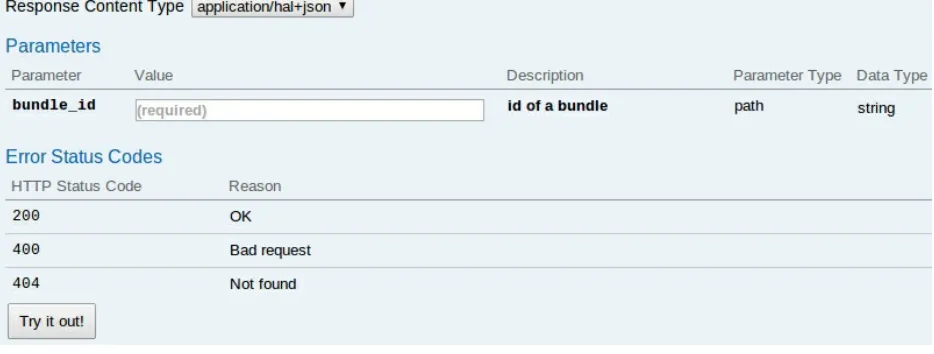
Finally, great documentation should be interactive. As mentioned, API documentation delivered in HTML format can be hosted on a website and kept up-to-date. But another added benefit is that we can use the browser to actually interact with our API.
Figure 2-1 is an example of interactive documentation using Swagger.
Figure 2-1. API documentation using Swagger, which offers a Try It Out feature
#4 – Have an Intuitive, Consistent Design
An intuitive API is one that makes it easy for a developer to know what to do to use it effectively. By lowering the learning curve of your API, you will ensure that developers experience successes early and often. This results in greater API adoption, longer retention (even in the face of competitors), and developer autonomy resulting in reduced support costs.
Follow these general guidelines to make your API more intuitive: Make data available easily, rather than hidden or hard to find.
Require only the information necessary to accomplish the desired task.
Offer both low-level ways of getting things done, as well as higher-level ways of accomplishing common workflows with fewer calls.
Use hypermedia links to inform API clients the available actions at any given point, based on the current state of the data and the permissions of the API client.
Offer only one way to accomplish a task.
For APIs, consistency is important for a great developer experience because it creates predictability. As developers start to become familiar with your API, they will come to expect the same familiarity as they explore it further. This consistency encompasses a number of areas, including naming, resource URLs, payload formats, and error messaging. Let’s examine each one further.
Consistent naming
As developers approach your API, the first thing they will notice is the naming conventions that you use. This includes the names of the domain concepts referenced, many of which become the resources used in the URLs of your API. Therefore, naming is critical to the understanding and usage of your API. The following are some tips for incorporating consistent naming:
confusion as some names may be unclear or inconsistently abbreviated.
Be consistent with resource names to avoid confusion.
Refrain from referencing internal systems, as this results in requiring insider knowledge to use or comprehend your API.
Consistent resource URLs
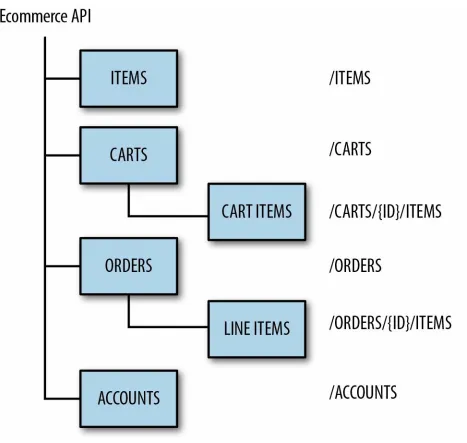
As you design your API, you will need to map out the various URLs that will represent your resources. It is highly recommended that you develop a
resource ontology to ensure that URLs are consistently designed into the API. If you are unfamiliar, ontology is a technique used in information science for the naming and typing of entities and their relationships. API ontologies define the structure of your API, from the top-level resources to the nested resources under them.
Figure 2-2. An example resource ontology for an eCommerce API
When designing your resource ontology, apply the following techniques to create a more consistent API:
Use plural resource names when offering a collection of resources and a singular resource name for a single resource (e.g., /users for a collection of user resources, /user for a single user resource).
Use nested resources to indicate relationships between resources.
/user).
We will cover this topic in more detail in Chapter 4.
Consistent payload formats
Finally, the payload format should be consistent to allow API consumers to easily construct request payloads and parse response payloads. Most
developers prefer to write helper code to handle this logic. If an API is inconsistent in its approach, developers will have to write one-off code to handle the differences. Follow these patterns for more consistent API payloads:
Reuse field names across payloads when possible for better predictability (e.g., use firstName and lastName or use fullName, but don’t interchange them).
Avoid abbreviations in field names.
Keep consistent casing rules, usually camelCase or snake_case (e.g.,
firstName or first_name, but not both).
Select a single payload format or standard when handling payloads, including resource representations and search result collections.
Ensure all error message formats are consistent across the API. This is especially important when an API is built by multiple developers who may otherwise handle error messaging differently.
Beyond data: Supporting API-based workflows
APIs often require more than just data. While data is important, developers seek out APIs to solve a problem. If they wanted to store data, they would push it into a database directly, unless you have data that no one else can provide. They are looking to your API to do something that they don’t want to build themselves. This may be solving difficult problems, building support for collaboration, or providing data analysis.
endpoints are essential to any API, adding workflow into your API helps developers get things done quickly and with fewer lines of code.
As an example, Twilio only supported conference calls by putting each caller on mute and then managing each caller using the low-level access APIs. The company realized that customers required an affordance to support
conference calls at a higher level. The result is that providers were able to remove a lot of hard work from API developers by building in a higher-level conference call API that did the heavy lifting for them.
As an API provider, it is important to look for usage patterns of how your API may be used across a variety of different types of developers. Then begin to build in higher-level APIs that support these workflows, saving them effort and time.
A NOTE ABOUT HYPERMEDIA APIS
Hypermedia APIs are a breed of web APIs that inform clients about what actions are possible after a given request. This may take the form of next steps within a workflow, related API resources, and other functional areas of the API. This mimics how we use the Web: we go to a homepage, click the login link, enter our credentials, then navigate to various areas of the application. Using hypermedia enables our clients to be more flexible and reduces the amount of business logic we have to code into them. Instead, they look for the existence of specific links within a response payload and offer (or hide) specific actions based on the server’s determination of what is and isn’t allowed. If the business logic needs to change in a workflow, the server simply adds or removes the appropriate hypermedia links that are used to guide the client’s behavior.
#5 – Design for Security at the Start
Teams can become so focused on the features that they forget to integrate security into their API design. Nearly every API will need to provide access to internal business systems, sensitive and personal information (PII), and/or public data that co-exists with internal/private data. Some APIs may provide limited data for free or for specific roles, while others may restrict access to any and all data. Therefore, every API must consider security from the design phase rather than as an afterthought, when it is often too late to make API changes without significant impact. The following are security considerations that need to be made during API design.
Authentication
Authentication is the process of verifying the identity of a particular API consumer. For websites that are built for humans, this is often a form that asks for a username and password. For APIs, there are a number of options available:
Password-based authentication
With password-based authentication, a username and password is sent on each request. While this may be secured through the use of transport-level security (TLS), software integrations to APIs may stop working if a user resets her password for any reason.
API-key based authentication
Instead of sharing a username and password, APIs can require the use of an API key that is provided by the service. This key identifies the API client and is not directly tied to a user’s password. The API key may be embedded within the URL as part of the request body or in the request header. API keys may be shared with other applications, but revoking access to the API key will cause all applications sharing the key to stop working.
Delegation-based authentication
API on someone else’s behalf (e.g., a third-party Twitter or Facebook client), delegation-based authentication is often the best approach. OAuth is the most popular standard, since it is somewhat like a “protocol of protocols” that allows disconnecting the authentication provider that provides API tokens from the API provider. API tokens are granted and revoked as desired by the user, allowing third-party
applications to make API calls on their behalf (i.e., delegated access)
Authorization
Once you have identified yourself through the authentication mechanism, the API must still authorize access to the appropriate data and functional access rules for the system. This may be a direct result of your user account
permissions within the API, or the permissions granted through the use of a delegation-based authentication mechanism such as OAuth. Each API endpoint’s authorization requirements should be considered during the API design process to ensure that data and access to critical systems are secured properly while the core functionality of the API is maintained.
Data leakage
Even with the proper authentication and authorization mechanism, your API design can still have security leaks. While this can happen for a variety of reasons, the most common is that APIs are designed for internal consumption only and are eventually promoted to partner or public developers. Sensitive data once thought as accessible only by internal systems is now made
available to developers outside of the organization.
As an example, the Tinder API experienced a security breach through data leakage. While its mobile applications did not surface an individual’s exact location, the API did return specific locations within the response payload. This means that any developer had access to an individual’s location, since the data was not removed or scrubbed properly for external consumption. Instead, internal knowledge of another Tinder user’s location was both stored within their backend systems and then made available directly via its API,
exposing these users to potential harm.
the public. This includes adding proper authorization for API consumers to grant or revoke access to specific data fields and functional areas of the API as appropriate.
Always use TLS
While some API endpoints may be providing data that isn’t sensitive, it is generally best to use TLS to secure all data in motion. This will help protect authentication credentials, as well as prevent eavesdropping when
transmitting sensitive data between the API client and server.
Designing with security is important
As you likely realize by now, if security is an afterthought in your API design, everything from the API documentation to assumptions in
#6 – Share Great Code Examples
Documentation is a very important element of the developer experience. However, code examples provide the important guidance necessary for developers to be able to apply the documentation in practice.
Code examples come in a variety of forms, from just a few lines that
demonstrate how a specific API works, to more complex examples that show how to assemble multiple API calls into a complete workflow.
So, how do you choose what kind of examples to include? First, you need to understand the developer journey and the various milestones developers go through as they learn your API.
Milestone 1: First success
Initially, the developer needs to overcome any doubts that the API will solve his needs. This often starts with code examples that allow her to explore the API beyond the interactive documentation.
It is important to remember that during this phase, the developer just wants to see something work. This is often known as TTFHW, “Time to first Hello World” and is a key metric for determining API complexity. The longer it takes to get a developer to her first “win”, the more likely the developer will leave your API and find a better solution. If there are no alternatives for your API, the developer will build his own solution.
Products such as Twilio have made it their goal to onboard developers in less than five minutes. While this takes considerable focus and investment, your goal should be to find the shortest possible route, then keep working to shorten the time as your API matures.
To achieve a low TTFHW, provide concise examples that remove all need for boilerplate code. Look at the following example:
require "stripe"
Stripe.api_key = "sk_test_BQokikJOvBiI2HlWgH4olfQ2"
:card => {
:number => "4242424242424242", :exp_month => 6,
:exp_year => 2016, :cvc => "314"
}, )
Notice in this example that there is little code to write. Simply fill-in your API key and the credit card credentials to try it out.
Bad example code requires that you write code to use the example. This requires you to learn more about the API before you can try it out. Never require developers to write code to complete an example when first trying out your API.
Milestone 2: Workflow support
After the developers have had some time to acquaint themselves with your API using your easy-to-use examples, the next step is to begin to demonstrate the API based on how they will want to use it.
Workflow examples focus more on achieving specific goals than applying coding best practices. This means that you want to convey clarity over code performance, clear intent over code quality. Use copious inline comments to explain why each step is necessary. Be willing to include hard-coded values for easier reading. Choose variable and method names that make it easy to read. Focus more on behavior than handling errors at this point.
It is important to note that while these examples will be more complex than those found from the first milestone, they shouldn’t exceed the height of the screen. The examples need to be short enough to explain the concepts but not too long that they require considerable time to understand. It is often best to demonstrate scenarios that are easily understood and likely map to your customer needs.
Milestone 3: Production-ready integration
into her production environment. This includes how to catch errors to help developers properly troubleshoot their integration code. It also includes
#7 – Provide Helper Libraries
Web APIs have a huge advantage: they are built on the hard work of the
authors of the HTTP specification. This means that any developer can pick up their favorite programming language, select an HTTP client library, and make API calls. They don’t need anything else to make it happen.
Helper libraries allow developers to make API calls using a special library built for their specific programming language. As an example, a Ruby helper library can be provided to allow developers to consume your API directly, without having to write the code necessary to handle the lower-level HTTP logic required for web APIs.
While API providers are not required to release helper libraries, they often accelerate developer success. This is especially the case for mobile
developers, who are accustomed to working with helper libraries rather than raw HTTP. Many API providers that wish to reach mobile developers choose to produce a helper library for iOS and a helper for Android.
For APIs that will likely be used outside of a mobile platform, you may opt to provide helper libraries for Java, JavaScript, Python, Ruby, Go, PHP, and .NET. What languages you choose depend upon your intended audience. For example, if your target audience is enterprise developers, then Java and .NET should be priority. For web developers, you may choose to focus on Python, PHP, JavaScript, Ruby, and Go. Whatever you do, don’t assume that your team’s preferred language platform is what your customers will be using. Do the research to be sure you have prioritized your focus.
Chapter 3. The Design-First API
Process
Traditional software development is often focused on internal development teams that have access to the source code that makes the software function. Or, at the very least, they have access to the internal developers and data administrators to ask questions.
Web APIs, however, are more social in nature. They require collaboration between the developers consuming the API and the developers that built the API. They only have the API design and documentation to guide them. Developers consuming an API do not have access to the source code,
database diagrams, or an internal knowledge base on why the API operates a certain, quirky way. They cannot copy-and-paste the source code for an API and make the changes they need to get their job done.
This means that our goals for our API design need to reflect simplicity and clarity and to anticipate the needs of developers and the end users who will indirectly consume the API from a web or mobile application. This is a
difficult challenge for any team, no matter how experienced they may be with the particular software or business domain. Therefore, heavy emphasis should be placed on the API design process, including how your team translates product requirements.
User Interface Wireframes to Drive API Design
In the case of an API that is being developed in tandem with a mobile or web interface, wireframing the user interface will help drive a top-down view of how the API will be used. The wireframes won’t define every required feature of the API, but they will focus on the key goals of end users: what they will do and how they will do it. This will have a large impact on the API, as often the user interface requires more complex interactions that the API will need to support.While many APIs start with simple data-access functionality, the user interface will expose the gaps in your APIs as they need to perform more complex tasks. It will also expose the number of API calls that will be
required to accomplish a given task. This is especially important with regard to mobile applications, where every HTTP call to an API occurs over an unreliable cellular network.
As we will discuss later, a simple wireframe or static mockup of the screens can help validate your API design. Be sure to schedule time into your project plan to design any web and mobile screens, preferably in time to help
API Modeling
Just as a beautiful web design begins from a wireframe, a great API design begins with modeling. The goal of API modeling is to translate the product requirements into the beginnings of a high-level API design. API modeling ensures that both developers and end users have their goals met.
The API modeling process is comprised of five steps:
1. Identify the participants, or actors, who will interact with your API.
2. Identify the activities that participants wish to achieve.
3. Separate the activities into steps that the participants will perform.
4. Create a list of API methods from the steps, grouped into common resource groups.
5. Validate the API by using requirements artifacts to test the completeness of the API.
Step 1: Identify the Participants
The first step is to identify the participants, sometimes called actors, who will interact with the API. Unlike a user interface, an API design must factor in both humans and non-humans who may interact with your API. Some examples include:
System administrators (i.e., your company’s administrators)
Account administrators (i.e., your customer’s administrators)
Users of the system, including their various roles (e.g., users, managers, and moderators)
Internal or external software
Other Internet-connected devices
For each participant, you will capture their name and perhaps a short description of what they do (see Table 3-1).
Table 3-1. Some example participants for our project management API
Participant Description
Project manager The person in charge of the project
Project member Someone assigned to the project and tasks
System administrator Manages global settings
Step 2: Identify the Activities
Activities are the outcomes that your participants will expect your API to provide. These activities focus on the job to be done, not how to do it. We will capture the steps required to accomplish the activities in our next modeling process.
Although your API may focus on only one activity, most APIs must support more than one activity to deliver value to developers. If you find yourself with only one activity, try asking what each participant is trying to achieve. Most likely, you will find more than one activity will be required of your API once you evaluate the activities for each of your participants identified in step 1.
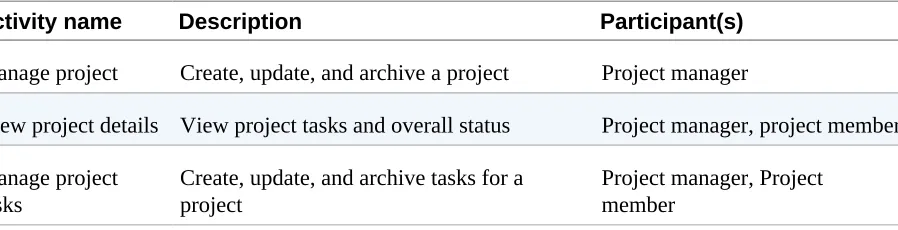
For each activity, capture a short name, description, and the participant(s) that will be involved in the activity (see Table 3-2).
Table 3-2. Some example activities for our project-management API
Activity name Description Participant(s)
Manage project Create, update, and archive a project Project manager
View project details View project tasks and overall status Project manager, project member
Manage project
Step 3: Separate the Activities into Steps
Once you have a list of activities, it is time to break them into steps. Each step may involve one or more participants but must be executed by a single participant at a time.
You may find that you may be missing some details about how an activity should be performed. This is an indicator that you should involve one or more subject matter experts (SMEs) who can provide greater insight and details into how the system should work. These experts may be business analysts, customers, and/or quality-assurance teams familiar with the requirements.
For each activity step, capture the activity name, a short name for the step, a description, and a list of participants who may perform the step. Table 3-3 is an example of documenting the activity steps for the “manage project tasks” activity in the previous modeling step.
Table 3-3. “Manage project tasks” activity step example for our project management API
Activity Activity step name Description Participant(s) Manage project
tasks Add task to project Adds a task to an existing project Project manager, projectmember
Manage project
tasks Archive project task Archives a task in an existingproject Project manager, projectmember
Manage project
tasks Mark project task ascomplete Marks a task in an existing projectas complete Project manager, projectmember
Step 4: Identify the Resources and Candidate APIs
Once you have the activities and steps identified, you will begin to see specific business entities emerge. These are your resource candidates that may become actual API resources. Others may appear to be resources but may instead be activities that will be performed outside of the API itself and therefore won’t become actual API resources. Since this is the modeling phase, that is perfectly fine. Our API design process will help filter out these unnecessary items.Because this is the modeling and not the design phase, we do not want to focus on the HTTP specifics. Instead, focus on the high-level API only. The details of how you will implement the API, including the specific URLs, HTTP verbs, and response codes will emerge as we move into the full API design process. Table 3-4 is an example of how to document the project tasks API that we have identified as a result of our API design model.
Table 3-4. “Project tasks API”: Project-management API example
Method Participant(s) authorized for API Add task to project Project manager, project member
Archive project task Project manager, project member
Step 5: Validate the API Model
Once you have an API model defined, you can use the model to validate that it meets the requirements of internal developers, partner or public developers, and the end user. There are three techniques that can help validate your API model:
The API walkthrough
If you have mobile or web mockups, walk through each screen to
determine which API will be used to satisfy the data being displayed or functionality being performed. Revisit any areas that you may have missed to ensure that you have a complete API model.
Use-case validation
Using existing use cases, step through each one to identify any gaps in your API. This is especially useful if user interface mockups haven’t been completed yet, or if some of the API will not have a user interface associated with it. This is often the case for APIs designed for machine-to-machine integration rather than end-user functionality.
Business-process diagrams
For APIs that will be supporting business-workflow processes, first diagram the workflow(s). For each step in the workflow, map your API model to each step to ensure that you can accomplish all necessary aspects of the workflow.
Next Step: Detailed API Design
Chapter 4. API Design Details
While API modeling is focused on mapping requirements to the API, the API design process maps the API model to HTTP, the language of the Web.
Transitioning from the model to design phase will require a variety of decisions. Some of these decisions will become obvious, while others may require some careful thought and planning. The more decisions you leave until the development phase, the more likely your API design will be compromised due to your delivery schedule.
An HTTP Primer
HTTP Is Request/Response
Uniform Resource Locators (URLs)
Uniform resource locators, or URLs, provide a address of where to locate a resource, such as a web page, image, or data, from an API. A URL is divided into the following parts:
Scheme
How we want to connect, (e.g., HTTP [unsecure] or HTTPS [secure]).
Hostname
The server to contact (e.g., api.example.com).
Port number
A number ranging from 0 to 65535 that identifies the process on the server where the request is to go (e.g., 443 [optional, defaults to 80 for HTTP and 443 for HTTPS]).
Path
The path to the resource being requested (e.g., /projects [default is /, which indicates the homepage]).
Query string
Contains data to be passed to the server. Starts with a question mark and contains name/value (e.g., foo=bar) pairs, using an ampersand as a
HTTP Verbs
HTTP request verbs indicate the type of action being requested from the URL. For APIs, they are often one of the following:
GET
Retrieve a collection or individual resource.
POST
Create a new resource or request custom action.
PUT
Update an existing resource or collection.
DELETE
Delete an existing resource or collection.
NOTE
HTTP Requests
A client request is composed of the following parts:
Request verb
Informs the server about the type of request being made (e.g., retrieve, create, update, delete, etc.)
URL
The universal address of the information being requested
Request header
Information about the client and what is being requested in name:value format
Request body
The request details (may be empty)
The following is an example HTTP request with no request body:
GET http://www.oreilly.com/ HTTP/1.0 Proxy-Connection: Keep-Alive
User-Agent: Mozilla/5.0 [en] (X11; I; Linux 2.2.3 i686) Host: oreilly.com
Accept: image/gif, image/x-xbitmap, image/jpeg, */* Accept-Encoding: gzip
Accept-Language: en
Accept-Charset: iso-8859-1, *, utf-8
The following are examples of API requests:
GET /accounts
Retrieves all accounts in the accounts resource collection
GET /accounts/{id}
Retrieves a specific account by the given ID
POST /accounts
PUT /accounts/{id}
Updates an account by the given ID
DELETE /accounts/{id}
HTTP Responses
A server response is composed of the following parts:
Server response code
A number indicating if the request was successful or not
Response header
Information about what happened in name:value format
Response body
Contains the response payload, often HTML, XML, JSON, or an image (may be empty)
The following code is an example HTTP request with an HTML response body:
HTTP/1.1 200 OK
Date: Tue, 26 May 2015 06:57:43 GMT
Content-Location: http://oreilly.com/index.html Etag: "07db14afa76be1:1074"
Last-Modified: Sun, 24 May 2015 01:27:41 GMT Content-Type: text/html
Server: Apache
<html>...</html>
Response codes are grouped into families, with the 2xx response codes indicating success, 4xx response codes indicating that the client failed to format the request properly, and 5xx response codes indicating a server error. The following are the most common server response codes used for web APIs:
200 OK
The request has succeeded.
201 Created
created.
202 Accepted
The request has been accepted for processing, but the processing has not been completed.
204 No Content
The server has fulfilled the request but does not need to return a body. This is common for delete operations.
400 Bad Request
The request could not be understood by the server due to malformed syntax.
401 Unauthorized
The request requires user authentication.
403 Forbidden
The server understood the request, but is refusing to fulfill it.
404 Not Found
The server has not found anything matching the requested URI.
500 Internal Server Error
Building Your Resource Ontology
An ontology is simply a classification of concepts. An API ontology captures the set of resources you will be offering, and their relationships to other
resources. It is generally realized through your API’s URL structure. If you modeled your API already, you likely have a list of candidate
resources that will be part of it. If not, take some time and model your API to help you identify your resources. To build your ontology, begin by creating a list of the resources, placing them at the top of the URL structure (e.g.,
Defining URLs Through Relationships
Next, you will need to determine if your resources all belong at the top level, or if some of them should be nested under parent resources. To do this, we first need to understand the relationships between each of the resources. Relationships between resources can be categorized into three types:
independent, dependent, and associative. Those familiar with database design will recognize these relationship types and will quickly understand them. For those not familiar, the following list contains a description of each of the three types, with further information in Table 4-1:
Independent
Independent resources can exist stand alone without the other’s
existence, but may reference each other. The URLs for both resources often exist at the top level.
Dependent
Dependent resources cannot exist without the existence of the parent resource. The URL for the dependent resource exists as a nested resource of its parent.
Associative
Associative resources have a relationship that contains or requires
additional properties to describe it. Associative resources may be nested under one parent or may be placed as a top-level resource and treated as an independent resource.
Table 4-1. Examples of resource relationships
Relation
Type Resources Meaning
Independent /projects, /tasks Tasks can exist with or without a project
Dependent /projects, /projects/{id}/tasks Tasks must belong to a project instance
/projects/{id}/collaborators collaborators
In our project-management API example, we have to make a critical decision: whether tasks exist outside of a project or not. If they can, then both
resources are independent and therefore both exist at the top level of the URL structure (e.g., /projects and /tasks). However, if tasks must belong to a
Mapping Resource Lifecycles to HTTP Verbs
Once you determine your resource URL structure, you can then map your resource lifecycles to the necessary HTTP verb or verbs. We have four core HTTP verbs that we will focus on, though a few others exist when you need them for uncommon situations.Your API model will provide insight into the lifecycle requirements of your resources. Review your model and notice the verbs you used for each
resource. Some resources may require all verbs in our lifecycle: search, create, read, update, and delete. However, other resources may not require update or delete actions. Other resources may be read-only. Therefore, the requirements identified during the modeling phase will inform your API design.
As you model your API, you will notice a common pattern between the verbs you choose and the eventual resource lifecycle they require. Table 4-2 is a common mapping between verbs used in modeling and the verbs in HTTP.
Table 4-2. Common modeling actions to HTTP verb mappings
Modeling Actions Typical HTTP Verb
“List”, “Search”, “Match”, “View All” GET collection
“Show”, “Retrieve”, “View” GET resource instance
“Create”, “Add” POST create a new resource
“Replace” PUT update a resource collection
“Update” PUT update a resource instance
“Delete All”, “Remove All”, “Clear”, “Reset” DELETE delete a resource collection
“Delete”, “Remove” DELETE delete a resource instance
Mapping Response Codes
For each API endpoint you identified in the previous step, you will need to consider what response code(s) to return. While we hope that most responses will indicate a success, sometimes the client will fail to provide all of the correct details necessary to fulfill a request.
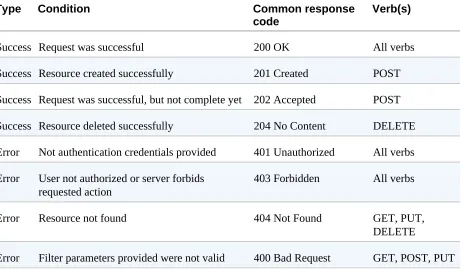
It is important to map both success and error codes in the design phase, as it will be part of our documentation delivered to developers consuming our API. It will also inform your team in the complexity of each API endpoint prior to development, to help with the estimation process (see Table 4-3).
Table 4-3. Common HTTP verb to response-code mappings
Type Condition Common response
code Verb(s)
Success Request was successful 200 OK All verbs
Success Resource created successfully 201 Created POST
Success Request was successful, but not complete yet 202 Accepted POST
Success Resource deleted successfully 204 No Content DELETE
Error Not authentication credentials provided 401 Unauthorized All verbs
Error User not authorized or server forbids
requested action 403 Forbidden All verbs
Error Resource not found 404 Not Found GET, PUT,
DELETE
Validating Design Through Documentation
and Prototyping
As your API design starts to emerge, you should start the API documentation process. At this stage, you may not have all of the details of what your
resource representations will look like — that is expected.
By documenting your API design early, it will encourage the team to focus on documentation throughout the development process. It will also encourage validation through feedback from internal or external developers by sharing your API design with them early rather than waiting until launch.
You can begin to document the high-level design using one of your favorite API definition formats, such as Swagger, RAML, Blueprint, or IO Docs. Each of these formats can convert your API design into beautiful interactive docs, one of our key characteristics of a great API design. As your resource structures begin to take shape, you can capture those additional details, along with examples to complete your documentation.
In addition to documentation, prototyping is another effective way to validate your API design. Prototypes come in two common forms: a static prototype and a working prototype.
A static prototype is just a method of returning resource representations in one or more formats, such as XML or JSON. The static prototype is either stored on the local filesystem or served via a web server.
Static prototypes allow developers to begin to integrate the search (i.e., GET collection) and read (i.e., GET a resource instance) portions of the lifecycle. However, the filesystem or web server cannot process POST, PUT, or
DELETE requests, so static prototypes are limited. To get beyond this limitation, a working prototype is required.
Working prototypes offer more functionality than static prototypes, allowing any or all functionality to be delivered. The focus of a working prototype is to simplify more complex interactions, such as third-party integrations or
Working prototypes are not meant to be production-ready implementations, so they can take shortcuts or flatten complex data structures for ease of
Putting It All Together
APIs can offer several advantages for businesses, including faster innovation and increased revenue. Every member of the organization, including
executives, product managers, and developers, must be willing to see APIs as an investment that will create business value.
About the Author
Acknowledgments
I would first like to thank D. Keith Casey, Jr., whose generosity knows no bounds.
I would also like to thank Mike Amundsen for his feedback on an early draft of this book.