MARISA W. PARYASTO - 33207002
Date: 13/10/2009.
Daftar Isi
Bagian 1. Dasar-dasar Java 4
1. Kelas dan Objek 4
1.1. Tujuan 4
1.2. Perangkat 4
1.3. Materi 4
1.3.1. Program 1 - Hello World 4
1.3.2. Program 2 - Kelas sederhana 4
1.3.3. Program 3 - Kelas sederhana dengan encapsulation 5
1.3.4. Program 4 - Inheritance sederhana 6
1.3.5. Program 5 - Inheritance 8
1.3.6. Program 6 - Inheritance dengan keyword Super 9 1.3.7. Program 7 - Inheritance dengan lebih banyak kelas 9
1.3.8. Program 8 - Inheritance overriding 11
2. Struktur dari Program Java 12
2.1. Tujuan 12
2.2. Perangkat 12
2.3. Materi 12
2.3.1. Program 1 12
2.3.2. Program 2 13
2.3.3. Program 3 14
2.3.4. Program 4 16
3. Layout Manager 19
3.1. Tujuan 19
3.2. Perangkat 19
3.3. Materi 19
3.3.1. Contoh Layout 19
3.3.2. Border Layout 22
3.3.3. Card Layout 23
3.3.4. Flow Layout 23
3.3.5. Grid Layout 24
3.3.6. Gridbag Layout 25
3.3.7. Box Layout 27
3.3.8. More examples 28
Bagian 2. Pemrograman dalam Java 32
4. Membuat applet dan application 32
4.1. Applet 32
4.1.2. Program 2 32
5. Event Handling 42
5.1. Program 1 42
5.2. Program 2 43
5.3. Program 3 43
5.4. Program 4 45
5.5. Program 5 45
Bagian 3. Packages and Streams 65
7. Thread and Multithreading 65
8. Java I/O Stream Classes 85
8.1. Program 1 85
9. Server - Client Applications 97
Bagian 1. Dasar-dasar Java
1. Kelas dan Objek
1.1. Tujuan. Setelah menyelesaikan bagian ini, mahasiswa diharapkan dapat: (1) Memahami cara mengkompilasi dan menjalankan program dengan
meng-gunakan Java
(2) Mengindentifikasi pesan kesalahan yang terjadi pada saat proses kompilasi dilakukan
(3) Memahami konsep dasar dan penggunaan kelas dalam bahasa pemrogram-an Java
(4) Memahami konsep objek dan merepresentasikannya dalam bahasa pemro-graman
(5) Memahami konsep encapsulation dan inheritance
1.2. Perangkat. PC dengan JDK 1.5 1.3. Materi.
1.3.1. Program 1 - Hello World. Ketiklah program dibawah ini lalu compile dengan menggunakan perintah:
j a v a c H e l l o . j a v a
dan jalankan dengan perintah
j a v a H e l l o
yang diketik dari console.
1 c l a s s H e l l o {
2 public s t a t i c void main ( S t r i n g [ ] a r g s )
3 {
4 System . out . p r i n t l n ( " H e l l o�World ! " ) ;
5 }
6 }
(1) Jelaskan untuk apakah perintah static, void dan args
(2) Apakah yang terjadi jika nama kelas tidak sama dengan nama file-nya? Jelaskan mengapa demikian.
1.3.2. Program 2 - Kelas sederhana. Contoh program sederhana yang sudah meng-gunakan kelas:
1 c l a s s Student {
2 private S t r i n g name ; 3 S t r i n g s t a t u s ;
4 i n t mark ;
5
6 public Student ( ) {
7 name = "" ; 8 s t a t u s = "" ;
9 mark = 0 ;
11
12 public void set_name ( S t r i n g n ) { 13 name = n ;
14 }
15
16 public void s e t _ s t a t u s ( S t r i n g s ) { 17 s t a t u s = s ;
18 }
19
20 public void set_mark (i n t m) {
21 mark = m;
22 }
23
24 public void d i s p l a y _ d a t a ( ) {
25 System . out . p r i n t l n ( "Name�:�" + name ) ;
26 System . out . p r i n t l n ( " S t a t u s�:�" + s t a t u s ) ;
27 System . out . p r i n t l n ( "Mark�:�" + mark ) ;
28 }
29 public s t a t i c void main ( S t r i n g a r g s [ ] ) { 30 Student me = new Student ( ) ;
31
32 me . set_name ( " Chika " ) ; 33 me . s e t _ s t a t u s ( " a c t i v e " ) ; 34 me . set_mark ( 9 0 ) ;
35 me . d i s p l a y _ d a t a ( ) ;
36 }
37 }
Baris 6-10 pada Program 2 disebut constructor. Apakah guna dari constructor ini?
1.3.3. Program 3 - Kelas sederhana dengan encapsulation. Berikut adalah modifi-kasi dari program sebelumnya, dilengkapi dengan contoh enkapsulasi. Pada baris kedua, variabel dari kelas Student di set menjadi private sehingga variabel terse-but tidak dapat diakses oleh kelas lain. Default dari variabel atau kelas jika tidak didefinisikan access specifiernya adalah public.
1 c l a s s Student {
2 private S t r i n g name ; 3 S t r i n g s t a t u s ;
4 i n t mark ;
5
6 public Student ( ) {
7 name = "" ; 8
9 s t a t u s = "" ;
11 } 12
13 public void set_name ( S t r i n g n ) {
14 name = n ;
15 }
16
17 public void set_data ( S t r i n g s ) { 18 s t a t u s = s ;
19 }
20
21 public void set_mark (i n t m) {
22 mark = m;
23 }
24
25 public void d i s p l a y _ s t a t u s ( ) {
26 System . out . p r i n t l n ( "Name�:�" + name ) ;
27 System . out . p r i n t l n ( " S t a t u s�:�" + s t a t u s ) ;
28 System . out . p r i n t l n ( "Mark�:�" + mark ) ; }
29 } ;
30
31 c l a s s Te st St ud en t {
32 public s t a t i c void main ( S t r i n g a r g s [ ] ) { 33 Student me = new Student ( ) ;
34
35 me . set_name ( " Chika " ) ; 36 me . s e t _ s t a t u s ( " a c t i v e " ) ; 37 me . set_mark ( 9 0 ) ;
38
39 me . name = "ABC" ; 40 me . s t a t u s = " z z z " ; 41
42 me . d i s p l a y _ d a t a ( ) ; } 43 }
Perhatikan baris 39 dan 40. Ketika kompilasi terdapat pesan error untuk baris 39 dan tidak untuk baris 40. Mengapa?
1.3.4. Program 4 - Inheritance sederhana. Berikut adalah contoh program inheri-tance sederhana:
1 import j a v a . l a n g . S t r i n g ; 2
3 c l a s s Dad{
4 protected S t r i n g EyesColor ;
5 protected S t r i n g NoseShape ;
8 Dad ( ) {
9 EyesColor = "Dark�Brown" ;
10 NoseShape = " Sharp " ; 11 C h a r a c t e r = " Nice " ;
12 }
13
14 void D i s p l a y ( ) {
15 System . out . p r i n t l n ( " Eyes�c o l o r :�" +
EyesColor ) ;
16 System . out . p r i n t l n ( " Nose�shape :�" +
NoseShape ) ;
17 // System . o u t . p r i n t l n (" C h a r a c t e r : " + C h a r a c t e r ) ;
18 }
19 } ; 20
21 c l a s s Me extends Dad{ 22 S t r i n g EyesColor ; 23 S t r i n g NoseShape ; 24 S t r i n g C h a r a c t e r ; 25
26 void S e t C h a r a c t e r ( S t r i n g c ) {
27 C h a r a c t e r = c ;
28 }
29
30 void S e t ( S t r i n g Eyes , S t r i n g Nose ) {
31 EyesColor = Eyes ;
32 NoseShape = Nose ;
33 }
34
35 void D i s p l a y ( ) {
36 super. D i s p l a y ( ) ;
37 System . out . p r i n t l n ( " C h a r a c t e r�:�" +
C h a r a c t e r ) ;
38 }
39 } 40
41 c l a s s OtherPeople { } 42
43 public c l a s s DadAndMe{
44 public s t a t i c void main ( S t r i n g a r g s [ ] ) {
45 Dad myDad = new Dad ( ) ;
46 Me I = new Me( ) ;
47 OtherPeople You = new OtherPeople ( ) ; 48
50 I . S e t C h a r a c t e r ( "Shy" ) ; 51 myDad . C h a r a c t e r = "Grumpy" ; 52 I . D i s p l a y ( ) ;
53 }
54 }
Coba lengkapi class OtherPeople dan perhatikan bahwa atribut yang dimiliki class Dad tidak terdapat pada class OtherPeople
1.3.5. Program 5 - Inheritance. Perhatikan program dibawah ini. Kelas Item me-rupakan turunan dari kelas Book.
1 c l a s s Item {
2 S t r i n g item_name ;
3 i n t i t e m _ p r i c e ; // i n USD 4
5 void d i s p l a y D e t a i l s ( )
6 {
7 System . out . p r i n t l n ( " Item�Name�i s : "+item_name ) ;
8 System . out . p r i n t l n ( " Item�P r i c e�i s : "+i t e m _ p r i c e ) ;
9 }
10 } 11
12 public c l a s s Book extends Item { 13 S t r i n g author_name ;
14 f l o a t s e r i e s n o ;
15 public Book ( ) {
16 item_name="Macbeth" ; 17 i t e m _ p r i c e =10;
18 author_name=" S h a k e s p e a r e " ; 19 s e r i e s n o =1.0 f ;
20 }
21 void d i s p l a y D e t a i l s ( ) {
22 System . out . p r i n t l n ( " Author�Name�i s : "+author_name ) ;
23 System . out . p r i n t l n ( " S e r i e s�Number�i s : "+s e r i e s n o ) ;
24 }
25
26 public s t a t i c void main ( S t r i n g a r g s [ ] ) { 27 Book bookobj=new Book ( ) ;
28 bookobj . d i s p l a y D e t a i l s ( ) ;
29 }
30 }
(1) Apakah hasil keluaran dari program tersebut?
1.3.6. Program 6 - Inheritance dengan keyword Super. Berikut adalah contoh peng-gunaan keyword Super pada inheritance:
1 public c l a s s S u p e r c l a s s {
2 public void printMethod ( ) {
3 System . out . p r i n t l n ( " P r i n t e d�i n�S u p e r c l a s s . " ) ;
4 }
5 } 6
7 public c l a s s S u b c l a s s extends S u p e r c l a s s {
8 public void printMethod ( ) { // o v e r r i d e s p r i n t M e t h o d i n S u p e r c l a s s
9 super. printMethod ( ) ;
10 System . out . p r i n t l n ( " P r i n t e d�i n�S u b c l a s s " ) ;
11 }
12
13 public s t a t i c void main ( S t r i n g [ ] a r g s ) { 14 S u b c l a s s s = new S u b c l a s s ( ) ;
15 s . printMethod ( ) ;
16 }
17 }
1.3.7. Program 7 - Inheritance dengan lebih banyak kelas. Hal apa yang berbeda dari listing program dibawah ini dibandingkan dengan program-program sebelum-nya?
1 c l a s s Toy { 2 i n t t o y I d ; 3 S t r i n g toyName ; 4 f l o a t t o y P r i c e ; 5
6 public Toy (i n t id , S t r i n g name , f l o a t p r i c e ) { 7 t o y I d=i d ;
8 toyName=name ;
9 t o y P r i c e=p r i c e ;
10 }
11
12 public void d i s p l a y D e t a i l s ( ) {
13 System . out . p r i n t l n ( "Toy�Id�i s : "+t o y I d ) ;
14 System . out . p r i n t l n ( "Toy�Name�i s : "+toyName ) ;
15 System . out . p r i n t l n ( "Toy�P r i c e�i s : "+t o y P r i c e ) ;
16 }
17 } 18
22 S t r i n g c u s t A d d r e s s ; 23
24 public Customer (i n t id , S t r i n g name , S t r i n g a d d r e s s ) { 25 c u s t I d=i d ;
26 custName=name ;
27 c u s t A d d r e s s=a d d r e s s ;
28 }
29
30 public void d i s p l a y D e t a i l s ( ) {
31 System . out . p r i n t l n ( " Customer�Id�i s : "+c u s t I d ) ;
32 System . out . p r i n t l n ( " Customer�Name�i s : "+custName ) ;
33 System . out . p r i n t l n ( " Customer�Address�i s : "+c u s t A d d r e s s ) ;
34 }
35 } 36
37 c l a s s OnlineCustomer extends Customer { 38 S t r i n g l o g i n I d ;
39 S t r i n g masterCardNo ; 40
41 public OnlineCustomer (i n t cId , S t r i n g name , S t r i n g a d d r e s s , 42 S t r i n g id , S t r i n g cardno ) {
43 super( cId , name , a d d r e s s ) ; 44 l o g i n I d=i d ;
45 masterCardNo=cardno ;
46 }
47
48 public void d i s p l a y D e t a i l s ( ) { 49 super. d i s p l a y D e t a i l s ( ) ;
50 System . out . p r i n t l n ( " Customer�l o g i n�i d�i s : "+l o g i n I d ) ;
51 System . out . p r i n t l n ( " Master�Card�No�i s : "+masterCardNo ) ;
52 }
53 } 54
55 public c l a s s T r i a l {
56 public s t a t i c void main ( S t r i n g a r g s [ ] ) {
57 OnlineCustomer cObj=new OnlineCustomer ( 1 0 0 1 , " C a r o l " , " 1 6 4 , 58 � � � � � �Redmond�Way, Ohio " , " c a r o l @ u s a . n e t " , " 9473884833 " ) ;
59 Customer custObj = new Customer ( 0 0 1 , "Andrew" , " W a l l s t r e e t " ) ; 60 Toy tObj=new Toy ( 1 0 0 1 , " B a r b i e�D o l l " , 4 0 ) ;
61 cObj . d i s p l a y D e t a i l s ( ) ; 62 tObj . d i s p l a y D e t a i l s ( ) ; 63 custObj . d i s p l a y D e t a i l s ( ) ;
64 }
1.3.8. Program 8 - Inheritance overriding. Pada contoh program ini ditunjukkan bagaimana cara meng-override suatu kelas:
1 public c l a s s Animal {
2 public s t a t i c void t e s t C l a s s M e t h o d ( ) {
3 System . out . p r i n t l n ( "The�c l a s s�method�i n�Animal . " ) ;
4 }
5
6 public void t e s t I n s t a n c e M e t h o d ( ) {
7 System . out . p r i n t l n ( "The�i n s t a n c e�method�i n�Animal . " ) ;
8 }
9 } 10
11 public c l a s s Cat extends Animal {
12 public s t a t i c void t e s t C l a s s M e t h o d ( ) {
13 System . out . p r i n t l n ( "The�c l a s s�method�i n�Cat . " ) ;
14 }
15
16 public void t e s t I n s t a n c e M e t h o d ( ) {
17 System . out . p r i n t l n ( "The�i n s t a n c e�method�i n�Cat . " ) ;
18 }
19
20 public s t a t i c void main ( S t r i n g [ ] a r g s ) { 21 Cat myCat = new Cat ( ) ;
22 Animal myAnimal = myCat ; 23 Animal . t e s t C l a s s M e t h o d ( ) ; 24 myAnimal . t e s t I n s t a n c e M e t h o d ( ) ;
25 }
2. Struktur dari Program Java
2.1. Tujuan. Setelah menyelesaikan bagian ini, mahasiswa diharapkan dapat: (1) Memahami struktur program Java
(2) Memodifikasi dan membuat program Java dengan struktur yang baik (3) Mengidentifikasi kesalahan pada program
(4) Membuat program dengan dokumentasi yang baik (5) Membuat program applet dan aplikasi
2.2. Perangkat. PC dengan JDK 1.5 2.3. Materi.
2.3.1. Program 1. Contoh program aplikasi sederhana
1 p u b l i c c l a s s SimpleApplicationCG {
2 p u b l i c s t a t i c v o i d main ( S t r i n g a r g s [ ] ) { 3 // D i s p l a y H e l l o World ! now
4 System . out . p r i n t l n ( " H e l l o , t h i s i s my f i r s t a p p l i c a t i o n ! " ) ;
5 }
6 }
Contoh program applet sederhana 1 import j a v a . awt .∗;
2 import j a v a . a p p l e t .∗;
3 p u b l i c c l a s s SimpleAppletCG e x t e n d s Applet { 4 p u b l i c v o i d i n i t ( ) { // I n i t i a l i z e t h e canvas
5 C o l o r l i g h t g r a y=new C o l o r ( 2 1 1 , 2 1 1 , 2 1 1 ) ; // c u s t o m i z e 6 setBackground ( l i g h t g r a y ) ; // make mellow background 7 r e s i z e ( 1 5 0 , 1 0 ) ;
8 }
9
10 p u b l i c v o i d p a i n t ( Graphics g ) { // D i s p l a y H e l l o World ! 11 g . d r a w S t r i n g ( " H e l l o , t h i s i s my f i r s t a p p l e t ! " , 5 0 , 2 5 ) ;
12 }
13 }
Program .html untuk menjalankan applet
1 <HTML>
2 <APPLET CODE=SimpleAppletCG . c l a s s WIDTH=100 HEIGHT=100> 3 </APPLET>
4 </HTML>
Contoh program applet untuk menampilkan tombol
1 import j a v a . a p p l e t .∗;
2 import j a v a . awt .∗;
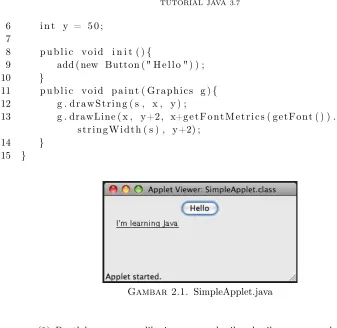
3 p u b l i c c l a s s SimpleApplet e x t e n d s Applet { 4 S t r i n g s = " I ’m l e a r n i n g Java " ;
6 i n t y = 5 0 ; 7
8 p u b l i c v o i d i n i t ( ) {
9 add ( new Button ( " H e l l o " ) ) ;
10 }
11 p u b l i c v o i d p a i n t ( Graphics g ) { 12 g . d r a w S t r i n g ( s , x , y ) ;
13 g . drawLine ( x , y+2, x+g e t F o n t M e t r i c s ( getFont ( ) ) . s t r i n g W i d t h ( s ) , y+2) ;
14 }
15 }
Gambar 2.1. SimpleApplet.java
(1) Buatlah program aplikasi yang memberikan hasil yang sama dengan pro-gram applet di atas
2.3.2. Program 2. Berikut adalah contoh program sederhana untuk membuat se-buah jendela dengan dua se-buah tombol
1 import j a v a x . swing .∗;
2
3 public c l a s s SampleProgram { 4 s t a t i c JFrame f 1 ;
5 JPanel p1 ; 6 JButton b1 , b2 ; 7
8 public SampleProgram ( ) {
9 p1=new JPanel ( ) ;
10 f 1 . getContentPane ( ) . add ( p1 ) ; 11 b1=new JButton ( " Submit " ) ; 12 p1 . add ( b1 ) ;
13 b2=new JButton ( " Cancel " ) ; 14 p1 . add ( b2 ) ;
15 }
16
18 {
19 f 1=new JFrame ( " Sample�A p p l i c a t i o n " ) ;
20 SampleProgram o b j=new SampleProgram ( ) ; 21 f 1 . s e t S i z e ( 3 0 0 , 3 0 0 ) ;
22 f 1 . s e t V i s i b l e (true) ;
23 }
24 }
(1) Apa yang terjadi jika keyword “static” pada baris 4 dihilangkan. Beri pen-jelasan.
(2) Berikan penjelasan mengenai apa yang dilakukan oleh baris ke-10
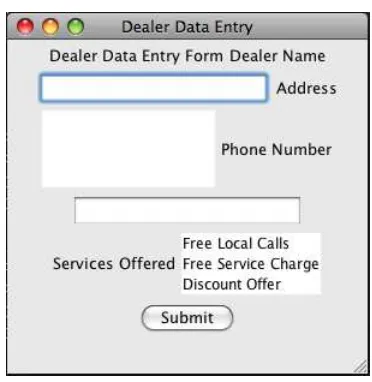
2.3.3. Program 3. Contoh berikut terdiri dari lebih banyak komponen. Perhatik-an bagaimPerhatik-ana penamaPerhatik-an variabel dPerhatik-an susunPerhatik-an program sehingga mudah untuk ditelusuri.
1 import j a v a x . swing .∗;
2 import j a v a . awt .∗;
3
4 public c l a s s D e a l e r {
5 s t a t i c JFrame fr a me O bj e ct ; 6 JPanel p a n e l O b j e c t ;
7 JLabel l a b e l T i t l e ; 8 JLabel labelDealerName ; 9 J T e x t F i e l d textDealerName ; 10 JLabel l a b e l D e a l e r A d d r e s s ; 11 JTextArea t e x t D e a l e r A d d r e s s ; 12 JLabel l a b e l D e a l e r P h o n e ; 13 J T e x t F i e l d t e x t D e a l e r P h o n e ; 14 JLabel l a b e l D e a l e r S e r v i c e s ; 15 J L i s t l i s t D e a l e r S e r v i c e s ; 16 JButton b1 ;
17
18 public D e a l e r ( ) {
19 p a n e l O b j e c t = new JPanel ( ) ;
20 fr a me O bj e c t . getContentPane ( ) . add ( p a n e l O b j e c t ) ; 21 // I n i t i a l i z e l a b e l c o n t r o l s
22 l a b e l T i t l e = new JLabel ( " D e a l e r�Data�Entry�Form" ) ;
23 labelDealerName = new JLabel ( " D e a l e r�Name" ) ;
24 l a b e l D e a l e r A d d r e s s = new JLabel ( " Address " ) ; 25 l a b e l D e a l e r P h o n e = new JLabel ( "Phone�Number" ) ;
26 l a b e l D e a l e r S e r v i c e s = new JLabel ( " S e r v i c e s�O f f e r e d " ) ;
32
33 S t r i n g s e r v i c e s [ ] = {" Free�L o c a l�C a l l s " ,
34 " Free�S e r v i c e�Charge " , " D i s c o u n t�O f f e r " } ;
35 l i s t D e a l e r S e r v i c e s = new J L i s t ( s e r v i c e s ) ; 36 b1=new JButton ( " Submit " ) ;
37
38 //Add t h e c o n t r o l s
39 p a n e l O b j e c t . add ( l a b e l T i t l e ) ; 40 p a n e l O b j e c t . add ( labelDealerName ) ; 41 p a n e l O b j e c t . add ( textDealerName ) ; 42 p a n e l O b j e c t . add ( l a b e l D e a l e r A d d r e s s ) ; 43 p a n e l O b j e c t . add ( t e x t D e a l e r A d d r e s s ) ; 44 p a n e l O b j e c t . add ( l a b e l D e a l e r P h o n e ) ; 45 p a n e l O b j e c t . add ( t e x t D e a l e r P h o n e ) ; 46 p a n e l O b j e c t . add ( l a b e l D e a l e r S e r v i c e s ) ; 47 p a n e l O b j e c t . add ( l i s t D e a l e r S e r v i c e s ) ; 48 p a n e l O b j e c t . add ( b1 ) ;
49 }
50
51 public s t a t i c void main ( S t r i n g a r g s [ ] ) {
52 fr a me O b j e c t=new JFrame ( " D e a l e r�Data�Entry " ) ;
53 D e a l e r d e a l e r O b j=new D e a l e r ( ) ; 54 fr a me O b j e c t . s e t S i z e ( 3 0 0 , 3 0 0 ) ; 55 fr a me O b j e c t . s e t V i s i b l e (true) ;
56 }
57 }
(1) Jelaskan apa yang terjadi jika baris 68 dan 69 dimodifikasi atau dihilangk-an? Kesimpulan apa yang dapat diambil? [to be edited]
(2) Adakah perintah lain yang memberikan efek yang sama dengan baris 20? Jika ya, sebutkan.
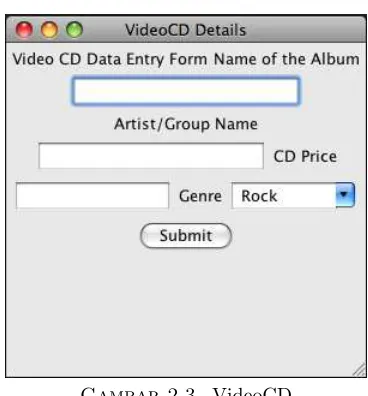
2.3.4. Program 4. Contoh program dengan penggunaan setToolTipText
1 import j a v a x . swing .∗;
2 import j a v a . awt .∗;
3
4 public c l a s s VideoCD{
5 s t a t i c JFrame fr a me O bj e ct ; 6 JPanel p a n e l O b j e c t ;
7 JLabel l a b e l T i t l e ; 8 JLabel labelAlbumName ; 9 JLabel l a b e l A r t i s t N a m e ; 10 JLabel l a b e l G e n r e ; 11 JLabel l a b e l P r i c e ; 12
13 // v a r i a b l e s f o r d a t a e n t r y c o n t r o l s 14 J T e x t F i e l d textAlbumName ;
15 J T e x t F i e l d t e x t A r t i s t N a m e ; 16 JComboBox comboGenre ; 17 J T e x t F i e l d t e x t P r i c e ; 18 JButton b1 ;
19
20 public VideoCD ( ) {
21 p a n e l O b j e c t = new JPanel ( ) ;
22 fr a me O bj e c t . getContentPane ( ) . add ( p a n e l O b j e c t ) ; 23
24 // I n i t i a l i z e l a b e l c o n t r o l s
25 l a b e l T i t l e=new JLabel ( " Video�CD�Data�Entry�Form" ) ;
26 labelAlbumName = new JLabel ( "Name�o f�t h e�Album" ) ;
27 l a b e l A r t i s t N a m e = new JLabel ( " A r t i s t /Group�Name" ) ;
28 l a b e l G e n r e = new JLabel ( " Genre " ) ; 29 l a b e l P r i c e = new JLabel ( "CD�P r i c e " ) ;
30
31 // I n i t i a l i z e d a t a e n t r y c o n t r o l s 32 textAlbumName = new J T e x t F i e l d ( 1 5 ) ;
33 textAlbumName . s e t T o o l T i p T e x t (new S t r i n g ( " Enter�t h e�
name�o f�t h e�album�h e r e " ) ) ;
34 t e x t A r t i s t N a m e = new J T e x t F i e l d ( 1 5 ) ;
35 t e x t A r t i s t N a m e . s e t T o o l T i p T e x t (new S t r i n g ( " Enter�t h e�
name�o f�t h e�a r t i s t / group�name�h e r e " ) ) ;
37 t e x t P r i c e . s e t T o o l T i p T e x t (new S t r i n g ( " Enter�t h e�p r i c e�
o f�t h e�CD�h e r e " ) ) ;
38 comboGenre=new JComboBox ( ) ; 39 comboGenre . s e t E d i t a b l e (true) ;
40 comboGenre . addItem (new S t r i n g ( "�Rock" ) ) ;
41 comboGenre . addItem (new S t r i n g ( "�Jazz " ) ) ;
42 comboGenre . addItem (new S t r i n g ( "�Country " ) ) ;
43 comboGenre . addItem (new S t r i n g ( "�B l u e s " ) ) ;
44 comboGenre . addItem (new S t r i n g ( "�C l a s s i c " ) ) ;
45 comboGenre . addItem (new S t r i n g ( "�A l t e r n a t i v e " ) ) ;
46 comboGenre . s e t T o o l T i p T e x t (new S t r i n g
47 ( " S p e c i f y�t h e�t a r g e t�age�group�and�t h e�g e n d e r�h e r e " ) ) ;
48 b1=new JButton ( " Submit " ) ; 49
50 //Add t h e c o n t r o l s
51 p a n e l O b j e c t . add ( l a b e l T i t l e ) ; 52 p a n e l O b j e c t . add ( labelAlbumName ) ; 53 p a n e l O b j e c t . add ( textAlbumName ) ; 54 p a n e l O b j e c t . add ( l a b e l A r t i s t N a m e ) ; 55 p a n e l O b j e c t . add ( t e x t A r t i s t N a m e ) ; 56 p a n e l O b j e c t . add ( l a b e l P r i c e ) ; 57 p a n e l O b j e c t . add ( t e x t P r i c e ) ; 58 p a n e l O b j e c t . add ( l a b e l G e n r e ) ; 59 p a n e l O b j e c t . add ( comboGenre ) ; 60 p a n e l O b j e c t . add ( b1 ) ;
61 }
62
63 public s t a t i c void main ( S t r i n g a r g s [ ] ) { 64 fr a me O b j e c t=new JFrame ( "VideoCD�D e t a i l s " ) ;
65 VideoCD cdObject=new VideoCD ( ) ; 66 fr a me O b j e c t . s e t S i z e ( 3 0 0 , 3 0 0 ) ; 67 fr a me O b j e c t . s e t V i s i b l e (true) ;
68 }
Gambar 2.3. VideoCD
3. Layout Manager
3.1. Tujuan. Setelah menyelesaikan bagian ini, mahasiswa diharapkan dapat: (1) Menjelaskan perbedaan antara jenis-jenis layout manager yang dimiliki
Ja-va
(2) Menggunakan layout manager sesuai kebutuhan
3.2. Perangkat. PC dengan JDK 1.5 3.3. Materi.
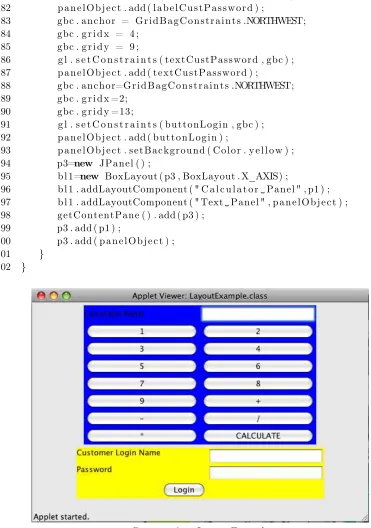
3.3.1. Contoh Layout. Perhatikan contoh program dibawah ini:
1 import j a v a x . swing .∗;
2 import j a v a . awt .∗;
3 public c l a s s LayoutExample extends JApplet { 4 JPanel p1 , p3 ; JPanel p a n e l O b j e c t ;
5 JLabel labelCustName ; 6 JLabel l a b e l C u s t P a s s w o r d ; 7 J T e x t F i e l d textCustName ;
8 J P a s s w o r d F i e l d textCustPassword ; 9 JButton buttonLogin ;
10 GridBagLayout g l ;
11 G r i d B a g C o n s t r a i n t s gbc ; 12 JLabel l 1 , l 2 ;
13 J T e x t F i e l d t f 1 ;
14 JButton b1 , b2 , b3 , b4 , b5 , b6 , b7 , b8 , b9 , b10 , b11 , b12 , b13 , b14 ; 15 GridLayout g1 ;
16 BoxLayout b l 1 ; 17
18 public void i n i t ( ) {
19 g1=new GridLayout ( 8 , 2 ) ; 20 JPanel p1=new JPanel ( ) ; 21 p1 . s e t L a y o u t ( g1 ) ;
22 l 2=new JLabel ( " C a l c u l a t o r�Panel " ) ;
23 t f 1=new J T e x t F i e l d ( 1 5 ) ; 24 b1=new JButton ( "1" ) ; 25 b2=new JButton ( "2" ) ; 26 b3=new JButton ( "3" ) ; 27 b4=new JButton ( "4" ) ; 28 b5=new JButton ( "5" ) ; 29 b6=new JButton ( "6" ) ; 30 b7=new JButton ( "7" ) ; 31 b8=new JButton ( "8" ) ; 32 b9=new JButton ( "9" ) ; 33 b10=new JButton ( "+" ) ; 34 b11=new JButton ( "−" ) ;
36 b13=new JButton ( "∗" ) ;
37 b14=new JButton ( "CALCULATE" ) ; 38 p1 . add ( l 2 ) ;
39 p1 . add ( t f 1 ) ; 40 p1 . add ( b1 ) ; 41 p1 . add ( b2 ) ; 42 p1 . add ( b3 ) ; 43 p1 . add ( b4 ) ; 44 p1 . add ( b5 ) ; 45 p1 . add ( b6 ) ; 46 p1 . add ( b7 ) ; 47 p1 . add ( b8 ) ; 48 p1 . add ( b9 ) ; 49 p1 . add ( b10 ) ; 50 p1 . add ( b11 ) ; 51 p1 . add ( b12 ) ; 52 p1 . add ( b13 ) ; 53 p1 . add ( b14 ) ;
54 p1 . setBackground ( C o l o r . b l u e ) ; 55 g l = new GridBagLayout ( ) ;
56 gbc = new G r i d B a g C o n s t r a i n t s ( ) ; 57 p a n e l O b j e c t = new JPanel ( ) ; 58 p a n e l O b j e c t . s e t L a y o u t ( g l ) ; 59
60 // I n i t i a l i z e c o n t r o l s
61 labelCustName = new JLabel ( " Customer�Login�Name" ) ;
62 l a b e l C u s t P a s s w o r d = new JLabel ( " Password " ) ; 63 textCustName = new J T e x t F i e l d ( 1 5 ) ;
64 textCustPassword = new J P a s s w o r d F i e l d ( 1 5 ) ; 65 buttonLogin=new JButton ( " Login " ) ;
66
67 //Add c o n t r o l s t o t h e p a n e l
68 gbc . anchor = G r i d B a g C o n s t r a i n t s .NORTHWEST; 69 gbc . g r i d x = 1 ;
70 gbc . g r i d y = 5 ;
71 g l . s e t C o n s t r a i n t s ( labelCustName , gbc ) ; 72 p a n e l O b j e c t . add ( labelCustName ) ;
73 gbc . anchor = G r i d B a g C o n s t r a i n t s .NORTHWEST; 74 gbc . g r i d x = 4 ;
75 gbc . g r i d y = 5 ;
76 g l . s e t C o n s t r a i n t s ( textCustName , gbc ) ; 77 p a n e l O b j e c t . add ( textCustName ) ;
78 gbc . anchor = G r i d B a g C o n s t r a i n t s .NORTHWEST; 79 gbc . g r i d x = 1 ;
81 g l . s e t C o n s t r a i n t s ( l a b e l C u s t P a s s w o r d , gbc ) ; 82 p a n e l O b j e c t . add ( l a b e l C u s t P a s s w o r d ) ;
83 gbc . anchor = G r i d B a g C o n s t r a i n t s .NORTHWEST; 84 gbc . g r i d x = 4 ;
85 gbc . g r i d y = 9 ;
86 g l . s e t C o n s t r a i n t s ( textCustPassword , gbc ) ; 87 p a n e l O b j e c t . add ( textCustPassword ) ;
88 gbc . anchor=G r i d B a g C o n s t r a i n t s .NORTHWEST; 89 gbc . g r i d x =2;
90 gbc . g r i d y =13;
91 g l . s e t C o n s t r a i n t s ( buttonLogin , gbc ) ; 92 p a n e l O b j e c t . add ( buttonLogin ) ;
93 p a n e l O b j e c t . setBackground ( C o l o r . y e l l o w ) ; 94 p3=new JPanel ( ) ;
95 b l 1=new BoxLayout ( p3 , BoxLayout . X_AXIS) ;
96 b l 1 . addLayoutComponent ( " C a l c u l a t o r�Panel " , p1 ) ;
97 b l 1 . addLayoutComponent ( " Text�Panel " , p a n e l O b j e c t ) ;
98 getContentPane ( ) . add ( p3 ) ; 99 p3 . add ( p1 ) ;
100 p3 . add ( p a n e l O b j e c t ) ;
101 }
102 }
Gambar 3.1. Layout Example
(2) Jelaskan mengapa program diatas menggunakan lebih dari satu panel
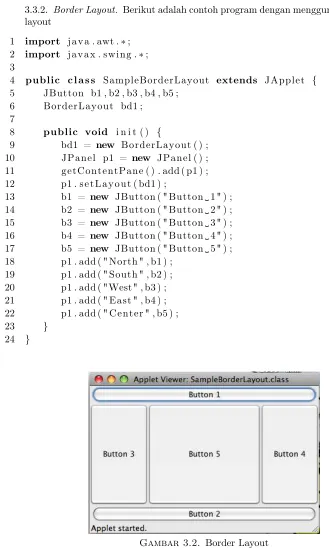
3.3.2. Border Layout. Berikut adalah contoh program dengan menggunakan border layout
1 import j a v a . awt .∗;
2 import j a v a x . swing .∗;
3
4 public c l a s s SampleBorderLayout extends JApplet { 5 JButton b1 , b2 , b3 , b4 , b5 ;
6 BorderLayout bd1 ; 7
8 public void i n i t ( ) {
9 bd1 = new BorderLayout ( ) ; 10 JPanel p1 = new JPanel ( ) ; 11 getContentPane ( ) . add ( p1 ) ; 12 p1 . s e t L a y o u t ( bd1 ) ;
13 b1 = new JButton ( " Button�1" ) ;
14 b2 = new JButton ( " Button�2" ) ;
15 b3 = new JButton ( " Button�3" ) ;
16 b4 = new JButton ( " Button�4" ) ;
17 b5 = new JButton ( " Button�5" ) ;
18 p1 . add ( " North " , b1 ) ; 19 p1 . add ( " South " , b2 ) ; 20 p1 . add ( "West" , b3 ) ; 21 p1 . add ( " East " , b4 ) ; 22 p1 . add ( " Center " , b5 ) ;
23 }
24 }
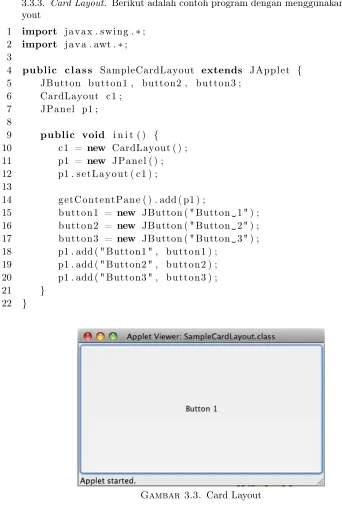
3.3.3. Card Layout. Berikut adalah contoh program dengan menggunakan card la-yout
1 import j a v a x . swing .∗;
2 import j a v a . awt .∗;
3
4 public c l a s s SampleCardLayout extends JApplet { 5 JButton button1 , button2 , button3 ;
6 CardLayout c1 ; 7 JPanel p1 ; 8
9 public void i n i t ( ) { 10 c1 = new CardLayout ( ) ; 11 p1 = new JPanel ( ) ; 12 p1 . s e t L a y o u t ( c1 ) ; 13
14 getContentPane ( ) . add ( p1 ) ;
15 button1 = new JButton ( " Button�1" ) ;
16 button2 = new JButton ( " Button�2" ) ;
17 button3 = new JButton ( " Button�3" ) ;
18 p1 . add ( " Button1 " , button1 ) ; 19 p1 . add ( " Button2 " , button2 ) ; 20 p1 . add ( " Button3 " , button3 ) ;
21 }
22 }
Gambar 3.3. Card Layout
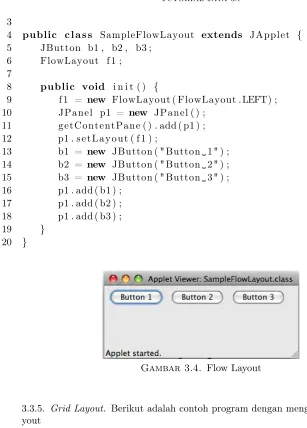
3.3.4. Flow Layout. Berikut adalah contoh program dengan menggunakan flow la-yout
1 import j a v a . awt .∗;
3
4 public c l a s s SampleFlowLayout extends JApplet { 5 JButton b1 , b2 , b3 ;
6 FlowLayout f 1 ; 7
8 public void i n i t ( ) {
9 f 1 = new FlowLayout ( FlowLayout . LEFT) ; 10 JPanel p1 = new JPanel ( ) ;
11 getContentPane ( ) . add ( p1 ) ; 12 p1 . s e t L a y o u t ( f 1 ) ;
13 b1 = new JButton ( " Button�1" ) ;
14 b2 = new JButton ( " Button�2" ) ;
15 b3 = new JButton ( " Button�3" ) ;
16 p1 . add ( b1 ) ; 17 p1 . add ( b2 ) ; 18 p1 . add ( b3 ) ;
19 }
20 }
Gambar 3.4. Flow Layout
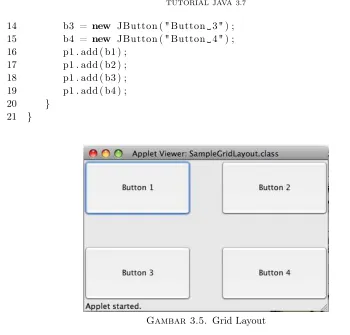
3.3.5. Grid Layout. Berikut adalah contoh program dengan menggunakan grid la-yout
1 import j a v a . awt .∗;
2 import j a v a x . swing .∗;
3 public c l a s s SampleGridLayout extends JApplet { 4 JButton b1 , b2 , b3 , b4 ;
5 GridLayout g1 ; 6
7 public void i n i t ( ) {
8 g1 = new GridLayout ( 2 , 2 , 5 0 , 5 0 ) ; 9 JPanel p1 = new JPanel ( ) ;
10 getContentPane ( ) . add ( p1 ) ; 11 p1 . s e t L a y o u t ( g1 ) ;
12 b1 = new JButton ( " Button�1" ) ;
14 b3 = new JButton ( " Button�3" ) ;
15 b4 = new JButton ( " Button�4" ) ;
16 p1 . add ( b1 ) ; 17 p1 . add ( b2 ) ; 18 p1 . add ( b3 ) ; 19 p1 . add ( b4 ) ;
20 }
21 }
Gambar 3.5. Grid Layout
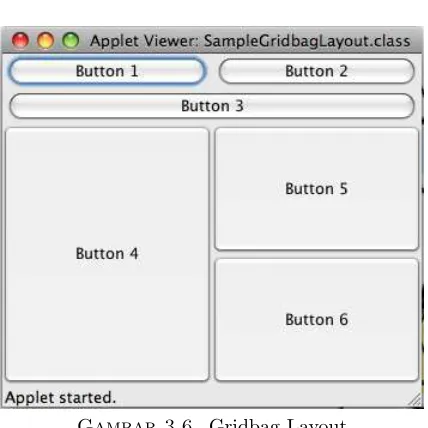
3.3.6. Gridbag Layout. Berikut adalah contoh program yang menggunakan gridbag layout
1 import j a v a . awt .∗;
2 import j a v a x . swing .∗;
3 public c l a s s GridBagSample extends JApplet { 4 JPanel p a n e l O b j e c t ;
5 GridBagLayout gbObject ; 6 G r i d B a g C o n s t r a i n t s gbc ; 7 JButton b1 , b2 , b3 , b4 , b5 , b6 ; 8
9 public void i n i t ( ) {
10 gbObject = new GridBagLayout ( ) ; 11 gbc = new G r i d B a g C o n s t r a i n t s ( ) ; 12 p a n e l O b j e c t = new JPanel ( ) ;
13 getContentPane ( ) . add ( p a n e l O b j e c t ) ; 14 p a n e l O b j e c t . s e t L a y o u t ( gbObject ) ; 15 JButton b1 = new JButton ( " Button�1" ) ;
16 JButton b2 = new JButton ( " Button�2" ) ;
18 JButton b4 = new JButton ( " Button�4" ) ;
19 JButton b5 = new JButton ( " Button�5" ) ;
20 JButton b6 = new JButton ( " Button�6" ) ;
21 gbc . f i l l = G r i d B a g C o n s t r a i n t s .BOTH; 22 gbc . anchor = G r i d B a g C o n s t r a i n t s .CENTER; 23 gbc . g r i d w i d t h = 1 ;
24 gbc . weightx = 1 . 0 ;
25 gbObject . s e t C o n s t r a i n t s ( b1 , gbc ) ; 26 p a n e l O b j e c t . add ( b1 ) ;
27 gbc . g r i d w i d t h = G r i d B a g C o n s t r a i n t s .REMAINDER; 28 gbObject . s e t C o n s t r a i n t s ( b2 , gbc ) ;
29 p a n e l O b j e c t . add ( b2 ) ;
30 gbc . g r i d w i d t h = G r i d B a g C o n s t r a i n t s .REMAINDER; 31 gbObject . s e t C o n s t r a i n t s ( b3 , gbc ) ;
32 p a n e l O b j e c t . add ( b3 ) ; 33 gbc . weightx = 0 . 0 ; 34 gbc . weighty = 1 . 0 ; 35 gbc . g r i d h e i g h t = 2 ; 36 gbc . g r i d w i d t h = 1 ;
37 gbObject . s e t C o n s t r a i n t s ( b4 , gbc ) ; 38 p a n e l O b j e c t . add ( b4 ) ;
39 gbc . g r i d w i d t h = G r i d B a g C o n s t r a i n t s .REMAINDER; 40 gbc . g r i d h e i g h t = 1 ;
41 gbObject . s e t C o n s t r a i n t s ( b5 , gbc ) ; 42 p a n e l O b j e c t . add ( b5 ) ;
43 gbc . g r i d w i d t h = G r i d B a g C o n s t r a i n t s .REMAINDER; 44 gbc . g r i d h e i g h t = 1 ;
45 gbObject . s e t C o n s t r a i n t s ( b6 , gbc ) ; 46 p a n e l O b j e c t . add ( b6 ) ;
47 }
Gambar 3.6. Gridbag Layout
3.3.7. Box Layout. Berikut adalah contoh program yang menggunakan box layout
1 import j a v a . awt .∗;
2 import j a v a x . swing .∗;
3
4 public c l a s s SampleBoxLayout extends JApplet { 5 JPanel c a l p a n e l , l o g p a n e l ;
6 JPanel mainpanel ; 7
8 public void i n i t ( ) { 9 GridLayout g r i d O b j ;
10 GridBagLayout gridbagObj ; 11 G r i d B a g C o n s t r a i n t s gbc ;
12 BoxLayout boxObj ;
13
14 g r i d O b j = new GridLayout ( 8 , 2 ) ; 15 c a l p a n e l = new JPanel ( ) ;
16 c a l p a n e l . s e t L a y o u t ( g r i d O b j ) ; 17 gridbagObj = new GridBagLayout ( ) ; 18 gbc = new G r i d B a g C o n s t r a i n t s ( ) ; 19 l o g p a n e l = new JPanel ( ) ;
20 l o g p a n e l . s e t L a y o u t ( gridbagObj ) ; 21 mainpanel = new JPanel ( ) ;
22 boxObj = new BoxLayout ( mainpanel , BoxLayout . X_AXIS ) ; 23 boxObj . addLayoutComponent ( " C a l c u l a t o r�Panel " , c a l p a n e l ) ;
24 boxObj . addLayoutComponent ( " TextPanel " , l o g p a n e l ) ; 25 getContentPane ( ) . add ( mainpanel ) ;
27 mainpanel . add ( l o g p a n e l ) ;
28 }
29 }
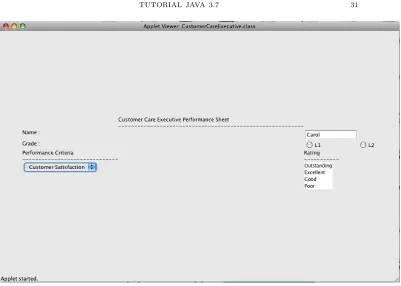
3.3.8. More examples. Berikut adalah contoh program tambahan
1 import j a v a x . swing .∗;
2 import j a v a . awt .∗;
3
4 public c l a s s CustomerCareExecutive extends JApplet { 5 // V a r i a b l e s f o r t h e c o n t r o l s
6 JPanel p a n e l O b j e c t ;
7 JLabel l a b e l t i t l e , labelName , l a b e l G r a d e , l a b e l P e r f C r i t e r i a , l a b e l R a t i n g ;
8 JLabel l i n e 1 , l i n e 2 , l i n e 3 ; 9 J T e x t F i e l d textName ;
10 JRadioButton buttonGrade1 , buttonGrade2 ; 11 JComboBox c o m b o P e r f C r i t e r i a ;
12 J L i s t l i s t R a t i n g ; 13 GridBagLayout g l ;
14 G r i d B a g C o n s t r a i n t s gbc ; 15
16 public void i n i t ( ) {
17 // i n i t i a l i z e t h e l a y o u t 18 g l = new GridBagLayout ( ) ;
19 gbc = new G r i d B a g C o n s t r a i n t s ( ) ;
20 p a n e l O b j e c t = ( JPanel ) getContentPane ( ) ; 21 p a n e l O b j e c t . s e t L a y o u t ( g l ) ;
22
23 // i n i t i a l i z e t h e c o n t r o l s
24 l a b e l t i t l e =new JLabel ( " Customer�Care�E x e c u t i v e�
Performance�S h e e t " ) ;
25 l i n e 1=new JLabel ( "
−−−−−−−−−−−−−−−−−−−−−−−−−−−−−−−−−−−−−−−−−−−−−−−−−−−−−−−−−−
" ) ;
26 labelName=new JLabel ( "Name�: " ) ;
27 l a b e l G r a d e=new JLabel ( " Grade�: " ) ;
28 l a b e l P e r f C r i t e r i a=new JLabel ( " Performance�C r i t e r i a " ) ;
29 l a b e l R a t i n g=new JLabel ( " Rating " ) ;
30 l i n e 2=new JLabel ( "−−−−−−−−−−−−−−−−−−−−−−−−−−−−−−" ) ;
31 l i n e 3=new JLabel ( "−−−−−−−−−−−" ) ;
32 textName=new J T e x t F i e l d ( 1 0 ) ; 33 textName . s e t T e x t ( " C a r o l " ) ;
36 S t r i n g c r i t e r i a [ ] = {" Customer�S a t i s f a c t i o n " , "
P r o d u c t i v i t y " } ;
37 c o m b o P e r f C r i t e r i a = new JComboBox ( c r i t e r i a ) ;
38 S t r i n g r a t i n g [ ] = { " Outstanding " , " E x c e l l e n t " , "Good" , " Poor " } ;
39 l i s t R a t i n g=new J L i s t ( r a t i n g ) ; 40
41 // Apply c o n s t r a i n t s and add c o n t r o l s t o t h e p a n e l 42 gbc . anchor = G r i d B a g C o n s t r a i n t s .NORTHWEST;
43 gbc . g r i d x = 3 ; 44 gbc . g r i d y = 1 ;
45 g l . s e t C o n s t r a i n t s ( l a b e l t i t l e , gbc ) ; 46 p a n e l O b j e c t . add ( l a b e l t i t l e ) ;
47 gbc . anchor = G r i d B a g C o n s t r a i n t s .NORTHWEST; 48 gbc . g r i d x = 3 ;
49 gbc . g r i d y = 3 ;
50 g l . s e t C o n s t r a i n t s ( l i n e 1 , gbc ) ; 51 p a n e l O b j e c t . add ( l i n e 1 ) ;
52 gbc . anchor = G r i d B a g C o n s t r a i n t s .NORTHWEST; 53 gbc . g r i d x = 2 ;
54 gbc . g r i d y = 9 ;
55 g l . s e t C o n s t r a i n t s ( labelName , gbc ) ; 56 p a n e l O b j e c t . add ( labelName ) ;
57 gbc . anchor = G r i d B a g C o n s t r a i n t s .NORTHWEST; 58 gbc . g r i d x = 4 ;
59 gbc . g r i d y = 9 ;
60 g l . s e t C o n s t r a i n t s ( textName , gbc ) ; 61 p a n e l O b j e c t . add ( textName ) ;
62 gbc . anchor = G r i d B a g C o n s t r a i n t s .NORTHWEST; 63 gbc . g r i d x = 2 ;
64 gbc . g r i d y = 1 4 ;
65 g l . s e t C o n s t r a i n t s ( l a b e l G r a d e , gbc ) ; 66 p a n e l O b j e c t . add ( l a b e l G r a d e ) ;
67 gbc . anchor = G r i d B a g C o n s t r a i n t s .NORTHWEST; 68 gbc . g r i d x = 4 ;
69 gbc . g r i d y = 1 4 ;
70 g l . s e t C o n s t r a i n t s ( buttonGrade1 , gbc ) ; 71 p a n e l O b j e c t . add ( buttonGrade1 ) ;
72 gbc . anchor = G r i d B a g C o n s t r a i n t s .NORTHWEST; 73 gbc . g r i d x = 5 ;
74 gbc . g r i d y = 1 4 ;
75 g l . s e t C o n s t r a i n t s ( buttonGrade2 , gbc ) ; 76 p a n e l O b j e c t . add ( buttonGrade2 ) ;
79 gbc . g r i d y = 1 9 ;
80 g l . s e t C o n s t r a i n t s ( l a b e l P e r f C r i t e r i a , gbc ) ; 81 p a n e l O b j e c t . add ( l a b e l P e r f C r i t e r i a ) ;
82 gbc . anchor = G r i d B a g C o n s t r a i n t s .NORTHWEST; 83 gbc . g r i d x = 4 ;
84 gbc . g r i d y = 1 9 ;
85 g l . s e t C o n s t r a i n t s ( l a b e l R a t i n g , gbc ) ; 86 p a n e l O b j e c t . add ( l a b e l R a t i n g ) ;
87 gbc . anchor = G r i d B a g C o n s t r a i n t s .NORTHWEST; 88 gbc . g r i d x = 2 ;
89 gbc . g r i d y = 2 2 ;
90 g l . s e t C o n s t r a i n t s ( l i n e 2 , gbc ) ; 91 p a n e l O b j e c t . add ( l i n e 2 ) ;
92 gbc . anchor = G r i d B a g C o n s t r a i n t s .NORTHWEST; 93 gbc . g r i d x = 4 ;
94 gbc . g r i d y = 2 2 ;
95 g l . s e t C o n s t r a i n t s ( l i n e 3 , gbc ) ; 96 p a n e l O b j e c t . add ( l i n e 3 ) ;
97 gbc . anchor = G r i d B a g C o n s t r a i n t s .NORTHWEST; 98 gbc . g r i d x = 2 ;
99 gbc . g r i d y = 2 6 ;
100 g l . s e t C o n s t r a i n t s ( c o m b o P e r f C r i t e r i a , gbc ) ; 101 p a n e l O b j e c t . add ( c o m b o P e r f C r i t e r i a ) ;
102 gbc . anchor = G r i d B a g C o n s t r a i n t s .NORTHWEST; 103 gbc . g r i d x = 4 ;
104 gbc . g r i d y = 2 6 ;
105 g l . s e t C o n s t r a i n t s ( l i s t R a t i n g , gbc ) ; 106 p a n e l O b j e c t . add ( l i s t R a t i n g ) ;
107 }
Bagian 2. Pemrograman dalam Java
4. Membuat applet dan application
4.1. Applet. Untuk memanggil applet perlu dibuat satu file dalam format html yang berisi file .class yang akan dipanggil, seperti contoh di bawah ini:
1 <HTML>
2 <APPLET CODE=" D i s p l a y A p p l e t . c l a s s " WIDTH=" 200 " HEIGHT=" 200 ">
3 </APPLET> 4 </HTML>
1 import j a v a x . swing .∗;
2 import j a v a . awt .∗;
3
4 public c l a s s D i s p l a y A p p l e t extends JApplet { 5 public void p a i n t ( Graphics g ) {
6 g . d r a w S t r i n g ( " This�i s�d i s p l a y e d�by�t h e�p a i n t�method"
, 2 0 , 2 0 ) ;
7 }
8 }
4.1.2. Program 2. Berikut adalah program yang menunjukkan siklus dari suatu applet. Perhatikan counter-counter dari applet tersebut.
1 import j a v a x . swing .∗;
2 import j a v a . awt .∗;
3
4 public c l a s s AppletMethods extends JApplet { 5 i n t i n i t C o u n t e r = 0 ;
6 i n t s t a r t C o u n t e r = 0 ; 7 i n t sto pCou nter = 0 ; 8 i n t d e s t r o y C o u n t e r = 0 ; 9
10 public void i n i t ( ) { 11 i n i t C o u n t e r ++; 12 r e p a i n t ( ) ;
13 }
14
15 public void s t a r t ( ) { 16 s t a r t C o u n t e r ++; 17 r e p a i n t ( ) ;
18 }
19
22 r e p a i n t ( ) ;
23 }
24
25 public void d e s t r o y ( ) { 26 d e s t r o y C o u n t e r++; 27 r e p a i n t ( ) ;
28 }
29
30 public void p a i n t ( Graphics g ) {
31 g . d r a w S t r i n g ( " i n i t�has�been�i n v o k e d�"
32 + S t r i n g . v a l u e O f ( i n i t C o u n t e r ) + "�t i m e s " , 2 0 , 2 0 ) ;
33 g . d r a w S t r i n g ( " s t a r t�has�been�i n v o k e d�"
34 + S t r i n g . v a l u e O f ( s t a r t C o u n t e r ) + "�t i m e s " , 2 0 , 3 5 ) ;
35 g . d r a w S t r i n g ( " s t o p�has�been�i n v o k e d�"
36 + S t r i n g . v a l u e O f ( sto pCoun ter ) + "�t i m e s " , 2 0 , 5 0 ) ;
37 g . d r a w S t r i n g ( " d e s t r o y�has�been�i n v o k e d�"
38 + S t r i n g . v a l u e O f ( d e s t r o y C o u n t e r ) + "�t i m e s " , 2 0 , 6 5 ) ;
39 }
40 }
1 import j a v a x . swing .∗;
2
3 public c l a s s VCD extends JApplet { 4 // V a r i a b l e f o r t h e p a n e l
5 s t a t i c JPanel p a n e l O b j e c t ;
6 i n t stopCount ;
7 i n t s t a r t C o u n t ; 8
9 // V a r i a b l e s o f l a b e l s 10 JLabel labelVideoCDNo ; 11 JLabel labelVideoCDName ; 12 JLabel l a b e l G e n r e ;
13 JLabel l a b e l A r t i s t ; 14
15 // L a b e l f o r t h e image
16 JLabel l a b e l I m a g e P o s i t i o n ; 17
18 // L a b e l t o d i s p l a y count 19 JLabel l a b e l C o u n t ; 20
21 // V a r i a b l e s f o r d a t a e n t r y c o n t r o l s 22 J T e x t F i e l d textVideoCDNo ;
23 J T e x t F i e l d textVideoCDName ;
24 JComboBox comboGenre ;
26
27 public void i n i t ( ) { 28 // C reat e p a n e l
29 p a n e l O b j e c t = new JPanel ( ) ;
30 getContentPane ( ) . add ( p a n e l O b j e c t ) ; 31
32 // I n i t i a l i z i n g l a b e l s
33 labelVideoCDNo = new JLabel ( " Video�CD�Number" ) ;
34 labelVideoCDName = new JLabel ( "�Name" ) ;
35 l a b e l G e n r e = new JLabel ( " Package " ) ; 36 l a b e l A r t i s t = new JLabel ( " A r t i s t " ) ; 37 l a b e l C o u n t=new JLabel ( ) ;
38 I c o n logoImage = new
39 ImageIcon ( " c : \ \ Se mes ter \\ Batchcode
40 � � � � � �\\Groupname\\ CellGO \\ Images \\VideoCD . g i f " ) ;
41 l a b e l I m a g e P o s i t i o n = new JLabel ( logoImage ) ; 42
43 // I n i t i a l i z i n g T e x t F i e l d
44 textVideoCDNo = new J T e x t F i e l d ( 1 5 ) ; 45 textVideoCDName = new J T e x t F i e l d ( 3 0 ) ; 46 t e x t A r t i s t = new J T e x t F i e l d ( 3 0 ) ;
47 S t r i n g g e n r e s [ ] = { "Rock" , "Pop" , " C l a s s i c a l " , "Rap" } ; 48 comboGenre = new JComboBox ( g e n r e s ) ;
49
50 // Adding image t o t h e a p p l e t
51 p a n e l O b j e c t . add ( l a b e l I m a g e P o s i t i o n ) ; 52
53 // Adding c o n t r o l s f o r Video CD No 54 p a n e l O b j e c t . add ( labelVideoCDNo ) ; 55 p a n e l O b j e c t . add ( textVideoCDNo ) ; 56
57 // Adding c o n t r o l s f o r Video CD Name 58 p a n e l O b j e c t . add ( labelVideoCDName ) ; 59 p a n e l O b j e c t . add ( textVideoCDName ) ; 60
61 // Adding c o n t r o l s f o r g e n r e 62 p a n e l O b j e c t . add ( l a b e l G e n r e ) ; 63 p a n e l O b j e c t . add ( comboGenre ) ; 64
65 // Adding c o n t r o l s f o r Customer Age 66 p a n e l O b j e c t . add ( l a b e l A r t i s t ) ; 67 p a n e l O b j e c t . add ( t e x t A r t i s t ) ; 68
71 } 72
73 public void s t a r t ( ) {
74 // Increment s t a r t C o u n t by 1 75 s t a r t C o u n t ++;
76
77 //Show t h e u p d a t e d count
78 S t r i n g count=" S t a r t�count�i s�"+s t a r t C o u n t
79 +"�Stop�count�i s�"+stopCount ;
80 l a b e l C o u n t . s e t T e x t ( count ) ;
81 }
82
83 public void s t o p ( ) {
84 // Increment stopCount by 1
85 stopCount++;
86 S t r i n g count=" Stop�count�i s�"+stopCount
87 +"�S t a r t�count�i s�"+s t a r t C o u n t ;
88 l a b e l C o u n t . s e t T e x t ( count ) ;
89 }
90 }
1 import j a v a . awt .∗;
2 import j a v a x . swing .∗;
3
4 public c l a s s D a i l y D i a r y extends JApplet { 5 JPanel panelObj ;
6 JLabel l a b e l T a s k ;
7 JButton b u t t o n S t o r e , b u t t o n D i s p l a y ; 8 JComboBox comboTaskList ;
9 JLabel l a b e l S t a t u s ; 10
11 public void i n i t ( ) {
12 panelObj=new JPanel ( ) ;
13 getContentPane ( ) . add ( panelObj ) ; 14
15 Font myfont = new Font ( " Times�New�Roman" , Font .BOLD,
1 8 ) ;
16 l a b e l T a s k =new JLabel ( " Task�L i s t : " ) ;
17
18 S t r i n g taskMessage [ ] = { " 9 . 0 0�AM�Meeting�on�SEI�−�CMM" ,
" 1 . 0 0�PM�Submit�bug�r e p o r t�f o r�p r o j e c t�t o�t h e�
Manager" , "Book�c a k e s�f o r�t h e�Birthday�Party " , "
Book�t i c k e t s�f o r�New�York�f l i g h t " } ;
20 comboTaskList =new JComboBox ( taskMessage ) ; 21 comboTaskList . s e t E d i t a b l e (true) ;
22 l a b e l S t a t u s=new JLabel ( ) ;
23 b u t t o n S t o r e =new JButton ( " S t o r e�S c h e d u l e " ) ;
24 b u t t o n D i s p l a y =new JButton ( " D i s p l a y�S t a t u s " ) ;
25
26 panelObj . add ( l a b e l T a s k ) ; 27 panelObj . add ( comboTaskList ) ; 28 panelObj . add ( b u t t o n S t o r e ) ; 29 panelObj . add ( b u t t o n D i s p l a y ) ; 30 panelObj . add ( l a b e l S t a t u s ) ;
31 }
32
33 public void s t a r t ( ) {
34 g e t A p p l e t C o n t e x t ( ) . showStatus ( " Hi ! ! !�You ’ l l�do�i t " ) ;
35 }
36
37 public void s t o p ( ) {
38 g e t A p p l e t C o n t e x t ( ) . showStatus ( " W i l l�be�back�a g a i n�t o�
remind�you " ) ;
39 l a b e l S t a t u s . s e t T e x t ( "Unknown" ) ;
40 }
41
42 public void p a i n t ( Graphics g ) {
43 l a b e l S t a t u s . s e t T e x t ( S t r i n g . v a l u e O f ( comboTaskList . getItemCount ( ) ) ) ;
44 }
45 }
1 import j a v a x . swing .∗;
2
3 public c l a s s D e a l e r extends JApplet { 4 // V a r i a b l e f o r t h e p a n e l
5 JPanel p a n e l O b j e c t ; 6
7 // V a r i a b l e s o f l a b e l s
8 JLabel l a b e l D e a l e r C e l l N o ; 9 JLabel labelDealerName ; 10 JLabel l a b e l D e a l e r A d d r e s s ; 11 JLabel l a b e l D e a l e r S c h e m e ; 12
16 JComboBox comboDealerScheme ; 17 J T e x t F i e l d t e x t D e a l e r A d d r e s s ; 18
19 public void i n i t ( ) {
20 // Add a p p r o p r i a t e c o n t r o l s t o t h e frame 21 // C reat e p a n e l
22 p a n e l O b j e c t = new JPanel ( ) ;
23 getContentPane ( ) . add ( p a n e l O b j e c t ) ; 24
25 // C reat e and add t h e a p p r o p r i a t e c o n t r o l s 26 // I n i t i a l i z i n g l a b e l s
27 l a b e l D e a l e r C e l l N o = new JLabel ( " C e l l�Number" ) ;
28 labelDealerName = new JLabel ( "�Name" ) ;
29 l a b e l D e a l e r S c h e m e = new JLabel ( "Scheme" ) ; 30 l a b e l D e a l e r A d d r e s s = new JLabel ( " Address " ) ; 31
32 // I n i t i a l i z i n g t e x t f i e l d
33 t e x t D e a l e r C e l l N o = new J T e x t F i e l d ( 1 5 ) ; 34 textDealerName = new J T e x t F i e l d ( 3 0 ) ; 35 t e x t D e a l e r A d d r e s s = new J T e x t F i e l d ( 3 0 ) ;
36 S t r i n g schemes [ ] = { " D i s c o u n t " , " Standard " } ; 37 comboDealerScheme = new JComboBox ( schemes ) ; 38
39 // Adding c o n t r o l s f o r c e l l Number 40 p a n e l O b j e c t . add ( l a b e l D e a l e r C e l l N o ) ; 41 p a n e l O b j e c t . add ( t e x t D e a l e r C e l l N o ) ; 42
43 // Adding c o n t r o l s f o r D e a l e r Name 44 p a n e l O b j e c t . add ( labelDealerName ) ; 45 p a n e l O b j e c t . add ( textDealerName ) ; 46
47 // Adding c o n t r o l s f o r D e a l e r Package 48 p a n e l O b j e c t . add ( l a b e l D e a l e r S c h e m e ) ; 49 p a n e l O b j e c t . add ( comboDealerScheme ) ; 50
51 // Adding c o n t r o l s f o r D e a l e r Address 52 p a n e l O b j e c t . add ( l a b e l D e a l e r A d d r e s s ) ; 53 p a n e l O b j e c t . add ( t e x t D e a l e r A d d r e s s ) ;
54 }
55
56 public void d e s t r o y ( ) { 57 showFrame ( ) ;
58 }
59
61 JFrame frame = new JFrame ( " D e a l e r�D e t a i l s " ) ;
62
63 // V a r i a b l e s o f l a b e l s 64 JLabel l a b e l D e a l C e l l N o ;
65 JLabel labelDealName ;
66 JLabel l a b e l D e a l A d d r e s s ; 67 JLabel l a b e l D e a l S c h e m e ; 68
69 // V a r i a b l e s f o r d a t a e n t r y c o n t r o l s
70 J T e x t F i e l d t e x t D e a l C e l l N o=new J T e x t F i e l d ( 1 0 ) ; 71 J T e x t F i e l d textDealName=new J T e x t F i e l d ( 1 5 ) ; 72 J T e x t F i e l d textDealScheme=new J T e x t F i e l d ( 1 5 ) ; 73 J T e x t F i e l d t e x t D e a l A d d r e s s=new J T e x t F i e l d ( 2 5 ) ; 74 t e x t D e a l C e l l N o . s e t T e x t ( t e x t D e a l e r C e l l N o . getText ( ) ) ; 75 textDealName . s e t T e x t ( textDealerName . getText ( ) ) ;
76 t e x t D e a l A d d r e s s . s e t T e x t ( t e x t D e a l e r A d d r e s s . getText ( ) ) ; 77 textDealScheme . s e t T e x t ( S t r i n g . v a l u e O f
78 ( comboDealerScheme . g e t S e l e c t e d I t e m ( ) ) ) ; 79 l a b e l D e a l C e l l N o = new JLabel ( " C e l l�Number" ) ;
80 labelDealName = new JLabel ( "�Name" ) ;
81 l a b e l D e a l S c h e m e = new JLabel ( "Scheme" ) ; 82 l a b e l D e a l A d d r e s s = new JLabel ( " Address " ) ; 83 JPanel p a n e l=new JPanel ( ) ;
84
85 // add p a n e l t o t h e frame
86 frame . getContentPane ( ) . add ( p a n e l ) ; 87
88 // Adding c o n t r o l s f o r c e l l Number 89 p a n e l . add ( l a b e l D e a l C e l l N o ) ;
90 p a n e l . add ( t e x t D e a l C e l l N o ) ; 91
92 // Adding c o n t r o l s f o r D e a l e r Name 93 p a n e l . add ( labelDealName ) ;
94 p a n e l . add ( textDealName ) ; 95
96 // Adding c o n t r o l s f o r D e a l e r Package 97 p a n e l . add ( l a b e l D e a l S c h e m e ) ;
98 p a n e l . add ( textDealScheme ) ; 99
100 // Adding c o n t r o l s f o r D e a l e r Address 101 p a n e l . add ( l a b e l D e a l A d d r e s s ) ;
102 p a n e l . add ( t e x t D e a l A d d r e s s ) ; 103 frame . s e t S i z e ( 2 0 0 , 2 0 0 ) ; 104 frame . s e t V i s i b l e (true) ;
106 }
1 import j a v a x . swing .∗;
2
3 public c l a s s SampleProgram { 4 s t a t i c JFrame f 1 ;
5 JPanel p1 ; 6 JButton b1 ; 7
8 public SampleProgram ( ) {
9 p1 = new JPanel ( ) ;
10 f 1 . getContentPane ( ) . add ( p1 ) ; 11 b1 = new JButton ( " Submit " ) ; 12 p1 . add ( b1 ) ;
13 b1 . s e t T e x t ( " Cancel " ) ; 14 p1 . add ( b1 ) ;
15 }
16
17 public s t a t i c void main ( S t r i n g a r g s [ ] ) { 18 f 1 = new JFrame ( " Sample�A p p l i c a t i o n " ) ;
19 SampleProgram sp = new SampleProgram ( ) ; 20 f 1 . s e t S i z e ( 3 0 0 , 3 0 0 ) ;
21 f 1 . s e t V i s i b l e (true) ;
22 }
23 }
1 import j a v a x . swing .∗;
2
3 public c l a s s NewJFrame extends JFrame { 4 JButton jButton1 , jButton2 , jButton3 , 5 jButton4 , jButton5 , jButton6 ; 6
7 public NewJFrame ( ) {
8 j a v a . awt . G r i d B a g C o n s t r a i n t s g r i d B a g C o n s t r a i n t s ; 9 jButton1 = new JButton ( "1" ) ;
10 jButton2 = new JButton ( "2" ) ; 11 jButton3 = new JButton ( "3" ) ; 12 jButton4 = new JButton ( "4" ) ; 13 jButton5 = new JButton ( "5" ) ; 14 jButton6 = new JButton ( "6" ) ; 15
16 getContentPane ( ) . s e t L a y o u t (new j a v a . awt . GridBagLayout ( ) ) ;
18 g r i d B a g C o n s t r a i n t s = new j a v a . awt . G r i d B a g C o n s t r a i n t s ( ) ;
19 g r i d B a g C o n s t r a i n t s . g r i d x = 1 ; 20 g r i d B a g C o n s t r a i n t s . g r i d y = 1 ; 21 g r i d B a g C o n s t r a i n t s . weightx = 0 . 5 ; 22 g r i d B a g C o n s t r a i n t s . weighty = 0 . 5 ;
23 getContentPane ( ) . add ( jButton1 , g r i d B a g C o n s t r a i n t s ) ; 24 g r i d B a g C o n s t r a i n t s = new j a v a . awt . G r i d B a g C o n s t r a i n t s ( )
;
25 g r i d B a g C o n s t r a i n t s . g r i d x = 3 ; 26 g r i d B a g C o n s t r a i n t s . g r i d y = 0 ; 27 g r i d B a g C o n s t r a i n t s . g r i d h e i g h t = 3 ;
28 g r i d B a g C o n s t r a i n t s . f i l l = j a v a . awt . G r i d B a g C o n s t r a i n t s . VERTICAL;
29 getContentPane ( ) . add ( jButton2 , g r i d B a g C o n s t r a i n t s ) ; 30 g r i d B a g C o n s t r a i n t s = new j a v a . awt . G r i d B a g C o n s t r a i n t s ( )
;
31 g r i d B a g C o n s t r a i n t s . g r i d x = 4 ; 32 g r i d B a g C o n s t r a i n t s . g r i d y = 0 ; 33 g r i d B a g C o n s t r a i n t s . g r i d h e i g h t = 3 ;
34 g r i d B a g C o n s t r a i n t s . f i l l = j a v a . awt . G r i d B a g C o n s t r a i n t s . VERTICAL;
35 getContentPane ( ) . add ( jButton3 , g r i d B a g C o n s t r a i n t s ) ; 36 g r i d B a g C o n s t r a i n t s = new j a v a . awt . G r i d B a g C o n s t r a i n t s ( )
;
37 g r i d B a g C o n s t r a i n t s . g r i d x = 0 ; 38 g r i d B a g C o n s t r a i n t s . g r i d y = 3 ; 39 g r i d B a g C o n s t r a i n t s . g r i d w i d t h = 3 ;
40 g r i d B a g C o n s t r a i n t s . f i l l = j a v a . awt . G r i d B a g C o n s t r a i n t s . HORIZONTAL;
41 getContentPane ( ) . add ( jButton4 , g r i d B a g C o n s t r a i n t s ) ; 42 g r i d B a g C o n s t r a i n t s = new j a v a . awt . G r i d B a g C o n s t r a i n t s ( )
;
43 g r i d B a g C o n s t r a i n t s . g r i d x = 3 ; 44 g r i d B a g C o n s t r a i n t s . g r i d y = 3 ;
45 g r i d B a g C o n s t r a i n t s . f i l l = j a v a . awt . G r i d B a g C o n s t r a i n t s . VERTICAL;
46 getContentPane ( ) . add ( jButton5 , g r i d B a g C o n s t r a i n t s ) ; 47 g r i d B a g C o n s t r a i n t s = new j a v a . awt . G r i d B a g C o n s t r a i n t s ( )
;
48 g r i d B a g C o n s t r a i n t s . g r i d x = 4 ; 49 g r i d B a g C o n s t r a i n t s . g r i d y = 3 ;
50 getContentPane ( ) . add ( jButton6 , g r i d B a g C o n s t r a i n t s ) ;
51 // pack ( ) ;
53 }
54 public s t a t i c void main ( S t r i n g a r g s [ ] ) { 55 new NewJFrame ( ) . s e t V i s i b l e (true) ;
56 }
5. Event Handling
5.1. Program 1. Contoh program aplikasi untuk membuat satu tombol yang da-pat di-klik dengan mengimplementasikan ActionListener.
1 import j a v a . awt .∗;
2 import j a v a . awt . e v e n t .∗;
3 import j a v a x . swing .∗;
4
5 c l a s s MyFrame extends JFrame{ 6 JButton b1 ;
7
8 public s t a t i c void main ( S t r i n g a r g s [ ] ) { 9 MyFrame f = new MyFrame ( ) ;
10 }
11
12 public MyFrame ( ) {
13 super( "Window�T i t l e " ) ;
14 b1 = new JButton ( " C l i c k�Me ! " ) ;
15
16 getContentPane ( ) . add ( " Center " , b1 ) ;
17 B u t t o n L i s t e n e r b L i s t e n = new B u t t o n L i s t e n e r ( ) ; 18 b1 . a d d A c t i o n L i s t e n e r ( b L i s t e n ) ;
19 s e t S i z e ( 2 0 0 , 2 0 0 ) ; 20 s e t V i s i b l e (true) ;
21 }
22
23 c l a s s B u t t o n L i s t e n e r implements A c t i o n L i s t e n e r { 24 public void a c t i o n P e r f o r m e d ( ActionEvent e v t ) { 25 JButton s o u r c e = ( JButton ) e v t . g e t S o u r c e ( ) ; 26 s o u r c e . s e t T e x t ( " Button�c l i c k e d ! " ) ;
27 }
28 }
29 }
5.2. Program 2. Contoh applet untuk membuat satu buah tombol yang meng-implementasikan ActionListener. Perhatikan cara mendeklarasikan ActionListener dan menghubungkannya pada tombol dibandingkan dengan Program 1
1 import j a v a . awt . e v e n t .∗;
2 import j a v a x . swing .∗;
3
4 public c l a s s Welcome extends JApplet implements A c t i o n L i s t e n e r {
5 JPanel p1 ;
6 JButton buttonClickMe ; 7
8 public void i n i t ( ) { 9 p1=new JPanel ( ) ;
10 getContentPane ( ) . add ( p1 ) ;
11 buttonClickMe=new JButton ( " C l i c k�Me" ) ;
12 p1 . add ( buttonClickMe ) ;
13 buttonClickMe . a d d A c t i o n L i s t e n e r (t h i s) ;
14 }
15
16 public void a c t i o n P e r f o r m e d ( ActionEvent e v e n t O b j e c t ) { 17 g e t A p p l e t C o n t e x t ( ) . showStatus ( "You�c l i c k e d�t h e�C l i c k�
Me�button . " ) ;
18 }
19 }
Gambar 5.2. ButtonAppletBefore
5.3. Program 3. Contoh applet dengan satu button yang jika ditekan akan me-nampilkan angka berurut yang dihasilkan oleh suatu counter. Perhatikan variabel numClicks yang dideklarasikan static. Apakah guna dari variabel static?
1 import j a v a . awt .∗;
2 import j a v a . awt . e v e n t .∗;
3 import j a v a x . swing .∗;
4
Gambar 5.3. ButtonAppletAfter
6 JPanel p a n e l ; 7 JButton button ;
8 s t a t i c i n t numClicks = 0 ; 9
10 public void i n i t ( ) { 11 p a n e l = new JPanel ( ) ;
12 button = new JButton ( " C l i c k ! " ) ; 13
14 getContentPane ( ) . add ( p a n e l ) ; 15 p a n e l . add ( button ) ;
16 button . a d d A c t i o n L i s t e n e r (t h i s) ;
17 }
18
19 public void a c t i o n P e r f o r m e d ( ActionEvent e ) { 20 Object o b j = e . g e t S o u r c e ( ) ;
21 i f ( o b j == button ) {
22 numClicks++;
23 g e t A p p l e t C o n t e x t ( ) . showStatus ( "Number�o f�c l i c k s�:�" + numClicks ) ;
24 }
25 }
26 }
5.4. Program 4. Contoh program aplikasi untuk membuat satu button yang bisa di-klik dengan variabel static yang menjadi counter.
1 import j a v a . awt .∗;
2 import j a v a . awt . e v e n t .∗;
3
4 public c l a s s TestButton implements A c t i o n L i s t e n e r {
5 Frame f ;
6 Button b ;
7 s t a t i c i n t numClick = 0 ; 8
9 public TestButton ( ) {
10 f = new Frame ( " Test " ) ;
11 b = new Button ( " P r e s s�Me ! " ) ;
12 b . setActionCommand ( " ButtonPressed " ) ;
13 }
14
15 public void LaunchFrame ( ) {
16 b . a d d A c t i o n L i s t e n e r (t h i s) ; 17 f . add ( b , BorderLayout .CENTER) ; 18 f . pack ( ) ;
19 f . s e t V i s i b l e (true) ;
20 }
21
22 public void a c t i o n P e r f o r m e d ( ActionEvent e ) {
23 numClick++;
24 System . out . p r i n t l n ( " Action�o c c u r e d " ) ;
25 System . out . p r i n t l n ( " Button ’ s�command�i s�:�" + e .
getActionCommand ( ) ) ;
26 System . out . p r i n t l n ( "Number�o f�button�c l i c k s�:�" +
numClick ) ;
27 }
28
29 public s t a t i c void main ( S t r i n g a r g s [ ] ) { 30 TestButton tb = new TestButton ( ) ; 31 tb . LaunchFrame ( ) ;
32 }
33 }
5.5. Program 5. Contoh program aplikasi dengan dua buah tombol dengan dua ActionListener
1 import j a v a . awt .∗;
2 import j a v a . awt . e v e n t .∗;
3 import j a v a x . swing .∗;
4
6 JFrame frame ; 7
8 public s t a t i c void main ( S t r i n g a r g s [ ] ) { 9 AngelandDevil aad = new AngelandDevil ( ) ; 10 aad . go ( ) ;
11 }
12
13 public void go ( ) {
14 frame = new JFrame ( ) ;
15 JButton button = new JButton ( " Should�I�do�i t ? " ) ;
16 button . a d d A c t i o n L i s t e n e r (new A n g e l L i s t e n e r ( ) ) ; 17 button . a d d A c t i o n L i s t e n e r (new D e v i l L i s t e n e r ( ) ) ;
18 frame . getContentPane ( ) . add ( BorderLayout .CENTER, button ) ;
19 frame . pack ( ) ;
20 frame . s e t V i s i b l e (true) ;
21 }
22
23 c l a s s A n g e l L i s t e n e r implements A c t i o n L i s t e n e r { 24 public void a c t i o n P e r f o r m e d ( ActionEvent e ) {
25 System . out . p r i n t l n ( "Don ’ t�do�i t ,�you�might�r e g r e t�i t ! "
) ;
26 }
27 } 28
29 c l a s s D e v i l L i s t e n e r implements A c t i o n L i s t e n e r { 30 public void a c t i o n P e r f o r m e d ( ActionEvent e ) { 31 System . out . p r i n t l n ( "Come�on ,�do�i t ! " ) ;
32 }
33 }
34 }
Gambar 5.5. Should I do it?
1 import j a v a . awt .∗;
2 import j a v a . awt . e v e n t .∗;
3 import j a v a x . swing .∗;
4
5 public c l a s s NewFrame extends JFrame implements A c t i o n L i s t e n e r {
6 JPanel p a n e l ; 7 JButton button ; 8
9 NewFrame ( ) {
10 p a n e l = new JPanel ( ) ;
11 button = new JButton ( "New�Frame" ) ;
12 button . a d d A c t i o n L i s t e n e r (t h i s) ; 13 getContentPane ( ) . add ( p a n e l ) ; 14 p a n e l . add ( button ) ;
15 s e t D e f a u l t C l o s e O p e r a t i o n ( JFrame .EXIT_ON_CLOSE) ; 16 pack ( ) ;
17 s e t V i s i b l e (true) ;
18 }
19
20 public void a c t i o n P e r f o r m e d ( ActionEvent e ) { 21 Object temp = e . g e t S o u r c e ( ) ;
22 i f( temp == button )
23 {
24 JButton b ;
25
26 JFrame smallFrame ;
27 smallFrame = new JFrame ( ) ; 28 b = new JButton ( " H e l l o ! " ) ;
29 smallFrame . getContentPane ( ) . add ( b ) ; 30 smallFrame . pack ( ) ;
31 // smallFrame . s e t S i z e ( 1 0 0 , 1 0 0 ) ; 32 smallFrame . s e t V i s i b l e (true) ;
33 }
34 }
35
36 public s t a t i c void main ( S t r i n g a r g s [ ] ) { 37 NewFrame n f = new NewFrame ( ) ;
38 }
Gambar 5.7. NewFrame
Gambar 5.8. New Frame Pop
1 import j a v a . awt .∗;
2 import j a v a . awt . e v e n t .∗;
3 import j a v a x . swing .∗;
4
5 public c l a s s ClickMe extends JFrame implements A c t i o n L i s t e n e r {
6 s t a t i c i n t numClick = 0 ; 7 JPanel p a n e l ;
8 JButton b1 , b2 ; 9 JLabel l a b e l;
10 S t r i n g TEXT = "Number�o f�button�c l i c k�:�" ;
11
12 ClickMe ( ) {
13 p a n e l = new JPanel (new GridLayout ( 0 , 3 ) ) ; 14 b1 = new JButton ( " C l i c k 1 " ) ;
15 b2 = new JButton ( " C l i c k 2 " ) ;
16 l a b e l = new JLabel (TEXT + "0� �" ) ;
17
18 b1 . a d d A c t i o n L i s t e n e r (t h i s) ; 19 b2 . a d d A c t i o n L i s t e n e r (t h i s) ; 20
21 getContentPane ( ) . add ( p a n e l ) ; 22 p a n e l . add ( b1 ) ;
23 p a n e l . add ( b2 ) ; 24 p a n e l . add (l a b e l) ;
25 s e t D e f a u l t C l o s e O p e r a t i o n ( JFrame .EXIT_ON_CLOSE) ; 26 pack ( ) ;
27 s e t V i s i b l e (true) ;
28 }
30 public void a c t i o n P e r f o r m e d ( ActionEvent e ) { 31 Object temp = e . g e t S o u r c e ( ) ;
32
33 i f( temp == b1 ) {
34 numClick = numClick + 1 ;
35 }
36 i f( temp == b2 ) {
37 numClick = numClick + 2 ;
38 }
39
40 l a b e l. s e t T e x t (TEXT + numClick ) ;
41 }
42
43 public s t a t i c void main ( S t r i n g a r g s [ ] ) { 44 ClickMe cm = new ClickMe ( ) ;
45 }
46 }
Gambar 5.9. Two Button
1 import j a v a . awt .∗;
2 import j a v a . awt . e v e n t .∗;
3 import j a v a x . swing .∗;
4
5 public c l a s s FavColor extends JApplet implements I t e m L i s t e n e r {
6 JPanel p a n e l ;
7 JLabel lName , l A d d r e s s , lSex , l F a v C o l o r s ; 8 J T e x t F i e l d tfName , t f A d d r e s s ;
9 JRadioButton rbMale , rbFemale ; 10 JComboBox cb ;
11 JButton bSubmit , bReset ; 12 ButtonGroup bGroup ; 13
14 public void i n i t ( ) { 15 p a n e l = new JPanel ( ) ;
16 lName = new JLabel ( "Name" ) ;
19 l F a v C o l o r s = new JLabel ( " F a v o r i t e�C o l o r s�:�" ) ;
20 tfName = new J T e x t F i e l d ( 1 0 ) ; 21 t f A d d r e s s = new J T e x t F i e l d ( 2 0 ) ; 22 rbMale = new JRadioButton ( " Male " ) ; 23 rbFemale = new JRadioButton ( " Female " ) ; 24 cb = new JComboBox ( ) ;
25 bSubmit = new JButton ( " Submit " ) ; 26 bReset = new JButton ( " Reset " ) ; 27 bGroup = new ButtonGroup ( ) ; 28
29 getContentPane ( ) . add ( p a n e l ) ; 30 p a n e l . add ( lName ) ;
31 p a n e l . add ( tfName ) ; 32 p a n e l . add ( l A d d r e s s ) ; 33 p a n e l . add ( t f A d d r e s s ) ; 34 p a n e l . add ( l S e x ) ; 35 p a n e l . add ( rbMale ) ; 36 p a n e l . add ( rbFemale ) ; 37 p a n e l . add ( l F a v C o l o r s ) ; 38 p a n e l . add ( cb ) ;
39 p a n e l . add ( bSubmit ) ; 40 p a n e l . add ( bReset ) ; 41 bGroup . add ( rbMale ) ; 42 bGroup . add ( rbFemale ) ;
43 rbMale . a d d I t e m L i s t e n e r (t h i s) ; 44 rbFemale . a d d I t e m L i s t e n e r (t h i s) ;
45 }
46
47 public void itemStateChanged ( ItemEvent ev ) {
48 Object o b j=ev . g e t S o u r c e ( ) ; 49 i f( o b j == rbMale ) {
50 cb . r e m o v e A l l I t e m s ( ) ; 51 cb . addItem ( " Black " ) ; 52 cb . addItem ( " Blue " ) ; 53 cb . addItem ( "Brown" ) ;
54 }
55 i f( o b j == rbFemale ) { 56 cb . r e m o v e A l l I t e m s ( ) ; 57 cb . addItem ( " Pink " ) ; 58 cb . addItem ( "Red" ) ; 59 cb . addItem ( " Yellow " ) ;
60 }
61 }
Gambar 5.10. FavColor Male
Gambar 5.11. FavColor Female
1 import j a v a x . swing .∗;
2 import j a v a . awt .∗;
3 import j a v a . awt . e v e n t .∗;
4
5 public c l a s s A i r L i n e R e s e r v a t i o n extends JApplet 6 implements F o c u s L i s t e n e r {
7 S t r i n g d a t e [ ] = { " 12/21/2001 " , " 01/12/2002 " , " 12/25/2001 " } ; 8 S t r i n g d e s t [ ] = { " Chicago " , " Boston " , "New�York" ,
9 " C a l i f o r n i a " , " A t l a n t a " , " Mexico " } ; 10 JPanel panelObj ;
11 JComboBox destCombo ; 12 J L i s t d a t e L i s t ; 13 JButton submit ; 14
15 public void i n i t ( ) {
16 d a t e L i s t=new J L i s t ( d a t e ) ;
17 d a t e L i s t . a d d F o c u s L i s t e n e r (t h i s) ; 18 destCombo=new JComboBox ( ) ;
21
22 getContentPane ( ) . add ( panelObj ) ; 23 panelObj . add ( d a t e L i s t ) ;
24 panelObj . add ( destCombo ) ; 25 panelObj . add ( submit ) ;
26 }
27
28 public void f o c u s L o s t ( FocusEvent e ) { 29 Object temp=e . g e t S o u r c e ( ) ;
30
31 i f( temp==d a t e L i s t ) {
32 destCombo . r e m o v e A l l I t e m s ( ) ; 33
34 i n t s e l e c t i o n=d a t e L i s t . g e t S e l e c t e d I n d e x ( ) ; 35 destCombo . addItem ( d e s t [ s e l e c t i o n ] ) ;
36 destCombo . addItem ( d e s t [ s e l e c t i o n +1]) ;
37 }
38 }
39
40 public void f o c u s G a i n e d ( FocusEvent e ) { 41 // W i l l not be h a n d l e d
42 }
43 }
Gambar 5.12. Airline Reservation
1 import j a v a . awt .∗;
2 import j a v a x . swing .∗;
3 import j a v a . awt . e v e n t .∗;
4
5 public c l a s s User extends JApplet implements 6 F o c u s L i s t e n e r , I t e m L i s t e n e r , A c t i o n L i s t e n e r { 7 // D e c l a r a t i o n f o r d a t a e n t r y c o n t r o l s 8 JPanel p1 ;
11 JRadioButton male ; 12 JRadioButton f e m a l e ; 13 JComboBox c1 ;
14 JButton b1 ;
15 S t r i n g s u b j e c t a r r [ ] = { " S o f t w a r e " , " Movies " , 16 " L i t e r a t u r e " , " S o c i e t y�and�People " } ;
17 S t r i n g name , sex , s u b j e c t ; 18
19 public void i n i t ( ) { 20 p1=new JPanel ( ) ;
21 getContentPane ( ) . add ( p1 ) ;
22 l 1=new JLabel ( " Enter�Login�Name : " ) ;
23 l 3=new JLabel ( " S e l e c t�s e x " ) ;
24 l 4=new JLabel ( " S u b j e c t�o f�I n t e r e s t : " ) ;
25 t f 1=new J T e x t F i e l d ( 1 0 ) ;
26 male=new JRadioButton ( " Male " ) ; 27 f e m a l e=new JRadioButton ( " Female " ) ; 28 c1=new JComboBox ( s u b j e c t a r r ) ; 29 b1=new JButton ( " Submit " ) ; 30
31 p1 . add ( l 1 ) ; 32 p1 . add ( t f 1 ) ; 33 p1 . add ( l 3 ) ; 34 p1 . add ( male ) ; 35 p1 . add ( f e m a l e ) ; 36 p1 . add ( l 4 ) ; 37 p1 . add ( c1 ) ; 38 p1 . add ( b1 ) ;
39 male . a d d I t e m L i s t e n e r (t h i s) ; 40 f e m a l e . a d d I t e m L i s t e n e r (t h i s) ; 41 t f 1 . a d d F o c u s L i s t e n e r (t h i s) ; 42 c1 . a d d A c t i o n L i s t e n e r (t h i s) ; 43 b1 . a d d A c t i o n L i s t e n e r (t h i s) ;
44 }
45
46 public void itemStateChanged ( ItemEvent ev ) {
47 Object o b j=ev . g e t S o u r c e ( ) ; 48 i f( o b j==male )
49 s e x=" Male " ; 50 i f( o b j==f e m a l e ) 51 s e x=" Female " ; 52 i f( o b j==c1 ) {
53 s u b j e c t=S t r i n g . v a l u e O f ( c1 . g e t S e l e c t e d I t e m ( ) ) ; 54 g e t A p p l e t C o n t e x t ( ) . showStatus ( s u b j e c t ) ;
56 } 57
58 public void f o c u s L o s t ( FocusEvent e ) { 59 Object temp=e . g e t S o u r c e (