• Tidak ada hasil yang ditemukan

Staff Site Universitas Negeri Yogyakarta

N/A
N/A
Protected

Academic year: 2017

Membagikan "Staff Site Universitas Negeri Yogyakarta"

Copied!
617
0
0

Teks penuh

(1)
(2)

The 8051 Microcontroller and Embedded

Systems

Using Assembly and C

Second Edition

Muhammad Ali Mazidi Janice Gillispie Mazidi

Rolin D. McKinlay

CONTENTS

ˆ Introduction to Computing

ˆ The 8051 Microcontrollers

ˆ 8051 Assembly Language Programming

ˆ Branch Instructions

ˆ I/O Port Programming

ˆ 8051Addressing Modes

ˆ Arithmetic & Logic Instructions And Programs

ˆ 8051 Programming in C

ˆ 8051 Hardware Connection and Hex File

ˆ 8051 Timer/Counter Programming in Assembly and C

ˆ 8051 Serial Port Programming in Assembly and C

ˆ Interrupts Programming in Assembly and C

ˆ 8051Interfacing to External Memory

ˆ 8051 Real World Interfacing I: LCD,ADC AND SENSORS

ˆ LCD and KeyboardInterfacing

(3)

Chung-Ping Young

楊中平

I NTRODUCTI ON TO

COMPUTI NG

The 8051 Microcontroller and Embedded

Systems: Using Assembly and C

(4)

OUTLI NES

‰

Numbering and coding systems

‰

Digital primer

(5)

NUMBERI NG

AND CODI NG

SYSTEMS

Decimal and

Binary Number

Systems

‰

Human beings use base 10 (

decimal

)

arithmetic

¾

There are 10 distinct symbols, 0, 1, 2,

…,

9

‰

Computers use base 2 (

binary

) system

¾

There are only 0 and 1

¾

These two binary digits are commonly

(6)

NUMBERI NG

AND CODI NG

SYSTEMS

Converting

from Decimal

to Binary

‰

Divide the decimal number by 2

repeatedly

‰

Keep track of the remainders

‰

Continue this process until the quotient

becomes zero

‰

Write the remainders in reverse order

to obtain the binary number

Ex. Convert 25

10

to binary

Quotient

Remainder

25/ 2 =

12

1

LSB (least significant bit)

12/ 2 =

6

0

6/ 2 =

3

0

3/ 2 =

1

1

(7)

NUMBERI NG

AND CODI NG

SYSTEMS

Converting

from Binary to

Decimal

‰

Know the weight of each bit in a binary

number

‰

Add them together to get its decimal

equivalent

‰

Use the concept of weight to convert a

decimal number to a binary directly

Ex. Convert 11001

2

to decimal

Weight:

2

4

2

3

2

2

2

1

2

0

Digits:

1

1

0

0

1

Sum:

16 +

8 +

0 +

0 +

1 = 25

10

Ex. Convert 39

10

to binary

(8)

NUMBERI NG

AND CODI NG

SYSTEMS

Hexadecimal

System

‰

Base 16, the

hexadecimal

system,

is used as a

convenient

representation of

binary numbers

¾

ex.

I t is much easier to

represent a string of 0s

and 1s such as

100010010110 as its

(9)

NUMBERI NG

AND CODI NG

SYSTEMS

Converting

between Binary

and Hex

‰

To represent a binary number as its

equivalent hexadecimal number

¾

Start from the right and group 4 bits at a

time, replacing each 4-bit binary number

with its hex equivalent

‰

To convert from hex to binary

¾

Each hex digit is replaced with its 4-bit

binary equivalent

Ex. Convert hex 29B to binary

2

9

B

Ex. Represent binary 100111110101 in hex

1001

1111

0101

(10)

NUMBERI NG

AND CODI NG

SYSTEMS

Converting

from Decimal

to Hex

‰

Convert to binary first and then

convert to hex

‰

Convert directly from decimal to hex

by repeated division, keeping track of

the remainders

Ex. Convert 45

10

to hex

32

16

8

4

2

1

1 0 1 1 0 1

32 + 8 + 4 + 1 = 45

45

10

= 0010 1101

2

= 2D

16

Ex. Convert 629

10

to hex

512

256

128

64

32

16

8

4

2

1

1 0 0 1 1 1 0 1 0 1

(11)

NUMBERI NG

AND CODI NG

SYSTEMS

Converting

from Hex to

Decimal

‰

Convert from hex to binary and then to

decimal

‰

Convert directly from hex to decimal

by summing the weight of all digits

Ex. 6B2

16

= 0110 1011 0010

2

1024

512

256

128

64

32

16

8

4

2

1

1

1 0 1 0 1 1 0 0 1 0

(12)

NUMBERI NG

AND CODI NG

SYSTEMS

Addition of Hex

Numbers

‰

Adding the digits together from the

least significant digits

¾

I f the result is less than 16, write that digit

as the sum for that position

¾

I f it is greater than 16, subtract 16 from it

to get the digit and carry 1 to the next

digit

Ex. Perform hex addition: 23D9 + 94BE

23D9

LSD: 9 + 14 = 23

23 – 16 = 7 w/ carry

+ 94BE

1 + 13 + 11 = 25 25 – 16 = 9 w/ carry

(13)

NUMBERI NG

AND CODI NG

SYSTEMS

Subtraction of

Hex Numbers

‰

I f the second digit is greater than the

first, borrow 16 from the preceding

digit

Ex. Perform hex subtraction: 59F – 2B8

59F

LSD: 15 – 8 = 7

(14)

NUMBERI NG

AND CODI NG

SYSTEMS

ASCI I Code

‰

The ASCI I (pronounced

ask-E

) code

assigns binary patterns for

¾

Numbers 0 to 9

¾

All the letters of English alphabet,

uppercase and lowercase

¾

Many control codes and punctuation

marks

‰

The ASCI I system uses 7 bits to

represent each code

y 79 Y 59 … ... ... ... d 64 D 44 c 63 C 43 b 62 B 42 a 61 A 41 Symbol Hex Symbol Hex

(15)

DI GI TAL

PRI MER

Binary Logic

‰

Two voltage levels can be represented

as the two digits 0 and 1

‰

Signals in digital electronics have two

distinct voltage levels with built-in

tolerances for variations in the voltage

‰

A valid digital signal should be within

either of the two shaded areas

1

2

3

4

5

(16)

DI GI TAL

PRI MER

Logic Gates

‰

AND gate

‰

OR gate

Computer Science Illuminated, Dale and Lewis

(17)

DI GI TAL

PRI MER

Logic Gates

(cont’)

‰

Tri-state buffer

‰

I nverter

‰

XOR gate

Computer Science Illuminated, Dale and Lewis
(18)

DI GI TAL

PRI MER

Logic Gates

(cont’)

‰

NAND gate

‰

NOR gate

(19)

DI GI TAL

PRI MER

Logic Design

Using Gates

Half adder

Full adder

(20)

DI GI TAL

PRI MER

Logic Design

Using Gates

(cont’)

4-bit adder

(21)

DI GI TAL

PRI MER

Logic Design

Using Gates

(cont’)

‰

Decoders

¾

Decoders are widely used for address

decoding in computer design

Address decoder for 9 (1001

2

)

The output will be 1 if and

only if the input is 1001

2

Address decoder for 5 (0101

2

)

The output will be 1 if and

only if the input is 0101

2
(22)

DI GI TAL

PRI MER

Logic Design

Using Gates

(cont’)

‰

Flip-flops

¾

Flip-flops are frequently used to store data

(23)

I NSI DE THE

COMPUTER

I mportant

Terminology

‰

The unit of data size

¾

Bit

: a binary digit that can have the value

0 or 1

¾

Byte

: 8 bits

¾

Nibble

: half of a bye, or 4 bits

¾

Word

: two bytes, or 16 bits

‰

The terms used to describe amounts of

memory in I BM PCs and compatibles

¾

Kilobyte

(K): 2

10

bytes

¾

Megabyte

(M) : 2

20

bytes, over 1 million

¾

Gigabyte

(G) : 2

30

bytes, over 1 billion

(24)

I NSI DE THE

COMPUTER

I nternal

Organization of

Computers

‰

CPU (Central Processing Unit)

¾

Execute information stored in memory

‰

I / O (I nput/ output) devices

¾

Provide a means of communicating with

CPU

‰

Memory

¾

RAM (Random Access Memory)

temporary storage of programs that

computer is running

ƒ

The data is lost when computer is off

¾

ROM (Read Only Memory)

contains

programs and information essential to

operation of the computer

ƒ

The information cannot be changed by use,

and is not lost when power is off

(25)

I NSI DE THE

COMPUTER

I nternal

Organization of

Computers

(cont’)

CPU

Memory

(RAM, ROM)

Peripherals

(monitor,

printer, etc.)

Address bus

(26)

I NSI DE THE

COMPUTER

I nternal

Organization of

Computers

(cont’)

‰

The CPU is connected to memory and

I / O through strips of wire called a

bus

¾

Carries information from place to place

ƒ

Address bus

ƒ

Data bus

ƒ

Control bus

CPU

Read/ Write

RAM

Address bus

Data bus

ROM

Printer

Disk

Monitor

Keyboard

(27)

I NSI DE THE

COMPUTER

I nternal

Organization of

Computers

(cont’)

‰

Address bus

¾

For a device (memory or I / O) to be

recognized by the CPU, it must be

assigned an address

ƒ

The address assigned to a given device must

be unique

ƒ

The CPU puts the address on the address bus,

and the decoding circuitry finds the device

‰

Data bus

¾

The CPU either gets data from the device

or sends data to it

‰

Control bus

¾

Provides read or write signals to the

(28)

I NSI DE THE

COMPUTER

More about

Data Bus

‰

The more data buses available, the

better the CPU

¾

Think of data buses as highway lanes

‰

More data buses mean a more

expensive CPU and computer

¾

The average size of data buses in CPUs

varies between 8 and 64

‰

Data buses are bidirectional

¾

To receive or send data

(29)

I NSI DE THE

COMPUTER

More about

Address Bus

‰

The more address buses available, the

larger the number of devices that can

be addressed

‰

The number of locations with which a

CPU can communicate is always equal

to 2

x

, where

x

is the address lines,

regardless of the size of the data bus

¾

ex. a CPU with 24 address lines and 16

data lines can provide a total of 2

24

or 16M

bytes of addressable memory

¾

Each location can have a maximum of 1

byte of data, since all general-purpose

CPUs are

byte addressable

(30)

I NSI DE THE

COMPUTER

CPU’s Relation

to RAM and

ROM

‰

For the CPU to process information,

the data must be stored in RAM or

ROM, which are referred to as

primary

memory

‰

ROM provides information that is fixed

and permanent

¾

Tables or initialization program

‰

RAM stores information that is not

permanent and can change with time

¾

Various versions of OS and application

packages

¾

CPU gets information to be processed

ƒ

first form RAM (or ROM)

(31)

I NSI DE THE

COMPUTER

I nside CPUs

‰

Registers

¾

The CPU uses registers to store

information temporarily

ƒ

Values to be processed

ƒ

Address of value to be fetched from memory

¾

I n general, the more and bigger the

registers, the better the CPU

ƒ

Registers can be 8-, 16-, 32-, or 64-bit

(32)

I NSI DE THE

COMPUTER

I nside CPUs

(cont’)

Flags

ALU

Program Counter

Instruction Register

Instruction decoder,

timing, and control

Register A

Register B

Register C

Register D

Address Bus

C

ontrol Bus

Data Bus

(33)

I NSI DE THE

COMPUTER

I nside CPUs

(cont’)

‰

ALU (arithmetic/ logic unit)

¾

Performs arithmetic functions such as add,

subtract, multiply, and divide, and logic

functions such as AND, OR, and NOT

‰

Program counter

¾

Points to the address of the next

instruction to be executed

ƒ

As each instruction is executed, the program

counter is incremented to point to the address

of the next instruction to be executed

‰

I nstruction decoder

¾

I nterprets the instruction fetched into the

CPU

ƒ

A CPU capable of understanding more

(34)

I NSI DE THE

COMPUTER

I nternal

Working of

Computers

Ex. A CPU has registers A, B, C, and D and it has an 8-bit

data bus and a 16-bit address bus. The CPU can access

memory from addresses 0000 to FFFFH

Assume that the code for the CPU to move a value to

register A is B0H and the code for adding a value to

register A is 04H

The action to be performed by the CPU is to put 21H into

register A, and then add to register A values 42H and 12H

(35)

I NSI DE THE

COMPUTER

I nternal

Working of

Computers

(cont’)

Ex. (cont’)

Action

Code

Data

Move value 21H into reg. A B0H 21H

Add value 42H to reg. A 04H 42H

Add value 12H to reg. A 04H 12H

Mem. addr. Contents of memory address

1400 (B0) code for moving a value to register A 1401 (21) value to be moved

1402 (04) code for adding a value to register A 1403 (42) value to be added

1404 (04) code for adding a value to register A 1405 (12) value to be added

1406 (F4) code for halt

(36)

I NSI DE THE

COMPUTER

I nternal

Working of

Computers

(cont’)

Ex. (cont’)

The actions performed by CPU are as follows:

1.

The program counter is set to the value 1400H,

indicating the address of the first instruction code to

be executed

2.

¾

The CPU puts 1400H on address bus and sends it

out

ƒ The memory circuitry finds the location

¾

The CPU activates the READ signal, indicating to

memory that it wants the byte at location 1400H

ƒ This causes the contents of memory location

1400H, which is B0, to be put on the data bus and brought into the CPU

...

(37)

I NSI DE THE

COMPUTER

I nternal

Working of

Computers

(cont’)

Ex. (cont’)

3.

¾

The CPU decodes the instruction B0

¾

The CPU commands its controller circuitry to bring

into register A of the CPU the byte in the next

memory location

ƒ The value 21H goes into register A

¾

The program counter points to the address of the

next instruction to be executed, which is 1402H

ƒ Address 1402 is sent out on the address bus to

fetch the next instruction

(38)

I NSI DE THE

COMPUTER

I nternal

Working of

Computers

(cont’)

Ex. (cont’)

4.

¾

From memory location 1402H it fetches code 04H

¾

After decoding, the CPU knows that it must add to

the contents of register A the byte sitting at the

next address (1403)

¾

After the CPU brings the value (42H), it provides

the contents of register A along with this value to

the ALU to perform the addition

ƒ I t then takes the result of the addition from the ALU’s output and puts it in register A

ƒ The program counter becomes 1404, the address of the next instruction

(39)

I NSI DE THE

COMPUTER

I nternal

Working of

Computers

(cont’)

Ex. (cont’)

5.

¾

Address 1404H is put on the address bus and the

code is fetched into the CPU, decoded, and

executed

ƒ This code is again adding a value to register A ƒ The program counter is updated to 1406H 6.

¾

The contents of address 1406 are fetched in and

executed

¾

This HALT instruction tells the CPU to stop

(40)

Chung-Ping Young

楊中平

8051 MI CROCONTROLLERS

The 8051 Microcontroller and Embedded

Systems: Using Assembly and C

(41)

OUTLI NES

‰

Microcontrollers and embedded

processors

(42)

MI

CRO-CONTROLLERS

AND

EMBEDDED

PROCESSORS

Microcontroller

vs.

General-Purpose

Microprocessor

‰

General-purpose microprocessors

contains

¾

No RAM

¾

No ROM

¾

No I / O ports

‰

Microcontroller has

¾

CPU (microprocessor)

¾

RAM

¾

ROM

¾

I / O ports

¾

Timer

(43)

MI

CRO-CONTROLLERS

AND

EMBEDDED

PROCESSORS

Microcontroller

vs.

General-Purpose

Microprocessor

(cont’)

Serial

COM

Timer

I/O

ROM

RAM

CPU

Microcontroller

CPU

RAM

Address bus

Data bus

ROM

I/O

Port

Serial COM

Port

Timer

(44)

MI

CRO-CONTROLLERS

AND

EMBEDDED

PROCESSORS

Microcontroller

vs.

General-Purpose

Microprocessor

(cont’)

‰

General-purpose microprocessors

¾

Must add RAM, ROM, I / O ports, and

timers externally to make them functional

¾

Make the system bulkier and much more

expensive

¾

Have the advantage of versatility on the

amount of RAM, ROM, and I / O ports

‰

Microcontroller

¾

The fixed amount of on-chip ROM, RAM,

and number of I / O ports makes them ideal

for many applications in which cost and

space are critical

(45)

MI

CRO-CONTROLLERS

AND

EMBEDDED

PROCESSORS

Microcontrollers

for Embedded

Systems

‰

An embedded product uses a

microprocessor (or microcontroller) to

do one task and one task only

¾

There is only one application software that

is typically burned into ROM

‰

A PC, in contrast with the embedded

system, can be used for any number of

applications

¾

I t has RAM memory and an operating

system that loads a variety of applications

into RAM and lets the CPU run them

¾

A PC contains or is connected to various

embedded products

(46)

MI

CRO-CONTROLLERS

AND

EMBEDDED

PROCESSORS

Microcontrollers

for Embedded

Systems

(cont’)

‰

Home

¾

Appliances, intercom, telephones, security systems,

garage door openers, answering machines, fax

machines, home computers, TVs, cable TV tuner,

VCR, camcorder, remote controls, video games,

cellular phones, musical instruments, sewing

machines, lighting control, paging, camera, pinball

machines, toys, exercise equipment

‰

Office

¾

Telephones, computers, security systems, fax

machines, microwave, copier, laser printer, color

printer, paging

‰

Auto

(47)

MI

CRO-CONTROLLERS

AND

EMBEDDED

PROCESSORS

x86 PC

Embedded

Applications

‰

Many manufactures of general-purpose

microprocessors have targeted their

microprocessor for the high end of the

embedded market

¾

There are times that a microcontroller is

inadequate for the task

‰

When a company targets a

general-purpose microprocessor for the

embedded market, it optimizes the

processor used for embedded systems

‰

Very often the terms

embedded

(48)

MI

CRO-CONTROLLERS

AND

EMBEDDED

PROCESSORS

x86 PC

Embedded

Applications

(cont’)

‰

One of the most critical needs of an

embedded system is to decrease

power consumption and space

‰

I n high-performance embedded

processors, the trend is to integrate

more functions on the CPU chip and let

designer decide which features he/ she

wants to use

‰

I n many cases using x86 PCs for the

high-end embedded applications

¾

Saves money and shortens development

time

ƒ

A vast library of software already written

(49)

MI

CRO-CONTROLLERS

AND

EMBEDDED

PROCESSORS

Choosing a

Microcontroller

‰

8-bit microcontrollers

¾

Motorola’s 6811

¾

I ntel’s 8051

¾

Zilog’s Z8

¾

Microchip’s PI C

‰

There are also 16-bit and 32-bit

(50)

MI

CRO-CONTROLLERS

AND

EMBEDDED

PROCESSORS

Criteria for

Choosing a

Microcontroller

‰

Meeting the computing needs of the

task at hand efficiently and cost

effectively

¾

Speed

¾

Packaging

¾

Power consumption

¾

The amount of RAM and ROM on chip

¾

The number of I / O pins and the timer on

chip

¾

How easy to upgrade to

higher-performance or lower power-consumption

versions

(51)

MI

CRO-CONTROLLERS

AND

EMBEDDED

PROCESSORS

Criteria for

Choosing a

Microcontroller

(cont’)

‰

Availability of software development

tools, such as compilers, assemblers,

and debuggers

‰

Wide availability and reliable sources

of the microcontroller

¾

The 8051 family has the largest number of

diversified (multiple source) suppliers

ƒ

I ntel (original)

ƒ

Atmel

ƒ

Philips/ Signetics

ƒ

AMD

ƒ

I nfineon (formerly Siemens)

ƒ

Matra

(52)

OVERVI EW OF

8051 FAMI LY

8051

Microcontroller

‰

I ntel introduced 8051, referred as

MCS-51, in 1981

¾

The 8051 is an 8-bit processor

ƒ

The CPU can work on only 8 bits of data at a

time

¾

The 8051 had

ƒ

128 bytes of RAM

ƒ

4K bytes of on-chip ROM

ƒ

Two timers

ƒ

One serial port

ƒ

Four I / O ports, each 8 bits wide

ƒ

6 interrupt sources

(53)

OVERVI EW OF

8051 FAMI LY

8051

Microcontroller

(cont’)

Interrupt

Control

Bus

Control

CPU

OSC

I/O

Ports

Serial

Port

Etc.

Timer 0

Timer 1

On-chip

RAM

On-chip

ROM

for code

P0 P1 P2 P3

Address/Data

TXD RXD

Counter Inputs

(54)

OVERVI EW OF

8051 FAMI LY

8051 Family

‰

The 8051 is a subset of the 8052

‰

The 8031 is a ROM-less 8051

¾

Add external ROM to it

¾

You lose two ports, and leave only 2 ports

for I / O operations

6

8

6

I nterrupt sources

1

1

1

Serial port

32

32

32

I / O pins

2

3

2

Timers

128

256

128

RAM (bytes)

0K

8K

4K

ROM (on-chip program

space in bytes)

8031

8052

(55)

OVERVI EW OF

8051 FAMI LY

Various 8051

Microcontrollers

‰

8751 microcontroller

¾

UV-EPROM

ƒ

PROM burner

ƒ

UV-EPROM eraser takes 20 min to erase

‰

AT89C51 from

Atmel Corporation

¾

Flash (erase before write)

ƒ

ROM burner that supports flash

ƒ

A separate eraser is not needed

‰

DS89C4x0 from

Dallas Semiconductor

,

now part of

Maxim Corp.

¾

Flash

(56)

OVERVI EW OF

8051 FAMI LY

Various 8051

Microcontrollers

(cont’)

‰

DS5000 from

Dallas Semiconductor

¾

NV-RAM (changed one byte at a time),

RTC (real-time clock)

ƒ

Also comes with on-chip loader

‰

OTP (one-time-programmable) version

of 8051

‰

8051 family from

Philips

¾

ADC, DAC, extended I / O, and both OTP

(57)

Chung-Ping Young

楊中平

8051 ASSEMBLY

LANGUAGE

PROGRAMMI NG

The 8051 Microcontroller and Embedded

Systems: Using Assembly and C

(58)

I NSI DE THE

8051

Registers

‰

Register are used to store information

temporarily, while the information

could be

¾

a byte of data to be processed, or

¾

an address pointing to the data to be

fetched

‰

The vast majority of 8051 register are

8-bit registers

(59)

I NSI DE THE

8051

Registers

(cont’)

‰

The 8 bits of a register are shown from

MSB D7 to the LSB D0

¾

With an 8-bit data type, any data larger

than 8 bits must be broken into 8-bit

chunks before it is processed

D0 D1

D2 D3

D4 D5

D6 D7

8 bit Registers

most

significant bit

(60)

I NSI DE THE

8051

Registers

(cont’)

‰

The most widely used registers

¾

A (Accumulator)

ƒ

For all arithmetic and logic instructions

¾

B, R0, R1, R2, R3, R4, R5, R6, R7

¾

DPTR (data pointer), and PC (program

counter)

R6 R5 R4 R3 R2 R1 R0 B A

R7

DPTR

(61)

I NSI DE THE

8051

MOV

I nstruction

MOV destination, source

; copy source to dest.

¾

The instruction tells the CPU to move (in reality,

COPY

) the source operand to the destination

operand

MOV A,

#

55H ;load value 55H into reg. A

MOV R0,A ;copy contents of A into R0

;(now A=R0=55H)

MOV R1,A ;copy contents of A into R1

;(now A=R0=R1=55H)

MOV R2,A ;copy contents of A into R2

;(now A=R0=R1=R2=55H)

MOV R3,#95H ;load value 95H into R3

;(now R3=95H)

MOV A,R3 ;copy contents of R3 into A

;now A=R3=95H

(62)

I NSI DE THE

8051

MOV

I nstruction

(cont’)

‰

Notes on programming

¾

Value (proceeded with # ) can be loaded

directly to registers A, B, or R0 – R7

ƒ

MOV

A,

#

23H

ƒ

MOV R5, #

0

F9H

¾

I f values 0 to F moved into an 8-bit

register, the rest of the bits are assumed

all zeros

ƒ

MOV A, #5

” , the result will be A= 05; i.e., A

= 00000101 in binary

¾

Moving a value that is too large into a

register will cause an error

ƒ

MOV A, #7F2H

; I LLEGAL: 7F2H> 8 bits (FFH)

If it’s not preceded with #,

it means to load from a

memory location

(63)

I NSI DE THE

8051

ADD

I nstruction

ADD A, source

; ADD the source operand

; to the accumulator

¾

The

ADD

instruction tells the CPU to add the source

byte to register A and put the result in register A

¾

Source operand can be either a register or

immediate data, but the destination must always

be register A

ƒ

ADD R4, A

” and “

ADD R2, #12H

” are invalid since A must be the destination of any arithmetic operation

MOV A, #25H

;load 25H into A

MOV R2, #34H

;load 34H into R2

ADD A, R2 ;add R2 to Accumulator

;(A = A + R2)

MOV A, #25H

;load one operand

;into A (A=25H)

(64)

Structure of

Assembly

Language

‰

I n the early days of the computer,

programmers coded in

machine language

,

consisting of 0s and 1s

¾

Tedious, slow and prone to error

‰

Assembly languages

, which provided

mnemonics for the machine code instructions,

plus other features, were developed

¾

An Assembly language program consist of a series

of lines of Assembly language instructions

‰

Assembly language is referred to as a

low-level language

¾

I t deals directly with the internal structure of the

CPU

(65)

Structure of

Assembly

Language

8051

ASSEMBLY

PROGRAMMI NG

‰

Assembly language instruction includes

¾

a mnemonic

(abbreviation easy to remember)

ƒ

the commands to the CPU, telling it what those

to do with those items

¾

optionally followed by one or two operands

ƒ

the data items being manipulated

‰

A given Assembly language program is

a series of statements, or lines

¾

Assembly language instructions

ƒ

Tell the CPU what to do

¾

Directives (or pseudo-instructions)

(66)

Structure of

Assembly

Language

ORG 0H

;start(origin) at location

0

MOV R5, #25H

;load 25H into R5

MOV R7, #34H

;load 34H into R7

MOV A, #0

;load 0 into A

ADD A, R5

;add contents of R5 to A

;now A = A + R5

ADD A, R7

;add contents of R7 to A

;now A = A + R7

ADD A, #12H

;add to A value 12H

;now A = A + 12H

HERE: SJMP HERE ;stay in this loop

END

;end of asm source file

8051

ASSEMBLY

PROGRAMMI NG

‰

An Assembly language instruction

consists of four fields:

[label:] Mnemonic [operands] [;comment]

Mnemonics

produce

opcodes

The label field allows

the program to refer to a

Comments may be at the end of a

line or on a line by themselves

The assembler ignores comments

(67)

ASSEMBLI NG

AND RUNNI NG

AN 8051

PROGRAM

‰

The step of Assembly language

program are outlines as follows:

1)

First we use an editor to type a program,

many excellent editors or word

processors are available that can be used

to create and/ or edit the program

ƒ

Notice that the editor must be able to produce

an ASCI I file

(68)

ASSEMBLI NG

AND RUNNI NG

AN 8051

PROGRAM

(cont’)

2)

The

“asm

source file containing the

program code created in step 1 is fed to

an 8051 assembler

ƒ

The assembler converts the instructions into

machine code

ƒ

The assembler will produce an object file and

a list file

ƒ

The extension for the object file is

obj

while

the extension for the list file is

lst

3)

Assembler require a third step called

linking

ƒ

The linker program takes one or more object

code files and produce an absolute object file

with the extension

abs

(69)

ASSEMBLI NG

AND RUNNI NG

AN 8051

PROGRAM

(cont’)

4)

Next the

“abs

file is fed into a program

called

“OH”

(object to hex converter)

which creates a file with extension

“hex”

that is ready to burn into ROM

ƒ

This program comes with all 8051 assemblers

(70)

ASSEMBLI NG

AND RUNNI NG

AN 8051

PROGRAM

Steps to Create

a Program

EDITOR

PROGRAM

ASSEMBLER

PROGRAM

LINKER

PROGRAM

OH

PROGRAM

myfile.asm

myfile.obj

myfile.abs myfile.lst

(71)

ASSEMBLI NG

AND RUNNI NG

AN 8051

PROGRAM

lst File

‰

The lst (list) file, which is optional, is

very useful to the programmer

¾

I t lists all the opcodes and addresses as

well as errors that the assembler detected

¾

The programmer uses the lst file to find

the syntax errors or debug

1 0000 ORG 0H ;start (origin) at 0

2 0000 7D25 MOV R5,#25H ;load 25H into R5 3 0002 7F34 MOV R7,#34H ;load 34H into R7 4 0004 7400 MOV A,#0 ;load 0 into A

5 0006 2D ADD A,R5 ;add contents of R5 to A ;now A = A + R5

6 0007 2F ADD A,R7 ;add contents of R7 to A ;now A = A + R7

(72)

PROGRAM

COUNTER AND

ROM SPACE

Program

Counter

‰

The program counter points to the

address of the next instruction to be

executed

¾

As the CPU fetches the opcode from the

program ROM, the program counter is

increasing to point to the next instruction

‰

The program counter is 16 bits wide

¾

This means that it can access program

(73)

PROGRAM

COUNTER AND

ROM SPACE

Power up

‰

All 8051 members start at memory

address 0000 when they’re powered

up

¾

Program Counter has the value of 0000

¾

The first opcode is burned into ROM

address 0000H, since this is where the

8051 looks for the first instruction when it

is booted

(74)

PROGRAM

COUNTER AND

ROM SPACE

Placing Code in

ROM

‰

Examine the list file and how the code

is placed in ROM

1 0000 ORG 0H ;start (origin) at 0 2 0000 7D25 MOV R5,#25H ;load 25H into R5 3 0002 7F34 MOV R7,#34H ;load 34H into R7 4 0004 7400 MOV A,#0 ;load 0 into A

5 0006 2D ADD A,R5 ;add contents of R5 to A ;now A = A + R5

6 0007 2F ADD A,R7 ;add contents of R7 to A ;now A = A + R7

7 0008 2412 ADD A,#12H ;add to A value 12H ;now A = A + 12H 8 000A 80EF HERE: SJMP HERE ;stay in this loop

9 000C END ;end of asm source file

ADD A, # 12H 2412

0008

ADD A, R7 2F

0007

ADD A, R5 2D

0006

MOV A, # 0 7400

0004

MOV R7, # 34H 7F34

0002

MOV R5, # 25H 7D25

0000

Assembly Language Machine Language

(75)

PROGRAM

COUNTER AND

ROM SPACE

Placing Code in

ROM

(cont’)

‰

After the program is burned into ROM,

the opcode and operand are placed in

ROM memory location starting at 0000

80 000A

12 0009

24 0008

2F 0007

2D 0006

00 0005

74 0004

34 0003

7F 0002

25 0001

7D 0000

Code

Address

(76)

PROGRAM

COUNTER AND

ROM SPACE

Executing

Program

‰

A step-by-step description of the

action of the 8051 upon applying

power on it

1.

When 8051 is powered up, the PC has

0000 and starts to fetch the first opcode

from location 0000 of program ROM

ƒ

Upon executing the opcode 7D, the CPU

fetches the value 25 and places it in R5

ƒ

Now one instruction is finished, and then the

PC is incremented to point to 0002, containing

opcode 7F

2.

Upon executing the opcode 7F, the value

34H is moved into R7

(77)

PROGRAM

COUNTER AND

ROM SPACE

Executing

Program

(cont’)

‰

(cont’)

3.

The instruction at location 0004 is

executed and now PC = 0006

4.

After the execution of the 1-byte

instruction at location 0006, PC = 0007

5.

Upon execution of this 1-byte instruction

at 0007, PC is incremented to 0008

ƒ

This process goes on until all the instructions

are fetched and executed

(78)

PROGRAM

COUNTER AND

ROM SPACE

ROM Memory

Map in 8051

Family

‰

No member of 8051 family can access

more than 64K bytes of opcode

¾

The program counter is a 16-bit register

Byte Byte Byte

0000

0FFF

0000 0000

3FFF

7FFF 8751

AT89C51

DS89C420/30

(79)

8051 DATA

TYPES AND

DI RECTI VES

Data Type

‰

8051 microcontroller has only one data

type - 8 bits

¾

The size of each register is also 8 bits

¾

I t is the job of the programmer to break

down data larger than 8 bits (00 to FFH,

or 0 to 255 in decimal)

(80)

8051 DATA

TYPES AND

DI RECTI VES

Assembler

Directives

‰

The

DB

directive is the most widely

used data directive in the assembler

¾

I t is used to define the 8-bit data

¾

When

DB

is used to define data, the

numbers can be in decimal, binary, hex,

ASCI I formats

ORG

500H

DATA1: DB

28

;DECIMAL (1C in Hex)

DATA2: DB

00110101B

;BINARY (35 in Hex)

DATA3: DB

39H

;HEX

ORG

510H

DATA4: DB

“2591”

;ASCII NUMBERS

ORG 518H

DATA6: DB

“My name is Joe”

;ASCII CHARACTERS

The “D” after the decimal

number is optional, but using

“B” (binary) and “H”

(hexadecimal) for the others is

required

The Assembler will

convert the numbers

into hex

Place ASCII in quotation marks

The Assembler will assign ASCII

code for the numbers or characters

(81)

8051 DATA

TYPES AND

DI RECTI VES

Assembler

Directives

(cont’)

‰

ORG

(origin)

¾

The

ORG

directive is used to indicate the

beginning of the address

¾

The number that comes after

ORG

can be

either in hex and decimal

ƒ

I f the number is not followed by H, it is decimal

and the assembler will convert it to hex

‰

END

¾

This indicates to the assembler the end of

the source (asm) file

¾

The

END

directive is the last line of an

8051 program

ƒ

Mean that in the code anything after the

END

(82)

8051 DATA

TYPES AND

DI RECTI VES

Assembler

directives

(cont’)

‰

EQU

(equate)

¾

This is used to define a constant without

occupying a memory location

¾

The

EQU

directive does not set aside

storage for a data item but associates a

constant value with a data label

(83)

8051 DATA

TYPES AND

DI RECTI VES

Assembler

directives

(cont’)

‰

EQU

(equate)

(cont’)

¾

Assume that there is a constant used in

many different places in the program, and

the programmer wants to change its value

throughout

ƒ

By the use of

EQU

, one can change it once and

the assembler will change all of its occurrences

COUNT

EQU 25

...

....

MOV

R3, #COUNT

Use

EQU

for the

counter constant

(84)

FLAG BI TS AND

PSW REGI STER

Program Status

Word

‰

The program status word (PSW)

register, also referred to as the

flag

register

, is an 8 bit register

¾

Only 6 bits are used

ƒ

These four are CY (

carry

), AC (

auxiliary carry

), P

(

parity

), and OV (

overflow

)

They are called

conditional flags

, meaning

that they indicate some conditions that

resulted after an instruction was executed

ƒ

The PSW3 and PSW4 are designed as RS0 and

RS1, and are used to change the bank

(85)

FLAG BI TS AND

PSW REGI STER

Program Status

Word

(cont’)

P

--OV

RS0

RS1

F0

AC

CY

CY PSW.7 Carry flag.

AC PSW.6 Auxiliary carry flag.

--

PSW.5 Available to the user for general purpose

RS1 PSW.4 Register Bank selector bit 1.

RS0 PSW.3 Register Bank selector bit 0.

OV PSW.2 Overflow flag.

--

PSW.1 User definable bit.

P PSW.0 Parity flag. Set/cleared by hardware each

instruction cycle to indicate an odd/even

number of 1 bits in the accumulator.

10H – 17H 2

0 1

08H – 0FH 1

1 0

00H – 07H 0 0 0 Address Register Bank RS0 RS1

Carry out from the d7 bit

A carry from D3 to D4

Reflect the number of 1s

in register A

(86)

FLAG BI TS AND

PSW REGI STER

ADD

I nstruction And

PSW

X MOV C, bit

X ORL C, / bit

X ORL C, bit

X ANL C, / bit

X ANL C, bit

X CPL C 0 CLR C 1 SETB C X PLC X RPC X DA X 0 DI V X 0 MUL X X X SUBB X X X ADDC X X X ADD AC OV CY I nstruction

(87)

FLAG BI TS AND

PSW REGI STER

ADD

I nstruction And

PSW

(cont’)

Example 2-2

Show the status of the CY, AC and P flag after the addition of 38H

and 2FH in the following instructions.

MOV A, #38H

ADD A, #2FH ;after the addition A=67H, CY=0

Solution:

38 00111000

+ 2F

00101111

67 01100111

CY = 0 since there is no carry beyond the D7 bit

AC = 1 since there is a carry from the D3 to the D4 bi

(88)

FLAG BI TS AND

PSW REGI STER

ADD

I nstruction And

PSW

(cont’)

Example 2-3

Show the status of the CY, AC and P flag after the addition of 9CH

and 64H in the following instructions.

MOV A, #9CH

ADD A, #64H ;after the addition A=00H, CY=1

Solution:

9C 10011100

+ 64

01100100

100 00000000

CY = 1 since there is a carry beyond the D7 bit

AC = 1 since there is a carry from the D3 to the D4 bi

(89)

FLAG BI TS AND

PSW REGI STER

ADD

I nstruction And

PSW

(cont’)

Example 2-4

Show the status of the CY, AC and P flag after the addition of 88H

and 93H in the following instructions.

MOV A, #88H

ADD A, #93H ;after the addition A=1BH, CY=1

Solution:

88 10001000

+ 93

10010011

11B 00011011

CY = 1 since there is a carry beyond the D7 bit

AC = 0 since there is no carry from the D3 to the D4 bi

(90)

REGI STER

BANKS AND

STACK

RAM Memory

Space

Allocation

‰

There are 128 bytes of RAM in the

8051

¾

Assigned addresses 00 to 7FH

‰

The 128 bytes are divided into three

different groups as follows:

1)

A total of 32 bytes from locations 00 to

1F hex are set aside for register banks

and the stack

2)

A total of 16 bytes from locations 20H to

2FH are set aside for bit-addressable

read/ write memory

3)

A total of 80 bytes from locations 30H to

(91)

8051

REGI STER

BANKS AND

STACK

RAM Memory

Space

Allocation

(cont’)

Scratch pad RAM

Bit-Addressable RAM

Register Bank 3

Register Bank 2

Register Bank 1 (stack)

Register Bank 0 07

08 0F 10 17 18 1F 20 2F 30 7F

(92)

8051

REGI STER

BANKS AND

STACK

Register Banks

‰

These 32 bytes are divided into 4

banks of registers in which each bank

has 8 registers, R0-R7

¾

RAM location from 0 to 7 are set aside for

bank 0 of R0-R7 where R0 is RAM location

0, R1 is RAM location 1, R2 is RAM

location 2, and so on, until memory

location 7 which belongs to R7 of bank 0

¾

I t is much easier to refer to these RAM

locations with names such as R0, R1, and

so on, than by their memory locations

(93)

8051

REGI STER

BANKS AND

STACK

Register Banks

(cont’)

R7 R6 R5 R4 R3 R2 R1 R0

Bank 0 Bank 1 Bank 2 Bank 3

7 6 5 4 3 2 0 1 F E D C B A 8 9 1F 1E 1D 1C 1B 1A 18 19 17 16 15 14 13 12 10 11 R7 R6 R5 R4 R3 R2 R1 R0 R7 R6 R5 R4 R3 R2 R1 R0 R7 R6 R5 R4 R3 R2 R1 R0

(94)

8051

REGI STER

BANKS AND

STACK

Register Banks

(cont’)

‰

We can switch to other banks by use

of the PSW register

¾

Bits D4 and D3 of the PSW are used to

select the desired register bank

¾

Use the bit-addressable instructions SETB

and CLR to access PSW.4 and PSW.3

1 1

Bank 3

0 1

Bank 2

1 0

Bank 1

0 0

Bank 0

RS0( PSW.3) RS1( PSW.4)

(95)

8051

REGI STER

BANKS AND

STACK

Register Banks

(cont’)

Example 2-5

MOV R0, #99H

;load R0 with 99H

MOV R1, #85H

;load R1 with 85H

Example 2-6

MOV 00, #99H

;RAM location 00H has 99H

MOV 01, #85H

;RAM location 01H has 85H

Example 2-7

SETB PSW.4

;select bank 2

(96)

8051

REGI STER

BANKS AND

STACK

Stack

‰

The stack is a section of RAM used by

the CPU to store information

temporarily

¾

This information could be data or an

address

‰

The register used to access the stack

is called the SP (stack pointer) register

¾

The stack pointer in the 8051 is only 8 bit

wide, which means that it can take value

of 00 to FFH

¾

When the 8051 is powered up, the SP

register contains value 07

(97)

8051

REGI STER

BANKS AND

STACK

Stack

(cont’)

‰

The storing of a CPU register in the

stack is called a

PUSH

¾

SP is pointing to the last used location of

the stack

¾

As we push data onto the stack, the SP is

incremented by one

ƒ

This is different from many microprocessors

‰

Loading the contents of the stack back

into a CPU register is called a

POP

¾

With every pop, the top byte of the stack

is copied to the register specified by the

instruction and the stack pointer is

(98)

8051

REGI STER

BANKS AND

STACK

Pushing onto

Stack

Example 2-8

Show the stack and stack pointer from the following. Assume the

default stack area.

MOV R6, #25H MOV R1, #12H MOV R4, #0F3H PUSH 6

PUSH 1 PUSH 4

Solution:

25 12 F3

After PUSH 4

SP = 0A

08 09 0A 0B

SP = 09 SP = 08

Start SP = 07

25 08 25 08 08 12 09 09 09 0A 0A 0A 0B 0B 0B

(99)

8051

REGI STER

BANKS AND

STACK

Popping From

Stack

Example 2-9

Examining the stack, show the contents of the register and SP after

execution of the following instructions. All value are in hex.

POP 3 ; POP stack into R3 POP 5 ; POP stack into R5 POP 2 ; POP stack into R2

Solution:

6C After POP 2

SP = 08

08 09 0A 0B

SP = 09 SP = 0A

Start SP = 0B

6C 08 6C 08 6C 08 76 09 76 09 76 09 0A F9 0A F9 0A 0B 0B 54 0B

After POP 5 After POP 3

(100)

8051

REGI STER

BANKS AND

STACK

CALL

I nstruction And

Stack

‰

The CPU also uses the stack to save

the address of the instruction just

below the

CALL

instruction

¾

This is how the CPU knows where to

(101)

8051

REGI STER

BANKS AND

STACK

I ncrementing

Stack Pointer

‰

The reason of incrementing SP after

push is

¾

Make sure that the stack is growing

toward RAM location 7FH, from lower to

upper addresses

¾

Ensure that the stack will not reach the

bottom of RAM and consequently run out

of stack space

¾

I f the stack pointer were decremented

after push

(102)

8051

REGI STER

BANKS AND

STACK

Stack and Bank

1 Conflict

‰

When 8051 is powered up, register

bank 1 and the stack are using the

same memory space

¾

We can reallocate another section of RAM

(103)

8051

REGI STER

BANKS AND

STACK

Stack And Bank

1 Conflict

(cont’)

Example 2-10

Examining the stack, show the contents of the register and SP after

execution of the following instructions. All value are in hex.

MOV SP, #5FH ;make RAM location 60H ;first stack location MOV R2, #25H

MOV R1, #12H MOV R4, #0F3H PUSH 2

PUSH 1 PUSH 4

Solution:

25 12 F3

After PUSH 4

60 61 62 63 25 60 25 60 60 12 61 61 61 62 62 62 63 63 63

(104)

Chung-Ping Young

楊中平

JUMP, LOOP AND CALL

I NSTRUCTI ONS

The 8051 Microcontroller and Embedded

Systems: Using Assembly and C

(105)

LOOP AND

JUMP

I NSTRUCTI ONS

Looping

‰

Repeating a sequence of instructions a

certain number of times is called a

loop

¾

Loop action is performed by

DJNZ reg, Label

ƒ

The register is decremented

ƒ

I f it is not zero, it jumps to the target address

referred to by the label

ƒ

Prior to the start of loop the register is loaded

with the counter for the number of repetitions

ƒ

Counter can be R0

R7 or RAM location

;This program adds value 3 to the ACC ten times

MOV A,#0

;A=0, clear ACC

MOV R2,#10

;load counter R2=10

AGAIN: ADD A,#03

;add 03 to ACC

DJNZ R2,AGAIN ;repeat until R2=0,10 times

(106)

LOOP AND

JUMP

I NSTRUCTI ONS

Nested Loop

‰

I f we want to repeat an action more

times than 256, we use a loop inside a

loop, which is called

nested loop

¾

We use multiple registers to hold the

count

Write a program to (a) load the accumulator with the value 55H, and

(b) complement the ACC 700 times

MOV A,#55H

;A=55H

MOV R3,#10

;R3=10, outer loop count

NEXT: MOV R2,#70

;R2=70, inner loop count

AGAIN: CPL A

;complement A register

(107)

LOOP AND

JUMP

I NSTRUCTI ONS

Conditional

Jumps

MOV A,R0

;A=R0

JZ OVER

;jump if A = 0

MOV A,R1

;A=R1

JZ OVER

;jump if A = 0

...

OVER:

‰

Jump only if a certain condition is met

JZ label

;jump if A=0

Determine if R5 contains the value 0. If so, put 55H in it.

MOV A,R5

;copy R5 to A

JNZ NEXT

;jump if A is not zero

MOV R5,#55H

NEXT:

...

(108)

LOOP AND

JUMP

I NSTRUCTI ONS

Conditional

Jumps

(cont’)

‰

(cont’)

JNC label

;jump if no carry, CY=0

¾

I f CY = 0, the CPU starts to fetch and execute

instruction from the address of the label

¾

I f CY = 1, it will not jump but will execute the next

instruction below JNC

Find the sum of the values 79H, F5H, E2H. Put the sum in registers

R0 (low byte) and R5 (high byte).

MOV A,#0

;A=0

MOV R5,A

;clear R5

ADD A,#79H

;A=0+79H=79H

;

JNC N_1

;if CY=0, add next number

;

INC R5

;if CY=1, increment R5

N_1: ADD A,#0F5H ;A=79+F5=6E and CY=1

JNC N_2

;jump if CY=0

INC R5

;if CY=1,increment R5 (R5=1)

N_2: ADD A,#0E2H ;A=6E+E2=50 and CY=1

JNC OVER

;jump if CY=0

INC R5

;if CY=1, increment 5

(109)

LOOP AND

JUMP

I NSTRUCTI ONS

Conditional

Jumps

(cont’)

‰

All conditional jumps are short jumps

¾

The address of the target must within

-128 to + 127 bytes of the contents of PC

Jump if bit

1 and clear bit

JBC

Jump if bit

0

JNB

Jump if bit

1

JB

Jump if CY

0

JNC

Jump if CY

1

JC

Jump if byte

#data

CJNE reg,#data

Jump if A

byte

CJNE A,byte

Decrement and Jump if A

0

DJNZ

Jump if A

0

JNZ

Jump if A

0

JZ

Actions

Instructions

(110)

LOOP AND

JUMP

I NSTRUCTI ONS

Unconditional

Jumps

‰

The unconditional jump is a jump in

which control is transferred

unconditionally to the target location

LJMP

(long jump)

¾

3-byte instruction

ƒ

First byte is the opcode

ƒ

Second and third bytes represent the 16-bit

target address

Any memory location from 0000 to FFFFH

SJMP

(short jump)

¾

2-byte instruction

ƒ

First byte is the opcode

ƒ

Second byte is the relative target address

(111)

LOOP AND

JUMP

I NSTRUCTI ONS

Calculating

Short Jump

Address

‰

To calculate the target address of a

short jump (

SJMP, JNC, JZ, DJNZ,

etc.

)

¾

The second byte is added to the PC of the

instruction immediately below the jump

‰

I f the target address is more than -128

to + 127 bytes from the address below

the short jump instruction

(112)

LOOP AND

JUMP

I NSTRUCTI ONS

Calculating

Short Jump

Address

(cont’)

Line PC Opcode

Mnemonic Operand

01 0000

ORG 0000

02 0000 7800

MOV R0,#0

03 0002 7455 MOV A,#55H

04 0004 6003

JZ NEXT

05 0006 08

INC R0

06 0007 04 AGAIN: INC A

07 0008 04 INC A

08 0009 2477 NEXT: ADD A,#77H

09 000B 5005

JNC OVER

10 000D E4

CLR A

11 000E F8

MOV R0,A

12 000F F9 MOV R1,A

13 0010 FA

MOV R2,A

14 0011 FB

MOV R3,A

15 0012 2B OVER: ADD A,R3

16 0013 50F2

JNC AGAIN

17 0015 80FE HERE: SJMP HERE

18 0017

END

+

+

(113)

CALL

I NSTRUCTI ONS

‰

Call instruction is used to call subroutine

¾

Subroutines are often used to perform tasks

that need to be performed frequently

¾

This makes a program more structured in

addition to saving memory space

LCALL

(long call)

¾

3-byte instruction

ƒ

First byte is the opcode

ƒ

Second and third bytes are used for address of

target subroutine

Subroutine is located anywhere within 64K

byte address space

ACALL

(absolute call)

(114)

CALL

I NSTRUCTI ONS

LCALL

‰

When a subroutine is called, control is

transferred to that subroutine, the

processor

¾

Saves on the stack the the address of the

instruction immediately below the LCALL

¾

Begins to fetch instructions form the new

location

‰

After finishing execution of the

subroutine

¾

The instruction RET transfers control back

to the caller

(115)

CALL

I NSTRUCTI ONS

LCALL

(cont’)

ORG 0

BACK: MOV A,#55H ;load A with 55H MOV P1,A ;send 55H to port 1 LCALL DELAY ;time delay

MOV A,#0AAH ;load A with AA (in hex) MOV P1,A ;send AAH to port 1

LCALL DELAY

SJMP BACK ;keep doing this indefinitely

;--- this is delay subroutine ---ORG 300H ;put DELAY at address 300H DELAY: MOV R5,#0FFH ;R5=255 (FF in hex), counter AGAIN: DJNZ R5,AGAIN ;stay here until R5 become 0

RET ;return to caller (when R5 =0)

END ;end of asm file

Upon executing “

LCALL DELAY

”,

the address of instruction below it,

MOV A,#0AAH

” is pushe

Gambar

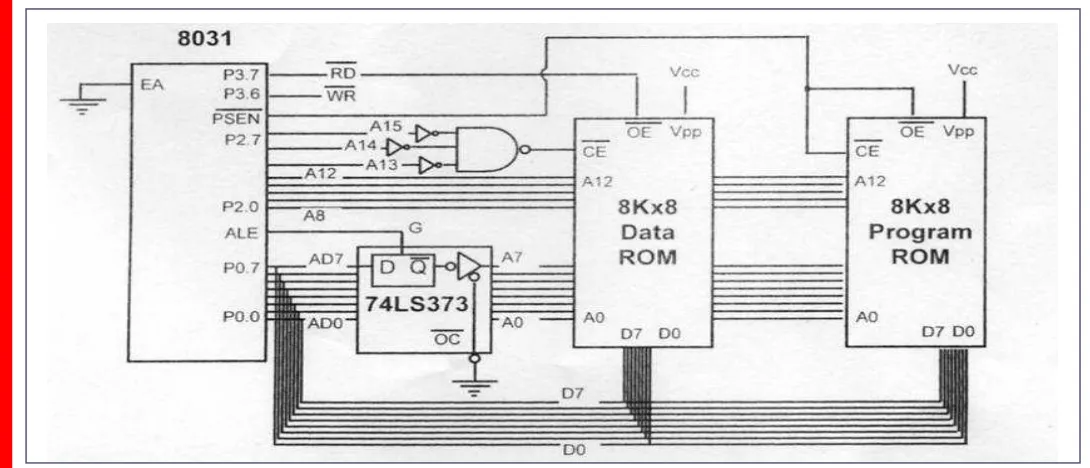
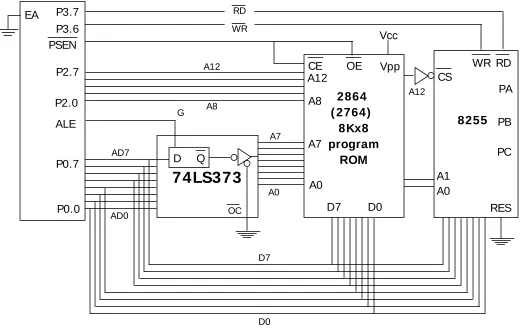
Figure 14-14 shows the design. Notice the role of PSEN and RD in each ROM. For program ROM, PSEN is used to activate both OE and CE
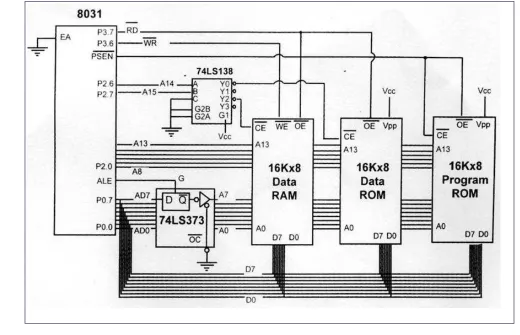
Figure 14-18. 8051 Accessing 256K*8 External NV-RAM
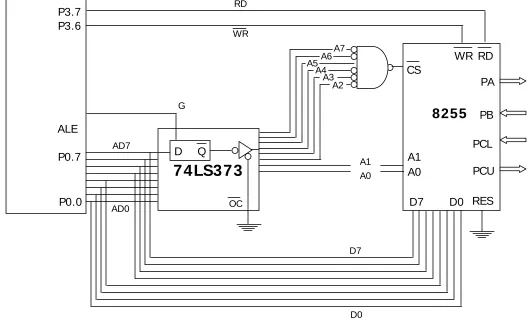
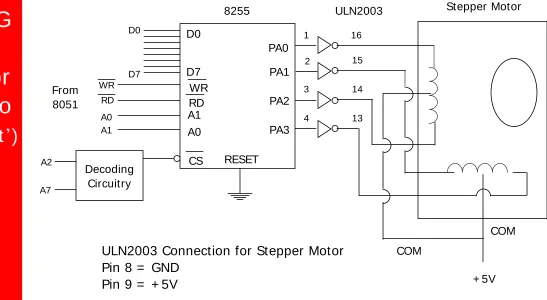
Figure 15-6. 8051 Connection to the 8255 for Example 15-4
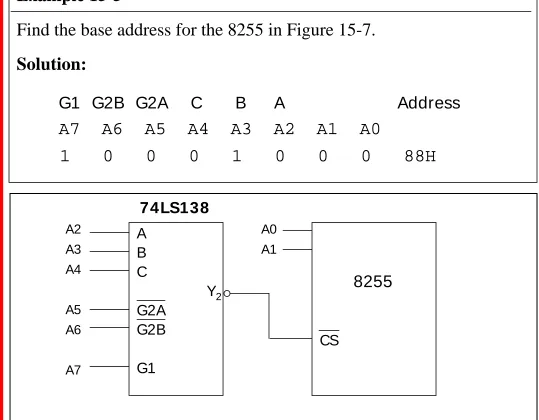
Figure 15-7. 8255 Decoding Using 74LS138
+7

Referensi

Dokumen terkait

Dengan topik "Pablic Speaking " y^ng diselenggarakan pzda tanggal 28 Agustus 2008. Samsul

Cit ing Kongsvik’s opening t houghts in Graves’ Conceptualizing Cont ent (2000, p.37):. “ It w as very difficult to concept ualize t he content of

Ada beberapa counter example yang dapat digunakan, yaitu: subgrup yang tidak dipenuhi. Ada beberapa counter example yang dapat

 Senyawa koordinasi adalah senyawa yang mengandung satu atau lebih ion kompleks dengan sejumlah kecil molekul atau ion di seputar atom atau ion logam pusat (ion lawan atau

To counter those problems, the development of health sector in the country border areas has been focused to the availability of medical doctors, midwives, nurses,

Cara lain untuk mencapai hasil yang sama adalah dengan menggunakan fakta bahwa dua kolom berdekatan berbeda nilai tempatnya dengan faktor yang menjadi basis sistem

This paper presents an analysis of efficiency in Indonesia Teacher Training Institutions or universities in the year of 2011, using the Data Envelopment Analysis. The database

Pada bagian ini akan dibahas bagaimana flip-flop dapat digunakan di dalam counter biner sedemikian rupa hingga keadaan-keadaan output FF menyatakan suatu bilangan biner