The Development of DMSNumGen; A Document Management System Number Generator Application Dissertation
By
Nabila Faeqa Salim
Dissertation submitted in partial fulfillment of the requirements for the
Bachelor of Information and Communication Technology (Hons)
SEPTEMBER 2012
Universiti Teknologi PETRONAS, Bandar Seri Iskandar,
31750 Tronoh, Perak Darul Ridzuan
CERTIFICATION OF APPROVAL
The Development of DMSNumGen; A Document Management System Number Generator Application
By
Nabila Faeqa Salim
A project dissertation submitted to the
Information and Communication Technology Programme Universiti Teknologi PETRONAS
in partial fulfillment of the requirement for the
BACHELOR of INFORMATION and COMMUNICATION TECHNOLOGY (Hons) (INFORMATION and COMMUNICATION TECHNOLOGY)
Approved by,
_________________
(Khairul Shafee Kalid)
UNIVERSITI TEKNOLOGI PETRONAS TRONOH, PERAK
September 2012
Certification of originality
This is to certify that I am responsible for the work submitted in this project, that the original work is my own except as specified in the references and acknowledgements, and that the original work contained herein have not been undertaken or done by unspecified sources or persons.
(NABILA FAEQA SALIM)
ABSTRACT
Document Management System Number Generator (DMSNumGen) comes with the objectives of analyzing the critical security features for Document ID (DID) generation by providing different interfaces between system administrator and normal users, designing both system architectures for system administrator and normal users as well as developing an automated system that can generate DID based on the input given by users. The system shall be flexible enough which can be customized to suit organization’s document numbering convention. These objectives are to address the issue in generating DID which can suits every organization’s document numbering convention complexity. This project is intended to replace manual-based system currently being used or a system which does not support organizations’ numbering convention complexity. Development methodology been used is Spiral Model Approach whilst for research methodology is qualitative type. It is found that each organization has its own document numbering convention and the larger the organization, the more complex the document numbering convention. New system architecture had been designed to automate the DID generation process without involving the intervention from system administrator unless needed should system errors occurred.
Acknowledgements
Firstly, I would like to thank Allah, The Almighty as I was able to complete my final year project with His blessings.
The highest appreciation goes to UTP’s supervisor, Mr. Khairul Shafee Khalid for giving an endless guidance, kind supervision, and the evaluation of my final year project. Not to be forgotten a million thanks to those who involved directly or indirectly for research and development purposes especially Mrs. Zarinah Mohaideen and Mr. Vinoth.
My gratitude then goes for all interviewees involved for project research, Mrs. Zaleha Naim, manager of Project Document Center (PDC), in MIMOS Berhad, Ms. Nor Adeera Noorazman, the staff of PETRONAS and Mr. Ahmad Faris Ahmad Khairi, the intern in Freescale for giving full commitment during the interview. Also to those who constantly being supportive and assisting me throughout the research and development phases.
Table of Contents
List of figures ... i
List of tables ... ii
ABBREVIATIONS & NOMENCLATURES ...iii
CHAPTER 1 ... 1
INTRODUCTION ... 1
1.1. Background ... 1
1.2. Problem Statement ... 3
1.2.1. Problem Identification ... 3
1.2.2. Significant of the Project ... 4
1.3. Objectives ... 6
1.4. Scope of Study ... 7
1.5. The Relevancy of the Project... 7
1.6. Feasibility of the Project within Scope and Time Frame ... 8
CHAPTER 2 ... 9
LITERATURE REVIEW AND/OR THEORY ... 9
2. LITERATURE REVIEW AND/OR THEORY ... 9
2.1. Document Management (DM) Versus Knowledge Management (KM) ... 9
2.2. Document Management System (DMS) Definitions ... 12
2.3. The Use of DMS for Better Organizations ... 13
2.4. Information Management (IM) ... 15
CHAPTER 3 ... 17
METHODOLOGY/PROJECT WORK... 17
3. METHODOLOGY/PROJECT WORK ... 17
3.1. Key Milestones ... 17
3.2. Project Activities ... 18
3.3. Gantt chart ... 21
3.4. Tools Needed ... 21
CHAPTER 4 ... 23
RESULT AND DISCUSSION ... 23
4. RESULT AND DISCUSSIONS ... 23
4.1. MIMOS Berhad Case Study ... 23
4.2. Data Gathering & Analysis... 24
4.3. Experimentation/Modeling ... 28
4.4. Prototype ... 31
CHAPTER 5 ... 38
CONCLUSION ... 38
5. CONCLUSION ... 38
5.1. Relevancy to the Objectives ... 38
REFERENCES ... 40
APPENDICES ... 42
Appendix 1 – Test Scenarios ... 42
Appendix 2 – Test Cases ... 43
Appendix 3 – Technical Report ... 43
i
List of figures
Figure 1: Spiral Model Approach ... 18
Figure 2: Milestones & Project Activities ... 20
Figure 3: As-is State System... 25
Figure 4: New System Flow (in progress) ... 26
Figure 5: DMSNumGen Architecture ... 27
Figure 6: DMSNumGen System Flow (user) ... 29
Figure 7: DMSNumGen System Flow (admin) ... 30
Figure 8: Administrator Login Page ... 32
Figure 9: Normal User Login Page ... 32
Figure 10: DMS Main Site ... 33
Figure 11: DID Generation Form Configuration... 34
Figure 12: Data Flow of the System ... 35
Figure 13: Document Numbering Convention Details Form... 36
Figure 14: DID Request Form ... 37
ii List of tables
Table 1: Extracted Information of DID ... 2
Table 2: Project Gantt chart ... 21
Table 3: DID Found in Database ... 28
Table 4: New Generated DID ... 28
iii
ABBREVIATIONS & NOMENCLATURES
CUT. Code Unit Test DID. Document ID.
DM. Document Management
DMS. Document Management System.
DMSNumGen. Document Management System Number Generator.
IM. Information Management KM. Knowledge Management QA. Quality Assurance
UAT. User Acceptance Test.
1 CHAPTER 1
INTRODUCTION
1. INTRODUCTION
Chapter 1 introduces the background, issues to be addressed, objectives to be achieved along the way of completing the project and the scope of study which limits the boundary of the system to be built and the research done.
1.1. Background
Document Management System (DMS) is a computer-based software or system which is used to manage, store and track electronic documents and electronic images.
Since it is widely being used by organizations all over the world for the capabilities stated, the numbers of DMS platforms in the market are also growing with the purpose of providing basic DMS features together with the additional ones. In real environment, the bigger the organization, the more complex DMS platform they would require.
The key features of DMS platform are:
i. Storing
ii. Easy retrieval for reference purpose iii. Easy tracking for changes done
2 iv. Workflow for review and approval process v. Versioning for updates purpose
vi. Searching by tagging, document ID (DID), title, author, etc.
vii. Document ID (DID) generation
For easy tracking, retrieval and searching purposes, each document should be assigned with a number or unique ID (normally in alphanumeric form) which is determined by particular organization’s numbering convention. This unique ID differentiates one document from another.
Numbering convention is crucial for DID generation of any types of document issued by an organization. The convention is not simply by incrementing the last digit (running number) of the DID as each number or alphabet has its own significance.
MSDN (2010) has explained that
The document ID feature creates identifiers that can be used to retrieve items independent of their current location.
This indicates that DID generated are essential for searching or retrieval purposes besides depicting its own meaning. By using a unique identifier, document could be retrieved even though it has been relocated to other location such as, a document numbered as 083A is stored at this location; home.com/newpolicy. It will not be an issue for retrieval later on if it is relocated to home.com/policy.
DID is also the key of gaining as much information as possible. The longer a DID is, the more information could be extracted as in the example shown below.
DID Document Type Purpose Running Number Version
GDL-FC-001-A Guideline Financial Claim 001 A
Table 1: Extracted Information of DID
3
As the DIDs generated are solely based on the organizations’ document numbering convention, the information that could be extracted would be different from one organization to another.
None of DMS platforms would be able to suit every organization’s document numbering convention due to a reason; different organizations would be having different document numbering conventions. Larger organizations tend to have a more complex convention rather than the smaller organizations and the DID would also be longer and consist of many parts.
This project is to address the above issue. A study had been done in MIMOS Berhad to get a clearer view of the issue stated together with a research to prove that every organization implements document numbering convention with different level of complexity. It involved three different organizations and will be discussed further in Chapter 3, Methodology/Project Work.
1.2. Problem Statement
Each organization regardless the size, would definitely have its own document numbering convention. Hence, the level of convention complexity would also be different from one and another.
1.2.1. Problem Identification
Despite of being used all over the world for its capabilities there’re still lacking features in DMS platforms. One of the issues being raised is the document numbering generation does not suit every single organization’s document numbering convention.
“Many clients complained that MOSS document management suffered from the feature which was inexcusable; Lack of uniqueness identifiers for documents which is really
4
important in any Document Management System, in particular in Records Management”
(Pisarek M., 2010).
In this context, uniqueness identifiers are referring to DID and even though DMS platforms such as SharePoint and FileHold are offering document numbering generation, it is merely for simple conventions (increment the last DID). Thus, both large organizations and those having complex document numbering convention would have to face this issue.
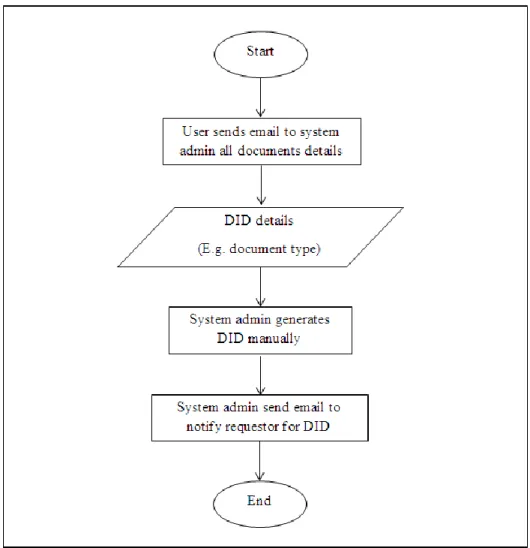
Currently, the process of generating DID which is based on document numbering convention of particular organizations is in a manual-based manner as in stated below:
i. Requestor (user) sends email to system administrator with all the details of document which the number is to be issued or generated. The details could be document type, description, department in charge, etc. These details are depends on the organizations’ document numbering convention.
ii. System administrator needs to generate DID manually (without using DMS platform or any proper system). E.g.: it could be generated by using MS Excel.
iii. Once DID is successfully generated, system administrator would send an email notifying the newly generated DID.
1.2.2. Significant of the Project
There are reasons of addressing this issue in spite of the fact that DID is vital as a document unique identifier. This section would cover three significances of the project which are cost and tedious works, unfamiliar back-end coding amendments and time consuming for a manual-based system.
5 Cost and Tedious Works
Changing DMS platform is tedious especially for large organizations and those that have been established for years since these kinds of organization would have big databases storing their information and paperless documents for certain. When changing DMS platform takes place, the information stored in the server with previous DMS platform needs to be migrated to the newer version of DMS platform. Only expert would have the right to involve in this process besides ensuring neither information nor those paperless document to lose.
Unfamiliar Back-end Coding Amendments
There are DMS platforms which providing back-end coding amendments feature, in order to suit the platform with organizations’ business process yet the drawback is still exists whereby the system administrator might not be familiar to it. The learning process would also take longer time since the amendments of the back-end coding are complex and DMS platform is very crucial in an organization. Thus, any back-end changes need to be done carefully and any mistakes should not be occurred.
Manual-based System is Time-Consuming
Quality is always related to short, efficient and effective business process and the term of short business process itself is pointing to the time consumption. Normally manual-based system would take a longer time to accomplish certain processes. So, it can be concluded that automate-based system could cut business process by lessen the time consumption and tedious steps involved.
Complying to ISO 9001:2008 Clause 4
In order to maintain the process quality, this project will be complied with IS0 9001:2008 Clause 4.2.3 – Document Control which falls under Clause 4; Quality Management System (QMS). It stated that each document shall always being updated to suit
6
organization or project amendments, being reviewed and approved in prior to make it as a reference and available at the time of needed. This clause also tells that each document issued by an organization need to be assigned a number or unique ID as an identifier which is reflecting what the contents are all about inside the document, the synchronized version and document contents, relevant version at the time of referring, being updated by author once amendments are needed before reviewing and approval process takes place.
Since in the ISO 9001:2008 Clause 4 (Document Control) did not stated any standards in term of the complexity of document numbering convention and the length of DID, it could be either in a long or short series of alphanumeric/digits as it is depends on the organizations’ document numbering convention. It could be 20 digits, more or less than that. Nonetheless, it should be able to differentiate one document from another besides maintaining the core criterion stated in the clause; DID should reflects the contents.
(Naim, 2012).
1.3. Objectives
The objectives of this project are:
i. To analyze the critical features in order to provide security for DID generation by prompting login page for system administrator before they can use the system and different interfaces between system admin and normal users.
ii. To design the system architecture of DMSNumGen and interfaces for both users;
system administrator and normal users.
iii. To develop an automated system that can generate DID, based on user input. The system shall be also flexible enough to be customized by system administrator in order to suit organization’s numbering convention.
7 1.4. Scope of Study
The system falls under the domain of Document Management System (DMS) whilst DMS is under the big domain of Information Management (IM). Document types (which DID need to be generated) are general and neither intended merely for engineering nor template documents.
This system is intended to replace manual-based system currently being used by organizations which are having a complex or totally different from a normal numbering convention. Numbering those documents in an automated manner is vital in quality perspective as it provides efficiency to the organizations since it cuts the business processes. Furthermore, the bright side of this project is, users do not have to go through the documents thoroughly to look for document information; merely the DID will do.
They can tell the documents’ details by looking at those DID for it reflects the contents.
Furthermore, it will keep the system administrator or users at ease as they do not need to spend on any other expensive DMS platform to suit their business processes.
1.5. The Relevancy of the Project
As DMS is widely being used by all organizations, the issue of DMS platforms do not support the complexity of document numbering in most of big organizations should be addressed. Complaints made by DMS users are the strongest proofs that DMS platforms need an improvement in this matter.
It is to lessen the burden of cost they would have to incur as well as to put system administrator at ease in a way to ensure the process quality is always being maintained.
8
1.6. Feasibility of the Project within Scope and Time Frame
It is feasible to develop this project within the scope of study and a period of one year for the requirements has been gathered and not much tools needed. Experience that the developer possesses in DMS development is an added advantage.
9 CHAPTER 2
LITERATURE REVIEW AND/OR THEORY
2. LITERATURE REVIEW AND/OR THEORY
In this chapter, past works and reviews made by other individuals would be discussed in order to support the problems statement together with those domains which this project falls under, which are Document Management (DM), Document Management System (DMS) and Information Management (IM).
2.1. Document Management (DM) Versus Knowledge Management (KM)
Toolbox.com (2008) has stated that
Document management is defined as a way to produce, store, control, and track documents in a work-group environment. There are many procedures and methods for managing documents as there are organizations.
Previously, documents issued by organizations were not managed electronically and the methods of handling it were based on the procedures determined by the organization. It could be considered as a tedious work because documents were issued frequently and the storage for those documents needed to be bigger and bigger as time goes by. Since every organization kept on issuing documents regardless the types and usage, those physical paper-based documents were continuously causing difficulties in retrieval,
10
storage and searching processes. It was not only time-consuming as employees needed to dig a bundle of documents just for one, but also bringing the down the level of efficiency and effectiveness of the organization.
After DM concept was introduced to the organization worldwide, documents then were less printed and only stored in the computer disks. For easy retrieval, searching and storing, those paperless documents were resided under different folders and the folders’
name would be reflecting what documents were kept inside it.
According to Bach (2012)
Document management is the process of navigating, manipulating and maintaining the information contained in the files and other information sources associated with anyone effort.
This statement tells that each organization’s documented activities should be systematically managed. It is aims of providing easiness to everyone in getting up-to- date document for it is always being maintained. As such, requirements gathered for a project should be documented for further reference at the time needed and the documents later on should be updated along the way of the project development accordingly. This means, activities done would be reflected in the documents.
Though, those computer disks storing paperless documents were not a centralized repository that could be something valuable to the organization and it was also exposed to potential loss. Furthermore, documents sharing were likely to be tedious when it comes to sharing with other colleagues as it resides in an individual’s computer disks.
They might need to email each other to get the document crossed.
Nonetheless, as the technologies nowadays are rapidly growing, developers have come out with newer and more sophisticated system in handling those paperless documents rather than storing it in computer disks, which is Document Management System (DMS)
11
in order to assist entire organizations’ document management to be more efficient and effective. DMS would be discussed in the next subchapter 2.2. Document Management System (DMS) Definitions.
Document Management (DM) is somehow related to Knowledge Management (KM) based on the statement made by Frost, a writer of an article in Knowledge Management Tools website. Frost (2010) has described in his article that
KM is about making the right knowledge available to the right people. It is about making sure that an organization can learn, and that it will be able to retrieve and use its knowledge assets in current applications as they are needed.
The relationship between DM and KM could be clearly seen as one of DM’s criteria is to provide the right knowledge (documents) available to the right people at the time needed. As frost had implicitly explained the relationship between DM and KM, his statement is even supported explicitly in an article in a website called InsideKnowledge.
InsideKnowledge (2000) has stated that
Document management and knowledge management are dependent on each other;
good document management increase knowledge and empowers the recipient of that knowledge.
The recipients in this context are referring to the employees of particular organization and as a result of having a good document management; the level of efficiency and effectiveness can be brought up by those knowledgeable recipients. Knowledge management is actually a broad scope whereby document management is one of the elements resides under it. This can be seen through the statement made by Koenig, the writer of an online magazine, KM World Magazine. Koenig (2012) has explained that
Knowledge management is a discipline that promotes an integrated approach to identifying, capturing, evaluating, retrieving, and sharing all of an enterprise's information assets. These assets may include databases, documents, policies, procedures, and previously un-captured expertise and experience in individual workers.
12
Based on both statements by InsideKnowledge and Koenig, the relationship between DM and KM is getting clearer whereby DM is a subdomain resides under the domain of KM.
Thus, it can be concluded that for an organization to have a good KM, the DM should be efficiently and effectively being handled prior to the KM.
2.2. Document Management System (DMS) Definitions
The term is generic and can cover a multitude of functions and activities, but a DM system – more properly in the way we are discussing the concept here, an electronic document management system (EDMS) – typically refers to a computerized system that facilitates the creation, capture, organization, storage, retrieval, manipulation and controlled circulation of documents in electronic format (Raynes, 2002).
According to Raynes, the generic term is referring to DMS which is by definition is a computerized system that has the capability of managing electronic documents or paperless-based documents. This definition is later on supported by Williams (2009) that
Document Management are designed from the ground up to assist entire organizations seeking to manage the creation, storage, retrieval and expiry of information stored as documents.
Based on these two reviews, the definitions have shown that DMS is a computer-based system that addresses the problem of managing, tracking, storing and retrieving paperless or electronic documents issued by organizations as well as to avoid potential loss. Those documents are crucial as it contain explicit knowledge and need to be managed wisely and carefully. Thus, DMS is considered to be good in controlling the life cycle of paperless documents.
13 2.3. The Use of DMS for Better Organizations
The dissemination of documents frequently involves sending them along specified routes within an organization. These may be predefined, as when a document needs to collect signatures for authorization in a defined sequence, or ad hoc, as when the recipient of a document decides some particular set of colleagues also need to see it (Doverton, 2001).
Based on the statement by Doverton, it explained that DMS is being used in organizations for its functionality in documents dissemination within organization besides storing, retrieval and managing documents features. Apart from it, DMS also provides another crucial feature which is security as what has been mentioned by William (2009),
Unlike a file structure on your PC, a DMS resolves around a centralized repository that is used to manage the storage of any type of information that could of value to an organization – and protect the same against loss.
Security in this context is referring to the documents protection against loss. As the documents are stored in a centralized server, it would be less likely to lose unlike paper- based documents which somehow could be misplaced or torn off.
Peter S. Campbell also proving the statement by Doverton, that DMS is being used in organizations today and has added some more information in relation to the benefits that particular organizations might have gained for using DMS. In his article, Campbell (2007) has explained
For many of us, logging on to a network or the Internet can be like charting the ocean with a rowboat. There may be a sea of information at our fingertips, but if we lack the proper vessel to navigate it, finding what we need — even within our own organization's information system — can be a significant challenge.
14
Implicitly, he said that an efficient document management system would benefit the organization or else, it would become a challenge when such issues encountered. The issues could be documents loss, difficulties in tracking documents or even inconsistency in documents naming.
As organizations nowadays are like floating in a virtual sea of documents and top level management are very particular in bringing up their level of productivity, efficiency and effectiveness, DMS has become a must-have platform especially in large organizations.
As a result, DMS platforms flood the market providing numerous features other than the basic ones. For instances SharePoint, OpenDoc, Krystal, FileHold, M-Files and many more. Nonetheless, none of them have the capability of generating DID which is based on particular organization’s document numbering convention. The absence of this vital key feature is one of the reasons an organization suffers from a non-smooth business process. Following are the two reviews made concerning the absence feature in DMS platform that they are currently facing. According to Pisarek (2010),
Many clients complained that MOSS document management suffered from the feature which was inexcusable; Lack of uniqueness identifiers for documents which is really important in any Document Management System, in particular in Records Management.
This review was also experienced by the author in using SharePoint 2007 as DMS platform. The uniqueness of DID generated was not up to target whereby DID generated was not based on the organization’s document numbering convention, instead it was simply incremented. For example, A002 is assigned for document 2 and A003 will be assigned to document 3. This kind of DID does not show any significant until it is capable of giving information solely based on the number (unique ID) assigned to it. Thus, people would have known what was written in the documents as it reflected by the DID assigned.
Most of the organizations are using SharePoint 2007 or simply called MOSS yet, DID generation feature which is based on organizations’ document numbering convention is not included. Even though the newer version of SharePoint 2007 which is SharePoint
15
2010 includes this feature, there is still a need for developer to do the back-end coding amendments to suit the platform with their organizations’ document numbering convention. This would be a tedious work for the unfamiliar ones.
The same goes to FileHold whereby it only assigns a unique number to each document (simply by incrementing the previous number) without any significant value in it whereby there is no information could be extracted from it such as the version of the document.
2.4. Information Management (IM)
DMS is categorized under the domain of Information Management (IM) since documents hold useful information of organizations. In short, according to Detlor, IM covers on how information is created, distributed, used, stored and organized as stated below.
Information management concerns the control over how information is created, acquired, organized, stored, distributed, and used as a means of promoting efficient and effective information access, processing, and use by people and organizations. Various perspectives of information management exist. For this entry, three are presented: the organizational, library, and personal perspectives. Each deals with the management of some or all of the processes involved in the information life cycle. Each concerns itself with the management of different types of information resources. The purpose of this entry is to clearly describe what “information management” is and to clarify how information management differs in regards to closely related terms (Detlor, 2010).
In this context, DID could be the reference as an example. A document issued by organization should be assigned a unique ID or a number and it should be meaningful and reflecting the contents inside. The process of generating the ID should also be based on the organizations’ document numbering convention.
16 Lin (2010) stated that
Information management is the management of the processes and systems that create, acquire, organize, store, distribute, and use information. The goal of information management is to helps people and organizations access, process and use information efficiently and effectively. Doing so helps organizations operate more competitively and strategically, and helps people better accomplish their tasks and become better informed.
The review made by Detlor previously in term of IM definition and area is supported by Lin from Wuhan University of Technology. She also added that IM aims of helping people and organization access, process and use of that information in an efficient and effective manner.
These two reviews conclude that, this project is categorized under the domain of DMS which is then resides under the bigger domain called IM.
17 CHAPTER 3
METHODOLOGY/PROJECT WORK
3. METHODOLOGY/PROJECT WORK
The core of Chapter 3 describes the methodology used for DMSNumGen development which is Spiral Model. To be precise, this chapter contains the descriptions of project activities and key milestones besides the tools needed to accomplish the objectives of development.
3.1. Key Milestones
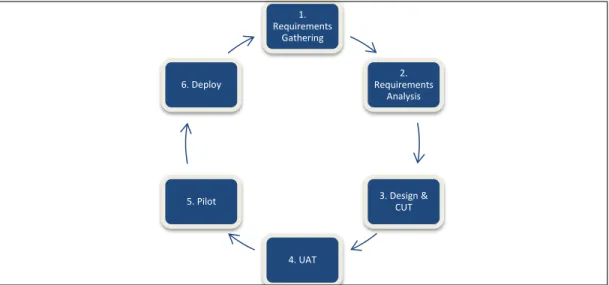
Spiral model has six major activities/phases which can be considered as the key milestones, that are requirements gathering, requirements analysis, design and Code Unit Test (CUT), User Acceptance Test (UAT), pilot and deploy. This model was chosen as the methodology approach due to the expanding/growing features of DMS day by day. As new requirements come in, the process will go back to the first phase – requirements gathering and continues up to deployment phase all over again. In other words, the behavior of this model is like a loop.
Figure 1 shows how the phases of this model approach go to one after another and rotate all over again once new requirements are being specified.
18
Figure 1: Spiral Model Approach
Nevertheless, the model is then modified for this project by cutting the last two phases (pilot and deploy) in a way to suit the environment. Both phases are cut due to a reason;
they are subjected to alpha (internal use) and beta releases (external use) respectively whereby installation at the client’s side server is needed. These processes would take a longer time for the project to be completed hence it could be done in the future for release purpose with additional requirements (if any).
Therefore, UAT is the last key milestones for DMSNumGen development and amendments would be done at this phase should the test case fails.
3.2. Project Activities
Splitting up key milestones into smaller tasks would make the development much easy and structured. Thus, we could see those unresolved issues clearly before taking appropriate solutions.
There are several project activities fall under each of the key milestones.
1.
Requirements Gathering
2.
Requirements Analysis
3. Design &
CUT
4. UAT 5. Pilot
6. Deploy
19
i. Requirements gathering were done during a phone call interview and during the internship period at particular organization which had been made as the case study in this project; MIMOS Berhad. A phone interview had been with the ISO expert in MIMOS Berhad, works under the department Corporate Quality whom involves in Document Control/DMS for years. Few questions were asked concerning the DID convention. For examples:
a. What numbering limits does ISO fix for a document to have?
b. To what extend are the companies allowed to have a numbering convention in term of the complexity?
During the internship period, requirements were also gathered yet it is merely based on a company. The level of complexity to generate DID could be considered as complex as each document would be assigned to a long unique ID and there are some logics behind the generation.
Another online interview was done with an interviewee from other organization; PETRONAS to get the idea to what extend that the complexity of DID generation convention would be. Few open-ended questions were asked so that the interviewee would not feel restricted in answering those questions.
For instances:
c. Does your organization have a unique document numbering?
d. Could you please give an example of a document number (DID) that is assigned to a document?
e. What are the logics applied behind the document number (DID) generation?
20
The last online interview was done with an interviewee who was an intern of a semiconductor company, Freescale. The same questions with an interview from PETRONAS were asked.
ii. Later on, the requirements were analyzed from the perspective of developer in order to ease the usage of the system before proposing the new architecture of the system. This is due to different thoughts of developer-side and user-side.
Users think of how the system works or run (more to interfaces flow) yet, developers think of the architecture of the system to be built.
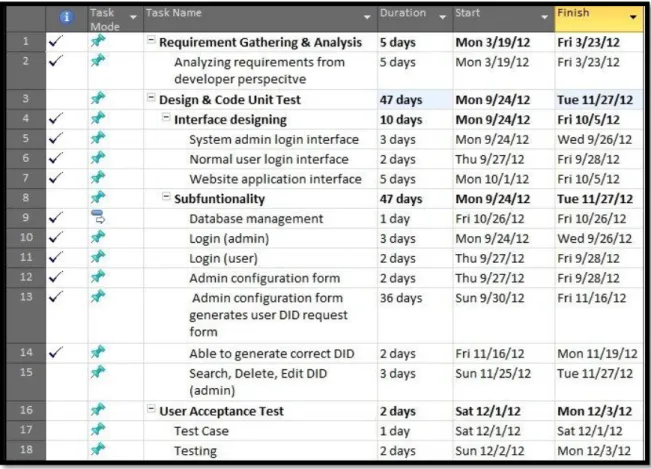
Figure 2: Milestones & Project Activities
iii. The design and CUT phase was an implementation of the proposed solution.
Currently, the DMSNumGen is under UAT phase (refer to Figure 2, item 16).
At current stage, DID has been successfully generated based on the
21
configuration set up by system administrator. The system was tested as a whole to check any errors that may cause the system is not executable. At this level, the quality and functionality are both tested to get clients’/users’
feedback so as to achieve the project objectives.
3.3. Gantt chart
Table 3 below shows the key milestones throughout the project life cycle; from requirements analysis up until the UAT.
No. Key Milestones Month
1 2 3 4 5 6 7 8
1 Requirements
Gathering
2 Requirements
Analysis
3 Design & CUT
4 UAT *current
phase Table 2: Project Gantt chart
3.4. Tools Needed
The tools needed for DMSNumGen development are:
22
i. Server side and client side; There is no limitation to what type of operating system needed for this system to run, IIS 7web server, PHP 5.3.6, MySQL, Browsers – Internet Explorer 6.0 or later, Chrome Version 22.0.1229.79 m or later and Mozilla Firefox 10 or later.
ii. Users need to connect to internet prior to have access to the web application.
For development purpose, both server and client resided at the same computer to ease the CUT phase. However, in real environment it should be hosted in a separate server for mobility since users shall be able to access the web application at any time without restrictions.
23 CHAPTER 4
RESULT AND DISCUSSION
.
4. RESULT AND DISCUSSIONS
Chapter 4 presents and discusses the results of the study. Under this chapter, the feedbacks obtained during the interview were analyzed so as to take proper solution for the development.
4.1. MIMOS Berhad Case Study
As organizations now flood their servers with thousands of document, DMS platforms are considered as the one and only solution. The same goes with MIMOS Berhad as it uses SharePoint 2007 as DMS platform for document handling. In the organization, each department manages its own web page whereby the site champion (web page administrator) is not only responsible for updating department’s announcements to be circulated, but also in granting and controlling the access of other employees to the documents inside the repository. Such documents are procedures, policy, project documents, research papers and others.
Based on the study of document numbering issue done in MIMOS Berhad, it could be seen that the level of complexity for the organization’s document numbering convention is quite complex. This is due to there are many parts for a single DID and it consists of
24
several logic to generate one. This complexity is not supported by SharePoint 2007 which involved predetermined logic for each DID to be generated other than retrieving information in the database.
Currently, the requestors need to fill in a form to be attached in emails for DID request and the generated DID would be stored in a single file resided under SharePoint site. However, this file can be seen and downloaded by whoever has the access. This could be a problem when the access is accidentally granted to those who are not supposed to see the confidential information and this would lead to unsecured system.
One solution for this issue is by providing search function, hence users can always search for DID details without downloading any files. Only system administrator will have the access to documents’ information.
Information gathered was analyzed and will be discussed further in the next sub chapter.
4.2. Data Gathering & Analysis
The first factor to be looked at before analyzing the needed solution was the as-is state or the manual-based system being used.
25
Figure 3: As-is State System
As shown in Figure 3 (As-is State System), it involved a lot of intervention from system administrator in order to generate a single requested DID. The process flow of DID generation could not be continued whenever system administrator is not around or is not alert with the email (form-like containing the details for DID requested). This condition has a high possibility in bringing the organization down to a lower level of efficiency.
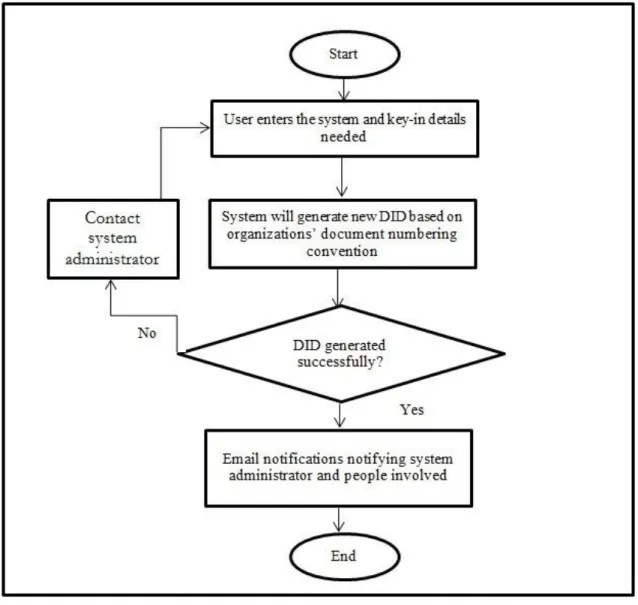
Therefore, the flow of the system should be automated to lessen the involvement from system administrator. Figure 4 represents the flow of the current system being developed.
26
At this level, the issues of time consuming and manual-based system could be resolved.
System administrator would be still in the loop of DID generation process yet there is no need of manually notifying and generating DID for requestor. They will do it by their own by using the system and contacting system administrator occurs when the system is not able to generate one due to errors (e.g.: server down)
Figure 4: New System Flow (in progress)
27
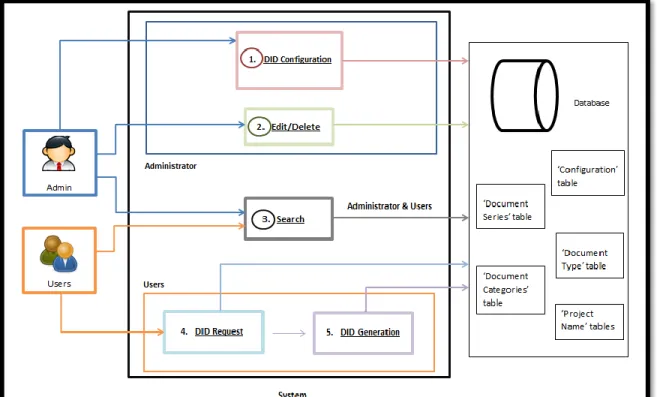
Figure 5 represents DMSNumGen architecture for a better view of this system.
System administrator’s roles will be handling the components needed for the database to store DIDs generated besides configuring the logic/convention of the generation process before user can use the system. The components in this context are the parts in each DID that is assigned to a document. Components could be document series, running number, version, document types and many others depending on the organization’s numbering convention. Meanwhile, the logic/convention is an algorithm of generating DID which will be explained in Table 3 and 4.
For an instance, if a DID consists of four (4) parts there will be a need for the database to hold or contains four (4) parts for maintenance process later on apart from to give easiness in the logic convention. Here is an example for a better idea.
Figure 5: DMSNumGen Architecture
28
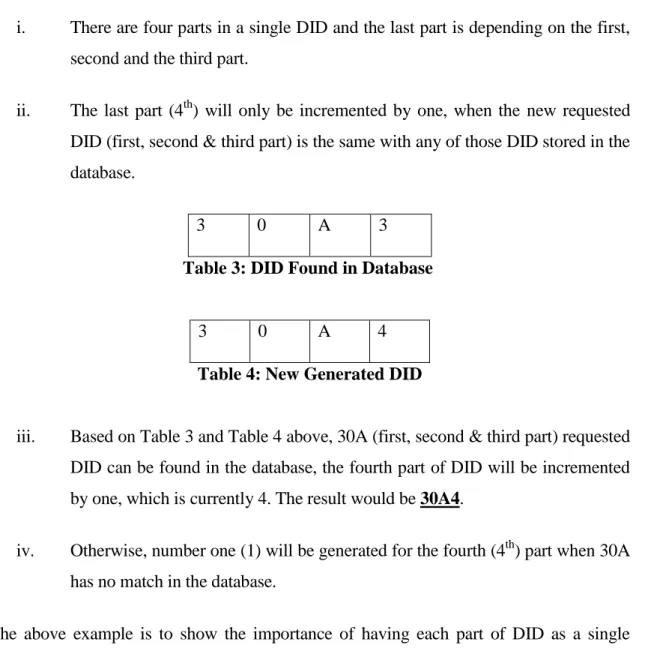
i. There are four parts in a single DID and the last part is depending on the first, second and the third part.
ii. The last part (4th) will only be incremented by one, when the new requested DID (first, second & third part) is the same with any of those DID stored in the database.
3 0 A 3
Table 3: DID Found in Database
3 0 A 4
Table 4: New Generated DID
iii. Based on Table 3 and Table 4 above, 30A (first, second & third part) requested DID can be found in the database, the fourth part of DID will be incremented by one, which is currently 4. The result would be 30A4.
iv. Otherwise, number one (1) will be generated for the fourth (4th) part when 30A has no match in the database.
The above example is to show the importance of having each part of DID as a single component in the database.
Users/requestors’ role is merely to use the system for DID generation besides performing search for details needed. Yet, those details are not downloadable for security purpose.
4.3. Experimentation/Modeling
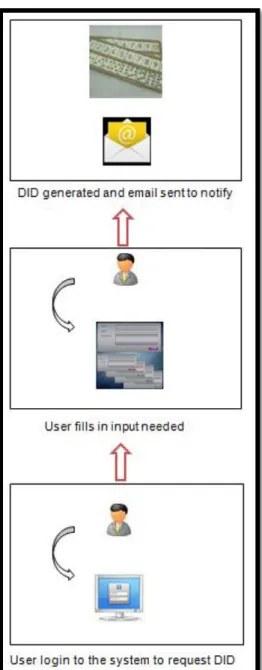
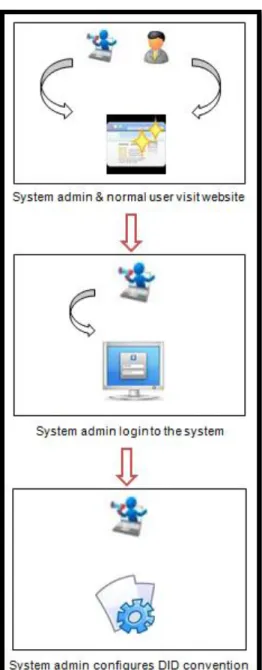
Figure 6 and 7 below represents the model of the new system flow.
29
Figure 6: DMSNumGen System Flow (user)
30
Figure 7: DMSNumGen System Flow (admin)
There are seven steps for DID generation process to take place which are:
i) System administrator and normal users may visit the website at any time without login. They may read the new release DIDs, search DID details for reference.
31
ii) System administrator need to login to the system in order to use the DMSNumGen functionality other than web-viewing and details searching. For example, to edit or delete a wrongly generated DID due to human error.
iii) Once login succeed, system administrator may start configuring the DID convention or the logic to generate DIDs. (whenever document numbering convention is updated or changed)
iv) By the time user (requestor) needs a new DID, login to DMSNumGen system is needed.
v) User needs to fill in the form upon successful login. This form consists of components/parts needed in order to generate a single DID.
vi) Once submitted, DID will be generated and display for user reference.
vii) Email will be sent automatically by the system instead of system administrator
to notify other users regarding the new released DID. Other users shall be specified in the form previously.
4.4. Prototype
The prototype is still in development phase where about 40% to finish and each key feature stated in this report are embedded. Yet they are the small-scaled of entire DMSNumGen since suiting every organization’s needs may take a longer time for development to take place. For instance, there are six (6) major parts of DID being developed, though in real world the parts may be more than that. This prototype is to show how the proposed system works. Figures below show some of the prototype screenshots.
32
Figure 8: Administrator Login Page
Figure 8 shows the screen shot of administrator login page. Once administrator has successfully logged in, it will redirect current user (admin) to the home page of DMSNumGen. Other functionalities are resided under the home page such as, configuring DID components, search DID and view the released DID (successfully generated).
Figure 9: Normal User Login Page
Figure 9 shows the screen shot of normal users (requestors) login page. Once they have successfully logged in, it will redirect current users (normal users) to the home page of DMSNumGen. Other functionalities are resided under the home page such as, configuring DID components, search DID and view the released DID (successfully generated).
33
Figure 10: DMS Main Site
This is the screen shot of the home page of DMSNumGen. There are four other web pages reside under this domain; About, DID Released, DID Request and Contact.
Figure 10 shows the draft or the design of DMSNumGen Main Site. It contains of several parts:
i) Details of the department currently issuing DIDs, so that new user or first-time requestor will be familiar with the functions resided in the system.
ii) New released DIDs, so that users know what DID has been released and they can keep updated with the latest information here.
iii) Search function. Users or system administrator may search document details without login to the system by filling in several parameters (information to be looked for in the database) needed. Relevant search results will be displayed in a table form.
34
Figure 11: DID Generation Form Configuration
Figure 11 represents the DID generation for the logic form and only system administrator will have the access to it. It made up of three (3) sections as per below:
i) Document Numbering Convention details. A database has been created for managing DID. Only the version name of the numbering convention is needed for reference in case the convention is to be updated later on.
ii) The Components of DID. The number of DID parts and the type of separator are needed. For DMSNumGen, only three (3) parts are required meanwhile in the real organization, it may be more which the complexity starts to rise.
iii) DID Generation Business Logic. There are three options, incrementing the last part of DID by one (1) only, the last part is odd number only or the even
35
number only (double increment). For DMSNumGen, the last part of DID is depending on the first, second and the third parts of previous DID generated (one that found in database). The example from Table 3 and 4 suit this project well. However, in real organization, the logic could be more complex. For example, running number is in the middle and only depends on the first part of DID.
Once the above form has been submitted, all components will be created as table in the database by the system.
Figure 12: Data Flow of the System
Figure 12 portrays the data flow diagram. Input from system administrator regarding the database components and logic will be captured by system before sending that information to the database. Based on the input, components of database will be created upon successful form submission.
36
Figure 13: Document Numbering Convention Details Form
Figure 13 shows a form, Document Numbering Convention Details. This form shall be filled in and submitted by system administrator to insert the entire information key in into the table created in the database accordingly. If system administrator opted two parts for Total DID parts field in the previous form (Figure 11) and the parts selected were Document Series and Project Name, only these two parts will be display in this form, just like the above figure. This form prompts system administrator to key in four (4) project names which will be inserted into Project Name table created previously in the database.
The same goes with the Document Series as the series or codes keyed in will be inserted into Document Series table to ease DID generation later on. It’s not necessarily to be four project names as an organization may running hundreds project, yet for prototype purpose, only four or less are needed.
37
Figure 14: DID Request Form
Figure 14 shows the DID Request Form that is to be filled in by normal users to generate DID. Since previously system administrator only opt two components (tables) to be created in the database; Document Series and Project Name, this is the form generated look like. Only two parts are displayed to normal users and these are the only information need to be submitted by requestors to generate a DID.
Yet, in real environment the information prompted to requestor may be more than these. It could be six (6) or more parts to suit particular organizations’ document numbering convention.
38 CHAPTER 5
CONCLUSION
5. CONCLUSION
The last chapter of this dissertation concluded the development of DMSNumGen project as well as the recommendation for future reference.
5.1. Relevancy to the Objectives
All three objectives stated have been achieved, yet there are still rooms of improvement.
For examples, DID edit and delete functionality. These two features function as to edit any DID which wrongly generated and deletion cannot be done for it may cause other issues.
At this level, system administrator needs to use this feature to edit the DID as reported by requestor. Meanwhile delete DID feature is to delete obsolete DID or invalidly generated due to system error. Both features are intended to be used by system administrator.
This project is intended for automation in business process; DID generation as none of DMS platforms are totally suits each and every single organization worldwide. There are still some lacking features (absent) in the platforms as different organizations have different business process and goals which lead to different document numbering conventions. The size of organization also determines the complexity of the convention, to ensure the DID assigned to each document is purely unique for easy retrieval and
39
searching processes. A unique and good DID format or convention should be reflecting what is written in the document, for instance if the document is updated, the DID version to be upgraded as well instead of maintaining the previous one. This will ease other users of the document to identify and differentiate between the old and new documents.
However, as DMS platforms features are expanding up until now there are organizations which moving forwards from using DID for easy searching and retrieval purposes to taxonomy and metadata. Yet, this project (DMSNumGen) is intended to address those organizations which are still using DID as their main concern instead of taxonomy and metadata. Besides saving their cost, they are able to maintain their current document numbering convention. As organizations expand from time to time, there are possibilities that they will also be using taxonomy and metadata for many purposes (e.g.: searching) instead of DID in the future. These two criteria; taxonomy and metadata are to be included soon for future enhancement of the system.
Even though DMS platforms resolved many organizations’ document management issues, there is still room for improvements. As per stated below, these are the recommendations towards the betterment of DMS platforms:
i. To take into consideration every single thing related to documents. As DMS platforms were developed in a wide range of organizations’ needs, those developers were less concentrate on DID generation even though it is the most crucial part of a document. A lot of information could be extracted from DID such as version and type of document and it also differentiates one from another.
ii. DMS platform shall be developed in a few versions according to the size of organizations. Not only large organizations could be the users yet the small ones as well. Those small organizations will not have to spend on costly DMS platforms which intended to be used by large organizations to ensure an excellent document management.
40
REFERENCES
Document IDs and the DocID Service in SharePoint Server 2010 (ECM). (2010, May -).
Retrieved February 27, 2012, from MSDN - Explore Windows, Web, Cloud, and Windows Phone Software Development: http://msdn.microsoft.com/en-
us/library/ee559302.aspx
Bach, J. A. (2002). IEEE Xplore - Document management as a prerequisite to quality assurance. Document Management as a Prerequisite to Quality Assurance (pp.
739-741). Los Angeles: -.
Campbell, P. S. (2007, January -). Better Organization through Document Management Systems. Retrieved November 24, 2012, from IdealWare:
http://idealware.org/articles/doc_management.php
Dataware Technologies. (-). Knowledge Management. Cambridge: Dataware Technologies.
Detlor, B. (2010). International Journal of Information Management. Information Management, 30(2), 103-108.
Doverton, D. V. (2001). Background, scope and structure of the review. Techniques of document management: a review of text retrieval and related technologies, 193.
EdrawSoft 2004-2012. (2004-2012, - -). Standard Flowchart Symbols and Their Usage.
Retrieved February 28, 2012, from Edraw Professional Diagram Solution:
http://www.edrawsoft.com/flowchart-symbols.php
Ektron. (2000-2011, - -). What is Document Management. Retrieved April 15, 2012, from Enterprise Content Management: http://www.contentmanager.eu.com/dms.htm FileHold. (-, - -). Document Numbering in Document Management Software. Retrieved
February 27, 2012, from FileHold Document & Record Lifecycle Software:
http://www.filehold.com/features/standard/document-numbering
Frost, A. (2010, - -). What is Knowledge Management? Retrieved November 24, 2012, from KMT An Educational KM Site: http://www.knowledge-management- tools.net/knowledge-management.html
InsideKnowledge. (2000, February 1). Your Say Part 2: Document Management vs Knowledge Management . Retrieved November 24, 2012, from InsideKnowledge The Original Knowledge-Management Publication:
http://www.ikmagazine.com/xq/asp/sid.0/articleid.13914B99-5047-4522-B13E- EEF3F19E2818/eTitle.Your_Say_Part_2__Document_Management_vs_Knowled ge_Management/qx/display.htm
Khairi, A. F. (2012, March 7). Document ID Generation. (N. F. Salim, Interviewer) Koenig, M. E. (2012, May 4). What is KM? Knowledge Management Explained.
Retrieved November 24, 2012, from KM World Magazine:
http://www.kmworld.com/Articles/Editorial/What-Is-.../What-is-KM-Knowledge- Management-Explained-82405.aspx
Lin, X. C. (2010). Three perspectives of Information management. 2010 3rd International Conference on Information Management, Innovation Management and Industrial Engineering, 1.
41
Naim, S. Z. (2012, March 7). Document ID Generation & ISO Requirements. (N. F.
Salim, Interviewer)
Noorazman, N. A. (2012, March 7). Document ID Generation. (N. F. Salim, Interviewer) Pisarek, M. (2010, April 28). Document IDs and the DocID Service in SharePoint Server
2010 (ECM). Retrieved February 27, 2012, from MSDN - Explore Windows, Web, Cloud, and Windows Phone Software Development:
http://msdn.microsoft.com/en-us/library/ee559302.aspx
Pisarek, M. (2010, April 28). SharePoint 2010 Document ID Feature. Retrieved February 27, 2012, from SharePoint Analyst HQ:
http://www.sharepointanalysthq.com/2010/04/document-id-feature/
Quality Works. (-, - -). Document Numbers Quality Management System. Retrieved February 27, 2012, from Quality Works Harness The Power of Management System: http://www.quality-works.com/learn-document-no.htm
Raynes, M. (2002). What is "document management system"? Document management: is the time now right?, 303.
Toolbox.com. (2008, October 9). Document Management. Retrieved November 23, 2012, from Toolbox.com: http://it.toolbox.com/wiki/index.php/Document_management WestField State University. (2010, January 2010). APA Style - How to Document
Information. Retrieved February 27, 2012, from APA Style Citation Guide:
http://lib.westfield.ma.edu/webapa.htm
Wikipedia. (2012, October 9). Data Flow Diagram. Retrieved October 11, 2012, from Wikipedia The Free Encyclopedia:
http://en.wikipedia.org/wiki/Data_flow_diagram
Williams, S. (2009, February 18). What is a Document Management System or DMS?
Retrieved November 24, 2012, from Slide Share:
http://www.slideshare.net/StephenWilliams/what-is-a-document-management- system-or-dms
42 APPENDICES
Appendix 1 – Test Scenarios
Document Management System Number Generator (DMSNumGen) Application Test Scenario
By: Nabila Faeqa Salim (12770)
Project Title: Document Management System Number Generator (DMSNumGen) Application
No. Test Case ID Description Test Scenario
1 DMSNumGen_01 Login function for DMSNumGen system admin
System admin log in to the system using admin username and password.
2 DMSNumGen_02 Login function for DMSNumGen normal user
User log in to the system using user’s username and password.
3 DMSNumGen_03 Configuring DID Configuration Logic
System admin key in all details for documents numbering convention configuration. Once completed, system admin will key in all information related to the items selected during the configuration previously.
4 DMSNumGen_04 Generating DID based on user’s input
User key in details in the form. Fields displayed in the form are based on the system admin’s configuration previously.
5 DMSNumGen_05 Searching for DID details
System admin or user key in DID to search for the details.
The system will display related information with associated DID.
6 DMSNumGen_06 To list and display all DIDs have been generated
successfully
System admin or user clicks on DID Released tab on the DMSNumGen Home Page.
All successfully generated DIDs will be displayed for reference.
43 Appendix 2 – Test Cases
Document Management System Number Generator (DMSNumGen) Application Test Case
By: Nabila Faeqa Salim (12770)
Project Title: Document Management System Number Generator (DMSNumGen) Application
1) Login function for DMSNumGen system admin.
Test Case ID: DMSNumGen_01 Test Case: System admin login Description: Login
Requirement: User Test Strategy: Functional Priority: 1- Critical
Author: Nabila Faeqa Salim Precondition: Existed admin account Test
Equipment/
Environment:
Web browsers; Internet Explorer 7 (and above), Chrome 23.0.1271.95 and Mozilla Firefox
Input
Specification:
Admin’s username and password
Test
Procedure: 1.1 Access the DMSNumGen url.
1.2 Verify system displayed the DMSNumGen login for system admin.
1.3 Fill in the username entry field.
1.4 Fill in the password entry field.
1.5 Click Login button.
1.6 Verify system displayed the Home Page of DMSNumGen.
Expected
Output: System displayed the Home Page of DMSNumGen.
44 2) Login function for DMSNumGen user.
Test Case ID: DMSNumGen_02 Test Case: User login
Description: Login Requirement: User Test Strategy: Functional Priority: 1- Critical
Author: Nabila Faeqa Salim Precondition: Existed user account Test
Equipment/
Environment:
Web browsers; Internet Explorer 7 (and above), Chrome 23.0.1271.95 and Mozilla Firefox
Input
Specification:
User’s username and password
Test
Procedure: 1.1. Access the DMSNumGen url.
1.2. Verify system displayed the DMSNumGen login for normal user.
1.3. Fill in the username entry field.
1.4. Fill in the password entry field.
1.5. Click Login button.
1.6. Verify system displayed the Home Page of DMSNumGen.
Expected
Output: System displayed the Home Page of DMSNumGen.
45 3) Configuring DID Configuration Logic
Test Case ID: DMSNumGen_03
Test Case: Document Numbering Convention Configuration
Description: To configure (set up) the tables (components) needed in generating DID to be captured into the database.
Requirement: User Test Strategy: Functional Priority: 1- Critical
Author: Nabila Faeqa Salim
Precondition: Successfully logged in to the system as system admin Test
Equipment/
Environment:
Web browsers; Internet Explorer 7 (and above), Chrome 23.0.1271.95 and Mozilla Firefox
Input
Specification:
1. Version name. Name it as ‘1a’.
2. Total DID parts. Choose two (2).
3. DID parts based on company’s document numbering convention.
a. Choose ‘Doc. Series’
b. Choose ‘Project Name’
4. Choose separator if needed. Choose ‘No’
5. Configuration name. Name it as ‘config’.
6. Document series. Key in ‘A001 A002 A003’
7. Project Name. Key in ‘Project 1.0’
8. Project Code. Key in ‘proj10’
9. Project Name. Key in ‘Project 2.0’
10. Project Code. Key in ‘proj20’
Test
Procedure: 1.1. Login to the system as system admin.
1.2. Verify system displayed the DMSNumGen homepage.
1.3. Click on Change Convention.
1.4. Verify system displayed DID Configuration Logic Form page.
1.5. Key in input (1-5) and click on Submit.
1.6. Verify the system showed that everything has been captured into the database.
1.7. Click on Proceed to enter details for each DID parts chosen previously.
1.8. Verify the system displayed second DID Configuration Form.
1.9. Key in input (6-10) and click on Submit.
1.10. Verify system displayed that everything has been
46
captured into the database.
Expected
Output: 1. System displayed both DID Configuration Logic Form pages.
2. System displayed only the DID parts chosen by system admin and listing all the details keyed in previously in a drop down list for user to choose from in DID Request Form page.
47 4) Requesting DID
Test Case ID: DMSNumGen_04 Test Case: DID Request.
Description: Generating DID based on user’s input.
Requirement: User Test
Strategy:
Functional Priority: 1- Critical
Author: Nabila Faeqa Salim
Precondition: Successfully logged in to the system as user.
Test
Equipment/
Environment:
Web browsers; Internet Explorer 7 (and above), Chrome 23.0.1271.95 and Mozilla Firefox
Input
Specification:
1. Requestor name.
2. Email 3. Version
4. Total DID parts details.
Test
Procedure: a. Login to the system as user.
b. Verify system displayed the DMSNumGen homepage.
c. Click on DID Request.
d. Key in input (1-4).
e. Click on Submit.
Expected
Output: System generated and displayed DID requested.
48 5) Searching for DID details
Test Case ID: DMSNumGen_05 Test Case: Search
Description: To search for DID details.
Requirement: User Test Strategy: Functional Priority: 2- Medium
Author: Nabila Faeqa Salim Precondition: None
Test
Equipment/
Environment:
Web browsers; Internet Explorer 7 (and above), Chrome 23.0.1271.95 and Mozilla Firefox
Input
Specification:
DID
Test Procedure:
1.1. Access the DMSNumGen url.
1.2. Verify system displayed DMSNumGen homepage.
1.3. Key in the DID Expected
Output: System displayed all details of DID been searched.
49 6) Listing DIDs generated and released.
Approved by,
(Izzah Khairiyah Abidin, Corporate Quality, MIMOS Berhad.)
Test Case ID: DMSNumGen_06 Test Case: Listing
Description: To list and display all DIDs have been generated successfully Requirement: User
Test Strategy:
Functional Priority: 2- Medium
Author: Nabila Faeqa Salim Precondition: None
Test
Equipment/
Environment:
Web browsers; Internet Explorer 7 (and above), Chrome 23.0.1271.95 and Mozilla Firefox
Input
Specification:
None
Test
Procedure: 1.1. Access the DMSNumGen home page.
1.2. Click on DID Released.
1.3. Verify system displayed DID Released page.
Expected
Output: System displayed all details of DIDs been generated and released.