RAFFLESIA COLLEGE ROOM RESERVATION SYSTEM
Syabrinah binti Md Aripin
Bachelor of Computer Science with Honors (Multimedia Computing)
2020
i
ii
Declaration
I hereby declare that this project is my original work. I have not copied from any other student’s work or any other sources except where due to reference or acknowledgment is not made explicitly in the text, nor has any part had been written for me by another person.
………
(SYABRINAH BINTI MD ARIPIN) (12/08/2020)
iii
Acknowledgment
First, I want to thank the supreme power of the Almighty to allow me to finish my Final Year
Project. Without His grace, this project cannot finish on time. Next, thank you to my beloved
parent and siblings because support me throughout the journey and give me moral support to
complete my Final Year Project gracefully. Other than that, I would like to thank my supervisor,
Madam Norazian for guiding me in my Final Year Project and correcting me if I am making any
mistakes during finishing the tasks. Last but not least, I would like to extend my gratitude to all
my beloved friends because give their hand to me when I need it. Finally, I want to apologize to
all other unnamed who variously helped me throughout my journey finishing my Final Year
Project.
iv
Table of Contents
Declaration ... ii
Acknowledgment ... iii
Abstract ... ix
Abstrak ... x
CHAPTER 1 ... 1
INTRODUCTION ... 1
1.1 Project Description ... 1
1.2 Problem Statement ... 2
1.3 Project Scope ... 2
1.4 Objective ... 3
1.5 Brief Methodology ... 3
1.6 Significance of Project ... 4
1.7 Expected Outcome ... 4
CHAPTER 2 ... 6
LITERATURE REVIEW ... 6
2.1 Introduction ... 6
2.2 eCollege System UNIMAS ... 6
2.3 University Malaysia Terengganu (UMT) Official Website (MyNemo Student Portal)... 8
2.4 Traveloka (Reservation Websites) ... 10
2.5 University Malaya Sabah (UMS) Portal (SMP UMS) ... 13
2.6 Comparison Table ... 16
2.7 Standalone Mobile Application, Mobile Application and Web-based System ... 18
2.8 Conclusion ... 19
CHAPTER 3 ... 20
REQUIREMENT ANALYSIS AND DESIGN ... 20
3.1 Introduction ... 20
3.2 Requirement Analysis ... 20
3.3 System Design ... 31
3.4 Sketch of Interface ... 44
3.5 Summary ... 50
CHAPTER 4 ... 51
v
IMPLEMENTATION ... 51
4.1 Introduction ... 51
4.2 Screenshot of User Interface for Rafflesia College Room Reservation System ... 51
4.3 Conclusion ... 68
CHAPTER 5 ... 69
TESTING ... 69
5.1 Introduction ... 69
5.2 Functionality Testing ... 69
5.3 Usability Testing ... 78
5.4 Conclusion ... 87
CHAPTER 6 ... 88
CONCLUSION AND FUTURE WORKS ... 88
6.1 Introduction ... 88
6.2 Achievements ... 88
6.3 Limitation and Constraint ... 89
6.4 Future Work ... 90
6.5 Conclusion ... 90
REFERENCES ... 92
Appendix ... 93
vi
List of Figures
Figure 2.1:Residential application form from eCollege System ... 7
Figure 2.2: Reservation Details from eCollege System ... 7
Figure 2.3: Error of Confirmation Acceptance ... 8
Figure 2.4:Main page for MyNemo Student Portal ... 9
Figure 2.5: Announcement about College Application from MyNemo... 9
Figure 2.6: Application Status from MyNemo ... 10
Figure 2.7: Page for choosing the room that user want... 11
Figure 2.8: Room Details Page ... 11
Figure 2.9 Room Details Page ... 12
Figure 2.10 Announcement Page ... 12
Figure 2.11: Main page for UMS Portal ... 13
Figure 2.12: Login page for UMS Portal ... 14
Figure 2.13: College Application Status for UMS Portal ... 14
Figure 2.14: Interface with slow connection ... 15
Figure 2.15: Interface with stable connection ... 15
Figure 3.1: Summary of Respondents ... 21
Figure 3.2: Summary of Respondents ... 21
Figure 3.3: Summary of Respondents ... 22
Figure 3.4: Summary of Respondents ... 23
Figure 3.5: Summary of Respondents ... 24
Figure 3.6: Summary of Respondents ... 24
Figure 3. 7 Flowchart Diagram ... 31
Figure 3.8: Context Diagram ... 33
Figure 3. 9: Data Flow Diagram (Level 0) ... 34
Figure 3. 10: Data Flow Diagram (Level 1) for Process 1.0 ... 35
Figure 3. 11: Data Flow Diagram (Level 1) for Process 2.0 ... 35
Figure 3. 12: Data Flow Diagram (Level 1) for Process 3.0 ... 36
Figure 3. 13: Data Flow Diagram (Level 1) for Process 4.0 ... 36
Figure 3. 14: Data Flow Diagram (Level 1) for Process 5.0 ... 37
Figure 3. 15: Data Flow Diagram (Level 1) for Process 6.0 ... 38
Figure 3. 16: Data Flow Diagram (Level 1) for Process 7.0 ... 38
Figure 3. 17: Data Flow Diagram (Level 1) for Process 8.0 ... 39
Figure 3. 18: Data Flow Diagram (Level 1) for Process 9.0 ... 40
Figure 3.19: Entity Relationship Diagram ... 41
Figure 3. 20: Interface for choosing role ... 44
Figure 3. 21: Interface for login ... 44
Figure 3. 22: Interface for announcement ... 45
Figure 3. 23: Interface for booking room ... 45
Figure 3. 24: Interface for reservation status ... 46
Figure 3. 25: Interface for feedback ... 46
Figure 3. 26: Interface for register electric appliances ... 47
Figure 3. 27: Interface for update announcement ... 47
vii
Figure 3. 28: Interface for approve reservation ... 48
Figure 3.29 Interface for electric appliances approval ... 48
Figure 3.30: Interface for taking action from student’s feedback ... 49
Figure 4.1 Login Page……….…….51
Figure 4. 2 Forgot Password Page ... 52
Figure 4. 3 Announcement Page ... 52
Figure 4. 4 View Block Location Page ... 53
Figure 4. 5 Choosing Type of Room Page ... 53
Figure 4. 6 Choosing Block Page... 54
Figure 4. 7 Fill in Reservation Details Page ... 55
Figure 4. 8 Reservation Details Page ... 56
Figure 4. 9 Registration Electric Appliances Page... 57
Figure 4. 10 List of Approved Appliances ... 57
Figure 4. 11 List of Disapproved Electrical Appliances ... 58
Figure 4. 12 Add New Entry Complaint Forms Page ... 59
Figure 4. 13 Student Profile Page ... 59
Figure 4. 14 Update Profile Page ... 60
Figure 4. 15 Gallery Page ... 61
Figure 4. 16 Staff Main Page ... 62
Figure 4. 17 Choose type of room... 62
Figure 4. 18 Students Approval Page... 63
Figure 4. 19 Electric Appliances Approval Page ... 64
Figure 4. 20 Announcement Update Page ... 65
Figure 4. 21 Entry Complaint Form Page ... 65
Figure 4. 22 Feedback Page ... 66
Figure 4. 23 Staff Profile Page ... 67
Figure 4. 24 Update Profile Page ... 67
Figure 5. 1 Result for a rating of satisfaction when using the system [ Enter matric no and password ]....80
Figure 5. 2 Result for rating of satisfaction when using the system [ Choose the type of room] ... 81
Figure 5. 3 Result for rating of satisfaction when using the system [ Choose the room number] ... 81
Figure 5. 4 Result for a rating of satisfaction when using the system [ View information after making reservation] ... 82
Figure 5. 5 Result for a rating of satisfaction when using the system [ Get a notification for reservation status] ... 83
Figure 5. 6 Result for " The system is easy to use" ... 83
Figure 5. 7 Result for satisfaction when using all the function in the system ... 84
Figure 5. 8 Results for suggestion features to add in the proposed system ... 85
viii
List of Tables
Table 2. 1: Comparison of reviewed similar system ... 17
Table 3. 1: Functionality and its explanation……….. …….26
Table 3. 2: Software Requirement ... 29
Table 3. 3 :Hardware Requirements ... 30
Table 3. 4: Entity Relationship Diagram ... 42
Table 5. 1 Login Function for Students……….. ……69
Table 5. 2 Login Function for Staff ... 70
Table 5. 3 Password Function for Student ... 70
Table 5. 4 Password Function for Staff... 71
Table 5. 5 Reserve Function for Student ... 72
Table 5. 6 View Reservation Function... 73
Table 5. 7 Register Electrical Appliances Function ... 73
Table 5. 8 Feedback Function for Student ... 74
Table 5. 9 View and Update Information Function ... 74
Table 5. 10 Approval Function for Staff ... 75
Table 5. 11 Approval Electric Appliances Function ... 76
Table 5. 12 Announcement Details Function ... 76
Table 5. 13 Upload Image Function... 77
Table 5. 14 Feedback for Student's Comment/Feedback ... 77
Table 5. 15 View and Update Information Function for Staff ... 78
Table 5.16 Usability Testing Result for Staff ... 86
Table 6. 1 Objectives and Achievements ………88
ix
Abstract
Rafflesia Room Reservation System
The Rafflesia Room Reservation System is a proposed system that will manage the registration
and reservation for Rafflesia College, UNIMAS. Currently, Rafflesia College still uses an old-
fashioned way for students to register their room. Other than that, the proposed system allows a
student to reserve their room through the system so it will make students and staff doing their task
efficiently because they just have to choose the room through the proposed system and the staff
can approve or decline the request through the proposed system. Next, the proposed system will
allow the student to check the availability of the room before choosing the room. This proposed
feature will help to avoid any data redundancy problem happens. Furthermore, students will be
able to register their electrical appliances through the proposed system, so they are not required to
collect the electrical appliances registration form from the management office. Majority of students
tend to forget to take the electric appliances registration form. There are many cases where majority
of the students forget to fill up the form which caused them trouble when college staff doing an
inspection. Students will end up paying fine because they do not register their appliances due to
their forgetfulness.
x
Abstrak
Sistem penempahan bilik Rafflesia ialah sistem cadangan yang menguruskan pendaftaran dan
penempahan untuk Kolej Rafflesia. Pada masa kini, Kolej Rafflesia masih lagi menggunakan cara
manual untuk mendaftar pelajar masuk ke bilik masing-masing. Selain itu, sistem yang
dicadangkan membenarkan pelajar untuk menempah bilik mereka dengan mudah keranan mereka
hanya memilih bilik tersebut melalui sistem yang dicadangkan dan kakitangan boleh menerima
dan menolak permohonan melalui sistem yang dicadangkan. Selepas itu, sistem yang dicadangkan
membenarkan pelajar untuk memeriksa status bilik. Sistem yang dicadangkan juga akan
membantu mengelakan pengulangan data untuk berlaku. Tambahan pula, sistem yang
dicadangkan membenarkan pelajar untuk mendaftar peralatan elektrik dan pelajar tidak perlu
untuk mendaftar melalui manual di pejabat. Kadangkala pelajar selalu lupa untuk mengambil
boring pendaftaran elektrik dan ketika pihak atas melakukan pemeriksaan, pelajar selalu
dimarahi dan membayar denda. sistem ini dicadangkan untuk membantu pelajar supaya kerja
mereka berjalan dengan lancar dan tidak rumit
CHAPTER 1
INTRODUCTION 1.1 Project Description
For this project, I am creating a web-based system that available for a student that being
accepted to stay in Rafflesia College either for the long term or short term. Rafflesia College is
one of the residential colleges in University Malaysia Sarawak. Rafflesia College also located
outside University Malaysia Sarawak main campus and it is also the largest college in University
Malaysia Sarawak. There are 15 blocks and 480 apartments that available in Rafflesia College. 12
blocks are specially for female residents and 3 blocks for male residents. Currently, Rafflesia
College still using manual ways to register and reserve a room for the students. Students must fill
a college application in eCollege system UNIMAS. eCollege system is used as a medium for the
students to apply for college if they want to stay inside UNIMAS. It is important to propose this
room reservation system because it can make staff work more efficient. After all, they will not be
waiting for the student to choose the room that they like. Furthermore, staff can keep track of
students that already make a reservation for their room. The proposed system can help student and
staff to reduce their time in terms of reservation. Lastly, I choose the web-based system rather than
a mobile application because most of the students can view the system on their web browser either
on a mobile phone or personal computer. When we are using the mobile application there is some
phone that cannot support a certain version of the application on their phone. This is because of
the fragmentation problem. Fragmentation is a phenomenon that occurs when some of the mobile
users are running an older version of OS, while the other is using the newer version.
2
1.2 Problem Statement
Rafflesia students often complaint when they are required to do the room reservations by using the traditional way. Based on the analysis that has been made, there are 29.4% of students are not very satisfied with the current college registration system. Students must do the room reservation by fill in the reservation form on the counter using the paper-based form which can cause some forms may be misplaced. If the reservation form was misplaced, the staff must ask the student information again and they may give different data than the old data that they had been given before. Paper-based reports could take up significant office space and it can lead to missing data problems if anything happens in the place where the data was stored. Apart from that, students have to go to the office early in the morning and have a long queue to register and reserve their room. Last but not least, staff on duty that time must wait for students to choose their room which can take most of their time.
1.3 Project Scope
This proposed project will be focusing on UNIMAS students that will be staying at
Rafflesia College. This website can be used everywhere as long as there is active internet access
to the website. Staff can also update all the system’s essential college records, such as the resident's
room number or any available vacant rooms available that other residents can book. Although this
project is only for the pilot test, other colleges also can try to use the system if the project is
successful. Although this project is only for the pilot test, other colleges also can try to use the
system.
3
1.4 Objective
There are a few objectives that will be referred in this proposed system
1. To develop a system that can replace the current paper-based system
2. To build a system that enables the student to reserve a room through a web-based system
3. To design a system that can avoid data redundancy when selecting a room on the reservation system
1.5 Brief Methodology
This proposed system will be developed by using the Rapid Application Development (RAD) model. There are many benefits when using the RAD model. RAD model allows developers to break down the project into smaller tasks that are more manageable. Besides, the RAD model can reduce the time for design and allows feedback from customers. There are a few ways we can break down the RAD process, but in general, RAD follows four main phases. The first phase is the requirements planning. During this phase, designers, users, and team members collaborate to decide the project's goals and expectations, as well as current and potential problems that need to be resolved at construction. For this project, the current potential problem is college residents must do the room reservation and fill in the key receipt manually on the counter using a paper-based form which can cause some forms may be misplaced. The second phase is the user design phase. In the user design phase, users will work with the developers during this phase to ensure that their needs are met at every stage of the design process. Other than that, users can check each prototype of the product to ensure that it meets their requirements at each point. The third phase is rapid construction, which is a phase of development and conversion into a working model.
The last phase is the cutover. This is the phase of implementation in which the finished product is
4
launched. It includes converting data, testing, and switching to the new system, as well as training users.
1.6 Significance of Project
The proposed system can contribute many benefits to students as well for staff. For students, the proposed system will help them to make their reservation easier and will help in reducing the time for the student to book their room. As we know, making reservations through the system is easier than making manual reservations in the office. Besides, the proposed system is important to students because they can check the availability of the room they want. The proposed system does not have the payment page because the payment fee and the way to pay the fees will be displayed on the Ecollege System UNIMAS which is the official system for students who submit their application to stay in any college under UNIMAS. Other than that, students can always alert with notifications that have been provided by the staff. Rafflesia college reservation room system can benefit the staff, as the proposed system may help to reduce manual tasks for the staff. Moreover, the proposed system can help the staff to retrieve the data easily. Finally, staff can easily approve the students through the proposed system and do not need to check the reservation one by one based on the paper form.
1.7 Expected Outcome
Students can book their room without going to the office. First, students can log in to the
system by entering their matric number and password. After they successfully logging into the
system, students can fill out their details in the form and proceed to choose the block, house number
and room number that available at that time. Staff can log in to the system using their staff number
and password. They will view the student’s reservations and decide whether to approve or reject
5
them. They will then notify the student that they have successfully booked the room. The
notification will be sent to the student’s email. Other than that, the proposed system will allow
students to register an electrical appliance, so they don't have to register the electrical appliance
using a paper-based system which can lead to problems such as failing to submit the form to the
office and failing to register their electrical appliances. Registering of electrical appliances is one
of the main rules for Rafflesia college students. After registration, students are required to put the
electrical appliances form on the house so that it is easy for staff to carry out an inspection.
6
CHAPTER 2
LITERATURE REVIEW 2.1 Introduction
In this chapter, there are four existing systems will be review. It will include the features and limitations of the existing system. Other than that, a table of comparison will be included to differentiate the features of the existing system and the proposed system. Last but least, the difference between the standalone mobile application, mobile application and web-based system will be justified.
2.2 eCollege System UNIMAS
eCollege system is used as a medium for the students to apply for college if they want to
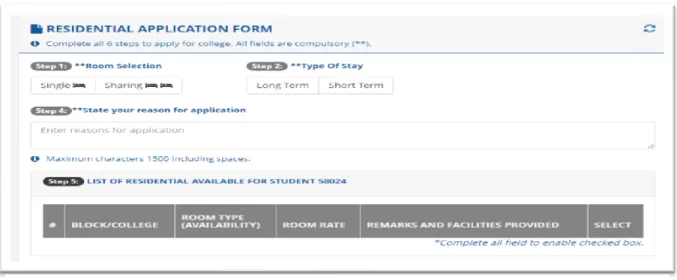
stay inside UNIMAS. This system allows the student to choose the type of room and duration of stay either long term (one semester) or short term (a few days or weeks). Other than that, the student must state the reasons why they want to apply for college. Students can choose which college they want to stay in.
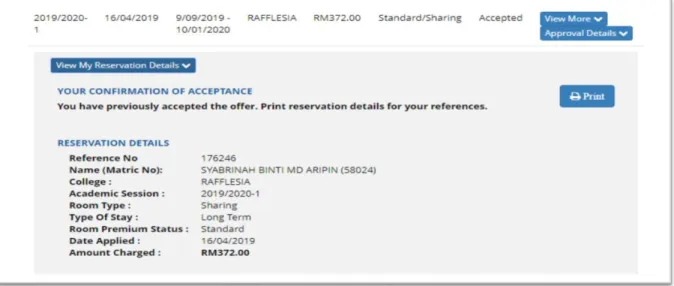
Firstly, students need to fill in the form in the residential application form (Figure 2.1) and submit it through the system. After submitting the form, students must wait for some time for their request to be approved by the college management. If the application has been approved, the student can check through the eCollege system and view the approval details (Figure 2.2). The reservation details must be printed and brought to the college for room registration. Students that fail to bring the receipt to the college will not be registered by the college staff.
The limitation for the eCollege system is it not being used by college management because
each of the colleges in UNIMAS has its way to register students. Next, the system is lacking the
7
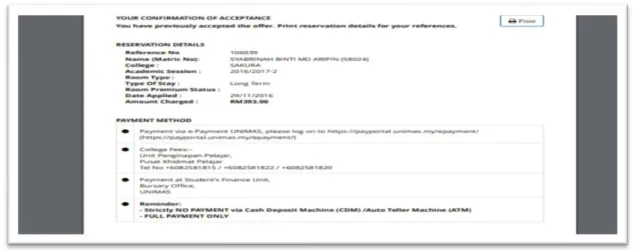
accuracy of college information. College information includes a student’s reference number and college name. For example, if a student wants to print the college reservation details it will print the wrong college name on the paper (Figure 2.3). The correct details that should appear in the receipt are Rafflesia College, not the Sakura College.
Figure 2.1:Residential application form from eCollege System
Figure 2.2: Reservation Details from eCollege System
8
Figure 2.3: Error of Confirmation Acceptance
2.3 University Malaysia Terengganu (UMT) Official Website (MyNemo Student Portal) MyNemo is the official website for University Malaysia Terengganu (UMT) students.
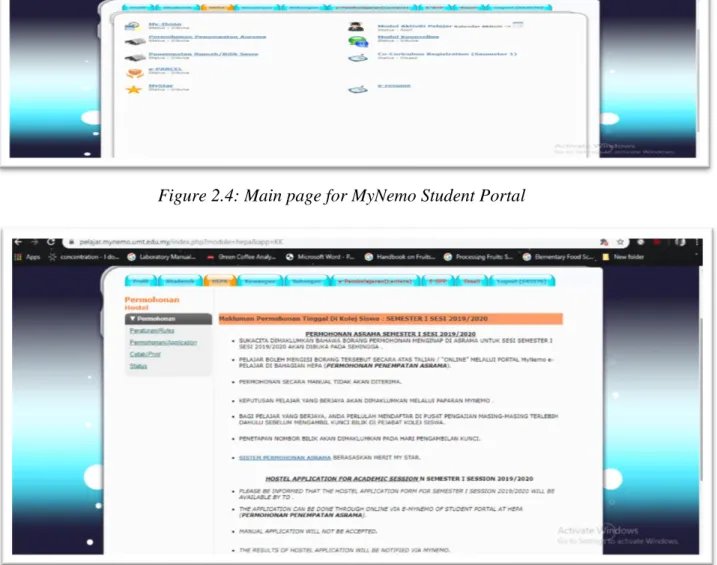
MyNemo portal allows students to view their information and read the latest announcement given by the management (Figure 2.5). The system can help the student to register their college application. Moreover, the college application only opens at a certain time which is when the student wants to enter the new semester (Figure 2.6).
The limitation of this system is the arrangement of the button are complicated and more
difficult to navigate through the system. Other than that, there are so many buttons that end up
making users more confused to make a choice. Furthermore, the time it takes for a user to complete
their task increases with the number of options available. We can conclude that the less is better.
9
Figure 2.4: Main page for MyNemo Student Portal
Figure 2.5: Announcement about College Application from MyNemo
10
Figure 2.6: Application Status from MyNemo 2.4 Traveloka (Reservation Websites)
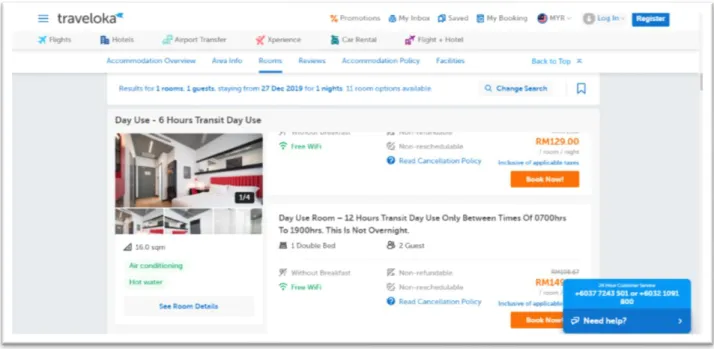
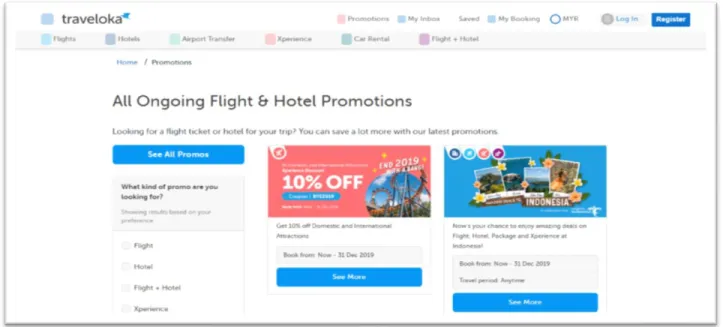
Traveloka is an Indonesian unicorn company that offers online ticketing services and hotel
reservations. With more than 100 domestic and international airlines, the company has established
partnerships serving more than 200,000 routes worldwide. It also has the largest inventory of direct
accommodation, varying from hotels, apartments, guest houses, homes to resorts and villas. The
system allows users to log in and chooses any room that they want. Other than that, the system
allows the user to view the room details before making any purchase. Moreover, the system has
an announcement page to make sure the user knows about new updates or promotions from the
websites.
11
Figure 2.8: Room Details Page
Figure 2.7: Page for choosing the room that user want
12
Figure 2.9 Room Details Page
Figure 2.10 Announcement Page
13
2.5 University Malaya Sabah (UMS) Portal (SMP UMS)
SMP UMS
is “Sistem Maklumat Pelajar Bersepadu Universiti Malaysia Sabah”. It is a platform for UMS’s students to get important information, receive an announcement about the college application and check their semester exam results. Other than that, this system allows students to log into the system with direct authentication from Google using student Gmail ID and password. Furthermore, SMP UMS also attaches a link to submit a financial help application to Zakat Pusat Islam UMS.
SMP UMS contains Kukuro Webchat which is an“Intelligent Virtual Assistant”. “Intelligent Virtual Assistant” can help the user have any problem when using the system. (Figure 2.9). Unfortunately, the college application only open at a certain time which is when the student wants to enter the new semester (Figure 2.11)
The limitation for the system is when the user has a slow connection some images cannot be viewed. It happens because of too many images on the interface (Figure 2.12).