General Instructions
• Working time: 1–12hours
• The supervisor will tell you when to begin the test
• This test has TEN parts
• Attempt ALL questions
• Write using black or blue pen
• Do NOT write in pencil
Trial Year 10 Computing
Skills Test
Instructions for answering multiple-choice questions and matching exercises
• Complete your answers in either black or blue pen.
• Fill in the answers on the separate Answer Sheets.
Select the alternative A, B, C or D that best answers the question. Fill in the response oval completely.
Sample: 2 +4 = (A) 2 (B) 6 (C) 8 (D) 9
A B C D
Match each of the parts (i), (ii) and (iii) with one of the alternatives A, B, C or D.
Fill in the response oval completely. There will be one alternative left over.
Sample: (i) A B C D
(ii) A B C D
(iii) A B C D
If you think you have made a mistake, put a cross through the incorrect answer and fill in the new answer.
Sample: A B C D
If you change your mind and have crossed out what you consider to be the Corrections
Changes
Matching exercises
Multiple-choice questions
Directions
• This paper has TEN parts.
The Desktop Environment Questions 1–10 (10 marks) Basic Software Operations Questions 11–20 (10 marks) Common Core Tasks Questions 21–30 (10 marks) Word Processing Skills Questions 31–40 (10 marks) Spreadsheet Skills Questions 41–50 (10 marks) Database Skills Questions 51–60 (10 marks) Multimedia Skills Questions 61–70 (10 marks)
Graphics Skills Questions 71–80 (10 marks)
Research Skills Questions 81–90 (10 marks)
Internet/Intranet Skills Questions 91–100 (10 marks)
• In each part, the first nine questions are multiple choice.
• In each part, the last question is a matching exercise.
• Complete your answers on the separate Answer Sheets provided.
• Clearly indicate in the spaces provided on the Answer Sheets the time YOU start the test and the time YOU finish the test.
Sample Start time :
h h m m
Finish time :
h h m m
8 5 0 1
3 3 9 0
The Desktop Environment
1 What should you do after you have been working at your computer for almost two hours?
(A) Keep working.
(B) Change computers.
(C) Take a short rest-break.
(D) Play a computer game.
2 You are sitting at a computer as shown in the diagram.
After a while, your neck becomes sore.
Which of the following should you do before continuing?
(A) Raise the height of the chair.
(B) Lower the height of the chair.
(C) Move the chair closer to the screen.
(D) Adjust the brightness of the screen.
3 Which of the following is an acceptable way to shut down the computer?
Use this information to answer Question 4.
4 Which is the active folder?
(A) D&T (B) English (C) Mathematics (D) Science Use this information to answer Question 5.
5 The name of the Papers folder has been highlighted.
What would happen if the word ‘Art’ was now typed?
(A) The folder would be deleted.
(B) The word ‘Art’ would replace the word ‘Papers’.
(C) The folder label would be changed to ‘Papers Art’.
File Edit View Help
Papers Multimedia
Files Audio
Sport New Folder
Graphics D&T
English
Mathematics Science
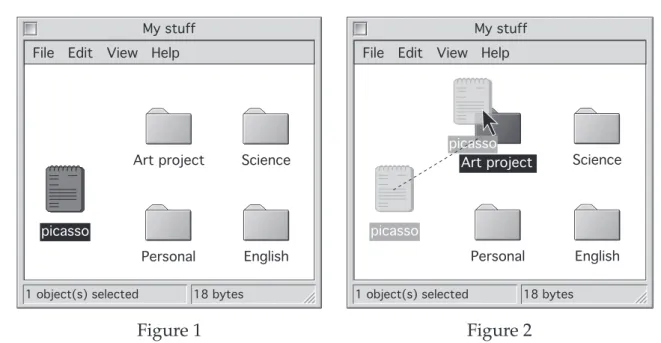
6 The screen in Figure 1 shows an open window with four folders and a file.
In Figure 2, the mouse button has been clicked on the file ‘picasso’ and the file has been dragged over the folder ‘Art project’.
What happens when the mouse button is released?
(A) The file ‘picasso’ will be deleted.
(B) The file ‘picasso’ will be moved into the folder ‘Art project’.
(C) The file ‘picasso’ will be copied into the folder called ‘Art project’.
(D) The file ‘picasso’ will be moved on top of the folder called ‘Art project’.
7 Yesterday, in your music class you saved your compositions as MP3 files. Today, you cannot remember where you saved them.
Which is the best way to locate the files?
(A) Create the files again.
(B) Ask the person next to you.
(C) Use the Find or Search feature.
(D) Put your hand up and ask the teacher.
1 object(s) selected 18 bytes File Edit View Help
Art project
Personal English Science
picasso
My stuff
1 object(s) selected 18 bytes File Edit View Help
Personal English Science
picasso
My stuff
Art project picasso
Figure 1 Figure 2
Use this information to answer Questions 8 and 9.
8 How many windows can you see open?
(A) 1 (B) 2 (C) 3 (D) 4
9 You want to see the whole picture of the butterfly.
Which is the quickest way to do this?
(A) Close the other windows.
(B) Resize the other windows.
(C) Click on the window with the butterfly.
(D) Drag the other windows out of the way.
Butterfly.tif @ 200%
200%
Spreadsheet 1
A B C D
1 2 3
Monday
5 17
Tuesday
Document 1
The Excursion
This is a matching exercise.
Use this information to answer Question 10.
10 Match each of the tasks (i), (ii) and (iii) with one of the elements on the screen labelled A, B, C or D. (There will be one element left over.)
(i) Resize the document window.
(ii) Identify the filename of the document.
(iii) Move up and down through the document.
Butterflies
(C) (B) (A)
(D)
Butterflies can identify their favourite plants from miles away and travel for hours to taste the nectar of the flowers. They will lay eggs and remain nearby as long as you tend your garden, keeping it healthy and blooming. It isn’t difficult to make your backyard home to dozens of butterflies at a time.
Basic Software Operations
Use this information to answer Question 11.
11 What must you do to open the ‘Writer’ application?
(A) Click on the ‘Bin’.
(B) Select ‘Writer’ in the program menu.
(C) Select ‘Copier’ in the program menu.
(D) Select ‘Worker’ in the program menu.
Start Recent Controls Help Programs
Writer Worker Copier
Bin
Use this information to answer Questions 12 and 13.
You have to compose a poem for your English class.
12 Which menu command should be selected to create your poem on the computer?
(A) (B)
(C) (D)
13 Which command should be selected to edit an existing story that is stored on the local hard drive?
(A) (B)
(C) Save… (D) Print…
Open…
New…
Print…
Save…
Open…
New…
File Edit View Tools Window Help New...
Open...
Close Save Save As...
Page Setup...
Print Preview Print...
Exit
1 Cover letter Buckley 2 04 budget fctable...
3 ths\Matheman Rep 4 T's Response LS Dra...
Use this information to answer Questions 14–16.
In an English lesson, you create a résumé using a computer.
14 You want to save your résumé to a floppy disk.
Which command should you select to do this?
(A) (B)
(C) (D)
15 You want to email your saved résumé to a friend who does not have the same word processor as you.
To change the file type of your résumé when you save it, which command should you select?
(A) (B)
(C) (D)
16 Which command should be selected to print your résumé in landscape orientation?
(A) Save… (B) Save As…
Page Setup…
Print…
Save As…
Save…
Print…
Page Setup…
Save As…
New…
File Edit View Tools Window Help New...
Open...
Close Save Save As...
Page Setup...
Print Preview Print...
Exit
1 Cover letter Buckley 2 04 budget fctable...
3 ths\Matheman Rep 4 T's Response LS Dra...
17 You want to use an existing layout for your résumé.
Which is the best way to do this?
(A) Use a template.
(B) Use a form layout in a database.
(C) Create a table in a word processor.
(D) Scan and modify the existing layout.
18 The diagram shows the view of your résumé.
You want to change the view on your résumé.
Which of the following should you select to find out how to do this?
(A) (B) (C) (D)
View Help
95%
File Edit Document View Window Tools Help
Resume
Work experience January 2003
The Food Barn
• Food preparation
• Packaging
• Customer service
You have finished viewing your résumé and want to exit the application.
19 Which menu command should you use?
(A) Close
(B) Document Properties
(C) Document Security…
(D) Quit
File Edit Document View Tools Window Help Open...
Close
Save A Copy...
Document Properties Document Security...
Page Setup Print...
Print Secure Document
Quit
1 Accordance Fonts 2 Accordance Tutorial 3 ah02-c02.pdf 4 ah02-c04.pdf 5 ah02-c01.pdf
This is a matching exercise.
20 You have opened a new program and its file menu appears as shown.
Match each of the actions (i), (ii) and (iii) with one of the areas labelled A, B, C or D. (There will be one area left over.)
(i) to save your file (ii) to create a document
(iii) to open the most recently used file
File Edit View Tools Window Help New...
Open...
Close Save Save As...
Page Setup...
Print Preview Print...
Exit
1 Cover letter Buckley 2 04 budget fctable...
3 ths\Matheman Rep 4 T's Response LS Dra...
(A) (B) (C)
(D)
Common Core Tasks
21 In a Design and Technology project you have typed:
MY DT PROJECT You want to reformat to Bold.
Which of the following shows the change?
(A) MY DT PROJECT (B) MY DT PROJECT (C) MY DT PROJECT (D) MY DT PROJECT
22 In a PDHPE lesson, you want to store information on students’ heights and weights. You decide to use a database for this.
What would you select to guide you through this process?
(A) Help (B) A template
(C) A blank document (D) An Assistant/Wizard
In a Science lesson, you need to edit your essay on butterflies.
Use Figures 1 and 2 to answer Question 23.
Figure 1
Figure 2
The highlighted text needs to be moved from the position in Figure 1 to the position in Figure 2.
23 What is the best way to make this change?
(A) Cut and paste.
(B) Cut and delete.
(C) Copy and paste.
(D) Copy and delete.
24 Before submitting your work you want to find any words spelt incorrectly.
Which of the following would you use?
(A) Thesaurus (B) Spell Checker (C) Grammar Checker (D) Find and Replace
Butterflies can identify their favourite plants from miles away and travel for hours to taste the nectar of the flowers. It isn’t difficult to make your backyard home to dozens of butterflies at a time. They will lay eggs and remain nearby as long as you tend your garden, keeping it healthy and blooming.
Butterflies can identify their favourite plants from miles away and travel for hours to taste the nectar of the flowers. They will lay eggs and remain nearby as long as you tend your garden, keeping it healthy and blooming. It isn’t difficult to make your backyard home to dozens of butterflies at a time.
25 In an Art lesson you want to change the format of the text in Figure 1.
Figure 1
You use the ‘format paragraph’ option to set the paragraph alignment to ‘justified’.
How would the text appear?
Russell Drysdale’s (1912–1981) paintings of the 1940s to the 1970s reflected the essence of Australia and its people. He drew images of rural country towns and outback landscapes. His work helped in defining a national identity.
(D)
Russell Drysdale’s (1912–1981) paintings of the 1940s to the 1970s reflected the essence of Australia and its people. He drew images of rural country towns and outback landscapes. His work helped in defining a national identity.
(C)
Russell Drysdale’s (1912–1981) paintings of the 1940s to the 1970s reflected the essence of Australia and its people. He drew images of rural country towns and outback landscapes. His work helped in defining a national identity.
(B)
Russell Drysdale’s (1912–1981) paintings of the 1940s to the 1970s reflected the essence of Australia and its people. He drew images of rural country towns and outback landscapes. His work
helped in defining a national identity.
(A)
Russell Drysdale’s (1912–1981) paintings of the 1940s to the 1970s reflected the essence of Australia and its people. He drew images of rural country towns and outback landscapes. His work helped in defining a national identity.
26 You want to add a graphic from a file to your history assignment.
Which menu command would achieve this?
File Edit View
New...
Open...
Close...
Save Save As...
Page Setup...
Print preview Print...
File Edit View
New...
Open...
Close...
Save Save As...
Page Setup...
Print preview Print...
Edit View Insert Undo Typing Repeat Typing Cut
Copy
Clear Select All
Links...
Object Publishing Find...
Replace...
Create Publisher...
Subscribe To...
Subscriber Options...
Insert Format Font Break...
Page Numbers...
Date and Time...
Footnote...
Caption...
Picture Text Box Movie...
File...
Object...
Bookmark...
Autoshapes WordArt...
Chart Clip Art...
From File...
(A) (B)
(C) (D)
Use this information to answer Questions 27 and 28.
In your Mathematics lesson, you create a slide presentation on statistics.
27 You want to change printers before you print the slide presentation.
Which option, P, Q, Ror S, will allow you to do this?
(A) P (B) Q (C) R (D) S
28 How many slides have been selected for printing?
(A) 1 (B) 2 (C) 3 (D) 6
23 1
23 1
1 2
3 4
5 6
Grayscale
Pure black and white Include animations
Scale to fit paper
Order: Horizontal Vertical
Frame slides Print hidden slides Slides per page:
Handouts Print what:
OK Cancel
Printer Name:
Status: Idle
HP DeskJet 500 LPT1:
Type:
Where:
Comment:
Print to file Properties
Copies
Number of copies:
Collate Page range
All
Custom Show:
Slides:
Enter slide numbers and/or slide ranges.
For example, 1, 3, 5—12
Current slide Selection
6
3 HP DeskJet 500
Slides
P
Q
R S
29 In a Geography lesson, you select the following menu option.
What operation are you about to perform?
(A) Insert text.
(B) Insert table.
(C) Insert chart.
(D) Insert image.
Font
Format Tools Table
Break...
Page Numbers...
Date and Time...
AutoText Field...
Symbol...
Comment Footnote...
Caption...
Cross-reference...
Index and Tables...
Picture Text Box Movie...
File...
Object...
Bookmark...
Hyperlink...
AutoShapes WorkArt...
Chart Clip Art...
From File...
Insert
This is a matching exercise.
In a History lesson, you format a paragraph in an essay as shown.
30 Match each of the text extracts (i), (ii) and (iii) with the areas labelled A, B, C or D. (There will be one area left over.)
(i) until it ended in 1938.
(ii) The Great Depression (iii) 29% of Australia’s population
History essay
File Edit View Insert Format Font Tools Table Window Work Help
Normal Times 16
The Great Depression
The Great Depression began in October 1929, when the values of stocks and shares in the United States dropped rapidly. This affected the world economy and continued for 9 years until it ended in 1938. The worst unemployment rate of the Great Depression came in 1932 when just over 29% of Australia’s population were out of a job.
(B)
(A) (C) (D)
Word Processing Skills
31 The Office of the Board of Studies logo appears at the top of every page of a document as shown.
In which part of the document was the logo placed?
(A) Footer (B) Header (C) Text box (D) Footnote
32 A page is to be added to the end of a document.
Which of the following would be the best method to do this?
(A) Insert a page break.
(B) Use the vertical scroll bar.
(C) Press ‘return’ until the next page is created.
(D) Press the space bar until the next page is created.
The Principal Merino High School 117 Woolly Street Sydney NSW 2000
Dear Principal
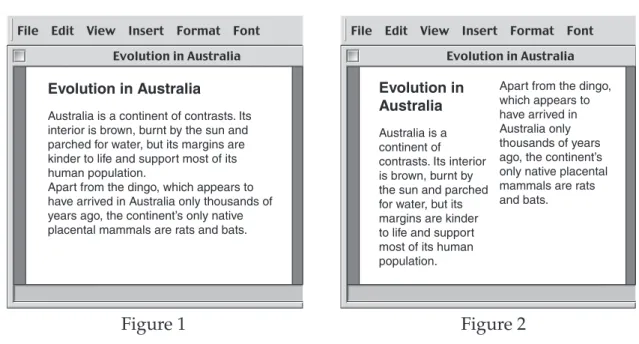
33 The text in Figure 1 was reformatted as shown in Figure 2.
What operation was performed to achieve this?
(A) Select Format then Tabs (B) Select Format then Rows (C) Select Format then Columns (D) Select Format then Paragraphs
File Edit View Insert Format Font Evolution in Australia
Evolution in Australia
Australia is a continent of contrasts. Its interior is brown, burnt by the sun and parched for water, but its margins are kinder to life and support most of its human population.
Apart from the dingo, which appears to have arrived in Australia only thousands of years ago, the continent’s only native placental mammals are rats and bats.
File Edit View Insert Format Font Evolution in Australia
Evolution in Australia
Australia is a continent of contrasts. Its interior is brown, burnt by the sun and parched for water, but its margins are kinder to life and support most of its human population.
Apart from the dingo, which appears to have arrived in Australia only thousands of years ago, the continent’s only native placental mammals are rats and bats.
Figure 1 Figure 2
Use this information to answer Questions 34 and 35.
34 How would the text appear after you click the button ?
35 The text was reformatted as shown.
The Great Depression began in October 1929.
The values of stocks and shares in the United States dropped rapidly.
The Great Depression began in October 1929.
The values of stocks and shares in the United States dropped rapidly.
• This affected the world economy.
• The unemployment rate was just over 29% in Australia.
(D)
The Great Depression began in October 1929.
The values of stocks and shares in the United States dropped rapidly.
◆ This affected the world economy.
◆ The unemployment rate was just over 29% in Australia.
(C)
The Great Depression began in October 1929.
The values of stocks and shares in the United States dropped rapidly.
This affected the world economy.
The unemployment rate was just over 29% in Australia.
(B)
The Great Depression began in October 1929.
The values of stocks and shares in the United States dropped rapidly.
This affected the world economy.
The unemployment rate was just over 29% in Australia.
(A)
Normal Times 12
Title
The Great Depression began in October 1929.
The values of stocks and shares in the United States dropped rapidly.
This affected the world economy.
The unemployment rate was just over 29% in Australia.
36 Three tab types are shown on this word-processing ruler.
Which of the following shows the tabs correctly matching the alignment of the text?
2 1 1 2 3 4 5 6 7 8 9 10 11 12 13
2 1 1 2 3 4 5 6 7 8 9 10 11 12 13
2 1 1 2 3 4 5 6 7 8 9 10 11 12 13
2 1 1 2 3 4 5 6 7 8 9 10 11 12 13
Orange 223 T-shirts
Blue 44 Trousers
Green 3 Skirts
Pink 1 Jumper
(A)
Orange 223 T-shirts
Blue 44 Trousers
Green 3 Skirts
Pink 1 Jumper
(B)
(C)
(D)
Orange 223 T-shirts
Blue 44 Trousers
Green 3 Skirts
Pink 1 Jumper
Orange 223 T-shirts
Blue 44 Trousers
Green 3 Skirts
Pink 1 Jumper
2 1 1 2 3 4 5 6 7 8 9 10 11 12 13
Document
37 The text between Xand Yhas been formatted differently.
What has been used at Xand Yto allow this to take place?
(A) Columns (B) Gutters (C) Page breaks (D) Section breaks
Australia is a continent of contrasts. Its interior is brown, burnt by the sun and parched for water. Its plants and animals are for the most part quite different to those of the rest of the world.
Australia A unique land
The Gold Coast is 42 km of white sand beach, which runs from the NSW border
to Southport, south of Brisbane. It offers a full range of
entertainment.
It is a great place for families and young children, with lots of theme parks.
Kakadu National Park is a World Heritage Site, famous for its waterfalls, rockpools, birdlife and vegetation. A cruise along the river takes you through a series of gorges. The red sandstone canyon walls rise steeply up
60 metres from the cool waters of the Katherine River.
X
Y
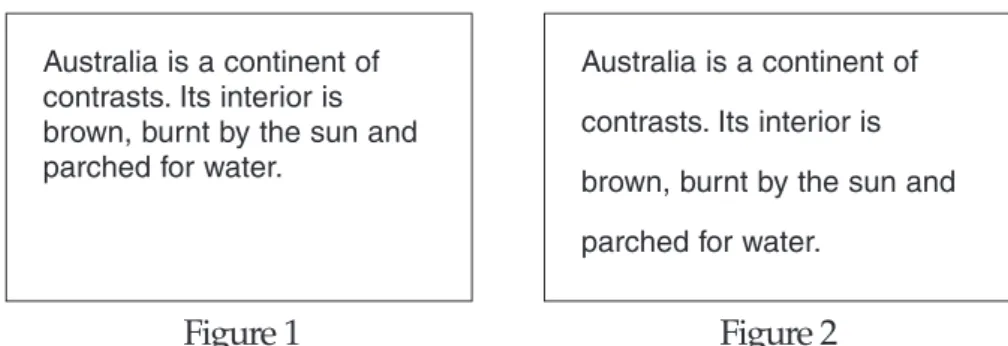
38 The text in Figure 1 was reformatted to the text in Figure 2.
Figure 1 Figure 2
Which of the following was used to achieve the new formatting?
Before:
After:
12 pt 0 pt (A)
Left:
Right:
12 pt 0 pt
(B)
Double
Line spacing: At:
(C)
Left Alignment:
(D)
Spacing
Indentation
Australia is a continent of contrasts. Its interior is brown, burnt by the sun and parched for water.
Australia is a continent of contrasts. Its interior is brown, burnt by the sun and parched for water.
39 You create a word-processing document containing the following text.
The text is to be presented in the following way.
Which of the following is the best method to achieve this?
(A) Convert the text to a table.
(B) Draw a rectangle, then cut and paste the text.
(C) Use Tabs to place the text in the correct position.
(D) Insert a spreadsheet object and move the text into the cells.
This is a matching exercise.
A document is formatted as shown.
Title
Normal Helvetica 10
Paper Collage Project
You will need to ensure you come prepared.
Your teacher will provide:
• scissors
• coloured paper
• glue
Paper colour Number of pieces green 2
blue 4
(A) (B) (C)
(D)
ABC 100%
2 1 1 2 3 4 5 6 7 8 9 10 11 12 13
Number of sides 3
4 Shapes
Triangle Quadrilateral
Shapes
Number of sides Triangle
3
Quadrilateral 4
Spreadsheet Skills
Use this spreadsheet to answer Questions 41–45.
41 What is the data shown in cell E5?
(A) $2.75 (B) $3.30 (C) Price (D) Small
42 The highlighted cells in column D have been formatted as currency.
Which button would you select to do this?
(A) (B) (C) (D)
43 Which of the following describes the group of cells that are highlighted?
(A) A column (B) A worksheet
(C) Active cells (D) A range of cells
44 The Total salesfor Short black coffee has been determined.
Which formula was used to do this?
(A) =D5*F5 (B) =D5+F5 (C) =D5–F5 (D) =D5^F5
45 Which formula was entered in column F to calculate Most sold?
(A) =MIN(F5:F10) (B) =MAX(F5:F10)
100%
1 2 3 4 5 6 7 8 9 10 11 12
A B C D E F G
Item
Coffee Short black $2.50 $2.75 Small 10 $27.50
Coffee Long black $3.00 $3.30 Small 5 $16.50
Coffee Flat white $3.00 $3.30 Small 8 $26.40
Coffee Cappuccino $3.00 $3.30 Small 15 $49.50
Coffee Cappuccino $4.00 $4.40 Large 6 $26.40
Coffee Latté $3.00 $3.30 Small 7 $23.10
Description Price Price include GST Size
Most sold 15
Number sold Total sales
Signor’s Coffee Shop
Use this information to answer Questions 46–49.
You have collected the following statistics to complete a Geography assignment.
46 If Australia’s Export values 1998/99 are sorted using the button, what will be the first Goodsitem?
(A) Coal (B) Iron ore
(C) Crude oil (D) Aluminium
47 What would be the best method to quickly copy the formula from the active cell to each cell in the shaded area?
(A) Paste (B) Fill Down
(C) Fill Right (D) Paste Special
48 Which cells need to be selected to print the Goods list and the 1998/99 values including the titles for each column?
(A) A1:A9 (B) A2:B9
(C) A1:B9 (D) A1:B9, E1:E9
Australia’s Export $M.xls
1 2 3 4 5 6 7 8 9 10 11
A B C D E
Goods
Iron ore Aluminium
Wheat Beef Wool Coal Crude oil
Gold
1998/99
3800 3300 3600 2700 3700 9300 1600 6300
1999/00
3800 3800 3400 3200 2800 8300 4900 5000
2000/01 Total
4900 4700 4100 4100 3600 10800 7600 5100
=SUM(B2:D2)
100%
This is a matching exercise.
Use this information to answer Question 50.
50 The formulae shown in the shaded area (in Row 5) are to be copied and pasted into Row 9.
Match each of the formulae (i), (ii) and (iii) with one of the cells labelled A, B, C or D. (There will be one cell left over.)
(i) =J9–K9 (ii) =F9–$F$3 (iii) =$G$5–$G$3
Sheet 1
1 2 3 4 5 6 7 8 9 10
E F G H I J K L M
Test 2 Test 3 Test 4 Test 5
Original Change
Gas 1 Gas 2 Gas 1 – Gas 2 % Difference Change Difference Change Test 1
Volume
23 25 27 30
Gas 1 20 21
Changes
16 17 18 20
Gas 2 13 14
(in cubic centimetres)
=F5–$F$3 =$G$5–$G$3 =J5–K5 =L5/($F$3–$G$3)
(A) (B) (C) (D)
Database Skills
Use this database to answer Questions 51–55.
51 What is the filename of this database?
(A) Name (B) Recipe
(C) Stir-fry vegetables (D) Unsorted
52 What term is used to describe this view in a database?
(A) Form (B) List (C) Preview (D) Print
53 How many fields are in this database?
(A) 3 (B) 4 (C) 5 (D) 8
54 A new recipe was added to the database.
Name Apricot chicken Serving Main meal Illustration ✔
Recipe
Records:
Unsorted 5
Name Serving Illustration Fat content
Stir-fry vegetables Main meal
✓
High Medium Low 1
55 Which of the following best represents the elements of this database from smallest to largest?
(A) Character, field, file, record (B) Character, record, field, file (C) Character, record, file, field (D) Character, field, record, file
Use this information to answer Questions 56–58.
Your Geography class has been using the database shown.
56 If you search for the word ‘English’, how many matches would occur?
(A) 1 (B) 3 (C) 4 (D) 11
57 If the database was sorted by Population (millions) in ascending order, which country would appear first?
(A) Australia (B) China (C) Turkey (D) Zimbabwe
58 By which field has the database been sorted?
(A) Country (B) Population (millions)
(C) Continent (D) Language
Country Turkey Brazil Italy Indonesia India France UK Australia USA China Zimbabwe
30 174 57 217 1050 59 70 20 287 1281 13
Asia
South America Europe
Asia Asia Europe Europe Australasia North America Asia
Africa
Turkish Portuguese Italian Indonesian Indian French English English English Chinese Afrikaans Population (millions) Continent Language
59 Which of the following examples would best be stored in a database?
(A) A video clip.
(B) A family portrait.
(C) Club membership details.
(D) An article in this year’s school magazine.
This is a matching exercise.
You are creating a simple database of early settlers in NSW for a History project.
60 Match each of the actions (i), (ii) and (iii) with one of the commands labelled A, B, C or D. (There will be one command left over.)
(i) See all records.
(ii) Add an additional record.
(iii) Move to the last record in the database.
History
Records:
layout #2
Unsorted 6
4
New Delete Reports View as form View as list
Name Surname Country of birth
Smith Maurice England
Date of birth Date of arrival Age at arrival
24.10.1760 31.10.1792 32
Reason for entry Free settler
(C) (D)
(B) (A)
Multimedia Skills
Use this information to answer Questions 61 and 62.
Your English class visits an environmental centre. This centre uses a touch screen to assist visitors with information about the area.
61 Which icon should be selected to hear an audio presentation?
62 Which icon should be selected to look at a visual presentation?
(A) (B) (C) (D)
(A) (B) (C) (D)
N Cow Bay
Daintree River
Daintree Environmental Centre
Daintree Environmental Centre
Use this information to answer Questions 63–66.
Your PE teacher has asked your group to create a multimedia presentation on basketball shooting techniques. The teacher provides these three slides to start with.
63 When Slide 1 appears, a whistle blows to gain audience attention.
Which type of file has been inserted to achieve this?
(A) Sound (B) Bit map (C) Document (D) Background
64 To improve the presentation, you want to make the ball appear to move.
What is this called?
(A) MP3 (B) Hyperlink (C) Animation (D) Audio link
65 When the button is clicked, the next slide fades in.
Which is this called?
(A) Hyperlink (B) Masking (C) Presentation (D) Transition
66 You find a better photo of a basketball in a magazine and want to replace the
Next
Next Back Next Back Next
Slide 1 Slide 2 Slide 3
Use this information to answer Questions 67 and 68.
67 How many slides are in this presentation?
(A) 1 (B) 2 (C) 3 (D) 4
68 In order to conform to accepted design practice, what change would you make to best emphasise the text ‘Speed cameras’?
(A) Increase the font size.
(B) Change the title to capital letters.
(C) Change the font colour to yellow.
(D) Change the background shading to grey.
1 Speed cameras
• Fixed speed cameras represent an effective and efficient means of enforcement on specific high accident lengths of road which meet strict criteria.
2 Safety
• Fixed speed cameras free up police to perform other functions as well as offering a safe means of enforcement, as there is no requirement for an officer to stand on the side of the road.
3 Objectives
• The key objectives of the fixed speed camera program are to ensure that drivers keep to the legal speed limit and to reduce crashes and thereby prevent deaths and injuries on NSW roads.
4 RTA Vision
What is the RTA’s long term vision for speed management?
Our long-term vision for speed mangement is to shift road users perception from
“I have the right to drive at what I consider to be a safe speed.”
• Fixed speed cameras represent an effective and efficient means of
enforcement on specific high accident lengths of road which meet strict criteria.
Speed cameras
11 10 9 8 7 6 5 4 3 2 1 0 1 2 3 4 5 6 7 8 9 10 11
87654321012345678
Click to add notes
Which of the following screen design principle(s) is demonstrated in the three slides above?
(A) A balanced appearance due to use of white space
(B) Consistency of design (all common elements found in the same space) (C) Text unbroken by graphics
(D) All of the above
1 2 3
• Fixed speed cameras represent an effective and efficient means of enforcement on specific high accident lengths of road which meet strict criteria.
Speed cameras
• Fixed speed cameras free up police to perform other functions as well as offering a safe means of enforcement, as there is no requirement for an officer to stand on the side of the road.
Safety Objectives
60
SPEED CAMERA 24 HOURS
Liverpool Strathfield Parramatta
Hornsby
Sydney N
• The key objectives of the fixed speed camera program are to ensure that drivers keep to the legal speed limit and to reduce crashes and thereby prevent deaths and injuries on NSW roads.
69
This is a matching exercise.
Use this information to answer Question 70.
70 Match each of the multimedia tools (i), (ii) and (iii) with one of the slides labelled A, B, C or D. (There will be one slide left over.)
(i) Hyperlink
(ii) Navigation tools
Slide 1 Heading
Text Graphic
Slide 2 Heading
Text Graphic
Slide 3 Heading
Text Graphic
(A)
(B)
(C)
(D)
BLANK PAGE
Graphics Skills
71 You want to modify the digital photograph in Figure 1 to look like Figure 2.
Figure 1 Figure 2
Which method will achieve this?
72 You want to save the changed photograph in Figure 2.
Which of the following file formats would be most suitable?
(A) Jpeg format (jpg) (B) Html format (htm) (C) Drawing format (drw) (D) Document format (doc)
(A) (B)
(C) (D)
Use this information to answer Questions 73–75.
You have used a drawing program to start creating a birthday card as shown in Figure 1.
Figure 1
73 You want to position the speech balloon as shown in Figure 2.
Figure 2
Which command should you use to achieve this result?
(A) Send to Back (B) Bring to Front (C) Bring Forward
Have a wonderful day!
Have a wonderful day!
74 To move both the photograph and the speech balloon together in one operation, what should you do before dragging them to the new position?
(A) Paste the photograph and the speech balloon.
(B) Group the photograph and the speech balloon.
(C) Cut the photograph and the speech balloon to the clipboard.
(D) Rotate the photograph and the speech balloon to the new position on the page.
75 You are adding the heading ‘Happy Birthday’ at the top of the card.
What have you inserted to do this?
(A) Clip Art (B) Word Art (C) A textbox (D) A rectangle
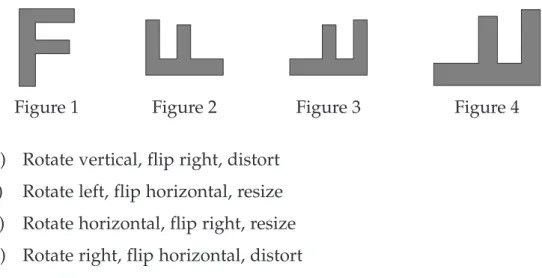
Have a wonderful day!
76 Starting with the letter in Figure 1, and following the changes shown, what sequence was used to complete the task?
(A) Rotate vertical, flip right, distort (B) Rotate left, flip horizontal, resize (C) Rotate horizontal, flip right, resize (D) Rotate right, flip horizontal, distort
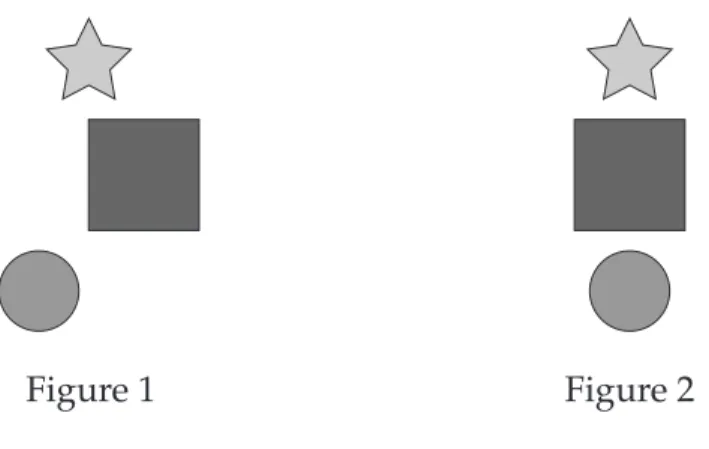
77 You use a drawing program to create three objects as shown in Figure 1.
After selecting all three objects, what should you do to change the view in Figure 1 to that in Figure 2?
(A) Align Top (B) Align Centre (C) Align Bottom (D) Align Horizontal
Figure 1 Figure 2
Figure 1 Figure 2 Figure 3 Figure 4
Use this tool menu to answer Questions 78 and 79.
78 Which tool should be used to select an object and move it?
79 Which tool would be used to select a portion of the image?
This is a matching exercise.
Use this information to answer Question 80.
You are experimenting with the tools in a paint program.
80 Match each of the buttons (i), (ii) and (iii) with one of the areas labelled A, B, C or D. (There will be one area left over.)
(C)
(B) (D)
(A)
COOL
(D)
(B) (C)
(A)
(B) (C)
(A) (D)
Research Skills
Use this information to answer Questions 81–84.
Your Science class is researching weather in Australia. The result of your Internet search is shown.
SimpleSearch
A u s t r a l i a & N Z
Search Australia for all the words
Australia NZ World
weather in australia
Results
Directory SearchSearch
Home | Help
Showing 1–10 of 353 000 results
1. Burea of Meteorology - Home Page
...WEATHER FORECASTS WARNINGS and OBSERVATIONS More results From: www.bom.gov.au
2. Australia Weather ABC News Online
…Broadband Services. SMS Weather updates. Australia Centres Weather Forecast…
More results From: www.abc.net.au
3. Welcome to The Weather Channel
Weather Channel Australia, The complete weather site for Australia.
More results From: www.weatherchannel.com.au
4. Weather in Australia
Free Online Australian Immigration Visa Assessment.
http://www.migrationint.com.au/weather_maps.html SimpleSearch
81 How many results were found in this search?
(A) 1 (B) 4 (C) 10 (D) 353 000
82 From where did this search locate these websites?
(A) Australia (B) New Zealand (C) The whole world
(D) Australia and New Zealand
83 Which of the following statements is correct?
(A) Result 1 is a New Zealand website.
(B) Result 2 is an education website.
(C) Result 3 is a commercial website.
(D) Result 4 is a government website.
84 You are not happy with the number of results returned in this search.
Which of the following refinements to your search would give the least number of results?
(A) weather sites (B) Australia weather (C) “weather in Australia”
(D) “weather sites” in Australia
Use this information to answer Questions 85 and 86.
You are part of a group of students in charge of organising your school’s Clean Up Australia Day activities. The screen below comes from a site that you found.
85 You bookmarked the site title (added to favourites).
What bookmark (favourite) should you click on to revisit the site.?
(A) Get involved! (B) Clean Up Australia
(C) www.cleanup.com.au (D) Clean Up Australia online
86 You decide to download one of the graphics and use it to create a promotional poster for the school.
What must you do before printing the poster?
File Edit View Favourites Tools Help
Back Search Favourites History
Clean Up Australia
http://www.cleanup.com.au
Get involved!
Thursday, 20 March 2003 About us News & Info
Search Contact us Donate Home
Use this information to answer Questions 87 and 88.
You obtain the following information about a new printer you have purchased.
87 What is the source of the information shown?
(A) A CD-ROM (B) The Internet (C) An encyclopedia (D) Your local hard disk
88 You want to keep a copy of this information on your computer for future reference.
What is the best way to do this?
(A) Click on downloadable version.
(B) Contact the source for a printed copy.
(C) Retype the text using your word processing-application.
(D) Highlight the text and choose ‘copy’ then paste it using your word-processing application.
http://www.xpressprinters.com
>> home
>> contact Xpress Printers Search:
>> products & services >> support & drivers >> solutions >> how to buy
more options Xpress customer care all of Xpress Australia
Xpress 5000jp printer Product Information
printable version
downloadable version
89 You hand in a Science assignment containing text you have copied from an encyclopedia CD-ROM. You do not mention the source of your information.
What is this called?
(A) Bibliography (B) Plagiarism (C) Referencing (D) Research
This is a matching exercise.
Use this information to answer Question 90.
Your Science class is researching data loggers suitable for your school’s Macintosh computers. You decide to use an advanced search as shown.
90 Match each of the functions (i), (ii) and (iii) with the fields labelled A, B, C or D.
(There will be one field left over.)
(i) Locate English language sites only.
(ii) Return the most up-to-date information.
SimpleSearch
A u s t r a l i a & N Z
Find results
Return pages written in any language
Language
any format File format Only return results of the file format
last five days Return web pages updated in the
Date
anywhere in the page Return results where my terms occur
Occurrences
www.simplesearch.com.au
Advanced Search
Only return results from the site or domain Domain
eg. simple.com/.org More info SafeSearch No filtering Filter using SafeSearch
Find results with all of the words with the exact phrase with at least one of the words without the words
Simple search 10 results
(A)
(C) (B) (D)
Please turn over
Internet/Intranet Skills
Use this information to answer Questions 91–96.
91 Who will receive a copy of the email?
(A) salma only
(B) van and frida only (C) van, frida and admin
(D) salma, van, frida and admin Hi,
The magazine is underway, but I need people to send me digital photos and stories.
Regards Abby
Magazine editor
Newschool, Melaleuca, NSW email: [email protected] website: www.newschool.edu.au To:
Cc:
Bcc:
Subject:
Attachments:
[email protected], [email protected] [email protected]
School magazine
New Reply Reply All Forward Send & Receive
92 What will happen to this email when the button is clicked?
(A) The email is sent to the recipient(s).
(B) The email is removed from the inbox.
(C) The received email will replace this one.
(D) The email is added to the address book.
93 What is the text in italics at the end of the email called?
(A) A website (B) An address (C) A signature (D) An attachment
94 Abby sent a Bcc to admin. Which of the following is correct?
(A) Salma knows admin has been sent the email.
(B) Nobody knows who else received the email.
(C) Van and frida know admin has been sent the email.
(D) Admin will know that salma, van and frida have been sent the email.
95 Frida has a digital photo of the Year 10 music performance.
The file name is chicago.jpg.
How should this be included in an email?
(A) Include as a footnote.
(B) Add as an attachment.
(C) Post as a colour print.
(D) Using File Transfer Protocol (FTP).
96 Abby has received a file via email. What should be done before opening it?
(A) Reply to Sender.
(B) Change the file name.
(C) Scan the file for viruses.
Send & Receive
Use this information to answer Questions 97–99.
Sam has received four emails from friends.
97 How many of the emails have an attachment?
(A) 1 (B) 2 (C) 3 (D) 4
98 The email was typed in capital letters. Why is this not good practice?
(A) It takes longer to type.
(B) It takes longer to send.
(C) It is regarded as shouting.
(D) It is easy to infect with a virus.
99 How many of the emails have been opened?
From Subject Date Time Size
Folders Inbox Inbox (1)
Outbox Sent Items Drafts Deleted Items Address Book
Jase Homework hassles 06/09/03 02:59 pm 25k
Lee Great game 06/09/03 02:10 pm 670k
Teejay Go the roosters! 06/09/03 01:48 pm 6k
Trina Party invitation 05/09/03 09:10 pm 10k
HEY SAM,
CHECK OUT THIS SITE WWW.MONSTERSGAME.TV.AU.
LEE From: Lee
Subject: Great game Cc:
Attachments: monster.doc
This is a matching exercise.
Use this information to answer Question 100.
As part of a group project in Science, Misha sent an email to Dr Tom. Misha received this reply.
100 Match each of the statements (i), (ii) and (iii) with one of the components labelled A, B, C or D. (There will be one component left over.)
(i) The subject of the email
(ii) The quickest way for Misha to thank Dr Tom
(iii) The best way to get a copy of this email to other group members
End of test Dear Misha
Thanks for your questions about the solar system.
I’ve sent you a slide show that has some interesting facts and pictures that I prepared for Year 10 Science students in Victoria.
Dr Tom
From: Dr Tom<[email protected]>
Cc:
Subject: Solar system
solar.ppt
(A) (B)
(C)
(D)
New Reply Reply All Forward Send & Receive
BLANK PAGE