ISP SERVER CONFIGURATION ON LINUX AND CISCO NETWORKING
SUBMITTED BY
Sree Joyanto Chandro Barmon ID: 152-15-6236
This Report Presented in Partial Fulfillment of the Requirements for the Degree of Bachelor of Science in Computer Science and Engineering
Supervised By
Md. Zahid Hasan Assistant Professor
Department of Computer Science and Engineering Faculty of Science & Information Technology
Daffodil International University
Co-Supervised By
Dewan Ziaul Karim Lecturer
Department of Computer Science and Engineering Daffodil International University
DAFFODIL INTERNATIONAL UNIVERSITY
DHAKA, BANGLADESH MAY 2018
© Daffodil International University
APPROVAL
This Internship titled “ISP Server Installation and Configuration on Linux And Cisco Networking”, submitted by Sree Joyanto Chandro Barmon ID No: 152-15- 6236 to the Department of Computer Science and Engineering, Daffodil International University, has been accepted as satisfactory for the partial fulfillment of the requirements for the degree of B.Sc. in Computer Science and Engineering and approved as to its style and contents. The presentation has been held on May,05,2018.
BOARD OF EXAMINERS
Dr. Syed Akhter Hossain Chairman
Professor and Head
Department of Computer Science and Engineering Faculty of Science & Information Technology Daffodil International University
Dr. Sheak Rashed Haider Noori Internal Examiner
Associate Professor and Associate Head
Department of Computer Science and Engineering Faculty of Science & Information Technology Daffodil International University
Md. Zahid Hasan Internal Examiner
Assistant Professor
Department of Computer Science and Engineering Faculty of Science & Information Technology Daffodil International University
Dr. Mohammad Shorif Uddin External Examiner
Professor
Department of Computer Science and Engineering Jahangirnagar University
© Daffodil International University
DECLARATION
I hereby declare that, this internship report is prepared by me, Sree Joyanto Chandro Barmon, ID No: 152-15-6236 to the department of Computer Science and Engineering, Daffodil International University. Under the supervision of Md. Zahid Hasan, Assistant Professor, Department of CSE, Daffodil International University.
I also declare that neither this internship report nor any part of this internship report has been submitted elsewhere for award of any Degree or Diploma. I also declare that, I collect information from Daffodil Online Limited (DOL), Data Center and Internet Service Provider (ISP) Based Company, Books and Internet.
Supervised by
Md. Zahid Hasan Assistant Professor
Department of Computer Science and Engineering Faculty of Science & Information Technology Daffodil International University
Co-Supervised By
Dewan Ziaul Karim Lecturer
Department of Computer Science and Engineering Daffodil International University
Submitted by
Sree Joyanto Chandro Barmon ID: 152-15-6236
Department of CSE
Daffodil International University
© Daffodil International University
ACKNOWLEDGEMENT
First I express heartiest thanks and gratefulness to almighty God for His divine blessing makes us possible to complete the final year internship successfully.
I am grateful to Mr. Sabbir Ahamed, General Manager of Daffodil Online Limited. I am also grateful to Mr. Mohammad Abul Basher, System Admin (Network & Training) of Daffodil Online Limited. Without their continuous support I can‟t continue my internship in the company. Other members of the company helped me tremendously for doing my internship.
I really grateful and wish profound indebtedness to Md. Zahid Hasan, Assistant Professor, Department of CSE Daffodil International University, Dhaka. Deep Knowledge & keen interest of supervisor in the field of “Linux System and Network Administration” to carry out this internship. His endless patience, scholarly guidance, continual encouragement, constant and energetic supervision, constructive criticism, valuable advice, reading many inferior draft and correcting them at all stage have made it possible to complete this internship.
I would like to express heartiest gratitude to Dr. Syed Akhter Hossain, Professor and Head, Department of CSE, for his kind help to finish my internship and also to other faculty member and the staff of CSE department of Daffodil International University.
I would like to thank entire course mate in Daffodil International University, who took part in this discuss while completing the course work.
Finally, I must acknowledge with due respect the constant support and patients of parents.
© Daffodil International University
ABSTRACT
If two and more computers are interconnected and able to exchange data or information then we call network. We want to increase the number of PC‟s and exchange data or information from one to another that time we need some special PC‟s are called Server. There is various type of work in the network that is why also different types of server have. For Example- Web Server, Mail Server, FTP Server, Firewall. Each of them works differently and without them it is impossible to maintain a network. If network is connected to the Internet and we want to secure your information they must setup server using Linux Operating System.
That‟s why I choose this subject of my report is “Server Installation and Configuration on ISP (Linux Platform)”. The report discussed about the purpose of the specific server using on ISP, hardware requirement for the server, choosing software and installation process of the software, step by step server configuration process and simple troubleshooting of the server.
© Daffodil International University
TABLE OF CONTENTS
CONTENTS
PAGE
Approval II
Declaration III
Acknowledgement IV
Abstract V
Table of contents VI, VII
List of Figure VIII,
CHAPTER
CHAPTER 1: INTRODUCTION 1-3
1.1 Introduction 1
1.2 Motivations 1
1.3 Internship Objectives 1-2
1.4 Introduction to the Company 2
1.5 Report Layout 2
CHAPTER 2: INTERNSHIP ENTERPRISE 3-5
2.1 Introduction 3
2.2 Product and Market Situation 3-4
2.3 Target Group 4
2.4 SWOT Analysis 4-5
2.3 Organizational Structure 5
CHAPTER 3: INTERNSHIP ROLES AND RESPONSIBILITIES 6-40
3.1 Daily Task and Activities 6
3.2 Events and Activities 7
3.3 Project Task and Activities 7
3.4.1 Creating Linux Partition 7
3.4.2 Linux Run-Level Used by Centos 7-8
3.4.3 The Basic Command of Linux Centos 8
© Daffodil International University
3.4.4 User Create and Password Management 9
3.4.5 To Know About the Logged In User 9
3.4.6 To Copy or Move a File 9
3.4.7 Vi Editor 10
3.4.8 Install/Update/Remove Packages in Centos 10 3.4.9 Compress and Decompress A Directory Using Tar And Untar
3.4.10 Root Password Break
11 11 3.4.11 How to Add Change Delete and Display IP Address In Centos 12
3.4.12 Server Configuration 14-22
3.5 CCNA 23
3.6 Cisco IOS 23
3.7 Features 23
3.8 Release history 23
3.9 Open System Interconnection Reference Model 24
3.10 Address Schemes 24
3.11 Routing & Switching 26-29
3.12 Security 29-33
3.13 Basic Routing and Switching Configuration: 34-39
3.14 Challenges 40
CHAPTER 4: Competencies and Smart Plan 41
4.1 Competencies Earned 41
4.2 Smart Plan 41
4.3 Reflections 41
CHAPTER 5: Conclusion and Future Career 42
5.1 Discussion and Conclusion 42
5.2 Scope for Further Career 42
APPENDICES
X, XI© Daffodil International University
LIST OF FIGURES
FIGURES PAGE NO
Figure 2.5: Shows Organogram of Daffodil Online Limited. 5
Figure 3.1: Show Directory and File 8
Figure 3.2: Create User, Lock and Unlock User and Show User 9
Figure 3.3: Show in Tar and Untar 11
Figure 3.4: Root Password Break 12
Figure 3.5: Show ip address in CentOS 12
Figure 3.6: Shows address in eth port 13
Figure 3.7: Shows set ip address in eth port permanently 13 Figure 3.8: Shows Set ip address in sysconfig file eth port permanently 13
Figure 3.9: Shows Screen Print Yum install bind 16
Figure 3.10: Shows Screen Print Edit using VI editor named conf file 16 Figure 3.11: Shows Screen Print Edit Enter a web Address of forward
zone 17
Figure 3.12: Shows Screen Print Enter a IP Address For Reverse Zone. 17 Figure 3.13: Shows Screen Print edit Forward Zone File for abc.com 18 Figure 3.14: Shows Screen Print edit Forward Zone File for abc.com 18 Figure 3.15: Shows Screen Print edit Reverse Zone File 18 Figure 3.16: Shows Screen Print edit Reverse Zone File 19 Figure 3.17: Shows Screen Print service named restart 19 Figure 3.18: Shows Screen Print service named status 19 Figure 3.19: Shows Screen Print abc.com open in browser 20
Figure 3.20: Host name set 21
Figure 3.21: Check VSFTPD 21
Figure 3.22: VSFTPD Package Installation 21
Figure 3.23: OSI 7 Layer Model 24
Figure 3.24: IPv4 Address 25
Figure 3.25: Static Routing System 26
Figure 3.26: Routing Protocols Classification 27
Figure 3.27: RIP Configuration 28
Figure 3.28: EIGRP Configuration 28
Figure 3.29: OSPF Configuration 29
Figure 3.30: Standard ACL Configuration 31
Figure 3.31: ACL Configuration 33
Figure 3.32: Plagiarism Check 46
CHAPTER 1 Introduction 1.1 Introduction
This is the era of Information Technology. Now a day‟s a large number of people all over the world use internet technology and server is a part and parcel. Linux is quite possibly the most important free software achievement since the original Space War, or, more recently. We cannot do anything relating to internet communication without server. So DNS server is very important for internet technology. Internship is an old practice to make students understand the real working, environment and challenges of jobs.
Medical Science, Engineering and Accounts all branches have their own importance of internship before degree award. Today every business and commerce is very much related to software based communication and internet technology. This is called E-Commerce. Internet Banking, SMS Alert Banking, Mobile Banking, EFT (Electronic Fund Transfer) etc. are not possible without server. DNS (domain name system) is also very useful server and we can operate different types of services by using this system. Internet technology, E-mail, E- Business, Telecommunication, Mobile technology etc.
are not possible without server and DNS is one of them. Today, Banking industry and other business organization totally depends upon different types of Software and Online Technology and Server is very essential. ATM Technology(Switching Software), Banking Software, Debit Card, Credit Card, Online Transaction etc. are very much depends upon Software and different types of Server and Linux is one of them. It has developed into an operating system for business, education, and personal productivity.
1.2 Motivation
I am currently pursuing my Bachelors in Computer Science Engineering at Daffodil International University, I understand the importance of gaining practical knowledge which will complement the textbook knowledge and help a student gain a wider perspective of the subjects.
During the internship I have found that I am perfectly skilled in the details of Linux network and server management and Cisco Network Configuration. As an internet service provider I‟ve getting my point across very well, communicating with people, understanding their needs and providing them better service. My skills lie in my ability to comprehensively read and understand the situation and act quickly and yet smartly.
1.3 Internship Objectives
Ultimate objective of my internship program is to prepare myself as an eligible one in the competitive job market. So this is very effective of skill development. I would like to gather some extraordinary quality to provide
myself as skilled one.The internship in computer science is designed to provide work experience while students is still in school, to coordinate job experience with academic training, and to help student to make the transition from classroom to job.
1.4 Introduction to the Company
Daffodil Online Ltd. prides itself as one of the leading nationwide Internet Service Provider (ISP) in Bangladesh. They are the most experienced and oldest company in the ICT field where they are basic business ethics is Long Term Relationship with they are customers. As we look at the growth over the decade since our inception, they are extremely proud of what they have achieved, and even more excited about they are outlook for an equally promising future.
It may please you to know that they started they are operation in the year 2002. During the past years, they extended they are operation and service portfolio according to the customer‟s recommendation and considering demands of time. They worked with many national projects and international organizations and achieved the reputation. They are using the latest technologies and upgrading the services wherever it is required. They are Corporate Network Solution department is capable to provide state-of-art network and telecommunication solutions with a highly efficient technical expertise group.
1.5 Report Layout
In the chapter (1) I have described objective of internship, Motivation of internship and Introduction to the company.
In the chapter (2) I have described the methodology of my internship. And this chapter gives the information about where the internship has been attached to undertake this program. Also included about how did perform the internship works, about the company, what are the IT service offered in DOL and what are the roles of in jobs market of Linux.
In the chapter (3) I have described about daily task and activities, Events and Activities and Challenges.
In the chapter (4) I have described is Competencies Earned, Smart Plan, Reflections.
In the chapter (5) I have described is Conclusion and Future Scope. I discuss Future Scopes of Linux and write conclusion.
CHAPTER 2 Internship Enterprise 2.1 About the Company
Daffodil Online Ltd. (DOL) is pleased to be one of the pioneers and most seasoned ISP/ASPs in Bangladesh and giving one stop coordinated ICT administrations and arrangement since July 2002. It has its own particular Fiber Optic and Radio Link WAN foundation to serve corporate, SME and individual customers. The establishment worked with numerous national undertakings and universal associations with high thankfulness from all concerned. It utilizing the most recent advances and redesigning the administrations wherever it is required.
The focuses Corporate Network Solution office is fit for giving condition of- craftsmanship system and media transmission arrangements with a gathering of exceptionally proficient specialized specialists. DOL has an extremely solid expert building and administration group confirmed and connected with SUN, Cisco, Microsoft, Linux, and Oracle and effectively required with world driving registering affiliations including IEEE, ACM, ACS, BCS, and PMI. Its Corporate Social Responsibility ethos reinforces the awareness of other's expectations on Community, Workstation, Location and Market put. As a Group concern, DOL advances 3 noteworthy stages e.g., instruction, country building and condition, through its projects and administrations [1].
2.2 Product and Market Situation
Daffodil Online Ltd. prides itself as one of the leading nationwide Internet Service Provider (ISP) in Bangladesh. They are the most experienced and oldest company in the ICT field where they are basic business ethics is Long Term Relationship with the are customers. As they look at the growth over the decade since our inception, they are extremely proud of what we have achieved, and even more excited about our outlook for an equally promising future. Daffodil Online Ltd also provides different IT Services and Professional Training services. These are given below.
IT Services Corporate Internet Solution
Security solution.
Domain registration and web hosting.
Website development.
Open source application solution.
Internet Service Provider
State of the Art Data Centers.
Hi speed Wi-Fi Zone.
Data Connectivity, Data center & Co-Location.
Bulk SMS Service.
Proxy & DNS Server solution, Mail Server Solution.
And All computer accessories
Professional course and trainings:
Professional Training Services
ISP Setup and administration using Linux.
Training Course on Certified Ethical Hacking (CEH).
ISP Setup and Administration using MikroTik.
Web site Development with Joomla.
CCNA.
PHP and MYSQL for Website Development.
E-commerce & Open source Joomla Virtue Mart.
Red Hat Certified Security Specialist (RHCSS).
Red Hat Certified Engineer (RHCE).
2.3 Target Group
The company's customer base includes all consumers and all small- to medium-sized businesses, including start-ups. The company plans to concentrate on SOHO clients, as these are perfect targets for our new high- speed offerings, and hold the greatest growth potential for the company. Web Solutions feels that these market segments have special pricing and service needs, and make more dedicated, reliable customers.
2.4 SWOT Analysis
SWOT Analysis is a useful technique for understanding your Strengths and Weaknesses, and for identifying both the Opportunities open to you and the Threats you face.
Strengths:
Communication between people separated by distance (at home and within the workplace)
Working from home with ease
Setting up an online business
Gathering information (valuable asset in business)
Weaknesses:
New entrants underestimate levels of expertise needed to survive the market
Large sums of money required to set up businesses
Competition for small resellers
Numerous pricing tariffs and service options
Opportunities:
Age structure of the population changing
Number of households in the UK increasing
Introduction of simpler tariffs
Revision of regulatory framework
Threats:
The Economic Crisis - Householders less likely to increase their Broadband subscriptions Stock Market's lack of confidence in the digital-communications market.
It remains to be seen how far consumers can be persuaded to embrace Internet access.
2.5 Organizational Structure
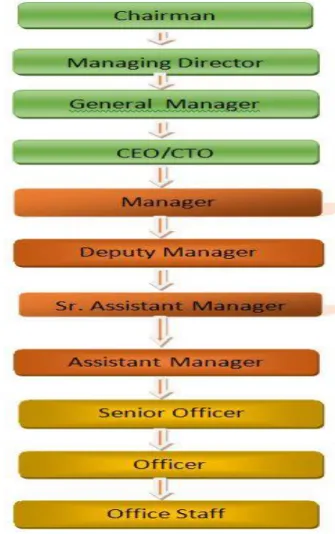
Organogram Structure of Daffodil Online Ltd. shows in fig 2.5:
Figure 2.5: Shows Organogram of Daffodil Online Limited.
CHAPTER 3
Tasks, Projects and Activities 3.1
Daily Task and Activities Month - 1: In the first month of internship on daffodil online limited I have learned and performed the following tasks:
Learning & understanding About Network Components.
Learning & understanding Basics of Linux.
Understanding Linux HDD Partitions.
Learning & understanding Linux Run Level.
Linux Installation.
Month - 2: In the second month of internship on daffodil online limited I have learned and performed the following tasks:
Basic CentOS Commands.
Linux User and Password Management.
Know About logged in users.
File and Directory Accessing.
To Copy and Move File and Directories.
Compressed and Decompressed File And Directories.
Crontab.
Mount Un mount Drive.
Month – 3: In the third month of internship on daffodil online limited I have learned and performed the following tasks:
File and Directory Permissions.
Install, Update and Remove Package Using YUM.
Concept of IP Addressing.
Configuring IP Address in CentOS.
Month – 4: The last month of internship on daffodil online limited I have learned and performed the following tasks:
Learning, understanding and configuring WEB Server.
Learning, understanding and configuring FTP Server.
Learning, understanding and Installation MAIL Server.
Learning, understanding and Installation DHCP Server.
CCNA
Static and Dynamic Routing
Security ACL
ACL Configuration
3.2 Events and Activities
Monitor and Maintain Computer Systems and Network.
Setting up user accounts, permissions and passwords.
Configure Cisco Router And Switch
Troubleshooting servers and routers.
Troubleshooting local area networks and switches.
Fixing network faults.
Technical support for people using the network.
Day to day admin and monitoring of network use.
Suggesting IT solutions to business problems.
Client Support over the phone or Physical move to client Ends.
Checking Fiber Optical Media Convertor & Fiber Optic Transmission devices.
3.3 Project Task and Activities
Centos Install
3.4.1 Creating Linux Partition
For Installation of Linux we have to create at least 3 partitions root (/), boot, and swap.
Root Partition: /
A Root Partition there is where “/” The root directory is located all files (except in /boot) are on the root partition. Minimum 5 GB HDD Space Required.
Boot Partition: /boot
The partition boot (200 MB): the partition mounted on /boot/
contains the operating system kernel (which allows your system to boot Linux), along with files used during the bootstrap process. Due to limitations, creating a native ext3 partition to hold these files is required. For most users, a 200 MB boot partition is sufficient.
SWAP Partition: swap
The partitions swap is used to support virtual memory. In other words, data is written to a swap partition when there is not enough RAM to store the data your system is processing. Partition Swap should equal 2x physical RAM for up to 2 GB of physical RAM, and then an additional 1x physical RAM for any amount above 2 GB, but it cannot less than 32 MB [4].
3.4.2 Linux Run-Level Used by Centos
# init 0 = Shut Down.
# init 1 = Single User Mode.
# init 2 = Multi User Mode.
# init 3 = Full Multi User Mode.
# init 4 = Unused.
# init 5 = X-Window (GUI Mode)
# init 6 = Reboot.
See current run-level = who –r
3.4.3 The Basic Command of Linux Centos
Shutdown = power off, init 0, shutdown –h now.
Reboot = reboot or init 6 .
Logout = log the current user off the system.
Display a calendar = Cal , cal 2014, cal 10 1989 Display or change date or time = date .
Present Working Directory = pwd .
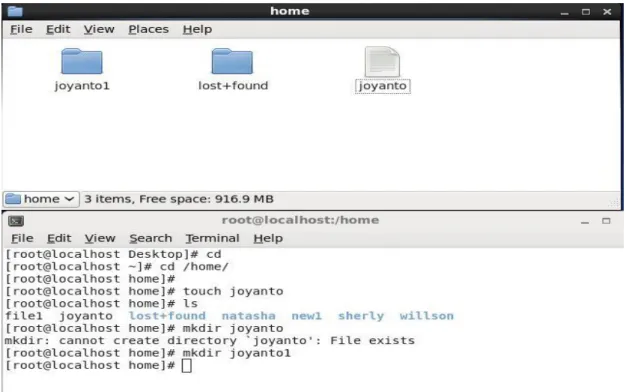
Create a blank file = touch joyanto(File name).
Create a directory = mkdir joyanto1(directory name).
Remove file or directory = rm -rf (directory or file name).
List information about file = ls .
Chang Working Directory = cd /root/Desktop(directory path) To Show Drive = df -th.
To Check Manual Command = man df.
Show Ram = free -m.
Figure 3.1: Show Directory and File
3.4.4 User Create and Password Management Adding a user = adduser joyanto(username).
Find the user = cat /etc/passwd(to show all user)
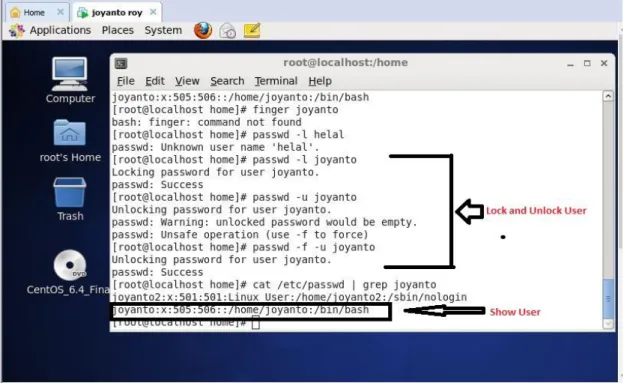
Find one user = cat /etc/passwd | grep joyanto(user name) Set a Password to New User = passwd joyanto(username).
Password Disable/Remove = passwd -d joyanto(username).
Verify user information = finger joyanto(username).
Locking an account = passwd -l joyanto(username).
Unlock an account = passwd -f –u joyanto(username).
Delete a user = userdel joyanto(username).
Delete a user with home directory = userdel –r joyanto(username).
To check password set or not = cat /etc/shadow | grep joyanto.
Set comment an user = adduser -c “Linuxe User” joyanto2
Figure 3.2: Create User, Lock and Unlock User and Show User
3.4.5 To Know About the Logged In User w
who who am i
root pts/0 2018-02-06 04:42 (:0.0)
3.4.6 To Copy or Move a File
Copy = cp filename destination example: cp file1 /home/helal/ahmmed Move = mv filename destination example: cp file1 /home/helal/hammed
3.4.7 Vi Editor
To Edit A File = vi joyanto(file name) To insert Text = press a or i
To delete the character = press x or dd
To copy line = press esc key and type 5yy to copy 5 line.
To paste = press p for paste.
To set line number = :set nu To delete line number = set nonu Search something = /abc for search abc For Go top of the lines = :0
For Go bottom of the lines = :$
For Go Specific Line = :50 to go 50 no line.
To save the document = :wq {save the current changes and exits vi editor}
= :w {save the current changes but does not exist vi editor}
= :q {exits vi editor without saving any changes}
3.4.8 Install/Update/Remove Packages in Centos
Install a package using yum install Yum install (package name)
e.g. yum install mysql
Uninstall a package using yum yum remove (package name)
e.g yum remove mysql
Update a package using yum yum update (package name)
e.g yum update firefox
Search a package using yum yum search (package name)
e.g yum search firefox
Display Additional Information about a Package yum info (package name)
e.g yum info firefox
View All Available Package yum list | less
View Already Installed Package yum list installed
List of all available software group yum grouplist
Install a specific soft group yum groupinstall dnsnameserver
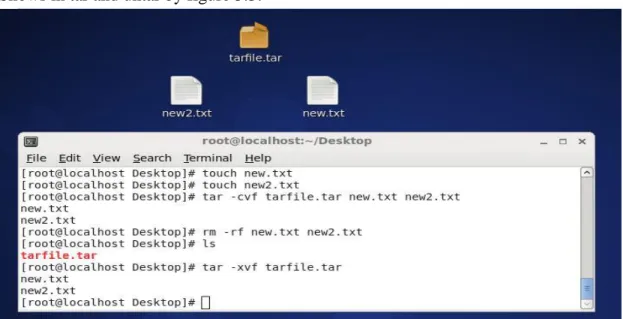
3.4.9 Compress and Decompress A Directory Using Tar and Un tar Compressing a directory :
tar cvf archive_name.tar dir_name/
e.g : 3.1 tar -cvf tarfile.tar new.txt new2.txt Extract A Compressed Directory:
Tar -xvf tarfile.tar
Shows in tar and untar by figure 3.3:
Figure 3.3: Shows in tar and untar
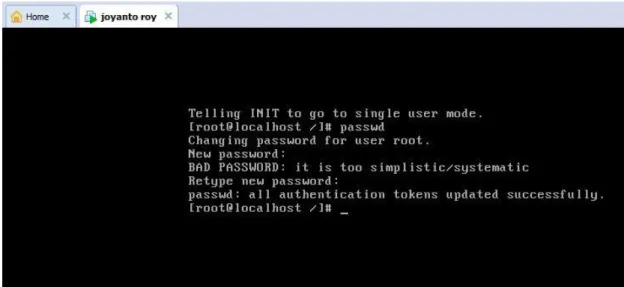
3.4.10 Root Password Break At First restart root
When show the second then click any key of keyboard
Then press to „e‟, and select kernel, and again press „e‟ now press „1‟
and click to Enter then press „b‟. Now change password to write Password change = passwd
Set new password:
Retype new password:
Then get a successfully message
Figure 3.4: Root Password break
3.4.11 How to Add Change Delete and Display IP Address In Centos
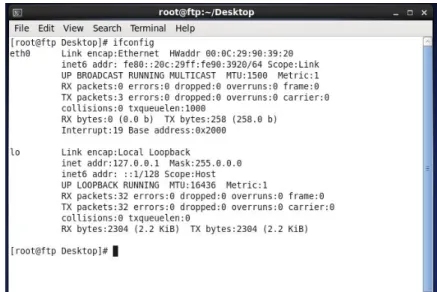
To see ip address : ifconfig or ifconfig eth0 3.5 show in interface ip address
Figure 3.5: Shows ip address in CentOS
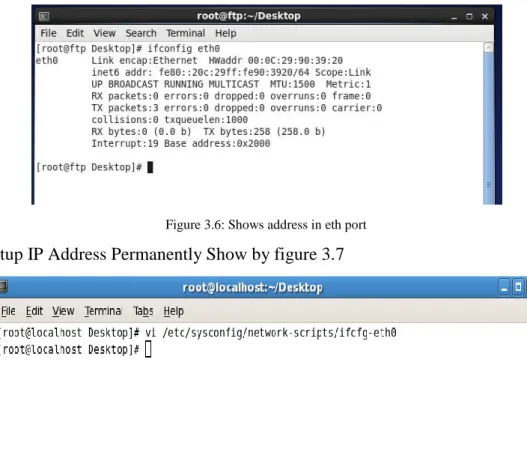
IP address and Mac address in command ifconfig eth0 by Shows Figure 3.6
Figure 3.6: Shows address in eth port
Setup IP Address Permanently Show by figure 3.7
Figure 3.7: Shows set ip address in eth port permanently
Edit ip address: vi /etc/sysconfig/network-scripts/ifcfg-eth0 Show figure 3.8
Figure 3.8: Shows set ip address in sysconfig file eth port permanently
3.4.12 Server Configuration
In Internet Service Provider [ISP] the Server Configuration is very important purpose. Server Selection is important for each server services. Many servers contains in Linux Operating System. Within Those Servers DNS server, DHCP server, FTP server, NFS server, PROXY server, MAIL server, WEB server, SAMBA server Internet Service Provider [ISP] can be configured.
Web Server
Web servers are computers that deliver Web pages. Every Web server has an IP address and possibly a domain name. For example, if you enter the URL
http://facebook.com in your browser, this sends a request to the Web server whose domain name is facebook.com. The server then fetches the page named index.html and sends it to your browser. [7]
Centos 6.3 Web Server Configuration Requirements
To set up your own web site is a computer, an operating system, a web server, a domain name, an IP address of a name server is required.
The computer is capable of running Linux can be used on any system. The language of the operating system, we, of course, you would assume using Centos 6.3. Centos operating system up and running once the previously mentioned can be easily installed the Apache Web server supports. A domain name can be registered with a domain name registration services.
Your ISP provides static IP address, and then you will need to add your domain with static IP addresses. This is achieved by using a name server.
Most domain registration services will provide this service for you.
If you configure your domain name and your name server, the next step is to install and configure your web server.
Domain Name System (DNS)
Host specified by the IP address of the computer that is convenient for them, but it's not always easy for people working with the name. Therefore, the IP address of the host name does not need to convert to a translation table. Every day millions of new machines popping up on the Internet, it would be impossible to keep everyone on the table this sort of up-to-date. This is where it comes in will DNS. DNS- of the Domain Name System. DNS- IP address of the machine on the net for all machines that have changed the name. This translates [or jargon as the "map"] to address the name and address, and some other factors.
As a mapping ftp.linux.org, in this case, is an association between two things is simply the name of a machine, and the machine's IP number [or address]
199.249.150.4. The machine name, IP number DNS- mapping contains the other way; this is a "reverse mapping" is called. [3]
DNS- the uninitiated, the more opaque areas of network administration, either.
This is part of project, we have a caching-only server and a primary DNS server for a domain that is going to set up, starting with a simple DNS- describes how to set up the name of the server tries to clean up [8]
A net-wide database of DNS-. Take care of what we have done. We are garbage, then we, and others; it will get out of the garbage. Tidy and consistent in DNS- place and we will get good service from it. Debug it, learn it, and we have admin keeping the net from falling to its knees by mismanagement will be another good admin.
Serving as a program called the Unix. This is coordinated by the Internet Software Consortium, the "binding" on the package, a part of. Most Linux distributions are included in the names and usually is installed, / usr / sbin /, usually from a package called the binding, the top or bottom of the package depends on the whim of the case. Most DNS implementations, including that of Red Hat Linux use BIND, BIND is an acronym for the "Berkeley Internet Name Domain" project which maintains the DNS related software suite that runs under Linux. The most well-known program in BIND is "named", the daemon that responds to DNS queries from remote machines. Currently BIND 8/9 is being used for DNS purposes. To access the database, one needs a DNS server for his/her site. A DNS server is also known as a name server [NS].
These servers come in three varieties; [3]
• Master [also called primary]
• Slave [also called secondary]
• Caching
DNS SERVER CONFIGURTION WORKS OF DNS:
It converts name to IP address.
And IP Address to Name.
ZONE FILES:
Forward Zone File: name to IP address.
Reverse Zone File: IP Address to Name
PACKAGE NAME: bind
DEFAULT PORT: 53
CONFIGURATIONS FILE NAME: named.config
STEP: 1
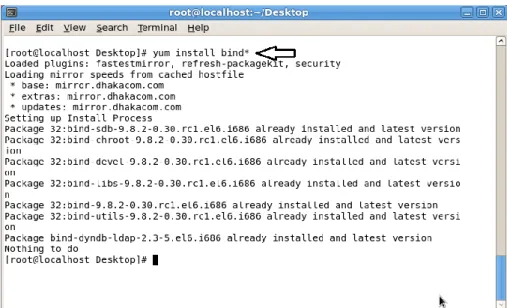
At first we have to install package of dns name bind : yum install bind*
There Show Already install because of its already installed in my pc.
Show 3.9 in install DNS in command yum install bind*
Figure 3.9: Shows Screen Print yum install bind.
STEP: 2
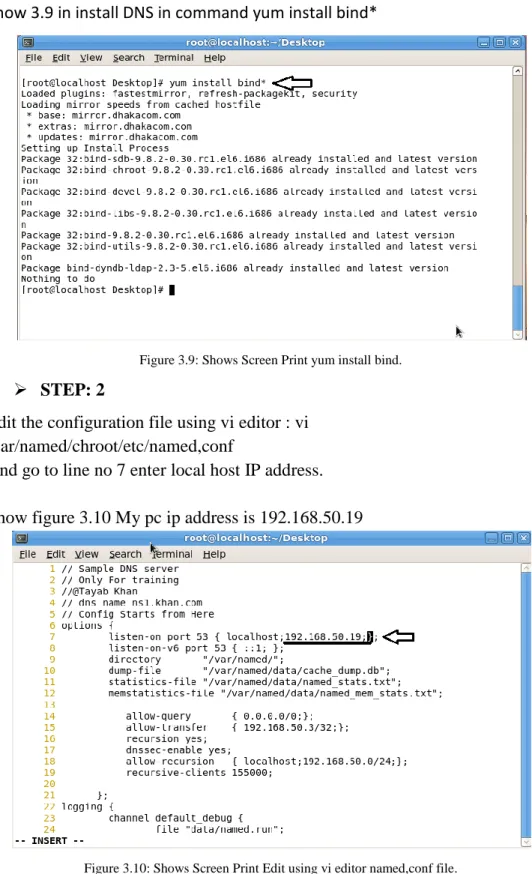
Edit the configuration file using vi editor : vi /var/named/chroot/etc/named,conf
And go to line no 7 enter local host IP address.
Show figure 3.10 My pc ip address is 192.168.50.19
Figure 3.10: Shows Screen Print Edit using vi editor named,conf file.
STEP: 3
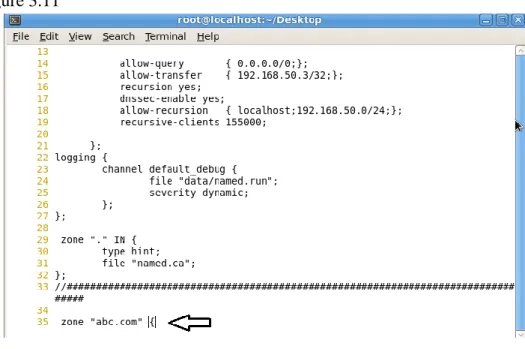
Enter a web address of forward zone. I used abc.com for testing. Shows in figure 3.11
Figure 3.11: Shows Screen Print Edit Enter a web address of forward zone
STEP: 4
Enter AN IP Address For Reverse Zone. Figure 3.12 We Have To Write IP Address In Backward Method:
192.168.50.19 as 50.168.192 without Network Portion
Figure 3.12: Shows Screen Print Enter an IP Address For Reverse Zone.
STEP: 5
Show figure 3.13 forward zone file command in command vi /var/named/chroot/var/named/abc.com
Figure 3.13: Shows Screen Print edit Forward Zone File for abc.com
Forward zone file create Shows in figure 3.14
Figure 3.14: Shows Screen Print edit Forward Zone File for abc.com
STEP: 6
Show 3.15 figure reverse zone file command
Figure 3.15: Shows Screen Print edit Reverse Zone File
Show 3.16 figure edit reveres zone file full configureation file
Figure 3.16: Shows Screen Print edit Reverse Zone File
STEP: 7
Restart the Service show 3.17 figure
Figure 3.17: Shows Screen Print service named restart
Show 3.18 Restart Web Server Service
Figure 3.18: Shows Screen Print service named status
STEP: 8
Go to Browser and type abc.com in figure 3.19
Figure 3.19: Shows Screen Print abc.com open in browser
FTP Server
Often as the "FTP Server", is a standard network protocol used for the transfer of computer files between a client and server on a computer. It supports multiple file transfer protocols, including FTP,FTPS,HTTP,HTTPS and SFTP, giving the clients flexibility in how they connect to the server. And it provides admins with a web based interface to administrate the server from anywhere.
We can also monitor server performance and online sessions and even recive email notifications about various events taking place on the server.
Setup FTP Server
Step 1: To ping google.com and also ping ip address
Step 2: Then clean yum
#yum clean all
#yum list all
Step 3: Now install the package VSFTPD
Step 4: Now check ip address
#ipconfig
Step 5: Now set the host name
#hostname
#hostname ftp.examples.com Then check
#vim /etc/hosts
Figure 3.20: Host name set
Step 6 : Now check the package are install or not
#rpm –qa | grep vsftpd
Figure 3.21: Check VSFTPD
If the package are not installed then install packages
Step 7 : Now install VSFTPD Package
#yum install vsftpd* -y
Figure 3.22: VSFTPD Package Installation
Mail Server
Installation:
Step 1:Install the nfs-utils package
At first open the terminal and type the following command
Step 2:Configuration
If there is any need to configure type the following the command
Step 3: Starting the Service
Now start the service type the following command
The service of Mail server is started DHCP Server
Installation:
Step 1:Install the nfs-utils package
At first open the terminal and type the following command
Step 2:Configuration
If there is any need to configure type the following the command
Step 3: Starting the Service
Now start the service type the following command
The service of DHCP server is started
3.5 CCNA
CCNA (Cisco Certified Network Associate) is an information technology (IT) certification from Cisco. CCNA certification is an associate- level Cisco Career certification.
The Cisco exams have changed several times. In 2013, Cisco announced an update to its certification program that "aligns certification and training curricula with evolving industry job roles. There are now several different types of Cisco-Certified Network Associate, with "CCNA Routing and Switching" being closest to the original CCNA focus; other types of CCNA focus on security, cloud, collaboration, security operations, design, data center technologies, industrial plants, service providers, and wireless.
3.6 Cisco IOS
Internetwork Operating System is a family of software used on most Cisco Systems routers and current network switches. IOS is a package of routing it‟s also used to internetworking and telecommunication function. Although the IOS operating system code base operating system, most IOS features have been ported to other kernels such as QNX and Linux for use in Cisco products.
3.7 Features
Cisco IOS supports many applications used by Internet service providers. For example
IP Traffic Export (RITE)
Ingress Flexible NetFlow
Input QoS Classification
Ingress Netflow
Input ACL
NAT Outside-to-Inside
Policy Routing
Unicast RPF Marking
Input Flexible Packet Matching
The product is supported by Cisco through a forum and a wiki, providing assorted and thematic examples of configurations. Cisco IOS supports Internet Protocol Version 4 (IPv4) as well as Internet Protocol Version 6 (IPv6).
3.8
Release history
Cisco has released different version of Cisco IOS at different times. Some of them are given below.
Cisco 7600 Routers with Cisco IOS Release 12.2SR : 03/Nov/2011
Cisco Release 15.0S : 29/Jun/2012
Cisco IOS Release 12.2SR : 19/Mar/2013
Cisco Release 15.1S : 14/Apr/2014
3.9 Open System Interconnection Reference Model
The Open System Interconnection (OSI) reference model describes how information from a software application in one computer moves through a network medium to a software application in another computer. It conceptually divides computer network architecture into 7 layers in a logical progression.
Figure 3.23: OSI 7 Layer Model
3.10 Address Schemes 3.10.1 IP Addressing
Each end device on a network must be configured with an IP address
Structure of an IPv4 address is called dotted decimal
IP address displayed in decimal notation, with four decimal numbers between 0 and 255
With the IP address, a subnet mask is also necessary
IP addresses can be assigned to both physical ports and virtual interfaces
3.10.2 IPv4
An Internet Protocol (IP) address is a numerical unique identification.
Originally an Ipv4 address defined as a 32-bit number (32-bit local address).
Figure 3.24: IPv4 address
3.10.3 Classification of IP address
Class name - Range for 1st Octet
Class-A - Ip address range: 1-126 Class-B - Ip address range: 128-191 Class-C - Ip address range: 192-223 Class-D - Ip address range: 224-239 Class-E - Ip address range: 240-254 Here Class-D & Class-E are reserved
3.11 Routing & Switching 3.11.1 Types of Routing
1. Static Routing 2. Dynamic Routing
3.11.2 Static Routing
A router can learn about remote networks in one of two ways
• Manually - Remote networks are manually entered into the route table using static routes.
• Dynamically - Remote routes are automatically learned using a dynamic routing protocol.
Static Routing Command
Router (config) # ip route destination ip musk outgoing interface
Figure 3.25: Static Routing System
3.11.3 Dynamic Routing
Evolution of Dynamic Routing Protocols
Dynamic routing protocols used in networks since the late 1980s
Newer versions support the communication based on IPv6
Routing Protocols Classification
Figure 3.26: Routing Protocols Classification
3.11.3.1 RIP
RIP – Router Information Protocol Version – 1
Version – 2
All masking is same is called class full.
All masking is not same is called class less.
RIP Command
Router (config) # router rip Router (config) # version 2
Router (config) # network ip address and mask address /int f0/0
Router (config) # network ip address and mask address /se2/0
Figure 3.27: RIP Configuration
3.11.3.2 EIGRP
EIGRP Command
Router (config) # router eigrp 10 /10 is a identification Router (config) # network ip address and wildcard mask /f0/0
Router (config) # network ip address and wildcard mask /se2/0
Router (config) # no auto-summary
Figure 3.28: EIGRP Configuration
3.11.3.3 OSPF
OSPF Command
Router (config) # router eigrp 10 /10 is a Process ID Router (config) # network ip address and wildcard mask area 5
Router (config) # network ip address and wildcard mask area 5
Here OSPF is identify to area number
Figure 3.29: OSPF Configuration
3.12 Security
The world is becoming more interconnected with the advent of the Internet and new networking technology. There is a large amount of personal, commercial, military, and government information on networking infrastructures worldwide. Network security is becoming of great importance because of intellectual property that can be easily acquired through the internet. For an examples access control list (ACL) is a list of access control entries (ACE). Each ACE in an ACL identifies a trustee and specifies the access rights allowed, denied, or audited for that trustee. The security descriptor for a securable object can contain two types of ACLs: a DACL and a SACL.
3.12.1 ACL
ACLs are lists of conditions used to test network traffic that tries to travel across a router interface. These lists tell the router what types of packets to accept or deny. Acceptance and denial can be based on specified conditions. ACLs enable management of traffic and secure access to and from a network.
An ACL makes routing decisions based on source address, destination address, protocols, and upper-layer port numbers.
3.12.2 How to identify Access Lists
* IP Standard 1 - 99
* IP Extended 100-199
There are many types of ACLs. This lesson explains standard ACLs, extended ACLs, and named ACLs.
3.12.3 There are two special keywords that are used in ACLs, the any and host options
The any option substitutes 0.0.0.0 for the IP address and 255.255.255.255 for the wildcard mask. This option will match any address that it is compared against.
The host option substitutes 0.0.0.0 for the mask. This mask requires that all bits of the ACL address and the packet address match. This option will match just one address.
Example for Any:
Router (config)# access-list 1 permit 0.0.0.0 255.255.255.255 Or,
Router (config)# access-list 1 permit any Example for Host:
Router (config)# access-list 1 permit 172.30.16.29 0.0.0.0 Or,
Router (config)# access-list 1 permit host 172.30.16.29
3.12.3 Standard Access List examples
Router Designatio
n
Route r Name
Interfac e Type
Fast/Ethernet 0 address
Serial 0 address
Subnet mask
Router 1 BUET DCE 192.168.20.1 192.168.22.
1 255.255.255.
0 Router 2 DU DTE 192.168.25.1 192.168.22.
2
255.255.255.
0
Figure 3.30: Standard ACL Configuration
Problem1: Deny all traffic from a specific subnet.
BUET(config)# access-list 1 deny 192.168.20.0 0.0.0.255 BUET(config)# access-list 1 permit any
(implicit deny any - not visible in the list) (access-list 1 deny 0.0.0.0 255.255.255.255) BUET(config)# interface f 0/0
Router(config-if)# ip access-group 1 in Problem2: Deny a specific host
BUET(config)# access-list 1 deny host 192.168.20.2
BUET(config)# access-list 1 permit 0.0.0.0 255.255.255.255 (we can use any)
(implicit deny any - not visible in the list) (access-list 1 deny 0.0.0.0 255.255.255.255) Router(config)# interface f /00
Router(config-if)# ip access-group 1 in
3.12.3 Extended IP Access List configuration
Allow more precise filtering conditions:
Check source and destination IP address
Specify an optional IP (TCP or UDP) protocol port number
Use access list number range 100 - 199 Well-Known IP Protocol Port Numbers (Decimal):
20 - File Transfer Protocol (FTP) data 21 - FTP program
23 - Telnet
25 - Simple Mail Transport Protocol (SMTP) 69 - Trivial File Transfer Protocol (TFTP) 53 - Domain Name System (DNS)
Router(config)# access-list acl-number {permit|deny} protocol source source-mask destination destination-mask [operator operand]
[established]
Extended Access List examples:
Router(config)# access-list acl-number {permit|deny} protocol source source-mask destination destination-mask [operator operand]
[established]
Problem1: Router1 deny HTTP to Router2
Set Router1 global configuration mode (after basic configuration):
BUET(config)#access-list 101 deny tcp host 192.168.20.2 host 192.168.22.2 eq 80
BUET(config)#access-list 101 permit ip any any
Set source interface(s0/0) side:
BUET(config)#interface s0/0
BUET(config-if)#ip access-group 101 out BUET(config-if)#end
BUET# copy run-config start-config
Test the configuration from your browser.
Problem2: Router1 deny telnet traffic to Router2
Set Router1 global configuration mode (after basic configuration):
BUET(config)#ip http server
BUET(config)#access-list 101 deny tcp host 192.168.20.2 host 192.168.22.2 eq 23
BUET(config)#access-list 101 permit ip any any Set source interface (fa0/1) side:
BUET(config)#interface fastethernet 0/1 BUET(config-if)#ip access-group 101 in BUET(config-if)#end
BUET# copy run-config start-config
Router> show ip interface
Command that displays IP interface information and indicates whether any access lists are set. (Monitor Access Lists).
Figure 3.31: ACL Configuration
3.13 Basic Routing and Switching Configuration 3.13.1 Static Routing Configuration
Router1>
Router1>en Router1#
Router1#conf t
Router1(config)#int f0/0 Router1(config-if)#ip add
Router1(config-if)#ip address 192.168.0.1 255.255.255.224 Router1(config-if)#no shut
Router1(config-if)#ex Router1(config)#int se2/0 Router1(config-if)#
Router1(conf-if)#ip add 203.190.10.5 255.255.255.252 Router1(config-if)#ex
Router1(config)#ip rou
Router1(config)#ip route 192.168.10.0 255.255.255.224 203.190.10.5 Router1(config)#^Z
Router2>
Router2>en Router2#
Router2#conf t
Router2(config)#int f0/0 Router2(config-if)#ip add
Router2(config-if)#ip address 192.168.10.1 255.255.255.224 Router2(config-if)#no shut
Router2(config-if)#ex Router2(config)#int se2/0 Router2(config-if)#
Router2(conf -if)#ip add 203.190.10.6 255.255.255.252 Router2(config-if)#ex
Router2(config)#ip rou
Router2(config)#ip route 192.168.0.0 255.255.255.224 203.190.10.6 Router2(config)#^Z
3.13.2 Dynamic Routing Configuration RIP Version
R1
joyanto1>ena joyanto1#conf t
Enter configuration commands, one per line. End with CNTL/Z.
joyanto1(config)#router rip joyanto1(config-router)#ver joyanto1(config-router)#version 2
joyanto1(config-router)#network 192.168.0.0 joyanto1(config-router)#network 203.190.10.4 R2
joyanto2(config)#router rip joyanto2(config-router)#version 2
joyanto2(config-router)#network 192.168.10.0 joyanto2(config-router)#network 203.190.10.4
EIGRP Version
R1
Router>ena Router#conf t
Enter configuration commands, one per line. End with CNTL/Z.
Router(config)#hostname R1 R1(config)#int fa0/0
R1(config-if)#ip add 192.168.0.1 255.255.255.224 R1(config-if)#no shut
R1(config-if)#int se2/0
R1(config-if)#ip add 203.190.10.5 255.255.255.252 R1(config-if)#clock rate 64000
R1(config-if)#no shut
R1(config)#router eigrp 10 R1(config-router)#netw
R1(config-router)#network 192.168.0.0 0.0.0.31 R1(config-router)#network 203.190.10.4 0.0.0.3 R1(config-router)#no auto-summary
R2
Router>ena Router#conf t
Enter configuration commands, one per line. End with CNTL/Z.
Router(config)#hostname R2 R2(config)#int fa0/0
R2(config-if)#ip add 192.168.10.1 255.255.255.224 R2(config-if)#no shut
R2(config-if)#int se2/0
R2(config-if)#ip add 203.190.10.6 255.255.255.252 R2(config-if)#no shut
R2(config)#router eigrp 10
R2(config-router)#network 192.168.10.0 0.0.0.31 R2(config-router)#network 203.190.10.4 0.0.0.3 R2(config-router)#no auto-summary
OSPF Version
R1
Router>ena Router#conf t
Enter configuration commands, one per line. End with CNTL/Z.
Router(config)#hostname R1 R1(config)#int fa0/0
R1(config-if)#ip add 192.168.0.1 255.255.255.224 R1(config-if)#no shut
R1(config)#int se2/0
R1(config-if)#ip add 203.190.10.5 255.255.255.252 R1(config-if)#clock rate 64000
R1(config-if)#no shut
%LINK-5-CHANGED: Interface Serial2/0, changed state to down R1(config-if)#ex
R1(config)#router ospf 10
R1(config-router)#network 192.168.0.0 0.0.0.31 area 0 R1(config-router)#network 203.190.10.4 0.0.0.3 area 0 R2
Router>ena Router#conf t
Enter configuration commands, one per line. End with CNTL/Z.
Router(config)#hostname R2 R2(config)#int fa0/0
R2(config-if)#ip add 192.168.10.1 255.255.255.224 R2(config-if)#no shut
R2(config-if)#int se2/0
R2(config-if)#ip add 203.190.10.6 255.255.255.252 R2(config-if)#no shut
R2(config-if)#ex
R2(config)#router ospf 10
R2(config-router)#network 192.168.10.0 0.0.0.31 area 0 R2(config-router)#network 203.190.10.4 0.0.0.3 area 0
3.13.3 ACL Configuration
Router>
Router>en Router#config t
Enter configuration commands, one per line. End with CNTL/Z.
Router(config)#ho
Router(config)#hostname R-1 R-1(config)#int f0/0
R-1(config-if)#ip add
R-1(config-if)#ip address 192.168.5.1 255.255.255.0 R-1(config-if)#no sh
R-1(config-if)#no shutdown R-1(config-if)#
%LINK-5-CHANGED: Interface FastEthernet0/0, changed state to up
%LINEPROTO-5-UPDOWN: Line protocol on Interface FastEthernet0/0, changed state to up
R-1(config-if)#
R-1(config-if)#exit R-1(config)#int s2/0 R-1(config-if)#ip ad
R-1(config-if)#ip address 100.100.100 ^
% Invalid input detected at '^' marker.
R-1(config-if)#ip address 100.100.100.1 255.255.255.252 R-1(config-if)#cl
R-1(config-if)#clock r
R-1(config-if)#clock rate 56000 R-1(config-if)#no sh
R-1(config-if)#no shutdown
%LINK-5-CHANGED: Interface Serial2/0, changed state to down R-1(config-if)#
R-1(config-if)#exit R-1(config)#ip ro
R-1(config)#ip route 0.0.0.0 0.0.0.0 s2/0 R-1(config)#
%LINK-5-CHANGED: Interface Serial2/0, changed state to up
%LINEPROTO-5-UPDOWN: Line protocol on Interface Serial2/0, changed state to up
R-1(config)#
R-1(config)#
R-1(config)#ac
R-1(config)#access-list 10 de R-1(config)#access-list 10 deny hos
R-1(config)#access-list 10 deny host 192.168.5.2 R-1(config)#acc
R-1(config)#access-list 10 pe R-1(config)#access-list 10 permit a R-1(config)#access-list 10 permit any R-1(config)#int f0/0
R-1(config-if)#ip ac
R-1(config-if)#ip access-group 10 in R-1(config-if)#
R-1(config-if)#
R-1(config-if)#exit
R-1(config)#li R-1(config)#line v R-1(config)#line vty 0 4 R-1(config-line)#pas
R-1(config-line)#password 123 R-1(config-line)#login
R-1(config-line)#eixt ^
% Invalid input detected at '^' marker.
R-1(config-line)#exit R-1(config)#ena R-1(config)#enable s
R-1(config)#enable secret 123 R-1(config)#ac
R-1(config)#access-list 100 de R-1(config)#access-list 100 deny t R-1(config)#access-list 100 deny tcp hos
R-1(config)#access-list 100 deny tcp host 192.168.10.2 hos
R-1(config)#access-list 100 deny tcp host 192.168.10.2 host 192.168.5.1 eq
R-1(config)#access-list 100 deny tcp host 192.168.10.2 host 192.168.5.1 eq 23
R-1(config)#ac
R-1(config)#access-list 100 per R-1(config)#access-list 100 permit i R-1(config)#access-list 100 permit ip R-1(config)#access-list 100 permit ip an R-1(config)#access-list 100 permit ip any a R-1(config)#access-list 100 permit ip any any R-1(config)#
R-1(config)#int s2/0 R-1(config-if)#ip ac
R-1(config-if)#ip access-group 100 in R-1(config-if)#
3.14 Challenges
No work has not challenges, but four months of my internship experience and to share friends after hearing about the happy hour, I've found that there is some common challenges intern. I think it is that interns three things: unpaid / under, temporary, and they are in a race to gain experience.
Sometimes Not enough work: There‟s not enough work assigned to me. I‟m bored, underutilized, strumming my fingers at my desk and tempted to peruse Facebook.
Too much work: Because interns are just glad to get a foot in the door, some work places may take advantage of young workers by giving them very long hours of dull repetitive work.
Afraid to ask questions: All of a sudden there‟s an influx of work, and I finally have the chance to prove myself! But I‟m not sure about x, y, z….I may feel the pressure to be an independent and self-sufficient worker, but it‟s so much better to clarify uncertainties!
Compete with other Intern: Luckily I was an intern; we ask questions of each other and can easily team up with projects that have worked in teams where there was such a collaborative relationship. Interns in a future job opening, or a recommendation for a good letter will be competing in other office environments, may not be so friendly.
A New Lifestyle: As a recent college graduate, I may be getting used to a new life style that can be quite jarring. Instead of waking up at eight and going to a few classes a day, I‟m sitting at a desk 9-5. I might be living at my parents to save money. The hours and the new living situation clearly make socializing more difficult than before.
CHAPTER 4
4.1 Competencies Earned
Competencies Earned or learning outcome is a statement of what a learner is expected to know, understand or be able to do as a result of a learning process.
Install and decommission of both network and server machines at two datacenters. Lead role in advanced Linux software implementations, for example LDAP HA, aligned to program learning outcomes, field and internship evaluations. The Student Association office funds many student Intern Learning Outcomes: Gathering and organizing information into a Internship Project Description: Participate in the redesign of the Linux Lab web site. Learning Outcomes. Install & Configure software and upgrades;
Install, configure & test network Employer Services • Furthermore, consistent with the learning outcomes, the Internship On-Site Supervisor will provide an orientation concerning organizational policies and procedures.
4.2 Smart Plan
Every company should have a smart plan to gain the success. Basically some common things of combination create a smart plan.
4.3 Reflections
Daffodil Online Limited. started they are operation in the year 2002. During the past years, they extended they are operation and service portfolio according to the customer‟s recommendation and considering demands of time. They worked with many national projects and international organizations and achieved the reputation. They are using the latest technologies and upgrading the services wherever it is required. They are Corporate Network Solution department is capable to provide state-of-art network and telecommunication solutions with a highly efficient technical expertise group.
CHAPTER 5
Conclusion and Future Career 5.1 Discussion and Conclusion
Review this internship has been a wonderful and rewarding experience. I have seen the future and I will be able to help me with the opportunity to network with a lot of people have been able to confirm that. Through this internship, I have learned that one of the main issues and time management skills as well as self-motivation. When I first started I was eight hours a day, six days a week is going to be able to sit in an office and did not think that. Once I realized what I had to do my hours of overlapping is not broken, so I organize my day job.
Organized and it was the right time, when I get a response prepared for questions that need to be learned. This internship and time management of the office for many hours, I had to learn how to motivate yourself through. I'm still looking for using the company came up with the various proposals and ideas. I'm still keeping my options open to new opportunities, however, are continuing to work for the University of Bangladesh in the world. I'm enjoying this line of work. I continue to work hard for my position and hope to continue to learn about the industry and meet new people will. It was a wonderful experience, and I hope the other intern got a lot out of it![5]
5.2 Scope for Further Career
Career opportunities are available in different areas under Linux. The career opportunities in Linux‟s mentioning not only the Linux platform, it covers lot of different areas like: Desktop Application Development, Kernel & Device Drivers Development Today their huge demand open source software‟s and open source software‟s developers and network engineers. There many company today migrated to Linux and open source software‟s. The company like Google, Yahoo, Boeing, Lufthansa, wiki.org, many companies migrated to cost effective open source solution. There is a huge demand for the skilled professionals in LINUX, MICROTIK etc.
References
[1] Get idea about Daffodil online limited (DOL), Available at:
http://www.daffodilnet.com/index.php?option=com_content&view=article&id=54&Itemid=112 , last accessed on 01 Jan 8102, 11.30pm.
[2] The career opportunities in Linux, Available at: https://goinggnu.wordpress.com/2007/07/09/the-career- opportunities-in-linux/ last access on 01 Jan 8102, 12.00pm
[3] About Configuring DNS, Available at:
http://www.linuxhomenetworking.com/wiki/index.php/Quick_HOWTO_:_Ch18_:_Configuring_DNS#.VT K2KPA0-1k last access on 05 Jan 8102, 10.00am
[4] About Recommended Partitioning Scheme, Available at:
www.centos.org/docs/5/html/5.2/Installation_Guide/s2-diskpartrecommend-ppc.html last accessed on 08
Jan 8102, 4.00pm.
[5] About internship, Available at: http://ashleydotson.blogspot.sg/2009/08/in-review-this-internship-has- been.html, last access on 08 Jan 8102, 10.20am
[6] Get Concept about File and directory details, Available at http://www.bitpapers.com/2012/12/linux- working-with-files.html last access on 09 Jan 8102, 11.20pm
[7] Get Concept about Web server, Available at http://www.webopedia.com/TERM/W/Web_server.html last access on 09 Jan 8102, 10.30am
[8] Get Concept about DNS server, Available at
http://compnetworking.about.com/od/dns_domainnamesystem/f/dns_servers.html last access On 08 Jan 8102, 11:00am
[9] Get Concept about Mail Server, https://www.centos.org/docs/5/html/Deployment_Guide-en-US/ch- email.html, last access on 11 Jan 8102, 11:00am
[10]Get Concept about CCNA
https://en.wikipedia.org/wiki/CCNA 04 Jan 8102, 11:00am
[11] Get Concept about CiscoIOS,
https://www.cisco.com/c/en/us/products/ios-nx-os-software/ios-technologies/index.html 04 Feb 8102, 11:00am
[12] Get Concept about Release history,
https://en.wikipedia.org/wiki/Cisco_IOS 05 Feb 8102, 11:00am
[13]Get Concept about
Router Board, https://en.wikipedia.org/wiki/Cisco 05 Feb 8102, 11:00am [14]Get Concept about ACL,
https://www.pluralsight.com/blog/it-ops/access-control-list-concepts 19 Feb 8102, 11:00am
Appendices
Appendix A: Internship Reflection
The primary goal of my internship in a professional setting, practical solutions to real- world problems is to apply the knowledge gained in the classroom. And professionally relevant competencies and relationships in a professional setting, learning to deal with new knowledge, skills, and the ability to determine how to sharpen and develop plans.
Add to network with other professional‟s supervisors and professional relationships. I am a professional in the field exposure with clients and professional etiquette and professional supervisors and other employees to learn from watching an understanding of the behavior, as well as to gain through interaction. To fulfill the duties of my internship, I'm exercising proper business etiquette. I am an organization's mission / vision is implemented, how to contact colleagues, how power is shared, how it is structured, how decisions are made, how to understand the culture of a professional organization, and what degree of accountability and feedback to the organization. With an assessment at the end of my internship supervisor and internship experience running through individual meetings provides an opportunity to take a professional opinion. Internship experiences to prepare for life in a global society, leadership and service, my gift to be able to put it to use.
Appendix B: Company Detail
Head Office
Name Daffodil Online Limited
Address 102, Shukrabad (3rd floor), Mirpur Road, Dhanmondi, Dhaka - 1207, Bangladesh
Telephone 02-9143258-60
Fax 880-2-8116103
E-mail [email protected]
Website www.daffodilnet.com
Type of Organization Nationwide Internet Service Provider (ISP)
Employees 12
P
lagiarism Check Result
Figure 3.32: Plagiarism Check