Online Inventory System
By
Rakesh Shaha (152-35-1255)
A project submitted in partial fulfillment of the requirement for the degree of Bachelor of Science in Software Engineering
Department of Software Engineering
DAFFODIL INTERNATIONAL UNIVERSITY
Spring – 2019
i ©Daffodil International University
Declaration
I hereby declare that, this project has been done by me under the supervision of MS. Fatama Binta Rafiq, lecturer department of Software Engineering, Daffodil International University. I also declare that neither this project nor any part of this project has been submitted elsewhere.
Certified By
MS. Fatama Binta Rafiq lecturer
Department of software engineering, Daffodil International University.
Submitted By
Rakesh Shaha Id: 152-35-1255
Department of Software Engineering Daffodil International University
ii ©Daffodil International University
Acknowledgement
First of all I would like to thanks my God. After that I would like to express my special thanks of gratitude to my supervisor teacher “Ms. FatamaBinta Rafiq” who gave me the golden opportunity to do this wonderful project on the topic of “Online Inventory System”, which also helped me in doing a lot of Research, and I came to know about so many new things. He always supports me to make this project successfully. I am really thankful to him.
Secondly I would also like to thank my friends who helped me lots to complete this project within the limited time.
I am also thankful to and fortunate enough to get constant encouragement, support and guidance from all Teaching staffs of Department of Software Engineering which helped me to successfully completing my project properly.
iii ©Daffodil International University
Abstract
This project is aimed to developing online inventory information. The entire project has been developed keeping in view of the distributed client server computing technology, in mind. The project entitled “Online Inventory System” is a web application. It is developed using PHP and MySQL. This project has tried to incorporate all the advanced features of PHP such as to fulfill the aim of the project. The application has been designed such that it encompasses the managerial as well as public functionalities. Among the managerial functionalities are the task performed by the various offices. The public features are exercised by the users and outsiders according to the permissions level availed to them.
iv ©Daffodil International University
Table of Contents
Chapter 1: Introduction ...1
1.1. Project Overview...1
1.2. Project Purpose ...1
1.2.1. Background ...1
1.2.2. Benefits & Beneficiaries ...1
1.2.3. Goals ...2
1.3. Stakeholders ...2
1.4. Proposed System Model (block diagram) ...2
1.5. Project Schedule ...3
1.5.1 Gantt chart ...3
1.5.2. Release Plan/Milestone ...4
Chapter 2: Software Requirement Specification ...5
2.1. Functional Requirements ...5
2.2. Data Requirements ...6
2.3. Performance Requirements ...6
2.3.1. Speed and Latency Requirements ...6
2.3.2. Precision or Accuracy Requirements ...7
2.3.2. Capacity Requirements ...7
2.4. Dependability Requirements ...7
2.4.1. Reliability Requirements ...7
2.4.2. Robustness or Fault-Tolerance Requirements ...8
2.4.3. Safety-Critical Requirements ...8
2.5. Maintainability and Supportability Requirements ...8
2.5.1. Maintenance Requirements ...8
2.5.2. Supportability Requirements ...8
2.5.3. Adaptability Requirements ...8
2.6. Security Requirements ...8
2.6.1. Access Requirements ...9
2.6.2. Integrity Requirements ...9
2.6.3. Privacy Requirements ...9
2.7. Usability and Human-Interaction Requirements ... 10
2.7.1. Ease of Use Requirements ... 10
v ©Daffodil International University
2.7.2. Personalization and Internationalization Requirements ... 10
2.7.3. Understandability and Politeness Requirements ... 10
2.7.4. Accessibility Requirements ... 10
2.7.5. User Documentation Requirements ... 10
2.7.6. Training Requirements ... 10
2.8.Look and Feel Requirements... 10
2.8.1. Appearance Requirements ... 10
2.8.2. Style Requirements ... 11
2.9. Operational and Environmental Requirements... 11
2.9.1. Expected Physical Environment ... 11
2.9.2. Requirements for Interfacing with Adjacent Systems... 11
2.9.3. Release Requirements ... 11
2.10. Legal Requirements ... 11
2.10.1. Compliance Requirements... 11
2.10.2. Standards Requirements ... 11
3.1. Use Case Diagram ... 12
3.2. Use Case Description (for each use case) ... 12
3.3. Activity Diagram (for each use case)... 16
3.4. System Sequence Diagram (for each use case) ... 23
Chapter 4: System Design Specification ... 27
4.1. Class Responsibilities Collaboration (CRC) Cards... 27
4.2. Class Diagram... 29
4.3. Database Design Diagram ... 30
4.4. Development Tools & Technology... 30
4.4.1. User Interface Technology ... 30
4.4.2. Implementation Tools & Platforms ... 31
Chapter 5: System Testing ... 32
5.1. Testing Features... 32
5.1.1Features to be tested ... 32
5.2 Testing Strategies... 32
5.2.1. Test Approach ... 32
5.2.2. Pass/Fail Criteria ... 33
5.2.3.Testing Schedule ... 35
vi ©Daffodil International University
5.2.4. Traceability Matrix ... 35
5.3.Testing Environment (hardware/software requirements)... 36
5.4. Test Cases ... 36
Chapter 6: User Manual ... 41
6.1. User Manual (manager) ... 41
6.2.User Manual (admin) ... 43
Chapter 7: Project Summary ... 46
7.1. Github Link ... 46
7.2. Limitations ... 46
7.3. Obstacles & Achievements ... 46
7.4. Future Scope... 46
vii ©Daffodil International University
List of Figures
Figure 1.4. Proposed System Model (block diagram) ...2
Figure 1.5.1 Gantt chart ...3
Figure 3.1. Use Case Diagram ... 12
3.3. Activity Diagram (for each use case) ... 16
Figure 3.3.1 Sing in ... 16
Figure 3.3.2 Add bills ... 17
Figure 3.3.3 View sells list ... 18
Figure 3.3.4 Add category ... 19
Figure 3.3.5 Add products ... 20
Figure 3.3.6 View product list ... 21
3.4. System Sequence Diagram (for each use case) ... 23
Figure 3.4.1 Sing in ... 23
Figure 3.4.2 Add bills ... 24
Figure 3.4.3 View sells list ... 24
Figure 3.4.4. Add category ... 25
Figure 3.4.5. Add products ... 25
Figure 3.4.6. View product list ... 26
Figure 3.4.7. Add products details ... 26
Figure 4.2. Class Diagram ... 29
Figure 4.3. Database Design Diagram ... 30
User Manual ... 41
6.1. User Manual (manager) ... 41
Figure 6.1.1. Sing in ... 41
Figure 6.1.2. Home page ... 41
Figure 6.1.3. Make bill ... 42
Figure 6.1.4. Final slip ... 42
6.2.User Manual (admin) ... 43
Figure 6.2.1. Sing in ... 43
Figure 6.2.2. Home page ... 43
Figure 6.2.3. Add sub-category ... 44
Figure 6.2.4. Add Products ... 44
viii ©Daffodil International University Figure 6.2.5. View Products List ... 45 Figure 6.2.6. View Sales List ... 45
1 ©Daffodil International University
Chapter 1: Introduction
1.1. Project Overview
Today we have computers with large computing power and almost every business is going to take the advantages of using those technologies. But nowadays digital certifications itself becomes an essential component for every business infrastructure. Because it provides security and it can identify every unique individual. Besides, people can use it easily.
Everything is digital now People now use digital methods in everything. Besides, people are very interested in the use of the digital method.
Moreover, many of these countries have their own business. Someone is big business, someone small business. Many of them have traded in previous ways. It is a lot of trouble.
The old method is wasted many times. Besides, if you want to see many previous accounts, it is very difficult.
Besides, big businessmen are in trouble looking after the shop alone. Then his employee kept.
There are many things in the business that hide from the employee. Moreover, the businessman always doubts his employee. When he does not live
If a Businessman goes out of the shop. Then his client gave an order on the phone. Then there is a problem to take his order. Since now a day’s more than just being sold in retail.
So, A system should be created. They can easily order from any place or learn about his shop.
1.2. Project Purpose
The main purpose of this project named "Online Base Inventory System" is to make an inventory system which may be help to solve the problem of businessmen. So that's why we are going to develop such a project.
1.2.1. Background
I see this problem in my father's business. Moreover, all big businessmen have the same problem. There is no solution for this. The problem is going on in this way. So I thought that to solve this problem
1.2.2. Benefits & Beneficiaries
Our applications would be beneficial for some point of view. Now, I am mentioning those below:
• Will be able to bill soon and easily.
• Can sell shop products and create bills from anywhere.
• Even though the owner is not in the shop, he will know about the merchandise.
2 ©Daffodil International University
• If a product is less than the stock, then the system will massage
I have also mentioned some benefits as well as beneficiaries. So, I think this application is very much helpful for users.
1.2.3. Goals
Everyone in the present world is familiar with modern technology. The people of Bengal are a little familiar. The people of Bangladesh are connected to technology in some way or the other way. In comparison to the past few years, the technology of Bangladeshi technology has improved greatly. The Bangladeshi people used the internet in 2013 for 30000, but now 91 million. There is a system desktop cap, but not online. So by thinking of that side, I want to develop the project.
1.3. Stakeholders
There are two types of stakeholders in our System. Such as:
Admin (owner)
Manager
Manager: Here manager call bill. See the sales list.
Admin (owner): Admin can do everything. Add product, add category, view product details, view sales info, make bill etc.
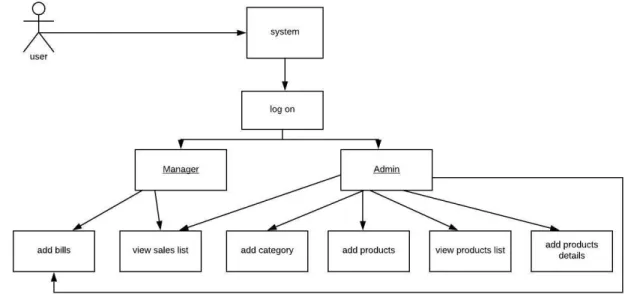
1.4. Proposed System Model (block diagram)
I prepared a system model. This model will clarify my proposed system in brief.
Figure 1: Proposed System Model for my project
3 ©Daffodil International University
1.5. Project Schedule
I must prepare schedule for my project to complete it on time.
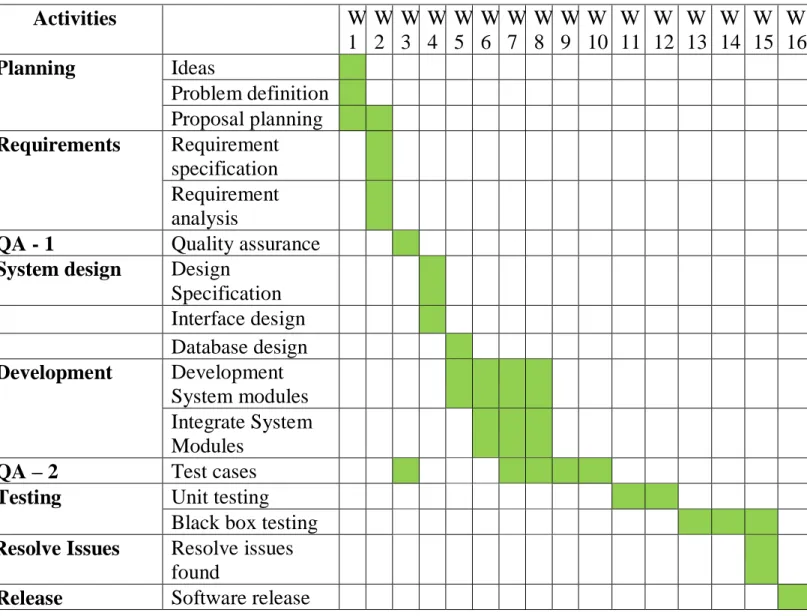
1.5.1 Gantt chart
A Gantt chart is a visual view of tasks scheduled over time. They are a useful way of showing what work is scheduled to be done on a certain day. They also help me view the start and end dates of a project in one simple view.
Activities
W
1 W 2
W 3
W 4
W 5
W 6
W 7
W 8
W 9
W 10
W 11
W 12
W 13
W 14
W 15
W 16
PlanningIdeas
Problem definition Proposal planning
RequirementsRequirement
specification Requirement analysis
QA - 1
Quality assurance
System designDesign
Specification Interface design Database design
DevelopmentDevelopment
System modules Integrate System Modules
QA – 2
Test cases
Testing
Unit testing Black box testing
Resolve IssuesResolve issues
found
Release
Software release
Figure 2: Gantt chart
4 ©Daffodil International University
1.5.2. Release Plan/Milestone
The release plan or milestones are given below:
Activities
Duration in week Total
week
Brainstorming
Week 1 1
Problem identification
Week 1, Week 2 2
Requirement specification Week 2
1
Requirement analysis
Week 2 1
Design specification
Week 4 1
Interface design
Week 4 1
Database design
Week 5 1
Development System modules
Week 5, Week 6, Week 7, Week 8 4
Integrate System Modules Week 6, Week 7, Week 83
Test caseWeek 2, Week 7, Week 8, Week 9, Week
10
5
Unit testing
Week 11, Week 12 2
Black-box testing
Week 13, Week 14, Week 15 3
Resolve Issues
Week 15 1
Software release
Week 16 1
5 ©Daffodil International University
Chapter 2: Software Requirement Specification
2.1. Functional Requirements
Functional requirements are those which are related to the technical functionality of the system. Function Requirement is described as a specification of behavior between outputs and inputs.
2.1.1. Sing In
FR 01 Sing in
Description Users and Admin will Sign in the system using user name, password &
system will verify information. If user name, password incorrect user wouldn’t Sign in this system.
Stakeholder Owner, Manager
2.1.2. Make bill for the customer
FR 01 Make bill for the customer
Description When customer will come for purchasing something manager and admin both can make the bill. Bill making part will have for both admin and manager.
Stakeholder Owner, Manager
2.1.3. View sell list
FR 02 View sell list
Description When any product will be sold then it will be added to the sell list. Sell list for the selling information of the shop. Manager and admin both can view the sell list.
Stakeholder Owner, Manager
2.1.4. Add product category
FR 03 Add product category
Description There can be many types of product in an inventory and they will have many category. When new product will come it can be stored in existing category or can be in new category. So in that case if new category needed then only admin can add new product category.
Stakeholder Owner
6 ©Daffodil International University 2.1.6. View product list
FR 05 View product list
Description Sometime the owner (admin) wants to view his all inventory. Because he wants to know how many product are stored in his inventory. So that there will be product list for admin.
Stakeholder Manager and owner
2.1.7. Add product details
FR 06 Add product details
Description There can be same name product in the inventory. In this case admin can add product details for that product.
Stakeholder owner
2.2. Data Requirements
Data requirements establish the process used to identify, prioritize, precisely formulate, and validate the data needed to achieve objectives. For my project all data will be provided from users so we need to focus on some points. For example:
• Data source sequence
• Types of entity of the system
• Availability of data
2.3. Performance Requirements
It is very important to maintain performance of any software system. To ensure performance, we need to maintain some steps. Now, I will explain performance requirements of my project.
2.3.1. Speed and Latency Requirements
Speed and latency requirements must be ensured while retrieving data from the cloud server.
SLR-1 Search result must be faster.
Description When you will search product name, then the search result must show within seconds.
Stakeholders Admin, manager
7 ©Daffodil International University
2.3.2. Precision or Accuracy Requirements
Results that is to be shown to the end user is need to be accurate. Because, wrong information might be ruined the whole business process
PAR-1 Search result must be accurate
Description When manager and admin search for a product, then the search result must be according to the input value given by manager and admin .
Stakeholders Traffic police
2.3.2. Capacity Requirements
The Admin of the system must be capable to handle all user data.
CR-1 The system will handle thousands of data.
Description The system need to handle data hundred of data every moment.
Stakeholders Admin and manager
2.4. Dependability Requirements
The term dependability is measured based on four dimensions. Such as:
• Availability
• Reliability
• Safety
• Security
If we want to say that our application system is dependable then it must fulfill the four dimensions. But there are other tasks. Like there is no way to make mistakes or our system should have the ability to detect and then remove errors. Besides that, it is also very important to limit the damage which might be caused by system failure.
2.4.1. Reliability Requirements
Reliability Requirements is usually defined as the probability that a product will operate without failure.
RAR-1 The system must be available on 24 X 7
Description • Our system must be available all day long, every day in a week
• The system must be updated regularly
• System must be malware free Stakeholders n/a
8 ©Daffodil International University
2.4.2. Robustness or Fault-Tolerance Requirements
To ensure robustness and fault-tolerance facilities to the end users, it is urgent to ensure 0%
crush. Moreover, it must show accurate results.
2.4.3. Safety-Critical Requirements
There are no safety-critical requirements in my project.
2.5. Maintainability and Supportability Requirements It is very important to provide after service or support to the end users
2.5.1. Maintenance Requirements
2.5.2. Supportability Requirements
Supportability requirements may have related to some extends. Like:
• Maintainability
• Compatibility
• Configurability
• Serviceability
• Install ability
Our application meets all of the above requirements related to supportability
2.5.3. Adaptability Requirements
Here no adaptability requirements in my system.
2.6. Security Requirements
Making software security as a requirement is very important. Software security requirements should be its functional requirement. Software security enforces security of an application system. Functionality related to software security can either be directly tested or observed.
RFT-1 The system handles all user access without system errors
Description Together one can (both) hit our application system. All their requests must be handled without any errors.
Stakeholders N/A
1.
MR-1 System helps to add product and delete product Description It is very important to add product and delete product Stakeholders Admin
9 ©Daffodil International University Some security related requirements is given below:
• Signing in a admin or manager
• Get access according to logged in user
• Set points to the drivers without having any issue
• Signing out as a admin or manager 2.6.1. Access Requirements
Here no access requirements in my project.
2.6.2. Integrity Requirements
Here no Integrity requirements in my project.
2.6.3. Privacy Requirements
In every system there should be exist privacy requirements. To ensure privacy of user’s data, users are allowed to gain admittance to that information which are being related by them which can be guaranteed by the users sign in to system.
10 ©Daffodil International University
2.7. Usability and Human-Interaction Requirements
The main target of developing any system is to make the system user friendly and easy to usable for the end users.
2.7.1. Ease of Use Requirements
Our application is easy to use and also easily understandable.
2.7.2. Personalization and Internationalization Requirements
There are not any personalization and internationalization requirements to my system. This maiden version of our application is only be operated by Bangladesh
2.7.3. Understandability and Politeness Requirements
Here no specific understandability and politeness Requirements to my project.
2.7.4. Accessibility Requirements
Here no specific accessibility requirements associated to my project.
2.7.5. User Documentation Requirements
Do not need User Documentation Requirements in my project.
2.7.6. Training Requirements
Do not need training requirements in my project.
2.8.Look and Feel Requirements
Look and feel requirements mainly refer, how the system will look like and how the user interface or graphical user interface of our system will display to the user.
2.8.1. Appearance Requirements
No appearance requirements in my project.EUR-1 Application must be usable for the end users.
Description
This apps is enough usable to the admin by which they can operate this system easily.
Stakeholders Admin, manager
11 ©Daffodil International University
2.8.2. Style Requirements
No style requirements in my project2.9. Operational and Environmental Requirements
Operational and environmental requirement refers to the capabilities, performance measurements, process, measurements of effectiveness, measurements of performance, measures of sustainability, measurements of technical performances etc.
2.9.1. Expected Physical Environment
Here no expected physical requirements in my project.
2.9.2. Requirements for Interfacing with Adjacent Systems
Here no requirements for interfacing with adjacent system for my project.2.9.3. Release Requirements
Here no specific release requirements in my system.
2.10. Legal Requirements
Legal requirements normally refer to the terms and conditions or privacy policy of any organizations. The terms and condition of our application is that, no third party software or person are allowed to engage to use our data for their business purpose
2.10.1. Compliance Requirements
Here no specific compliance requirements for my system.
2.10.2. Standards Requirements
Here no specific standards requirements for my system
12 ©Daffodil International University
Chapter 3: System Analysis
3.1. Use Case Diagram
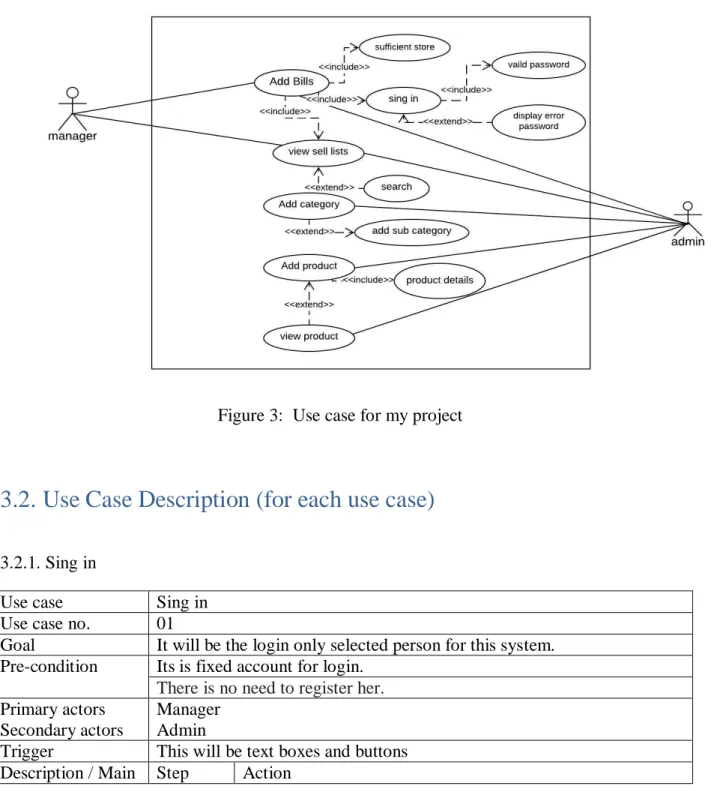
We have use case diagram. And there are two actors. This diagram will refine my project in brief
Figure 3: Use case for my project
3.2. Use Case Description (for each use case)
3.2.1. Sing in
Use case Sing in
Use case no. 01
Goal It will be the login only selected person for this system.
Pre-condition Its is fixed account for login.
There is no need to register her.
Primary actors Secondary actors
Manager Admin
Trigger This will be text boxes and buttons Description / Main Step Action
13 ©Daffodil International University
success 1. Enter the web site
2. Give user id and password
3. Logged in
Alternative flows N/A Quality
requirement
N/A
3.2.2 Add bills
Use case Add Bill
Use case no. 02
Goal Here the manager and admin will make the bill.
Pre-condition Must have to logged in Primary actors
Secondary actors
Manager Admin
Trigger This will be buttons and select items Description /
Main success
Step Action
1. Login the system 2. Click in to make bill.
3. Serach product make
4. Give quantity and measurement 5. Click into submit button.
Alternative flows No Alternative flows Quality
requirement
No Quality requirement
3.2.3 View sells list
Use case View sells list Use case no. 03
Goal Check all sells information.
Pre-condition Before the bill has to be created or made Primary actors
Secondary actors
Manager Admin
Trigger This will be buttons Description /
Main success
Step Action
1. Visit the web site 2. Click into the sells list.
Alternative flows No Alternative flows Quality
requirement
No Quality requirement
14 ©Daffodil International University
3.2.4. Add category
Use case Add category
Use case no. 04
Goal Here the owner can add to his needs category Pre-condition Admin must have to login
Primary actors Secondary actors
n/a Admin
Trigger This will be addcategory Description /
Main success
Step Action
1. Login the system 2. Click category
3. Then saw click add catagory
4. Enty the name of category and Click submit button Alternative flows Step Requirement
1. Admin add sub category in this system Quality
requirement
No quality requirement
3.2.5. Add product
Use case Add product
Use case no. 05
Goal The admin is able to add products like the need.
Pre-condition Admin must have to login Primary actors
Secondary actors n/a Admin
Trigger This will be text boxes and buttons Description /
Main success
Step Action
1. Login the system
2. Click add product button 3. Then fill up the product details 4. Click submit button.
Alternative flows No alternative flows Quality
requirement
No quality requirement
3.2.6. View product list
Use case View product list Use case no. 06
Goal It will be saw all product list in the system
15 ©Daffodil International University
3.2.7. Product details
Pre-condition Admin must have to login Primary actors
Secondary actors n/a Admin
Trigger This will be buttons Description /
Main success
Step Action
1. Login the system
2. Click product
3. Drop down the product list button.
4. Then click into the button Alternative flows No alternative flows
Quality requirement
No quality requirement
Use case Product details Use case no. 08
Goal Entry product information Pre-condition Admin must be log in Primary actors
Secondary actors Admin
Trigger This will be text boxes and buttons Description /
Main success
Step Action
1. Enter the web site
2. Give user id and password
3. GO to addproduct and fill up details Alternative flows No alternative flows
Quality requirement
No quality requirement
16 ©Daffodil International University
3.3. Activity Diagram (for each use case)
3.3.1 Sing in
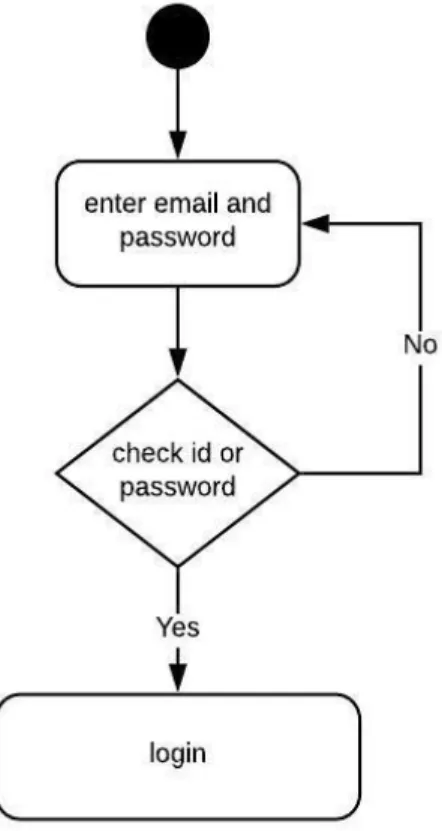
Users provided must be match with database to sign in.
Figure 4: Activity Diagram for log in
17 ©Daffodil International University
3.3.2 Add bills
Manager and Owen can make Bill .
Figure 5: Activity Diagram for make bill
18 ©Daffodil International University
3.3.3 View sells list
Manager and owner see the sales list.
Figure 6: Activity Diagram for view sells list
19 ©Daffodil International University
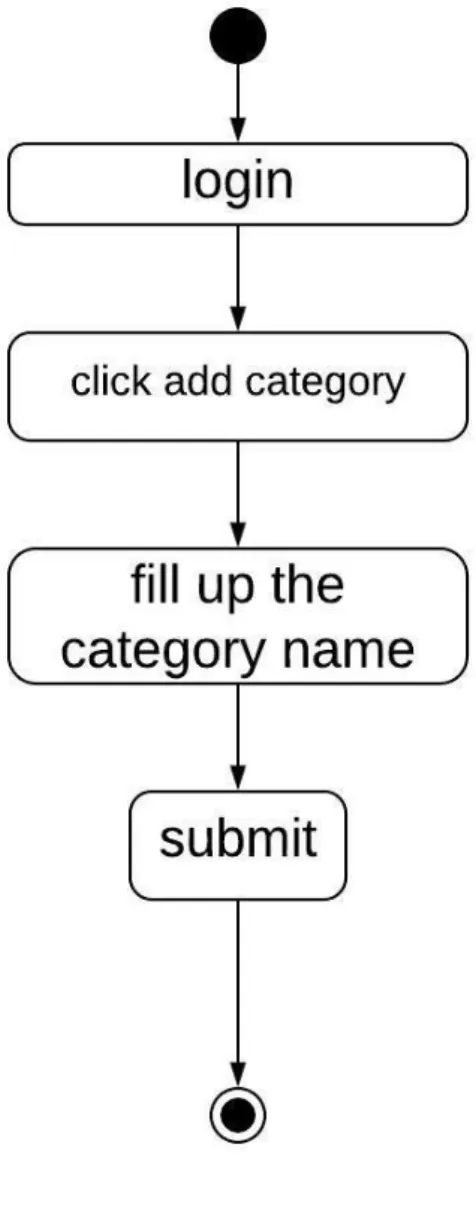
3.3.4 Add category
Owner can login and add category
Figure 7: Activity Diagram for Add category
20 ©Daffodil International University
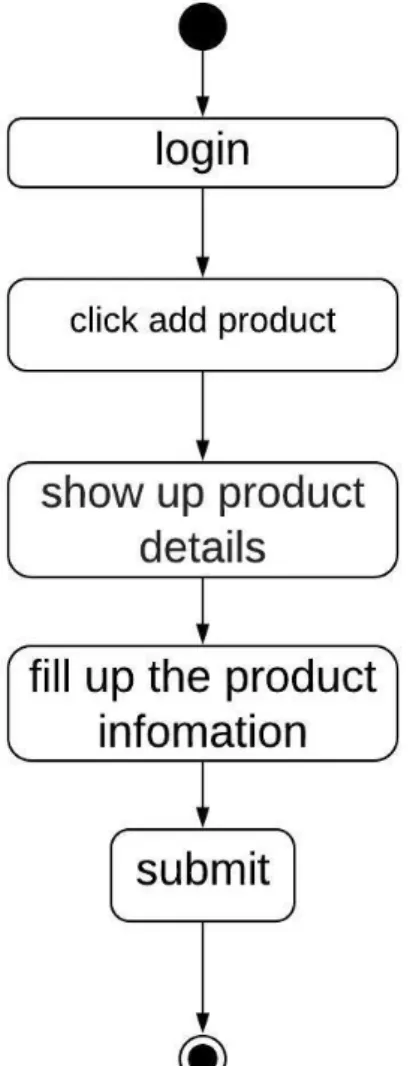
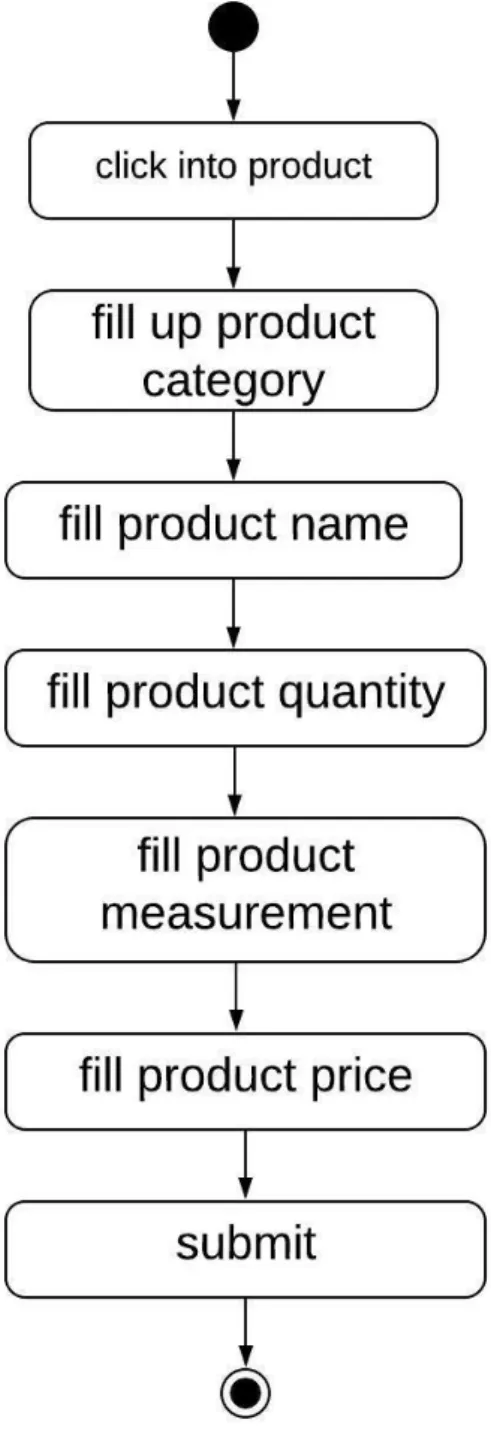
3.3.5 Add products
Owner can login and add products
Figure 8: Activity Diagram for Add product
21 ©Daffodil International University
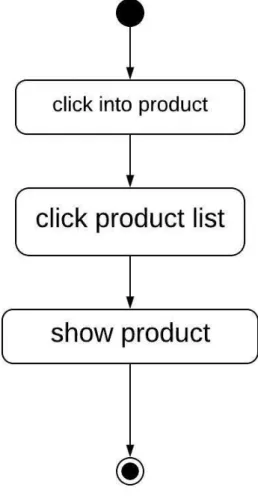
3.3.6 View product list
Manager and Owen view product list.
Figure 9: Activity Diagram for view product list
22 ©Daffodil International University
3.3.7 Add products details Owner fill up product details
Figure 10: Activity Diagram for Add product details
23 ©Daffodil International University
3.4. System Sequence Diagram (for each use case)
3.4.1 Sing in
Figure 11: System sequence diagram for sing in
24 ©Daffodil International University
3.4.2 Add bills
Figure 12: System sequence diagram for add bill 3.4.3 View sells list
Figure 13: System sequence diagram for view sells list
25 ©Daffodil International University
3.4.4. Add category
Figure 14: System sequence diagram for add category 3.4.5. Add products
Figure 15: System sequence diagram for add products
26 ©Daffodil International University
3.4.6. View product list
Figure 16: System sequence diagram for view product list
3.4.7. Add products details
Figure 17: System sequence diagram for add products details
27 ©Daffodil International University
Chapter 4: System Design Specification
4.1. Class Responsibilities Collaboration (CRC) Cards 4.1.1 User card
4.1.2 Categories card
4.1.3 Sub-categories card
4.1.4 Sales product
28 ©Daffodil International University
4.1.5 Sales info
4.1.6 Products info
29 ©Daffodil International University
4.2. Class Diagram
Figure 18: Class Diagram for my project
30 ©Daffodil International University
4.3. Database Design Diagram
Figure 19: Database Design Diagram for my project
4.4. Development Tools & Technology 4.4.1. User Interface Technology
4.4.1.1. ASP.NET MVC4 Framework or Laravel Framework
In my project I didn’t use any framework. In my project I have used server-side programming language named PHP. This is a scripting language.
4.4.1.2. jQuery UI
jQuery UI is a curated set of UI cooperation, effects, gadgets, and themes based over the jQuery JavaScript Library. I used jQuery in my project because jQuery makes easier to understand and work with. It also provides AJAX functionality which I used for search function.
31 ©Daffodil International University
4.4.1.3. CSS Framework
Bootstrap is an open source toolkit for developing with HTML, CSS, and JS. Quickly prototype my ideas. Bootstrap provides a set of some files which contains stylesheets which gives basic definition. Bootstrap also provides some JavaScript components also. There are some built in components like jQuery UI. By using Bootstrap framework, I get both CSS and JavaScript facilities with a single platform.
4.4.1.4. User Interface Technology
The significance of User interface is high. For accomplishment of any project, a gorgeous UI assumes an imperative job. User interface includes using good image, graphics, stylesheets, scripting etc. I used bootstrap templates for my project.
4.4.2. Implementation Tools & Platforms
There are some tools and technologies that need to be used for developing software. It is very important to determine which tools and platforms are the best match of my requirements.
After making a proper decision, I am using php that is a server-side scripting language.
4.4.2.1. Integrated Development Environment
There is a lot of PHP editors available that are maintained on Windows, Linux, and Mac and are obtainable for free download. For my project I used Subline text editor. It is an accepted and a competing tool for the PHP editors. It is lightweight with required feature and is supported on OSX, Windows as well as Linux. The Sublime text editor is put up to gain its powers through different plugins and packages.
4.4.2.2. Database Server
I used MySQL server. It is a free to use. It can be used on cross platform. It supports a wide range of features and I have worked with MySQL server before. It is also very easy to use. So, working with this server will be easier to me.
32 ©Daffodil International University
Chapter 5: System Testing
5.1. Testing Features
Feature testing can be considered as making change to add or modify the new functionality to the existing project. To test the features and functionality, a new test set is to be written for testing purpose. Almost every feature and functionality have different characteristics. Those are designed to make the application more useful, intuitive, reliable, secured, scalable, effective and efficient
5.1.1Features to be tested
Features Priority Description
Login 1 User must be authenticated by login
Logout 1 Session must be destroyed after logout
Insert category data 2 To builds bills, the category need to be inserted properly
Insert products data 2 Products data must be inserted properly Insert products price data 2 Products price must be inserted properly Technological Features
Database 1
Database will be used at almost every operation.
So this is why, this part must be controlled tightly.
Here, 1 = Low Priority, 2 = Medium Priority, 3 = High Priority
5.2 Testing Strategies 5.2.1. Test Approach
To complete the test process, testers must take some approach. There are mainly two test approach.
Automation testing: Automation testing is a name of testing technique by which test engineers prepare some scripts according to test plan and after that they use suitable tools to perform testing of the software. Nowadays, almost every software company follow the approach of automation testing.
Manual testing: Manual testing is also a name of technique of testing by searching out the bugs or vulnerability in an application. In this process, test engineers manually test and execute the test cases without having any automation tools.
33 ©Daffodil International University
5.2.1.1. Black Box Testing
Black-box testing is a method of software testing that examines the functionality of an application based on the specifications. It is also known as Specifications based testing.
Independent Testing Team usually performs this type of testing during the software testing life cycle. This method of test can be applied to each and every level of software testing such as unit, integration, system and acceptance testing.
Now I will discuss 2 of the techniques involved in Black Box testing.
• Equivalence Partitioning Testing: Equivalence Partitioning also called as equivalence class partitioning. It is abbreviated as ECP. It is a software testing technique that divides the input test data of the application under test into each partition at least once of equivalent data from which test cases can be derived. An advantage of this approach is it reduces the time required for performing testing of software due to less number of test cases.
• Boundary Value Analysis: Boundary value analysis is a type of black box or specification based testing technique in which tests are performed using the boundary values.
Boundary values are validated against both the valid boundaries and invalid boundaries.
5.2.1.2. White Box Testing
White box testing is a testing technique, which examines the program structure and derives test data from the program logic. Here are some white box testing techniques:
• Statement Coverage: This technique is aimed at exercising all programming statements with minimal tests.
• Branch Coverage: This technique is running a series of tests to ensure that all branches are tested at least once.
• Path Coverage: This technique corresponds to testing all possible paths which means that each statement and branch is covered.
5.2.2. Pass/Fail Criteria
Pass or fail criteria will be set by the test engineers. They will prepare the pass / fail criteria on the basis of which input data are worked and which are not works well. Those data that are worked well will consider as pass criteria. And rest of input data will be considered as fail criteria.
Now I will give the pass / fail criteria below.
• System crash will not be considered as pass case.
34 ©Daffodil International University
• If any criteria pass 100% times, then it will be considered as pass criteria only.
• The managercannotsaw many information in properly, then it is also to be considered as fail criteria
35 ©Daffodil International University
5.2.3.Testing Schedule
Test Phase Time
Testing plan create 1 week
Test specification 2 week
Unit testing During development time
Component test 1 week
Test Phase Time
Integration testing 1 week
Validating use cases 1 week
Testing user interfaces 1 week
Load testing 1 week
Performance testing 1 week
Release to production 1 week
5.2.4. Traceability Matrix
Project Manager Business Analyst Lead
QA Lead Target Implementation Date
BR# Category / Functionality / Activity
Requirement Description
Use Case Reference
Test Case Reference
Comments
BR-1 Functional Log Use case
3.2.1 Test case 5.4.1 BR-2 Functional
Add bill
Use case
3.2.1 Test case 5.4.2 BR-3 Functional View selas
information Use case
3.2.3 Test case 5.4.3 BR-4 Functional Add category
Use case 3.2.4
Test case 5.4.4
BR-5 Functional Add products Use case
3.2.5 Test case 5.4.5 BR-6 Functional View products list Use case
3.2.6 Test case 5.4.6 BR-7 Functional Add products
details Use case
3.2.7 Test case 5.4.7 BR-12 Non Functional Reliability N/A N/A
36 ©Daffodil International University
5.3.Testing Environment (hardware/software requirements)
Testing environment means to prepare the environment with hardware and software so that test engineers can be able to execute test cases as required. Besides hardware and software usage, network configuration might be needed to execute test plans.
For making the environment for testing, some key area need to setup. Those are:
• Test data
• Database server
• Client’s operating system
• Front end running environment
• Browser
• System and application
• Network
• Hardware with server operating system
5.4. Test Cases
A test case refers to some rules and regulations or conditions by which it can be determined whether a system can be able to meet the works or requirements under test cases properly. We know, there is a chance to have some fault or break holes in any application. This is very common scenario. And those issues are solved usually by software testing approaches. But if we don’t care of those issues, then the full application development might be ruined. So proper testing must be needed. For testing our application, I have prepared some test cases.
Now, I am going to provide them.
5.4.1 Log In
Test case #1 Test case name: Log in
System: online base inventory system Subsystem: admin or manager Designed by: Rakesh shaha Designed date: 05-feb-2019
Executed by: Executed date:
Short description: No need to register in my project, it has been fixed here. And before that our application will check the authentication and authorization.
Pre-conditions:
• Users are always redirected to the login page whether they have not authenticated by our application while entering into the dashboard.
• Assume that, the Gmail is ‘[email protected]’ and password is ‘password’
Step Phone Password Expected
Result
Pass/Fail Comment
37 ©Daffodil International University
1 Admin 143 Invalid
2 admin@gmail
Invalid
3 143
Invalid 4 [email protected] Password Successfully
login to the application and
redirected to the
dashboard
Post-conditions: admin and manager will successfully login to the application.
5.4.2 Add bills
Test case #4 Test case name: Add bills
System: online base inventory system Subsystem: admin or manager Designed by: Rakesh Shaha Designed date: 05-feb-2019
Executed by: Executed date:
Short description: All textbox must be filled.
Pre-conditions: Admin and manager must log in
Step Action Response Pass/Fail Comment
1 All data is not provided
Then the bill will not be created
2 Data provided properly Data saved
successfully for approval of insurance.
Post-conditions: Admin and manager will successfully make bills.
38 ©Daffodil International University
5.4.3 View sales list
Test case #4 Test case name: sales list view
System: online base inventory system Subsystem: admin or manager Designed by: Rakesh Shaha Designed date: 05-feb-2019
Executed by: Executed date:
Short description: Here’s a list of customer.
Pre-conditions: Admin and manager must log in
Step Action Response Pass/Fail Comment
1 Don’t they log in.
The admin or manager can not see.
2 They are logged in. The admin or
manager will be able to see.
Post-conditions: Admin and manager will successfully see lists
5.4.4 Add Category
Test case #4 Test case name: add category
System: online base inventory system Subsystem: admin
Designed by: Rakesh Shaha Designed date: 05-feb-2019
Executed by: Executed date:
Short description: Here admin can add category Pre-conditions: Admin must log in
Step Action Response Pass/Fail Comment
1 If the manager does
There is no option.
39 ©Daffodil International University
2 If the admin does Data saved
successfully for approval of insurance.
Post-conditions: Admin will successfully add category.
5.4.5 Add products
Test case #4 Test case name: add products
System: online base inventory system Subsystem: admin
Designed by: Rakesh Shaha Designed date: 05-feb-2019
Executed by: Executed date:
Short description: Here admin can add products Pre-conditions: Admin must log in
Step Action Response Pass/Fail Comment
1 All data is not provided
Admin can notadd product
2 Data provided properly Data saved
successfully for approval of insurance.
Post-conditions: Admin will successfully add products.
40 ©Daffodil International University
5.4.6 View products list
Test case #4 Test case name: view products
System: online base inventory system Subsystem: admin
Designed by: Rakesh Shaha Designed date: 05-feb-2019
Executed by: Executed date:
Short description: Here the admin can see product list.
Pre-conditions: Admin must log in
Step Action Response Pass/Fail Comment
1 Login by Manager
The manager can not see.
2 Login by Admin The admin
will be able to see.
Post-conditions: Admin will successfully see products list.
5.4.7 Add products details
Test case #4 Test case name: add products details System: online base inventory system Subsystem: admin
Designed by: Rakesh Shaha Designed date: 05-feb-2019
Executed by: Executed date:
Short description: Here admin can add products details.
Pre-conditions: Admin must log in
Step Action Response Pass/Fail Comment
1 All data is not provided
Admin can notadd product details
2 Data provided properly Data saved successfully for approval of insurance.
Post-conditions: Admin will successfully add products details.
41 ©Daffodil International University
Chapter 6: User Manual
6.1. User Manual (manager) 6.1.1. Sing in
This is login page.
Figure 20: User manual for manager log in 6.1.2. Home page
Its is make bill page. Here manger can make bill.
Figure 21: User manual for manager make bill memo
42 ©Daffodil International University
6.1.3. Make bill
Here manger fill quality and measurement for make bill.
Figure 22: User manual for make bill
6.1.4. Final slip
Its is final bill memo.
Figure 23: User manual for Memo slip
43 ©Daffodil International University
6.2.User Manual (admin) 6.2.1. Sing in
This is login page for owner. Manger or owner same log in page.
Figure 24: User manual for owner log in 6.2.2. Home page
This is owner home page. Owner can see about inventory alert sms. And can make bill form this page.
Figure 25: User manual of home page for owner
44 ©Daffodil International University
6.2.3. Add sub-category
It is sub-category page. Here owner add sub-category.
Figure 26: User manual of sub-category for owner.
6.2.4. Add Products
This page for owner, Here owner add product detail.
Figure 27: User manual of add product for owner.
45 ©Daffodil International University
6.2.5. View Products List Here owner view product list.
Figure 28: User manual of view product list for owner.
6.2.6. View Sales List Owner can see sales detail.
Figure 29: User manual of view sales list for owner
46 ©Daffodil International University
Chapter 7: Project Summary
7.1. Github Link
https://github.com/Rakeshshaha/Online-Inventory-System 7.2. Limitations
During developing this project, I have faced some limitations. Now I will describe those limitations in brief.
Only Web Version: This system is available only in web version. But we all know now peoples want an application for any kind of internet works. I didn’t make any android ISO version of this project.
7.3. Obstacles & Achievements
In developing a project, obstacles mean challenges. Obviously, I had several obstacles during development of this project. After some development I was confused. I had no idea what I was going to do. Also I have one thing in my head is, is this project going to help businessman. Also how much benefit they will get from my system. But I had some obstacles . That is, the system was like many previously system. Then I developed the project.
I did not know much about PHP before. Besides, I knew how to develop a project but I did not really do it any day. Through this project, I learned everything.
7.4. Future Scope
I will do this project for Android OS and for IOS. So that this project can reach more people.
7.5. References
Here I will add some references from where I got lot of helps:
Larry Page , Sergey Brin (2003), Google,Retrieved 04-01-2019, from https://www.google.com/
Karl Sun (2008), retrieved 05-03-2019, Lucidchart, from www.lucidchart.com/pages/
Widenius and Axmark (1994), mysql, retrieved 29-01-2019, from www.mysql.com/products/workbench
Mark otto, jacobthornton. (2011). Bootstrap. Retrieved 29-01-2019, from https://getbootstrap.com/
Chad hurley, stevechen, jawed karim. (2005). YouTube. Retrieved 04-01-2019, from https://www.youtube.com/
John resig. (2006). Jquery. Retrieved 29-01-2019, http://jquery.com/
Refsnes data. (1998). W3School. Retrieved 29-01-2019, from https://www.w3schools.com/
47 ©Daffodil International University