• Tidak ada hasil yang ditemukan

Gamification and Creating Game Developers

N/A
N/A
Protected

Academic year: 2018

Membagikan "Gamification and Creating Game Developers"

Copied!
13
0
0

Teks penuh

(1)

Gamification and

games to support learning and retention, and students can design and create computer games so that students can learn the beginnings of computer programming. In fact, the gamification of lessons and courses is becoming popular. Bringing game aspects to learning will require more people to develop games and think through what kinds of gaming principles and processes can be applied effectively to what kinds of learning. This paper discusses educational computer games and presents the activities and assignments for a computer game development class that others can use to teach computer game development. Well over 100 students have developed working games with this curriculum in a six week summer program. Providing a PC with some Microsoft tools (Paint and Office) and game development software (GameMaker), students can learn how evaluate, design, and develop computer games. In this curriculum, the design process utilizes storyboarding. Students play games, evaluate games, present and demonstrate games, and create a game design, a computer game, and a game manual. The timeframe of the course can be anywhere from three to twelve weeks. Some of the student-made games will be made available for play at the presentation. Learning is fun; let’s use games to keep it that way.

Keywords: game development, gamification, computer games, educational games, teaching how to make games

1. BACKGROUND

Children are playing over 10,000 hours of computer games by the time they complete their education, around 21 years old, and people on Earth are playing over 3 billion hours of games each week (McGonigal, 2010). We need to pay attention to games and how we might effectively use them.

All games have the following attributes:  rules to play by, missions. They sometimes even perform tasks in a group as team.

Gamification and Benefits

(2)

can be made game-ish or an instructional game can be made that has activities and goals that support the learning process and outcomes. In general, you bring what works about gaming to instruction, including, hopefully, some fun. In the gamefication of instruction, the students become players, the instructor defines rules to play by, goals are selected based on learning objectives, and feedback supports the goals. Some of the feedback should be immediate.

Why would we want to make educational computer games or gamify anything? Educational games can be very beneficial to those who play them. In fact, educational computer games have been around since early personal computers. Some titles that have been around for decades include the Reader Rabbit and Math Blaster series of games. There are many benefits of computer games that have already been shown. Ferdig (2009) published a 3-volume book on the effectiveness of educational computer games with one study done on a commercially available game, Math Blaster Algebra. Also in that book, Ke (2009) recorded 89 empirical studies about the effectiveness of educational computer games. Most of the games were developed in a laboratory for the purposes of the study and not made available outside of the study’s classroom. Holz (2012) reported on many scientific studies on computer games that showed great promise to improve perception, decision making, dexterity, and even creativity. Results showed that practiced gamers can pay attention to six things at once without getting confused, as opposed to four that most people can track. Gamers can act on choices six times a second which is four times faster than most people. Surgeons had improved hand-eye coordination. Computer games can be good for us, and we could use more well-made and thought out games.

In order to create an interest in computer science and in game development, we can teach how to make useful computer games. Also, one of the emerging educational fields is gaming and gamification (NMC and Educause, 2013). With growing game industry and this emerging field, there is and will be a growing demand for game developers. We need good courses to teach how to develop good games.

The rest of this paper presents a game development class that has been used successfully with about 150 high school students

to develop a computer game within six weeks of a summer. All students developed a computer game with at least 3 levels or rooms in the games. This curriculum has been used three times as part of the fourth year of the Prefreshman Engineering Program (PREP) (PREP-USA, 2013). PREP is an academic summer science camp that motivates and prepares middle and high school students for success in further studies in engineering, mathematics, science and technology. This game development class has been very successful and can be generalized for students who already have basic computer literacy and understanding, especially about files and folders. No computer programming is required, yet some will be learned in the class. Those students with a programming background often develop more in-depth games. It is the hope that students would get interested in computer programming from this course.

2. GAME DEVELOPMENT CLASS

Beyond needing instructors and students, each person needs to have access to a Windows-based personal computer with

 Microsoft Word or equivalent,  Microsoft Paint or equivalent,

 GameMaker 8.1 Lite (Yo Yo Games, 2013) (or some other game development tool such as Unity or Teaching World),

 an email account, and  access to the Internet.

Students should also have a way to backup their files (Word .docx, Paint .jpg, GameMaker not even when reminded). The classroom should have some typical technology such as a PC, document camera, projector and screen.

(3)

different sprites or images to use. The 3 games shown in this paper were developed by the author although the first two are similar to the tutorials available with GameMaker. Each week’s material can be organized for a different time instructor can direct students toward educational games. Many games can be found at the websites below that students can use to play and evaluate. These sites have educational games about math and science:

www.arcademicskillbuilders.com/games

These websites have other educational games of multiple subjects:

www.clarkchart.com www.educationarcade.org www.funschool.kaboose.com

www.gaming2learn.org

www.games2train.com

These websites have various, typically non-educational games: www.wingz2fly.com (moving soon to www.i-elearn.org), a searchable, online database with over 1500 educational computer games cataloged). materials and activities for students to be able to  understand the game design process with

storyboards,

 create sprites with Paint, and

 make 2 simple games (described below).

Assignments for the second week include evaluating and writing game reviews of around 5 different games. One of the objectives of the reviews is to make sure students comprehend the difference between what a player actually does (press the space bar, press the up arrow key, hover over an object, click on an area) distinct from what it means in the game (shoot, move an object up, add points, lose a life). The game evaluations should include paragraphs about the game play, ratings for various aspects of a game (such as multimedia, design, support, appeal), and a summary of what is bad and good about a game. Another assignment is for students to decide the main idea of the game they intend to develop. They can make games with combinations of clicking on items, colliding with objects, dragging objects, moving through mazes and rooms, and jumping over obstacles. Some student can learn more about the capabilities in GameMaker by reading manuals and viewing videos online.

(4)

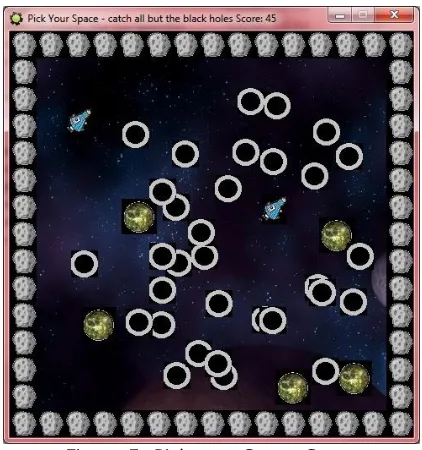
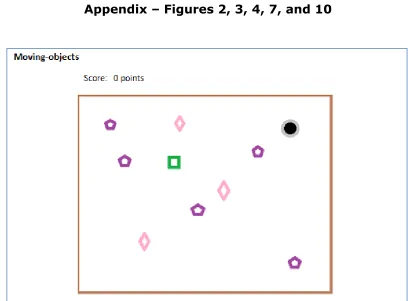
flow chart of the rooms or levels and draft screens of the rooms and levels. Figure 1 below shows the simple flow chart with the four states of a game called Pick Your Space. The game requires a player to click on moving objects to gain points. (Figures 2, 3 and 4 are in the appendix.)

Figure 1: Flow Chart for Pick Your Space

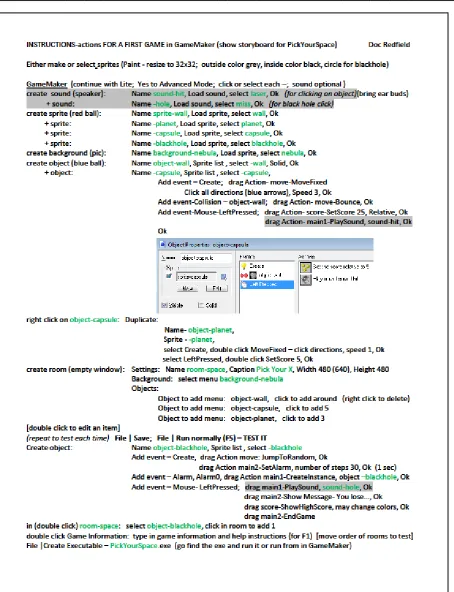
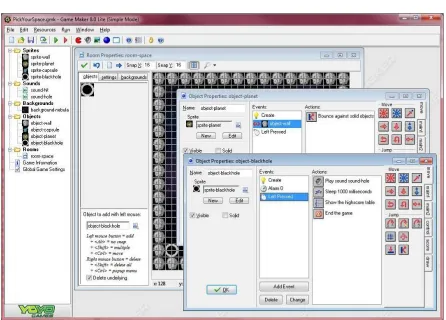
Figure 2 shows an example storyboard draft screen of Pick Your Space, a possible first game to make. Figure 3 shows the actions to make the

game in GameMaker. Figure 4 shows what the game looks like in the GameMaker interface. Figure 5 below shows an example screen of the Pick Your Space game running.

Figure 5: Pick your Space Game

The typical order of activities to create a working game in GameMaker include

1. create a sprite (a small image) 2. create an object

3. tie the sprite to the object

4. add behaviors or events to the object 5. create a room

6. place the object in the room

Other sprites, objects and behaviors, and rooms can be created to match the design of the game.

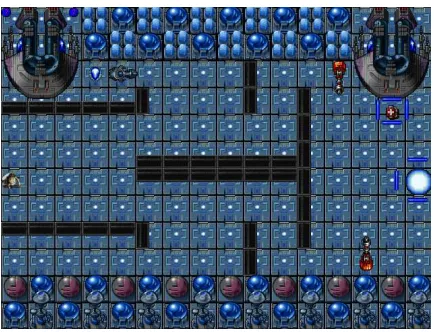
The instructor then should lead the class in developing another simple game with a different activity in the game. This second game could be a simple one-room shooter. Figure 6 below

 game evaluations of 5 computer games.

In the third week, students will  make a multi-room game,

 see some educational games, and  find or create sprites for their game.

(5)

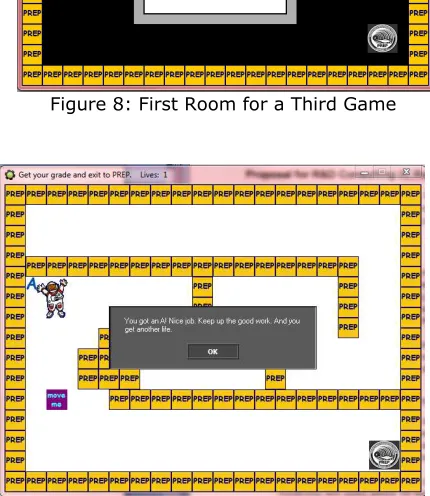
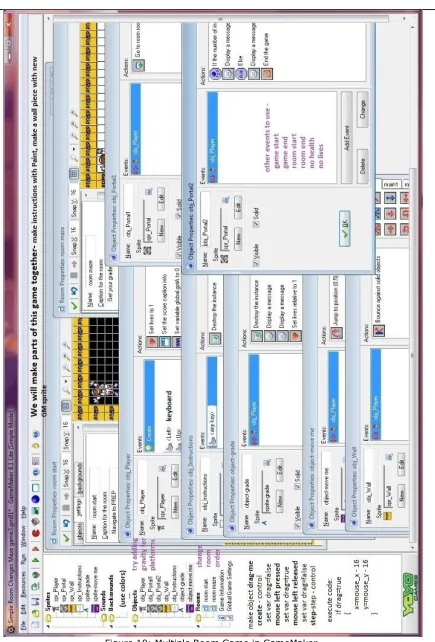
The instructor should create one more game with the class. This third game should include multiple rooms to show possible transitions between rooms. Figure 8 and 9 below show example rooms of a maze for the third game. Figure 10 in the appendix shows this third game inside the GameMaker interface.

Figure 8: First Room for a Third Game

Figure 9: Maze for Multiple Rooms

In summary, the student assignment for the third week is the

 storyboard document.

In the fourth week, students should

 develop sprites, objects with events, and at least one room for their game.

Instructors can share an aspect about gaming that interests them such as artificial intelligence in games. This week, students need lots of time to develop their games. No assignment is due rooms getting created for the game. Instructors can look at the list of sprites and objects in the game.

The fifth week also should be focused on development of the game with an eye on students finishing the game and starting a game manual document. By the end of this week, students should have completed their game and started on a game manual. Nothing has to be turned in, but again an instructor should meet with each student individually to check on the progress of the game. All of the rooms should be created at this point, with the desired objects in the rooms and events, actions and behaviors on the objects. The instructor should watch out for any students who might need extra help or could use suggestions to simplify or work around something in order to have a working game. Students who have become proficient with the game development tool and are almost done with the development of their games can help other students.

The game manual is to be turned in with or right after the game has been turned in. The game manual should include discussions on

 what the game is, by showing screens shots.

(6)

students put nominations on the board up front for games that had or were the

- best game play, - most depth, - most unique,

- most educational, and - most PREP-topic-related.

Awards were given at another class session to the top games in these categories. The game manual and final game are due at this point in the class. Students should show their games to the entire class so that they practice presenting to a group and presenting a product. Knowing that they will be presenting their game to the class may encourage them to do well in the development of their game. The instructor can collect the student game files onto a USB flash drive that can hold all the student games and documents including the .gm81 and .exe files plus the .docx game manual.

In summary, students turn in the  game they developed, and  game manual.

Also in the last week, some videos can be shown that are inspirational about computer gaming such as some TED talks at www.TED.org. For example, Jane McGonigal (2010) encourages the audience to play more games to make a better world, and she even has us live longer by following along in her talk on how playing games can lengthen your life (McGonigal, 2012). She recommends that we play games we enjoy up to 21 hours per week (a half-time job!), and with people you know in the same physical space, and in a cooperative or creative mode.

Figure 11: Nautilus Game

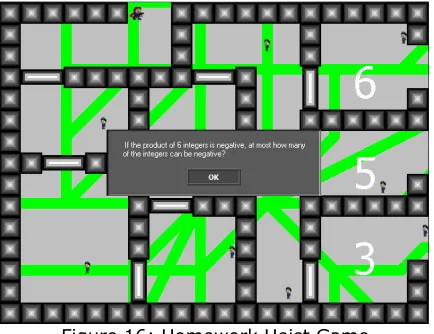
Over the three summers that this course has been taught, the games that have been created range from climbing the clouds through the atmospheric layers to re-designs of Tron and Pac-man (making a two-player version) to a set of mazes avoiding obstacles to collect tools to fix your submarine. The students all developed working games with at least 3 rooms or levels. One student put together over 40 rooms for his game. Figures 11-16 show some screens from a

few student games.

Figure 12: Mario Crates Game

(7)

Figure 14: Its Raining Cats and Dogs Game

Figure 15: Atomic Math Game

Figure 16: Homework Heist Game

Assessment

The assignments that are due could be graded or not. A minimum standard could be a pass or fail based on if the assignments were completed or not. The PREP program is graded and does provide some motivation for the students and

the grades can count toward their school grade point average if a student selects to have the grade counted. High grades in PREP can lead to some financial scholarships at local universities in the area where PREP is held.

If assignments are going to be graded, the following grading scheme from the student’s perspective might be used:

20% game manual for your game

3. THE CHARGE – GAME ON

As in the PREP program, other students from high school and above can easily learn how to evaluate, design and create computer games using storyboarding techniques and free game development tools. The students only need basic computer literacy skills, not computer programming, although it can help. The fundamentals of game development can be taught within a 3-12 week period with this curriculum. Of course students need to learn computer programming skills if they continue on in game development later. The demand to create games in order to gamify learning, teaching, and instruction is expected to increase, and curriculum such as this one may become more and more valuable.

4. REFERENCES

Ferdig, Richard (Ed.) (2009). Handbook of Research on Effective Electronic Gaming in Education. Hersey, PA: IGI Global.

Holz, Robert (2012, March 5). When Gaming is Good for You, The Wall Street Journal. Retrieved May 26, 2013 from http://online.wsj.com/article/SB1000142405 2970203458604577263273943183932.html

Kapp, Karl (2012). The Gamification of Learning and Instruction: Game-based Methods and Strategies for Training and Education. USA, Pfeiffer.

(8)

Education (pp. 1-32). Hersey, PA: IGI Global.

McGonigal, Jane (2010, February). Jane McGonigal: Gaming can make a better world. Retrieved on May 28, 2013 from www.ted.com/talks/jane_mcgonigal_gaming _can_make_a_better_world.html.

McGonigal, Jane (2012, June). Jane McGonigal: The game that can give you 10 extra years of life. Retrieved on May 28, 2013 from www.ted.com/talks/jane_mcgonigal_the_ga me_that_can_give_you_10_extra_years_of_ life.html.

NMC and Educause (2013). NMC Horizon Report: 2013 Higher Education Edition. Retrieved

August 29, 2013 from

http://net.educause.edu/ir/library/pdf/hr201 2.pdf.

PREP-USA (2013). PREP-USA: About: PREP Mission Statement. Retrieved May 25, 2013

from

www.prep-usa.org/portal/main/generaldetail.asp?ID=2 96.

(9)

Appendix

Figures 2, 3, 4, 7, and 10

(10)
(11)
(12)
(13)

Gambar

Figure 5: Pick your Space Game
Figure 8: First Room for a Third Game
Figure 12: Mario Crates Game
Figure 14: Its Raining Cats and Dogs Game
+6

Referensi

Dokumen terkait

tersebut akan menempati ruang yang kosong dan data tersebut menempati posisi sebagai data. terakhir

Hasil penelitian menunjukkan bahwa nilai koefisien korelasi Pearson’s Product Moment (R) adalah sebesar 0,676 yang artinya memiliki hubungan yang positif dan kuat

Penyebab terpenting dari gagal nafas adalah ventilasi yang tidak adekuat dimana terjadi8. obstruksi jalan nafas

Muhammad Fadlillah, PENDIDIKAN KARAKTER ANAK USIA DINI, ( Jogjakarta:AR-RUZ MEDIA,2013),hal.48.. Metode bermain kartu huruf hijaiyah. Menurut pemahaman peneliti tentang

Selain pabrik-pabrik garmen yang ada di desa ini, pabrik batako yang juga terdapat di Kampung Benteng semuanya adalah milik pendatang, namun satu pabrik yang

Berdasarkan gambar 4 menunjukkan bahwa peserta Diklat Calon Pegawai Negeri Sipil mempersepsikan WoG di tempat kerja peserta Diklat telah diterapkan di instansi

a) GetCapabilities (required implementation by servers) – This operation allows a client to request the service metadata (or Capabilities) document. This XML document describes

Selanjutnya peneliti melakukan uji pada setiap variabel penelitian didapat (1) agreeableness memiliki pengaruh yang positif dan signifikan terhadap intensi OCB (2) sikap memiliki