CHRIS ALLEN
•WADE ARNOLD
•ARAL BALKAN
NICOLAS CANNASSE
•JOHN GRDEN
•MOSES GUNESCH
MARC HUGHES
•R. JON MACDONALD
•ANDY ZUPKO
LEARN HOW TO INTEGRATE OPEN SOURCE
TOOLS INTO YOUR FLASH DEVELOPMENT
WORKFLOW
The Essential Guide to
Open Source Flash Development
Chris Allen
Wade Arnold
Aral Balkan
Nicolas Cannasse
John Grden
Moses Gunesch
Marc Hughes
R. Jon MacDonald
Lead Editor
Ben Renow-Clarke
Technical Reviewer
Christophe Herreman
Editorial Board
Clay Andres, Steve Anglin, Ewan Buckingham, Tony Campbell, Gary Cornell, Jonathan Gennick, Matthew Moodie, Joseph Ottinger, Jeffrey Pepper, Frank Pohlmann, Ben Renow-Clarke, Dominic Shakeshaft, Matt Wade, Tom Welsh
Project Manager
Copyright © 2008 by Chris Allen, Wade Arnold, Aral Balkan, Nicolas Cannasse, John Grden, Moses Gunesch, Marc Hughes, R. Jon MacDonald, Andy Zupko
All rights reserved. No part of this work may be reproduced or transmitted in any form or by any means, electronic or mechanical, including photocopying, recording, or by any information storage or retrieval system, without the
prior written permission of the copyright owner and the publisher. ISBN-13 (pbk): 978-1-4302-0993-5
ISBN-13 (electronic): 978-1-4302-0994-2
Printed and bound in the United States of America 9 8 7 6 5 4 3 2 1
Buzzy illustrated by Sillapanon Hattachanchai, based on a sketch by Aral Balkan. Copyright © 2008 OSFlash.org. Released under the Creative Commons Attribution 2.0 UK: England & Wales License (creativecommons.org/licenses/by/2.0/uk/). Trademarked names may appear in this book. Rather than use a trademark symbol with every occurrence of a trademarked name, we use the names only in an editorial fashion and to the benefit of the trademark owner, with no intention of infringement of the
trademark.
Distributed to the book trade worldwide by Springer-Verlag New York, Inc., 233 Spring Street, 6th Floor, New York, NY 10013. Phone 1-800-SPRINGER, fax 201-348-4505, e-mail[email protected], or visitwww.springeronline.com. For information on translations, please contact Apress directly at 2855 Telegraph Avenue, Suite 600, Berkeley, CA 94705.
Phone 510-549-5930, fax 510-549-5939, e-mail[email protected], or visitwww.apress.com.
Apress and friends of ED books may be purchased in bulk for academic, corporate, or promotional use. eBook versions and licenses are also available for most titles. For more information, reference our Special Bulk Sales–eBook Licensing web page at
http://www.apress.com/info/bulksales.
The information in this book is distributed on an “as is” basis, without warranty. Although every precaution has been taken in the preparation of this work, neither the author(s) nor Apress shall have any liability to any person or entity with respect to any
loss or damage caused or alleged to be caused directly or indirectly by the information contained in this work. The source code for this book is freely available to readers atwww.friendsofed.comin the Downloads section.
you for a lifetime of unconditional love and support. Thank you
for believing in me. Thank you for teaching me that I can do
anything I set my mind to. I am forever in your debt.
—Aral Balkan
To Airi.
—Nicolas Cannasse
A glass raised to Winsor McCay—the original animator and one of
America’s greatest talents.
—Moses Gunesch
To my wife, Jess, for putting up with me, and to the open source
community, for constantly amazing me.
—Marc Hughes
To my family and friends who provide constant encouragement
and support even though I often take on much more work
About the Authors
. . .xv
About the Technical Reviewer
. . .xix
Acknowledgments
. . .xxi
Introduction
. . .xxiii
Chapter 1
Introducing the World of Open Source Flash
. . .1
Chapter 2
Exploring Open Source Flash: What’s Available
. . .7
Chapter 3
Preparing an Open Source Workflow
. . .19
Chapter 4
Using an Open Source Workflow
. . .55
Chapter 5
Testing and Debugging
. . .101
Chapter 6
Deploying Your Application
. . .131
Chapter 7
Using AMFPHP
. . .153
Chapter 8
Working with SWX: The Native Data Format for
the Flash Platform
. . .197
Chapter 9
Using haXe
. . .227
Chapter 10
Fuse and GoASAP: Open Source Animation Tools
. . .247
Chapter 11
Using Papervision3D
. . .291
Chapter 12
Introducing Red5
. . .309
Chapter 13
Building Some Red5 Apps
. . .337
About the Authors
. . .xv
About the Technical Reviewer
. . .xix
Acknowledgments
. . .xxi
Introduction
. . .xxiii
Chapter 1
Introducing the World of Open Source Flash
. . .1
Chapter 2
Exploring Open Source Flash: What’s Available
. . .7
Community open source initiatives . . . 7
Development tools. . . 8
MTASC . . . 8
ASDT . . . 8
FlashDevelop . . . 9
haXe development tools . . . 9
swfmill . . . 10
SWFObject . . . 10
Ant. . . 11
Sprouts . . . 11
Libraries and toolkits . . . 11
Fuse Kit . . . 12
Papervision3D. . . 12
Screenweaver HX . . . 13
Server-side technologies . . . 13
AMFPHP . . . 13
Red5 . . . 13
SWX . . . 14
Adobe open source initiatives . . . 14
Flex 3 SDK . . . 15
BlazeDS . . . 15
ActionScript 3 libraries . . . 15
Debugging . . . 191
Chapter 12
Introducing Red5
. . .309
The history of Red5 . . . 310
Why the name Red5? . . . 312
Installing Red5 . . . 312
Simple Windows setup . . . 313
Checking your installation . . . 318
Setting up your development environment . . . 320
Why set up Red5 to run in Eclipse in the first place? . . . 321
Setting up Eclipse for Red5 development . . . 321
Starting Red5 in Eclipse . . . 323
How Red5 web applications are set up . . . 325
Directory structure of Red5 applications . . . 326
Source code . . . 327
Configuration files. . . 328
web.xml . . . 328
red5-web.xml . . . 328
red5-web.properties . . . 328
log4j.properties . . . 329
Connecting to myTest with Flash . . . 329
Debugging Red5 in Eclipse . . . 331
Chapter 13
Building Some Red5 Apps
. . .337
Simple samples. . . 337
Exploring SimpleBallDemo . . . 338
Exploring SimpleBroadcaster and SimpleRecorder . . . 341
Exploring SimpleSubscriber . . . 344
Creating simple chat using SoSend. . . 346
Exploring SimpleStreamPlayer . . . 349
Being a guitar hero . . . 350
Getting a list of MIDI devices . . . 351
Receiving MIDI messages . . . 354
Sending MIDI messages . . . 355
Flexing your Red5 muscles . . . 359
VideoBroadcaster.mxml. . . 360
VideoPlayer.mxml . . . 361
Chat.mxml . . . 362
Links and more. . . 363
With extensive experience developing for the Flash Platform and Java,Chris Allen is a leader in the open source Flash community. Over the past eight years he has been a software architect and developer for various companies including Cambridge Technology Partners, Mass General Hospital, and Scholastic. Chris is currently the president and CEO of Infrared5, a consulting firm built around serv-ices for the open source Red5 server, and he is the co-project man-ager and a Java developer for the open source Red5 project.
Wade Arnold is the CEO of T8DESIGN, which is a rich media and application firm located in Cedar Falls, Iowa. Wade is responsible for strategic planning and product development as well as for creating an exciting and rewarding corporate environment. Wade has been selected to be a speaker at several national software development and security conferences. He has an active dialogue with Adobe and actively participates in prerelease beta development of Flash, Flex, and AIR, and he is passionately involved in open source Flash/Flex development and aligns T8DESIGN behind these initiatives. Wade is the lead developer of AMFPHP and the open source implementation of Flash Remoting. Wade has a degree in computer science emphasizing intelligent systems and an MBA from the University of Iowa. T8DESIGN works with hundreds of community banks and medium to enterprise customers including Nike, McDonald’s, John Deere, AT&T, Lindsay Corporation, Best Buy, and the Department of Defense.
Aral Balkanis a Flash Platform veteran and overall Internet junkie. Oh, and this year he’s producing the world’s first large-scale online web conference, Singularity.
Aral is a published author and has contributed to several books and magazine articles. Specifically, he is the author of theAdobe Flex 2 QuickStart GuideandFlex 3 QuickStart Guide
and has authored six courses on Flash, Flex, ActionScript, and open source development.
Aral is a regular speaker at international conferences including Macworld, FlashForward, d.construct, FITC, Wizards of OS, and Adobe MAX.
Nicolas Cannasse is one of the cofounders of OSFlash.org and the creator of the MTASC compiler. He is also the CTO at Motion-Twin, a French independent game studio making web games in Flash. For the past two years, he has been working on haXe, an open source programming language for the Web, capable of compiling to Flash but also to JavaScript and the server side.
With more than eight years of experience in working with Flash technology,John Grdenis the creator of the Xray debugger, FLEXible (an MXML editor), and the FLASC compiler GUI, and he is a core member and contributor on the Papervision3D project. John also started the Red5 open source server project and is the co-project manager along with Chris Allen. John has also served as the director of Flash Platform for BLITZ and was the senior Flash developer with Zing.com. John currently lives near Houston, Texas, and works as a senior software developer for Infrared5.
Marc Hughesis the manager of software engineering at Tom Snyder Productions, an educational software publisher in Watertown, Massachusetts. While there, he’s worked on several large educa-tional applications including FASTT Math and TimeLiner XE. Outside of his day job, Marc wrote AgileAgenda (http://www.agileagenda. com), an AIR/Flex-based project-scheduling application that won the Best in Show award of Adobe’s AIR Developer Derby in October 2007. He’s also authored several useful Flex-based open source projects, including a popular library called ObjectHandles that allows users to move and resize components inside a Flex applica-tion. His open source projects, as well as his blog, can be found at http://www.rogue-development.com.
A certified Adobe Flash and web developer,R. Jon MacDonaldoffers a wealth of expertise in development, design, usability, and visual communication. Over the course of nine years, Jon has honed his skills through a multitude of experiences.
Jon works with household brands, advertising agencies, and talented designers and developers across the country through JonnyMac Design, the interactive collective he started, as well as XPLANE, a consulting and design firm that drives business results by clarifying complex information through visual communications.
His portfolio and blog can be found athttp://www.jonnymac.com.
With more than seven years development experience, Andy Zupko
Christophe Herremanis a software architect and developer living in Belgium. He mainly focuses on Flex-based Rich Internet Applications and likes to philosophize about object-oriented development. He is an active open source contributor and the author and lead devel-oper of the Prana Framework (http://www.pranaframework.org). He has also been involved in other projects such as AS2lib, AMFPHP, and ARP.
I would like to thank my wife and business partner, Rebecca Allen, for supporting me while I’m trying to do too much. I would also like to thank everyone on the Red5 team for doing their parts to make Red5 a reality. Some of those guys include John Grden, Luke Hubbard, Joachim Bauch, Dominick Accattato, Paul Gregoire, Steven Gong, and Thijs Triemstra. It’s also worth mentioning a word of gratitude to conference organizers Shawn Pucknell, Stewart McBride, and John Davey for seeing the potential and interest in Red5 and being willing to take a chance on letting us present on our technology before it was the thing to do. Others who deserve mention are Keith Peters, Sam Agesilas, Todd Anderson, Jon Valliere, Andy Zupko, Richard Blakely, Jerry Chabolla, and Paul Blakely. Then of course there’s the whole team at friends of ED that made this book possible: Chris Mills, Ben Renow-Clarke, Pete Aylward, Kylie Johnston, Kim Wimpsett, and the rest. Thanks!
Chris Allen
I would like to thank the community of developers who continue to push what is capable online. Your questions and inspirational projects are what keep me working into the late hours to push what is possible. To Dr. Gray and Dr. Wallingford, thank you for teaching me how to
thinkcomputer science. For allowing me to start working on computers from an early age when the rest of the world could not even access a PC, thank you, Mom and Dad; in addition to resources, thanks for aiding in the development of my perseverance. And most important, thanks to my amazing wife, Shannon, who not only puts up with but supports my dreams. Bushel and a peck, Shannon, David, and #2!
Wade Arnold
I want to thank the open source Flash community: every day I learn from you, I get inspired by the amazing things you do, and I feel honored to count so many of you among my friends. You make a difference every day by sharing your knowledge and your passion with others. You are the soul of Flash.
Aral Balkan
I’d like to thank Aral for being a good friend and allowing me to help out way back when we were creating new OS projects by hand and for giving us a place to park these awesome ideas! Without Aral, we wouldn’t have a community like we do now—that’s a fact. Also, I don’t know where I’d be without Chris Allen—he has been a great friend, has been an awesome mentor, and has really made an impact on my Flash life. I couldn’t have gotten this far without him. I
thanks for my family as well: Linda, Riley, and Luke (yes, I named my son after Luke Skywalker— get used to it). Because of them, I was able to do these projects and succeed, and they’re the coolest fans I could ever ask for. I love them dearly. And mostly, I want to thank God for all the blessings he’s given me; by saving me from either myself or calamity altogether, he’s always been by my side, and I’m most grateful for His patience, peace, and help in my life. Rock on.
John Grden
I would like to thank my parents, whose foresight to put a Commodore 64/128 in my bedroom as a child provided me with the start to a wonderful means of turning a passion into a living. Thanks to Aral Balkan for providing me with this opportunity and trusting me to do right by his project. Thanks to all of my co-workers, past and present, who have influenced and aided in my growth as a developer. Finally, thanks to the amazing Flash Platform community—without such an active and open community, projects like those included in this book would not exist.
Welcome toThe Essential Guide to Open Source Flash Development. The concept of “open source” has been around for a while now, and most people are familiar with its meaning, but how does that relate to Adobe Flash, which is a traditionally closed platform? When people talk about open source Flash, they can mean any number of things—an ActionScript library, a code editor, a new messaging format—what’s important is that the project extends or supports Flash and follows the open source methodology. One of the leading lights in the open source Flash world is Aral Balkan, and he put together the OSFlash.org website that brought together all of the existing disparate open source Flash projects into one focused community. This community blossomed to produce some incredible projects that not only expanded the possibilities of what Flash can do but also completely altered people’s perceptions of what Flash meant as a tool and how SWF files could be created.
This book is a collection of some of the best of those projects. We’ve collected projects that run the whole gamut of the open source Flash world so you can get an idea of just what sort of power is available to you. Alongside the project-specific chapters, we’ve also gone into a lot of detail on how these projects can be integrated to make a full open source SWF workflow or how you can pick and choose the projects that you want to use to expand your existing work-flow. After all, it’s one thing to experiment with these projects at home, but their real use is to empower your current workflow to make Flash a bigger, better, faster, and more fun field to work within.
Adobe has also started an open source initiative (see http://opensource.adobe.com) that already has some pretty exciting projects as part of it and is sure to see even more in the future. This is great news for the open source Flash community. With Adobe’s dedication to opening up its platform and more and more users becoming involved in open source projects, the future looks pretty rosy for open source Flash development. There hasn’t been a better time than now to dive in.
Layout conventions
To keep this book as clear and easy to follow as possible, the following text conventions are used throughout.
Pseudo-code and variable input are written initalic fixed-width font. Menu commands are written in the formMenu➤Submenu➤Submenu.
Where we want to draw your attention to something, we’ve highlighted it like this:
Sometimes code won’t fit on a single line in a book. Where this happens, we use an arrow like this:➥.
This is a very, very long section of code that should be written all on ➥
the same line without a break.
I was eight years old when my father brought home our first computer. It was an 8MHz IBM XT PC compatible with a four-color CGA display, a whopping 640KB of RAM, and a 20MB hard drive. I quickly tired of playing the few games available at the time—Alley Cat, Moonbugs, Dig Dug—and began leafing through the BASIC manual that came with the computer to write my own games.
Source code, especially in those days, was everywhere. Most computer magazines had pages and pages of code—games, utilities, what have you. Commercial software was in its infancy, and you were as likely to copy a listing from a magazine as you were to find an application to buy.
So, I learned BASIC by copying source code written and shared by others. I dabbled in Logo. I wrote games and even a primitive word processor to keep myself amused. When I started to outgrow BASIC, I moved on to Pascal and C and briefly flirted with Prolog.
That was 23 years ago.
Many years later, I would find that programming knowledge invaluable when a com-pany called Macromedia released a version of a web animation application called Flash with a scripting language called ActionScript.
INTRODUCING THE WORLD OF
OPEN SOURCE FLASH
Today, software is something most people buy in a box off a shelf (or download from the Web) and you’d be hard-pressed to find source code listings in computer magazines, but there is more readily available source code in the world than ever before thanks to the astronomic rise in popularity of the open source software movement.
Open source softwareis software for which the source code is freely available. But that’s not its only defining characteristic. In fact, the Open Source Initiative lists ten criteria that an approved open source license must meet.
Thespritof open source is the free sharing of knowledge. The ultimate goal is to create high-quality software by practicing an open and transparent development process that is subject to peer review. These types of definitions, however, are dry, academic statements that cannot capture the character or spice of a thing. So, let’s get back to the story.
When I first started dabbling in ActionScript in the days of Flash 4 and Flash 5, I learned an invaluable amount from the knowledge shared by members of the Flash community. Flash pioneers such as Branden Hall, Sam Wan, Ted Patrick, Joshua Davis, Jared Tarbell, Ralf Bokelberg, Keith Peters, Colin Moock, Peter Hall, Charlie Cordova, and Jesse Warden taught me invaluable lessons by sharing their code, their time, and their perspectives with me and the rest of the community on their blogs and on lists such as the seminal FlashCoders.
All this is to say that the Flash Platform, from its earliest days, has always been about sharing and com-munity. In the beginning, open source on the Flash Platform was limited to sharing source code, the binary FLA files used by the Flash IDE, and (later) the ActionScript files and classes. In 2004, Nicolas Cannasse released an open source ActionScript 2 compiler called Motion-Twin ActionScript 2 Compiler (MTASC), and the character of open source on the Flash Platform was changed forever.
Having an open source compiler meant that developers on the Flash Platform were not limited to just sharing Flash code but could create their own open source development tools. The release of swfmill, an XML-to-SWF compiler, allowed developers to add assets to their Flash applications. This was fol-lowed by the creation of a fully open source development stack for the Flash Platform called AMES. AMES stands for “ASDT, Apache, MTASC, Eclipse, swfmill”—the four open source tools that compose it. ActionScript Development Tool (ASDT) is an Eclipse plug-in for developing ActionScript code. It was the first development environment for ActionScript that gave Flash developers the professional-quality tools (such as language intelligence) that the primitive code editor in the Flash IDE did not provide.
AMES influenced the creation of the commercial Flash Development Tool (FDT) and later provided healthy competition for the Flex team at Adobe, spurring Adobe to improve its own Flex Builder. Alongside AMES, other development tools such as FlashDevelop also surfaced at this time and are still going strong.
You can read the Open Source Initiative’s definition ofopen sourceat
Development tools aside, open source frameworks such as Arp, Cairngorm, and PureMVC make it easier for developers to work in teams and build scalable web applications on the Flash Platform, regardless of whether they are using open source tools, the Flash IDE, or Flex.
The birth of OSFlash.org, a hub where open source developers could meet, plan, and build their proj-ects, coincided with the “tipping point” in open source development that was spurred on by the release of MTASC and swfmill. OSFlash became an incubator that led to the creation of new open source software on the Flash platform. I remember the days when Red5 was nothing more than an idea voiced by John Grden on the OSFlash mailing list! What’s most special about OSFlash for me is that it led to the formation of lasting friendships, companies, and even a rock group!
Fast-forwarding to the present day, some of the most exciting technologies on the Flash Platform are open source. These include Papervision3D, the simple and powerful 3D library that made 3D feasible on the Flash Platform; Red5, the open source server that handles streaming audio and video and real-time shared objects; SWX, the native data format for the Flash Platform; and, with Flex 3, the Flex SDK, including the Flex compilers, as open sourced by Adobe.
You will read about many of these technologies, and others, in the rest of this book, many times from the actual authors and contributors to the projects. The contribution of the open source community to the Flash Platform has been and continues to be immense. And what a lovely community it is too. Open source is about sharing knowledge and furthering the state of the art. I hope that this book helps you start on your own journey of knowledge. And once you’re ready, I hope that you too share what you have learned, and the wonderful things you have created, with others. You can start getting involved today by joining OSFlash’s mailing list and saying “hi.”
Today, we stand on the brink of a web application revolution with Google’s recent announcement of Google App Engine, a massively scalable, integrated development and deployment platform that per-fectly complements the toolsets—both open and closed source—that we have on the Flash Platform. This is truly an exciting time to be creating web applications, and the tools and servers you will be reading about in this book are at the cutting edge of web technologies today.
The following links should help you get started on your journey in the world of open source Flash. Remember that you can almost always find information about an open source Flash project by going to http://osflash.org/<project name>
(for example,http://osflash.org/papervision3d).
■ OSFlash:http://osflash.org
■ OSFlash Mailing List:http://osflash.org/mailman/listinfo/ osflash_osflash.org
■ The GAE SWF Project:http://gaeswf.appspot.com
■ Google App Engine:http://code.google.com/appengine/
■ Papervision3D:http://osflash.org/papervision3d
■ Red5:http://osflash.org/red5
■ SWFAddress:http://www.asual.com/swfaddress/
■ PyAMF:http://pyamf.org/
■ Fuse:http://osflash.org/fuse/
■ GoASAP:http://osflash.org/goasap/
■ SWX:http://swxformat.org
■ AMFPHP:http://www.amfphp.org/
■ MTASC:http://mtasc.org
■ swfmill:http://osflash.org/swfmill
■ AMES:http://osflash.org/ames
■ FlashDevelop:http://osflash.org/flashdevelop
■ ASDT:http://osflash.org/asdt
■ PureMVC:http://puremvc.org/
■ Arp:http://osflash.org/arp
In this chapter, you will get a brief introduction to some of the open source tools that are available, including both the projects covered in the rest of the book and some other noteworthy projects worth checking out on your own. We’ll cover three major categories of tools:
Development tools
Libraries and toolkits
Back-end, server-side technologies
These tools come from two major sources: the general open source community, which is often centered on the OSFlash.org website, and the open source initiatives that originated at Adobe to help further the Flash Platform. In this chapter, we’ll look at the tools broken down by these two main contributors.
Community open source initiatives
“Community” open source projects constitute the projects contributed by individuals and companies unrelated to Adobe. Many of these started as internal company or personal projects that grew to the point where an open source development model
EXPLORING OPEN SOURCE FLASH:
WHAT’S AVAILABLE
Development tools
When doing Flash development, most people think of working in Adobe’s Flash IDE. The tools covered in the following sections represent an alternate workflow when writing ActionScript code and inte-grating it with assets from designers. These are compilers, development environments, and other useful Flash development tools.
MTASC
The Motion-Twin ActionScript 2 Compiler (MTASC) written by Nicolas Cannasse is the cornerstone of open source ActionScript 2 development. It acts as a full compiler and linker for ActionScript 2 proj-ects and is able to create SWFs from your source code. It’s capable of compiling large amounts of code quickly, far exceeding the capabilities of the default compiler that comes with the Flash Platform.
Besides mimicking the functionality of the default Adobe compiler (MMC), MTASC introduces a few features to help aid good development practices. The first of these is preventing variables from being doubly declared in a function. For example, the following code will compile under MMC but will not compile under MTASC:
function test() {
var i = 5; if( true ) {
for( var i = 0 ; i < 10 ; i++ ) { /* do something */ } }
}
Under the Flash runtime, there is only function-level scoping of variables. So, theforloop modifies the same variable that was declared before it, which leads to a common source of bugs. MTASC iden-tifies these situations, and the compile will fail.
MTASC also doesn’t allow local function definitions. This provides an extra layer of compile-time checking for parentheses closure. MTASC does support anonymous inner functions assigned to a variable.
In MTASC, you can replace the defaulttrace()method with a method you write. This allows you to implement extended logging capabilities, redirect the output to other locations, or ignore it alto-gether. You’ll learn more about this in Chapters 4 and 5 of this book.
For more information about MTASC and to download it, visit the project website at http:// www.mtasc.org/.
ASDT
ASDT provides features such as the following:
Code completion
Code folding
Code navigator and exploration tools
Compilation using MTASC
Syntax checking
Syntax highlighting
Code templates
Chapters 3 and 4 of this book go into detail about how to set up and use an ASDT-based development workflow. You can find out more about Eclipse athttp://www.eclipse.org/. Information about ASDT is available athttp://aseclipseplugin.sourceforge.net/.
FlashDevelop
FlashDevelop is a Windows-only alternative to the Eclipse and ASDT environment. It supports ActionScript 2 and 3 development and supports many of the same features as ASDT, including the following:
Code completion
Code folding
Code navigator and exploration tools
Compilation using MTASC or the Flex SDK
Syntax checking
Syntax highlighting
Code templates
Version control system integration
In addition, FlashDevelop has a plug-in architecture to support additional features including support for other languages such as haXe.
Chapters 3 and 4 cover using FlashDevelop, and you can read more about it on the FlashDevelop web-site athttp://www.flashdevelop.org.
haXe development tools
haXe is a modern, high-level programming language targeting web technologies originally written by the same author of MTASC, Nicolas Cannasse. Like ActionScript, haXe can target Flash Player. Unlike ActionScript, it can also target a JavaScript or Neko runtime environment. Neko is a native system run-time environment (much like a Java JRE) that allows you to run haXe programs on a local system. It’s oftentimes used for server-side development.
lan-for all three environments have been generalized in the haXe standard library, allowing a high degree of reuse between environments.
The haXe syntax is similar to ActionScript and should be easy for a veteran Flash developer to pick up. Chapter 9 of this book gives you a primer of the haXe programming language to get you started writ-ing haXe-based applications.
You can learn more about haXe from the project website athttp://www.haxe.org/.
swfmill
MTASC, the Flex SDK, and the haXe compiler all provide mechanisms for converting source code into compiled SWFs. swfmill provides a mechanism for compiling raw art assets into a SWF. Using swfmill, you can create SWFs that contain bundles of art assets or fonts. swfmill is capable of putting those assets into a library for use by ActionScript or, alternatively, placing an object directly on the viewable stage. swfmill is capable of pulling assets from the following:
Other SWF files
Compiled SWC files (component libraries)
PNG and JPEG images
SVG graphics (imported as vector graphics)
TrueType fonts
Once you create an asset SWF with swfmill, you can use MTASC to inject compiled ActionScript code into that SWF to provide an end-to-end development solution capable of replacing Adobe’s Flash IDE.
You can learn more about swfmill in Chapter 4 and from the project website at http://www. swfmill.org/.
SWFObject
SWFObject is a set of JavaScript libraries and best practices for embedding Flash content into an HTML page. It provides features such as the following:
Flash plug-in version detection
Flash plug-in upgrades using the autoupdate feature
Support for a wide variety of web browsers and operating systems
Standards-compliant markup
Graceful fallback when embedding techniques fail, including allowing you to specify alternative content
A workaround for the “click to activate” functionality in the Internet Explorer and Opera browsers
Chapters 6 and 11 of this book talk more about SWFObject and provide several examples. You can also learn more from the SWFObject websites at http://blog.deconcept.com/swfobject/ and
Ant
Ant is a general-purpose Java-based build tool. Ant is meant to work alongside your ASDT builds, not to replace it.
As projects get more complex, the process of gathering components from different teams and assem-bling them becomes more and more complicated. Building through ANT allows you to maintain the integrity of your build cycle so you can be guaranteed that each build is made in the same repeatable way.
Imagine a situation where you are doing the ActionScript development, a designer down the hall is making the art assets for your project, and a web design firm in Turkey is creating the web pages in which your application will be embedded. Fully creating a new build might involve several steps:
1.
Copying files from your designer to the correct location in your build tree2.
Downloading new content from the web design firm3.
Actually building your application4.
Copying your application, plus all that content, to a staging server5.
At some later time, publishing everything to a live production serverFew things in software development are more frustrating then tracking down bugs that were caused by a missed step in the build cycle. By creating an automated build script, you’ll both make your life easier throughout the project and be able to guarantee a completely repeatable build process. Using Ant provides several advantages over using ASDT to make this easier:
You can copy, delete, and move both files and directories.
You can deploy your application over FTP, WebDav, or SSH.
You can invoke other build tools, such as swfmill, automatically.
You can create a build environment that others, who may not be using ASDT or FlashDevelop, can use.
You can integrate build scripts into automated build environments.
You’ll learn how to set up and use Ant in Chapters 3 and 4. Chapter 6 will revisit the topic by showing how to extend your Ant scripts to deploy your applications.
Sprouts
Although not covered in this book, Sprouts is a new open source project aimed at making it easier to set up and maintain a Flash development environment. Sprouts is capable of creating and managing the configuration of ActionScript 2, ActionScript 3, and Flex-based projects.
You can learn more about Sprouts at the Sprouts website (http://www.projectsprouts.org/).
Libraries and toolkits
and Papervision 3D. Besides these, there are many more; you can find a list of a few of them at the end of this chapter.
Fuse Kit
Fuse Kit, often referred to simply as Fuse, is a development library by Moses Gunesch that combines a tweening engine and sequencer to provide a powerful code-based animation solution for Action-Script 2 development. Using Fuse you can easily set up complex sets of animations without the need of callback functions, timers, or extensive calls to theTweenclass.
The tweening engine allows you to animate all of the usual Flash properties (such as changing the x coordinate of an object to move it across the screen), plus all other properties of an object, and it even includes filter tweening.
The sequencer allows you to set up chains, orfuses, of tweens to create complex animation effects that are timed and sequenced with each other.
To give an idea of the power of Fuse, here is a simple example from the Fuse Kit documentation that moves aMovieClipin a rounded square.
var f:Fuse = new Fuse( { _x:'100', controlY:'-50' }, { _y:'100', controlX:'50' },
{ _x:'-100', controlY:'50' }, { _y:'-100', controlX:'-50' }); f.target = box_mc;
f.start();
This example shows off the simplified syntax of the tweening engine, and the first four lines represent the movement of an object in four different directions. The sequencer kicks in by executing each of these tweens sequentially without the need for the developer to determine when each part of the ani-mation should start or stop.
You can learn more about Fuse in Chapter 10 of this book or from the project website athttp:// www.mosessupposes.com/Fuse/.
Papervision3D
Papervision3D is a full-featured 3D rendering engine for Flash Player. The core Papervision3D devel-opment team consists of Carlos Ulloa, John Grden, Ralph Hauwert, Tim Knip, and Andy Zupko. Using Papervision3D you can create simple 3D effects such as rotating planes or cubes or complex fully interactive 3D environments. Versions are available for both ActionScript 2 and ActionScript 3 depending on your needs.
Screenweaver HX
Screenweaver HX is a desktop application deployment option for Flash applications originally created by Edwin Van Rijkom and Nicolas Cannasse. Screenweaver HX is largely written in haXe and runs in the Neko runtime environment. Using Screenweaver HX, you can host the Flash plug-in in a window and load SWFs created with either ActionScript or haXe (or any other technology capable of creating SWFs). Using this technology, you can create desktop applications in Flash that have access to local resources, such as read/write access to files, and also leverage all the capabilities of the Flash Platform. Chapter 6 of this book presents an example of how to deploy a desktop application using Screenweaver HX.
You can find out additional information or download Screenweaver HX from http://www. screenweaver.org/.
Server-side technologies
Much of the focus on Flash development is focused on the visual front-ends, but the server back-end can be just as tricky to get right. In the following sections, we’ll explore two open source technologies—AMFPHP, SWX, and Red5—that help to create robust and scalable back-end solutions with a minimum amount of effort.
AMFPHP
The Action Message Format (AMF) is a binary data exchange format optimized for the Flash Platform. AMFPHP is one server-side implementation of this format and is the oldest of the three server-side solutions we’ll be covering. AMFPHP provides Remote Procedure Call (RPC) functionality allowing Flash applications to call server-side functions. In addition to supporting AMF, it can communicate via JavaScript Object Notation (JSON) and XML-RPC. These last two options open the possibility of talking to AMFPHP using client-side technologies other than Flash.
AMFPHP allows you to focus on the domain-specific logic of your application instead of worrying about the transport mechanisms used to send data back and forth between the server and client. It’s designed to be a lightweight and unobtrusive solution that is applicable to a wide variety of develop-ment approaches.
As the name implies, AMFPHP is written in PHP, allowing it to be used on a wide variety of inexpensive web hosting environments. It doesn’t require any special PHP extensions. Anyone with knowledge of PHP should be able to quickly learn how to develop an AMFPHP application.
Chapter 7 of this book goes into detail about AMFPHP. You can also find out more information from the project website athttp://www.amfphp.org/.
Red5
Red5 is an open source project focused on delivering a full Flash remoting development environment. Like AMFPHP, it provides RPC functionality over AMF. Unlike AMFPHP, it also provides streaming media and server-side shared object support.
Shared remote objects give Flash clients a way to keep data synchronized across different clients and give them a mechanism to push data from the server to the client. Some example applications using this functionality might include a real-time chat room or a multiplayer video game.
Red5 is a Java-based server with stand-alone and J2EE-hosted versions. It’s built on standard Java tech-nologies such as Spring, Mina, and Jetty.
You can read more about Red5 at the official Red5 website athttp://www.red5.org/or in Chapters 13 and 14 of this book.
SWX
SWX is a relatively new server-side technology by Aral Balkan. It uses the SWF format for data exchange, which provides a few significant advantages over other transport mechanisms:
Support for Flash Lite development
Natively understood by Flash Player for a minimum of processing time
Extremely easy to use
SWX provides an RPC mechanism allowing Flash to directly make calls into the server. Unlike AMFPHP or Red5, there are several server-side implementations of SWX:
SWX PHP:http://swxformat.org/documentation/swx-php/
SWX Ruby:http://swxruby.org/
SWX Java:http://www.swxjava.org/
An example of using SWX from Flash follows:
loader.serviceClass = "Flickr"; loader.method = "swxPhotosGetRecent"; loader.debug = true;
loader.loadMovie("http://swxformat.org/php/swx.php", "GET");
This example downloads the 100 most recent Flickr photos and comes from an example that Aral Balkan has been distributing on small cards that measure less than 11⁄2inch by 23⁄4inches. That’s how easy SWX is!
You can read more about SWX in Chapter 8 of this book or on the project website at http:// www.swxformat.org.
Adobe open source initiatives
Flex 3 SDK
The Flex 3 SDK package is Adobe’s official development environment for ActionScript 3 development using the Flex framework and targeting Flash Player 9 and newer. In April 2007 Adobe announced its intention to make the entire Flex SDK open source. Since then, Adobe has made the SDK publicly available for free, with the full source to the framework code including access to the source code of all the tools (compiler, debugger, and so on) and the framework. Adobe has also made the bug-tracking system open to the public.
You can currently find more information at the following locations:
The Flex 3 SDK:http://opensource.adobe.com/wiki/display/flexsdk/Flex+SDK
The Flex bug-tracking database:http://bugs.adobe.com/flex/
BlazeDS
BlazeDS is a Java-based server solution offering real-time communication services for the Flash Platform. It consists of three major components:
A remoting service to access server-side methods and objects
A messaging service for a publish/subscribe messaging support
A proxy service to allow Flash applications to access types of data not usually allowed under the Flash security sandbox
BlazeDS can be installed on a J2EE-based server or run stand-alone using the BlazeDS turnkey server. You can find both deployment options, as well as access to the source code, at the BlazeDS website (http://opensource.adobe.com/wiki/display/blazeds/BlazeDS).
ActionScript 3 libraries
In addition to the large, officially funded projects at Adobe, several ActionScript libraries are written and maintained by Adobe staff members. Some of those libraries include the following:
as3ebaylib is a library for accessing eBay’s XML API through ActionScript. You can find it at
http://code.google.com/p/as3ebaylib/.
as3corelib is a collection of classes and utilities that make ActionScript development easier. You can find it athttp://code.google.com/p/as3corelib/.
Although the core SDK is open source, Flex Builder is not part of Adobe’s open source initiative and will remain a commercial product. Likewise, its Flash authoring environ-ment remains a commercial endeavor.
as3odeolib is an ActionScript library for retrieving podcasts from the Odeo service. You can find it athttp://code.google.com/p/as3odeolib/.
as3youtubelib is a library for accessing the YouTube data API. You can find it at http:// code.google.com/p/as3youtubelib/.
as3syndicationlib provides a single interface for dealing with RSS and Atom feeds. You can find it athttp://code.google.com/p/as3syndicationlib/.
as3flickrlib is a library for consuming the Flickr API. You can find it athttp://code.google. com/p/as3flickrlib/.
as3mapprlib provides access to the Mappr API that combines Flickr and geo-tagged informa-tion. You can find it athttp://code.google.com/p/as3mapprlib/.
Cairngorm is a framework for developing Flex-based rich Internet applications. You can find it athttp://labs.adobe.com/wiki/index.php/Cairngorm.
And many more . . .
As you’ve seen in this chapter, a lot of open source projects are available for Flash development. The rest of this book looks at a few of those projects. But the best thing about open source Flash is that new projects are starting all the time. Visit Flash community blogs, read the OSFlash mailing list, and do the occasional Google search since you never know what useful and amazing projects you’ll find.
We’ll end this chapter with a list of a few projects not covered in this book that are still worth check-ing out:
AlivePDF is an ActionScript library to generate PDFs. You can find it athttp://alivepdf.org/.
ARP is a lightweight development framework. You can find it at http://osflash.org/ projects/arp.
AsWing is a GUI framework and set of ActionScript components. You can find it athttp:// www.aswing.org/.
Degrafa is a Flex library for creating a drawing API in MXML. You can find it athttp://www. degrafa.com/.
FlexLib is a set of Flex-based components ranging from an animated fire effect to a full sched-ule display framework. You can find it athttp://code.google.com/p/flexlib/.
GoASAP is a lightweight framework for building ActionScript 3 animation tools. Its main con-tributor is Moses Gunesch, also the author of Fuse. You can find it athttp://www.goasap.org/.
ObjectHandles is a Flex library that helps you build an interface to allow users to move and resize objects on the screen. You can find it at http://www.rogue-development.com/ objectHandles.html.
Pulse Particle System is a general-purpose particle library that includes an interactive particle explorer to help you create visual particle effects. You can find it at http://www.rogue-development.com/pulseParticles.html.
Several projects are located at the Spicefactory website (http://spicefactory.org/). These include Spicelib, a library for task management, reflection, and logging; Parsley, an Inversion of Control (IoC) container, MVC framework, and localization utility; and Cinnamon, an ActionScript 3/Java remoting solution.
Prana is an application framework centered around an IoC container. You can find it at
http://www.pranaframework.org/.
This chapter covers the following:
Installing the tools necessary for Flash development
Setting those tools up so they best work with each other
Creating a simple sample project with those tools
Exploring some alternative workflows
In previous chapters, we described some of the tools available for open source Flash development. It’s time for you to install those tools and configure them to work together.
Many tools for open source Flash development exist. By combining different combi-nations of those tools, you can make hundreds of different development workflows, and different workflows will work better or worse for different developers. I will briefly describe two alternative workflows here. One will use ASDT and Eclipse, and the other will use FlashDevelop.
Before reading on, it may be helpful to download the accompanying material for this chapter from the friends of ED website (http://www.friendsofed.com). Once you’ve done that, extract the contents, and locate the Chapter 3 directory. It contains
PREPARING AN OPEN SOURCE
WORKFLOW
ActionScript 3 development
Developing applications at the most basic level involves editing source code files, combining the files into a project, and then compiling your project. To edit ActionScript, you will learn how to install and use FlashDevelop and ASDT. Depending on your choice of ActionScript 2 or ActionScript 3 develop-ment, you will use either MTASC or the Flex SDK as your compiler. Beyond the pure basics of devel-opment, installing standard libraries of code and debugging tools are also covered in the following workflows.
There are some great options for a developer wanting to use open source tools to do ActionScript 3 development. Some of those tools, such as the Flex SDK or the Java JDK, come from large, established companies. Still others, such as FlashDevelop and MTASC, come from small independent groups of developers.
Introducing the Flex SDK
Adobe has made a significant leap into the open source world by completely open sourcing its entire Flex SDK. This includes the ActionScript and MXML compilers, a debugger, and the ActionScript libraries that make up the core Flex framework.
The Flex SDK is made available under the open source Mozilla Public License (MPL) and is available for download from Adobe’s website free of charge. This gives you a very liberal license to use it to create your own open source or commercial applications.
Flexis a term developers usually associate with a specific way of writing applications using the Flex framework. If you’re looking to create non-Flex applications, don’t let the name Flex SDK scare you. By using this SDK, it’s possible both to create Flex-based applications and to create Flash applications not based on that framework.
Installing the Java JDK
It may seem odd that the first step in the installation of a Flash development environment is to install the Java Development Kit (JDK), but the reason for this is that the Flex compilers and debuggers are written in Java. Because of this, you must have a Java Runtime Environment (JRE) installed for Flex, but since other components later in the chapter require the full JDK, we’ll go over the installation of that. Some other tools that require Java include Ant and the Red5 server (see Chapters 13 and 14 for infor-mation on Red5).
Many systems have a version of Java installed by default, so before attempting to install, you should check to see whether a Java JDK is already installed and, if so, what version it is. Open a command
Adobe publishes a product called Flex Builder, which is a fully integrated Eclipse and ActionScript 3 development environment with many of the tools you need to create Flex-based applications. The Flex SDK is included in that product, but you can also get it separately for free as I’ll show how to do later in this chapter.
prompt, and enter the command java -versionto check your installed version. If you receive a “command not found” error, you most likely don’t currently have Java installed. If you do have Java installed, make sure you have version 1.5 or higher.
If you don’t have a JRE installed or if you have a version previous to 1.5, you will need to install a fresh copy. We recommend getting the latest version of the full JDK (JDK 6 Update 5 as of the writing of this book).
Follow these steps to install the JDK on Windows or Linux:
1.
Open a web browser tohttp://java.sun.com/javase/downloads/index.jsp.2.
Click theDownloadbutton next to the option for the JDK.3.
Choose the appropriate installation package for your system, and download it. Under Windows, you have the option for an offline install or an online install. If you will be connected to the Internet for the entire time while you install the software, choosing the online version can often save you time since it will download only the components you want to install.4.
Install the file you downloaded. On Windows, run the executable, and follow the directions. On Linux, use your system’s package manager utility to install the software.OS X comes with a Java JDK installed by default. If you have an outdated version, you can upgrade using the standard OS X software update mechanism. First, connect to the Internet. Then select the Software Update option from your Apple menu. A dialog box listing all the available updates will appear. Find theJava 1.6option, make sure the check mark next to it is enabled, and click theInstall button at the bottom of the window. OS X will download and install the update for you.
Installing the Flex SDK
You can download the Flex SDK for your platform from Adobe’s website. Point your web browser at
http://opensource.adobe.com/wiki/display/flexsdk/Downloads, and follow theFree Adobe Flex 3 SDKlink.
The Flex SDK comes packaged as a single ZIP file containing the necessary files for all the platforms it
Installing the JDK on OS X
Installing the JDK on Windows or Linux
the root of your drive for Windows, or in youruserdirectory for OS X and Linux (C:\FlashTools\ flex3sdkon Windows or~/FlashTools/flex3sdkon OS X/Linux).
After extracting the archive, add thebindirectory to your system search path. If you’re using Windows and the recommended paths, this would beC:\FlashTools\flex3sdk\bin, whereas if you’re using Linux or OS X, the path would be~/FlashTools/flex3sdk/bin. The next sections show how to mod-ify your system’s PATH variable if you’re unsure how.
Configuring your system’s search path
Your system’s PATH variable tells your computer where to search for executable programs. If you are on Windows, follow these steps to modify your PATH variable:
1.
Right-click theMy Computericon, and selectProperties.2.
Click theAdvancedtab.3.
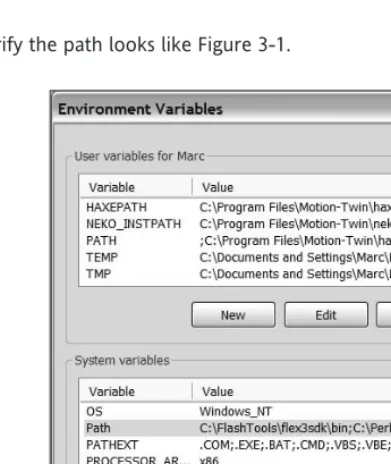
Click theEnvironmental Variablesbutton; you should see a window similar to Figure 3-1.4.
Find the entry forPathin theSystem Variablessection, and select it.5.
Click theEditbutton, and a window to edit the value will appear.6.
Prepend the value with the path to your Flex SDK compiler followed by a semicolon. If you used the recommended path, you would enterC:\FlashTools\flex3sdk\bin;at the beginning of the path.7.
ClickOK. Verify the path looks like Figure 3-1.Modifying your PATH variable on OS X or Linux can vary greatly depending on what shell you use. The default shell on OS X and many Linux distributions is Bash. If you are using Bash, you can edit a file in your home directory called.bashrc. In that file, add a line similar to the following:
export PATH=$PATH:~/FlashTools/flex3sdk/bin
This tells Bash to append the directory called~/FlashTools/flex3sdk/binto the end of the PATH variable. If you are using a shell other than Bash, please consult the documentation that comes with that shell.
Testing your installation
After installing the Flex SDK, you can test that everything is working correctly by opening a command prompt (terminal on OS X) and issuing thecompccommand. You should receive output similar to the following:
C:\>compc
Adobe Compc (Flex Component Compiler) Version 3.0.0 build 477
Copyright (c) 2004-2007 Adobe Systems, Inc. All rights reserved.
Use 'compc -help' for information about using the command line.
If you get a “command not found” or some other error, review the installation instructions, and make sure you set your PATH variable correctly.
Installing FlashDevelop
For this section, I’ll be using FlashDevelop as the IDE to show how to edit and compile ActionScript code. FlashDevelop is Windows-only since it requires the Microsoft .NET 2.0 runtime. If you’re using OS X or Linux, you should take a look at FDT, which is mentioned in the “ActionScript 2 Development” section of this chapter since it is also capable of creating ActionScript 3 applications.
To install FlashDevelop, first download and install the .NET runtime from the Microsoft website (http://www.microsoft.com). To find the download link, perform a search for Microsoft .NET Framework Version 2.0 Redistributable.
After you have installed the .NET runtime, you’re ready to install FlashDevelop. To find the latest download, go to the FlashDevelop website (http://www.flashdevelop.org), and click theReleases link. FlashDevelop regularly releases versions, so it’s up to you to choose whether you want to get the latest, possibly buggy, beta version or go with a slightly older but more stable officially released ver-sion. After downloading, a standard installation wizard will guide you through the rest of the process.
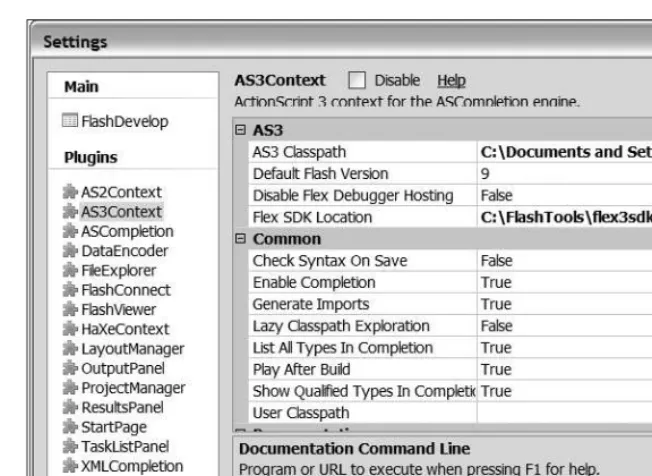
Figure 3-2.TheSettingsdialog box of FlashDevelop
In this dialog box, find theFlex SDK Locationentry underAS3Context, and set the directory where you unpacked your Flex SDK. With that done, you’re ready to start using FlashDevelop to create ActionScript 3 projects.
In this section, I will show how to create a simple sample application; you will learn how to set up and compile a project from FlashDevelop.
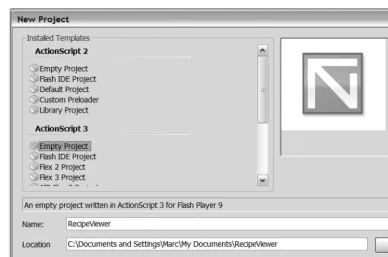
To begin, select theProject➤New Projectmenu option, which will cause theNew Projectdialog box to be displayed (see Figure 3-3). SelectEmpty Projectunder theActionScript 3heading, which will create a standard Flash ActionScript 3 project. If you were developing a Flex or an AIR application, you would see options for those environments as well. In Chapter 4, you’ll be creating an application to view recipes. So, let’s give this a name ofRecipeViewerby typing that into theNamefield. To keep things organized, also enter a directory name ofRecipeViewer, and then click theOKbutton.
Once you have a new project created, you select theProjectpanel on the right side of your screen. Right-click in that panel, and selectAdd➤New Class. This will open a dialog box asking for a name for the new class. EnterRecipeViewer.asin that dialog box, and click theOKbutton. A new ActionScript file will be created.
Figure 3-3.The FlashDevelopNew Projectdialog box Modify the generated class in the following ways:
1.
Add a SWF metatag before the class to specify the properties of the resulting Flash application.2.
Addextends Spriteto the class definition. This will let the class act as the default object in anActionScript 3 Flash application.
3.
Add code in the constructor to create a TextField, assign some text to it, and add it to the dis-play list.The resulting class should resemble the following:
package {
import flash.display.Sprite; import flash.text.TextField;
[SWF(backgroundColor="#eeeeff", frameRate="60", width="500", ➥
height="350")]
public function RecipeViewer() {
var tf:TextField = new TextField(); tf.text = "Hello World";
addChild(tf); }
} }
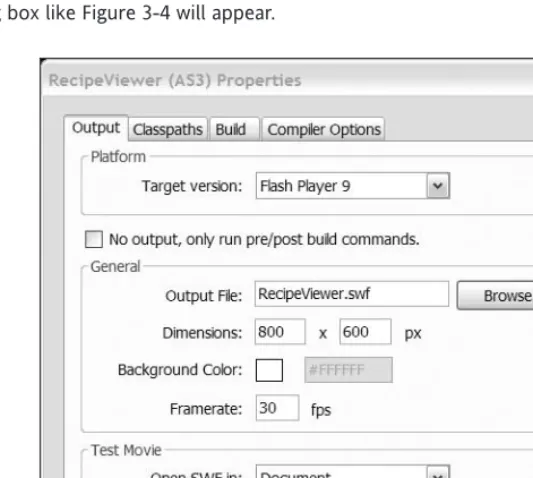
You now have all the code necessary for your simple test application. To run it, you must first right-click the file in theProjectpanel and selectAlways Compile. If the file isn’t appearing in your list, select theShow Hidden Itemstoolbar option. After you do that, select theProject➤Propertiesmenu option, and a dialog box like Figure 3-4 will appear.
Figure 3-4.The project properties panel in FlashDevelop
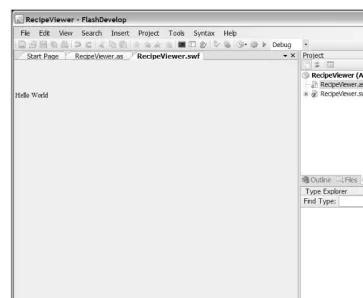
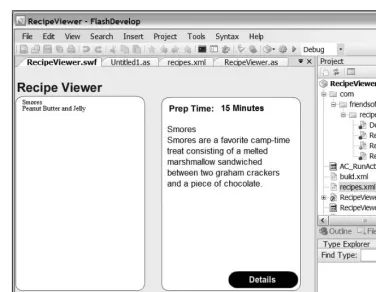
Type a file name for the resulting compiled application in theOutput Filefield, and click theOK but-ton. Pressing F5 or clicking the blue triangle play icon in the toolbar will cause your application to be compiled, and the resulting output will be displayed in FlashDevelop (see Figure 3-5).
Figure 3-5.The final sample application running in FlashDevelop
ActionScript 2 development
You’ve already seen how to use FlashDevelop to create ActionScript 3 projects; you can also use FlashDevelop to create ActionScript 2. In the following sections, we will show a different workflow commonly called AMES because it consists ofASDT,Apache,MTASC,Eclipse, andswfmill.
Installing MTASC
Installing MTASC is a simple matter of downloading and unpacking it:
1.
Download a precompiled binary from the download section of the MTASC website (http:// www.mtasc.org). At the time of writing, the latest version of MTASC was 1.13.After installing MTASC, open a command prompt, and issue the commandmtasc. You should receive output similar to the following:
C:\>mtasc
Motion-Twin ActionScript2 Compiler 1.13 - (c)2004-2007 Motion-Twin Usage : mtasc.exe [options] <files...>
Options :
-pack <path> : compile all files in target package -cp <paths> : add classpath
-v : turn on verbose mode -strict : turn on strict mode
-infer : turn on local variables inference -wimp : turn on warnings for unused imports -msvc : use MSVC style errors
-mx : use precompiled mx package -swf <file> : swf file to update -out <file> : swf output file
-keep : does not remove AS2 classes from input SWF
-frame <frame> : export into target frame (must exist in the swf) -main : enable main entry point
-header <header> : specify header format 'width:height:fps' -group : group classes into a single clip
-exclude <file> : exclude classes listed in file -version : change SWF version (6,7,8,...) -trace <function> : specify a TRACE function -help Display this list of options
--help Display this list of options
If you get a “command not found” or some other error, review the installation instructions, making sure you set your PATH variable correctly.
Installing an IDE
One of the most important, and certainly the most visible, components of a development environ-ment is the integrated developenviron-ment environenviron-ment (IDE). This usually consists of a code editor, file management functions, and integration with a compiler. In the following sections, I’ll explain how to install Eclipse as your IDE.
In this book we use the termFlash IDEto refer to the product that Adobe publishes called Flash (Flash MX 2004, Flash 8, Flash CS3, and so on). Don’t be confused by our use of the termIDEhere, because we’re not referring to the Flash IDE.
Installing Eclipse
As a Flash developer, I find myself wearing many hats. One day I might need to edit PHP and manipu-late a database, while the next I do nothing but ActionScript. One of the greatest benefits of the Eclipse platform is that it has plug-ins for almost every language imaginable. There’s a plug-in for XML, a plug-in for PHP, yet another plug-in for Ruby, and of course a plug-in for ActionScript. Beyond sim-ple code editing, there are plug-ins to connect to databases, to build UML models, and to connect to version control systems. While the variety of plug-ins is a great benefit of the platform, it can also be a nightmare since tracking down the correct plug-ins and getting them to play nicely with each other can be difficult.
Luckily, there’s help from a group of software developers whose goal is to make Eclipse installation easy. They can be found at the website Easy Eclipse (http://www.easyeclipse.org). They have several distributions of Eclipse aimed at web developers with editions for Windows, Mac OS X, and Linux. I usually choose the Easy Eclipse for LAMP package because it includes most of the functionality I use on a day-to-day basis. If you do other types of development, you may want to take a look at the other options listed on the website.
To download and install Easy Eclipse for LAMP, follow these steps:
1.
Download your desired distribution from the Easy Eclipse website (http://www.easyeclipse. org/site/distributions/index.html).2.
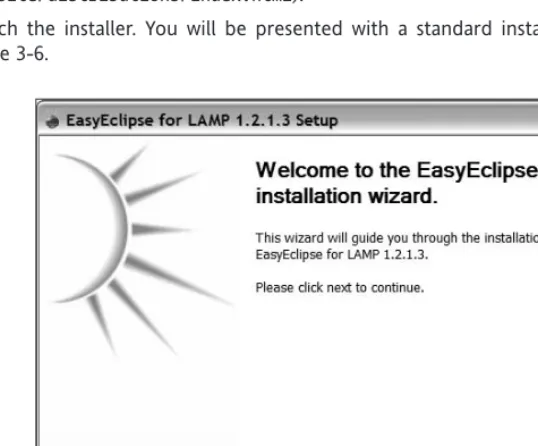
Launch the installer. You will be presented with a standard installation wizard, as shown in Figure 3-6.3.
Click theNextbutton, and answer the remaining prompts to complete the installation. You can either leave the defaults or customize where your project workspace will be created.Installing Eclipse plug-ins
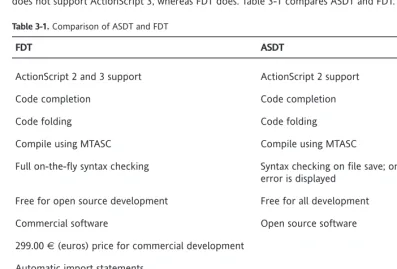
Eclipse, by itself, is not well suited for ActionScript development. To really make it shine, you need to install an ActionScript plug-in. There are currently two options: a fully open source solution called ASDT and a commercial plug-in called FDT. Both offer similar functionality of editing ActionScript, maintaining projects, and compiling applications from within Eclipse. At the time of this writing, ASDT does not support ActionScript 3, whereas FDT does. Table 3-1 compares ASDT and FDT.
Table 3-1.Comparison of ASDT and FDT
FDT ASDT
ActionScript 2 and 3 support ActionScript 2 support
Code completion Code completion
Code folding Code folding
Compile using MTASC Compile using MTASC
Full on-the-fly syntax checking Syntax checking on file save; only the first error is displayed
Free for open source development Free for all development
Commercial software Open source software
299.00€(euros) price for commercial development
Automatic import statements
ActionScript 3 support
30-day free trial available
While deciding which plug-in to use, you may want to install them both to give them a try. In my expe-rience, it is not a good idea to install them both in Eclipse at the same time. Make sure to uninstall your first option before installing your second.
In this chapter, I’ll describe how to install both plug-ins. However, after that, the focus will be on ASDT, since it is the open source solution of the two. It may seem odd that we mention FDT at all. The rea-son behind this is that FDT is a much more polished product, and it offers free licenses to open source developers. The feature list of the two plug-ins seems similar, but that doesn’t capture the fact that many of the features simply work better in FDT. Many developers who have the ability to choose between the two pick FDT over ASDT. Much of the information regarding ASDT development is also directly applicable to development in an FDT environment.
Installing ASDT
Installing Eclipse plug-ins is easy through Eclipse’s software update feature. You can install ASDT through this mechanism by following these steps: