ONLINE ADVERTISEMENT ON DEMAND BY
TAIZUL ISLAM ID: 142-15-3592 TANJIR AHAMED
ID: 142-15-3969 KAUSHIK RAY
ID: 142-15-4061
This Report Presented in Partial Fulfillment of the Requirements for the Degree of Bachelor of Science in Computer Science and Engineering.
Supervised By Ms. Subhenur Latif
Assistant Professor Department of CSE
Daffodil International University Co-Supervised By
Mr. Serajul Al Mahmud Mostafa Senior Lecturer
Department of CSE
Daffodil International University
DAFFODIL INTERNATIONAL UNIVERSITY
DHAKA, BANGLADESH
DECLARATION
We hereby declare that, this project has been done by us under the supervision of Ms. Subhenur Latif, Assistant Professor, Department of CSE Daffodil International University. We also declare that neither this project nor any part of this project has been submitted elsewhere for award of any degree or diploma.
Supervised by:
Ms. Subhenur Latif Assistant Professor Department of CSE
Daffodil International University
Submitted by:
Md. Taizul Islam ID: 142-15-3592 Department of CSE
Daffodil International University
Tanjir Ahamed ID: 142-15-3969 Department of CSE
Daffodil International University
Kaushik Ray ID: 142-15-4061 Department of CSE
Daffodil International University
ACKNOWLEDGEMENT
First we express our heartiest thanks and gratefulness to almighty Allah for His divine blessing makes us possible to complete this project successfully.
We fell grateful to and wish our profound our indebtedness to Ms. Subhenur Latif, Assistant Professor, Department of CSE Daffodil International University, Dhaka. Deep Knowledge & keen interest of our supervisor in the field of android development influenced us to carry out this project.
His endless patience, scholarly guidance, continual encouragement, constant and energetic supervision, constructive criticism, valuable advice, reading many inferior draft and correcting them at all stage have made it possible to complete this project.
We would like to express our heartiest gratitude to Dr. Syed Akhter Hossain, Head, Department of CSE, for his kind help to finish our project and also to other faculty member and the staff of CSE department of Daffodil International University.
We would like to thank our entire course mate in Daffodil International University, who took part in this discuss while completing the course work.
Finally, we must acknowledge with due respect the constant support and patients of our parents.
ABSTRACT
This project is on "Online Advertisement on Demand". This is an android based application which needs an android device to run and this application is a community platform there have four features those are Land, Tutor, Flat and To-Let. All the features are found by the people daily through newspaper, website and also in the wall to wall by physically. This application is more user friendly and so that user can easily find out the features what they need by their smart phone.
In the development of this application the most essential elements were computer, an android device and an android application development tool. The development of this application is described in the project report. Using this application user will also get lot of facilities. After development session of this application we have tested it by different user and found it to be a well build application which works perfectly.
TABLE OF CONTENT
CONTENTS PAGE
Board of examiners i
Declaration ii
Acknowledgements iii
Abstract iv
CHAPTER 1: INTRODUCTION
1-21.1 Introduction 1
1.2 Background 1
1.3 Motivation 2
1.4 Problem Statement 2
1.5 Project Objective 2
1.6 Project Scope 2
CHAPTER 2: BACKGROUND
3-52.1 Introduction 3
2.2 Related works 3
2.3 Comparative Studies 5
2.4 Challenges 5
CHAPTER 3: REQUIREMENT SPECIFICATION
6-133.2 Use case narrative for User 7
3.3 Business Process Modeling (BPM) 11
3.4 Data Flow Diagram (DFD) 12
3.5 Non-functional Requirement 13
3.6 Usability requirement 13
CHAPTER 4: DESIGN SPECIFICATION
14-304.1 System Architecture 14
4.2 Database Design 15
4.3 E-R Diagram 18
4.4 UI Design 19
4.5 Design Requirements 30
CHAPTER 5: TESTING AND EVALUATION
31-335.1 Usability Test 31
5.2 Unit Test 32
CHAPTER 6: CONCLUSION AND FUTURE WORK
346.1 Conclusion 34
6.2 Future Work 34
REFERENCES
35
APPENDIX
36-37Appendix A: Survey Form for application 36
Appendix B: Plagiarism Check Report 37
LIST OF FIGURES
FIGURES PAGE NO
Figure 2.1: Flatmate: Roommate, Sublet, Tolet in Bangladesh 3
Figure 2.2: Tutor Finder 4
Figure 2.3: Bproperty: Bangladesh Property 5
Figure 3.1: Use case diagram 6
Figure 3.2: Business Processing Modeling (BPM) 11
Figure 3.3: Data Flow Diagram of the System (DFD) 12
Figure 4.1: System Architecture 14
Figure 4.2: Overview of Firebase Database for Android App 15 Figure 4.3: Database Design for Android App (Part1) 16
Figure 4.4: Database Design for Android App (Part2) 17
Figure 4.5: E-R Diagram 18
Figure 4.6: Home Screen ` 19
Figure 4.7: Home Screen of To-Let 20
Figure 4.8: Navigation Drawer of To-Let 21
Figure 4.9: Add To-Let form. 22
Figure 4.10: Auto Place Picker 23
Figure 4.11: User account 24
Figure 4.12: Advanced Search Bar for To-Let 25
Figure 4.14: Calling 27 Figure 4.15: Route View and Live Route of Selected Location
Marker from Current Location 28
Figure 4.16: Find Tutor by Google Map 29
Figure 5.1 Survey Result 31
LIST OF TABLE
TABLE PAGE NO
Table 1: Result of Unit Test 32
CHAPTER 1
Introduction
1.1 Introduction
Activities in our daily life are decided by the use of Internet. Internet changes our daily life. We expend lots of time on the Web. Veritable use of the Internet rehash our lives easy and simple. The Internet gives us effective information, data, and knowledge for the personal, social and economic development and it’s up to us to utilize our time on the web in an originative manner. The Internet is a great revolution in information technology [5].
For the great revolution of internet, we design and build an application that advertises the information on public demand.This application that can help a user to find To-Let, Tutor, and Properties easily without physical going. Its create user friendly features that helps user to getting valid information.
1.2 Background
As I have stated before, keeping in mind the goodwill of our people we have decided to build an application that will provide proper advertising information. Following the idea we build an useful application which contains are To-Let, Tutor, Land and Flat.
Using the To-Let portion, The Landlord can post To_Let and the Tenant can see those post or find their desired residence.
Using the Land portion, The Landlord can post their properties and Buyer can see those post.
Using the Flat portion, The Landlord or Developers can post their Flat and Buyer can see those post.
Using the Tutor portion, Teacher can post his qualification and Student or Parents see the Teachers qualification.
1.3 Motivation
The main motivation of Ad BD application is to manage effectively and do maximum work at minimum time [8]. This application will handle user advertisements procedure. It will store and display user information. It creates user friendly features that helps user to find out only Valid To- Let or Properties. It's model helps people to search freedom of living & helps Owner for not contacting with all seeker and not showing all of them Property physically and not going door to door for viewing all Property physically.
1.4 Problem Statement
Lack of proper use of internet may lead toward poor facilities, a bunch of trouble losses of valuable time.In case of the people of our country, because of not having proper knowledge about the use of internet, they are going door to door to view the properties physically.
1.5 Project Objective
Providing a trouble free advertisement.
By providing information, getting a user to find out Tutor, Residence and Properties.
Saving the valuable time of people.
1.6 Project Scope
Providing information regarding To-Let, Flat, Land and Tutor.
Designing a database for storing related data.
Get location/address of the advertisement using the map.
Establishing a CALL plan via GSM module.
CHAPTER 2
Background
2.1 Introduction
We work on the area of BD Advertising like To-Let, Tutor, Properties. An emergency people has to need tutor also may have to need to-let and people need to find it by their physical instance. We have decided to do some work on this area to solve the problem and tried to make it less time consuming.
We came to know that, there are many types of tolet such as family, sublet, student and etc also have male tutor and female tutor so by using this application user will be able to find out them by category wise.
2.2 Related works
There has been a couple of works in the past regarding BD Advertising. For example, there are some applications named:
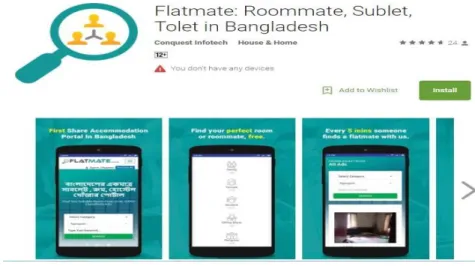
2.2.1 Flatmate: Roommate, Sublet, Tolet in Bangladesh
“Flatmate: Roommate, Sublet, Tolet in Bangladesh application only contains Roommate, To-let and sublet [1].
Figure 2.1: Flatmate: Roommate, Sublet, To-let in Bangladesh
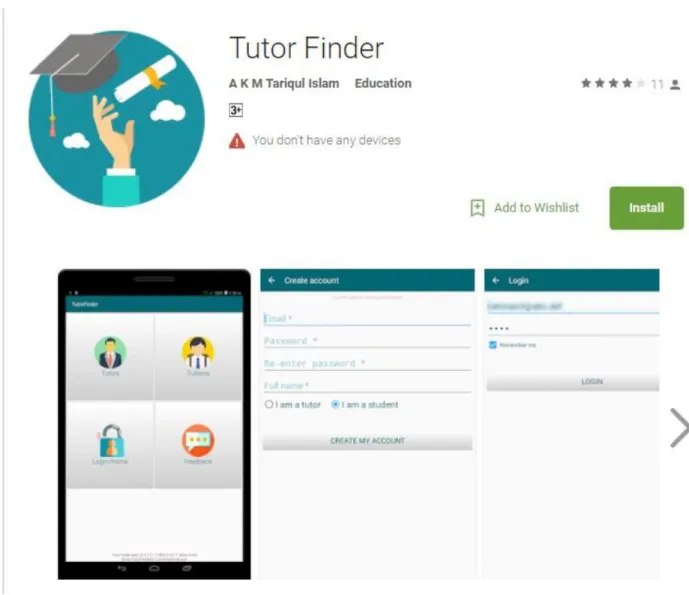
2.2.2 Tutor Finder
"Tutor Finder" application only contain the tutor or student information. Tutor Finder is an app where user can find tutors/students. This application is absolutely free and no need to create an account. Just install and start searching [2].
Figure 2.2: Tutor Finder
2.2.3 Bproperty: Bangladesh Property
“Bproperty: Bangladesh Property” application only contains flat and land for buy and sale [3].
Figure 2.3: Bproperty: Bangladesh Property
2.3 Comparative Studies
There are some existing application which have some limitations. Most of the applications have some problem. Different applications contain different features but there is no app which contain all features in one application. Such as Bproperty, Tutor Finder and Flatmate.
But In one application we provide lots of feature such as To-let, Flat, Land and Tutor .On the other hand our application also allows the google map to track the ad owner. It also allows phone calling
system to contact the ad owner. It also allows find nearby tutor from current location using google map.
2.4 Challenges
Interactive Application: One important thing in a software project is its Interactions. Mobile devices offer many high-quality features with high quality sensors. So, creating interactions is time consuming and can be very complex in design phase
Keeping the Application simple and Clear: If the app is very complex and user can not recognize how it works, then the user will be frustrated and will give a negative review about the application.
So the functions of the app should be very clear.
Mobile Content Management: The importance of mobile application content is growing day by day because increasing number of smart phone. So, including rich content such as images, animations is important. On the other hand, in our app such functions like as attendance, result are important.
Dealing with the different screen devices: Users may have many different screen devices. So our challenge is to handle the design of the application as it may vary for different devices.
Maintaining the connection with the user: Mobile application market is dynamic because of high number of innovations. So connection with the users is very important.
Performance: One of the important challenge is to design well performing and bug free application which needs minimum charge of battery.
CHAPTER 3
Requirement Specification
3.1 Use Case Diagram
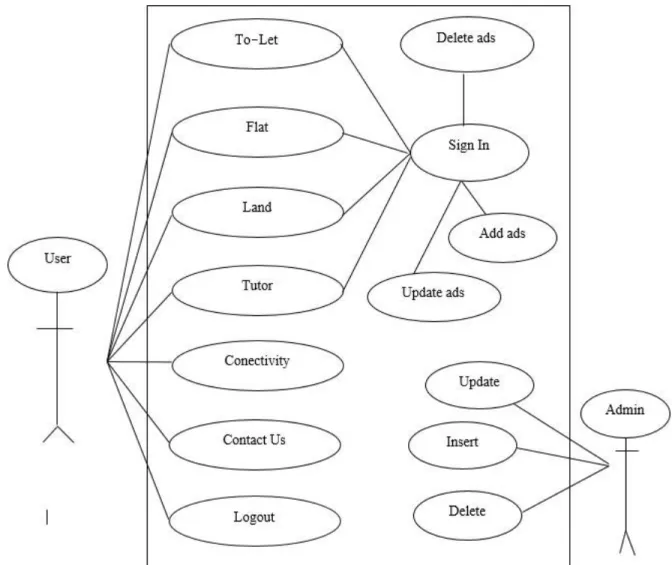
A use case diagram at its simplest is a representation of a user's interaction with the system that shows the relationship between the user and the different use cases in which the user is involved [4].
Figure 3.1: Use Case Diagram of Ad BD.com
3.2 Use case narrative for User 3.2.1 To-Let
Use case: To-Let Actor: user Pre-condition:
Android OS based handset.
Turn on Location.
Internet Connection.
Scenario:
User can see all kinds of To-Let like family, student, employee, sub-let.
User can see the information of To-Let.
User can see the shortest path of To-Let from current location via google map.
Alternative Scenario: If user does not turn on location/GPS, turn on. Check the Internet connection, if user not connected.
Post-condition: Application will be running without an error.
3.2.2 Flat Use case: Flat Actor: User Pre-condition:
Android OS based handset.
Scenario:
User can see the information of Flat.
User can see the shortest path of Flat from current location via google map.
Alternative Scenario: If user does not turn on location/GPS, turn on. Check the Internet connection, if user not connected.
Post-condition: Application will be running without an error.
3.2.3 Land Use case: Land Actor: user Pre-condition:
Android OS based handset.
Turn on Location.
Internet Connection.
Scenario:
User can see the information of Land.
User can see the shortest path of Land from current location via google map.
Alternative Scenario: If user does not turn on location/GPS, turn on. Check the Internet connection, if user not connected.
Post-condition: Application will be running without an error.
3.2.4 Tutor Use case: Tutor Actor: user Pre-condition:
Android OS based handset.
Turn on Location.
Internet Connection.
Scenario:
User can see the information of Male Tutor, Female Tutor.
User can find nearest Tutor via google map.
Alternative Scenario: If user does not turn on location/GPS, turn on. Check the Internet connection, if user not connected.
Post-condition: Application will be running without an error.
3.2.5 Network Connectivity Use case: Connectivity Actor: user
Pre-condition:
Android OS based handset.
Scenario:
User can see the network connectivity.
Post-condition: Application will be running without an error.
3.2.6 Create Account Use case: Sign In Actor: user Pre-condition:
Android OS based handset.
Internet Connection.
Scenario:
User can create account by Email or Phone number for post ad.
User can insert, update and delete their ad.
Alternative Scenario: If user does not turn on location/GPS, turn on. Check the Internet connection, if user not connected.
Post-condition: Application will be running without an error.
3.2.7 Contact Us Use case: Contact Us Actor: User
Pre-condition:
None Scenario:
User can know about application.
Alternative Scenario: None.
Post-condition: None.
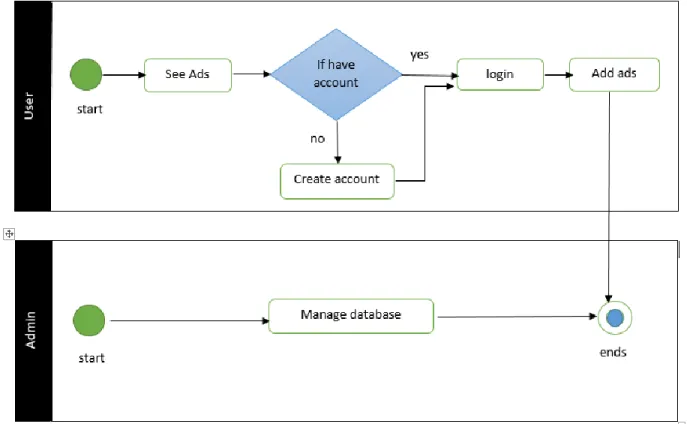
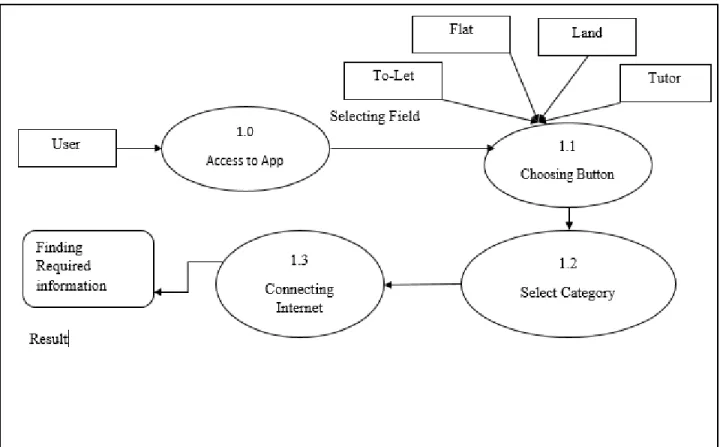
3.3 Business Process Modeling (BPM)
Business process modeling (BPM) is the activity of representing processes of an enterprise, so that the current process may be analyzed, improved, and automated. The term 'business model' is thus used for a broad range of informal and formal descriptions to represent core aspects of including purpose, operational processes and policies [10].
Figure 3.2: Business Process Modeling (BPM)
3.4 Data Flow Diagram
A DFD shows what kind of information will be input to and output from the system, how the data will advance through the system, and where the data will be stored. It does not show information about process timing or whether processes will operate in sequence or in parallel, unlike a traditional structured flowchart which focuses on control flow, or a UML activity workflow diagram, which presents both control and data flows as a unified model.
Figure 3.3: Data Flow Diagram of the System
3.5 Non-functional Requirement
Help text will be provided in English.
The process of using the application will always be available.
There is no user limit for browsing the application.
This application can be used only on android OS.
During browsing through the application system responses should be no more than 1 second.
Only register user can modify the information of the application.
3.6 Usability requirement
An android OS based handset (Android version 4.2 - 7.0) with internet connection and GPS support.
The interface of the application is suitable even for the color-blind people.
Anyone who knows Bengali or English can use this application.
CHAPTER 4
Design Specification
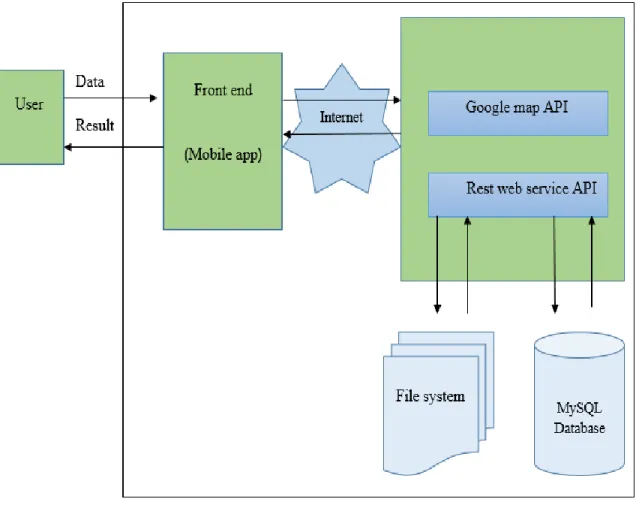
4.1 System Architecture
System architecture shows the structure and behavior of a system, how the system works and how it interacts with users [7]. The following figure 4.1 shows System Architecture.
Figure 4.1: System Architecture
4.2 Database Design
Database design is the process of producing a detailed data model of database.
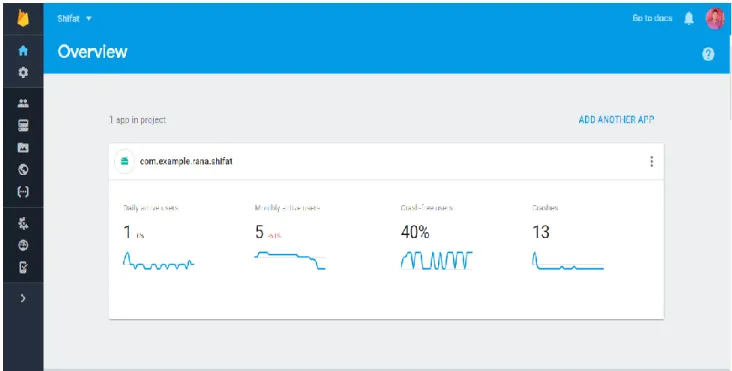
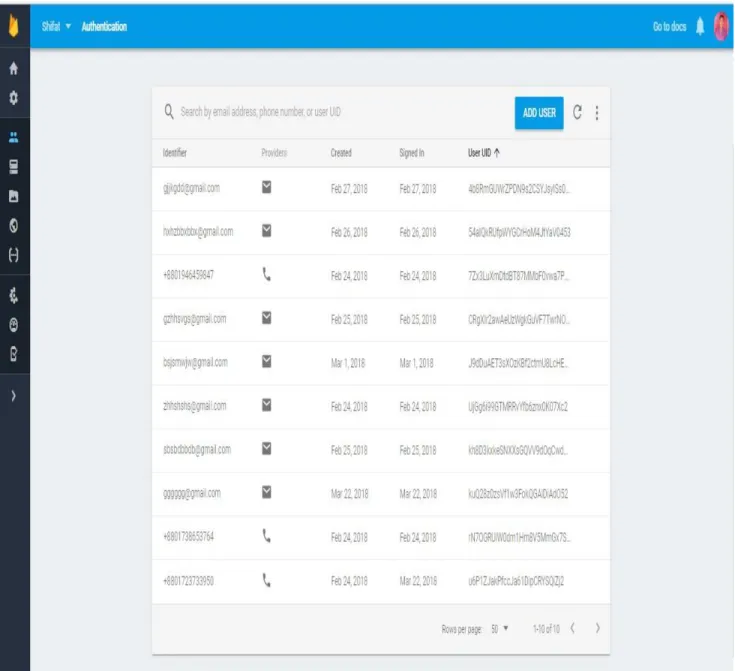
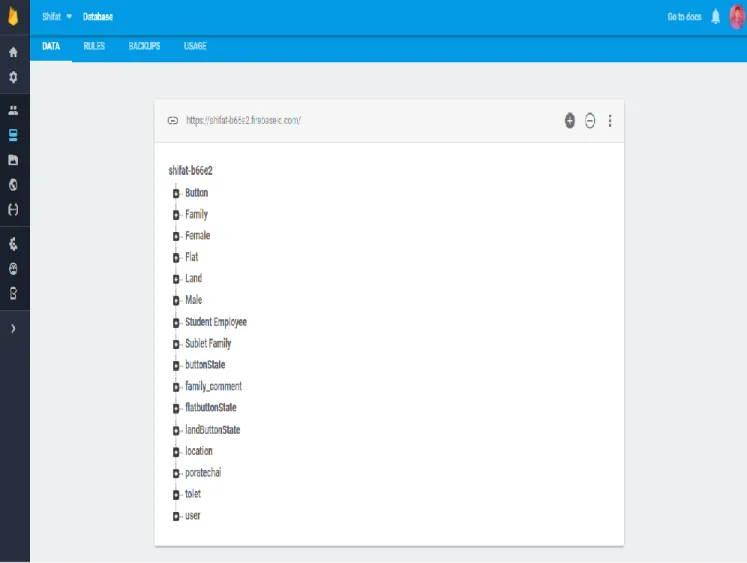
Figure below dictates the Database Design of our developed application. This database acts as host of data from which the application can fetch data whenever it needs. The first, second and third part of designated database design is shown in fig. 4.2, 4.3 and 4.4
Figure 4.2: Overview of Firebase Database for Android App
Figure 4.3: Database Design for Android App (Part1)
Figure 4.4: Database Design for Android App (Part2)
4.3 E-R Diagram
E-R diagram is a diagram used to conduct data modeling activity [6]. It describes the relationship between data and used E-R diagram to perform data modeling, and explain the diagram to stakeholders.
Person, place, object, event or concept about which data is to be maintained by the entity.
Relationship Associated with the instances of one or more entity types. Attributes is named
Following figure shows the total E-R (Entity-Relationship) diagram.
Figure 4.5: E-R Diagram of Ad BD.com
4.4 UI Design
User Interface (UI) that allows user to interact with the mobile devices or other electronic devices.
UI design usually refers to the design of Graphical User Interface (GUI), but can also refer to others, such as natural and voice user interfaces.
4.4.1 Home Screen
Home screen shows seven items To-Let, Flat, Land, Tutor, User network connectivity, about us and logout. User can select To-let, Flat, Land, Tutor, Connectivity and About Us for go forward.
Figure 4.6: Home Screen
4.4.2 To-let
As the four buttons (To-Let, Land, Flat and Tutor) of advertisement category work in the same way, so we are describing the procedure for the To-Let button only.
Clicking on the to-let button user will see advanced search bar with navigation drawer and see about the to-let information or data. Selecting the navigation drawer item of upper left corner will show add to-let button, user accout button and category wise search option.
Figure 4.7: Home Screen of To-Let
4.4.3 Navigation drawer for To-Let
Selecting the navigation drawer item of upper left corner will show add to-let button, user accout button and category wise search option.
In the navigation drawer of Home page user will add to-let.
Figure 4.8: Navigation Drawer of To-Let
4.4.4 Add To-Let
Using this form user would post their to-let. This form have some advanced features such as auto date picker , spiner , checkbox and google auto complete text view that help the user to fillup the for shortly.
Figure 4.9: Add To-Let form.
4.4.5 Auto place picker
Auto complete textview provides location suggestion. So when user will try to enter his location address then it will provide uers location in suggestion.
Figure 4.10: Auto Place Picker
4.4.6 User account
User account is the most important feature of this application. there for user can store their information into their account. User can also manage their information by update or delete their Ad.
Figure 4.11: User Account
4.4.7 Advanced search bar for To-Let
In this application we use advanced search option. By using this search bar user can easily find out their desireable to-let.
Figure 4.12: Advanced Search Bar for To-Let
4.4.8 Details information of To-Let
When user click on the to-let button then he can see the number of to-let information. if user wants to see the details information of a particular to-let then has to click on this to-let and can see more information .
Figure 4.13: Details Information of To-Let
4.4.9 Calling
If user click on the colorfull autolink number, a number will be shown on dialer and user can call in that number if he wants. The below figure shows the number in dialer and an ongoing call in process.
Figure 4.14: Calling
4.4.10 Route view and Live Route of Selected Location marker from Current Location In the below left figure show the Route Selected Location marker from Current Location and right figure, if user click on Start Button on left figure it will lead to a visual of live route. If we start going toward our destination an arrow start moving too as our current location by updating the live route.
Figure 4.15: Route View and Live Route of Selected Location Marker from Current Location
4.4.11 Find Tutor by Google map
Although Tutor ,To-let, Land and Flat have same functionalities , But there have one useful features in Tutor. This feature is find tutor by google map. user can see the their nearby by all Tutor location from user current location.
Figure 4.16: Find Tutor by Google Map
4.5 Design Requirements 4.5.1 Android Studio
Android Studio is the IDE (integrated development environment) for android operating system. It designed specifically for android application development. Using android studio, we developed our application.
4.5.2 Android SDK
Android SDK provides the API libraries and developer tools necessary to build, test, and debug android applications.
To develop Android application, Android SDK is the essential tool. This SDK is very comprehensive tool that contains not only the library for development, but also includes the simulator to test the application.
4.5.3 Java Development Kit (JDK)
JDK is an implementation of either one of the Java SE, Java EE or Java ME platforms.
4.5.4 Android Virtual Device (AVD)
The AVD manager provides a graphical interface which run the android application called emulator. A QEMU-based device-emulation tool that can use to debug and test applications in an actual Android run-time environment.
CHAPTER 5
Testing and Evaluation
5.1 Usability Test
In usability testing basically, we as testers tests the ease with which the user interfaces can be used.
It is tests that whether the application or the product built is user-friendly or not. We ran a survey among 30 users, aged between 18-35, where 20 of them were male and 10 were female. Few questions were included in this survey which had parameters to ensure the success of this survey.
The pattern of the survey form with questions is given in the Appendix. The output of the survey is given below as a bar chart:
Figure: 5.1: Survey Result
So, at the end we can carry out the results as the benefits of usability testing to the end user or the leaner:
Better quality Application.
Application is easier to use.
Application is more readily accepted by users.
Shortens the information for new users.
Better UI.
Innovative idea for the traveling environments.
5.1 Unit Test
Unit testing is used in a details designing and implementing of a project [9]. Unit testing is a process of application development in which the smallest testable parts of an application, called units, are individually and independently tested and implemented after passing the test. Unit testing involves only those characteristics that are vital to the performance of the unit under test [9]. The Unit test was done in time of implementing the codes of this application and also upon completion of this project.
Test case is a combination of conditions or variables that will determine if a system fulfill or satisfies the requirements or not.
The results of the Unit test is shown below in Table 1:
5.2 Result of Unit Test
Table 1: Result of Unit Test Test Case Test Input Expected
Output
Actual Output Result
Interface visibility
Tested on AVD
Interface are display correctly.
Interface are displayed correctly.
Pass
Correct Response for
each button
Tested on AVD
Display correct activity
Displayed correctly
Pass
Click Call Button
Tested on AVD
It should make a Call
Successfully Calling
Pass
Click About Us Button
Tested on AVD
It should go About Us
activity
Go successfully About Us
activity
Pass
Map Zoom in & out
Tested on AVD
Should zoom in
& out properly
Successfully Zoom In & Out
Pass
Click Logout Button
Tested on AVD
It should leave from account
successfully logout
Pass
Click network connectivity
button
Tested on AVD
It should connect with
internet
Successfully connect
Pass
Click Back Tested on It should go Go Back Pass
CHAPTER 6
Conclusion and Future Work
6.1 Conclusion
Ad BD.com is an android based mobile application which supports the people in their short time by providing information regarding their desired To-Let,Land,Tutor and Flat. It also provide the google map location for all items and for the consequences user also can see the live locattion and shortest path from the current location [11]. It also provides the information of near tutor by google map with phone call functionalities. Therefor user can call from google map to the specific teacher or student .Using this application getting desired To-Let, Land, Tutor and Flat’s information will be easier than ever before.
6.2 Future Work
This application is built such way that it would cover only bangladesh but in future we will make it updated that it can cover all over the world. And now the language of our application is english so in future we will setup language setting option so that user can setup language according to their country.
REFERENCES
[1] Play.google.com. (2018). [online] Available at:
https://play.google.com/store/apps/details?id=flatmatebd.app [Accessed 5 Apr. 2018].
[2] Play.google.com. (2018). [online] Available at:
https://play.google.com/store/apps/details?id=com.tariqulislam.tutorfinder [Accessed 5 Apr. 2018].
[3] Play.google.com. (2018). [online] Available at:
https://play.google.com/store/apps/details?id=com.bproperty.bpropertyapp [Accessed 5 Apr. 2018].
[4] En.wikipedia.org. (2018). Use case diagram. [online] Available at:
https://en.wikipedia.org/wiki/Use_case_diagram [Accessed 5 Apr. 2018].
[5] Sharma, V., Sharma, V., Sharma, A., Sharma, A., Sharma, V., Sharma, V., Sharma, V., Sharma, V., Sharma, V., Sharma, V., Sharma, A., Sharma, A., Sharma, A. and Sharma, A. (2018). Uses of internet in our daily life - Everyday Internet. [online] KLIENT SOLUTECH. Available at:
http://www.klientsolutech.com/uses-of-internet-in-our-daily-life-everyday-internet/ [Accessed 5 Apr. 2018].
[6] Lucidchart. (2018). What is an Entity Relationship Diagram. [online] Available at:
https://www.lucidchart.com/pages/er-diagrams [Accessed 5 Apr. 2018].
[7] Lix.polytechnique.fr. (2018). What is Systems Architecture?. [online] Available at:
https://www.lix.polytechnique.fr/~golden/systems_architecture.html [Accessed 5 Apr. 2018].
[8] BusinessDictionary.com. (2018). Which of your friends needs to learn this term?. [online] Available at:
http://www.businessdictionary.com/definition/motivation.html [Accessed 5 Apr. 2018].
[9] [duplicate], W. (2018). What is unit testing and how do you do it?. [online] Stackoverflow.com.
Available at: https://stackoverflow.com/questions/652292/what-is-unit-testing-and-how-do-you-do-it [Accessed 5 Apr. 2018].
[10] Google.com. (2018). business process model - Google Search. [online] Available at:
https://www.google.com/search?ei=FI_CWoikI8rivASt6arYDQ&q=business+process+model&oq=busi&gs _l=psy-
ab.3.1.35i39k1l2j0i67k1l2j0l3j0i131k1l2j0.7781.8728.0.11096.4.4.0.0.0.0.166.635.0j4.4.0....0...1c.1.64.ps y-ab..0.4.631....0.XEJvgmCtlic [Accessed 5 Apr. 2018].
[12] Smartdraw.com. (2018). Data Flow Diagram - Everything You Need to Know About DFD. [online]
Available at: https://www.smartdraw.com/data-flow-diagram/ [Accessed 5 Apr. 2018].
[13] PNMsoft. (2018). Business Process Management Platform | BPM Software (BPMS). [online]
Available at: http://www.pnmsoft.com/resources/bpm-tutorial/bpm/ [Accessed 5 Apr. 2018].
APPENDIX
Appendix A
Survey Form for application Serial
no
Query Easy Medium Difficult Very
Difficult
N/A
1 How easy it was to use the application?
2 How easy it was to get the all types advertisement?
3 How easy it was to get the tutor?
4 How easy it was to get the nearby tutor?
5 How easy it was to see the route view os the
advertsement
6 How easy it was to see the live root of advertising 7 How it was to call?
8 How easy it was to access the all function in the application?
Appendix B
Plagiarism Check Report
.