Design and Development of Android App Based Application
“Emergency Service”
BY
MD Abdullah Al Noman ID: 153 – 15 – 6545
MD Rashel ID: 162 – 15 – 7676
This report is prepared in Partial Fulfillment of the Bachelor of Science in Computer Science and Engineering Degree Requirements
Supervised By
Shadaab Kawnain Bashir Lecturer
Department of CSE
Daffodil International University
DAFFODIL INTERNATIONAL UNIVERSITY DHAKA, BANGLADESH
MAY 2021
APPROVAL
This Project titled “Emergency Service”, submitted by Md Abdullah Al Noman, ID No.
153-15-6545, and Md Rashel, ID No. 162-15-7676 to the Department of Computer Science and Engineering, Daffodil International University has been accepted as satisfactory for the partial fulfillment of the requirements for the degree of B.Sc. in Computer Science and Engineering and approved as to its style and contents. The presentation has been held on 02-06-2021.
BOARD OF EXAMINERS
________________________
Dr. Touhid Bhuiyan Professor and Head
Department of Computer Science and Engineering Faculty of Science & Information Technology Daffodil International University
Chairman
________________________
Moushumi Zaman Bonny Assistant Professor
Department of Computer Science and Engineering Faculty of Science & Information Technology Daffodil International University
Internal Examiner
________________________
Md. Sazzadur Ahamed Senior Lecturer
Department of Computer Science and Engineering Faculty of Science & Information Technology Daffodil International University
Internal Examiner
________________________
Dr. Md Arshad Ali Associate Professor
Department of Computer Science and Engineering
Hajee Mohammad Danesh Science and Technology University
External Examiner
DECLARATION
As such, we are eager to invite you that this project was directed by Shadaab Kawnain Bashir, a Lecturer in Daffodil International University's Department of Computer Science and Engineering.
Apart from that, we would like to emphasize unequivocally that neither this project nor any component of it has been submitted to any other institution for the purpose of conferring a degree or certificate.
Supervised by:
Shadaab Kawnain Bashir Lecturer
Department of CSE
Daffodil International University
Submitted by:
MD Abdullah Al Noman ID: 153-15-6545
Department of CSE
Daffodil International University
Md Rashel ID: 162-15-7676 Department of CSE
Daffodil International University
ACKNOWLEDGEMENT
To begin, we would like to express our profound thanks and thanks to Almighty Allah for bestowing upon us the divine grace essential to accomplish the final year project.
We are sincerely happy and desire to offer our deepest thanks to Shadaab Kawnain Bashir, Lecturer in the Department of Computer Science and Engineering at Daffodil International University. Our supervisor's significant experience and enthusiasm for the subject of "Android App Development" allows her to accomplish this project effectively. Her unwavering patience, intellectual direction, persistent encouragement, frequent and enthusiastic supervision, constructive criticism, helpful counsel, and reviewing and revising several inferior versions at all levels permitted the completion of this project.
We would like to express our heartfelt appreciation to Shadaab Kawnain Bashir, Lecturer, Department of CSE, as well as to the other academics and staff members of the Department of CSE of Daffodil International University, for your considerable support in completing our study.
We would like to convey our appreciation to all of our students at Daffodil International University who took part in this conversation as part of their academic work.
Finally, we owe our parents appreciation for their unflinching support and patience.
©Daffodil International University IV
ABSTRACT
For human existence, a variety of critical components are necessary. Every day, the ordinary individual is presented with one or more concerns, such as those requiring water, gas, electricity, and health care.
Similarly, fires, earthquakes, traffic accidents, terrorist and anti-social activities, violence against women and children, child marriage and the dowry system, as well as consumer rights, are all covered.
We established the "Emergency Service" to give prompt help in the case of an emergency.
Simultaneously, we supply mobile phone numbers, locations, Google maps positions, possibilities for audio and video submission, and emergency service alert buttons.
Victims may quickly call such emergency services in the case of an emergency.
Contacting someone may be good. The suggested solution is implemented as a Java application that utilizes the Firebase database.
©Daffodil International University V
TABLE OF CONTENTS
CONTENTS PAGE
Board of examiners 1
Declaration 2
Acknowledgements 3
Abstract 4
CHAPTER
CHAPTER 1: INTRODUCTION 1-3
1.1 Introduction 1
1.2 Motivation 1
1.3 Objectives 2
1.4 Expected Outcome 2
1.5 Report Layout 3
CHAPTER 2: BACKGROUND 4-6
2.1 Introduction 4
2.2 Related Works 4
2.3 Scope of the Problem 5
2.4 Challenges 6
CHAPTER 3: REQUIREMENT SPECIFICATION 7-10
3.1 Business Process Modeling 7
3.2 Requirement Collection and Analysis 8
3.3 Features 9
3.4 Flow chart 10
CHAPTER 4: DESIGN SPECIFICATION 11-15
4.1 Front-end Design 11-13
4.2 Back-end Design 14-15
CHAPTER 5: IMPLEMENTATION AND TESTING 16-28
5.1 Implementation of Database 16
5.2 Implementation of Front-end Design 16
5.3 Testing Implementation 17
5.4 Test Results and Reports 17-28
CHAPTER 6: CONCLUSION AND FUTURE SCOPE 29-32
6.1 Discussion and Conclusion 29
6.2 Scope for Further Developments 29
6.3 Conclusion 29
APPENDIX 30
REFERENCES 31
REPORT 32
©Daffodil International University VII
CHAPTER 1 INTRODUCTION
1.1 Introduction
To survive, we must maintain a constant state of vigilance and alertness, since danger might strike at any moment. Often, for a number of reasons, we are unable to address our conflicts directly. We are unable to acquire the service instantly, even if we wish a lengthy period of time, due to a shortage of resources. As a consequence, we find ourselves quite powerless and unserviceable.
We developed the application "Emergency Service" to give quick support in emergency circumstances. It includes cell phone numbers, addresses, Google Maps locations, audio and video capabilities, and emergency service alert buttons.
When someone is in danger, victims are unable to call the service promptly for any reason. He or she may use this application to get services and guidance. For instance, if you are unable to attend a hospital due to the coronavirus pandemic, these applications will allow you to educate yourself on different medical services and regulations from the comfort of your own home. This should result in persons getting care throughout the pandemic. The suggested solution is developed in Java and makes use of the Firebase object-relational mapping database management system.
1.2 Motivation
The fundamental motivation for building this program stemmed from a firsthand
encounter with some of life's most catastrophic incidents. Several years ago, soon before 2:00 a.m., a tremendous explosion ignited a fire, killing countless sleeping individuals and leaving everyone in tears.
However, the most shocking part was that no one in the region had the emergency services' contact information at the time. They were refused quick aid, which resulted in this sad event in which numerous innocent onlookers sustained injuries. We reasoned that fixing all of those difficulties would qualify us for emergency help in the case of a calamity. Assuming that these emergency services are available over the Internet, we developed a solution.
Users may then swiftly and easily settle conflicts from any place. They will make every attempt to address their issues through the organization's hotline.
We hope that these online-based emergency services prove crucial in supporting victims at this trying time.
1.1 Objectives
A management system based on apps is designed to handle all of the fundamental data necessary for managing the complete dataset.
Our project, "Emergency social service," has the purpose and scope of capturing all information pertaining to the emergency assistance desk.
This program is completely free and very easy to use.
Notify victims' communities through email if they are in risk.
1.4 Expected Outcome.
"Emergency Service" is a free Android application that is always accessible to all users.
This application has been allowed access to a variety of different types of managers. They are limited to their given responsibilities, guaranteeing the security of Data and the avoidance of duplicated Data.
The Data is stored electronically. To use the application, you must have a mobile device and a network connection.
The major goal is to enable victims to contact their favorite groups for emergency aid in the case of a disaster.
As previously stated, our major purpose is to solve the problem of affected persons receiving emergency care. Obtaining emergency help-desk contact information is a very straightforward process. Based on the user's choices, this app-based program saves the user substantial time and energy. This app-based concept provides an amazingly efficient approach, allowing victims to examine all pertinent information and obtain rapid aid via this wonderful tool.
1.5 Report Layout
Each report is divided into three sections:
o First and foremost.
o Test
o Back matter
The title page, approval page, abstract summary, Acknowledgements, table contents, list of tables, list of figures, and other lists comprise the first matter. The opening pages are paginated independently of the succeeding material. Our report is organized as follows:
Chapter 3: specifies the project's specifications. I sketched a data flow diagram, a use case diagram, and design requirements. Additionally, I explained the method for eliciting and analyzing requirements.
Chapter 4: Detailed the project's front-end and back-end design.
Chapter 5: I demonstrated the implementation of the full project and tested each piece to verify that the application worked as planned.
Chapter 6: We discussed the project's end and the prospect of future development.
After each report, I provide a reference page to confirm that the information included within is correct.
CHAPTER 2 BACKGROUND
2.1 Introduction
Nowadays, many entrepreneurs are rediscovering or renewing their interest in project management software. Historically, risk management has concentrated on providing schedule and commodity information to senior management in a restricted number of
industries, such as the military and research organizations. Today's commitment management system encompasses much more, and efforts are handled by individuals from various walks of life and from all over the globe. The adoption of Tran's disciplinary and global
workgroups has radically altered the working culture of many businesses, and new technology has become a thorny issue. We will attempt to provide an overview of
"Emergency service" in this chapter. We discussed "Emergency service" in this part.
2.2 Related Works
Numerous massive Apps are organized in our nation for a variety of reasons, including emergency services, blood banks, and police enforcement. Additionally, they demand an exceptional place in which to do this preparation. In such a place, no mechanism enables data retrieval. Individuals, on the other hand, do not have access to all emergency help- desk information in a single application, including 999, blood banks, and police; as a result, we created this "Emergency Service" App to enable survivors to quickly obtain solutions to a variety of events while seated on their mobile device.
This is kept up by two different levels of users:
Admin
User
Admin: The administrator is the one who has full authority over the online program.
Users: Users have total access to all information and the ability to post any sort of video or audio while maintaining a high level of privacy.
This is a simple and straightforward application. This system is very simple to construct. It is compatible with almost all setups. The key term in this instance is "Data." Data is properly organized and stored for an extended period in this location.
Several requirements are listed low: -
Searching for each helpdesk option.
Reserved for organizational purposes.
Name, address, and contact details.
Include video and audio files.
Emergency button (safe and unsafe)
Summary
Feedback Comparative Studies
The "Emergency service" provides victims with access to requested services such as voice or video choices, a panic button, and feedback. This system is in the process of shifting from a volume- based service model to a value-based service model with a strong focus on quality.
2.3 Scope of the Problem
Nowadays, the global situation is continuously developing and presenting new challenges.
Citizens must get improved support under the arrangement, and victims have made the most of its straightforward system. Therefore, the victims and the social groups that aid them will benefit. The term "emergency service" refers to a method for addressing these needs and acting as a conduit for collecting the essential information and support as quickly as possible.
These programs run on all major mobile operating systems. To maintain people, a separate section is provided.
Approachable: Visitors are welcome to visit, select their preferred emergency service, and gather information about all available emergency services.
Multiple Participant: There are several user participants.
Searchable: Easy Search for helpdesk, any number, and address.
2.4 Challenges
Each piece of art has a unique set of difficulties. Without a spirit of adventure, no endeavor is likely to succeed. Similarly, our project ran across several roadblocks. To begin, we are aiming to develop this system utilizing user inspiration resources; as a result, we must finish it by satisfying all the user's needs, which is very tough for us to do. Our programs, on the other hand, are accessible and user-friendly; nonetheless, completing the work for us will be challenging.
This Challenge aims to design user-centered solutions capable of boosting user performance via discrete home activity monitoring and analysis. These technologies will result in highly individualized user experiences and thought processes, as well as time savings, improved service quality, greater service speed, and enhanced access to services. That is why "Emergency services"
are vital to the victims in our nation.
In this instance, the user will have the ability to contact me about any difficulties or new services.
It is helpful to understand the magnitude of the services or problem at hand and to make every attempt to remedy it.
It is very resource-efficient and compatible with practically all system settings.
They are as follows:
Data security
Data precision
Admin panel control
Work efficiency
Manual data entry reduced.
Time needed must be minimal.
Chapter: 3
SOFTWARE REQUIREMENTS SPECIFICATION
3.1 Business Process Modeling:
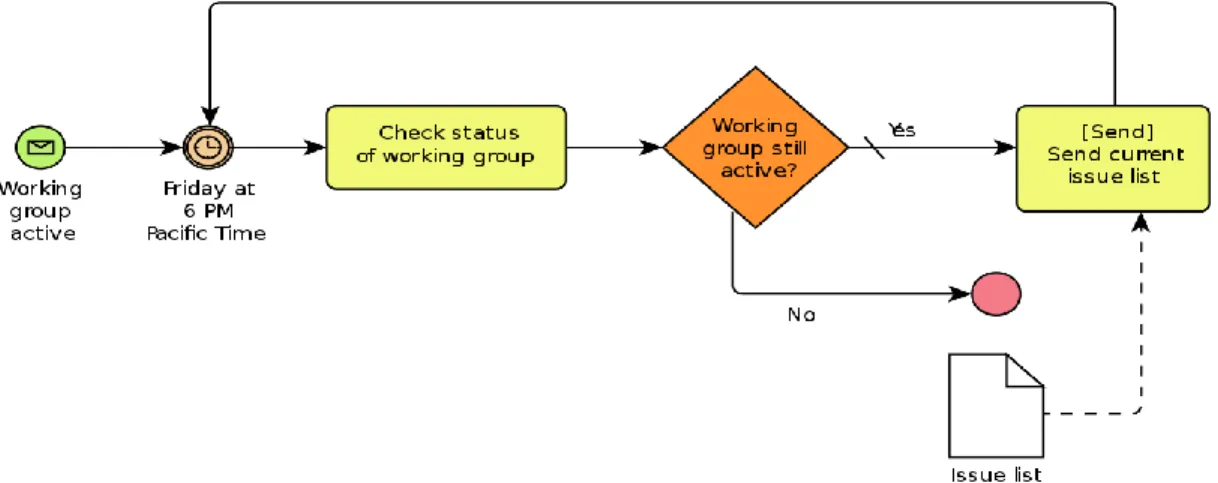
Business process modeling is a task that falls under the category of process management. By contrast, systems engineering is the practice of modeling an enterprise's processes with the purpose of analyzing, improving, and automating them. BPM is often performed by business analysts with modeling experience, subject matter experts with in-depth understanding of the processes being modeled, or, more usually, a team comprising of both. Alternatively, the process model may be generated directly from the event logs using process mining techniques.
Figure 3.1.1: Business Process Modeling
This chapter will cover the application's visual appearance, functioning, and the people who will have access to and utilize it. It will illustrate the data types necessary to develop this application and how it works; further, it will introduce us to the admin panel, the information necessary to establish an account, and how users may access it. Furthermore, it proves the system's security.
3.1 Overall Description
User: They are the prime target group for this initiative. This initiative was created to assure their service in the event of an emergency. They may make an account with this program by logging in using their Gmail address. When a person is engaged in an accident or is unable to express their feelings openly, they may submit a document (audio/video).
Admin: They represent the back-end users of the program. They have unrestricted power to make changes.
3.2 Requirement Collection and Analysis:
This is a straightforward application to develop. It is very resource-efficient and is compatible with practically all system settings.
Hardware configuration required:
Processor: Dual-core or above.
Memory: 250 GB or above.
HDD: 100 GB or above.
I/O: Keyboard, Mouse, Monitor.
Software configuration required:
OS: Windows 10 or above.
Tool: android-studio-ide.
DB: PhpMyAdmin.
Framework: CodeIgniter.
Server: Firebase.
It also ensures following requirements that is required:
Data accuracy
Admin panel control
Efficiency of working
Manual data entry minimized.
Time required must be minimum.
User friendly
Effective
3.3 Features:
In the proposed system we have several features here. These are the main feature.
Home.
Rules and Regulation.
Topics and Supervisor
Title Defense Registration.
Profile.
Share.
Feedback.
Search system.
3.4 Flow chart:
Figure: Flow chart
CHAPTER 4
DESIGN SPECIFICATION
This chapter details the architecture of our system. Furthermore, I discuss the implementation of all tools and techniques used to build this system. We demonstrate how we tested our system in this section by examining its representational construction.
4.1 Front-end or UI Design
As is common, the presentation layer included the front-end or user interface. It established that this is the sole method for the user to engage with our system. Additionally, the user experience is significantly influenced by front-end or user interface design. The major goal of building a website or mobile application is for users to rapidly locate the required choice through the user interface (UI). When using Wikipedia or the stack overflow app, the search bar automatically shows the needed default option that the great majority of users need. The front-end or user interface development process, sometimes referred to as client-side or user-site development, generates both default and bespoke XML.
Developers and designers develop structural components and features that are accessible indirectly by users through a front-end application or system.
For front-end or UI design what we needed:
Ability to create XML layouts such as Liner layouts, Relative layouts, Coordinator layouts, and Constraint layouts.
This position requires familiarity with Google Material Design.
Require an XML preview editor capable of handling complex XML documents.
This position requires knowledge in custom layout design.
Experience with HTML and CSS is preferred.
XML
XML is a markup language in the same vein as HTML. The term EML stands for Extensible Markup Language. It was created with the express intention of becoming a general-purpose markup language.
The language's principal goal is to facilitate data exchange between heterogeneous systems, such as the Internet. Numerous languages have been developed on top of the XML foundation. XHTML, XUL, and XBL are only a few examples. Additionally, you may create your own. XML does not include any predefined tags. We use XML to develop our layouts on Android since it is a lightweight language that does not add any weight to our format.
XML Layout
The Android user interface is defined by the hierarchy of View and View Group components. A View Group is a non-visible container that organizes child views. These extra widgets are needed to create the different UI components. As seen in the picture below, a View Group may contain a child element that is another view group element.
HTML
HTML is the industry's most widely utilized mark-up language. HTML components serve as the foundation for HTML pages. HTML structures allow the embedding of pictures and other objects, such as interactive forms, into the produced page. HTML supports organized texts by indicating the structural semantics of text components such as headers, paragraphs, lists, links, and quotations. HTML elements are denoted by angle brackets. Numerous allusions to HTML have been made. While trying to show a mark-up-like interface on Android using Html (...)?
If you examine the HTML class's source code, you'll note that the tags are deconstructed into spans before being applied to the Text View.
CSS
CSS is an abbreviation for "Cascading Style Sheets. The site's pages are formatted using
Cascading Style Sheets. They may be used to indicate content styles, table sizes, and other page- specific properties that must be given in the page's HTML. CSS's fundamental goal is to separate the content of a web archive (expressed in any markup dialect) from the display of that archive (that is composed utilizing Falling Templates). CSS provides a slew of advantages, including greater accessibility and flexibility of substances. Furthermore, CSS asserts control over the archive's numerous introduction attributes.
Interactive Design and UX
On June 25, 2014, Google released a new design pattern for Android application development called Material design to improve the user experience. Anyone may learn from material design what to do and what not to do to create a better user experience.
Goals:
Have a fundamental understanding of what a front-end or user interface structure is and how it contributes value.
Learn how to combine XML, HTML, and CSS properly and start squeezing.
4.2 Back-end Design
Like customer-side innovation, the back end is the computer that powers a website that the client does not see or is not expressly linked with. Nonetheless, it is disappearing from view at an alarming rate. Distribute useful information and data intuitively from the database to the program.
The framework is comprised of a database and an essayist developed in a server-side dialect that is optimized for use on web and cloud servers. However, when it comes to designing Android apps, things are not always the same. For Android application development, there are two kinds of back-end services: offline storage or back-end system and online back-end system.
Additionally, we construct the back-end system in Java or Kotlin, using the Flutter or React Native frameworks in conjunction with the Android framework. Furthermore, Google has made Kotlin the official language for developing Android applications. However, because of Kotlin's scarcity of resources for creating Android apps, the majority of developers continue to favour Java.
Java
Java is an object-oriented programming language created by Sun Microsystems and bought by Oracle. Java is capable of much more than developing Android applications due to its age.
Consequently, if you are a Java specialist, there are several career options available to you. You may not always desire to design Android-only apps. However, if you desire to talk precisely Android application development, Java allows you to fly.
Kotlin
Kotlin was developed to complement Java's skills in developing Android applications and to help with mobile development. Kotlin was built by JetBrains, the company that built Bintelli, the integrated development environment. It is an open-source, statically typed programming language based on the Java Virtual Machine (JVM). Kotlin has the benefit of being compliable to JavaScript and so allowing it to be used in combination with Java.
Flutter
Flutter is a software development kit for mobile applications that enables developers to write apps in a unified codebase and compile them for Android and iOS. Firebase is a mobile
development platform that incorporates an application's back end. Cloud fire-store is a NoSQL document database for storing, synchronizing, and querying data for mobile applications.
When combined, these three Google tools can automate a significant portion of mobile development, enabling you to move swiftly from idea to implementation.
React Native.
React Native is a JavaScript framework for developing native mobile apps for iOS and Android.
It is built on top of React, a JavaScript toolkit for designing user interfaces developed by Facebook. It is, however, tailored for mobile devices as opposed to the browser.
In other words, web developers may now use the well-known and popular JavaScript library to construct fully "native" mobile apps.
Additionally, since the majority of the code you write is platform-independent, React Native streamlines the process of building Android and iOS applications simultaneously.
CHAPTER 5
IMPLEMENTATION AND TESTING
5.1 Implementation of Database
The use stage is when you define the database management system (DBMS) for the critical component, optimize the database for that component and the programming stage, as well as construct and load the database. Create the database and its related tables. Data should be loaded into the database.
The steps for database usage are as follows: -
Database Life Cycle.
SDLC – Agile Model
Requisite gathering.
Analysis and exploration.
Logical Design.
Implementation.
5.2 Implementation of Front-end Design
The front-end embodiment, nicknamed user-side headway, creates XML and some HTML-CSS for a client-side android application. We utilized XML for the majority of our front-end and user interface designs since it is saved in distinct XML files rather than embedded inside the HTML content. Since XML data is kept in plain language, it is platform neutral. It substantially simplifies the exporting, importing, and relocating of data. Additionally, we used a variety of XML layout approaches, including Liner layout, Relative layout, Coordinator layout, and Constraint layout, in our work. Due to the range of devices accessible, it would be difficult to handle the numerous screen kinds and sizes if we designed the whole program using a single XML structure. Consequently, we use several different XML layouts.
5.3 Testing Implementation
Prior to implementation, the provision must be finalized, and our goals defined precisely. They are now conducting tests on each of the provisions' functions. Additionally, test content serves as a marker for the position of a test redaction device. The content of the computerization is written in a language that the equipment understands. The term "manual test content" refers to tests that are meant to be run manually rather than via a test execution equipment. The test methods, or test contents, are then structured into a test execution plan that contains a superscript indicating which strategies should be executed first. Composing the test system gives another chance to structure the tests and guarantee that the most effective testing is completed within the time restrictions.
5.4 Test Results and Reports
A test report should correctly represent the test's findings and enable speedy review. A statement that summarizes the data acquired during an assessment excursion illustrates the natural or work environment and links test results to destinations. Thus, once the basic architecture for connection protests is specified, we can concentrate on the future advantages of ease-of-use testing. The challenge then becomes one of organizing its occurrences in such a way that user interface designers can readily find them. Any location may be used for communication. The association of a framework is what offers it vitality and appeal to a customer. Establishing an intuitive foundation is crucial, which is what we are aiming to achieve. As mentioned earlier, we also include certain unique components to fill out our architecture. I organized our foundation in such a way that customers quickly understand why they should visit our Site. I am referring to a high degree of integration between our planning and use of adjacent networks.
Framework and Libraries
For constructing Android apps, a variety of frameworks are available, including the official Android component built in Kotlin or Java, the React native framework, and the Flutter framework. On the other side, Google suggested developers to mix the standard Android
framework with Kotlin or Java, since flutter and react-native are not native Android development methodologies.
Retrofit:
Retrofit is a productive network that makes use of the library's resources. When we transfer data to the server, get data from the server, or conduct a server-side call, our application encounters a variety of difficulties, repulsions, and so on. Additionally, we overcome these concerns fast via the usage of retrofit libraries.
Recycler View:
Item views produce views, which are often created as part of the layout process for different layouts. To begin, we'll show the list in list view. There is one exception, however: if your list view is overly extensive or complicated, particular user experience difficulties will be worsened.
As a result, the Recycler view is great for presenting a vast quantity of data in a list. For these reasons, the Recycler view library is required.
Glide:
Glide is a library for visual loading. In our limited time, we must load several photos of varied sizes and genres. Additionally, since the majority of mobile devices have substantially less capabilities, manually importing photos of varied sizes or kinds creates a slew of complications.
As a consequence, we overcome this issue by using the Glide library.
Database Server and Administration Tools AWS Mobile:
Nowadays, substantial storage is essential to adequately manage our Data. To do this, Amazon Web Service Mobile provides an ideal platform for storing your data—it offers a number of capabilities like as notification, authentication, cloud storage, data warehousing, and device farm. There are SDKs available for several platforms, including iOS, Android, Xamarin, React Native, and Unity. To begin, the plan is completely free of charge.
Firebase:
As a consequence, Firebase is an outstanding server for data storage. Additionally, Google recommends it for Android application development. Numerous components of the firebase SDK are handled automatically, which is one of the reasons it is so popular with Android developers. Numerous reasons to rejoice, including real-time database access, crash reporting, authentication, cloud storage, hosting, and an Android development lab. Additionally, it is a risk- free option to begin with.
Back4App:
It is a newly established cloud-based parsing server. Numerous features include real-time database querying, an analytics dashboard, version control, a command-line tool, multi-app tenancy, and collaboration and teams. Additionally, the trial is risk-free.
MySQL:
Instead of using AWS, Firebase, or Back4App, you may utilize a database on your hosting server, such as MySQL. MySQL is a free relational database management system (RDBMS) that your application may use if it runs on a MySQL server.
Home page and app navigation
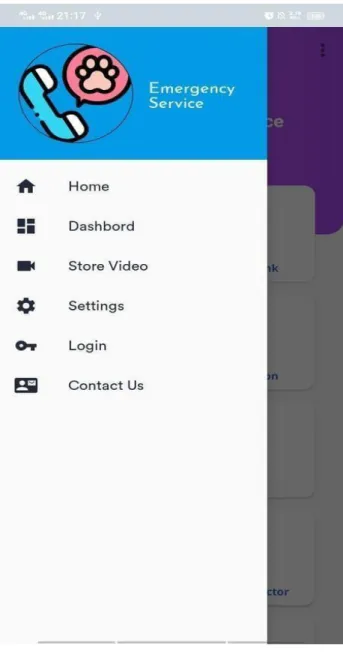
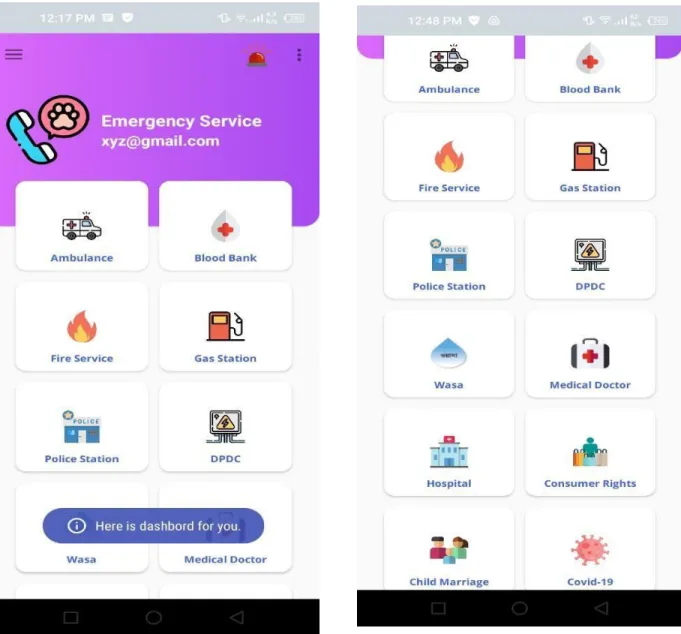
The home page for the "Emergency service" is shown in Figure 1.1, which covers all important information and procedures. Additionally, figure 1.2 depicts the app navigation option, which allows users to quickly access and pick an application.
Figure 1.1: Home page Figure 1.2: App navigation
Sign up and Login
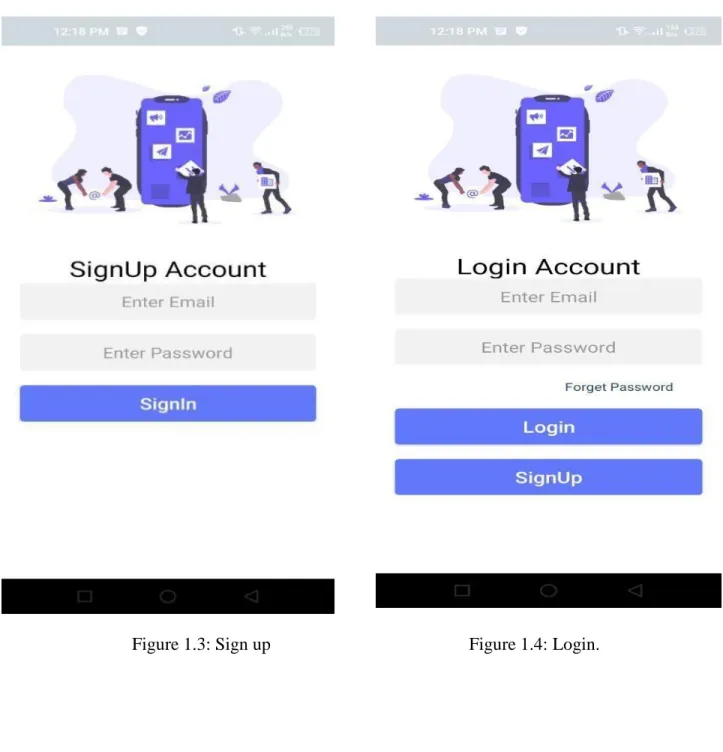
The sign-up option for a user was exposed, and to sign up, a user must provide a name, an email address, and at least an eight-character long password that contains a combination of alphabets, numbers, and symbols, as well as a confirm password. Additionally, the figure revealed that users can sign in using their previously created email address and password, or they can sign in using their Google account. They must choose an administrator or user login role for the login or sign- up option.
Figure 1.3: Sign up Figure 1.4: Login.
©Daffodil International University"
21
Reset password and user profile.
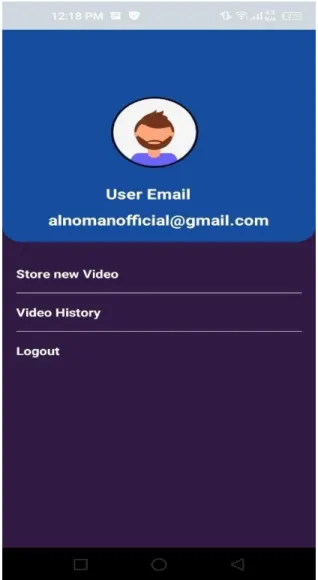
In Figure 1.5, a password reset option is seen. And this is required when a user forgets his password and attempts to reset it. After you input your email address, if it is legitimate, this app will give you an 8-digit verification number through email. Then you check your email inbox and use this verification code to reset your password. And on the right-hand side of figure 1.6, a user profile page displayed. This option becomes available if you successfully enter a valid email address and password.
Figure 1.5: Reset password Figure 1.6: User profile
©Daffodil International University"
22
Features of emergency service
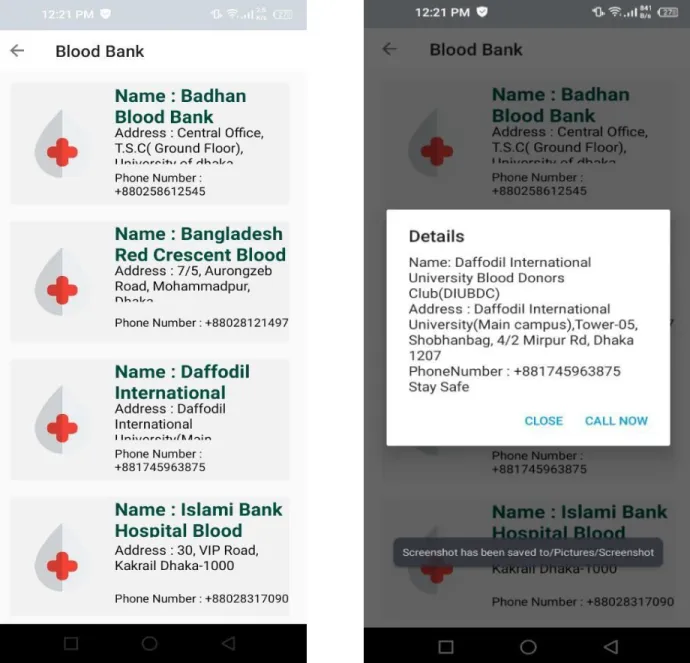
In Figure 1.3, a list of emergency services was displayed, complete with their name, address, and contact information.
Figure 1.7: Service List
Service information and phone call
The figures 1.8 and 1.9 represent the service information details from the service list page, where the user may access all service information and make a phone call.
Figure 1.8: service information Figure 1.9: Phone call
Service information and phone call
Figure 2.0: service information Figure 2.1: Phone call
Upload video and Store option
As seen in Figures 2.0 and 2.1, users can upload useful material such as video footage and save it on their account
Figure 2.2: upload video Figure 2.1: store video
Share video and Emergency Button
Figure 2.1 and 2.2 exposed that any user can easily view that he store video and share this video link to everywhere that a user needs to save from any unwanted situation and if anyone falls in any danger then instantly press the emergency button a notification send to admin and then admin send it to the organizations to rescue the victims.
Figure 2.3: Share video Figure 2.4: Emergency Button
Feedback and contact us
As illustrated in Figure 2.1 and 2.2, any user can easily view the video he has stored and share the link to it with anyone who needs to be rescued from an unwanted situation. If anyone is in danger, they can instantly press the emergency button, which sends a notification to the administrator, who then forwards it to the organizations that will rescue the victims.
Figure 2.4: Feedback Figure 2.5: Contact Us
CHAPTER 6
CONCLUSION AND FUTURE SCOPE
6.1 Discussion and Conclusion
Our project will be completed rather quickly. Our country has delayed far too long to establish an efficient "Emergency Service." This is a product that was made specifically to aid victims. The purpose of testing some of this was to develop an easy-to-use framework that limits victims' attempts. Additionally, it may store data in a straightforward and usable manner, enabling users to quickly access help desk information, organizational data, and administrative control.
Furthermore, victims have easy access to whatever information they choose, including audio and video uploads.
6.2 Future work and Further Development
This system will be enhanced in the future. This platform has a great deal of potential for future modification to make it more user-friendly. We'll begin by developing a web application to host it.
6.3 Conclusion
The purpose of this project is to cooperate in safeguarding vulnerable people's lives and property. We made an endeavor to preserve the lives of endangered persons and to reduce the harm. Now, we think that using Google Location, if an instant consumer is in danger, he may instantly communicate his location with the service provider, enabling the provider to act promptly and save victims.
APPENDIX
Appendices A Projection Reflection: During the fall-2019 semester, we began our journey to establish an "Emergency Service" for the general public. We implemented and monitored our invention as part of the improvement project in order to accomplish our goal.
Appendices B Abbreviations and Acronyms
XML is an acronym for Extensible Markup Language.
XHTML is a term for Extensive Hypertext Markup Language.
XUL is an initialize for XML User Interface Language.
XBL is an alias for XML Binding Language.
HTML is a short form for Hypertext Markup Language.
CSS is an abbreviation for “for Cascading Style Sheets.
PHP is an idiom for Hypertext Preprocessor.
UX stands for "User Experience."
UI stands for graphical user interface.
Not Only SQL.
Rest: Transfer of Representational State.
API is a designation for Application Programming Interface.
SDK is an acronym which stands for Software Development Kit iOS is the alternative spelling for the iPhone operating system.
The SDLC is an abbreviated form for the software development life cycle.
DBMS is an idiom for Database Management System.
REFERENCES
[1] Android Studio Tool Kit available at << https://developer.android.com/studio>>
[2] Front-end and backend development guide available at << https://developer.android.com/studio/intro>>
[3] Firebase for database available at << https://firebase.google.com/>>
[4] Virtual co-ordination and coding help available at << https://github.com/>>
[5] From Wikipedia, Available at https://en.wikipedia.org/wiki/Business_process_modeling
[6] https://www.moveoapps.com/blog/java-vs-kotlin/
[7] https://www.lynda.com/Flutter-tutorials/What-Flutter/786417/5000141-4.html
[8] https://www.oreilly.com/library/view/learning-react-native/9781491929049/ch01.html