PORTABLE MAIL SERVER USING RASPBERRY PI
NURHAFIZAH BT MAT ISA
BORANG PENGESAHAN STATUS TESIS*
JUDUL: PORTABLE MAIL SERVER USING RASPBERRY PI
SESI PENGAJIAN: 2014/2015
SAYA NURHAFIZAH BT MAT ISA
mengaku membenarkan tesis (PSM) ini disimpan di Perpustakaan Fakulti Teknologi Maklumat
dan Komunikasi dengan syarat-syarat kegunaan seperti berikut:
1.
Tesis dan projek adalah hakmilik Universiti Teknikal Malaysia Melaka.
2.
Perpustakaan Fakulti Teknologi Maklumat dan Komunikasi dibenarkan membuat salinan
untuk tujuan pengajian sahaja.
3.
Perpustakaan Fakulti Teknologi Maklumat dan Komunikasi dibenarkan membuat salinan
tesis ini sebagai bahan pertukaran antara institusi pengajian tinggi.
4.
**Sila tandakan (/)
_______ SULIT
(Mengandungi maklumat yang berdarjah
keselamatan atau kepentingan Malaysia seperti
yang termaktub di dalam AKTA RAHSIA
RASMI 1972)
_______ TERHAD
(Mengandungi maklumat TERHAD yang telah
ditentukan oleh organisasi/badan di mana
penyelidikan dijalankan)
________ TIDAK TERHAD
(TANGDATANGAN PENULIS)
(TANDATANGAN PENYELIA)
Alamat tetap:_________________
Nama Penyelia
Tarikh:_______________________
Tarikh:______________________
i
PORTABLE MAIL SERVER USING RASPBERRY PI
NURHAFIZAH BT MAT ISA
This report is submitted in partial fulfillment of the requirements for the
Bachelor of Computer Science (Computer Networking)
FACULTY OF INFORMATION AND COMMUNICATION TECHNOLOGY
UNIVERSITI TEKNIKAL MALAYSIA MELAKA
DECLARATION
I hereby declare that this project report entitled
PORTABLE MAIL SERVER USING RASPBERRY PI
is written by me and is my own effort and that no part has been plagiarized
without citations.
STUDENT
: __________________________ Date: _______________
(NURHAFIZAH BT MAT ISA)
iii
ACKNOWLEDGEMENTS
Alhamdulillah, praise to Allah that have given me the strength to complete my final
project. Thank you Allah for give me the guidance for helping me to finish this
project.
My deep sense of gratitude to my supervisor Dr. Nurul Azma Bt Zakaria for giving
assistant to me during completing this project. Thank you for all the support and help
that have been given by Dr. Nurul Azma. Her guidance and knowledge help me a lot
in completing my project.
A bundle of love and thanks for my family especially to my mother, Fauziah Bt
Dehelan and my father, Mat Isa Bin Pin for the support and pray. Both of you have
given me the motivation to finish up my project.
I take this opportunity to record my sincere thanks to the Faculty of Technology and
Communication especially to the Department of System and Computer
Communication for providing me with all the necessary facilities to complete this
project.
ABSTRACT
v
ABSTRAK
TABLE OF CONTENTS
CHAPTER
SUBJECT
PAGE
TITLE
i
DECLARATION
ii
ACKNOWLEDGEMENTS
iii
ABSTRACT
iv
ABSTRAK
v
TABLE OF CONTENTS
vi – viii
LIST OF TABLES
ix
LIST OF FIGURES
x – xii
CHAPTER I
INTRODUCTION
1.1 Project Background
1
1.2 Problem statement(s)
2
1.3 Objective
2
1.4 Scope
3
1.5 Project significance
3
1.6 Expected Output
4
1.7 Report Organization
4 – 6
1.8 Conclusion
6
CHAPTER II
LITERATURE REVIEW
2.1 Introduction
7 – 8
2.2 Fact and Finding
9
2.2.1 E-mail server
9
2.2.2 Raspberry Pi
10 – 12
2.3 Proposed Solution / Further Project
13
vii
CHAPTER
III
PROJECT METHODOLOGY
3.1 Introduction
15
3.2 Methodology
15 – 17
3.2.1 Phase 1: Planning
16
3.2.2 Phase 2: Analyze
16
3.2.3 Phase 3: Design
17
3.2.4 Phase 4: Implementation and Testing
17
3.3 Project Milestone
18
3.3.1 Project Gantt Chart
19
3.4 Conclusion
20
CHAPTER IV
ANALYSIS AND DESIGN
4.1 Introduction
21
4.2 Problem Analysis
21 – 23
4.3 Requirement Analysis
4.3.1 Software Requirement
24 – 25
4.3.2 Hardware Requirement
25 – 26
4.4 Detail Design
27
4.4.1 Physical Design
27
4.4.2 Logical Design
28
4.4.3 Project Planning
29
4.4.4 Block Diagram
30
4.4 Conclusion
31
CHAPTER V
IMPLEMENTATION
5.1 Introduction
32
5.2 Project Development Environment Setup
32 – 33
5.2.1 Raspberry Pi Environment Setup as Mail Server
34 – 35
5.2.2 PC (VMware) Environment Setup as Mail Server 35 – 36
5.2.3 DNS Server Environment Setup
37
5.2.5 Switch Environment Setup
39
5.3 Project Configuration Management
40
5.3.1 Raspberry Pi Mail Server Configuration
41 – 44
5.3.2 PC (VMware) Mail Server Configuration
45 – 51
5.4 Conclusion
52
CHAPTER VI
TESTING
6.1 Introduction
53
6.2 Test Plan
53
6.2.1 Test Organization
53
6.2.2 Test Environment
54
6.2.3 Test Schedule
54
6.3 Test Strategy
55
6.3.1 Classes of Test
55
6.4 Test Design
56
6.4.1 Test Description
56 – 58
6.4.2 Test Data
59 – 71
6.5 Test Result and Analysis
72 – 79
6.6 Conclusion
80
CHAPTER
VI1
CONCLUSION
7.1 Introduction
81
7.2 Project Summarization
81 – 82
7.3 Project Contribution
82 – 83
7.4 Project Limitation
83
7.5 Future Work
84
7.6 Conclusion
84
REFERENCE
85-86
ix
LIST OF TABLES
TABLE
TITLE
PAGE
2.1
Different type of server using Raspberry Pi
12
3.1
Milestone for the project
18 – 19
3.2
Gantt chart for the project
19
4.1
Typical hardware for mail server using PC
23
6.1
Connectivity Testing
56
6.2
Configuration Testing From Local Host
57
6.3
Configuration Testing From Client PC
58
6.4
Connectivity testing result
72
6.5
Configuration testing result
73
6.6
Configuration Test result from client PC
78
LIST OF FIGURES
FIGURE
TITLE
PAGE
2.1
Keyword for the project
8
2.2
Architecture of mail server
9
3.1
List of activities in all stages of the project
16
4.1
Raspberry Pi Model B+
22
4.2
Compaq 8000 Elite + 19" LCD
23
4.3
Physical diagram for the project
27
4.4
Logical diagram for the project
28
4.5
Overall project planning
29
4.6
Block Diagram for the project
30
5.1
Raspberry Pi environment setup
34
5.2
Block diagram for Raspberry Pi mail server environment
35
5.3
VMware environment setup
36
5.4
Block diagram for PC (VMware) mail server environment
36
5.5
Client environment setup
38
5.6
Switch environment setup
39
5.7
Install Postfix
41
5.8
Configuration files for Postfix
41
5.9
Installing Dovecot Package
42
5.10
Creating Mailbox file
42
5.11
Open mail configuration
42
5.12
Change the mail location value
43
5.13
Open auth.conf configuration
43
5.14
Change the auth_mechanisms
43
5.15
Change the user and group
43
5.16
Create user
44
xi
5.18
Add the IP address for DNS server inside Raspberry Pi
44
5.19
Setting for VMware machine (VM1)
45
5.20
Setting for VMware machine (VM2)
45
5.21
Setting for VMware machine (VM3)
45
5.22
Installing Postfix Package
46
5.23
Change the hostname and domain for Postfix
46
5.24
Change the home mailbox value
46
5.25
Edit the destination parameter
47
5.26
Add the IP address inside the network
47
5.27
Uncomment myorigin parameter
47
5.28
Change the inet_interface parameter
48
5.29
Change the value for smtpd banner parameter
48
5.30
Uncomment header checks and add body checks parameter
49
5.31
Add the message and mailbox size limit
49
5.32
Installing Dovecot Package
50
5.33
Change the mail location for Dovecot
50
5.34
Change the disable_plaintext_auth parameter
50
5.35
Change the mechanisms parameter
51
5.36
Start Postfix and Dovecot services
51
5.37
Create user
51
6.1
Ping from Raspberry Pi to Client PC
59
6.2
Ping from Raspberry Pi to DNS server
59
6.3
Ping from Raspberry Pi to DNS server
60
6.4
Ping from PC (VMware) to client PC
60
6.5
Ping from PC (VMware) to DNS server
61
6.6
Ping from PC (VMware) to gateway interface
61
6.14
Configuration test 2 for PC (VMware2) using local host
65
6.15
Configuration test 3 for PC (VMware2) using local host
66
6.16
Configuration test 1 for PC (VMware3) using local host
66
6.17
Configuration test 2 for PC (VMware3) using local host
67
6.18
Configuration test 3 for PC (VMware3) using local host
67
6.19
Adding new account using Microsoft Office Outlook
68
6.20
Test account setting status
68
6.21
Add new account for VMware1 user
69
6.22
Test account setting status for VMware1 user
69
6.23
Add new account for VMware2 user
70
6.24
Test account setting status for VMware2 user
70
6.25
Add new account for VMware 3 user
71
6.26
Test account setting status for VMware 3 user
71
6.27
Time before queue manager Graph
74
6.28
Time in queue manager Graph
75
1 CHAPTER I
INTRODUCTION
1.1 Project Background
Mail server is a server that handles the delivery of an e-mail across the network. The mail server mechanism consists of Mail Transport Agent (MTA) that will acts as the post office (sort and handle transportation of e-mail), Mail Delivery Agent (MDA) as the mailbox that store message receive by the server and Mail User Agent (MUA) the software use to retrieve e-mail from the server. Mail server use Simple Mail Transfer Protocol (SMTP) to send the e-mail over the internet.
Raspberry Pi is a low cost, credit-card sized computer that capable of doing everything that a desktop computer can do. The main goal of this product is to advance the education in the field of computers. The Raspberry Pi primarily uses Linux-kernel-based operating systems. But it also works in different operating system such as Firefox OS and Android.
1.2 Problem Statement(s)
Raspberry Pi is a new thing to be explore as an e-mail server. Because of that there is lack of information about how the Raspberry Pi can be use and how it work. Beside that to setting up the mail server many equipments such as hardware for the server will be needed. The equipments are computer (PC), a CPU, monitor, keyboard and others more devices. By explore the usage of the Raspberry Pi, it actually can help to explain more deeper about what is the Raspberry Pi and how it can works as the mail server.
The cost for having the PC as the e-mail server is expansive because the price for the hardware is more than thousand Ringgit. An e-mail server setup using the PC produce a noise, need a lot of space to place and need a higher power consumption because it need to be switch on 24/7 and it also not a portable server. Using Raspberry Pi as the server it can be the portable server because of the size is small. In this project, it will show and prove how the Raspberry Pi e-mail server can cut the cost better that the PC as the e-mail server and how to overcome the problem with e-mail server that setup using PC in term of the noise, portabality and power consumption.
1.3 Objective
In this project there are three main objectives that must be achieved in order to make sure the project is success. The objectives are:
To study key topics related to the project such as about the Raspberry Pi and e-mail server.
To built the raspberry pi as the e-mail server which small in size, portable and cost effective.
3
1.4 Scope
This project is focusing on the LAN environment. A LAN environment will be setup to running this project which is the e-mail server using Raspberry Pi. The LAN will consist of a router, switch, PC and Raspberry Pi. The router will act as the gate way for the LAN while switch will be use to connect all the devices or hosts inside the LAN. In addition, PC will be use as another e-mail server to do the comparison between the Raspberry Pi and PC as an e-mail server. The Raspberry Pi will be set as the e-mail server and will be given the ip address that allocated inside the LAN. The user of this e-mail server will be all the hosts that connected inside the LAN. All the hosts that located inside the LAN can sending and receiving an e-mail to each other using Microsoft outlook as the mail user agent (MUA) that being install in the hosts system. The e-mail server will act as the post office that will process all the e-mail and sending to the correct mailbox (host).
1.5 Project significance
1.6 Expected Output
A performance analysis in term of delay between Raspberry Pi mail server and
PC (VMware) mail server.
A product from a Raspberry Pi that act as an e-mail server.
1.7 Report Organization
Chapter 1: Introduction
This chapter explained the project background of the project. The problem statement and project objective also will be explained in this chapter. The scope in the project involved the LAN environment also will be explained in this project and the output for this project also will be included in this chapter.
Chapter 2: Literature Review
This chapter will explained about the domain that related with this project which is the network services. This chapter also will be discussed about the previous work that related to the topic which is about the mail-server. From the previous work, the issue or problem will be listed out and will be discussed. From the issue and problem in the existing mail server, the proposed solution will also be explained and discussed in this chapter.
Chapter 3: Project Methodology
5 Chapter 4: Analysis and Design
This chapter will be explained about the problem analysis for this project. The problem statement that have been stated in chapter 1 will be discussed in this chapter in more deeper. The requirement analysis for this project will be discussed in this chapter. The requirement analysis contsists of two main requirement which are software and hardware requirement. The detailed design for the project also will be discussed in this chapter. The designs that included in this chapter are logical and physical design for the project. The overall project planning also will be included in this chapter. Beside that, the block diagram for the project also will be attached in this chapter.
Chapter 5: Implementation
This chapter will be explained about the implementation for the project. In this project there are 2 main implementation that will be done which are Raspberry Pi and PC (VMware) implementation. The implementation contsits of the step by step configuration of Postfix and Dovecot services. The project development environment setup also will be discussed in this chapter. The block diagrams for Raspberry Pi and PC (VMware) development environment setup also will be attach in this chapter.
Chapter 6: Testing
Chapter 7: Project Conclusion
In this chapter, the project summarization will be explained. In this chapter, how the objective has been achieved also will be desribed and explained. The project contribution also will be discussed in this chapter. Each problems that have been facing during this project will be explained in the project limitation for this chapter. The future work that can be continue from this project also will be explained and discussed in this chapter. The concluding phrases to conclude the project also will be attach in this chapter.
1.8 Conclusion
7 CHAPTER II
LITERATURE REVIEW
2.1 Introduction
In this chapter we will discuss about the literature review which is related with the previous works and other information that related with this project. The main focus in this chapter is to study and analyze about what is an e-mail server. Beside that this chapter we will discuss about the Raspberry Pi, what it is actually and how it can be use as a different type of server. In this chapter also we will discuss about the proposed solution or the further project that will be develop.
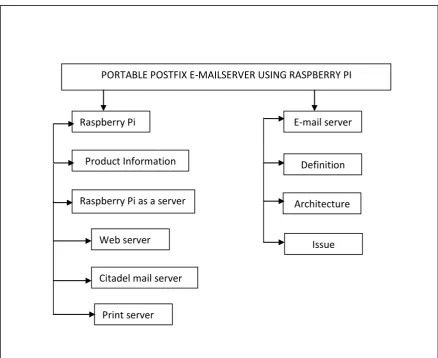
PORTABLE POSTFIX E-MAILSERVER USING RASPBERRY PI
Raspberry Pi
Product Information
Raspberry Pi as a server
Web server
Print server Citadel mail server
E-mail server
Definition
Architecture
[image:22.595.113.552.125.483.2]Issue
9 2.2 Fact and Finding
2.2.1 E-mail server
[image:23.595.121.562.583.665.2]As we know Raspberry Pi is a new thing to discover. Because of it is a new thing there are only a few research is done on it. Most of the research done is about how to make the Raspberry Pi as the home server, web server and print server. Raspberry Pi as an email server is quit new thing to discover. But there is a project that built an e-mail server using the Raspberry pi. E-mail server is a server that handles the process of delivery e-mail over a network. The server works by using the Mail Transport Agent (MTA) to handle the transportation and sorting of the e-mail. MTA then deliver the e-mail to the incoming server that use Mail Delivery Agent (MDA) to store the message received until the recipient check or read the e-mail. There are two main protocol used to retrieving e-mail on MDA which are Post Office Protocol (POP3) and Internet Access Message Protocol (IMAP). The cost of setting up an e-mail server is quite expensive. This is because we need to buy a computer to be set as the e-mail server. The price of a computer is more that thousand Ringgit. In this project the Raspberry Pi is used as the server instead of the computer. Because of the price of the Raspberry Pi is cheaper that the computer it will reduce the cost to set up the e-mail server.
2.2.2 Raspberry Pi
Raspberry Pi is a single-board Linux-powered computer. The size of the Raspberry Pi is as small as the creadit card. The Raspberry Foundation provides Debian and Arch Linux ARM distributions for download. Tools are available for Python as the main programming language, with support for BBC BASIC(via the RISC OS image or the Brandy Basic clone for Linux), C, C++, Java, Perl and
Ruby[Mehta Karankumar D, Mehta Shreya B , Raviya Kapil S,(2014)]. The Pi runs
GNU/Linux and variants of similar operating systems [Chris Clay, (2014)].Their ultimate goal is to foster computer science education [Tim Verry, (2012).] among the society. It’s capable of doing everything you’d expect a desktop computer to do, from browsing the internet and playing high-definition video, to making spreadsheets, word-processing, and playing games [Tim Verry, (2012).]. It also can be setup as a server. They are a few reasons why Raspberry Pi is suitable to set as a server .An extremely low power draw, small form factor, no noise, solid state storage, and other features make it an attractive solution for a small and lightweight server [Chris Clay, (2014).].
Raspberry Pi as a server
In the related research, there are a few type of server have been developed using the Raspberry Pi. The servers that have been developed are:
1. Raspberry Pi as a Web server