LAMPIRAN
PRETEST
(Pada tanggal __/__/____)
KUESIONER
THE INTEGRATION OF GAMES FOR COLLABORATIVE LEARNING
Saya mengucapkan terima kasih atas kesediaan Anda mengisi kuesioner ini.
Tujuan kuesioner ini adalah mengetahui pendapat Anda mengenai penggunaan
permainan (games) untuk pembelajaran kolaboratif. Segala informasi yang Anda
berikan dalam kuesioner ini bersifat konfidensial.
Atas kesediaan dan kerjasama Anda, saya mengucapkan terima kasih.
Petunjuk:
Berilah tanda centang (√) pada jawaban yang menurut Anda paling tepat.
Data Responden
Jenis Kelamin
:
Perempuan
Laki-laki
Angkatan
:
2013
2014
2015
Pertanyaan
1.
Bagaimana perasaan Anda setelah membuat game bersama-sama?
Sangat Senang
Senang Biasa Kurang Senang
Tidak
Senang
2.
Apakah Anda suka membuat pertanyaan di dalam game?
Sangat Suka
Suka Biasa
Kurang Suka
Tidak Suka
3.
Bagaimana tingkat kesulitan pembuatan game ini?
Sangat Mudah
Mudah
Biasa
Sulit Sangat Sulit
4.
Seberapa jauh template yang disediakan membantu Anda dalam pembuatan
game?
Sangat Terbantu Terbantu Biasa Kurang Terbantu Tidak Terbantu
5.
Apakah Anda setuju pembuatan game dipakai untuk belajar bersama?
Sangat Setuju
Setuju
Biasa Kurang Setuju Tidak Setuju
6.
Apakah Anda tertarik untuk membuat game lainnya dengan topik bahasan yang
Sangat Tertarik Tertarik
Biasa Kurang Tertarik Tidak
Tertarik
7.
Apakah metode belajar dengan cara membuat game membuat Anda bersemangat?
Sangat Semangat Semangat Biasa Kurang Semangat Tidak
Semangat
8.
Apakah pembuatan game dapat memenuhi kebutuhan Andauntuk dalam belajar
akan suatu hal?
Sangat Terpenuhi Terpenuhi Biasa Kurang Terpenuhi Tidak
Terpenuhi
9.
Apakah Anda tertarik mengajarkan cara pembuatan game untuk belajar bersama?
Sangat Tertarik
Tertarik Biasa
Kurang Tertarik
Tidak
Tertarik
10.
Apakah Anda tertarik membagikan hasil game yang telah dibuat kepada orang
lain?
Sangat Tertarik
Tertarik Biasa
Kurang Tertarik
Tidak
Tertarik
11.
Menurut Anda, seberapa yakinkahgame yang Anda hasilkan tersebut dapat
digunakan untuk belajar oleh orang lain?
Sangat Yakin Yakin Biasa Kurang Yakin Tidak
Yakin
12.
Menurut Anda, seberapa menarik jika game yang telah dibuat dapat dimainkan di
gadget (tablet/smartphone)?
Sangat Menarik Menarik Biasa Kurang Menarik Tidak
Menarik
13.
Menurut Anda, menarikkah penggunaan karakter kartun di dalam game?
Sangat Menarik Menarik Biasa Kurang Menarik Tidak
Menarik
14.
Menurut Anda, apakah game dengan jenis game Role Playing Game (RPG)
menarik untuk dimainkan?
Sangat Menarik Menarik Biasa Kurang Menarik Tidak
15.
Apakah Anda tertarik jika diajarkan untuk membuat game dengan jenis selain
RPG untuk belajar bersama?
Sangat Tertarik
Tertarik
Biasa Kurang Tertarik Tidak
Tertarik
1.
Tuliskan kendala dalam pembuatan game untuk belajar bersama.
__________________________________________________________________
__________________________________________________________________
2.
Tuliskan komponen dalam pembuatan game apa saja yang menurut Anda kurang
untuk keperluan belajar bersama.
__________________________________________________________________
__________________________________________________________________
3.
Tuliskan judul game atau jenis game
yang menurut Anda menarik untuk dibuat
dalam kaitannya dengan pembelajaran kolaboratif.
__________________________________________________________________
POSTTEST
(Pada tanggal __/__/____)
KUESIONER PENELITIAN
“
GAME
MAKING FRAMEWORK DEVELOPMENT FOR
COLLABORATIVE LEARNING”
Peneliti mengucapkan terima kasih atas kesediaan Anda mengisi kuesioner di
bawah ini sesuai dengan kondisi yang sebenarnya. Tujuan kuesioner ini yaitu
mengetahui pendapat Anda mengenai dampak dari penggunaan framework yang
dibuat oleh peneliti untuk membantu pengembangan game sebagai sarana
pembelajaran kolaboratif.
Terima kasih atas kesediaan dan kerjasama Anda.
Petunjuk:
Berilah tanda silang (X) pada kolom yang telah tersedia dengan memilih sesuai
dengan kondisi sebenarnya.
Data Responden
Jenis Kelamin
:
Perempuan
Laki-laki
Angkatan
: 2013
2014
2015
2016
Pertanyaan
1.
Apakah Anda senang membuat game RPG secara bersama-sama?
Sangat Senang
Senang Biasa
Kurang Senang
Tidak Senang
2.
Apakah Anda setuju pembuatan game dipakai untuk belajar bersama?
Sangat Setuju
Setuju Biasa
Kurang Setuju
Tidak Setuju
3.
Seberapa jauh penggunaan framework yang dikembangkan peneliti membantu
Anda untuk membuat game secara bersama?
Sangat Terbantu Terbantu
Biasa Kurang Terbantu Tidak
Terbantu
4.
Apakah metode belajar dengan cara membuat game dengan bantuan framework
membuat Anda bersemangat?
Sangat Semangat Semangat
Biasa Kurang Semangat Tidak
Semangat
5.
Bagaimana tingkat kemudahan dari fitur yang tersedia di dalam framework?
Sangat Mudah
Mudah Biasa Sulit
Sangat Sulit
6.
Apakah fitur-fitur yang tersedia di aplikasi framework yang diberikan memenuhi
Sangat Terpenuhi Terpenuhi Biasa Kurang Terpenuhi Tidak
Terpenuhi
7.
Seberapa besar fitur instalasi yang tersedia di framework membantu Anda dalam
pengembangan game?
Sangat Terbantu Terbantu Biasa Kurang Terbantu Tidak
Terbantu
8.
Apakah adanya fitur add member (menambahkan anggota) semakin memudahkan
Anda dalam membuat game secara bersama-sama?
Sangat Mudah
Mudah
Biasa
Sulit
Sangat Sulit
9.
Apakah fasilitas editing yang disuguhkan yaitu upload, download, delete, dan
synchronize sangat membantu dalam membuat game secara kolaboratif?
Sangat Terbantu Terbantu
Biasa Kurang Terbantu Tidak
Terbantu
10.
Seberapa jauh template
game yang disediakan membantu Anda dalam
pengembangan game untuk materi belajar yang diberikan?
11.
Sangat Terbantu Terbantu
Biasa Kurang Terbantu Tidak
Terbantu
12.
Apakah Anda tertarik untuk mengembangkan game lainnya secara bersama
dengan bantuan framework?
Sangat Tertarik Tertarik Biasa Kurang Tertarik Tidak Tertarik
13.
Menurut Anda, seberapa menarik jika game RPG yang telah Anda buat dapat
dimainkan di gadget (tablet/smartphone)?
Sangat Menarik Menarik Biasa Kurang Menarik Tidak Menarik
14.
Apakah Anda sering menggunakan aplikasi Dropbox?
Sangat
Sering
Sering
Biasa
Jarang Tidak
Pernah
15.
Menurut Anda, apakah penggunaan cloud storage sebagai tempat penyimpanan
sangat memudahkan?
Sangat Mudah
Mudah
Biasa
Sulit Sangat
Sulit
2.
Menurut Anda, fitur apa sajakah yang mempermudah pengembangan game?
(Tuliskan selengkapnya)
3.
Apakah Anda pernah menemui atau menggunakan aplikasi framework
yang
serupa? (Jika Anda pernah menemui aplikasi yang serupa, tuliskan nama aplikasi
lain tersebut)
4.
Menurut Anda fitur apa saja yang seharusnya ada di dalam aplikasi framework ini
supaya dapat membantu pembuatan game secara bersama? (Tuliskan
Judul Buku:
Mudah Membuat
Game Edukasi Berbasis
Android
Tanggal Terbit: 22 Februari 2016
ISBN: 9786020281049
Penulis: Ridwan Sanjaya, Aprilia
Ratna Christanti, Michael Satrio
Prayogo
Abstrak:
Materi pelajaran akan lebih mudah diserap siswa jika disampaikan dalam bentuk
game edukasi. Pertanyaannya, bisakah para pendidik tanpa kemampuan
pemrograman membuat game edukasi? Jawabnya, bisa! Dengan RPG Maker MV.
RPG Maker MV bisa dipelajari dalam waktu relatif singkat oleh pengguna awam
sekalipun. Dengan RPG Maker MV, Anda dapat membuat game edukasi yang
dapat dijalankan di gadget berbasis Android.
Berbagai materi pelajaran dapat disampaikan secara lebih menarik, bergantung
imajinasi dan kreativitas Anda. Buku ini mengajak Anda untuk menguasai
penggunaan RPG Maker MV mulai dari instalasi sampai mengubah aplikasi
menjadi paket APK yang bisa disebarkan melalui Google Play.
Meskipun awalnya disusun untuk guru dan praktisi pendidikan, buku ini dapat
digunakan oleh siswa, mahasiswa, dan para orangtua yang ingin membuat game
berbasis edukasi bagi anak-anaknya. Mari kita sampaikan pelajaran dengan cara
Code form Login:
PublicClass LoginPublic storedaccestoken AsString Dim path AsString
Dim FILE_NAME AsString
Dim menuutama AsNew menuutama Dim folderpath AsString
PrivateSub Form1_Load(sender AsObject, e As EventArgs) HandlesMyBase.Load Dim registrybrowser As RegistryKey =
Registry.CurrentUser.OpenSubKey("SOFTWARE\Microsoft\Internet
Explorer\Main\FeatureControl\FEATURE_BROWSER_EMULATION", True) registrybrowser.SetValue("RPGMakerGameMakingKit.exe", 8000, RegistryValueKind.DWord)
Dim clientID = "j6hi200n0ktjexg" path =
System.Environment.GetFolderPath(Environment.SpecialFolder.MyDocuments) folderpath = path & "\RPG development kit"
FILE_NAME = folderpath & "\myaccestoken.txt" Dim logfile = folderpath & "\logfile.txt"
Dim redirectUri = New Uri("https://www.dropbox.com/1/oauth2/redirect_receiver") Dim uri =
String.Format("https://www.dropbox.com/oauth2/authorize?response_type=token&redirec t_uri={0}&client_id={1}&force_reapprove=true", redirectUri, clientID)
If System.IO.Directory.Exists(folderpath) = FalseThen System.IO.Directory.CreateDirectory(folderpath) EndIf
If System.IO.File.Exists(FILE_NAME) = FalseThen System.IO.File.Create(FILE_NAME).Dispose() EndIf
If System.IO.File.Exists(logfile) = FalseThen System.IO.File.Create(logfile).Dispose() EndIf
IfMy.Computer.Network.IsAvailable Then If FileLen(FILE_NAME) = 0 Then WebBrowser1.Navigate(uri) Else
menuutama.Show() Me.Close()
EndIf Else
MessageBox.Show("Internet Connection Needed, Please Check you internet connection or contact your network administrator")
Me.Close() EndIf
EndSub
PrivateSub WebBrowser1_DocumentCompleted(sender AsObject, e As WebBrowserDocumentCompletedEventArgs) Handles
WebBrowser1.DocumentCompleted
If (e.Url.AbsoluteUri.Contains("#access_token")) Then Dim accessToken =
HttpUtility.ParseQueryString(e.Url.Fragment.Substring(1))("access_token")
MessageBox.Show("Synchronizing" + Environment.NewLine + "Please wait") If System.IO.File.Exists(FILE_NAME) = FalseThen
System.IO.File.Create(FILE_NAME).Dispose() EndIf
Dim objWriter AsNew System.IO.StreamWriter(FILE_NAME, False) objWriter.Write(accessToken)
MessageBox.Show("Your account has been synchronized") menuutama.Show()
Me.Close()
Me.Cursor = Cursors.AppStarting EndIf
EndSub EndClass
Code form Menu Utama:
PublicClass menuutama Private A As DropboxClient Dim IList AsObjectDim sourcepath AsString Dim FILE_NAME AsString Dim storedaccesstoken AsString Dim root
Dim folder Dim foldername Dim logfile Dim updatestate Dim byteuploaded
Dim sendbasicsize AsInteger Dim logstrg AsString
Dim info
Dim totalsize AsInteger Dim secs AsInteger Dim constat AsInteger SubNew()
InitializeComponent() sourcepath =
System.Environment.GetFolderPath(Environment.SpecialFolder.MyDocuments) Dim folderpath = sourcepath & "\RPG development kit"
FILE_NAME = folderpath & "\myaccestoken.txt"
root = System.Environment.GetFolderPath(Environment.SpecialFolder.UserProfile) folder = root & "\Dropbox"
Dim folders = folder & "\templateCL" & "\Game.rpgproject" logfile = folderpath & "\logfile.txt"
If System.IO.File.Exists(folders) = FalseThen GameEngineToolStripMenuItem.Enabled = False Else
GameEngineToolStripMenuItem.Enabled = True EndIf
Me.Cursor = Cursors.Default EndSub
PrivateSub menuutama_Load(sender AsObject, e As EventArgs) Handles MyBase.Load
storedaccesstoken = My.Computer.FileSystem.ReadAllText(FILE_NAME) IfNot FileLen(FILE_NAME) = 0 Then
IfMy.Computer.Network.IsAvailable Then constat = 1
checkcon()
Timer1.Interval = 1000 Timer1.Start()
If constat = 1 Then
A = New DropboxClient(storedaccesstoken) info = A.Users.GetCurrentAccountAsync
Dim Space = A.Users.GetSpaceUsageAsync
ruangkosong.Text = "Used Spaces : " & filesize(Space.Result.Used) & " From " & filesize(Space.Result.Allocation.AsIndividual.Value.Allocated)
ForEach File In A.Files.ListFolderAsync(String.Empty).Result.Entries() Dim NewItem AsNew ListViewItem
NewItem.Text = Path.GetFileName(File.Name) If File.IsFolder Then
If File.AsFolder.SharedFolderId = String.Empty Then NewItem.SubItems.Add("Directory")
NewItem.SubItems.Add("-")
NewItem.SubItems.Add("Not shared") NewItem.ImageIndex = 1
NewItem.Tag = 0 ElseIf File.IsFolder Then
NewItem.SubItems.Add("Directory") NewItem.SubItems.Add("-")
NewItem.SubItems.Add("shared") NewItem.ImageIndex = 1
NewItem.Tag = 1 EndIf
EndIf
If File.IsFile Then
NewItem.SubItems.Add("File")
NewItem.SubItems.Add(filesize(File.AsFile.Size)) NewItem.ImageIndex = 2
EndIf
listfile.Items.Add(NewItem) NewItem.EnsureVisible() Next
write_log(Date.Now.ToString("dd:MM:yyyy - HH:mm:ss") & "||" & "Login as : " & " " & info.Result.Email)
EndIf Else
MessageBox.Show("Internet Connection Needed, Please Check you internet connection or contact your network administrator")
Me.Close() EndIf
EndIf EndSub
Function filesize(ByVal size AsDouble) AsString Dim type AsString() = {"B", "KB", "MB", "GB"} Dim sizedouble AsDouble = size
Dim CSA AsInteger = 0
While sizedouble >= 1024 AndAlso CSA + 1 < type.Length CSA += 1
sizedouble = sizedouble / 1024 EndWhile
Return [String].Format("{0:0.##} {1}", sizedouble, type(CSA)) EndFunction
PrivateSub listfile_DoubleClick(sender AsObject, e As EventArgs) Handles listfile.DoubleClick
ForEach C As ListViewItem In listfile.SelectedItems OnErrorResumeNext
If C.Text = "..."Then listfile.Items.Clear()
Dim NewItem AsNew ListViewItem NewItem.Text = "..."
NewItem.ImageIndex = 2 listfile.Items.Add(NewItem) EndIf
direktori.Text = direktori.Text.Substring(0, direktori.Text.LastIndexOf("/")) write_log(Date.Now.ToString("dd:MM:yyyy - HH:mm:ss") & "||" & "Opening Directory " & " " & C.Text)
ForEach File In A.Files.ListFolderAsync(direktori.Text).Result.Entries Dim NewItem AsNew ListViewItem
NewItem.Text = Path.GetFileName(File.Name) If File.IsFolder Then
If File.AsFolder.SharedFolderId = String.Empty Then NewItem.SubItems.Add("Directory")
NewItem.SubItems.Add("-")
NewItem.SubItems.Add("Not shared") NewItem.Tag = 2
NewItem.ImageIndex = 1 ElseIf File.IsFolder Then
NewItem.SubItems.Add("Directory") NewItem.SubItems.Add("-")
NewItem.SubItems.Add("shared") NewItem.Tag = 1
NewItem.ImageIndex = 1 EndIf
EndIf
If File.IsFile Then
NewItem.SubItems.Add("File")
NewItem.SubItems.Add(filesize(File.AsFile.Size)) NewItem.ImageIndex = 2
EndIf
listfile.Items.Add(NewItem) NewItem.EnsureVisible() Next
Else
listfile.Items.Clear()
Dim back AsNew ListViewItem back.Text = "..."
back.ImageIndex = 2 listfile.Items.Add(back) direktori.Text += "/" & C.Text
ForEach File In A.Files.ListFolderAsync(direktori.Text).Result.Entries Dim NewItem AsNew ListViewItem
NewItem.Text = Path.GetFileName(File.Name) If File.IsFolder Then
If File.AsFolder.SharedFolderId = String.Empty Then NewItem.SubItems.Add("Directory")
NewItem.SubItems.Add("-")
NewItem.SubItems.Add("Not shared") NewItem.ImageIndex = 2
NewItem.Tag = 2 ElseIf File.IsFolder Then
NewItem.SubItems.Add("Directory") NewItem.SubItems.Add("-")
NewItem.SubItems.Add("shared") NewItem.ImageIndex = 1
EndIf
If File.IsFile Then
NewItem.SubItems.Add("File")
NewItem.SubItems.Add(filesize(File.AsFile.Size)) NewItem.ImageIndex = 2
EndIf
listfile.Items.Add(NewItem) NewItem.EnsureVisible() Next
EndIf Next EndSub
PrivateAsyncSub LogoutToolStripMenuItem_Click(sender AsObject, e As EventArgs) Handles LogoutToolStripMenuItem.Click
write_log(Date.Now.ToString("dd:MM:yyyy - HH:mm:ss") & "||" & "Loging Out as : " & " " & info.Result.Email)
write_log("---") Timer1.Stop()
Await A.Auth.TokenRevokeAsync
If System.IO.File.Exists(FILE_NAME) = TrueThen System.IO.File.Delete(FILE_NAME)
EndIf
Dim login AsNew Login login.Show()
Me.Close() EndSub
PrivateSub DeleteToolStripMenuItem_Click(sender AsObject, e As EventArgs) Handles DeleteToolStripMenuItem.Click
ForEach C As ListViewItem In listfile.SelectedItems
write_log(Date.Now.ToString("dd:MM:yyyy - HH:mm:ss") & "||" & "Deleting" & " " & C.Text)
Dim Del = A.Files.DeleteAsync(direktori.Text & "/" & C.Text) C.Remove()
write_log(Date.Now.ToString("dd:MM:yyyy - HH:mm:ss") & "||" & C.Text & " " & "Deleted")
MsgBox("Successully Deleted") Next
EndSub
PublicAsyncSub UploadToolStripMenuItem1_Click(sender AsObject, e As EventArgs) Handles UploadToolStripMenuItem1.Click
Using FolderBrowserDialog AsNew FolderBrowserDialog
If FolderBrowserDialog.ShowDialog() <> Windows.Forms.DialogResult.OK Then Return
Dim alamat AsString = FolderBrowserDialog.SelectedPath Dim rootname AsString = Path.GetFileName(alamat).ToString Dim hitungawal = Directory.EnumerateDirectories(alamat)
write_log(Date.Now.ToString("dd:MM:yyyy - HH:mm:ss") & "||" & "Upload Folder " & " " & rootname)
IfNot hitungawal.Any() Then MsgBox("Mulai")
Await uploadberkas(alamat, rootname) Else
Dim toproot AsString = Directory.GetParent(alamat).ToString Dim folderlist = Directory.GetDirectories(alamat)
Dim size AsInteger Dim total AsInteger
ForEach fileorfolder In foldersize.GetFiles("*.*", SearchOption.AllDirectories) size += fileorfolder.Length
total += 1 Next
totalsize = total
Dim filelist = Directory.GetFiles(alamat)
ForEach arsip AsStringIn folderlist
Await LoadSubDirs(arsip, toproot, rootname, size) Next
ForEach berkas AsStringIn filelist totalsize -= 1
Dim fileinfos = Path.GetFileName(berkas)
Dim basicsize = My.Computer.FileSystem.GetFileInfo(berkas) sendbasicsize = basicsize.Length
Dim jalur = Path.GetFullPath(berkas)
Dim tujuan = direktori.Text & "/" & jalur.Substring(toproot.Length + 1).Replace("\", "/")
Await UploadFileforfolder(berkas, tujuan, sendbasicsize, size, rootname, fileinfos, totalsize)
Next EndIf EndUsing EndSub
PrivateAsyncFunction LoadSubDirs(dir AsString, topdir AsString, rootname As String, size AsInteger) As Task
Dim subdirectoryEntries AsString() = Directory.GetDirectories(dir) Dim filelist = Directory.GetFiles(dir)
ForEach subdirectory AsStringIn subdirectoryEntries Await LoadSubDirs(subdirectory, topdir, rootname, size) Next
ForEach berkas AsStringIn filelist totalsize -= 1
Dim fileinfos = Path.GetFileName(berkas)
Dim basicsize = My.Computer.FileSystem.GetFileInfo(berkas) sendbasicsize = basicsize.Length
Dim jalur = Path.GetFullPath(berkas)
Dim tujuan = direktori.Text & "/" & jalur.Substring(topdir.Length + 1).Replace("\", "/")
Await UploadFileforfolder(berkas, tujuan, sendbasicsize, size, rootname, fileinfos, totalsize)
Next EndFunction
PrivateAsyncFunction uploadberkas(alamat, rootname) As Task Dim nama AsString = New DirectoryInfo(alamat).Name.ToString
Dim Createfolder = A.Files.CreateFolderAsync(direktori.Text & "/" & nama) foldername = Path.GetFileName(Createfolder.Result.Name)
Dim hitungfile = Directory.EnumerateFiles(alamat) Dim foldersize AsNew DirectoryInfo(alamat) Dim size AsInteger
Dim total AsInteger
ForEach fileorfolder In foldersize.GetFiles("*.*", SearchOption.AllDirectories) size += fileorfolder.Length
Next
formrefresh(1)
ForEach berkas AsStringIn hitungfile total -= 1
Dim namaberkas = berkas
Dim fileinfos = Path.GetFileName(berkas) Dim filetempat = Path.GetFullPath(berkas)
Dim basicsize = My.Computer.FileSystem.GetFileInfo(filetempat) sendbasicsize = basicsize.Length
Dim tujuan = direktori.Text & "/" & foldername & "/" & Path.GetFileName(berkas) Await UploadFileforfolder(berkas, tujuan, sendbasicsize, size, rootname, fileinfos, total)
Next EndFunction
AsyncFunction UploadFileforfolder(localPath AsString, remotePath AsString,
filebasicsize AsInteger, size AsInteger, rootname AsString, filenames AsString, total As Integer) As Task
Me.Cursor = Cursors.WaitCursor Me.Enabled = True
Const ChunkSize AsInteger = 1024 * 1024
Using fileStream = File.Open(localPath, FileMode.Open) If fileStream.Length <= ChunkSize Then
count.Text = total & " Left"
Await A.Files.UploadAsync(remotePath, body:=fileStream)
write_log(Date.Now.ToString("dd:MM:yyyy - HH:mm:ss") & "||" & filenames & " Uploaded")
Else
AwaitMe.ChunkUploadfolder(remotePath, fileStream, ChunkSize, filebasicsize, rootname, filenames, total)
EndIf
If total = 0 Then
write_log(Date.Now.ToString("dd:MM:yyyy - HH:mm:ss") & "||" & rootname & "Folder Uploaded")
MessageBox.Show("Succesfuly uploaded") Me.Cursor = Cursors.Default
Me.Enabled = True formrefresh(1) EndIf
EndUsing EndFunction
PrivateAsyncFunction ChunkUploadfolder(path As [String], stream As FileStream, chunkSize AsInteger, filebasic AsInteger, rootname AsString, filename AsString, total AsInteger) As Task
Dim numChunks AsInteger = CInt(Math.Ceiling(CDbl(stream.Length) / chunkSize)) Dim buffer AsByte() = NewByte(chunkSize - 1) {}
Dim sessionId AsString = Nothing For idx AsInteger = 0 To numChunks - 1
Dim byteRead = stream.Read(buffer, 0, chunkSize)
Using memStream = New MemoryStream(buffer, 0, byteRead) If idx = 0 Then
Dim result = Await A.Files.UploadSessionStartAsync(False, memStream) sessionId = result.SessionId
Else
Dim cursor = New UploadSessionCursor(sessionId, CULng(CUInt(chunkSize) * CUInt(idx)))
kondisi.Text = filesize(byteuploaded) & " From " & filesize(filebasic) count.Text = path & filename & " " & total & " Left"
If idx = numChunks - 1 Then
Dim fileMetadata As FileMetadata = Await
A.Files.UploadSessionFinishAsync(cursor, New CommitInfo(path), memStream)
write_log(Date.Now.ToString("dd:MM:yyyy - HH:mm:ss") & "||" & filename & "File Uploaded")
kondisi.Text = filesize(filebasic) & " Uploaded" Else
Await A.Files.UploadSessionAppendV2Async(cursor, False, memStream) EndIf
EndIf
If total = 0 Then
MessageBox.Show("Folder Uploaded")
kondisi.Text = filesize(filebasic) & " Has been Uploaded" Me.Cursor = Cursors.Default
Me.Enabled = True formrefresh(1) EndIf
EndUsing Next
EndFunction
PrivateAsyncSub UploadToolStripMenuItem2_Click(sender AsObject, e As EventArgs) Handles UploadToolStripMenuItem2.Click
Dim C AsNew OpenFileDialog C.Title = "Choose File"
C.Filter = "All Files (*.*)|*.*"
If C.ShowDialog = Windows.Forms.DialogResult.OK Then Dim fileinfos = Path.GetFileName(C.FileName)
Dim filetempat = Path.GetFullPath(C.FileName)
Dim basicsize = My.Computer.FileSystem.GetFileInfo(filetempat) sendbasicsize = basicsize.Length
Dim tempat AsString = direktori.Text & "/" & fileinfos
write_log(Date.Now.ToString("dd:MM:yyyy - HH:mm:ss") & "||" & "Upload" & " " & C.FileName)
Await Upload(filetempat, tempat, sendbasicsize, fileinfos) EndIf
EndSub
AsyncFunction Upload(localPath AsString, remotePath AsString, filebasicsize As Integer, filename AsString) As Task
Const ChunkSize AsInteger = 4096 * 1024 Me.Cursor = Cursors.WaitCursor
Using fileStream = File.Open(localPath, FileMode.Open) If fileStream.Length <= ChunkSize Then
Await A.Files.UploadAsync(remotePath, body:=fileStream) MessageBox.Show("Upload Complete")
write_log(Date.Now.ToString("dd:MM:yyyy - HH:mm:ss") & "||" & filename & " " & "Uploaded")
Me.Cursor = Cursors.Default formrefresh(1)
Else
AwaitMe.ChunkUpload(remotePath, fileStream, ChunkSize, filebasicsize, filename)
PrivateAsyncFunction ChunkUpload(path As [String], stream As FileStream, chunkSize AsInteger, filebasic AsInteger, filename AsString) As Task
Dim numChunks AsInteger = CInt(Math.Ceiling(CDbl(stream.Length) / chunkSize)) Dim buffer AsByte() = NewByte(chunkSize - 1) {}
Dim sessionId AsString = Nothing For idx AsInteger = 0 To numChunks - 1
Dim byteRead = stream.Read(buffer, 0, chunkSize)
Using memStream = New MemoryStream(buffer, 0, byteRead) If idx = 0 Then
Dim result = Await A.Files.UploadSessionStartAsync(False, memStream) sessionId = result.SessionId
Else
Dim cursor = New UploadSessionCursor(sessionId, CULng(CUInt(chunkSize) * CUInt(idx)))
byteuploaded = cursor.Offset
MessageBox.Show("Upload Starting")
kondisi.Text = filesize(byteuploaded) & "From" & filesize(filebasic) If idx = numChunks - 1 Then
Dim fileMetadata As FileMetadata = Await
A.Files.UploadSessionFinishAsync(cursor, New CommitInfo(path), memStream)
write_log(Date.Now.ToString("dd:MM:yyyy - HH:mm:ss") & "||" & filename & " " & "Uploaded")
rightclick.Enabled = True Me.Cursor = Cursors.Default Else
Await A.Files.UploadSessionAppendV2Async(cursor, False, memStream) EndIf
EndIf EndUsing Next
MessageBox.Show("Upload Complete")
kondisi.Text = "upload complete" & filesize(filebasic) & " has been uploaded" formrefresh(1)
EndFunction
PrivateSub DownloadToolStripMenuItem2_Click(sender AsObject, e As EventArgs) Handles DownloadToolStripMenuItem2.Click
ForEach D As ListViewItem In listfile.SelectedItems Dim C AsNew SaveFileDialog
C.Title = " Save File To" C.Filter = "All Files (*.*)|*.*"
C.FileName = Path.GetFileName(D.Text)
If C.ShowDialog = Windows.Forms.DialogResult.OK Then DownloadFile(D.Text, C.FileName)
EndIf Next EndSub
AsyncSub DownloadFile(Filepath AsString, Final AsString) Dim Down = Await A.Files.DownloadAsync(direktori.Text & "/" & Path.GetFileName(Filepath))
File.WriteAllBytes(Final, Await Down.GetContentAsByteArrayAsync) MsgBox("Successfully Downloaded")
EndSub
ForEach C As ListViewItem In listfile.SelectedItems Dim isfoldershared = C.Tag
If isfoldershared = 1 Then
MessageBox.Show(" Folder already Shared please add the member of the folder")
Else
Dim sharefolder = Await A.Sharing.ShareFolderAsync(direktori.Text & "/" & C.Text)
Dim sharedfolderid = ""
If (sharefolder.IsAsyncJobId) Then While (True)
Dim shareFolderJobStatus = Await
A.Sharing.CheckShareJobStatusAsync(sharefolder.AsAsyncJobId.Value) If (shareFolderJobStatus.IsFailed) Then
MessageBox.Show("Sharing folder failed: ", shareFolderJobStatus.IsFailed.ToString)
Return
ElseIf (shareFolderJobStatus.IsInProgress) Then Console.WriteLine("Sharing folder in progress...") System.Threading.Thread.Sleep(500)
ElseIf (shareFolderJobStatus.IsComplete) Then MessageBox.Show("Sharing folder complete.") sharedfolderid =
shareFolderJobStatus.AsComplete.Value.SharedFolderId EndIf
EndWhile
ElseIf (sharefolder.IsComplete) Then
sharedfolderid = sharefolder.AsComplete.Value.SharedFolderId Else
Return EndIf
Dim email = InputBox("Please input the member dropbox email", "email") IfNot email = String.Empty Then
Dim member = {New AddMember(New MemberSelector.Email(email), accessLevel:=AccessLevel.Editor.Instance)}
Await A.Sharing.AddFolderMemberAsync(sharedFolderId:=sharedfolderid, members:=member)
MessageBox.Show("Member Added to the Folder")
write_log(Date.Now.ToString("dd:MM:yyyy - HH:mm:ss") & "||" & C.Text & " Shared " & email & " Added as First member")
formrefresh(1) EndIf
EndIf Next EndSub
PrivateAsyncSub UnshareToolStripMenuItem_Click(sender AsObject, e As EventArgs) Handles UnshareToolStripMenuItem.Click
ForEach C As ListViewItem In listfile.SelectedItems
Dim sharefolder = Await A.Files.GetMetadataAsync(direktori.Text & "/" & C.Text) Dim sharedfolderid = sharefolder.AsFolder.SharedFolderId.ToString
If sharedfolderid = String.Empty Then MessageBox.Show("Not Shared Folder") Else
Dim member = A.Sharing.ListFolderMembersAsync(sharedfolderid, limit:=100).Result.Users
Dim logedaccount = A.Users.GetCurrentAccountAsync Dim id = logedaccount.Result.AccountId
If owner = id Then
Await A.Sharing.UnshareFolderAsync(sharedfolderid, False) MessageBox.Show("Folder Unshared")
write_log(Date.Now.ToString("dd:MM:yyyy - HH:mm:ss") & "||" & C.Text & " Unshared ")
formrefresh(1) Else
MessageBox.Show(" You dont Have Permission") EndIf
EndIf Next EndSub
PrivateAsyncSub AddMemberToolStripMenuItem1_Click(sender AsObject, e As EventArgs) Handles AddMemberToolStripMenuItem1.Click
ForEach C As ListViewItem In listfile.SelectedItems
Dim sharefolder = Await A.Files.GetMetadataAsync(direktori.Text & "/" & C.Text)
Dim sharedfolderid = sharefolder.AsFolder.SharedFolderId.ToString Dim email = InputBox("Please input the member dropbox email", "email") IfNot email = String.Empty Then
Dim member = {New AddMember(New MemberSelector.Email(email), accessLevel:=AccessLevel.Editor.Instance)}
Await A.Sharing.AddFolderMemberAsync(sharedFolderId:=sharedfolderid, members:=member)
MessageBox.Show("Member Added to Folder")
write_log(Date.Now.ToString("dd:MM:yyyy - HH:mm:ss") & "||" & email & "Added member To " & C.Text)
EndIf Next EndSub
PrivateAsyncSub AddMemberToolStripMenuItem_Click(sender AsObject, e As EventArgs)
ForEach C As ListViewItem In listfile.SelectedItems Dim filepath AsString = direktori.Text & "/" & C.Text
Dim email = InputBox("Please input the member dropbox email", "email") IfNot C.Name.EndsWith(".jpg") And C.Name.EndsWith(".mp3") And C.Name.EndsWith(".zip") AndNot email = String.Empty Then
Dim memberfile = {New MemberSelector.Email("email")}
Dim process = Await A.Sharing.AddFileMemberAsync(filepath, memberfile, accessLevel:=AccessLevel.Editor.Instance)
MessageBox.Show("Member Added to the file")
write_log(Date.Now.ToString("dd:MM:yyyy - HH:mm:ss") & "||" & email & " Member Added")
Else
MessageBox.Show("Incompatible file format to upload, Please upload this file to a folder and share it")
EndIf Next EndSub
PrivateSub NotifToolStripMenuItem_Click(sender AsObject, e As EventArgs) Handles NotifToolStripMenuItem.Click
Dim notif AsNew notif notif.Show()
Me.Hide() EndSub
PrivateSub CreateFolderToolStripMenuItem_Click(sender AsObject, e As EventArgs) Handles CreateFolderToolStripMenuItem.Click
Dim Name AsString = InputBox("Folder Name", "Create Folder", , -1, -1) Dim Create = A.Files.CreateFolderAsync(direktori.Text & "/" & Name)
write_log(Date.Now.ToString("dd:MM:yyyy - HH:mm:ss") & "||" & "Folder" & Name & " Member Added")
Dim NewItem AsNew ListViewItem
NewItem.Text = Path.GetFileName(Create.Result.Name) NewItem.SubItems.Add("Directory")
NewItem.ImageIndex = 0 listfile.Items.Add(NewItem)
MsgBox("Successfully Created Folder") EndSub
PrivateSub RefreshToolStripMenuItem_Click(sender AsObject, e As EventArgs) Handles RefreshToolStripMenuItem.Click
listfile.Items.Clear()
ForEach File In A.Files.ListFolderAsync(String.Empty).Result.Entries() Dim NewItem AsNew ListViewItem
NewItem.Text = Path.GetFileName(File.Name) If File.IsFolder Then
If File.AsFolder.SharedFolderId = String.Empty Then NewItem.SubItems.Add("Directory")
NewItem.SubItems.Add("-")
NewItem.SubItems.Add("Not shared") NewItem.ImageIndex = 1
ElseIf File.IsFolder Then
NewItem.SubItems.Add("Directory") NewItem.SubItems.Add("-")
NewItem.SubItems.Add("shared") NewItem.ImageIndex = 1
EndIf EndIf
If File.IsFile Then
NewItem.SubItems.Add("File")
NewItem.SubItems.Add(filesize(File.AsFile.Size)) NewItem.ImageIndex = 2
EndIf
listfile.Items.Add(NewItem) NewItem.EnsureVisible() Next
EndSub
PrivateSub AboutToolStripMenuItem_Click(sender AsObject, e As EventArgs) Handles AboutToolStripMenuItem.Click
Dim about AsNew AboutBox1 about.Show()
Me.Hide() EndSub
PrivateSub OpenFolderToolStripMenuItem_Click(sender AsObject, e As EventArgs) Handles OpenFolderToolStripMenuItem.Click
Dim filepath AsString = folder
write_log(Date.Now.ToString("dd:MM:yyyy - HH:mm:ss") & "||" & "Opening " & filepath)
Process.Start(filepath) Next
EndSub
PrivateSub GameEngineToolStripMenuItem_Click(sender AsObject, e As EventArgs) Handles GameEngineToolStripMenuItem.Click
Dim folders = folder & "\templateCL" & "\Game.rpgproject"
write_log(Date.Now.ToString("dd:MM:yyyy - HH:mm:ss") & "||" & "Opening " & folders)
Process.Start(folders) EndSub
PrivateSub OpenRPGMakerToolStripMenuItem_Click(sender AsObject, e As EventArgs) Handles OpenRPGMakerToolStripMenuItem.Click
Dim rpg =
System.Environment.GetFolderPath(Environment.SpecialFolder.ProgramFilesX86) Dim file = rpg & "\KADOKAWA\RPGMV" & "\RPGMV.exe"
write_log(Date.Now.ToString("dd:MM:yyyy - HH:mm:ss") & "||" & "Opening " & file) Shell(file)
EndSub
PrivateSub DropboxDekstopToolStripMenuItem_Click(sender AsObject, e As EventArgs) Handles DropboxDekstopToolStripMenuItem.Click
Dim drop =
System.Environment.GetFolderPath(Environment.SpecialFolder.ProgramFilesX86) Dim file = drop & "\Dropbox\Client" & "\Dropbox.exe"
write_log(Date.Now.ToString("dd:MM:yyyy - HH:mm:ss") & "||" & "Opening " & file) Shell(file)
EndSub
PrivateAsyncSub ShowMemberToolStripMenuItem1_Click(sender AsObject, e As EventArgs) Handles ShowMemberToolStripMenuItem1.Click
ForEach C As ListViewItem In listfile.SelectedItems
Dim sharefolder = Await A.Files.GetMetadataAsync(direktori.Text & "/" & C.Text) Dim sharedfolderid = sharefolder.AsFolder.SharedFolderId.ToString
If sharedfolderid = String.Empty Then MessageBox.Show("Not Shared Folder") Else
Dim member = A.Sharing.ListFolderMembersAsync(sharedfolderid, limit:=100).Result.Users
Dim usersOutput = member.Select(Function(m) m.User.AccountId) Dim pengguna = A.Users.GetAccountBatchAsync(usersOutput).Result Dim nama = pengguna.Select(Function(n) n.Name.DisplayName.ToString) Dim list = String.Join(", ", nama)
MessageBox.Show(list)
write_log(Date.Now.ToString("dd:MM:yyyy - HH:mm:ss") & "||" & " Opening List Of " & C.Text & " Member")
EndIf Next EndSub
PrivateSub GetLinkToolStripMenuItem_Click(sender AsObject, e As EventArgs) Handles GetLinkToolStripMenuItem.Click
Dim getlink = A.Sharing.CreateSharedLinkWithSettingsAsync(direktori.Text & "/" & C.Text).Result.Url
My.Computer.Clipboard.SetText(getlink.ToString)
write_log(Date.Now.ToString("dd:MM:yyyy - HH:mm:ss") & "||" & C.Name & "Link : " & getlink.ToString)
sourcepath =
System.Environment.GetFolderPath(Environment.SpecialFolder.MyDocuments) Dim folderpath = sourcepath & "\RPG development kit"
Dim save = folderpath & "\" & C.Text & ".txt" If System.IO.File.Exists(save) = FalseThen System.IO.File.Create(save).Dispose() EndIf
Dim objWriter AsNew System.IO.StreamWriter(save, False) objWriter.Write(getlink)
objWriter.Close()
MessageBox.Show("Link Succesfully created") Next
EndSub
Sub formrefresh(triger AsInteger) If triger = 1 Then
listfile.Items.Clear()
ForEach File In A.Files.ListFolderAsync(String.Empty).Result.Entries() Dim NewItem AsNew ListViewItem
NewItem.Text = Path.GetFileName(File.Name) If File.IsFolder Then
If File.AsFolder.SharedFolderId = String.Empty Then NewItem.SubItems.Add("Directory")
NewItem.SubItems.Add("-")
NewItem.SubItems.Add("Not shared") NewItem.Tag = 2
NewItem.ImageIndex = 2 ElseIf File.IsFolder Then
NewItem.SubItems.Add("Directory") NewItem.SubItems.Add("-")
NewItem.SubItems.Add("shared") NewItem.ImageIndex = 1
NewItem.Tag = 1 EndIf
EndIf
If File.IsFile Then
NewItem.SubItems.Add("File")
NewItem.SubItems.Add(filesize(File.AsFile.Size)) NewItem.ImageIndex = 2
EndIf
listfile.Items.Add(NewItem) NewItem.EnsureVisible() Next
EndIf EndSub
PrivateSub UploadFileforfolder(berkas AsString) ThrowNew NotImplementedException
EndSub
PrivateSub write_log(messages AsString)
objWriter.WriteLine(messages) objWriter.Close()
EndSub
PrivateSub ShowLogToolStripMenuItem_Click(sender AsObject, e As EventArgs) Handles ShowLogToolStripMenuItem.Click
write_log(Date.Now.ToString("dd:MM:yyyy - HH:mm:ss") & "||" & "Opening Logfile") Process.Start(logfile)
EndSub
PrivateSub form_closed(sender AsObject, e As EventArgs) Handles MyBase.FormClosing
write_log(Date.Now.ToString("dd:MM:yyyy - HH:mm:ss") & "||" & "Closing Application")
write_log("---") EndSub
PrivateSub checkcon()
IfMy.Computer.Network.IsAvailable Then Try
Dim pingreq As Ping = New Ping()
Dim pinging As PingReply = pingreq.Send("www.google.com") Dim latency AsInteger = pinging.RoundtripTime
Dim status = pinging.ToString constat = 1
Catch err As Exception
write_log(Date.Now.ToString("dd:MM:yyyy - HH:mm:ss") & "||" & "Connection Error" & err.ToString() & err.Message)
constat = 0 Timer1.Stop()
MessageBox.Show(" Connection Error, Application closing due inconnectivity ")
Me.Close() EndTry Else
Timer1.Stop() Me.Close() EndIf
EndSub
PrivateSub Timer1_Tick(sender AsObject, e As EventArgs) Handles Timer1.Tick Dim folders = folder & "\templateCL" & "\Game.rpgproject"
If System.IO.File.Exists(folders) = FalseThen GameEngineToolStripMenuItem.Enabled = False Else
GameEngineToolStripMenuItem.Enabled = True EndIf
secs += 1 If secs >= 2 Then Timer1.Stop() checkcon() secs = 0 Timer1.Start() EndIf
Code form Invitation:
PublicClass notifPrivate A As DropboxClient Dim folderid
Dim FILE_NAME Dim sourcepath Dim storedaccesstoken Dim logfile
SubNew()
InitializeComponent() sourcepath =
System.Environment.GetFolderPath(Environment.SpecialFolder.MyDocuments) Dim folderpath = sourcepath & "\RPG development kit"
FILE_NAME = folderpath & "\myaccestoken.txt" logfile = folderpath & "\logfile.txt"
EndSub
PrivateSub write_log(messages AsString)
Dim objWriter AsNew System.IO.StreamWriter(logfile, True) objWriter.WriteLine(messages)
objWriter.Close() EndSub
PrivateSub notif_Load(sender AsObject, e As EventArgs) HandlesMyBase.Load storedaccesstoken = My.Computer.FileSystem.ReadAllText(FILE_NAME) IfNot FileLen(FILE_NAME) = 0 Then
A = New DropboxClient(storedaccesstoken)
ForEach File In A.Sharing.ListMountableFoldersAsync(limit:=100).Result.Entries Dim NewItem AsNew ListViewItem
NewItem.Text = Path.GetFileName(File.Name) If File.PathLower = String.Empty Then
NewItem.SubItems.Add("Not Accepted")
NewItem.SubItems.Add(File.TimeInvited.ToString) Else
NewItem.SubItems.Add("Accepted")
NewItem.SubItems.Add(File.TimeInvited.ToString) EndIf
Dim idfolder = File.SharedFolderId NewItem.Tag = idfolder.ToString listfile.Items.Add(NewItem) NewItem.EnsureVisible() Next
EndIf EndSub
PrivateSub BackToMainMenuToolStripMenuItem_Click(sender AsObject, e As EventArgs) Handles BackToMainMenuToolStripMenuItem.Click
Dim back AsNew menuutama back.Show()
Me.Close() EndSub Sub refresh()
listfile.Items.Clear()
ForEach File In A.Sharing.ListMountableFoldersAsync(limit:=100).Result.Entries Dim NewItem AsNew ListViewItem
NewItem.Text = Path.GetFileName(File.Name) If File.PathLower = String.Empty Then
NewItem.SubItems.Add("Not Accepted")
NewItem.SubItems.Add(File.TimeInvited.ToString) Else
NewItem.SubItems.Add(File.TimeInvited.ToString) EndIf
Dim idfolder = File.SharedFolderId NewItem.Tag = idfolder.ToString listfile.Items.Add(NewItem) NewItem.EnsureVisible() Next
EndSub
PrivateAsyncSub MountToolStripMenuItem_Click(sender AsObject, e As EventArgs) Handles MountToolStripMenuItem.Click
ForEach C As ListViewItem In listfile.SelectedItems Dim folderid = C.Tag.ToString
Dim mount = Await A.Sharing.MountFolderAsync(folderid) refresh()
write_log(Date.Now.ToString("dd:MM:yyyy - HH:mm:ss") & "||" & " Accepting invitation to become member of " & C.Text & "Folder")
MessageBox.Show("Invitation Accepted")
write_log(Date.Now.ToString("dd:MM:yyyy - HH:mm:ss") & "||" & " Invitation to become member of " & C.Text & "Folder Accepted")
Next EndSub
PrivateSub UnmountToolStripMenuItem_Click(sender AsObject, e As EventArgs) Handles UnmountToolStripMenuItem.Click
ForEach C As ListViewItem In listfile.SelectedItems Dim folderid = C.Tag.ToString
Dim mount = A.Sharing.UnmountFolderAsync(folderid) refresh()
write_log(Date.Now.ToString("dd:MM:yyyy - HH:mm:ss") & "||" & " Removing membership of " & C.Text & "Folder")
MessageBox.Show("Confirmation Removed")
write_log(Date.Now.ToString("dd:MM:yyyy - HH:mm:ss") & "||" & " Membership of " & C.Text & "Folder Removed")
Developing Educational Game for Collaborative
Learning
Aprilia Ratna Christanti
Game Technology Program, Information Systems Department,
Faculty of Computer Science, Soegijapranata Catholic University
Semarang, Indonesia [email protected]
Ridwan Sanjaya
Information Systems Department, Faculty of Computer Science, Soegijapranata Catholic University
Semarang, Indonesia [email protected]
Cecilia Titiek Murniati
English Department, Faculty of Language and Arts, Soegijapranata Catholic University
Semarang, Indonesia [email protected]
Abstract—Nowadays, conventional methods of learning are no longer enthused by students, because a one-way teaching method makes students easily bored. Collaborative learning methods are used to make students more interested in learning and encourage students to actively contribute to the classroom session. One of the benefits of collaborative learning as a learning method is that it allows each student in a group to actively contribute and share their ideas. An example of collaborative learning implementation in the classroom is computer-supported collaborative learning (CSCL). CSCL is a type of collaborative learning technique in which students can learn a subject matter with their peers using computers. Such strategies could be implemented in the form of digital games to make the collaborative learning methods more attractive and interactive. This paper attempts to investigate students’ perception toward the collaborative task of designing a game in a language classroom. Overall, the findings suggest that students showed positive attitude towards the task because it allowed them to understand the subject matter better.
Keywords— collaborative learning; digital game; game design; educational game; mobile application
Ι. INTRODUCTION
Science plays a vital role in developing social and economic status worldwide [1]. The advancement of science and technology brings the global society to prosperity. The strategy to master advanced science and technology is to educate people to become excellent human resources that can compete internationally[2].
Indonesian government enacted Law No. 20 of 2003 on National Education System, therein described the meaning of education in paragraph 1 of Article 1, which states "Education means a conscious and well-planned effort in creating a learning environment and learning process so that students will be able to develop their full potential for acquiring spiritual and religious strengths, develop self-control, personality, intelligence, morals, noble character and skills that one needs for him/herself, for the community, for the nation, and for the State." [3]. The law clearly encourages students to actively develop their potential in order to better understand what they learn. The teaching and
learning strategies should be well designed in order to create well rounded students.
In Indonesia, the teaching and learning approach, especially in K-12 settings, is mostly based on grades. Teachers and parents pay more attention to grades instead of the actual learning process. Students learn course contents by rote memorization[4]. 2013 educational curriculum was designed as an attempt to change the educational paradigm, but it was not popular among K-12 teachers and policy makers. In higher education institutions, however, the teaching and learning paradigm is slightly different from that in K-12 education because teachers have more freedom to determine the most appropriate teaching strategies that can sharpen students’ critical thinking skills.
Many university teachers adopt active learning strategies so that students become more creative, innovative, and engaged. Some of the methods that teachers often use are collaborative and cooperative learning. Cooperative learning refers to a teaching method in which students divide tasks among group members, whereas collaborative learning is a learning method in which each student contributes their skills and strengths to accomplish a task together. These methods can be combined to obtain the best learning experience. Teachers use various tools including digital media, which was known as computer-supported collaborative learning (CSCL). CSCL is a type of collaborative learning technique in which students can learn a subject matter with their peers using computers [5].
With CSCL, teachers can also create digital games to increase student engagement and attract students’ interest. Digital games can be used not only for entertainment, but also as an interactive, unique, and effective learning media [6]. Salen claims that the use of games in education is acceptable as long as the games are “rich with data”. A good educational game is one that has a lot of instructions for players such as how to play the game, what players should do to complete the game, how they get points or bonuses, and so on [7].
2016 International Seminar on Application for Technology of Information and Communication
The growth of computer technology and its increasing number of users, particularly for mobile devices or smartphones worldwide, has been predicted to exceed two billion in 2016. The results of the survey firm eMarketer showed that smartphone users increased by 12.6% from 2015, from 1.91 billion to 2 , 16 billion [8]. This has created greater opportunities for creative industries based on games. Anyone who has an interest in computer games, including teachers and lecturers, has the opportunity to be involved in the development of educational games. Teachers have the knowledge and experience, based on their respective fields of study, which they can use to develop the content of educational games [9].
Recent literature also indicates that games are used mostly by users of gadgets or mobile devices; thereby educational games have a potential to be incorporated as a media of collaborative learning methods [10]. Games can be used and integrated in the teaching and learning process. However, teachers need to select the most appropriate games if depending on students’ technological comfort level, students’ interest and abilities, subject matters, and goals of the course. [11].
Meta-analysis studies on the effectiveness of serious games for learning reveal mixed results. However, serious games do have positive effects on motivation and class engagement [12]. Piirainen-Marsh and Taino (2009) examined how their research participants engaged and interacted when playing the game. They found that games provided ample interactional opportunities when they played the games. Game based learning approach, in addition, can promote students problem solving skills and increase learning motivation [13].
Previous studies on serious games focused more on the ready to use games. The participants were tested as the users of games. In this study, however, the researchers would like to use games as a tool to work collaboratively. In other words, the participants in this study were asked to design a game and create activities and exercises in a collaborative manner for other people to use.
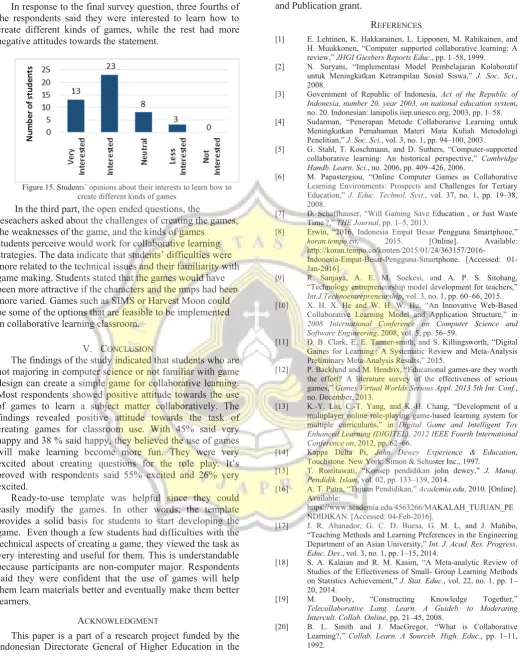
The researchers conducted this study to explore how a certain type of game, in this case a role-playing game (RPG), is integrated to make students more engaged through collaborative learning. More specifically, this study wants to address the following research questions: (1) How do students perceive the collaborative task of designing a game to create activities for classroom use? (2) How do they perceive the usefulness of the task to learn subject matters? (3) Are students interested in developing a game for classroom use?
II. THEORETICAL FOUNDATION
2.1. Education
According to John Dewey, in his book entitled "Experience and Education", education is a preparation [14]. This means that education is a form of gaining experience which is then used as stepping stones for future achievements. Moreover, he claims that one can attain
future goals if he possesses experiences and understands the consequences of their decisions. In consideration of the skills possessed by students to be educated as citizenship, vocational, for leisure; then taught reading, arithmetic, geography recognize due to be useful for them in social life.
For Dewey, education is always evolving. It never ends. Education should be participatory, democratic, pluralistic, and liberal. [15].
The Indonesian model of education emphasizes the importance of having well-rounded citizens. Law No. 20 of 2003 on National Education System stipulates that the purpose of education is to create students who possess great potentials for the greater good. In addition, the Preamble of the Indonesia 1945 Constitution underlines the guidelines for the nation's intellectual life. It highlights the importance of Indonesian citizens to possess intellectual, emotional, and social intelligence. [16].
2.2. Collaborative learning method
The learning method is a systematic plan to achieve set learning objectives through appropriate steps. It refers to a series of related and progressive actions carried out by teachers and students [17]. There are three basic methods of teaching: teacher-centered, learner-centered and focus-centralized [17]. Each method has advantages and disadvantages. Teachers can modify or even combine one or more of the methods in order to achieve the goals of the course. The methods and strategies used by the instructor in the classroom can thoroughly teach many things so that students understand the purpose of dealing with different situations or problems in daily life [17].
There are several methods of teaching that increase student engagement. They are cooperative learning, collaborative learning, problem-based learning, inquiry-based learning, peer learning and team learning.
Collaborative learning is one method of active learning registered in GAISE (The Guidelines for Assessment and Instruction in Statistics Education) of the ASA (American Statistical Association) in 2010 (recommendation number 4) which states that [18]:
"Using active learning methods in class is a valuable way to promote collaborative learning, allowing students to learn from each other… Activities offer the teacher an informal method of assessing student learning and provide feedback to the instructor on how well students are learning. It is important that teachers not underestimate the ability of activities to teach the material or overestimate the value of lectures, which is why suggestions are provided for incorporating activities, even in large lecture classes. "(p. 18)
Collaborative learning is a learning process whereby every group member contributes ideas, information, experiences, skills and ability from one to another to increase awareness amongst the members of the group [4]. Collaborative learning requires collaboration of each group member in the learning process to achieve a common goal. In a collaborative learning method, students learn from one another. They contribute their ideas equally. [19].
2016 International Seminar on Application for Technology of Information and Communication
Collaborative learning is a significant shift from a process-centered teaching or teacher-centered classroom. In a collaborative classroom, lecturing may not disappear completely. Lecturing is usually used together with other methods such as class discussion, paired work, and many other methods. The most important goal of collaborative learning is to make students learn the subject matter more actively in order to improve knowledge retention. In the collaborative learning classroom, teachers are no longer the transmitter of knowledge. Instead, they become designers of intellectual experience. [20].
The following four characteristics underscore the basic assumptions of collaborative learning [20]:
1. Learning is an active, constructive process: learning is active and constructive process in which students learn new information, ideas or skills.
2. Learning depends on rich contexts: learning is fundamentally influenced by the context and the activities in which it is embedded.
3. Students are diverse: diverse students bring some new views or perspectives based on their background, experience, learning method, and their opinions.
4. Learning is inherently social: collaborative learning generates intellectual synergies to solve a problem through interactions with other group members.
III. METHODS
In this study, the researchers employed closed and open ended questionnaires in elicit responses. The questionnaires were distributed to 47 students consisting of freshmen, sophomores, juniors, and seniors in the Faculty of Language and Arts Soegijapranata Catholic University, Semarang, Indonesia who were taking Structure 1 course. The researchers used convenient sampling to collect data. Students who agreed to participate in this study were given a workshop to create a game using game engine called RPG Maker MV. These students did not major in computer science, because this research focused on the enthusiasm in learning new material from non-computer science students who were taught by a lecturer using collaborative learning methods that applied game development.
Since students did not major in computer science, RPG Maker MV was selected. In addition, the researchers created a template that students can readily use to create activities and exercises in the game. It is expected that by providing a template, students could put more attention into creating activities and role plays.
The questionnaire consisted of three parts. The first part was to elicit background questions such as inquiring gender and class. The second part consisted of 15 closed-ended questions with five response options. The last part consisted of three open-ended questions.
The questions were designed to find out students’ perceptions of the collaborative task of designing a game in a language classroom and their interests in creating similar educational games.
This study uses descriptive statistics in the form of percentages to present the findings.
IV. SURVEY RESULTS
To address the research questions, the researchers asked several questions related to the task of designing the game and the exercises and their interests. When asked whether students liked creating games collaboratively, the findings indicated that 53% of the respondents liked to create games collaboratively very much, 38% liked it, 7% of the respondents reported that they felt neutral about creating games collaboratively, and the rest, 2%, did not like it at all (see Figure1)
Figure 1. Students’ opinions about creating games collaboratively
Figure 2 below shows students’ response about the task of creating question items for the games. 26% of the respondents said they were very interested. More than half of the respondents, 55%, were interested in designing questions for the game. 17% said that they felt ambivalent and 2% said they were not interested.
Figure 2. Students’ opinions about designing questions for the game
When asked about the level of difficulty in creating the game, 17% of the respondents felt that the process was very easy. Slightly less than a half, 40%, of the respondents said that it was easy. However, 43% of the respondents felt that developing the provided games was neither easy nor difficult (see Figure 3).
2016 International Seminar on Application for Technology of Information and Communication
Figure 3. Students’ opinions about the level of difficulty in making the game
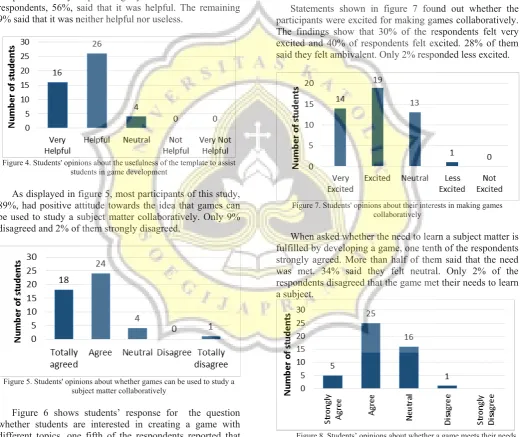
The responses to asking opinions about the usage of the templates to assist in game development are shown in Figure 4. More than a third, 35%, responded that the template was very helpful. Slightly more than a half of the respondents, 56%, said that it was helpful. The remaining 9% said that it was neither helpful nor useless.
Figure 4. Students' opinions about the usefulness of the template to assist students in game development
As displayed in figure 5, most participants of this study, 89%, had positive attitude towards the idea that games can be used to study a subject matter collaboratively. Only 9% disagreed and 2% of them strongly disagreed.
Figure 5. Students' opinions about whether games can be used to study a subject matter collaboratively
Figure 6 shows students’ response for the question whether students are interested in creating a game with different topics, one fifth of the respondents reported that they were very interested and 49% said they were interested in creating more games with different topics. Less than one
fifth, 17%, answered neutral, and the remaining, 13%, said not interested.
Figure 6. Students' opinions about their interest in creating a game with different topics
Statements shown in figure 7 found out whether the participants were excited for making games collaboratively. The findings show that 30% of the respondents felt very excited and 40% of respondents felt excited. 28% of them said they felt ambivalent. Only 2% responded less excited.
Figure 7. Students' opinions about their interests in making games collaboratively
When asked whether the need to learn a subject matter is fulfilled by developing a game, one tenth of the respondents strongly agreed. More than half of them said that the need was met. 34% said they felt neutral. Only 2% of the respondents disagreed that the game met their needs to learn a subject.
Figure 8. Students’ opinions about whether a game meets their needs for learning a subject
Figure 9 shows the responses concerning whether respondents liked creating a game collaboratively. 15% of 2016 International Seminar on Application for Technology of Information and Communication
respondents were very interested and 49% of respondents were interested in making games. While 23% of respondents responded if they taught how to develop the game for learn together is mediocre, and 13% responded the less interested.
Figure 9. Students’ opinions about interest in creating a games for collaborative activities
17% of responde