Search Engine
Optimization with PHP
A Developerâs Guide to SEO
Jaimie Sirovich
Search Engine
Optimization with PHP
A Developerâs Guide to SEO
Jaimie Sirovich
A Developerâs Guide to SEO
Published by
Wiley Publishing, Inc.
10475 Crosspoint Boulevard Indianapolis, IN 46256
www.wiley.com
Copyright © 2007 by Wiley Publishing, Inc., Indianapolis, Indiana Published simultaneously in Canada
ISBN: 978-0-470-10092-9
Manufactured in the United States of America 10 9 8 7 6 5 4 3 2 1
Library of Congress Cataloging-in-Publication Data:
Sirovich, Jaimie,
1981-Professional search engine optimization with PHP : a developer's guide to SEO / Jaimie Sirovich, Cristian Darie. p. cm.
Includes index.
ISBN 978-0-470-10092-9 (pbk.)
1. PHP (Computer program language) 2. Web sites--Design. 3. Search engines. I. Darie, Cristian. II. Title. QA76.73.P224S525 2007
005.13'3--dc22
2007003317
No part of this publication may be reproduced, stored in a retrieval system or transmitted in any form or by any means, electronic, mechanical, photocopying, recording, scanning or otherwise, except as permitted under Sections 107 or 108 of the 1976 United States Copyright Act, without either the prior written permission of the Publisher, or authorization through payment of the appropriate per-copy fee to the Copyright Clearance Center, 222 Rosewood Drive, Danvers, MA 01923, (978) 750-8400, fax (978) 646-8600. Requests to the Publisher for permis-sion should be addressed to the Legal Department, Wiley Publishing, Inc., 10475 Crosspoint Blvd., Indianapolis, IN 46256, (317) 572-3447, fax (317) 572-4355, or online at http://www.wiley.com/go/permissions.
LIMIT OF LIABILITY/DISCLAIMER OF WARRANTY:THE PUBLISHER AND THE AUTHOR MAKE NO REPRESENTATIONS OR WARRANTIES WITH RESPECT TO THE ACCURACY OR COMPLETENESS OF THE CONTENTS OF THIS WORK AND SPECIFICALLY DISCLAIM ALL WARRANTIES, INCLUDING WITHOUT LIMITATION WARRANTIES OF FITNESS FOR A PARTI CULAR PURPOSE. NO WARRANTY MAY BE CREATED OR EXTENDED BY SALES OR PROMOTIONAL MATERIALS. THE ADVICE AND STRATEGIES CONTAINED HEREIN MAY NOT BE SUITABLE FOR EVERY SITUATION. THIS WORK IS SOLD WITH THE UNDERSTAND-ING THAT THE PUBLISHER IS NOT ENGAGED IN RENDERUNDERSTAND-ING LEGAL, ACCOUNTUNDERSTAND-ING, OR OTHER PRO-FESSIONAL SERVICES. IF PROPRO-FESSIONAL ASSISTANCE IS REQUIRED, THE SERVICES OF A COMPETENT PROFESSIONAL PERSON SHOULD BE SOUGHT. NEITHER THE PUBLISHER NOR THE AUTHOR SHALL BE LIABLE FOR DAMAGES ARISING HEREFROM. THE FACT THAT AN ORGANIZATION OR WEBSITE IS REFERRED TO IN THIS WORK AS A CITATION AND/OR A POTENTIAL SOURCE OF FURTHER INFORMA-TION DOES NOT MEAN THAT THE AUTHOR OR THE PUBLISHER ENDORSES THE INFORMAINFORMA-TION THE ORGANIZATION OR WEBSITE MAY PROVIDE OR RECOMMENDATIONS IT MAY MAKE. FURTHER, READ-ERS SHOULD BE AWARE THAT INTERNET WEBSITES LISTED IN THIS WORK MAY HAVE CHANGED OR DISAPPEARED BETWEEN WHEN THIS WORK WAS WRITTEN AND WHEN IT IS READ.
For general information on our other products and services please contact our Customer Care Department within the United States at (800) 762-2974, outside the United States at (317) 572-3993
or fax (317) 572-4002.
Jaimie Sirovichis a search engine marketing consultant. He works with his clients to build them power-ful online presences. Officially Jaimie is a computer programmer, but he claims to enjoy marketing much more. He graduated from Stevens Institute of Technology with a BS in Computer Science. He worked under Barry Schwartz at RustyBrick, Inc., as lead programmer on e-commerce projects until 2005. At present, Jaimie consults for several organizations and administrates the popular search engine market-ing blog, SEOEgghead.com.
Acquisitions Editor
Kit Kemper
Developmental Editor
Kenyon Brown
Technical Editor
Bogdan Brinzarea
Production Editor
Angela Smith
Copy Editor
Kim Cofer
Editorial Manager
Mary Beth Wakefield
Production Manager
Tim Tate
Vice President and Executive Group Publisher
Richard Swadley
Vice President and Executive Publisher
Joseph B. Wikert
Compositor
Laurie Stewart, Happenstance Type-O-Rama
Proofreader
Ian Golder
Indexer
Melanie Belkin
Anniversary Logo Design
The authors would like to thank the following people and companies, listed alphabetically, for their invaluable assistance with the production of this book. Without their help, this book would not have been possible in its current form.
Dan Kramer of Volatile Graphix for generously providing his cloaking database to the public â and even adding some data to make our cloaking code examples work better.
Kim Krause Berg of The Usability Effect for providing assistance and insight where this book references usability and accessibility topics.
MaxMind, Inc., for providing their free GeoLite geo-targeting data â making our geo-targeting code examples possible.
Several authors of WordPress plugins including Arne Brachhold, Lester Chan, Peter Harkins, Matt Lloyd, and Thomas McMahon.
Acknowledgments
vii
Introduction xvii
Chapter 1:
You: Programmer and Search Engine Marketer
1
Who Are You?
2
What Do You Need to Learn?
3
SEO and the Site Architecture
4
SEO Cannot Be an Afterthought
5
Communicating Architectural Decisions
5
Architectural Minutiae Can Make or Break You
5
Preparing Your Playground
6
Installing XAMPP
7
Preparing the Working Folder
8
Preparing the Database
11
Summary
12
Chapter 2:
A Primer in Basic SEO
13
Introduction to SEO
13
Link Equity
14
Google PageRank
15
A Word on Usability and Accessibility
16
Search Engine Ranking Factors
17
On-Page Factors
17
Visible On-Page Factors
18
Invisible On-Page Factors
20
Time-Based Factors
21
External Factors
22
Potential Search Engine Penalties
26
The Google âSandbox Effectâ
26
The Expired Domain Penalty
26
Duplicate Content Penalty
27
The Google Supplemental Index
27
Resources and Tools
28
Market Research
29
Researching Keywords
32
Browser Plugins
33
Community Forums
33
Search Engine Blogs and Resources
34
Summary
35
Chapter 3:
Provocative SE-Friendly URLs
37
Why Do URLs Matter?
38
Static URLs and Dynamic URLs
38
Static URLs
39
Dynamic URLs
39
URLs and CTR
40
URLs and Duplicate Content
41
URLs of the Real World
42
Example #1: Dynamic URLs
42
Example #2: Numeric Rewritten URLs
43
Example #3: Keyword-Rich Rewritten URLs
44
Maintaining URL Consistency
44
URL Rewriting
46
Installing mod_rewrite
48
Testing mod_rewrite
49
Introducing Regular Expressions
54
URL Rewriting and PHP
60
Rewriting Numeric URLs with Two Parameters
61
Rewriting Keyword-Rich URLs
64
Building a Link Factory
66
Pagination and URL Rewriting
72
Rewriting Images and Streaming Media
72
Problems Rewriting Doesnât Solve
75
A Last Word of Caution
75
Summary
76
Chapter 4:
Content Relocation and HTTP Status Codes
77
HTTP Status Codes
78
Redirection Using 301 and 302
79
301
81
302
82
Removing Deleted Pages Using 404
83
Redirecting with PHP and mod_rewrite
84
Using Redirects to Change File Names
85
URL Correction
89
Dealing with Multiple Domain Names Properly
90
Using Redirects to Change Domain Names
90
URL Canonicalization: www.example.com versus example.com
91
URL Canonicalization: /index.php versus /
92
Other Types of Redirects
94
Summary
94
Chapter 5:
Duplicate Content
95
Causes and Effects of Duplicate Content
96
Duplicate Content as a Result of Site Architecture
96
Duplicate Content as a Result of Content Theft
96
Excluding Duplicate Content
97
Using the Robots Meta Tag
97
robots.txt Pattern Exclusion
99
Solutions for Commonly Duplicated Pages
103
Print-Friendly Pages
103
Navigation Links and Breadcrumb Navigation
104
Similar Pages
106
Pages with Duplicate Meta Tag or Title Values
106
URL Canonicalization
106
URL-Based Session IDs
107
Other Navigational Link Parameters
107
Affiliate Pages
108
Redirecting Parameterized Affiliate URLs
109
Summary
118
Chapter 6:
SE-Friendly HTML and JavaScript
119
Overall Architecture
120
Search EngineâFriendly JavaScript
120
JavaScript Links
121
DHTML Menus
121
Popup Windows
121
DHTML Popup Windows
129
Crawlable Images and Graphical Text
129
Search EngineâFriendly HTML
140
HTML Structural Elements
141
Frames
144
Using Forms
144
Using a Custom Markup Language to Generate SE-Friendly HTML
145
Flash and AJAX
149
The Blended Approach
149
Summary
150
Chapter 7:
Web Feeds and Social Bookmarking
151
Web Feeds
151
RSS and Atom
152
Creating RSS Feeds
154
Syndicating RSS and Atom Feeds
160
Other Sources of Syndicated Content
164
Social Bookmarking
164
Summary
172
Chapter 8:
Black Hat SEO
173
Whatâs with All the Hats?
174
Bending the Rules
175
Technical Analysis of Black-Hat Techniques
176
Attack Avoidance
177
HTML Insertion Attacks
177
Avoiding Comment Attacks Using Nofollow
180
Sanitizing User Input
184
Requesting Human Input
188
301 Redirect Attacks
194
Content Theft
196
On Buying Links
197
Digital Point Co-op, Link Vault
197
Summary
197
Chapter 9:
Sitemaps
199
Traditional Sitemaps
199
Search Engine Sitemaps
200
Using Google Sitemaps
201
Using Yahoo! Sitemaps
203
Generating Sitemaps Programmatically
203
The Sitemaps.org Standard Protocol
209
Summary
210
Chapter 10:
Link Bait
211
Hooking Links
211
Informational Hooks
212
News Story Hooks
212
Humor/Fun Hooks
212
Evil Hooks
212
Traditional Examples of Link Bait
213
Interactive Link Bait: Put on Your Programming Hardhat!
213
Case Study: Fortune Cookies
214
Summary
218
Chapter 11:
Cloaking, Geo-Targeting, and IP Delivery
219
Cloaking, Geo-Targeting, and IP Delivery
219
More on Geo-Targeting
220
A Few Words on JavaScript Redirect Cloaking
221
The Ethical Debate on Cloaking
221
Cloaking Dangers
222
Using the Meta Noarchive Tag
222
Implementing Cloaking
223
Cloaking Case Studies
232
Rendering Images as Text
233
Redirecting Excluded Content
233
Feeding Subscription-Based Content Only to Spiders
233
Disabling URL-Based Session Handling for Spiders
234
Other Cloaking Implementations
234
Implementing Geo-Targeting
234
Summary
241
Chapter 12:
Foreign Language SEO
243
Foreign Language Optimization Tips
243
Indicating Language and Region
244
Server Location and Domain Name
244
Include the Address of the Foreign Location if Possible
245
Dealing with Accented Letters (Diacritics)
245
Foreign Language Spamming
248
Chapter 13:
Coping with Technical Issues
249
Unreliable Web Hosting or DNS
249
Changing Hosting Providers
250
Cross-Linking
251
SEO-Aware Split Testing
253
Detecting Broken Links
254
Summary
259
Chapter 14:
Case Study: Building an E-Commerce Store
261
Establishing the Requirements
262
Implementing the Product Catalog
262
Summary
281
Chapter 15:
Site Clinic: So You Have a Web Site?
283
1. Creating Sitemaps
284
2. Creating News Feeds
284
3. Fixing Duplication in Titles and Meta Tags
284
4. Getting Listed in Reputable Directories
284
5. Soliciting and Exchanging Relevant Links
285
6. Buying Links
285
7. Creating Link Bait
285
8. Adding Social Bookmarking Functionality
286
9. Starting a Blog and/or Forum
286
10. Dealing with a Pure Flash or AJAX Site
286
11. Preventing Black Hat Victimization
286
12. Examining Your URLs for Problems
287
13. Looking for Duplicate Content
287
14. Eliminating Session IDs
287
15. Tweaking On-page Factors
287
Summary
288
Chapter 16:
WordPress: Creating an SE-Friendly Blog
289
Installing WordPress
290
Turning On Permalinks
293
Akismet: Preventing Comment Spam
294
Sociable: Social Bookmarking Icons
295
WP-Email: Email a Friend
296
Sitemap Generator Plugin
299
Google Sitemaps Plugin
301
Digg Button Plugin
304
Pagerfix Plugin
305
Eliminating Duplicate Content
307
Pull-downs and Excluding Category Links
308
Excerpting Article Content
309
Making the Blog Your Home Page
309
Summary
310
Appendix A:
Simple Regular Expressions
311
Matching Single Characters
312
Matching Sequences of Characters That Each Occur Once
317
Introducing Metacharacters
319
Matching Sequences of Different Characters
324
Matching Optional Characters
326
Matching Multiple Optional Characters
328
Other Cardinality Operators
332
The * Quantifier
332
The + Quantifier
334
The Curly-Brace Syntax
336
The {n} Syntax
336
The {n,m} Syntax
337
{0,m}
337
{n,m}
339
{n,}
340
Glossary
343
Welcome to Professional Search Engine Optimization with PHP: A Developerâs Guide to SEO!
Search engine optimization has traditionally been the job of a marketing staff. With this book, we examine search engine optimization in a brand new light, evangelizing that SEO should be done by the program-mer as well.
For maximum efficiency in search engine optimization efforts, developers and marketers should work together, starting from a web siteâs inception and technical and visual design and moving throughout its development lifetime. We provide developers and IT professionals with the information they need to create and maintain a search engineâfriendly web site and avoid common pitfalls that confuse search engine spiders. This book discusses in depth how to facilitate site spidering and discusses the various technologies and services that can be leveraged for site promotion.
Who Should Read This Book
Professional Search Engine Optimization with PHP: A Developerâs Guide to SEO is mainly geared toward web developers, because it discusses search engine optimization in the context of web site programming. You do not need to be a programmer by trade to benefit from this book, but some programming background is important for fullyunderstanding and following the technical exercises.
We also tried to make this book friendly for the search engine marketer with some IT background who wants to learn about a different, more technical angle of search engine optimization. Usually, each chap-ter starts with a less-technical discussion on the topic at hand and then develops into the more advanced technical details. Many books cover search engine optimization, but few delve at all into the meaty tech-nical details of how to design a web site with the goal of search engine optimization in mind. Ultimately, this book does just that.
Where programming isdiscussed, we show code with explanations. We donât hide behind concepts and buzzwords; we include hands-on practical exercises instead. Contained within this reference are fully functional examples of using XML-based sitemaps, social-bookmarking widgets, and even work-ing implementations of cloakwork-ing and geo-targetwork-ing.
What Will You Lear n from this Book?
At the end of Chapter 1, You: Programmer and Search Engine Marketer,you create the environment where youâll be coding away throughout the rest of the book. Programming with PHP can be tricky at times; in order to avoid most configuration and coding errors you may encounter, we will instruct you how to prepare the working folder and your MySQL database.
If you arenât ready for these tasks yet, donât worry! You can come back at any time, later. All programming-related tasks in this book are explained step by step to minimize the chances that anyone gets lost on the way.
Chapter 2, A Primer in Basic SEO,is a primer in search engine optimization tailored for the IT profes-sional. It stresses the points that are particularly relevant to the programmer from the perspective of the programmer. Youâll also learn about a few tools and resources that all search engine marketers and web developers should know about.
Chapter 3, Provocative SE-Friendly URLs,details how to create (or enhance) your web site with improved URLs that are easier for search engines to understand and more persuasive for their human readers. Youâll even create a URL factory, which you will be able to reuse in your own projects.
Chapter 4, Content Relocation and HTTP Status Codes,presents all of the nuances involved in using HTTP status codes correctly to relocate and indicate other statuses for content. The proper use of these status codes is essential when restructuring information on a web site.
Chapter 5, Duplicate Content,discusses duplicate content in great detail. It then proposes strategies for avoiding problems related to duplicate content.
Chapter 6, SE-Friendly HTML and JavaScript,discusses search engine optimization issues that present themselves in the context of rendering content using HTML, JavaScript and AJAX, and Flash.
Chapter 7, Web Feeds and Social Bookmarking,discusses web syndication and social bookmarking. Tools to create feeds and ways to leverage social bookmarking are presented.
Chapter 8, Black Hat SEO,presents black hat SEO from the perspective of preventing black hat victim-ization and attacks. You may want to skip ahead to this chapter to see what this is all about!
Getting the Most Out of this Book
Chapter 9, Sitemaps,discusses the use of sitemaps â traditional and XML-based â for the purpose of improving and speeding indexing.
Chapter 10, Link Bait,discusses the concept of link bait and provides an example of a site tool that could bait links.
Chapter 11, Cloaking, Geo-Targeting, and IP Delivery,discusses cloaking, geo-targeting, and IP Delivery. It includes fully working examples of all three.
Chapter 12, Foreign Language SEO,discusses search engine optimization for foreign languages and the concerns therein.
Chapter 13, Coping with Technical Issues,discusses the various issues that an IT professional must understand when maintaining a site, such as how to change web hosts without potentially hurting search rankings.
Chapter 14, Case Study: Building an E-Commerce Store,rounds it off with a fully functional search engineâoptimized e-commerce catalog incorporating much of the material in the previous chapters. Chapter 15, Site Clinic: So You Have a Web Site?,presents concerns that may face a preexisting web site and suggests enhancements that can be implemented in the context of their difficulty.
Lastly, Chapter 16, WordPress: Creating an SE-Friendly Blog,documents how to set up a search engineâoptimized blog using WordPress 2.0 and quite a few custom plugins.
We hope that you will enjoy reading this book and that it will prove useful for your real-world search engine optimization endeavors!
Contacting the Author s
Jaimie Sirovich can be contacted through his blog at http://www.seoegghead.com. Cristian Darie can be contacted from his web site at http://www.cristiandarie.ro.
Conventions
To help you get the most from the text and keep track of whatâs happening, weâve used a number of conventions throughout the book.
As for styles in the text:
â We highlightnew terms and important words when we introduce them.
â We show keyboard strokes like this: Ctrl+A.
â We show file names, URLs, and code within the text like so: persistence.properties.
â We present code in two different ways:
In code examples we highlight new and important code with a gray background. The gray highlighting is not used for code thatâs less important in the present context, or has been shown before.
Source Code
As you work through the examples in this book, you may choose either to type in all the code manually or to use the source code files that accompany the book. All of the source code used in this book is available for download at http://www.wrox.com. Once at the site, simply locate the bookâs title (either by using the Search box or by using one of the title lists) and click the Download Code link on the bookâs detail page to obtain all the source code for the book.
Because many books have similar titles, you may find it easiest to search by ISBN; this bookâs ISBN is 978-0-470-10092-9.
Once you download the code, just decompress it with your favorite compression tool. Alternatively, you can go to the main Wrox code download page at http://www.wrox.com/dynamic/books/ download.aspxto see the code available for this book and all other Wrox books.
Er rata
We make every effort to ensure that there are no errors in the text or in the code. However, no one is perfect, and mistakes do occur. If you find an error in one of our books, like a spelling mistake or faulty piece of code, we would be very grateful for your feedback. By sending in errata you may save another reader hours of frustration and at the same time you will be helping us provide even higher quality information.
To find the errata page for this book, go to http://www.wrox.comand locate the title using the Search box or one of the title lists. Then, on the book details page, click the Book Errata link. On this page you can view all errata that has been submitted for this book and posted by Wrox editors. A complete book list including links to each bookâs errata is also available at www.wrox.com/misc-pages/ booklist.shtml.
p2p.wrox.com
For author and peer discussion, join the P2P forums at p2p.wrox.com. The forums are a web-based system for you to post messages relating to Wrox books and related technologies and interact with other readers and technology users. The forums offer a subscription feature to email you topics of interest of your choos-ing when new posts are made to the forums. Wrox authors, editors, other industry experts, and your fellow readers are present on these forums.
At http://p2p.wrox.comyou will find a number of different forums that will help you not only as you read this book, but also as you develop your own applications. To join the forums, just follow these steps:
1.
Go to p2p.wrox.comand click the Register link.2.
Read the terms of use and click Agree.3.
Complete the required information to join as well as any optional information you wish to pro-vide and click Submit.4.
You will receive an email with information describing how to verify your account and complete the joining process.You can read messages in the forums without joining P2P but in order to post your own messages, you must join.
Once you join, you can post new messages and respond to messages other users post. You can read mes-sages at any time on the web. If you would like to have new mesmes-sages from a particular forum emailed to you, click the Subscribe To This Forum icon by the forum name in the forum listing.
Search Engine Mar keter
Googlingfor information on the World Wide Web is such a common activity these days that it is hard to imagine that just a few years ago this verb did not even exist. Search engines are now an integral part of our lifestyle, but this was not always the case. Historically, systems for finding information were driven by data organization and classification performed by humans. Such systems are not entirely obsolete â libraries still keep their books ordered by categories, author names, and so forth. Yahoo! itself started as a manually maintained directory of web sites, organ-ized into categories. Those were the good old days.
Today, the data of the World Wide Web is enormous and rapidly changing; it cannot be confined in the rigid structure of the library. The format of the information is extremely varied, and the individual bits of data â coming from blogs, articles, web services of all kinds, picture galleries, and so on â form an almost infinitely complex virtual organism. In this environment, making information findablenecessitates something more than the traditional structures of data organiza-tion or classificaorganiza-tion.
Introducing the ad-hoc query and the modern search engine. This functionality reduces the afore-mentioned need for organization and classification; and since its inception, it has been become quite pervasive. Googleâs popular email service, GMail, features its searching capability that permits a user to find emails that contain a particular set of keywords. Microsoft Windows Vista now integrates an instant search feature as part of the operating system, helping you quickly find information within any email, Word document, or database on your hard drive from the Start menu regardless of the underlying file format. But, by far, the most popular use of this functional-ity is in the World Wide Web search engine.
Figure 1-1
The less obvious effect of the search engine explosion phenomenon is that web developers are now directly involved in the search engine marketing process. To rank well in these organic results, it may not be enough to âwrite relevant content,â as your typical search engine marketing tutorial drones. Rather, the web application developer must work together with the marketing team, and he or she must build a web site fully aware that certain features or technologies may interfere with a search engine marketing campaign. An improperly designed web site can interfere with a search engineâs need to periodically navigate and index the information contained therein. In the worst case, the search engine may not be able to index the content at all.
So, ironically, while users are becoming less interested in understanding the structure of data on the Internet, the structure of a web site is becoming an increasingly important facet in search engine mar-keting! This structure â the architecture of a web site â is the primary focus of this book.
We hope that this brief introduction whets your appetite! The remainder of this chapter tells you what to expect from this book. You will also configure your development machine to ensure you wonât have any problems following the technical exercises in the later chapters.
Who Are You?
Maybe youâre a great programmer or IT professional, but marketing isnât your thing. Or perhaps youâre a tech-savvy search engine marketer who wants a peek under the hood of a search engine optimized web site. Search engine marketing is a field where technology and marketing are both critical and interdepend-ent, because small changes in the implementation of a web site can make you or break you in search engine rankings. Furthermore, the fusion of technology and marketing know-how can create web site features that attract more visitors.
What Do You Need to Lear n?
As with anything in the technology-related industry, one must constantly learn and research to keep apprised of the latest news and trends. How exhausting!Fortunately, there are fundamental truths with regard to search engine optimization that are both easy to understand and probably wonât change in time significantly â so a solid foundation that you build now will likely stand the test of time. We remember the days when search engine optimization was a black art of analyzing and improving on-page factors. Search engine marketers were obsessed over keyword density and which HTML tags to use. Many went so far as to recommend optimizing content for different search engines individually, thusly creating different pages with similar content optimized with different densities and tags. Today, that would create a problem called duplicate content.
The current struggle is creating a site with interactive content and navigation with a minimal amount of duplicate content, with URLs that do not confuse web spiders, and a tidy internal linking structure. There is a thread on SearchEngineWatch (http://www.searchenginewatch.com) where someone asked which skill everyone reading would like to hone. Almost all of them enumerated programming as one of the skills (http://forums.searchenginewatch.com/showthread.php?t=11945). This does not surprise us. Having an understanding of both programming and search engine marketing will serve one well in the pursuit of success on the Internet.
When people ask us where weâd suggest spending money in an SEO plan, we always recommend making sure that one is starting with a sound basis. If your web site has architectural problems, itâs tantamount to trumpeting your marketing message atop a house of cards. Professional Search Engine Optimization with PHP: A Developerâs Guide to SEOaims to illustrate how to build a solid foundation.
To get the most out of this journey, you should be familiar with a bit of programming (PHP, preferably). You can also get quite a bit out this book by only reading the explanations. And another strategy to reading this book is to do just that â then hand this book to the web developer with a list of concerns and directives in order to ensure the resulting product is search engine optimized. In that case, donât get bogged down in the exercises â just skim them.
The Story
We cover a quick introduction to SEO in Chapter 2, which should nail down the foundations of that subject. However, PHP and MySQL are vast subjects; and this book cannot afford to also be a PHP and MySQL tutorial. The code samples are explained step by step, but if you have never written a line of PHP or SQL before, and want to follow the examples in depth, you should also consider reading a PHP and MySQL tutorial book, such as the following:
â PHP and MySQL for Dynamic Web Sites: Visual QuickPro Guide, 2nd edition(Larry Ulman, Peachpit Press, 2005)
â Build Your Own Database Driven Website Using PHP & MySQL, 3rd Edition(Kevin Yank, Sitepoint, 2005)
â Teach Yourself PHP in 10 Minutes(Chris Newman, Sams, 2005)
SEO and the Site Architecture
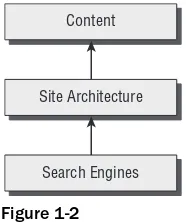
A web siteâs architecture is what grounds all future search engine marketing efforts. The content rests on top of it, as shown in Figure 1-2. An optimal web site architecture facilitates a search engine in traversing and understanding the site. Therefore, creating a web site with a search engine optimized architecture is a major contributing factor in achieving and maintaining high search engine rankings.
Architecture should also be considered throughout a web siteâs lifetime by the web site developer, along-side other factors such as aesthetics and usability. If a new feature does not permit a search engine to access the content, hinders it, or confuses it, the effects of good content may be reduced substantially. For example, a web site that uses Flash or AJAX technologies inappropriately may obscure the majority of its content from a search engine.
Figure 1-2
We do not cover copywriting concepts in detail, or provide much coaching as to how to create persuasive page titles. These are also very important topics, which are masterfully covered by Bryan and Jeffrey Eisenberg in Persuasive Online Copywriting: How to Take Your Words to the Bank(Wizard Academy Press, 2002), and by John Caples and Fred E. Hahn in Tested Advertising Methods, 5th edition(Prentice Hall, 1998). Shari Thurow also has an excellent section on creating effective titles in her book, Search Engine Visibility
(New Riders Press, 2002). Writing copy and titles that rank well are obviously not successful if they do not convert or result in click-throughs, respectively. We do give some pointers, though, to get you started. We also do not discuss concepts related to search engine optimization such as usability and user psy-chology in depth, though they are strong themes throughout the book.
Content
Site Architecture
Optimizing a siteâs architecture frequently involves tinkering with variables that also affect usability and the overall user perception of your site. When we encounter such situations, we alert you to why these certain choices were made. Chapter 5, âDuplicate Content,â highlights a typical problem with breadcrumbs and presents some potential solutions. Sometimes we find that SEO enhancements run counter to usability. Likewise, not all designs that are user friendly are search engine friendly. Either way, a compromise must be struck to satisfy both kinds of visitors â users and search engines.
SEO Cannot Be an Afterthought
One common misconception is that search engine optimization efforts can be made after a web site is launched. This is frequently incorrect. Whenever possible, a web site can and should be designed to be search engine friendly as a fundamental concern.
Unfortunately, when a preexisting web site is designed in a way that poses problems for search engines, search engine optimization can become a much larger task. If a web site has to be redesigned, or partially redesigned, the migration process frequently necessitates special technical considerations. For example, old URLs must be properlyredirected to new ones with similar relevant content.
The majority of this book documents best practices for design from scratch as well as how to mitigate redesign problems and concerns. The rest is dedicated to discretionary enhancements.
Communicating Architectural Decisions
The aforementioned scenario regarding URL migration is a perfect example of how the technical team and marketing team must communicate. The programmer must be instructed to add the proper redirects to the web application. Otherwise existing search rankings may be hopelessly lost forever. Marketers must know that such measures must be taken in the first place.
In a world where organic rankings contribute to the bottom line, a one-line redirect command in a web server configuration file may be much more important than one may think. This particular topic, URL migration, is discussed in Chapter 4.
Architectural Minutiae Can Make or Break You
So you now understand that small mistakes in implementation can be quite insidious. Another common example would be the use of JavaScript-based navigation, and failing to provide an HTML-based alter-native. Spiders would be lost, because they, for the most part, do not interpret JavaScript.
The search engine spider is âthe third browser.â Many organizations will painstakingly test the effi-cacy and usability of a design in Internet Explorer and Firefox with dedicated QA teams. Unfortunately, many fall short by neglecting to design and test for the spider.Perhaps this is because you have to design in the abstract for the spider; we donât have a Google spider at our disposal after all; and we canât inter-view it afterward with regard to what it thought of our âusability.â However, that does not make its assessment any less important.
The Spider Simulator tool located at http://www.seochat.com/seo-tools/spider-simulator/
Preparing Your Playground
This book contains many exercises, and all of them assume that youâve prepared your environment as explained in the next few pages. If youâre a PHP and MySQL veteran, hereâs the quick list of software requirements. If you have these, you can skip to the end of the chapter, where youâre instructed to create a MySQL database for the few exercises in this book that use it.
â Apache 2 or newer, with the mod_rewrite module
â PHP 4.1 or newer
â MySQL
Your PHP installation should have these modules:
â php_mysql (necessary for the chapters that work with MySQL)
â php_gd2 (necessary for exercises in Chapter 5 and Chapter 10)
â php_curl (necessary for exercises in Chapter 11)
If you already have PHP but you arenât sure which modules you have installed, view your php.ini
configuration file. On a default Windows installation, this file is located in the Windowsfolder; if you install PHP through XAMPP as shown in the exercise that follows, the path is \Program Files\xampp\ apache\bin. To enable a module, remove the leading â;â from the extension=module_name.dllline, and restart Apache.
After installing the necessary software, youâll create a virtual host named seophp.example.com, which will point to a folder on your machine, which will be your working folder for this book. All exercises you build in this book will be accessible on your machine through http://seophp.example.com.
Lastly, youâll prepare a MySQL database named seophp, which will be required for a few of the exer-cises in this book. Creating the database isnât a priority for now, so you can leave this task for when youâll actually need it for an exercise.
Installing XAMPP
XAMPP is a package created by Apache Friends (http://www.apachefriends.org), which includes Apache, PHP, MySQL, and many other goodies. If you donât have these already installed on your machine, the easiest way to have them running is to install XAMPP.
Here are the steps you should follow:
1.
Visit http://www.apachefriends.org/en/xampp.html, and go to the XAMPP page specific for your operating system.2.
Download the XAMPP installer package, which should be an executable file named like xampp-win32-version-installer.exe.3.
Execute the installer executable. When asked, choose to install Apache and MySQL as services, as shown in Figure 1-3. Then click Install.4.
Youâll be asked to confirm the installation of each of these as services. Donât install the FileZilla FTP Server service unless you need it for particular purposes (you donât need it for this book), but do install Apache and MySQL as services.5.
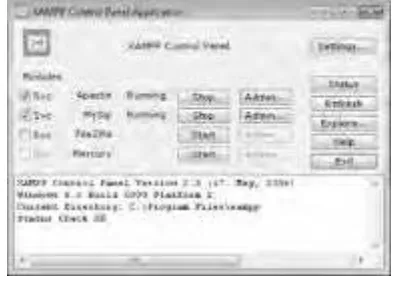
In the end, confirm the execution of the XAMPP Control Panel, which can be used for adminis-tering the installed services. Figure 1-4 shows the XAMPP Control Panel.Figure 1-3
Figure 1-4
6.
To test that Apache installed correctly, load http://localhost/using your web browser. An XAMPP welcome screen like the one in Figure 1-5 should load.7.
Finally, after youâve tested that both Apache and PHP work, itâs recommended to turn on PHP error reporting. Apache logs errors in a file named error.log, located in the xampp\apache\ logsfolder; looking at the latest entries of this file when something goes wrong with your appli-cation can be very helpful at times. To enable PHP error reporting, open for editing the php.iniconfiguration file, located by default in the xampp\apache\bin\folder. There, locate this entry:
display_errors = Off
and change it to:
display_errors = On
8.
To configure what kind of errors you want reported, you can alter the value of the PHPerror_reportingvalue. We recommend the following setting to report all errors, except for PHP notices:
error_reporting = E_ALL & ~E_NOTICE
Preparing the Working Folder
Now youâll create a virtual host named seophp.example.comon your local machine, which will point to a local folder named seophp. The seophpfolder will be your working folder for all the exercises in this book, and youâll load the sample pages through http://seophp.example.com.
The seophp.example.comas virtual host wonât interfere with any existing online applications, because example.comis a special domain name reserved by IANA to be used for documentation and demonstration purposes. See http://example.comfor the official information.
Figure 1-5
Follow these steps to create and test the virtual host on your machine:
1.
First, you need to add seophp.example.comto the Windowshostsfile. The following line will tell Windows that all domain name resolution requests for seophp.example.comshould be handled by the local machine instead of your configured DNS. Open the hosts
file, which is located by default in C:\Windows\System32\drivers\etc\hosts, and add this line to it:
127.0.0.1 localhost
127.0.0.1 seophp.example.com
2.
Now create a new folder named seophp, which will be used for all the work you do in this book. You might find it easiest to create it in the root folder (C:\), but you can create it any-where else if you like.3.
Finally, you need to configure a virtual host for seophp.example.comin Apache. Right now, all requests to http://localhost/and http://seophp.example.com/are handled by Apache, and both yield the same result. You want requests to http://seophp.example.com/to be served from your newly created folder, seophp. This way, you can work with this book without interfering with the existing applications on your web server.
NameVirtualHost 127.0.0.1:80
<VirtualHost 127.0.0.1:80>
DocumentRoot âC:/Program Files/xampp/htdocsâ ServerName localhost
</VirtualHost>
<VirtualHost 127.0.0.1:80> DocumentRoot C:/seophp/ ServerName seophp.example.com <Directory C:/seophp/>
Options Indexes FollowSymLinks AllowOverride All
Order allow,deny Allow from all </Directory> </VirtualHost>
4.
To make sure httpd-vhosts.confgets processed when Apache starts, open xampp\apache\ conf\httpd.confand make sure this line, located somewhere near the end of the file, isnât commented:# Virtual hosts
include conf/extra/httpd-vhosts.conf
5.
Restart Apache for the new configuration to take effect. The easiest way to restart Apache is to open the XAMPP Control Panel, and use it to stop and then start the Apache service.In case you run into trouble, the first place to check is the Apache error log file. In the default XAMPP installation, this is xampp\apache\logs\error.log.
6.
To test your new virtual host, create a new file named test.phpin your seophpfolder, and type this code in it:<?php phpinfo(); ?>
7.
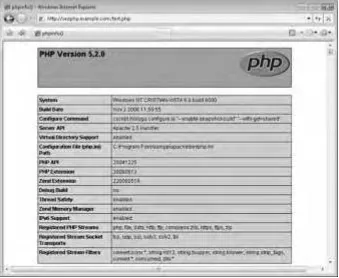
Then load http://seophp.example.com/test.phpand expect to see a page like the one in Figure 1-6.This way youâve also tested that your PHP installation is working correctly.
Figure 1-6
Preparing the Database
The final step is to create a new MySQL database. Youâre creating a database named seophpthat you will use for the exercises contained in this book. Youâll also create a user named seouser, with the password seomaster, which will have full privileges to the seophpdatabase.
You will be using this database only for the exercises in Chapter 11 and Chapter 14, so you can skip this database installation for now if desired.
To prepare your database environment, follow these steps. Note that this exercise uses the MySQL console application to send commands to the database server.
Follow these steps:
1.
Load a Windows Command Prompt window by going to Start ⪠Run and executing cmd.exe. In Windows Vista, you can type cmd or Command Prompt in the search box of the Start menu.2.
Change your current directory to the binfolder of your MySQL installation. With the default XAMPP installation, that folder is \Program Files\xampp\mysql\bin. Change the directory using the following command:3.
Start the MySQL console application using the following command (this loads an executable file named mysql.exelocated in the directory you have just browsed to):mysql -u root
If you have a password set for the root account, you should also add the -poption, which will have the tool ask you for the password. By default, after installing XAMPP, the rootuser doesnât have a pass-word. Needless to say, you may want to change this for security reasons.
4.
Create the seophpdatabase by typing this at the MySQL console:CREATE DATABASE seophp;
MySQL commands, such as CREATE DATABASE, are not case sensitive. If you like, you can type cre-ate databaseinstead of CREATE DATABASE. However, database objects, such as the seophp data-base, may or may not be case sensitive, depending on the server settings and operating system. For this reason, itâs important to always use consistent casing. (This book uses uppercase for MySQL commands, and lowercase for object names.)
5.
Switch context to the seophpdatabase.USE seophp;
6.
Create a database user with full access to the new seophpdatabase:GRANT ALL PRIVILEGES ON seophp.*
TO seouser@localhost IDENTIFIED BY âseomasterâ;
7.
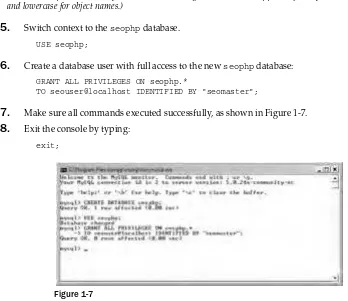
Make sure all commands executed successfully, as shown in Figure 1-7.8.
Exit the console by typing:exit;
Figure 1-7
Summar y
Although this book addresses search engine optimization primarily from the perspective of a web siteâs architecture, you, the web site developer, may also appreciate this handy reference of basic factors that contribute to site ranking. This chapter discusses some of the fundamentals of search engine optimization.
If you are a search engine marketing veteran, feel free to skip to Chapter 3. However, because this chapter is relatively short, it may still be worth a skim. It can also be useful to refer back to it, because our intent is to provide a brief guide about what does matter and what probably does not. This will serve to illuminate some of the recommendations we make later with regard to web site architecture.
This chapter contains, in a nutshell:
â A short introduction to the fundamentals of SEO.
â A list of the most important search engine ranking factors.
â Discussion of search engine penalties, and how you can avoid them.
â Using web analytics to assist in measuring the performance of your web site.
â Using research tools to gather market data.
â Resources and tools for the search engine marketer and web developer.
Introduction to SEO
Knowing and understanding the exact algorithms employed by a search engine would offer an unas-sailable advantage for the search engine marketer. However, search engines will never disclose their proprietary inner workings â in part for that very reason. Furthermore, a search engine is actually the synthesis of thousands of complex interconnected algorithms. Arguably, even an individual com-puter scientist at Google could not know and understand everything that contributes to a search results page. And certainly, deducing the exact algorithms is impossible. There are simply too many variables involved.
Nevertheless, search engine marketers are aware of several ranking factors â some with affirmation by representatives of search engine companies themselves. There are positive factors that are generally known to improve a web siteâs rankings. Likewise, there are negative factors that may hurt a web siteâs rankings. Discussing these factors is the primary focus of the material that follows in this chapter.
You should be especially wary of your sources in the realm of search engine optimization. There are many snake oil salesmen publishing completely misleading information. Some of them are even trying to be helpful â they are just wrong. One place to turn to when looking for answers is reputable contrib-utors on SEO forums. A number of these forums are provided at the end of this chapter.
Many factors affect search engine rankings. But before discussing them, the next section covers the concept of âlink equity,â which is a fundamental concept in search engine marketing.
Link Equity
Without links, the World Wide Web would just be a collection of unrelated documents. Links provide structure and provide both implicit and explicit information in the aggregate. For example, if a web page is linked from many web sites, it usually implies that it is a more important page than one that has fewer incoming links. Moreover, if the anchor text of those links contains the word âcookie,â this indicates to search engines that the cited page is about cookies.
Links assign value to web pages, and as a result they have a fundamental role in search engine optimiza-tion. This book frequently references a concept called URL equity or link equity. Link equity is defined as the equity, or value, transferred to another URL by a particular link. For clarity, we will use the term link equitywhen we refer to the assigning or transferringof equity, and URL equitywhen we refer to the actual equity contained by a given URL.
Among all the factors that search engines take into consideration when ranking web sites, link equity has become paramount. It is also important for other reasons, as we will make clear. Link equity comes in the following forms:
1.
Search engine ranking equity.Modern search engines use the quantity and quality of links to a particular URL as a metric for its quality, relevance, and usefulness. A web site that scores well in this regard will rank better. Thus, the URL contains an economicvalue in tandem with the content that it contains. That, in turn, comprises its URL equity. If the content is moved to a new URL, the old URL will eventually be removed from a search engine index. However,doing so alone will not result in transference of the said equity, unless all the incoming links are changed to target the new location on the web sites that contain the links (needless to say, this is not likely to be a successful endeavor). The solution is to inform the search engines about the change using redirects, which would also result in equity transference. Without a proper redirect, there is no way for a search engine to know that the links are associated with the new URL, and the URL equity is thusly entirely lost.
2.
Bookmark equity.Users will often bookmark useful URLs in their browsers, and more recently in social bookmarking web sites. Moving content to a new URL will forgo the traffic resulting from these bookmarks unless a redirect is used to inform the browser that the content has moved. Without a redirect, a user will likely receive an error message stating that the content is not available.3.
Direct citation equity.Last but not least, other sites may cite and link to URLs on your web site. That may drive a significant amount of traffic to your web site in itself. Moving content to a new URL will forgo the traffic resulting from these links unless a redirect is used to inform the browser that the content has moved.Therefore, before changing any URLs, log files or web analytics should be consulted. One must under-stand the value in a URL. Web analytics are particularly useful in this case because the information is provided in an easy, understandable, summarized format. If a URL must be changed, one may want to employ a 301-redirect. This will transfer the equity in all three cases. Redirects are discussed at length in Chapter 4, âContent Relocation and HTTP Status Codes.â
Google PageRank
PageRank is an algorithm patented by Google that measures a particular pageâs importance relative to other pages included in the search engineâs index. It was invented in the late 1990s by Larry Page and Sergey Brin. PageRank implements the concept of link equity as a ranking factor.
PageRank approximates the likelihood that a user, randomly clicking links throughout the Internet, will arrive at that particular page. A page that is arrived at more often is likely more important â and has a higher PageRank. Each page linking to another page increases the PageRank of that other page. Pages with higher PageRank typically increase the PageRank of the other page more on that basis. You can read a few details about the PageRank algorithm at http://en.wikipedia.org/wiki/PageRank. To view a siteâs PageRank, install the Google toolbar (http://toolbar.google.com/) and enable the PageRank feature, or install the SearchStatus plugin for Firefox (http://www.quirk.biz/ searchstatus/). One thing to note, however, is that the PageRank indicated by Google is a cached value, and is usually out of date.
PageRank values are published only a few times per year, and sometimes using out-dated information. Therefore, PageRank is not a terribly accurate metric. Google itself is likely using a more current value for rankings.
PageRank is just one factor in the collective algorithm Google uses when building search results pages (SERPs). It is still possible that a page with a lower PageRank ranks above one with a higher PageRank for a particular query. PageRank is also relevance agnostic, in that it measures overall popularity using links, and not the subject shrouding them. Google currently also investigates the relevance of links when calculating search rankings, therefore PageRank should not be the sole focus of a search engine marketer. Building relevant links will naturally contribute to a higher PageRank. Furthermore, building too many irrelevant links solely for the purpose of increasing PageRank may actually hurt the ranking of a site, because Google attempts to detect and devalue irrelevant links that are presumably used to manipulate it. PageRank is also widely regarded by users as a trust-building factor, because users will tend to perceive sites with a high value as more reputable or authoritative. Indeed, this is what PageRank is designed to indicate. This perception is encouraged by the fact that Google penalizes spam or irrelevant sites (or individual pages) by reducing or zeroing their PageRank.
Google PageRank isnât the only link-related ranking algorithm, but it is one of the most popular. Other algorithms include:
â The Hilltop algorithm (http://www.cs.toronto.edu/~georgem/hilltop/)
â ExpertRank of Ask.com (http://about.ask.com/en/docs/about/ask_technology.shtml)
â HITS (http://en.wikipedia.org/wiki/HITS_algorithm)
â TrustRank (http://en.wikipedia.org/wiki/TrustRank)
A Word on Usability and Accessibility
Web site usability is defined as the ease of use exhibited by a web site. Web site accessibility addresses the same concerns, but focuses on those users who have impairments such as limited vision or hearing. The search engine marketer can analogize usability and accessibility as âuser optimization.â
Having a web site that ranks well is paramount. But the search engine is only one of the consumers of a web siteâs contents, and your users must also appreciate your web site once they arrive. Developers especially tend to ignore this factor, and they often cower in fear when they hear words like âusabilityâ and âaccessibility.â Kim Krause Berg of The Usability Effect(http://www.usabilityeffect.com) sug-gests an explanation:
âThis is because, and they [developers] are not alone in this belief, they fear someone is about to put some serious limitations on their work. Graphic artists often react the same way.â
As a hybrid developer and search engine marketer, you must have a wiser reaction. The implementation of a web site must incorporate search engine optimization concerns, as well as usability and accessibility concerns. Where interests conflict, a careful compromise must be struck. âUser optimizationâ must not be forgotten.
Search Engine Ranking Factor s
The algorithms used by Google, Yahoo!, or MSN Live Search to calculate search results can change at any time, therefore we generally avoid citing specific details regarding particular search engines and their algorithms. Search engines have been known to occasionally modify their algorithms and, as a result, turn the SERPs upside down. Examples of this include Googleâs Florida and BigDaddy updates. A great place to peruse to see the latest trends are the forums mentioned at the end of this chapter. Historically, search engine marketers created optimized pages for each particular search engine. This is no longer viable, as mentioned in Chapter 1, because it yields duplicate content. Rankings must be achieved in all search engines using the same web pages. Furthermore, calculations such as âoptimal keyword densityâ and âoptimal page content lengthâ for the various search engines are almost entirely obsolete. Calculations like these demonstrate a gross oversimplification of modern search engine infor-mation retrieval algorithms.
With these disclaimers out of the way, it is time to briefly discuss the most important and consistently considered factors as a quick primer for the web site developer. We group the factors that affect search engine rankings into the following general categories:
â Visible on-page factors
â Invisible on-page factors
â Time-based factors
â External factors
On-Page Factors
On-page factors are those criteria of a web page that are dictated by the contents of a web page itself. They are critical to a search engine marketing campaign, but less so than they were historically, because they are very easy to manipulate. Because there are obvious incentives for spammers to do so, search engines have begun to place importance on other factors as well. That is notto say that on-page factors are not important, however.
It is useful to further divide on-page factors into two categories â those that are visible and those that are invisible. The former are much more important than the latter. Many search engine marketers believe that the latter are now devalued to the extent that they are mostly not worth bothering with. This is because they can be so easily manipulated without influencing page presentation at all. Spam can be carefully hidden in a web page in this way. A search engineâs confidence in such factors being honest or accurate, therefore, is low. In short, the search engineâs algorithms regard visible content with more confidence, because the user will actually see this content.
Any content that is hidden using CSS or other forms of subterfuge, regardless of intent, may be regarded as an invisible factor and devalued. At worst, if employed excessively, the page or site may be penalized as a whole.
Visible On-Page Factors
The visible on-page factors covered here are the following:
â Page title
â Page headings
â Page copy
â Outbound links
â Keywords in URLs and domain name
â Internal link structure and anchors
â Overall site topicality
Page Title
The page title is a string of text, defined by contents of the <title>element in the <head>section of the HTML document. The title is visible both in the title bar of a browser window, as well as the headline of a search engine result. It is arguably one of the most important factors in search engine optimization because it is both an important factor in search engine rankings, as well as a critical call to action that can enhance the click-through rate (CTR). Vanessa Fox of Google states, âMake sure each page has a descriptive <title>tag and headings. The title of a page isnât all that useful if every page has the same one.â
One of the biggest mistakes web developers make is to set the title for all pages on a web site to the same generic text. Frequently, this text is the company name and/or a slogan. In this case, at best your pages will be indexed poorly. At worst, the site could receive a penalty if the search engines see the pages as duplicate content. Be sure all pages on a dynamic site have unique and relevant titles.
When writing titles, it is also wise to insert some targeted keywords. You should not lose sight, however, that a title is also a call to action. Even if a title successfully influences a search engine to rank a page highly, that ranking effectiveness is then multiplied by your CTR. Keyword stuffed titles are not always effective for CTR, though they may rank well. As a reminder, these keywords should also appear in the documentâs copy.
People will also frequently use a page title for the anchor text of an inbound link. Anchor text is an important off-page factor, and its beneficial effect is discussed later in this chapter.
Page Headings
Page headings are sections of text set off from web page copy to indicate overall context and meaning. They are usually larger in size than the other copy within the document. They are typically created using
<Hx>tags in HTML, where x is a number between 1 and 6. They have been abused in the past to manip-ulate search rankings, but they are still an important on-page factor, and they also serve to help the user navigate a page.
Page Copy
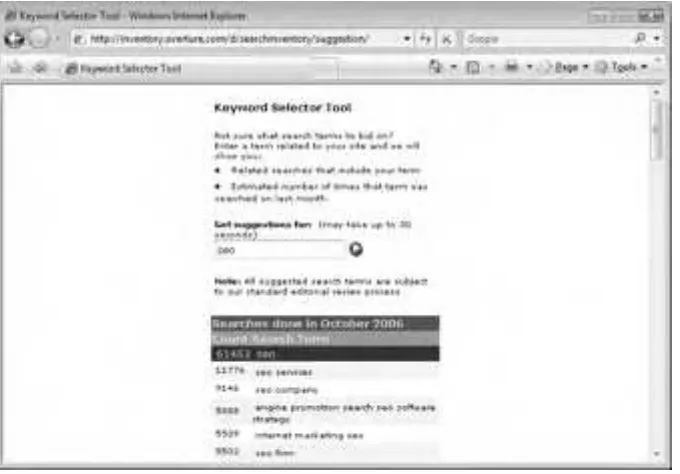
singular, past, present, and so on) is likely beneficial, as well as varying word order (âchocolate chip cookiesâ versus âcookies with chocolate chipsâ). Excessive and contrived keyword repetition â âkeyword stuffingâ â however, could actually be perceived as spam.
Because the search engine algorithms are unknown, âexcessiveâ is an unfortunately vague qualifier. This is one of the times we will reference something requisitely in an imprecise manner.
SEO copywriting aims to produce content on a web site in such a way that it reads well for the surfer, but also targets specific search terms in search engines. It is a process that legitimately, without the use of spamming techniques, seeks to achieve high rankings in the search engines. SEO copywriting is an art, and it takes time to master. There is no magic solution that will make it easy to create copy that is persuasive, contains relevant keywords a few times, and sounds like it is not contrived specifically to do so. There are a few tricks, and a few useful hints, however.
One of our favorite tricks is to use the end and beginning of a sentence to repeat a keyword subtly. Example: âMiami Hotels: You may want to try one our fine hotels in Miami. Hotelaccommodations at the Makebelieve Hotel will exceed your wildest expectations.â
The copy should also contain words that are related, but not necessarily inflections of your targeted key phrase. For example, a search engine algorithm would likely see a page on cookies that also contains the words âchocolate chipâ or âcakesâ as relevant. This tends to happen naturally with well-written prose, but it is worth mentioning.
Outbound Links
Search engines will evaluate the links that a document contains. A related link on a web page is valuable content in and of itself, and is treated as such by search engines. However, links to totally irrelevant or spam content can potentially hurt the rankings of a page. Linking to a âbad neighborhoodâ of spam sites or even lots of irrelevant sites can hurt a siteâs rankings.
Keywords in Page URL and Domain Name
It is likely that keywords contained by a URL, both in the domain name or in the file name, do have a minor but apparently positive effect on ranking. It also likely has an effect on CTR because keywords in the URL may make a user more likely to click a link due to an increase in perceived relevance. The URL, like the page title, is also often selected as the anchor text for a link. This may have the same previously mentioned beneficial effect.
Internal Link Structure and Anchors
Search engines may make the assumption that pages not linked to, or buried within a web siteâs internal link structure, are less important, just as they assume that pages that are not linked well from external sources are less important than those that are. Linking from the home page to content that you would like to rank can improve that pageâs rankings, as well as linking to it from a sitemap and from various related content within the site. This models real-world human behavior as well. Popular products are often prominently featured in the front of a store.
One horrible way to push pages down the link hierarchy is to implement pagination using â< prevâ and ânext >â links, without linking directly to the individual pages. Consider the example of the fourth page of an article that is split into four parts. It is reached like this:
This fourth page is harder to reach not only by humans (who need to click at least four times), but also by search engines, which would probably consider the content in that page as less important. We call the effect of this link structure âdeath by pagination,â and we suggest two possible approaches for mitigat-ing the problem:
1.
Donât use simple pagination. Page with â< prevâ and ânext >â links, but also add links to the individual pages, that is, â< prev 1 2 3 4 next >.â This creates a better navigation scheme to all pages.2.
Add a sitemap with links to all the pages.Because this problem is pretty common with blogs, in Chapter 16 you create a WordPress plugin that implements pagination with links to the individual pages. This technique is also demonstrated in the e-commerce case study in Chapter 14. You learn more about sitemaps in Chapter 9.
Overall Site Topicality
The fact that a web page is semantically related to other pages within a web site may boost the rankings of that particular page. This means other related pages linked within a site may be used to boost the rankings of the web site as a whole. This tends to happen naturally when writing quality content for a web site regardless.
Invisible On-Page Factors
Invisible on-page factors are, as you correctly guessed, parts of a web page that are not visible to the human readers. They can be read, however, by a search engine parsing a web site. Invisible page factors include:
â Meta description
â Meta keywords
â Alt and title attributes
â Page structure considerations
Meta Description
For the most part, the importance of a meta description lies in the fact that search engines may choose to use it in the SERPs, instead of displaying relevant bits from the page (this is not guaranteed, however). Speaking from a marketing point of view, this may improve CTR. A meta description may also have a minor effect on search engine rankings, but it is definitely not a critical factor in that regard. Here is an example:
<head>
<meta name=âdescriptionâ value=âThe secrets to baking fresh, chewy chocolate chip cookies that make you wish thousands of calories were actually good for you!â />
Meta Keywords
This criterion is widely regarded as totally unimportant because it is completely invisible and subject to manipulation. It is wise to place a few major keywords as well as their misspellings in the meta key-words tag, but the effectiveness of targeting misspellings this way has been disputed:
<head>
<meta name=âkeywordsâ value=âchocolate chip cookies, baking chocolate chip cookies, choclate, cokiesâ />
... </head>
Alt and Title Attributes
Because these tags are mostly invisible, they are likely not an important ranking factor. Many assert that their value is higher on hyperlinked images. They are important, however, for screen readers and text-based browsers â that is, for accessibility and usability in general, so they should not be ignored for that reason alone. Neither of these attributes will make or break you, but blind visitors using screen readers will thank you in any case. This is a case where accessibility, usability, and search engine opti-mization coincide. The descriptions should be short. Keyword stuffing in an alttag will irk blind users using screen readers, and possibly âirkâ the search engines as well. Alt tags can only be used in image tags, whereas title attributes can be used in most tags. Here is an example of the altattribute in an image:
<img src=â/images/chocolate_chip_cookie.jpgâ alt=âa picture of a really big c