J.M. Zain et al. (Eds.): ICSECS 2011, Part I, CCIS 179, pp. 111–121, 2011. © Springer-Verlag Berlin Heidelberg 2011
Visual Impaired
Wan Fatimah Wan Ahmad, Rustam Asnawi, and Sufia Ruhayani Binti Zulkefli
Department of Computer & Information Sciences Universiti Teknologi PETRONAS,
31750 Tronoh, Perak
[email protected], [email protected], [email protected]
Abstract. Integrated Learning System (ILS) is a system that integrates several functions of the multimedia elements such as audio, text and slide show presentation to support teaching/learning process. This paper describes a development of ILS model for visually impaired students. In this context, one of the most unique functions of the system is the Text to Voice feature which is able to “read” texts from e-slides written in Bahasa Malaysia for learning a topic in History. Waterfall Model has been chosen as the methodology for developing the system and a prototype of the ILS was introduced. Delphi programming, one of the rapid application programming tools that support object-oriented design is used to develop the system. Microsoft Access is used to manage the Database of audio files containing all the voices in Bahasa Malaysia. The prototype will benefit the visually impaired to enjoy the benefits of computer technology in using ILS.
Keywords: Integrated Learning System, visual impaired, multimedia, learning.
1 Introduction
With the advancement of technology, the visual impaired students are encouraged to use electronic educational material in their learning by the use of multimedia and computer technology as the main tool [1]. Students with visual impairment face difficulties in accessing educational material. Visual impairment (or vision impairment) is vision loss (of a person) to such a degree that additional supports are needed due to a significant limitation of visual capability resulting from either disease, trauma, or congenital or degenerative conditions that cannot be corrected by conventional means, such as refractive correction, medication, or surgery [2].
learn and how they interact with technologies were obtained from previous research projects which have conducted observations for 3 to 5 years on the blinds who interact with technologies.
The choice of Microsoft PowerPoint slide is mostly due to its wide utilization as the tool for delivering educational material. In fact, it can be categorized as an interactive learning medium will beneficial for both normal and visually impaired students. Normal students can use this learning system as an alternative way to study since besides reading the slides they are also able to listen to the text audio as well.
Decades ago, the medium of learning between educators and students in universities were blackboard, white board and OHP Hardware. Nowadays, almost all universities in Malaysia are using Microsoft PowerPoint as the medium to deliver lessons. It is possible that in the future, schools will also adopt the same method, whereby teachers will use Microsoft PowerPoint to deliver lessons instead of using writing boards. While such change is possible in schools for normal students, it would not be possible in schools for visually impaired students since the output of the existing Microsoft PowerPoint slides are visual.
Currently, schools that cater for visual impaired students are using JAWS software that is provided by the government. JAWS or Job Access With Speech is produced by the Blind and Low Vision Group at Freedom Scientific of St. Petersburg, Florida, USA. It provides the user with access to the information displayed on the screen via text-to-speech or by means of a Braille display and allows for comprehensive keyboard interaction with the computer. The JAWS software is almost like Microsoft Narrator but it has more advanced functions. The government has considered that JAWS is suitable to support the blinds and visual impaired for navigation and reading using a computer. However, the software is in English language, while in Malaysia, the language used is in Bahasa Malaysia. Therefore, the pronunciations of words are very different which may confuse the visual impaired students because they are different from the teacher’s pronounces.
In order to solve this problem, an ILS has been developed. ILS is a system that integrates several functions of the multimedia elements such as audio, text and slide show presentation to support teaching/learning process. In this study, the ILS is specially designed in such a way as to encourage the visually impaired students to use learning materials in e-slide format. Principally, the ILS is developed to overcome several problems:
1. The visual impaired are not able to use the technology or computer that is available for other students.
2. The visual impaired will be left behind in using any technology such as Microsoft PowerPoint. In other words, they will not be using any technology to assist them in learning.
2 Literature Review
The number of people with visual impairment has reached up to 135 million compared to the world’s population which is approximately 6 billion [3].Technology-Related Assistance for Individuals with Disabilities Act of 1988 (also call as Tech Act) has been defined as the first Assistive Technology Device for people with visual impairments [4].
Computers and technologies are usually developed for normal people; however they should also include Human Computer Interaction (HCI) systems for the visually impaired or blinds. For example, W3C’s Web Accessibility Guideline (WCAG) has provided a general guideline for providing a universal way in to computing technology that consisted of the specification on shapes and colors. According to WCAG [5], a system that was specially developed for visual impaired people will be totally different from normal people.
While [6] mentioned that in order to learn about visual impaired people, it is important to include some critical extreme values of the relevant characteristics. This shows that in order to gather the requirements of such ILS, the visually impaired or the blinds should be involved. There is a couple of ways to determine the interaction for visually impaired people such as tactile or audio [1]. This research has shown that principally tactile is more effective than audio.
Meanwhile, according to [4] there are seven categories of Assistive Technology (AT) devices; positioning, mobility, augmentative and alternative communication, computer access, adaptive toys and games, adaptive environments, and instructional aides. Related to visually impaired people, the accessibility of computer devices is the most important category to be considered in developing the ILS. In this context, the accessibility to computer devices can be interpreted as the visually impaired can “read” the text written in an e-slide file such as the Microsoft PowerPoint.
Researchers have studied different matters on the use of technologies and they have identified several points such as blind acceptance of technologies, learning method of the blinds, ICT and its effect, development of Text to Voice, and relationship between the blinds and the visually impaired. Each of these is addressed in the subsequent sections.
2.1 Blind Acceptance towards Technologies
2.2 Learning Method
The learning process for the visual impaired should include instructional design, communication bridges, skill development simulations, distance learning practices and discovery learning [8]. Department of Allied Health and Science [9], UNC School of Medicine conducted a research called The Deaf-Blind Model Classroom Project. In that research, two persons volunteered to test the system, and observations were made on both of them. Both of them, from the age group 10 to 15 years old, who never knew the alphabets before, yet succeeded to make sentences within 1 to 3 years of using the system.
The research done by UNC School of Medicine was for the beginning of the learning process. It may take years to observe the whole learning process step by step. In this paper, a summary of the observations made by other researchers is provided, such as from UNC School of Medicine.
The next section describes the learning processes of the visual impaired.
2.2.1 Instructional Design
Generally, instructional design (ID) is a set of actions that treat knowledge familiarity, value, and request directions at the maximum potential. In this context, ID is purposely focused on the set of activities that takes places on how the visual impaired students learn. In non-technological way, the blinds read using Braille. The Braille is a symbol of dots that represents the “ABC” alphabet. The visual impaired/blinds read by feeling the dots with their fingers. By using Braille they are able to use the keyboard, remember the alphabets and type as normal people do. They can use the keyboard by remembering each position of the alphabets. On the computer’s keyboard, there are two dots on “F” and “J” alphabets, which will provide the clue to the positions of other alphabets.
2.2.2 Communication Bridges
The visual impaired has less problem to communicate compared to other physical disabilities. They can easily communicate and express what they want or dislike with others. However, the main communicate issue with the visual impaired is describing pictures or something that needs visual assessment to interpret them. For example, it is very challenging to talk about colors to visual impaired as they have never seen them before. It is almost pointless to make them understand about colors as they cannot visualize anything. Thus, when designing an ILS system it is important to consider those areas or subjects that are beneficial to them, such as the alphabet, weather, knowledge and etc.
2.2.3 Skills Development Simulations
between visual impaired and the ILS, whereby the blinds can use computer directly (by clicking the mouse and typing words).
2.2.4 Distance Learning
Distance Learning can be applied when a teacher is not in the same room with the students. Video conferencing can also be another method of teaching. Although video conferencing provides both voice and video streaming, unfortunately for the blinds, only voice is beneficial for them. Through video conferencing, the teacher (who may not blind) can observe the students’ learning process. Then again, to reduce the cost of development and enhancing efficiency of the ILS, the Distance Learning can be applied only through audio call between visual impaired students and the teacher.
2.2.5 Discovery Learning
In discovery learning, [8] introduces interactive learning experiences such as games, non-fiction stories, and video segments. To make the learning more interesting and fun, games can also be incorporated in the teaching and learning processes for the visual impaired. For example, to make them remember, it is very interesting to make the learning experiences through non-fiction story of “snow white”, which can be played in the video. As ILS is developed with several features of audio and text, so it is possible to implement discovery learning for the visual impaired. This may make the learning experience interesting and fun.
Besides, the system can also be made available to normal students whereby instead of reading, they can listen to the audio while doing something else. Nowadays, it has become a trend to study while listening to music. Using the ILS, normal students can read and learn while listening to the voice reading the written text.. This may be a very effective way to study and at the same time it may also increase students’ performances.
2.3 Student, ICT and Its Impact
According to [10], many researches on ICT and its impacts have been conducted, but the real effects have not yet been exposed. These may be caused by the inconsistency of methods used leading to uncertainty of results in some research studies. Hence, [10] have suggested using more consistent and normal standards in conducting research on the effect of students being exposed to ICT and technologies. Through all that, the most important thing while doing this research is to understand the impact on students in terms of their thinking, knowledge, understanding and acting processes. Their attitude towards ICT and technologies also has some impacts on the students’ learning process [11, 12].
3 Methodology
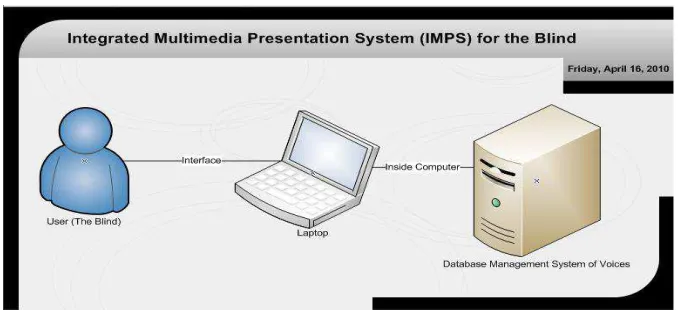
Voice routine will be resided in the machine. The functionality testing of the system has been performed at Sekolah Kebangsaan Sultan Yussof and Sekolah Sri Mutiara. 5 participants are involved in this study.
Fig. 1. System architecture
4 Integrated Learning System
In this paper, ILS is a system that integrates two components, audio and text. The learning system enable the visual impaired students to “read” the text on a Microsoft PowerPoint slide by incorporating Text to Voice feature that reads the text to them. Waterfall Model has been chosen as the methodology for developing the system and a prototype of the ILS. Delphi programming, one of the rapid application programming tools that support object-oriented design is used to develop the system. Microsoft Access is used to manage the Database of audio files containing all the voices in Bahasa Malaysia. The difference between JAWS and ILS is that JAWS is using the JAWS Scripting Language.
The interaction between the ILS and visually impaired student has applied the combination of both audio and tactile as recommended by [1]. In the concept of ILS, audio is exploited in order to benefit the visually impairment or the blinds to enable them to “read” the text. Some short or hot keys are provided to the blinds to support accessibility to the system. The short key will be pressed by the blind students through the keyboard device as an alternative way to execute their choices. After conducting a few feasibility analyses such as economic, technical and time perspectives, it is more feasible and less risk to produce ILS with combined modes of interaction.
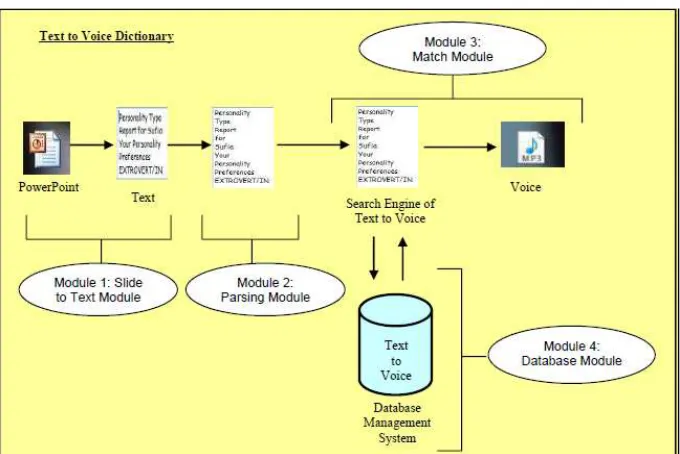
4.1 Slide to Text Module
In this module, the Microsoft PowerPoint slides have to extract the texts from sentences. In normal Power Point slide, few text boxes will be placed on a slide. This module will gather all sentences in the text boxes on all slides and convert into string of sentences.
4.2 Parsing Module
In this module, it will accept any string of words and chunk them into one single word in an array. The purpose of the system is to store all words or sentences into an array to make them easier to be used in Match Module later. For example a slide of Microsoft PowerPoint has 6 sentences and each sentence has 10 words, so the total words in that particular slide in an array would be 60 words.
4.3 Match Module
In this module, it will take the array stored by Parsing Module and matches with the database. Some researchers used normal looping to make the system, which always produces errors. Therefore Match Module has adopted timer technique. Timer actually acts as looping, it produces start and end time of the voicing slide. The advantage is that when using timer, the system will be free from the previous errors.
4.4 Database Module
Database module provides all the words in Bahasa Malaysia for the specific learning material of this project. The learning material is Form one History covering chapter
one to chapter four. Several audio files are saved in a specific file. The files can be retrieved using Microsoft Access. So basically in Microsoft Access, there are maps of words and related specific audio MP3 file.
Figure 2 shows the relation between modules for developing Text to Voice in Bahasa Malaysia.
5 Results and Discussions
5.1 The Interfaces of the ILS
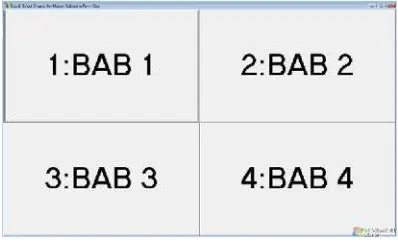
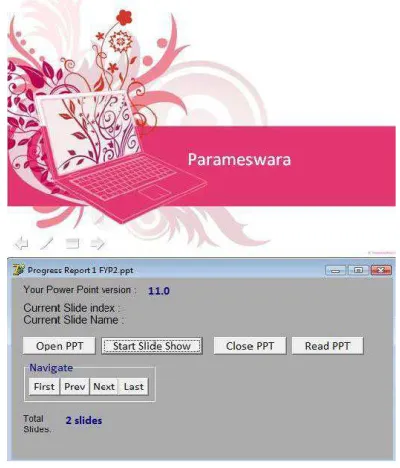
Figure 3 shows the main page of ILS. Basically it can execute Text to Voice through Microsoft PowerPoint instead of normal text. Regardless of the shape and number of text box on the Microsoft PowerPoint slide, the ILS is able to “read” all text written on the slide. Figure 4(a) and 4(b) show the interfaces of the snapshots in running ILS.
5.2 Feedback on the Functional Testing
The testing has been conducted at Sekolah Kebangsaan Sultan Yussof and Sekolah Sri Mutiara. 5 teachers were asked to go through the ILS and feedbacks and interviews on the ILS were taken after they have finished with the system.
The feedbacks were: 1) the system should include a voicing notification of slide transition in order to inform the students that a slide transition is taking place. This way, the system will also be able to control the voice speed; 2) a proper introduction can be provided before starting the slide; 3) to provide background music rather than merely “reading” a text only; 4) ILS does have an impact on the visual impaired students and it is capable to boost the students’ self esteem.
A positive comment from the teachers include the students would be able to study independently using this system. This presents a new method to the visual impaired students, in particular, whereby the computer is no longer only limited to normal students. Visual impaired students are also able to benefit from the computer to enhance their learning process.
Fig. 4(a). Snapshot of executed ILS
6 Conclusion
The paper has discussed the development of ILS for visual impaired students. The functional testing indicated the potential of the system, as well as the positive feedbacks from the teachers. The ILS is not only limited to visual impaired students but it can also be used by non-blind students as an alternative interactive learning system. The system does not only provide an easy way for visual impaired students to study e-slide materials, but it would also help to boost their self esteems by being able to study independently using the system. The proposed ILS system complements the current JAWS software, because JAWS read Malay text using English language. Since the ILS provides Text to Voice feature in Bahasa Malaysia, this software is more appropriate for learning purposes in visual impairment environment in Malaysia. Future work includes testing with the real users and enhancement will be made according to the feedback. ILS will benefit the visual impaired to enjoy the benefits of computer and multimedia technology.
Acknowledgment
The authors would like to thank Universiti Teknologi PETRONAS and all those involved in this study either directly or indirectly.
References
1. Baldonado, M., Chang, C., Gravano, L., Paepcke, A.: The Stanford Digital Library Metadata Architecture. International Journal of Digital Libraries 1(2) (1997)
2. Arditi, A., Rosenthal, B.: Developing an objective definition of visual impairment. In: Vision 1996: Proceedings of the International Low Vision Conference, pp. 331–334. ONCE, Madrid (1998)
3. van Leeuwen, J. (ed.): Computer Science Today: Recent Trends and Developments. LNCS, vol. 1000. Springer, Heidelberg (1995)
4. Bruce, K.B., Cardelli, L., Pierce, B.C.: Comparing Object Encodings. In: Ito, T., Abadi, M. (eds.) TACS 1997. LNCS, vol. 1281, pp. 415–438. Springer, Heidelberg (1997)
5. Michalewicz, Z.: Genetic Algorithms + Data Structures = Evolution Programs, 3rd edn. Springer, Heidelberg (1996)
6. Shinohara, K., Tenenberg, J.: Observing Sara: A Case Study of a Blind Person’s Interactions with Technology. In: Proceedings of the 9th International ACM SIGACCESS Conference on Computers and Accessibility, Tempe, Arizona, USA, pp. 171–178 (2007) 7. Sánchez, J., Galáz, I.: AudioStoryTeller: Enforcing Blind Children Reading Skills.
In: Stephanidis, C. (ed.) HCI 2007. LNCS, vol. 4556, pp. 786–795. Springer, Heidelberg (2007)
8. Patron, B.S.: Snapshot of Interactive Multimedia at Work Across the Curriculum in Deaf Education: Implications for Public Address Training. Journal of Educational Multimedia and Hypermedia 15(2), 159–173 (2006)
9. School of Medic UNC Winter, vol. 13(2) (2006),
http://www.med.unc.edu/ahs/clds/projects/
10. Cox, M.J., Marshall, G.: Effects of ICT: Do we know what we should know? Journal Education and Information Technologies 12(12), 59–70 (2007)
11. Pearson, M., Naylor, S.: Changing contexts: Teacher professional development and ICT pedagogy. Journal Education and Information Technologies 11(3-4), 283–291 (2006) 12. Watson, D.M.: Pedagogy before Technology: Re-thinking the Relationship between ICT