• Tidak ada hasil yang ditemukan

Access-2.ppt 483KB Mar 29 2010 04:55:15 AM

N/A
N/A
Protected

Academic year: 2017

Membagikan "Access-2.ppt 483KB Mar 29 2010 04:55:15 AM"

Copied!
17
0
0

Teks penuh

(1)

Chapter 2

Tables and Forms: Design, Properties, Views, and

Wizards

(2)

Objectives

(1 of 2)

• Describe table design

• Describe data types and properties; set a primary key

• Use Table Wizard; add and delete fields

(3)

Objectives

(2 of 2)

• Use Form Wizard

• Distinguish between bound, unbound, and calculated controls

• Modify an existing form

(4)

Overview

• Basic principles of table and form design • Design guidelines

(5)

Table Design Basics

• Include necessary data

• Store data in its smallest parts

(6)

Creating a Table

• Table Wizard is easiest

• Designing a table yourself • Field names

• Data types • Primary key

(7)

Data Types

• Number field • Text field • Memo field

• Date/Time field • Currency field

• Yes/No field

• OLE field

• AutoNumber

(8)

New Table Screen

Click on ‘New’ Button

(9)

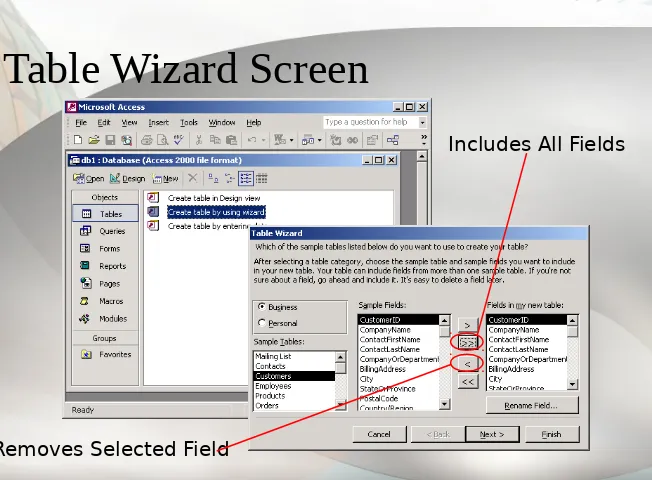
Table Wizard Screen

Includes All Fields

(10)

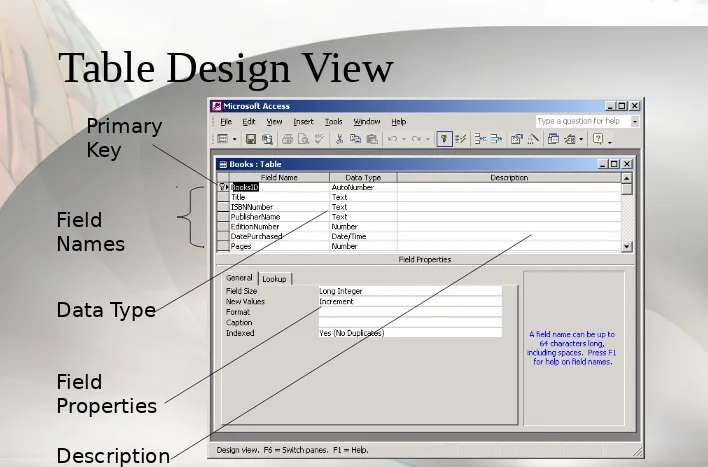
Table Design View

Data Type

(11)

Properties

(1 of 2)

• Field size

• Format

• Input Mask

• Caption

• Default Value

• Validation Rule

(12)

Properties

(2 of 2)

• Required

• Allow Zero Length • Indexed

• Unicode Compression • IME Mode

(13)

Creating a Form

• Controls--objects

• Bound control has data source • Unbound control: no data source

• Calculated control: expression as data source • Properties

(14)

Form Design View

Click and drag to move Toolbox

(15)

Form View

(16)

Chapter 2 Summary

• Information depends on underlying data

• Database design is critical

(17)

Chapter 2 Summary

Continued

• Form provides easy way to enter and display data

• Form consists of objects called controls
Gambar

Table Design Basics
Table Wizard Screen
Table Design View

Referensi

Dokumen terkait

 FEVER, INTENSE HEADACHE FEVER, INTENSE HEADACHE  VOMITING, PHOTOPHOBIA, VOMITING, PHOTOPHOBIA,  NECKPAIN AND STIFFNESS NECKPAIN AND STIFFNESS.  SIGNS OF MENINGEAL

• Balance Between Simplicity and Chaos • Limit the use of every Font

Channel And Medium Six-Phase Process Channel And Medium Six-Phase Process Phase 1: Sender Has an Idea Phase 1: Sender Has an Idea Phase 3: Sender Transmits Message Phase 3:

Final Report Final Report Edited Copy Edited Copy Grammar, Usage and Punctuation Grammar, Usage and Punctuation Spelling Errors and Typos Spelling Errors and Typos Missing

Punctuate Polite Requests and Questions Differently Pay Attention to Tone. Pay Attention

Chapter 11 - 3 Preparing Visuals Preparing Visuals Gain an Gain an Advantage Advantage Gain an Gain an Advantage Advantage Balance Words Balance Words and Visuals and Visuals

Information Information 2 2 Evaluate and Evaluate and Finalize Sources Finalize Sources Evaluate and Evaluate and Finalize Sources Finalize Sources 3 3 Analyze Data Analyze Data

 Problem recognition: actual state versus desired state and motivation arousal!.  Pre-purchase, post-purchase, and ongoing