Essential
®
Essential
®
Development
Build Successful Applications
for the Facebook Platform
John Maver
Cappy Popp
Upper Saddle River, NJ •Boston•Indianapolis•San Francisco New York •Toronto •Montreal•London•Munich•Paris •Madrid
er was aware of a trademark claim, the designations have been printed with initial capital letters or in all capitals.
The authors and publisher have taken care in the preparation of this book, but make no expressed or implied warranty of any kind and assume no responsibility for errors or omis-sions. No liability is assumed for incidental or consequential damages in connection with or arising out of the use of the information or programs contained herein.
The publisher offers excellent discounts on this book when ordered in quantity for bulk pur-chases or special sales, which may include electronic versions and/or custom covers and content particular to your business, training goals, marketing focus, and branding interests. For more information, please contact
U.S. Corporate and Government Sales (800) 382-3419
[email protected] For sales outside the United States, please contact
International Sales [email protected] Visit us on the Web: informit.com/aw
Library of Congress Cataloging-in-Publication Data:
Maver, John,
1972-Essential Facebook development : build successful applications for the Facebook platform / John Maver, Cappy Popp.
p. cm.
Includes bibliographical references and index.
ISBN 978-0-321-63798-7 (pbk. : alk. paper) 1. Facebook (Electronic resource) 2. Online social networks. 3. Social networks—Computer network resources. 4. Web sites—Design. I. Popp, Cappy, 1970- II. Title.
HM742.M38 2010 006.7'54—dc22
009035432 Copyright © 2010 Pearson Education, Inc.
All rights reserved. Printed in the United States of America. This publication is protected by copyright, and permission must be obtained from the publisher prior to any prohibited repro-duction, storage in a retrieval system, or transmission in any form or by any means, elec-tronic, mechanical, photocopying, recording, or likewise. For information regarding permis-sions, write to:
Pearson Education, Inc.
Rights and Contracts Department 501 Boylston Street, Suite 900 Boston, MA 02116
Fax (617) 671-3447
Facebook®is a registered trademark of Facebook, Inc. ISBN-13: 978-0-321-63798-7
ISBN-10: 0-321-63798-4
Text printed in the United States on recycled paper at R.R. Donnelley in Crawfordsville, Indiana.
First printing December 2009
Acquisitions Editor
This book is dedicated to those who aren’t afraid to dive in and figure out how things really work.
Preface xvi
Part I: Introduction to Facebook Applications
1 Facebook Applications: The Basics 3
2 Making Great Applications 21
3 Platform Architecture Overview 31
4 Platform Developer Tools 49
5 Facebook Terms of Service and Application Programs 69
Part II: Developing Applications
6 The Basics of Creating Applications 83
7 Building the Canvas 107
8 Updating the Profile 133
9 Feed Stories, Feed Forms, and Templates 155
10 Publisher, Notifications, and Requests 193
11 FBJS, Mock AJAX, and Flash 243
Part III: Integrating Facebook into an External Website
12 Facebook JavaScript Client Library 315
13 Facebook Connect 343
Part IV: Post Launch
14 Measuring Application Success 369
15 Spreading and Monetizing Applications 385
16 Improving Application Performance and Workflow 399
Part V: Appendices
A Resources 421
Preface xvi
Part I: Introduction to Facebook Applications
1 Facebook Applications: The Basics 3 Environment and Integration Points 4
Profiles 5 Feed 10 Sharing 13 Photos 14 Notes 14
Messages, Notifications, and Requests 14 Extending Facebook 16
Platform Applications 16 Desktop Applications 16 Public Profiles 16 Facebook Connect 17
Facebook Platform Core Components 18 FBML 18
FBJS 18 FQL 18
XFBML and the Facebook JavaScript Client Library 19 Summary 19
2 Making Great Applications 21
Begin with a Plan 21 Objectives 21 Target Audience 22 Value Proposition 22 Competitive Advantage 22 Involving the User 22 Iterating 23
Planning for Growth 23 Facebook’s Guiding Principles 23
Make Them Trustworthy 24 Make Them Well Designed 25 Examples of Great Applications 26
LivingSocial 26 Causes 27 Graffiti 27 Summary 29
3 Platform Architecture Overview 31
Facebook’s Internal Servers 31 Servers 31
Technologies 32
Facebook’s External REST Interface 33 Using REST on the Web 33 Implementing REST in Facebook 34 Overview of the Facebook API 35
Permissions API 35 Authorization API 35 Batching API 36
Comments API (Beta) 36 Data Store API (Beta) 36 Events API 36
FBML API 36 Feed API 37 FQL API 37 Links API 37
User Management API 37 Notes API (Beta) 38 Messaging API 38 Pages API 38
Photo and Video API 38 Profile API 38
Open Stream API (Beta) 38
Facebook JavaScript Client Library 39 Facebook Mobile Support 40
Official Libraries 42
Unofficial or Third-Party Supported Libraries 43 Application Architecture 43
Secret Keys 44 Canvas Page URL 44 Canvas Callback URL 44 Canvas Page Workflow 44 Profile Box Workflow 46 Summary 46
4 Platform Developer Tools 49
Facebook Provided Tools 49 API Test Console 49 FBML Test Console 52 Feed Template Console 56 Registered Templates Console 57 Facebook Debugging Support 57 Developer Test Accounts 59 Browser Debugging Tools 60
Firebug Add-On for Firefox 60 Web Developer Add-On for Firefox 64 YSlow Add-On for Firefox 64
Firebug Lite Extension for Internet Explorer 6 and 7 65
IE Developer Toolbar for Internet Explorer 6 and 7 65 Debugger Tools for Internet Explorer 8 66
Summary 66
5 Facebook Terms of Service and Application Programs 69
Facebook Terms of Service 69 User Guidelines 70 Developer Guidelines 72 Facebook Application Programs 77
Application Verification Program 77 fbFund 78
Part II: Developing Applications
6 The Basics of Creating Applications 83
Setting Up the Environment 83 Using the Developer Application 84
Basic Settings Tab 86
Authentication Settings Tab 88 Profiles Settings Tab 90 Canvas Settings Tab 90 Connect Settings Tab 93 Widgets Settings Tab 93 Advanced Settings Tab 93 Creating the Application Skeleton 95 Application Authorization 98
Parameters Sent to Applications 99 Generating Signatures 102
Before an Application Is Authorized 103 After an Application Is Authorized 104 How an Application Is Authorized 104 Summary 106
7 Building the Canvas 107
Choosing Between an FBML and IFrame Canvas 107 Learning Curve 107
Migration of Existing Applications 108 Cross-Platform Portability 108 Look and Feel 108
Performance 108 Testing 109
Preparing the Compliments Canvas Pages 109 Database Setup 109
Adding the Utility Functions 111 Using External CSS Files 113
Defining the Types of Compliments 114 Creating the Compliments FBML Canvas Page 114
Adding the Send Compliment Form 116
Creating the Compliments IFrame Canvas Page 121 Loading the IFrame Canvas Page 121
Adding the Send Compliment Form 122 Using Tabs for Multiple Pages 129 Summary 131
8 Updating the Profile 133
Profile Boxes 133
Creating the Compliments Profile Boxes 135 Adding the Profile Boxes 140
Application Tabs 144 Application Info Sections 145
Getting the Compliments Data 147 Creating the Info Section 148 Adding Info Section Buttons 149
Allowing Users to Update Info Sections 150 Working with Facebook’s Caching 151
Refreshing the Image Cache 151 Managing the FBML Cache 152 Summary 154
9 Feed Stories, Feed Forms, and Templates 155
Using Feed Forms and Templates 155 Introducing Feed Forms 155 Feed Templates 158
Using Feed Forms to Publish to the Stream 168 Using the Facebook API 177
Using the API to Publish to the Stream 178 Sandbox Mode and Testing Feed Stories 190 Summary 191
10 Publisher, Notifications, and Requests 193 Getting to the Heart of Feed: The Publisher 193
Notifications 207 Notification Types 208
Sending Notifications with the Facebook API 210 Application Email 213
Extended Permissions 213 Sending Application Email 214 Requests 221
Overview of Requests and Invitations 221 Sending Requests and Invitations 222 Application Messaging and Allocations 230
Viewing Application Allocation Limits 230 How Facebook Determines Allocations 231 Tracking Allocations 235
Facebook Sharing 236
Publishing Content Via Sharing 237 Sharing Preview 238
Summary 241
11 FBJS, Mock AJAX, and Flash 243
Allowing External JavaScript in Facebook 243 Sandboxing 244
How Facebook Restricts JavaScript 245 Sandbox Creation and Initialization 245 Basic FBJS 248
Browser Detection 249 FBJS and the DOM 249 FBJS Dialogs 259 Mock AJAX 262 Advanced FBJS 269
UsingAjax.FBML 271
Using Firefox and Firebug to Monitor AJAX 275 UsingAjax.JSON 279
Publishing Feed Stories with FBJS 281 FBJS and CSS 284
Using Flash 294
Hosting Flash Content in Facebook Applications 294 Creating a SWF That Can Communicate with
FBJS 296
Hosting and Communicating with Flash from FBJS 303
Summary 311
Part III: Integrating Facebook into an External Website
12 Facebook JavaScript Client Library 315 Cross-Domain Communication 316 Using the Library 317
FeatureLoader 318 Including Features 318 Authentication 320
Calling Facebook JavaScript Client Library Functions 322
Key Library Classes 323 FB.apiClient 323 FB.Bootstrap 323 FB.Connect 324 FB.FBDebug 327 FB.UI 330 FB.XFBML 331
Updating Compliments’ IFrame Page 338 Summary 342
13 Facebook Connect 343
Facebook Connect Features 343 Trusted Authentication 344 Real Identity 344
Dynamic Privacy 346 Friends Access 346 Social Distribution 347
Detecting Login Status 351 Logging the User In 354 Logging Out the User 356
Disconnecting Users from Facebook 357 Reclaiming Accounts 358
Friend Linking 358 Widgets 361
Comments Box 361 Live Stream Box 365 Summary 365
Part IV: Post Launch
14 Measuring Application Success 369
Metrics: Why They Matter 369 Viral Loop 369
Collecting Metrics 371 A/B Testing 372 Metrics Dashboards 375
Facebook Insights and the Metrics API 375 Kontagent 382
Summary 384
15 Spreading and Monetizing Applications 385 Spreading Your Application 385
Facebook Ads 386 Ad Networks 391
Developer Link Exchanges 391 Monetizing Your Application 392
Displaying Ads 392 Sponsors 394 Affiliate Links 394 Subscriptions 394
16 Improving Application Performance and Workflow 399
Batching API Calls 399 FQL 401
FQL Overview 401 fql.multiquery 407 Preloading FQL 408
Working with Multiple Developers 410
Setting Up Port Forwarding for Each Developer 411 Creating Additional Applications for Each
Developer 411
Creating a Smart Local Configuration File 411 Summary 416
Part V: Appendices
A Resources 421
Links 421 Facebook 421 Developer Tools 422 Facebook News 422
B Beta Features 423 Add Page Referrer 423 Stream 423
Custom Tags 424 Data Store API 424 FBJS Local Proxy 424 Cookies 424
FBML Tags 425 <fb:board> 425 <fb:chat-invite> 425 <fb:feed> 425
<fb:typeahead-input> 425 IFrame URL 425
Links, Notes, and Status 426 LiveMessage 426
Currently, Facebook has more than 250 million active users and more than 350,000 active applications; both are growing rapidly. Facebook continues to roll out massive changes to its development platform, rendering previous best practices obsolete.To date, few definitive developer resources explain how to effectively use the new platform features.
However, just knowing the technical aspects of how to build a Facebook application does not guarantee that it will succeed. It is important to understand what makes appli-cations work on Facebook, how to measure their progress, and how to make the changes that maximize their potential for success.This book is not only an up-to-date reference that discusses the latest features of the Facebook Platform, but it also addresses the entire process of creating applications from inception to deployment and beyond.
Who This Book Is For
This book is for intermediate developers who are comfortable with PHP, MySQL, and the major technologies of the web: HTML, JavaScript, and Cascading Style Sheets (CSS). Readers should also be knowledgeable about setting up and configuring a web server, such as Apache or Internet Information Services (IIS).
No prior experience with Facebook development is required, although some famil-iarity with the Facebook website as a user is assumed.To be a good developer for a plat-form, it helps to understand it from a user’s perspective.
This book helps readers understand what makes a good Facebook application, how to use the core technologies of the Facebook Platform to create it, and the best practices to deploy, monitor, and tune it.
How This Book Is Structured
This book is divided into five main parts:
also provides a quick reference to the key points of the Facebook Terms of Use as they apply to developers.
n Part II, “Developing Applications,” goes through creating an application from beginning to end, using a sample application called Compliments. Each chapter in this part builds upon the prior chapter, starting with creating the application infra-structure and adding support for profiles, canvas pages, messaging, and Facebook JavaScript (FBJS).
n Part III, “Integrating Facebook into an External Website,” introduces the Facebook JavaScript Client Library and Facebook Connect, which are two technologies for integrating Facebook functionality into external websites and IFrames within the Facebook Platform.
n Part IV, “Post Launch,” details some best practices for spreading, measuring applica-tion success, and increasing performance.
n Part V, “Appendices,” lists commonly referenced URLs in Appendix A and discusses upcoming beta features in Appendix B.
Contacting the Authors
If you have any questions or comments about this book, send us an email at [email protected] can also visit this book’s website,
Writing a book requires a lot of hard work, but not just from the authors.To create this masterpiece, we had an amazing team assisting us:
Trina MacDonald, our acquisitions editor, made sure that everything happened suc-cessfully, dealing with all the hiccups along the way. She was essential as a guide for two first-time authors in navigating all the challenges of completing this work.
Joseph Annuzzi, Jr., Jerry Ablan, and Ben Schupak, our technical editors, went through our text, code, and screenshots with a fine-tooth comb, testing everything and adding their own knowledge and experience to make the book even better.
Michael Thurston, our development editor, slogged through many revisions of all of our chapters, refining the text and creating consistency. He helped make our book easy to read and a pleasure to behold.
Olivia Basegio, our assistant editor, worked behind the scenes to keep all of our docu-ments and revisions flowing smoothly between us and our editors.
We thank the entire team for all of their hard work, patience, and abilities.This book could have never been written without them.
John Maverhas been involved with the Facebook, Bebo, and MySpace platforms from the time they were released, and he has written several successful applications. He has been a speaker at conferences and webinars about Facebook development and was the Featured Developer for the Bebo platform in the spring of 2008. As cofounder and Principal of Thought Labs, John has worked with small businesses and Fortune 100 companies to find the right goals, strategies, and implementations for their social media campaigns. Prior to specializing in social media, John spent ten years leading software-development teams and building award-winning software-debugging products.You can connect with John on Facebook at www.facebook.com/jmaveror Twitter at @jmaver.
Cappy Poppfrequently speaks about Facebook and other topics at conferences such as GSP East, MITX, Social Media Business School, and others. He has been developing popular applications for Facebook and other social networking platforms since they launched. Cappy also cofounded Thought Labs, where he’s implemented many thriving social media solutions for clients of all sizes, from small businesses to some of the world’s largest companies.
I
Introduction to Facebook
Applications
1 Facebook Applications: The Basics
2 Making Great Applications
3 Platform Architecture Overview
4 Platform Developer Tools
1
Facebook Applications:
The Basics
F
acebook currently has more than 250 million active users.Think about that for a minute. If Facebook were a country, its population would make it the world’s fourth largest. It would be larger than Russia, Brazil, Japan, Mexico, or any European nation. It ranks in the top ten most visited websites by the entire world’s top Internet research firms. It handles billions of page views per month. Facebook provides some extremely compelling statistics.
General Growth
n More than 250 million active users.
n More than two-thirds of Facebook users are outside of college. n The fastest growing demographic is people 35 years and older.
User Engagement
n An average user has 120 friends on the site.
n More than 5 billion minutes are spent on Facebook each day. n More than 30 million users update their statuses at least once a day. n More than 8 million users become Fans of Facebook pages each day.
Applications
n More than 900 million photos are uploaded to the site each month. n More than 10 million videos are uploaded each month.
n More than 1 billion pieces of content (web links, news stories, blog posts, notes, photos, and so on) are shared each week.
International Growth
n More than 50 translations are available on the site, with more than 50 in development. n More than 70 percent of Facebook users are located outside the United States.
Platform
n More than 1,000,000 developers and entrepreneurs from more than 180 countries. n More than 350,000 applications are currently available from the Facebook
Applica-tion Directory.
n More than 5,000 applications have more than 10,000 or more monthly active users. n Every month, more than 70 percent of Facebook users engage with Platform
appli-cations.
The Facebook ecosystem is frequently referred to in terms of a social graph. In this graph, each Facebook user represents a node, and that user’s friend relationships represent the edges between these nodes. All these nodes and edges together comprise the social graph. Scientists have studied social graphs for decades, and there is a wealth of available information about them.
One of the most important hypotheses of social networks, especially as they relate to Facebook, is the “small world phenomenon”—the basis for the well-known phrase “six degrees of separation”—which states that there are generally only a few social relation-ships separating any two arbitrary people in the world.The power of this idea can be clearly seen when you look at this in terms of Facebook’s social graph of 250 million nodes.The potential for a single Facebook user to interact with any other in Facebook’s closed system is much greater than it would be in an open environment, like the web.
Facebook’s Platform gives you direct access to its social graph and the data contained within it, so it’s no surprise that the interest in creating Facebook applications has exploded. This book takes you through the necessary steps to get your application built in the best way possible to maximize your chances of getting your application to spread successfully.
Environment and Integration Points
Profiles
The Facebook profile is the main entry point for Facebook users.To be statistically valid, social graphs require that their nodes (or users) are unique, and Facebook ensures this—or at least mitigates it—in its Statement of Rights and Responsibilities by requiring that each account be backed by a single physical person. Each account is supposed to represent a user’s real-world identity.The Profile is where that identity is displayed for a given user.
Applications can integrate with Facebook in multiple locations within its user inter-face, including the profile. As far as the Facebook Profile goes, there are several places ap-plications can integrate, which are discussed in the following sections.
Profile Boxes
A user’s profile is comprised of many sections:
n The Wall and Info tabs share a common left column of application profile boxes. n The Boxes tab hosts two columns of application profile boxes.
n The Application tabs are full-screen-width application profile boxes.
n The Feed Wall lists activities carried out on Facebook by a user and his friends. In Facebook, you can reach the profile by clicking the Profile link at the top of any page while you’re logged in.The user can allow an application to display a box on the left side of his profile when the Wall or Info tab is selected, or he can allow a box to be placed on his Boxes tab. At least one application must be installed to have the Boxes tab appear on the profile.The size of these boxes is limited by both height and width, if they are placed on the Wall or Info tabs and by width on the Boxes tab. Note that an application cannot place anything on a user’s profile without his express permission. (This is covered in Chapter 8,“Updating the Profile.”)
Wall, Info, and Boxes Tabs
The Wall and Info tabs share a common left navigation area, which is shown in Figure 1.1. A user can place up to five application profile boxes in this region, and they all must be placed below the Friends section.These boxes are limited in both width and height, so the content they display is crucial: It needs to get users’ attention, encourage interaction, and provide a call to action (to get new users to install the application, for example) all within a small space.
Boxes can be placed on the left side of a user’s profile by using a special tag that Face-book provides.This tag displays an Add to Profile button to encourage users to install a profile box for an application.This is the only direct means for an application to install a profile box directly to the Wall and Info tabs. Profile boxes can also be relocated here from the Boxes tab.
When Facebook first launched the F8 Platform in May 2007, applications had nearly free reign to display whatever they liked, including showing different content to non-application users on behalf of and without a user’s consent. Application developers tried every trick in the book to get people to spread and install their applications using any and all loopholes in the Facebook Terms of Service.
Since then, Facebook made many changes to close those loopholes, the largest of which was the new profile redesign (launched in July 2008), which relegated all existing application profile boxes to the Boxes tab.Application developers were less than enthusiastic at first; how-ever, the change certainly cleaned up the profile and, with the creation of the Feed, made it more focused on what users were doing rather than what applications they had installed.
It’s more difficult to make successful applications today than it was when Facebook first launched.To be popular and successful—and especially have a profile presence— applications must now be engaging, have powerful messaging in place, and have a high potential for reuse.
Applications Menu
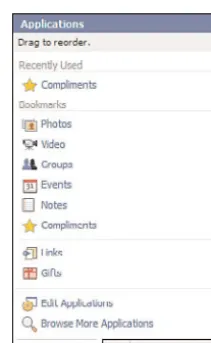
The Applications menu is one of the main places where a user can go to launch an appli-cation after she has installed it.This menu is located on the lower-left side of the Facebook interface. Any Windows or Linux user will find the menu idiom easy to understand. It
Figure 1.1 The Information and Friends profile boxes go along the left side of this user’s profile.
allows a user to access her recently used applications, see applications she has book-marked, edit global application settings, and search for new applications from the Face-book Application Directory.
As shown in Figure 1.2, the first six bookmarked applications are shown in the Book-marks section. All other bookmarked applications are shown below this line. Recently used applications are the four most recently used nonbookmarked applications. Interest-ingly, there does not appear to be a limit to the size of this menu: If you bookmark dozens of applications, your menu will become so long that it will scroll past the top of the browser window. Notice the link for an application named Compliments.This appli-cation will be developed throughout this book.
Bookmarks
Bookmarks are simply saved links to applications you’ve visited on Facebook.They show up in three places in the Facebook profile.You can choose six that are visible both along the lower status area of the interface as nice little icons and on your Home page on the right side of your profile. All other bookmarks are visible both on the Applications menu and by clicking More below your top six bookmarks on your Home page.
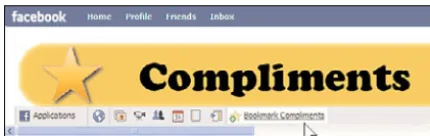
There are a couple of ways to add a new bookmark for an application.You can click the Bookmark <Application Name> button to the right of the bookmarked application icons in the status area when you’re on that application’s canvas page (see Figure 1.3).
You can also check the appropriate checkbox in the Bookmarks tab of the applica-tion’s settings dialog from the Application Settings page (see Figure 1.4).
Figure 1.3 You can bookmark an application while us-ing it by clickus-ing the Bookmark link that Facebook adds to
the bottom of the page.
Figure 1.4 Bookmarking an application using Application Settings
Bookmarks are critical in Facebook.Why? If a user installs an application but does not bookmark it, use it within a month, or install it on her profile, that application is only ac-cessible to her via the Application Settings page. Few users ever visit this page or even know it exists. Recently, Facebook added the Edit Applications link to the Applications menu shown in Figure 1.2 to make finding it somewhat easier, but the important thing to realize is that getting users to bookmark your application really affects how often they will use it.You can get application users to bookmark your application simply by asking them to do so within the application itself. Unfortunately, there is currently no way to automatically bookmark an application.
Application Tabs
name,“Movies,” shows up in the profile and how the content spans nearly the entire page width.
Application Info Sections
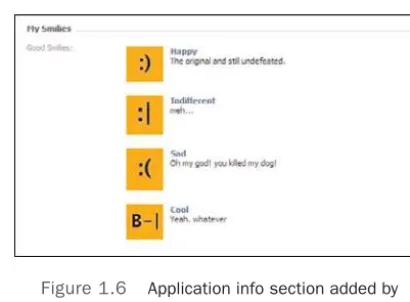
Applications can add discrete sections of content to the Info tab of your users’ profiles. The Info tab contains personal information about a user: his contact information, activi-ties, favorite books, movies, and the like, as well as his education and work information. Application data added here needs to follow the structured format of the data Facebook adds here.These sections are interesting because users can edit them themselves. Applica-tions are sent the data after an application user saves it and are then responsible for for-matting it appropriately for display. Application users must explicitly choose to place application content in an info section. As with the application profile boxes found on the Wall and Info tabs, Facebook provides a special Add to Info button that applications can use to allow users to do so. It looks nearly identical to the Add to Profile button (dis-cussed previously).There is no other way for an application to add an info section.
Two types of info sections can be created by applications. First, text-only sections are just that.The data is all unformatted text, of which approximately five lines are shown be-fore Facebook adds a See More link to display the remainder. Object info sections can
Figure 1.6 Application info section added by Facebook’s Smiley sample application
display more structured information.They consist of a single title field and an array of other data, such as links, images, and descriptions. Figure 1.6 shows an example of an application-provided info section.This one is from Facebook’s Smiley sample application.
Publisher
Found at the top of both the Home page and the profile, the Publisher has become a principal means for applications to allow users to directly post and share content to their own and their friends’ Feeds. Applications can provide custom Publisher integration that allows them to push rich media content to these Feeds. Application users must choose to use an application’s Publisher, but after they do, it shows up more prominently in their or their friends’ profiles, making it all the more likely that they will use it again. Users can also use the Publisher on their friends’ profiles.
When a user clicks the Publisher box, it expands inline to show all the options that user has for publishing content. Facebook always shows the Publisher options from Face-book’s own default applications (Link, Photos, and Videos), followed by those provided by applications. Application Publisher options are sorted by the time of their last use.
The more engaging the content an application Publisher creates, the more it involves the application users’ friends, which increases the chances that they will interact with it and install your application. Ensure that your content sparks a response from them, inter-ests them, or calls them to take some action. Publishers can be intricate. Figure 1.7 shows the Facebook Photo Publisher. Note how it offers several different options for getting content into Facebook.
Feed
Figure 1.7 Facebook Photo Publisher allows users to upload or create new photos to share on Facebook.
Two major pieces to the Feed exist: the Feed Wall and the stream. Facebook recently renamed the Home Page News Feed to the stream after it made its update in real time; these terms are interchangeable, and you will come across both while developing applica-tions.The Feed Wall appears on your profile and is populated by information about ac-tions you take on Facebook.The stream is comprised of stories published by your friends on Facebook. It’s found on every Facebook user’s Home page. Making sure your applica-tion uses them to their maximum potential is critical to making your applicaapplica-tion succeed.
Feed Wall
The Feed Wall is the first tab on your profile. It is a combination of what used to be the Facebook Wall and Mini-Feed. It contains all the recent stories added by a user via a Pub-lisher, a Feed form, or imported through some other means. It also contains stories in which a user participated, even if she did not add the story herself, such as being tagged in a photo. In the old version of Facebook, the Wall contained stories published by a user’s friends, and the Mini-Feed contained stories published by the user.To get that same functionality today, you simply have to filter the Feed Wall using the links provided at the top of the Feed Wall page. For example, in Figure 1.8, the user could make the Feed Wall behave like the old Facebook Wall by clicking Just Friends to filter the Feed to show only content created by his friends. Clicking Just John makes it behave like the old Mini-Feed in that it would only show content directly created by that user.
Stream
Figure 1.8 My Feed Wall
As previously discussed, applications can provide a custom Publisher, which directly publishes content to the Feed. However, application users must manually post stories to the Feed using a Publisher. Applications can also automatically post stories to the Feed via the Facebook application programming interface (API) or through the use of Feed forms, which Chapter 9,“Feed Stories, Feed Forms, and Templates,” covers. In this case, applica-tion users do not have to manually publish any content. Stories come in two sizes—one line and short—and each size has specific benefits and shortcomings.
One Line Stories
One line stories are just that: a single line of text.They cannot contain anything else, such as images, videos, audio, or other media.These stories are only visible on a user’s Wall on her profile and never in the stream. One line stories are important, however, because the user does not have to allow any special privileges for an application to publish them on her behalf.
The changes Facebook made to the Home page in March 2009 seriously affected the power of these stories. First, one line stories can no longer be published to the stream.This means that, to see them, a user must visit a friend’s profile.Also, Facebook no longer aggre-gates similar one line stories from an application. If five application users generate the same one line story within a short time period, Facebook used to combine them and include all five of these users in a single story, which generally increased that story’s potential for en-gagement and, therefore, its reach in the social graph. For example, instead of,“Cappy took the brainless quiz and got a new high score,” published multiple times for different users, you’d see,“Cappy, Peter, Paul, and Mary took the brainless quiz and got a new high score.”
increased a story’s chances of inclusion. Facebook still uses this technique to combine au-tomatically published stories in the Highlights section of the Home page.With these changes in place, one line stories have lost some of their punch.They are unique in that they do not require a user’s permission to be sent, so they are still worth understanding.
Short Stories
Short stories have no limitations on where they are published.They are always published to the user’s Wall Feed and the stream of a user and his friends, depending on their origin. They can contain photos, videos, Flash, or other rich media.They cannot, however, be published without express user consent. Applications must prompt a user to allow an ap-plication to publish these types of stories or provide a Publisher to allow users to directly create them. Short stories are more interesting from a content perspective and are, there-fore, more effective in helping applications to spread throughout the social graph. But, ap-plications have to convince users of their worth in order for them to invest in allowing these types of stories to be published on their behalf.
You might wonder why you would ever provide a Publisher or Feed form when you can use the API to post all the Feed stories you want. Obviously, for an application to spread quickly, getting stories into the stream is extremely important. Remember, one line stories are the only ones that don’t require anything more than authorizing an appli-cation to be created; however, their reach is limited to the profile and the Highlights sec-tion of the Home page, and applicasec-tions can send only a limited amount of them per user, per day. Also, all stories published automatically by the Facebook API—no matter their size—are only visible on the user’s Wall, never the stream. It’s critical that applica-tions master the capability to convince users to create short-form stories so that they reach the wider audience exposed by the stream.
User engagement increases story value—period. Story value is directly related to how useful, interesting, and relevant its content is for those that read it. Getting more detailed and useful content from your application into the stream requires that you learn about and capitalize on all the features Facebook offers to get your messaging published. At the moment, short stories are the only way to get content in the stream. Plus, giving users multiple options for publishing application content greatly increases the chances of it spreading.
Sharing
Figure 1.9 Facebook users can share content on Facebook either by directly publishing it to their profiles
or by sending it to other users via a Facebook email message.
Photos
Facebook has quickly become one of the biggest photo sharing and storage archives on the web. Several terabytes of photos are uploaded to Facebook every day, and hundreds of thousands of images are served per second. Applications can integrate with this system by allowing users to upload photos, create photo albums, and tag photos.There are also Face-book Markup Language (FBML) controls to allow the rendering of FaceFace-book photos within an application.
Notes
Notes are basically rich text documents that can be created or imported into Facebook. Notes can be created, edited, and deleted by applications via the Facebook API. Users can tag their friends in Notes, which is an operation that results in a Feed story being gener-ated.The most frequent use of the Notes application is as a Really Simple Syndication (RSS) aggregator for a single RSS feed. If an application generates a lot of content, Notes are a great way to get that content into the stream.
Messages, Notifications, and Requests
Inbox. Instead, they are sent to the email address the recipient of the message used when she set up her Facebook account.
Notifications are public and are most often used by applications to notify a user and her friends of some action taken within that application. Notifications are stored on the Notifications tab on the Facebook Inbox page, which can be accessed from the Inbox link at the top of the Facebook user interface, as shown in Figure 1.10. An application can send two types of notifications. User-to-user notifications are sent on behalf of one user directly to another. User-to-user notifications can be sent from an application user to the friends of the user, whether they use the application. Using notifications to alert non-application users is, of course, a critical way to get an non-application to spread. Notifications can also be sent to other application users, even if the sending user is not their friend. Application-to-user notifications are sent from the application to users and generally announce something related to the application in general, such as a new feature, a critical bug fix, or a milestone.To limit abuse of notifications, Facebook strictly enforces the number of notifications that an application can send per user, per day.
Requests and invitations are basically identical—the only difference is their names. These allow applications to send messaging to users that requires them to perform some action, whether it be to use an application, respond to an application-generated event, or take some specific step using an application. Requests have been abused by applications, causing Facebook to corral them in a special page only visible by clicking links from a user’s Home page, as shown in Figure 1.11.This move cuts the vast quantities of these
Figure 1.11 All of a user’s requests and invita-tions are listed on the Requests page, which is
ac-cessible from a user’s Home page.
types of messages being sent to users. Even so, requests are still an important part of any developer’s toolkit for making a successful application.
Extending Facebook
Now that you know some of the basics of where you can integrate with Facebook, this section covers the different ways to accomplish it. Facebook provides several options, and more options become available all the time.
Platform Applications
Facebook Platform applications can be just about anything.The common features they share are that they are web applications hosted outside of Facebook. Users don’t need to do anything specific to install applications—they just need to authorize them to give an application access to their personal information.This is, by far, the most popular method of integrating with Facebook, and it’s the main focus of this book.
Desktop Applications
You can also create applications that integrate with Facebook externally. For example, the Firefox Facebook extension provides a lot of functionality of Facebook from within the Firefox browser, while not requiring the user to be on the Facebook site. External appli-cations require special privileges to allow users to remain logged into Facebook indefi-nitely on their behalf. A popular Twitter desktop client has recently added functionality to set Facebook status messages using this feature.
Public Profiles
user profiles in that there usually is not a single user that backs them, but a set of adminis-trators. Because Public Profiles don’t directly map to single users, they don’t have friends; they have Fans.When a user becomes a Fan of a Public Profile, he signs up for updates from that Public Profile that get published to his stream. Public Profiles can also host cus-tom applications. Public Profiles provide one of the most important horizons for applica-tion growth as businesses and brands enter the Facebook ecosystem more rapidly.
Facebook Connect
Facebook has dubbed Facebook Connect as the “next evolution of the Facebook Plat-form.” It allows developers to integrate Facebook into their own external sites.This tech-nology allows a Facebook user to take his social graph with him across the web. Sites that implement Facebook Connect allow a user to log into them with his Facebook creden-tials (see Figure 1.12). Once logged in, that site has access to the Facebook details for that user and gives that site access to the Facebook API.This is incredibly powerful because it allows external sites access to the Facebook social graph without having to live within the Facebook user interface or have any of their content hosted on Facebook servers. It’s even making its way onto mobile devices. Facebook released Facebook Connect for Ap-ple’s iPhone and iPod Touch, which gives the enormously popular iPhone applications a direct way to access Facebook. Facebook Connect is discussed in Chapter 13,“Facebook Connect.”
Facebook Platform Core Components
Along with its rich API, Facebook provides several components that allow application de-velopers to easily replicate the look and feel of Facebook within their application and get access to all the data in the social graph.These components are based on existing well-known web development languages like HTML, JavaScript, and SQL to make it easier for developers to be productive quickly.
FBML
As previously mentioned, FBML is an acronym for Facebook Markup Language. FBML is a tag-based language based on HTML. It provides many of the tags supported by that language and provides a large set of Facebook user interface and programmatic primitives. FBML is automatically parsed and translated into HTML, Cascading Style Sheets (CSS), and JavaScript code by Facebook servers when a request for an application page that con-tains it is detected. FBML gives developers access to controls that allow applications to look like they were developed as part of Facebook.
When an application is created, the developer must choose whether that application will support FBML. It is always suggested that developers new to Facebook applications use FBML unless they have a specific need for a technology that does not allow it. For example, if your application uses third-party JavaScript libraries that are over 64K in size, you cannot use FBML; you must use an IFrame-based application instead.
FBJS
FBJS is Facebook’s version of JavaScript. It supports most of the DOM-based manipula-tion methods that developers are comfortable with and the familiar events, funcmanipula-tions, anonymous closures, and properties. It differs from JavaScript in several important ways. First, its syntax is slightly different, primarily to protect Facebook itself from malicious JavaScript code. Next, many DOM properties used in normal JavaScript are replaced by
get/setproperty methods. Finally, some widely-used event handlers are not available that are widely used in normal client-side JavaScript.
For example, Facebook does not allow use of the ubiquitous onload()event handler to execute code when a web page loads. In all but a few locations, a user must take a physical action on the page (set focus to a control, click a mouse button, hit a key) before FBJS can execute.To further protect itself, Facebook wraps all FBJS in what’s called the sandbox.To accomplish this, Facebook prepends all FBJS variables, function names, and function parameters with a special string that ensures that no FBJS code conflicts with or can override any existing JavaScript code that might be on the page.
FQL
supported, but primitives, such as SELECT,WHERE,ORDER BY, and LIMIT, clauses are. FQL is powerful in that it accesses and returns the same data provided by many of the Facebook API calls; however, it allows applications to have Facebook filter that data before it’s re-turned to the client, which potentially speeds up page loading and response times.
Many times, applications need to call API methods whose input depends on the result of a previous API call. A great example is demonstrated with getting the names of a user’s friends. Using the Facebook API, an application must first call the friends.get()
method and then pass the result directly back into another API call,users.getInfo().To get the same result in FQL requires one API call, which results in one less round trip to the Facebook servers. FQL can also be “preloaded” for all the pages in an application.This is incredibly useful if an application needs similar Facebook data on every page.
XFBML and the Facebook JavaScript Client Library
Applications based on IFrames and external sites that use Facebook Connect do not have access to FBML and, therefore, don’t get access to a lot of the precanned Facebook con-trols and widgets it provides. Facebook provided XFBML to address this problem, as well as the Facebook JavaScript Client Library to give developers access to more of the fea-tures provided by FBML. Not all the FBML tags are supported, but many of the most popular ones are and, in most cases, behave exactly like their FBML counterparts. Appli-cations that use XFBML must render their pages using strict XHTML and must load the Facebook JavaScript Client Library to get access to its features.
Summary
This chapter provided an overview of some of the ways in which Facebook Platform ap-plications can integrate with Facebook, as well as some of the technologies available to make the process easier. Here are the key points to remember:
n Facebook provides several points within its interface for applications to integrate. Facebook profiles and Feed are the most important.
n Developers can interact with the Facebook Platform internally via Facebook appli-cations and pages, and externally via desktop appliappli-cations and Facebook Connect. n Facebook provides several technologies that not only allow applications easy access
2
Making Great Applications
T
here are more than 350,000 applications in the Facebook Application Directory, and more than 70 percent of Facebook users engage with them each month. However, only around 5,000 of those applications have 10,000 or more monthly active users.The success of an application can be short lived, so making it near the top doesn’t mean that an appli-cation will stay there.What separates the top applications from the rest? In some cases, it is just luck, com-bined with effective use of the various integration points. However, the applications with staying power tend to exhibit the same quality; they deliver actual value to users.That value can be quick fun, better interaction with friends, or a new way for users to express themselves. Great applications focus on providing value and continuously improving themselves in response to user feedback and Facebook changes.
Although there have been many good applications, there have been a lot of bad ones—applications that try to trick users, are difficult to use, or that create huge amounts of spam.This has caused some user backlash and, as a result, Facebook encourages devel-opers to start creating high-quality applications. It created a set of Guiding Principles (described in the section,“Facebook’s Guiding Principles”) and several programs to verify and reward great applications, which are covered in Chapter 5,“Facebook Terms of Service and Application Programs.”
Begin with a Plan
Before you create an application, it is important to understand what your goals are and how you plan to implement them.This section provides the key areas on which to focus.
Objectives
what areas of Facebook communication to focus on. Just like in life, if you don’t have any goals, it is difficult to score.
Target Audience
Who do you want to use this application? Facebook has many different demographics, and choosing to focus on one or more of these affects how you develop your application. For example, an application that requires a long attention span is unlikely to succeed if it targets high-school and college students. Instead, focus on providing quick value and communication to fit their usage patterns.
It might also make sense to create applications that are location-specific. An application that centers on Turkish culture might be wildly successful in Turkey and achieve your ob-jectives, even if it isn’t popular in the United States.
Of course, after launching the application, an unexpected demographic might domi-nate the user base.This is a great opportunity to reevaluate both objectives and focus to continue to grow and improve the application.
Value Proposition
Why will users want this application? So many choose to ignore this question and pro-duce applications that gather dust, regardless of how good they look or how much time was spent developing them. Users aren’t looking to help you spread your application; they just want something out of it, especially if you ask them to authorize the application in-stead of just visit it.
Spend the time to really think about what users will get out of your application.The Facebook Guiding Principles and the application profiles shown later in this chapter can help with this process. Remember, one of the best values you can offer your users is a simple-to-use interface.
Competitive Advantage
Why is your application better than your competition’s? Make sure to look through the Facebook Application Directory to find applications that offer similar functionality. Read through the forums and Wall posts on each competitor’s application About page to find out what users like and don’t like about them.You don’t have to provide everything for everyone or even match your competitors’ features, but you need to provide them with a good reason to use your application.
Involving the User
Home page or profile. Applications can also integrate with Facebook Chat for real-time communication.
You also need to plan the workflows for how users will engage with the application.Try to refine long sequences of actions—some users will give up at each step.Also, plan to build in A/B testing and metrics for a solid understanding of what is working and what isn’t.
Iterating
How will your application respond to feedback? Most applications do best when they create something good enough quickly and then release updates as they gather usage data. It’s a good idea to have a set of plans for future releases, but recognize that respond-ing to user feedback can result in the application takrespond-ing a completely different track than what it started with.
Having clearly defined goals up front helps you decide when to make a set of changes and when to stay the course. It is possible that the users you first acquire are not the ones you were expecting, and the feedback they give might lead you down a path that’s incon-sistent with your objectives.
Planning for Growth
Do you have a scalability plan? As discussed in the introduction to this chapter, most ap-plications are not successful, so chances are likely that you won’t need to allocate dozens of servers at the start. However, doing some planning can prevent you from repeating the experience of the iLike application’s founders after their user count dramatically increased—driving around in a truck trying to find more servers for the data center.
Chapter 16,“Improving Application Performance and Workflow,” goes over some scal-ability tips, but you need to design the system up front to use multiple servers.Think about how you can use Facebook’s own servers to help take on some of the burden. Also, choose a host that supports autoscaling and pricing based on actual usage, rather than paying by the month.
Facebook’s Guiding Principles
Facebook has laid out a set of Guiding Principles to help developers understand how to make successful applications. Most of these seem like common sense, but you can easily find applications that don’t follow any of these guidelines and suffer the consequences of low user count, bad reviews, and short lifetimes. Not every application has to offer all these things, but the better an application is at incorporating them, the better its chances are of getting and keeping users.
Make Them Meaningful
The following sections discuss the types of value recommended by Facebook’s Guiding Principles.
Enable Social Activities
The most powerful feature of Facebook is the social graph. Harnessing the information from a user’s friends allows applications to help them connect in new ways or more easily, or just learn more about each other. Some good examples of applications that use Social Activities are iLike, which helps music Fans create and share playlists, and Movies, which uses quizzes to identify similar movie tastes with friends.
Be Useful
Applications must strive to do more than allow users to “throw sheep” at each other.They need to help users easily organize things on a scale that just isn’t possible outside of Face-book. Applications like We’re Related enable users to quickly build their family trees, whereas users of Cities I’ve Visited can mark their travels and create reviews to share with everyone.
Allow Users to Express Themselves
Users can fill out their profile info, update their statuses, and upload photos and videos us-ing Facebook’s built-in applications. However, many more possibilities exist to allow users to share more about themselves and create content. Sports applications, like Boston Red Sox Fans, allow users to show off their sports affiliations by starting Waves. (Lil) Green Patch lets users demonstrate their support for the environment by building a Green Patch with their friends.
Engage Users’ Attention
Applications need to be interesting enough that users will want to use them more than once, even for short periods of time. Social games, like Texas HoldEm and Scrabble, en-able users to play against each other. SuperPoke, with its large variety of pokes, has people constantly sending things back and forth.
Make Them Trustworthy
Reading stories about people losing out on jobs because of pictures they shared on Face-book might make you think that privacy isn’t that important to FaceFace-book users. Based on the reaction to the last changes Facebook made to its Terms of Use, users really care about it. (Chapter 5 covers this.) They also want applications to work as they expect, both in the interface and in the messages it sends on their behalf.
Secure User Privacy
Therefore, Facebook requires users to take specific actions to allow applications to get de-tailed user information, send emails, and access their data when the user isn’t online. However, applications must keep user data secure and private without Facebook forcing them to do so.
Be Respectful of Users
Most applications want their user base to grow, and Facebook provides many methods to let users tell their friends about an application.This creates a temptation to use all the available methods at all opportunities. However, users don’t want to be spammers—they want to pass on only information that they think their friends will find interesting. Appli-cations end up being proxies for these users, so the appliAppli-cations must use these communi-cation channels carefully and with content that users would find acceptable.
Have Transparent Functionality
When a user clicks a button or accesses an application, he expects a certain behavior. Ap-plications must not trick users with something else, such as an OK button that secretly sends messages to all of their friends without their permission or creates News stories about actions they never took. Applications that abuse a user’s trust will be uninstalled, re-viled, and can be suspended by Facebook, as Chapter 5 outlines.
Make Them Well Designed
Well-designed applications are a pleasure to use.Their easy-to-use interfaces consistently deliver the results that users expect.
Build Clean Interfaces
The best looking application in the world will fail if it is too difficult to use. Sometimes, even one difficult step in a workflow is enough to doom an application to failure.When an application is intuitive, users can quickly navigate it, use all the available functionality, and are likely to come back. Design workflows up front and test them after launching to make sure that they function as both you and users expect. Look at top applications for interface patterns that work well and have gone through many iterations in response to user feedback.
Respond Quickly
Figure 2.1 The LivingSocial application displays book reviews from friends.
Work Reliably
Great applications have great quality. Functionality should be tested before and after de-ployment to make sure that everything works.When things do go wrong, the developer needs to work to resolve the problems quickly and communicate the results or status with affected users. Users appreciate applications that respect their time and trust.
Examples of Great Applications
This section covers some of the many applications that exhibit the principles discussed in this chapter.The Causes application is one of the official Facebook Great Apps program winners. Graffiti is a great way to express and communicate with friends and LivingSocial has been one of the best users of the new stream functionality.
LivingSocial
LivingSocial also makes effective use of the stream, letting users pick their Top 5 fa-vorites in a given category and publishing a news story about it.These stories provide value, because friends can learn about new items, give their opinion, or create their own Top 5. Figure 2.2 shows an example of a news story from LivingSocial.
As a result of these News stories, LivingSocial has rocketed to the top, becoming the largest Facebook application ever, based on monthly active users.This demonstrates the importance of keeping up with changes in the Facebook Platform, such as the one from profile boxes to the stream.
Causes
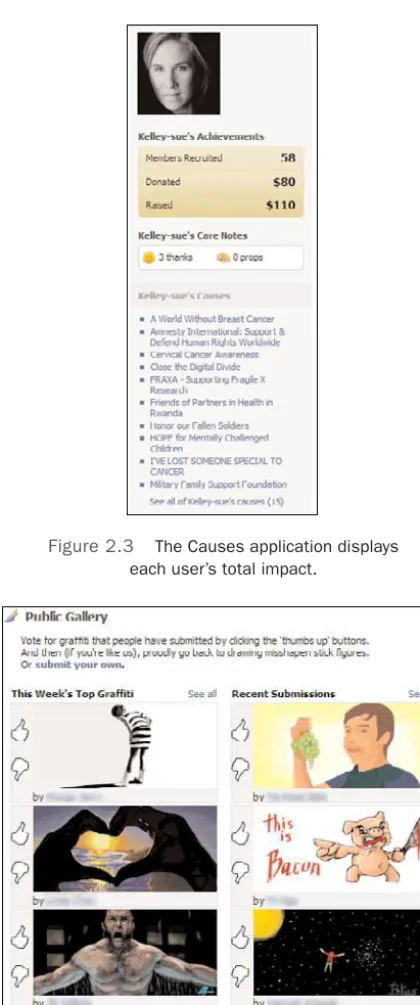
Causes (http://apps.facebook.com/causes/) allows users to create communities around issues and nonprofits that matter to them, and easily recruit members and donations to join them in support.This application is a great example of providing value: It significantly lowers the costs of acquiring new supporters compared to traditional marketing methods. It also allows anyone to participate, with over one million registered nonprofits from which to choose. Figure 2.3 shows the impact one user has had on her favorite causes.
Users not only get to help the causes they care about, but they also get social recogni-tion for doing it.This is a great example of how applicarecogni-tions can let users demonstrate their associations to their friends.
Graffiti
Graffiti (http://apps.facebook.com/graffitiwall/) enables an entirely new way of expression by letting users hand draw pictures and send them to their friends.This might seem insignifi-cant at first, but after you marvel at the absolutely stunning entries in the drawing con-tents or see how users create birthday messages for each other, you will understand how important self-expression can be. Figure 2.4 shows a few of the top creations for the cur-rent week.
Graffiti has been around since the Facebook Platform launch, and it has stood the test of time. However, it has not yet embraced the new importance of using the News Feed as the primary application communication channel. It will be interesting to see how the ap-plication decides to take advantage of it.
Figure 2.3 The Causes application displays each user’s total impact.
Summary
You now know what makes a great application, and you have a basis for creating your own. Here are some key points:
n Make sure you understand what you are building and why before you start your application. Have clear objectives and know who your users are.
n Early on, focus on providing value for users and make sure that the user workflows are well designed and simple to perform.
n Plan for success by designing for scalability at the beginning.
n Iterate rapidly in response to user feedback, but make sure that the user demo-graphic giving the feedback aligns with your objectives.
n Build applications that connect users, provide real value, and allow them to connect in new or more in depth ways.
n Respect user privacy and trust by keeping users’ data safe and only sending com-munications they expect.
n Test application functionality before deploying, respond quickly to issues, and pro-vide a fast and reliable experience.
n Make your applications simple to use and intuitive.
3
Platform Architecture Overview
W
ith such a large number of active users, Facebook has enormous demands on its in-frastructure. Facebook also has a vibrant application community and needs to provide a fast and reliable interface for developers to use.To accomplish this, Facebook has em-braced many open source technologies and contributed many improvements back into the community.This chapter describes how the Facebook Platform works: the servers and software it runs on and the mechanisms that developers can use to interact with it.
Facebook’s Internal Servers
According to Facebook, it is the second most-trafficked PHP-based website in the world, one of the largest users of the MySQL database, and the largest user of memcached, which is a high-performance caching system. Facebook has also invented many of its own technologies and released some of them as open source projects.This section discusses the Facebook infrastructure and the details of its technologies.
Servers
Facebook uses multicore Fedora and Red Hat Enterprise Linux servers. Facebook last re-ported that it has 10,000 web servers, 1,800 MySQL servers, and 805 memcached servers. Currently, it does not use a storage area network (SAN); instead, it relies on a large num-ber of hard drives in RAID 10 configuration. (RAID 10 is a hard-drive storage technol-ogy that allows both increased performance and data loss protection.)
Technologies
Facebook uses a customized Linux,Apache, MySQL, PHP (LAMP) stack. For many of these technologies, Facebook has released enhancements back to the community. Facebook has also opened up some of its own internal technologies. Here are brief descriptions of the major technologies:
n Apache HTTP server(http://httpd.apache.org/) is the #1 web server used on the Internet.The Apache Software Foundation manages it, and users from around the world constantly update it.
n PHP(www.php.net/) is an extremely popular, C-like scripting language that is pri-marily used for dynamic web development. (Currently, it’s installed on more than 20 million websites and runs on more than one million web servers.) PHP code is executed on the server and can be embedded within existing HTML or be used to generate dynamic HTML that is sent to a client’s browser. It currently provides the user interface code for not only Facebook, but also Wikipedia,Yahoo!,YouTube, and others. Primarily an interpreted language, it benefits from third-party optimizers, which can dramatically increase its performance.
Facebook has contributed to an optimizer extension for PHP, called the Alternative PHP Cache (APC) (http://pecl.php.net/package/APC/). APC caches the base exe-cutable constructs parsed from raw PHP, called opcodes, so that that PHP doesn’t have to reinterpret them each time the page executes.This extension, and others like it, can really affect the performance of PHP sites.
n MySQL(www.mysql.com/) is the world’s most popular open source database. It is fast, reliable, and easy to operate. Many of the most popular websites on the Inter-net use it.
n Memcached(http://danga.com/memcached/) is a high-performance, distributed memory object caching system for databases. Originally created for
LiveJournal.com, Facebook uses it to improve the performance of its many MySQL databases.
Facebook has significantly contributed to the memcached project, boosting its per-formance and adding functionality.
n Facebook Open Platform(http://developers.facebook.com/fbopen/) is a snapshot of the infrastructure that makes up the Facebook Platform. It includes an implementa-tion of the Facebook applicaimplementa-tion programming interface (API), Facebook Markup Language (FBML) parser, Facebook Query Language (FQL) parser, Facebook JavaScript (FBJS), and a test harness and several common API utility methods and FBML tags.
definitions in C++, Java, Python, PHP, and Ruby. Facebook uses Thrift in its Search, Mobile, Posts, Notes, Feed, and the Developer Platform.
n Scribe(http://developers.facebook.com/scribe/), also developed by Facebook, is a scala-ble and robust server used to parse and collect server logs from a large number of servers in real time. Scribe was built using Thrift. Scribe is based on a multi-instance architecture:There can be many concurrent Scribe servers and clients active at once in a system. If a Scribe server goes down, clients write logs locally until the server comes back up. Facebook runs Scribe on thousands of its servers to deliver billions of messages a day.
Facebook’s External REST Interface
Facebook exposes an interface to application developers based on Representational State Transfer (REST). REST is an architectural style that uses Hypertext Transfer Protocol (HTTP).This section discusses how REST works and then describes how Facebook ex-pects developers to use it.
Using REST on the Web
The majority of the web uses HTTP and, therefore, REST implementations can take ad-vantage of the many features that the web offers, such as interoperability, scalability, secu-rity, and standard URLs. REST deals with everything as resources, addressed using standard URIs.
The basic tenets of REST are as follows:
n URIs are resources.(Example:http://server.com/person/john/) REST is stateless on the server:The state is contained on the client and is passed to the server as part of the URI. For example, a user might get a list of restaurants in Massachusetts by going to http://server.com/restaurants/ma/. She might then click one of the resulting restaurant names (Mangia, for example) to get more information, resulting in the URLhttp://server.com/restaurants/ma/mangia/.This process continues as the user narrows her search, and it might eventually include additional information as query parameters, such as http://server.com/restaurants/ma/mangia/?search=pizza, to find what types of pizza Mangia serves.
n HTTP verbs are the methods.(Example:GET,POST,PUT, and DELETE)In general,
GETshould be a read-only, repeatable operation to return resource information.This allows servers to easily cache and scale.POST,PUT, and DELETEchange the resource. n Content-type describes how the data is exchanged.(Example:
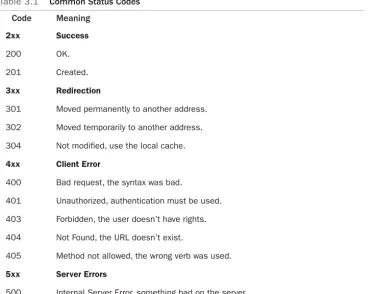
Table 3.1 Common Status Codes Code Meaning
2xx Success
200 OK.
201 Created.
3xx Redirection
301 Moved permanently to another address. 302 Moved temporarily to another address. 304 Not modified, use the local cache.
4xx Client Error
400 Bad request, the syntax was bad.
401 Unauthorized, authentication must be used. 403 Forbidden, the user doesn’t have rights. 404 Not Found, the URL doesn’t exist.
405 Method not allowed, the wrong verb was used.
5xx Server Errors
500 Internal Server Error, something bad on the server.
n Status codes are the result.(Example: 200 is OK; 400 is a bad request.) Having a defined set of returned status codes is important.Table 3.1 lists the standard ones, which are recognized as part of HTTP/1.1.
Implementing REST in Facebook
Facebook provides a REST-like implementation for its API. It’s not pure REST, because individual resources (methods, objects) are not given unique URIs. For example, to get a list of friends of the current user using a REST API, you might expect to use a GET re-quest to retrieve it from a collection URI (perhaps http://api.facebook.com/users/).Then, the client code could use one of these user identifiers returned from this query to access specific data of a single user, again using a dedicated URI (for example,http://api.facebook.com/ users/uid100).