CANON
®
EOS DIGITAL
PHOTOGRAPHY PHOTO
WORKSHOP
Canon®EOS Digital Photography Photo Workshop
Published by Wiley Publishing, Inc. 10475 Crosspoint Blvd. Indianapolis, IN 46256 www.wiley.com
Copyright © 2008 by Wiley Publishing, Inc., Indianapolis, Indiana Published simultaneously in Canada
ISBN 978-0-470-11434-6
Manufactured in the United States of America 10 9 8 7 6 5 4 3 2 1
No part of this publication may be reproduced, stored in a retrieval system or transmitted in any form or by any means, electronic, mechanical, photocopying, recording, scanning or otherwise, except as permitted under Sections 107 or 108 of the 1976 United States Copyright Act, without either the prior written permission of the Publisher, or authorization through payment of the appropriate per-copy fee to the Copyright Clearance Center, 222 Rosewood Drive, Danvers, MA 01923, (978) 750-8400, fax (978) 750-4744. Requests to the Publisher for permission should be addressed to the Legal Department, Wiley Publishing, Inc., 10475 Crosspoint Blvd., Indianapolis, IN 46256, (317) 572-3447, fax (317) 572-4355, or online at http://www.wiley.com/go/permissions.
Limit of Liability/Disclaimer of Warranty:The publisher and the author make no representations or warranties with respect to the accuracy or completeness of the contents of this work and specifically disclaim all warranties, including without limitation warranties of fitness for a particular purpose. No warranty may be created or extended by sales or promotional materials. The advice and strategies contained herein may not be suit-able for every situation. This work is sold with the understanding that the publisher is not engaged in rendering legal, accounting, or other profes-sional services. If profesprofes-sional assistance is required, the services of a competent profesprofes-sional person should be sought. Neither the publisher nor the author shall be liable for damages arising herefrom. The fact that an organization or Web site is referred to in this work as a citation and/or a potential source of further information does not mean that the author or the publisher endorses the information the organization or Web site may provide or recommendations it may make. Further, readers should be aware that Internet Web sites listed in this work may have changed or disap-peared between when this work was written and when it is read.
For general information on our other products and services or to obtain technical support, please contact our Customer Care Department within the U.S. at (800) 762-2974, outside the U.S. at (317) 572-3993 or fax (317) 572-4002.
taries, celebrities, and world figures as well as a wide variety of commercial and individual clients. As the official photographer of the International Fencing Federation (FIE), he founded FencingPhotos.com; it is a part of Tiger Mountain Photo, a Pacific Northwest studio co-owned with his wife, Amy. The author of five books, his most recent titles with Wiley include
Total Digital Photography and Digital Sports Photography. He also teaches and lectures
Technical Editor Michael Guncheon
Editorial Manager Robyn Siesky
Vice President & Group Executive Publisher Richard Swadley
Vice President & Publisher Barry Pruett
Business Manager Amy Knies
Senior Marketing Manager Sandy Smith
Jennifer Mayberry Brent Savage
Proofreading and Indexing Laura Bowman
Sherry Massey
Cover Design Daniela Richardson Larry Vigon
Book Designers LeAndra Hosier Tina Hovanessian
ing the unexpected twists and turns this book has taken. Cricket Krengel, the book’s editor, and Michael Guncheon, its technical editor, were tireless in their efforts to ensure the book was accurate, readable, and up-to-date with everything from current Canon technology and products to correcting me on various topics and concepts of photography. This team could not have been more stellar. Several professional friends helped tremendously in the book’s progress and development, as well. Michael Johnson of New Era Photography came through at the last minute with badly needed images as did Jackson Reed, one of my photography students, and Harry Haugen was ever-obliging as a sound-ing board. My gratitude also goes to the gang at Glazers Camera in Seattle (thanks, Dave!) for their knowledgeable advice and allowing me to use their products and part of their store as a makeshift studio. And Margot Hutchison, my agent, has been there to represent me in virtually every situation a writer might encounter — and to entertain any wild idea and crazy view of the world with calm logic and reason.
What is a Photography System? 4
Canon System Overview 5
Professional dSLRs 5
Consumer dSLRs 6
Canon lenses 6
Additional Canon system components 8
Personal Photography Systems 9
Building Your Photography System 12
Choosing the Gear That’s Right for You 16
Planning 16
Cost 18
Timing 19
Should you buy new or used equipment? 19
CHAPTER
2
Choosing and Using a Canon Digital SLR
23
Considerations for Buying a Canon Digital SLR 24
What Resolution is Right for You? 26
Technologies and Features Common to Canon dSLRs 28
Sensor technology 30
CONTENTS
Looking at the Canon dSLR Lineup 33
The Canon EOS-1Ds Mark III 33
The Canon EOS-1D Mark III 36
The Canon EOS 5D 37
The Canon EOS 40D 38
The Canon EOS Rebel XSi 39
The Canon EOS Digital Rebel XTi 40
The Canon EOS Digital Rebel XT 40
Exploring Different Image Sensor Sizes 41
Crop Factor 42
What Difference Does Frame Rate Make? 42
Getting the Most from Your Canon DSLR 44
Color space setting 44
Setting the resolution 45
RAW versus JPEG? 45
Custom Functions 48
Setting Picture Styles or Parameters 48
CHAPTER
3
Lens Basics
53
Building the Backbone of Your System 54
Learning the Basics of Lenses 55
Focal length and angle of view 55
Perspective and depth of field 57
f/number 58
Crop factor 60
Bokeh 60
Exploring Focusing Options 62
CHAPTER
4
The Science of Lenses
71
How Lenses Work 72
How the Lens Communicates with the Camera 77
Canon Lens Technologies 78
Fluorite and UD glass 78
Aspherical lenses 78
Diffractive optics 79
Floating system 80
Ultrasonic motors (USM) 80
Image stabilizer 80
Electronic mount 82
Dust and water resistant construction 82
Tilt-and-shift lenses 83
Focal Length and Aperture Effects 83
Focal length and images 83
Aperture and images 84
What Makes a Lens Good? 85
CONTENTS
CHAPTER
5
Understanding Lens Characteristics
89
Ghosting 90
Lens Flare 90
Chromatic Aberration 91
Moiré Patterns 92
False Colors 92
Diffraction 93
Evaluating Color and Contrast 93
Luminance histograms 94
RGB histograms 94
High and low key images 96
Contrast 97
Pincushioning and Barrel Distortion 100
Vignetting 101
CHAPTER
6
Choosing and Using Lenses
105
Zoom versus Prime Lenses 107
Prime lenses 108
Zoom lenses 108
Fast versus Slow Lenses 108
L Series Lenses 110
Canon Lenses 112
Wide-Angle Lenses 113
Telephoto Lenses 123
Canon’s telephoto lens lineup 125
Telephoto tips 127
Macro Lenses 128
Canon’s macro lens lineup 128
Understanding magnification and subject size 130
Taking close-up shots 131
Macro tips 131
Tilt-and-Shift Lenses 133
CHAPTER
7
Lens Accessories and Care
137
Extend the Range of L Series Lenses 138
Consider a Close-up Lens 139
Consider a Filter 140
Consider a Tripod Mount for Specialty Lenses 141
Filters Worth Considering 142
Protective and UV/haze filters 143
Skylight and warming filters 144
Polarizing filters 144
Colored filters 145
Infrared filters 145
Neutral density filters 146
Softmat (soft-focus) filters 146
CONTENTS
Using Lens Hoods 147
Cleaning and Storing Lenses 149
CHAPTER
8
Flash Basics and More
153
How ETTL II Technology Works to Your Advantage 155
Built-in Flash Techniques 157
Portraits 158
Dealing with Red-Eye 159
Canon’s Speedlite Lineup 161
Speedlite 580EX II 161
Speedlite 430EX 162
Speedlite 220EX 163
Other Flash Equipment 165
Masters and slaves 165
Speedlite Transmitter ST-E2 165
Exploring Canon Speedlite Flash Capabilities 166
Flash Exposure Compensation 167
Flash Exposure Bracketing 168
Flash Exposure Lock 169
High-speed sync 170
Bounce flash 171
Setting your flash manually 173
Modeling flash 174
Stroboscopic (multi) flash 175
Macro Twin Lite MT-24EX 179
CHAPTER
9
Integrated Workflow with Your Canon dSLR
183
Workflow: The Foundation of Great Photography 184Image Storage and Backup: On the Road and in the Studio 186
Portable hard drives 186
CD and DVD storage 187
Memory cards 188
Laptop 188
Wireless file transmittal 189
Managing and Archiving Photos 190
Managing images 190
Image metadata 191
Archiving and preparing for editing 193
Getting and Keeping the Highest Image Quality 194
Camera care 194
Optimizing and adapting to your environment 195
Optimizing digital image quality 196
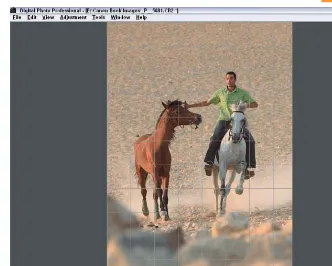
Canon’s Digital Photo Professional 199
Installation and updates 200
Digital Photo Professional main screen 201
CONTENTS
Prioritizing and comparing photos 211
Picture Styles 212
CHAPTER
10
Camera Care and Sensor Cleaning
219
Knowing and Avoiding the Five Things That Damage Your Camera Gear 220Dust, sand, and dirt 220
Water and moisture 222
Salt 223
Oils and chemicals 224
Physical damage 225
Cleaning Your Sensor 227
Recognizing CMOS spots 228
Simple (dry) sensor cleaning 231
Sensor-cleaning brushes 232
Advanced (wet) sensor cleaning 233
Keeping Your Equipment in Top Condition 234
Camera bags 235
When should you upgrade gear? 240
How do I decide when to sell existing gear? 243
Showing Off Your Work 244
What are some good ways to create a portfolio? 244
Where do I start when I sell my work or charge for my services? 251
Business Details 254
How do I establish a brand identity? 255
What do I need to know about intellectual property? 256
When do I need to seek model and property releases? 258
APPENDIX A
:
Resources
263
APPENDIX B
:
Additional Canon dSLR Accessories
269
Glossary
273
of the world along with the people, places, and things I’ve been privileged to encounter, and a way for me to keep the memories of them alive. Even as I’ve pursued other interests, my Canon has always been a best friend ready to go anywhere at any time.
While working at Logitech in the early 1990s, I participated in launching one of the first digital con-sumer cameras, Fotoman, and it became apparent that the world of digital photography was looming
large on the horizon. Then, when my professional life turned back to full-time photography in 2001, I realized that digital photography’s proverbial ship had arrived in port loaded with goods and treasures. I first used a Canon digital SLR, a 10D, at the 2003 World Fencing Championships in Havana, Cuba. Trading back-and-forth with an EOS film camera (which could handle fast action shots much better than my 10D), I kept working with the digital SLR and exploring its remarkable capabilities. That event in Havana was the last time I shot film, ending more than 25 years of reliance on slides and neg-atives.
I quickly acquired and grew into using the Canon 1D Mark II, which I knew was necessary for shooting a high-speed sport such as fencing. With it I captured thousands of images at the 2004 Athens Olympic Games, including one that has become quite famous (see figure 9 in chapter 11). I knew then that digi-tal was no longer an option or a possibility, but the reality and future of photography. Clearly, the prod-ucts and technology of Canon were leading the charge and their announcements and developments promised to do everything possible to tempt me into spending as much time, money, and creativity as I had to explore and keep up with what they had to offer.
PHO
TOGRAPHY
ST
E
M
W
HATI
S AP
HOTOGRAPHYS
YSTEM?
C
ANONS
YSTEMO
VERVIEWP
ERSONALP
HOTOGRAPHYS
YSTEMSYou may have read the long, heated debates on photography Web sites and in photography maga-zines about which digital SLR (dSLR) camera is best. They range from debating the speed and construction of different cameras to their ease of use and image quality. But few discussions con-centrate on the fundamental consideration: When you buy a dSLR, it is the first step in building a photography system you will continue to invest in for many years to come.
So what is a photography system, and what con-siderations are important when you add compo-nents to your system? This chapter helps to answer those questions, and it provides evalua-tion criteria to help you decide which elements you need for a basic system based on your photog-raphy interests and shooting preferences.
WHAT IS A PHOTOGRAPHY
SYSTEM?
From a broad point of view, a photography system includes all the components that are offered by the camera manufacturer and third-party companies and that are compatible with your camera. From this perspective, a system includes the camera body, lenses, flash units, battery chargers, extension tubes, interface cables, and so on. In other words, the photography system encompasses the universe of components that are compatible with your cam-era. Your current system may be as simple as one basic body and several lenses, as shown in 1-1.
ABOUT THIS PHOTOA camera system can range from simple to complex. Here the Canon 1D Mark IIn and five Canon lenses make a powerful combination for a variety of photography applications. ©Amy A. Timacheff
in the world, Canon offers a photography system that reflects the company’s long heritage of understanding the needs of photographers by sup-plying professional equipment and pioneering new technologies.
CANON SYSTEM OVERVIEW
From the broad view, Canon offers a complete range of cameras, lenses, Speedlite flashes, and accessories. There are so many options, in fact, that choosing among them is a challenge. Throughout this book, you get detailed informa-tion on individual components of the Canon photography system as well as help in choosing components based on your shooting preferences and needs. For now, it’s worthwhile to review the overall scope of Canon’s photography system.
PROFESSIONAL DSLRS
Canon professional dSLRs are distinguished by both advanced features and build quality. For example, the shutter mechanism of the professional cameras is rated at 100,000 to 300,000 actuations (shutter releases) to account for heavier use. In addition, the design of the Mark III series dSLRs includes extensive weatherproofing to protect the camera against the elements and demanding use.
■EOS-1Ds Mark III.Professional-build camera with a 21.1-megapixel full-frame sensor with a capture rate of up to 5 frames per second (fps) for 56 JPEG or 12 RAW images per burst.
■EOS-1D Mark III. Professional-build camera with a 10.1-megapixel sensor with a capture rate of up to 10 fps for up to 110 full-resolu-tion JPEG or 30 RAW images per burst.
CANON PHOTOGRAPHIC LEGACY
Originally started in a Tokyo apartment in 1933, Canon’s first commercial camera was built and released between 1935 and 1936 by Saburo Uchida and his brother-in-law, Takeo Maeda. Originally called “Kwanon,” Canon today is not only known for its cutting-edge technology, but also for working closely with photographers to solve problems and to create innovative new approaches.In 2005, Canon ranked second in the world in filing patents, after IBM. The company’s technol-ogy pursuits range from developing an optical sensor for earth observation satellites — cap-turing light from a galaxy 2.8 billion light years away — to developing super UD (Ultra Low Dispersion) lenses to improve optical quality.
Canon designs, develops, and manufactures its image sensors and image processors in-house. Canon was the first to develop and offer a full-frame 35mm sensor in its digital SLR
erence to Greek mythology’s Goddess of Dawn is not necessarily accidental). EOS refers to the standardiza-tion of an electronic interface between the lens and cam-era to control functions such as focusing and aperture.
More details on each camera are provided in Chapter 2.
■ EOS 5D.Professional-level camera with a 12.8-megapixel full-frame sensor with a cap-ture rate of up to 3 fps for 60 JPEG or 17 RAW images per burst.
■ EOS 40D. A semiprofessional camera with a 10.1-megapixel sensor with a capture rate of 6.5 fps for up to 75 JPEG or 17 RAW images.
CONSUMER DSLRS
Canon’s consumer dSLRs provide excellent dura-bility and offer shooting modes similar to the pro-fessional cameras, as well as programmed
point-and-shoot modes. Canon offers the follow-ing cameras in its line of consumer EOS dSLRs:
■ EOS Digital Rebel XT (350D). Offers an 8.0-megapixel sensor with a capture rate of up to 3 fps for up to 14 JPEG images per burst.
■ EOS Digital Rebel XTi (400D).Offers a 10.1-megapixel sensor with a capture rate of
ABOUT THIS PHOTO
The excellent quality of its lenses is one of the things that make the Canon system the choice of so many photogra-phers. ©Jim White
Sensor sizes and frame rates are dis-cussed in more detail in Chapter 2.
x-ref
CANON LENSES
For years, the exceptional quality of Canon lenses, such as those shown in 1-2, has drawn photographers to the Canon brand. As any pho-tographer can tell you, a camera is only as good as the lens that’s mounted on it. Certainly more fac-tors figure into image quality with digital photog-raphy than with film photogphotog-raphy, but the lens remains an essential component in image quality.
1-2
up to 3 fps for up to 27 JPEG or 10 RAW images per burst.
(electrofocus) lens lineup: Ultrawide Zoom Lenses
■ EF-S 10-22mm f/3.5-4.5 USM ■ EF 16-35mm f/2.8L II USM
■ EF 17-40mm f/4L USM ■ EF 20-35mm f/3.5-4.5 USM
Wide-Angle Prime (Single-focal-length) Lenses
■ EF 14mm f/2.8L USM ■ EF 14mm f/2.8L II USM
■ EF 15mm f/2.8 Fisheye ■ EF 20mm f/2.8 USM
■ EF 24mm f/1.4L USM ■ EF 24mm f/2.8
■ EF 28mm f/1.8 USM ■ EF 28mm f/2.8
■ EF 35mm f/1.4L USM ■ EF 35mm f/2
Standard Zoom Lenses
■ EF-S 17-55 f/2.8 IS USM ■ EF-S 17-85mm f4-5.6 IS USM
■ EF-S 18-55mm f/3.5-5.6 USM ■ EF-S 18-55mm f/3.5-5.6 IS
■ EF 24-70mm f/2.8L USM ■ EF 24-85mm f/3.5-4.5 USM
■ EF 24-105mm f/4L IS USM
■EF 28-105mm f/4.0-5.6 USM
■EF 28-135mm f/3.5-5.6 IS USM ■EF 28-200mm f/3.5-5.6 USM
■EF 28-300mm f/3.5-5.6L IS USM Standard and Medium Telephoto Lenses
■EF 50mm f/1.2L USM
■EF 50mm f/1.4 USM ■EF 50mm f/1.8 II
■EF 85mm f/1.2L II USM ■EF 85mm f/1.8 USM
■EF 100mm f/2 USM Telephoto Zoom Lenses
■EF 55-200mm f/4.5-5.6 II USM
■EF 70-200mm f/2.8L IS USM ■EF 70-200mm f/2.8L USM
■EF 70-200mm f/4L IS USM ■EF 70-200mm f/4L USM
■EF 70-300mm f/4-5.6 IS USM ■EF 70-300mm f/4.5-5.6 DO IS USM
■EF 75-300mm f/4-5.6 III USM ■EF 75-300mm f/4-5.6 III
■EF 80-200mm f/4.5-5.6 II ■EF 100-300mm f/4.5-5.6 USM
Telephoto Prime (Single-focal-length) Lenses
■ EF 135mm f/2L USM
■ EF 135mm f/2.8 with Softfocus ■ EF 200mm f/2.8L II USM Macro Prime Lenses
■ EF 50mm f/2.5 Compact Macro ■ EF-S 60mm f/2.8 Macro USM
■ MP-E 65mm f/2.8 1-5x Macro Photo ■ EF 100mm f/2.8 Macro USM
■ EF 180mm f/3.5L Macro USM Tilt-Shift Lenses
The most expensive components of a photogra-phy system are camera bodies and lenses, but a variety of accessories increase your creative options. Additional components include Canon Softmat filters and close-up lenses, teleconvertors to increase the effective focal length of lenses, Speedlite flashes, circular polarizing and haze fil-ters, a variety of remote control accessories, a wireless file transmitter, a data verification kit, a variety of eyecups and extenders, angle finders, and focusing screens.
For lighting on the go, Canon offers the 580EX II, 430EX, and 220EX Speedlites. The ST-E2 trans-mitter allows control of slave flashes for up to 33 feet outdoors and almost 50 feet indoors. Macro photographers can benefit from the Macro Twin Lite MT-24EX or the Macro Ring Lite MR-14EX. In addition, you can add a variety of battery packs and magazines, hot-shoe adapters, TTL (through-the-lens) distributors, and off-camera shoe cords. A body, lens, and flash made a complete system for this wedding photographer, with great results (see 1-3).
For a more detailed description of Speedlites and accessories, see Chapter 9. For more on lenses, see Chapters 3 through 7.
PERSONAL PHOTOGRAPHY
SYSTEMS
Whether you started with an entry-level camera such as the Digital Rebel XTi, shown in 1-4, or went with a professional dSLR, from a photogra-pher’s point of view, a photography “system” includes the camera gear that you currently own. And in a larger sense, a digital photography sys-tem also includes the components of your studio and digital darkroom, such as computers, stand-alone hard drives for storage, printers, and
image-editing programs. From this perspective, a system includes everything that’s necessary to capture, process, and print/fulfill images.
For hobbyists and advanced amateurs, photogra-phy systems run the gamut from minimal to extensive. In addition to a computer and an image-editing program, a basic photography sys-tem might include the following, as shown in 1-5:
■A digital camera body ■One or more zoom lenses
■One or two memory cards
ABOUT THIS PHOTOThe EOS 1Ds with 24-70mm L lens and 580EX Speedlite make up a high-quality camera system to take lifelike, high-quality professional images such as this wedding shot at ISO 100, 1/60 second at f/4. ©Jim White
ABOUT THIS PHOTO
The Canon Digital Rebel XTi is an entry-level dSLR that offers both professional shooting modes as well as programmed point-and-shoot modes. It is capable of working with all Canon EF lenses. ©Amy A. Timacheff
1-4
ABOUT THIS PHOTOA very basic system can consist of a camera, a lens, and a memory card. ©Amy A. Timacheff
ing assignments proceed on schedule. Thus a pro-fessional system can include several bodies, numerous lenses, and flash equipment, such as the studio lighting equipment shown in 1-6. Because it is impractical to duplicate all compo-nents of a professional system, working profes-sionals often rent backup components on location, a strategy that is popular with many event and wedding photographers. Renting backup gear lightens the travel load as well. A professional photography system may include a wide variety of components:
■ One or more primary camera bodies and sec-ondary or backup camera bodies
■ Multiple zoom and single-focal-length, or prime, lenses with multiples of the most often used lenses as backups
■ One or more Canon Speedlites or third-party flash units, brackets, stands, and light modi-fiers such as softboxes
■ Filters
■ Multiple high-capacity, fast media cards
■ Portable image storage and display units for offloading images during travel
■ Tripods and monopods with heads
■A wireless file transmitter
■Cleaning accessories for the camera sensors and lenses
■A laptop computer for traveling
■Studio lighting, power packs, and backdrops, as in figure 1-6
■Padded camera bag and/or hard case suitable for shipping
■An extensive desktop computer system including large-screen and calibrated moni-tors, stand-alone hard drives, and archival-quality printers
BUILDING YOUR
PHOTOGRAPHY SYSTEM
Buying a new camera body or a backup body requires careful consideration of what your cur-rent photography system lacks and how to bal-ance those needs with your budget. Lenses, especially Canon’s high-end L-series professional lenses and specialized lenses such as for macro photography, are expensive, and it’s often diffi-cult to decide which lens or system component that you need next or need most.
Unless you have unlimited resources, it’s best to have a plan for building your system. Even if your interests include more than one type of photogra-phy, such as the macro and portrait work shown in 1-7 and 1-8, this will ensure that you invest wisely and help you arrange your purchases around equipment that will enhance your own creative vision.
ABOUT THIS PHOTO
A Photoflex Octodome softbox mounted on a Manfrotto tripod and boom, with a Bowens stu-dio light, provides an adjustable modeling light and powerful flash that is triggered wirelessly from the camera. The back of the softbox (seen here) is black; the front of it is a white translu-cent material. ©Serge Timacheff
1-6
For more on L-series and fast lenses, see Chapter 6.
ABOUT THESE PHOTOS
The versatility of a good camera system allows you to pursue multi-ple photography styles and tech-niques; with a limited budget, you can get a lot out of a single body and lens. Both 1-7 and 1-8 were taken with an EOS 5D and an EF 100mm f/2.8 Macro lens. 1-7 at ISO 320, f/22 at 1/60 second. 1-8 at ISO 100, f/16 at 1/160 second. ©Amy A. Timacheff
1-7
The starting place for any photography system involves having the basic components you need for everyday photography. While you may want and think that you need five, six, or even ten lenses, remember that many great photographers made great pictures using a single lens. Their work testifies to the fact that you can do much more with a single lens than you might imagine. The goal is to exploit your current gear to its greatest potential.
Many of Canon’s dSLRs are available as kits that include a zoom lens that provides a focal range suitable for common shooting needs — from landscapes to portraits. For example, Canon offers consumer-quality lenses, including the EF-S 18-55mm f/3.5-5.6 USM, designed for optimized performance on the Digital Rebels and EOS 40D cameras.
While a kit lens ensures a focal range adequate for photographing landscapes and portraits, a sin-gle lens typically won’t meet all your shooting needs. And if you didn’t buy a kit or you bought a professional-level camera, then the question is what lenses you need to buy — lenses that will become the foundation of your system.
But what are the goals for a basic photography sys-tem, and what would a basic system include? Assuming that you already have a Canon dSLR, my recommendations for a basic photography sys-tem include the elements shown in the following list. With this system, you have a focal range that allows you to photograph everyday family photos as well as travel, landscape, portrait, and wildlife images. In addition, the basic system allows you to travel light while not missing photographic oppor-tunities. A typical basic system would include:
■A wide-angle zoom lens. A wide-angle lens in the range of 17-40mm allows you to cap-ture a landscape image (see 1-9), group por-traits, and even individual portraits at the 40mm setting. On the Digital Rebel XTi and EOS 40D cameras with an APS-C-size sensor, a lens in this range is equivalent to 27-64mm. On the EOS-1D Mark III, with an APS-H-size sensor, this range is equivalent to
22-52mm. On full-frame-sensor cameras, such as the EOS-1Ds Mark III and the EOS 5D, a 17-40mm lens, for example, operates precisely as a 17-40mm lens.
■A telephoto zoom lens. A telephoto lens in the range of 70-300mm enables you to cap-ture portraits, wildlife, birds, sports, and dis-tant landscapes, such as the scene shown in 1-10. On the Digital Rebel XTi and EOS 40D cameras with an APS-C-size sensor, a lens in this range is equivalent to 112-480mm. On the EOS-1D Mark III with an APS-H-size sensor, a lens in this range is equivalent to 91-390mm.
For a more complete explanation of sensor size and crop factor, see Chapter 2.
x-ref
■UV haze filters for all lenses.These filters absorb ultraviolet light to reduce haze on a sunny day and protect the front lens element from dirt and scratches.
front element of the lens. Also, if you have a Digital Rebel or EOS 40D with a built-in flash, then you may find that it is adequate for your immediate needs.
ABOUT THIS PHOTO
With a good wide-angle zoom lens, you can crop your scene exactly as you want. Taken with an EOS-1Ds Mark II, EF 16-35mm f/2.8L lens, ISO 50, 2 seconds at f/16. ©Jim White
ABOUT THIS PHOTO
By remaining quite still and using a good telephoto zoom lens, I was able to capture this early morning image of a young deer crossing the road. Taken with an EOS-1Ds Mark II, EF 100-400mm IS L lens, ISO 400, 1/320 second at f/6.3. ©Jim White
1-9
This is a do-it-all approach that works well for general shooting. The basic system is, however, not as well suited for specialty shooting, such as for macro images and sports photography. If you have a specialty shooting area identified, then the composition of your basic system will be weighted toward the lenses you need for that specialty.
CHOOSING THE GEAR THAT’S
RIGHT FOR YOU
While no one can tell you what is exactly right for you, you can evaluate your shooting history and preferences to better determine the photog-raphy system components that work for you. While reading over the list of Canon photogra-phy system components, you may have the over-whelming urge to buy one or two new lenses or accessories. Just seeing the list is like the ultimate wish list for the great camera store in the sky. Patience, however, is a virtue, and so is develop-ing a solid plan to help you build a system that’s right for you. From personal experience, I can tell you that there are few things more aggravating than having an expensive lens or Speedlite gather dust in a gear bag. I’ve also learned that the loss on the resale price of gear I didn’t really need or use is sobering enough to keep my per-sonal wish list carefully prioritized.
PLANNING
To plan your photography system, think carefully about your areas of interest, and then try to look ahead to future needs and desires. You may be interested in flower macro shots (see 1-11), natu-ral scenes, or portraits (see 1-12). To get you started, here are some general questions to help you create a plan for building your photography
■Is photography your passion, a current or future profession, or a hobby and a way to keep family snapshots current?If you are serious about photography, then the type of gear you buy will be different from the gear you’d buy for family snapshots.
■What subjects do you most enjoy photo-graphing? If you shoot sports or fast-moving children, then you should factor camera fea-tures such as a high burst rate and fast focus-ing into your plannfocus-ing. But if you do fine-art shooting, portraits, or landscapes, a slower frame rate and high-quality lenses become more important.
See Chapter 2 for more on frame and burst rates.
x-ref
■Who uses the camera?If you and other fam-ily members intend to use the camera, you may want a camera that includes point-and-shoot modes such as the Digital Rebel and EOS 40D.
■How important is it to you to get the high-est-possible quality with every image you make?If you tend to examine every detail of your images, your needs will be significantly different from the photographer who is happy with the average snapshot.
■At what size do you print images?
Answering this question helps you determine the camera resolutionyou need. But also think
games in a dimly lit gym, then a fast lens such as an f/2.8 with image stabilization (to coun-teract movement while handholding the cam-era) gives you an edge. If most of your
shooting is outdoors in good light, then a slower lens should be adequate.
■ Is weight important?In considering this question, factor in the combined weight of the camera body, the battery or battery grip, and the lenses.
try different types of filters to soften or enhance colors in your images (such as warm-ing filters, which come in a variety of tones and shades for optimizing color in your images). Or perhaps you need a monopod for stabilizing your camera while still being able to move around and shoot.
ABOUT THIS PHOTOThis photo of a dwarf iris shows the versatility of a sharp, fast telephoto lens.
COST
As you learned earlier in this chapter, Canon offers both cameras and lenses in consumer and professional categories, and the price difference is significant. For example, if your answers to the previous questions indicate that you care intensely about image quality and the ability to
make enlargements from your pictures, then you’ll get the best image quality and biggest enlargements with a high-resolution camera such as the EOS-1Ds Mark III, the EOS 5D, or, in the consumer category, the EOS Digital Rebel XTi (400D).
For lenses, the highest image quality comes from Canon’s L-series pro lenses, although many of the consumer lenses also offer excellent image con-trast while providing excellent sharpness and speedy focusing.
Using the basic photography system and high image quality as the criterion, approximate costs for a basic system at the time of this publication are as follows:
Canon EOS 5D 12.8-megapixel digital SLR: ≈$2,000
Wide-angle telephoto EF 24-105mm f/4L IS USM lens: ≈$1,000
77mm UV haze filter: ≈$50 77mm circular polarizer: ≈$125 Canon EF 70-200mm f/4L IS USM lens: ≈$1,000
67mm UV Haze-1 filter: ≈$70 67mm circular polarizer: ≈$95 Total: $4,340
If, on the other hand, you enjoy photography as a pastime, and you don’t tend to lose sleep over getting the biggest enlargements or fret over minute image details, then the basic system cost would look a little more like this:
Canon EOS Digital Rebel XTi (400D) 10.1-megapixel dSLR with Canon EF-S 18-55mm f/3.5-5.6 USM lens: ≈$600
ABOUT THIS PHOTOA normal-range lens helps capture fine details across a wide range of tonality in natural-looking portraits — especially with RAW images. I photographed this child in a Shanghai marketplace. Taken with an EOS-1D Mark II with an EF 24-70mm f/2.8L lens, ISO 640, 1/250 second at f/5. ©Serge Timacheff
lens:≈$180
58mm UV haze filter: ≈$15 58mm circular polarizer: ≈$85 75-300mm lens hood: ≈$25 Total: $930
These examples clearly show that knowing your priorities for a photography system makes a big difference in the amount of money that you spend. And, of course, there are many variations on the system components.
choose the best lens to add to your system. It is also important to think ahead. As your pho-tography skills increase and the range of your photography evolves, the core pieces of your pho-tography system — the lenses — should stand the test of time and change.
For example, you may spend several years shoot-ing with a Canon EOS Digital Rebel. As you add lenses, the EF-S lenses may seem to be the best buy for the money and you may add a couple more EF-S lenses to your system. But if three years from now, you decide to replace the Digital Rebel with an EOS 5D, then you’ll have to replace the EF-S lenses because they are incompatible with the 5D. This is only one example of why it’s a good idea to think and plan for the future even if it means delaying a purchase until you can afford the item.
SHOULD YOU BUY NEW OR
USED EQUIPMENT?
Certainly, used equipment can represent substan-tial savings over the cost of new gear. Used camera gear is sold online on eBay, on KEH.com, on www.robgalbraith.com forums, and on Web sites of major camera stores. Used camera bodies and lenses are usually rated by condition such as scratches, dents, the amount of wear, and so on. Pristine gear may be rated as “Mint,” which is defined as factory-new condition with original documentation and packaging. At the bottom of the scale is “Bargain,” which means that the item has 50 percent or less of the original finish, it is well worn, may have missing parts, or may not be fully functional. In most cases, you have to rely on the honesty of the seller to accurately rate the gear.
Other chapters later in the book detail specific criteria for purchasing lenses, Speedlites, and accessories, but this overview helps you evaluate the factors that are most important in building a photography system.
note
TIMING
Another consideration is timing. If you are new to photography, the idea of acquiring many more lenses and accessories may seem overwhelming, but remember that you can acquire the lenses and accessories that you need over a period of months or years.
You also want to focus on the working condition of an item rather than base its value strictly on appearance. Many picky customers pass over per-fectly good equipment because it looks “used.” If the glass on a lens is clean and it performs well, then the aesthetic value should be secondary. A camera store I used to frequent was a great source for used equipment. Whenever the owner encountered a shopper obsessed with appearance over functionality, he would invariably ask, “Are you going to take pictures with it, or of it?” I prefer to buy used gear from sources that accu-rately rate their equipment. The downside of
buy-ing used professional gear is that it likely has more miles of use on it than if you buy from a photogra-phy enthusiast who may not be as good at rating the gear, but will likely have used the gear less and in less demanding conditions. The same cautions apply to buying used camera equipment as to other used gear — if the price seems too good to be true, then it probably is. One way to ensure you don’t throw money away is to buy from camera stores that provide a warranty with the used equipment. The warranty is usually limited and of a short duration, but if you use the gear right away to ensure its functionality, you have some recourse if it doesn’t perform as described.
DEVELOPING YOUR PHOTOGRAPHIC VISION AND STYLE
For new photogra-phers, the idea of a photographic vision and personal style seems elusive and perhaps limit-ing. Many new photographers are absorbed by the overall concept and practice ofphotography in general, and do not have a clear idea of where the photographic journey will take them.
But after months or years of general shooting, more specific interests begin to emerge, and a sense of creative excitement and satisfaction emerges when you shoot certain scenes or sub-jects. For example, you may get the most joy from making portraits or from exploring the intricacies of nature. And sometimes the interest areas that emerge are not what you would have predicted at the beginning of the journey. But when you begin to envision images — images that sit restlessly inside your mind — and you know how you want the images to look and feel, you have the beginnings of a personal photographic vision. As you pursue your vision, a shooting and image-processing style may emerge as well.
Developing your vision and style is part instinctive and intuitive, and, for most, it takes time. As you read magazines and newspapers, pay attention to the images you are drawn to most often. Visit local galleries and make a note of images and art that resonate with you.
place that you fall, you no doubt have some combination of equipment that is your favorite. Show your love to the other readers by taking a photo using your favored gear and post it on the Web site to share with other readers. Who knows? Maybe you will find a kindred spirit!
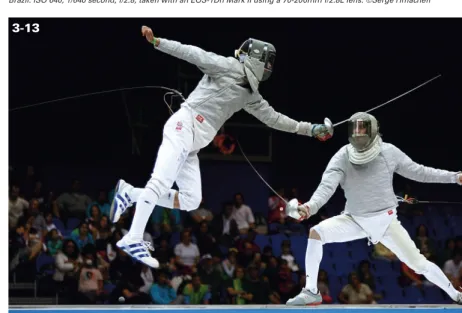
My favorite “Canon combo” is the EF 70-200mm f/2.8L lens with a fast camera, such as my 1D Mark IIn. In this emotional sports image, taken by my 15-year-old son using my equipment, he captured one of his favorite fencers (Italy’s Andrea Baldini) moments before a gold-medal match for a world title. Taken at the 2006 World Fencing Championships in Torino, Italy, at ISO 500, 1/320 second, and f/2.8.
USING A
CANON
AL SLR
C
ONSIDERATIONS FORB
UYING AC
ANON DSLR
W
HATR
ESOLUTIONI
SR
IGHT FORY
OU?
T
ECHNOLOGIES ANDF
EATURESC
OMMONTO
C
ANON DSLR
SL
OOKING AT THEC
ANON DSLR L
INEUPE
XPLORINGD
IFFERENTI
MAGES
ENSORS
IZESC
ROPF
ACTORWhether you already own a Canon digital SLR, or you’re considering upgrading or buying a backup camera body, Canon provides a lineup of dSLR cameras that have a logical progression of features and resolution for primary and secondary shooting needs. Behind the scenes, Canon’s trusted digital imaging technology ensures you get consistent results, whether you are an individual photogra-pher with a single camera body or you own a stu-dio with multiple dSLRs at different resolutions. Also, historically Canon has led, and continues to pioneer, digital imaging technology, so you can expect the highest image quality and can’t-live-without features from all of Canon’s dSLRs. This chapter provides an overview of the tech-nologies that are common to Canon’s dSLR cam-eras, technologies that are specific to camera categories or models, as well as the exposure, metering, and focusing features of each camera.
CONSIDERATIONS FOR
BUYING A CANON DSLR
My photography students often ask me which camera they should buy. The truth is that no one can tell you what camera to buy, but if you under-stand the commonalities and differences among Canon’s dSLRs, then you can make informed deci-sions when it’s time to buy a new camera, upgrade your existing camera, buy a backup camera body, or add another camera to your existing system.
Regardless of which camera you are thinking about, many considerations go into selecting a camera:
■Image quality.What size and quality of images do you need to produce? Do you need a full-frame camera, or are other attributes more critical? Will a slightly lower-priced dSLR suffice so that you can spend more money on professional lenses?
■Lens quality and selection.What mix of lenses are necessary, versus ones that you can put on your “wish list”? Do you need a “fast,” wide-aperture lens that will hold its wide-aperture at any zoom level? Do you need to shoot close-up images with a dedicated macro lens, or distant images? Will you benefit from a very wide aper-ture, exceptionally narrow-depth-of-field por-trait lens?
■Exposure. What camera features are neces-sary/important to your work? You may want to consider an external flash (or two) if you do lots of indoor, low-light shooting so as to expand your capabilities. Do you need the ability to shoot low-light, nonflash images that would require low-noise, high ISO capa-bilities and very wide aperture lenses?
held in a “buffer” as they are downloaded to the storage media in the camera. A camera such as the 1D Mark III has a burst rate of 30 RAW or 110 JPEG images—far greater than that of most dSLRs—so if you need to shoot lots of images in a short amount of time, this is an important consideration.
■ Overall camera handling. What body style and lens(es) feel good to you? Do you need a lighter, but professional-quality, camera such as the 5D, or is your arm strong enough to handle an EOS-1D camera (which is much heavier)? Does the “chording” system of changing settings in the EOS-1D series work better for you, or do you prefer the rotating wheel for operating a camera such as the 40D?
■ Budget. Obviously, money is a consideration for your gear lineup. The question is where do you spend it — on camera body, lenses, flashes, studio equipment, or digital darkroom gear? You must consider what you need to operate with right now and how your needs might change and expand as your skill and interests change. Additionally, you should be aware of new product releases that pertain to your specific needs and interests and under-stand how these new items can impact your spending and budget.
a camera — both based on my professional shoot-ing needs, priorities, and preferences. These are image resolution of the camera and the quality of the lens and optics. Resolution is important because my images must meet the minimum reso-lutions standards required by stock agencies, which is 11 ×14 inches. For my gallery clients, I want to be able to offer prints at 11 ×14 inches or larger. I have also sold prints as large as 3 ×5 feet, so for me high resolution is a must! On the other hand, some labs are able to print larger prints from smaller-resolution images using sophisticated technologies.
WHAT RESOLUTION IS
RIGHT FOR YOU?
While most photographers focus on the number of megapixels to gauge a camera’s resolution, the actual resolution is more complex than the num-ber of pixels on an image sensor. For example, the camera may not use all the pixels in the digital image; some pixels may be used for other imaging tasks. Other factors come into play as well, such
ABOUT THIS PHOTO
Canon’s impressive lineup of lenses offers great quality for everyone from the amateur to the professional. This image shows just a fraction of the many lenses Canon offers. ©Amy A. Timacheff
2-1
as sensor size and digital noise, which is the grainy
quality of a low-light digital image.
this case, bigger is better.
Each pixel in a camera sensor contains one or more light-sensitive receptors that convert the incoming light into an electrical signal. This signal is then processed into the colors used in the final image, and the brightness of individual pixels is amplified or decreased. A common cause of digital noise is overamplification of the signal coming from the photosite. If the same pixel is exposed several times by the same amount of light, the resulting color values are not always identical but have small variations, resulting in digital noise. Even with no light present, the electrical activity of the sensor itself will generate some noise (think of it as the photographic equivalent to the background hiss in audio equipment).
ISO (sensitivity), and as pixel size decreases. This is why digital compact cameras generate much noisier images than dSLRs. Professional cameras, such as the EOS-1Ds Mark III and EOS-1D Mark III, have higher-quality components and more powerful processors that allow for more advanced noise reduction; subsequently these cameras dis-play significantly less noise even at high ISOs. If you only plan to have 4 ×6 or 5 ×7 prints made at your local drug store kiosk, then you can be less concerned with differences in sensor size. If you plan to make 8 ×10, 11 ×14, or larger-size prints, then the dSLR’s larger sensor provides a bigger payoff. As you can see in 2-2 and 2-3, big-ger pixels can be enlarged or upsized, with much less noise and better results. When a digital image
is enlarged beyond its native resolution via soft-ware, it results in an effect called pixilation, an
unsightly effect where jagged pixels are very obvi-ous to the naked eye. Some editing programs will attempt to create new pixels to the best of their ability if an image is enlarged; one method for doing this is called interpolation. Generally
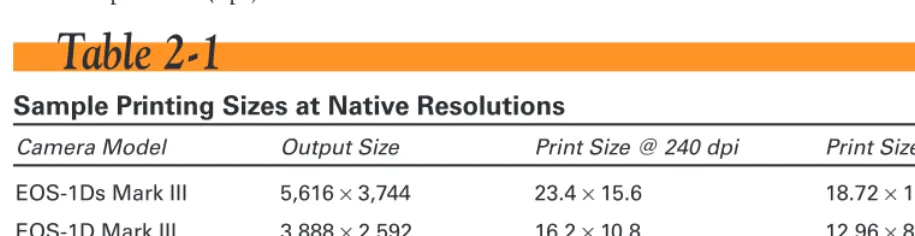
speak-ing, the results are of less-than-adequate quality. In general terms, resolution correlates to the size of the prints that you can make at the camera’s maximum quality setting. Table 2-1 provides an overview of the general sizes at which you can print images from Canon dSLRs at both 240 and 300 dots per inch (dpi).
Table 2-1
Sample Printing Sizes at Native Resolutions
Camera Model Output Size Print Size @ 240 dpi Print Size @ 300 dpi
EOS-1Ds Mark III 5,616 ×3,744 23.4 ×15.6 18.72 ×12.48 EOS-1D Mark III 3,888 ×2,592 16.2 ×10.8 12.96 ×8.64 EOS 5D 4,368 ×2,912 18.2 ×12.1 14.56 ×9.7 EOS 40D 3,888 ×2,592 16.2 ×10.8 12.96 ×8.64 EOS Rebel XTi 3,888 ×2,592 16.2 ×10.8 12.96 ×8.64 EOS Rebel XT 3,456 ×2,304 14.4 ×9.6 11.52 ×7.68
Digital images are made up of pix-els, which are individual dots of information that combine in a matrix of millions to form a photograph. Zooming in on a digital image in an image-editing program reveals the pixels that fool the human eye into believing it’s seeing a fluid, smooth photo. A megapixel is one million pixels, and the term is used to represent a camera’s maximum resolution (for example, 6.2 megapixels). For example, the EOS-1Ds Mark III has a maximum resolution of 21.10 megapixels; its maximum RAW file produces images of 5,616 ×3,744 pixels (5,616 ×3,744 = 21,026,304 pixels, which rounds to 21.10 megapixels).
note
TECHNOLOGIES AND
FEATURES COMMON TO
CANON DSLRS
Regardless of which dSLR you have or are consid-ering, Canon has a long track record of employing consistent technologies within their dSLR lineup. Since digital photography came into its own, a defining characteristic of the progression of the
But more importantly, as Canon’s ongoing research and development continues to refine camera fea-tures, Canon has progressively applied new and improved technologies throughout its camera lineup. As a result, photographers can rely on a consistently high level of quality as well as overall similarity of features and functionality from one Canon dSLR camera to another. And as a result, as photographers move from one camera to another, the learning curve is lower, allowing quick integra-tion of the new camera into the system.
In addition, functionality that is common to mul-tiple camera models is a boon for photographers who use more than one camera body. For exam-ple, Canon’s Picture Style feature, a set of prepro-grammed and customizable settings that set the color tone, contrast, saturation, and sharpness of images, means that photographers can set up mul-tiple cameras to produce consistent image “looks” across all cameras. And with consistent image results, postcapture editing becomes consistently more standardized, which increases efficiency.
ABOUT THIS PHOTOCanon’s Digital Rebel XTi is quite capable of producing professional results under demanding shooting situations. Taken with a Canon 24-105mm L lens, ISO 100, f/5.6 at 1/4000 second. ©R. Jackson Reed
While the evolution of digital technology means that some newer cameras offer technologies that previous cameras could not, certain core tech-nologies are common to all Canon dSLR cam-eras, as explained in the next sections.
SENSOR TECHNOLOGY
There are two primary types of digital image sen-sors: CCD, or charge-coupled device, and CMOS, or complementary metal-oxide semicon-ductor. Both are types of chip technology; Canon uses CMOS sensors in their cameras. Both types of sensors absorb light and convert it into digital information (electrons), but accomplish the task differently in terms of how and where they process the light-to-electron conversion.
Canon is one of the few camera manufacturers that use CMOS sensors and that produce and market full-frame, 35mm-size image sensors — sensors that are used in the EOS-1Ds Mark III and the EOS 5D. Canon is also one of the only companies that design and manufacturer its sensors in-house for all of its dSLRs. This marriage of the camera and sen-sor technology has been instrumental in making Canon the leader in dSLR technology.
Here are current advantages and limitations of each type of sensor.
and other optical devices; in general, they offer low image noise but they have inherent limits. The sequential processing of electrical charges limits the speed at which CCDs can process images. Also, the voltages needed to initiate the relay of charges across the CCD require more power than CMOS sensors. This demand for more power at longer shutter speeds creates more heat and, subsequently, more digital noise in the image. In addition, CCD-based camera batteries must be larger and they require longer recharge times.
■CMOS sensors. CMOS sensors work in a sim-ilar fashion to CCD sensors but use less power and can process images much more quickly due to differences in design. While the CMOS architecture offers the advantages of low power consumption and high speed, the tech-nology has inherent disadvantages in that it produces more noise. Canon has, over the course of several years, addressed this problem with their extensive in-house technology. The result: Canon’s CMOS sensors now provide both faster operation and less digital noise.
DIGIC IMAGE PROCESSOR
After image capture but prior to the recording stage, camera image processing determines how the signals from the sensor are translated into a viewable image. In Canon dSLRs, this function is performed by the DIGIC Image Processor chip. The DIGIC II Image Processor provides quick but high-quality image processing, as well as
enhanced color and white balance, and optimized camera performance — all with relatively low power requirements. Newer Canon dSLRs feature the new DIGIC III Image Processor with even better performance.
Canon’s Picture Style feature had its beginnings as the Parameters fea-ture in the EOS Digital Rebel cameras. Like Picfea-ture Styles, Parameters provided a set of preprogrammed and user-definable settings for contrast, color tone, sat-uration, and sharpening to achieve a look, much like different films offered different looks. Currently, the EOS Digital Rebel XT still uses Parameters, while the EOS Digital Rebel XTi (400D), the EOS 5D, the EOS 40D, the EOS 30D, and the EOS-1D Mark III and EOS-1Ds Mark III offer the newer Picture Style feature.
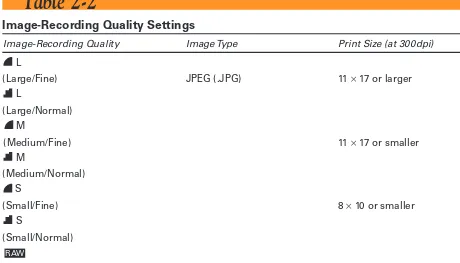
All of Canon’s dSLR cameras offer the option of recording both a JPEG and a RAW image simul-taneously. Simultaneous RAW+JPEG recording offers the best of both worlds — a preprocessed JPEG digital proof to quickly preview your shots, and the highest quality RAW images for those of you desiring the quality of the RAW format. This also translates into a considerable timesaver if you don’t want to convert RAW images to JPEGs before posting or e-mailing them.
raphy always producing full-sized files that occupy lots of storage space, these smaller files are great options if you like the advantages of RAW but don’t need the full resolution of a full-sized RAW file; they are about one-quarter the size.
There are of course situations where you may only need small JPEGs, such as for e-mail, the Web, or other online applications. Also you may need the extra frame rate provided when shooting just JPEGs (smaller files mean faster write time). In these cases just select which JPEG you need.
A BIT ABOUT DIFFERENT FILE TYPES
If you use Photoshop or other image-editing programs, you may have noticed a number of different file types. Here are few of the more common types to consider:JPEG/JPG.This is the most common image format. It’s very compressible (meaning small file
size) and universally supported in print, by image labs (sometimes exclusively), and on the Web. However, it is a lossy format and will lose quality when saved and resaved multiple times. It supports eight bits per color (RGB) for a 24-bit total. Supported by all Canon dSLRs.
TIFF.A high-quality, lossless (the image data doesn’t degrade over time with multiple saves) format that is very common among graphic artists, high-end photo labs, and most applica-tions — but very few digital cameras offer it as a direct storage format. TIFF files support Photoshop layers (a great advantage), and they have up to 16 bits per color (RGB) for a 48-bit total. TIFF files can be very large.
RAW.A camera-specific image file that is the closest possible representation of what the cam-era’s image sensor actually perceived and recorded. You normally must store a RAW file as a TIFF or JPEG image; TIFF is usually preferable to take advantage of the 16 bits per color (RGB). RAW is supported by most Canon dSLRs.
BMP.Originally used by Microsoft Windows to manage images, it is now a less-common
image format although still widely supported. BMP files tend to be quite large.
PICTURE STYLES AND
PARAMETERS
Canon dSLRs also offer the ability for photogra-phers to modify image settings, including con-trast, color tone, saturation, and sharpness. The controls for adjusting these settings vary by cam-era. On the EOS Digital Rebel XT, the settings are called Parameters.
On the EOS-1D Mark III, EOS-1Ds Mark III, EOS 5D, EOS 40D, and the EOS Digital Rebel XTi, the settings are called Picture Styles. In either case, they include a group of programmed settings that modify the look of pictures and offer the ability to modify the programmed settings as well as create user-defined settings. You can see an example of using the Portrait Picture Style in figure 2-5. Picture Styles and Parameters are dis-cussed in more detail later in the chapter.
CUSTOM FUNCTIONS
From the outset of introducing its mainstream dSLRs, Canon provided the ability for photogra-phers to customize camera functionality by modi-fying custom functions via the camera menu. This feature allows you to modify the camera to suit your needs. For example, you can change the function of the cross-keys of the EOS Digital Rebel XT or set a Custom Function on the EOS-1Ds Mark III to turn on safety shifting in Shutter-or Aperture-priShutter-ority AE modes. Custom func-tions are a boon to all photographers, and espe-cially to those with specific shooting preferences, such as having the ability to set autofocus (AF) point selection on the EOS-1Ds Mark III. The number of custom functions varies by camera model, ranging from 9 on the Digital Rebel XT to 57 on the EOS-1Ds Mark III. Knowing the potential complexity of the Custom Function
ABOUT THIS PHOTO
The Portrait Picture Style was applied to this image to enhance the portrait look. Taken with an EOS-1Ds Mark II, Canon 24-70mm L lens, ISO 100, f/10 at 1/125 second. ©Jim White
eras with automatic modes, modifications to Custom Functions operate in all except Full Auto mode. Some of the more useful Custom
Functions are explained later in the chapter.
LOOKING AT THE CANON
DSLR LINEUP
Lining up the Canon dSLR models on a camera store counter creates an impressive array of choices. If you put the lenses of your choice on each camera body, the lineup quickly becomes a photographer’s ultimate toy store. Each camera presents a unique opportunity that satisfies the shooting needs, requirements, and credit limit of one or another photographer.
This section gives you an overview of Canon’s dSLRs, with insights that you’re unlikely to learn while browsing at a camera store. In the last year, I’ve shot with each of these cameras, and I’ve talked to other photographers who have or are currently shooting with them.
Your priorities may include overall weight, speed, features, or a balance of all these factors against total system cost. Ultimately, you have to decide which camera to buy, but this chapter can help you evaluate the camera you currently own or are look-ing to buy against the lineup that Canon offers.
THE CANON EOS-1DS MARK III
The big-boy leader of Canon’s dSLR lineup is the EOS-1Ds Mark III, a workhorse of a camera built to endure the rigors of the field in very rigorous and demanding applications such as outdoor
crete floor from standing height. Though he caught it on first bounce, and there was a small dent on the corner of the body, the camera’s operation wasn’t affected in the least. I certainly don’t recommend dropping any camera, but it is nice to know that if it happens, you’re still poten-tially in business!
No question about it, the EOS-1Ds Mark III feels substantial and unquestionably solid. Based on the Canon EOS 1 series bodies, the EOS-1Ds Mark III with battery is heavy. Throw in a lens such as the EF 70-200mm f/2.8 L IS USM and the package gets heavier! Packing around that weight for a long shoot is not for the faint of heart. But the image quality, body quality, and the excellent in-hand balance make it worth it.
While many photographers lust after this top-of-the-line camera, the price alone is reason for a long, sober pause (the EOS-1D Mark III, by com-parison, has actually been optimized to be priced for news agencies). For working photographers, the question is how quickly the camera can pay itself off and begin making a profit, and whether the resolution and camera features are justified by the work that clients need. For most photogra-phers, it comes down to how badly they want the advanced features and whether they can afford the camera.
attests to its great resolution. Taken with a Canon 100mm Macro lens, ISO 320, f/3.2 at 1/125 second.
Here are the EOS-1Ds Mark III specifications at a glance:
■ 21.10-megapixel full-frame CMOS sensor ■ 5 frames-per-second (fps) continuous shooting
■ Large buffer — burst of 12 RAW and 56 JPEG images
■ 3-inch, high-resolution LCD with zoom and review modes
■ 19 cross-type AF points/26 assist AF points ■ Customizable Picture Styles
■ DIGIC III Image Processor
■ Dual high-performance memory card slots (CompactFlash and SD)
■ ISO speed range: 100–1600; expandable to L:50 and H:3200
■ Shutter durability of 300,000 cycles
■ Water- and dust-resistant, magnesium alloy body
■ USB and Video for complete connectivity ■ WFT-E2A accessory for wireless and wired
LAN compatibility
■ Complete compatibility with all Canon EF lenses and Speedlite EX flashes
THE CANON EOS-1D MARK III
The EOS-1D Mark III has the same body, build quality, and most of the advanced features of the EOS-1Ds Mark III with more emphasis on speed than resolution, not to suggest this camera is in any way a substandard. On the contrary, Canon’s new EOS-1D Mark III can record 10 fps for up to 110 JPEG frames in one burst—making it the
such as for sports and journalism. It has a new 10.1-megapixel CMOS sensor (with Canon’s EOS Integrated Cleaning System) and a 3.0-inch LCD monitor with Canon’s Live View technology, combined with the speed and intelligence of the DIGIC III Image Processor. Adding the ability to record RAW and JPEG images on different mem-ory cards, a larger 3.0-inch LCD, Canon’s Picture Style technology, and more, the EOS-1D Mark III makes for an impressive professional camera. Here are the EOS-1D Mark III specifications at a glance:
■ 10.10 megapixel CMOS APS-H sensor
■ 10 fps continuous shooting
■ Large buffer — burst of 30 RAW and 110 JPEG images
■ 3-inch, high-resolution LCD screen with 10x zoom
■ 19 cross-type AF points/26 assist AF points
■ Customizable Picture Styles ■ DIGIC III Image Processor
■ Dual high-performance memory card slots (CompactFlash and SD)
■ ISO speed range: 100–3200; expandable to L:50 and H:6400
■ Shutter durability of 300,000 actuations ■ Water- and dust-resistant magnesium alloy
body
■ USB and Video for complete connectivity
■ WFT-E2A accessory for wireless and wired LAN compatibility
offers a full-frame CMOS sensor with 12.8 megapixels and currently sells for less than $3,000. It has become a fast favorite of many pro-fessional photographers, due to the high resolu-tion and lighter weight of previous full-frame dSLRs. Price has also contributed to its popular-ity. As I mentioned previously, the overriding dif-ference aside from higher resolution is the build quality. The Mark III is designed to withstand abuse and inclement weather extremes, while the 5D is not. If your primary use will be under nor-mal everyday conditions, the lower price and lighter weight are a plus — for example, my wife,
EOS-1Ds Mark III camera, you are looking at an extremely high-resolution camera, so lens quality is paramount for optimum results.
The 5D is what some consider the ideal camera. It is lightweight, offers high resolution, and, like all the Canon dSLRs, the menu, controls, and dials are intuitive and easy to master. Many pro-fessionals prefer its smaller profile particularly for candid or street photography. Unlike the Mark III, this camera doesn’t scream “professional,” which can quickly rule out candid people shots. This isn’t to suggest in any way that this camera’s construction is subpar, as the magnesium alloy body makes it a sturdy performer.
ABOUT THIS PHOTO
The 5D has become one of Canon’s most popular dSLRs as it appeals to advanced ama-teurs as well as professionals. ©Serge Timacheff
The 5D is a sturdy dSLR that uses all of Canon’s EF lenses to their fullest potential. The full-frame high-resolution CMOS sensor, combined with Canon’s DIGIC II Image Processor, a high-preci-sion 9-point AF system with six assist points, and Picture Style color control, delivers images of superior quality with enough resolution for almost any application. With its wide-angle capabilities, 2.5-inch LCD and magnesium-alloy body, the 5D is a great addition to the digital EOS lineup. Here are the EOS 5D specifications at a glance:
■ 12.8-megapixel, full-frame CMOS sensor ■ 3 fps continuous shooting
■ Buffer/maximum burst of 60 large JPEG images, 17 RAW
■ 2.5-inch, high-resolution LCD screen ■ High-precision, 9-point wide-area AF
■ Customizable Picture Styles ■ DIGIC II Image Processor
■ ISO range: 100–1600; expandable to L:50 and H: 3200
■ Shutter durability of 100,000 cycles ■ Magnesium alloy body and stainless steel
chassis
■ USB 2.0 Hi-Speed and Video Out interface
■ Compatible with all Canon EF lenses and Speedlite EX flashes
■ Supports wireless file transmitter WFT-E1A
THE CANON EOS 40D
The EOS 40D is the successor to the 30D, which was the successor to the hugely popular EOS 20D, and is without question one of the most popular dSLRs of all time. The 20D is responsible for many of the recent converts to the Canon system. The 40D features Canon’s proven 10.1.-megapixel CMOS sensor with a 1.6x conversion factor, com-bined with the speed and intelligence of the DIGIC III Image Processor. With the 40D, several more professional features were added, including a magnesium body, a heavy-duty shutter rated for 100,000 plus actuations, true spot metering, and the incorporation of the Picture Styles technology.
If an image sensor is full-frame, it is the equivalent to a 35mm frame of film that uses 100 percent of a lens’s potential. Most sensors, however, are smaller than full-frame, so a con-version factor indicates how this affects the smaller area the lens is taking in. For example, if you use a 50mm lens on a camera with an image sensor with a 1.6 conversion factor, it would act like an 80mm lens in terms of its full angle of view and the amount of focal width you have in your photograph (1.6 x 50mm = 80mm).