What readers are saying about
Manage It!
As a 30+ year veteran in the growth of PM, I gained insight into things I have been doing for years. Here, process takes a backseat to context, and Johanna provides the professional with one of the finest com-pendiums of observations, advice, and counsel on managing projects I have come across.
Mike Dwyer
Sr. Manager, Strategic Initiatives, Healthways
Johanna packs a wealth of practical advice into this book. Even the most experienced project managers will find numerous nuggets and gems that they can immediately apply to their project work.
James A. Ward
Senior Project Management Consultant, James A. Ward and Associates, Inc.
As I was reading this book, I was picturing in my mind many simi-lar experiences. As I thought to myself, “But what about this?” I kept finding what I was thinking of! This is one of the best IT books I have ever read, but it still shows Johanna’s personality. It almost feels like she is at your elbow as you read it.
Eric Petersen
Senior Consultant, Emprove
Most project management stuff I’ve read is very cerebral and theoret-ical, and then sometimes it’s extraordinarily specific and dictatorial but in a realm that has nothing to do with me. This book provides just what I need—specific suggestions about dealing with reality. Moreover, it suggests how to think about the problem, rather than stopping at the cookbook answer.
This book is a pleasure to read and is packed with wisdom. Junior project managers will get a great introduction with some really valu-able practical advice, while senior project managers will learn some new tricks and relearn some forgotten fundamentals. Project spon-sors and customers should get a copy too. I pulled some classics from my shelves including DeMarco, Weinberg, Brooks, McConnell, Cock-burn, McCarthy, and Humphrey. Johanna is as readable as the best of them.
George Hawthorne
Project Manager, Oblomov Consulting
I’ve been on the receiving end of (mostly) poor project management for nearly twenty years. I had never entertained the thought of becoming a project manager, however, until I read this book. Johanna places the art in perspective and codifies a practical, flexible approach, founded on empirical process control theory that thrives on dynamic environments—where continuous learning is essential to project suc-cess. I’ve implored everyone associated with project work to read it. Twice.
Bil Kleb
Aerospace Engineer
In twenty years of managing projects, there have been many new items for project managers to consider. Johanna Rothman describes many of them inManage It!The chapter on meetings is worth the price of the book by itself. Read this book, and practice its principles. The people who work on your projects will think you are really smart.
Dwayne Phillips
Senior Systems Engineer
Each project is unique—which is why all project managers need to know more than one approach for managing projects. Johanna walks us through her thought process to assess the context around the project, choose a life cycle, and establish clear criteria for a project. Her advice will help you make choices that will help your project suc-ceed.
Esther Derby
Manage It!
Your Guide to Modern,
Pragmatic Project Management
Johanna Rothman
Many of the designations used by manufacturers and sellers to distinguish their prod-ucts are claimed as trademarks. Where those designations appear in this book, and The Pragmatic Programmers, LLC was aware of a trademark claim, the designations have been printed in initial capital letters or in all capitals. The Pragmatic Starter Kit, The Pragmatic Programmer, Pragmatic Programming, Pragmatic Bookshelf and the linkingg
device are trademarks of The Pragmatic Programmers, LLC.
Every precaution was taken in the preparation of this book. However, the publisher assumes no responsibility for errors or omissions, or for damages that may result from the use of information (including program listings) contained herein.
Our Pragmatic courses, workshops, and other products can help you and your team create better software and have more fun. For more information, as well as the latest Pragmatic titles, please visit us at
http://www.pragmaticprogrammer.com
Copyright © 2007 Johanna Rothman.
All rights reserved.
No part of this publication may be reproduced, stored in a retrieval system, or transmit-ted, in any form, or by any means, electronic, mechanical, photocopying, recording, or otherwise, without the prior consent of the publisher.
Printed in the United States of America.
ISBN-10: 0-9787392-4-8 ISBN-13: 978-0-9787392-4-9
Printed on acid-free paper with 85% recycled, 30% post-consumer content. First printing, June 2007
To Ilse Rothman, the first project manager I knew who
worked in timeboxes and chunks.
Contents
Foreword 12
Preface 14
1 Starting a Project 17
1.1 Define Projects and Project Managers . . . 17
1.2 Manage Your Drivers, Constraints, and Floats . . . 19
1.3 Discuss Your Project Constraints with Your Client or Sponsor 22 1.4 Decide on a Driver for Your Project. . . 23
1.5 Manage Sponsors Who Want to Overconstrain Your Project 25 1.6 Write a Project Charter to Share These Decisions . . . 27
1.7 Know What Quality Means for Your Project . . . 30
2 Planning the Project 33 2.1 Start the Wheels Turning . . . 33
2.2 Plan Just Enough to Start. . . 34
2.3 Develop a Project Plan Template . . . 35
2.4 Define Release Criteria . . . 42
2.5 Use Release Criteria . . . 47
3 Using Life Cycles to Design Your Project 50 3.1 Understanding Project Life Cycles . . . 50
3.2 Overview of Life Cycles . . . 51
3.3 Seeing Feedback in the Project . . . 55
3.4 Larger Projects Might Have Multiple Combinations of Life Cycles 56 3.5 Managing Architectural Risk . . . 60
3.6 Paddling Your Way Out of a Waterfall . . . 62
CONTENTS 8
4 Scheduling the Project 64
4.1 Pragmatic Approaches to Project Scheduling . . . 64
4.2 Select from These Scheduling Techniques . . . 66
4.3 Start Scheduling with a Low-Tech Tool . . . 69
5 Estimating the Work 77 5.1 Pragmatic Approaches to Project Estimation . . . 77
5.2 Milestones Define Your Project’s Chunks . . . 91
5.3 How Little Can You Do? . . . 93
5.4 Estimating with Multitasking . . . 93
5.5 Scheduling People to Multitask by Design. . . 94
5.6 Using Rolling-Wave Scheduling . . . 95
5.7 Deciding on an Iteration Duration . . . 96
5.8 Estimating Using Inch-Pebbles Wherever Possible . . . 98
6 Recognizing and Avoiding Schedule Games 101 6.1 Bring Me a Rock . . . 101
6.2 Hope Is Our Most Important Strategy . . . 104
6.3 Queen of Denial . . . 106
6.4 Sweep Under the Rug . . . 109
6.5 Happy Date . . . 111
6.6 Pants on Fire . . . 113
6.7 Split Focus. . . 115
6.8 Schedule Equals Commitment . . . 117
6.9 We’ll Know Where We Are When We Get There . . . 119
6.10 The Schedule Tool Is Always Right . . . 121
6.11 We Gotta Have It; We’re Toast Without It . . . 124
6.12 We Can’t Say No . . . 126
6.13 Schedule Chicken. . . 128
6.14 90% Done . . . 129
6.15 We’ll Go Faster Now . . . 131
6.16 Schedule Trance . . . 133
7 Creating a Great Project Team 135 7.1 Recruit the People You Need . . . 135
7.2 Help the Team Jell . . . 137
7.3 Make Your Organization Work for You . . . 140
7.4 Know How Large a Team You Need . . . 143
7.5 Know When to Add More People . . . 145
7.6 Become a Great Project Manager . . . 145
CONTENTS 9
8 Steering the Project 156
8.1 Steer the Project with Rhythm . . . 156
8.2 Conduct Interim Retrospectives . . . 157
8.3 Rank the Requirements . . . 158
8.4 Timebox Requirements Work . . . 161
8.5 Timebox Iterations to Four or Fewer Weeks . . . 164
8.6 Use Rolling-Wave Planning and Scheduling . . . 165
8.7 Create a Cross-Functional Project Team . . . 168
8.8 Select a Life Cycle Based on Your Project’s Risks . . . 169
8.9 Keep Reasonable Work Hours . . . 170
8.10 Use Inch-Pebbles . . . 171
8.11 Manage Interruptions . . . 172
8.12 Manage Defects Starting at the Beginning of the Project 174 9 Maintaining Project Rhythm 179 9.1 Adopt or Adapt Continuous Integration for Your Project 179 9.2 Create Automated Smoke Tests for the Build . . . 181
9.3 Implement by Feature, Not by Architecture . . . 182
9.4 Get Multiple Sets of Eyes on Work Products . . . 187
9.5 Plan to Refactor . . . 188
9.6 Utilize Use Cases, User Stories, Personas, and Scenarios to Define Requirements190 9.7 Separate GUI Design from Requirements . . . 191
9.8 Use Low-Fidelity Prototyping as Long as Possible . . . 192
10 Managing Meetings 194 10.1 Cancel These Meetings . . . 194
10.2 Conduct These Types of Meetings . . . 197
10.3 Project Kickoff Meetings . . . 198
10.4 Release Planning Meetings . . . 198
10.5 Status Meetings . . . 199
10.6 Reporting Status to Management. . . 204
10.7 Project Team Meetings . . . 205
10.8 Iteration Review Meetings . . . 206
10.9 Troubleshooting Meetings . . . 206
10.10 Manage Conference Calls with Remote Teams . . . 208
11 Creating and Using a Project Dashboard 212 11.1 Measurements Can Be Dangerous . . . 212
11.2 Measure Progress Toward Project Completion . . . 215
11.3 Develop a Project Dashboard for Sponsors . . . 238
CONTENTS 10
12 Managing Multisite Projects 246
12.1 What Does a Question Cost You?. . . 247
12.2 Identify Your Project’s Cultural Differences . . . 248
12.3 Build Trust Among the Teams . . . 249
12.4 Use Complementary Practices on a Team-by-Team Basis252 12.5 Look for Potential Multisite Project and Multicultural Problems260 12.6 Avoid These Mistakes When Outsourcing . . . 262
13 Integrating Testing into the Project 265 13.1 Start People with a Mind-Set Toward Reducing Technical Debt265 13.2 Reduce Risks with Small Tests . . . 266
13.3 TDD Is the Easiest Way to Integrate Testing into Your Project267 13.4 Use a Wide Variety of Testing Techniques . . . 270
13.5 Define Every Team Member’s Testing Role . . . 273
13.6 What’s the Right Developer-to-Tester Ratio? . . . 277
13.7 Make the Testing Concurrent with Development . . . . 283
13.8 Define a Test Strategy for Your Project. . . 283
13.9 System Test Strategy Template . . . 284
13.10 There’s a Difference Between QA and Test . . . 286
14 Managing Programs 288 14.1 When Your Project Is a Program . . . 288
14.2 Organizing Multiple Related Projects into One Release 289 14.3 Organizing Multiple Related Projects Over Time . . . . 291
14.4 Managing Project Managers . . . 294
14.5 Creating a Program Dashboard . . . 296
15 Completing a Project 298 15.1 Managing Requests for Early Release . . . 298
15.2 Managing Beta Releases . . . 299
15.3 When You Know You Can’t Meet the Release Date . . . 300
15.4 Shepherding the Project to Completion . . . 308
15.5 Canceling a Project . . . 312
16 Managing the Project Portfolio 315 16.1 Build the Portfolio of All Projects . . . 315
16.2 Evaluate the Projects . . . 317
16.3 Decide Which Projects to Fund Now . . . 318
16.4 Rank-Order the Portfolio. . . 318
16.5 Start Projects Faster . . . 319
CONTENTS 11
A More Detailed Information About Life Cycles 330
A.1 Serial Life Cycle: Waterfall or Phase-Gate . . . 330
A.2 Iterative Life Cycle: Spiral, Evolutionary Prototyping, Unified Process334 A.3 Incremental Life Cycle: Staged Delivery, Design to Schedule338
A.4 Agile Life Cycles . . . 339
B Glossary of Terms 343
C Bibliography 345
Foreword
Hello, and welcome to Johanna’s latest book. I’m currently a director at Yahoo! (in Berkeley) and have been in the software business for several decades. In fact, you might have heard of Digital Equipment Corpora-tion (the foundaCorpora-tion of the early Internet) and its Alpha system. That was a very important project for me.I played a major role in the delivery of the Alpha software. It was a monumental task: some 2,000 engineers scattered all over the world, all working on various parts of the system. It required rigorous planning and project management, and we delivered on a four-year schedule within one month of our target date. So, as you can imagine, I thought I was a pretty good manager! But I was about to find out what an
excellent manager is like.
In May 1996, I decided to leave DEC, and I heard about a job opening at another major software company in the Boston area. It was just the kind of challenge I relish, director of a product group—“a team living in chaos.” Great, I thought. This is what I do! Coax the potential out of the chaos, and help deliver an actual working product. Now where’s my white horse?
I heard that a consultant had been brought in to “triage” the develop-ment of the group’s beta release. This only strengthened my conviction that they would soon find the hero they had been waiting for—in me.
FOREWORD 13
But all that usually takes significant time to put in place—especially when starting from a deficit position. Yet here they were! You’ve probably guessed by now that this consultant was Johanna Rothman. (Johanna has a case study about our joint adventure on her website— only the names have been changed to protect the guilty!)
Over the years since I first met Johanna, I’ve run software development organizations in companies large and small. And on numerous occa-sions, I’ve engaged Johanna’s services to help move my team to the next level. Her assessment process is rigorous and provides the solid foot-ing that’s required for effective project management. She tailors effec-tive workshops on a multitude of topics—for me, she has done iteraeffec-tive project requirements, project management, and QA. I have hired her for interim management positions and for one-on-one coaching for people with varied skill sets. Johanna draws on a broad range of experience in a diversity of situations and organizations, and she always manages to provide solutions that are practical and realistic—solutions that can actually be implemented to solve key problems.
And so, this book is a real gift from Johanna.
She pulls knowledge from all her years on the front lines and presents the material in a cohesive way. The book provides you with the tools you need to analyze your own situation, build a framework and rational plan, and then execute. Johanna gives you lots of tips and examples of what works and what doesn’t—and advice on how to avoid the rat holes. Even after years of project and program management experience, I learned new things when reviewing this book. And when I’m in a new or challenging situation or when I need a sounding board to help me think through a tough problem, Johanna is the one I call.
Oh, yeah—that project we worked on when I first met Johanna? We shipped the product to the beta customers, and it worked!
I know Johanna’s book will help you succeed as well.
Preface
You’ve been bombarded with a ton of techniques, practices, and unso-licited pieces of advice about how to manage projects. All of them are saying “Look at me, I’m right.”Well, many of them are right—under certain conditions. Since each project is unique, you will need to evaluate your context (the project, the project team, and the business in which you’re working) and then make pragmatic choices about what will work and what won’t.
Every day your projects become faster-paced, your customers grow more impatient, and there is less and less tolerance for products that don’t work. What worked before might have been good enough to get you here, but the chances that it will work in the future are not good. You must take advantage of all practices and techniques to reduce your project’s risk, including considering agile techniques for every project.
This book is a risk-based guide to making good decisions about how to plan and guide your projects. It will help software project managers, team members, and software managers succeed. Much of the informa-tion also applies if you are building more tangible products, such as a house or a circuit board, or if you are managing a service project.
I’m assuming you’re managing a high-tech project, with at least some software component. You might have had some of the same project management experiences as I have: lots of software projects and some hardware/software combination projects. I’ve also managed a few ser-vice projects, such as planning and holding conferences. I’ve been part of some construction projects (one new house, one small remodel, and one large remodel). But the bulk of my experience is with software or software/hardware projects in some form.
PREFACE 15
can’t directly measure it, and we can’t see it. It’s harder to see the product unfold, and it’s harder to see and anticipate the risks—so it’s much harder to deal with risks. The way we practice software product development does not always help us see where the project is or where it’s heading.
When you manage tangible-product projects, you can see the product take shape. You can see the shell of the building, the finish on the walls, and all the steps in between. With service products with a tangible result, such as a conference or meeting, you can gain some insight into the project if there are interim deliverables, such as rough-draft reports or run-throughs of meetings. Both tangible-product projects and some service projects allow you to see project progress before the end of the project.
So, what do you do when you can’t directly see project progress? What do you do when you suspect the project smells funny, and you think it might be headed toward disaster? How do you deal with stakehold-ers who don’t want to make the decisions that will help you create a successful project?
This book is about providing insight into your software projects and managing the risks that arise from within the project as well as the risks with which you start your projects. From chartering to release, each chapter discusses ways you can see inside your software project, measure it, feel it, taste it, and smell it.
One thing you won’t find in this book is the One True Way to manage projects. There is no One True Way that works for all projects. You also won’t find best practices. I’ll suggest helpful practices for each life cycle that might help you and the project team achieve your goals.
You’ll notice that there are forward and backward references in this book. That’s because a project is a nonlinear system. Your early deci-sions for your current project have implications for how you’ll finish this one—and possibly how you’ll start the next one. How you manage projects might affect the way you can manage the product backlog or project portfolio.
All the templates in this book are also online, at the book’s home page,
PREFACE 16
I thank all the people who helped me write and edit this book: Tom Ayerst, Jim Bullock, Brian Burke, Piers Cawley, Shanti Chilukuri, Esther Derby, Michael F. Dwyer, Mark Druy, Jenn Greene, Payson Hall, Peter Harris, George Hawthorne, Ron Jeffries, Bil Kleb, Michael Lee, Hal Macomber, Rob McGurrin, Andrew McKinlay, Erik Petersen, Dwayne Phillips, Frederick Ros, Ellen Salisbury, George Stepanek, Andrew Wag-ner, and Jim Ward. My editor, Daniel Steinberg, provided exceptionally helpful feedback. Kim Wimpsett was again a copyeditor par excellence. I thank Steve Peter for his typesetting wizardry. Mark Tatro of Rotate Graphics developed all the schedule game cartoons. Working with Andy Hunt and Dave Thomas was, once again, my pleasure. Any mistakes are mine.
The stories I’m telling are all true—the names, companies, and specifics have all been changed to protect the innocent and the guilty.
Let’s start.
Chapter 1
Starting a Project
The easiest way to start a project wrong is to just start. Want at least a reasonable hope for success? That will take a bit more organizing and planning. You’ll need to know what’s driving your project and whatdonemeans for the project. And you need to write those decisions down in a charter so you can share them with the rest of the project team.
1.1
Define Projects and Project Managers
First, let’s make sure we agree on what a project is.
Project:
A novel undertaking or systematic process to create a new prod-uct or service, the delivery of which signals completion. Projects involve risk and are typically constrained by limited resources.1
Project managers manage those risks and resources. You need project management when you have risks across the project: the schedule is tight, it’s not clear you can achieve the technical goals, quality could suffer, you don’t have unlimited funds, and you might not have the people you need when you need them.
Each project has a different focus, so each project is unique. That means you’ll need to plan and manage each project in a way that makes sense for your project. Before you initiate a project, start by gathering some ideas about what the project is supposed to accomplish.
DEFINEPROJECTS ANDPROJECTMANAGERS 18
What Are We Building?
by Chris, project manager
I’m a project manager at a large company. I run software/hardware integration projects. My colleague Nikky runs events. My team builds machines, and Nikky’s teams organize events—our outputs aren’t similar in any way, but we’re both project managers.
Our risks are completely different. Our deliverables are totally different. I need software, hardware, and some documentation. Nikky needs booths, food, or whatever else it takes to make her events successful.
One of the things we do that’s the same is learn at the beginning what the focus of our project is so we can define what we’re building quickly.
Knowing what we’re building and whatdone means helps both of us run
our projects.
Every project is unique. Projects have different size teams with different capabilities. Some have internal customers, and others have external customers. Some work under substantial time pressure; others have very different risks for completion. At the center of every project is the product. Again, let’s agree on the following definition.
Product:
The set of deliverables that results from the project.
You’re a successful project manager—or want to be. Take a little time to identify what’s unique about this project. That way, you can start, manage, and end the project with a shot at success.
Now that we have defined a project and product, let’s clarify what we mean by a project manager. Wideman says that a project manager “heads up the project team and is assigned the authority and responsi-bility for conducting the project and meeting project objectives through project management.”2 That’s great as a formal definition. But here’s
a working definition you might find more ambiguous and, at the same time, more accurate:
Project manager:
The person whose job it is to articulate and communicate what
done means and to guide the project team to done. By done, I mean a product that meets the needs of the organization develop-ing the product and the customers who will use the product.
MANAGEYOURDRIVERS, CONSTRAINTS,ANDFLOATS 19
That business of done implies substantial risk. I bet your product is loaded with risks. We’ll take a look at how you identify and classify some of these risks. Before you do anything else, you must understand what’s driving the project.
Small or Big—Projects All Involve Risk
by Eric, experienced project manager
I’ve worked in big projects (several years, with a couple hundred people) and small projects (two or three of us working with a client who had two or three people, over a total of three months). There’s one thing I know about projects: there’s always risk in getting to the final deliverable.
Sometimes the risks depend on the team. Think of something simple like making your bed at home. To me it’s just a checklist item. But to my kids, making a bed is a project full of risks. Mostly the risk is they won’t finish before bedtime!
1.2
Manage Your Drivers, Constraints, and Floats
One of the biggest risks to finishing a project is understanding the project’s context.
The project’s context is a result of what is important to the organization. What’s driving the project? Are there constraints on the project? Can you trade off any of the drivers and constraints or buy yourself some more degrees of freedom?
What’s Driving This Project Is Different from My Previous Project
by Stuart, project manager
I’m managing my second project now. The first project was a point release for our flagship product. It was pretty easy to figure out what we needed to focus on—adding a few new features and making sure we fixed a bunch of defects.
But this second project—wow, this one is really different. This is an experiment for us so we can see whether we want to enter this market. We need a bunch of new features. The features have to work, but we don’t have to focus on defects. And the deadline is really close. My boss told me we could have a couple of more people, but not contractors, because we need to manage the cost.
MANAGEYOURDRIVERS, CONSTRAINTS,ANDFLOATS 20
!"#$
%&'()*+(
,*-+.$/ !"#$
%&'()*+(
0(#"*1&(#
Figure 1.1: Traditional iron triangles
You’ve probably heard of theiron triangle in projects. Two of the three sides of the triangle are cost and schedule. The third side is usually either quality or scope (see Figure1.1). The iron triangle is too simplis-tic. Look at Stuart’s two projects. The drivers were vastly different.
Successful project managers like Stuart trade off many more factors than what’s in the iron triangle. You can’t just tell your customers to choose two of the sides of the iron triangle, and then you can deliver what they want. If that was all there was to it, anyone could be a project manager.
First, write down your customers’ expectations—what’s driving the pro-ject from your customers’ perspective [Rot98]. Your list includes what your customers expect (the feature set), when they will receive it (time to release), and how good it is (defect levels) [Gra92].
Next, write down the constraints you are under. What’s your environ-ment like? Do you have the flexibility to collocate the team? What pro-cesses are you stuck with? Who do you have? What can they do? How much money do you have? You can change these constraints (this often happens when a project is in trouble). Constraints dictate how big (or how long or how good) your project can be.
MANAGEYOURDRIVERS, CONSTRAINTS,ANDFLOATS 21
Choose one item, say time to release. That is what you identify as your
driver.
What’s left on your list? You’ll see things such as feature set, low defects, and cost to release. Which of the remaining items will you need to manage to make the project successful? Create a hierarchy with these concerns being a little less critical to the success of your project than the driver. Your customers’ expectations and sponsors’ concerns will constrain your project in one or more of those dimensions. Choose two or three of these. We will call these theconstraintsof the project.
Again, look at the remaining items. Some of these items are important to the project, but you have flexibility to manage them. We call these
floats, and you should have at least three of them for this project.
Finally, go back to the set of items you did not select. Are any of them more important than the ones you did select? If so, you are allowed to do some juggling. If not, you have identified the driver, constraints, and floats for this project.
I’ve seen projects with up to three constraints succeed, but only with extraordinary effort on the part of the project team. In my experience, if you have one driver, two constraints, and three floats, you have a reasonable chance of success. The more floats you have, the easier it is to organize the project.
Ideally, you would have no more than one driver, no more than one constraint, and four floats. Most of us work on less than ideal projects, so if you have one driver, two constraints, and three floats, you can still succeed. More drivers or more constraints lead to an overconstrained project. You might be able to succeed, but you and your project team will have to select a project organization and practices that can help you get close to success—and realize you still might not achieve total success.
If you have more drivers or constraints and you feel like you have no choice but to start the project, the best thing you can do is choose something as a driver and deliver pieces of the project as often as pos-sible to help your sponsors decide what they do want. As you start the project, keep asking context-free questions (see Section 1.5, Use
Context-Free Questions to Identify Project Drivers, on page 26) to elicit
success criteria for the project. And, define release criteria (see
DISCUSSYOURPROJECTCONSTRAINTS WITHYOURCLIENT ORSPONSOR 22
Tip: With Too Many Constraints, You Decide
Overconstrained projects will fail. Too many drivers means no one knows what the success criteria are. Too many con-straints means no one in the organization is willing to make priority decisions.
If you need to, push your management into making some decisions about what’s driving the project, what the con-straints are, and where you have more flexibility. If that doesn’t work, make the decisions yourself. Your project and the organization will benefit.
You can’t create project requirements that don’t fit inside the project constraints. If you try, you have the problem of a ten-pound project in a five-pound project bag. No matter what you try, you just don’t have enough people, time, money, or tools to release a product when man-agement wants it, with the features manman-agement wants, and without too many defects.
1.3
Discuss Your Project Constraints with Your Client or Sponsor
Feel free to take the initiative to understand what your sponsor wants. Here’s a conversation I had with a sponsor for a recent project:
JR: Hey Clyde, let’s discuss what’s really driving this project.
Clyde: Oh, no. Not this again. You made me do this the last time.
JR: Yup. And remember when you wanted to add another feature?
Because you told me you wanted to squeeze in as many features as possible before the release date, I was able to add it, because of the way we had organized the project. It wasn’t easy, but it was possible.
Clyde: Oh, yeah. I forgot. OK. But this project is different.
JR: Oh? Tell me more.
Clyde: Look, you take care of the people. And the project environment—
that’s your job too. Since you won’t need capital equipment, I don’t have to think about the cost because the cost is all salary.
DECIDE ON ADRIVER FORYOURPROJECT 23
Clyde: Picky, picky. OK, if you need some software, let me know. But
honestly, the cost is practically all salary—not something I need to man-age. I really care how long this project is going to take.
JR: What about the feature set? Or how good it has to be? This is a
small app for the finance department. You know what perfectionists they are. If I don’t give them everything perfectly, Leslie blows her top.
Clyde: Yeah, but I’m paying for it. And what I want is to give them the
smallest number of features that work well enough so that you and the team are done soon, say, in maybe ten weeks.
JR: If it’s week eight and we don’t quite have all the features and we
have too many defects, what do you want to do?
Clyde: JR, come on. I want it all. You and your team have done this
before. You can do it again.
JR: Clyde, you know that the project team and I will do as much as we
can, assuming I understand what you really want.
Clyde: Fine. No half-baked features. You start it, you finish it so that
Leslie likes it. Otherwise, Leslie will have my head. And I’m going to need you and the project team later to join that big program Vince has started. He says he’ll be ready for more people in about ten weeks. That gives you just enough time to do something reasonable for Leslie.
1.4
Decide on a Driver for Your Project
In my conversation with Clyde, I asked Clyde to identify what was most important to him. When Clyde said the big program was going to start in ten weeks, it was clear the date was the driver.
Early in the project, everything seems possible, especially if no one has tried to estimate anything. Your sponsor may say, “We want this project to have these five features, be done by August 1, and have no critical defects. And we want you to bring it in under a million bucks. You have these six people. OK?”
Don’t say OK.
DECIDE ON ADRIVER FORYOURPROJECT 24
your work environment. In that case, your sponsor needs to make some hard decisions. Make decisions based upon what’s driving this project for your organization: the release date, the feature set, the cost, who’s assigned and when they’re assigned, and the practices and techniques you’ll use.
Sponsors who don’t decide what’s driving their project push that deci-sion down to the project manager. If the project manager doesn’t decide, the project team will decide. But they won’t decide with one mind. And they won’t necessarily make the choice that the sponsor would have wanted them to make. Instead, each person—regardless of his or her role on the project—will make an individual decision. Some will opti-mize for the release date, throwing any concerns about low defects out the door. Some will optimize for schedule by implementing only one thing—one thing in totality with a full regression test suite—and leav-ing all the other features undone. Some will optimize for feature set, implementing as many stubs as possible and filling in where the testers find problems, until they run out of time. Each person will do what he or she thinks is right. Without a decision from the project sponsor (or the project manager), each person will make a different decision.
One approach is to develop a ranked list [Hal07], explaining it’s like Sudoku. List the possible drivers down the left side and leave a space on the right to fill in a number.
Use a Matrix to Articulate the Project Priorities
Here’s Clyde’s ranked matrix.Project Priorities Rank
Cost to release 5 Release date 1
Feature set 2
Low defects 3
People 4
Work environment 6
MANAGESPONSORSWHOWANT TOOVERCONSTRAINYOURPROJECT 25
But the features were also important—the release date without enough features was also valueless. And, given that the product was in a reg-ulated industry, the defect levels had to be low. The people were next, because they had to be available in ten weeks for the next program. The cost of the project was less important, because the value of the project was so high. The work environment was last, because I had the flexibility to change things to finish this project on time.
Even though I had the priorities in order, we didn’t have much flexibil-ity. But knowing what was driving the project helped me define success criteria and choose a life cycle. The project team could create release criteria and use these drivers to make reasonable choices about their work. And yes, we met the requested deliverables for this project.
1.5
Manage Sponsors Who Want to Overconstrain Your Project
Most of the time, the conversation about what success looks like is not easy. You can see that I had to push Clyde to make some choices. That is typical.
I bet you’ve either been a project manager or worked on a project team who was told the feature set, low defects, and schedule are all the same priority—all number one. You can’t add more to the project. And, the cost is fixed. And you have to use the company-mandated process, offices, or furniture, or you have some other work environment issue that makes the project work difficult to perform. Nobody can make a project like that succeed unless there’s no technical or schedule risk in the project. But you have some approaches that can help you clarify those supposedly fixed constraints.
You saw the matrix of project drivers in Section 1.4, Use a Matrix to
Articulate the Project Priorities, on the previous page. This approach is
most appropriate if the sponsor is ready to make choices. It might help a reluctant sponsor to be more decisive. You may have to rough out the rankings yourself and present them to your sponsor. For example, you might have several sponsors who don’t agree on the relative ranking, or you might have a sponsor who is reluctant to decide. In this case, make the decisions and show them to your sponsor. She might be more willing to correct your rankings or sign off on them than to create her own.
MANAGESPONSORSWHOWANT TOOVERCONSTRAINYOURPROJECT 26
Imagine the Future
Begin by asking the sponsor to imagine that you are three weeks from the end of the project. Not all of the features are implemented. (Specifi-cally discuss the one or two features this sponsor needs.) In addition to the missing features, there are still significant defects and too many of them. It’s clear you can’t finish the features and eliminate the defects before the desired release date. What would the sponsor do then?
If the sponsor says to you, “I’ll have your head,” it could be time to leave the organization. See Section7.7,Know When It’s Time to Leave, on page148.
But it’s more likely the sponsor will say something like this, “Finish the damn project. You need more people?” Follow up with, “Finish the features or the defects?” The sponsor will typically say, “Those two fea-tures and these defects.” Ask, “In that order?” More often, you need to help the sponsor articulate which constraints are real constraints and which constraints are the sponsor’s wishes.
A conversation including context-free questions can help you and the sponsor identify the project’s drivers, constraints, and degrees of free-dom.
Use Context-Free Questions to Identify Project Drivers
Project managers can identify the project requirements when they de-termine the project drivers. It makes sense to use context-free ques-tions [GW89] to help elicit those requirements. Context-free questions are high-level questions that help elicit other people’s implicit assump-tions about the project. Start with these quesassump-tions:
• What does success look like? • Why are these results desirable? • What is the solution worth to you? • What problems does this system solve? • What problems could this system create?
WRITE APROJECTCHAR TER TOSHARETHESEDECISIONS 27
Ask these questions out of a genuine desire to know about the project, not to put anyone on the defensive. You can use these questions to lay the groundwork for a useful collaboration with your sponsor, not a difficult relationship.
These questions address the value of the system. When you ask the sponsors these questions, keep the conversation collegial. Take notes on paper, not on a computer, so that there’s no barrier between you and your sponsor. Use these questions as a starting point in the con-versation. The more information you gather at the beginning about the project’s value to the sponsor, the more you’ll understand how to design the project.
What Does Success Look Like?
by Justin, project manager
I’m a couple of months into managing a two-to-three-year project, when my boss comes to me and says he wants to add a feature. Part of me says, “Cool, this particular feature would be great.” Part of me says, “Uh-oh, we’re two months into the project. If I train my boss that it’s OK to ask for more features, either I need to change the way we’re working or I’ll be in trouble.” I asked the question, “What does success look like to you?”
Imagine my surprise when I realized my boss thinks success is a
completely adaptable project. He’s pretty sure the requirements are going to keep evolving until the last minute—maybe a week before we release. I haven’t run a project like that before! But now that I know, I can figure out how to do this.
1.6
Write a Project Charter to Share These Decisions
A project charter identifies the project requirements and constraints, and it helps a project manager decide how to design the project. The charter is the one place the entire project team and the sponsors can visit to make sure they all agree on the decisions about the project.
WRITE APROJECTCHAR TER TOSHARETHESEDECISIONS 28
If you’re managing an agile project (one using an agile life cycle,
Sec-tionA.4,Agile Life Cycles, on page339), your charter can be quite short.
You might need only the project vision (so people involved with the project can make good decisions) and the release criteria (so you don’t end up gold-plating past the time the project could end).
Here is my project charter template:
• Vision
• Requirements • Goals
• Success criteria • ROI estimate
The project charter is short by design. The charter helps the project team start. It doesn’t say how the team members will know they are done. It doesn’t say how the team will organize the project. But it’s enough to get started.
Vision
There’s a reason (or two or three) behind every project. What’s the rea-son for this project? Use the vision statement to show what’s valuable about this project. The easier it is for you to articulate the project’s value early in the project, the more the project team is likely to tell you whether the project makes sense—or whether you’re starting an impossible project. If you can’t articulate the vision, chances are good that you’re starting on an impossible project (because there’s no way to end a project with no vision). A useful vision is compelling to the project team.
Requirements
Sometimes the only requirement of a project is to release something by some particular date. More often, the requirements are intermingled in some way: “We need the blatz feature in a major release by February 20.” Think of your project drivers for this part, not the product’s list of features.
Goals
WRITE APROJECTCHAR TER TOSHARETHESEDECISIONS 29
Joe Asks. . .
Who Writes the Project Charter?
Chartering is one early way to help a team jell. Involve as many of the team members as possible in writing the charter.
But if you don’t have anyone on your project team yet, write a charter yourself. If you have some people on the project, write the charter with them. In the project kickoff meeting (see
Sec-tion10.3,Project Kickoff Meetings, on page198), walk through
the charter and make sure everyone understands what’s in the charter and why.
Goals are not the same as requirements [DeM97]. Project goals are things the project is notrequired to deliver. If you’ve been doing tradi-tional phase-gate or waterfall development, you probably have substan-tial technical debt (AppendixB, on page343) in your product. Working off technical debt in the form of redesign, adding more automated tests, and developing smoke tests are all examples of possible project goals.
Sometimes, the customer has asked for something specific: “I’d love to get an electronic signature if we can do that for free within the current schedule.” As a pragmatic project manager, you can say, “OK, we’ll add it to the goals. That way if Shirley and Jane have some time, they can do it.”
Success Criteria
Success criteria are the things that define what the customers will be able to do with the product when you are done. Success criteria are not about defects; they are about capabilities (see [Rot02b] and [Wie05]).
Here are some examples of success criteria:
• Include features 1, 2, and 3 so we can sell to that specific market. • Improve and measure performance so we can create marketing material that compares our product to our competitor’s product. • Our customers can open the packaging and load the software
KNOWWHATQUALITYMEANS FORYOURPROJECT 30
Projects Start Before You Think They Do
Most of the time, projects start before the official schedule start. Maybe someone has done some prototyping. Maybe some-one has estimated some features. Maybe the management team has talked to the chief architect about what’s possible and what’s not. That’s part of the project, even if you don’t think it is part of the project.
Since the project starts before you think it does, don’t be wor-ried about iterating on the project charter, the project plan, and the project schedule. As a pragmatic project manager, you spend the first part of the project trying to wrap your arms around the project while the work has already started. In the middle, you steer the project as you reevaluate the project’s progress and risks. At the end, if you’ve been pragmatic, you have little to do except to worry.
The project team has control over success criteria. As a project man-ager, you’ll have to guard against success criteria that only other people can fulfill (such as “Sell 50,000 units”). You and the project team have no control over what other people do; you and the project team can con-trol only what you do. Make success criteria something in your concon-trol.
ROI
Few of my clients measure return on investment (ROI). It’s too easy to manipulate the numbers. However, if your management requires it and you can estimate the benefit of the project, try calculating ROI. And check it after the project is over to see whether you achieved it.
1.7
Know What Quality Means for Your Project
Understanding the project drivers, constraints, and floats is the first step to understanding what quality means to your sponsors and cus-tomers. The sponsors are the people who are paying for the project. The customers are the people who use the product. Those people are not necessarily the same—and neither is their definition of quality. And yes, that makes life harder for you. But part of knowing what done
KNOWWHATQUALITYMEANS FORYOURPROJECT 31
!"#$%&'"#()*
!+,&-.&/0.)
1)23+-$-4%&
!+*3560"6*6 7060-+"#0)6 8#"49"*06*6 :-+6)#;"*0;)6 <()=*026 13)
:3"69
109) <0>)&-.&
:56*-9)#& ?"6)
'"0+6*#)"9
Figure 1.2: Moore’s Chasm
Weinberg says, “Quality is value to someone” [Wei92]. This definition allows you to add more features and see how many more (and what kinds) of “someones” a feature might attract. Shortening or extending a release might attract (or not!) other “someones.” As you think about your sponsors and customers, think about what they would like from your project. That will give you options to increase/reduce the time to release, the project cost, and the number of people, as well as allows you to consider whether all your “someones” need this feature. If you and the team know what these “someones” accept as quality, you can continue to work toward that as they change their minds—and you’ll still be successful.
Your customers have a different definition of quality depending on where your product is in its adoption lifetime [Moo91], as shown in Figure1.2.
At the beginning of a product’s life, the size of the customer base is small, but technology enthusiasts want to see what you have, so there’s substantial pressure to release. The product doesn’t have to do much, or be rugged, but it needs to do something well enough to attract more customers.
KNOWWHATQUALITYMEANS FORYOURPROJECT 32
Each set of customers wants your product to do something—not nec-essarily what the other customers want. And all your customers want their release, with their features, fast. Your product can’t be too awful to use, but these people have a problem, and only your product can solve their problem, so defects won’t prevent you from selling your product.
But once your product (or products like it) has hit the mainstream, the pragmatists now care that you fix the defects in your product. If you’ve created technical debt (see AppendixB, on page343) in your product in previous releases, now is the time to start paying it off. And because the pragmatists have such tremendous buying power, they will pressure your management to release often—even if not all the customers want to install the release. You don’t have to add too many features in a given release, but you can’t only make the software more rugged.
The conservatives will buy your product, but only under duress. And, the conservatives will take any and every opportunity to complain about your product if it does not do what it says it will or if it has too many defects. Conservatives don’t want more features; they want the prom-ised features to work. This is where you could release just fixes or a more reliable/high-performance/rugged product.
Laggards and skeptics might or might not buy your product. Some-times, companies call products in this space cash cows, because they make more money on support contracts than they have to spend on support.
Although there is substantial pressure for many releases early in the product’s lifetime, there is even more pressure from more customers for low defects later during the product’s lifetime.
Remember This
• Start every project with a charter.
• Expect to iterate on the project charter. The charter doesn’t have to be perfect; it just has to exist to help the entire project team with their planning.
Chapter 2
Planning the Project
By now, you have a project charter. If your team wasn’t available to write the charter with you, conduct a walk-through of the charter in a project kickoff meeting (see Section10.3,Project Kickoff Meetings, on page198). Once the team is familiar with the charter, you and the team are ready to do some targeted planning and just a little scheduling.
Planning and scheduling are two different activities. Planning includes writing a project plan with release criteria. Scheduling creates the sequenced description of the work.
2.1
Start the Wheels Turning
The charter helps everyone plan just a little up front to point themselves in a reasonable direction—or determine early whether there is no rea-sonable direction. The project plan focuses the team on the desired project results.
If you have a small enough team, say fewer than ten people, write the project plan with them as a group. Have a conversation with your team about where to head for the next couple of days or weeks, keeping the project’s outcome in mind. If you have some requirements, the team can start prototyping or developing the first iteration. If you’re using an agile life cycle, use the project plan as the release plan.
More likely, you have only some of the people you need, or too many people for the prototypes, or you don’t really know what you have to do. In that case, ask some or all of the people to start fixing defects from a previous release. See Section13.1,Start People with a Mind-Set Toward
PLANJUSTENOUGH TOSTAR T 34
2.2
Plan Just Enough to Start
You’ve got a charter, but what is your plan? Your management still wants to have an idea of when you’ll deliver which features into the code base. How will you measure progress? When will the project be done?
Your plan does not have to be perfect. In fact, there’s no way it can be. Your plan only has to be good enough to start the project with a chance of success. If you’re working on time-pressured projects (which I do most of the time), timebox your planning activities. If you plan to replan the project, you don’t need to worry about perfecting plans at the beginning.
Atimeboxis a specific amount of time in which the person or team will
attempt to accomplish a specific task. As much as the person or the team can accomplish in that duration is what you bring to the next part of the project. If necessary, the person/team decreases the scope to complete the timebox.
We Timebox Our Initial Planning
by Steve, senior director of project portfolio management
We typically have somewhere between two and five big projects and an additional fifteen or so small and short projects going on at the same time. For almost all of our projects, we need to start in order to see how many people we really need and how long it will really take. Even when we do initial planning for a new project, we keep the initial planning really short.
Our most recent big program is turning out to be almost two years, with several releases. We timeboxed the initial planning to just three days. At the end of three days, we had a project charter, a project plan with release criteria for the first release, and a schedule for the first three weeks. That’s it. But it was enough to start the project.
For our last couple of short projects (less than six months), we timeboxed the initial planning to one day, including organizing a two-week schedule. As the project team proceeds on those projects, we use the feedback from the initial planning to plan more, as we need.
For those projects that need to predict when specific features are
DEVELOP APROJECTPLANTEMPLATE 35
Even if you’re not working on a time-pressured project, if you take too much time trying to get to just the “right” plan, it will become a time-pressured project.
Tip: Make Your Planning Empirical, Not Predictive
Empirical planning, which means planning just a little and
then gathering information on actual progress to feed back into future planning, works. Predictive planning, which is attempting to predict the future, doesn’t work well unless you have a crystal ball. Use empirical planning and scheduling as much as possible in your projects.
You’ve probably heard the famous Eisenhower quote, “Plans are worth-less, but planning is everything.”1 Your projects have too much
un-certainty and risk to bother planning everything in advance. Plan to start and replan every few weeks, as in Section5.6,Using Rolling-Wave
Scheduling, on page95. No matter what life cycle you use, assume you’ll
be replanning. Don’t create a perfect plan; create one that works until you replace it (soon).
Tip: Start with the End in Mind [Cov91]
As you start planning, think about how much you need to write down. Release criteria (see Section 2.4,Define Release
Criteria, on page 42) can help focus your sponsor and your
project team. If you want to reduce planning time, make sure you have release criteria and a risk list. Iterate on the plan-ning as necessary. If you’re runplan-ning an agile lifecycle project, you won’t need any more up-front planning. [Coh06].
2.3
Develop a Project Plan Template
Organize your thoughts with a project plan, preferably one you can reuse for more projects at your organization. Here’s my template for a project plan:
• Product purpose
DEVELOP APROJECTPLANTEMPLATE 36
• History
• Release criteria • Goals
• Project organization • Schedule overview
• Project staffing (staffing curve) • Proposed schedule
• Risk list
Product Purpose
Briefly describe the product, why the organization wants to produce it, what benefits accrue to the company, and so on. What’s the value of this release, if it’s a follow-on release (three to four sentences)? If you have written the vision in a charter, you might be able to use that here.
Sometimes the vision from the charter isn’t enough for a project. Or, the vision applies to a program (a series or group of projects; see Sec-tion14.1,When Your Project Is a Program, on page288). In those cases, make sure the purpose for this project is clear.
Years ago, before TCP/IP was built into operating systems, I managed a program for a hardware/software combination product. We included a variety of features, each of which was its own project. I had a charter for the program, where the program charter’s vision was something like this: “Release this product in time for such-and-such trade show.” We had about six project teams, one of which was networking team. They had a purpose for their project: “Ensure the TCP/IP works as of the first integration date and continues to work throughout the project.” Their purpose was clear and was related to the program’s vision but was much more specific.
Depending on the size and duration of your project (or program), each project team (or subproject team) may have its own purpose. That pur-pose aligns with the program charter’s vision but is not the same.
History
DEVELOP APROJECTPLANTEMPLATE 37
released defects, customer-reported problems, and anything else that might affect how you determine what quality means or how you’ll man-age this project.
Tip: The Less You Know. . .
The less you know about any part of your project, the more likely you are to be surprised. This applies to technical debt, a new architecture, a development or testing risk, or plan-ning. Anytime you don’t have previous experience with a pro-ject like this, the more surprises you’ll encounter. A little planning and planning to replan will help.
If your customers are accustomed to one release a year and are not asking for more (mainstream customersin Moore’s language, as in Fig-ure1.2, on page31), you have several alternatives. The first alternative is to resist senior management’s request for more frequent releases. Instead of resisting, consider a different alternative: either use release trains (see Section 14.3, Organize Multiple Releases of a Product into
Release Trains, on page292) or use an agile life cycle to allow for
more-frequent releases. If you’re trying to open a new market or move into a new market, organize the project so that you can push for even more frequent releases.
Review the number and type of released defects so you understand the level and kind of technical debt (Appendix B, on page 343) you are starting with in the code base.
If the customers are reporting a large number of problems in one area, review that to see whether it’s a documentation issue or a code issue (or some other kind of issue). The more about the incoming technical debt you know, the more opportunity you have to manage it early.
Release Criteria
Itemize the key product deliverables from the project. A good way to identify these is to ask, “If we don’t do that, do we still have a release?” Include functionality, performance, and quality requirements. See
DEVELOP APROJECTPLANTEMPLATE 38
Goals
You might have known about some of the goals as you wrote the project charter. By the time you’re ready to write a project plan, you probably know more about the goals. If you didn’t know about any goals when you wrote the charter, this is a good time to think about them.
You might have goals that fit in the following categories—product goals, project goals, team goals, or organization goals:
• Product goals might be the ranked requirements that have not been committed for this release. You might keep this list in a product backlog (see Section 16.6, Build a Product Backlog, on page321).
• Project goals could be something such as a performance standard that’s better than the requirement, or “Decrease the open defect list at ship time from 50 open defects to 40 open defects.” Espe-cially if you’re running a program, the goals for each subproject may be specific to that project’s area. There may be specific tech-nical debt a project team wants to pay off.
• Team goals could be “ Increase the percentage of automated smoke tests for the product.” A team might also want to improve a specific feature’s performance or reliability.
• Organization goals could be “Reduce the overall duration of pro-jects to improve our organizational agility.”2
If your goals are detailed in your project charter document, you don’t need them in your project plan. Choose one place or the other to specify the goals.
Project Organization
Articulate how you expect the team will work on the project. Address how you’ll organize the project’s work with a life cycle, some of the key practices, and whether there are any decision makers who can decide something about this project. If you know (or suspect) you need some prototyping, explain that here. “Steve and Jenny will prototype the architecture for that feature set. Bill will concurrently test. Because of the time pressure, the project team will select techniques that allow us continuous review of the code.”
DEVELOP APROJECTPLANTEMPLATE 39
Describe the general approach to the project, including such issues as ramping up with the entire project team at the project start, hiring new people, developing complete features including code and documenta-tion, writing all the code and seeing what you can document in the time, and the like.
The actual details of what you will include here depend on the life cycle of the project and structure of the team. If you have one prod-uct owner who makes all the prodprod-uct decisions, decide whether you need to name that person. If you have multiple decision makers decid-ing about features and trade-offs, list those decision makers and their areas of responsibility.
If you’re using timeboxed iterations, explain how long each timebox will be. Or, if you’re using release trains, explain how long the duration of each train is.
Schedule Overview
Create a schedule overview with the major milestones and what people can expect at those milestones. If you’re using iterations or increments, explain how long the iterations (or increments) are and what you expect at the end of each one. Don’t put in a work breakdown structure, but if you have one, include a pointer to it for people who want more detail. No matter what life cycle you’re using, if there’s a beta test or an early release to the customer, show those milestones.
Work breakdown structure:
The work breakdown structure (WBS) is the organization of tasks, showing their dependencies, durations, and owner. The higher level the WBS (and the earlier in the project), the less you know. Expect to evolve the WBS as you proceed.
Schedule Overview Makes the Project Real to My Managers
by Terry, project manager
I’m managing my second project now. My managers didn’t believe that this one requires much more customer interaction than the last one did. I developed a project overview with milestones to explain it to them. Here’s what it looked like:
Date Milestone
July 1 Project initiation.
DEVELOP APROJECTPLANTEMPLATE 40
Date Milestone
July 30 Show Lucinda and kitchen staff prototypes for the kitchen
interface.
August 15 Deliver the web and kitchen interfaces internally.
August 30 Deliver early release to Lucinda’s five hand-picked
cus-tomers (beta test).
September 1 Start beta test.
September 30 End beta test.
October 30 Launch site including all customer orders and kitchen
interface.
Once my management could see what I was doing, they realized why I asked for the time, people, and customer access I had requested.
For more complex projects, if you think the schedule is at risk before you even start, consider offering several alternatives for the project so your sponsors can see their choices. Figure2.1, on the following page is based on an organization where people are matrixed into a project.
Make sure you understand the value, not just the cost of each alter-native. If you deliver a product that doesn’t meet the release criteria, that’s not an alternative with sufficient value.
Project Staffing
Many project managers do not have control over who is assigned to their project. If you acquire all the people for your project on the first day of the project, don’t bother with a staffing curve. If you need to request people from other groups or teams, this is the place to explain how many of which people you’ll need when. See Chapter7,Creating a
Great Project Team, on page135for how to do this.
Proposed Schedule
Outline the major milestones, as much as you understand them. If you have a Gantt chart that reflects the original scheduling, provide a pointer here. Of course, you’ll need to keep a working Gantt chart that shows the current reality as you replan. Keep the working Gantt chart separate from the project plan so it’s easy to update.
DEVELOP APROJECTPLANTEMPLATE 41
!"#$%&'()*'(+,& !-"#$%&'()*'(+,& .-"#$%&'()*'(+,&
/0"*'(+,& 1"#$%&'()*'(+,& 2$3+4%$&"/5"05"65"75"
.5"!
0"#$%&'()*'(+,& /-"#$%&'()*'(+,& /-"#$%&'()*'(+,& 7"*'(+,&
2$3+4%$&"/5"05"6 6"#$%&'()*'(+,& 0"#$%&'()*'(+,& /"#$%&'()*'(+, !"#$%&'()*'(+,& !"#$%&'()*'(+,&
2$3+4%$&"/"3(8"0" 0"*'(+,&
9':";<*$ ;$&+";<*$
9$=$>'#*$(+";<*$ ?%:,<+$:+4%$";<*$
@3>$(83%"94%3+<'( ?>+$%(3+<=$
Figure 2.1: Project alternatives with a matrixed team
The more you use rolling-wave planning (see Section5.6,Using
Rolling-Wave Scheduling, on page95), the less detail you need to insert past
the first wave.
Tip: Beware of Early Detailed Schedules
Iterate on your schedules, building detail as you proceed. See Chapter 4, Scheduling the Project, on page 64 for more discussion. The earlier in the project you provide a detailed schedule to your sponsors, the more likely they are to think that there is little or no risk in your project. They will see the projected end date and believe it’s the Real End Date for your project.
Develop a Project Risk List
DEFINERELEASECRITERIA 42
O#.,*N-.60#G(#') L0'4+4#/#(B R-I-0#(B PQG'.20- K0#$$-0*N+(- 3#(#$+(#')*L/+)
M214-0-7*O#.,
Figure 2.2: Risk list
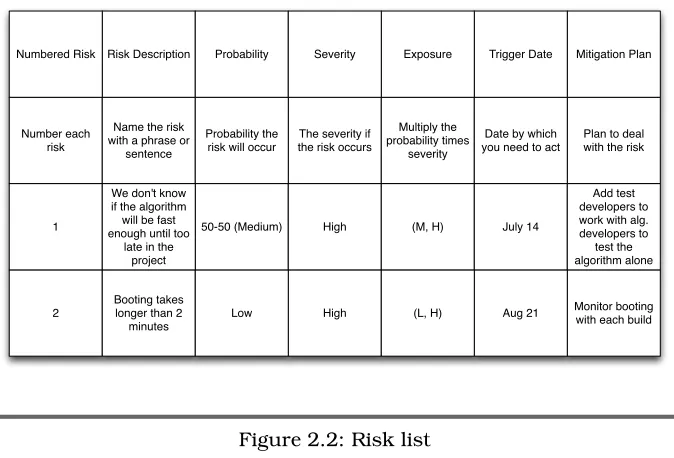
It’s never too early to start identifying and managing risks. Figure 2.2 is the risk table I use to start and examples from a real project.
As you proceed through the project, update the risk list. Use the prac-tices in Chapter 8, Steering the Project, on page 156 and Chapter 9,
Maintaining Project Rhythm, on page179to help reduce the risks.
2.4
Define Release Criteria
Release criteria tell you whatdonemeans ([Rot02a] and [BWe01]). Some project managers release software when some senior manager says so, when the testers “approve” it, or when people feel it is right. The prob-lem is everyone has a different opinion of whatdonemeans.
Release criteria are not about shifting blame from one group to another; they exist to provide some objective measurement about when a prod-uct is ready to release. Release criteria allows the sponsor/customer to make a reasonable business decision about the quality and risks of the product.
DEFINERELEASECRITERIA 43
Release criteria can also help you build whole-product responsibility into the product release. For example, can the salespeople sell the uct that meets these criteria? Can the support staff support the prod-uct? Can the trainers develop and deliver training? When you work with people across the organization to define what success looks like, they realize not only are they accountable for their part but also that they’re pointing you toward project success as well.
Once you know what success means, you can define what’s most im-portant for this project—the release criteria.
Use these steps for defining and using release criteria:
1. Define what’s important for this release so you can monitor release criteria throughout the project.
2. Draft release criteria.
3. Make release criteria SMART: Specific, Measurable, Attainable, Relevant, and Trackable. See Section2.4,3. Make Release Criteria
SMART, on page 46.
4. Gain agreement from the project team and senior management.
1. Define What’s Important for This Project
What’s critically important to this project is a combination of what the organization needs and what the customers need. Customers don’t buy products based on the number or lack of defects. They buy products because they solve some problem the customer needs solved. When you develop release criteria, keep defects or defect levels in mind—but make sure your release criteria deal with more than defects. Think about the problems you’re solving for your customers—whether those customers are outside or inside your organization.
Sometimes the release date is most important. Sometimes, it’s a par-ticular feature or set of functionality. More often, it’s a combination of schedule, features, and few defects. It all depends on your customers and their expectations, as in Section 1.2, Manage Your Drivers,
Con-straints, and Floats, on page 19.