Building Polyfills by Brandon Satrom
Copyright © 2014 Brandon Satrom. All rights reserved.
Printed in the United States of America.
Published by O’Reilly Media, Inc., 1005 Gravenstein Highway North, Sebastopol, CA 95472.
O’Reilly books may be purchased for educational, business, or sales promotional use. Online editions are also available for most titles (http://my.safaribooksonline.com). For more information, contact our corporate/ institutional sales department: 800-998-9938 or [email protected].
Editors: Simon St. Laurent and Brian Anderson Production Editor: Nicole Shelby
Proofreader: Sharon Wilkey
Cover Designer: Randy Comer Interior Designer: David Futato Illustrator: Rebecca Demarest
February 2014: First Edition
Revision History for the First Edition:
2014-02-14: First release
See http://oreilly.com/catalog/errata.csp?isbn=9781449370732 for release details.
Nutshell Handbook, the Nutshell Handbook logo, and the O’Reilly logo are registered trademarks of O’Reilly Media, Inc. Building Polyfills, the image of a beech marten, and related trade dress are trademarks of O’Reilly Media, Inc.
Many of the designations used by manufacturers and sellers to distinguish their products are claimed as trademarks. Where those designations appear in this book, and O’Reilly Media, Inc. was aware of a trademark claim, the designations have been printed in caps or initial caps.
While every precaution has been taken in the preparation of this book, the publisher and author assume no responsibility for errors or omissions, or for damages resulting from the use of the information contained herein.
ISBN: 978-1-449-37073-2
Table of Contents
Preface. . . vii
Foreword. . . xiii
Part I. Building Polyfills
1. The Current State of Web Polyfills. . . 3
Polyfilling: Past, Present, and Future 3
What Is a Polyfill (and What Is It Not)? 4
Types of Polyfills 5
The Shim 5
The Opt-In Polyfill 7
The Drop-In Polyfill 9
The Forward Polyfill 10
Why Polyfills Still Matter 11
2. Principles and Practices of Polyfill Development. . . 13
Building Responsible Polyfills 13
The Polyfill Vision Statement 14
Principles of Responsible Polyfill Development 16
Read the Spec 16
Respect the API, If Possible 17
Mind (Only) the Gaps 18
Think Like A Browser Developer 19
Build With Performance in Mind 19
Plan for Obsolescence 20
3. Building Your First Polyfill, Part 1: Getting Started. . . 23
The HTML5 Forms Polyfill 23
Why Use a Library? 25
Setting Up Your Polyfill Project 26
4. Building Your First Polyfill, Part 2: Build Workflows and Cross-Browser Testing. . . 59
The Bottom Line: Use What Works for You! 80
5. Building Your First Polyfill, Part 3: Performance and Edge-Case Testing. . . 83
Building for Performance 83
1. Set Up Performance Benchmarks 84
2. Don’t Execute Code Too Early or Too Often 84
3. Iterate Until You’re Happy, Then Iterate Some More 91
Running Performance Benchmarks 103
Tune It But Don’t Overdo It 104
Dealing with Browser-Specific Edge Cases 104
Mobile-Specific Considerations 110
File Size Matters 110
Always Test on Devices 111
Part II. Prollyfilling and the Future of the Web Platform
6. The Future of Polyfilling. . . 115
Polyfilling: Not Just For Older Browsers 115
Prollyfilling: Extending the Web Forward 115
Prollyfills In Action: Prollyfilling CSS 116
Using HitchJS to Experiment with CSS 117
Building Your Own Hitches 120
Prollyfills in Action: ServiceWorker 122
Prollyfills in Action: Web Components 124
Templates 125
Shadow DOM 126
Custom Elements 127
HTML Imports 128
Creating Custom Elements with AngularJS 129
Creating Custom Elements with Polymer 129
Strategies for Polyfilling Experimental APIs 131
Expect the API to Change 132
Don’t Be Afraid to Try Something New 132
7. Building Your First Prollyfill. . . 133
Prollyfills vs. Polyfills: What’s the Difference? 133
The Resource Priorities Prollyfill 134
Specifying the API and Deciding What to Build 137
Setting Up Your Prollyfill Project 139
Adding Prollyfill Features 140
The First Test: Feature Detection 140
The Second Test: Initial lazyload Functionality 142
The First Refactor: Cleaning Up the Tests 143
The Third Test: Modifying the Public API 144
The Fourth Test: Supporting Additional Element Types 145
The Second Refactor: Completing Element Type Support 146
The Fifth Test: Completing Initial Support 148
The Final Test: Supporting the lazyloaded Event 149
What’s Next? 150
Suggesting an API Modification 151
Preface
If you play a game of word association with a room full of frontend developers, polyfill will no doubt receive mention from more than a few participants. This word—tradi‐ tionally a synonym for fallback, spackle, or patch—was unfamiliar to many developers until just a few years ago, but has become a staple of conversations about modern and open web technologies. And while polyfilling has traditionally operated as a practice for delivering modern features to nonmodern browsers (oldIE, meaning IE6–8, is in‐ creasingly a synonym for older browsers), the concept has expanded over the last few years to include the addition of new and experimental platform features to all browsers, including the newest and most cutting-edge.
Before our eyes, the practice of polyfilling is evolving from an adoption technique to a full-blown design pattern that allows developers to “spackle” their browsers with what‐ ever semantics they wish. AngularJS, a very popular and fast-growing app framework, encourages this practice by enabling developers to use directives to add custom HTML tags and components to their applications.
Design by polyfill extends beyond frameworks as well. One such example is the Web Components effort, a set of specifications in the W3C designed to make the creation of custom semantics and encapsulated components a feature in the browser itself. With Web Components, if you want a <calendar> component, you need only create one yourself, or grab one from a third party. It’s a powerful idea, and if the concept takes off, it will unlock a new set of capabilities for web developers while adding new depth and richness to the applications we create.
Who This Book Is For
When it comes to the art of patching browser capabilities via polyfills, developers fall into two camps: those using polyfills to provide modern web platform capabilities in their sites, and those building polyfills for the broader web community. The book is primarily focused on the latter camp, and is intended to serve as an introduction to
polyfilling, to provide a set of principles and practical guidelines for building reliable polyfills, and finally, to provide a road map for the future of polyfilling itself. However, even if you’re a JavaScript developer not especially interested in building polyfills, there’s a lot of useful content in this book in the realm of test-driven development (TDD), JavaScript build workflows, and performance optimizations.
At present, countless articles and book chapters exist that cover the subject of polyfilling. However, in nearly every case, these articles are targeted at polyfill consumers, not the intrepid developers who build these libraries. One notable exception is Addy Osmani’s guide for polyfill developers, an introductory read that I highly recommend. Beyond Addy’s article, there are few resources, online or in print, that cover the topic of polyfills from the viewpoint of the developer. A lack of definitive resources for building these libraries means that we must strike out on our own, or slowly dig through other libraries for patterns and ideas.
My sincere hope is that this book will close the gap by serving as a field guide for polyfill developers. We’ll start with a cursory introduction to polyfilling on the web platform, and I’ll share some principles and guidelines for building polyfills that developers can rely on. Once the guidelines have been established, we’ll shift the discussion to an in-depth walk-through of building a real-life, reasonably complex polyfills.
Once I’ve covered the ins and outs of building polyfills, the last two chapters will shift to focus on that emerging trend on the web platform: the forward polyfill, or prollyfill. This pattern, as I’ve mentioned already, enables developers to test and work with emerg‐ ing concepts, sometimes ahead of the browser vendors themselves. By the time we’re done, you’ll have all the tools you need to build reliable polyfills for the present, and the future, of the Web.
How This Book Is Organized
This book is organized into two parts. In the first part, we discuss the ins and outs of polyfill development, starting with the current landscape of polyfilling in Chapter 1. In
Chapter 2, I’ll introduce some principles and practices for the polyfill developer, guid‐ ance that I hope you’ll find useful regardless of the type of polyfill you plan to build. Then, in Chapters 3 through 5, we’ll dig deep into polyfill development with a real-life library. In Chapter 3, I’ll introduce our sample project, an HTML5 Forms polyfill, and we’ll build out several features for this library. In Chapter 4, we’ll talk about testing and build workflows, and I’ll introduce you to some tools that can make your life easier as a polyfill developer. Finally, we’ll wrap up Part I with a discussion on polyfill perfor‐ mance in Chapter 5, where I’ll walk through a couple of cases in which we can improve the speed of our polyfill.
In Part II of this book, we’ll turn our focus to the future of polyfilling, the prollyfill. In
important variation on the polyfill. Finally, in Chapter 7, we’ll close out the book with another walk-through and build a prollyfill for a cutting-edge web platform specifica‐ tion. Once we’re done, you should be well equipped to jump into the present, and future, of polyfilling.
Conventions Used in This Book
The following typographical conventions are used in this book:
Italic
Indicates new terms, URLs, email addresses, filenames, and file extensions.
Constant width
Used for program listings, as well as within paragraphs to refer to program elements such as variable or function names, databases, data types, environment variables, statements, and keywords.
Constant width bold
Shows commands or other text that should be typed literally by the user.
Constant width italic
Shows text that should be replaced with user-supplied values or by values deter‐ mined by context.
This element signifies a tip or suggestion.
This element signifies a general note.
This element indicates a warning or caution.
Using Code Examples
Supplemental material (code examples, exercises, etc.) is available for download at
http://bit.ly/kendo-ui and http://bit.ly/slacker-js.
This book is here to help you get your job done. In general, if example code is offered with this book, you may use it in your programs and documentation. You do not need to contact us for permission unless you’re reproducing a significant portion of the code. For example, writing a program that uses several chunks of code from this book does not require permission. Selling or distributing a CD-ROM of examples from O’Reilly books does require permission. Answering a question by citing this book and quoting example code does not require permission. Incorporating a significant amount of ex‐ ample code from this book into your product’s documentation does require permission.
We appreciate, but do not require, attribution. An attribution usually includes the title, author, publisher, and ISBN. For example: “Building Polyfills by Brandon Satrom (O’Reilly). Copyright 2014 Brandon Satrom, 978-1-449-37073-2.”
If you feel your use of code examples falls outside fair use or the permission given above, feel free to contact us at [email protected].
Safari® Books Online
Safari Books Online is an on-demand digital library that
delivers expert content in both book and video form from the world’s leading authors in technology and business.
Technology professionals, software developers, web designers, and business and crea‐ tive professionals use Safari Books Online as their primary resource for research, prob‐ lem solving, learning, and certification training.
Safari Books Online offers a range of product mixes and pricing programs for organi‐ zations, government agencies, and individuals. Subscribers have access to thousands of books, training videos, and prepublication manuscripts in one fully searchable database from publishers like O’Reilly Media, Prentice Hall Professional, Addison-Wesley Pro‐ fessional, Microsoft Press, Sams, Que, Peachpit Press, Focal Press, Cisco Press, John Wiley & Sons, Syngress, Morgan Kaufmann, IBM Redbooks, Packt, Adobe Press, FT Press, Apress, Manning, New Riders, McGraw-Hill, Jones & Bartlett, Course Technol‐ ogy, and dozens more. For more information about Safari Books Online, please visit us
How to Contact Us
Please address comments and questions concerning this book to the publisher:
O’Reilly Media, Inc.
1005 Gravenstein Highway North Sebastopol, CA 95472
800-998-9938 (in the United States or Canada) 707-829-0515 (international or local)
707-829-0104 (fax)
We have a web page for this book, where we list errata, examples, and any additional information. You can access this page at http://bit.ly/building-polyfills.
To comment or ask technical questions about this book, send email to bookques [email protected].
For more information about our books, courses, conferences, and news, see our website at http://www.oreilly.com.
Find us on Facebook: http://facebook.com/oreilly
Follow us on Twitter: http://twitter.com/oreillymedia
Watch us on YouTube: http://www.youtube.com/oreillymedia
Acknowledgments
First and foremost, thanks go to my wife Sarah, whose faith in me is equal parts un‐ flagging and humbling. I am ever grateful for her encouragement to take on these kinds of projects, while also keeping me honest and engaged with my family. It is because of her that I don’t have to apologize for countless nights of missed dinners and time lost with our family, because no such sacrifice was required. I hope you’ll agree that the quality of this work did not suffer, as a result.
I’m also grateful to my boys, Benjamin and Jack, whose smiles and playful spirits remind me of what really matters each and every day. Thanks for all of the writing interruptions for hugs and kisses, boys! Also, to Matthew Satrom. Though this book was completed before you were born, you were constantly in my thoughts. I can’t wait to meet you in early 2014!
Thanks also to my fantastic colleagues at Telerik, especially Burke Holland, who re‐ viewed every single line of this book, ran and critiqued all of the code samples, and provided immensely helpful feedback when I was deep in the weeds of polyfilling. Thanks also to Addy Osmani who, in addition to writing the foreword, provided early
input on the proposal and table of contents for this book. Any “aha!” moments you have while reading this book are due to the insight of these two gentlemen, while any excla‐ mations to the opposite effect are solely the fault of its author.
I also want to thank Brian Kardell for his helpful insights about the origin of the term “prollyfill” and his work on both HitchJS and as chair of the Extensible Web W3C Community Group. Thanks for all of your hard work extending the Web forward, Brian.
Foreword
Polyfill, a word synonymous with fallback, is a term which has become all too familiar with developers building modern web apps targeting nonmodern browsers. In the past, however, much of the guidance around authoring them was limited to out of date re‐ sources, often leaving developers to fend for their own.
I’m happy to say that the lack of a definitive resource for learning how to build robust polyfills is filled by this excellent book, allowing you to spend less time striking out on your own and more time building a reliable solution that won’t let you down.
In this practical guide, you will be shown through the fundamental principles and guidelines for building polyfills that users can rely on. Learn how to responsibly match the APIs specified by the web platform features you’re targeting and deliver a solution which is focused and does one thing well. It can be a challenge to understand the ins and outs of platform features, but this guide cuts through the nonsense, helping you understand web platform features so that you can deliver complete polyfills which won’t frustrate developers.
In the fast-paced world of frontend development, polyfills are no longer strictly used for delivering modern features to older browsers, but also to enable developers to use experimental platform features. This hints at the potential for polyfills to be around far longer than when all browsers become evergreen (or auto-updating).
Walk through an introduction to polyfilling, discover the core principles for building reliable polyfills, and then move on to an in-depth explanation of developing a real-world, nontrivial polyfill—the HTML5 Forms polyfill. Brandon talks about emerging trends such as the “experimental feature” polyfill and how this has been a successful pattern for W3C specifications like Web Components, encompassing Custom Elements, HTML Imports, and other technologies.
Building Polyfills is an invaluable resource which will teach you lessons that can be easily reused to write reliable polyfills today and in the future. I found it filled with useful best practices, original thinking, and pro-tips that make it an important reference book for anyone serious about writing cross-browser polyfills.
PART I
Building Polyfills
CHAPTER 1
The Current State of Web Polyfills
Like many things in the world of technology, the practice of polyfilling is far older than its name. And even though the term itself is a recent addition to the web platform canon, as long as we’ve had multiple browsers with varying and inconsistent implementations of web platform features—which is to say, always—we’ve had the practice of polyfilling in one form or another. Every developer who mucks with the string prototype to add a trim() function for oldIE is creating a polyfill, as is the developer who lovingly adds a homegrown window.addEventListner() function to IE8 in the hopes of simplifying her event management code. As a practice, polyfilling has been around for a while, but its naming coincides with a time in which its use on the Web exploded: the advent of HTML5.
Polyfilling: Past, Present, and Future
Much as the term Ajax was minted at a time when JavaScript and XHR apps were a daily occurrence, the practice of polyfilling was given a name at a time when developers were increasingly looking at HTML5 and thinking, “How can I get some of that in my site?” Part of the answer at the time was polyfilling and, in many ways, it’s been an adequate answer. For the last several years, polyfilling has allowed developers to target multiple browsers with new technologies, while not leaving those oldIE users behind. This is polyfilling’s past, and also its present. We still live in a world where the predominant use case for a polyfill is “filling the gaps” in a browser that doesn’t yet natively provide a feature or features that we need.
But were that the end of the story, I don’t think an entire book on polyfills would be very interesting. Thankfully, the story continues, and a subtle shift in how we look at poly‐ filling is taking place in the web community. Rather than simply building polyfills to modernize older browsers, a new class of library is starting to emerge. These libraries, sometimes called forward polyfills, or prollyfills, are created with the goal of trying out new ideas and unproven specifications on the Web. This can be something as simple as
a library that adds classes to JavaScript in accordance with the ECMAScript 6 specifi‐ cation, or as complex as a full suite of libraries that provide advance support for Web Components, as is the case with the Polymer project.
It’s a powerful pattern, and this new class of polyfill is shifting the balance of power on the Web. Increasingly, these libraries are allowing us lowly web developers to emerge as not just authors of websites and applications, but also as architects of the web platform itself. It’s an exciting time to be a polyfiller.
What Is a Polyfill (and What Is It Not)?
In 2009, as he was working on the popular book Introducing HTML5, Remy Sharp conceived and coined the term polyfill to describe a practice that he’d seen increasingly applied by developers adopting HTML5 and CSS3 in their applications. In a post on his
blog from 2010, Sharp defines the term as follows:
A polyfill, or polyfiller, is a piece of code (or plug-in) that provides the technology that you, the developer, expect the browser to provide natively. Flattening the API landscape if you will.
For those of you in the United Kingdom, the term polyfill might evoke images of Polyfilla, a paste that Britons use to cover cracks and holes in wall (we call this spackling in the United States). It’s a convenient image that happens to describe exactly what good poly‐ fills strive to do: fill in the gaps and holes of browsers so that a developer can go to work on a smooth, consistent surface.
The term also has a more direct, deeper meaning if analyzed in parts, poly and fill. Fill denotes the hole in the browser that the library exists to address, and poly means that the problem can be solved by using any number of techniques. JavaScript might be the predominant polyfilling approach, but there are several examples of polyfills that fall back to plug-ins like Silverlight or Flash to provide functionality to the browser. Notable examples of these are the excanvas plug-in, which falls back to Silverlight to provide Canvas support in IE6–8 and mediaelement.js, which provides consistent HTML5 me‐ dia support across browsers with Flash.
According to Sharp, the practice that we now refer to as polyfilling needed a new term because existing terms didn’t convey the key idea of replicating the API of native browser features by using JavaScript. Polyfills are distinct from both shimming and progressive enhancement in that regard. The term shim does describe a library or bit of code that adds features or functionality to the browser, and may even provide an abstraction that spans cross-browser inconsistencies, but these libraries often introduce their own, spe‐ cialized APIs. jQuery, which was first introduced as a way to normalize Document Object Model (DOM) interactions across browsers, is a popular example of a shim.
JavaScript, or that remain functional in the absence of JavaScript, respectively. Polyfills often depend on JavaScript in the absence of native browser functionality and, as such, neither of these terms seem appropriate.
When Remy Sharp conceived of the term polyfill, he wasn’t attempting to coin a new phrase for posterity. Instead, he was hoping to describe an increasingly relevant practice that would undoubtedly become even more important as HTML5 and the open Web continued to proliferate throughout the development world. The web development community needed a term to describe this burgeoning practice, and Sharp had one to offer. In spite of periodic assertions from corners of the community that the word should be changed, “polyfilling” has caught on. I don’t expect that it, or the practice that it represents, will go anywhere any time soon. Quite the opposite, in fact, which is why you hold this book in your hands.
Types of Polyfills
With a proper explanation of polyfills out of the way, let’s spend a few moments talking about types of polyfills. While the formal definition does have a pure, simple interpre‐ tation, polyfills, in reality, don’t always respect this definition to a T. In this section, we’ll look at some common “classes” of polyfills, as well as the pros and cons of choosing each approach when building polyfills of your own.
The Shim
A shim is not a polyfill, at least by definition, but is often considered a worthy member of the polyfilling conversation nonetheless. This is for two reasons:
1. People often use the two terms interchangeably.
2. Shims and polyfills share similar goals, in spite of their differing approaches.
A shim is a piece of code, typically JavaScript, that’s designed to add functionality into the browser that is not already present, or to bring a level of consistency to various browser implementations. Unlike the various polyfill types, shims do not map their functionality to a built-in or specified browser API, instead choosing to implement their own API that developers must learn and adopt in order to leverage provided functionality.
As stated previously, jQuery—specifically the library’s sizzle selector engine and event management functionality—is a classic example of a shim. Selecting an element from the DOM with jQuery requires a specific action on the part of the developer. For in‐ stance, consider the simple selector in Example 1-1.
Example 1-1. Using jQuery to interact with the DOM
$('#myTodoList').find('li.dueToday')
.css('background-color','yellow')
.end()
.find('li.overdue')
.css('background-color', 'red');
The preceding sample is doing a number of things, not the least of which is performing three separate element selections from the DOM. This code is guaranteed to work con‐ sistently across all browsers, from IE6 on up, and there’s nothing special I need to do to manage how jQuery performs this selection from one browser to the next. Internally, jQuery does manage a complex algorithm for DOM selection based on the browser, using HTML5’s querySelector/querySelectorAll syntax, if supported, or the classic document.GetElementById/document.GetElementsByClassName approach, if not. However, because all of this functionality is abstracted into a separate API from that specified by the W3C—as opposed to adding its functionality to the document object prototype—it fits more into the definition of a shim than that of a polyfill.
In spite of the fact that shims are not polyfills, they do still offer some advantages to developers. For starters, their opt-in nature means that developers leveraging their functionality aren’t doing so by accident. Instead they are choosing to learn a new API because the library provides needed functionality. Because a library-specific API is being used, developers are guaranteed not to override built-in browser functionality in an unexpected way, which can happen with pure polyfills. A developer adopting a shim (hopefully) knows what he’s getting himself into and has chosen that shim for a reason.
Another advantage to shims is that the library developer isn’t constrained by the speci‐ fied API of built-in functionality. If the developer wishes to diverge from the API to improve the library’s interface for developers—for instance, the chainability of jQuery selectors and methods—she is free to do so without worrying about affecting or breaking a standardized API. With pure polyfills, respecting the API is vital, as we’ll discuss in
Chapter 2.
The Opt-In Polyfill
The next polyfill type on our list is the opt-in polyfill. These libraries qualify as polyfills in the sense that they operate on standard APIs. However, they are opt-in because the developer must take action in order to leverage them in their apps.
As an example, consider PIE, a popular CSS3 polyfill. PIE, aka Progressive Internet Explorer, exists to provide CSS3 features like radius, box-shadow, and border-image to, you guessed it, IE6, 7, and 8. The library works in one of two ways. Developers can use the relevant CSS properties, as normal, and then opt into PIE by including a behavior property at the end of the CSS rule, as shown in Example 1-2.
Example 1-2. Activate PIE using CSS
#myElement {
background: #DDD;
padding: 2em;
-o-border-radius: 1em;
-moz-border-radius: 1em;
-webkit-border-radius: 1em;
border-radius: 1em;
**`behavior: url(PIE.htc);`** }
This IE-specific line of CSS activates the PIE polyfill.
In this example, the opt-in happens when the browser’s parser encounters the behav ior property. If the behavior property looks foreign to you, you’re not alone. This property, which is supported only in Internet Explorer 5.5 through 9, allows you to use CSS to add a script to a selector, with the purpose of implementing something Microsoft calls HTML components. The .htc extension on our PIE file is an HTML component-specific format that’s essentially markup and JavaScript, plus some additional vendor-specific elements that define the components themselves.
When loaded, PIE.htc uses the CSS properties defined in its loading selector— border-radius in this case—to fake those features using the HTC component. So, PIE is using a decade-old IE-specific hack in order to add support for CSS3 to IE6–8. That’s pretty clever! Not only that; it’s also efficient. Since other browsers don’t support the behav ior property, its existence will be overlooked, and the HTC file will be neither loaded nor parsed by browsers that already support CSS3 properties.
If the thought of using DHTML to fake CSS3 support in IE isn’t your cup o’ tea, you can also use JavaScript to add PIE to your apps, as illustrated in Example 1-3. Of course, you’ll still need to define the CSS for border-radius, as well as include any of PIE’s dependencies, like jQuery.
Example 1-3. Activate PIE using JavaScript
Modernizr.load({
test: Modernizr.borderradius,
nope: 'PIE.js',
In this example, we start by leveraging Modernizr’s built-in Modernizr.load capabilities to determine if the CSS3 border-radius property is supported. A key feature of Mod ernizr.load is the ability to conditionally load a script file based on the truthiness or falsiness of a test. When using polyfills, it’s important to consider the users who don’t need a polyfill just as much as those who do. Ideally, you never want to load a library that a user doesn’t need, and polyfills are no exception. With Modernizr.load, you can load libraries only when the browser requires them.
Hopefully, you’re familiar with Modernizr as a polyfill consumer. If not, I highly recommend learning the library since, as a polyfill au‐ thor, you’ll need to be intimately familiar with the various ways de‐ velopers perform feature detection before loading your library. That is, unless you do the feature detection for them, which we’ll discuss shortly.
Once PIE.js is loaded, the complete function is called. At this point, I opt in to PIE by selecting elements from the DOM via jQuery and passing each element into the PIE.at tach function, which does the fancy corner-rounding for me. It’s a bit more code than the HTML Components approach, but still simple enough to implement.
Opt-in polyfills have a couple of advantages over shims. For starters, these libraries work against standard APIs, meaning that developers don’t have to learn a new API or write a bunch of needless boilerplate in order to use them. What’s more, the footprint of these libraries is relatively small and self-contained. When the developer no longer needs to support an opt-in polyfill, the offending code is easy to track down and remove.
undoubtedly pop up. Doesn’t sound like much fun, does it? Thankfully, there are other approaches that are designed to be a bit more hands-off.
The Drop-In Polyfill
The next type of polyfill is the so-called drop-in, or pure, polyfill. I’ve chosen this name to indicate a polyfill that adheres to the API of the feature in question while requiring no additional configuration beyond a script include. When included, a drop-in polyfill goes to work by adding its functionality to the browser, typically via additions to Java‐ Script prototypes or globals such as window or document. Once the polyfill is included and parsed, the developer is free to rely on standard functionality without the need for additional feature detects or user agent interrogation.
Let’s take a look at a simple, yet appropriate example: String.trim(). This useful func‐ tion is included in all modern browsers, but is notably absent from IE6–8. If you’re tasked with supporting these browsers, and you absolutely must trim your strings with a built-in function, you can add that needed functionality via a drop-in polyfill, as il‐ lustrated in Example 1-4, courtesy of Mozilla’s excellent MDN documentation.
Example 1-4. Creating a drop-in polyfill for String.trim()
if(!String.prototype.trim) {
String.prototype.trim = function () {
return this.replace(/^\s+|\s+$/g,'');
}; }
In this example, we’re checking to see whether the trim function exists on the String prototype, and if not, we add a new function that performs a simple RegEx replacement. To leverage this polyfill, a developer need only include it somewhere in her app before the first call to trim. If trim does indeed exist, our polyfill isn’t needed and thus, nothing happens. It may seem like a minor point, but it’s important to note that a good polyfill is aware of its execution environment and adds functionality only when needed. We’ll talk more about this in the next chapter.
The biggest advantage of the drop-in polyfill is hands-off adoption for the developer. Because the workflow for using this type of library is a single step—include the library in your app—this type of approach is quite appealing for many developers looking for a quick solution that takes them out of the feature-detection game.
That said, the biggest benefit of the drop-in polyfill can also be a weakness. A drop-in polyfill can mislead developers into thinking that the API they are looking to leverage is both fully supported and implemented in a similar manner as standard approaches taken by already-supporting browsers. If your polyfill deviates from the spec in any way, or behaves unpredictably, you run the risk of confusing or annoying the developers who rely on your tool. As a result, building drop-in polyfills is not for the faint of heart.
Taking on this type of library necessitates a deep understanding of the relevant spec, as well as some knowledge of the inner-workings of compliant implementations in other browsers.
It also requires that you either support the entire API of a given feature, or be crystal clear which aspects you do and don’t support in your documentation. By definition, drop-in polyfills can be subdivided into two types: those that fully fill a complete feature API, and those that fill only a portion of that API. An example of the latter subtype is the excanvas polyfill, which supports much of the HTML5 Canvas API, but does not support the rendering of text via the standard fillText and strokeText APIs. For text, the developer must either avoid using these functions, or leverage an additional polyfill for this functionality. While a partial drop-in polyfill is still useful, it somewhat obviates the benefits of building this type of library because the developer still must feature-test for those aspects of the API not supported by your library. It’s not always possible or sensible to fully support a standard API, of course, but where possible, you should make every effort to do so when building this type of polyfill.
The Forward Polyfill
The last type of polyfill is an emerging type: the prollyfill. According to Alex Sexton, who coined the term, a prollyfill is “a polyfill for a not yet standardized API.” These types of libraries, also called forward polyfills, are unique in that they are not designed to fill existing standards gaps, as polyfills have done traditionally. Rather, these polyfills are designed to test new or emerging standards inside browsers.
The prollyfill pattern is becoming more and more important to web developers and standards authors alike because they create a feedback loop between developers, spec authors, and browser engineers that’s heretofore been unseen on the Web. Traditionally, browser standardization has been very top-down, and often developers have no op‐ portunity to experiment with new APIs until these are implemented in one or more browsers. If you want proof that top-down standardization isn’t always the best ap‐ proach, see XHTML 2.0, Microformats, Web SQL, Application Cache, or any number of standards that failed to gain traction once subjected to real-world use by developers.
Prollyfills bring a bottom-up, democratized process to the open Web by allowing de‐ velopers to experiment with and iterate on candidate APIs before they move into stable browser implementations. Prollyfills can also emerge from new libraries and languages that weren’t formed with the goal of shaking up the world of web standards. Take Cof‐ feeScript, for instance, as shown in Example 1-5:
Example 1-5. CoffeeScript’s “dash rocket” and fat-arrow function syntax
square = (x) -> x * x
Though CoffeeScript isn’t really a prollyfill, it’s a great example of how developer adop‐ tion of an idea can drive the standardization process, as evidenced by TC39’s acceptance of fat-arrow function syntax into ECMAScript 6, as shown in Example 1-6:
Example 1-6. Arrow function syntax in ECMAScript 6
let square = x => x * x; let cube = x => square(x) * x;
Prollyfills are an important concept, and they are a big reason for my writing this book. A deeper discussion of these, the rationale behind them, and various approaches for building prollyfills can be found in the latter half of this book. In the meantime, let’s talk about why polyfills should and do still matter to web developers.
Why Polyfills Still Matter
In the current era of faster updates to browsers—including our favorite punching bag, Internet Explorer—it’s easy to dismiss polyfills as a passing fad that have offered little more than to inform the early days of HTML5 adoption. In some ways, this claim isn’t unfair. When polyfills first entered the developer consciousness, their goal was singular: easing the path to HTML5 adoption by reducing the amount of platform-specific code needed to leverage a new feature. Had the polyfilling pattern never grown beyond this scope, we probably wouldn’t be talking about them much these days.
And yet, polyfills remain part of our everyday frontend vernacular. I believe this is for a couple of reasons. For starters, for HTML5 and beyond (the open Web, if you will), browser vendors continue to adopt emerging technologies at differing paces. While some browsers tend to add features as early as possible for the purpose of developer testing and feedback, others prefer to iterate solely in the standards bodies, adopting features only as they move further through the process and mature. It’s outside the scope of this book and well beyond this author’s temperament to render judgment on which of these approaches is more ideal, but these differences are worth mentioning because they point to the continued importance of polyfills. As long as browser x implements a different set of emerging features than browsers y or z, the need for polyfills remains.
Another reason for the continued importance of the polyfill is the emergence of the prollyfill, as described in the last section. The prollyfill variation has appeared over the last year in response to an ever-growing number of developers desiring to get involved earlier in the standards process. Prollyfills are a tool of choice for developers looking to “extend the Web forward.” In the recent Extensible Web Manifesto, polyfills were de‐ scribed as the catalyst that aids in creating a “virtuous cycle” between web developers and the W3C’s standardization process:
Making new features easy to understand and polyfill introduces a virtuous cycle:
• Developers can ramp up more quickly on new APIs, providing quicker feedback to the platform while the APIs are still the most malleable.
• Mistakes in APIs can be corrected quickly by the developers who use them, and library authors who serve them, providing high-fidelity, critical feedback to browser vendors and platform designers.
• Library authors can experiment with new APIs and create more cow-paths for the platform to pave.
— The Extensible Web Manifesto http://extensiblewebmanifesto.org
CHAPTER 2
Principles and Practices of
Polyfill Development
In Chapter 1, we talked about what polyfills are and are not, various types of polyfills, and why these libraries are still important in the world of web development. In this chapter, I’m going to introduce the concept of responsible polyfills, that is, polyfills built to serve the needs of the consuming web developer. It’s a common sense subject, for sure, but one that I still believe warrants explicit discussion.
Once I’ve introduced the responsible polyfills concept, I’ll share some principles of poly‐ fill development to use as your guide, regardless of the type of library you’re building. For many of these principles, the discussion will include some of the common challenges and pitfalls of polyfilling you might run into.
Building Responsible Polyfills
When building a polyfill, or any library for that matter, you’ll probably start by asking yourself several questions. For instance:
• Why is this library necessary?
• Why am I building it?
• What should this library do?
• How will developers want to use it?
For most of us, the act of creating a new piece of software is driven by an unmet need of our own. If you encounter a platform feature not supported in all browsers, and think that you have the skills, time, and desire to create a polyfill, that may be all it takes to get you started. And, as the developer and first user of your library, you often have a good handle on answering most or all of the preceding questions.
Even still, if you’re creating a library as open source or publicly available software, you’re probably not doing it for yourself alone. You may be the first user, but you don’t want to be the only one. As such, planning the creation of your polyfill should be an exercise in thinking about the variety of needs and contexts that developers will bring to the table when using your library.
I call this practice responsible polyfilling because it’s not just for yourself and your needs, but for the needs of as many developers as possible. This means that you need to think about things like performance, the execution environment, and even planned obsoles‐ cence. Responsible polyfills are polyfills that don’t make the developer pay a tax for using them, be that a performance tax, maintenance tax, or otherwise. Responsible polyfills give developers options based on their context and needs, and don’t force them down a narrow path built solely for the library developer.
Responsible polyfilling is about having a clear purpose, clear goals and non-goals, and about following a couple of basic principles during development. We’ll talk about prin‐ ciples in the next section, but the first and most important step in polyfill development is to define the purpose and goals for your library.
The Polyfill Vision Statement
Much like a vision statement for a new company or product, your polyfill needs some‐ thing to clearly define why it exists, what benefit it provides, and what it will and won’t offer to developers. This little bit of advance planning helps drive development and clearly communicates your values. It can also spur additional feedback from developers who might have different or expanded needs from your library, thereby allowing you to enhance your polyfill, if doing so makes sense.
All this vision statement babble might sound like a lot of work for an open source library, but it doesn’t have to be. A half-hour spent defining what your polyfill is all about will streamline your development, keep you focused on the things that matter, and save you tons of time and headaches down the road.
Let’s look at an example. In the next few chapters, I’m going to walk step-by-step through the construction of a polyfilling library that uses Kendo UI widgets to fill in the missing or inconsistent parts of the HTML5 Forms experience across all browsers, including IE7/8. When I started this project, I sat down and defined three things:
• The scope and vision for the library
• Its goals
• Its non-goals
Purpose and Goals of the Kendo UI HTML5 Forms Polyfill
The purpose of this project is to serve as a complete polyfill for HTML5 Forms func‐ tionality, including support for new input types (like color and datetime), new attributes (like placeholder and pattern), and validation. This project includes built-in feature de‐ tection and, by default, will polyfill only those forms features not present in the user’s browser. To polyfill forms features, Kendo UI widgets and framework features will be used.
If developers prefer not to use the default behavior, they will be able to configure the polyfill to always use Kendo UI widgets and features, even in cases where the browser natively supports these.
This library will function as an opt-in polyfill, meaning that the developer will need to initialize a form using Kendo UI’s imperative, plug-in syntax (e.g., $("form").kendo Form();) or with declarative syntax on an HTML form element (for example, <form data-role="form">).
Goals
• Provide a complete HTML5 Forms solution that leverages Kendo UI for visual widgets and features such as validation.
• Enable developers to mark up forms using HTML5 Forms semantics and automat‐ ically gain support for these in nonsupporting browsers. Anecdotally, in a future world where all browsers fully support the forms spec, a developer should be able to remove the script reference for this library and the single attribute or line of code that initializes it and have a nonbroken, fully functional experience.
• Ensure that performance is a feature. This library should tax the developer and end user as little as possible, making the benefit of use far higher than the cost of devel‐ opment, maintenance, or performance.
Non-Goals
• This library will not support configurable or drop-in replacement for another UI/ widget library.
• This library will not diverge from the HTML5 Forms spec in order to add conve‐ nience features or nonstandard behaviors.
As you can see, in just a few hundred words, I’m able to clarify important features of the library, why it exists, and even spend some time being specific about what the library does and doesn’t do. If I hadn’t written this ahead of time, I might have missed important features or configuration options, or overlooked the importance of performance. I might have even taken on large, burdensome features—like swappable library support —without thinking them through ahead of time.
When you set out to build your polyfill, spend an hour or so thinking about some of those important Ws from journalism and composition: Who, What, Why, When, Where, and of course, How. The exercise will provide you with laser-like focus and set you up for success.
Speaking of success, let’s build on our vision statement and talk about some principles for building responsible polyfills.
Principles of Responsible Polyfill Development
I’m a big fan of guiding principles and patterns, and not so much a fan of lists of rules. In my experience, it’s too easy to allow lists of rules to turn into checklists and, when that happens, one can lose all sense of context around the current problem—meaning, rules tend to be rote, often applied without context. Principles, on the other hand, en‐ courage the application of context because they force us to consider how to uniquely apply a given principle to the current problem. Sometimes a principle will be incorpo‐ rated in a straightforward matter. In other scenarios, a given principle may not even apply to the problem at hand. Either way, it’s up to the developer to decide, not the crafter of the principles themselves.
With that bit of soapboxing out of the way, let’s talk about principles for responsible polyfill development. Remember that the goal of responsible polyfilling is to build for the needs of developers using your library. With that goal in mind, here are the six principles that I believe can help you build reliable polyfills for other developers:
• Read the spec
• Respect the API, if possible
• Mind (only) the gaps
• Think like a browser developer • Build with performance in mind
• Plan for obsolescence
Let’s talk about each of these in turn.
Read the Spec
I do a lot of reading. About half of my reading is technical (blog posts, articles, and books) and the other half is not; things like great novels and books about the joys and trials of raising three precocious boys. Across these, there are a lot of things I love to read, and many things that require a monumental force of will for me to power through.
This is not to say that these specifications aren’t useful or even a worthwhile read. As a matter of fact, they are enormously useful to their primary audience: browser imple‐ menters. And they are worth your time as a polyfill developer. Much like my four-year-old needs to be reminded that eating vegetables is important, I have to be reminded from time to time that specifications are very useful, even to us lowly web developers.
For the polyfill developer, reading and understanding a specification is almost as im‐ portant as it is to browser implementers themselves. As we’ll discuss in the next prin‐ ciple, reading the spec is the best way to understand what your polyfill needs to provide and thus is essential. It’s the most rule-like of all these principles, but also the most important. So pull up a chair, put on a pot of coffee, get yourself a Ludovico apparatus, and get to work.
Respect the API, If Possible
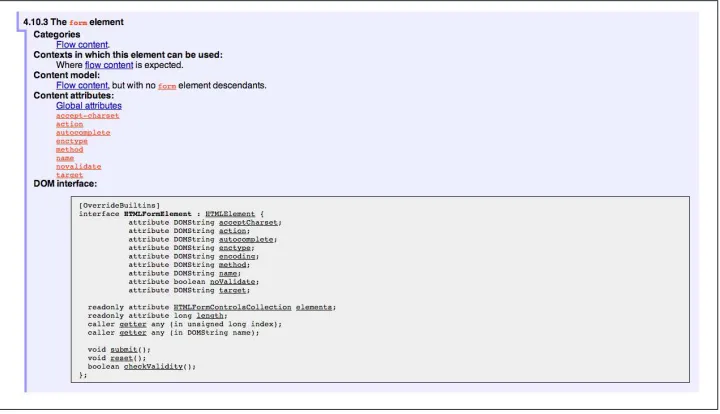
When reading W3C specifications, you’ll often come across blocks of text and pseudo-code, similar to those found in Figure 2-1. This code is called Web IDL, an interface definition language designed for browsers. According to its specification, Web IDL “is an IDL variant with a number of features that allow the behavior of common script objects in the web platform to be specified more readily.”
Figure 2-1. Example WebIDL snippet for the HTML form element
So Web IDL specifies the interface that browsers are to use when building a standard implementation, and browsers do exactly that. What’s more, most of them—perhaps even all of them, but I can’t claim all without seeing Internet Explorer’s code base, which
is not open source—automatically generate Web IDL bindings directly from the spec-defined IDL. Chrome even includes Web IDL docs for developers working with the browser source.
While it’s true that not all W3C specifications use Web IDL at present, the Web IDL spec itself was moved into Candidate Recommenda‐ tion status in early 2012, so it’s likely that the newer spec you’re look‐ ing to polyfill will be written using this syntax.
There’s no doubt that JavaScript API design is hard work. It’s easy to get it wrong, and the chances of doing something you’ll later regret are high. Because of this, one of the best parts of building polyfills is that your API is already defined for you! While W3C specs contain a lot of information you’ll need to absorb for your polyfill, Web IDL is the icing on the cupcake, giving you the exact shape of your API, and all you need to do is make sense of it. What’s more, with efforts like WebIDL.js from the Extensible Web Community Group, getting a boilerplate API for your library might soon be as easy as running some IDL through the terminal.
The bottom line of this principle is that, most of the time, the API of your polyfill should be a pretty cut and dried effort. My advice is to extract the defined interfaces from the spec and make sure to implement those. No more, and no less.
Of course, this principle does have the caveat of “if possible.” For some libraries, you might not be able to implement the entire API because part of the API depends on low-level networking or platform features that aren’t available to you. For example, if you’re building a polyfill for the DeviceOrientation Event spec, you might find it possible to support the deviceorientation event via existing platform features, but not device motion or other aspects of the spec. This is fine, of course, as long as you’re crystal clear with your users that you’re providing an incomplete polyfill implementation by design.
In other cases, you might be dealing with a specification that has experienced changes to its API. One example of this scenario is the CSS Flexbox module, which has changed property syntax a couple of times during its lifetime while also experiencing early browser implementations. If you’re maintaining a Flexbox library, chances are you’ll need to support the legacy CSS property syntax in your implementation for a while. The bottom line is this: specs and their APIs change, and building a polyfill might require you to bridge the gap created by API changes, in addition to merely filling in the gaps for browsers.
Mind (Only) the Gaps
life is to fill in the gaps in other browsers—or to iterate on experimental APIs, in the case of a prollyfill—and nothing more. You should resist the temptation to add non-standard features simply because you want them or developers are clamoring for them. You can always create a separate shim that depends on your polyfill and add these features, but you’d be wise to keep them out of your main library.
Of course, prollyfills, which we’ll discuss in Chapters 6 and 7, are an exception to this principle. Because the point of a prollyfill is to help vet an emerging API, you should experiment with new ideas and interfaces that you believe belong in the spec.
Think Like A Browser Developer
As I mentioned in the first principle, most W3C specifications are written by browser developers for browser developers. And while efforts like the Extensible Web movement are hoping to change that reality, for now, many of the specs in the standards pipeline were written by the people who will be adding those features to our browsers. I’m not going to weigh in here on whether that reality is or isn’t an ideal world, but I do bring this point up to underscore an important fact: when you’re building polyfills, you need to think like the C++ developer who is working on this feature in the browser. “Thinking like a browser developer” can take a number of forms:
• Following feature and spec discussions on the appropriate W3C Working Group mailing list.
• Following the implementation discussion in the issue trackers for Chrome or Fire‐ fox. Google and Mozilla developers do a very good job of working in the open, so these trackers reveal a lot of insight into the various design decisions that go into implementing a given feature.
• Asking questions of developers on Internet Relay Chat (IRC). Picking a browser developer’s brain via IRC can be one of the best ways to tap into implementation knowledge. It may sound daunting, but if you let these folks know that you’re working on a polyfill for the feature they’re working on, most will be happy to help. The Chrome team can be reached at #blink-dev on freenode, while Mozilla engi‐ neers typically hang out at #firefox on irc.mozilla.org. For more information on getting started with IRC, check out #irchelp.
Build With Performance in Mind
If you talk to web developers who have been working with HTML5 for a couple of years, you might discover that many hold the opinion that polyfills are nice, but too often, slow. Sometimes, when developers create a polyfill, they’re interested first in covering features. Once those are delivered, the developers usually pack up their gear and head home, thinking the job is done.
But the truth is, performance is important when adopting HTML5 features, even when polyfilling older browsers. While your library cannot hope to match native browser performance, you should make every effort to make your library as fast as possible. After all, a poorly performing polyfill will end up being a bigger nightmare to end users —and thus developers—than if the developer just omitted the nonstandard feature in the first place.
There are a couple of ways you can build for performance. First, you can benchmark your implementation against native (i.e., the browser) using a tool like JSPerf and then iterate the heck out of your library until you can’t iterate anymore. Second, you can create a robust set of unit tests with your polyfill, and make sure that these are tested using a cross-browser automated testing framework, like Karma. We’ll look at both of these strategies in Chapters 3 through 5.
Plan for Obsolescence
Polyfills, by their nature, are temporary. Unless you’re building a shim with a brand new API—and thus, not a polyfill—your goal should never be to build the next jQuery or Backbone. As a polyfill developer, recognize that you’re in the humbling business of building libraries that you want to become irrelevant in the future. The good news is that, for as long as developers need your library to fill in a key feature, it will be a welcome addition to their toolset. But we should never forget that the ultimate goal is to push for a world where these features exist native to all the browsers. It may seem that it goes without saying, but planning for obsolescence, along with complementary principles like “mind (only) the gaps,” will help you stay focused on polyfilling and only polyfilling, while resisting the urge to morph your library into something that’s part polyfill and part shim. A phrankenfill, if you will.
Take a look back at the principles for development, specifically the second bullet under “Goals.” The second sentence indicates that a goal of my Kendo UI Forms polyfill is to allow the developer to remove the library in a fully compliant browser and not lose any functionality whatsoever. Not only does this keep me focused on the spec, and only the spec, but it is an example of planning for obsolescence.
Our second goal is not nihilistic but is rather a commitment to standardization of the Web as a platform. We believe in a Web open to everyone to participate however they will. No locked doors. No walls. The things we do with PhoneGap are directly influenced by the work we see at the W3C, WHATWG, and other research such as Mozilla’s WebAPI, BONDI, WAC, webinos, webOS, Tizen, and the like.
Over the last five years, Apache Cordova (aka PhoneGap) has become the de facto wrapper for building hybrid mobile apps with HTML5. It would be easy for the founders and their benefactors to focus on sustaining this little kingdom of theirs. Instead, they point to the open Web as the reason they exist, as well as the reason they one day hope to shutter the project. It’s an admirable attitude, and one we’d all be wise to emulate when building polyfills of our own.
Each of the preceding principles is designed to reinforce the goal of building responsible polyfills for developers. If you build your polyfill with some or all of these principles in mind, you’ll go a long way toward delivering a robust, dependable, well-performing library that developers will love to use.
Now that we’ve talked about some of the key principles of building responsible polyfills, let’s get to work. In the next chapter, I’ll walk you through building a complete polyfill, step-by-step, using the principles found in this chapter.
CHAPTER 3
Building Your First Polyfill,
Part 1: Getting Started
Over the last two chapters, we’ve covered why polyfilling is still important, as well as some principles for responsible polyfill development. In this chapter, I’m going to walk through some practical steps for building cross-browser polyfills via an actual, real-world project that I created. We won’t go through every line of code or every excruciating detail, but I will introduce you to some practical examples and considerations that you’ll want to keep in mind for your own polyfill development, no matter the web platform feature being targeted. We’ll start with a discussion on project setup and structure before diving into setting up your API and deciding what you plan to build and not to build. Then we’ll explore adding basic features and refactoring your polyfill as you expand scope over time. We’ll then wrap up the chapter with a look at manual cross-browser testing, and some tips for streamlining your cross-browser testing workflow.
The HTML5 Forms Polyfill
First, let’s take a look at our candidate library for the next two chapters: an HTML5 Forms polyfill. When I first set out to write this book, I considered a lot of different options for a guinea pig polyfill to use. I wanted to target something that was reasonably complex, but straightforward enough to introduce in bits and pieces, via text. I also wanted to choose a technology whose implementation status across browsers was more than just “supported in everything but IE.” And even though IE will factor into some of the hairier aspects of our polyfill development, I wanted to walk through an example with quirks in as many browsers as possible. For those purposes, there’s no better tech‐ nology to attempt to polyfill than HTML5 Forms.
What we know of today as “HTML5 Forms” was actually the first technology to be proposed under the umbrella of what eventually became HTML5. First introduced out‐ side the W3C as Web Forms 2.0 by a consortium of browser vendors that included
Google, Mozilla, Opera Software, and Apple, this proposal arrived at a time when the W3C was still pouring much of its effort into the now-defunct XHTML 2.0 specification. As an outflow of Web Forms 2.0, these vendors formed the Web Hypertext Application Technology Working Group (WHATWG), a sibling standards body to the W3C that still exists today.
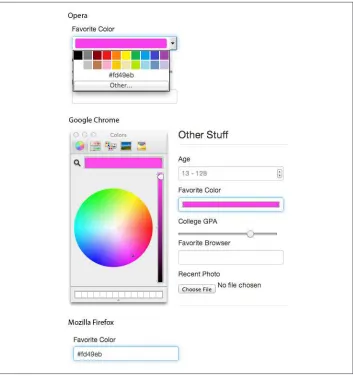
And while it is outside of the scope of this book to discuss the politics of HTML5, various collected standards, and competing standards bodies, it is important to note that HTML5 Forms has not only been around a while, but it’s still one of the most hotly debated aspects of the HTML5 spec. While certain aspects of the Forms spec have near universal support (for example, forms constraint validation), some of the more visual aspects of the spec (new input types like number, color, and datetime) have yet to be consistently implemented across all browsers, as illustrated in Figure 3-1. What’s more, in some cases, for those browsers that do support certain types, the specifics of said support are often inconsistent from one implementation to the next. This means that you, the developer, might not get exactly the behavior you expect, every time, in every browser.
HTML5 Forms is a minefield, and I can’t think of a better area in which to venture as a polyfill developer. It’s a bit hairy, for sure, but this area of the spec is sufficiently complex enough to expose many of the polyfilling practices that I introduced in the preceding chapter.
Figure 3-1. Color inputs viewed in Opera, Chrome, and Firefox
Why Use a Library?
At this point, you may be asking yourself why I’ve chosen to use a library like jQuery UI or Kendo UI at all. Why not just build the UI for each input type from scratch? It’s a valid question, and in fact there are several great HTML5 Forms libraries out there that take this approach. If you’re interested in taking a look at the code required to deliver UI widgets from scratch, I encourage you to check one of these out.
In our case, however, I’ve chosen to use a UI library because it allows me to focus on the process of building polyfills, which is, after all, what this book is about. By starting with a library that I can plug in, I’m able to focus on tips and tricks that are common to
all types of polyfills, without getting bogged down in the very complex specifics of building form UI by hand.
The HTML5 Forms polyfill we will be building over the next three chapters can be found in its current form online on GitHub. The project is actively maintained, and you’re welcome to view the source after reading this book if you want to dig deeper into any specifics that I was unable to cover here.
Finally, it’s worth mentioning that I’ve decided to build my HTML5 Forms polyfill as an opt-in polyfill, as opposed to a drop-in library. While it’s certainly possible to do the latter, I think the former is a better approach, in my case, for a couple of reasons. For starters, since I’m using Kendo UI to power my widgets, and Kendo UI requires explicit widget initialization, I feel that it’s appropriate for me to do the same with my polyfill and require that the developer activate the capabilities of my polyfill. I’ve also chosen to pursue an opt-in approach because the HTML5 Forms spec is so broad and complex that I’m not sure if my library will ever be able to support every single corner of the spec to the letter. By taking an opt-in approach, and documenting what I do and don’t sup‐ port, I can make sure that the developers know what they are buying into.
That said, even though my polyfill is opt-in, it doesn’t mean that I can’t future-proof my library. Just as with a drop-in polyfill, my goal is to provide a polyfill that can be easily removed (along with a line of code) when all browsers support the HTML5 Forms spec.
Setting Up Your Polyfill Project
Regardless of the technology you choose to target with your polyfill, the two most im‐ portant choices that you can make early on are:
• Which source control solution you plan to use
• What your initial project structure will look like.
Sure, you can start with “Source Control by Dropbox” at the beginning and name your polyfill mylib.js if you’re just itching to get started, but a little bit of foresight and planning is, in my opinion, just as important to polyfill development as the code you write. As such, I’ll use the next few sections to talk about these early considerations.
Choosing a Source Control Solution
Mercurial. These two systems have a similar command-line syntax for working with files and code repositories, so some developers will be comfortable working with either. That said, Git is far and away the most popular source control system in use today, so you’ll reach a larger body of potential collaborators by choosing that system.
When paired with a solid code-sharing site, your source control solution also gives you a platform for making your polyfill available to the world. You can not only store your polyfill source and history in these sites, but also make that source and history available for others, which is hopefully your goal as a polyfill developer. Just as Git is the most popular source control option around today, GitHub is the most popular option for hosting and collaborating on all manner of Git-based open source software projects. Other options worth considering, if GitHub is not your cup of tea, are Bitbucket, which allows you to host both Git and Mercurial projects, and Microsoft’s CodePlex, which supports Mercurial projects only. For the examples in this book, I’ve chosen Git as my source control solution and GitHub for code sharing and distribution.
Setting Up the Initial Project Structure
Once I’ve chosen a source control solution, I’m ready to set up my project. I’ll start by creating a new folder for my polyfill, called kendo-ui-forms in my usual development folder on my machine. Then, I’ll open a terminal window in that directory and initialize a new GitHub repo by running the git init command. Once you’ve initialized your own local Git repository, you’ll want to connect it to the remote repository that will be hosting your project online, which you can do by running the following command: git
remote add [email protected]:yourusername/your-project-name.git. If you’re not
familiar with setting up a new remote repository, head over to GitHub, create a new repository for your project, and follow the on-screen instructions.
With that done, your local and remote repositories will be all set up, and it will be time to add some essential project files. Here’s the basic project structure I recommend for most open source polyfills (assuming a view from the folder root):
dist/
The minified and concatenated files you plan to distribute (the “binaries” for your polyfill).
lib/
Any third party libraries that your polyfill depends on (jQuery, Underscore).
sample/
Sample and example code for the polyfill.
spec/
Home for your unit tests, which we’ll discuss in Chapter 4.
src/[js,css]
Source JavaScript and CSS files.
gitignore
A list of files for Git to ignore when found in your project. GitHub can create one of these files for you when creating a new project. If you go that route, select the Node template.
CHANGELOG.md
A laundry list of minor and breaking changes for each version of your library.
CONTRIBUTING.md
Essential if you plan to accept contributions for your project.
README.md
The readme file for your project. GitHub automatically treats this file as the main entry point when anyone visits your project. It should describe the purpose and goals of the polyfill—as I discussed in Chapter 1—features of the project, a road map for the project, installation and usage instructions, and anything else you think might be useful to consumers of or collaborators on your polyfill.
LICENSE.md
Every open source project needs a license. Which license you choose is up to you, but permissive licenses, such as MIT and Apache 2.0, will garner more interest and, possibly, participation from other developers. GitHub can also generate this file for you, based on the license chosen at project creation.
Though I did take the LSAT once upon a time, please note that I am not an attorney, nor do I play one on the Internet. As such, my opin‐ ions on licensing should not be confused for legal expertise. Your best bet is to consult with a legal expert before choosing an open source license. You can also visit Choose A License for more information about the dizzying array of open source licenses available. But still, you should talk to a lawyer if you want an expert legal perspective.