Matthew S. Gast
Building
Applications
with iBeacon
ELEC TRONIC S/NET WORKING
Building Applications with iBeacon
ISBN: 978-1-491-90457-2
US $24.99 CAN $26.99
Twitter: @oreillymedia facebook.com/oreilly
High-precision location information is increasingly useful for mobile application developers, since it allows devices to interact with the world around them. This prac tic al b o ok shows you how to
achieve arm’s reach accuracy with iBeacons, simple
transmitters that enable your applications to react to nearby surroundings and then deliver timely, relevant information—especially indoors, where GPS and cell service are inaccurate.
Whether you’re enabling a map, giving users directions, creating a game, recommending purchases, letting users check in, or creating an immersive experience, you’ll learn how iBeacons provide precise location information, empowering your applications to engage and interact with users nearby.
■ Get examples of several application types you can build with iBeacons
■ Learn how iBeacons provide applications with proximity information
■ Set up, activate, and test iBeacons on both specialized and general-purpose hardware
■ Explore the APIs and tools you need to develop location-aware mobile applications
■ Use built-in iOS features to interact with iBeacons, including Passbook
■ Build networks to help shoppers, travelers, conference attendees, and others find what they’re looking for
Matthew S. Gast is the director
of product management at Aerohive Networks, responsible for the software that powers its networking devices as well as investigating emerging technolo-gies. He’s an industry expert who led the development of IEEE 802.11-2012 and security task groups at the Wi-Fi Alliance, and the author of several books on Wi-Fi for O’Reilly, most recently
Matthew S. Gast
978-1-491-90457-2
[LSI]
Building Applications with iBeacon by Matthew S. Gast
Copyright © 2015 Matthew S. Gast. All rights reserved.
Printed in the United States of America.
Published by O’Reilly Media, Inc., 1005 Gravenstein Highway North, Sebastopol, CA 95472.
O’Reilly books may be purchased for educational, business, or sales promotional use. Online editions are also available for most titles (http://safaribooksonline.com). For more information, contact our corporate/institutional sales department: 800-998-9938 or [email protected].
Editors: Brian Sawyer and Mike Loukides
Production Editor: Matthew Hacker
Copyeditor: Kiel Van Horn
Proofreader: Charles Roumeliotis
Indexer: WordCo Indexing Services, Inc.
Interior Designer: David Futato
Cover Designer: Ellie Volckhausen
Illustrator: Rebecca Demarest
October 2014: First Edition
Revision History for the First Edition 2014-09-23: First Release
See http://oreilly.com/catalog/errata.csp?isbn=9781491904572 for release details.
The O’Reilly logo is a registered trademark of O’Reilly Media, Inc. Building Applica‐ tions with iBeacon, the image of a vampire bat, and related trade dress are trade‐ marks of O’Reilly Media, Inc.
For A.,
Table of Contents
Preface. . . vii
1. Introduction. . . 1
Why iBeacons? 2
Applications 5
Bluetooth Low Energy Beacons 9
2. The iBeacon Protocol. . . 13
Bluetooth Basics of an iBeacon 13
iBeacon Advertising Packet Contents 16
3. Setting Up Your Own Beacons. . . 19
Types of Hardware 19
Activating a Beacon 22
4. Application Development. . . 31
Limitations on iBeacons 32
Basic iBeacon Programming Functions 33
Advanced iBeacon Programming Functions 37
Security and Privacy 38
5. iOS and iBeacons. . . 41
iBeacon Development on iOS with Core Location 41
iBeacon Monitoring with Core Location 43
Ranging 48
6. Building iBeacon Networks. . . 53
Planning and Project Objectives 53
Beacon Location Selection 56
Project Checklist 59
Preface
We all carry supercomputers in our pockets. Sometimes we even still make phone calls with them, too. The computing power available in most smartphones today is vastly greater than what many desktop computers had when I started working with computers, and that additional computing power has been put to good use in redefining the way that we interact with the world.
Extending the mobile computing experience beyond the glass touchscreen is a key component of enabling the Internet of Things, developing wearable computers, and embedding intelligence in the world. Humans have sensors (such as eyes!) to interact with the world around us, and phones now have the electronic equivalent by using proximity technology to discover the immediate world around them.
But how can a phone recognize what it is near?
The answer to that question is the essence of proximity and helps move nearby interactions onto the smartphone touchscreen. Getting a basic readout on what is in the neighborhood is the most basic operation for making a phone part of a mobile computing system. Or, to say it better, knowing what you are near is foundational. Prox‐ imity is the “Hello, world” for the Internet of Things.
Many technologies exist to help phones interact with the world around them. This book is about iBeacons, a Bluetooth technology that helps a device understand its location and surroundings with a high degree of accuracy. iBeacons enable a device to display web pages, control nearby machines, and negotiate transactions, all based on being near enough for actions to matter.
Who This Book Is For
This book is intended mainly for application developers. As you’ll see, the protocol is straightforward. The main talent required to suc‐ cessfully use beacons is imagination to see how to apply proximity to the problems your application faces. iBeacons are cheap enough to easily get started with application development, and the cost is low enough that any organization can afford the tiny up front cost. In many cases, it is common to start off with just a single developer investigating the technology.
How to Use This Book
This book is organized into the following chapters:
Chapter 1, Introduction
This chapter introduces the concepts of proximity sensing, which is the core of what beacons enable, and describes sample applications of the technology.
Chapter 2, The iBeacon Protocol
Beacons describe the space around them using a simple proto‐ col. Instead of directly describing the space, a beacon is used as a pointer by an application running on a mobile device to map the physical world containing the beacon into something that the application can act on.
Chapter 3, Setting Up Your Own iBeacons
The beacon protocol is simple enough that it can be imple‐ mented straightforwardly in software. Applications can run on a general-purpose operating system such as Mac OS X, free appli‐ cations on mobile devices, USB dongles, and even special-purpose tiny computers, such as Raspberry Pi or Arduino.
Chapter 4, Application Development
After you have an iBeacon running, an application will watch for it and react to it. To find iBeacons, applications can monitor
from end to end, which might require providing security beyond what is built into the protocol.
Chapter 5, iOS and iBeacons
This chapter describes what is needed to get an application working on iOS. iOS extends the Core Location framework to use iBeacons, which enables developers to activate pre-programmed actions in response to detecting a beacon.
Chapter 6, Building iBeacon Networks
The final step in creating an application is to place beacons in the field to support the application, so that the application works as desired.
Conventions Used in This Book
The following typographical conventions are used in this book:
Italic
Indicates new terms, URLs, email addresses, filenames, and file extensions.
Constant width
Used for program listings, as well as within paragraphs to refer to program elements such as variable or function names, data‐ bases, data types, environment variables, statements, and key‐ words.
Constant width bold
Shows commands or other text that should be typed literally by the user.
Constant width italic
Shows text that should be replaced with user-supplied values or by values determined by context.
This element signifies a tip or suggestion.
This element signifies a general note.
This element indicates a warning or caution.
Using Code Examples
This book is here to help you get your job done. In general, if exam‐ ple code is offered with this book, you may use it in your programs and documentation. You do not need to contact us for permission unless you’re reproducing a significant portion of the code. For example, writing a program that uses several chunks of code from this book does not require permission. Selling or distributing a CD-ROM of examples from O’Reilly books does require permission. Answering a question by citing this book and quoting example code does not require permission. Incorporating a significant amount of example code from this book into your product’s documentation does require permission.
We appreciate, but do not require, attribution. An attribution usu‐ ally includes the title, author, publisher, and ISBN. For example: “Building Applications with iBeacon by Matthew S. Gast (O’Reilly). Copyright 2015 Matthew S. Gast, 978-1-4919-0457-2.”
If you feel your use of code examples falls outside fair use or the per‐ mission given above, feel free to contact us at permis‐ [email protected].
Safari® Books Online
Safari Books Online is an on-demand digital library that delivers expert content in both book and video form from the world’s leading authors in technology and business.
primary resource for research, problem solving, learning, and certif‐ ication training.
Safari Books Online offers a range of plans and pricing for enter‐ prise, government, education, and individuals.
Members have access to thousands of books, training videos, and prepublication manuscripts in one fully searchable database from publishers like O’Reilly Media, Prentice Hall Professional, Addison-Wesley Professional, Microsoft Press, Sams, Que, Peachpit Press, Focal Press, Cisco Press, John Wiley & Sons, Syngress, Morgan Kaufmann, IBM Redbooks, Packt, Adobe Press, FT Press, Apress, Manning, New Riders, McGraw-Hill, Jones & Bartlett, Course Tech‐ nology, and hundreds more. For more information about Safari Books Online, please visit us online.
How to Contact Us
Please address comments and questions concerning this book to the publisher:
O’Reilly Media, Inc.
1005 Gravenstein Highway North Sebastopol, CA 95472
800-998-9938 (in the United States or Canada) 707-829-0515 (international or local)
707-829-0104 (fax)
We have a web page for this book, where we list errata, examples, and any additional information. You can access this page at http:// bit.ly/building_apps_w_ibeacon.
To comment or ask technical questions about this book, send email to [email protected].
For more information about our books, courses, conferences, and news, see our website at http://www.oreilly.com.
Find us on Facebook: http://facebook.com/oreilly
Follow us on Twitter: http://twitter.com/oreillymedia
Watch us on YouTube: http://www.youtube.com/oreillymedia
Acknowledgments
Writing a book is a collborative effort between author and editor. In many cases (including this book), it is unlikely that I would have fin‐ ished the book as quickly without the persistence and drive of my editor, in this case Brian Sawyer. Brian helped the project in many ways, and the comparison of location and proximity benefited espe‐ cially from his assistance.
One of the many reasons that writing for O’Reilly is worthwhile is the ease with which we can call on other experts in the field to par‐ ticipate in the technical review. My review team consisted of Doug Thompson, proprietor of the BEEKn blog; Carles Cufí, an engineer with Nordic Semiconductor; and Robert Davidson of Ambient Sen‐ sors. Doug brought his wide-ranging expertise and keen under‐ standing of the market to bear. Carles and Robert are both highly experienced engineers with a deep understanding of Bluetooth, and they helped the book more clearly ground iBeacon firmly within the Bluetooth ecosystem. Naturally, any errors that remain in the book are my own and in no way reflect on the review team.
1Reading the tilt of a phone is a complex process that involves multiple sensors. Acceler‐ ometers measure the orientation of the phone relative to gravity, and gyroscopes pro‐ vide a rate of change in the angles of the device around its axis. Multiple sensors can be combined in software (a process called sensor fusion), blending inputs from GPS, mag‐ netic fields, acceleration, gyroscopes, and even barometric pressure.
2The most famous test of navigation skill and geographic awareness is “The Knowledge,”
required of every London cab driver.
CHAPTER 1
Introduction
Close don’t count in baseball. Close only counts in horseshoes and hand grenades. —Frank Robinson
Close doesn’t always count when building mobile applications. Mobile devices typically have smaller screens and might have limi‐ ted forms of text input. But the user profile of a device is not the major constraint on its function. At its best, an application that knows where you are will augment reality to help you navigate and interact with the physical world.
We have seen some tentative steps toward applications that interact with the world around them. Star maps use location information and accelerometer-derived tilt readings to highlight stars in the sky on a real-time picture from a phone’s camera.1 Inexpensive GPS
receivers have turned every smartphone into an up-to-date naviga‐ tion system for drivers, turning archaic practices such as knowing how to fold a paper map or memorizing how to get around a city2
into stories that we will someday scare children with.
3Particularly astute readers may be asking why we need proximity beacons if a typical phone has multiple sensors. The answer, as pointed out by one of my reviewers, is that the typical gyroscopes used in mobile devices are too noisy to perform high-quality navigation functions; hence, beacons are required to overcome the limitations of exist‐ ing sensor technology.
Until now, no technology has enabled you to interact with the world within “arm’s reach.” That has changed with the introduction of Bluetooth proximity beacons, often referred to as iBeacons.3 Beacons
bridge the gap between the data world of ones, zeros, and the glass screen on a mobile device and the physical world that users move through with their devices. By transmitting an identifier, a beacon can define a small area that devices react to, and those reactions can be used to create new applications and new interactions.
An iBeacon is a Bluetooth Low Energy proximity beacon that is sub‐ mitted for compatibility testing under an Apple licensing program, and the Bluetooth proximity functions on Apple systems are referred to in developer documentation as iBeacon frameworks. Much of the enthusiasm for these new applications comes from building systems for retailers, but the simple beacon protocol can be applied to many types of spaces, leading to varied applications as diverse as indoor direction finding, queue management, museum guides, and restaurant management.
Why iBeacons?
There are two interrelated reasons for the excitement around iBea‐ cons. Most importantly, the technology enables a device to make extremely precise determinations of what is nearby. Even under ideal conditions, GPS technologies struggle to do better than a few meters, and GPS is often limited indoors. iBeacons can enable a determination within centimeters.
4With all the technology development that has occurred in my career, it is sometimes hard for me to remember that when I first moved to Silicon Valley, I found an apart‐ ment by getting a daily list faxed to me and looking up street addresses on paper maps using the index of street names!
5In more formal language, location has vector attributes, because it includes direction. Proximity is a scalar, because it has no direction.
iBeacons offer high precision micro-location, along with the ability to act on what a mobile device is near. No other technology yet offers that combination.
Location Versus Proximity
iBeacons define “what you are close to,” which is often related to “where you are,” but not necessarily. Many people use the terms
location and proximity interchangeably. Though the words are
related, they have subtle differences that make them distinct concepts.
Most importantly, location is an absolute, unchanging concept, typi‐ cally defined by some form of a coordinate system. Whether you define it as geographical coordinates such as latitude and longitude, a street address, or even much larger distance scales such as a city, state, province, or country, a location is a fixed point or area of space. Many technologies can help you answer the question of “What is my location?” One of the most common ways to answer that question is to use GPS or cell tower mapping, and the resulting location often has the precision of a building or a street address. With this form of location, you can drive or walk to a building, find nearby events or restaurants, or check in for your visit.4
In contrast to the absolute of location, proximity is the answer to the question “What is nearby?” Rather than an absolute location, prox‐ imity is defined in relation to some other point.5 Conceptually, prox‐
imity is a distance, and has no direction. Am I near another person? A particular display in a store? The conductor on the train?
Part of the confusion comes from the fact that proximity technolo‐ gies can be used to provide location information. If a proximity net‐ work is installed in an indoor location where GPS does not work well, the reference points used by the proximity system may be used to help an application infer a location. That is, the proximity system
knows that you are a given distance from three proximity points with known locations and, therefore, you are standing near baggage claim carousel 5.
When used in this manner, proximity technologies are said to be providing micro-location, because they can provide much more accurate information than GPS, especially in buildings where GPS does not operate with high accuracy (or possibly even at all). In a micro-location scenario, proximity can operate as a tighter descrip‐ tion of where you are, but that misstates the power of proximity. iBeacons are exciting because they can do more than provide loca‐ tion information. Proximity is based on “what is near you” instead of “where you are.” As a result, an application can tell whether you are near an item of interest, regardless of its location.
For example, if you are visiting the Louvre, you might care whether you are near the Venus de Milo or Canova’s Cupid’s Kiss, regardless of the location of those artworks in the galleries. Using proximity technology means that an electronic museum guide knows what is near by knowing proximity information, rather than the more com‐ plicated process of the museum guide knowing where it is and where displays are and calculating proximity based on comparing the two points.
Proximity enables an application to identify something of interest based on what it is near, and that is often independent of location. As an example, consider a train passenger. The passenger’s location is constantly changing as the train moves along the tracks, but an application that holds a ticket does not care about location. In con‐ trast, it might be interested in knowing only when a conductor is nearby, so that it can display an electronic ticket.
6When used outdoors, most mobile GPS devices have accuracy on the order of 10–15 meters, with substantially less accurate indoor resolution.
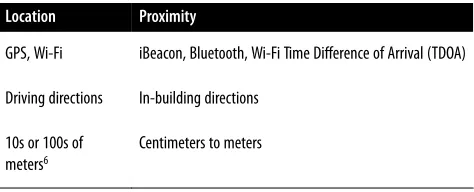
Table 1-1. Differences between location and proximity Location Proximity
GPS, Wi-Fi iBeacon, Bluetooth, Wi-Fi Time Difference of Arrival (TDOA)
Driving directions In-building directions
10s or 100s of meters6
Centimeters to meters
An important technical difference between the two classes of tech‐ nology is that proximity technologies can be used indoors to pro‐ vide the same types of services as large outdoor systems but on a smaller scale.
Interactivity
iBeacons define small regions in space, based on how far their sig‐ nals move through space. The beacon transmissions can trigger a mobile device to take action at a precise location, typically through an application.
Rather than depend on a user to locate himself on a map, or press buttons, or select from a menu of actions, applications can now be triggered by the physical world.
Applications
The most important difference between proximity and location is that the smaller scale of proximity drives closer interaction between customers and a business. Although the technology is most dis‐ cussed in retail, it is potentially useful in a wide variety of contexts. Broadly speaking, applications use proximity technologies to improve location awareness in areas where technologies tradition‐ ally have not supported a fine-grained location. When iBeacons are used, they provide proximity information to enable the application,
though, as we will see, the iBeacon provides a trigger to the applica‐ tion and works in conjunction with a companion web service.
Indoor Location and Proximity
The go-to technologies used for location, GPS and Wi-Fi, are not useful for indoor direction finding. That is, they provide location services, but not proximity. Possible applications for indoor proxim‐ ity include:
Map replacement
Within a large building, it can be difficult to find your way around without extensive maps. Large hospitals often are a challenge to navigate, as are malls. In both types of locations, a series of beacons can help a device accurately place itself on a map and augment reality by providing clear directions to a destination. Electronic maps have the additional advantage of being able to update electronically and instantaneously in response to changes in the physical location of departments, stores, or other points of interest.
Transit assistance
Transit hubs such as airports and train stations can be confusing for infrequent travelers. (Navigating Shinjuku Station in Tokyo or Penn Station in New York City can be challenging for even highly experienced travelers.) Applications can already access ticketing information and use that to automatically assist travel‐ ers in finding a boarding gate, ending with calling up the rele‐ vant ticket at the end of the journey.
Indoor direction finding
In heavily built-up cities, directions will often include a subway or train station exit to take for the optimal path to a destination. Both the Hong Kong and Tokyo subways use clearly identified exits with examples of major landmarks. By using proximity technology indoors, direction-finding apps could incorporate instructions to train riders to find the correct exit, even deep below ground.
Where is my car?
vehicles. Instead of the mobile device giving you directions to a fixed point, it can guide you directly to your parking spot.
Museum guides
Instead of printed paper guidebooks, museums can build apps for patrons. In addition to direction finding, major exhibits can have extended information available, allowing visitors to engage more deeply with major exhibitions than a few signs would allow. One of my favorite museum guides is at the Musée de la Musique in Paris, where an audio guidebook enables visitors to hear many of the musical instruments in the collection being played.
Retail store enhancement
I’ve placed this item last on the list because it is the most obvi‐ ous and likely to be familiar even without reading this book. Proximity allows a mobile device to take the display you are standing in front of into account, rather than just mere presence in the store. One of the earliest applications of beacons in retail is the official Apple Store app for iOS, which will welcome you to an Apple store and offer assistance with items you are stand‐ ing in front of. By further developing this channel, it is possible to monitor shoppers through the store and offer promotions based on purchase history.
iBeacons are about much more than indoor locations. In addition to offering information about where a device is to help the user, the proximity of a device to a given location can also be used to trigger an action on the device.
Proximity-Triggered Actions
Location technologies can provide a position that is accurate to within a building, but some applications might benefit from even more accurate position information. Proximity enables actions to be taken when two devices are close to each other. Typically, this is dis‐ cussed as a mobile device moving through space, but it might also be two mobile devices moving relative to each other.
Here are some examples of possible actions triggered by proximity:
Mobile advertisements
Proximity is discussed so frequently with mobile ads that the two seem inextricably linked sometimes. When a device gets
7For a striking but less uplifting application of the same sort of proximity information, in April 2014, New York City’s New Museumsimulated a minefield using iBeacons.
close to a display, an advertisement can be pushed to the display. The display might be a coupon, notification of a sale, or simply an offer to receive more information.
Ticket validation
On many trains, conductors are required to validate tickets, and one of my favorite developments in recent years is the use of easily integrated mobile ticketing services that allow me to carry tickets electronically and update them seamlessly. If the train conductor’s equipment signals that the conductor is coming, the proximity of a passenger’s mobile device to the train conductor can be used to display the ticket.
Treasure hunt
At CES in 2014, an app rewarded users who went around the show floor to collect “virtual stamps.” After getting near all nine virtual locations, users could then take the completed virtual card to the show office for a reward.7
Patient information integration
Relentless checking and rechecking of treatment orders is a practical approach to reducing medical errors. Low-energy Bluetooth hardware is inexpensive enough that iBeacons on patient ID bands can be used to automatically pull up records on a doctor’s tablet and confirm that patients are being treated appropriately.
Triggering actions based on proximity can bring devices into your business processes. One of the most common business processes to integrate users into is some sort of queue management, because many organizations have their customers use a line of some sort.
Queue Management
8For much more detail and information on Bluetooth Low Energy and its definition in the Bluetooth specification, see Getting Started with Bluetooth Low Energy by Townsend et al. (O’Reilly).
Queue measurement
By placing proximity beacons at the start and end of a queue, businesses can measure how long a typical transaction takes and can even expose that information to other customers. The Cali‐ fornia DMV, for example, regularly publishes queue times at different DMV offices (though they gather the information through methods other than beacons). Bank teller queues or airport security queues are often of great interest to customers.
Restaurant table pager
Restaurants often use wireless devices to signal you that your table is ready. The existing devices are pagers and therefore have limited communication abilities. By using proximity technolo‐ gies, an app running on a phone can “check in” to a queue for a table and potentially signal the restaurant to alert the patron when a table is ready. In this case, beacon technology is used to trigger the start of the interaction, but other data networks are required to complete it.
Transaction completion in retail
Quick-service restaurants are managed for turnaround time. By using beacons, they can trigger an app to wake up and pay for a transaction automatically using a payment system such as Pay‐ Pal or Square. Or if a restaurant allows patrons to order hot food, the act of walking into a restaurant can trigger the kitchen to start making an order.
Many other types of queue management exist, of course, and one of the advantages of building queue management with iBeacons is that the location of the queue entry point can move easily without reprogramming the application.
Bluetooth Low Energy Beacons
The key technology that enables the iBeacon is the proximity specification in Bluetooth Low Energy (BLE), which is often called Bluetooth Smart.8 BLE is an enhancement of the existing Bluetooth
specification designed for even lower-power operation. BLE beacons
transmit identification information that applications can use to identify the type of space the beacon is installed in. Devices branded as “Bluetooth Smart Ready” are dual-mode devices that can intero‐ perate with both classic Bluetooth as well as BLE.
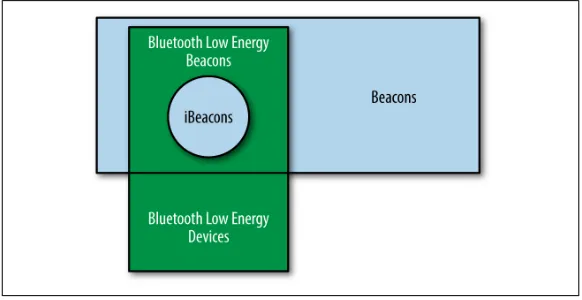
iBeacons are a subset of the BLE beacon specification. Figure 1-1
illustrates the relationship between iBeacons, generic beacons, BLE beacons, and BLE devices. All iBeacons are BLE beacons, and all BLE beacons are BLE devices. However, there are beacons that are not Bluetooth-based, and there are BLE devices that do not beacon. This book concentrates on the overlap of all these categories, with minor notes where the iBeacon specification differs from generic BLE beacons.
Figure 1-1. The relationship between iBeacons, BLE, and beacons
At low transmit power, the energy consumption of a beacon is quite low. Beacons can run for extended periods of time on battery power, with vendors claiming battery life of months or even years. Many proximity applications are designed to be triggered within a few feet of the target area and, in practice, that will require battery operation. In retail stores, for example, many displays will not have ready access to electrical power. Many early hardware products support limited battery lifetimes of a few weeks or months, so permanent displays will require full-time power.
connectivity to function, the applications they enable typically do require connectivity to the device.
CHAPTER 2
The iBeacon Protocol
iBeacons are transmit-only devices. They work by periodically transmitting numerical identifiers that are mapped into actions by an application on a mobile device. As a result, the “protocol” that they use is simple and is basically a vehicle to deliver numerical identifiers to nearby clients.
Translating those numbers into concrete action requires building an app for mobile devices. The simplicity of the protocol hides the big challenge, which is that application developers and user experience designers need to figure out how to make applications interact more tightly with the physical world.
Bluetooth Basics of an iBeacon
The iBeacon advertising function is transmit-only. Many iBeacon devices will implement a Bluetooth receiver for monitoring and configuration functions, but the protocol itself is transmit-only. In the jargon of the Bluetooth specification, an iBeacon is a broad‐ caster, a type of device that is specific to Bluetooth Low Energy. Broadcasters transmit periodic advertising packets, which contain information used by the receivers. iBeacon advertising packets are designed to be transmitted, but receivers do not need to respond to
1In the terminology of the Bluetooth specification, an iBeacon sends nonconnectable undirected advertising packets, which means that there is no attempt to establish any sort of connection between the iBeacon and any receivers.
them.1 In effect, iBeacon advertising packets are thrown out into the
air, and receivers can act on them (or not).
iBeacons send advertising packets. When a device receives an advertising packet, it results in the creation of an advertisement event at the receiver. Sometimes, advertising packets and events are also referred to generically as adver‐ tisements.
In effect, an iBeacon advertising packet says to the world, “Hello, I’m here, and my name is…” The difference is that the “name” in an iBeacon hello consists of three numerical identifiers:
Universal Unique Identifier (UUID) (128 bits)
Roughly speaking, the UUID transmitted by an iBeacon is a 128-bit identifier that uniquely identifies the organization the beacon belongs to. When iBeacons are used by, say, a chain of stores, the UUID will indicate the beacon is run by the com‐ pany.
Major number (16 bits)
The Bluetooth and iBeacon specifications place no structure on the use of the major and minor numbers, but there is a hierar‐ chy in the APIs used. The major number is used to identify major groups of beacons owned by one entity. In the example of a chain of stores, the major number will typically be used for all the beacons within one particular store.
Minor number (16 bits)
The minor number is used to identify the lowest level of the hierarchy within a set of beacons. Returning to the example of a chain of stores, the minor number will be used for individual beacons within a single store location, perhaps to identify a product on display.
(RSSI). RSSI is not transmitted in the advertising packet, because it is the power level of the signal when it reaches the receiver.
As far as data transmitted, the payload of an iBeacon consists of these three numbers. By far the most important, as well as most often misunderstood, is the UUID.
The Universal Unique Identifier
Many items in the Bluetooth specification use a UUID to identify unique elements. In iBeacons, the field called a UUID is most for‐ mally referred to as the proximity UUID, to distinguish it from any other UUIDs that might be in use by a Bluetooth device. The UUID is used to identify iBeacons that are under common management, and in effect, the UUID sits at the top level of the hierarchy of numbers.
Unlike other network protocols, such as 802.11, the UUID is not centrally managed to avoid conflicts. The Bluetooth protocol assumes that UUIDs are unique across all space and time. IEEE 802 networks, such as wireless LANs, have centralized assignment to guarantee uniqueness, but Bluetooth does not. With 128 bits to use in the identifier, it is likely that well-designed random number gen‐ erators will choose unique numbers.
Most UUIDs are created by random number generators and will often incorporate the current time and an identifier of the generator (such as a MAC address). Many iBeacon configuration applications have a Generate button to generate a random UUID. Mac OS X has a command-line utility to generate UUIDs as well:
Matthew-Gasts-MacBook:~$ uuidgen
C743365A-C141-4C43-8A45-E258F7755D5B
Advertising Interval
Although the Bluetooth specification allows many advertising inter‐ vals, the iBeacon specification fixes the advertising interval at 100 ms. Setting the advertising interval is a balance between preserving battery life in beacons with long advertising intervals, but having
advertisements be frequent enough to enable services to be built with iBeacons.
Where to Get Specifications
Bluetooth specifications are published by the Bluetooth SIG and are freely available to the public. iBeacons are based on version 4.0 of the Bluetooth specification. The iBeacon specification is made available to Apple developers.
iBeacon Advertising Packet Contents
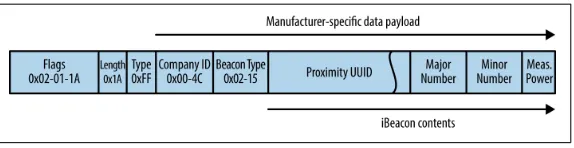
iBeacons transmit advertising packets, shown in Figure 2-1.
Figure 2-1. iBeacon advertising packet format
Advertising packets always have the same length and are composed of a series of fixed fields. The latter part of the frame contains manufacturer-specific information defined by Apple. The main rea‐ son for defining a custom packet format is to improve the ranging capabilities of an iBeacon.
Advertising Header
The iBeacon advertising header contains four fields, which, in prac‐ tice, are fixed for iBeacons:
Flags (3 bytes, 0x02-01-1A)
The Flags field is a length/type/value field. The first byte is a length indicator, which states that the Flags field has two addi‐ tional bytes. The second byte describes the type, with a value of
2The Bluetooth SIG provides a table of company identifiers within Bluetooth specifications.
Length (1 byte, 0x1A, decimal 26)
The remainder of the iBeacon advertising packet also has a length/type/value tuple. The Length field describes the length of the frame payload following this field. All iBeacon advertising packets are 30 bytes, but the Length field describes the length of the packet after three bytes of flags and the one-byte Length field for a total of 26.
Type (1 byte, 0xFF, decimal 256)
This value indicates the contents of the frame are manufacturer-specific data. The first two bytes contain the company identifier, and the company is free to define how to interpret the remain‐ ing fields. In the case of an iBeacon, the Company ID will be set to Apple. Part of the reason for maintaining a licensing system for use of the protocol is that every iBeacon uses Apple’s com‐ pany ID, and Apple needs to ensure that devices implementing its ID are using it in the prescribed way.
Company ID (2 bytes, 0x004C)
Technically, this field is the start of the manufacturer-specific advertising payload. The Bluetooth specification requires that manufacturer-specific payloads begin with the company ID number. iBeacons start with Apple’s company ID number.2
As with most communications technologies, the header serves to introduce the payload, which immediately follows the end of the header.
iBeacon Payload
The payload is the workhorse of the iBeacon specification, and it contains the only fields in the entire advertisement that can be con‐ figured by the user. In addition to the three numerical fields, it also contains a calibration constant used in ranging.
These are the five fields in the iBeacon payload:
Beacon type (2 bytes, 0x02-15)
Apple has assigned a value for proximity beacons, which is used by all iBeacons. Some sources state that this is a two-byte field,
3Two’s complement is a common way of storing integers in computing.
with the first byte indicating a protocol identifier of 2 for iBea‐ con and the second byte indicating a length of 21 further bytes (15 in hex is 21 decimal).
Proximity UUID (16 bytes)
This field contains the UUID for the iBeacon. Typically, this will be set to the organization that owns the beacon. Not all beacon products allow this field to be set.
Major (2 bytes) and Minor (2 byte) numbers
These fields, each two bytes in length, contain the major or minor number that will be contained within the iBeacon’s broadcast.
Measured power (1 byte)
Implicit within the iBeacon protocol is the idea of ranging
(identifying the distance a device is from a beacon, as discussed in “Ranging” on page 48). There may be slight variations in transmitter power, so an iBeacon is calibrated with a reference client. Measured power is set by holding a receiver one meter from the beacon and finding an average received signal strength. This field holds the measured power as a two’s comple‐ ment.3 For example, a value of C5 indicates a measured power at
one meter of –59 dBm.
Distance from an iBeacon is calculated by esti‐ mating the distance a signal must travel for it to fade to the level at which it is received, as adjus‐ ted by the calibration constant.
CHAPTER 3
Setting Up Your Own Beacons
There are many ways to get a beacon running. With such a simple protocol, all that a beacon needs to do is transmit its UUID, major number, and minor number at a fixed interval. Any device with Bluetooth 4.0 (or later) hardware is capable of acting as a beacon, whether it is a software application on a laptop, a software app on a mobile device, or a host computer with a USB interface.
Types of Hardware
Creating a beacon does not require any specialized type of hardware. You might already have suitable hardware lying around to create a beacon. If not, the investment required is only a few dollars.
Dedicated Beacon Hardware
The advantage of dedicated beacon hardware is that it is cheaper than using general-purpose hardware, and it is optimized for the beacon task. Here are a couple popular options:
Estimote
One of the earliest developers of beacon technology, Estimote
sells a developer kit that includes three beacons for $99. Inter‐ estingly, Estimote beacons have fixed configuration parameters and, in particular, administrators cannot set the UUID.
1A January 2014 teardown of the Estimote beacon in Make magazine noted that approx‐ imately a fifth of the battery capacity was consumed in a month. Tests since seem to indicate that battery life claims are often optimistic.
RadBeacon
RadBeacon is a $29 USB dongle that performs the transmission functions of an iBeacon. All you have to supply is USB power. Configuration of the beacon’s numbers is done through an app.
Kontakt
Kontakt sells an ARM-based iBeacon as well as tools for manag‐ ing iBeacons and analyzing user interactions with them.
Gelo
Gelo’s Beacons are waterproof and designed for both indoor and outdoor use, and the batteries can be replaced manually using simple tools.
Some dedicated iBeacon hardware runs on batteries, either coin cell or something with a higher capacity, such as AA.1 The iBeacon pro‐
tocol is simple, and the hardware was designed to run on small bat‐ teries for extended periods of time.
One of the major reasons for designing such a simple protocol is that it allows beacons to be made cheaply. Additionally, such a sim‐ ple protocol can run on battery power for extended lengths of time, which enables proximity applications to be developed for areas that might otherwise be inaccessible if beacons were required to be con‐ nected to a higher-power source.
reduced battery life. If iBeacons are battery powered, the operational lifetime between battery changes may be quite short.
General-Purpose Hardware
Rather than use specialized hardware, beacons can be generated using general-purpose hardware, such as the following examples:
Macs
Newer Mac laptops and desktops include BLE chipsets and can act as an iBeacon. iBeacon capability came to the MacBook Air in 2011, the iMac and MacBook Pro in 2012, and the Mac Pro in 2013. When using OS X, a program is needed to program the BLE chipset to act as an iBeacon, such as the $10 MacBeacon
program.
iOS devices
Newer iOS devices (running iOS 7)—including iPhone 4S or later, iPad 3 or later, iPad mini, and fifth generation iPod touch —can act as beacons by using one of the many free programs that use the BLE hardware through the appropriate develop‐ ment frameworks.
Raspberry Pi
The Raspberry Pi ($15 for USB 4.0 interface, plus the Raspberry Pi) is a tiny Linux machine, capable of running a Bluetooth stack. With the addition of a Bluetooth 4.0 USB adapter, a Rasp‐ berry Pi can act as an iBeacon.
Arduino
Kytelabs BLEduino, a Kickstarter-funded project, promises to add iBeacon functionality to the Arduino world when the project ships. The RedBearLab BLE Mini can be used to add iBeacon functions to development platforms with a serial interface.
Nordic Semiconductor
The Nordic Semi nRF1822 is a tiny 20 mm diameter iBeacon reference design.
These options often provide a useful way to test the interaction of apps with a beacon, because they can be used for proof-of-concept work.
Activating a Beacon
Once you have identified the supporting hardware, making it act as an iBeacon is straightforward.
iOS Devices
Newer iOS devices (see “General-Purpose Hardware” on page 21) have the ability to use the built-in BLE hardware to become an iBeacon. With the radio hardware and a stack, any application can activate iBeacon capabilities to add proximity information. For example, a kiosk application could act as an iBeacon, automatically signing in end users who come into the vicinity of the kiosk.
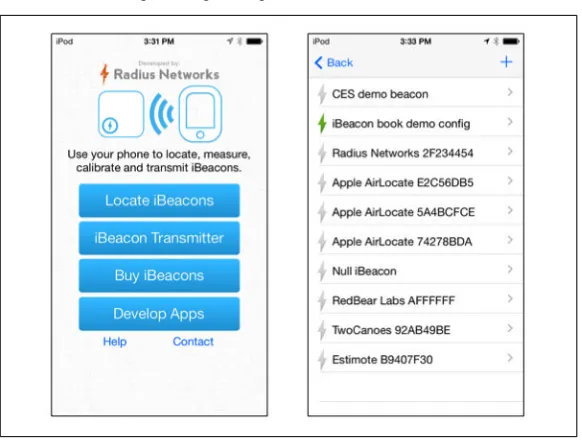
If all you want is a test iBeacon, though, many applications can offer that functionality. The one I use most is Locate Beacon by Radius Networks, available free from the App Store.
After starting up the application, tap the iBeacon Transmitter button to bring up a list of configured iBeacon transmitters, as shown in
Figure 3-1. One configuration can be set for transmission, which is indicated with a green lightning bolt to the left of the name.
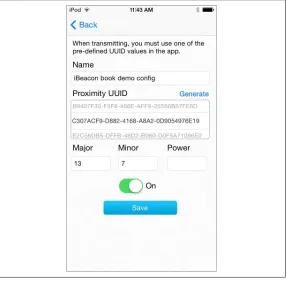
To add a new iBeacon configuration, tap the plus sign in the upper-right corner. You will be taken to the iBeacon transmitter configura‐ tion screen shown in Figure 3-2.
Figure 3-2. Locate Beacon transmitter configuration
The elements on the transmitter screen are straightforward:
Name
This is a string identifier held within the application. It has no effect on any parameters transmitted on the BLE interface.
UUID
Every iBeacon must have at least a UUID. If you are configuring a specific UUID, it can be typed into this field. If you are gener‐ ating a first-time iBeacon for use with an application, use the Generate link above the UUID field to generate a random UUID for use with your application.
Major and minor numbers
These are the major and minor numbers transmitted in the iBeacon advertisement packets. As a two-byte number, the range must be between 0 and 65,535. If they are left blank, a zero will be transmitted.
Power
The value of this field ranges between –1 and –255, representing the measured power field in the iBeacon. If left blank, it will default to –59 dBm.
Transmitter switch
By default, a newly configured iBeacon will be off. If you switch on the configuration, the iOS device will act as a beacon for the current configuration only and will switch from any active configuration.
Not surprisingly, the controls on the application correspond with the mutable fields in the iBeacon protocol, plus a switch to trigger transmission. With a simple protocol, a one-screen configuration is easy to achieve.
RadBeacon
The Radius Networks RadBeacon is a USB-powered iBeacon that is configured over Bluetooth. The advantage of USB power is that power adapters are cheap and plentiful, and an iBeacon can be placed anywhere that USB power is available. It is a good test device for demonstration purposes or for work with application develop‐ ment, because it is inexpensive and most people will have a USB charger lying around.
Figure 3-3 shows a RadBeacon inserted into an Apple USB power adapter. I often store my RadBeacon attached to power, because it is easy to remove the RadBeacon if I need power.
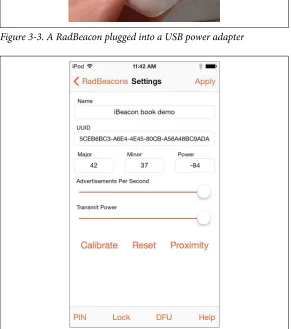
To configure the RadBeacon, install the free RadBeacon app from the App Store on an iOS device. The app will activate and look for RadBeacons in its vicinity. From the list, you can drill into any single RadBeacon to set its configuration.
Figure 3-3. A RadBeacon plugged into a USB power adapter
Figure 3-4. RadBeacon parameters
For security reasons, a RadBeacon can have its configuration changed only within the first 30 minutes after powering up. After that, you must turn the power off and turn it back on, which can be
as simple as unplugging the RadBeacon from its USB host to cause it to reboot.
Raspberry Pi
The Raspberry Pi has taken the world by storm as a cheap prototyp‐ ing platform because it has relatively high capabilities, plus the pro‐ grammability of Linux, at a price that would have been unthinkably low even just a few years ago.
Raspberry Pi iBeacon hardware
It doesn’t take much to set up a Pi as an iBeacon. The hardware shopping list has only four items, and even if you are starting from scratch, you probably have one or two of them lying around:
Raspberry Pi (about $35)
Either a Model A or a Model B will work. I use a Model B, because it has a built-in Ethernet port and two USB ports. You will be using one USB port for the Bluetooth adapter, so if you also want to have a Wi-Fi interface, you will need to have the Model B with its two USB ports.
Bluetooth interface (about $15)
The IOGEAR GBU521 is a common choice, because it is afford‐ able and uses one of the major Bluetooth chips on the market: the Broadcom BCM20702A0 chipset. This adapter supports both classic Bluetooth as well as BLE; setting it up as an iBeacon will use only the BLE mode. When purchasing a Bluetooth adapter, ensure that it is a Bluetooth 4.0 adapter. Earlier Blue‐ tooth adapters are still readily available, but they do not support iBeacon functions.
SD card
The SD card will act as the disk for the Linux installation. It must be at least 4 GB, but much larger disks are still quite inex‐ pensive. When I assembled my first Raspberry Pi iBeacon, a 16 GB card was around $10.
A micro-USB power adapter (about $15)
To run multiple USB devices, get a high-current adapter capable of supplying 2 amps.
• USB keyboard and mouse and a monitor with HDMI for the initial configuration (in a pinch, a television with an HDMI input can serve as the monitor)
• HDMI cable
• Software tool (as described in “Installation and setup” on page 27) to watch for iBeacons to verify that it is working
Once you have everything in one place, it is time to get started. Set‐ ting up a Raspberry Pi is simple, but there are enough steps that I would budget an hour or two for the entire process.
Installation and setup
Several forms of Linux can run on Raspberry Pi. This example uses the Raspbian distribution, which is available from the Raspberry Pi support site.
The core software required to set up an iBeacon is the BlueZ stack, which added support for Bluetooth Low Energy in the 5.x series. BlueZ is not part of the Raspbian distribution and needs to be com‐ piled before it will run.
The process for getting the Pi running as an iBeacon is straightforward:
1. Download Raspbian (or your preferred Linux distribution). 2. Write Linux onto a digital memory card. This process varies
depending on the operating system of the computer that is cre‐ ating the memory card.
3. Boot your Pi and perform an initial configuration. For the pur‐ pose of starting up an iBeacon, the main configuration you’ll probably want to do is to enable SSH access. If the Pi is connect‐ ing to the Internet with Wi-Fi, the wireless interface will need to be configured, too.
4. Update Raspbian. Although Raspbian is released frequently, I usually begin by updating to the most recent software available by using the package system:
mmmpi$ sudo apt-get update
mmmpi$ sudo apt-get upgrade
5. Install the support libraries. Several USB libraries are required to run Bluetooth interfaces, and they can all be installed with
one command. The downloads are not substantial and should take only a few minutes:
mmmpi$ sudo apt-get install libusb-dev libdbus-1-dev libglib2.0-dev libudev-dev libical-dev libreadline-dev
6. Download and install the BlueZ stack to control the Bluetooth interface:
mmmpi$ cd bluez-5.18
mmmpi$ sudo ./configure --disable-systemd
mmmpi$ sudo make
mmmpi$ sudo make install
At the time this book was written, the ver‐ sion of BlueZ in the package system was quite old. You need to install version 5 or later, so you might need to compile it.
7. Shut down the Pi, insert the dongle, and restart. Once it reboots, check if the device is discoverable, both by looking at the USB devices and by running hciconfig. The IOGEAR module uses a Broadcom chip and appears last:
mmmpi$ lsusb
Bus 001 Device 002: ID 0424:9512 Standard Microsystems Corp.
Bus 001 Device 001: ID 1d6b:0002 Linux Foundation 2.0 root hub
Bus 001 Device 003: ID 0424:ec00 Standard Microsystems Corp.
Bus 001 Device 004: ID 0a5c:21e8 Broadcom Corp. mmmpi$ hciconfig
hci0: Type: BR/EDR Bus: USB
BD Address:00:02:72:C8:B2:EB ACL MTU:1021:8 SCO MTU: 64:1
DOWN
RX bytes:547 acl:0 sco:0 events:27 errors:0 TX bytes:384 acl:0 sco:0 commands:27 errors:0
8. Bring up the Bluetooth interface and configure the iBeacon data. Make sure scanning is turned off before configuring the beacon. To check, run hciconfig and make sure the SCAN flag is not present.
mmmpi$ hciconfig hci0 up
mmmpi$ sudo hcitool -i hci0 cmd 0x08 0x0008 1e 02 01 1a 1a ff 4c 00 02 15 e2 c5 6d b5 df fb 48 d2 b0 60 d0 f5 a7 10 96 e0 00 00 00 00 c5 00 00 00 00 00 00 00 00 00 00 00 00 00
< HCI Command: ogf 0x08, ocf 0x0008, plen 44
1E 02 01 1A 1A FF 4C 00 02 15 E2 C5 6D B5 DF FB 48 D2 B0 60
D0 F5 A7 10 96 E0 00 00 00 00 C9 00 00 00 00 00 00 00 00 00
00 00 00 00
> HCI Event: 0x0e plen 4 01 08 20 00
9. Finally, turn on the Bluetooth advertising capability to begin sending out the iBeacon data:
mmmpi$ sudo hciconfig hci0 leadv 3
Once again, the hciconfig command is used to control the interface. The command uses leadv to activate low-energy advertising, and the number 3 to indicate nonconnectable advertising, which is what is required by the specification. With the last step complete, you now have a functioning iBeacon that can be used to trigger an application to take actions.
1One of the many organized efforts to quickly build applications with iBeacon is the February 2014 hackathon held in San Francisco: Bring Home the Beacon Hackathon.
CHAPTER 4
Application Development
iBeacons and the applications they empower are tied at the hip. One of the benefits of using such a simple protocol is that it is limited only by the imagination of the developer community.1 This chapter
describes the basic elements of application development with iBea‐ con—in essence, the seeds from which all iBeacon-enabled applica‐ tions grow.
iBeacons have one operation: to transmit advertisement packets. Mobile devices either receive the beacon transmission or do not. Everything in the iBeacon ecosystem flows from that simple state‐ ment. Proximity is defined as “I am close enough to the beacon to receive its transmissions.”
As discussed in Chapter 2, iBeacons repeatedly transmit three num‐ bers, and that’s it. Those numbers are used to trigger actions on the device, but otherwise, a beacon transmission is not all that interest‐ ing. If an application developer wants to interact with the user by popping up a message, contacting a server, or pushing data to the user, that must be done by programming an application to take those actions.
A beacon’s advertisement includes no descriptive text or mapping. Translation between the beacon’s transmissions and any actions are done entirely within an application on the receiver, even if the
2Many iBeacon devices have more feature-rich capabilities, such as flash memory to store upgradeable firmware and a configuration server.
3Many iBeacon devices use two-way Bluetooth interfaces to receive configuration. How‐ ever, the beacon functions do not use reception.
4Many of these actions can be accomplished by applications running on mobile devices. It is important to make the distinction between the iBeacon protocol and what an entire iBeacon-based system can accomplish.
application is a simple text message to say, “Welcome to the region.” iBeacons are not servers, and they do not need to have storage for anything beyond the contents of the numbers in the advertisement packet.2
To add interactivity based on an iBeacon, an application needs to query its own local storage or a web service to learn more. By itself, an iBea‐ con is not capable of anything beyond simple broadcast messages.
Limitations on iBeacons
The main reason for requiring an application is that iBeacons don’t receive or process any information.3 As a result, while beacon hard‐
ware can be made incredibly simple, conversely, varying levels of complexity must be put into the companion application.
As a transmit-only device, an iBeacon cannot perform an action that depends on receiving data from a device. iBeacons cannot be directly responsible for either of the following:4
Reporting on nearby clients
Beacons are transmitted in only one direction, with no response from mobile devices. Without any handshaking or reception built into the protocol, there is no way for an iBeacon to learn about devices in its immediate area.
Enabling mobile devices to learn about other devices
connections between devices, bidirectional communications are needed, and iBeacon is unable to act as a broker.
iBeacons cannot directly interact with the mobile device and, at best, they are triggers for other applications. However, due to the lack of direct interaction and the simplicity of the protocol, an iBeacon also cannot:
Send a message to a mobile device
An iBeacon’s transmission consists of three numbers to uniquely identify what the device is near. To translate those three numbers into an action or a message, an application needs to be involved. That application can be as simple as “when the UUID, major number, and minor numbers match, display the string: welcome to store #123.”
Get access to latitude and longitude information
iBeacons transmit identification numbers, not a geographic location. In order to get latitude and longitude, an app would need to either use a technology like GPS or translate an iBea‐ con’s numerical identifiers into a geographic location using a mapping database.
Anything that an iBeacon can do is accomplished by a few simple protocol operations, plus a dash of logic in an application. Although an iBeacon cannot always directly provide support to a mobile device, it often enables an application to do so.
Basic iBeacon Programming Functions
iBeacons enable location to be reported to an application through two operations:
Monitoring
A high-level view of whether a device is within range of a speci‐ fied beacon. It indicates that both the beacon and the mobile device are loosely within the same space, as defined by whatever the transmission characteristics of the beacon are.
Ranging
Specific to a single beacon, ranging uses its transmissions to estimate the distance from a mobile device to a beacon.
Monitoring and ranging are related to the position of a mobile device relative to an iBeacon, but they each convey slightly different information.
Monitoring
An iBeacon’s transmissions define physical space, often called a
region. A device is either “in” the region and able to receive and decode beacon transmissions, or it is “out” of the region and unable to receive transmissions. In essence, monitoring tells the application whether the device is close to a point or a resource of some sort.
Monitoring is a one-way function: a device lis‐ tens for beacons. The beacons themselves can‐ not tell a device what is around, though of course they can report information to an app that can.
Monitoring can be carried out on any stage of the numerical hierar‐ chy in the beacon protocol:
Match UUID only
Any beacon matching the UUID will be reported to the applica‐ tion. Matching on the UUID ensures only the broadest possible set of triggers, because any iBeacon associated with the applica‐ tion will trigger action. In the case of a store chain, monitoring for UUID will wake up the application only when the device enters a given store.
Match UUID and major number
Rather than match any possible iBeacon, applications can instead choose to monitor for a particular subset of iBeacons collected under one major number. In the case of a store chain, the application developer might want to identify the device entering a particular store.
Match UUID, major number, and minor number
When all three numbers are matched, it is likely that the appli‐ cation is targeting a particular iBeacon, perhaps a display within a single store.
store will probably begin by monitoring on UUID only to determine when the device is near any of the chain’s locations. Once monitoring activities determine that the device is near a location, the application can read the major number and set up a new moni‐ toring trigger to look for anything in the store, or even particular displays within the store.
An application can change the regions it moni‐ tors for dynamically, looking at wider and nar‐ rower scopes, depending on where the device is in relation to what is around it.
Although the iBeacon specifications allow configuration of any number of monitoring rules, many operating systems limit the num‐ ber of simultaneous regions that can be added to the monitoring list. This could be because if multiple applications are running, it is pos‐ sible to fill up the monitoring list with ease. The size of the monitor‐ ing list is a decision made by the operating system developer and is not a fundamental limitation in the protocol. At this point, however, it is important to always check the return code when you begin monitoring to ensure that it was successful.
Most operating systems have a relatively small limit for the number of regions that can be monitored.
Monitoring rules communicate to an application when a device is either in range of an iBeacon or set of iBeacons, or when the device has moved out of range. Wireless signal strength can be jumpy and shift dramatically, even when the transmitter and receiver remain in the same physical space. Therefore, many iBeacon receivers will implement hysteresis to smooth out (or calm) monitoring alerts. Notifications that a device has entered or left an area will happen within a few seconds, but they are not guaranteed to be immediate.
Ranging
The second major operation performed by mobile devices is ranging: determining how far away a device is from a particular iBeacon. Based on the transmission strength and calibration constant
5As an extreme example, consider Paolo Veronese’s massive The Wedding Feast at Cana, a one-and-a-half-ton masterwork with an area over 720 square feet (67 square meters). To appreciate such a large painting, a museum patron might move back to take in the full view and be closer to an iBeacon on another exhibit in the same room.
transmitted in the beacon, the receiver can use the received signal power to estimate distance.
Measuring the range is a relatively high-power operation, because the device must listen for and process all beacon advertisements, requiring significantly more activity with its radio.
A common use of ranging operations is to determine which iBeacon is closest to a receiver. For example, a museum exhibit hall might contain several significant displays, all with an iBeacon. A device might use ranging to determine which exhibit is closest to the device, so that the user interface may sort retrieved data by distance to the exhibit. However, it is bad interface design to assume that the user is always interested in the closest exhibit.5
When there are multiple iBeacons near a device, do not assume the user is interested in the clos‐ est one. Instead, offer a choice between the nearby iBeacons.
Calibration and Ranging Accuracy
Accurate ranging information depends on correctly setting the cali‐ bration constant, as described in the “Measured Power” entry in
“iBeacon Payload” on page 17. A mobile device uses the received signal power, as adjusted by the calibration constant, to calculate the range.
fixed, multipath interference may cause the received signal strength to fluctuate rapidly. Ranging algorithms must be aware of the potential for multipath interference and smooth out variations if the range is used by a user-facing function.
Advanced iBeacon Programming Functions
iBeacons trigger applications on the device to take some action. Those actions might be based on data stored locally on the device, or they might trigger the device to interact with network-based serv‐ ices. Once an iBeacon is detected, it is up to the application on the device to determine what, if anything, is needed from elsewhere on the network.
Web Services Interactions
For interactivity, iBeacon-powered applications need to translate the tuple of numbers in the iBeacon advertisement into something
actionable. Two approaches are possible, and the one you choose
depends on the amount and stability of the information:
Local storage
When an iBeacon advertisement is received, the application refers to local storage to look up the beacon parameters. This approach is best when the application must operate without net‐ work connectivity and when the information is long-lived, because it requires users to update the application (or at the very least, a beacon database) to change the application behav‐ ior. The application will need adequate storage for the beacon database, which might be a consideration if the number of iBea‐ con identifiers is quite large.
Web service
As an alternative, the application can look up the iBeacon in a database and retrieve information about the beacon for use by the application. If the number of beacons is large, or if they change position or meaning frequently, this approach works better. From a practical perspective, an application that uses real-time status information will need to use a network service to hold device location information, for example.
6For example, one of the first “treasure hunt” applications was shown at CES in January 2014, and it was promptly reverse engineered by Alasdair Allan and Sandeep Mistry.
Whether you choose for an application to use local storage or a web service, interacting with external data stores is an important method of adding interactivity.
Geofencing and Location Services
One of the initial applications of iBeacons is to perform geofencing, where services are restricted based on proximity. For example, a device can report that it is inside a building and receive a higher level of service.
As another example, iBeacon transmissions are low power and, practically speaking, can be readily confined to a room. Restricing service visibility to areas where a beacon is visible can assist users in choosing from a long list of network services.
Security and Privacy
With a relatively simple protocol, iBeacons have straightforward pri‐ vacy and security implications. Essentially, the protocol provides very little in the way of management tools, and there are huge opportunities to add on to the basic framework.
Basic iBeacon Security
The main security threat to iBeacons is that the protocol provides no cryptographic security at all. The contents of the beacon frame are not encrypted or authenticated, and are therefore quite easy to spoof. It is not difficult to learn the numeric identifiers from an iBeacon and assign them to a pirate beacon.6
7The Radius Networks Proximity Kit can perform some of these functions automatically and transparently within your app.
Timestamping
When an application receives a beacon transmission, record it on a network service that can provide a trusted timestamp. Soft‐ ware can then analyze a beacon track to ensure that it was com‐ pleted in a reasonable amount of time. For example, a major convention show floor takes several minutes to walk across, so rapidly programming a beacon to spoof several transmitters will show an impossibly fast timestamp trace.
Cross-references
Cross-reference iBeacons with some other source of informa‐ tion. When a beacon transmission is received, cross-reference against other location attributes to ensure that the receiving device was in the right neighborhood. Does the GPS lock match the expected location,7 and are Wi-Fi access points in the area
the access points that are around the “real” beacon?
Use an iBeacon to trigger some other sort of transaction on the network, and protect that transaction with appropriate security techniques such as Transport Layer Security (TLS), the pro‐ tocol that protects nearly all web transactions.
Most importantly, ensure in the application design that the presence of an iBeacon itself is not the sole security feature of an application. The best design is to use the iBeacon to kick off transactions, but to ensure that any monetary or personally identifiable transaction is protected by a strong cryptographic channel.
Privacy
iBeacons themselves do not have significant privacy implications, because they cannot receive signals from a mobile device. However, the presence of iBeacons in a physical space can readily enable tracking because an application can record a beacon track and report it to a network service for further analysis.
Be aware that just because an iBeacon itself does not track users, that does not preclude the iBea‐ con from being an integral part of a user-tracking system.
Location information is already subject to user control on many mobile devices, whether at install time or at runtime. Ideally, an opt-in privacy framework would opt-include a specific settopt-ing for beacon-based or Bluetooth-beacon-based location information; unfortunately, that level of granularity is not yet supported.
As you develop an application, be clear about the benefit to the end user for sharing location information. Users are likely to accept indoor navigation and help locating hard-to-find items much more readily than turning their mobile devices into yet another channel for advertisements.
When writing an application, be careful about collecting tracking information without explicit user authorization.
1For the purposes of this book, the terms framework and API are used interchangeably. Formally, a framework consists of libraries and support code, in addition to the inter‐ face, and is a superset of an API, which is the public interface to use functionality exposed by the framework.
2The iOS Core Location developer documentation describes both the location functions and the new proximity functions. For more information on developing for iBeacons, look at the beacon classes.
CHAPTER 5
iOS and iBeacons
This chapter describes how t