11g Release 1 (11.1.1)
E12326-03Copyright © 2007, 2011, Oracle and/or its affiliates. All rights reserved.
Primary Author: Martin Wykes
Contributing Author: James Leask
This software and related documentation are provided under a license agreement containing restrictions on use and disclosure and are protected by intellectual property laws. Except as expressly permitted in your license agreement or allowed by law, you may not use, copy, reproduce, translate, broadcast, modify, license, transmit, distribute, exhibit, perform, publish, or display any part, in any form, or by any means. Reverse engineering, disassembly, or decompilation of this software, unless required by law for interoperability, is prohibited.
The information contained herein is subject to change without notice and is not warranted to be error-free. If you find any errors, please report them to us in writing.
If this software or related documentation is delivered to the U.S. Government or anyone licensing it on behalf of the U.S. Government, the following notice is applicable:
U.S. GOVERNMENT RIGHTS Programs, software, databases, and related documentation and technical data delivered to U.S. Government customers are "commercial computer software" or "commercial technical data" pursuant to the applicable Federal Acquisition Regulation and agency-specific supplemental regulations. As such, the use, duplication, disclosure, modification, and adaptation shall be subject to the restrictions and license terms set forth in the applicable Government contract, and, to the extent applicable by the terms of the Government contract, the additional rights set forth in FAR 52.227-19, Commercial Computer Software License (December 2007). Oracle USA, Inc., 500 Oracle Parkway, Redwood City, CA 94065.
This software is developed for general use in a variety of information management applications. It is not developed or intended for use in any inherently dangerous applications, including applications which may create a risk of personal injury. If you use this software in dangerous applications, then you shall be responsible to take all appropriate fail-safe, backup, redundancy, and other measures to ensure the safe use of this software. Oracle Corporation and its affiliates disclaim any liability for any damages caused by use of this software in dangerous applications.
Oracle is a registered trademark of Oracle Corporation and/or its affiliates. Other names may be trademarks of their respective owners.
Preface
... ix1
Introduction
2
Working with Sealed Content
3
Sealed Content Examples
3.6.2 Unsealing Using the IRM Java API ... 3-22
4
Working with Domains, Contexts, Roles, and Rights
4.1 Concepts ... 4-1 4.1.1 Domains ... 4-1 4.1.1.1 DomainRef... 4-1 4.1.1.2 Domain... 4-2 4.1.2 Context Templates ... 4-2 4.1.2.1 ContextTemplateRef... 4-2 4.1.2.2 ContextTemplate... 4-2 4.1.3 Contexts... 4-2 4.1.3.1 ContextInstanceRef... 4-2 4.1.3.2 ContextInstance... 4-2 4.1.4 Roles (Document Roles)... 4-3 4.1.4.1 DocumentRoleRef... 4-3 4.1.4.2 DocumentRole... 4-3 4.1.5 Rights (Document Rights) ... 4-3 4.1.5.1 DocumentRightRef... 4-3 4.1.5.2 DocumentRight... 4-3 4.2 Examples ... 4-3 4.2.1 Creating a Context from a Template... 4-4 4.2.1.1 Calling createContextFromTemplate... 4-4 4.2.2 Searching for Journal Entries ... 4-5 4.2.2.1 Calling searchJournal... 4-5 4.2.3 Assigning a Role ... 4-5 4.2.4 Listing the Rights Assigned to a User or Group ... 4-7 4.2.5 Unassigning a Role ... 4-7
5
Working with Users and Groups
5.1 The AccountRef Type... 5-1 5.1.1 About the AccountRef Type ... 5-1 5.1.2 Creating an AccountRef Using a GUID ... 5-1 5.1.3 Creating an AccountRef Using a User Name ... 5-1 5.1.4 Creating an AccountRef Using a Group Name... 5-1 5.2 Obtaining User and Group Names ... 5-2
6
Code Samples for Web Services
6.2.8 Assigning a Role to a User... 6-9 6.2.9 Listing Rights Assigned to a User or Group... 6-10 6.2.10 Altering the Role Assigned to a User or Group ... 6-12 6.2.11 Sealing a File ... 6-13 6.2.12 Peeking a Sealed File ... 6-15 6.2.13 Peeking a Sealed File and Checking the Digital Signature... 6-17 6.2.14 Changing Item Restrictions Associated with a Right... 6-18 6.2.15 Unassigning Rights Assigned to a User ... 6-19 6.2.16 Reclassifying a File ... 6-20 6.2.17 Resealing a File with Different Custom Data ... 6-22 6.2.18 Unsealing a File... 6-23 6.2.19 Listing Classifications ... 6-24 6.2.20 Searching the Context Journal Using Web Services ... 6-25 6.2.21 Checking in Licenses ... 6-27 6.2.22 Deleting a Domain... 6-28 6.3 Using the Oracle IRM Web Service Code... 6-29 6.3.1 Introduction ... 6-30 6.3.2 Class Path... 6-30 6.3.3 Differences from the JDeveloper Generated Code ... 6-30 6.3.4 Creating a Domain... 6-30 6.3.5 Creating a Role ... 6-31 6.3.6 Creating a Context Template ... 6-33 6.3.7 Creating a Context ... 6-34 6.3.8 Assigning a Role to a User... 6-36 6.3.9 Listing Rights Assigned to a User or Group... 6-37 6.3.10 Altering the Role Assigned to a User or Group ... 6-38 6.3.11 Sealing a File ... 6-39 6.3.12 Peeking a Sealed File ... 6-41 6.3.13 Peeking a Sealed File and Checking the Digital Signature... 6-42 6.3.14 Changing Item Restrictions Associated with a Right... 6-43 6.3.15 Unassigning Rights Assigned to a User ... 6-44 6.3.16 Reclassifying a File ... 6-45 6.3.17 Resealing a File with Different Custom Data ... 6-46 6.3.18 Unsealing a File... 6-48 6.3.19 Listing Classifications ... 6-49 6.3.20 Searching the Context Journal Using Web Services ... 6-49 6.3.21 Checking in Licenses ... 6-51 6.3.22 Deleting a Domain... 6-51
7
Code Samples for Java Applications
8
Setting Up Custom Online Status Pages
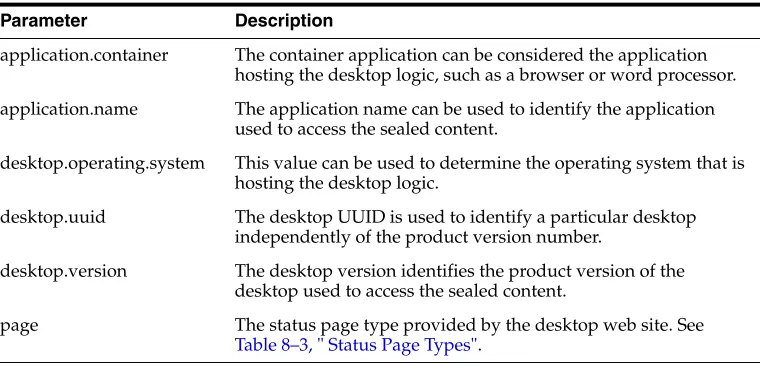
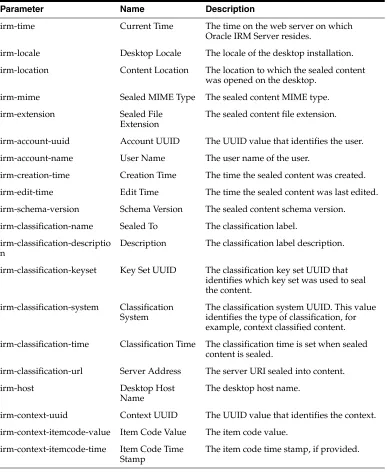
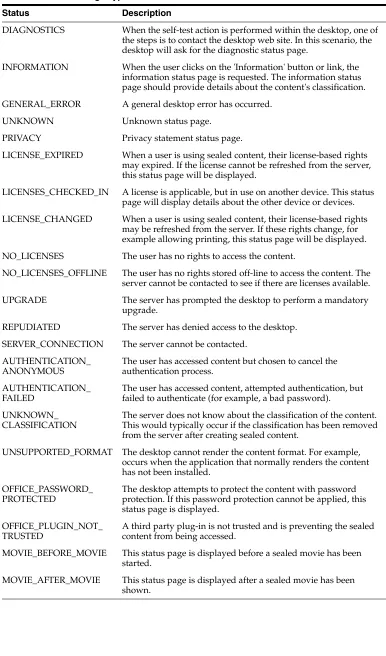
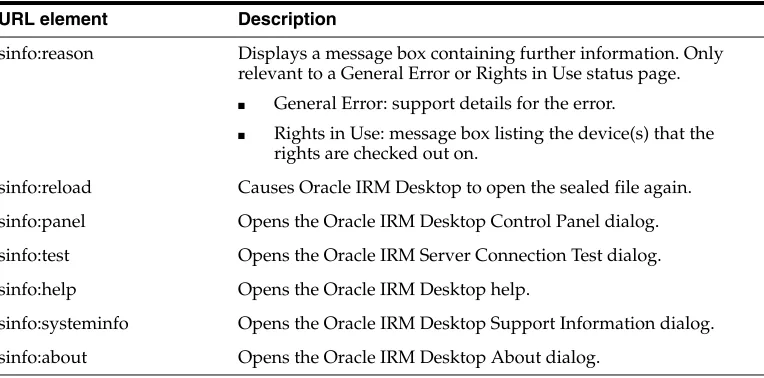
8.1 Overview of Online and Offline Status Pages ... 8-1 8.2 Process for Setting Up Custom Online Status Pages ... 8-2 8.3 Acquiring Oracle IRM Status Information ... 8-2 8.3.1 Using the HTTP POST Method ... 8-2 8.3.2 Using the HTTP GET Method... 8-3 8.4 Configuring Oracle IRM Server for Custom Online Status Pages... 8-4 8.5 Reference Information and Examples... 8-4 8.5.1 List of Built-in Parameters... 8-4 8.5.2 List of Status Page Types ... 8-5 8.5.3 List of URL Elements Available for Use in Custom Online Status Pages ... 8-7 8.5.4 Example of Oracle IRM Desktop State in XML ... 8-7
9
Reference
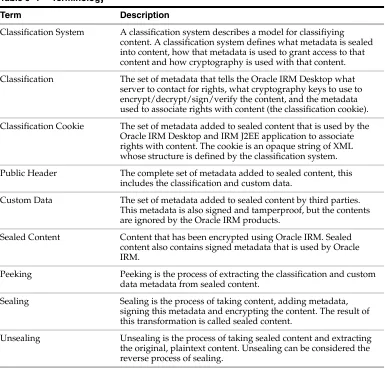
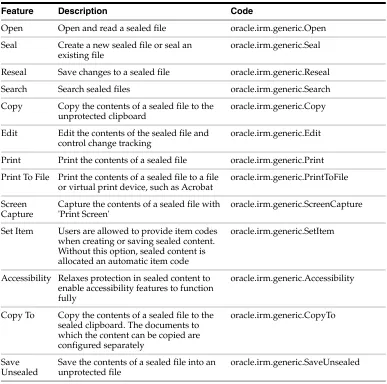
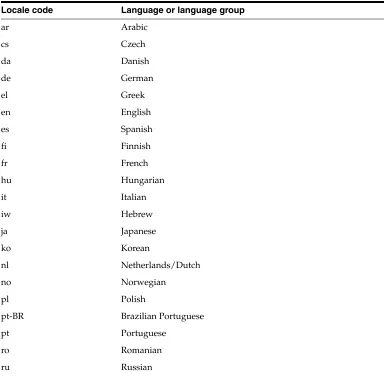
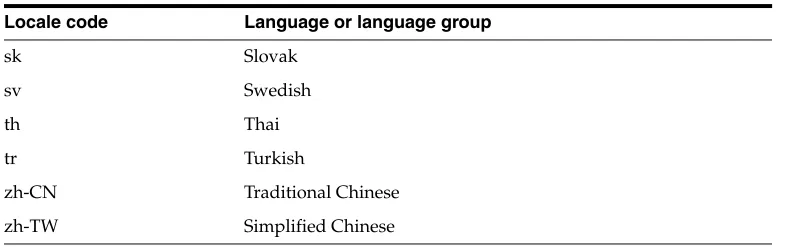
9.1 Terminology... 9-1 9.2 Feature Codes ... 9-2 9.3 Locale Codes ... 9-3
This guide describes how to create code that will perform sealing and related tasks for protecting the content of files under Oracle IRM control.
Audience
This guide is for developers who want to create tools for sealing and unsealing protected content, or who want to adapt existing tools to support content protected by Oracle IRM. Users of this guide need basic familiarity with Oracle IRM, should be competent Java developers familiar with a Java IDE, and should know how to call web services from Java.
Documentation Accessibility
Our goal is to make Oracle products, services, and supporting documentation accessible to all users, including users that are disabled. To that end, our
documentation includes features that make information available to users of assistive technology. This documentation is available in HTML format, and contains markup to facilitate access by the disabled community. Accessibility standards will continue to evolve over time, and Oracle is actively engaged with other market-leading
technology vendors to address technical obstacles so that our documentation can be accessible to all of our customers. For more information, visit the Oracle Accessibility Program Web site at http://www.oracle.com/accessibility/.
Accessibility of Code Examples in Documentation
Screen readers may not always correctly read the code examples in this document. The conventions for writing code require that closing braces should appear on an
otherwise empty line; however, some screen readers may not always read a line of text that consists solely of a bracket or brace.
Accessibility of Links to External Web Sites in Documentation
This documentation may contain links to Web sites of other companies or
organizations that Oracle does not own or control. Oracle neither evaluates nor makes any representations regarding the accessibility of these Web sites.
Access to Oracle Support for Hearing-Impaired Customers
Oracle customers have access to electronic support through My Oracle Support or by calling Oracle Support at 1.800.223.1711. Hearing-impaired customers in the U.S. who wish to speak to an Oracle Support representative may use a telecommunications relay service (TRS). Information about the TRS is available at
Oracle Support engineer will respond to technical issues according to the standard service request process.
Related Documents
For more information, see the following documentation:
■ Oracle Fusion Middleware Administrator's Guide for Oracle IRM Server
This guide is also available as the online help for the Oracle IRM Server product.
■ Oracle Fusion Middleware External Users Support Guide for Oracle IRM Desktop
■ Oracle Fusion Middleware User's Guide for Oracle IRM Desktop
This guide is also available as the online help for the Oracle IRM Desktop product.
Conventions
The following text conventions are used in this document:
The following conventions are used throughout this guide:
■ The notation <Install_Dir> is used to refer to the location on your system where Oracle IRM Server is installed.
■ Forward slashes (/) are used to separate the directory levels in a path name. This is true when referring to files on a Windows file system or on a UNIX system. A forward slash will always appear after the end of a directory name.
Convention Meaning
boldface Boldface type indicates graphical user interface elements associated with an action, or terms defined in text or the glossary.
italic Italic type indicates book titles, emphasis, or placeholder variables for which you supply particular values.
1
1
Introduction
This guide covers all of the development topics relating to the Oracle IRM J2EE application (Oracle IRM Server).
The guide describes how to use the following:
■ Web services. The Oracle IRM Web services include operations that allow content to be sealed and unsealed, contexts to be created and rights to be assigned.
This guide describes the web services that are available for use by external
developers. Other web services exist for Oracle IRM that are not authorized for use by external developers.
■ Java APIs. Sealing and other operations can be performed using the IRM Java API.
■ Status page customization. On-line Oracle IRM Desktop status pages can be customized allowing an organization to offer a branded or personal experience to end users when working with sealed content.
2
2
Working with Sealed Content
This section contains the following topics:
■ Concepts
■ Sealing Server
■ IRM Java API
2.1 Concepts
This section contains the following topics:
■ Sealing
■ Unsealing
■ Peeking
■ Resealing
■ Reclassification
2.1.1 Sealing
Sealing is the process of transforming plaintext content into encrypted and signed content. The sealing process adds metadata, signs this metadata and encrypts the content. The result of this transformation is called sealed content. Sealed content can be opened only with Oracle IRM Desktop, the Oracle IRM client application. Oracle IRM Desktop checks the digital signature, decrypts the content, and maintains the protection of the sealed content while in use. One of the other changes currently made during sealing is to alter the file extension. For example, a sealed HTML document has a stml file extension rather than a html or htm file extension. Oracle IRM Desktop identifies sealed content using these different file extensions.
2.1.1.1 Metadata: The Public Header
The metadata added to sealed content is called the public header. It is a
human-readable XML document that appears near the top of the sealed content. The public header is digitally signed so that tampering of sealed content can be detected by Oracle IRM Desktop.
classification also includes information about which server (Oracle IRM Server) to contact for rights, and which cryptography keys were used to seal the content.
Classification Cookie
To allow content to be classified in different ways, the classification contains a section of XML data called the classification cookie. The classification cookie contains data that is used by Oracle IRM Desktop and the Oracle IRM J2EE application to associate rights with content. The data contained in the classification cookie is defined by the classification system.
Context Classified Content
Sealed content that uses the context classification system has a classification cookie that contains a UUID value (to identify a context) and an item code that identifies the document. This allows rights to be expressed either at the context level or for a particular document (for example, John can access any document sealed to context Top Secret or Mary can access the top secret document named secrets.sdoc).
2.1.1.1.2 Custom Metadata Additional data can be tagged to sealed content using custom metadata. Custom metadata can be added by third party systems that perform sealing. This allows tamper proof metadata to be added to sealed content, which in turn can be extracted by these applications. For example, a content management system could add additional properties to the sealed content, such as the original author or document version.
Oracle IRM Desktop also uses custom metadata when displaying the poster page for sealed movies. When movie content is sealed the poster page can be specified as custom metadata.
2.1.1.1.3 Content Schema Sealed content contains a version number called the content schema. This version number helps the Oracle IRM Desktop determine what features are supported in the sealed content.
2.1.1.1.4 Creation Time Sealed content contains a record of when the content was first sealed and when subsequent edits were made.
2.1.1.1.5 Example Public Header The following XML document is an example of a public header one might see in an HTML document sealed against the Top Secret context.
<?xml version="1.0" ?>
<content:PublicHeader xmlns:content="http://xmlns.oracle.com/irm/content"> <contentDescription>
<schema>
<schemaVersion>
<version>6.0</version> </schemaVersion>
</schema> <classification>
<id>588403f9-9cff-4cce-88e4-e030cc57282a</id> <system>
<uuid>37c8da32-5420-4146-816c-27f63de27250</uuid> </system>
<keySet>
<uuid>213f8f65-c5d1-4868-9fff-ad156daa2dd6</uuid> </keySet>
<uri>http://irm.example.com/irm_desktop</uri> <classifications:ContextCookie
<context>
<classificationTime>2008-02-01T13:00:00.000+01:00</classificationTime> <labels>
<uuid>2b8cd20a-d4f5-47b6-9097-d12547f2b707</uuid> <acme>
<author>John Smith</author> <version>2</version> </acme>
</customData>
<creationTime>2009-01-01T12:00:00.000+01:00</creationTime> <editTime>2009-01-01T12:00:00.000+01:00</editTime>
<sealedMime>application/vnd.sealedmedia.softseal.html</sealedMime> <unsealedSize>2367</unsealedSize>
</contentDescription>
<iv>d2hhdCB3aWxsIHByaW50IG91dA==</iv>
<sessionKey>SGVsbG8gTW9vbiBNb25rZXk=</sessionKey> <publicHeaderPeriod>1024</publicHeaderPeriod>
<encryptedContentBlockSize>16384</encryptedContentBlockSize> </content:PublicHeader>
2.1.1.2 Encrypted Content
The following is an example snippet of the encrypted section of a sealed file.
O£´—ä#Dmbg...l]>:z÷ýëËÜžXçÚÔÞôü•›@Ӫݎ•¤Ð3
Unsealing is the process of taking sealed content and extracting the original, plaintext content. Unsealing can be considered the reverse process of sealing. Unsealing is typically used when content no longer requires Oracle IRM protection or when the content needs to be processed by a third party system, for example an application producing a search index for sealed content.
2.1.3 Peeking
2.1.4 Resealing
Resealing is the process of saving a sealed file with some modifications. Oracle IRM Desktop allows certain formats, such as Microsoft Office, to be edited in sealed form: the process of saving edits is called resealing.
2.1.5 Reclassification
Reclassifying sealed content is the process of altering the classification of the sealed content. Reclassification usually means re-signing and re-encrypting the content as most classifications have their own set of cryptography keys. Reclassifying is typically used when content changes sensitivity (for example, a top secret document becomes a company confidential document).
2.2 Sealing Server
The sealing server is a J2EE application that runs on an application server and
provides sealing, unsealing, peeking, and reclassification services. Operations such as sealing content can be accomplished by uploading a file to the sealing server: the relevant metadata will be added and digitally signed, and the contents encrypted. The resultant sealed content is then returned to the caller. The sealing operations are exposed as web services. The typical use for the sealing server is for integrations that want to seal, unseal or examine sealed content. Oracle IRM Desktop users typically create sealed content on their local machines and would not use the sealing server.
The sealing server exposes two web services: the sealing web service and the desktop web service. The sealing web service allows sealed content to be manipulated (for example, sealing and unsealing content). The desktop web service allows licenses checked out to the sealing server to be queried and checked in. The desktop web service also provides classification details.
2.2.1 Sealing Web Service
The sealing server provides a number of web services operations that allow the following tasks to be performed:
■ Sealing unsealed content
■ Unsealing sealed content
■ Resealing or reclassifying sealed content
■ Peeking sealed content metadata
The sealing services WSDL file can be downloaded from the sealing server using the following URL, replacing irm.example.com with the host and port name of the sealing server:
http://irm.example.com/irm_sealing/sealing_services?wsdl
2.2.1.1 Authentication
The sealing services web service calls require authentication. The current release supports HTTP basic authentication. When rights are requested and operations performed on sealed content, they are performed as the authenticated user.
java.net.Authenticator class. This approach provides a user name and password for all HTTP requests for the running JVM instance.
java.net.Authenticator.setDefault(new java.net.Authenticator() { @Override
protected PasswordAuthentication getPasswordAuthentication() { return new PasswordAuthentication("username",
"password".toCharArray()); }
});
The other approach is to set the user name and password directly on the web services port object. This is the approach used in the web service sample code.
java.util.Map<String, Object> requestContext =
(javax.xml.ws.BindingProvider)port).getRequestContext();
requestContext.put(javax.xml.ws.BindingProvider.USERNAME_PROPERTY, "username");
requestContext.put(javax.xml.ws.BindingProvider.PASSWORD_PROPERTY, "password");
2.2.1.2 Authorization
The sealing services web service calls are authorized in the same way that Oracle IRM Desktop authorizes sealed content access. The authenticated user must have a valid license that allows an appropriate feature for the specified classification.
■ Sealing - requires a license that allows the seal feature.
In the context classification system, this means the user has to have a role assigned that allows the seal feature.
■ Unsealing - requires a license that allows the save unsealed feature.
In the context classification system, this means the user has to have a role that has export constraints set as none.
■ Resealing - requires a license that allows the reseal feature.
In the context classification system, this means the user has to have a role that allows the reseal feature.
■ Reclassification - requires a license that allows the copy to feature with an appropriate trusted destination in the source classification license and the seal feature in the target classification license.
In the context classification system, this means the user has to have a role that has export constraints set as trusted with the target context being a trusted context of the source context, or that the role has export constraints set as none.
■ Peeking - can be performed without having a license (unless the digital signature is checked, in which case the open feature is required).
In the context classification system, this means that the user does not need a role assigned within a context.
system. These licenses and keys are then used to process the content for this call and subsequent requests relating to the same classification (for the same user). Licenses that expire are re-requested by the sealing server. License rules, such as time constraints, are fully interpreted by the sealing server. License and key details are stored per authenticated user - there is an isolated store of rights and keys for any user that uses the sealing server. This is identical to the way that Oracle IRM Desktop requests licenses and keys. Oracle IRM Desktop also has an offline database in which keys and licenses are stored.
2.2.1.3 MTOM
The sealing server supports MTOM (SOAP Message Transmission Optimization Mechanism). This web service feature allows content to be transmitted as a raw binary attachment to the SOAP message rather than using in-line base 64 encoded data. This not only reduces the amount of data sent to the server, it also allows larger files to be uploaded and downloaded. It is strongly recommended to enable MTOM support when using the sealing web service operations.
For example, when using a JAX-WS client the MTOM feature can be enabled when obtaining the port:
service.getPort(SealingServices.class, new javax.xml.ws.soap.MTOMFeature());
If MTOM support is not enabled, the uploaded file size will be limited to the available memory in the client JVM.
2.2.2 Desktop Web Service
The sealing server also exposes a number of operations for managing licenses checked out to the sealing server and listing classification details. These operations are similar to the operations a user can perform using Oracle IRM Desktop. When licenses are checked out to the sealing server, the licences cannot be used by Oracle IRM Desktop unless the device count configuration setting has been configured to allow licenses to be used on multiple devices. The desktop services web service allows licenses to be checked in from the sealing server. In the same way that Oracle IRM Desktop can list classification details (contexts) when the user wants to seal content, the sealing server also provides an operation that lists classification details.
A couple of simple diagnostic pages are also made available on the sealing server so you can find out what licenses are checked out to the sealing server, and what classifications are currently available:
http://irm.example.com/irm_sealing/licenses
The desktop services WSDL file can be downloaded from the sealing server using the following URL, replacing irm.example.com with the host and port name of the sealing server.
http://irm.example.com/irm_sealing/desktop_services?wsdl
2.3 IRM Java API
Applications that want to process sealed content locally rather than sending the content to a server can use the IRM Java API. When using this API the sealed content cryptography is performed in the same process as the calling application.
Cryptography keys are shipped from the IRM J2EE application and used in the process using the API.
The typical use for the IRM Java API is for trusted integrations that want to seal, unseal or examine sealed content where network latency or performance may be an issue.
The API implementation makes use of Java Cryptography Extension (JCE) to perform cryptography operations. If use of AES 256 cryptography is required, the unlimited strength policy JAR files must also be installed. For the latest information about supported JDK/JREs, see the System Requirements and Supported Platforms for Oracle Fusion Middleware page on Oracle Technology Network at
http://www.oracle.com/technology/software/products/ias/files/fus ion_certification.html.
When using the IRM Java API, the following jar file should be added to the compile time or runtime classpath:
■ irm-api.jar
This irm-api.jar has a manifest entry that adds the following jars files to the classpath. These jar files need to be distributed with the irm-api.jar and placed in the same folder as the irm-api.jar file.
■ irm-common.jar
■ irm-engine.jar
■ irm-client.jar
■ irm-ws.jar
These jar files can be obtained from the IRM server installation, under the folder ECM_ ORACLE_HOME/irm/api/lib. These libraries are thread safe.
2.3.1 Runtime Configuration
Configuration settings for the IRM Java API are read from an XML configuration file. The configuration settings tell the IRM Java API where to store the offline cache of licenses, classification and cryptography key information, and the device identity, as
well as where to find the key store containing the cryptography key used to protect sealed content cryptography key material.
<?xml version="1.0" encoding="UTF-8" ?>
<core:DesktopConfiguration xmlns:core="http://xmlns.oracle.com/irm/core"> <storageFolder>/home/irm</storageFolder>
<device>6f750242-c35e-4992-bb37-e160dba87779</device> <application>
<name>sample-application</name> </application>
<keyStore>
<type>JCEKS</type>
<path>/home/irm/irm_api.jceks</path> </keyStore>
</core:DesktopConfiguration>
This XML configuration file can be stored in any location accessible to the process running the IRM Java API. The location is specified by setting the
oracle.irm.client.configuration system property. If this property is not set, the IRM Java API will throw an exception, informing the caller than the configuration settings have not been specified. Here is an example of a Java program running with the system property set to /home/irm/irm-configuration.xml:
java -Doracle.irm.client.configuration=/home/irm/irm-configuration.xml MyProgram
2.3.1.1 Storage Folder
When the IRM Java API is used to seal, unseal, reseal and reclassify content, license and cryptography key details are requested from the IRM J2EE application for the authenticated user. Depending on the license rules these details may be stored in memory or on the file system and used for future requests to seal, unseal, reseal, or reclassify content. The storage folder is where this data is stored. This data is stored in encrypted form and is locked to the machine that requested the information.
The following two files will be created the first time an operation is performed that needs to store license related details:
■ irm-store/irm-desktop-store.xml
■ irm-key-sets/irm-key-set-48ff59ab-be7a-4a2a-a093-65286f949909.x ml
The UUID value 48ff59ab-be7a-4a2a-a093-65286f949909 will vary from installation to installation.
Authentication: Once license and key material has been obtained from the IRM J2EE application, the process using the IRM Java API will be able to process sealed content, regardless of the user used to authenticate the original request. Unlike the sealing server, these details are shared per process rather than per user.
2.3.1.2 Device
Applications that perform sealing operations, such as Oracle IRM Desktop, sealing server and the IRM Java API, provide details about the where the operation is being performed. This information is provided in the form of a device. Each device has a unique value that is used to identify the location of an Oracle IRM client to the IRM J2EE application. This value is in the form of a UUID and is called the device UUID. When using the IRM Java API, a new UUID value should be generated and specified in the configuration file. It is valid to allow logically identical devices to share the same device UUID value. For example, a cluster of sealing services shares the same device UUID, so every member of the cluster can obtain the same licenses and the cluster is seen as one logical location.
The device UUID is used internally by IRM to track the location of licenses. When a license is used, it is typically checked out to a device (depending on the license criteria). This prevents the license being used on multiple devices at the same time. Sharing the same device UUID is however a simple way to relax this restriction when scaling or clustering an application that uses the IRM Java API.
2.3.1.3 Application
The application name is a human-readable label for the application that is processing sealed content. The application name is part of the information provided to the IRM J2EE application in a content-related audit record.
2.3.1.4 Key Store
When the IRM Java API obtains key material from the IRM J2EE application, the key material is encrypted using a key dedicated to the device. To be able to use the key material, the IRM Java API must have access to the appropriate cryptography key so that the key material can be decrypted and used to process sealed content. The key store type and location are specified in the configuration file. Passwords for the key store and key are not stored in the configuration file. Passwords will be prompted for on the command line when the IRM Java API first accesses the key store.
2.3.2 Enabling the IRM Java API
By default, the Oracle IRM J2EE application will only respond to requests from the Oracle IRM Desktop and the sealing server. To use the IRM Java API, additional configuration steps are required to add the application using the IRM Java API as a trusted application. Processing sealed content locally using the IRM Java API requires local access to the content cryptography keys. These keys are requested from the Oracle IRM J2EE application, which will respond with key material together with licenses. These licenses control what operations the IRM Java API is allowed to perform.
Without enabling the IRM Java API, requests to process seal content will result in the following error:
oracle.irm.engine.core.desktop.RepudiateException: IRM-01023: The desktop is repudiated
2.3.2.1 Generating a Key
The first step in enabling the IRM Java API to use an IRM J2EE application is to generate a new AES symmetric key or RSA asymmetric key pair. This can be done with the Java keytool command line tool. This AES symmetric key or RSA asymmetric key pair are used as a trust mechanism. The IRM J2EE application will encrypt data using a key, and the IRM Java API will decrypt data using the
corresponding key.
The following is an example of generating a 128 bit AES key and storing it in a JCEKS file based key store. The key alias should be the device UUID specified in the IRM Java API configuration. In the examples shown, the device UUID is
b2e1ea48-cc3e-44bc-ad9b-a214c62fd410 and the key store is called irm_ api.jks/irm_api.jceks:
keytool -keystore irm_api.jceks -storetype JCEKS -genseckey -alias b2e1ea48-cc3e-44bc-ad9b-a214c62fd410 -keysize 128 -keyalg AES
The following is an example of generating a 2048 bit RSA key and storing it in a JKS file based key store:
keytool -keystore irm_api.jks -keysize 2048 -genkeypair -alias b2e1ea48-cc3e-44bc-ad9b-a214c62fd410 -keyalg RSA
These commands all create the key store, generate a key, and prompt the user for a key store and key password. This key store is the one that should be used in the IRM Java API configuration.
2.3.2.2 Adding the Key to the Server
The symmetric key or asymmetric public key generated with keytool must be added to the IRM J2EE application key store, using the device UUID value as the key alias. The IRM J2EE application then uses this key to encrypt key material before sending it to the IRM Java API. Without the key being added to the IRM J2EE application key store, the IRM Java API will not be able to process sealed content.
Key Algorithm Choice: On AIX platforms using the IBMJCE
cryptography provider, the AES key wrap algorithm is not supported, so a RSA 2048 bit trust key must be used. If the IRM J2EE application is using a JKS key store type, the IRM Java API is also limited to using a RSA key. In all other cases, generate an AES key which is at least the same size as the sealed content key sizes. For example, when using the AES128 cryptography schema, generate a 128 or 256 bit AES key for the IRM Java API.
Certificate: When generating the RSA key, keytool will prompt for certificate details. The certificate details are not used by the IRM Java API or IRM J2EE application, so enter blank values for the certificate questions.
2.3.2.3 AES Keys
If the IRM Java API key is an AES key then the keytool -importkeystore feature can be used to import the key into the server key store. In this example, the IRM Java API key store is called irm_api.jceks and the IRM J2EE application key store is called irm.jceks:
keytool -importkeystore -srckeystore irm_api.jceks -srcstoretype JCEKS
-srcalias b2e1ea48-cc3e-44bc-ad9b-a214c62fd410 -destkeystore irm.jceks
-deststoretype JCEKS
-destalias b2e1ea48-cc3e-44bc-ad9b-a214c62fd410
When specifying the key store file name, the key store path may also be required, depending on whether the keytool command is run in the same folder as the key store file.
2.3.2.4 RSA Keys
The first step is to export the public key part of the asymmetric key pair from the IRM Java API key store. In this example, the IRM Java API key store is called irm_
api.jks and the IRM J2EE application key store is called irm.jks.
keytool -exportcert -keystore irm_api.jks -alias b2e1ea48-cc3e-44bc-ad9b-a214c62fd410 -file b2e1ea48-cc3e-44bc-ad9b-a214c62fd410.cer
The next step is to import this public key into the IRM J2EE application key store.
keytool -importcert -alias b2e1ea48-cc3e-44bc-ad9b-a214c62fd410 -file b2e1ea48-cc3e-44bc-ad9b-a214c62fd410.cer -keystore irm.jks
When specifying the key store file name, the key store path may also be required, depending on whether the keytool command is run in the same folder as the key store file.
2.3.2.5 Setting the Password
The IRM J2EE application will need to read the imported key and so will need to know the key password for symmetric keys. For asymmetric there is no password associated with the public key, so this step can be skipped. The key password for the IRM J2EE application is stored in the Fusion Middleware Credential Store Framework (CSF). The WLST tool is used to add new passwords. A WLST shell should be launched from ECM_ORACLE_HOME/common/bin. The credential is added using the createCred command. The example below shows connecting to an admin server and setting the password for a key store called irm.jceks to the value password for the key with alias b2e1ea48-cc3e-44bc-ad9b-a214c62fd410.
connect("weblogic", "password", "t3://adminServerHost:adminServerPort")
createCred("IRM", "key:irm.jceks:b2e1ea48-cc3e-44bc-ad9b-a214c62fd410", "dummy", "password")
2.3.3 Authentication
A sealed content operation that ends up requesting licenses and keys may involve a request to the IRM J2EE application, which in turn will require authentication. A remote call is made from the IRM Java API if the local memory and file cache of licenses and keys cannot satisfy the request. The peek operation does not require access to licenses and keys, and will never cause a request to the IRM J2EE application.
2.3.3.1 Using a
java.net.Authenticator
A java.net.Authenticator can be used to specify the username and password. Any HTTP connection that requires authentication will call back to the authenticator to request credentials.
java.net.Authenticator.setDefault( new java.net.Authenticator() { @Override
protected PasswordAuthentication getPasswordAuthentication() { return new PasswordAuthentication("username",
"password".toCharArray()); }
});
This code sample uses hard-coded passwords and user names. In a production system, these details should be retrieved from a secure location or a user prompt.
2.3.4 Advanced Topics
The IRM Java API provides a plug-in mechanism that allows code to be augmented into internal processes. Two such processes are the code that provides the key store and key password for the wrapping keys, and the code that reads configuration settings. Both processes can be changed to use programmer-provided logic instead of using the default IRM Java API logic.
2.3.4.1 Supplying Configuration Settings in Code
The configuration settings can be provided using code rather than using an XML configuration file. If code is used, there is no need to specify a location for the XML configuration file as a system property. The sample code below shows how
configuration settings can be provided using code. The settings are hard-coded and are identical to the XML sample configuration file. In a production system this code could read the settings from an alternative location rather than relying on an externally created XML file.
import static
oracle.irm.engine.core.desktop.DesktopApplicationFactory.createDesktopApplication; import static
oracle.irm.engine.content.store.KeyStoreSettingsFactory.createKeyStoreSettings;
import oracle.irm.engine.core.desktop.DesktopApplication; import oracle.irm.engine.content.store.KeyStoreSettings; import oracle.irm.engine.core.config.DesktopConfigurationSlice; import oracle.irm.engine.util.Aspect;
import oracle.irm.engine.util.Purpose; import java.io.File;
import java.util.UUID;
@Aspect(Purpose.INTERCEPTOR)
@Override
public void construct() {
UUID deviceUuid = UUID.fromString("6f750242-c35e-4992-bb37-e160dba87779");
File storageFolder = new File("/home/irm");
KeyStoreSettings keyStore= createKeyStoreSettings("JCEKS", new File("/home/irm/irm_api.jceks"));
DesktopApplication application = createDesktopApplication("demo");
vthis.construct( storageFolder, deviceUuid, application, keyStore); }
}
2.3.4.2 Specifying Key and Key Store Passwords in Code
The following code sample shows how to specify key and key store passwords. In a production integration, these passwords should be obtained using an appropriate mechanism and passed into the construct method rather than using hard-coded values. The key parameter provides details of the key store and key being requested. This key parameter can be used if the key store path or key alias name are needed to choose an appropriate set of passwords.
import oracle.irm.engine.content.key.WrappingKeySlice; import oracle.irm.engine.content.store.KeySettings;
import oracle.irm.engine.content.store.KeyStoreAccessException; import oracle.irm.engine.content.store.UnknownKeyException; import oracle.irm.engine.util.Aspect;
import oracle.irm.engine.util.Purpose;
@Aspect(Purpose.INTERCEPTOR)
public final class WrappingKeyDemo extends WrappingKeySlice {
@Override
public void construct(KeySettings key) throws KeyStoreAccessException, UnknownKeyException {
vthis.construct( key,
"password".toCharArray(), "password".toCharArray()); }
}
2.3.4.3 Activating Code Plug-ins
To activate code plug-ins, the XML file META-INF/oracle_irm_deployment.xml needs to be added to the classpath. The easiest way to do this is to package this file in the same jar file as the plug-in code and add the jar file to the end of the classpath. This sample file oracle_irm_deployment.xml tells the API to add in the
WrappingKeyDemo and DesktopConfigurationDemo classes into the internal logic processes.
<name>demo</name> <plugins>
<interfaceClass>oracle.irm.engine.content.key.WrappingKey</interfaceClass>
<resourcePath>/oracle/irm/engine/content/key/aspects/classes/WrappingKey.xml</resourcePath> <slices>
<implementationClass>WrappingKeyDemo</implementationClass> </slices>
</plugins> <plugins>
<interfaceClass>oracle.irm.engine.core.config.DesktopConfiguration</interfaceClass>
<resourcePath>/oracle/irm/engine/core/config/aspects/classes/DesktopConfiguration.xml</resourcePath >
<slices>
<implementationClass>DesktopConfigurationDemo</implementationClass> </slices>
</plugins> </components> </system:Deployment>
3
3
Sealed Content Examples
This section contains the following topics:
■ Finding File Extensions
■ Sealing
■ Peeking
■ Resealing
■ Reclassifying
■ Unsealing
3.1 Finding File Extensions
When sealing content, it is useful to be able to look up the file extension that Oracle IRM Desktop uses. The content operations described later in this section provide useful operations for obtaining file extension information, such as looking up sealed file extensions.
3.1.1 File Extensions
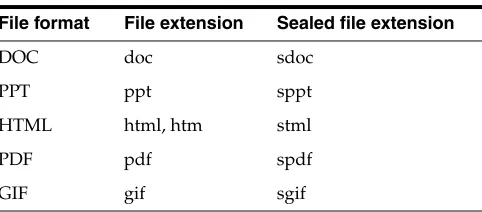
Sealed content uses file extensions that differ from the ones used for unsealed files. For example, a PDF file has the file extension .pdf, whereas a sealed PDF file has the file extension .spdf. The sealed file extension allows Oracle IRM Desktop to identify what file format the sealed content is, and display appropriate sealed file icons. The table below shows some example file extensions and the corresponding sealed file extension.
3.1.2 MIME Types
Sealed content includes a MIME type in the sealed content metadata. This MIME type is used by Oracle IRM Desktop to identify the format of the unsealed content. The
Table 3–1 Example file formats and extensions
File format File extension Sealed file extension
DOC doc sdoc
PPT ppt sppt
HTML html, htm stml
PDF pdf spdf
MIME type is an alternative way of detecting the file format when the content is not stored in a file (for example, a stream of data downloaded from a HTTP server). Unsealed MIME types vary and there are many examples where a single file format has more than one MIME type. For this reason the sealed content contains a sealed MIME type rather than the unsealed content MIME type. For example, a PDF file has the MIME type application/pdf, whereas a sealed PDF file will have a MIME type of application/vnd.sealedmedia.softseal.pdf added to the metadata.
Opening up sealed content in an editor will show that a sealed MIME type is added to the metadata. For example, the public header of a sealed PDF file:
<?xml version="1.0" ?>
<content:PublicHeader xmlns:content="http://xmlns.oracle.com/irm/content" xmlns:classifications="http://xmlns.oracle.com/irm/classifications"> <contentDescription>
...
<sealedMime>application/vnd.sealedmedia.softseal.pdf</sealedMime> ...
</contentDescription> </content:PublicHeader>
3.1.3 Using the Sealing Server
The sealing server provides a web service that can be used to query file and MIME type information. Sealed content file format information is immutable, so consider retrieving this information once and using a local copy when processing sealed files. This will avoid potentially expensive remote calls to a sealing server.
3.1.3.1 Finding the Corresponding Sealed File Name
When sealing a file a common scenario is to create the corresponding sealed file next to the original. The getSealedFileName operation takes a path and file name or just a file name and provides the equivalent sealed file name.
ContentTypeOperations contentTypeOperations = new
ContentTypeOperationsService().getContentTypeOperations();
String results =
contentTypeOperations.getSealedFileName("/usr/home/john/sample.html");
In the example above the results of calling the method would be "/usr/home/john/sample.stml".
3.1.3.2 Obtaining Content Type Information
A content type object contains all the file type information for content that can be sealed. The content type specifies the file extension(s), its sealed file extension, and the associated MIME types. Content type objects can be obtained using the file extension or the MIME type of the sealed or unsealed content.
ContentTypeOperations contentTypeOperations = new
ContentTypeOperationsService().getContentTypeOperations();
ContentType results = contentTypeOperations.getContentTypeFromExtension("pdf");
3.1.4 Using the IRM Java API
3.1.4.1 Finding the Corresponding Sealed File Name
Given an unsealed file name, the corresponding sealed file name can be found using the getSealedFileName operation. This method is useful when sealing content and deciding what the output file name should be.
import static
oracle.irm.engine.content.type.ContentTypeOperationsInstance.getSealedFileName; ..
String results = getSealedFileName("/usr/home/john/sample.html")
3.1.4.2 Obtaining Content Type Information
Given an unsealed or sealed file name, the MIME type and sealed file extension details can be found using the getContentTypeFromExtension method.
import static
oracle.irm.engine.content.type.ContentTypeOperationsInstance.getContentTypeFromExt ension;
import oracle.irm.engine.content.type.ContentType; ..
ContentType results = getContentTypeFromExtension("pdf")
3.2 Sealing
This section contains the following topics:
■ Sealing Using the Sealing Server
■ Sealing Using the IRM Java API
3.2.1 Sealing Using the Sealing Server
The sealing server supports sealing. Content is uploaded to the sealing server, encrypted and signed, and the sealed content returned to the caller.
3.2.1.1 Uploading Content
For JAX-WS generated web service proxies the content is provided as a
javax.activation.DataHandler parameter. Using a data handler allows the web service stack to stream the binary content to the server without having to load the complete file into memory.
javax.activation.DataHandler input = new javax.activation.DataHandler(new FileDataSource("example.html"));
The data source does not have to be a file.
3.2.1.2 Calling seal
A call to the seal method requires the unsealed data (in the form of a DataHandler), the MIME type of the unsealed or sealed content (either is fine) and the sealing
options. The sealing options contain the classification details, custom metadata, and a few other attributes, such as the time the sealed file was created.
SealingServices sealingServices = new
SealingServicesService().getSealingServices(new javax.xml.ws.soap.MTOMFeature());
It is important to enable the MTOM web service feature. This ensures the sealed content is uploaded to the server in the most optimal form. It also avoids java.lang.OutOfMemoryException exceptions if the uploaded file is large.
To call the seal operation, the authenticated user needs rights that allow the seal feature for the specified classification.
3.2.1.3 MIME Type
The seal method requires the MIME type of the unsealed or sealed content to be specified, for example:
■ For HTML content either the txt/html or application/vnd.sealed.txt MIME types can be used.
■ For text content either the txt/plain or
application/vnd.sealedmedia.softseal.html MIME types can be used.
For more information about how to obtain sealed content MIME types and what MIME types are supported, see "File Extensions" on page 3-1.
3.2.1.4 Sealing Options
The sealing options contain the classification, custom metadata and settings that affect how the content is encrypted. The classification is the most important part of the sealed content metadata. The classification contains the opaque XML document called the classification cookie. The classification cookie is the data used by Oracle IRM Desktop and the Oracle IRM J2EE application when associating rights with content. The classification cookie XML structure is defined by the classification system of the sealed content. The context classification system, for example, has an XML structure that includes a UUID to identify the context and a value called the item code which can be used to identify an individual document. The following is an example context cookie that might appear in sealed content:
<?xml version="1.0" ?>
<classifications:ContextCookie
xmlns:classifications="http://xmlns.oracle.com/irm/classifications"> <context>
<uuid>588403f9-9cff-4cce-88e4-e030cc57282a</uuid> </context>
<itemCode>
<value>sample.sdoc</value>
<time>2007-05-10T12:00:00.000+00:00</time> </itemCode>
</classifications:ContextCookie>
Rights for the context classification system are expressed using this information, for example:
John can access all documents with a context UUID of f3cd57c1-f495-48aa-b008-f23afa4d6b07
or:
Mary can access documents with a context UUID of
f3cd57c1-f495-48aa-b008-f23afa4d6b07 and an item code value of
plan001.sdoc or plan002.sdoc
The classification is mandatory and must be specified in the sealing options. The other sealing option properties are optional.
options.setClassification(classification);
3.2.1.4.1 Classification ID The classification ID is a simple string value that is used to uniquely identify the classification. The contents and format of the classification ID differ depending on what classification system is used. The classification ID is used to match classification details with master classification details stored on the server. During the seal operation, if the classification labels and key set are not specified the sealing server looks up the master classification definition by classification ID and uses the labels and key set defined on the master classification.
classification.setId("a4905cd7-7405-469e-b72c-78d11e959b3a");
The classification ID value for the context classification system should be set as the context UUID value. If this value is not set correctly, labels and key set details cannot be automatically set.
3.2.1.4.2 Classification System A classification must specify what classification system is being used to seal the content. A classification system is identified with a UUID value.
ClassificationSystemRef system = new ClassificationSystemRef(); system.setUuid("37c8da32-5420-4146-816c-27f63de27250");
classification.setSystem(system);
The classification system defines what value should be used as the classification ID, as well as what XML data should be set in the classification cookie. When sealed content is opened in Oracle IRM Desktop this information is sent to the Oracle IRM J2EE application. The Oracle IRM J2EE application then uses the classification system and classification cookie data to determine how rights are obtained for the authenticated user.
The UUID value for the context classification system is
37c8da32-5420-4146-816c-27f63de27250. This value is immutable and will never change.
3.2.1.4.3 Key Set When content is sealed, the cryptography keys used to encrypt and sign the content are specified using a key set. This value should be set to null, and is provided for future feature enhancements.
classification.setKeySet(null);
3.2.1.4.4 Server When sealed content is opened or created, the rights to open or seal the content must be obtained from an IRM server. A classification has a URI property which must be set to the URI of an IRM server that will provide the licenses and cryptography keys needed to open or seal content for the classification.
classification.setUri("https://irm.example.com/irm_desktop");
It is important that this value is the same as the the "Server URL" property configured on the General Settings page of the Oracle IRM Server Control Console (the Oracle IRM pages of the Oracle Enterprise Manager Fusion Middleware Control Console).
3.2.1.4.5 Classification Time Rights to access sealed content can include time
constraints. One such constraint can be based on the classification time, for example:
allow John to access any sealed content up to one month after the classification time
allow Mary to access any content classified in 2008
The classification time can be set during the sealing process:
classification.setClassificationTime(new java.util.Date());
If the classification time is not specified, it defaults to the current time by the sealing server.
classification.setClassificationTime(null);
In the 10g Oracle IRM release the classification time was called the publication time.
3.2.1.4.6 Labels A classification can contain a set of human-readable strings called labels. The classification labels are used by Oracle IRM Desktop to show the user classification details, for example informing the user that a document is sealed to the Top Secret classification. If no labels are specified for the classification provided to the seal operation, the sealing server will attempt to fill in the labels from the master classification definition. To allow for multi-language support, labels have a locale property. If the classification can be translated into multiple languages, multiple labels can be provided, each one specifying the appropriate locale (for example, en for English or zh-CN for traditional Chinese - see Locale Codes). Oracle IRM Desktop picks the most appropriate label based on the installed Oracle IRM Desktop language.
For the context classification system, the context labels defined on the Oracle IRM Server Management Console are the ones that are sealed into content.
Empty labels are specified by setting an empty set of labels using null.
classification.setLabels(null);
Labels can also be provided during the sealing process: these override any master classification definition.
Label label = new Label(); label.setLocale("en"); label.setName("Top Secret");
label.setDescription("Top Secret - this is a top secret document");
classification.setLabels(new Label[] {label});
3.2.1.4.7 Classification Cookie The classification cookie is defined by the classification XML schema as an <any> element, that is, an XML element of any form. The structure of this XML document is defined by the classification system being used. Depending on the web service proxy generator used, the cookie XML is typically provided as a org.w3c.dom.Element or Object. The following code snippet shows a
classification cookie for the context classification system. The cookie XML document is created using standard Java document object model (DOM) APIs. It does not matter how the XML document object is created: loaded from a file, created from a string, loaded in from a stream, etc. This example shows the cookie XML being created from a string.
String xml =
"<?xml version=\"1.0\" encoding=\"UTF-8\"?>" + "<classifications:ContextCookie
xmlns:classifications=\"http://xmlns.oracle.com/irm/classifications\">" + " <context>" +
" <uuid>a4905cd7-7405-469e-b72c-78d11e959b3a</uuid>" + " </context>" +
" <itemCode>" +
" <time>2007-05-10T12:00:00.000+00:00</time>" + " </itemCode>" +
"</classifications:ContextCookie>";
java.io.ByteArrayInputStream stream = new
java.io.ByteArrayInputStream(xml.getBytes("utf-8"));
javax.xml.parsers.DocumentBuilderFactory documentBuilderFactory = javax.xml.parsers.DocumentBuilderFactory.newInstance();
// As the context classification cookie uses namespaces, ensure these are maintained on parsing the XML
documentBuilderFactory.setNamespaceAware(true);
javax.xml.parsers.DocumentBuilder documentBuilder = documentBuilderFactory.newDocumentBuilder();
org.w3c.dom.Document document = documentBuilder.parse(stream);
3.2.1.4.8 Providing Custom Metadata Custom metadata can be specified during the sealing process. Custom metadata is an optional property on the SealingOptions. Custom metadata is added as an XML element together with a UUID value that can be used to identify the custom data when peeking the sealed content.
Element element = document.createElement("SampleCustomData");
element.setTextContent("Some example custom data provided as an XML element containing this text");
CustomData data = new CustomData();
// UUID identifies the custom data, this example uses a fixed example UUID value data.setUuid("7f79d1e8-fc07-464c-8477-834951e07060");
// Custom data is XML document data.setData(element);
// Set on the options before sealing
options.setCustomData(new CustomData[] {data});
3.2.1.4.9 Sealed Movie Poster Page A poster page is the image shown before a sealed movie is started. Oracle IRM Desktop loads the optional poster page from the custom metadata section of the public header. A poster page must be a JPEG or GIF image. The image is provided in the custom data as base 64 encoded data together with the file type.
// UUID for poster page image CustomData image = new CustomData();
image.setUuid("6f2c8fba-a2cb-4493-8861-45e5cbda1bac");
// Custom data is base 64 encoded data for image Element imageElement = document.createElement("item");
imageElement.setTextContent("R0lGODlhhQASAPcAAP...XfNIQAAAOw=="); image.setData(imageElement);
// UUID for poster page file type - either 'gif' or 'jpeg' CustomData fileType = new CustomData();
fileType.setUuid("38663feb-5df9-4c14-bd75-b557b6dfea18");
// Custom data is XML document
imageElement.setTextContent("gif"); image.setData(imageElement);
// Set on the options before sealing
options.setCustomData(new CustomData[] {image, fileType});
3.2.2 Sealing Using the IRM Java API
Sealing is the process of encrypting plaintext content and adding signed metadata to that content. This metadata includes the classification details and any custom
metadata supplied during the sealing process. Sealing can also be performed by using Oracle IRM Desktop. A call to the seal requires the unsealed data in the form of a source, the MIME type of the unsealed or sealed content (either is acceptable), and the sealing options. The sealing options contain the classification details, custom metadata, and a few other attributes, such as the time the sealed file was created.
import static oracle.irm.engine.content.sealing.SealingOperationsInstance.seal; import static oracle.irm.engine.content.sealing.FileSource.createFileSource; import oracle.irm.engine.content.sealing.Source;
import oracle.irm.engine.content.sealing.SealingOptions; ...
// Create the unsealed content source
Source source = createFileSource("unsealed.html");
// Sealed file written out to a file
OutputStream output = new FileOutputStream("sealed.stml");
// Sealing options...more on this later SealingOptions options = ...
// Seal the content
seal(source, output, options);
To call the seal operation, the authenticated user needs rights that allow the seal feature for the specified classification.
3.2.2.1 Unsealed Content Source
The source parameter provides the sealing operation with a stream to the unsealed data, the MIME type of the content, and the size of the unsealed content (if available). The MIME type is important because Oracle IRM Desktop uses the MIME type to determine how to render the content. The IRM Java API provides a number of sources: the main ones are listed here.
FileSource
The file source provides can be used to seal a file. Internally, the file source provides a FileInputStream stream to the sealing code. The MIME type is inferred from the file extension.
import static oracle.irm.engine.content.sealing.FileSource.createFileSource; import oracle.irm.engine.content.sealing.Source;
...
Source source = createFileSource("unsealed.html");
URLSource
a stream to downloaded content. The MIME type is inferred from the content-type header, or if that header is not present, a file extension on the URL path.
import static oracle.irm.engine.content.sealing.URLSource.createURLSource; import oracle.irm.engine.content.sealing.Source;
...
java.net.URL url = new java.net.URL("http://irm.example.com/sample.html"); Source source = createURLSource(url);
StreamSource
The stream source allows the programmer to supply both the input stream and MIME type. This option gives the programmer control over the type of input stream and MIME type used during sealing.
import static oracle.irm.engine.content.sealing.StreamSource.createStreamSource; import oracle.irm.engine.content.sealing.Source;
...
java.io.InputStream myStream = new MyInputStreamStream(); Source source = createStreamSource(myStream, "text/html");
The MIME type can be either the unsealed or sealed content MIME type. For example:
■ For HTML content, either the txt/html or application/vnd.sealed.txt MIME types can be used.
■ For text content, either the txt/plain or
application/vnd.sealedmedia.softseal.html MIME types can be used.
3.2.2.2 Sealing Options
The sealing options contain the classification, custom metadata, and settings that affect how the content is encrypted. The classification is the most important part of the sealed content metadata. The classification contains the opaque XML document called the classification cookie. The classification cookie is the data used by Oracle IRM Desktop and the Oracle IRM J2EE application when associating rights with content. The classification cookie XML structure is defined by the classification system of the sealed content. The context classification system, for example, has an XML structure that includes a UUID to identify the context and a value called the item code which can be used to identify an individual document. An example context cookie that might appear in sealed content:
<?xml version="1.0" ?> All rights reserved. --> <classifications:ContextCookie
xmlns:classifications="http://xmlns.oracle.com/irm/classifications"> <context>
<uuid>588403f9-9cff-4cce-88e4-e030cc57282a</uuid> </context>
<itemCode>
<value>sample.sdoc</value>
<time>2007-05-10T12:00:00.000+00:00</time> </itemCode>
</classifications:ContextCookie>
Rights for the context classification system are expressed using this information, for example:
John can access all documents with a context UUID of f3cd57c1-f495-48aa-b008-f23afa4d6b07
Mary can access documents with a context UUID of
f3cd57c1-f495-48aa-b008-f23afa4d6b07 and an item code value of
plan001.sdoc or plan002.sdoc
3.2.2.2.1 Classification The classification is mandatory and must be specified in the sealing options. The other sealing option properties are optional.
import static
oracle.irm.engine.content.sealing.SealingOptionsFactory.createSealingOptions; import static
oracle.irm.engine.core.classification.ClassificationFactory.createClassification; import oracle.irm.engine.content.sealing.SealingOptions;
import oracle.irm.engine.core.classification.Classification; ...
// Create the classification...parameter details are described below Classification classification = createClassification(
id, system, keySet, uri,
classificationTime, labels,
cookie);
// Create sealing options
SealingOptions options = new createSealingOptions(classification);
3.2.2.2.2 Classification ID The classification ID is a simple string value that is used to uniquely identify the classification. The contents and format of the classification ID differ depending on what classification system is used. The classification ID is used to match classification details with master classification details stored on the server. During the seal operation, if the classification labels and key set are not specified the IRM Java API looks up the master classification definition by classification ID and uses the labels and key set defined on the master classification.
Classification System
A classification must specify what classification system is being used to seal the content. The classification system defines what value should be used as the
classification ID, as well as what XML data should be set in the classification cookie.
A classification system is identified with a UUID value.
import static
oracle.irm.engine.core.classification.ClassificationSystemFactory.createClassifica tionSystem;
import oracle.irm.engine.core.classification.ClassificationSystem; ...
java.util.UUID uuid =
java.util.UUID.fromString("37c8da32-5420-4146-816c-27f63de27250"); ClassificationSystem system = createClassificationSystem(uuid);
When sealed content is opened in Oracle IRM Desktop this information is sent to the Oracle IRM J2EE application. The Oracle IRM J2EE application then uses the
Note: The classification ID value for the context classification system should be set as the context UUID value. If this value is not set
classification system and classification cookie data to determine how rights are obtained for the authenticated user.
Key Set
When content is sealed, the cryptography keys used to encrypt and sign the content are specified using a key set. If there is a selection of key sets available to a
classification, a key set can be explicitly set in the classification. This would, for example, allow the caller of the seal method to select a stronger encryption algorithm based on the type of content being sealed. The key set specified must be one the classification allows.
import static oracle.irm.engine.content.key.KeySetFactory.createKeySet; import oracle.irm.engine.content.key.KeySet;
...
java.util.UUID uuid =
java.util.UUID.fromString("52546b5c-a273-46c0-b990-e3538700182e"); KeySet keySet = createKeySet(uuid);
However, the most common way to specify which key set to use during the seal process is to let the system automatically select a key set. This is done by using a null key set value. The IRM Java API will then select the most recently generated key set that this classification allows.
KeySet keySet = null;
Server
When sealed content is opened or created, the rights to open or seal the content must be obtained from an IRM server. A classification has a URI property which must be set to the URI of an IRM server that will provide the licenses and cryptography keys needed to open or seal content for the classification.
java.net.URI uri = java.net.URI.create("https://irm.example.com/irm_desktop");
Classification Time
Rights to access sealed content can include time constraints. One such constraint can be based on the classification time, for example Allow John to access any sealed content up
Note: The IRM Java API provides the constant
oracle.irm.engine.classifications.context.ContextCon stants.CONTEXT_CLASSIFICATION_SYSTEM which can be used as the system parameter when creating a context}.
Note: When sealing content to the context classification system, the most common approach is to specify null in the key set property and let the IRM Java API select the most up to date key set available for the context.