• Table of Contents
• Index
• Reviews
• Reader Reviews
• Errata
Practical Unix & Internet Security, 3rd Edition
By Simson Garfinkel, Alan Schwartz, Gene SpaffordPublisher : O'Reilly Pub Date : February 2003 ISBN : 0-596-00323-4 Pages : 984
This new edition of Practical Unix & Internet Security provides detailed coverage of today's increasingly important security and networking issues. Focusing on the four most popular Unix variants today--Solaris, Mac OS X, Linux, and FreeBSD--this book contains new information on PAM (Pluggable Authentication Modules), LDAP, SMB/Samba, anti-theft technologies, embedded systems, wireless and laptop issues, forensics, intrusion detection, chroot jails, telephone scanners and firewalls, virtual and cryptographic filesystems, WebNFS, kernel security levels, outsourcing, legal issues, new Internet protocols and cryptographic algorithms, and much more.
[ Team LiB ]
• Table of Contents
• Index
• Reviews
• Reader Reviews
• Errata
Practical Unix & Internet Security, 3rd Edition
By Simson Garfinkel, Alan Schwartz, Gene SpaffordPublisher : O'Reilly Pub Date : February 2003 ISBN : 0-596-00323-4 Pages : 984
Copyright Preface
Unix "Security"? Scope of This Book Which Unix System?
Conventions Used in This Book Comments and Questions Acknowledgments
A Note to Would-Be Attackers
Part I: Computer Security Basics
Chapter 1. Introduction: Some Fundamental Questions Section 1.1. What Is Computer Security?
Section 1.2. What Is an Operating System? Section 1.3. What Is a Deployment Environment? Section 1.4. Summary
Chapter 2. Unix History and Lineage Section 2.1. History of Unix Section 2.2. Security and Unix Section 2.3. Role of This Book Section 2.4. Summary
Section 3.5. Compliance Audits Section 3.6. Outsourcing Options
Section 3.7. The Problem with Security Through Obscurity Section 3.8. Summary
Part II: Security Building Blocks
Chapter 4. Users, Passwords, and Authentication
Section 4.1. Logging in with Usernames and Passwords Section 4.2. The Care and Feeding of Passwords Section 4.3. How Unix Implements Passwords
Section 4.4. Network Account and Authorization Systems Section 4.5. Pluggable Authentication Modules (PAM) Section 4.6. Summary
Chapter 5. Users, Groups, and the Superuser Section 5.1. Users and Groups
Section 5.2. The Superuser (root)
Section 5.3. The su Command: Changing Who You Claim to Be Section 5.4. Restrictions on the Superuser
Section 5.5. Summary
Chapter 6. Filesystems and Security Section 6.1. Understanding Filesystems Section 6.2. File Attributes and Permissions Section 6.3. chmod: Changing a File's Permissions Section 6.4. The umask
Section 6.5. SUID and SGID Section 6.6. Device Files
Section 6.7. Changing a File's Owner or Group Section 6.8. Summary
Chapter 7. Cryptography Basics
Section 7.1. Understanding Cryptography Section 7.2. Symmetric Key Algorithms Section 7.3. Public Key Algorithms Section 7.4. Message Digest Functions Section 7.5. Summary
Chapter 8. Physical Security for Servers
Section 8.1. Planning for the Forgotten Threats Section 8.2. Protecting Computer Hardware Section 8.3. Preventing Theft
Section 8.4. Protecting Your Data
Section 8.5. Story: A Failed Site Inspection Section 8.6. Summary
Chapter 9. Personnel Security Section 9.1. Background Checks Section 9.2. On the Job
Section 9.4. Other People Section 9.5. Summary
Part III: Network and Internet Security Chapter 10. Modems and Dialup Security Section 10.1. Modems: Theory of Operation Section 10.2. Modems and Security Section 10.3. Modems and Unix
Section 10.4. Additional Security for Modems Section 10.5. Summary
Chapter 11. TCP/IP Networks Section 11.1. Networking
Section 11.2. IP: The Internet Protocol Section 11.3. IP Security
Section 11.4. Summary
Chapter 12. Securing TCP and UDP Services
Section 12.1. Understanding Unix Internet Servers and Services Section 12.2. Controlling Access to Servers
Section 12.3. Primary Unix Network Services Section 12.4. Managing Services Securely Section 12.5. Putting It All Together: An Example Section 12.6. Summary
Chapter 13. Sun RPC
Section 13.1. Remote Procedure Call (RPC) Section 13.2. Secure RPC (AUTH_DES) Section 13.3. Summary
Chapter 14. Network-Based Authentication Systems Section 14.1. Sun's Network Information Service (NIS) Section 14.2. Sun's NIS+
Section 14.3. Kerberos Section 14.4. LDAP
Section 14.5. Other Network Authentication Systems Section 14.6. Summary
Chapter 15. Network Filesystems Section 15.1. Understanding NFS Section 15.2. Server-Side NFS Security Section 15.3. Client-Side NFS Security Section 15.4. Improving NFS Security Section 15.5. Some Last Comments on NFS Section 15.6. Understanding SMB
Section 15.7. Summary
Chapter 16. Secure Programming Techniques
Part IV: Secure Operations Chapter 17. Keeping Up to Date
Section 17.1. Software Management Systems Section 17.2. Updating System Software Section 17.3. Summary
Chapter 18. Backups
Section 18.1. Why Make Backups? Section 18.2. Backing Up System Files Section 18.3. Software for Backups Section 18.4. Summary
Chapter 19. Defending Accounts Section 19.1. Dangerous Accounts Section 19.2. Monitoring File Format Section 19.3. Restricting Logins
Section 19.4. Managing Dormant Accounts Section 19.5. Protecting the root Account Section 19.6. One-Time Passwords
Section 19.7. Administrative Techniques for Conventional Passwords Section 19.8. Intrusion Detection Systems
Section 19.9. Summary
Chapter 20. Integrity Management Section 20.1. The Need for Integrity Section 20.2. Protecting Integrity
Section 20.3. Detecting Changes After the Fact Section 20.4. Integrity-Checking Tools
Section 20.5. Summary
Chapter 21. Auditing, Logging, and Forensics Section 21.1. Unix Log File Utilities
Section 21.2. Process Accounting: The acct/pacct File Section 21.3. Program-Specific Log Files
Section 21.4. Designing a Site-Wide Log Policy Section 21.5. Handwritten Logs
Section 21.6. Managing Log Files Section 21.7. Unix Forensics Section 21.8. Summary
Part V: Handling Security Incidents Chapter 22. Discovering a Break-in Section 22.1. Prelude
Section 22.2. Discovering an Intruder Section 22.3. Cleaning Up After the Intruder Section 22.4. Case Studies
Section 22.5. Summary
Chapter 23. Protecting Against Programmed Threats Section 23.1. Programmed Threats: Definitions Section 23.2. Damage
Section 23.3. Authors Section 23.4. Entry
Section 23.5. Protecting Yourself Section 23.6. Preventing Attacks Section 23.7. Summary
Chapter 24. Denial of Service Attacks and Solutions Section 24.1. Types of Attacks
Section 24.2. Destructive Attacks Section 24.3. Overload Attacks
Section 24.4. Network Denial of Service Attacks Section 24.5. Summary
Chapter 25. Computer Crime
Section 25.1. Your Legal Options After a Break-in Section 25.2. Criminal Hazards
Section 25.3. Criminal Subject Matter Section 25.4. Summary
Chapter 26. Who Do You Trust?
Section 26.1. Can You Trust Your Computer? Section 26.2. Can You Trust Your Suppliers? Section 26.3. Can You Trust People? Section 26.4. Summary
Part VI: Appendixes
Appendix A. Unix Security Checklist Section A.1. Preface
Section A.2. Chapter 1: Introduction: Some Fundamental Questions Section A.3. Chapter 2: Unix History and Lineage
Section A.4. Chapter 3: Policies and Guidelines
Section A.5. Chapter 4: Users, Passwords, and Authentication Section A.6. Chapter 5: Users, Groups, and the Superuser Section A.7. Chapter 6: Filesystems and Security
Section A.8. Chapter 7: Cryptography Basics Section A.9. Chapter 8: Physical Security for Servers Section A.10. Chapter 9: Personnel Security
Section A.11. Chapter 10: Modems and Dialup Security Section A.12. Chapter 11: TCP/IP Networks
Section A.13. Chapter 12: Securing TCP and UDP Services Section A.14. Chapter 13: Sun RPC
Section A.15. Chapter 14: Network-Based Authentication Systems Section A.16. Chapter 15: Network Filesystems
Section A.17. Chapter 16: Secure Programming Techniques Section A.18. Chapter 17: Keeping Up to Date
Section A.19. Chapter 18: Backups
Section A.20. Chapter 19: Defending Accounts Section A.21. Chapter 20: Integrity Management
Section A.27. Chapter 26: Who Do You Trust? Section A.28. Appendix A: Unix Security Checklist Section A.29. Appendix B: Unix Processes
Section A.30. Appendixes C, D, and E: Paper Sources, Electronic Sources, and Organizations
Appendix B. Unix Processes Section B.1. About Processes Section B.2. Signals
Section B.3. Controlling and Examining Processes Section B.4. Starting Up Unix and Logging In
Appendix C. Paper Sources
Section C.1. Unix Security References Section C.2. Other Computer References
Appendix D. Electronic Resources Section D.1. Mailing Lists Section D.2. Web Sites Section D.3. Usenet Groups Section D.4. Software Resources
Appendix E. Organizations
Section E.1. Professional Organizations Section E.2. U.S. Government Organizations Section E.3. Emergency Response Organizations
[ Team LiB ]
Copyright
Copyright © 2003, 1996, 1991 O'Reilly & Associates, Inc.
Printed in the United States of America.
Published by O'Reilly & Associates, Inc., 1005 Gravenstein Highway North, Sebastopol, CA 95472.
O'Reilly & Associates books may be purchased for educational, business, or sales promotional use. Online editions are also available for most titles (http://safari.oreilly.com). For more information, contact our corporate/institutional sales department: (800) 998-9938 or [email protected].
Nutshell Handbook, the Nutshell Handbook logo, and the O'Reilly logo are registered trademarks of O'Reilly & Associates, Inc. Many of the designations used by manufacturers and sellers to distinguish their products are claimed as trademarks. Where those designations appear in this book, and O'Reilly & Associates, Inc. was aware of a trademark claim, the designations have been printed in caps or initial caps. The association between the image of a safe and the topic of Unix and Internet security is a trademark of O'Reilly & Associates, Inc.
While every precaution has been taken in the preparation of this book, the publisher and authors assume no responsibility for errors or omissions, or for damages resulting from the use of the information contained herein.
Preface
It's been 11 years since the publication of Practical Unix Security—and 6 years since Practical Unix and Internet Security was published—and oh, what a difference that time has made!
In 1991, the only thing that most Americans knew about Unix and the Internet was that they were some sort of massive computer network that had been besieged by a "computer virus" in 1988. By 1996, when our second edition was published, the Internet revolution was just beginning to take hold, with more than 10 million Americans using the Internet on a regular basis to send electronic mail, cruise the World Wide Web, and sometimes even shop.
Today it is increasingly difficult for people in much of the world to remember the pre-Internet era. Perhaps 500 million people around the world now use the Internet, with several billion more touched by it in some manner. In the United States more than half the population uses the Internet on a daily basis. We have watched an Internet revolution become a dot-com craze, which then became a bust. And nobody remembers that 1988 Internet worm anymore—these days, most Internet users are bombarded by network worms on a daily basis.
Despite our greater reliance on network computing, the Internet isn't a safer place today than it was in 1991 or in 1996. If anything, the Internet is considerably less secure. Security mishaps on the Internet continue to be front-page stories in newspapers throughout the world. Sadly, these flaws continue to be accommodated rather than corrected.[1] The results are increasingly disastrous. The second edition of this book, for example, noted a security incident in which 20,000 people had their credit card numbers stolen from an Internet service provider; a few months before this third edition went to print, attackers broke into a system operated for the State of California and downloaded personal information on 262,000 state employees. Included in the haul were names, addresses, Social Security numbers—everything needed for identity theft.[2]
[1] We do note, however, that the vast majority of viruses, worms, security flaws, and incidents tend to occur in non-Unix systems.
[2]http://www.gocsi.com/press/20020407.html
Computer crime and the threat of cyberterrorism continue to be growing problems. Every year the Computer Security Institute (CSI) and the San Francisco Federal Bureau of Investigation (FBI) Computer Intrusion Squad survey organizations to find their current level of computer crime and intrusions. The 2002 survey had 503 responses from security practitioners in U.S. corporations, government agencies, financial institutions, medical institutions, and universities. Some of the results of the survey include:
Ninety percent of respondents (primarily large corporations and government agencies) detected computer security breaches within the last 12 months.[3]
[3] This may mean the others had incidents too, but were unable to detect them or declined to report them.
Eighty percent acknowledged financial losses as a result of system security breaches.
The combined loss of the 223 respondents who gave dollar values for their annual loss was more than $456 million, of which $171 million was the theft of proprietary information, and $116 million was financial fraud.
Slightly more than one-third (34%) reported the intrusions to law enforcement—up from 16% reporting in 1996.
Incidents reported included:
Computer viruses (85%)
Employees abusing their Internet connection, such as downloading pornography or pirated software, or sending inappropriate email (78%)
Penetration from outside the organization (40%)
Denial of service (DOS) attacks (40%)
Unauthorized access or misuse of the company's web sites (38%)
One quarter of the respondents who suffered attacks said that they had experienced between 2 and 5 incidents; 39% said that they had experienced 10 or more incidents. The average reported financial loss per company per year was in excess of $2 million.
What do all of these numbers mean for Unix? To be sure, most of the systems in use today are based on Microsoft's Windows operating system. Unix and Unix variants are certainly more secure than Windows, for reasons that we'll discuss in this book. Nevertheless, experience tells us that a poorly-administered Unix computer can be just as vulnerable as a typical Windows system: if you have a vulnerability that is known, an attacker can find it, exploit it, and take over your computer. It is our goal in this book to show you how to prevent yourself from ever experiencing this fate—and if you do, it is our goal to tell you what to do about it.
Unix "Security"?
When the first version of this book appeared in 1991, many people thought that the words "Unix security" were an oxymoron—two words that appeared to contradict each other, much like the words "jumbo shrimp" or "Congressional action." After all, the ease with which a Unix guru could break into a system, seize control, and wreak havoc was legendary in the computer community. Some people couldn't even imagine that a computer running Unix could ever be made secure.
Since then, the whole world of computers has changed. These days, many people regard Unix as a relatively secure operating system. While Unix was not originally designed with military-level security in mind, it was built both to withstand limited external attacks and to protect users from the
accidental or malicious actions of other users on the system. Years of constant use and study have made the operating system even more secure, because most of the Unix security faults have been publicized and fixed. Today, Unix is used by millions of people and many thousands of organizations around the world, all without obvious major mishaps.
But the truth is, Unix really hasn't become significantly more secure with its increased popularity. That's because fundamental flaws still remain in the operating system's design. The Unix superuser remains a single point of attack: any intruder or insider who can become the Unix superuser can take over the system, booby-trap its programs, and hold the computer's users hostage—sometimes even without their knowledge.
One thing that has improved is our understanding of how to keep a computer relatively secure. In recent years, a wide variety of tools and techniques have been developed with the goal of helping system administrators secure their Unix computers. Another thing that has changed is the level of understanding of Unix by system administrators: now it is relatively easy for companies and other organizations to hire a professional system administrator who will have the expertise to run their computers securely.
The difference between a properly secured Unix system and a poorly secured Unix system is vast, and the difference between a system administrator with the knowledge and motivation to secure a system and one without that knowledge or motivation can be equally vast. This book can help.
What This Book Is
This book is a practical guide to security for Unix and Unix-like (e.g., Linux) systems. For users, we explain what computer security is, describe some of the dangers that you may face, and tell you how to keep your data safe and sound. For administrators, we explain in greater detail how Unix security mechanisms work and how to configure and administer your computer for maximum protection. For those who are new to Unix, we also discuss Unix's internals, its history, and how to keep yourself from getting burned.
Is this book for you? If you administer a Unix system, you will find many tips for running your computer more securely. If you are new to the Unix system, this book will teach you the underlying concepts on which Unix security is based. If you are a developer, this book will give you valuable details that are rarely found together in one place—it might even give you an idea for a new security product.
We've collected helpful information concerning how to secure your Unix system against threats, both internal and external. In most cases, we've presented material and commands without explaining in any detail how they work, and in several cases we've simply pointed out the nature of the commands and files that need to be examined; we've assumed that a typical system administrator is familiar with the commands and files of his system, or at least has the manuals available to study.
A Note About Your Manuals
the extra time to read your manuals to verify what we say. You should also experiment with your running system to make sure that the programs behave the way they are documented.
Thus, we recommend that you go back and read through the manuals every few months to stay familiar with your system. Sometimes rereading the manuals after gaining new experience gives you added insight. Other times it reminds you of useful features that you haven't used yet. Many successful system administrators have told us that they make it a point to reread all their manuals every 6 to 12 months!
Certain key parts of this book were written with the novice user in mind. We have done this for two reasons: to be sure that important Unix security concepts are presented to the fullest and to make important sections (such as those on file permissions and passwords) readable on their own. That way, this book can be passed around with a note saying, "Read Chapter 4 to learn about how to set passwords."[4]
[4] Remember to pass around the book itself or get another copy to share. If you were to make a photocopy of the pages to circulate, it could be a significant violation of the copyright. This sets a bad example about respect for laws and rules, and conveys a message contrary to good security policy.
What This Book Is Not
This book is not intended to be a Unix tutorial, nor is it a system administration tutorial—there are better books for that (see Appendix C), and good system administrators need to know about much more than security. Use this book as an adjunct to tutorials and administration guides.
This book is also not a general text on computer security—we've tried to keep the formalisms to a minimum. Thus, this is not a book that is likely to help you design new security mechanisms for Unix, although we have included a chapter on how to write more secure programs.
We've also tried to minimize the amount of information in this book that would be useful to people trying to break into computer systems. If that is your goal, then this book probably isn't for you.
We have also tried to resist the temptation to suggest:
Replacements for your standard commands
Modifications to your kernel
Other significant programming exercises to protect your system
The reason has to do with our definition of practical. For security measures to be effective, they need to be generally applicable. Most users of Solaris and other commercial versions of Unix do not have access to the source code: they depend upon their vendors to fix bugs. Even most users of so-called "open source" systems such as Linux and FreeBSD rely on others to fix bugs—there are simply too many flaws and not enough time. Even if we were to suggest changes, they might not be applicable to every platform of interest. Experience has shown that making changes often introduces new flaws unless the changes are extremely simple and well-understood.
There is also a problem associated with managing wide-scale changes. Not only can changes make the system more difficult to maintain, but changes can be impossible to manage across many architectures, locations, and configurations. They also will make vendor maintenance more difficult— how can vendors respond to bug reports for software that they didn't provide?
Third-Party Security Tools
There are many programs, systems, and other kinds of software tools that you can use to improve the security of your computer system. Many of these tools come not from your own organization or from the vendor, but instead from a third party. In recent years, third-party tools have been provided by corporations, universities, individuals, and even the computer underground.
When we published the first version of this book, there were precious few third-party security tools. Because the tools that did exist were important and provided functionality that was not otherwise available, we took an inclusive view and described every one that we thought significant. We tried that same approach when the second edition of this book was published and we suffered the
consequences. There were simply too many tools, and our printed descriptions soon were out of date.
With this third edition of Practical Unix and Internet Security, we have taken a fundamentally different approach. Today, tools are both being developed and being abandoned at such a furious rate that it is no longer practical to mention them all in a printed volume. Furthermore, many of the better tools have been incorporated into the operating system. Therefore, in this edition of the book we will, for the most part, discuss only tools that have been integrated into operating system distributions and releases. We will not devote time (and precious pages) to explaining how to download and install third-party tools or modifications.[5]
[5] Articles about current security tools, with detailed configuration information, appear regularly on the O'Reilly web site and the O'Reilly Network, as well as on a variety of security-related sites. In addition, see Appendix D for some suggestions.
[ Team LiB ]
Scope of This Book
This book is divided into six parts; it includes 26 chapters and 5 appendixes.
Part I, provides a basic introduction to computer security, the Unix operating system, and security policy. The chapters in this book are designed to be accessible to both users and administrators.
Chapter 1, takes a very basic look at several basic questions: What is computer security? What is an operating system? What is a deployment environment? It also introduces basic terms we use throughout the book.
Chapter 2, explores the history of the Unix operating system, and discusses the way that Unix history has affected Unix security.
Chapter 3, examines the role of setting good policies to guide the protection of your systems. It also describes the trade-offs you will need to make to account for cost, risk, and
corresponding benefits.
Part II, provides a basic introduction to Unix host security. The chapters in this part of the book are also designed to be accessible to both users and administrators.
Chapter 4, is about Unix user accounts. It discusses the purpose of passwords, explains what makes good and bad passwords, and describes how the crypt( ) password encryption system works.
Chapter 5, describes how Unix groups can be used to control access to files and devices. It discusses the Unix superuser and the role that special users play. This chapter also introduces the Pluggable Authentication Module (PAM) system.
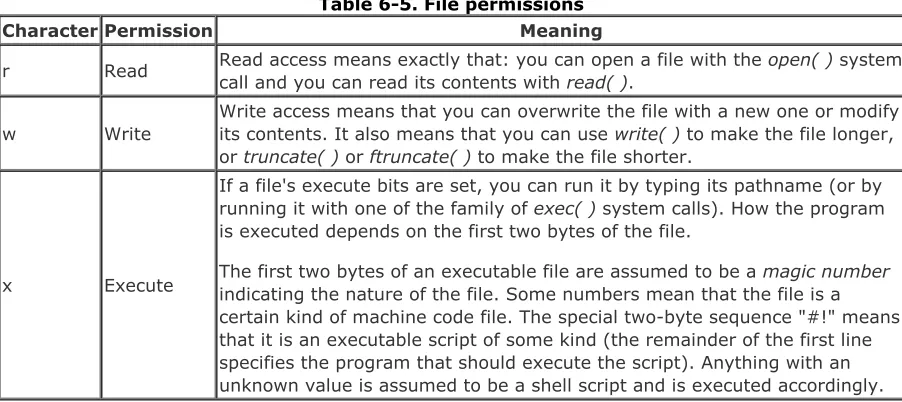
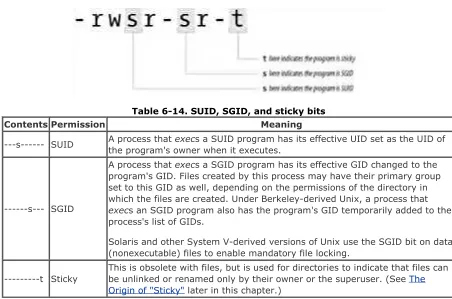
Chapter 6, discusses the security provisions of the Unix filesystem and tells how to restrict access to files and directories to the file's owner, to a group of people, or to everybody using the computer system.
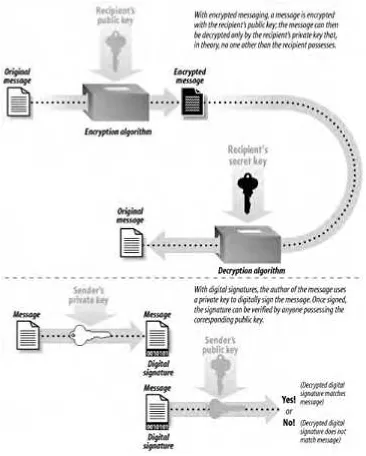
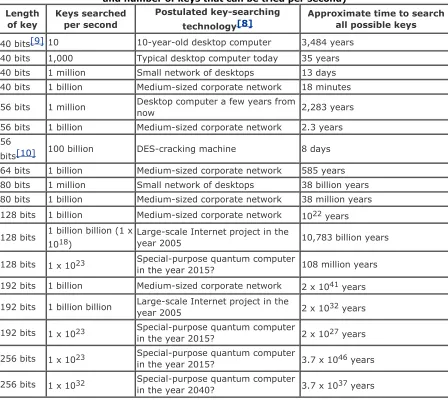
Chapter 7, discusses the role of encryption and message digests in protecting your security.
Chapter 8. What if somebody gets frustrated by your super-secure system and decides to smash your computer with a sledgehammer? This chapter describes physical perils that face your computer and its data and discusses ways of protecting against them.
Chapter 9, explores who you employ and how they fit into your overall security scheme.
Part III, describes the ways in which individual Unix computers communicate with one another and the outside world, and the ways in which these systems can be subverted by attackers who are trying to break into your computer system. Because many attacks come from the outside, this part of the book is vital reading for anyone whose computer has outside connections.
Chapter 10, describes how modems work and provides step-by-step instructions for testing your computer's modems to see if they harbor potential security problems.
Chapter 11, provides background on how TCP/IP networking programs work and describes the security problems they pose.
Chapter 12, the longest chapter in this book, explores the most common TCP and UDP services and how you can secure them.
Chapter 15, describes both Sun Microsystems' Network Filesystem (NFS) and the Windows-compatible Server Message Block (SMB)—in particular, the Samba system.
Chapter 16, describes common pitfalls you might encounter when writing your own software. It gives tips on how to write robust software that will resist attack from malicious users. This information is particularly important when developing network servers.
Part IV, is directed primarily towards Unix system administrators. It describes how to configure Unix on your computer to minimize the chances of a break-in, as well as to limit the opportunities for a nonprivileged user to gain superuser access.
Chapter 17, discusses strategies for downloading security patches and keeping your operating system up to date.
Chapter 18, discusses why and how to make archival backups of your storage. It includes discussions of backup strategies for different types of organizations.
Chapter 19, describes ways that an attacker might try to initially break into your computer system. By finding these "doors" and closing them, you increase the security of your system.
Chapter 20, discusses how to monitor your filesystem for unauthorized changes. This chapter includes coverage of the use of message digests and read-only disks, and the configuration and use of the Tripwire utility.
Chapter 21, discusses the logging mechanisms that Unix provides to help you audit the usage and behavior of your system.
Part V, contains instructions for what to do if your computer's security is compromised. This part of the book will also help system administrators protect their systems from authorized users who are misusing their privileges.
Chapter 22, contains step-by-step directions to follow if you discover that an unauthorized person is using your computer.
Chapter 23, discusses approaches for handling computer worms, viruses, Trojan Horses, and other programmed threats.
Chapter 24, describes ways that both authorized users and attackers can make your system inoperable. We also explore ways that you can find out who is doing what, and what to do about it.
Chapter 25. Occasionally, the only thing you can do is sue or try to have your attackers thrown in jail. This chapter describes legal recourse you may have after a security breach and
discusses why legal approaches are often not helpful. It also covers some emerging concerns about running server sites connected to a wide area network such as the Internet.
Chapter 26, makes the point that somewhere along the line, you need to trust a few things, and people. We hope you are trusting the right ones.
Part VI, contains a number of useful lists and references.
Appendix A, contains a point-by-point list of many of the suggestions made in the text of the book.
Appendix C, lists books, articles, and magazines about computer security.
Appendix D, is a brief listing of some significant security tools to use with Unix, including descriptions of where to find them on the Internet.
Appendix E, contains the names, telephone numbers, and addresses of organizations that are devoted to ensuring that computers become more secure.
Which Unix System?
An unfortunate side effect of Unix's popularity is that there are many different versions of Unix; today, nearly every computer manufacturer has its own. When we wrote the first edition of this book, there were two main families of Unix: AT&T System V and Berkeley's BSD. There was a sharp division between these systems. System V was largely favored by industry and government because of its status as a well-supported, "official" version of Unix. BSD, meanwhile, was largely favored by academic sites and developers because of its flexibility, scope, and additional features.
When we wrote the first edition of this book, only Unix operating systems sold by AT&T could be called "Unix" because of licensing restrictions. Other manufacturers adopted names such as SunOS (Sun Microsystems), Solaris (also Sun Microsystems), Xenix (Microsoft), HP-UX (Hewlett-Packard), A/UX (Apple), Dynix (Sequent), OSF/1 (Open Software Foundation), Linux (Linus Torvalds), Ultrix (Digital Equipment Corporation), and AIX (IBM)—to name a few. Practically every supplier of a Unix or Unix-like operating system made its own changes to the operating system. Some of these changes were small, while others were significant. Some of these changes had dramatic security implications and, unfortunately, many of these implications are usually not evident. Not every vendor considers the security implications of its changes before making them.
In recent years, Unix has undergone a rapid evolution. Most of the commercial versions of the operating system have died off, while there has simultaneously been an explosion of "free" Unix systems. Security has grown more important in recent years, and now all companies, organizations, and individuals distributing Unix claim to take the subject of security quite seriously. However, it is clear that some take the subject far more seriously than others.
Versions Covered in This Book
The third edition of this book covers Unix security as it relates to the four most common versions of Unix today: Solaris, Linux, FreeBSD, and MacOS X. Solaris and Linux are generally thought of as System V-based operating systems, while FreeBSD and MacOS X are generally seen as BSD-based systems. However, there has been so much mingling of concepts and code in recent years that these distinctions may no longer be relevant. In many cases, the underlying theory and commands on these systems are similar enough that we can simply use the word "Unix" to stand for all of these systems. In cases where we cannot, we note individual operating system differences.
Particular details in this book concerning specific Unix commands, options, and side effects are based upon the authors' experience with AT&T System V Release 3.2 and 4.0, Berkeley Unix Release 4.3 and 4.4, Digital Unix, FreeBSD 3.0 through 4.5, Linux (various versions), MacOS X, NeXTSTEP 0.9 through 4.0, Solaris 2.3 through 8, SunOS 4.0 and 4.1, and Ultrix 4.0. We've also had the benefit of our technical reviewers' long experience with other systems, such as AIX and HP-UX. As these systems are representative of the majority of Unix machines in use, it is likely that these descriptions will suffice for most machines to which readers will have access.
Throughout this book, we generally refer to System V Release 4 as SVR4. When we refer to SunOS without a version number, assume that we are referring to SunOS 4.1.x. When we refer to Solaris without a version number, assume that we are referring to Solaris 7 and above.
We also refer to operating systems that run on top of the Linux kernel as Linux, even though many Linux systems contain significant components that were developed by readily identifiable third parties. (For example, the Free Software Foundation was responsible for the creation of the GNU
development tools, without which the Linux system could not have been built, while MIT and the X Windows Consortium were responsible for the creation and initial development of the X Window system.)
feature offered in every version issued by every manufacturer—that would only make the book longer, as well as more difficult to read. It would also make this book inaccurate, as some vendors change their systems frequently. Furthermore, we are reluctant to describe special-case features on systems we have not been able to test thoroughly ourselves. Whether you're a system administrator or an ordinary user, it's vital that you read the reference pages of your own particular Unix system to understand the differences between what is presented in this volume and the actual syntax of the commands that you're using. This is especially true in situations in which you depend upon the specific output or behavior of a program to verify or enhance the security of your system.
The Many Faces of "Open Source" Unix
One of the difficulties in writing this book is that there are many, many versions of Unix. All of them have differences: some minor, some significant. Our problem, as you shall see, is that even apparently minor differences between two operating systems can lead to dramatic differences in overall security. Simply changing the protection settings on a single file can turn a secure operating system into an unsecure one.
The Linux operating system makes things even more complicated. That's because Linux is a moving target. There are many different distributions of Linux. Some have minor differences, such as the installation of a patch or two. Others are drastically different, with different kernels, different driver software, and radically different security models.
Furthermore, Linux is not the only free form of Unix. After the release of Berkeley 4.3, the Berkeley Computer Systems Research Group (CSRG) (and a team of volunteers across the Internet) worked to develop a system that was devoid of all AT&T code; this release was known as Berkeley 4.4. Somewhere along the line the project split into several factions, eventually producing four operating systems: BSD 4.4 Lite, NetBSD, FreeBSD, and OpenBSD. Today there are several versions of each of these operating systems. There are also systems based on the Mach kernel and systems that employ Unix-like utilities from a number of sources. (Chapter 2 covers this history.)
The world of free Unix is less of a maelstrom today than it was when the second edition of this book was published. However, it remains true that if you want to run Linux, NetBSD, FreeBSD, or any other such system securely, it is vitally important that you know exactly which version of which distribution of which operating system with which software you are running on your computer. Merely reading your manual may not be enough! You may have to read the source code. You may also have to verify that the source code you are reading actually compiles to produce the binaries you are running!
Also, please note that we cannot possibly describe (or even know) all the possible
variations and implications, so don't assume that we have covered all the nuances of your particular system. When in doubt, check it out.
By writing this book, we hope to provide information that will help users and system administrators improve the security of their systems. We have tried to ensure the accuracy and completeness of everything within this book. However, as we noted previously, we can't be sure that we have covered everything, and we can't know about all the quirks and modifications made to every version and installation of Unix-derived systems. Thus, we can't promise that your system security will never be compromised if you follow all our advice, but we can promise that successful attacks will be less likely. We encourage readers to tell us of significant differences between their own experiences and the examples presented in this book; those differences may be noted in future editions.
"Secure" Versions of Unix
Over time, several vendors have developed "secure" versions of Unix, sometimes known as "trusted Unix." These systems embody mechanisms, enhancements, and restraints described in various government standards documents. These enhanced versions of Unix are designed to work in
Multilevel Security (MLS) and Compartmented-Mode Workstation (CMW) environments—where there are severe constraints designed to prevent the mixing of data and code with different security classifications, such as Secret and Top Secret. In 2001, Chris I. Dalton and Tse Huong Choo at HP Labs released a system called Trusted Linux. The National Security Agency has also released a Linux
adds a form of mandatory access control to a vanilla Linux. Assuming that there are no major bugs and that you configure it correctly, you can achieve better security— but it doesn't come automatically, nor does it provide a comprehensive security solution.
Secure Unix systems generally have extra features added to them, including access control lists, data labeling, enhanced auditing, and mutual authentication between separate components. They also remove some traditional features of Unix, such as the superuser's special access privileges and access to some device files. Despite these changes, the systems still bear a resemblance to standard Unix. Trusted Solaris still functions basically like Solaris.
These systems are not in widespread use outside of selected government agencies, their contractors, and the financial industry. It seems doubtful to us that they will ever enjoy widely popular acceptance because many of the features make sense only within the context of a military security policy. On the other hand, some of these enhancements are useful in the commercial environment as well, and C2 security features are already common in many modern versions of Unix.
Today, trusted Unix systems are often more difficult to use in a wide variety of environments, more difficult to port programs to, and more expensive to obtain and maintain. Thus, we haven't bothered to describe the quirks and special features of these systems in this book. If you have such a system, we recommend that you read the vendor documentation carefully and repeatedly.
[ Team LiB ]
Conventions Used in This Book
The following conventions are used in this book:
Italic
Used for Unix file, directory, command, user, and group names. It is also used for URLs and to emphasize new terms and concepts when they are introduced.
Constant Width
Used for code examples, system output, and passwords.
Constant Width Italic
Used in examples for variable input or output (e.g., a filename).
Constant Width Bold
Used in examples for user input.
Strike-through
Used in examples to show input typed by the user that is not echoed by the computer. This is mainly used for passwords and passphrases that are typed.
call( )
Used to indicate a system call, in contrast to a command. In the original edition of the book, we referred to commands in the form command(1) and to calls in the form call(2) or call(3), in which the number indicates the section of the Unix programmer's manual in which the
command or call is described. Because different vendors now have diverged in their
documentation section numbering, we try to avoid this convention in this edition of the book. (Consult your own documentation index for the right section.) The call( ) convention is helpful in differentiating, for example, between the crypt command and the crypt( ) library function.
%
The Unix C shell prompt.
$
T he Unix Bourne shell or Korn shell prompt.
#
The Unix superuser prompt (Korn, Bourne, or C shell). We usually use this symbol for examples that should be executed by root.
Normally, we will use the Bourne or Korn shell in our examples unless we are showing something that is unique to the C shell.
[ ]
Surrounds optional values in a description of program syntax. (The brackets themselves should never be typed.)
Ctrl-X or ^X indicate the use of control characters. They mean "Hold down the Control key while typing the character `X'."
This icon designates a warning relating to the nearby text.
[ Team LiB ]
Comments and Questions
We have tested and verified the information in this book to the best of our ability, but you may find that features have changed (or even that we have made mistakes!). Please let us know about any errors you find, as well as your suggestions for future editions, by writing to:
O'Reilly & Associates, Inc. 1005 Gravenstein Highway North Sebastopol, CA 95472
(800) 998-9938 (U.S. and Canada) (707) 827-7000 (international/local) (707) 829-0104 (fax)
You can also contact O'Reilly by email. To be put on the mailing list or request a catalog, send a message to:
We have a web page for this book, which lists errata, examples, and any additional information. You can access this page at:
http://www.oreilly.com/catalog/puis3/
To comment or ask technical questions about this book, send email to:
For more information about O'Reilly books, conferences, Resource Centers, and the O'Reilly Network, see the O'Reilly web site at:
http://www.oreilly.com/
Acknowledgments
We have many people to thank for their help on the various editions of this book. In the following sections, we've included the acknowledgments for previous editions as well as the current one.
Third Edition
We would like to express our deepest thanks to the many people who worked with us in getting out the third version of this book. In particular, Paco Hope answered questions about the Unix "jail" now present on some versions, Casey Schaufler answered questions about POSIX 1003.1e; Ed Finkler helped with testing and expansion of the random number script in Chapter 16; students associated with the MIT Student Information Processing Board answered questions on Kerberos, and Wietse Venema answered questions about TCP Wrappers.
Many individuals reviewed some or all of the chapters in this book and provided us with helpful feedback that made the book better than it otherwise would have been. In particular, we would like to express our thanks to Brian Carrier, Dorothy Curtis, Linda McCarthy, Clifford Neuman, Gregory D. Rosenberg (N9NNO), Danny Smith, Kevin Unrue, Wietse Venema, and Keith Watson. Special thanks to Gregg Rosenberg of Ricis, Inc., for the speed and thoroughness of his review of all chapters. Any errors that remain are ours alone.
Untold thanks go to Debby Russell, our editor at O'Reilly & Associates, without whom this book would not have happened.
Second Edition
We are grateful to everyone who helped us develop the second edition of this book. The book, and the amount of work required to complete it, ended up being much larger than we originally envisioned. We started the rewrite of this book in January 1995; we finished it in March 1996, many months later than we had intended.
Our thanks to the people at Purdue University in the Computer Sciences Department and the COAST Laboratory who read and reviewed early drafts of this book: Mark Crosbie, Bryn Dole, Adam Hammer, Ivan Krsul, Steve Lodin, Dan Trinkle, and Keith A. Watson; Sam Wagstaff also commented on
individual chapters.
Thanks to our technical reviewers: Fred Blonder (NASA), Brent Chapman (Great Circle Associates), Michele Crabb (NASA), James Ellis (CERT/CC), Dan Farmer (Sun), Eric Halil (AUSCERT), Doug Hosking (Systems Solutions Group), Tom Longstaff (CERT/CC), Danny Smith (AUSCERT), Jan Wortelboer (University of Amsterdam), David Waitzman (BBN), and Kevin Ziese (USAF). We would also like to thank our product-specific reviewers, who carefully read the text to identify problems and add content applicable to particular Unix versions and products. They are C.S. Lin (HP), Carolyn Godfrey (HP), Casper Dik (Sun), Andreas Siegert (IBM/AIX), and Grant Taylor (Linux),
Several people reviewed particular chapters. Peter Salus reviewed the introductory chapter, Ed Ravin (NASA Goddard Institute for Space Studies) reviewed the UUCP chapter, Adam Stein and Matthew Howard (Cisco) reviewed the networking chapters, Lincoln Stein (MIT Whitehead Institute) reviewed the World Wide Web chapter, and Wietse Venema reviewed the chapter on wrappers.
Æleen Frisch, author of Essential System Administration (O'Reilly & Associates, 1995) kindly allowed us to excerpt the section on access control lists from her book.
complex set of Frame and SGML tools. Nicole Gipson Arigo did a wonderful job as production manager for this book. Clairemarie Fisher O'Leary assisted with the production process and managed the work of contractors. Kismet McDonough-Chan performed a quality assurance review, and Cory Willing proofread the manuscript. Nancy Priest created our interior design, Chris Reilley developed the new figures, Edie Freedman redesigned the cover, and Seth Maislin gave us a wonderfully usable index.
Thanks to Gene's wife Kathy and daughter Elizabeth for tolerating continuing mentions of "The Book" and for many nights and weekends spent editing. Kathy also helped with the proofreading.
Between the first and second editions of this book, Simson was married to Elisabeth C. Rosenberg. Special thanks are due to her for understanding the amount of time that this project has taken.
First Edition
The first edition of this book originally began as a suggestion by Victor Oppenheimer, Deborah Russell, and Tim O'Reilly at O'Reilly & Associates.
Our heartfelt thanks to those people who reviewed the manuscript of the first edition in depth: Matt Bishop (UC Davis); Bill Cheswick, Andrew Odlyzko, and Jim Reeds (AT&T Bell Labs) (thanks also to Andrew and to Brian LaMacchia for criticizing the section on network security in an earlier draft as well); Paul Clark (Trusted Information Systems); Tom Christiansen (Convex Computer Corporation); Brian Kantor (UC San Diego); Laurie Sefton (Apple); Daniel Trinkle (Purdue's Department of
Computer Sciences); Beverly Ulbrich (Sun Microsystems); and Tim O'Reilly and Jerry Peek (O'Reilly & Associates). Thanks also to Chuck McManis and Hal Stern (Sun Microsystems), who reviewed the chapters on NFS and NIS. We are grateful for the comments by Assistant U.S. Attorney William Cook and by Mike Godwin (Electronic Frontier Foundation) who both reviewed the chapter on the law. Fnz Jntfgnss (Purdue) provided very helpful feedback on the chapter on encryption—gunaxf! Steve Bellovin (AT&T), Cliff Stoll (Smithsonian), Bill Cook, and Dan Farmer (CERT) all provided moral support and helpful comments. Thanks to Jan Wortelboer, Mike Sullivan, John Kinyon, Nelson Fernandez, Mark Eichin, Belden Menkus, and Mark Hanson for finding so many typos! Thanks as well to Barry Z. Shein (Software Tool and Die) for being such an icon and Unix historian. Steven Wadlow provided the pointer to Lazlo Hollyfeld. The quotations from Dennis Ritchie are from an interview with Simson Garfinkel that occurred during the summer of 1990.
Many people at O'Reilly & Associates helped with the production of the first edition of the book. Debby Russell edited the book. Rosanne Wagger and Kismet McDonough did the copyediting and production. Chris Reilley developed the figures. Edie Freedman designed the cover and the interior design. Ellie Cutler produced the index.
Special thanks to Kathy Heaphy, Gene Spafford's long-suffering and supportive wife, and to Georgia Conarroe, his secretary at Purdue University's Department of Computer Science, for their support while we wrote the first edition.
A Note to Would-Be Attackers
We've tried to write this book in such a way that it can't be used easily as a "how-to" manual for potential system attackers. Don't buy this book if you are looking for hints on how to break into systems. If you think that breaking into systems is a fun pastime, consider applying your energy and creativity to solving some of the more pressing problems facing us all, rather than creating new problems for overworked computer users and administrators.
The days have long passed when breaking into computers required special skills or intelligence. Now all it requires is downloading scripts from a few web sites and clicking a button. What really takes cleverness is fixing systems so that they are resistant to external attacks. Breaking into someone else's machine to demonstrate a security problem is nasty and destructive, even if all you do is "look around."
The names of systems and accounts in this book are for example purposes only. They are not meant to represent any particular machine or user. We explicitly state that there is no invitation for people to try to break into the authors' or publisher's computers or the systems mentioned in this text. Any such attempts will be prosecuted to the fullest extent of the law, whenever possible. We realize that most of our readers would never even think of behaving this way, so our apologies to you for having to make this point.
[ Team LiB ]
Part I: Computer Security Basics
This part of the book provides a basic introduction to computer security, the Unix operating system, and security policy. The chapters in this part are designed to be accessible to both users and administrators.
Chapter 1, takes a very basic look at several basic questions: What is computer security? What is an operating system? What is a deployment environment? It also introduces basic terms we use throughout the book.
Chapter 2, explores the history of the Unix operating system, and discusses the way that Unix history has affected Unix security.
Chapter 3, examines the role of setting good policies to guide protection of your
systems. It also describes the trade-offs you will need to make to account for cost, risk, and corresponding benefits.
Chapter 1. Introduction: Some Fundamental Questions
In today's world of international networks and electronic commerce, every computer system is a potential target. Rarely does a month go by without news of some major network or organization having its computers penetrated by unknown computer criminals. These intrusions have become especially sinister in recent years: computers have been turned into attack platforms for launching massive denial of service attacks, credit-card numbers have been plundered from databases and then used for fraud or extortion, hospital medical records have been accessed by children who then used the information to play malicious practical jokes on former patients, business records have been surreptitiously altered, software has been replaced with secret "back doors" in place, and millions of passwords have been captured from unsuspecting users. There are also reports of organized crime, agents of hostile nation states, and terrorists all gaining access to government and private computer systems, and using those systems for nefarious purposes.
All attacks on computer systems are potentially damaging and costly. Even if nothing is removed or altered, system administrators must often spend hours or days analyzing the penetration and possibly reloading or reconfiguring a compromised system to regain some level of confidence in the system's integrity. As there is no way to know the motives of an intruder, and the worst must always be assumed.
People who break into systems simply to "look around" do real damage, even if they do not access confidential information or delete files.
Many different kinds of people break into computer systems. Some people are the equivalent of reckless teenagers out on electronic joy rides. Similar to youths who "borrow" fast cars, their main goal isn't necessarily to do damage, but to have what they consider to be a good time. Others are far more dangerous: some people who compromise system security are sociopaths—their goal is to break into as many systems as possible for the mere challenge of doing so. Others see themselves as being at "war" with rival hackers; woe to innocent users and systems who happen to get in the way of cyberspace "drive-by shootings!" Still others are out for valuable corporate information, which they hope to resell for profit or use for blackmail. There are also elements of organized crime, spies, saboteurs, terrorists, and anarchists.
Who Is a Computer Hacker?
HACKER noun 1. A person who enjoys learning the details of computer systems and how to stretch their capabilities—as opposed to most users of computers, who prefer to learn only the minimum amount necessary. 2. One who programs enthusiastically or who enjoys programming rather than just theorizing about programming.
—Eric S. Raymond, et al., The Hacker's Dictionary
There was a time when computer security professionals argued over the term hacker. Some thought that hackers were excellent and somewhat compulsive computer
programmers, such as Richard Stallman, founder of the Free Software Foundation. Others thought that hackers were criminals, like the celebrity hacker Kevin Mitnick. Complicating this discussion was the fact that many computer security professionals had formerly been hackers themselves—of both persuasions. Some were anxious to get rid of the word, while others wished to preserve it.
Today the confusion over the term hacker has largely been resolved. While some computer professionals continue to call themselves hackers, most don't. In the mind of the public, the word hacker has been firmly defined as a person exceptionally talented with computers who often misuses that skill. Use of the term by members of the news media, law
enforcement, and the entertainment industry has only served to reinforce this definition.
use descriptive terms such as attacker, code breaker, saboteur, intruder, vandal, and thief, as appropriate. Occasionally, we'll use more generic terms such as bad guy or, simply, criminal.
The most dangerous computer criminals are usually insiders (or former insiders), because they know many of the codes and security measures that are already in place. Consider the case of a former employee who is out for revenge. The employee probably knows which computers to attack, which files will cripple the company the most if deleted, what the defenses are, and where the backup tapes are stored. Nevertheless, when these people attack, they may well come in from the Internet— perhaps from a compromised computer system in Eastern Europe or South America—to obscure their true identities.
Despite the risks, having an Internet presence has become all but a fundamental requirement for doing business in the United States, Western Europe, and, increasingly, the rest of the world. Every day, the number of Internet-connected computers increases. What's more, our concept of what is a computer continues to broaden as well. It is now common for handheld devices weighing 8 ounces or less to have wireless Internet connections; some of these systems even run an embedded Unix operating system. By all indications, we are likely to see both more computers and more kinds of computers attached to the Internet in the years to come, and they are likely to be always on and always connected. All of these systems demand protection so that they can be run securely.
Interest in Unix has grown hand-in-hand with the deployment of the Internet. For many years, Unix ran the Internet; the majority of web servers on the Internet are still Unix-based. Unix systems likewise make great firewalls, mail servers, domain name servers, and more. What's more, you can download and install a fully functional, up-to-date free Unix system with only a floppy disk and a high-speed Internet connection.
1.1 What Is Computer Security?
Terms like security, protection, and privacy often have more than one meaning. Even professionals who work in information security do not agree on exactly what these terms mean. The focus of this book is not on formal definitions and theoretical models so much as it is on practical, useful
information. Therefore, we'll use an operational definition of security and go from there.
COMPUTER SECURITY. A computer is secure if you can depend on it and its software to behave as you expect.
If you expect the data entered into your machine today to be there in a few weeks, and to remain unread by anyone who is not supposed to read it, then the machine is secure. This concept is often called trust: you trust the system to preserve and protect your data.
By this definition, natural disasters and buggy software are as much threats to security as
unauthorized users are. This definition is obviously true from a practical standpoint. Whether your data is erased by a vengeful employee, a random virus, an unexpected bug, or a lightning strike—the data is still gone. That's why the word "practical" is in the title of this book—and why we won't try to be more specific about defining what "security" is, exactly. A formal definition wouldn't necessarily help you any more than our working definition, and would require detailed explanations of risk assessment, asset valuation, policy formation, and a number of other topics beyond what we are able to present here.
Our practical definition also implies that security is also concerned with issues of testing, quality assurance, hardware reliability, and even human factors. And in fact, these issues are increasingly of interest to security professionals. This book, however, does not address these topics in detail, as there are other books that cover these topics better than we could given the amount of space that we have available.
Instead, this book emphasizes techniques to help keep your system safe from other people—including both insiders and outsiders, those bent on destruction, and those who are simply ignorant or
untrained. The text does not detail every specific security-related feature that is available only on certain versions of Unix from specific manufacturers: such information changes quite quickly, and reading a compilation of bugs, patches, and workarounds does not noticeably improve one's understanding of this field. Instead, this text attempts to teach the principles necessary to evaluate the data that you will get from more technical sources.
Throughout this book, we will be presenting mechanisms and methods of using them. To decide which mechanisms are right for you, take a look at Chapter 3. Remember: each organization must develop its own enforceable overall security policies, and those policies will determine which mechanisms are appropriate to use. End users should also read Chapter 3—users should be aware of policy
considerations, too.
Years ago, Unix was generally regarded as an operating system that was difficult to secure. This is no longer the case. Today, Unix is widely regarded as the most secure operating system that is generally available. But despite the increasing awareness and the improvements in defenses, the typical Unix system is still exposed to many dangers. The purpose of this book is to give readers a fundamental understanding of the principles of computer security and to show how they apply to the Unix operating system. We hope to show you practical techniques and tools for making your system as secure as possible, especially if it is running some version of Unix. Whether you are a user or an administrator, we hope that you will find value in these pages.
[ Team LiB ]
1.2 What Is an Operating System?
For most people, a computer is a tool for solving problems. When running a word processor, a computer becomes a machine for arranging words and ideas. With a spreadsheet, the computer is a financial-planning machine, one that is vastly more powerful than a pocket calculator. Connected to an electronic network, a computer becomes part of a powerful communications system.
At the heart of every computer is a master set of programs called the operating system. This is the software that communicates with the system hardware to control the computer's input/output systems, such as keyboards and disk drives, and that loads and runs other programs. The operating system is also a set of mechanisms and policies that help define controlled sharing of system resources.
Along with the operating system is (usually) a large set of standard utility programs for performing common functions such as copying files and listing the contents of directories. Although these programs are not technically part of the operating system according to some formal definitions, the popular notion of an operating system includes them. Whether they are part of the definition or not, they can have a dramatic impact on a computer system's security.
All of Unix can be divided into four parts:
The kernel
The kernel, or heart of the Unix system, is the operating system. The kernel is a special program that is loaded into the computer when it is first started. It controls all of the
computer's input and output systems, allows multiple programs to run at the same time, and allocates the system's time and memory among them. The kernel includes the filesystem, which controls how files and directories are stored on the computer's storage devices (e.g., disks). The filesystem is one main mechanism by which security is enforced. Some modern versions of the Unix system allow user programs to load additional modules, such as device drivers, into the kernel after the system starts running.
Standard utility programs
These programs are run by users and by the system. Some programs are small and serve a single function—for example, /bin/rm deletes files and /bin/cp copies them. Other programs are large and perform many functions—for example, /bin/sh and /bin/csh are Unix shells that process user commands, and are themselves programming languages.
System database files
Most of the database files are relatively small and are used by a variety of programs on the system. One file, /etc/passwd, contains the master list of every user on the system. Another file, /etc/group, describes groups of users with similar access rights.
System startup and configuration files
Most of the startup and configuration files are relatively small and are used by a variety of programs on the system. These include files describing which server to start, and the network name and address of the machine. For example, most systems store information about how to look up Internet hostnames in /etc/resolv.conf.
From the point of view of Unix security, these four parts interact with a fifth entity:
Security policy
This policy determines how the computer is run with respect to the users and system
files than they did a few years ago. Today's Unix kernel has dramatically more functionality than the simple kernel on which the underlying Unix design was based. Even the security policies in
organizations that use Unix systems have changed substantially in recent years. As a result, operating a Unix system in a secure manner today is a very different task from ever before.
[ Team LiB ]
1.3 What Is a Deployment Environment?
Unix was developed in the 1970s to be an operating system for minicomputers that were being used simultaneously by several different people. Many of the features of the Unix environment can be traced back to this intended deployment environment.
In the three decades that have followed, Unix has been repurposed to many different kinds of deployment environments. One of the reasons for the operating system's success is that the design necessary to satisfy the original deployment requirements provided the operating system with great flexibility.
Today Unix is widely used in at least five different deployment environments:
Multiuser, shared systems
This is the original Unix deployment environment—a single computer that is simultaneously shared by several people. Shared systems are still common in universities, in some businesses, and among some Internet service providers. Thin-client Unix systems such as Sun
Microsystems' SunRay systems make use of a shared system driving multiple client displays.
The key difference between the shared systems of the 1970s and the shared systems of today is merely size. In the 1970s, the typical shared Unix system had 32 or 64 KB of RAM, had a disk pack of perhaps 5 MB of storage, and comfortably supported between 3 and 5
simultaneous users. Today's typical multiuser systems have between 64 MB and 4 GB of RAM, hundreds of GBs of disk storage, and multiple cooperating CPUs, and can comfortably support between 3 and 500 simultaneous users. Larger servers may have more than 40 GB of RAM, disk storage in terabytes, and over 100 processors.
One-user Unix workstations
Unix workstations for the individual user were popularized in the 1980s by Sun Microsystems and Digital Equipment Corporation (now part of Hewlett-Packard). These workstations typically had large bitmapped displays running the X Window system, allowing a single person to open several windows for shell sessions or other processes. A one-user system could be entirely self-contained, or it can access resources such as disks and printers over the network.
Today, the vast majority of Unix and Unix-like systems are one-user workstations. These include most of the computers running the Mac OS X operating system, as well as numerous Intel-based laptop and desktop systems running the Linux and FreeBSD operating systems. HP, Sun, IBM, and SGI are all vendors making one-user Unix workstations of various kinds.
Unix servers
Unix servers are typically powerful computers on the Internet that provide information services to other computers. Unix servers can provide many kinds of service, including email service, web service, domain name service, file service, and so on. In contrast to other operating systems, in Unix it is common to use a single Unix server to provide many different services simultaneously.
The Unix heritage of multiuser design makes it well-suited to providing Internet services in a secure and reliable fashion. Unlike other operating systems, which may run all network servers from a single privileged account, it is common on Unix systems to configure a virtual user for each service that will be provided. Because Unix was designed to prevent individual users from interfering with other users or disrupting the operating system, if one of these virtual users is compromised or fails, the extent of damage can be limited.
handheld computer with 64 MB of RAM and a StrongARM microprocessor running a stripped-down Linux distribution.
Although mobile Unix systems seem puny by today's standards, it is important to realize that these computers are more powerful than most workstations and multiuser servers were in the early 1990s. Mobile Unix systems can have a GB or more of storage and support network connections of 11 Mbps or faster, potentially making them formidable attack platforms as well as useful personal systems.
Embedded Unix systems
The term "embedded Unix" is typically used to describe a Unix system that is deployed on a single-purpose computer or "appliance." Although the appliance application itself might be managed, the embedded Unix operating system is designed to be management-free. Typical embedded Unix systems are firewall appliances, home routers, and computers designed for automobiles.
The key differences between these deployment environments are the policies and the amount of auditing that is provided. The underlying principles of Unix security are largely the same for all of these systems.
[ Team LiB ]
1.4 Summary
In this chapter, we looked briefly at the questions that underlie computer security. What is computer security, and what are the threats to it? What is an operating system? What is a deployment
environment? In the rest of the book, we'll explore all of these questions and your role in trying to answer them.
Chapter 2. Unix History and Lineage
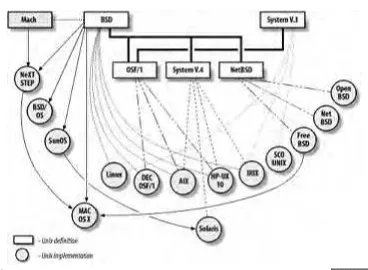
This is a book about Unix security. But before we can really plunge into the topic of our book—security —we need to explore what we mean by this word "Unix." After that, we'll discuss how notions of computer security play out in the Unix world. Figure 2-1 shows the many Unix variants, and their relationships, that we'll describe in this chapter.
Figure 2-1. Unix variants
[ Team LiB ]
2.1 History of Unix
The roots of Unix[1] go back to the mid-1960s, when American Telephone and Telegraph, Honeywell, General Electric, and the Massachusetts Institute of Technology embarked on a massive project to develop an information utility. The goal was to provide computer service 24 hours a day, 365 days a year—a computer that could be made faster by adding more parts, much in the same way that a power plant can be made bigger by adding more furnaces, boilers, and turbines. The project, heavily funded by the Department of Defense Advanced Research Projects Agency ( ARPA, also known as DARPA), was called Multics.
[1] A more comprehensive history of Unix, from which some of this chapter is derived, is Peter Salus's book, A Quarter Century of UNIX (Addison-Wesley).
2.1.1 Multics: The Unix Prototype
Multics (which stands for Multiplexed Information and Computing Service) was designed to be a modular system built from banks of high-speed processors, memory, and communications equipment. By design, parts of the computer could be shut down for service without affecting other parts or the users. Although this level of processing is assumed for many systems today, such a capability was not available when Multics was begun.
Multics was also designed with military security in mind, both to be resistant to external attacks and to protect the users on the system from each other. By design, Top Secret, Secret, Confidential, and Unclassif