SIMPLY
JAVASCRIPT
BY
KEVIN YANK
Simply JavaScript
by Kevin Yank and Cameron Adams
Copyright © 2007 SitePoint Pty. Ltd.
Editor: Georgina Laidlaw
Managing Editor: Simon Mackie
Index Editor: Max McMaster
Technical Editor: Kevin Yank
Cover Design: Alex Walker
Technical Director: Kevin Yank
Printing History:
First Edition: June 2007
Notice of Rights
All rights reserved. No part of this book may be reproduced, stored in a retrieval system or transmitted in any form or by any means, without the prior written permission of the publisher, except in the case of brief quotations embodied in critical articles or reviews.
Notice of Liability
The author and publisher have made every effort to ensure the accuracy of the information herein. However, the information contained in this book is sold without warranty, either express or implied. Neither the authors and SitePoint Pty. Ltd., nor its dealers or distributors will be held liable for any damages to be caused either directly or indirectly by the instructions contained in this book, or by the software or hardware products described herein.
Trademark Notice
Rather than indicating every occurrence of a trademarked name as such, this book uses the names only in an editorial fashion and to the benefit of the trademark owner with no intention of infringement of the trademark.
Published by SitePoint Pty. Ltd.
424 Smith Street Collingwood VIC Australia 3066 Web: www.sitepoint.com Email: [email protected]
About Kevin Yank
As Technical Director for SitePoint, Kevin Yank keeps abreast of all that is new and exciting in web technology. Best known for his book, Build Your Own Database Driven Website Using PHP & MySQL,1 now in its third edition, Kevin also writes the SitePoint Tech Times,2 a free, biweekly email newsletter that goes out to over 150,000 subscribers worldwide.
When he isn’t speaking at a conference or visiting friends and family in Canada, Kevin lives in Melbourne, Australia, and enjoys performing improvised comedy theater with Impro Melbourne,3 and flying light aircraft. His personal blog is Yes, I’m Canadian.4
About Cameron Adams
Cameron Adams melds a background in Computer Science with almost a decade's experience in graphic design, resulting in a unique approach to interface design. He uses these skills to play with the intersection between design and code, always striving to create interesting and innovative sites and applications.
Having worked with large corporations, government departments, nonprofit organizations, and tiny startups, he's starting to get the gist of this Internet thing. In addition to the projects that pay his electricity bills, Cameron muses about web design on his well-respected web-log—The Man in Blue5—and has written several books on topics ranging from JavaScript to CSS and design.
Sometimes he's in Melbourne, other times he likes to fly around the world to talk about design and programming with other friendly geeks. If you ever see him standing at a bar, buy him a Baileys and say “hi.”
About SitePoint
only hope to return the same amount of love and support that
you have given me.
—Cameron
To Jessica,
my partner in crime, the lemon to my lime.
Preface
. . . xvii
Who Should Read this Book? . . . xviii
What’s Covered in this Book? . . . xviii
The Book’s Web Site . . . xx
The Code Archive . . . xx
Updates and Errata . . . xx
The SitePoint Forums . . . xxi
The SitePoint Newsletters . . . xxi
Your Feedback . . . xxi
Acknowledgments . . . xxi
Kevin Yank . . . xxi
Cameron Adams . . . xxii
Conventions Used in this Book . . . xxiii
Code Samples . . . xxiii
Tips, Notes, and Warnings . . . xxiv
Chapter 1
The Three Layers of the Web
. . . 1
Keep ’em Separated . . . 2
Three Layers . . . 4
HTML for Content . . . 6
CSS for Presentation . . . 8
JavaScript for Behavior . . . 9
The Right Way . . . 11
JavaScript Libraries . . . 11
Chapter 2
Programming with JavaScript
. . . 13
Running a JavaScript Program . . . 14
Statements: Bite-sized Chunks for your Browser . . . 17
Comments: Bite-sized Chunks Just for You . . . 18
Variables: Storing Data for your Program . . . 19
Variable Types: Different Types for Different Data . . . 23
Conditions and Loops: Controlling Program Flow . . . 35
Conditions: Making Decisions . . . 36
Loops: Minimizing Repetition . . . 43
Functions: Writing Code for Later . . . 48
Arguments: Passing Data to a Function . . . 50
Return Statements: Outputting Data from a Function . . . 52
Scope: Keeping your Variables Separate . . . 54
Objects . . . 55
Unobtrusive Scripting in the Real World . . . 58
Summary . . . 59
Chapter 3
Document Access
. . . 61
The Document Object Model: Mapping your HTML . . . 61
Text Nodes . . . 64
Attribute Nodes . . . 65
Accessing the Nodes you Want . . . 66
Finding an Element by ID . . . 67
Finding Elements by Tag Name . . . 70
Finding Elements by Class Name . . . 74
Navigating the DOM Tree . . . 79
Interacting with Attributes . . . 82
Changing Styles . . . 85
Example: Making Stripy Tables . . . 92
Finding All Tables with Class
dataTable. . . 93
Getting the Table Rows for Each Table . . . 94
Adding the Class
altto Every Second Row . . . 96
Putting it All Together . . . 96
Exploring Libraries . . . 99
Prototype . . . 99
jQuery . . . 100
Dojo . . . 102
Summary . . . 102
Chapter 4
Events
. . . 105
An Eventful History . . . 106
Event Handlers . . . 107
Default Actions . . . 111
The
thisKeyword . . . 112
The Problem with Event Handlers . . . 115
Event Listeners . . . 116
Default Actions . . . 119
Event Propagation . . . 122
The
thisKeyword . . . 127
The Internet Explorer Memory Leak . . . 128
Putting it All Together . . . 129
Example: Rich Tooltips . . . 132
The Static Page . . . 133
Making Things Happen . . . 134
The Workhorse Methods . . . 135
The Dynamic Styles . . . 140
Example: Accordion . . . 144
The Static Page . . . 144
The Workhorse Methods . . . 146
The Dynamic Styles . . . 148
Putting it All Together . . . 150
Exploring Libraries . . . 158
Summary . . . 160
Chapter 5
Animation
. . . 163
The Principles of Animation . . . 163
Controlling Time with JavaScript . . . 165
Using Variables with
setTimeout. . . 168
Stopping the Timer . . . 172
Creating a Repeating Timer . . . 174
Stopping setInterval . . . 175
Revisiting Rich Tooltips . . . 175
Old-school Animation in a New-school Style . . . 176
Path-based Motion . . . 181
Animating in Two Dimensions . . . 190
Creating Realistic Movement . . . 192
Moving Ahead . . . 198
Revisiting the Accordion Control . . . 198
Making the Accordion Look Like it’s Animated . . . 198
Changing the Code . . . 199
Exploring Libraries . . . 208
script.aculo.us . . . 208
Chapter 6
Form Enhancements
. . . 213
HTML DOM Extensions . . . 214
Example: Dependent Fields . . . 216
Example: Cascading Menus . . . 226
Form Validation . . . 239
Intercepting Form Submissions . . . 240
Regular Expressions . . . 243
Example: Reusable Validation Script . . . 249
Custom Form Controls . . . 256
Example: Slider . . . 256
Exploring Libraries . . . 271
Form Validation . . . 272
Custom Controls . . . 274
Summary . . . 275
Chapter 7
Errors and Debugging
. . . 277
Nothing Happened! . . . 278
Common Errors . . . 282
Syntax Errors . . . 283
Runtime Errors . . . 288
Logic Errors . . . 292
Debugging with Firebug . . . 296
Summary . . . 303
Chapter 8
Ajax
. . . 305
XMLHttpRequest
: Chewing Bite-sized Chunks of Content . . . 306
Creating an
XMLHttpRequestObject . . . 307
Calling a Server . . . 310
A Word on Screen Readers . . . 316
Putting Ajax into Action . . . 316
Seamless Form Submission with Ajax . . . 329
Exploring Libraries . . . 337
Prototype . . . 339
Dojo . . . 340
jQuery . . . 341
YUI . . . 341
MooTools . . . 342
Summary . . . 343
Chapter 9
Looking Forward
. . . 345
Bringing Richness to the Web . . . 346
Easy Exploration . . . 346
Easy Visualization . . . 347
Unique Interaction . . . 349
Rich Internet Applications . . . 352
Widgets . . . 355
JavaScript Off the Web . . . 356
Exploring Libraries . . . 357
Dojo . . . 358
Google Web Toolkit . . . 361
Summary . . . 362
Appendix A
The Core JavaScript Library
. . . 363
The Object . . . 363
Event Listener Methods . . . 364
Script Bootstrapping . . . 375
Retrieving Computed Styles . . . 379
The Complete Library . . . 379
On the surface, JavaScript is a simple programming language that lets you make changes to your web pages on the fly, while they’re being displayed in a web browser. How hard could that be to learn, right? It sounds like something you could knock over in an afternoon.
But JavaScript is bigger on the inside than it seems from the outside. If you were a Dr. Who fan, you might call it the Tardis of programming languages. If you’re not a Dr. Who fan, roll your eyes with me as the fanboys (and girls) geek out.
Everyone back with me? Put your Daleks away, Jimmy.
As I was saying, JavaScript sounds like it should be simple. Nevertheless, throughout its ten year history (so far), the best ways of doing things with JavaScript have seemed to change with the seasons. And advice on how to write good JavaScript can be found everywhere: “Do it this way—it’ll run faster!” “Use this code—it’ll run on more browsers!” “Stay away from that feature—it causes memory leaks!”
Too many other JavaScript books—some of them from very respected names in the industry—will teach you a handful of simple solutions to simple problems and then call it a day, leaving you with just enough rope with which to hang yourself when you actually try to solve a real-world problem on your own. And when in desperation you go looking on the Web for an example that does what you need it to, you’ll likely be unable to make sense of the JavaScript code you find, because the book you bought didn’t cover many of the truly useful features of the language, such as object literals, event listeners, or closures.
This book aims to be different. From the very first page, we’ll show you the right way to use JavaScript. By working through fully fleshed-out examples that are ready to be plugged right into a professionally-designed web site, you’ll gain the confidence not only to write JavaScript code of your own, but to understand code that was written by others, and even to spot harmful, old-fashioned code that's more trouble than it’s worth!
devel-opment techniques—like Ajax—that are changing the face of the Web. We’ve also included sections that explore the new crop of JavaScript libraries like jQuery, Prototype, Yahoo! UI, and Dojo, making this the only beginner’s JavaScript book to cover these powerful time-savers.
… all of which made this book a lot harder to write, but that’s why they pay us the big bucks.
Who Should Read this Book?
Whether you’ve never seen a line of JavaScript code in your life, or you’ve seen one too many lines that doesn’t do what you expect, this book will show you how to make JavaScript work for you.
We assume going in that you’ve got a good handle on web design with HyperText Markup Language (HTML) and Cascading Style Sheets (CSS). You needn’t be an expert in these languages, but as we’ll see, JavaScript is just another piece in the puzzle. The better you understand basic web design techniques, the more you can enhance them with JavaScript.
If you need a refresher, we highly recommend Build Your Own Web Site The Right Way Using HTML & CSS1 (Melbourne: SitePoint, 2006).
What’s Covered in this Book?
Chapter 1: The Three Layers of the Web
A big part of learning JavaScript is learning when it’s the right tool for the job, and when ordinary HTML and CSS can offer a better solution. Before we dive into learning JavaScript, we’ll take a little time to review how to build web sites with HTML and CSS, and see just how JavaScript fits into the picture.
Chapter 2: Programming with JavaScript
JavaScript is a programming language. To work with it, then, you must get your head around the way computer programs work—which to some extent means learning to think like a computer. The simple concepts introduced in this
1
chapter—statements, variables, expressions, loops, functions, and objects—are the building blocks for every JavaScript program you’ll ever write.
Chapter 3: Document Access
While certain people enjoy writing JavaScript code for its own sake, you wouldn’t want to run into them in a dark alley at night. As a well-adjusted web developer, you’ll probably want to use JavaScript to make changes to the contents of your web pages using the Document Object Model (DOM). Lucky for you, we wrote a whole chapter to show you how!
Chapter 4: Events
By far the most eventful portion of this book (ha ha ha … I slay me), this chapter shows you how to write JavaScript programs that will respond to the actions of your users as they interact with a web page. As you’ll see, this can be done in a number of ways, for which varying degrees of support are provided by current browsers.
Chapter 5: Animation
Okay, okay. We can talk all day about the subtle usability enhancements that JavaScript makes possible, but we know you won’t be satisfied until you can make things swoosh around the page. In this chapter, you’ll get all the swooshing you can handle.
Chapter 6: Form Enhancements
I know what you’re thinking: forms are boring. Nobody leaps out of bed in the morning, cracks their knuckles, and shouts, “Today, I’m going to fill in some forms!” Well, once you trick out your forms with the enhancements in this chapter, they just might. Oh, and just to spice up this chapter a bit more, we’ll show you how to make an element on your page draggable.
Chapter 7: Errors and Debugging
Chapter 8: Ajax
You might have heard about this thing called Ajax that makes web pages look like desktop applications, and shaky business ventures look like solid invest-ments. We put it into this book for both those reasons.
Chapter 9: Looking Forward
JavaScript doesn’t just have a future; JavaScript is the future! Okay, you might think that’s taking it a bit far, but when you read this chapter and see the many amazing things that JavaScript makes possible, you might reconsider.
Appendix A: The Core JavaScript Library
As we progress through the book, we’ll write code to solve many common problems. Rather than making you rewrite that code every time you need it, we’ve collected it all into a JavaScript library that you can reuse in your own projects to save yourself a ton of typing. This appendix will provide a summary and breakdown of all the code that’s collected in this library, with instructions on how to use it.
The Book’s Web Site
Located at http://www.sitepoint.com/books/javascript1/, the web site that supports this book will give you access to the following facilities.
The Code Archive
As you progress through this book, you’ll note file names above many of the code listings. These refer to files in the code archive, a downloadable ZIP file that contains all of the finished examples presented in this book. Simply click the Code Archive
link on the book’s web site to download it.
Updates and Errata
No book is error-free, and attentive readers will no doubt spot at least one or two mistakes in this one. The Corrections and Typos page on the book’s web site2 will provide the latest information about known typographical and code errors, and will offer necessary updates for new releases of browsers and related standards.
2
The SitePoint Forums
If you’d like to communicate with other web developers about this book, you should join SitePoint’s online community.3The JavaScript forum,4 in particular, offers an abundance of information above and beyond the solutions in this book, and a lot of fun and experienced JavaScript developers hang out there. It’s a good way to learn new tricks, get questions answered in a hurry, and just have a good time.
The SitePoint Newsletters
In addition to books like this one, SitePoint publishes free email newsletters includ-ing The SitePoint Tribune, The SitePoint Tech Times, and The SitePoint Design View. Reading them will keep you up to date on the latest news, product releases, trends, tips, and techniques for all aspects of web development. If nothing else, you’ll get useful CSS articles and tips, but if you’re interested in learning other technologies, you’ll find them especially valuable. Sign up to one or more SitePoint newsletters at http://www.sitepoint.com/newsletter/.
Your Feedback
If you can’t find an answer through the forums, or if you wish to contact us for any other reason, the best place to write is [email protected]. We have an email support system set up to track your inquiries, and friendly support staff members who can answer your questions. Suggestions for improvements as well as notices of any mistakes you may find are especially welcome.
Acknowledgments
Kevin Yank
I’d like to thank Mark Harbottle and Luke Cuthbertson, SitePoint’s Co-founder and General Manager, who sat me down late in 2006 and—for the second time in my career—convinced me that stepping away from SitePoint’s day-to-day operations to write a book wouldn’t be the worst career move ever. I also owe a beverage to
3
http://www.sitepoint.com/forums/ 4
Simon Mackie, whose idea it was in the first place. Let’s hope someone buys it, guys!
To Jessica, for the many evenings that I stayed at the office to write long past the hour I said I’d be home, and for the boundless support and patience with which she greeted my eventual arrival, I owe something big and chocolaty.
And to the more than 150,000 readers of the SitePoint Tech Times newsletter,5 with whom I shared many of the ideas that made their way into this book, and who provided valuable and challenging feedback in return, my gratitude.
Cameron Adams
The knowledge I’ve accrued on JavaScript has been drawn from so many sources that it would be impossible to name them all. Anything that I can pass on is only due to the contributions of hundreds—if not thousands—of charitable individuals who use their valuable time to lay out their knowledge for the advantage of others. If you're ever in a position to add to those voices, try your hardest to do so. Still, I’d like to put out an old school shout-out to the Webmonkey team, in particular Thau and Taylor, who inspired me in the beginning. I'd also like to thank my coding colleagues, who are always available for a quick question or an extended discussion whenever I’m stuck: Derek Featherstone, Dustin Diaz, Jonathan Snook, Jeremy Keith, Peter-Paul Koch, and Dan Webb.
5
Conventions Used in this Book
You’ll notice that we’ve used certain typographic and layout styles throughout this book to signify different types of information. Look out for the following items.
Code Samples
Any code will be displayed using a fixed-width font like so:
<h1>A perfect summer's day</h1>
<p>It was a lovely day for a walk in the park. The birds were singing and the kids were all back at school.</p>
If the code may be found in the book’s code archive, the name of the file will appear at the top of the program listing, like this:
example.css
.footer {
background-color: #CCC; border-top: 1px solid #333; }
If only part of the file is displayed, this is indicated by the word excerpt:
example.css (excerpt)
Tips, Notes, and Warnings
Hey, You!
Tips will give you helpful little pointers.
Ahem, Excuse Me …
Notes are useful asides that are related—but not critical—to the topic at hand. Think of them as extra tidbits of information.
Make Sure you Always …
… pay attention to these important points.
Watch Out!
Chapter
1
The Three Layers of the Web
Once upon a time, there was … ‘A king!’ my little readers will say right away. No, children, you are wrong. Once upon a time there was a piece of wood…
—The Adventures of Pinocchio
You can do a lot without JavaScript. Using Hypertext Markup Language (HTML),1 you can produce complex documents that intricately describe the content of a page—and that content’s meaning—to the minutest detail. Using Cascading Style Sheets (CSS), you can present that content in myriad ways, with variations as subtle as a single color, as striking as replacing text with an image.
No matter how you dress it up, though, HTML and CSS can only achieve the static beauty of the department store mannequin—or at best, an animatronic monstrosity that wobbles precariously when something moves nearby. With JavaScript, you can bring that awkward puppet to life, lifting you as its creator from humble shop clerk to web design mastery!
1
But whether your new creation has the graceful stride of a runway model, or the shuffling gait of Dr. Frankenstein’s monster, depends as much on the quality of its HTML and CSS origins as it does on the JavaScript code that brought it to life.
Before we learn to work miracles, therefore, let’s take a little time to review how to build web sites that look good both inside and out, and see how JavaScript fits into the picture.
Keep ’em Separated
Not so long ago, professional web designers would gleefully pile HTML, CSS, and JavaScript code into a single file, name it index.html,2 and call it a web page. You can still do this today, but be prepared for your peers to call it something rather less polite.
Somewhere along the way, web designers realized that the code they write when putting together a web page does three fundamental things:
2
■ It describes the content of the page.
■ It specifies the presentation of that content. ■ It controls the behavior of that content.
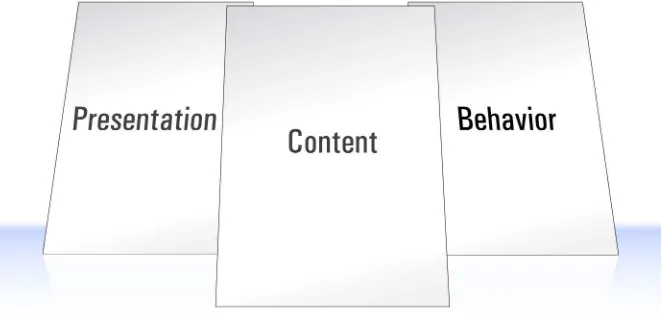
They also realized that keeping these three types of code separate, as depicted in Figure 1.1, made their jobs easier, and helped them to make web pages that work better under adverse conditions, such as when users have JavaScript disabled in their browsers.
Computer geeks have known about this for years, and have even given this principle a geeky name: the separation of concerns.
Figure 1.1. Separation of concerns
Now, realizing this is one thing, but actually doing it is another—especially if you’re not a computer geek. I am a computer geek, and I’m tempted to do the wrong thing all the time.
Now which is easier: opening up a separate CSS file to modify the page’s style sheet, or just typing those style properties into the HTML code I’m already editing?
Like behaving yourself at work functions, keeping the types of code you write sep-arate from one another takes discipline. But once you understand the benefits, you too will be able to summon the willpower it takes to stay on the straight and narrow.
Three Layers
Keeping different kinds of code as separate as possible is a good idea in any kind of programming. It makes it easier to reuse portions of that code in future projects, it reduces the amount of duplicate code you end up writing, and it makes it easier to find and fix problems months and years later.
When it comes to the Web, there’s one more reason to keep your code separate: it lets you cater for the many different ways in which people access web pages.
Depending on your audience, the majority of your visitors may use well-appointed desktop browsers with cutting-edge CSS and JavaScript support, but many might be subject to corporate IT policies that force them to use older browsers, or to browse with certain features (like JavaScript) disabled.
Visually impaired users often browse using screen reader or screen magnifier soft-ware, and for these users your slick visual design can be more of a hindrance than a help.
Some users won’t even visit your site, preferring to read content feeds in RSS or similar formats if you offer them. When it comes time to build these feeds, you’ll want to be able to send your HTML content to these users without any JavaScript or CSS junk.
Figure 1.2. The three layers of the Web
When building a site, we work through these layers from the bottom up:
1. We start by producing the content in HTML format. This is the base layer, which any visitor using any kind of browser should be able to view.
2. With that done, we can focus on making the site look better, by adding a layer of presentationinformation using CSS. The site will now look good to users able to display CSS styles.
3. Lastly, we can use JavaScript to introduce an added layer of interactivity and dynamic behavior, which will make the site easier to use in browsers equipped with JavaScript.
If we keep the HTML, CSS, and JavaScript code separate, we’ll find it much easier to make sure that the content layer remains readable in browsing environments where the presentation and/or behavior layers are unable to operate. This “start at the bottom” approach to web design is known in the trade as progressive enhance-ment.
HTML for Content
Everything that’s needed to read and understand the content of a web page belongs in the HTML code for that page—nothing more, nothing less. It’s that simple. Web designers get into trouble when they forget the K.I.S.S. principle,3 and cram non-content information into their HTML code, or alternatively move some of the page’s content into the CSS or JavaScript code for the page.
A common example of non-content information that’s crammed into pages is
presentational HTML—HTML code that describes how the content should look when it’s displayed in the browser. This can include old-fashioned HTML tags like
<b>, <i>, <u>, <tt>, and <font>:
<p>Whatever you do, <a href="666.html"><font color="red">don't click this link</font></a>!</p>
It can take the form of inline CSS applied with the style attribute:
<p>Whatever you do, <a href="666.html" style="color: red;">don't click this link</a>!</p>
It can also include the secret shame of many well-intentioned web designers—CSS styles applied with presentational class names:
<p>Whatever you do, <a href="666.html" class="red">don't click this link</a>!</p>
Presentational Class Names?
If that last example looks okay to you, you’re not alone, but it’s definitely bad mojo. If you later decide you want that link to be yellow, you’re either stuck up-dating both the class name and the CSS styles that apply to it, or living with the embarrassment of a class named “red” that is actually styled yellow. That’ll turn your face yellow—er, red!
3
Rather than embedding presentation information in your HTML code, you should focus on the reason for the action—for example, you want a link to be displayed in a different color. Is the link especially important? Consider surrounding it with a tag that describes the emphasis you want to give it:
<p>Whatever you do, <em><a href="evil.html">don't click this link</a></em>!</p>
Is the link a warning? HTML doesn’t have a tag to describe a warning, but you could choose a CSS class name that conveys this information:
<p>Whatever you do, <a href="evil.html" class="warning">don't click this link</a>!</p>
You can take this approach too far, of course. Some designers mistake tags like <h1>
as presentational, and attempt to remove this presentational code from their HTML:
<p class="heading">A heading with an identity crisis</p>
Really, the presentational information that you should keep out of your document is the font, size, and color in which a heading is to be displayed. The fact that a piece of text is a heading is part of the content, and as such should be reflected in the HTML code. So this code is perfectly fine:
<h1>A heading at peace with itself</h1>
In short, your HTML should do everything it can to convey the meaning, or semantics
of the content in the page, while steering clear of describing how it should look. Web standards geeks call HTML code that does this semantic markup.
Best of all, however, semantic markup lets you apply new styles (presentation) and interactive features (behavior) without having to make many (or, in some cases, any!) changes to your HTML code.
CSS for Presentation
Obviously, if the content of a page should be entirely contained within its HTML code, its style—or presentation—should be fully described in the CSS code that’s applied to the page.
With all the work you’ve done to keep your HTML free of presentational code and rich with semantics, it would be a shame to mess up that file by filling it with snippets of CSS.
As you probably know, CSS styles can be applied to your pages in three ways:
inline styles
<a href="evil.html" style="color: red;">
Inline styles are tempting for the reasons I explained earlier: you can apply styles to your content as you create it, without having to switch gears and edit a separate style sheet. But as we saw in the previous section, you’ll want to avoid inline styles like the plague if you want to keep your HTML code mean-ingful to those who cannot see the styles.
embedded styles
<style type="text/css">
.warning { color: red; }
</style>
⋮
<a href="evil.html" class="warning">
external styles
<link rel="stylesheet" href="styles.css" />
⋮
<a href="evil.html" class="warning">
styles.css
.warning { color: red; }
External styles are really the way to go, because they let you share your styles between multiple documents, they reduce the amount of code browsers need to download, and they also let you modify the look of your site without having to get your hands dirty editing HTML.
But you knew all that, right? This is a JavaScript book, after all, so let’s talk about the JavaScript that goes into your pages.
JavaScript for Behavior
As with CSS, you can add JavaScript to your web pages in a number of ways:
■ You can embed JavaScript code directly in your HTML content:
<a href="evil.html" onclick="JavaScript code here">
■ You can include JavaScript code at the top of your HTML document in a <script>
tag:
<script
type="text/javascript"><!--//--><![CDATA[//><!--JavaScript code here
//--><!]]></script>
⋮
CDATA?
If you’re wondering what all that gobbledygook is following the <script>
tag and preceding the </script> tag, that’s what it takes to legitimately embed JavaScript in an XHTML document without confusing web browsers that don’t understand XHTML (like Internet Explorer).
If you write your page with HTML instead of XHTML, you can get away with this much simpler syntax:
<script type="text/javascript"> JavaScript code here
</script>
■ You can put your JavaScript code in a separate file, then link to that file from as many HTML documents as you like:
<script type="text/javascript" src="script.js"></script>
⋮
<a href="evil.html" class="warning">
script.js (excerpt)
JavaScript code here
Guess which method you should use.
Writing JavaScript that enhances usability without cluttering up the HTML docu-ment(s) it is applied to, without locking out users that have JavaScript disabled in their browsers, and without interfering with other JavaScript code that might be applied to the same page, is called unobtrusive scripting.
The Right Way
So, how much does all this stuff really matter? After all, people have been building web sites with HTML, CSS, and JavaScript mixed together for years, and for the majority of people browsing the Web, those sites have worked.
Well, as you come to learn JavaScript, it’s arguably more important to get it right than ever before. JavaScript is by far the most powerful of the three languages that you’ll use to design web sites, and as such it gives you unprecedented freedom to completely mess things up.
As an example, if you really, really like JavaScript, you could go so far as to put everything—content, presentation, and behavior—into your JavaScript code. I’ve actually seen this done, and it’s not pretty—especially when a browser with Java-Script disabled comes along.
Even more telling is the fact that JavaScript is the only one of these three languages that has the ability to hang the browser, making it unresponsive to the user.4
Therefore, through the rest of this book, we’ll do our darnedest to show you the right way to use JavaScript, not just because it keeps your code tidy, but because it helps to keep the Web working the way it’s meant to—by making content accessible to as many people as possible, no matter which web browser they choose to use.
JavaScript Libraries
As I mentioned, one of the benefits of keeping different kinds of code separate is that it makes it easier to take code that you’ve written for one site and reuse it on another. Certain JavaScript maniacs (to be referred to from this point on as “people”) have taken the time to assemble vast libraries of useful, unobtrusive JavaScript code that you can download and use on your own web sites for free.
Throughout this book, we’ll build each of the examples from scratch—all of the JavaScript code you need can be found right here in these pages. Since there isn’t always time to do this in the real world, however, and because libraries are quickly
4
becoming an important part of the JavaScript landscape, we’ll also look at how the popular JavaScript libraries do things whenever the opportunity presents itself.
Here are the libraries that we’ll use in this book:
Prototype http://www.prototypejs.org/
script.aculo.us http://script.aculo.us/
Yahoo! User Interface Library (YUI)
http://developer.yahoo.com/yui/
Dojo http://dojotoolkit.org/
jQuery http://jquery.com/
MooTools http://mootools.net/
Not All Libraries are Created Equal
Watch out for sites offering snippets of JavaScript code for you to copy and paste into your web pages to achieve a particular effect. There is a lot of free code out there, but not all of it is good.
In general, the good libraries come in the form of JavaScript (.js) files that you can link into your pages unobtrusively, instead of pasting JavaScript directly into your HTML code.
If you don’t feel confident to judge whether a particular JavaScript library is good or bad, ask for some advice in the SitePoint Forums,5 or just stick with the libraries mentioned in this book—they’re all very good.
Let’s Get Started!
Enough preaching—you picked up this book to learn JavaScript, right? (If you didn’t, I’m afraid you’re in for a bit of a disappointment.) Clean HTML and CSS are nice and all, but it’s time to take the plunge into the third layer of the Web: behavior.
Turn the page, and get ready to start using some cool (and unobtrusive) JavaScript.
5
Chapter
2
Programming with JavaScript
Programming is all about speaking the language of computers. If you’re a robot, this should be pretty easy for you, but if you’re unlucky enough to be a human, it might take a bit of adjustment.
If you want to learn how to program, there are really two things you have to get your head around. First, you have to think about reducing one big problem into small, digestible chunks that are just right for a computer to crunch. Second, you have to know how to translate those chunks into a language that the computer un-derstands.
I find that the second part—the syntax—gradually becomes second nature (much like when you learn a real second language), and experienced programmers have very little trouble switching between different languages (like JavaScript, PHP, Ruby, or Algol 60). Most of the thought in programming is focused on the first
part—thinking about how you can break down a problem so that the computer can solve it.
problems for as long as you continue to program. We’ll tell you how to solve quite a few problems in this book, but there are always different ways to achieve a given task, and there will always be new problems to solve, so don’t think that your learning will stop on the last page of this book.
Running a JavaScript Program
Before you even start writing your first JavaScript program, you’ll have to know how to run it.
Every JavaScript program designed to run in a browser has to be attached to a doc-ument. Most of the time this will be an HTML or XHTML document, but exciting new uses for JavaScript emerge every day, and in the future you might find yourself using JavaScript on XML, SVG, or something else that we haven’t even thought of yet. We’re just going to worry about HTML in this book, because that’s what 99% of people use JavaScript with.
To include some JavaScript on an HTML page, we have to include a <script> tag inside the head of the document. A script doesn’t necessarily have to be JavaScript, so we need to tell the browser what type of script we’re including by adding a type
attribute with a value of text/javascript:
<!DOCTYPE HTML PUBLIC "-//W3C//DTD HTML 4.01//EN" "http://www.w3.org/TR/html4/strict.dtd"> <html lang="en-US">
<head>
<title>The Running Man</title> <meta http-equiv="Content-Type"
content="text/html; charset=utf-8">
<script type="text/javascript"> </script>
</head> </html>
<!DOCTYPE HTML PUBLIC "-//W3C//DTD HTML 4.01//EN" "http://www.w3.org/TR/html4/strict.dtd"> <html lang="en-US">
<head>
<title>The Running Man</title> <meta http-equiv="Content-Type"
content="text/html; charset=utf-8">
<script type="text/javascript">
alert("Arnie says hi!");
</script>
</head> </html>
XHTML and Embedded JavaScript don’t Mix
For this one example, we’ve switched from an XHTML DOCTYPE to an HTML DOCTYPE. As mentioned in Chapter 1, embedding JavaScript in XHTML requires gobbledygook that few mortals can remember:
<script type="text/javascript">
alert("Arnie says hi!");
//--><!]]></script>
For many, this is reason enough to avoid embedded JavaScript.
Even though it’s nice and easy to just type some JavaScript straight into your HTML code, it’s preferable to include your JavaScript in an external file. This approach provides several advantages:
■ It maintains the separation between content and behavior (HTML and JavaScript).
■ It makes it easier to maintain your web pages.
■ It allows you to easily reuse the same JavaScript programs on different pages of your site.
To reference an external JavaScript file, you need to use the src attribute on the
<!DOCTYPE html PUBLIC "-//W3C//DTD XHTML 1.0 Strict//EN" "http://www.w3.org/TR/xhtml1/DTD/xhtml1-strict.dtd"> <html xmlns="http://www.w3.org/1999/xhtml" lang="en-US"> <head>
<title>The Running Man</title> <meta http-equiv="Content-Type"
content="text/html; charset=utf-8" />
<script type="text/javascript" src="example.js"></script>
</head> </html>
Any JavaScript that you might have included between your <script> and </script>
tags can now be put into that external file and the browser will download the file and run the code.
The file can be called whatever you want, but the common practice is to include a
.js extension at the end of it.
If you’d like to try out the little program above, create a new HTML document (or open the closest one to hand) and insert the <script> tag inside the head. Once you’ve done that, put this snippet into a file called example.js in the same directory or folder:
alert("Arnie says hi!");
Now, open the HTML file in your browser, and see what happens! As you read through the rest of this chapter, you can replace the contents of example.js with each of the simple programs that I’ll show you, and try them for yourself!
Absolute URLs Work Too
As with the src attribute of an image, you can reference a file anywhere on your server, or anyone else’s server:
<script type="text/javascript"
It’s possible to include as many external scripts on your page as you want:
<script type="text/javascript" src="library.js"></script> <script type="text/javascript" src="more.js"></script> <script type="text/javascript" src="example.js"></script>
This capability is what makes JavaScript libraries, where you include a standard library file on your page alongside other code that uses the contents of that library, possible.
Every time you load a page with JavaScript on it, the browser will interpret all of the included JavaScript code and figure out what to do with it. If you’ve loaded a page into your browser, and then you make some changes to that page’s JavaScript (either on the page itself or in an external file), you’ll need to refresh the page before those changes will be picked up by the browser.
Statements: Bite-sized Chunks
for your Browser
So now you know how to tell the browser that it needs to run some JavaScript, but you don’t know any JavaScript for it to run. We’d better fix that!
Earlier, we were talking about reducing a problem into steps that a computer can understand. Each small step you take in a program is called a statement, and it tells the browser to perform an action. By building up a series of these actions, we create a program. Statements are to programs as sentences are to books.
In JavaScript each statement has to be separated by a new line or a semicolon. So, two statements could be written like this:
Statement one Statement 2.0
Or they could be written like this:
It is generally considered best practice, however, to do both—separate statements by a semicolon and a new line:
Statement one; Statement 2.0;
This way, each of your statements will be easy to read, and you’ll have removed the potential for any ambiguity that might occur if two statements accidentally run together.
There’s a whole bunch of different tasks you can achieve inside each statement; the first one that we’ll look at shortly is creating variables.
Comments: Bite-sized Chunks Just for You
If you follow the advice in this book and keep your JavaScript code simple and well structured, you should be able to get the gist of how it works just by looking at it. Every once in a while, however, you’ll find yourself crafting a particularly tricky segment of code, or some esoteric browser compatibility issue will force you to insert a statement that might seem like nonsense if you had to come back and work on the program later. In situations like these, you may want to insert a comment.
A comment is a note in your code that browsers will ignore completely. Unlike the rest of the code you write, comments are there to be read by you (or other program-mers who might later need to work on your code). In general, they explain the sur-rounding code, making it easier to update the program in future.
JavaScript supports two types of comments. The first is a single-line comment, which begins with two slashes (//) and runs to the end of the line:
Statement one; // I'm especially proud of this one
Statement 2.0;
If you need to write a more sizable comment, you can use a multi-line comment, starting with /* and ending with */:
/* This is my first JavaScript program. Please forgive any mistakes you might find here.
If you have any suggestions, write to [email protected]. */
Statement one; // I'm especially proud of this one Statement 2.0;
You’ll notice a distinct lack of comments in the code presented in this book. The main reason for this is that all of the code is explained in the surrounding text, so why not save a few trees? In real-world programs, you should always include a comment if you suspect that you might not understand a piece of code when you return to work on it later.
Variables: Storing Data for your Program
It’s possible to write a program that defines the value of every single piece of data it uses, but that’s like driving a ski lift—you don’t really get to choose where you’re going. If you want your program to be able to take user input, and adapt to different pages and situations, you have to have some way of working with values that you don’t know in advance.
As with most programming concepts, it’s very useful at this point to think of your computer as a BGC (Big, Giant Calculator). You know where you are with a calcu-lator, so it makes programming a bit easier to understand.
Now, we could write a program for a calculator that said:
4 + 2
But every time we run that program, we’re going to get exactly the same answer. There’s no way that we can substitute the values in the equation for something else—values from another calculation, data from a file, or even user input.
It adds two numbers.
If we’re getting those numbers when we run the program, we don’t know what they’ll be when we write the program, so we need some way of referring to them without using actual numbers. How about we give them names? Say … “x” and “y.”
Using those names, we could rewrite the program as:
x + y
Then, when we get our data values from some faraway place, we just need to make sure it’s called x and y. Once we’ve done that, we’ve got variables.
Variables allow us to give a piece of data a name, then reference that data by its name further along in our program. This way, we can reuse a piece of data without having to remember what its actual value was; all we have to do is remember a variable name.
In JavaScript, we create a variable by using the keyword var and specifying the name we want to use:
var chameleon;
This is called declaring a variable.
Having been declared, chameleon is ready to have some data assigned to it. We can do this using the assignment operator(=), placing the variable name on the left and the data on the right:
var chameleon;
chameleon = "blue";
This whole process can be shortened by declaring and assigning the variable in one go:
In practice, this is what most JavaScript programmers do—declare a variable whenever that variable is first assigned some data.
If you’ve never referenced a particular variable name before, you can actually assign that variable without declaring it using var:
chameleon = "blue";
The JavaScript interpreter will detect that this variable hasn’t been declared before, and will automatically declare it when you try to assign a value to it. At first glance, this statement seems to do exactly the same thing as using the var keyword; however, the variable that it declares is actually quite different, as we’ll see later in this chapter when we discuss functions and scoping. For now, take it from me—it’s always safest to use var.
The var keyword has to be used only when you first declare a variable. If you want to change the value of the variable later, you do so without var:
var chameleon = "blue";
⋮
chameleon = "red";
You can use the value of a variable just by calling its name. Any occurrence of the variable name will automatically be replaced with its value when the program is run:
var chameleon = "blue"; alert(chameleon);
The second statement in this program tells your browser to display an alert box with the supplied value, which in this case will be the value of the variable
Figure 2.1. JavaScript replacing the variable name with its value
Your variable names can comprise almost any combination of letters and numbers, though no spaces are allowed. Most punctuation and symbols have special meaning inside JavaScript, so the dollar sign ($) and the underscore (_) are the only non-al-phanumeric characters allowed in variable names. Variable names are also case-sensitive, so the names chameleon, Chameleon, and CHAMELEON refer to unique variables that could exist simultaneously.
Given those rules, these are all acceptable variable declarations:
var chameleon = "blue"; var Chameleon = "red"; var CHAMELEON = "green";
var yellow_chameleon = "yellow"; var orangeChameleon = "orange"; var chameleon$ = "greedy";
It’s standard practice to create variable names in lowercase letters, unless you’re concatenating more than one word. And as I mentioned, variable names can’t have spaces in them, so if you want a variable name to include more than one word, you can separate each word with an underscore (multi_word_variable) or capitalize the first letter of each word except for the first (multiWordVariable)—an approach called camel casing, because the name has humps like a camel (if you squint your eyes and tilt your head slightly … kind of).
Variable Types: Different Types for Different Data
A lot of programming languages feature strictly typed variables. With these, you have to tell the program what type of data the variable is going to hold when it’s declared, and you can’t change a variable’s type once it has been created.
JavaScript, however, is loosely typed—the language doesn’t care what your variables hold. A variable could start off holding a number, then change to holding a character, a word, or anything else you want it to hold.
Even though you don’t have to declare the data type up front, it’s still vital to know what types of data a variable can store, so that you can use and manipulate them properly inside your own programs. In JavaScript, you can work with numbers, strings, Booleans, arrays and objects. We’ll take a look at the first four of these types now, but you’ll have to wait till the end of the chapter to read about objects, because they’re a bit trickier.
Numbers
Eventually, everything inside a computer is broken down into numbers (see the Big Giant Calculator theory we explored earlier). Numbers in JavaScript come in two flavors: whole numbers and decimals. The technical term for a whole number is an
integer or int. A decimal is called a floating point number, or float. These terms are used in most programming languages, including JavaScript.
To create a variable with numerical data, you just assign a number to a variable name:
var whole = 3;
var decimal = 3.14159265;
Floating point numbers can have as many decimal places as you want:
var shortDecimal = 3.1;
var longDecimal = 3.14159265358979323846264338327950288419716939937;
var negativeInt = -3;
var negativeFloat = -3.14159265;
Mathematical Operations
Numbers can be combined with all of the mathematical operations you’d expect: addition (+), subtraction (-), multiplication (*), and division (/). They’re written in fairly natural notation:
var addition = 4 + 6; var subtraction = 6 – 4; var multiplication = 5 * 9; var division = 100 / 10;
var longEquation = 4 + 6 + 5 * 9 – 100 / 10;
The symbols that invoke these operations in JavaScript—+, -, *, and /—are called
operators, and as we’ll see through the rest of this chapter, JavaScript has a lot of them!
In a compound equation like the one assigned to longEquation, each of the opera-tions is subject to standard mathematical precedence (that is, multiplication and division operations are calculated first, from left to right, after which the addition and subtraction operations are calculated from left to right).
If you want to override the standard precedence of these operations, you can use brackets, just like you learned in school. Any operations that occur inside brackets will be calculated before any multiplication or division is done:
var unbracketed = 4 + 6 * 5; var bracketed = (4 + 6) * 5;
Here, the value of unbracketed will be 34, because 6 * 5 is calculated first. The value of bracketed will be 50, because (4 + 6) is calculated first.
var whole = 3;
var decimal = 3.14159265; var decimal2 = decimal – whole; var decimal3 = whole * decimal;
decimal2 now equals 0.14159265 and decimal3 equals 9.42477795.
If you divide two integers and the result is not a whole number, it will automatically become a float:
var decimal = 5 / 4;
The value of decimal will be 1.25.
Calculations can also involve any combination of numbers or numerical variables:
var dozen = 12;
var halfDozen = dozen / 2;
var fullDozen = halfDozen + halfDozen;
A handy feature of JavaScript is the fact that you can refer to the current value of a variable in describing a new value to be assigned to it. This capability lets you do things like increase a variable’s value by one:
var age = 26; age = age + 1;
In the second of these statements, the age reference on the right uses the value of
agebefore the calculation; the result of the calculation is then assigned to age, which ends up being 27. This means you can keep calculating new values for the same variable without having to create temporary variables to store the results of those calculations.
The program above can actually be shortened using the handy += operator, which tells your program to add and assign in one fell swoop:
Now, age will again equal 27.
It turns out that adding 1 to a variable is something that happens quite frequently in programming (you’ll see why when we get to loops later in this chapter), and there’s an even shorter shortcut for adding 1 to a variable:
var age = 26; age++;
By adding the special ++ operator to the end of age, we tell the program to increment the value of age by 1 and assign the result of this operation as the new value. After those calculations, age again equals 27.
Before or After?
As an alternative to placing the increment operator at the end of a variable name, you can also place it at the beginning:
var age = 26; ++age;
This achieves exactly the same end result, with one subtle difference in the pro-cessing: the value of age is incremented before the variable’s value is read. This has no effect in the code above, because we’re not using the variable’s value there, but consider this code:
var age = 26;
var ageCopy = age++;
Here, ageCopy will equal 26. Now consider this:
var age = 26;
var ageCopy = ++age;
In this code, ageCopy will equal 27.
As well as these special incrementing operators, JavaScript also has the correspond-ing decrementcorrespond-ing operators, -= and --:
var age = 26; age -= 8;
Now age will be 18, but let’s imagine we just wanted to decrease it by one:
var age = 26; age--;
age will now be 25.
You can also perform quick assignment multiplication and division using *= and
/=, but these operators are far less common.
Strings
A string is a series of characters of any length, from zero to infinity (or as many as you can type in your lifetime; ready … set … go!). Those characters could be letters, numbers, symbols, punctuation marks, or spaces—basically anything you can find on your keyboard.
To specify a string, we surround a series of characters with quote marks. These can either be single or double straight quote marks,1 just as long as the opening quote mark matches the closing quote mark:
var single = 'Just single quotes'; var double = "Just double quotes"; var crazyNumbers = "18 crazy numb3r5"; var crazyPunctuation = '~cr@zy_punctu&t!on';
The quote marks don’t appear in the value of the string, they just mark its boundaries. You can prove this to yourself by putting the following code into a test JavaScript file:
1
var single = 'Just single quotes'; alert(single);
When you load the HTML page that this file’s attached to, you’ll see the alert shown in Figure 2.2.
Figure 2.2. The string’s value displaying without the quotes used to create the string
It’s okay to include a single quote inside a double-quoted string, or a double quote inside a single-quoted string, but if you want to include a quote mark inside a string that’s quoted with the same mark, you must precede the internal quote marks with a backslash (\). This is called escaping the quote marks:
var singleEscape = 'He said \'RUN\' ever so softly.'; var doubleEscape = "She said \"hide\" in a loud voice.";
Don’t worry—those backslashes disappear when the string is actually used. Let’s put this code into a test JavaScript file:
var doubleEscape = "She said \"hide\" in a loud voice."; alert(doubleEscape);
Figure 2.3. The string’s value displaying without the backslashes used to escape quote marks in the string
It doesn’t matter whether you use single or double quotes for your strings—it’s just a matter of personal preference. I tend to use double quotes, but if I’m creating a string with a lot of double quotes in it (such as HTML code), I’ll switch to using single quotes around that string, just so I don’t have to escape all the double quotes it contains.
String Operations
We can’t perform as many operations on strings as we can on numbers, but a couple of very useful operators are available to us.
If you’d like to add two strings together, or concatenatethem, you use the same +
operator that you use for numbers:
var complete = "com" + "plete";
The value of complete will now be "complete".
Again, you can use a combination of strings and string variables with the + operator:
var name = "Slim Shady";
var sentence = "My name is " + name;
The value of sentence will be "My name is Slim Shady".
var name = "Slim Shady"; var sentence = "My name is "; sentence += name;
There’s one last trick to concatenating strings: you can concatenate numbers and strings, but the result will always end up being a string. If you try to add a number to a string, JavaScript will automatically convert the number into a string, then concatenate the two resulting strings:
var sentence = "You are " + 1337
sentence now contains "You are 1337". Use this trick when you want to output sentences for your h4x0r friends.
Booleans
Boolean values are fairly simple, really—they can be either true or false. It’s probably easiest to think of a Boolean value as a switch that can either be on or off. They’re used mainly when we’re making decisions, as we’ll see in a few pages time.
In order to assign a Boolean value to a variable, you simply specify which state you want it to be in. true and false are keywords in JavaScript, so you don’t need to put any quote marks around them:
var lying = true; var truthful = false;
If you were to surround the keywords in quote marks, they’d just be normal strings, not Boolean values.
Arrays
Arrays solve this problem by providing you with an ordered structure for storing a group of values. You can think of an array as being like a rack in which each slot is able to hold a distinct value.
In order to create an array, we use the special array markers, which are the opening and closing square brackets:
var rack = [];
The variable rack is now an array, but there’s nothing stored in it.
Each “slot” in an array is actually called an element, and in order to put some data into an element you have to correctly reference which element you want to put it in. This reference is called an index, which is a number that represents an element’s position in an array. The first element in an array has an index of 0, which can be a little confusing at first, but it’s just a programming quirk you have to get used to. The second element has an index of 1, the third: 2, and so on.
To reference a particular element, we use the variable name, followed by an opening square bracket, then the index and a closing square bracket, like this:
var rack = []; rack[0] = "First"; rack[1] = "Second";
With that data in the array, you could imagine it looking like Figure 2.4.
When we want to retrieve a particular element, we use the array-index notation just like a normal variable name. So, if we had an array like the one above, we could create an alert box displaying the value of the second element like this:
alert(rack[1]);
The resulting alert is shown in Figure 2.5.
Figure 2.5. An alert box displaying a value retrieved from an array
It’s possible to populate an array when it’s declared. We simply insert values, sep-arated with commas, between the square brackets:
var rack = ["First", "Second", "Third", "Fourth"];
That statement says that we should create an array—rack—that has four elements with the values specified here. The first value will have an index of 0, the second value an index of 1, and so on. The array that’s created will look like Figure 2.6.
Arrays can contain any data type—not just strings—so you could have an array of numbers:
var numberArray = [1, 2, 3, 5, 8, 13, 21, 34];
You might have an array of strings:
var stringArray = ["Veni", "Vidi", "Vici"];
A mixed array, containing multiple data types, would look like this:
var mixedArray = [235, "Parramatta", "Road"];
Here’s an array of arrays:
var subArray1 = ["Paris", "Lyon", "Nice"];
var subArray2 = ["Amsterdam", "Eindhoven", "Utrecht"]; var subArray3 = ["Madrid", "Barcelona", "Seville"];
var superArray = [subArray1, subArray2, subArray3];
That last example is what we call a multi-dimensional array—it’s a two-dimensional array, to be precise—and it’s useful if you want to create a group of groups. In order to retrieve a value from one of the sub-arrays, you have to reference two indices, like so:
var city = superArray[0][2];
If we translate that statement, starting from the right side, it says:
[2] Get the third element …
[0] of the first array …
superArray in superArray ...
It’s possible to have arrays of arrays of arrays, and arrays of arrays of arrays of arrays, but as you can probably tell from these descriptions, such arrangements quickly become unmanageable, so two-dimensional arrays are normally as far as you ever need to go.
The last thing to understand about arrays is the fact that a very useful property is attached to them: length. Sometimes, you’ll be dealing with an unknown array—an array you’ve obtained from somewhere else—and you won’t know how many ele-ments it contains. In order to avoid referencing an element that doesn’t exist, you can check the array’s length to see how many items it actually contains. We perform this check by adding .length to the end of the array name:
var shortArray = ["First", "Second", "Third"]; var total = shortArray.length;
The value of total will now be 3 because there are three items in the array
shortArray.
It’s important to note that you can’t use array.length to get the index of the last item in the array. Because the first item’s index is 0, the last item’s index is actually
array.length – 1:
var lastItem = shortArray[shortArray.length – 1];
This situation might seem a bit annoying, until you realize that this makes it easy to add an element to the end of the array:
shortArray[shortArray.length] = "Fourth";
Associative Arrays
Normal arrays are great for holding big buckets of data, but they can sometimes make it difficult to find the exact piece of data you’re looking for.
var postcodes = [];
postcodes["Armadale"] = 3143;
postcodes["North Melbourne"] = 3051; postcodes["Camperdown"] = 2050; postcodes["Annandale"] = 2038;
Now that we’ve created our associative array, it’s not hard to get the postcode for Annandale. All we have to do is specify the right key, and the value will appear:
alert(postcodes["Annandale"]);
The resulting alert is shown in Figure 2.7.
Figure 2.7. Finding a postcode using an associative array
Although the keys for an associative array have to be strings, the values can be of any data type, including other arrays or associative arrays.
Conditions and Loops: Controlling
Program Flow
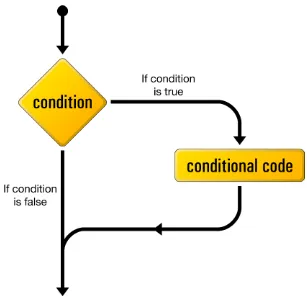
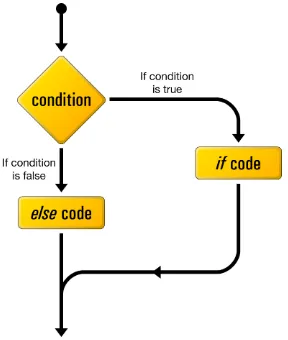
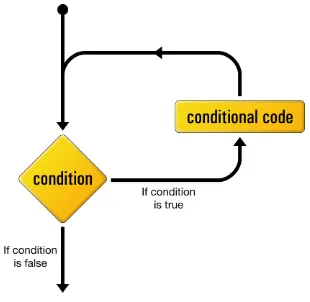
So far, we’ve seen statements that allow you to set and retrieve variables inside your program. For a program to be really useful, however, it has to be able to make de-cisions based on the values of those variables.