ABSTRACT:
Generating detailed simplified building models such as the ones present on Google Earth is often a difficult and lengthy manual task, requiring advanced CAD software and a combination of ground imagery, LIDAR data and blueprints. Nowadays, UAVs such as the AscTec Falcon 8 have reached the maturity to offer an affordable, fast and easy way to capture large amounts of oblique images covering all parts of a building. In this paper we present a state-of-the-art photogrammetry and visual reconstruction pipeline provided by Pix4D applied to medium resolution imagery acquired by such UAVs. The key element of simplified building models extraction is the seamless integration of the outputs of such a pipeline for a final manual refinement step in order to minimize the amount of manual work.
1 INTRODUCTION
Virtual globe visualization software such as Google Earth(Google, 2011a) are becoming increasingly popular, both on desktop and mobile platforms. They enable many applications in the fields of navigation, tourism, but also city and land planning. In addition of displaying detailed 2D vectorial and raster maps on top of dig-ital elevation models, modern virtual globes have the ability to render 3D building models.
These viewers often stream content over the web, for that reason the building models need to have the lowest number of polygons as possible. It is also a matter of processing power, as visual-ization of large cities implies the rendering of a huge amount of polygons by the viewer. Finally, to make the most visual sense, these models should capture also the semantics of the building, its main characteristics and properties. In other words it means that the polygons should correspond to the human understanding of a building: facades, roof, windows, balcony and so on. The CityGML standard (Fan et al., 2009) represents objects in vary-ing levels of detail (LOD), where level 1 and 2 correspond to box models without and with roofs, as often encountered on Google Earth. Level 3 includes additional architecture details that are sometimes present on specific buildings such as landmarks on Google Earth.
As for today, modeling of buildings is usually a difficult lengthy manual task done using CAD software. Data is usually acquired using a combination of total station, terrestrial laser scanners, blueprints, airborne LIDAR and imagery (Georgeta Pop, 2008, Karantzalos and Paragios, 2010, Haala and Brenner, 1997) . Most of these solutions are either very expensive, lengthy, or require advanced knowledge in these fields. There have been multiple approaches which proposed to automate the process of generat-ing level 1 and 2 buildgenerat-ing models usgenerat-ing various algorithms based purely on images. However, these techniques are usually lim-ited to very simple buildings’ shape or to over simplified mod-els(Debevec et al., 1996, Zebedin et al., 2008, Zhou and Neu-mann, 2010, Guo et al., 2008, Woo et al., 2008, Melnikova and Prandi, 2011, Nan et al., 2010). At the best of our knowledge, this crucial step of generating fully automatically LOD 3 buildings is not yet solved, and human intervention is still required.
We propose a workflow that drastically reduces the amount and difficulty of manual labor both in the acquisition process and in
the modeling process. Based purely on images, it removes the need for blueprints or LIDAR data. Images are aquired by au-tomated UAV, making the whole process fast, easy to deploy and affordable, and ensuring a full coverage of the building in-cluding rooftops and facades. These images are then automati-cally processed, outputting a LOD 1 model. Moreover, the posi-tions of the images and dense 3D cloud of points are also gener-ated. These two elements are seamlessly integrated in the CAD software Google Sketchup(Google, 2011b), and this integration greatly minimizes and simplifies the manual tasks to achieve a LOD 3 model.
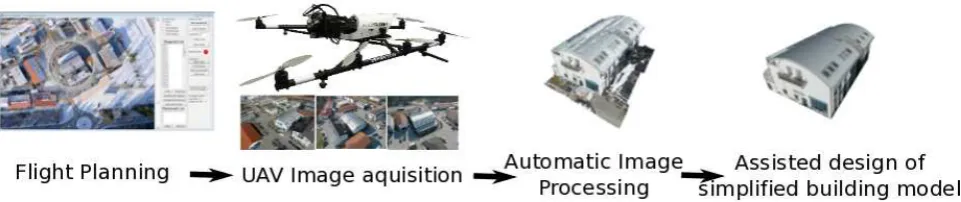
The three main elements of this workflow, shown on figure 1, are:
• Acquisition of images using automated UAVs
• Fully automated image processing and LOD 1 model
extrac-tion
• Seamless integration in CAD software
Capture of large set of images at all possible views is a per-fect task for micro Unmanned Aerial Vehicles (UAV). Fully au-tonomous UAV have recently become commercially available at very reasonable cost for civil applications. The advantage of these aircrafts is their ease of deployment and retrieval. More-over, UAV such as the AscTec Falcon 8 have the capability of taking oblique to horizontal imagery, allowing them to capture images all around a building at different heights.
Figure 1: Workflow of our method
service applied to UAV imagery which takes into account geolo-calization of the cameras using the GPS tags and introduction of Ground Control Points for better geolocalization.
Modern Computer-aided design (CAD) software such as Google Sketchup(Google, 2011b) offer powerful and intuitive tools for modeling buildings. However they lack fully automated image processing algorithms to register the images to the scene and gen-erate an automated dense cloud of points. Starting with the au-tomatically computed LOD 1 building model, together with the overlaid cloud of points reduces greatly the modeling time for higher level of details. Furthermore, displaying the registered im-ages allows the finest details to be modeled, together with a very convenient way to texture the model by a simple projection.
This paper is organized as follows. In section 2, the image ac-quisition using an AscTec Falcon 8 and a swinglet CAM are discussed. In section 3 the automated image processing algo-rithms are explained. Section 4 presents the seamless integration of the results of the algorithms with the CAD software Google Sketchup. The workflow is demonstrated in section 5 on four dif-ferent datasets, three taken by the AscTec Falcon 8 and one with a swingletCAM by Sensefly. We also discuss for each of them the results of the different steps.
2 IMAGE AQUISITION
In traditional photogrametry, the number of images is minimized as it adds tedious work to calibrate, register and use for the mod-eling step. With the advent of fast fully automated image pro-cessing, this paradigm is not valid anymore. A larger number of images equals an increased likelihood of a precise automatic reg-istration. One of the requirement of these algorithms is a large overlap in the order of 60% to 80% between the images. As digital cameras equipped with sufficient memory are nowadays ubiquitous, capturing a large amount of images is not a technical problem anymore.
Images taken from the ground are inherently unable to capture roof structures. On the other hand, planes and helicopter are way too complex and expensive to deploy for capturing images from a single building. UAVs equipped with a camera are the perfect fit to automatically capture large amounts of images including roof structures and facades in an easy and affordable way.
2.1 AscTec Falcon 8
The AscTec Falcon 8 produced by Ascending Technologies GmbH, Germany, is an 8 rotors flying platform displayed on Figure 1. Its SONY NEX-5 system camera records 14MP images. Due to the unique design of the AscTec Falcon 8 the camera is able to face completely down, horizontal and completely up, without any of
the rotors compromising the image. The Falcon 8 has a dedi-cated software which handles the flight plan, allowing it to circle around a point of interest with tilting of the camera to point to the same target. The mission planning has been automated for the application of generating building models. It can easily be done by the operator while the UAV is airborne with some simple steps using the telemetry display of the mobile ground station only. The following steps are required before the UAV automatically takes all images required for generating a building model. First, the pi-lot has to fly roughly above the center of the building of interest, operationg the AscTec Falcon 8 in GPS assisted mode and using the camera pointing down to determine when the UAV is hovering above the building. After pressing a button on the mobile ground station the UAV must now be flown away from the building, until the whole building is visible on the camera image. Also the de-sired flying altitude and camera orienation can be selected in this step. After pressing a button again the operator is asked to enter the number of photos desired, which are then evenly distributed on a circle around the building. After that, pressing GO makes the AscTec Falcon 8 take the first photograph on its current lo-cation and then automatically take all photos on its way around the building. As the whole process can be done without a laptop computer it is easy for the operator to change their position in or-der to keep the UAV in visual range throughout the flight, which is required by law in most countries.
2.2 swingletCam
The swinglet CAM is an electrically-powered 500-gram flying wing including a full-featured autopilot and an integrated 12 MP still camera. Its low weight combined with its exible-foam air-frame makes it particularly safe for third parties as it has approx-imately the same impact energy as a medium sized bird. It is launched by hand, which makes it particularly quick to deploy.
3 IMAGE PROCESSING
• All uploaded images are analyzed individually for keypoints.
On a second step these keypoints are compared across im-ages to find matching ones. Most well known in computer vision is the SIFT feature matching (Lowe, 2004). Studies on the performance of such feature desciptors are fiven by Mikolajzyk et.al (Mikolajczyk and Schmid, 2002). We use here binary descriptors, which are very efficient and fast to match (Strecha et al., 2011).
• The matching points as well as approximate values of the
image position and orientation provided by the UAV autopi-lot are used in a bundle block adjustment (Hartley and Zis-serman, 2004) to recompute the exact position and orienta-tion of the camera for every acquired image.
• Based on this reconstruction, the matching points are
veri-fied and their 3D coordinates calculated. The geo-reference system is WGS84, based on GPS measurements from the autopilot during the flight.
A report is generated giving statistics about the calibration and geo referencement.
3.2 Dense Matching
The cloud of points generated in the calibration step consists only of keypoints that were successfully matched and verified along multiple images. There are potentially many more matches which can be verified, producing a much more dense cloud of points. In this work, we use the approach by (Furukawa and Ponce, 2009, Furukawa et al., 2010, Furukawa et al., 2011). It is composed of first a image clustering part (CMVS), followed by the actual dense matching algorithm (PMVS). CMVS takes the output of Pix4D as input, then decomposes the input images into a set of image clusters of manageable size. These clusters are then passed to the PMVS software. The PMVS algorithms is based on ori-ented patches and are computed by iteratively following these three steps:
• Match: edge features from the images are matched along
epipolar geometry and form potential candidates
• Expend: spread the initial matches to nearby pixels and
ob-tain a dense set of patches
• Filter: visibility and smoothness constrains are applied to
remove matches
The output of this algorithm is a set of points together with the associated normals.
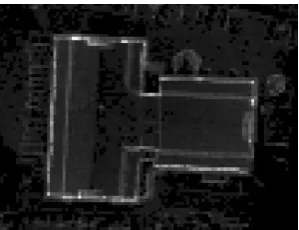
Figure 2: Projection of 3D points along the z axis on a grid for Main Building dataset
3.3 Box model extraction
A very simple algorithm for extracting a box model of the build-ing is proposed. The idea is to project the dense 3d points on a grid and count the number of projection for each cell. As straight walls and facades of the building are aligned with the z axe, they will result in much higher intensities on the grid. Simply thresh-olding this grid allows the recovery of these points, and a 2D SVD is applied on them in order to find the building’s main directions. The outline is then recovered by searching for the highest val-ues on the grid in each directions. The minimum and maximum height of these points in the z direction is then found to create a box from the outline rectangle.
4 CAD INTEGRATION
Building models of LOD 1 can easily be extracted from UAV imagery. Extracting higher level of details is far from being a trivial task for an automated algorithm.
We propose a method that minimizes the amount of manual in-tervention involved in creating simplified 3D building models of LOD 2 and 3. The key idea is to take advantages of the numerous images taken by the UAV and of the state-of-the art computer vision techniques to exploit them, and to seamlessly integrate them in a CAD software such a Google Sketchup. The initial box model provides the bases for fixing the coordinate system which is essential to Sketchup. Google Sketchup is based on the proper-ties shared by most of the buildings: horizontal walls and perpen-dicular facades. These properties define an euclidean coordinate system. The primitive creation tools of Sketchup are aligned on this coordinate system, enforcing these properties. By overlaying the computed cloud of point in Sketchup, it becomes very easy to estimate the dimension and the subdivision to perform to ap-proximate more closely the building. This computed box is then resized by pushing and pulling the faces and subdivided along the axes to fit to the cloud of points. This step generally provides the building’s outline. In order to import a large cloud of points into Sketchup, we used the PoinTools plugin??, which creates a binary tree structure of the cloud of points for fast visualization.
Sketchup includes a Photomatch feature, which displays an im-age in the background of a 3D model and the tools to draw on top of it. Sketchup has a Ruby scripting tool that allows the import of precomputed camera parameters and positions to Photomatch images. This feature is very useful for drawing accurately the roof structure on a surface in 2D. This surface is the pulled along the main axes of the building to model the whole roof in 3D.
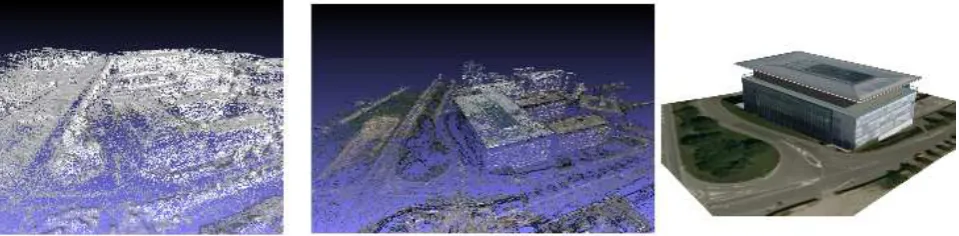
Figure 3: EPFL BC building: bundle block adjustment mesh, colorized dense matching 3D points, geolocalized refined textured model
is facing the most a selected surfaces in order to minimize distor-tions, followed by a projection involving a homography from the image to the surface.
5 RESULTS AND DISCUSSION
We tested this workflow on different datasets: three taken with an AscTec Falcon 8 octocopter and one using a swingletCam wing. The main advantage of the octocopter is the ability to program the tilt the camera during the flight planning, thus allowing to target the building during the capture. The swingletCam wing has a fixed camera and needs to perform acrobatic figures in order to take oblique imagery. As is it much harder to control, multiple passes are done, thus capturing many more images.
5.1 Ascending building
In this flight 138 images are captured by the AscTec Falcon 8. Three images from this dataset are show on figure 1 The flight plan is a circle with the camera tilting to target the building. A median of 4111 keypoints per images are found. After the match-ing, 131079 3D points are computed and used in the bundle ad-justment. After this step, all images are successfully registered, with a mean reprojection error of 0.7 pixels. The overlap be-tween the images was sufficient for a successful calibration step. The computation of this first step by Pix4D was under an hour, including the uploading time.
The dense matching outputs over 400’000 points, colored and displayed in figure /refprocess. The points are extremely densely sampled, which gives the illusion of texture from far away. Glob-ally, most of the parts have been correctly reconstructed. This building has two main difficulties for dense matching: very repet-itive texture on the roof and white uniform walls. Repetrepet-itive tex-ture can lead to errors such as floating points above the surface. The uniform walls are poorly textured, and thus consistency can-not be checked and no 3D point is computed. There are enough points recovered on the balcony to estimate its size, however the reconstruction is too sparse to accuratly estimate objects such as a table on the balcony. There is a bit of noise in the reconstruction which we visually estimate in the orders of 5 to 10 centimeters.
A box model is correctly estimated by projecting the points on a grid and computing the main directions. The modeling process start from this box. From a front facing image, the roof shape can be approximated with segments drawn on a registered image on the front of the box. Extruding this surface models the whole roof. Other elements of the buildings such as the balcony are ap-proximated by adding primitives to cover all computed dense 3D points. In order to texturize the model, registered images facing the different walls are chosen in order to minimize the distortions and simply projected on the selected faces.
This model was submitted for inclusion on Google Earth, and successfully accepted after review. It is now publicly visible at Konrad-Zuse-Bogen 4, 82152 Krailling, Germany.
5.2 Main house and side house
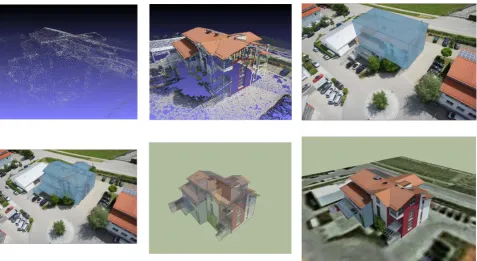
In the two flights, 36 images were captured by the AscTec Falcon 8 for each dataset. The flight plans are a circle with the cam-era tilting to target the buildings. A median of 9513 keypoints per images are found. After the matching, 118334 3D points are computed and used in the bundle adjustment of the main build-ing shown on figure 4, and 70176 for the side buildbuild-ing in figure 5. After this step, all images are successfully registered, with a mean reprojection error of 0.6 pixels in both cases. The overlap between the images was sufficient for a successful automatic cal-ibration step. The computation of this first step by Pix4D was under an 20 minutes, including the uploading time.
The dense matching outputs over 200’000 points, colored and displayed in figure 4 and 5. The roofs got extremely well recon-structed, with almost no floating pixels due to repetitive texture. The facades were a bit more problematic, due to slightly overex-posed images resulting in poor photometric consistency checks in the dense matching. However the edges between the facades were well reconstructed, allowing the understanding of the build-ing’s structure. The box model was successfully extracted in both cases as can be seen in the figures.
Modeling these building was a more challenging task, as they are composed of many geometrical overlapping parts. The manual steps were first to segment the starting box at places were the fa-cade edges present in the overlaid cloud of point. Using the Push and Pull tools, the segmented parts can the easily be adjusted to fit the points on the facade. Once the outline of the building is correctly set, the roof is drawn on top of registered images and then pulled along the building’s main directions.
One additional difficulty in these two datasets is that due to the shape of the building, not all parts can be seen in the images. The UAV should fly twice around the building at two different heights to capture all the details and texture. It is also interesting to note that vegetation is very challenging and that the 3D points on trees were often not computed.
5.3 EPFL BC building
fact that the images were not fully oblique and the reflective na-ture of the large windows. The box model however fitted nicely the facades. The manual part consisted mostly of creating the primitive for the roof top.
6 CONCLUSIONS AND FUTURE WORK
We presented in this work an approach for extracting simplified building models from UAV imagery. Our first remark is to point out the maturity of automated algorithms for registering and cali-brating large amount of oblique images. This creates a paradigm shift in the photogrametry community, where the goal now is to take as many images as possible instead of selecting a very lim-ited number of points of view. This shift makes UAVs perfectly suited for the image acquisition process, as they can easily fly around buildings and take numerous images of all angles.
The dense matching step generates a large amount of measure-ments. However, the quality still depends greatly on the texture of the surfaces to reconstruct. The output is relatively noisy, not uniformly sampled and contains a few outliers. This is not an issue for box model of building, but makes higher level of de-tail modeling not a trivial task for automated algorithm. More-over, simplified building models are related to the semantics of the building, a problem which is still far from being solved.
In contrast, we propose to seamlessly include the results of cali-bration and dense matching in the process of refining a box model. This makes the modeling of a building using only imagery pos-sible and minimizes the amount of manual work. Future work is needed to assess the quality of these reconstruction by compari-son with blueprints for example.
REFERENCES
Debevec, P. E., Taylor, C. J. and Malik, J., 1996. Modeling and rendering architecture from photographs: a hybrid geometry- and image-based approach. In: Proceedings of the 23rd annual con-ference on Computer graphics and interactive techniques, SIG-GRAPH ’96, ACM, New York, NY, USA, pp. 11–20.
Fan, H., Meng, L. and Jahnke, M., 2009. Generalization of 3d buildings modelled by citygml. In: W. Cartwright, G. Gartner, L. Meng and M. P. Peterson (eds), Advances in GIScience, Lec-ture Notes in Geoinformation and Cartography, Springer, Berlin Heidelberg, pp. 387–405.
Furukawa, Y. and Ponce, J., 2009. Accurate, dense, and robust multi-view stereopsis. IEEE Trans. on Pattern Analysis and Ma-chine Intelligence.
Furukawa, Y., Curless, B., Seitz, S. M. and Szeliski, R., 2010. Towards internet-scale multi-view stereo. In: CVPR.
Furukawa, Y., Curless, B., Seitz, S. M. and Szeliski, R., 2011. Clustering views for multi-view stereo. http://grail.cs.washington.edu/software/cmvs.
Haala, N. and Brenner, C., 1997. Generation of 3D city mod-els from airborne laser scanning data. EARSEL Workshop on LIDAR remote sensing of land and sea pp. 105–112.
Hartley, R. I. and Zisserman, A., 2004. Multiple View Geometry in Computer Vision. Second edn, Cambridge University Press, ISBN: 0521540518.
Karantzalos, K. and Paragios, N., 2010. Large-scale building re-construction through information fusion and 3-d priors. GeoRS 48(5), pp. 2283–2296.
Lowe, D. G., 2004. Distinctive image features from scale-invariant keypoints. Int. J. Comput. Vision 60, pp. 91–110.
Melnikova, O. and Prandi, F., 2011. 3d buildings extraction from aerial images. In: HighRes11, pp. xx–yy.
Mikolajczyk, K. and Schmid, C., 2002. An affine invariant in-terest point detector. In: Proceedings of the 7th European Con-ference on Computer Vision-Part I, ECCV ’02, Springer-Verlag, London, UK, UK, pp. 128–142.
Nan, L., Sharf, A., Zhang, H., Cohen-Or, D. and Chen, B., 2010. Smartboxes for interactive urban reconstruction. ACM Trans. Graph. 29, pp. 93:1–93:10.
Pix4d, 2011. Hands free solutions for mapping and 3d modeling. http://www.pix4d.com.
Strecha, C., Bronstein, A., Bronstein, M. and Fua, P., 2011. LDA-Hash: improved matching with smaller descriptors. IEEE Trans-actions on Pattern Analysis and Machine Intelligence.
Triggs, B., McLauchlan, P., Hartley, R. and Fitzgibbon, A., 2000. Bundle Adjustment – a Modern Synthesis. In: Vision Algo-rithms: Theory and Practice, pp. 298–372.
Woo, D., Nguyen, Q., Tran, Q., Park, D. and Jung, Y., 2008. Building detection and reconstruction from aerial images. In: ISPRS08, p. B3b: 713 ff.
Zebedin, L., Bauer, J., Karner, K. and Bischof, H., 2008. Fusion of feature- and area-based information for urban buildings model-ing from aerial imagery. In: D. Forsyth, P. Torr and A. Zisserman (eds), Computer Vision ECCV 2008, Lecture Notes in Computer Science, Vol. 5305, Springer Berlin / Heidelberg, pp. 873–886. 10.1007/978-3-540-88693-864.
Figure 4: Main house dataset. From left to right, top to bottom: bundle block 3D points, dense matching colorized 3D points, box model on top of registered image, untextured 3D refined model on top of registered image, textured refined 3D model with translucid faces, textured refined 3D model