by Rob Ciampa and Theresa Moore,
with John Carucci, Stan Muller,
Copyright © 2015 by John Wiley & Sons, Inc., Hoboken, New Jersey Published simultaneously in Canada
No part of this publication may be reproduced, stored in a retrieval system or transmitted in any form or by any means, electronic, mechanical, photocopying, recording, scanning or otherwise, except as permit-ted under Sections 107 or 108 of the 1976 Unipermit-ted States Copyright Act, without the prior written permis-sion of the Publisher. Requests to the Publisher for permispermis-sion should be addressed to the Permispermis-sions Department, John Wiley & Sons, Inc., 111 River Street, Hoboken, NJ 07030, (201) 748‐6011, fax (201) 748‐6008, or online at http://www.wiley.com/go/permissions.
Trademarks: Wiley, For Dummies, the Dummies Man logo, Dummies.com, Making Everything Easier, and related trade dress are trademarks or registered trademarks of John Wiley & Sons, Inc. and may not be used without written permission. YouTube is a registered trademark of Google, Inc. All other trademarks are the property of their respective owners. John Wiley & Sons, Inc. is not associated with any product or vendor mentioned in this book.
LIMIT OF LIABILITY/DISCLAIMER OF WARRANTY: THE PUBLISHER AND THE AUTHOR MAKE NO REPRESENTATIONS OR WARRANTIES WITH RESPECT TO THE ACCURACY OR COMPLETENESS OF THE CONTENTS OF THIS WORK AND SPECIFICALLY DISCLAIM ALL WARRANTIES, INCLUDING WITHOUT LIMITATION WARRANTIES OF FITNESS FOR A PARTICULAR PURPOSE. NO WARRANTY MAY BE CREATED OR EXTENDED BY SALES OR PROMOTIONAL MATERIALS. THE ADVICE AND STRATEGIES CONTAINED HEREIN MAY NOT BE SUITABLE FOR EVERY SITUATION. THIS WORK IS SOLD WITH THE UNDERSTANDING THAT THE PUBLISHER IS NOT ENGAGED IN RENDERING LEGAL, ACCOUNTING, OR OTHER PROFESSIONAL SERVICES. IF PROFESSIONAL ASSISTANCE IS REQUIRED, THE SERVICES OF A COMPETENT PROFESSIONAL PERSON SHOULD BE SOUGHT. NEITHER THE PUBLISHER NOR THE AUTHOR SHALL BE LIABLE FOR DAMAGES ARISING HEREFROM. THE FACT THAT AN ORGANIZATION OR WEBSITE IS REFERRED TO IN THIS WORK AS A CITATION AND/OR A POTENTIAL SOURCE OF FURTHER INFORMATION DOES NOT MEAN THAT THE AUTHOR OR THE PUBLISHER ENDORSES THE INFORMATION THE ORGANIZATION OR WEBSITE MAY PROVIDE OR RECOMMENDATIONS IT MAY MAKE. FURTHER, READERS SHOULD BE AWARE THAT INTERNET WEBSITES LISTED IN THIS WORK MAY HAVE CHANGED OR DISAPPEARED BETWEEN WHEN THIS WORK WAS WRITTEN AND WHEN IT IS READ.
For general information on our other products and services, please contact our Customer Care Department within the U.S. at 877‐762‐2974, outside the U.S. at 317‐572‐3993, or fax 317‐572‐4002. For technical support, please visit www.wiley.com/techsupport.
Wiley publishes in a variety of print and electronic formats and by print‐on‐demand. Some material included with standard print versions of this book may not be included in e‐books or in print‐on‐demand. If this book refers to media such as a CD or DVD that is not included in the version you purchased, you may download this material at http://booksupport.wiley.com. For more information about Wiley products, visit www.wiley.com.
Library of Congress Control Number: 2014948511
ISBN: 978‐1‐118‐95817‐9; 978‐1‐118‐95818‐6 (ebk); 978‐1‐118‐95906‐0 (ebk) Manufactured in the United States of America
Introduction ����������������������������������������������������������������� 1
Part I: Getting Started With YouTube Channels ��������������� 7
Chapter 1: Making a Home on YouTube �������������������������������������������������������������������������� 9 Chapter 2: The Basics of YouTube ��������������������������������������������������������������������������������� 25 Chapter 3: Building Your Channel from the Ground Up ���������������������������������������������� 55
Part II: Making Good Videos and Not Making
Bad Videos ����������������������������������������������������������������� 77
Chapter 4: What Makes a Good Video a Good Video? ������������������������������������������������� 79 Chapter 5: Making Plans Both Large and Small ������������������������������������������������������������ 99 Chapter 6: Acquiring the Tools of the Trade �������������������������������������������������������������� 121 Chapter 7: Putting It All Together to Capture Some Video ��������������������������������������� 139 Chapter 8: Fixing It in Post: The Edit ���������������������������������������������������������������������������� 157 Chapter 9: Preparing for Upload Day ��������������������������������������������������������������������������� 181
Part III: Growing and Knowing Your Audience ������������ 209
Chapter 10: Building Your Audience ���������������������������������������������������������������������������� 211 Chapter 11: Knowing Your Audience ��������������������������������������������������������������������������� 247
Part IV: YouTube Channels Are Serious Business ��������� 279
Chapter 12: How and Why Businesses Use YouTube ������������������������������������������������ 281 Chapter 13: Expanding Your Audience through YouTube Advertising ������������������� 297 Chapter 14: Mining the YouTube Goldmine ���������������������������������������������������������������� 331
Part V: The Part of Tens �������������������������������������������� 353
Chapter 15: Ten Key Steps to Improving YouTube Search Results ������������������������� 355 Chapter 16: Ten Things to Know About Copyright ���������������������������������������������������� 363
Introduction ����������������������������������������������������������������� 1
About This Book ... 2
Foolish Assumptions ... 2
How This Book Is Organized ... 4
Part I: Getting Started with YouTube Channels ... 4
Part II: Making Good Videos and Not Making Bad Videos ... 4
Part III: Growing and Knowing Your Audience ... 4
Part IV: YouTube Channels Are Serious Business ... 5
Part V: The Part of Tens ... 5
Icons Used in This Book ... 5
Beyond the Book ... 6
Part I: Getting Started With YouTube Channels ��������������� 7
Chapter 1: Making a Home on YouTube . . . .9
The YouTube Phenomenon – Why You Need To Be on YouTube ... 10
Audience, audience, audience ... 11
Incorporating YouTube into your business and marketing plans ... 12
Becoming a star! ... 13
Going viral ... 14
Wasting lots and lots of time ... 15
Seeing What Makes a YouTube Channel Unique ... 16
Angling for subscriptions... 18
Establishing your brand ... 19
Managing Channels for Fun and/or Profit ... 20
Creating content ... 21
Building an audience ... 22
Building a business ... 22
Monetization ... 22
Chapter 2: The Basics of YouTube . . . .25
What You’ll Find on YouTube ... 26
Managing your identity ... 26
Navigating the home page ... 27
Working with a YouTube Account ... 38
Getting an account ... 39
Logging on to your YouTube account ... 43
Creating a YouTube Channel ... 45
Verifying Your YouTube Channel ... 50
Setting Up a Custom Channel URL ... 52
Joining the YouTube Partner Program ... 54
Chapter 3: Building Your Channel from the Ground Up . . . .55
Navigating Your Channel ... 55
The My Channel link ... 56
The Channel tabs ... 58
The My Subscriptions link ... 59
The History link ... 61
The Watch Later link ... 62
The Purchases link ... 63
The Playlist Section link ... 63
The Subscriptions Sections link ... 63
The Browse Channels link ... 63
The Manage Subscriptions link ... 63
Customizing and Branding Your Channel ... 65
Creating channel art ... 65
Managing channel art ... 67
Creating the channel icon ... 70
Uploading the channel icon ... 70
Managing your links ... 72
Managing Uploads ... 74
Part II: Making Good Videos and Not Making
Bad Videos ������������������������������������������������������������������ 77
Chapter 4: What Makes a Good Video a Good Video? . . . .79
Picking the Right Camera for Your Needs ... 80
Knowing What Makes a Good Video ... 83
Mastering the Genres in Your YouTube Videos ... 85
Mastering music videos ... 85
Producing your very own vlog ... 86
Making an educational video ... 89
Making tutorial and how‐to videos ... 90
Let’s play (and make) gaming videos ... 91
Making animal videos ... 91
Capturing sporting events ... 92
Film and animation ... 94
Entertainment ... 95
Viral Videos versus Evergreen Content ... 96
Viral content ... 97
Evergreen content ... 97
Chapter 5: Making Plans Both Large and Small . . . .99
Establishing Your Channel’s Mission ... 100
Determining your goals ... 101
Being different, being valuable, being authentic ... 103
Surveying the YouTube landscape ... 103
Understanding Your Target Audience ... 106
Going narrow versus going broad ... 106
Knowing why your audience matters ... 107
Finding out the nitty‐gritty about your audience ... 108
Defining Desired Actions ... 109
Planning an Outstanding YouTube Channel ... 110
Having a spokesperson ... 110
Branding ... 111
Planning the channel layout ... 111
Crafting a Content Strategy ... 113
Recognizing that content includes video and more ... 113
Looking at content formats ... 114
Curation recycling ... 116
Programming for Success ... 117
Delivering content consistently ... 117
Being flexible and reactive ... 118
Going live for more engagement ... 119
Planning Doesn’t End ... 119
Chapter 6: Acquiring the Tools of the Trade . . . .121
Checking Out Your Camera Options ... 121
Working through the (camera) basics ... 122
Looking at DSLRs ... 126
Checking out camcorders ... 129
Settling for smart phones ... 133
Stabilizing the Shot ... 133
Seeing Your Way with Light ... 134
Setting up 3‐point lighting ... 134
Setting up high‐key lighting ... 136
Capturing Sound ... 136
Looking at microphones ... 137
Capturing good audio ... 138
Chapter 7: Putting It All Together to Capture Some Video . . . .139
Setting Up for a Shoot ... 140
Getting organized ... 140
Completing your checklists and “shoot sack” ... 140
Planning a realistic shooting schedule ... 143
Practicing good habits before a shot ... 145
Maintaining continuity ... 146
Shooting a Great‐Looking Video ... 147
Composing and dividing the screen ... 147
Determining the best shot ... 148
Moving and grooving the camera ... 149
Matching your eyelines ... 150
Following the 180‐degree rule ... 151
Shooting an interview ... 152
Shooting extra footage and B‐roll ... 153
Capturing the perfect take — several times ... 154
Working with Voice ... 154
Practicing diction and dialects ... 155
The power of the pause ... 156
Managing crowd audio ... 156
Chapter 8: Fixing It in Post: The Edit . . . .157
Choosing Editing Software ... 157
Mac tools ... 158
Windows tools ... 160
Where to Get Started with Editing ... 161
Attempting a test project ... 161
Handling file formats, resolution, and conversion ... 163
Editing Your Video ... 165
Logging your footage ... 166
Trimming video clips ... 167
Making a rough cut ... 168
Switching it around ... 169
Creating cuts ... 169
Filling the gaps with B-roll ... 171
Polishing Your Video ... 172
Fine-tuning your edit ... 172
Adding bells and whistles ... 173
Adding Music to Your Video ... 173
Adding built-in music in video editing tools... 175
Incorporating stock music libraries ... 175
Putting music in your video ... 176
Adding emotional impact ... 176
Cutting your video to music ... 177
Cutting your music to video ... 177
Adding Voiceover and Sound Effects ... 178
Exporting the Final Version ... 179
Chapter 9: Preparing for Upload Day . . . .181
Preparing Your Channel for Uploads ... 182
Maximizing the options for accounts in good standing ... 185
Enabling channel features ... 186
Tending to Video SEO Matters ... 186
Titles ... 187
Descriptions ... 189
Tags ... 192
Thumbnails ... 192
Uploading Your Video ... 194
Picking the source ... 194
Going public about YouTube privacy ... 195
Uploading to YouTube ... 196
Entering information about your video ... 199
Setting upload defaults ... 204
Adding Custom Thumbnails ... 204
Publishing and Unpublishing Videos ... 206
Part III: Growing and Knowing Your Audience ������������ 209
Chapter 10: Building Your Audience . . . .211
Developing a Community ... 212
Deciphering audience evolution ... 212
Determining what you want your audience to do ... 213
Appreciating the importance of community ... 213
Fans and Insights ... 215
Understanding Subscribers and Their Value ... 216
Convincing viewers to subscribe ... 217
Specifying how subscribers get updates ... 219
Setting the channel feed and privacy levels ... 220
Treating subscribers and nonsubscribers differently ... 222
Managing Comments ... 223
Seeing why comments matter ... 224
Setting up your channel for comments ... 225
Moderating comments ... 227
Reacting to inappropriate comments ... 229
Using Messaging ... 231
Configuring Community Settings ... 233
Getting Viewers to Engage ... 234
Working with annotations ... 235
Exploring the annotation types ... 235
Specifying an annotation target ... 236
Setting up annotations ... 237
Getting creative with annotations ... 238
Adding branding to the mix ... 240
Capturing the Captioning Opportunity ... 242
Adding subtitles and closed captions ... 242
Giving Credit Where It’s Due ... 244
Receiving credit ... 244
Assigning credit ... 245
Producing Live Events ... 246
Chapter 11: Knowing Your Audience . . . .247
Getting Started with YouTube Analytics ... 248
Reading YouTube Analytics reports ... 249
Breaking down the report components ... 250
Grouping information ... 252
Comparing data ... 253
Setting up report filters ... 253
Understanding visual charts ... 254
Managing report details ... 259
Learning about Views ... 260
Seeing which content is the most popular ... 260
Determining whether viewers are watching or leaving ���������������� 261 Understanding Your Audience ������������������������������������������������������������������� 263 Diving into demographics ����������������������������������������������������������������� 263 Diving into subscribers ��������������������������������������������������������������������� 265 Optimizing Discoverability ������������������������������������������������������������������������� 266 Seeing where viewers find your content �������������������������������������������������� 266 Finding out where (and how) viewers watch your content ������������������� 269 Making Sure Your Audience Is Engaged ��������������������������������������������������� 271 Getting Engagement Reports ��������������������������������������������������������������������� 272 Going In‐Depth on Annotation Analytics �������������������������������������������������� 274 Understanding annotation lingo ���������������������������������������������������������������� 274 Getting your annotation metrics ��������������������������������������������������������������� 275 Seeing whether your annotation are working ������������������������������������������ 276 Beyond YouTube Analytics ������������������������������������������������������������������������ 277
Part IV: YouTube Channels Are Serious Business ��������� 279
Chapter 12: How and Why Businesses Use YouTube . . . .281
YouTube isn’t television (or cable) ... 295
YouTube isn’t Google, either ... 296
Chapter 13: Expanding Your Audience through
YouTube Advertising . . . .297
Understanding YouTube Advertising ... 299
Recognizing the importance of ad policy ... 300
Looking at YouTube ad types ... 300
Planning for Advertising ... 301
Creating an AdWords account ... 302
Linking your AdWords account and YouTube channel ... 303
Determining Your Ad Targets ... 306
Setting up general targeting ... 306
Configuring more narrow targeting ... 307
Navigating the AdWords for Video Page ... 309
Exploring the Campaign navigation menu ... 309
Looking at your campaign details ... 310
Setting Up a YouTube Ad Campaign ... 312
Going with a general campaign ... 312
Selecting bidding and your target audience ... 315
Sharing your remarketing list ... 318
Placing and Managing Your Ads ... 319
Measuring Clicks and Results ... 323
Looking at campaign information ... 324
Getting earned metrics ... 325
Optimizing Your Campaign ... 326
Creating a Call‐to‐Action Overlay ... 328
Chapter 14: Mining the YouTube Goldmine . . . .331
Integrating AdSense ... 332
Setting up YouTube monetization ... 333
Linking your channel with AdSense ... 335
Creating your AdSense account for YouTube ... 335
Setting up AdSense monetization ... 338
Analyzing Ad Performance with YouTube Analytics ... 340
Getting your YouTube ad information ... 340
Seeing which metrics are offered ... 341
Analyzing your ad performance ... 342
Determining your estimating earnings ... 344
Managing AdSense for YouTube ... 347
Reconciling AdSense earnings data with YouTube Analytics ... 348
Making Monetization Adjustments ... 350
Looking at key ad‐serving metrics ... 350
Managing monetizable ad inventory ... 351
Part V: The Part of Tens ��������������������������������������������� 353
Chapter 15: Ten Key Steps to Improving YouTube
Search Results . . . . 355
Updating Video Metadata ... 355
Managing Video Titles ... 357
Understanding Working Titles ... 357
Optimizing Thumbnails for Viewer Session Time... 357
Managing Video Descriptions ... 358
Adding Closed Captioning ... 359
Handling Tags ... 360
Refreshing Metadata ... 360
Understanding Channel SEO ... 360
Avoiding Misleading Metadata ... 362
Chapter 16: Ten Things to Know About Copyright . . . . 363
Remember Who Owns the Copyright ... 364
Attribution Does Not Absolve a Copyright Violation ... 364
Know the Consequences ... 365
The Profit Motive Is Irrelevant ... 366
Getting Permission for Using Copyrighted Material ... 366
Fair Use Is Complicated ... 367
Don’t Let Copyright Issues on YouTube Lead to a Strikeout ... 367
Wipe the Slate Clean ... 368
YouTube’s Robots Are Good at Finding Copyright Infringements ... 369
Copyright Is Not Forever, But It’s Likely Forever Enough for YouTube... 369
M
aybe you’re looking to become a YouTube sensation with your next video or you simply want to share your insights or your particular expertise with the world. Perhaps you’d even like to use YouTube and video to help your business, which could be a local coffee shop or a Fortune 500 company. No matter how you plan to make use of your video‐making skills, YouTube has made sharing the results of those skills easy. And with the tips and techniques included within the pages of YouTube Channels For Dummies, you’ll be ready to take full advantage of YouTube’s user‐friendly platform when creating your very own YouTube channel.To get a better sense of how YouTube has changed the entertainment playing field, cast your mind back to ten or so years before the turn of the millennium — if you can remember back that far. Despite an explosion of ever better and ever cheaper video equipment for consumers, sharing a video still meant gathering family and friends around your giant 25‐inch, tube‐laden television screen so that everyone could watch your latest video masterpiece. Back in those days, someone who wasn’t in the room watching along was clean out of luck.
YouTube changed all that. It globalized the viewing experience, reinventing how people show videos by making it possible to share with audiences considerably larger than that bunch of friends and family gathered around the TV set eating popcorn. Any viewer who wanted to see any video any-where in the world only had to type www.youtube.com into their favorite browser, search for the video they wanted to see, and click the Play button — and there it was.
As easy as it is for a viewer to take full advantage of YouTube, it’s almost as easy for a contributor to become part of the YouTube mix. After setting up an account, it’s a snap to start uploading video. And, if the video you’re uploading takes off, you could become famous and even earn a good chunk of change from your YouTube exploits.
About This Book
In some ways, reading a book to find out all about YouTube channels seems a bit odd. Isn’t YouTube the place that specializes in videos designed to teach you about any topic on earth? Why not just stick with the YouTube videos that are all about YouTube?
First off, it’s a bit self‐referential and incestuous to get all your information about YouTube channels from YouTube videos. Second, that video purport-ing to tell you how to strike it rich on YouTube may have been shot and edited by the neighbor kid down the street who has never made a dime from YouTube and who may never move out of Mom and Dad’s basement. In other words, just as you shouldn’t believe everything you read on the Internet, you shouldn’t believe everything you see on YouTube. Sometimes it pays to listen to the true experts (like us) who have a track record in advising folks how to put their best foot forward on YouTube.
We also know that there are only so many hours in a day and that everyone’s schedules seem to be getting more and more hectic each day. That’s why we’ve written a book that doesn’t beat around the bush — in other words, it gets straight to the point so that you can get in and get out with the infor-mation you need. In that sense, YouTube Channels For Dummies is the exact opposite of all those wordy instructional manuals that spell out a hundred ways to do something but never get around to telling you the best way. No matter if you’re looking to set up a channel, create an effective header, or figure out ways to maximize your monetization potential, we show you the quickest, most effective way to get the job done.
Foolish Assumptions
Whether you’re an experienced videographer or you just bought your first camcorder, you should treat YouTube with an open mind. Just because it’s easy to make a video and upload it to YouTube doesn’t mean that you won’t hit the occasional bump in the road, so don’t fool yourself into thinking you don’t need help from time to time.
find content in these pages just for you. See whether you can see yourself in one of these categories:
✓Newbies: You shoot lots of videos but have never uploaded one to YouTube. But then the feeling overtook you to upload your best ones and share them with the world. No problem: This book can answer some of your most basic questions.
You want your movies to look really cool so that you can post them on YouTube and all your other favorite social media haunts, and if you use this book to answer your most basic questions, trust us — your movies will be awesome.
This book doesn’t require your fluency in technospeak. Instead, it’s written using a down‐to‐earth tone. Through clearly written explanations, lists, illustrations, and tips, you’ll find out how to best use your equip-ment, set up video shoots, and navigate the YouTube upload process.
✓Students: If making movies is what you do and you’re interested in sharing your work, this book can get you started by helping you set up your own YouTube channel as your stage. Since you already understand the fundamentals of making a movie, you can concentrate on the cre-ation and maintenance of your channel. Before long, you’ll be uploading videos, building a following, and transforming yourself into the next Steven Spielberg.
✓Videographers: You’re already comfortable with making movies, you know all about effective editing practices, and you’re ready to share your professional work with the world. You’ll find tons of info in this book to help set up your channel and grow your audience so that you can transform your video page into a moneymaking endeavor. Ripe with tips, this guide puts you in the easy chair, filling in the blanks with the best ways to showcase your videos and effectively monetize your content.
✓Business professionals: YouTube is great for business because it can help drive awareness and increase sales. These days, consumers turn to YouTube to learn more about the products or services they’re con-sidering. YouTube creators have become trusted advisors for viewers and more frequently collaborate with many of the world’s most famous brands to give buyers (or potential buyers) all the information they need to enhance their product choices.
✓Entrepreneurs: You may already have a moderate following on
How This Book Is Organized
YouTube Channels For Dummies is divided into five sections, with each section detailing the various phases of setting up and mastering your chan-nel. Each reader will no doubt prefer a particular area. Some may relish the section that pertains to making a home on YouTube, for example, whereas others may skip ahead to the section on growing and knowing your audience or the cool ways you can build a following. Think of it as a smorgasbord of information.
Part I: Getting Started with
YouTube Channels
This section provides a swift overview of YouTube and how to set up your channel. Whether you’re a beginner looking to share videos with a global audience, a working video professional looking to take advantage of moneti-zation, a business owner looking to close the distance, or anyone in between, this group of chapters covers all you need to know to get started.
Part II: Making Good Videos and Not
Making Bad Videos
Regardless of the device or camera used, the language of cinema remains the most important aspect of making good videos — and not making bad ones. The chapters in this part cover fundamental moviemaking for YouTube chan-nels, from using the right tools to putting all the pieces together in
postproduction.
Part III: Growing and Knowing
Your Audience
Part IV: YouTube Channels
Are Serious Business
This part covers what you need to get started with the business side of YouTube. Whether you’re looking to raise brand awareness or considering collaboration with your fellow YouTubers, the chapters in this part can help you get the job done.
Part V: The Part of Tens
The For Dummies version of a top ten list found in this part of the book pro-vides insight into the common, and the not so common, aspects of mastering your YouTube channel. More specifically, you’ll find out all about the steps you can take to improve your YouTube search results so that viewers are better able to track down your masterpiece. You’ll also find out ten things everyone should know about copyright so that you can keep the lawyers off your back.
Icons Used in This Book
What’s a For Dummies book without icons pointing you in the direction of truly helpful information that’s sure to help you along your way? In this section, we briefly describe each icon used in this book.
This icon points out helpful suggestions and useful nuggets of information.
This icon marks a generally interesting and useful fact — something you might want to remember for later use.
When you see this icon, you know that there’s techie stuff nearby. If you’re not feeling techie, feel free to skip it.
Beyond the Book
This book isn’t the end of your experience with YouTube channels — it’s just the beginning. We provide online content to make this book more flexible and better able to meet your needs. Look for these cool additions online:
✓Cheat Sheet: You remember using crib notes in school to make a better mark on a test, don’t you? You do? Well, our cheat sheet is sort of like that. It provides you with some special notes about some YouTube‐related tasks that not every other person knows. You can find the cheat sheet for this book at www.dummies.com/cheatsheet/youtubechannels. ✓Dummies.com online articles: A lot of readers were skipping
past the parts pages in For Dummies books, so the publisher decided to remedy that problem. You now have a truly good reason to read the parts pages — online content. Every parts page has an article associated with it that provides additional interesting information that wouldn’t fit in this book. You can find the articles for this book at
www.dummies.com/extras/youtubechannels.
✓Bonus Chapters: We had so much to say about YouTube channels that in the end we weren’t able to fit everything within the confines of these pages. Check out the Extras page at www.dummies.com/extras/ youtubechannels for bonus chapters on YouTube channel income opportunities (“Quitting Your Day Job”) and MCNs, otherwise known as multichannel networks (“Multichannel Networks and Other Opportunities”).
For great online content, check out http://www.dummies.com.
Getting Started With
✓ Find out how to set up a home on YouTube. ✓ Master all the YouTube basics.
Making a Home on YouTube
In This Chapter
▶Understanding the importance of being on YouTube
▶Becoming a viral video star
▶Making your channel unique
▶Producing video for fun and profit
Y
ouTube is the new business and entertainment frontier, which means there’s as much excitement and creativity associated with creating and managing a YouTube channel these days as had been the case during the early days of television, when the sky seemed the limit. YouTube — like television before it — is caught up in the same adventure that comes from defining its target audience as well as finding out what audiences are willing to watch.For television, the adventurous nature of their early endeavors could be traced to the fact that TV was so new that audiences really didn’t know what they wanted. For YouTube, working in today’s market, it’s much more about meeting the diverse interests and needs of an audience that attracts more than a billion people from all over the planet.
Anyone that wants to show off their video prowess or share their vision with the world can hang a virtual shingle on YouTube by starting their own channel. Of course, when television began, we humans had more toes than the TV had channels. These days, you can multiply those stubby digits by 100 million to count the number of YouTube channels. That makes running a successful YouTube channel seem a bit more daunting.
news — you also have an advantage over your counterpart in the 1940s. Back then, it took a great deal of capital to get started on television. Today? Not so much. In fact, if you just want a platform for presenting some of your video work, YouTube can make that possible without you having to fork over one thin dime.
Knowing that YouTube is free should reduce some of your worries — at least from a financial perspective. Couple that with the size and diversity of the YouTube audience — and the endless number of topics that interest them — it’s easy to believe that you have a fair chance of success for your channel. That’s true, up to a point — the point being that, if you want your channel to thrive, you need to provide your viewers with compelling content.
Saying that your channel needs to host solid content that people actually want to see seems as glaringly obvious as saying a hamburger joint must make a good burger in order to survive. But content merely makes up the first part of the equation; the rest depends on how you bring viewers to that
content — YouTube is free, video production certainly is not� Unless you want to shell out money from your own pocket, you need to generate some funds to produce content for your channel� In the world of YouTube, one major way to generate such funds is through advertising revenue — and it should come as no surprise that the more viewers you can attract, the greater your potential to generate advertising revenue� How much depends on your needs and ambitions, but increased revenue can lead to better production values, which brings it all back to more revenue�
But before you start worrying about all that money you’re going to make, let’s take a look at what it takes to get started on a YouTube channel for you or your business�
The YouTube Phenomenon – Why You
Need To Be on YouTube
Like snowflakes on a winter day, or episodes of Law and Order, there are more topics that viewers can appreciate on YouTube than any human can count� And since you already love making videos and most likely exhibit some expertise or viewpoint to share with the world, then YouTube may be your best creative outlet�
the number of those pre‐approved credit card applications that plague your mailbox, so we’re talking lots.)
Your journey on YouTube begins with knowing your strengths. Some users relish documenting the quirks of their existence to the gentle amusement of others. Others have some type of expertise to share. Then you have perform-ers who regard the video hosting site as their pperform-ersonal stage — the list could go on and on. Even businesses realize it’s a great place to inform consumers about their products or provide a great level of customer service. Regardless of your passion, a potential audience is waiting for you.
Audience, audience, audience
Have you ever noticed the repetitive way people describe what’s the most important thing about a piece of real estate? Yes, we know it’s all about location, so much so that realtors, among others, feel compelled to say it three times, as though saying it once doesn’t get the point across.
Maybe that need for the special emphasis that comes with repetition is justified, because when it comes to success on your YouTube channel, we’re of the opinion that saying the word “audience” just once doesn’t do justice to its importance. Paying homage to our real estate buddies, we can agree that success for your YouTube channel depends on . . . (drum roll, please) audience, audience, audience!
So, what’s a YouTube audience actually like? You’ll find people from all walks of life, and you’ll soon discover that they can spend a great deal of time meandering through YouTube’s seemingly endless virtual walls, sometimes just entertaining themselves, sometimes educating themselves, sometimes engaging quite passionately with what they see, sometimes letting it all just wash over them. Given the amount of time folks spend on the site, there’s a good chance that someone ends up seeing your video. Not a great chance, of course, given the fact that there is so much content on the site and only so many viewers to watch that content, but still a good chance.
Gathering information on the viewing habits of your audience is a crucial first step in determining what they want to see and how long they’re willing to do it. YouTube makes it easy to gather lots of information on your viewers — YouTube Analytics, covered in Chapter 11 is a big help here — but sometimes consulting friends and family about their viewing preferences is a good place to start�
Incorporating YouTube into your business
and marketing plans
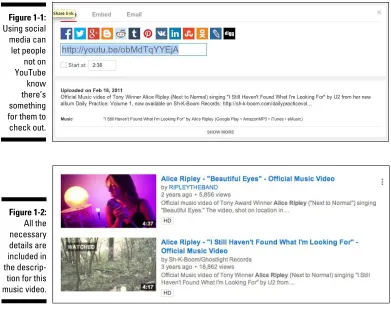
Just like cool sheets on a summer evening, YouTube goes perfectly with social media when it comes to your business and marketing needs� Why not? You already know that your presence on Facebook, LinkedIn, or Twitter keeps you connected with all the right people� Guess what? YouTube can help raise your social media profile as well� (See Figure 1-1�)
By integrating your video content with social media, you can drive interested parties to your channel; your channel, in turn, can point them back to your social media platforms and your contact information� This synergy helps build a strong following, because you can inform potential customers about your business through multiple avenues�
Video is the perfect partner when it comes to showing products, demonstra-tions, providing tutorials, or other features designed to increase awareness of your brand� And YouTube is the perfect partner to host your videos�
When coming up with a plan to incorporate your YouTube‐based video content into your business and marketing plans, here are some areas to consider:
✓Have effective titles: Your video should have clear and succinct titles. They should get to the point about your product or service, so that people can easily find your video.
✓Add more metadata: Having a strong title is a good place to start, but it doesn’t end there. You should also have a detailed description of the video, as shown in Figure 1-2, and use as many keywords as are appro-priate for the content. The more information that’s included with each video makes it easy for viewers to find exactly what you have to offer in a Google search.
Becoming a star!
Are you ready for your close up? Or maybe framing one is your thing. It doesn’t matter, because YouTube gives you a platform right up there with radio, film, and television as yet another means of achieving stardom. By doing so, YouTube has created a dedicated community that offers one more way for the world to notice you.
The thought of stardom often leans toward actors and musicians — and the creators behind them. Many have found great success after being discovered on YouTube. (Can you say “Justin Bieber”?) The rock band Journey found its current lead singer on YouTube. Aerosmith guitarist Joe Perry also found a singer for his other band, The Joe Perry Project.
Figure 1-1:
Using social media can let people not on YouTube know there’s something for them to check out.
Figure 1-2: All the necessary details are included in the
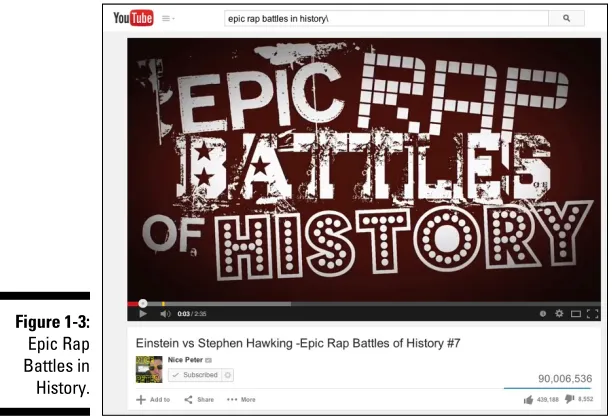
Actors have also found work by showcasing their clip reel, performances, and auditions. YouTube has even made some stars of its own — personalities offering everything from rap parodies to lip‐synching to video game analy-sis and commentary have made a name for themselves on YouTube. Epic Rap Battles in History, to take one example, has been seen by hundreds of millions of viewers. (See Figure 1-3.)
So, proof positive that YouTube can provide a stage big enough to start, and perhaps sustain, a career.
Going viral
If you’re a millennial or someone who remembers the world before the turn of the century, the phrase “going viral” could have two different meanings. So, in addition to meaning the spread of a virus, which is a bad thing, the term refers to the rapid spread of a video, and that’s a great thing.
When an uploaded video goes viral in the good sense, it becomes a sensation that users share and share and share — in the process gathering more num-bers of viewers than there are grains of sand in an hourglass. Having your video go viral is like releasing a hit record or having your book make the New York Times best seller list, except that you’re unlikely to get anywhere near as rich from going viral even if you get a couple of million hits.
Figure 1-3:
Planning on a video going viral is like planning on winning the lottery. It could happen, but you shouldn’t bet on it. If you are seriously interested in earning some ad revenue from your video content, work on creating a range of com-pelling content for your channel, rather than hoping on that one‐shot, grand slam home run.
While there’s no way of telling if a video will go viral, there are some traits that successful ones share. While we will discuss ways to improve the odds of your video going viral throughout the book, here are some factors that can make a video a runaway success:
✓Spontaneity: There’s a real in‐the‐moment feel to a viral video that captures a random and decisive moment that you could never repeat. The popular Sneezing Panda and its 200 million clicks comes to mind.
✓Be light hearted: People love stuff that’s silly and that makes them laugh and think — or even consider trying something, much like the Coke and Mentos video collection that have drawn hundreds of millions of views.
✓Get it out on social media: Yeah, you can rely on chance that someone stumbles across your video, but that’s sort of passive, like waiting by the phone for someone to “find you” for the job. A better tack would be for you to let social media know about your latest masterpiece. Just a few tweets here, a Facebook post there, and then maybe an announcement on Reddit could instantly start turning the wheels of virality.
Wasting lots and lots of time
One person’s waste of time is another’s quest for information, or someone’s need to laugh, or learn about something, so YouTube viewers simply spend a lot of time watching videos.
That’s a good thing, and a win‐win situation all around. The audience gets its dose of entertainment, education, and exploration. And your channel benefits because as viewership increases so does the potential for someone to find you, and when that someone finds your channel and you happen to have set it up for receiving advertising revenue (the YouTube term here is monetization), you can earn some money.
Here are some numbers provided by YouTube that indicate how much (potential) time‐wasting is really going on:
✓More than 1 billion unique users visit YouTube each month.
✓Over 6 billion hours of video are watched each month on YouTube — almost an hour for every person on Earth.
Seeing What Makes a YouTube
Channel Unique
Four walls do not make a home — but it does provide a good start. How you
adorn those walls and furnish those halls is what makes it uniquely yours — uniquely your home, in other words� Well, your YouTube channel is not much different�
When you first create a YouTube channel, it’s nothing more than an empty template on a page� Over time, you add videos, make playlists, and create a header with graphics, logo, and other information� Obviously, your video content plays a big part in what make your channel special, but so does the channel’s look and feel� Everything from the layout and font color to the type of content and its subscribers helps set one channel apart from the others� Though this book takes pride in describing effective ways to create and main-tain your YouTube channel for the next couple of hundred pages, let’s look at some basics first:
✓Have people find your channel. If a tree falls in the forest and nobody hears it fall, does it make a sound? Who knows? More appropriately, if you create a YouTube channel and nobody visits it, it’s a safe bet to say that all your good work has come to nothing�
Viewers have to know that your channel exists before they can visit� The main way you have of letting people know you exist is by making sure your content shows up high in the search results of both Google and YouTube itself� (Don’t forget that YouTube is the second-most-popular search engine, just behind Google�) To get those high rankings, you have
upper-left to associate tons of search‐engine‐friendly keywords with each of your videos — doing that will bring viewers searching for con-tent in contact with your concon-tent, rather than someone else’s concon-tent. It’s also important that viewers watch, like, comment on, and share your video — yet more indications to the search engines that your content and channel are important. For good measure, use social media to prep your audience for content that’s coming down the pike — just like a movie studio creates a buzz for a big summer blockbuster by teasing you with previews and trailers weeks before release.
✓Connect with your viewers. You definitely want to build a community of followers, and for that to happen, you need to actively communicate with them. That means everything from having them subscribe to your channel, engaging with them in your channel’s Comments section, and exposing them to your social media. You can do all this directly on your channel page.
Figure 1-4:
✓Provide them with a clear description of your channel. When viewers know what your channel has to offer, and if it appeals to their interests, they’re more likely to visit often, and maybe even subscribe to it. But you need to get the word out.
Angling for subscriptions
Viewers who like your content will come back and watch more, but viewers who love your content will want to subscribe. Why not? When you keep reach-ing for the same magazine whenever you see it, eventually you just subscribe to it so it regularly comes to your door. YouTube offers repeat viewers of your channel the same option. Basically all they have to do is click the Subscribe button, as shown in Figure 1-5, on your channel’s home page.
After viewers subscribe to your channel, you have to make it worth their while to view it, or they’ll unsubscribe faster than you can say Jack Nicholson. Here’s what “making it worth their while” entails:
✓Stay in touch subscribers. According to YouTube, viewers subscribe to millions of channels every day, so it’s important to stay in touch if you want to stay uppermost in their minds. Suggest that viewers follow you on social media so that you can let them know when new content is available. This strategy helps your audience grow as you amass a devoted fan base.
✓Actively upload videos. It’s difficult to imagine a television station maintaining viewers if it doesn’t add new programs. Even if it were all Seinfeld all the time, chances are good that viewers would even-tually drift off to something else. Well, the same concept applies for your YouTube channel. If you don’t upload new video content, you’ll lose the interest of your subscriber base. The takeaway here? Always provide new content.
✓Pay close attention to tagging. Tagging is where you categorize your video after uploading it to YouTube. When a video is properly identified, it increases the possibility of someone else finding it, and that extends to future subscribers.
Establishing your brand
Whether it’s a consumer or a viewer, a brand makes your product or service immediately identifiable. Imagine that the Coca‐Cola logo looked different every time you saw it, or maybe the apple on your PowerBook wasn’t the same apple you saw one embossed on your iPhone. This lack of consistency could shatter your confidence in the product; you may start wondering if what you had was a cheap knock‐off of the real thing, rather than the genuine article.
Branding is designed to restore confidence in the product — that familiar logo makes us relax, knowing that we are sure to get the real thing. When it comes to your YouTube channel, branding becomes the identifiable element that lets viewers know who you are and what you’re all about, thus creating a similar feeling of confidence. Just like consumers flock to brands they identify with, your audience will do the same with your brand.
Branding takes on many forms on YouTube:
✓Intro clip: Before each video runs on your channel, you can insert a three‐second clip that acts as a label for your content. The torch‐ carrying lady wrapped in a flag for Columbia Pictures and the roaring MGM lion are good examples of a branding element. Your job, if you choose to accept it, is to come up with an intro of your own that is equally compelling.
✓Channel header: This element is the banner on top of your main page, and at first it’s as empty as a blank page. (See Figure 1-6.) You’ll definitely want to click that Add Channel Art button to add a compelling picture or another graphic along with the name of your channel. The channel header can also include your contact info and specify how often you intend to upload new videos.
✓Playlists: If you have enough videos on your channel, you can create a running order of them. This playlist can provide an overview of your content or a specific sub‐topic of your videos. You can name every playlist, and even re‐arrange them.
✓Trailer: In a YouTube context, a trailer is a video that can automati-cally play when visitors come to your channel. You can use the video most representative of your content as a kind of advertisement for your offerings, or you could make a short video that shows viewers what your channel is all about and how they can benefit from watching your videos.
Managing Channels for Fun
and/or Profit
Everybody has a reason for making a video, and YouTube doesn’t discrimi-nate as to why you do it. Whether you were influenced a little too much by the silly, everyday situations depicted on television series like America’s Funniest Home Videos, or you want to show off your post‐film-school prowess, or you’re looking to educate the masses with a series of how‐to videos — there’s a place for you on YouTube, and (you hope!) an audience that’s willing to follow your exploits.
In addition to the pleasure that comes from a job well done, there’s also (potentially) a business side to running a YouTube channel. If you post videos that draw a lot of views, it’s worth your time for you to monetize your channel — generate some income from ad revenue, in other words. But that’s not the only business purpose YouTube channels can help with: They can serve as a great showcase for your particular skills or services, or act as a delivery system for product descriptions, tutorials, and testimonials associ-ated with whatever your business is selling.
Creating content
Whether you grab a 10‐second video of a gathering of friends, have some-thing meaningful to say on your video blog, or plan a highly structured production with sets and actors, you’re creating content.
Almost every topic under the sun is represented on YouTube. That diversity in topics is matched by an equally broad range of production levels. Some videos are quite sophisticated, displaying amazing production values, but many are fairly average. And a great deal are just poorly done and end up getting shown in film classes as examples of what not to do.
Better production values increase your ability to grab viewers’ attention — maybe enough for them to watch the entire video and maybe enough for them to even consider watching whatever else you have to offer. The Holy Grail, of course, is having them feel so enthusiastic about what they see that they then share it with others.
But great video quality doesn’t happen accidentally; rather it’s done con-sciously, from conception to upload. Though the topic is more thoroughly represented throughout this book, here are some key suggestions to always keep in mind.
✓Plan before you film. Great videos begin in pre‐production. That means having an idea of the shooting location and working with some sort of script (or at least a storyboard of the kind of shots you want for the video).
Great planning leads to great production.
✓Know your audience. When you’re just getting started, you try to make solid videos with good descriptions and hope that your audience finds you. After you have attracted a following, it’s still important to under-stand who they are and whether your content is right for them. For example, if you start an entertainment blog that talks about
up‐and‐coming hip‐hop artists, you should use language that’s consis-tent with a younger demographic. Don’t overlook the importance of being highly aware of your potential audience.
✓Keep viewers entertained. Regardless of the subject matter, it’s impor-tant for viewers to enjoy the experience so that you hold their attention. Remember that hooking a viewer’s attention starts with the first ten seconds of the video (Why? Because viewers may leave before the good stuff and continues until it’s over).
Building an audience
After you create great content, you have to find people to watch it. After all, isn’t that the entire purpose of sharing your video with the world? Whether it starts with ten people who run across your student film, or a million people viewing your talking puppy video, building your audience is essential.
YouTube is no different from other media when it comes to emphasizing the importance of building an audience. For example, you may have the catchiest song of all time, but if no one has ever heard it or even knows it exists, then that song cannot by any stretch of the imagination be called a success. The same is true for your videos — you need to work at getting as many people as possible to watch them.
Successfully building your audience depends on understanding their needs and making sure you can deliver on what your channel promises. Catering to your audience — whether it consists of one person or ten million — centers on understanding them and satisfying their appetite. (For more on building
your audience, check out Chapter 10�)
Building a business
In addition to letting you upload your videos to satisfy the fun side of your personality, YouTube can work wonders for your business side� You can easily set your account to monetize video content, as mentioned in the next section; as long as enough viewers click on your video, you can earn some extra money� If you’ve got something to sell or a service to offer, you can also leverage YouTube for some pretty cool and powerful advertising� As you’ll see in Chapter 13, it’s simple enough for anyone to do it�
Monetization
As you might expect, not everybody will strike it rich. In fact, very few will strike it rich. Nevertheless, it is possible to earn a goodly amount, especially if you take advantage of the multiple ways you can make money through your YouTube channel, including views of your video (an ad plays at the begin-ning) or clicks on a banner or other display ad on your channel’s page. Just keep in mind that slow and steady wins the race — making money takes time, or at least it will take time until you build a massive following. (For more on
The Basics of YouTube
In This Chapter
▶Navigating the basics of the YouTube interface
▶Watching YouTube videos
▶Creating a YouTube account
▶Setting up a unique channel URL
▶Checking out the YouTube Partner Program
I
n the simplest sense, YouTube is a website designed for sharing video. Before YouTube’s founding in 2005, posting and sharing a video online was difficult: The bandwidth and storage needed to stream video were expensive, and many copyright risks were involved in letting people upload whatever they wanted. Because YouTube was willing to absorb the costs and ignore the risks, it provided the infrastructure for users to upload and view as much video as they wanted, for free. This proposition turned out to be a popular one.Google acquired YouTube in 2006, and YouTube’s growth continued. As of 2014, users watch more than 6 billion hours of video per month, and more than 300 hours of video are uploaded every minute.
Let us say that last part again: 300 hours of video are uploaded to YouTube every minute.
an account, and start looking ahead to planning a channel. If you’re new to YouTube or you need to dig a bit deeper as a user, this is the chapter for you.
What You’ll Find on YouTube
You’ll find, in a word, videos on YouTube. You’ll find, in several words, just about anything on YouTube. We would say that you’ll find anything you can imagine, but even we never would have imagined that anyone would make a 10‐hour loop of the Nyan Cat meme video, and we definitely wouldn’t have imagined that it would have been viewed over 39 million times. The best way to describe what’s on YouTube may be to start with the categories YouTube lists on its home page.
Managing your identity
Your entire YouTube experience is driven by whether YouTube knows who you are. It doesn’t use any magic to figure that out. Instead, YouTube simply determines whether you’re logged in or logged out. When you log in, YouTube can make video recommendations based on your viewing behavior. In other words, after YouTube knows what you like, it does its best to bring more of that great video content to you.
YouTube and its parent Google are in the advertising business and are not promoting online video for the betterment of mankind. (Though some channels on YouTube actually help achieve that goal.) By understanding your viewing behavior when you’re logged in, YouTube and Google are able to serve better and more relevant ads to you. That’s good for them, for the advertiser, and for the viewer. Sure, most people don’t like ads, but YouTube is truly trying to do
a better job of targeting ads. (Chapter 13 covers this topic in more detail.) As you can see in this chapter and throughout the book, you need to be logged in to do most of the important things on YouTube. Sure, you can watch videos without being logged in, but you’ll miss a good part of the expe-rience. You need a Google account to log in, and we show you how to set up one of those a little later in this chapter. You also have the option of creating a YouTube channel that goes with your Google account.
Navigating the home page
The home page of YouTube (www.youtube.com) is a fickle beast. It was once the fount of discovery for YouTube users. If you were looking for new content, the home page was the place to be. Over the years, though, YouTube changed the home page experience. Many changes have been tied to the company’s desire to know its users. Users who are logged in with accounts and who have a history of using YouTube see videos that might appeal to them based on past usage. New users and those not logged in see the things that are currently most popular on the site.
The logged‐in experience
As long as you’re logged in to YouTube when you watch videos, the site is busily keeping track of everything you see and trying to form an idea about what kind of videos you like. This information dynamically drives the home page you see, and YouTube tries to show you videos that it thinks you’ll like. Your home page will come to be dominated by material that is similar to material you’ve watched in the past.
Here’s a quick tour of what you’re likely to see when you log on to
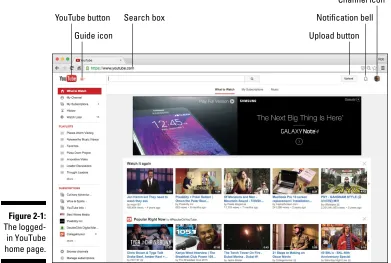
www.youtube.com after you create an account. (Again, we tell you more about creating an account later in this chapter.) Take a look at Figure 2-1 to see how a YouTube home page looks when you log in, and then read the descriptions in the following list:
Along the top
✓The YouTube button: Though it looks exactly like the YouTube logo, this button actually does something in addition to looking pretty; click-ing it always brclick-ings you back to the YouTube home page.
✓The Guide icon: This button, consisting of three horizontal bars with a small down arrow, sits next to the YouTube button. Clicking it brings up a guide of channels and topics that may be of interest to the viewer.
✓The Search box: This is where you search for videos. Enter keywords to find videos that may match what you’re looking for.
✓The Upload button: When you’re ready to upload a video, you get started by using this button. (Read more about the Upload button in
Chapter 9.)
✓Channel icon: A round image button shows either the channel icon you come up with or an image associated with your Google ID when you’re logged in. Use this to get to Creator Studio, which is your YouTube “mission control center,” or to configure your YouTube account settings. You’ll learn about both of those features in Chapter 3.
You can log into YouTube through your Google account, but we recom-mend having an associated YouTube channel to get all the benefits of your YouTube experience, such as creating playlists. (For more on playlists, see Chapter 3.)
Down the left side
The menu functions running down the left side of the screen complement the functionality of the ones that run across the top and focus more on content. You can toggle what’s shown on the left side by clicking the Guide icon.
✓What to Watch: This option is selected by default when you arrive at the YouTube home page. When this section is selected, the main window of the site shows you lists of channels and videos that YouTube assumes you’ll like:
Figure 2-1:
• My Channel: Clicking this link brings up the home page of your YouTube channel and shows you how other viewers see it. My Channel includes channel art, video trailers, sections, and chan-nels you recommend. To handle all the behind‐the‐scenes
manage-ment, you use Creator Studio, which you learn about in Chapter 3.
• My Subscriptions: This is where you manage the channels you’re subscribed to. Subscriptions are a good way to keep track of the channels you like on YouTube, but the subscription model has changed a lot in the past couple of years. We talk about subscrip-tions in detail in Chapter 10.
• History: Click here to review your YouTube history, which can be extensive. You can track which channels you’ve visited and which videos you’ve watched, and even see your comment history, all in one place.
You’ll end up seeing a lot of videos on YouTube and there’s going to be a point where you’ll want to go back to see what you’ve viewed or to watch a particular video again. The History section is a great way to keep track of what you’ve watched and analyze your viewing.
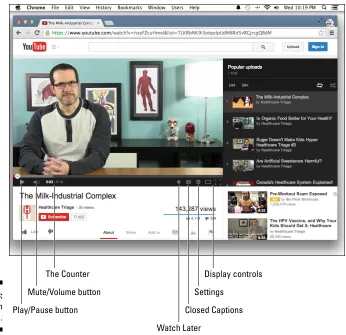
• Watch Later: This link leads to a list of videos you’ve flagged for later viewing using the creatively named Watch Later button in the YouTube player window.
✓Playlists: Playlists are a great way to organize videos you’ve discovered on YouTube. This section highlights some of your playlists and has a clickable link to your Playlist Management page. There, you can create and edit playlists for your own consumption, or you can use them to organize the videos on your channel, as discussed in detail in Chapter 3.
✓Subscriptions: This section highlights some of your subscriptions and has a clickable link to your Subscription Management page. You learned earlier that subscriptions are a good way to keep track of the channels you like on YouTube.
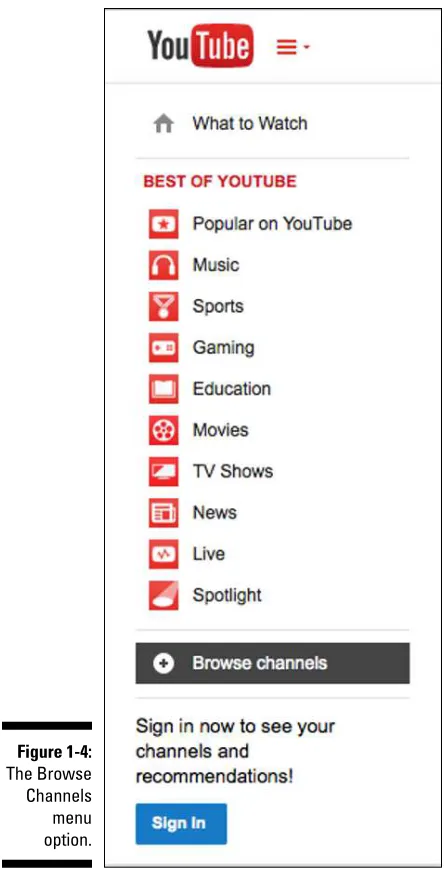
✓Browse Channels: This link takes you to a page where YouTube makes suggestions of channels that may interest you based on your prior view-ing habits. It recommends channels in many of the categories we look into in the “Logged-out experience”, later in this chapter.
✓You’ve now seen more than a few references to subscriptions in the Guide. Subscriptions and subscription management are a big deal on YouTube because they serve to support a strong connection between a viewer and a channel.
Advertisement
✓Banner ad: Last but not least, the largest element on the YouTube land-ing page is a banner ad — sometimes with and sometimes without its own, embedded video. The ad is probably not what you came to YouTube to see, but ad revenue keeps the lights on and the video flowing.
✓If you’d rather not look at the big banner ad, you can usually close the ad by clicking the Close Ad button in one of the banner’s corners.
The logged‐out experience
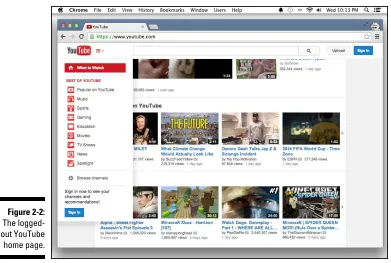
When you arrive at YouTube before you’ve taken the trouble to create an account, you see the pure, innocent YouTube of the viewer with no view-ing history. Treasure this moment, this innocence, this pure instant of seeing the site as it is. You’ll soon be a jaded viewer, with a viewing history filled with reminders of the hours spent watching One Direction videos. Have a look at Figure 2-2 to see what YouTube looks like to the user who is logged out.
Why does YouTube have ads?
It’s always flattering when people listen to you and seem to be interested in knowing exactly who you are. You might think that YouTube is a great listener, just because it takes a great interest in the kinds of videos you’re watch-ing, but that’s not because YouTube has sud-denly decided that you two are going to be Best Friends Forever. The truth is that YouTube’s
product — the way it makes money — is not
streaming video. In fact, the streaming video part costs the company quite a bit of money because it’s expensive for it to host the GoPro videos you made of your dog’s bath.
So if YouTube isn’t making money hosting and serving videos, how is it making money?
Here’s the dirty secret: It’s making money selling advertisements! That means you are YouTube’s product. It’s selling your attention to advertisers, and that’s why YouTube wants so badly to know you. It wants to be able to tell its ad‐buying customers exactly who is watching their ads.
On the left side of the screen, you see a list of links to the Best of YouTube channels. These verticals, as they’re called, are the primary content divisions on YouTube. Verticals are sort of like the sections of a newspaper. Like a newspaper, YouTube is organized into sections so that you can find the type of content you want to watch. You can subscribe to any of these verticals like it’s a normal user channel.
The programming on YouTube is divided into verticals. (Anywhere else, these content divisions would be called genres.) Verticals are all a combination of YouTube native content (content produced by regular YouTube users) and content produced by traditional media companies like CNN and The Onion. One amazing aspect of YouTube is that individuals can still manage to have a voice just as loud as the major media players (which is one fundamental point of this book).
It’s time to see what the verticals have to offer:
✓Popular on YouTube: This one is very much what it sounds like — a channel filled with what’s currently popular now on YouTube across diverse categories, from news to music videos and everywhere in‐ between. It’s also a great way to keep up with what’s hot in contempo-rary culture.
Figure 2-2:
The logged‐ out YouTube