• Tidak ada hasil yang ditemukan

Sams Teach Yourself SAP In 24 Hours 2nd Edition Nov 2005 ISBN 0672328224

N/A
N/A
Protected

Academic year: 2019

Membagikan "Sams Teach Yourself SAP In 24 Hours 2nd Edition Nov 2005 ISBN 0672328224 "

Copied!
795
0
0

Teks penuh

(1)

Sams Teach Yourself SAP™ in 24 Hours, Second Edition

By George Anderson, Danielle Larocca

... Publisher: Sams

Pub Date: November 07, 2005

ISBN: 0-672-32822-4

Pages: 432

Table of Contents | Index

Sams Teach Yourself SAP in 24 Hours, Second Edition is the perfect tool for learning one of the most sophisticated enterprise solutions available today. Designed to being with the basics, you will become acquainted with the entire SAP system, from navigation to creating your own reports. You'll also cover:

Implementation tools and methodologies

NetWeaver

ECC 5.0

Designing Screens and menus

Reporting

Integration with Microsoft Office

And more

(2)

Sams Teach Yourself SAP™ in 24 Hours, Second Edition

By George Anderson, Danielle Larocca

... Publisher: Sams

Pub Date: November 07, 2005

ISBN: 0-672-32822-4

Pages: 432

Table of Contents | Index

Copyright

About the Author

Acknowledgments

(3)

Relational Database Management System (RDBMS)

Status Field's System Information Icon

Summary

Workshop

Hour 5. Navigation in SAP

Performing Tasks Using Menu Paths

Performing Tasks Using Transaction Codes

Using the Clipboard

Newer SAP Implementation Tools and Methodologies

The SAP Implementation Guide (IMG)

Different Views of the IMG

IMG Basics

(4)

Workshop

Hour 9. Implementation Lessons Learned

Strategic Business Lessons Learned

End User Lessons Learned

Technology Lessons Learned

Implementation Process Lessons Learned

Summary

Workshop

Part III: SAP Products and Components

Hour 10. SAP NetWeaver

SAP NetWeaverA Working Definition

(5)

Application Architecture

Specific CCMS Transactions for Managing Performance

Analyzing Performance Data

Summary

Workshop

Hour 17. ABAP Dictionary and Repository

Database Tables

Structures and Includes in the ABAP Dictionary

Exploring the ABAP Dictionary

Client Dependence and Independence

What Table and Field Is This Stored In?

SAP Repository Information System

The Repository Information System Window

(6)

and QuickViewer)Hour 20. Reporting Tools in SAP (SAP Query, InfoSet Query, Ad Hoc Query,

Understanding the QuickViewer

Summary

Workshop

Hour 21. SAP SCM, CRM, PLM, and SRM

SAP Supply Chain Management

SAP Customer Relationship Management

SAP Product Lifecycle Management

SAP Supplier Relationship Management

Summary

Workshop

Hour 22. Integration with Microsoft Office

SAP and MS Office Integration Architecture

Quick References

Employment and Career Opportunities

Summary

(7)
(8)

Copyright

Sams Teach Yourself SAP in 24 Hours, Second Edition Copyright © 2006 by Sams Publishing

All rights reserved. No part of this book shall be reproduced, stored in a retrieval system, or transmitted by any means, electronic, mechanical, photocopying, recording, or otherwise, without written permission from the publisher. No patent

liability is assumed with respect to the use of the information contained herein. Although every precaution has been taken in the preparation of this book, the publisher and author assume no responsibility for errors or omissions. Nor is any liability assumed for damages resulting from the use of the information contained herein.

International Standard Book Number: 0-672-32822-4 Library of Congress Catalog Card Number: 2005930224 Printed in the United States of America

First Printing: November 2005

08 07 06 05 4 3 2 1

Trademarks

All terms mentioned in this book that are known to be trademarks or service marks have been appropriately

(9)

Warning and Disclaimer

Every effort has been made to make this book as complete and as accurate as possible, but no warranty or fitness is implied. The information provided is on an "as is" basis. The authors and the publisher shall have neither liability nor responsibility to any person or entity with respect to any loss or damages arising from the information contained in this book or from the use of the CD or programs accompanying it.

Bulk Sales

Sams Publishing offers excellent discounts on this book when ordered in quantity for bulk purchases or special sales. For more information, please contact

U.S. Corporate and Government Sales

1-800-382-3419

[email protected]

For sales outside of the U.S., please contact International Sales

[email protected]

Publisher

Paul Boger

Acquisitions Editor

(10)

Development Editor

Songlin Qiu

Managing Editor

Charlotte Clapp

Senior Project Editor

Matthew Purcell

Copy Editor

Kezia Endsley

Indexer

Chris Barrick

Proofreader

Jessica McCarty

Technical Editor

AJ Whalen

Publishing Coordinator

Cindy Teeters

Designer

Gary Adair

(11)

Kelly Maish

Dedication

George: To my church family and friends, I dedicate this book to youperhaps now you'll finally understand some of what I actually do for a living!

Danielle: To my best friend, Jimmy (and to our best friend,

(12)

About the Author

George W. Anderson currently resides in Houston, Texas, and is a senior SAP Consultant and Project Manager specializing in deploying, implementing, and optimizing SAP solutions. An eight-year veteran of numerous successful implementations, upgrades, technology refreshes, and other SAP engagements, he is a certified SAP Technical Consultant and PMI Project Management Professional. George is the author of SAP

Planning: Best Practices in Implementation and mySAP Toolbag

for Performance Tuning and Stress Testing, along with a host of

articles and other publications. A former U.S. Marine, husband to the most wonderful woman on Earth, and father of three awesome kids, George's overriding passion revolves around his relationship with our Father in Heaven and our Savior Jesus Christ. You can reach him at [email protected]. Danielle Larocca currently resides in Weddington, North Carolina. Danielle has earned a bachelor of science degree in psychology and holds certificates and certifications for many areas of SAP, including Human Resources, ABAP programming, and Basis Technologies. She is an ABAP programmer as well as an expert on SAP query-based reporting and the Human Capital Management module. Danielle has documented and instructed multiple computer languages and applications, including ABAP, Visual Basic, Electronic Data Interchange (EDI), as well as Oracle, PeopleSoft, and SAP. Danielle is a featured speaker at many SAP conferences throughout the U.S. Additionally,

(13)

Acknowledgments

From George: I'd simply like to recognize the love of our Lord and Savior whom makes everything possible, without whom we are nothing or mean nothingthank you for giving me life, giving that life purpose, and blessing me beyond what any man

deserves. To my family at home, thank you for your love without terms. To my colleagues and management team at work, and my clients across North America, thank you for the opportunity to share time together, learn from one another, and play a part in each others' lives. To the many men and women at SAP, thank you for your dedication toward developing not only practical but truly worthwhile solutions. And finally, to Danielle Larocca and AJ Whalen, thank you for the time you invested in this second editionyou both went above and beyond, and I recognize that fact and appreciate you. Because of your extraordinary efforts, this book will continue to serve its readers well for many years.

From Danielle: Special thanks to the man who saves my life, every day, James Signorile. Thanks for the support of my family Daniel, Carol, Patricia, and Cathy Larocca, Albee Hill, and Nicole Kaupp. Thanks for the support of my extended family Mary and Janeen Signorile and the Tricarico, Workman, Mifsud, and Beato families and the latest addition, Abbey Frances Willis. Warm thanks and appreciation to a wonderful boss, Robert Kovacs, and a wonderful list of colleagues and friends including Raj

Pragasam, Kelly Brunsman, Michael Lariosa, Brad Pearce, Sarah Van Aken, Chris Ashcroft, David Lynn, AJ Whalen, Joyce

(14)

We Want to Hear from You!

As the reader of this book, you are our most important critic and commentator. We value your opinion and want to know what we're doing right, what we could do better, what areas you'd like to see us publish in, and any other words of wisdom you're willing to pass our way.

As publisher for Sams Publishing, I welcome your comments. You can email or write me directly to let me know what you did or didn't like about this bookas well as what we can do to make our books better.

Please note that I cannot help you with technical problems related to the topic of this book. We do have a User Services group, however, where I will forward specific technical

questions related to the book.

When you write, please be sure to include this book's title and author as well as your name, email address, and phone number. I will carefully review your comments and share them with the author and editors who worked on the book.

(15)

For more information about this book or another Sams

(16)

Introduction

Welcome to the newly updated Sams Teach Yourself SAP in 24

Hours, your teach-yourself guide to learning one of the most

sophisticated and far-reaching set of enterprise solutions

available on the market today. And congratulationsyou've been paying attention. Over the last few years, we have seen

software packages become popular overnight, fading back into obscurity just as quickly. Through every storm that the dot-com bubble, tragedy of September 11, period of global recession, and unparalleled growth of the Internet era mustered, though, it's been impossible not to notice how one company and its products consistently stayed the course. That company is SAP, and its most popular products and technologies are mainstays throughout much of corporate America and indeed the

worldR/3, NetWeaver, mySAP ERP, Business Warehouse, Advanced Planner and Optimizer, Customer Relationship Management, Enterprise Portal, and much more. In fact,

upwards of 30 products or technical components make up SAP's stable of software solutions today. It is hard to believe that

merely a few short years ago, there were only two.

SAP is nothing if not revolutionary. Since 2001, we have witnessed something remarkable, almost unbelievable. The market leader in its industry looked inward and evaluated its core competencies, looked outward at its competitors and paid attention, and then made the necessary adjustments to

maintain its market leadership. It didn't shrink back and

(17)

own legacy development language, and all the while sped full steam ahead toward a vision of always-on, always-accessible, and eminently adaptable enterprise computing.

Yet, on a number of fronts, SAP remains a model of evolution as well as revolution, explaining at once why this company claims leadership in nearly every market in which it competes. SAP is not content to leave well enough alone. It's not content to hang its hat on market share and product award laurels that,

immediately following product announcement, only begin to age at Internet speed. SAP's product design philosophy, its attention to underlying architecture models, and most of all its customer focus, has created the third largest software company in the world. SAP is not afraid to embrace new technologies and computing models, or to embrace new ways of getting work done. NetWeaver proves this: SAP has taken the specialization and integration it has done so well, and added adaptability and agility to the mix. Boldly claiming that the future belongs to Web Services and the rapid adaptation of business processes that such technology enables, SAP has given the world a

platform that is not only immediately useful, but ready for the long haul. And its boldness will serve SAP well, especially in light of the fact that SAP is equally concerned with maintaining support for legacy technologies.

Today, SAP AG is the market leader in enterprise application software based on client/server and more recently Service Oriented Architecture (SOA) or more precisely Enterprise Services Architecture (ESA) technologythe latter of which is SAP's take on SOA. As the number one vendor of standard business-application software in the world, SAP AG's products are used by thousands of companies across more than a

hundred countries, from multi-national global entities to

small/medium business concerns determined to succeed in a global marketplace. And with solutions spanning industry verticals, SAP is also the undisputed leader in providing

(18)

industry sectors.

Picking up this book represents a confident step in the right direction. You are going with the market leader, the model of endurance, the preeminent technology frontrunner and

enterprise solution enabler. As a result, after about 24 hours of reading, you will possess a solid foundation upon which to build greater capabilities or even a career in SAP. Your knowledge foundation will be broad, certainly, and in need of much

bolstering in one direction or the other. But the beauty of the whole thing is that you'll be aware of these directionscareer options and choices that will enable you to grow and manage your own career in a direction of your choosing. You'll know

where you want to go. That alone is enough to get you on the road toward making something happen.

(19)

What's New in This Edition

Sams Teach Yourself SAP in 24 Hours is divided into 24

chapters that can each be completed in about an hour. This book covers everything you need to become well acquainted with the core SAP products and components that are often collectively referred to simply as SAP. The book is organized to provide visibility into key facets of SAP terminology, usage, configuration, deployment, administration, and more. As such, it is necessarily general at times rather than exceedingly

detailed, although a certain amount of depth in much of the subject matter is purposely provided where deemed critical to further your understanding. In this structure may be found the book's true valuethe content herein is broad enough to paint a picture most anyone can understand, yet deep enough to

(20)

Who Should Read This Book

Sams Teach Yourself SAP in 24 Hours begins with the basics

and terminology surrounding SAP, SAP NetWeaver, and ESA, and from there begins the process of carefully building upon your new knowledge to piece together the complex world of SAP. The pace of the book is designed to provide a solid

foundation such that you understand the more advanced topics covered later in the book. In this way, the novice may quickly realize what it means to plan for, deploy, and use SAP, in the process unleashing the power that comes with understanding how all the pieces of the puzzle come together to solve business problems. With this understanding also comes an appreciation of the role that colleagues and partners play with their regard to SAPperspectives of SAP end users, system administrators,

(21)

Organization of This Book

Thus, from the basics surrounding SAP, to implementation planning and system navigation, to creating your own SAP reports and using the many different SAP components that

make up NetWeaver and mySAP business suite today, this book is ideal for people at all levels of education, experience, and familiarity with SAP. Combined with its real-world examples, along with figures, tables, graphics, and actual SAP user-interface screenshots, Sams Teach Yourself SAP in 24 Hours

serves as an excellent launch pad for using and managing SAP in the real world of business and IT.

To test and reinforce your knowledge, each hour concludes with a Q&A, and Quiz section. These sections provide you an

opportunity to put your newfound knowledge and understanding both to the test and into practice. And with the answers to the quiz questions found at the back of the book, it is an easy matter to verify your knowledge and hone in on particularly troublesome topics.

Finally, most hours include an Exercises section as well.

Specifically, for those hours that are user-focused or that lend themselves to real-world application, a set of open-ended

exercises are designed to get you familiar or comfortable with a particular area. There's no wrong answer when it comes to

these exercises (indeed, there are no answers provided); instead, the knowledge you gain as you work through the exercises helps you build upon the foundation provided that hour.

I hope you enjoy the updated Sams Teach Yourself SAP in 24

Hours, and learning the new world of SAP. Good luck and

(22)

Conventions Used in This Book

Text that you type appears as bold monospace and text that

appears on your screen is presented in monospace type.

It will look like this to mimic the way text looks on your screen.

In addition to this, the following icons are used to introduce other pertinent information used in this book.

By the Way

A By the Way presents interesting pieces of information related to the surrounding discussion.

Did you Know?

A Did you Know? offers advice or teaches an easier way to do something.

Watch Out!

(23)

Part I: SAP Introduction

Hour 1 Introduction to SAP NetWeaver and ECC

Hour 2 SAP Basics

Hour 3 Database Basics

Hour 4 Customizing Your SAP Display

Hour 5 Navigation in SAP

(24)

Hour 1. Introduction to SAP NetWeaver

and ECC

This first hour provides you an overview of SAP, from its humble beginnings up to our present state of affairs. SAP's structure and philosophy from an architecture perspective, combined with necessary background information on SAP, set the stage for further hours. Welcome aboard!

Highlights of this hour include

An overview of SAP

An introduction to SAP's architecture

Investigating programming and development Discussing the logical unit of work (LUW) concept

(25)

Overview of SAP

SAP AG (pronounced ess-aye-pea aye-gee) is based in Walldorf, Germany and is the world's largest enterprise software

company. SAP's foundation is built upon the concepts of specialization and integration. That is, each component or

product within the SAP family of products and services meets a particular need, like providing web-based access to other SAP systems, addressing product lifecycle planning requirements (SAP PLM), supporting internal company procurement (SAP Enterprise Buyer), interconnecting different systems to ease integration headaches (SAP Exchange Infrastructure), and so on. Many of these components are explained in subsequent hours; suffice it to say here that there are many components, many products, and therefore many potential SAP solutions. Each product can typically be broken down further into

modulesportions of functionality that are more discrete in nature, geared toward addressing a particular piece of the

overall component pie. For instance, SAP R/3 and its successor, SAP ERP Central Component (ECC), are comprised of modules like Financials, Sales & Distribution, Materials Management, Warehouse Management, and so on. Individually, each of these modules effectively serves to manage a business area or

functional area for which a particular company department often is responsible.

Looking at it from another perspective, individual SAP modules combine to form an SAP component, application, or product. Within a particular module or component, a company's business processes are configured. SAP is well known for reflecting

(26)

or something as simple as a "credit check" transaction. Many business processes only require a few different modules within the component; others touch many more, however,

underscoring the importance of the integration SAP provides. However, to gain even better business visibility into trends and to maximize revenue and profit, it is becoming increasingly common to extend business processes like "order to cash" so that they inevitably touch multiple components. These so-called

cross-application business processes might start by accessing

ECC or perhaps SAP's Enterprise Portal, and then transfer control to another component such as SAP's Customer Relationship Management (CRM) product to determine

customer-buying trends. CRM's business logic might essentially direct or influence the business process in a particular way, seeking to ultimately increase order size or gross margin. Next, SAP's Advanced Planner and Optimizer (APO) system might be accessed to revise a supply chain planning process for a set of potential orders, looking to optimize profitability as the system seeks to balance the needs of many different customers with the organization's access to materials, people, and other resources. Finally, SAP's Business Warehouse (BW) might be queried to pull historical data relevant to the financial terms at hand (so as to offer the best financial terms and discount

strategy for this particular customer, for example, given his payment history). After these details are analyzed, control can be turned back over to ECC or Enterprise Portal to track

warehousing, drive the pick-list process, manage shipping data and the A/R process, and at some point place the final closing touches on the cross-application business process.

Through all this, take note of the common threadSAP's products are used to satisfy the needs of enterprises, big and small,

enabling an enterprise to tend to the business of running a business. After all, every enterprise needs to manage its inventories, generate and track sales, deliver services,

(27)

and its enterprise application competitorsOracle and to a lesser extent Microsoftenable this capability on a grand scale,

integrating many otherwise discrete functions under a single umbrella. This way, the company (by way of the system's user community) gains greater visibility into how it is conducting business and how it might do so more economically, rapidly, and profitably.

Evolution of SAP AG

Before you go any further, a quick history lesson is in order. SAP AG was founded in 1972 in Mannheim, Germany by a group of ex-IBM engineers with a great idea that fell on deaf ears

internally. The five original engineers who developed the concepts ultimately embraced by SAP originally named their company Systemanalyse und Programmentwicklung. Their goal was to develop a software package that integrated a company's myriad business functions in a manner that reflected best

practices. Their idea grew into what soon became Systems, Applications, and Products in Data Processing (SAP).

From day one, SAP was designed to be a global software product engineered on a multilingual and multinational

platform. Additionally, the engineers from IBM wanted to break away from the monolithic architecture model that defined

mainframes and their applications of the daythey wanted to open the doors to a variety of hardware, operating system, and database platforms, thereby giving SAP's customers flexibility and choice. These revolutionary and innovative design features are what made SAP Germany's top software vendor only a few short years after its core product hit the marketplace.

(28)

Today, SAP AG reigns as the undisputed market leader in

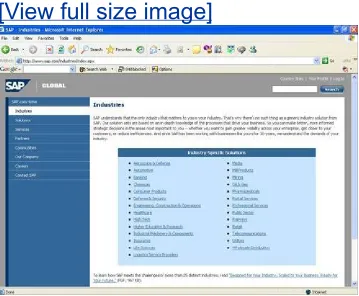
Enterprise Applications software. SAP is listed on the New York Stock Exchange (NYSE) under the symbol SAP. SAP AG offers comprehensive industry solutions atop their flagship R/3 and ECC products (so as to afford access to industry-specific best practices and processes), among these SAP Aerospace & Defense, SAP Automotive, SAP Banking, SAP Chemicals, SAP Consumer Products, SAP Engineering & Construction, SAP

Healthcare, SAP High Tech, SAP Insurance, SAP Media, SAP Oil & Gas, SAP Pharmaceuticals, SAP Public Sector, SAP Retail, SAP Service Provider, SAP Telecommunications, SAP Utilities, and othersnearly 30 industries are addressed by these solution sets

(see Figure 1.1).

Figure 1.1. SAP provides industry-specific

solution sets for nearly 30 industries.

(29)
(30)

SAP System Architecture and WebAS

Many of SAP's latest products over the last few years, including ECC, are built upon a relatively new and very powerful platform called Web Application Server, or WebAS. WebAS offers an

"open" front-end in that it speaks the most popular computer communication languagesHTML, XML, Web Services, and traditional "SAP." WebAS offers the programmers who help customize it a choice, tooSAP's very own and very powerful ABAP/4 language or the industry standard Java. Finally, WebAS continues to provide an "open" back-end. That is, many

database versions and releases are supported in which to house all the data and configuration information that help create a solution rather than a bunch of data and a pile of equipment. Given the flexibility and power inherent to WebAS, a company deploying it can navigate a number of different roads. You

might deploy an SAP system initially very similar to how you do business today, and then evolve your own business model over time, happy about the fact that you don't need to retool your SAP platform to make this happen. This applies to the use of Web Services, for example. Or better yet, you might jump in and immediately begin supporting your customers and partners who demand you communicate with them over XML or Web Services, while still supporting HTML and the traditional SAP user interface when it comes to your company's internal users. ECC's architecture (one component within the larger mySAP ERP bundle) is different from its predecessor's (detailed in Hour 11, "SAP ECC and R/3"), but also alike in many ways as well. For example, both allow for the distribution of a user-based or report-based workload to multiple PCs (front-end clients called "presentation servers" by SAP). These presentation clients are linked together through a network. The SAP system was

(31)

potentially physically separate from one another. In this way, a flexible system can be architected, one where additional

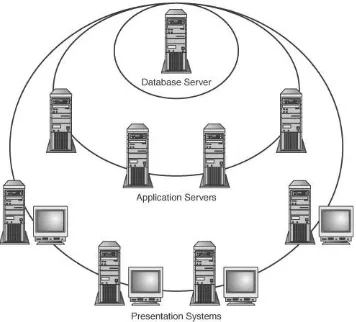
headroom can be easily added when required. See Figure 1.2

for a classic example.

Figure 1.2. The SAP classic system architecture

requires a database server, one or more

application servers, and one or more (typically

hundreds or thousands of) front-end presentation

servers.

(32)

The concept of client/server is still very popular despite the growing popularity of other environments and architectures. SAP R/3 was built around the concept of client/server; ECC, on the other hand, is built around SAP NetWeaver and the concept of Enterprise Services Architecture. Client/server is essentially one of a few different standards used to build computer

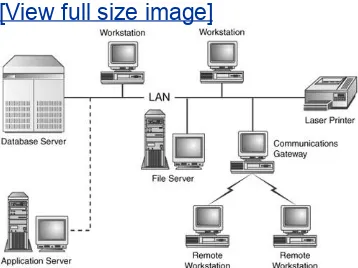
systems. Illustrated in Figure 1.3, a client/server environment

is one in which the client machine (an individual PC, workstation, mobile computing device, or even another

computer system) requests information (via a connection) from the supplying machine, known as the server. The

communication and interchange of data between the requesting and supplying machine is known as the client/server

relationship.

Figure 1.3. In simplest form, a standard

client/server environment connects workstations,

printers, and other client devices to a server.

(33)

Three-Tiered Architecture

SAP AG's approach to using client/server was brilliant, if not common sense. By constructing a computing solution that could be divided into three discrete layers or tiers, the engineers at SAP solved a couple of sticky issues. Among these issues were scalability (or lack of it, actually), the need to easily upgrade business application logic, and the desire for technical flexibility. To this last point, the engineers at SAP wanted to abstract the database layer so that many different databases could be supported without having to go back and recode existing programs.

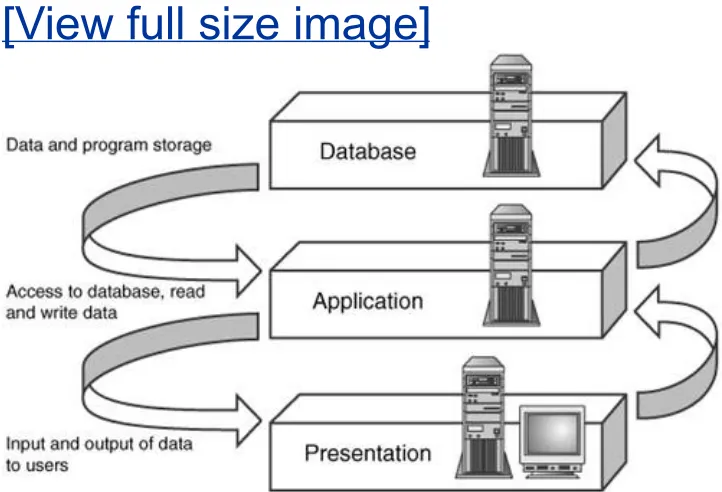
The result was SAP's three-tiered architecture, which essentially subdivides a higher-level architecture into three layers based on function:

The user interface layer

The business logic layer ("application" layer) The database layer

The configuration shown in Figure 1.4 is a good example of how the three-tiered architecture applies to SAP in the world of

legacy applications as well as in the world of Web Services and ESA.

(34)

[View full size image]

In this example, a central computer houses the database, known as the database server. In terms of a distributed SAP system, it is enough to understand that a database is the place where the data is stored. For the purposes here, assume that only a single database server is set up in a client/server

system. I will get into more detail on this in the upcoming Hour 3, "Database Basics."

The application server is responsible for the administrative

functions of the system. This includes background processing, printing (addressing spool requests), and process request management. Unlike the database server, multiple application servers can exist in an SAP three-tiered design. In the same way, many computers fulfill the role of presentation server (see

(35)

GUI.

Table 1.1. SAP System Architecture

Server Server Name Server Description

Presentation server Displays the user's communication window with SAP; also known as the SAP GUI.

Application server Manages SAP administrative functions, processes, and request management.

Database server Provides for the organized storage of all data, in the form of database tables, rows, and other structures.

Graphical user interface: The first practical user interfaces between people and computers were text-and-keyboard

oriented. The command-line interface of the MS-DOS operating system (the screen with the C:\ command prompt, which you can still get to from your Windows operating system by

executing the cmd command) is an example of a typical

text-based computer interface. In contrast, a graphical user

interface consists of graphic images called icons that include

buttons, pull-down menus, dialog boxes, and scrollbars, which are typically manipulated with a mouse. Such graphical user interfaces were developed with one purpose in mindto make computers user friendly, a rather tired but still very appropriate term today.

The Precursor to ESA

(36)

architectures. In the first, the application and database layers are combined onto one server. From an installation perspective, they're still separate (you install first one and then the other on your server). But by installing each of these tiers on the same server, you can quickly and cheaply create a

simple-to-administer system. The downside is scalabilitywhen the server runs out of horsepower, it has to be upgraded or replaced

entirely. It is primarily for this reason, in fact, that three-tiered architectures became so popular.

Four-tiered architectures came into being when SAP and other enterprise software vendors recognized the value that the Internet or company-internal intranets can provide. By adding an "accessibility tier" or "services tier" in between the

application and presentation tiers, a four-tiered system enabled simple browser-based access, solving two other dilemmashow to reduce the expense associated with installing, patching, and upgrading the SAP GUI user interface across perhaps hundreds or thousands of desktops, and how to integrate web or

(37)

ESA and mySAP ERP

SAP NetWeaver is the ultimate in four-tiered architectures, integrating Web Services and Internet support within the core WebAS platform. And because support is still maintained for the traditional SAP GUI as well as web browsers and other user interfaces, a company intending on moving to NetWeaver does not have to radically change the way it does business. It can do so methodically, in keeping with one of NetWeaver's core

benefits to longtime SAP customers and userslegacy support. Yet SAP NetWeaver is only one piece of the puzzle. SAP AG offers quite a bit more under the guise of mySAP ERPa suite of applications that has been specifically designed or updated to align with ESA, briefly discussed next.

Enterprise Services Architecture

Hour 10, "SAP NetWeaver," covers Enterprise Services

Architecture (ESA) and how it is leveraged in the deployment of SAP NetWeaver. Suffice it to say here, though, that ESA is the new model around which SAP is building its solutions. ESA provides the roadmap or blueprint for designing an adaptable enterprise computing solution. ESA is not exclusive by nature, therefore. In fact, by embracing an Enterprise Services

Architecture, R/3 and other legacy SAP solutions can be

plugged in as application services in much the same way that

new SAP NetWeaver components are. The preference might be

(38)

possible for you to adopt an Enterprise Services Architecture.

mySAP ERP

Within the bundle of solutions that SAP AG calls mySAP ERP, you find not only NetWeaver but also SAP ECC. That is, ECC is but only one component (the central component!) of the mySAP ERP bundle. This comprehensive bundle of solutions also

contains Business Intelligence (SAP BI), Enterprise Portal (SAP EP), SAP's Exchange Infrastructure (SAP XI), Mobile

Infrastructure (SAP MI), and more. And beyond NetWeaver, mySAP ERP also includes SAP's Strategic Enterprise

(39)

SAP ECC

At the core of mySAP ERP is ECC. SAP's ERP Central Component replaces SAP R/3 as the company's core online transaction

processing (OLTP) system. Like R/3, ECC addresses a business organization's needs to manage inventories and sales, track orders, plan and execute warehouse movements, and much more. Such activities often constitute the core business activities that must be accomplished day in and day out. Although a number of these functions were mentioned in

passing, it's important to point out that many of these functions are now augmented through the deployment of one of four

solutions that ship with mySAP ERP.

mySAP ERP Financials

mySAP ERP Human Capital Management

mySAP ERP Operations

mySAP ERP Corporate Services

These solutions include all the individual components necessary to fulfill their intended needs, making them easy ways to

procure, plan for, and implement such a system. It's also important to note that any of these solutions can be easily tailored for a company's specific business needs by developing and deploying one or more of the other components that ship with mySAP ERP (described previously).

(40)

SAP Transactions

At a high level, we talk of computing architectures and business models. But nothing useful can be realized until you understand that the backbone of SAP is at the transaction level. An SAP transaction is any logical process in the R/3, CRM, BW, or other SAP system. A simpler way to define this is to say that a

transaction is a self-contained unit, a set of steps with a beginning and an end, resulting in some kind of output and

often an update to the underlying SAP database. Creating a new customer, generating a list of existing customers, processing an order, and executing a program are all examples of SAP

transactions. SAP transactions therefore do the work of the application; everything else simply supports how this work gets done.

An SAP logical unit of work (LUW) contains all the steps of a transaction, concluding with the update to the SAP database, if necessary.

Suppose that you are adding a new employee in the SAP ECC Human Resources module. To complete this employee new-hire process, you need to go through several screens to describe and add that new employee to the system. Adding the

employee's name and address on one screen and then

proceeding to the next screen is considered a dialog step within the process. Adding the new employee's salary and paycheck information on another screen is an additional dialog step. At the end of an employee hiring, after you have gone through all the necessary screens (or dialogs) in the process, the data is committed to the SAP database, thus completing your LUW.

Dialog, Dispatch, and Dataflow

(41)

on a screen (dialog), the transfer of that screen data to the database (dispatch), and the update to the database and

movement to the next process (dataflow). The data typed into a screen by the user is performed through the Presentation Layer via the SAP GUI. Finally, in order to update the database, this data must be manipulated and managed by the dispatcher.

By the Way

The concepts of logical units of work (LUW), dialog, dispatch, and dataflow can get quite complicated and technical and are usually concerns of your technical team.

A dispatcher enables SAP to communicate with the

presentation server by managing the information exchange between the SAP GUI and the individual processes within SAP that execute work.

In simpler terms, the dispatcher serves as the go-to guy. Its role is to get things done. You learned about a logical unit of work, the steps performed to complete a task. It is the

responsibility of the dispatcher to assure that complete processing of these steps occurs. The dispatcher evenly distributes the work it receives and organizes the

communication activities so that, in the end, the database is updated and the transaction is complete (see Figure 1.5).

Figure 1.5. The SAP Dispatcher is responsible for

controlling which processes run on which servers

(42)
(43)

Summary

This hour provided you with an introduction to the world of SAP. You have gained an understanding of SAP's legacy and more current architectures, and its history. You are now more familiar with many SAP catch phrases and terms, too, such as

Enterprise Services Architecture, NetWeaver, ECC, client/server, three-tiered architectures, logical unit of work (LUW), dialog step, and others. You are now in an ideal position to jump with both feet into the SAP world as you progress into Hour 2, "SAP Basics," where you begin to truly explore SAP.

Q&A

QAre you required to use a three-tiered architecture for your SAP

implementation?

AAlthough a popular standard, the three-tiered architecture design is only one architecture used in deploying SAP.

QIs there a limit to the number of presentation servers that you can deployfor SAP?

A

Depending on the size of your SAP implementation, you might have hundreds, even thousands, of presentation servers (front-end systems or clients). Although there is not a limit, naturally each presentation server must be licensed for SAP software.

QCan you use your SAP system to support multiple languages within a

single client?

(44)
(45)

Workshop

The workshop is designed to help you anticipate possible questions, review what you've learned, and begin thinking ahead to putting your knowledge into practice. The answers to the quiz that follows can be found in Appendix A, "Quiz

Answers."

Quiz

1.What does SAP stand for?

2.Name a few of the industries for which SAP offers comprehensive bolt-on solutions.

3.What are the three distinct servers that comprise SAP?

4.What is the successor to SAP R/3?

5.What is the main benefit of SAP's integration?

6.What differentiates a cross-application business process from a standard business process?

7.Describe Enterprise Services Architecture (ESA).

(46)

Hour 2. SAP Basics

With the introduction to SAP NetWeaver in Hour 1, you are now ready to dive into the world of SAP. If SAP is already installed at your site, and you have access to an SAP User ID, you can

follow along as you progress through this hour. If your SAP access is not yet available, you can still follow along in the book; when your access is granted, you will be more prepared to jump right in. Let's get started.

The highlights of this hour include

Logging in and off the system

(47)

Session Basics

Each time you connect to SAP via the SAP GUI user interface you begin a user session. An SAP session simply means you have started the SAP GUI (the SAP graphical user interface) and established a connection with a particular SAP systemyou're connected, so to speak. You can have multiple sessions open with multiple SAP componentssuch as SAP ECC, R/3, CRM, and so onor you can open one or more sessions with a single

system. The number of the current session is displayed in the status bar, which you will see in a few minutes.

One of the benefits of this multiple session option is that you can multitask. Assume that you are processing a new customer order and your boss asks you to generate a report. There is no need to stop processing the order. You can leave that session (screen) open on your computer and begin a new session. With this new session, you can request and generate your boss's report. By default, you can open up to six sessions at the same time (as I explain later in the section "Session Management"), although the default can be increased by a System

Administrator knowledgeable in maintaining SAP from a

technical perspective. With six sessions, think about how much more work you can do! Multitasking is indeed alive and well in the world of SAP.

Access the System

Regardless of the particular SAP product, SAP solutions are

designed as "end user" or client systems. That is, most of these systems are geared toward satisfying business-oriented

requests. What this means is that you have the freedom to

(48)

SAP AG) or Internet Explorer (in most cases). This user interface connects to the SAP central instance (the SAP

"executables"), which in turn talks to the back-end database holding all the programs, data, and so on. The key in this is that you are not required to be at your particular desk working from a special desktop or client machine to complete your daily

tasks. Instead, if you happen to be visiting your warehouse and realize that you forgot to perform a task back at your office, you can perform it from this site (assuming the computer is connected to SAP via the company network or intranet). SAP recognizes who you are and what activities you are allowed to perform through your SAP user ID.

All SAP users are assigned a user name (although it is not uncommon to see infrequent factory, distribution site, and warehouse workers sharing a single SAP user ID). In most cases, it is your own name or initials, similar to the PC logon name you're accustomed to using. When you connect to SAP using your initial password, you are forced to change it

immediately upon logging in, thus securing your user ID even from System Administrators and others tasked with maintaining security.

The Client Concept

Your organization will likely have multiple clients. Clients in the world of SAP are the self-contained business entities or units within your various SAP systems. A client retains its own

separate master records and own set of tables. The best way to think of this is in the form of a companywithin a large

(49)

multinational organization as a whole can easily report on its cross-company financials, for example.

In the same way, an SAP system also tends to maintain

different clients strictly for convenience, or to segregate critical data from perhaps less critical data. Here is a general example. When you are first installing SAP and configuring the system, you will likely have a set of systems that you can log in to. Most SAP customer sites maintain a Development system, QA or Test system, and a Production system.

Within each of these systems you can choose the specific client you want to log in to. For instance, within the Development system you might maintain a "business sandbox" or "crash and burn" client along with your workhorse development client and later a copy of this workhorse client, called a "Golden Master" by many. These very distinct client environments within each system enable you to segregate your critical data (important golden development or production client data, for instance) from your test and what-if configuration data.

You might have many clients configured within a particular system. For example, the technical team might implement a new client in your development environment for special

developer training purposes, to be used to teach developers how to use the system without actually making any changes to the important development data. This same client configuration is often established in your other systems, toofrom production down to the QA and test systems, and so on.

(50)

client 900 in the QA or Test system to check on the status on new functionality being developed for production.

Watch Out!

Within the SAP world, the term client is used to describe something distinctly different from what the Information Technology (IT) world in general uses it for. In IT, a client represents an individual PC or workstation. For the purposes here, though, I will use client in the manner used by SAPto describe a logical and separate business entity within an SAP system.

Initial SAP Logon

The initial screen that you see when first connecting to SAP is the SAP R/3 Logon screen. See Figure 2.1 for an example,

keeping in mind that the Logon screen associated with different SAP products or components might look a bit different.

Figure 2.1. The first screen you see when starting

the logon process is the SAP Logon screen.

(51)

On this screen, you need to provide the client number, your user name, and the initial password that was assigned to you. Enter the information provided to you on this screen, and then select the green check mark (or press the Enter key on your keyboard) to continue.

By the Way

It is not necessary for you to enter your logon language on this initial logon screen (see Figure 2.1). Your system will likely be configured to default to a standard language for your

organization, such as "EN" for English. If your organization requires global (multilingual) logon capabilities, and those

(52)

Changing Your Password

On first signing in to SAP, you are prompted to change your password. Keep in mind the following five rules to create your password (with the caveat that some of these rules can be changed by your System Administrator):

Rule 1 A password must consist of at least three characters (most companies go with between five and eight characters at minimum, however).

Rule 2 The first character cannot be ! or ? or another special character.

Rule 3 The first three characters must be unique.

Rule 4 The first three characters should not be contained in the user name.

Rule 5 The password is generally limited to excluding SAP* or pass, along with anything that the System Administrator assigns as "no-no" passwords in database table USR40. Most sites do not allow their company name to be used as a password, for instance.

By the Way

In addition to the standard rules for governing passwords, your company will almost certainly define a set of rules that pertains to its own operations. A particular minimum length, and

(53)

a more secure environment for SAP.

On the Change Password screen, as shown in Figure 2.2, enter your new password on both lines and select the green check mark (or press Enter) to continue.

Figure 2.2. Upon first logging in to SAP, you are

required to change your password. In the same

way, if your System Administrator ever resets

your password, you are also required to change it

the next time you log in. This applies to each

client for which you have a user ID.

Logging Off of SAP

To terminate your SAP session or connection, you can select the System, Logoff option from the main menu or select the

Windows "X" icon in the top-right corner of your SAP GUI

window. You can also execute /nex from the SAP GUI command

(54)

The SAP Logon Pad

Until a few years ago, it was common to log in to SAP by

double-clicking an SAP icon that the System Administrator set up on each user's desktop. Although simple in approach, it was a bit limitingespecially for companies that deployed multiple SAP systems. Each user's desktop could crowd up quickly with SAP GUI icons. And additional icons set up on each user's

desktop to log in to Disaster Recovery systems and so on added to this complexity.

Thus, SAP developed the SAP Logon Pad, a simple utility with a straightforward yet powerful interface designed to help you manage your SAP systems and accounts. As seen in Figure 2.3, the SAP Logon Pad enables you to organize the various systems you need to use.

Figure 2.3. The SAP Logon Pad is useful for

organizing and simplifying access to multiple SAP

(55)

Configuring the SAP Logon Pad

To configure the SAP Logon Pad, you can either manually enter all the systems (using the buttons to add individual servers or groups of systems), or you can copy the saplogon.ini file from another person's personal computer to your own and then customize its contents. The saplogon.ini file usually resides in the C:\windows directory. For existing systems, right-click the current SAP system's description, and then select Properties. Edit the description to reflect something meaningful (I often include the user ID for a particular system in the description, for example, to help me remember it). Most importantly, enter the SAP application server you connect to (either the

computer's hostname or its TCP/IP address) and its System ID or SIDa three-character identifier assigned by the System

Administrator. You'll also need to include the system number (a two-digit number) and click the R/3 button (which actually

(56)

system). See Figure 2.4 for an example. Click the Save button when you're finished.

Figure 2.4. For each system you intend to log in

to, specify at minimum a Description, SAP

application server, System ID or System Number,

and SAP System type.

Low-Speed Connections

(57)

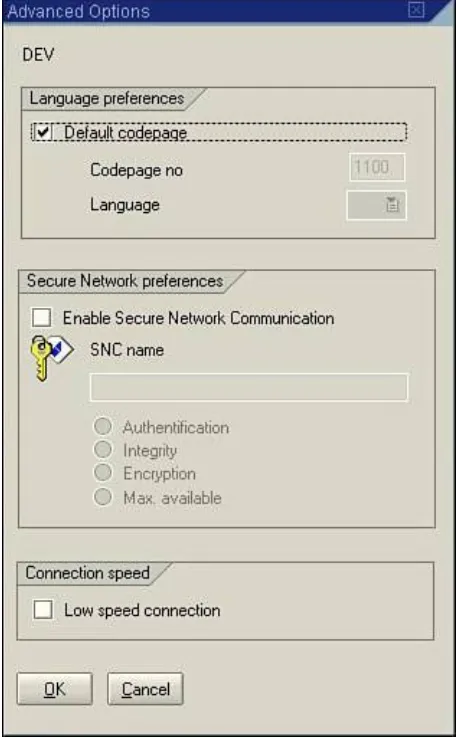
Pad's Properties dialog box, and a new Advanced Options box like the one in Figure 2.5 is displayed. Simply click the Low-Speed Connection check box and save the new setting by selecting OK.

Figure 2.5. For SAP GUI users at remote sites or

using slow modems or networks to connect to

SAP, the Low Speed Connection option can really

(58)

Session Management

Mentioned at the beginning of this hour, you can create up to six sessions by default. Each session you create is as if you logged in to the system again.

Consequently, the system can be given more work to do (you could launch five long-running reports, for example, while keeping one session available for online "real-time"

transactions). Such a workload can obviously affect to some degree how fast the system responds to your real-time

requests. That is, your desktop PC and even its network

connection back to SAP might perform slower than expected. For these reasons, plus the fact that the back-end SAP system can conceivably suffer a performance penalty as well, your

company will normally set limits to the number of sessions that you and your colleagues can create. Alternatively, it might

encourage the SAP user community to limit itself to only one or two sessions.

Creating a New Session

In SAP, you can create a session at any time and from nearly any screen in the system. You do not lose any data in the sessions that are already open with each new session you

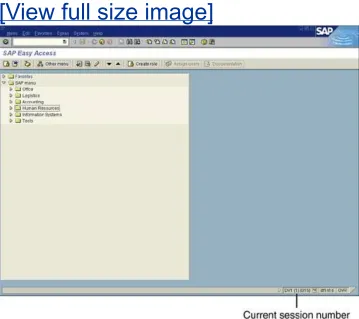
create, either. Create a new session by following the menu path System, Create Session. You will now have two sessions open on your computer. If you want to determine which session you are currently in, check the status bar on the bottom-right side of your screen (see Figure 2.6).

Figure 2.6. The SAP GUI window displays the

current session number in the bottom-right side

(59)

[View full size image]

Creating a New Session Using the Command Field

Rather than following the menu path, you can also create a new session by typing /O (O for open) in the command field on the

top-left side of your SAP GUI window and pressing Enter. You will be prompted with a window like the one shown in Figure 2.7similar to the same window seen when you enter transaction

SM04, although with the added benefit of the Generate button.

Figure 2.7. The Overview of Sessions window

displays the number of open sessions and enables

(60)

sessions.

From this box, you can create a new session by selecting the Generate button or terminate an existing session by selecting the End Session button. This box also provides an overview of all the sessions that you currently have open, making it easy to determine what you are doing in each session, for example. When you generate a session in this way, the system displays the initial SAP R/3 or SAP Easy Access system screen in the new session. But you can change this by changing what you type into the command field, explained next.

Creating a New Session and Starting a New Task at the

Same Time

Instead of creating a new session and then executing a desired transaction or task, you can combine these two steps into one. Again, you use the command field. By entering transaction codes in the command field, preceded with the /o, you can

quickly call a task or proceed to a specific screen. A

(61)

SAP system.

To execute or call a transaction, enter the transaction code in the command field on the top-left side of your SAP GUI window and press Enter. Give it a try using the transaction code SE38.

Type /oSE38 in the command field and press Enter. You should

not only open a new session, but arrive at the ABAP Editor Initial screen as well.

By the Way

Transaction codes are not case sensitive, which means that you can enter them in lower- or uppercase. For information on

finding and using transaction codes, see Hour 5, "Navigation in SAP."

Watch Out!

Depending on your system's security authorization, you might not be able to enter certain transaction codes or navigate to certain screens. Work with your System Administrator to understand your personal user ID authorizations and limitations.

Also, it is important to note that, when using transaction codes from any screen except the initial screen, you need to add an /N

prefix before the transaction code or an /O to create a new

(62)

Ending a Session

After you are done using a session, it is a good idea to end it. Each session uses system resources that can affect how fast the SAP system responds to your requests, and that of your

colleagues. Before you end a session, it is important to note that you must save any data that you want to keep. When you end a session, the system will not prompt you to save your data if you are in the middle of a transaction, for instance.

Ending a session is similar to creating a session. You follow the menu path System, End Session (or enter /O as previously

discussed). From the Overview of Sessions box, you can

selectively close a session by selecting it and then selecting the End Session button. Give it a try. Assuming you've followed

along and opened a number of SAP GUI sessions, select number 2 by single-clicking on it, and then select the End Session

button. It might not initially appear that anything has

happened, but the session was indeed closed. To verify this, return to the Overview of Sessions box by typing the

transaction code /O in the command field. Transactions 1 and 3

should still be listed, but number 2 is no longer open. Follow the same steps to end session 3, leaving only session 1 open.

Overview of Users

Have you ever been curious to see what your co-workers are running in the system, or what your boss is working on? SAP has a snooping screen in which you can see a list of every user currently logged on to the SAP system. The Users Overview screen available via transaction SM04 lists the client number they

(63)

By the Way

Depending on your SAP system's configuration, your SAP System Administrator might have blocked your access to execute transaction /nSM04.

To access this transaction, type /nSM04 in your command field

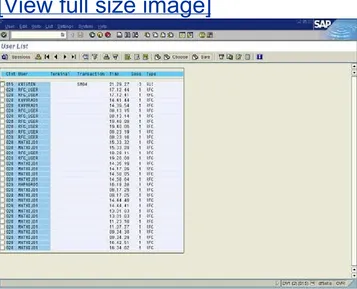
and press Enter. The screen should appear similar to the one shown in Figure 2.8. The User ID, time entered, and user's terminal (desktop "host" ID) may be displayed in this way.

Figure 2.8. Use

/nSM04

to review the transactions

your colleagues are executing, and end these

sessions if authorized and necessary.

(64)

As mentioned earlier, the Users Overview screen only displays the transaction code of the first session that a user has logged in to. What if the user has multiple sessions open, though? To look at a list of all the transactions a user is currently

processing, double-click on any user's name. An Overview of Sessions box will appear, listing all the current transaction codes that the user is processing, along with the powerful option to end the user's session.

Watch Out!

Be careful when snooping with this transaction, and never

(65)

SAP GUI Basics

The SAP GUI window is the user interface to most SAP systems available today. At the very top of the window is the title bar, which gives the screen (or transaction) description for the

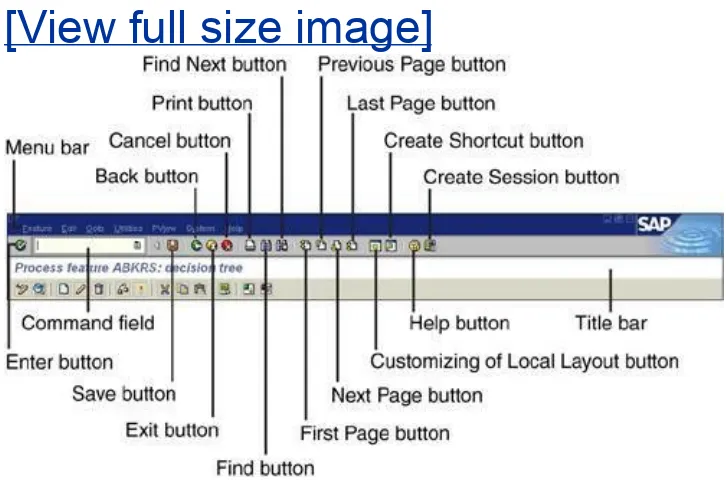
window that is displayed. The standard elements of an SAP GUI window are shown in Figure 2.9, and are explained in the

following sections.

Figure 2.9. Your SAP GUI window might appear

slightly different depending on which transaction

you are currently processing, and which

particular version or technical release of SAP you

are executing.

(66)

The Menu Bar

The menu bar contains all the menu options available. The

menu bar changes from screen to screen to match the function module that you are currently processing. The last two items on the menu bar, System and Help, remain constant on all SAP's screens and contain the same submenu options.

The Standard Toolbar

The standard toolbar is easy to identify because of all the

buttons. It varies slightly, but generally contains the same basic components on every screen. The main navigational, printing, page viewing, and help functions are all made available here. It contains the following elements:

Enter button This button has the same function as the Enter key on your keyboard and is used to check your entry in a field or your work in a transaction when you have

finished entering data on a screen. This button should not be confused with the Save button.

Command field The command field is located to the right of the Enter button and is used to enter transaction codes to call a task without having to choose menu options for navigation.

Save button The Save button saves your work and

performs the same function as selecting Save from the Edit menu.

(67)

name implies. It will take you back to the previous screen. If you use this button to return to the previous screen, your data will not be saved unless you save it first using the

Save button on the toolbar.

Exit button The Exit button is used to leave the current application. The system returns you to the previous

application or to the main menu screen.

Cancel button The Cancel button is used to exit the

current task without saving and performs the same function as selecting Cancel from the Edit menu.

Print button The Print button is used to print data from the screen in which you are currently working. (There are some advanced settings that the user should set up in order for the print setting to work more efficiently. These are covered in Hour 5.)

Find button This button is used to perform a search for data on the screen in which you are currently working. Find Next button This button is used to perform an extended search for data on the screen in which you are currently working.

First Page button This page navigation key is generally used in reports. It is used to travel to the top of a screen (or page) if the information on the screen is too long to fit on a single screen.

(68)

Next Page (Page Down) button This page navigation key is generally used in reports. It is used to travel down one screen when the information on the screen is too long to fit on a single screen. This button is equivalent to using the Page Down key on your keyboard.

Last Page button This page navigation key is generally used in reports. It is used to travel to the end of a screen (or page) when the information on the screen is too long to fit on a single screen.

Create Session button Open a new session by clicking this button. Alternatively, execute /O in the command field.

Create Shortcut button This is handy for creating a shortcut on a user's desktop for any SAP transaction, report, or other task that is executed frequently.

Help button The Help button is used for context-sensitive help. That is, when you place your cursor on any object on the screen and select the Help button, you receive specific help for that item (you will learn more about the Help

button and SAP's Help system in Hour 23, "Support Overview").

Customizing of Local Layout button This customizing button allows a user to customize SAP GUI display options; details are provided in Hour 4, "Customizing Your SAP

Display."

The Application Toolbar

The application toolbar is located under the standard toolbar.

(69)
(70)

Summary

Hour 2 walked you through exploring the SAP graphical user interface, or SAP GUI. In the process, you learned about its basic features and functionality. You also were introduced to the concepts of session management, session navigation, and basic user access. The fundamentals you have learned in this hour will serve you well as you work your way through the remaining hours in this book.

Q&A

QCan a user navigate to the same transaction code in more than one

session?

AUsing multiple sessions is like logging in to the system again and again; you canhave all your sessions running the same transaction at the same time if you want.

QIf the Production and Development clients reside on different servers, can

they both be viewed on the Users Overview screen (snooping screen)?

A

Only the clients installed on the server that you are logged in to are visible in the Users Overview (snooping screen). SM04, like most SAP transactions, can only "see" the local SAP instance (including users logged in to multiple application servers); other SAP instances are not visible.

QIf your security access prevents you from navigating to a particular screen

using the menu paths, can you jump there using a transaction code?

(71)

Workshop

The workshop is designed to help you anticipate possible questions, review what you've learned, and begin thinking ahead to putting your knowledge into practice. The answers to the quiz that follows can be found in Appendix A, "Quiz

Answers."

Quiz

1.What is the default maximum number of sessions that you can have open at one time in SAP?

2.What is the transaction code to execute the Users Overview screen?

3.If you are on any screen in the SAP system except the main screen, what two-character code must you enter in the command field before typing in a transaction code?

4.What two items on the menu bar are consistent across all SAP screens?

5.What is one of the most important benefits of using multiple sessions in SAP?

6.Which three items are required in order for you to log in to the SAP system?

7.What is the menu path to create a new session in SAP (without using the command field)?

Exercises

1.Create a new session and navigate to the Users Overview screen (snooping

(72)

2.

Using the SAP Logon Pad, set up a new connection to one of your SAP systems. Log in to the system and execute a few transactions. Then log out, change the connection speed option in the SAP Logon Pad, log back in to your system, and note the difference in the speed and performance of your SAP GUI session.

3.Execute the transaction code

(73)

Hour 3. Database Basics

All enterprise applications like SAP are essentially made up of programs along with the data that are both used by and created by those programs. The data are organized in a meaningful way within a database, making it easy for the programs to access and find the data necessary to do something useful like run a financial report or create a sales order. In the case of an SAP component or product like ECC, the programs and data reside

together in the same database. Each component generally has

its own database (although exceptions exist)a production system landscape composed of SAP ECC, SAP Business

Warehouse (BW), and SAP Customer Relationship Management (CRM) consists of three production databases. Given its

fundamental station in the life of an SAP system, it is important to therefore understand the overall role of the database. This hour, I explore the different features and structures in a

database, including the various industry-standard database vendors/brands supported by SAP.

Highlights of this hour comprise

Exploring the concepts and structures of an RDBMS

Discovering which databases are supported by SAP

(74)

Database Structure

A database is essentially an electronic filing system that

houses a collection of information organized in such a way that allows a computer program to quickly find desired pieces of data.

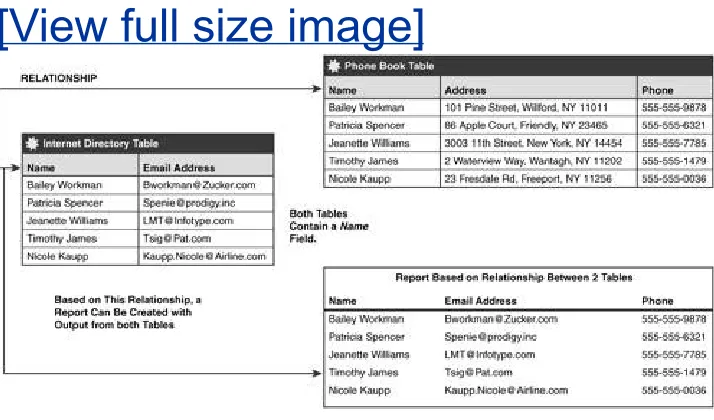
In the simplest form, a database is composed of tables, columns (called fields), and rows (called records or data). A classic example of a database is a telephone book, which is

organized alphabetically so as to make it possible to quickly find a desired piece of data. The telephone book can be considered a table, a storage container for information (see Figure 3.1).

Within this table is typically found three columns (or

fields)name, address, and telephone number. Within each of these fields exists rows (or records), the simplest form of data in the database.

Figure 3.1. One common use of a database

program is to store names, addresses, and phone

numbersessentially an electronic version of a

telephone book, which itself is a simple type of

database.

Gambar

Figure 1.1. SAP provides industry-specificsolution sets for nearly 30 industries.
Figure 1.2. The SAP classic system architecturerequires a database server, one or morehundreds or thousands of) front-end presentationapplication servers, and one or more (typicallyservers.
Figure 1.3. In simplest form, a standardclient/server environment connects workstations,
Table 1.1way, many computers fulfill the role of presentation server (see). These computers, or front-end clients as they aremore commonly called, display the software and screens that
+7

Referensi

Dokumen terkait

Using the Returned Data In this lesson you will learn how to process the information returned from the server in response to an Ajax request... The responseText and

As a rule of thumb, when changing the data type or length of field in a compound foreign key other than the check field, you must check to see whether the foreign key and check

230-other unusual problems, please report them to

For our MapReduce job example, you can see in Figure 4.7 that the text is stored in different blocks on the data node. TextInputFormat

The Node Manager daemon runs on each slave node in the cluster, as you saw in Figure 5.4, and accepts instructions from the Application Master to launch the task in the

Workshop —In this section, you will find an example of CRM in use and a case study of a company that is using Microsoft Dynamics CRM to solve business needs related to the topic of

It goes without saying that you need to create your own animation class, a subclass of Animation , that performs some change to the color of a sprite over time, as the examples

Although the number of power users, compared to typical Twitter users, is quite low, having a power user using (and advocating) your application is highly desirable, and although